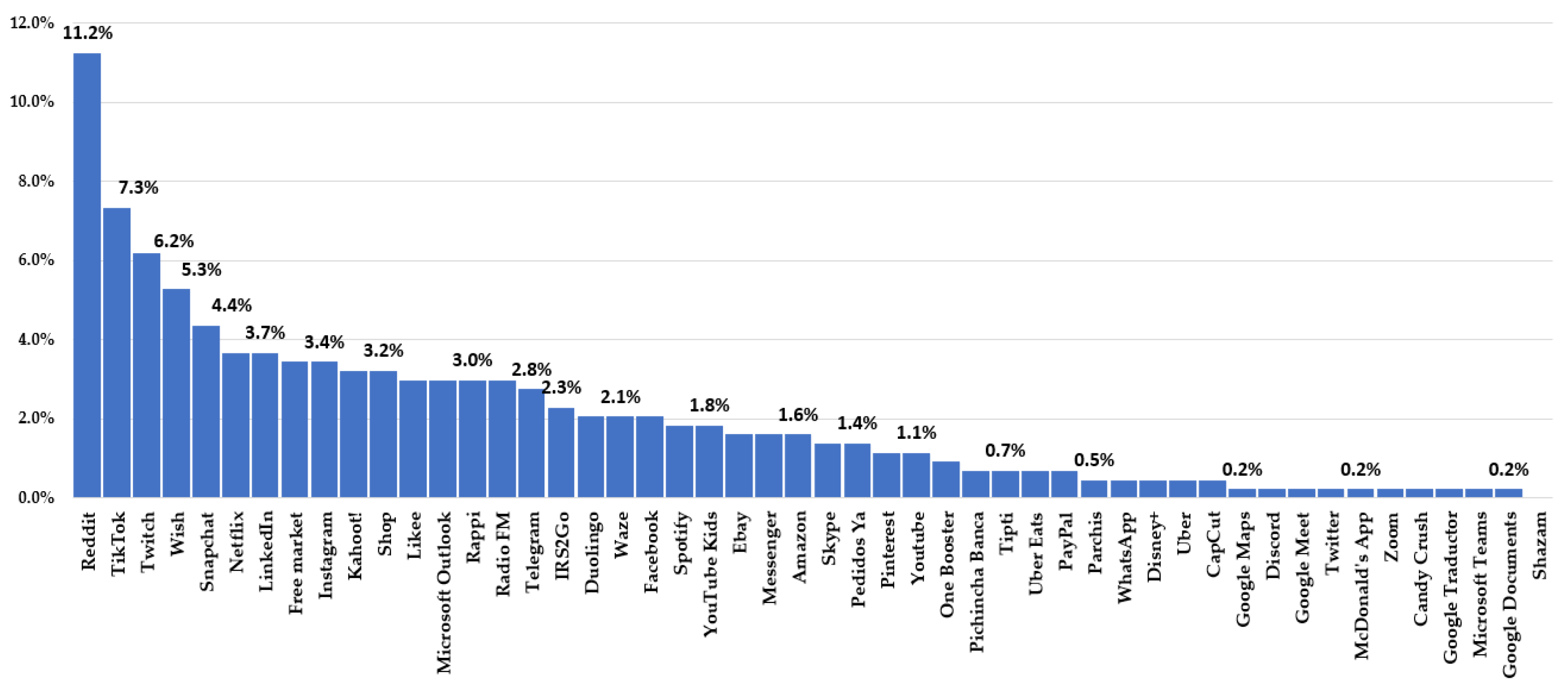


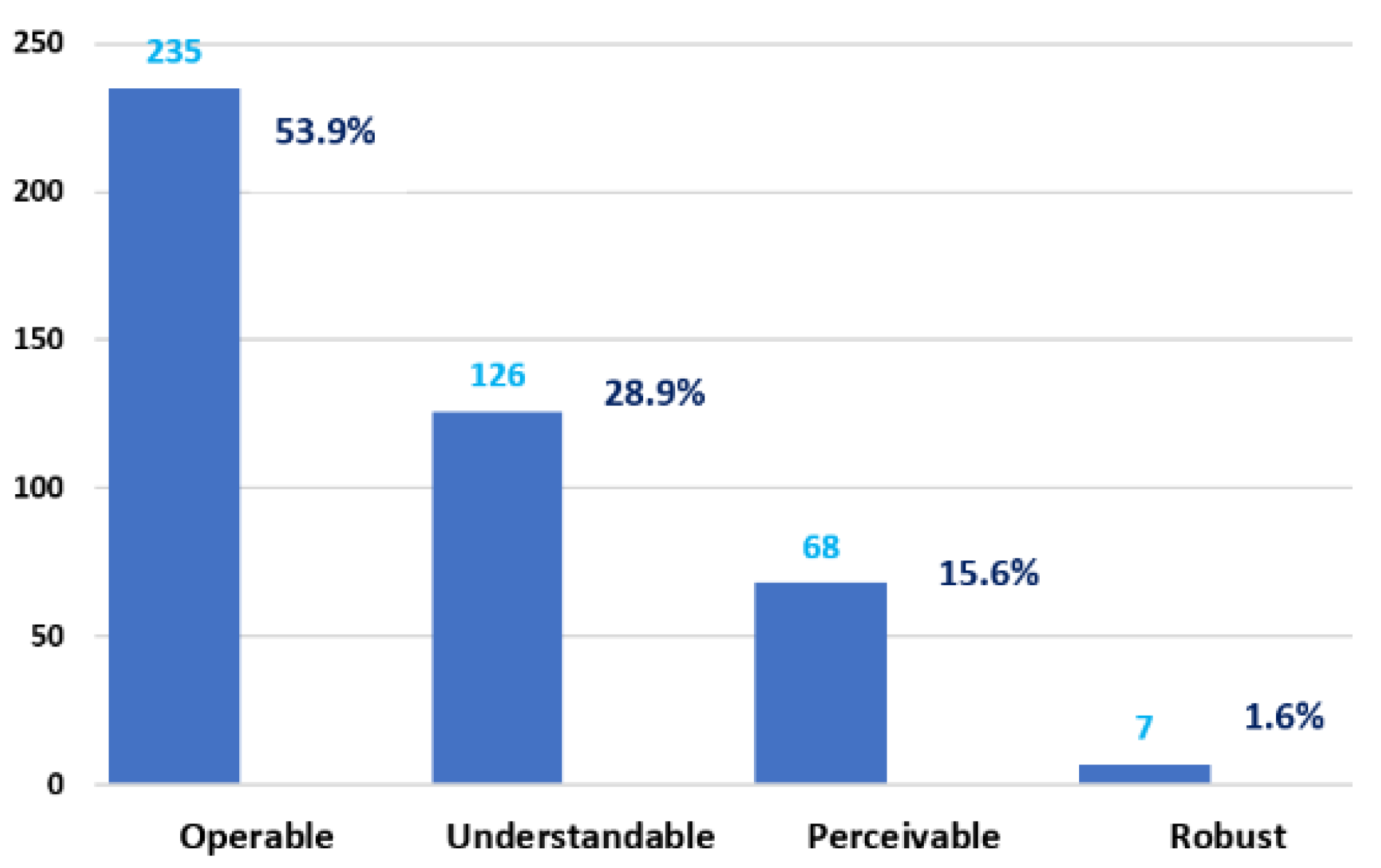
Towards Accessibility and Inclusion of Native Mobile Applications Available for Ecuador in Google Play Store

 ,
,  ,
, 
Abstract
1. Introduction
2. Literature Review
3. Materials and Methods
- (1)
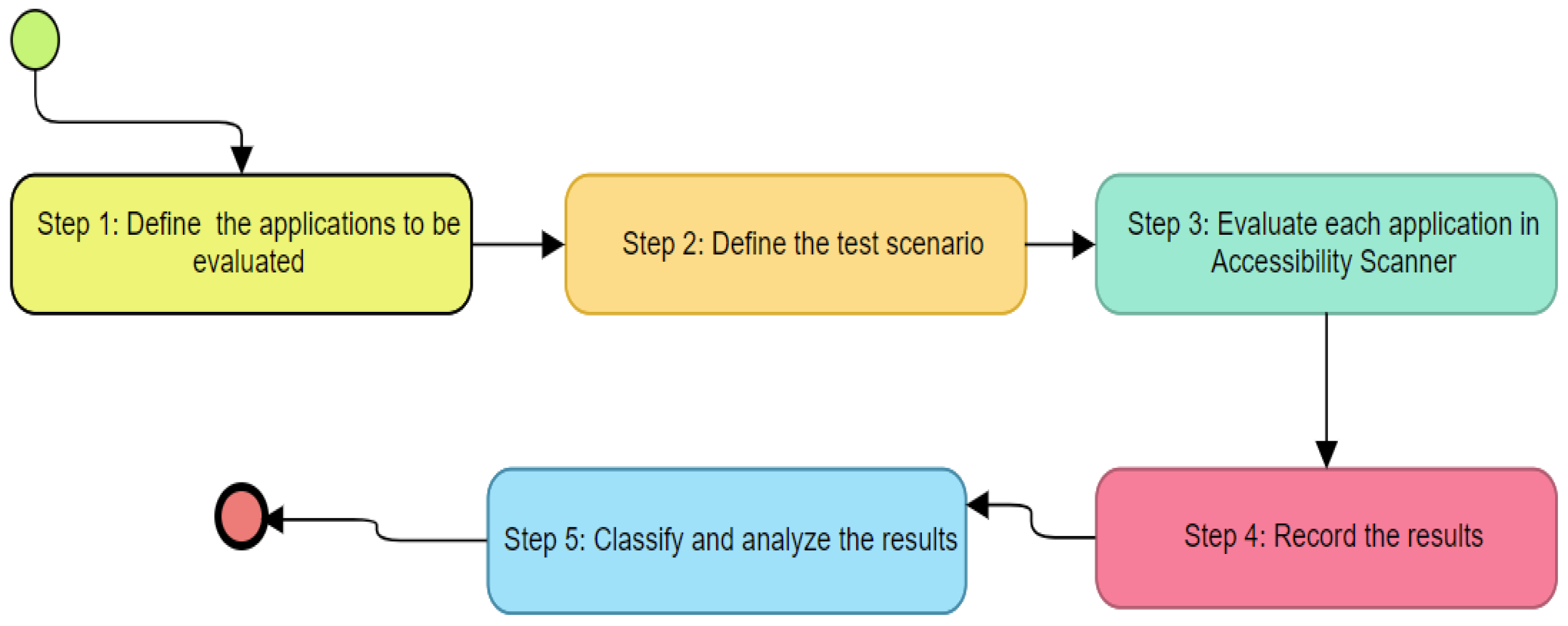
- Define the applications to be evaluated; in this step, we selected the 50 most successful free applications from Google Play for Android available in Ecuador. The sample was analyzed from 19 April to 28 June 2021. Table 1 contains the mobile applications evaluated in this study. They are sorted first by the number of downloads and the apps rated by Google Play for Android users, app type, and age group.
- (2)
- Define the test scenario; in this step, we defined the test environment by running BlueStacks emulator version 4.240.20.1016 under Windows 10; we visited the first screen of each application and interacted with the available menu. This process was applied to the 50 mobile applications evaluated. As for our study, we considered the following: we selected only the first screen of the application because it is the most critical element in terms of accessibility. If the first screen is not accessible, users could have problems even reaching other mobile application screens.
- (3)
- Evaluate each application in Accessibility Scanner; in this step, we ran BlueStacks emulator version 4.240.20.1016 under Windows 10 and the automatic review tool Accessibility Scanner. The evaluation of the mobile applications was conducted from 19 April to 28 June 2021.
- (4)
- Record the results; in this step, we recorded the evaluation results with the Accessibility Scanner. The data were organized according to the number of downloads and the rating assigned by Google Play users. The results section shows the evaluation of accessibility in mobile applications. The dataset for replicating the experiment of accessibility evaluation in mobile applications is available in the Mendeley repository [25].
- (5)
- Classify and analyze the results; based on the results obtained from the evaluation of the mobile applications with Accessibility Scanner, we organized the information to analyze the data recorded from the 50 applications analyzed. The details of the analysis performed are available in the Mendeley repository [25]. In the results and discussion section, we will present the analysis and correlation performed on the applications evaluated in this study.
4. Results
5. Discussion
6. Conclusions and Future Work
Author Contributions
Funding
Institutional Review Board Statement
Informed Consent Statement
Conflicts of Interest
References
- Mayordomo-Martínez, D.; Sánchez-Aarnoutse, J.-C.; Carrillo-De-Gea, J.M.; García-Berná, J.A.; Fernández-Alemán, J.L.; García-Mateos, G. Design and Development of a Mobile App for Accessible Beach Tourism Information for People with Disabilities. Int. J. Environ. Res. Public Heal. 2019, 16, 2131. [Google Scholar] [CrossRef] [Scilit] [PubMed]
- World Health Organization (WHO). World Report on Disability 2011. Available online: https://apps.who.int/iris/rest/bitstreams/53067/retrieve (accessed on 20 July 2021).
- World Bank Group. World Report on Disability: Main Report. Available online: http://documents.worldbank.org/curated/en/665131468331271288/Main-report (accessed on 20 July 2021).
- United Nations (UN). Sustainable Development Goals. Available online: https://www.un.org/sustainabledevelopment/ (accessed on 20 July 2021).
- Statista Research Department. Google Play: Number of Available Apps 2009–2020. Available online: https://www.statista.com/statistics/266210/number-of-available-applications-in-the-google-play-store/ (accessed on 20 July 2021).
- World Wide Web Consortium. Web Content Accessibility Guidelines (WCAG) 2.1. Available online: https://www.w3.org/TR/WCAG21/ (accessed on 20 July 2021).
- World Wide Web Consortium. Mobile Accessibility: How WCAG 2.0 and Other W3C/WAI Guidelines Apply to Mobile. Available online: https://www.w3.org/TR/mobile-accessibility-mapping/ (accessed on 20 July 2021).
- Google Play. Top Free Apps. Available online: https://play.google.com/store/apps/top (accessed on 20 July 2021).
- Tomažič, T.; Mišič, K.U. Parliament-citizen Communication in Terms of Local Self-Government and Their Use of Social Media in the European Union. Available online: http://pub.lex-localis.info/index.php/LexLocalis/article/view/1220 (accessed on 20 July 2021).
- Statista Research Department. Number of Apps Available in Leading App Stores. 2021. Available online: https://www.statista.com/statistics/276623/number-of-apps-available-in-leading-app-stores/ (accessed on 20 July 2021).
- Acosta-Vargas, P.; Serrano-Costales, L.; Salvador-Ullauri, L.; Nunes, I.L.; Gonzalez, M.; Acosta-Vargas, P. Toward Accessible Mobile Application Development for Users with Low Vision. In Proceedings of the AHFE 2020 Virtual Conference on Human Factors and Systems Interaction, San Diego, CA, USA, 16–20 July 2020. [Google Scholar] [CrossRef] [Scilit]
- Acosta-Vargas, P.; Salvador-Acosta, B.; Salvador-Ullauri, L.; Villegas-Ch., W.; Gonzalez, M. Accessibility in Native Mobile Applications for Users with Disabilities: A Scoping Review. Appl. Sci. 2021, 11, 5707. [Google Scholar] [CrossRef] [Scilit]
- Zhang, X.; Ross, A.S.; Fogarty, J. Robust Annotation of Mobile Application Interfaces in Methods for Accessibility Repair and Enhancement. In Proceedings of the 31st Annual ACM Symposium on User Interface Software and Technology, Berlin, Germany, 14 October 2018. [Google Scholar] [CrossRef] [Scilit]
- Acosta-Vargas, P.; Zalakeviciute, R.; Luján-Mora, S.; Hernandez, W. Accessibility Evaluation of Mobile Applications for Monitoring Air Quality. Proceedings of ICITS 2019, Quito, Ecuador, 6–8 February 2019. [Google Scholar] [CrossRef] [Scilit]
- Yan, S.; Ramachandran, P.G. The Current Status of Accessibility in Mobile Apps. ACM Trans. Access. Comput. 2019, 12, 1–31. [Google Scholar] [CrossRef] [Scilit]
- Ross, A.S.; Zhang, X.; Fogarty, J.; Wobbrock, J.O. An Epidemiology-inspired Large-scale Analysis of Android App Accessibility. ACM Trans. Access. Comput. 2020, 13, 1–36. [Google Scholar] [CrossRef] [Scilit]
- Vendome, C.; Solano, D.; Linan, S.; Linares-Vasquez, M. Can Everyone use my app? An Empirical Study on Accessibility in Android Apps. Proccedings of the 2019 IEEE International Conference on Software Maintenance and Evolution (ICSME), Cleveland, OH, USA, 29 September–4 October 2019. [Google Scholar] [CrossRef] [Scilit]
- Zhang, X.; de Greef, L.; Swearngin, A.; White, S.; Murray, K.; Yu, L.; Shan, Q.; Nichols, J.; Wu, J.; Fleizach, C.; et al. Screen Recognition: Creating Accessibility Metadata for Mobile Applications from Pixels. In Proceedings of the 2021 CHI Conference on Human Factors in Computing Systems, Yokohama, Japan, 8–13 May 2021. [Google Scholar] [CrossRef] [Scilit]
- Gonçalves, T.S.; Ivars-Nicolás, B.; Martínez-Cano, F.J. Mobile Applications Accessibility: An Evaluation of the Local Portuguese Press. Informatics 2021, 8, 52. [Google Scholar] [CrossRef] [Scilit]
- Mateus, D.A.; Silva, C.A.; Eler, M.M.; Freire, A.P. Accessibility of mobile applications. In Proceedings of the 19th Brazilian Symposium on Human Factors in Computing Systems, Diamantina, Brazil, 26–30 October 2020. [Google Scholar] [CrossRef] [Scilit]
- Acosta-Vargas, P.; Salvador-Ullauri, L.; Guerrero, J.L.J.; Guevara, C.; Sanchez-Gordon, S.; Calle-Jimenez, T.; Lara-Alvarez, P.; Medina, A.; Nunes, I.L. Accessibility Assessment in Mobile Applications for Android. In Proceedings of the AHFE 2019 International Conference on Human Factors and Systems Interaction, Washington, DC, USA, 24–28 July 2019. [Google Scholar] [CrossRef] [Scilit]
- Acosta-Vargas, P.; Salvador-Acosta, B.; Zalakeviciute, R.; Alexandrino, K.; Pérez-Medina, J.-L.; Rybarczyk, Y.; Gonzalez, M. Accessibility Assessment of Mobile Meteorological Applications for Users with Low Vision. In Proceedings of the AHFE 2020 Virtual Conference on Human Factors and Systems Interaction, San Diego, CA, USA, 16–20 July 2020. [Google Scholar] [CrossRef] [Scilit]
- Acosta-Vargas, P.; Salvador-Ullauri, L.; Pérez-Medina, J.L.; Zalakeviciute, R.; Hernandez, W. Heuristic Method of Evaluating Accessibility of Mobile in Selected Applications for Air Quality Monitoring. In Proceedings of the AHFE 2019 International Conference on Human Factors and Systems Interaction, Washington, DC, USA, 24–28 July 2019. [Google Scholar] [CrossRef] [Scilit]
- Brajnik, G. Measuring Web Accessibility by Estimating Severity of Barriers. Proccedings of the International Conference on Web Information Systems Engineering 2008, Auckland, New Zealand, 1–4 September 2008. [Google Scholar] [CrossRef] [Scilit]
- Mantilla-Vaca, F.; Zarate-Estrella, S.; Acosta-Vargas, P. (Dataset) Accessibility Assessment in Mobile Applications for Android. Mendeley Data 2021. [Google Scholar] [CrossRef] [Scilit]
- World Wide Web Consortium (W3C) (2021) Understanding WCAG 2.1. Available online: https://www.w3.org/WAI/WCAG21/Understanding/ (accessed on 19 July 2021).
- Vázquez-Herrero, J.; Negreira-Rey, M.-C.; Rodríguez-Vázquez, A.-I. Intersections between TikTok and TV: Channels and Programmes Thinking Outside the Box. J. Media 2021, 2, 1. [Google Scholar] [CrossRef] [Scilit]
- Carvalho, L.P.; Freire, A.P. Native or web-hybrid apps? An analysis of the adequacy for accessibility of android interface components used with screen readers. In Proceedings of the XVI Brazilian Symposium on Human Factors in Computing Systems, Joinville, Brazil, 23–27 October 2017. [Google Scholar] [CrossRef] [Scilit]
- Salvador-Ullauri, L.; Acosta-Vargas, P.; Gonzalez, M.; Luján-Mora, S. Combined Method for Evaluating Accessibility in Serious Games. Appl. Sci. 2020, 10, 6324. [Google Scholar] [CrossRef] [Scilit]
- Color Contrast Checker. Available online: https://siteimprove.com/es-es/accessibility/color-contrast-checker/ (accessed on 20 July 2021).


| Id | Mobile Applications | Download | Application Type | Age | Ranking |
|---|---|---|---|---|---|
| 1 | 5000 M | Communications | All | 4.2 | |
| 2 | Google Maps | 5000 M | Travel | All | 4.2 |
| 3 | 5000 M | Social | Teenagers | 4.1 | |
| 4 | YouTube | 5000 M | Video applications | Teenagers | 4.1 |
| 5 | Candy Crush | 1000 M | Casual | All | 4.6 |
| 6 | TikTok | 1000 M | Social | Teenagers | 4.5 |
| 7 | Google Traductor | 1000 M | Tool | All | 4.5 |
| 8 | 1000 M | Social | Teenagers | 4.4 | |
| 9 | Netflix | 1000 M | Entertainment | Teenagers | 4.4 |
| 10 | Skype | 1000 M | Communications | All | 4.3 |
| 11 | Snapchat | 1000 M | Social | Teenagers | 4.3 |
| 12 | Google Documents | 1000 M | Productivity | All | 4.3 |
| 13 | Messenger | 1000 M | Communications | All | 4.2 |
| 14 | 1000 M | Social | All | 4.2 | |
| 15 | Wish | 500 M | Shopping | Teenagers | 4.6 |
| 16 | 500 M | Lifestyle | Teenagers | 4.6 | |
| 17 | Telegram | 500 M | Communications | All | 4.5 |
| 18 | Spotify | 500 M | Music and audio | Teenagers | 4.5 |
| 19 | 500 M | Business | All | 4.4 | |
| 20 | Uber | 500 M | Food and drink | All | 4.4 |
| 21 | Shazam | 500 M | Music and audio | Teenagers | 4.4 |
| 22 | Likee | 500 M | Video applications | Teenagers | 4.3 |
| 23 | Zoom | 500 M | Business | All | 3.9 |
| 24 | Free Market | 100 M | Shopping | All | 4.8 |
| 25 | EBay | 100 M | Shopping | Teenagers | 4.7 |
| 26 | Amazon | 100 M | Shopping | Teenagers | 4.6 |
| 27 | Duolingo | 100 M | Education | All | 4.6 |
| 28 | Microsoft Outlook | 100 M | productivity | All | 4.6 |
| 29 | Discord | 100 M | Communications | Teenagers | 4.5 |
| 30 | CapCut | 100 M | Video applications | All | 4.5 |
| 31 | Uber Eats | 100 M | Food and drink | All | 4.4 |
| 32 | Twitch | 100 M | Entertainment | Teenagers | 4.4 |
| 33 | Waze | 100 M | Food and drink | All | 4.4 |
| 34 | Disney+ | 100 M | Entertainment | Teenagers | 4.3 |
| 35 | YouTube Kids | 100 M | Music and audio | All | 4.3 |
| 36 | PayPal | 100 M | Finance | All | 4.2 |
| 37 | Microsoft Teams | 100 M | Company | All | 4.1 |
| 38 | Google Meet | 100 M | Company | All | 3.7 |
| 39 | One Booster | 50 M | Tool | All | 4.7 |
| 40 | Radio FM | 50 M | Music and audio | Teenagers | 4.6 |
| 41 | 50 M | Social | All | 4.5 | |
| 42 | Parchis | 50 M | Game | Teenagers | 4.3 |
| 43 | Shop | 10 M | Shopping | All | 4.8 |
| 44 | Kahoot! | 10 M | Education | All | 4.6 |
| 45 | McDonald’s App | 10 M | Food and drink | All | 4.6 |
| 46 | Rappi | 10 M | Food and drink | All | 4.3 |
| 47 | IRS2Go | 10 M | Finance | All | 3.9 |
| 48 | Pedidos Ya | 10 M | Food and drink | All | 3.1 |
| 49 | Pichincha Banca | 1 M | Finance | All | 4.5 |
| 50 | Tipti | 0.1 M | Shopping | All | 3.4 |
| Features | Failure | % | Mobile Accessibility Considerations | Mobile Accessibility Considerations (Description) | Principle WCAG 2.1 | WCAG 2.1 (Success Criterion) | WCAG 2.1 (Success Criterion) Description | Level |
|---|---|---|---|---|---|---|---|---|
| Text contrast | 40 | 9.2 | 2.3 | Contrast | Perceivable | 1.4.3 | Contrast (Minimum) | AA |
| Item descriptions | 28 | 6.4 | 4.6 | Provide instructions for custom touchscreen and device manipulation gestures | Perceivable | 1.3.5 | Identify Input Purpose | AA |
| Touch target | 207 | 47.5 | 3.2 | Touch Target Size and Spacing | Operable | 2.5.5 | Target Size | AAA |
| Element type label | 13 | 3.0 | 2.1 | Small Screen Size | Operable | 2.5.3 | Label in Name | A |
| Clickable elements | 7 | 1.6 | 3.3 | Touchscreen Gestures | Operable | 2.5.1 | Pointer Gestures | A |
| Image contrast | 8 | 1.8 | 4.4 | Grouping operable elements that perform the same action | Operable | 2.4.4 | Link Purpose (In Context) | A |
| Editable element tag | 3 | 0.7 | 4.5 | Provide clear indication that elements are actionable | Understandable | 3.2.4 | Consistent Identification | AA |
| Item label | 123 | 28.2 | 4.2 | Consistent Layout | Understandable | 3.2.3 | Consistent Navigation | AA |
| Type of element not supported | 7 | 1.6 | 5.3 | Support the characteristic properties of the platform | Robust | 4.1.2 | Name, Role, Value | A |
| Tool | E | Tt | Ce | Tc | IL | EtL | Eet | Id | Ic | TNs |
|---|---|---|---|---|---|---|---|---|---|---|
| Shazam | 0 | |||||||||
| Candy Crush | 1 | 1 | ||||||||
| Google Traductor | 1 | 1 | ||||||||
| Google Documents | 1 | 1 | ||||||||
| 1 | 1 | |||||||||
| McDonald’s App | 1 | 1 | ||||||||
| Discord | 1 | 1 | ||||||||
| Microsoft Teams | 1 | 1 | ||||||||
| Google Meet | 1 | 1 | ||||||||
| Google Maps | 1 | 1 | ||||||||
| Zoom | 1 | 1 | ||||||||
| CapCut | 2 | 1 | 1 | |||||||
| Disney+ | 2 | 2 | ||||||||
| 2 | 2 | |||||||||
| Parchis | 2 | 2 | ||||||||
| Uber | 2 | 1 | 1 | |||||||
| Pichincha Banca | 3 | 1 | 2 | |||||||
| Tipti | 3 | 1 | 1 | 1 | ||||||
| Uber Eats | 3 | 2 | 1 | |||||||
| PayPal | 3 | 2 | 1 | |||||||
| One Booster | 4 | 2 | 2 | |||||||
| YouTube | 5 | 4 | 1 | |||||||
| 5 | 4 | 1 | ||||||||
| Skype | 6 | 5 | 1 | |||||||
| Pedidos Ya | 6 | 2 | 4 | |||||||
| Messenger | 7 | 5 | 1 | 1 | ||||||
| eBay | 7 | 6 | 1 | |||||||
| Amazon | 7 | 4 | 1 | 2 | ||||||
| YouTube Kids | 8 | 6 | 1 | 1 | ||||||
| Spotify | 8 | 8 | ||||||||
| Duolingo | 9 | 3 | 4 | 1 | 1 | |||||
| Waze | 9 | 2 | 6 | 1 | ||||||
| 9 | 6 | 1 | 2 | |||||||
| IRS2Go | 10 | 5 | 5 | |||||||
| Telegram | 12 | 12 | ||||||||
| Rappi | 13 | 1 | 12 | |||||||
| Microsoft Outlook | 13 | 9 | 2 | 2 | ||||||
| Radio FM | 13 | 10 | 3 | |||||||
| Likee | 13 | 7 | 6 | |||||||
| Shop | 14 | 5 | 9 | |||||||
| Kahoot! | 14 | 2 | 11 | 1 | ||||||
| 15 | 14 | 1 | ||||||||
| Free Market | 15 | 1 | 8 | 6 | ||||||
| Netflix | 16 | 7 | 3 | 4 | 2 | |||||
| 16 | 8 | 2 | 1 | 5 | ||||||
| Snapchat | 19 | 3 | 8 | 6 | 2 | |||||
| Wish | 23 | 2 | 15 | 2 | 3 | 1 | ||||
| Twitch | 27 | 14 | 10 | 3 | ||||||
| TikTok | 32 | 13 | 7 | 12 | ||||||
| 49 | 34 | 1 | 6 | 8 |
| Ranking | App | Accessibility Issues |
|---|---|---|
| 4.8 | Free Market | 15 |
| Shop | 14 | |
| 4.7 | Ebay | 7 |
| One Booster | 4 | |
| 4.6 | Amazon | 7 |
| Candy Crush | 1 | |
| Duolingo | 9 | |
| Kahoot! | 14 | |
| McDonald’s App | 1 | |
| Microsoft Outlook | 13 | |
| 5 | ||
| Radio FM | 13 | |
| Wish | 23 | |
| 4.5 | CapCut | 2 |
| Discord | 1 | |
| Google Translator | 1 | |
| Pichincha Banca | 3 | |
| 49 | ||
| Spotify | 8 | |
| Telegram | 12 | |
| TikTok | 32 | |
| 4.4 | 15 | |
| 16 | ||
| Netflix | 16 | |
| Shazam | 0 | |
| Twitch | 27 | |
| Uber | 2 | |
| Uber Eats | 3 | |
| Waze | 9 | |
| 4.3 | Disney+ | 2 |
| Google Documents | 1 | |
| Likee | 13 | |
| Parchis | 2 | |
| Rappi | 13 | |
| Skype | 6 | |
| Snapchat | 19 | |
| YouTube Kids | 8 | |
| 4.2 | Google Maps | 1 |
| Messenger | 7 | |
| PayPal | 3 | |
| 1 | ||
| 2 | ||
| 4.1 | 9 | |
| Microsoft Teams | 1 | |
| Youtube | 5 | |
| 3.9 | IRS2Go | 10 |
| Zoom | 1 | |
| 3.7 | Google Meet | 1 |
| 3.4 | Tipti | 3 |
| 3.1 | Pedidos Ya | 6 |
Publisher’s Note: MDPI stays neutral with regard to jurisdictional claims in published maps and institutional affiliations. |
© 2021 by the authors. Licensee MDPI, Basel, Switzerland. This article is an open access article distributed under the terms and conditions of the Creative Commons Attribution (CC BY) license (https://creativecommons.org/licenses/by/4.0/).
Share and Cite
Acosta-Vargas, P.; Zarate-Estrella, S.; Mantilla-Vaca, F.; Novillo-Villegas, S.; Chimbo, C.; Luján-Mora, S. Towards Accessibility and Inclusion of Native Mobile Applications Available for Ecuador in Google Play Store. Sustainability 2021, 13, 11237. https://doi.org/10.3390/su132011237
Acosta-Vargas P, Zarate-Estrella S, Mantilla-Vaca F, Novillo-Villegas S, Chimbo C, Luján-Mora S. Towards Accessibility and Inclusion of Native Mobile Applications Available for Ecuador in Google Play Store. Sustainability. 2021; 13(20):11237. https://doi.org/10.3390/su132011237
Chicago/Turabian StyleAcosta-Vargas, Patricia, Sebastian Zarate-Estrella, Franccesca Mantilla-Vaca, Sylvia Novillo-Villegas, Christian Chimbo, and Sergio Luján-Mora. 2021. "Towards Accessibility and Inclusion of Native Mobile Applications Available for Ecuador in Google Play Store" Sustainability 13, no. 20: 11237. https://doi.org/10.3390/su132011237
APA StyleAcosta-Vargas, P., Zarate-Estrella, S., Mantilla-Vaca, F., Novillo-Villegas, S., Chimbo, C., & Luján-Mora, S. (2021). Towards Accessibility and Inclusion of Native Mobile Applications Available for Ecuador in Google Play Store. Sustainability, 13(20), 11237. https://doi.org/10.3390/su132011237