3.1. Testbed Architecture
GIS was developed to emulate realistic industrial cyber-physical environments while maintaining full virtualization and pedagogical control. The primary design goal is to support reproducible, scalable cybersecurity experimentation in ICS contexts with no dependence on specialized physical equipment. The testbed architecture embraces software-defined infrastructure, open-source components, and emulated device logic to drive attack and defense workflows in fully virtualized environments.
GIS takes the Purdue model [
21] as its reference architecture, implementing the network layers of OT, IT, and DMZ using virtual network appliances. PLCs, sensors, and actuators in the OT domain, firewalls, and jump servers in the DMZ, enterprise workstations are deployed using Docker containers and orchestrated through the GNS3 platform. GNS3 provides the necessary graphical and logical framework, but
GIS extends it with scripting interfaces, telemetry systems, and topology generation tools to introduce dynamism and scalability beyond GNS3’s capabilities.
3.1.1. Foundational Technologies
GIS is built on top of widely adopted open-source platforms to ensure portability, reproducibility, and accessibility. The two main technologies on which GIS is built are discussed below.
Graphical Network Simulator-3 (GNS3)
GNS3 is a network emulation platform that allows users to build virtual network topologies using existing and user-defined networking appliances. These networking appliances include custom VMs and docker containers, as well as ready-made networking appliances available in the GNS3 appliance marketplace. GNS3’s network simulation capability can offer a more accurate representation of the network when compared to other network simulators since it does not attempt to simulate the network but actually uses the network stack to forward the actual network packets. In GIS, GNS3 operates as the connectivity platform, which handles the connectivity between the devices while abstracting the complexity of the network. This allows for the accurate simulation of realistic network environments, such as enterprise and ICS networks.
Docker and Containerization
Docker is a platform for building and running applications across different operating systems (OS) such as Windows, MacOS and Linux. It uses OS-level virtualization to create multiple isolated environments on the same physical machine. Software applications can be encapsulated into containers, which include the necessary libraries and dependencies required for the program to execute while sharing a common kernel with other containers on the same host. Containers are much lighter than VMs since they take only a few seconds to start as opposed to VMs, which can take several minutes to initialize. This lightweight nature enables us to run hundreds of containers on a single physical host. Docker containers are used to simulate most of the ICS and networking appliances in GIS, including PLCs, HMIs, servers, firewalls, workstations, etc.
3.1.2. Topology Structure and Layered Composition
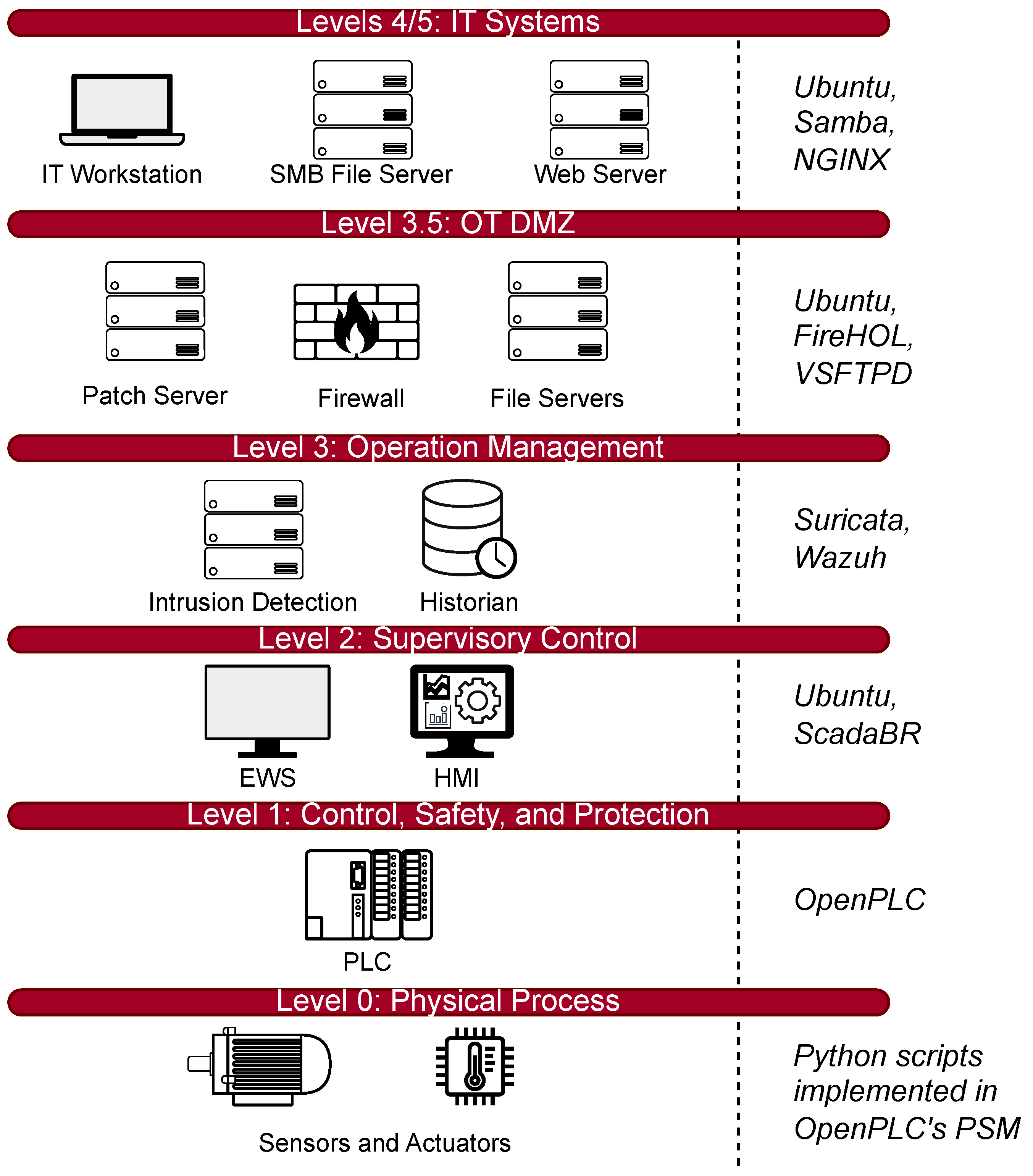
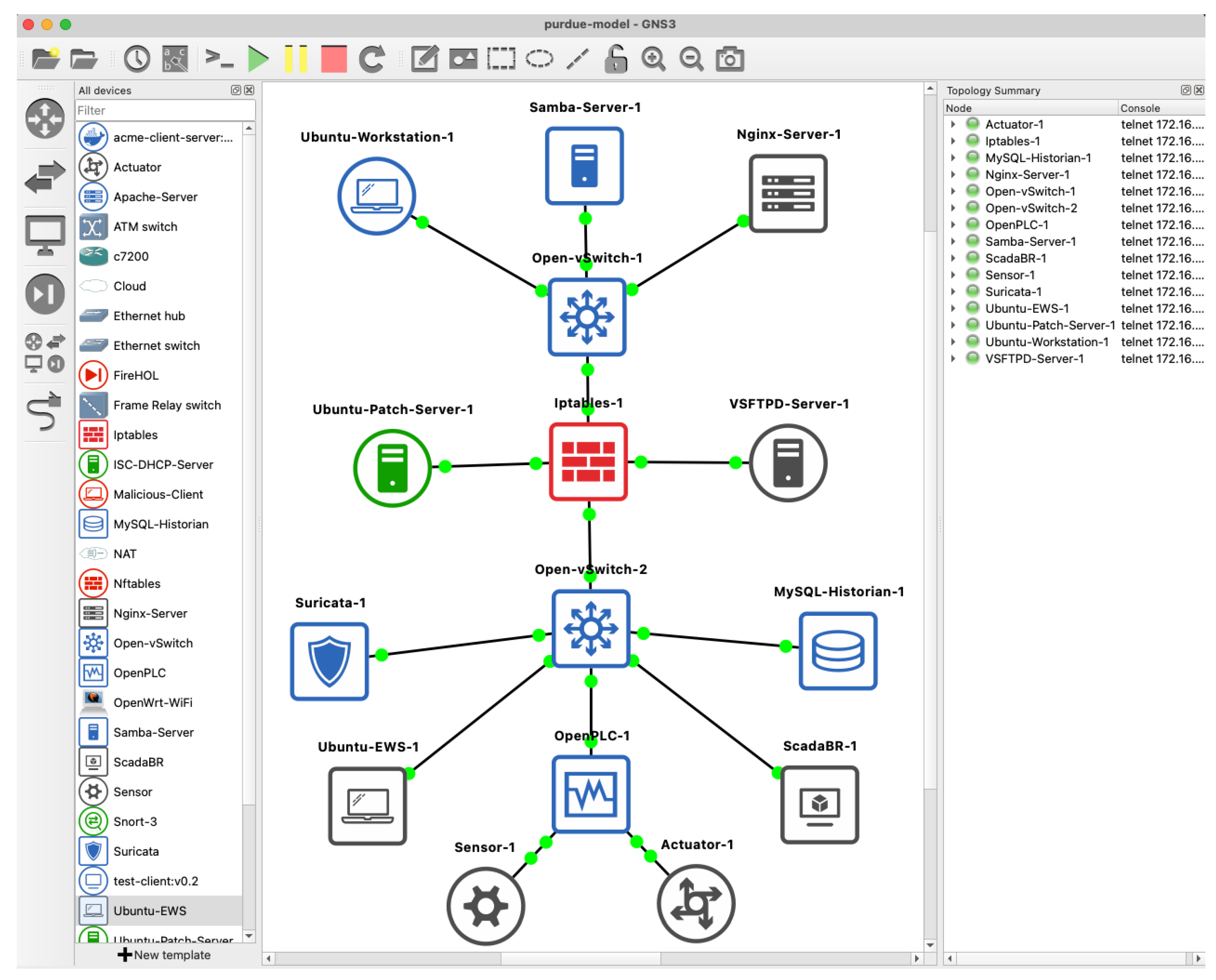
The topology of the Purdue model seen in
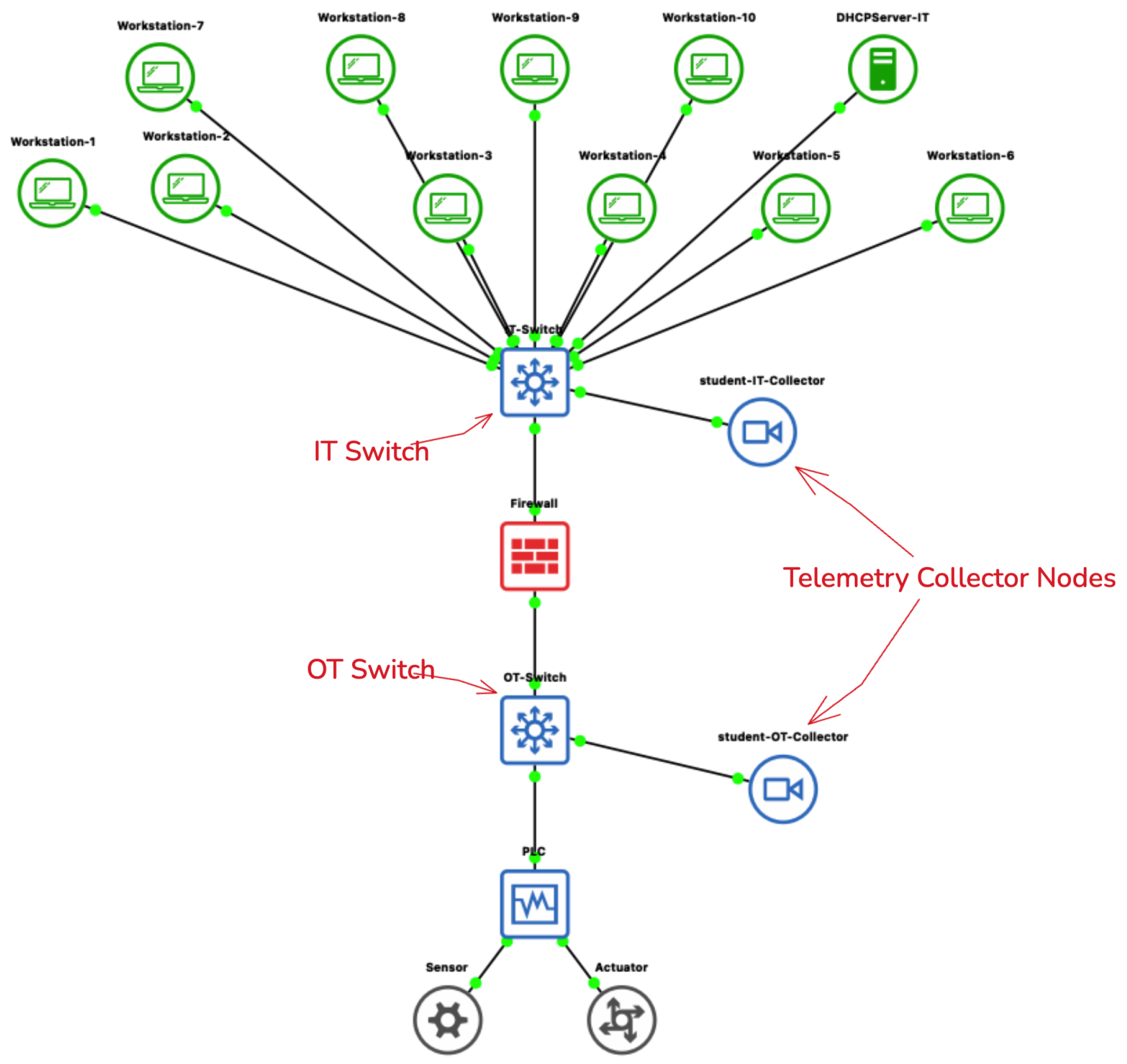
Figure 1 and the corresponding topology deployed inside GNS3 seen in
Figure 2 are segmented into distinct layers. Each layer is dedicated to provide a specific function within an ICS environment. These levels contain virtual appliances that are configured to emulate the behavior of their real-world counterparts.
At level 0 of the Purdue model,
GIS simulates the physical sensors and actuators using the Python Sub-Module (PSM) that is included as a hardware option in OpenPLC Runtime [
22]. The PSM exposes a python interface for users to implement any custom behavior between the OpenPLC Runtime and device hardware. This flexibility of PSM allows for writing simple python functions to model physical component behaviors, such as serial communication.
At Level 1 of the Purdue model, the logic control layer is implemented using OpenPLC instances that interact with the physical devices via the PSM. It can expose physical device behavior using simple Python functions for sensors and actuators. The communication between the logic control layer and the supervisory layer is performed via the Modbus/TCP protocol, with the OpenPLC instances operating as Modbus servers and the SCADA/HMI components operating as Modbus clients. In addition, since the entire topology of the GIS is implemented on virtual devices only, Modbus/TCP protocol communication occurs over standard Ethernet interfaces within the GNS3 topology. It is also important to note that although Modbus/TCP protocol is used in the default configuration of the topology, other industrial communication protocols such as DNP3 and OPC UA are also supported by OpenPLC.
Levels 2–3 include the Supervisory and DMZ layers. The Supervisory layer hosts ScadaBR [
23], which functions as an HMI component, utilizing an Ubuntu-based container to display field measurements, operator command functions, and system trends. EWS and update/patch servers are achieved through lightweight Ubuntu containers with custom Python script-based automation, simulating software update, configuration, signature distribution, and periodic polling of Level 1 PLCs. DMZ-based services include security-related functions, including SMB file servers, OpenSSH/VPN servers, and intrusion detection using either Suricata or Snort 3. These functions allow for hands-on exercises on topics including secure remote access, host pivoting, log analysis, and malware propagation. Firewalls within this layer can utilize any of the following tools:
iptables,
nftables and
FireHOL.
Levels 4–5 include simulated Enterprise IT Services, which include common IT services within an enterprise network. These include ISC-DHCP servers, Samba SMB file servers, NGINX and Apache web servers, VSFTPD FTP servers, MySQL historian databases, and Ubuntu desktop workstations with remote access capabilities. These services provide an operational environment to support adversarial scenarios, including lateral movement, directory traversal, and remote exploitation. The modular design allows for additional services, including Bind9 DNS, Windows clients, Active Directory, and centralized log servers.
All devices communicate on software-defined VLANs that are interconnected via switches (e.g., Open vSwitch) and routers. The virtualized network infrastructure implements segmentation, firewall rules, and routing that mimic typical ICS segmentation. The rules for access control, port filtering, and communication zones can be tailored to accommodate a wide variety of offense and defense scenarios.
3.1.3. Network Architecture and Communication Patterns
The communication patterns in GIS are designed to mimic IP-based virtual networks and have specific bandwidth restrictions that mimic the real-world environment. The restrictions include latency, jitter, packet loss, and bandwidth limitations achieved via the use of Linux-based tc (traffic control) commands. Such restrictions are imposed on specific network interfaces.
Communication among the devices have been designed to mimic real-world ICS scenarios. The field devices periodically send updates or respond to PLC polling. The PLC then sends control signals to sensors and actuators that are defined using the PSM. The SCADA and HMI periodically poll PLCs and show the results graphically. The EWSs upload new logic or perform maintenance. The IT workstation connects via a jump server or VPN entry points.
To account for the diversity of components found in an ICS environment, there are multiple alternative technologies for equivalent functions. For the network layer, switching and routing can be achieved via Open vSwitch and Linux-based bridge-router solutions. This allows for a comparison of switching and routing behaviors and access control enforcers. For the firewall function, there are three alternative technologies such as iptables, nftables, and FireHOL. For the protocol layer, there is default support for Modbus/TCP. The support for other protocols such as DNP3 and OPC UA via OpenPLC’s communication driver framework is also possible. This allows for a demonstration of the differences that different protocols have on polling and attack vectors.
Telemetry is implemented at the host level. Syslog-ng collectors are deployed as log monitoring tools on both the IT and OT layers. These collectors are connected to the IT and OT switches and are configured to accept and save logs along with the timestamps for every ICS component in the topology. This provides instructors with the telemetry data they need to monitor students’ activities and perform assessment.
The communication paths have been designed to cover all layers of the Purdue Model and include field-level interactions and enterprise-level IT services. The support of multiple protocol families and interchangeable network and security components provides instructors with a broad range of choices for building scenarios for instructional purposes.
Table 3 shows a summary of the communication paths.
3.1.4. Deployment Architectures
GIS offers two deployment options to meet the varied resource needs of different institutions. Both options utilize the same scenario, ensuring that the same learning objectives are met in both cases.
Mode
A: Centralized Infrastructure Deployment
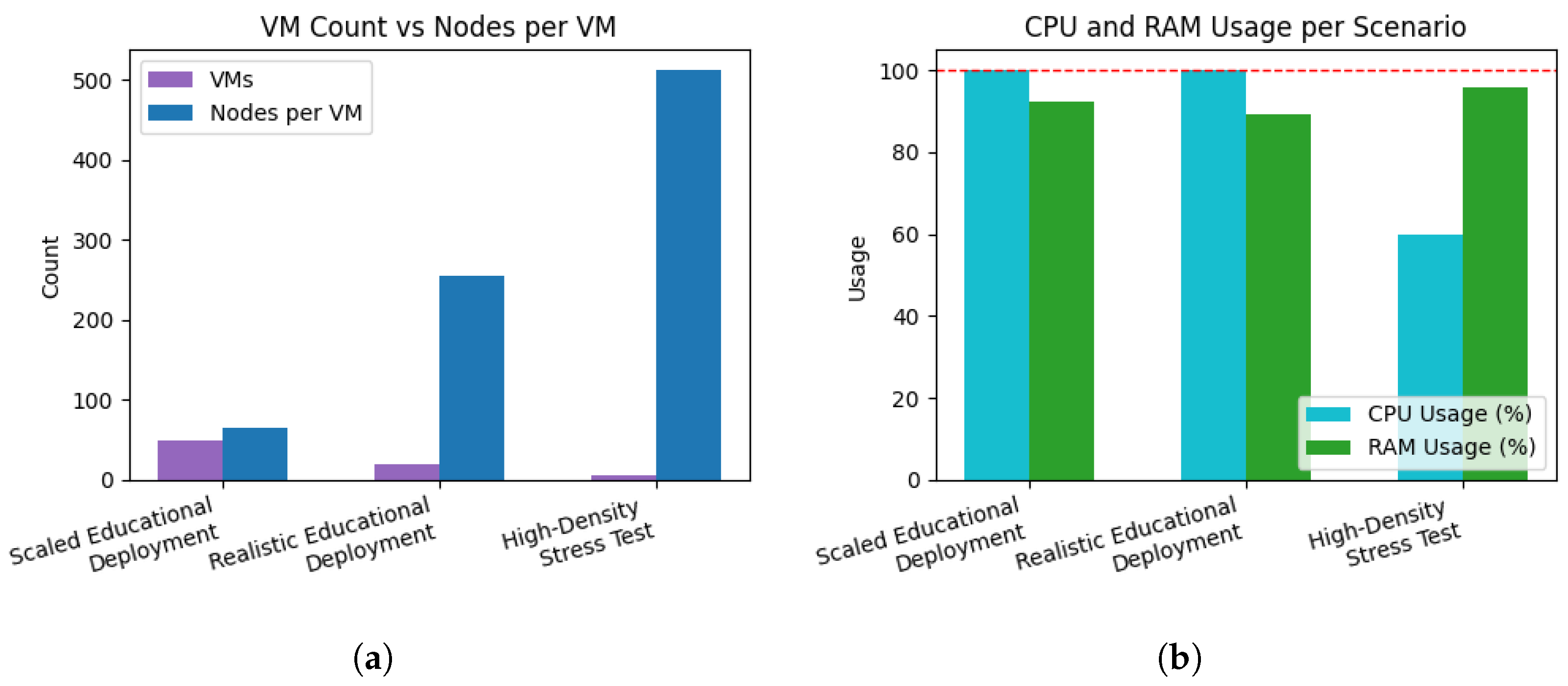
In this mode, the instructor leverages a dedicated server, either physical or cloud-based, that hosts multiple isolated GNS3 environments, with one environment allocated per student or student group. The instructor provisions a single QEMU-based VM that is preloaded with GNS3 templates and scenario definitions. The orchestration layer then duplicates this VM on demand, assigning each instance a unique IP address. Students access their isolated GNS3 environments remotely by configuring their GNS3 client to connect to the IP address associated with their assigned instance. The primary trade-off is that the institution must provision server hardware that scales linearly with the size of classes; the associated resource requirements are evaluated in the experiments presented in
Section 5.3.
Mode B: Distributed Student-Hosted Deployment
In the alternative deployment mode, students run GNS3 servers locally on their own machines. The instructor hosts only the GIS web frontend and backend API, which are lightweight and can run on an instructor’s laptop or an inexpensive cloud instance. In this configuration, the instructor’s service is responsible only for orchestrating access to scenarios and coordinating deployments, while all network emulation and container execution occurs on the student’s machine. The trade-offs include variability in student hardware capabilities and the need for local configuration, although detailed installation guides are provided in the repository.
3.1.5. Simple Instantiation and Access Workflow
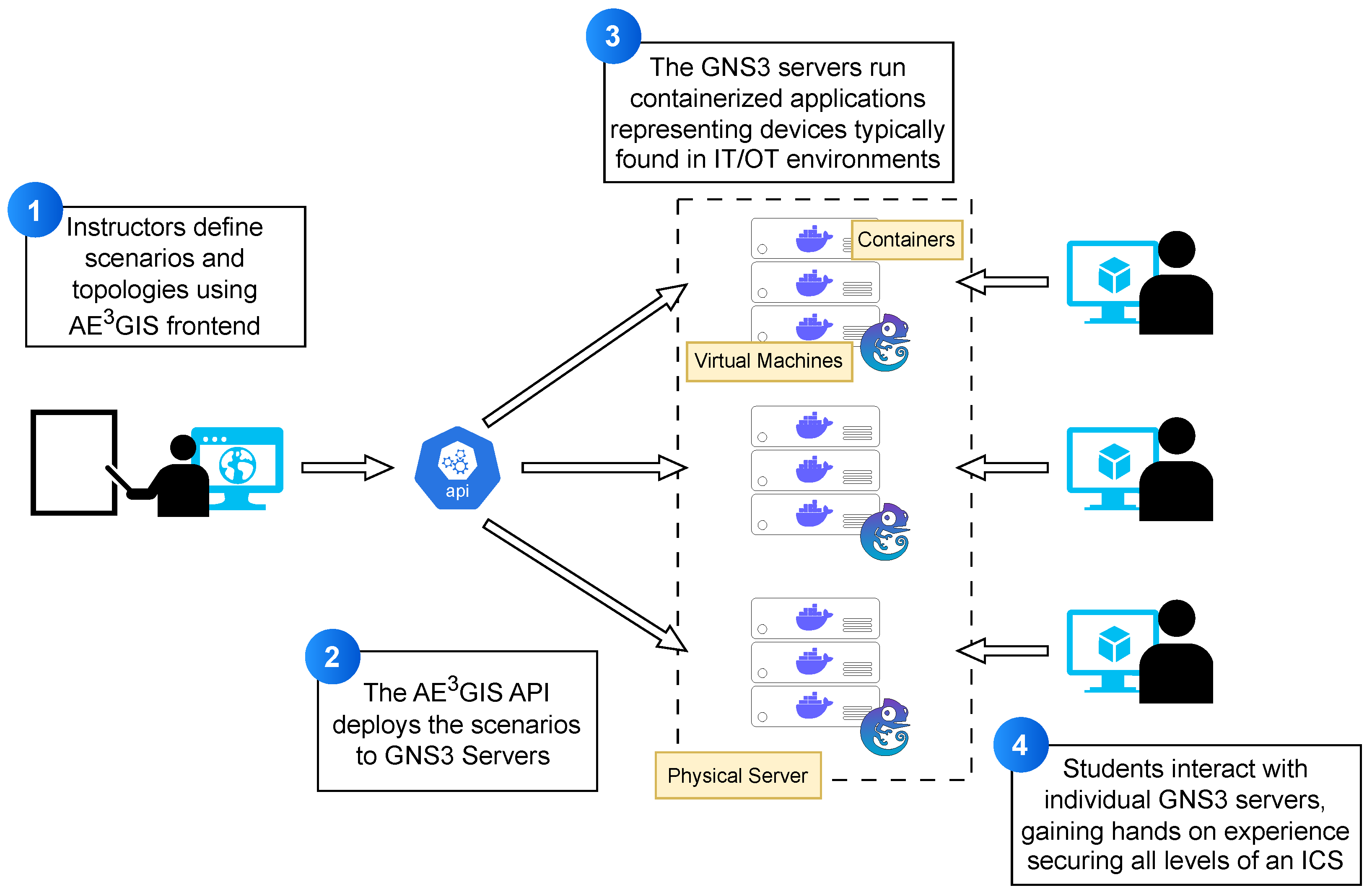
Figure 3 shows the implementation architecture of
GIS. The GUI offers a seamless method for loading, editing and instantiating the scenarios using the
GIS REST API. Furthermore, the GUI allows users to easily generate
GIS instances with GNS3 servers executed inside an isolated VM. The created
GIS instances come pre-configured with the templates needed to for students to execute the ICS scenarios. This system makes it possible for entire classes to execute similar scenarios simultaneously, while preserving separation of students to work individually in isolated environments. This set up allows GNS3 to be used in a classroom setting with several student or groups, without requiring much configuration by the students or the instructor.
Instructors use the GIS front-end to define ICS scenarios to select device types (e.g., PLCs, HMIs, file servers, sensors, firewalls) and specifying network configurations. The front-end then generates a structured, machine-readable file describing the entire environment. This file is handed over to the GIS orchestration API, which deploys the scenario locally or remotely in one or more GIS instances. The API initiates the scenario by setting up all the elements that are necessary—such as virtual switches, routers, and firewalls—along with containerized IT/OT components, and applies the networking rules that have been defined by the instructor. Each student will be assigned an isolated environment for working on their copy of the ICS scenario. In every GIS instance, there is a fully containerized model of an ICS environment made up of different components, such as OpenPLC, ScadaBR HMIs, Ubuntu EWS, Suricata, Zeek, MySQL historian, SMB/FTP server, and other IT/OT components. GNS3 manages link constraints, routing behavior, and inter-device communication that are necessary for the ICS operating conditions to be as realistic possible. By connecting to their respective virtualized servers, students can get access to the GIS instance that has been allocated to them and they can operate the ICS topology like they would in a real ICS testbed. This enables practical exercises such as uploading PLC logic, telemetry analysis, red/blue team activities, and playing with defensive or adversarial techniques across the whole ICS stack.
3.1.6. Scalability and Template-Based Extensibility
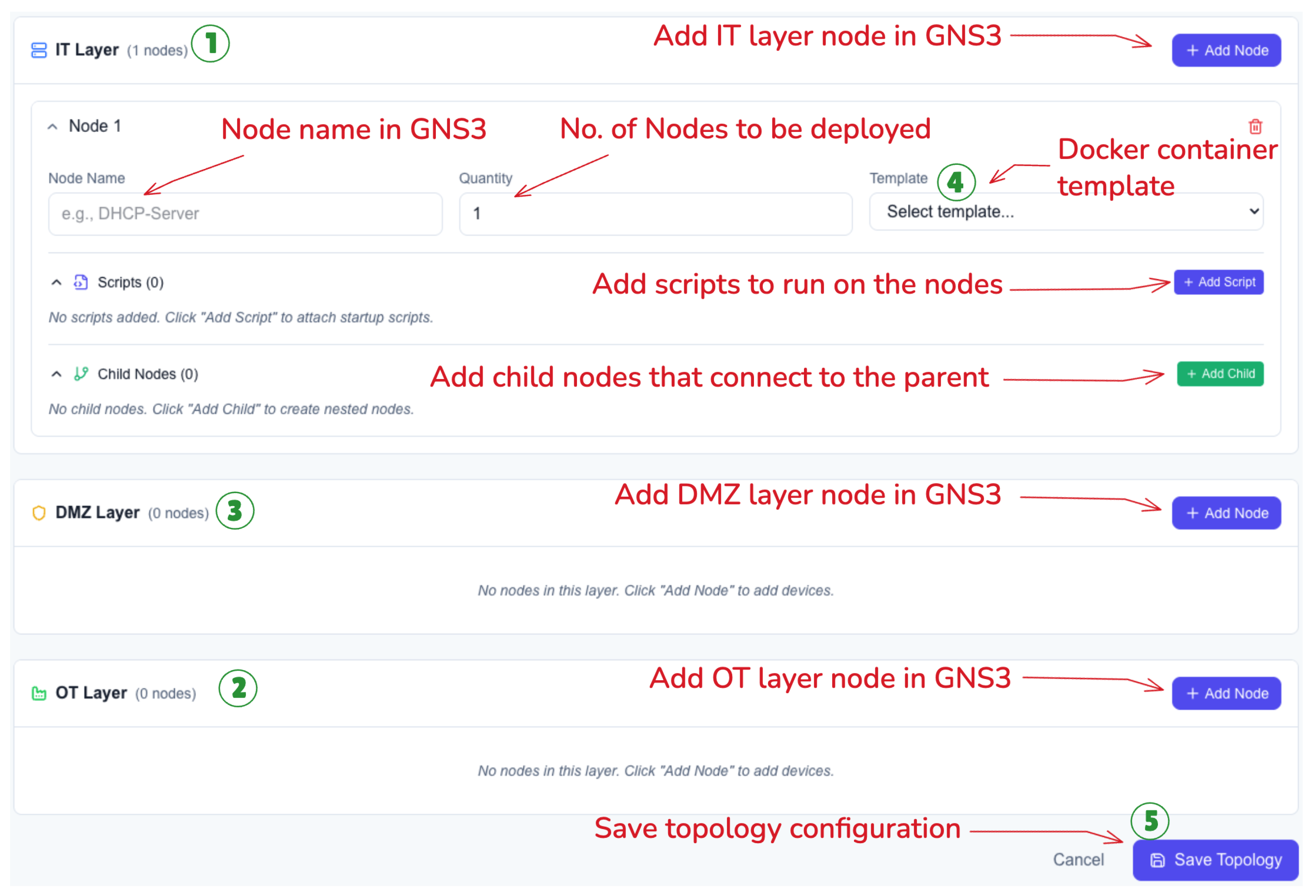
GIS addresses the problem of the complexity of large-scale topologies through a dedicated tool for topology generation. This tool utilizes the GNS3 API to deploy preloaded components, assign configurations, and link multiple components to form the ICS stack based on the Purdue model. The topology customization interface shown in
Figure 4 allows instructors to specify the types and numbers of components they want in an ICS network scenario that will be generated dynamically.
The workflow for configuring and building topologies via the GIS GUI starts with defining the main network domains. First, the user configures the types and number of nodes needed in the IT Layer (1). Then the user defines the devices and parameters of the OT Layer (2). After that, the user defines the network devices that make up the DMZ between the IT and OT domains (3). Once the structure of the network is set, the workflow proceeds to specific device configuration, where the user needs to assign the protocol or service implementation of each device from the pre-defined docker templates (4). Finally, the user saves the topology which creates a JSON object with dynamically generated links and node positions, which is used to build the actual topology in GNS3 (5). Students can access this saved topology and trigger the build process for any configuration to be deployed to their GNS3 instance.
Topologies generated from the configuration interface assume positions inside the GUI based on the Purdue level it represents and automatically connect to the necessary network components such as switches, firewalls, and routers. This means that the students and teacher would only require minimal interaction during the creation of the topology.
Apart from dynamic generation, GIS provides a range of reusable templates that can be applied for the generation of common ICS scenarios. These reusable templates help ensure that the generation of scenarios not only becomes repeatable, but becomes extendable as well. Teachers can utilize the base-level reusable templates to design lab exercises based on learning objectives, enabling GIS to serve both educational and research purposes in ICS domains.
3.2. Overcoming Significant Challenges and Providing Technical Solutions
Although GNS3 provides an adaptable graphical interface for virtualized networking and has emerged as popular software for IT laboratory emulation, it would prove particularly challenging for ICS networks for the following reasons concerning the delivery of structured educational scenarios. These are some of the hurdles that our development process had to overcome.
3.2.1. Scenario Creation and Dynamic Reconfiguration
Although GIS provides support for predefined scenarios, an important aspect of the tool is the capability for dynamic scenario definition. In the conventional GNS3 simulation setup, any kind of topology and configuration modification must be made before starting the simulation, making it difficult for the instructor to implement live network traffic, configuration, and/or topology modifications during the simulation. In GIS, the instance interacts with GNS3 to push scripts and apply node configurations. Custom scripts can be uploaded into GIS and later applied to the nodes in the ICS scenario while it is running. This gives the instructor the capability to implement state and configuration modifications of devices during live simulations. Some potential uses of pushing custom scripts include injecting malicious code, modifying firewall rules, removing nodes from the network, and uploading malicious PLC code.
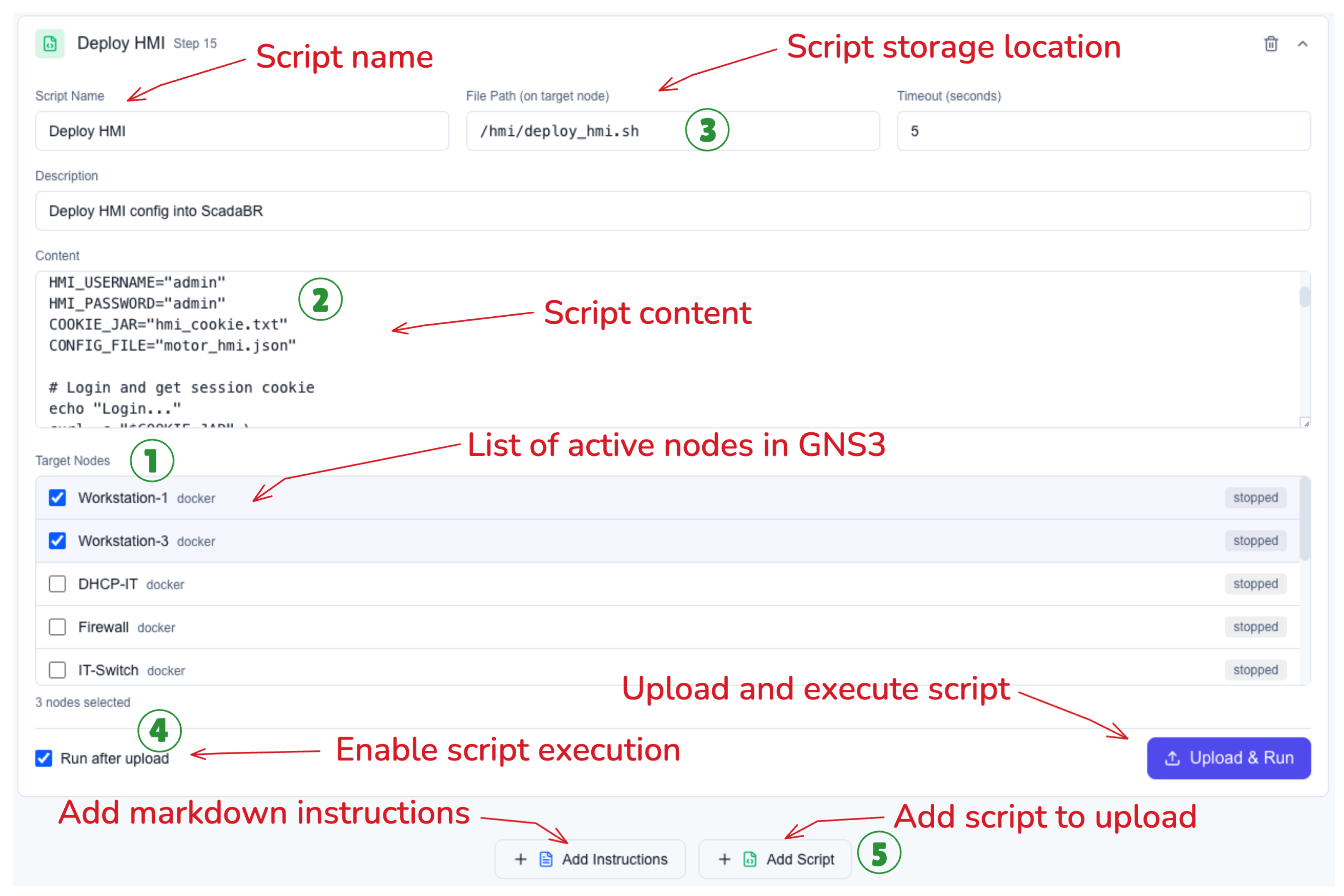
In the interface depicted in
Figure 5, the instructors or students can deploy personalized scripts on selected nodes of the topology. During this process, the user selects the target device from the list of active nodes in GNS3 (1). Then, the user needs to define script to be executed on the target nodes (2). The storage location of each script can be specified on the target device to allow for flexibility in defining executable scripts and their dependencies in a user-defined directory structure (3). At this point, the user gets to decide if the script should be executed immediately after being uploaded to the target nodes (4). The system also offers the option of adding instructional notes for the deployment of the scripts and allowing multiple scripts to be deployed sequentially on multiple nodes (5). These scenario definitions will be compiled and saved as JSON objects so that they can be easily distributed among students, ensuring every student has access to the same scenario definition and allowing reproducibility for research purposes.
3.2.2. Inadequate Mechanisms for Modeling Variable Network Conditions
Simulating an environment that accurately represents network conditions would be difficult for most general network simulators. In an industrial setting, the nature of operations that require control performance and the use of timing mechanisms for implementing various security controls make the system prone to network conditions such as latency, jitter, network loss, and low bandwidth. Therefore, simulations that include network timing for attacking, alert delays, and suboptimal system operations are necessary. However, GNS3 does not implement the intentional limits for simulating network performance, but rather it expects an underlying network that provides efficient and low-latency connectivity. This makes it difficult for GNS3 to accurately simulate an important aspect of ICS security.
GIS overcomes this by implementing scripts that simulate the network degradation features in virtualized network appliances. These scripts use tools, such as the Linux tc command, the Open vSwitch package, and the VyOS router package, are used to create simulations of the network degradation characteristics for the OT layers based on factors such as network bandwidth, delay, jitter, and losses. This deliberate limitation makes the simulation model far more representative of how an ICS would actually operate, where the presence of communications instabilities are not anomalies but rather design elements that would be expected and mitigated by security engineers.
3.2.3. Generating Background Activity
In the practical world of ICS networks, there are many network activities that are produced as a result of interaction between the user and other processes that are running on IT and OT. The continuous operation of these devices can be used to construct a baseline for normal network traffic. This would help train students to detect anomalies that deviate from the baseline to maintain the security of networks. In traditional GNS3 environments, network traffic only appears as a result of user interaction, so these scenarios lack the functionality that would help students understand the process through which network activity is affected by malicious activities.
For the purposes of simulating background traffic, GIS makes use of scripts that automatically create significant traffic between the various devices. These scripts mimic actual control system processes and their operations. Sensors produce dummy readings, actuators react based on signal thresholds, and HMI units initiate periodic requests. By adding the semantic and state transition information into the network, the system provides students with the dynamic setting wherein they must deal with actual traffic patterns, understand the nature of the background activity, and decode the actual and malicious system state.
Apart from automating operations, GIS also reproduces the realistic interaction of the enterprise side user with the IT component. Scripts are written to replicate activities such user login on workstations, executing administration commands, and accessing update repositories. This aspect of GIS gives the students an understanding of how the IT component of the network works, as well as the process by which the attacker pivots from the IT network to the DMZ and then the OT network.
3.2.4. Limited Support for Multi-Tenant or Classroom-Scale Use
Attempting to scale a simulation within a single infrastructure introduces the risk of interference across users, accidental misconfiguration, and resource competition. GNS3 was not designed as a multi-user platform. It does not provide functionality for session isolation, user namespaces, and access control. All projects use the same resource pool, and the whole network space consists of one flat namespace. This makes it impossible to provide simultaneous access for students and lecturers without the risk of having conflicts in IP addressing, network state, and logging.
GIS overcomes this limitation by redesigning the deployment model. Prior to the initiation of the scenario, instructors provide a list of students or groups, and pre-configured virtual
GIS instances are automatically deployed through the
GIS configuration interface. All
GIS instances are created on the QEMU host [
24] and are populated automatically with the predefined topology, template, and configuration as assigned by the instructor.
3.2.5. Simulating Physical Devices with Minimal Logic
Level 0 components such as sensors and actuators monitor underlying physical processes and often communicate using analog 4–20 mA loops or serial protocols such as Profibus. On the other hand, GNS3 assumes that every node is an IP-based networking device and provides no native support for analog or serial signaling. Another challenge is mapping individual virtual sensors and actuators to PLC I/O in a way that remains both flexible (easy to change or extend) and scalable (supporting many devices across multiple scenarios).
GIS addresses this gap by separating physical behavior from network plumbing and implementing the former directly in the PLC layer. Instead of attempting to emulate raw electrical signals, we model Level 0 devices as simple software processes that drive PLC inputs and outputs. Concretely, GIS uses Python scripts embedded within OpenPLC’s PSM hardware layer to compute the values that sensors and actuators would expose to the control logic. Each script is responsible for updating a small set of variables that are bound to specific PLC I/O addresses, effectively acting as a lightweight “physics engine” for that subset of the process.
The modeled behaviors are intentionally minimal but realistic enough for educational use. For example, sensor values can be generated using sinusoidal functions with added noise to represent periodic measurements, while other devices can use mathematical relationships that approximate effects such as the dependency between torque and slip in a motor. Because these behaviors are defined in Python at the hardware abstraction layer, instructors can easily adjust parameters, add new devices, or couple multiple signals together without changing the underlying network topology. Students can then observe how changes in the virtual process values propagate through the PLC logic and into the wider ICS network. This, in turn, allows them to study how attackers could manipulate physical processes via exploitation and lateral movement in the OT network, and to appreciate how seemingly “dumb” field devices play critical roles in the overall security posture of an ICS.
3.2.6. Unsupported Communication Protocols and Legacy Interfaces
Industrial networks frequently rely on serial communication standards such as RS-232, RS-485, and fieldbus protocols like Modbus RTU or Profibus. These technologies depend on precise electrical signaling, deterministic timing, and shared physical media. By design, GNS3 does not support such interfaces, its nodes expose Ethernet interfaces only and expect IP-based traffic. As a result, GNS3 cannot directly emulate low-level serial bitstreams, polling cycles, or the electrical behaviors that underlie many legacy industrial protocols.
Within GIS, the goal is not to reproduce the physical signaling of these serial protocols, but rather to preserve the logical behavior and operational semantics that matter for cybersecurity education. Instead of attempting to emulate RS-232 or RS-485 at the electrical layer, the platform implements a behaviorally accurate abstraction model. Serial protocols are represented using their TCP-based equivalents (e.g., Modbus/TCP) while retaining the essential master–slave interactions, register structures, and timing assumptions found in their serial counterparts.
In this model, communication still follows the same request–response cycles and device roles that students would observe in a real serial network; what changes is only the transport mechanism. This approach provides a practical balance between realism and feasibility: it enables learners to study the logic, vulnerabilities, and attack patterns of serial protocols—such as register manipulation, unauthorized polling, or replay behavior—without requiring full electrical-layer emulation that GNS3 cannot support.
Thus, GIS does not eliminate the concept of serial communication; rather, it simulates its operational behavior through an IP-friendly abstraction that integrates cleanly with GNS3, preserves the educational value of serial protocol logic, and scales across classroom-wide deployments.
3.2.7. Real-Time Control and Flexibility During Active Labs
A major limitation of traditional GNS3 setups is that once a topology is running, it becomes largely static. Instructors cannot easily modify device behavior, inject traffic, or introduce new events without stopping the project or manually reloading configurations. This makes it difficult to create spontaneous, reactive, or evolving scenarios—such as simulating a system failure, introducing malware, or altering network policies mid-lab.
GIS removes these constraints by providing real-time control through its unified web interface. Instead of interacting directly with individual nodes or using low-level tools, instructors simply select the desired actions through the GUI. Behind the scenes, GIS orchestrates the necessary operations using a combination of the GNS3 REST API and scripted Telnet interactions. Instructors can deploy scripts, change configurations, start or stop nodes, and trigger background processes with only a few clicks, without needing to access devices manually.
Each lab begins with a shared base topology, but instructors and students can extend or modify it dynamically through the interface. Nodes can be added or removed, behaviors can be customized, and automated tasks can be scheduled as part of the scenario. Actions may be triggered manually or set to occur automatically at predefined times or conditions. This design creates highly interactive labs where instructors can introduce new challenges on demand, adapt scenarios based on student progress, and simulate evolving real-world conditions—all while the underlying automation infrastructure handles the complexity.
3.2.8. Lack of Built-In Assessment and Feedback Tools
While GNS3 provides robust network emulation capabilities, it lacks built-in assessment tools for tracking student activity or measuring learning progress, as it was not originally designed with educational objectives in mind. Instructors can deploy realistic network simulations, but they have no easy way to see which commands students ran, whether they configured devices correctly, or how they responded to specific events. As a result, grading often relies on manual inspection or screenshots, which becomes tedious and infeasible across large classes.
In GIS, every container and VM is configured to send its system logs to the instructor’s machine. This gives instructors full visibility into what happens inside each student’s environment—commands executed, configurations applied, and network activities recorded in real time. These logs can then be reviewed to verify whether students completed required steps or to trace how they approached a given task. After all telemetry data are obtained from the students, the instructor can evaluate the students by looking through the output of the logs for each student.
3.2.9. Guided Instruction, Telemetry, and AI-Assisted Assessment
The purpose of GIS is to provide students with a framework for performing ICS cybersecurity exercises. At the same time, it gives instructors a view of the students’ activities. This is achieved through three different means.
Scenario-Based Guided Learning
Each scenario in GIS is accompanied by detailed documentation that guides the student through the process of completing the exercise. This documentation is step-by-step in nature and addresses the student from the beginning to the end of the exercise. The documentation explains the objectives of the exercise, the network layout and the different elements in the network, the specific actions the student is to perform (such as creating the environment, exploring the network, launching an attack, defending the network, etc.), and the expected results. The student then proceeds to work on the scenario on their own.
Centralized Telemetry Collection
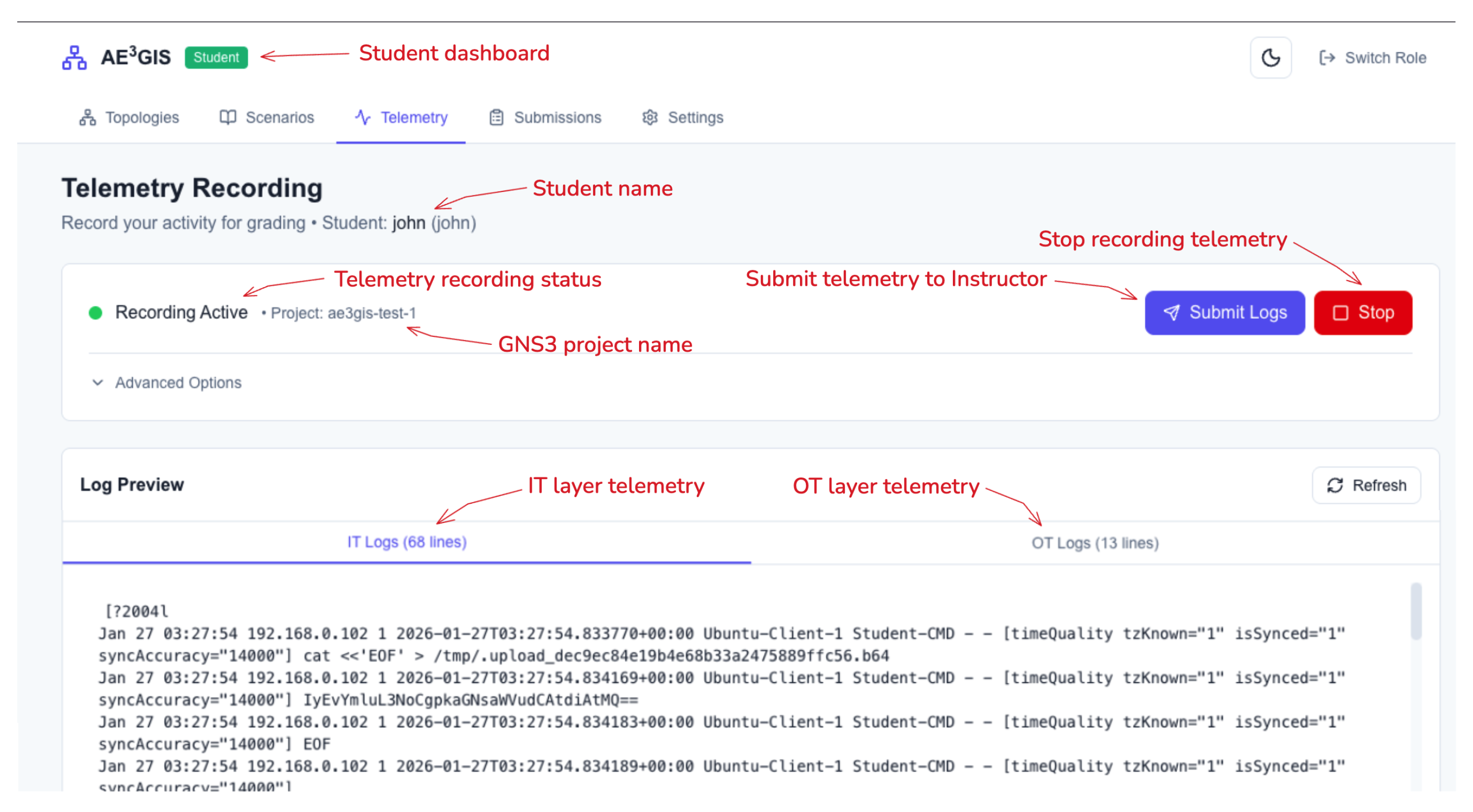
To allow the instructor to have access to the student’s activities, password-protected containers using syslog-ng are created for each student’s isolated GNS3 project. One container resides on the IT segment, and one resides on the OT segment, as shown in
Figure 6. Each node in the containerized network is configured to transmit the full command history and system logs to the collector. This provides the instructor with a centralized view of the student’s activities. Students may preview their logs using the web interface but cannot edit the data, as shown in
Figure 7.
AI-Assisted Analysis of Student Activity
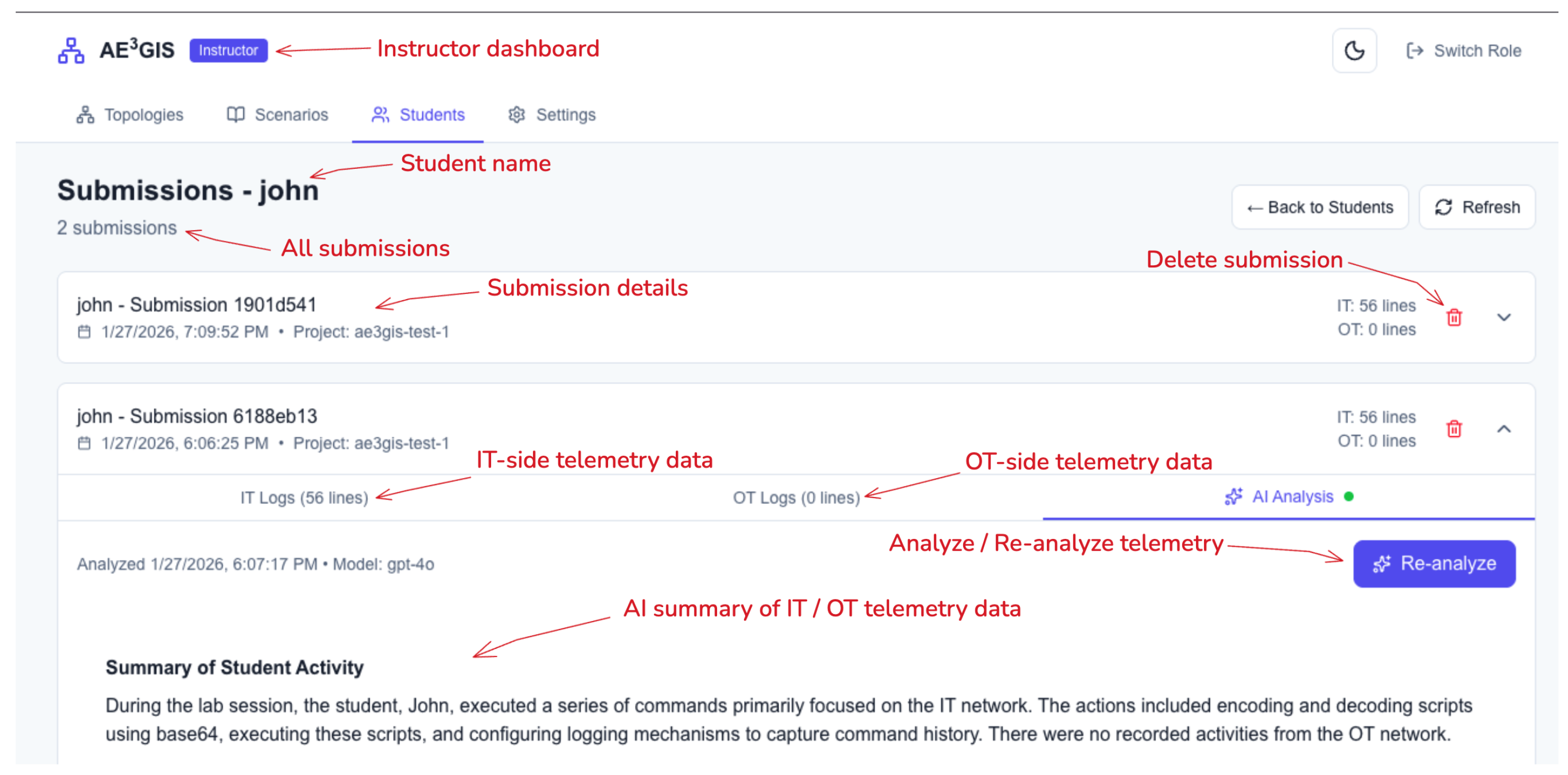
To reduce the instructor’s workload when reviewing unfiltered log data related to student activity within a class,
GIS introduces an LLM-based analysis tool, as shown in
Figure 8. The instructor initiates a request through the dashboard, and the backend system retrieves the student’s log data and sends a request to an LLM endpoint. The results are returned as a summary identifying relevant student activity, security decisions, misconceptions, and areas for further exploration. To interact with an LLM,
GIS uses the OpenAI Python Client Library, since it has become a standard interface within the industry. For our early experiments and the initial version of the platform, we relied on the OpenAI API. However, other open-source model-serving solutions, such as vLLM, Ollama, and LM Studio, also offer endpoints compatible with OpenAI’s API. This allows institutions to use a local open-source model, such as LLaMA or Mistral, to run the analysis pipeline entirely within their own infrastructure, which may be preferable for data privacy or cost-related reasons. In its current form, this feature is presented as a proof of concept, and instructors should not rely solely on the results provided by the model to make grading decisions. In addition, instructors should verify all the generated summaries against the original telemetry data provided to the model. Finally, if instructors decide to use a proprietary model provider, they should avoid submitting students’ personally identifiable information to the model.
3.2.10. Limited Support for Programmatic Topology Generation
Traditional GNS3 environments are built around a drag-and-drop interface, which works well for small labs but quickly becomes impractical for complex or large-scale topologies. Building an industrial network with multiple PLCs, HMIs, routers, firewalls, and workstations through the GUI can take time and is difficult to reproduce or share with others. There is no straightforward way to automate this process of creating large topologies, saving different versions this topology, and sharing this topology along with its configurations to others.
GIS solves this by introducing its own orchestration API that automates how network scenarios are created and managed. The API reads JSON-based scenario files that describe every part of the environment, including the nodes, links, configurations, and scripts to perform different actions. The GIS API uses the GNS3 REST API, and telnet connections to each node’s terminal to build and configure everything automatically. Each scenario can include pre-defined templates so that instructors can quickly reuse common components like firewalls, monitoring nodes, or industrial controllers without having to build them from scratch.
Through the GIS web interface, instructors and students can create, edit, or extend these scenario files dynamically and deploy them directly into their respective GIS instance. This makes it easy to build consistent, repeatable topologies across multiple student machines, customize them on the fly, and save multiple variations of these topologies based on their needs.



 ,
,