1. Introduction
In industry, the use of Supervisory Control and Data Acquisition (SCADA) systems is essential [
1]. Such systems have relatively high development costs, which makes them unfeasible for small-scale processes. SCADA systems are widely used in industries with complex or continuous operations, such as crude oil refinery plants [
2], oil and gas facilities, water treatment [
3,
4], and large-scale food and beverage processing plants. In these sectors, real-time monitoring and control of variables such as flow, temperature, pressure, and chemical reactions are critical for safe and efficient operation. However, with the widespread adoption of open-source software, the automation of industrial processes at various scales has become more accessible. The most modern supervisory and control systems encompass not only process visualization but also enable the operator to interact with the system and ongoing processes, making an accessible interface essential for proper process understanding. SCADA systems can achieve this result, ranging from simple applications to full control panels [
2].
There is an increasing demand for performance, quality, and flexibility in industrial facilities. Therefore, developing SCADA systems is crucial, as they facilitate a specific interaction between users and the supervised process [
3]. In most cases, SCADA solutions provide a Human–Machine Interface (HMI) for control room operations. Control graphic interfaces that represent the plant’s status in real time, including icons, animated icons, numbers, graphs, and flows. Additionally, it allows sending commands to the control network to change parameters, turn switches on or off, control valves, and more [
4]. According to Šenk et al. (2024) [
5], as the industrial world transitions to more advanced and interconnected infrastructures, the potential benefits of leveraging algorithms for enhanced monitoring, control, and decision-making in SCADA systems become evident, including process safety and cybersecurity [
6,
7].
According to [
2], the inflated cost of SCADA systems makes automation of small projects infeasible. For this reason, there is robust growth in the use of open-source software, which drives its technological development.
Some developers have integrated dynamic models into SCADA systems. In the work of Zou et al. (2003) [
8], a dynamic simulator for operator training in small-scale chemical production processes was developed and used to support process operation and optimization. The authors used linear first- and second-order models to represent process dynamics. SCADA Configuration Software, CENTURY STAR, was used to develop the graphical user interface (GUI) of the operator-training simulator. Scholl and Rocha (2016) [
9] developed open-source SCADA software (ESSA), designed for small and scientific applications. The tool enables integration with experimental plants, where HMI can be made available directly on the equipment via touch displays or remotely via a mobile/web interface. Rodríguez et al. (2016) [
3] developed a software architecture for educational laboratories that utilize industrial virtual plants. Commercial software, such as MATLAB, was used to develop dynamic models. The results demonstrated improved understanding of the relationships among different didactic units and the procedure for developing a SCADA system in an industrial environment. Bagal et al. (2018) [
10] developed a real-time control system using a SCADA and MATLAB OPC Toolbox. The design and implementation were carried out in three phases. First, a PLC-based application was designed; subsequently, SCADA applications were developed and integrated with the process via an OPC [
11] server. The process control results demonstrated efficient and reliable real-time data exchange among the PLC, MATLAB, and SCADA. Dieu (2001) [
12] applied a SCADA system to wastewater treatment facilities. The developed tool could monitor the city’s sewage collection and distribution systems, wastewater treatment, and wet-weather facilities. In the work of Morsi et al. (2014) [
13], a SCADA/PLC system was utilized to control an entire oil refinery. The design and specific implementation method for a real SCADA/PLC system in an oil refinery process were developed using the RSVIEW-32 SCADA system. In the work of Kovaliuk et al. (2018) [
14], an Arduino-based Web SCADA system was implemented to control the absorption process. Corresponding software for the Web SCADA system was also designed. Novák et al. (2014) [
15] developed a framework that integrates simulations, data sources, optimizers, other calculations, and SCADA systems into a single environment.
Virtual industrial plants, or digital twins, are essential to help understand theoretical concepts of a real facility, but also to be used as a simulator to replace the real equipment in the training process [
3]. Chemical process simulators, such as Aspen HYSYS [
16] and Aspen Plus [
17], are also widely used for teaching purposes. They are of great importance to the industry for training and employee qualification. Additionally, there is considerable interest from educational institutions in these tools, both to test theoretically developed behaviors and to assess the need for supervision, control, and instrumentation of the process.
The use of simulators such as Aspen HYSYS [
16] and Aspen Plus [
17,
18] has become increasingly common for process simulation and optimization. In gas processing and petroleum refining, these tools are crucial, primarily because they enable modeling of systems with complex thermodynamic behavior. In the context of natural processing, we can cite the works of [
19,
20,
21,
22].
Steady-state models provide a “snapshot” of a process in ideal thermodynamic equilibrium. These models are typically used for process synthesis and design, equipment sizing, and determination of energy requirements. Dynamic models, by contrast, account for the accumulation of material and energy. These models capture the transient response of a process and are typically used for process control and design, safety and operability studies, and operator training simulators [
23]. Several works have implemented dynamic simulation throughout the use of dynamic simulators: [
24,
25,
26,
27]. However, the application of real dynamic simulation still encounters modeling and implementation difficulties. Their integration with the SCADA system is not a common task.
Table 1 summarizes some open-source SCADA systems.
As shown in
Table 1, several open-source SCADA systems are available. We believe that, among these, ScadaBR is sufficient for small-scale implementations and integration with chemical process simulators. Notice that, in addition to the systems listed in
Table 1, Church et al. (2017) [
28] report other systems, including EPICS, TANGO, and ECLIPSE SCADA.
ScadaBR [
29] is an open-source software option for engineering application development. The software enables developers to implement applications with a 100% web interface, providing access to and control over devices and processes via any web browser on a computer, tablet, or smartphone. The main interface is easy to use and offers visualization of variables, graphs, statistics, protocol configuration, alarms, the creation of dashboards, and variable monitoring [
29]. Although there are other SCADA tools, such as those listed in
Table 1, ScadaBR is not necessarily the best; however, it is suitable for small-scale systems and allows easy communication with Python.
Recently, Miranda and Santos (2025) [
30] applied ScadaBR to a gas mixing process with the use of Unisim Design [
19] software. However, to date, few studies have been found in the literature that integrate open-source SCADA systems, such as ScadaBR and OpenScada [
31] with process simulators (e.g., Aspen HYSYS or Aspen Plus) to establish virtual plants or digital twins featuring real-time dynamic operation [
32] validation. This gap highlights an opportunity to develop solutions that integrate computational modeling within dynamic process simulators with SCADA interfaces, thereby expanding the scope of application for these technologies in chemical engineering.
Although this work does not develop novel tools for simulation and monitoring, the main innovation was the integration of dynamic chemical process simulators (Aspen HYSYS) with the ScadaBR system, which has not yet been reported in the literature. However, there are small-scale applications in Brazil that are poorly documented in academic journals. In this context, the present work proposes using the ScadaBR as a graphical user interface for real-time monitoring of chemical process simulations. It represents a promising platform due to its relative ease of connection with other chemical engineering simulators. Two representative case studies are considered: (i) a catalytic hydrocracking process and (ii) a heat exchanger handling a hydrocarbon stream. So, the main contributions of this work are as follows:
- (i)
By integrating dynamic models with ScadaBR, this approach aims to provide operator-like interaction and visualization capabilities, thereby bridging the gap between dynamic simulation and practical control-room training.
- (ii)
Presenting design aspects regarding the implementation of dynamic models with the ScadaBR system, such as time synchronization, data communication, and visual monitoring.
- (iii)
Discuss new possibilities to implement dynamic performance indicators related to energy usage, environmental factors, and production capacity.
Table 1.
Summary of the main open-source SCADA systems.
Table 1.
Summary of the main open-source SCADA systems.
| SCADA System | Customization | Scalability | Integration |
|---|
| ScadaBR [29] | Web environment with a graphical editor and scripting; customizable through API and event/routine configuration. Ideal for visualization adjustments and standardized logic. | Suitable for small to medium-sized projects; performs well in laboratories, small facilities, and IoT. | Supports numerous protocols (Modbus, OPC, DNP3, MQTT, etc.) and APIs, with integration to databases and systems through scripts and APIs. |
| Rapid SCADA [33] * | Support for modules and plugins; extendable through code and custom module development. | It can be used in large distributed systems, supporting replication, multiple nodes, and integration. | Broad compatibility (Modbus, OPC UA/DA, MQTT). |
| OpenSCADA [31] | A modular, multi-component architecture enables the addition or replacement of modules (e.g., UI, database, protocols). | Designed to support distributed systems, with modules capable of operating in scalable architectures, including clusters and complex network configurations. | Architecture focused on connecting multiple modules and protocols, facilitating integration with external systems and databases via specific interface modules. |
| IndigoSCADA [34] | C/C++ code facilitates customization of the SCADA engine itself, drivers, and internal logic. | Suitable for smaller and embedded systems. | Supports various industrial communication protocols and integrated SQL databases; the integration is more technical and depends on the development environment. |
This work is divided into the following topics. In Topic 2, we describe the study’s methodology. Topic 3 describes the studied cases. Topic 4 presents the results. The conclusions are presented in Topic 5.
2. Methodology
2.1. Summary of Methodology
The methodology is summarized in the following topics:
- (I)
Development of process simulation: In this step, a mathematical model is developed using Python or a process simulator.
- (II)
ScadaBR-Python communication: The Python programming language (version 3.14.2) is used to implement the pyModBusTCP (version 0.3.0) and pymodbus (version 2.5.3) packages, enabling communication between ScadaBR (version 1.0) and Python (version 3.14).
- (III)
ScadaBR implementation: Each process variable is inserted into the ScadaBR (version 1.0) environment. Also, the dashboard is implemented, containing the process flowsheet of the modeled process and real-time graphics for monitoring the main process variables.
2.2. Development of Process Simulation
The mathematical modeling stage for chemical processes involves applying mass and energy conservation equations, along with constitutive equations. Dynamic modeling of chemical processes can result in lumped-parameter or distributed-parameter systems. Lumped-parameter models usually produce systems of differential and algebraic equations (DAEs) derived from mass and energy balance equations [
35]. The following system of equations illustrates the general structure of a dynamic model in chemical engineering.
where
is total mass,
is mass flow rate,
is mol,
is molar flow rate,
is time,
is total internal energy,
is specific enthalpy,
is heat rate,
is power,
is generated heat,
is molar generation,
is a general vector or algebraic function,
is an algebraic variable, and
is the vector of parameters. In the above equations,
denotes component species,
is the number of input streams, and
is the number of output streams.
These models can be implemented in programming languages such as C++, Python, and MATLAB. Chemical process simulators, such as Aveva Dynsim and Aspen Dynamics, can also be used and allow the implementation of more complex models.
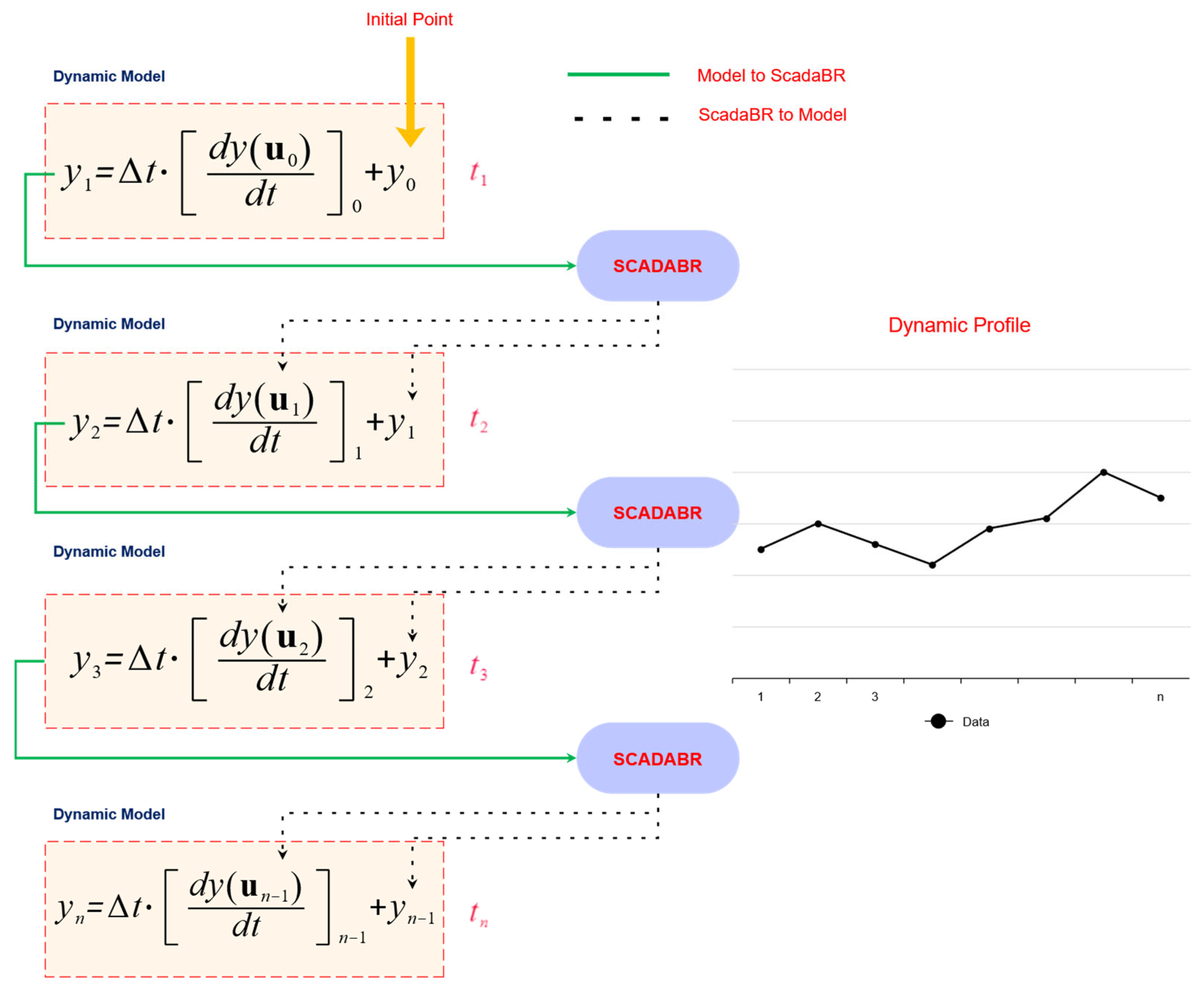
In
Figure 1, the model includes independent input variables, parameters, and dependent variables. Before integration, the parameters and input variables are updated from ScadaBR. The model is then integrated from time
to
. The final values obtained after integration are exported to ScadaBR. This solution scheme operates cyclically.
2.3. ScadaBR–Python Communication
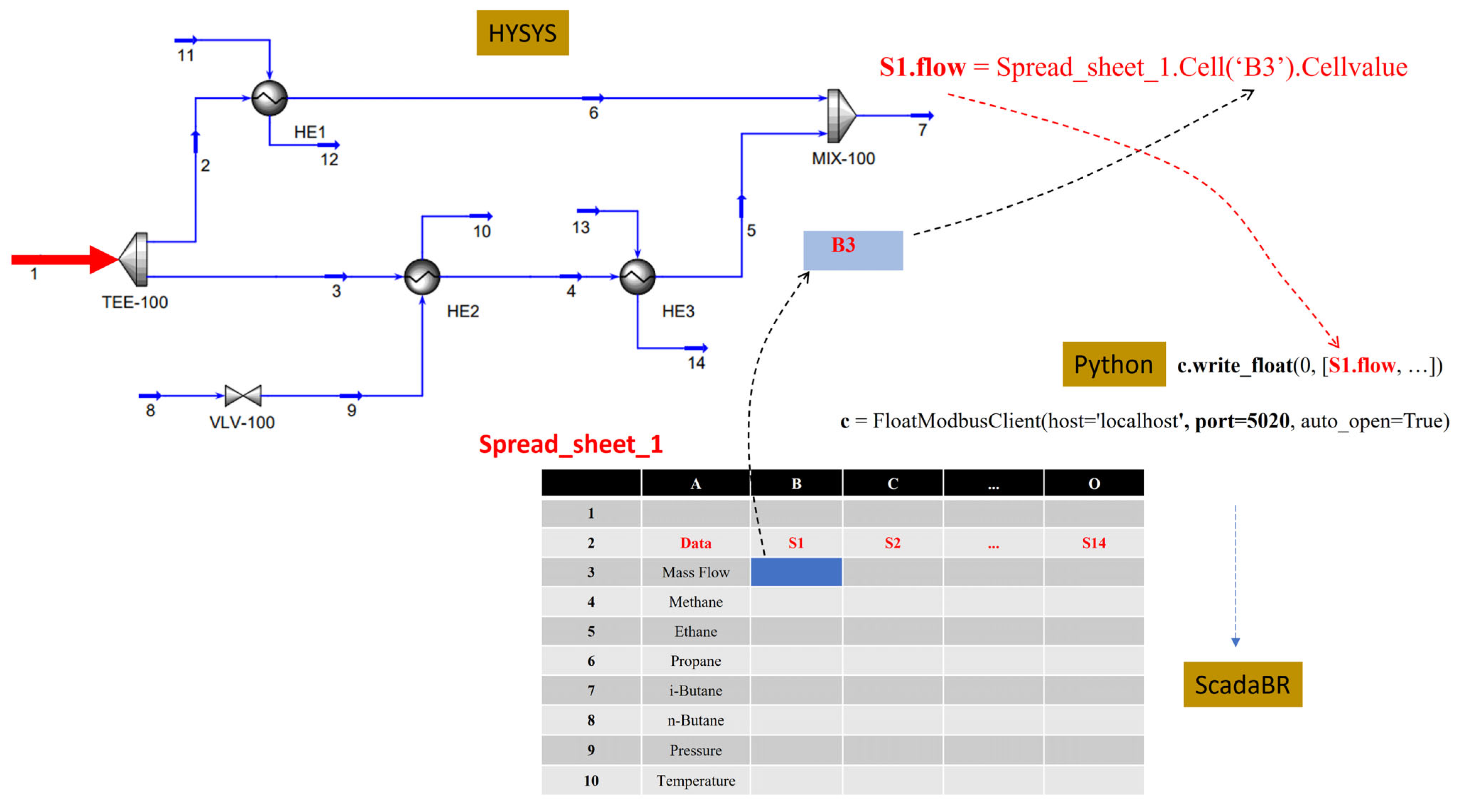
Communication between data from the Aspen HYSYS simulator and Python is already well established in the literature. Details of the communication procedure for Example 2 are provided in
Appendix A.
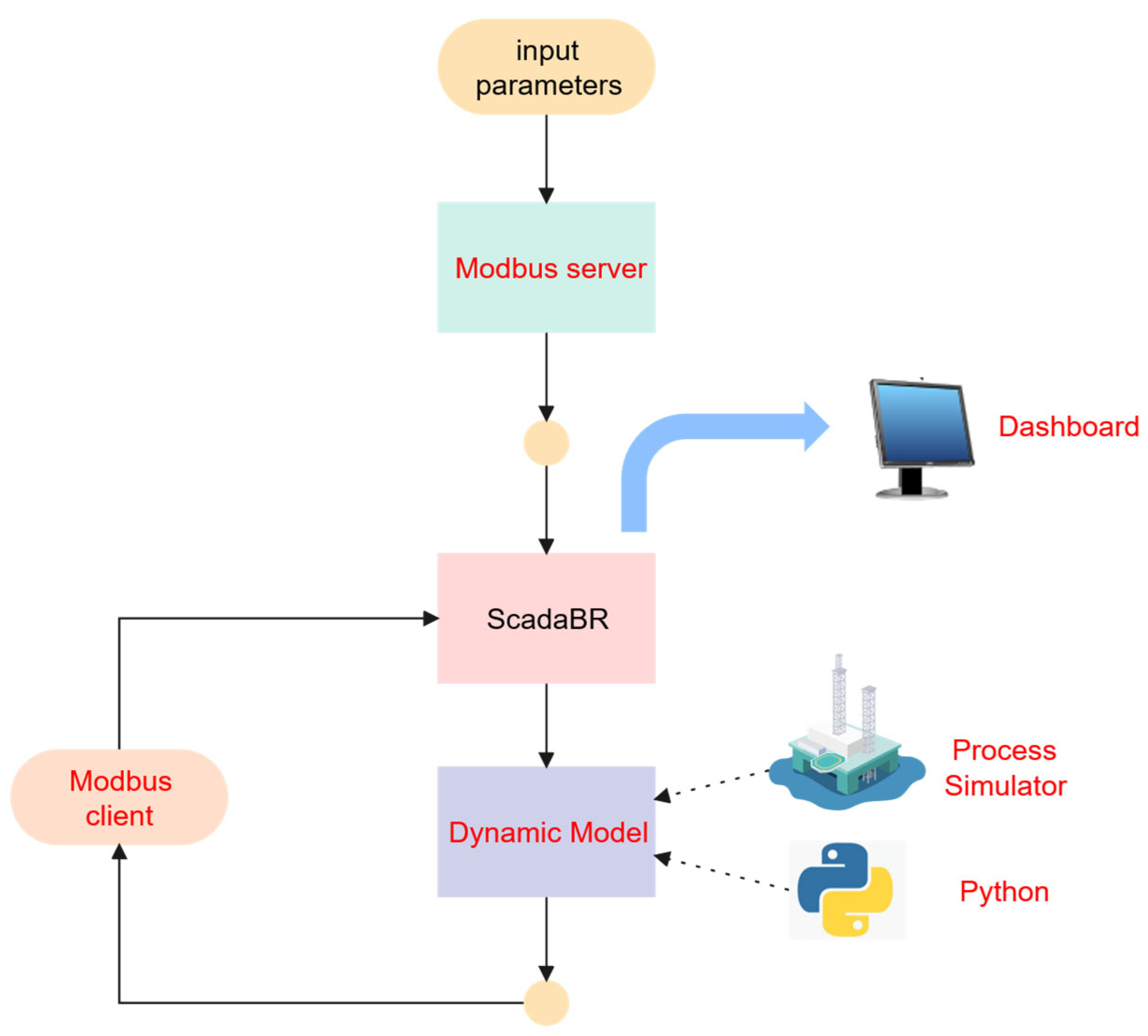
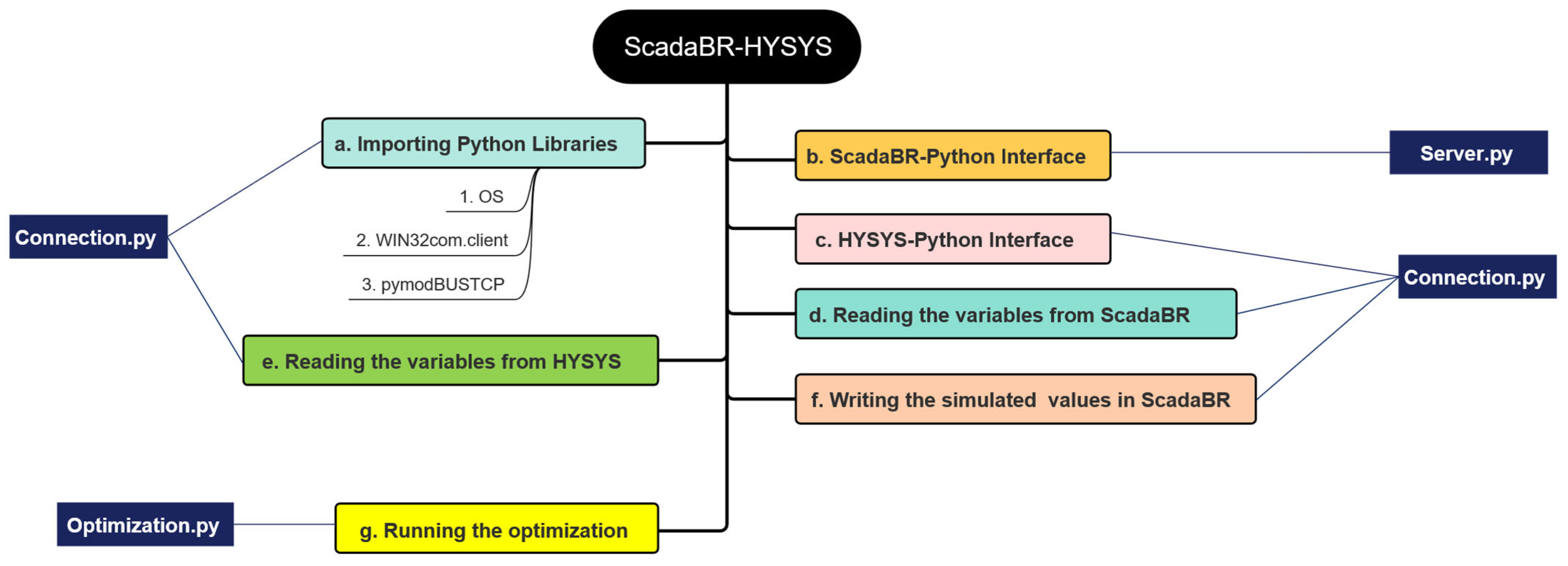
The integration between the dynamic simulation and the SCADA system was implemented using the Modbus TCP protocol, employing the pymodbus library (server) and pymodbusTCP (clients). The implementation was organized into logical-functional stages, as described below.
Each Modbus device contains four classic blocks: coils, discrete inputs, input registers, and holding registers. The StartTcpServer method activates the Modbus TCP server on a local port and keeps the service running continuously. This tool provides a stable environment for external clients to read and write Modbus registers, working as a virtual field device for functional testing and integration.
Multiple Modbus clients communicate with the Modbus server and the SCADA system using the pymodbusTCP library. Each client is initialized with an IP address. The role of the clients is as follows:
Open and maintain a Modbus TCP session;
Read holding registers and input registers;
Write processed values to Modbus registers.
The Modbus client reads the registers defined as input variables. This reading is performed in blocks, according to the predefined mapping. The values received from the SCADA system are converted to float32 and immediately transferred to the input objects of the dynamic simulator (HYSYS), feeding the corresponding spreadsheets and thermodynamic variables. This step establishes the data flow from the supervisory environment to the dynamic model.
With the input variables updated, the model computes the next process state. Temperatures, pressures, flow rates, compositions, and other thermodynamic and hydraulic variables involved in the process are calculated. After each iteration, the dynamic model exports the output variables to Python. The time step used for updating the dynamic model was 10 s. This period was defined heuristically to provide a reasonable frequency of process data updates in the ScadaBR system. It is important to emphasize that the computational cost of solving the models, for both examples studied, was well below the update period.
Although PyModbusTCP provides convenient Python-based interfaces for Modbus TCP communication, it can be subject to communication latency and error-handling limitations. A data quality verification routine was implemented at each communication cycle to detect exception errors and communication failures, thereby preventing the transmission of erroneous data to ScadaBR or the computational model. The routine attempts to retrieve data from client devices up to 10 times consecutively before transmission. If data acquisition fails after ten attempts, an alert is automatically issued to notify the user and facilitate the investigation of potential communication issues. During this period, system operation continues using the most recently validated data.
The Modbus client writes these simulated values into the holding registers configured as output points. This step enables the SCADA system to retrieve updated simulation values via the Modbus TCP protocol.
Section 3 provides a detailed account of the ScadaBR interface implementation for both case studies. The process generally involves the following steps:
- (i)
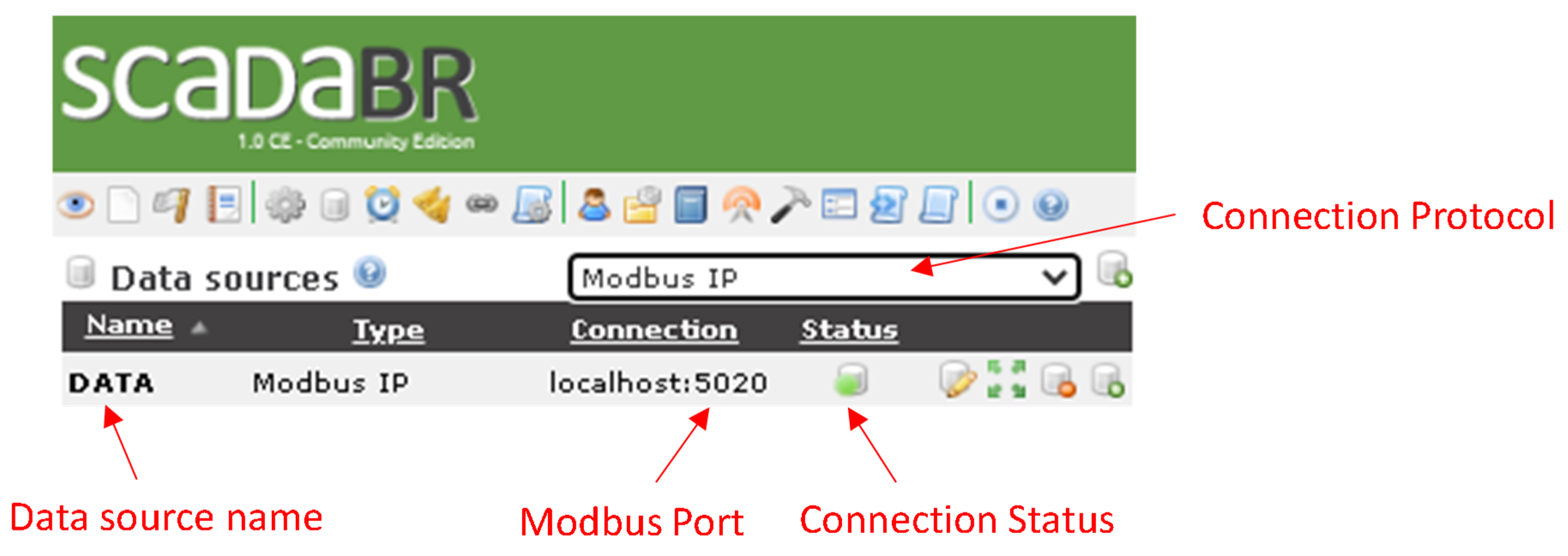
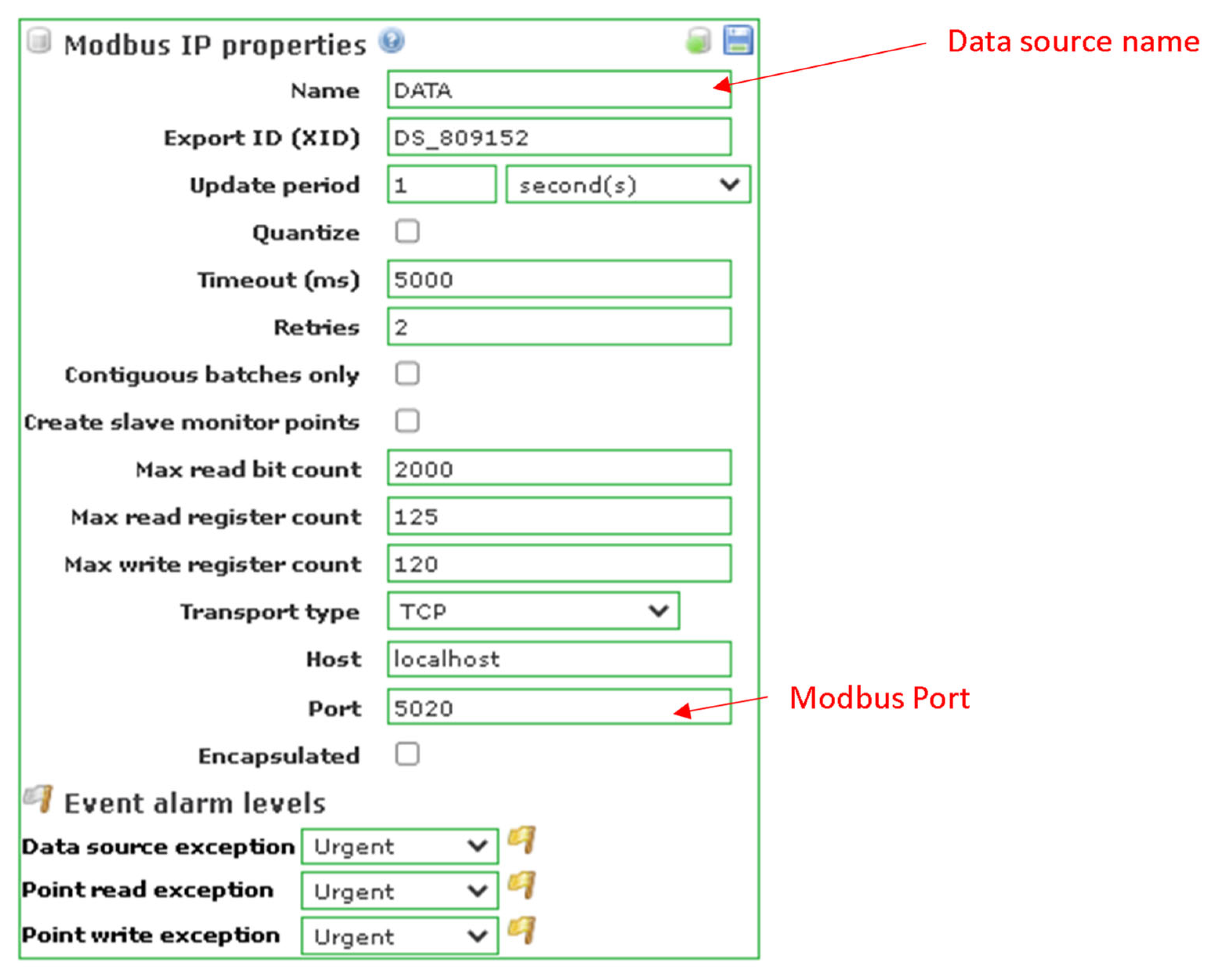
Configuring the DataSource with the Modbus TCP protocol;
- (ii)
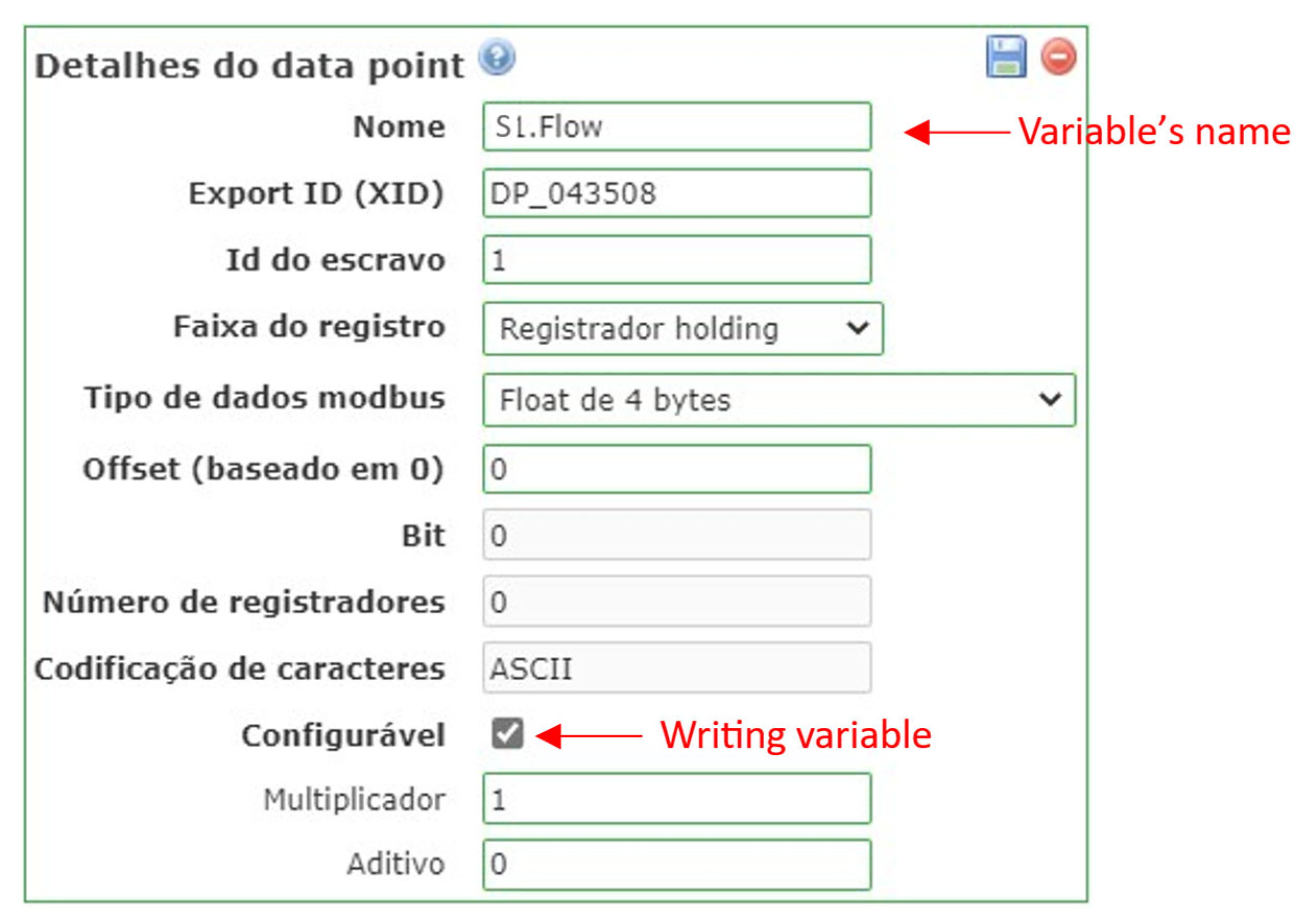
Configuring the DataPoints of each DataSource by linking process variables obtained from the model;
- (iii)
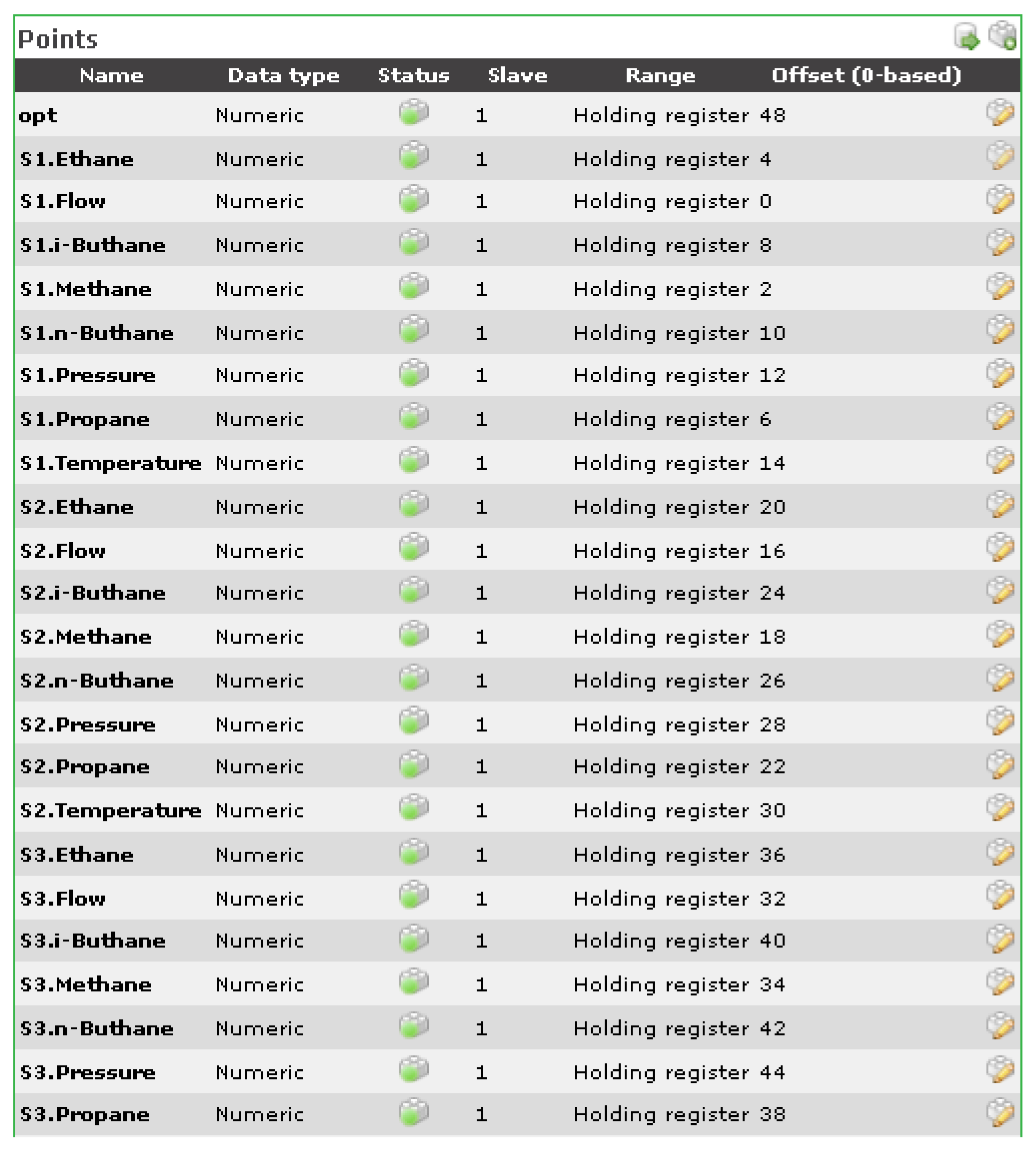
Configuring the ScadaBR Watchlist, which serves as the main monitoring dashboard displaying the variables;
- (iv)
Configuring the graphical process interface, including process flow diagrams (PFDs);
- (v)
Developing real-time monitoring graphs.
- (1)
The Modbus server must be continuously running prior to system initialization.
- (2)
All variables (datapoints) are initialized within the ScadaBR environment.
- (3)
The dynamic model is initialized using the initial values provided by ScadaBR.
- (4)
After the model is integrated, the output variables are exported to ScadaBR via a Modbus client, where the values of input variables can be modified before the initialization of a new cycle. A support Python tutorial for ScadaBR—Python communication can be seen in
https://github.com/LizandroCloud/SCADABR-PYTHON (accessed on 21 January 2026), in which case-2 files (Python-HYSYS) are shared.
4. Results
4.1. Results of Case 1: Kinetic Hydrocracking Model
The Nelder–Mead [
43] algorithm was used to estimate the kinetic model parameters based on the model of Barkhordari et al. (2009) [
37]. For Nelder–Mead, the minimize function from the Python library scipy was utilized. The following parameters were set: reflection coefficient: 1.0, expansion coefficient: 2.0, contraction coefficient: 0.5 and shrink coefficient: 0.5. The calculated kinetic constant values are listed in
Table 5.
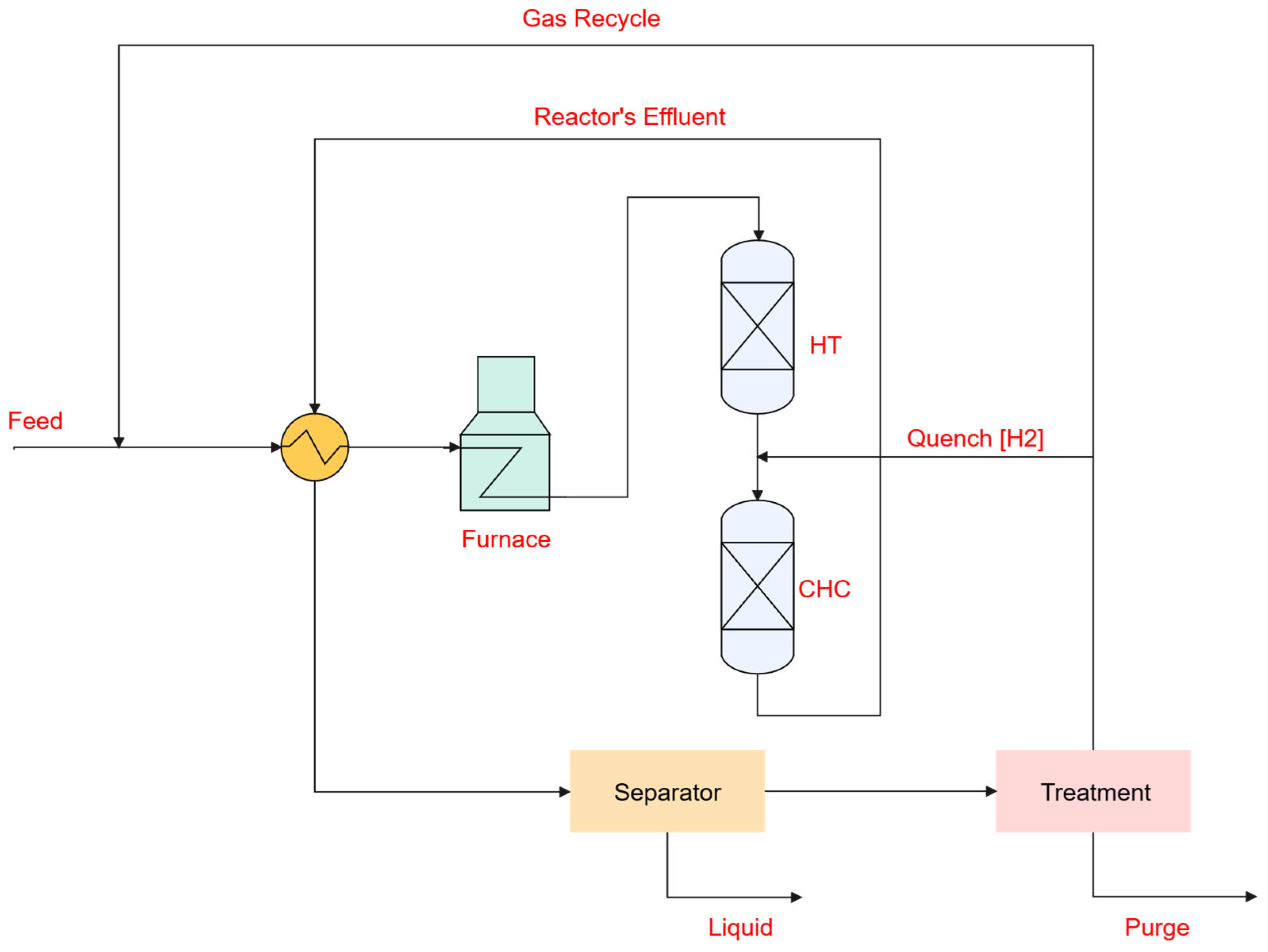
The catalytic hydrocracking process was performed in an isothermal packed-bed tubular reactor under different operating conditions, such as reaction temperatures of 390 °C and 410 °C (according to Barkhordari’s work [
37]), since the kinetic parameters depend on temperature, as shown by the Arrhenius equation.
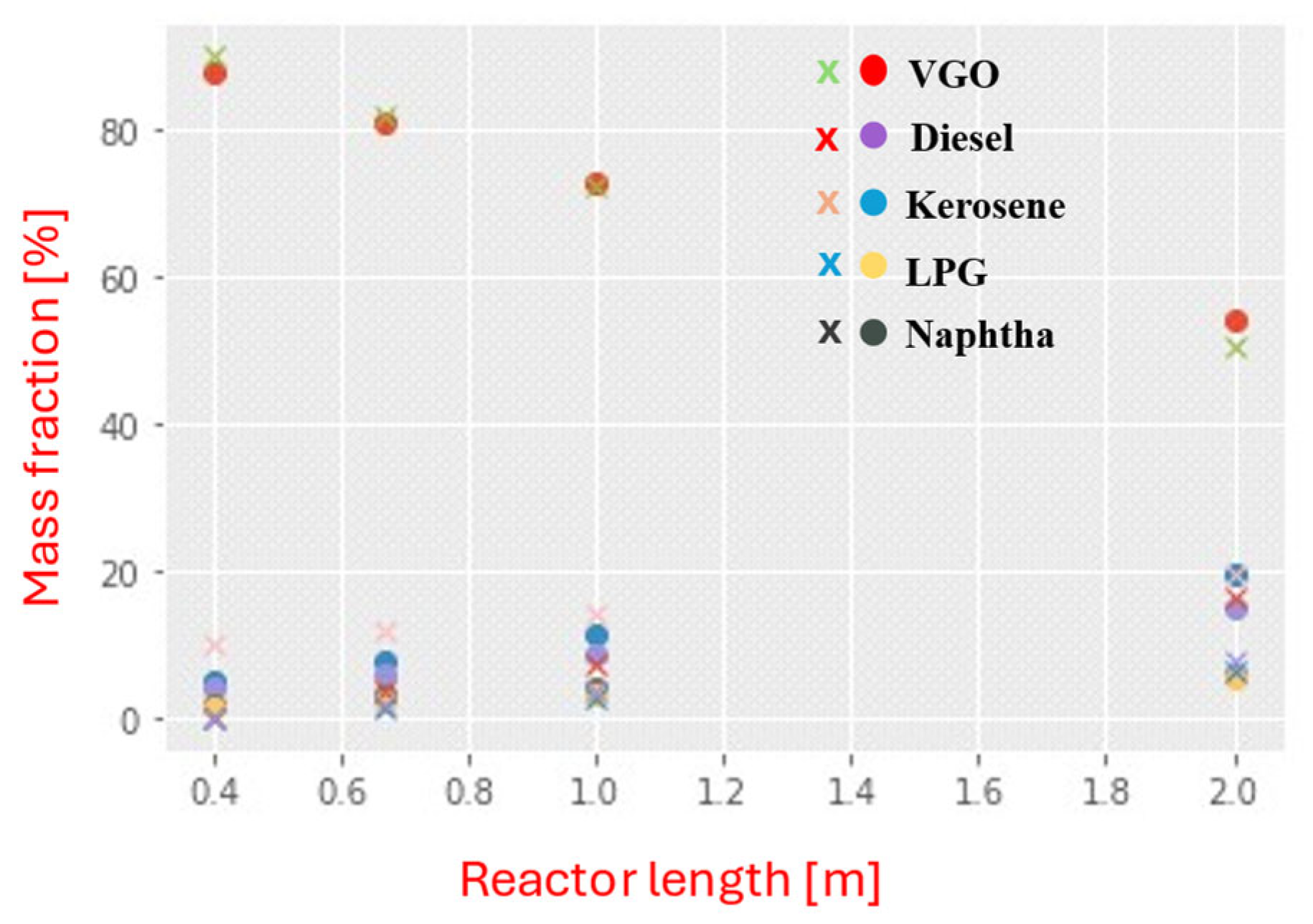
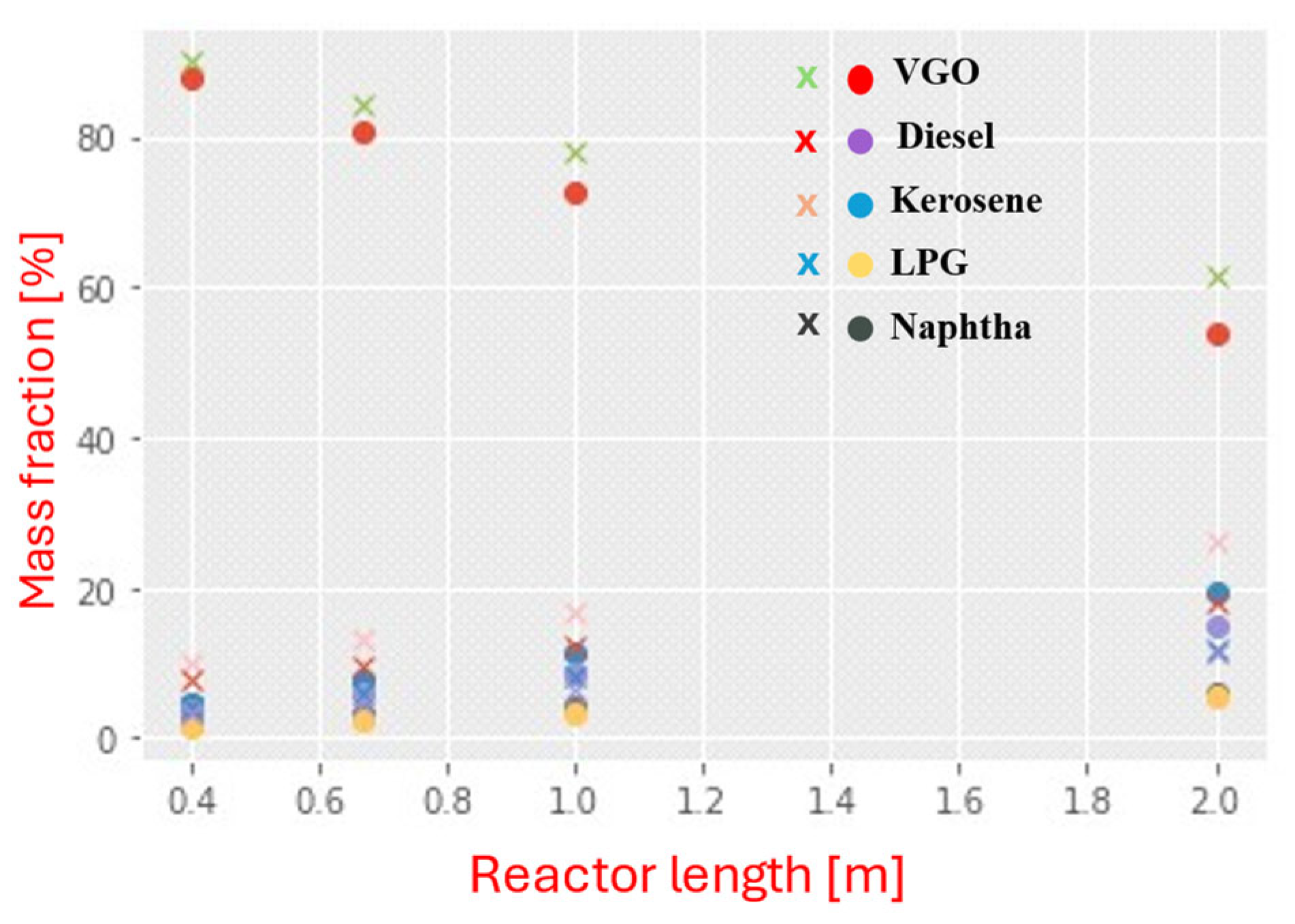
Figure 6 and
Figure 7 show typical mass–fraction profiles for VGO and its products at 410 °C and 390 °C, respectively. It indicates that the model reasonably reproduces the lower-temperature behavior. At 410 °C, the discrepancies are most pronounced at early times (0.4 h and 0.667 h) and diminish after approximately 1 h. This pattern suggests a small mismatch in the short-term dynamics. By contrast, at 390 °C, the slower kinetics reduce sensitivity to such transients, yielding closer agreement with the experiment over the whole-time horizon.
In hydrocracking, estimating kinetic parameters using the Arrhenius equation often fails to accurately reproduce the concentration profiles due to the process’s complexity. The most relevant causes can be explained by the facts: (i) a reaction network more complex than the proposed model; (ii) parameters adjusted for a lump may not correctly represent the internal conversion of the species; (iii) occurrence of temperature gradients in the catalytic bed, and (iv) correlation between the kinetic parameters [
36,
37,
38]. Deviations between model predictions and experimental data can also be related to the optimization strategy used for parameter estimation [
44].
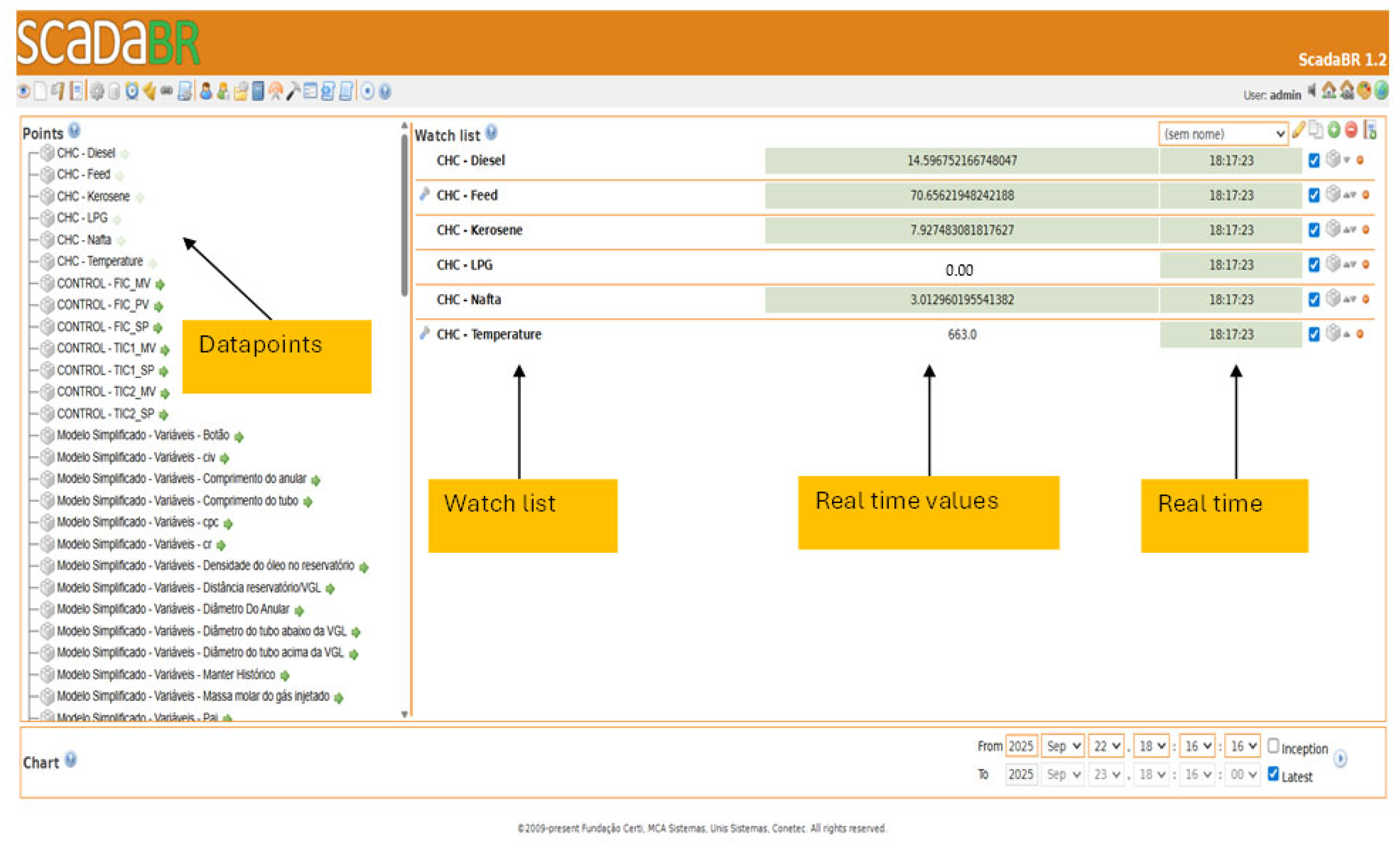
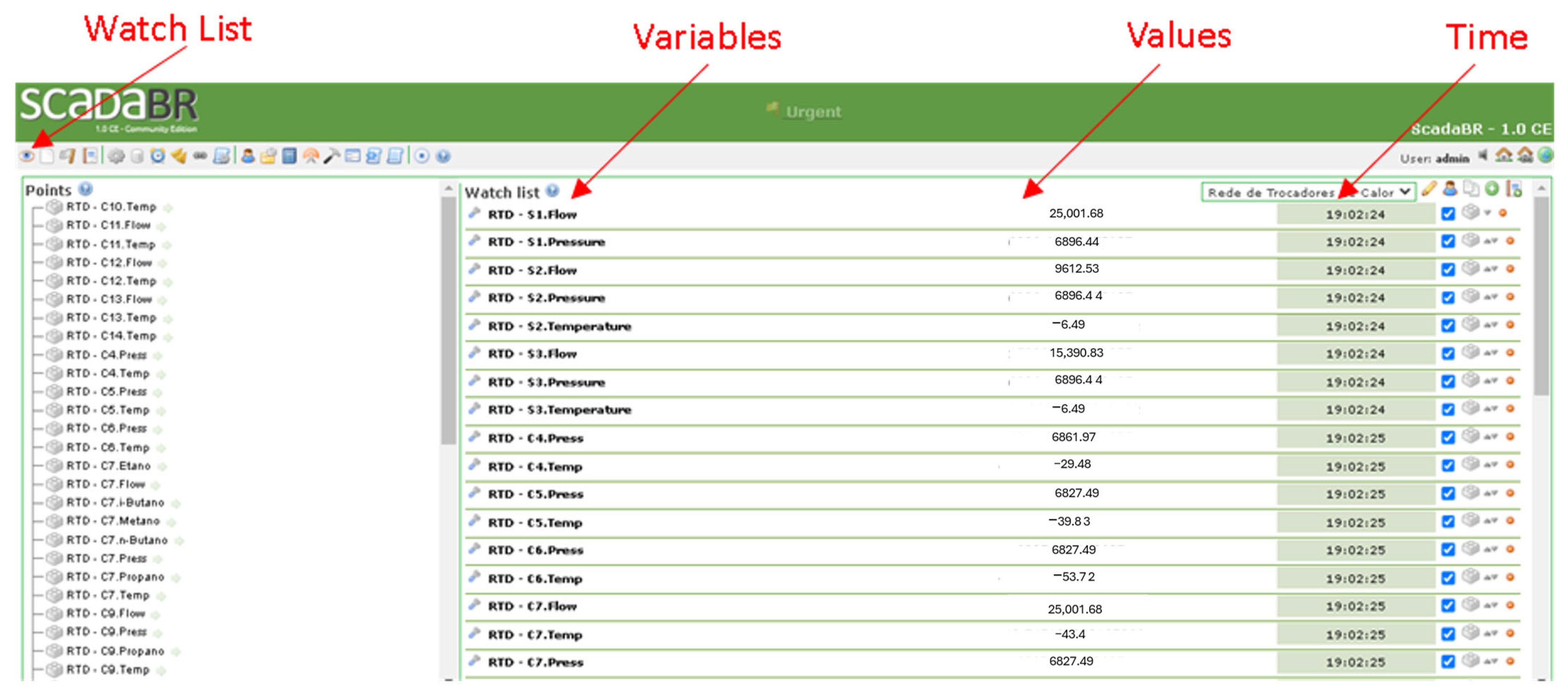
The watchlist displayed in
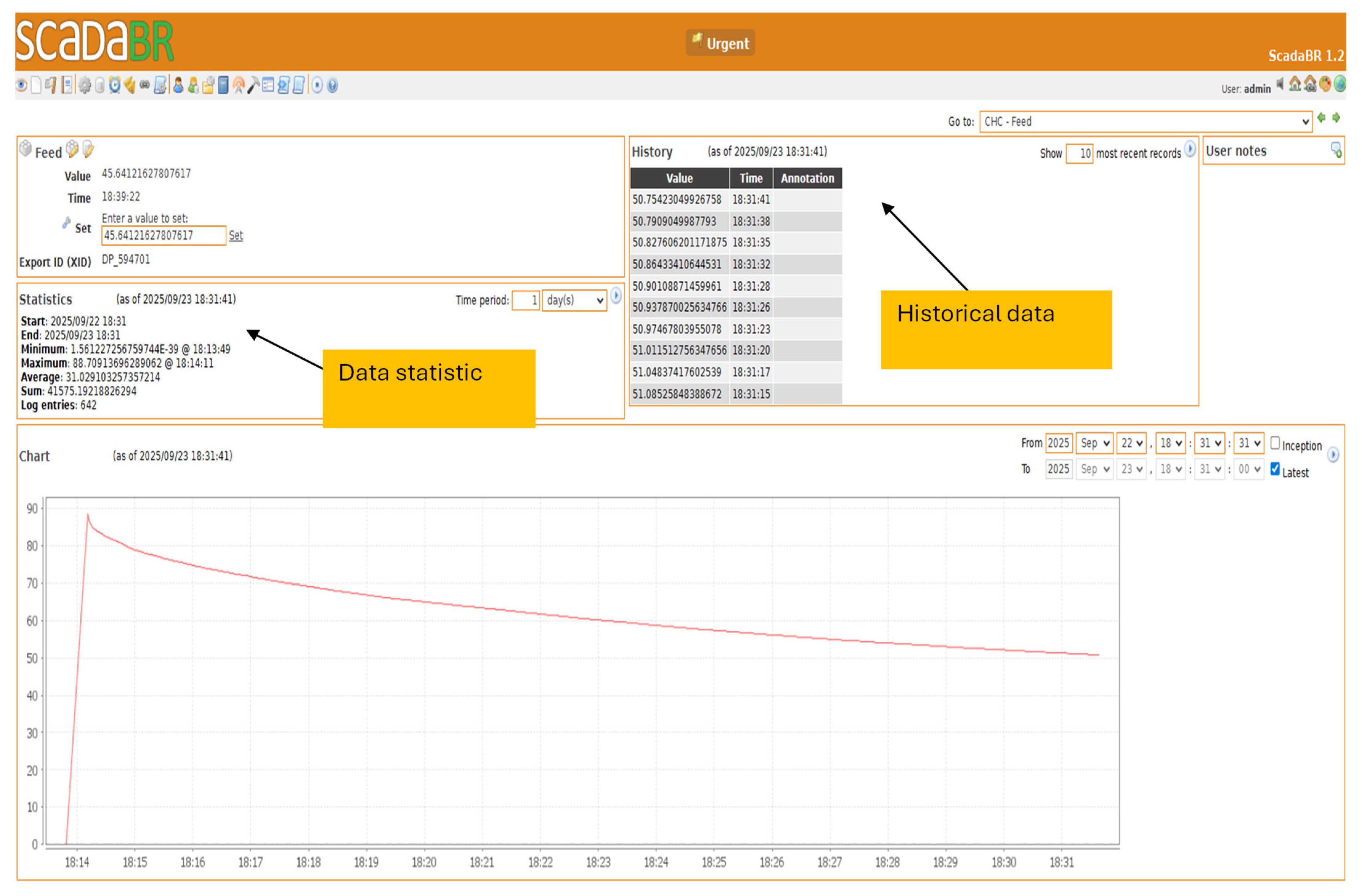
Figure 8 is the easiest way to monitor the values of the imported variables from the virtual CHC reactor. On the left-hand side of the screen, the data points for all variables present in the process are displayed. The right-hand panel allows users to visualize process variables in real time during process simulation. It is also possible to edit the watchlist by moving or removing data points from the main list. In addition, by selecting the “datapoint details” icon, users can visualize statistics, historical data, and graphs related to a specific variable, as shown in
Figure 9.
Figure 9 illustrates the typical behavior of a process variable (“Feed”) when it is selected in the watchlist. This screen enables users to view statistical data and historical records of the variable over a specified analysis period. The figure illustrates the decrease in the VGO mass fraction from an initial point. As previously presented, the VGO mass fraction decreases along the reactor according to the computed reaction rate.
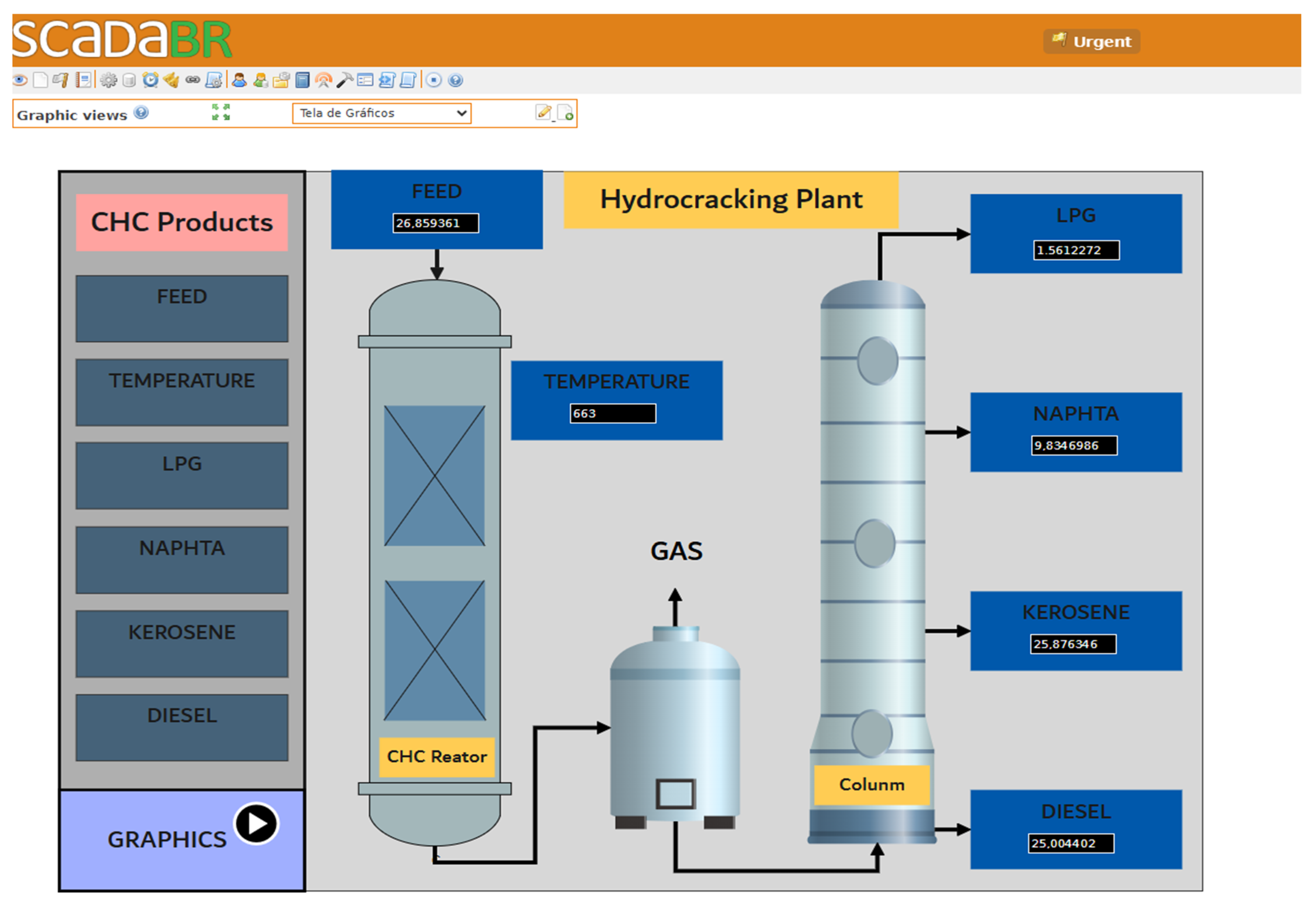
From the supervisory interface (
Figure 10), an operator can adjust the reactor temperature setpoint. On the left side of the screen in
Figure 10, it is possible to open the graphs related to the feed variables and the products of the CHC. On the right side of the screen, the representation of the main process can be observed, where the mass percentage values of the products can be visualized in real time.
4.2. Results of Case 2: Heat Exchanger Network
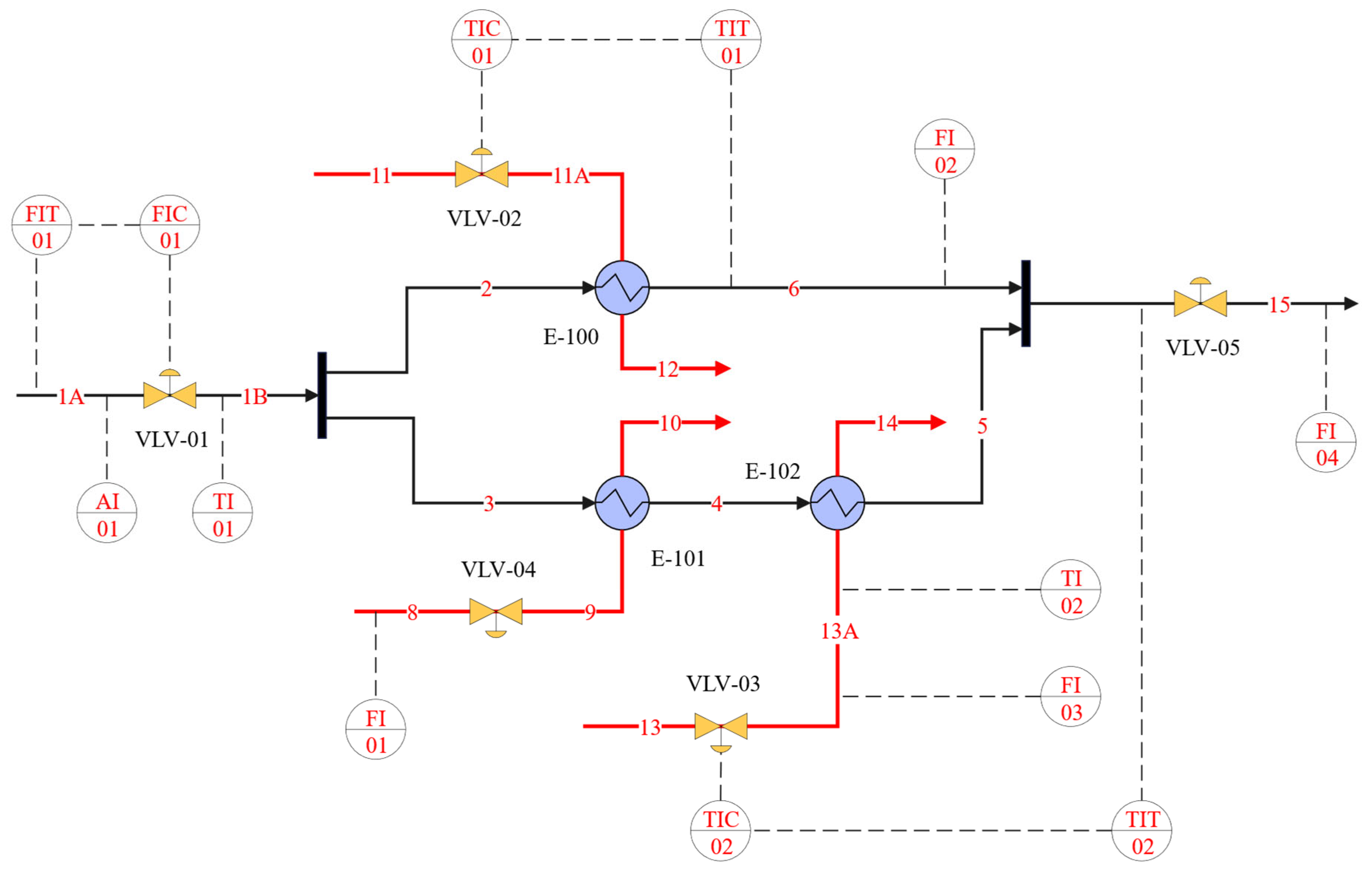
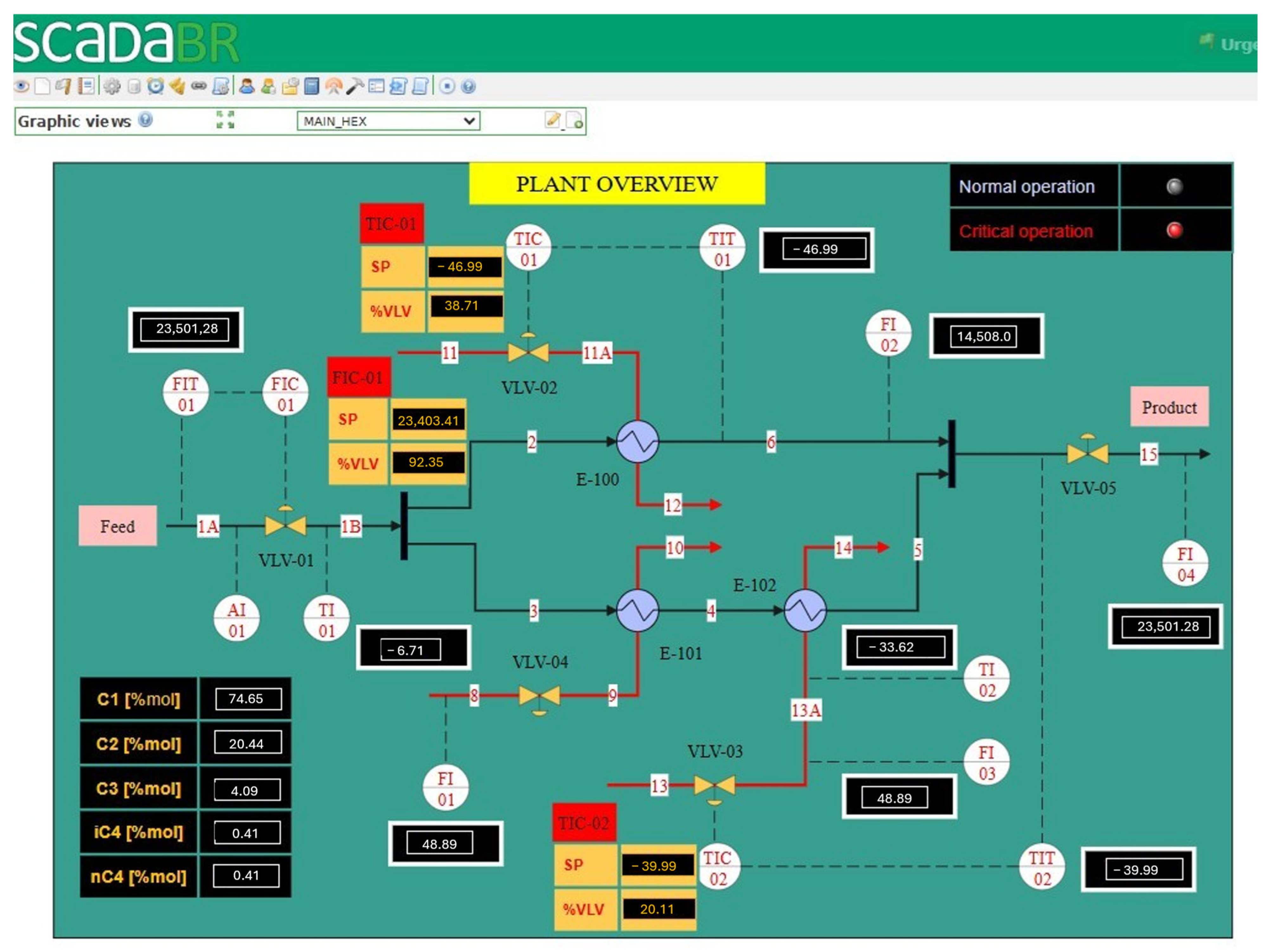
Figure 11 presents the Human–Machine Interface (HMI) of the ScadaBR system used to monitor and control the continuous process under study. The interface provides a high-level plant overview, integrating process equipment, instrumentation, control loops, and operational status indicators within a single supervisory environment. The process is represented by a diagram illustrating the material flow from the feed stream to the product outlet. Pipelines interconnect process units, and the flow direction is explicitly indicated. Real-time measurements of key process variables are displayed numerically, enabling continuous monitoring of plant performance. Temperature and flow variables are measured using temperature transmitters (TT) and flow transmitters (FT), respectively. Analytical measurements are provided by analyzer indicators (AI), which supply real-time information on process composition. This monitoring is supported by an online composition analysis panel, which reports the molar fractions of key components (C1, C2, C3, iC4, and nC4). Control actions are implemented via temperature and flow indicating controllers (TIC and FIC), each associated with a defined setpoint (SP). Several closed-loop control systems are implemented and visually identified by dashed connections between sensors, controllers, and final control elements. The control loops regulate critical process variables by manipulating control valves (VLV-01, VLV-02, VLV-03), with valve positions expressed as a percentage of the valve’s opening. In particular, the feed flow rate is regulated by a flow control loop (FIC-01), whereas the process thermal conditions are maintained by temperature control loops (TIC-01 and TIC-02). As the temperatures of streams 6 and 15 vary, the controllers TIC-01 and TIC-02 manipulate the flow rates of streams 11 and 13, respectively. The process also includes multiple heat exchangers (E-100, E-101, and E-102) that enable energy integration and temperature control across process streams. Operational status is communicated through visual indicators that differentiate normal and critical operating conditions. This alarm visualization strategy enhances situational awareness and supports timely operator intervention during process disturbances.
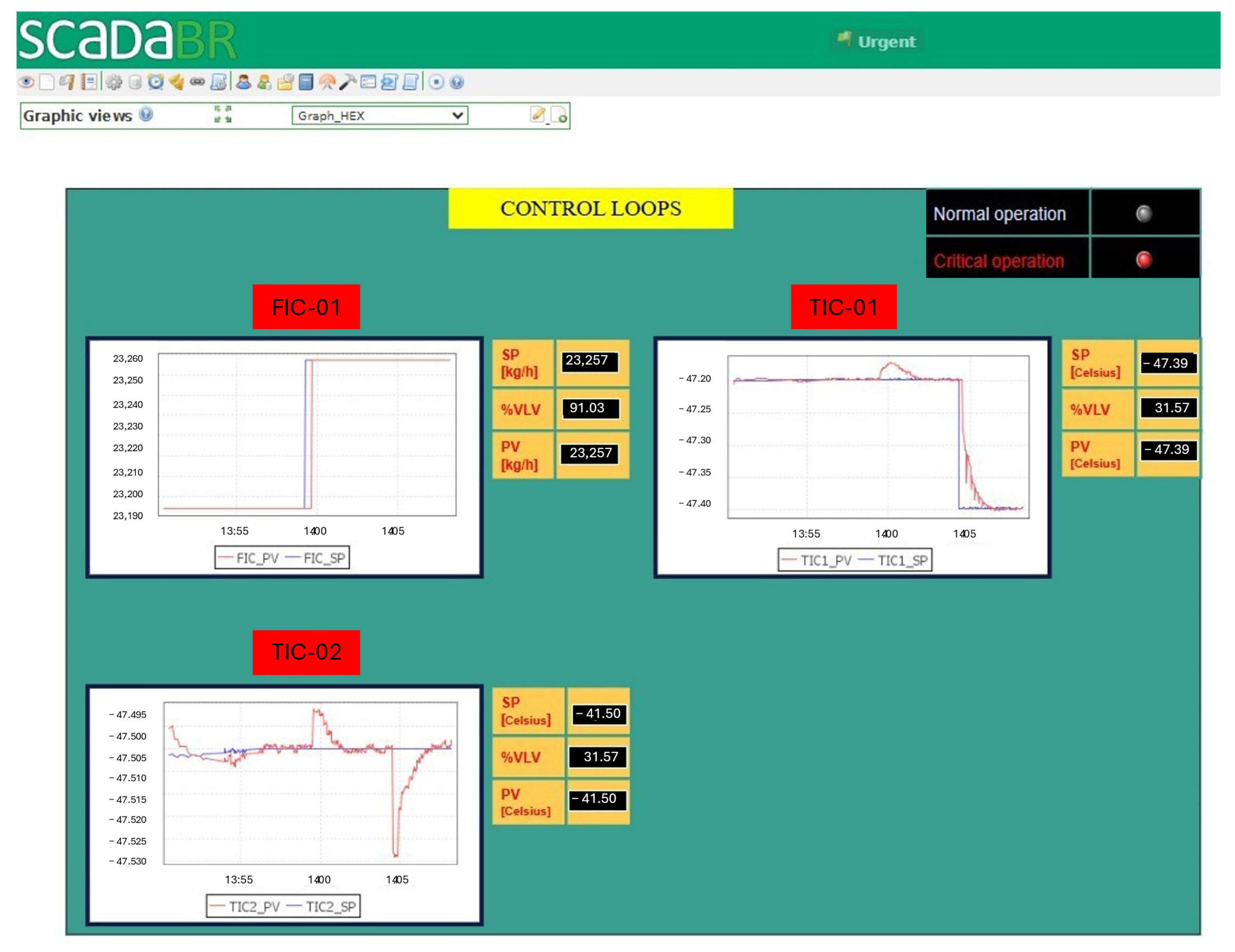
Figure 12 illustrates the supervisory interface designed for monitoring and performance analysis of closed-loop control systems. The control loops screen consolidates essential information required to evaluate controller behavior under dynamic operating conditions.
The interface displays multiple control loops concurrently, including a flow control loop (FIC-01) and two temperature control loops (TIC-01 and TIC-02). For each loop, time-domain plots of the process variable (PV) and the corresponding setpoint (SP) are presented, enabling direct assessment of setpoint tracking performance and disturbance rejection.
The displayed trends capture both transient and steady-state behaviors of the controlled variables, enabling identification of key performance characteristics such as response time, overshoot, stability, and steady-state error. Observable step changes in the set point facilitate comparative analysis of controller dynamics across different loops.
In addition to graphical trends, the interface provides real-time numerical values for the SP, PV, and the manipulated variable, represented as valve opening percentage (%VLV). This data supports a correlation between control actions and process responses, which is essential for controller tuning and diagnostic analysis.
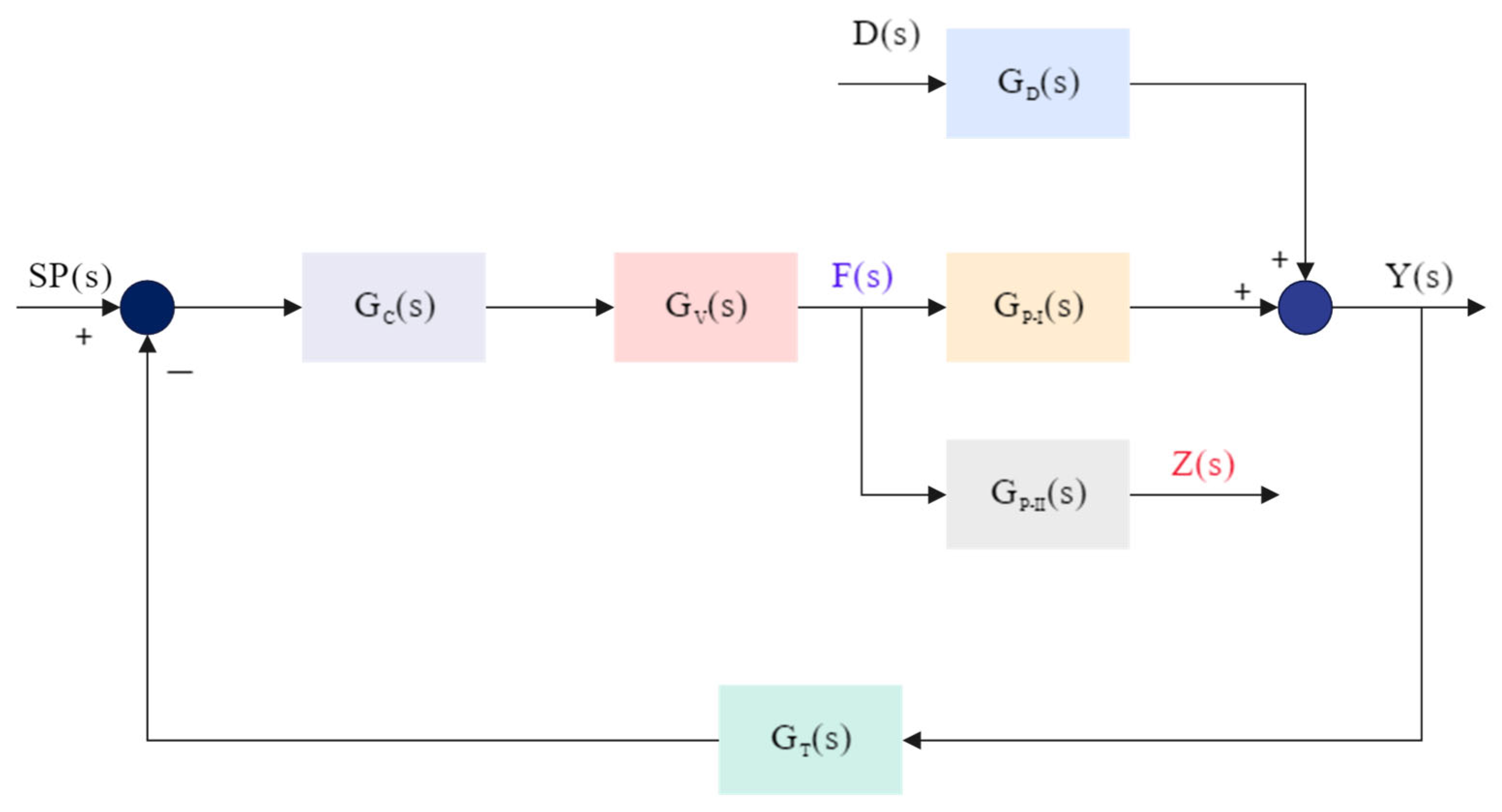
The control-loop performance shown in the previous figure is directly related to the PID controller tuning parameters for each loop: FIC-01, TIC-01, and TIC-02. These parameters include the proportional gain
, integral time
, and derivative time
. In
Figure 12, the FIC-01-SP and TIC-01-SP were modified at 14 h and 14 h 5 min, respectively.
In the FIC-01 (Flow Control Loop), the low proportional gain combined with the relatively large integral time , and the absence of derivative action results in a conservative controller. This leads to a smooth, stable response with minimal oscillations but a longer setting time.
In the TIC-01 (Temperature Control Loop 1), a moderate to high proportional gain , moderate integral time and a small but effective derivative time , this loop exhibits a faster response with improved damping. The derivative action anticipates the rate of change of the error, reducing overshoot and helping stabilize the control action. As a result, the temperature quickly approaches the set point with minimal overshoot, as evidenced by the corresponding time series.
In TIC-02 (Temperature Control Loop 2), the high proportional gain , combined with a small integral time , and a small derivative time , leads to an aggressive controller. The fast integral action rapidly eliminates steady-state error but can cause overshoot and oscillations due to increased controller sensitivity and the risk of integral windup. The corresponding graph confirms the rapid response with noticeable transient oscillations and overshoot before settling.
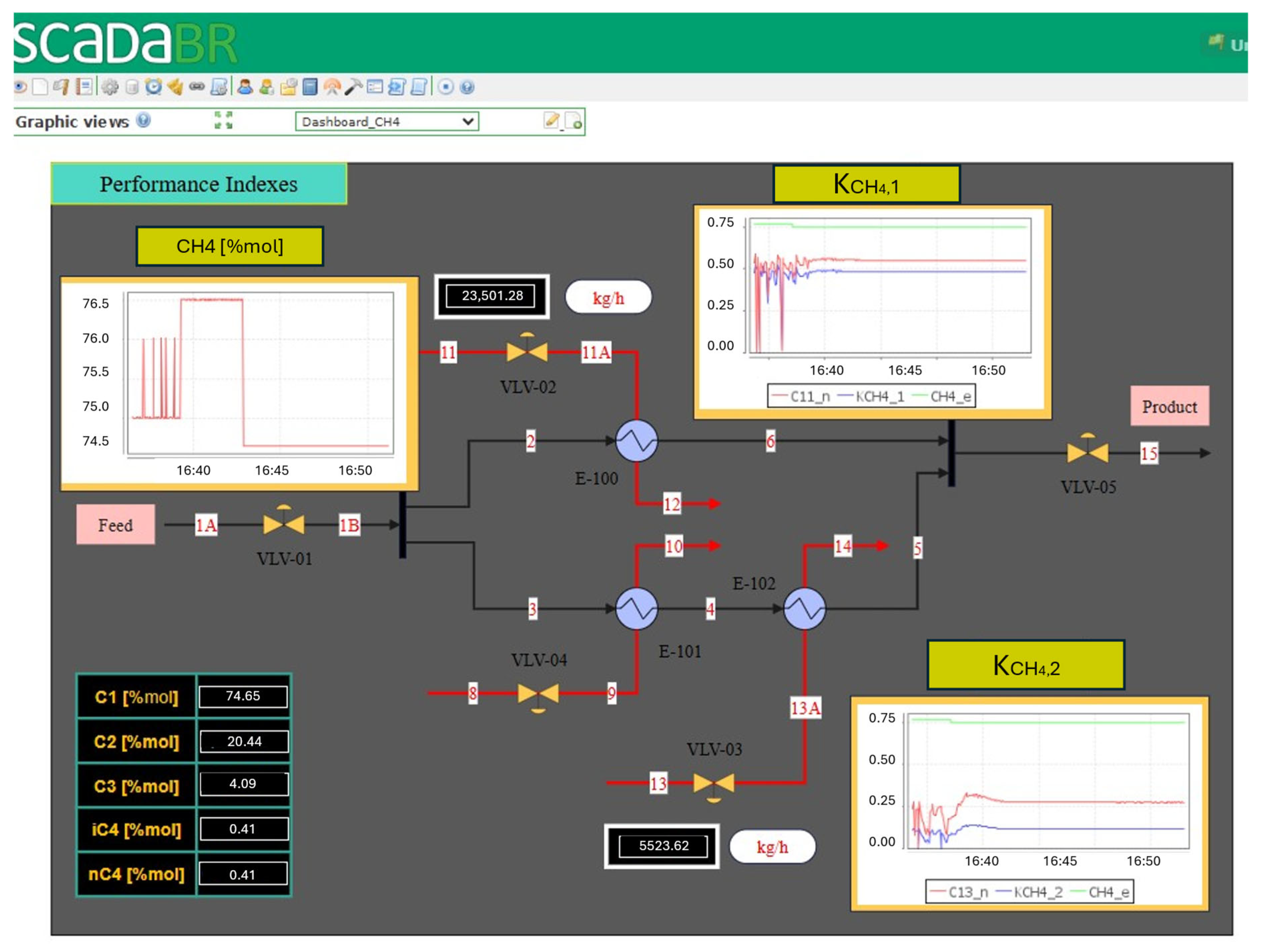
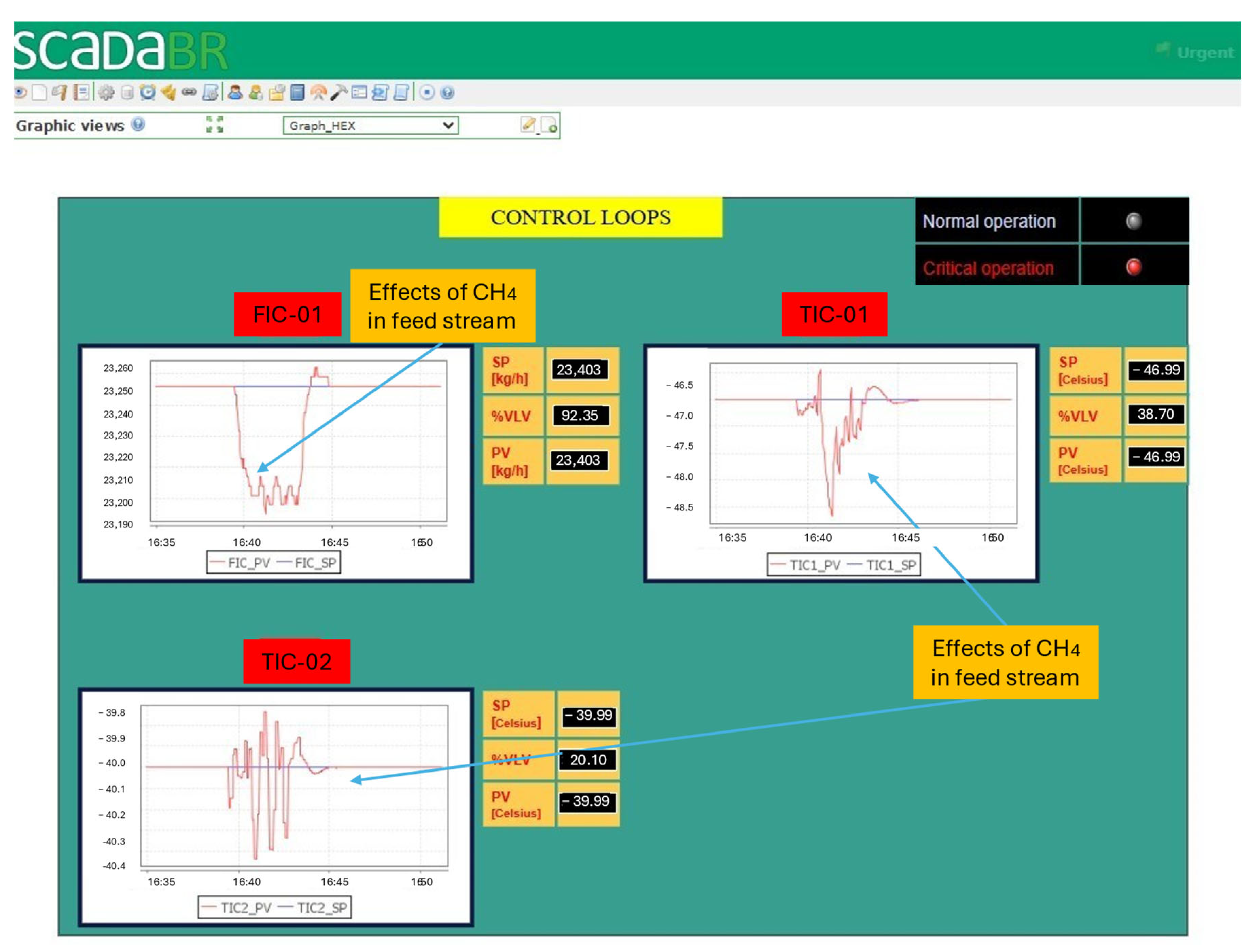
Monitoring of the
methane indices was also carried out and displayed on the dashboard shown in
Figure 13. Two graphs are used to monitor the molar flow rates of the cold utility streams and the molar percentage of methane in the inlet stream (1A). The results show that reducing the molar percentage of methane increases the indices
and
. This can be explained by the fact that the natural gas molar composition directly influences the thermal load required in heat exchangers E-100 and E-102, particularly when phase change occurs, as in the present case. A reduction in the molar fraction of methane, with a consequent increase in the proportion of heavier species (C
2, C
3), raises the dew point temperature of the hydrocarbon mixture. Therefore, in natural gas cooling systems where condensation may occur, a decrease in the methane molar fraction demands more thermal utility to cool the natural gas stream.
Figure 14 shows the correlation between the controlled variables FIC01, TIC01, and TIC02 and the molar fraction of methane at the inlet stream. Changes in the stream’s composition result in variations in the properties of the gas stream, including density, viscosity, and average molar mass. These properties directly affect the flow behavior and, consequently, the response of flow measurement and control devices. The results shown in
Figure 14 indicate that these disturbances affect the three controlled variables of the process; however, due to the action of the controllers, the variables return to their set-point values.
The results of this example demonstrate that it is feasible to integrate rigorous physical models with the ScadaBR system. This type of application can be helpful for both training and industrial applications. Despite this, the use of ScadaBR systems in large-scale industrial applications has not yet been reported in the literature. For large industrial applications, additional aspects must be addressed, such as: (i) robustness to handle systems with thousands of variables; (ii) cybersecurity; (iii) industrial compliance; and (iv) technical support. Regarding latency, our Modbus TCP integration using Python libraries (PyModbusTCP/pymodbus) demonstrated satisfactory performance for supervisory-level monitoring and set-point tracking in the simulated environment. However, we recognize that in high-speed or highly dynamic processes, the inherent delays in TCP/IP communication, sequential polling, and Python execution may affect real-time performance.
Processing power and large datasets are also relevant factors: the integration was tested on standard desktop hardware and was sufficient for the demonstration cases in HYSYS, but larger simulations with multiple interconnected units or high-frequency data acquisition could require more robust computing resources, such as multi-core processors and increased memory, to maintain responsiveness.
Finally, hardware constraints for real-world deployment should be considered: reliable network infrastructure, appropriate SCADA server capacity, and sufficient client devices are necessary to ensure stable operation. Despite these limitations, the study provides a foundation for future work. It demonstrates that open-source SCADA systems can effectively interface with process simulators, offering a cost-effective and flexible solution for education, research, and small industrial applications.
5. Conclusions
This work demonstrates the feasibility of an open-source, web-based supervisory monitoring and control platform that integrates dynamic process simulators with ScadaBR. Two cases were solved.
In the first case, a simplified dynamic kinetic model of a catalytic cracking process of VGO was developed in Python. This model simulates the evolution of the LPG, diesel, naphtha, and kerosene products along the reactor, with periodic updates to the SCADA system. The kinetic model has temperature as the independent variable, which can be adjusted via the ScadaBR dashboard. Tests showed that the ScadaBR system performed well, demonstrating stability and robustness in the communication and representation of its model.
In the second case study, a heat exchanger network simulated in HYSYS Dynamics demonstrated the system’s capability to monitor multi-loop PID control, track performance indices under varying feed conditions, and illustrate how changes in methane content affect cooling utility demand.
Indeed, by highlighting the first implementations of dynamic simulation, the work opens the way for future developments. For dynamic simulation, the next step is to integrate dynamic optimization algorithms with predictive control. Another essential point will be the implementation of dynamic machine-learning algorithms (black-box models) that leverage physical models. The tool could also be used to simulate extreme scenarios to predict unsafe process conditions.
Beyond technical validation, the platform offers significant educational and operational advantages. From an educational perspective, the tool offers an interactive digital-twin environment where students and operators can manipulate control variables and setpoints, such as FIC or TIC setpoints, and directly observe the resulting dynamic responses of the process and associated performance indices (e.g., KPCH4). This feature facilitates experiential learning by enabling users to investigate cause-and-effect relationships, control-loop interactions, and transient behaviors that cannot be illustrated in static simulations or steady-state analysis. It improves comprehension of process dynamics, control performance, and operational trade-offs, thereby increasing the platform’s value for training and academic instruction.
Future work will focus on expanding the framework to more complex systems (e.g., dynamic distillation columns), incorporating machine learning for predictive analytics, and enhancing the dashboards with features such as mobile notifications and multi-user collaboration.