



Mobile Application for Online Control and Booking of Free Parking Spots

Abstract
1. Introduction
2. Related Apps for Parking
3. Architecture of the Developed Mobile App
3.1. Base Architecture
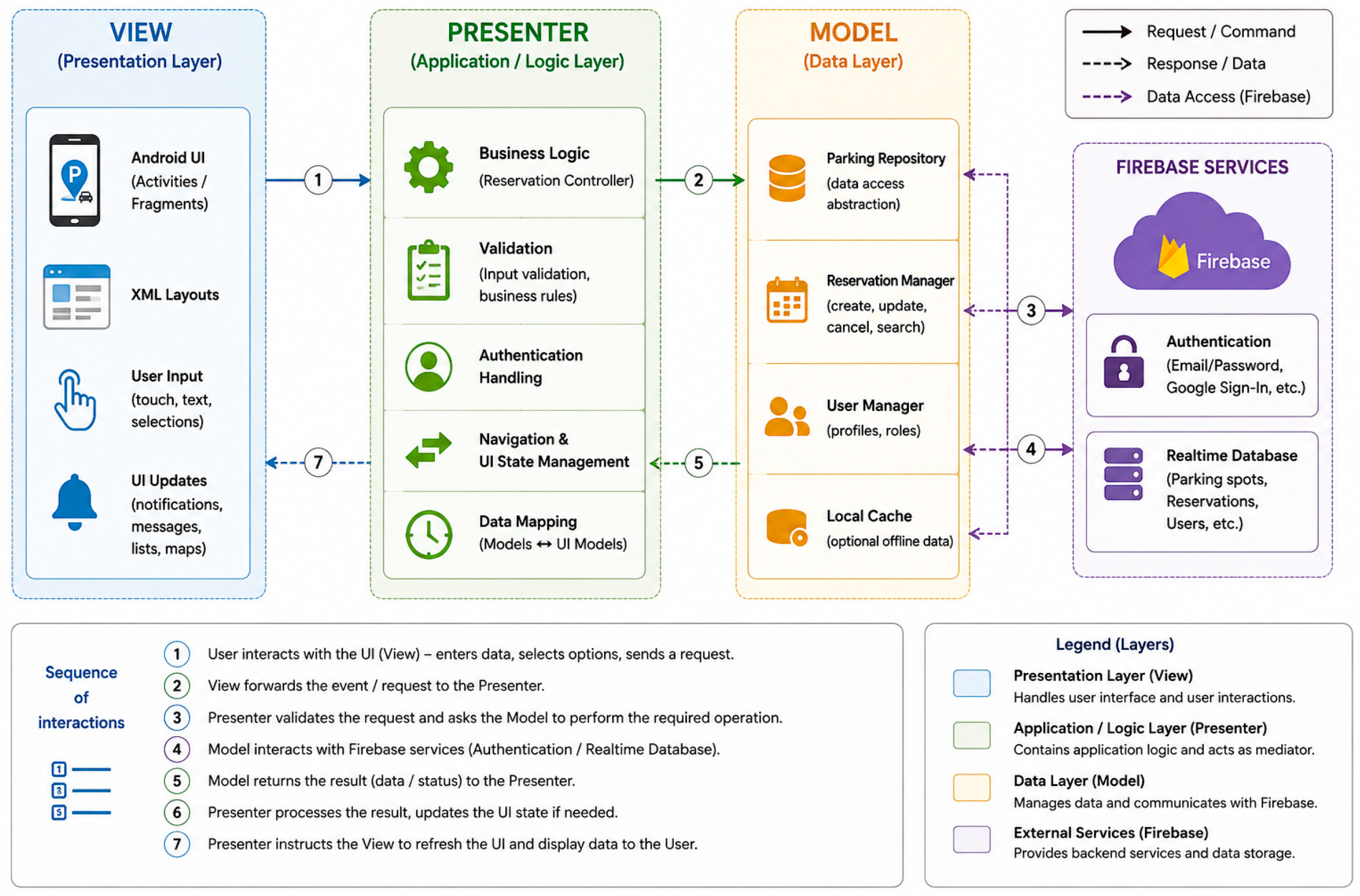
- Model: This controls the data, structures, and internal logic of the application. In Parky, the model is responsible for processing and storing data related to users, parking spots, and books. Data is synchronized in real time via the Firebase database, ensuring consistency and security.
- View: This represents the visualization of the information and the application’s user interface. In Parky, this is implemented using XML, which enables the visualization of login and registration forms and user profiles, searching for and booking parking spots, and other functionalities. The user interface is responsible for ensuring a pleasant user experience.
- Presenter: This receives input data from the user and converts it into commands for the Model or View. In Parky, the Presenter controls the interactions between the user and the application by processing user actions (such as booking and parking recommendations) and ensuring that the View is updated in response to changes in the data.
3.2. Functions Implemented
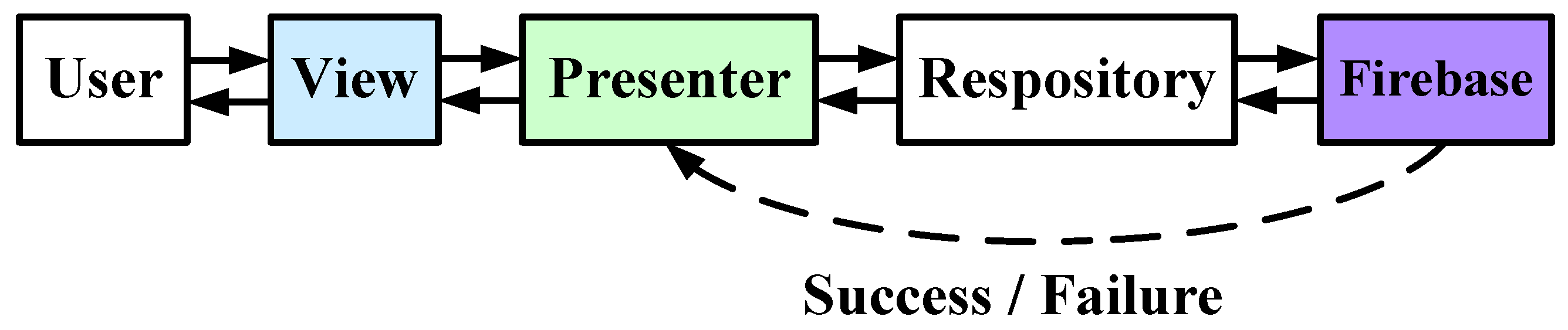
- User: The user initiates the process by submitting a booking request (Request Booking).
- Frontend: This receives the request from the user and sends an HTTP POST request to the server (FindParkingDetailsActivity) with the path “/reserve”.
- FindParkingDetailsActivity: This is responsible for processing requests. It calls the checkAvailability() method in the data model (ParkingSlotModel) to check the availability of parking spots.
- ParkingSlotModel: This processes the availability check request and returns a response to FindParkingDetailsActivity, indicating whether or not there are available spots in the parking lot.
- FindParkingDetailsActivity: Based on the response from ParkingSlotModel, FindParkingDetailsActivity calls the saveReservation() method in the Firebase database to save the booking if spots are available.
- FirebaseDatabase: This stores the booking information and returns a response to FindParkingDetailsActivity, indicating whether the operation was successful or not.
- FindParkingDetailsActivity: After receiving a response from FirebaseDatabase, FindParkingDetailsActivity returns the result (TRUE or FALSE) to the frontend.
- Frontend: It returns the result and displays the booking status to the user (Show Reservation Status).
4. Software Implementation
- ConstraintLayout: This is one of the main components used in the application. It is used to arrange visual elements. It enables flexible and efficient positioning of elements, allowing constraints to be defined between them. This results in an adaptive and dynamic user interface. It also simplifies the support and expansion of the application by ensuring that images are resized on different devices with varying screen sizes.
- ImageView and TextView: These are the main display components in the app. ImageView is used to display graphical resources such as images of parking spots or icons, while TextView is used to display text information such as parking spot names, contact information, and other details. The LinearLayout feature is used to arrange multiple elements vertically or horizontally. This ensures a clear structure and consistency in the layout of the content on the screen.
- Menu XML files define the navigation options available to the user within the app. They contain various navigation elements such as profile, feedback, password change, parking search, and others, providing quick access to the app’s main functions. The menu is easy to customize and offers convenient and intuitive navigation.
- AppCompatButton: This is a function for creating buttons. It allows users to make recommendations regarding parking, bookings, and navigation.
- Business logic and data control with Java: Java is used to implement the application’s core business logic, such as processing bookings, customer data control, parking recommendations, and navigation. Java classes are responsible for processing user input, interacting with the user interface, and performing operations such as monitoring available parking spots and creating notifications.
- Users’ sessions control: The connection to Firebase is implemented in Java using Firebase Authentication (FirebaseAuth), which provides secure access to the application and control of user sessions. Through FirebaseAuth, users can register, log in, and maintain a secure session while interacting with the application.
- Data storage and real-time synchronization: The Firebase Realtime Database is integrated into the application via Java to provide data storage and data control, such as parking spot information, bookings, recommendations, and user data. Any changes to the data are synchronized in real time between client devices and the Firebase database, ensuring that users always have access to up-to-date information. Java classes handle communication with Firebase and perform the necessary operations for updating and extracting data.
- Event processing and notifications: Java is also responsible for processing user events and generating in-app notifications. For example, when a user books a parking spot, Java classes update the relevant data in Firebase and generate in-app notifications to inform the user that the operation was successful.
- Connectivity control: The app uses Java to control Internet connectivity and check for an active connection before performing operations that require communication with Firebase. This is an important aspect of ensuring the app works reliably and correctly, especially for operations that require access to real-time data.
- Request Book: Specify the starting point where the user submits a booking request.
- HTTP POST/book: The request sent from the frontend to FindParkingDetailsActivity to start the booking process.
- checkAvailability(): A function in the data model that checks whether parking spots are available.
- saveReservation(): A function that saves the booking in the database if available spots exist.
- Show Book Status: The final step, where the booking confirmation is sent to the user.
- MainPages: This section contains data on the main pages in the app, such as the password reset and feedback.
- ParkingSlots: This part of the DB contains information on all available parking spots. The following data is stored for each parking spot:
- Contact: The phone number to contact the parking spot.
- Email: The user’s email address associated with a specific parking spot.
- Latitude and Longitude: The geographic coordinates of the parking spot, used for map display and navigation.
- Name: The name of the parking spot.
- ParkingImage: An image associated with the parking spot, displayed in the user interface.
- Prices: The pricing information for the parking spot.
- SelectedPrice: The price selected by the user to reserve the parking spot.
- Status: The current status of the parking spot (e.g., “Available”).
- UsedId: The unique ID of the user who reserved the parking spot.
- Users: This section stores information about the app’s registered users. For each user, a unique identifier and personal data—such as email address, name, age, vehicle type, vehicle model, and registration number—are stored and used to control profiles and reservations.
- Users and ParkingSlots: The relationship between these two entities allows parking spots to be linked to specific users, such as by reserving selected or recommended parking spots for a given user.
- Users and Feedback: Every piece of feedback or rating provided by a user is linked to a specific user through the user ID. This allows for the personalization of the collected feedback.
- Users and ChangePassword: Every password change is linked to a specific user, with information about the old and new passwords stored by the application.
- Real-time storage and control of big data, even with a large number of users.
- Fast access to and processing of information that is updated and synchronized in real time.
- Protect data through built-in access control mechanisms.
- Database scalability as the number of users increases.
- Statistical processing of data in the database, such as the number of active users per day, helps analyze user behavior and optimize the application’s performance.
- Ability to integrate with other Google services and platforms, simplifying the expansion of the application’s functionalities.
- A high level of security and resilience against hacker attacks, since once a password is hashed, the original password cannot be easily recovered from the generated hash code.
- Every time a password is changed, both the current and the new passwords are hashed before being stored in the database. This ensures password protection even in the event of unauthorized access to the database.
- Access to the database is restricted and protected using a unique user identifier (user ID) to link user data to their identity. This provides an additional layer of security and control over access to information.
5. Results of Workability Tests
- Tests 1, 2, 3: This feature provides the application’s base functionality related to user authentication. Logging in requires entering valid credentials, and logging out terminates the active session.
- Test 4: This test verifies whether the user can successfully submit feedback through the app. A successful test indicates that communication between users and the support team is functioning properly.
- Test 5: The system checks whether the user can successfully book a parking spot. Passing this test indicates that the app is communicating correctly with the database and updating the available parking spots.
- Test 6: The system checks whether the user can recommend a parking spot. A successful test means that the recommendation function works properly and that data is stored and shared correctly.
- Test 7: The system checks whether a user can both book and recommend a parking spot. Successful completion of this test indicates that the system can perform both actions without any conflicts.
- Test 8: The test verifies whether the app displays the recommended parking spots to the user. Passing this test indicates that the app correctly displays and filters the recommendations.
- Test 9: The test checks whether the user can view the history of all their previous bookings. A successful test confirms that the app correctly stores and retrieves data on previous bookings.
6. Discussion
7. User Evaluation and Experimental Validation
7.1. Evaluation Methodology
7.2. Participants and Sampling
7.3. Test Procedure
7.4. Asked Questions
7.5. Statistical Analysis
8. Conclusions
Funding
Data Availability Statement
Conflicts of Interest
Abbreviations
| DB | Database |
| ITS | Intelligent Transportation System |
| IoT | Internet of Things |
| MVP | Model–View–Presenter |
| RFID | Radio Frequency IDentification |
| XML | Extensible Markup Language |
References
- Foth, M. Handbook of Research on Urban Informatics: The Practice and Promise of the Real-Time City; IGI Global: Hershey, PA, USA, 2009. [Google Scholar]
- Song, H.; Srinivasan, R.; Sookoor, T.; Jeschke, S. Smart Cities: Foundations, Principles and Applications; John Wiley & Sons: Hoboken, NJ, USA, 2017. [Google Scholar]
- Bıyık, C.; Allı, H.; Arslan, A.; Coşkun, E. Smart parking systems: Reviewing the literature, architecture and ways forward. Smart Cities 2021, 4, 623–642. [Google Scholar] [CrossRef]
- Douglas, M.; Luke, R.; Twinomurinzi, H.; Mageto, J. From concepts to connectivity: A systematic review of smart mobility antecedents and impacts. Technol. Forecast. Soc. Change 2026, 228, 124684. [Google Scholar] [CrossRef]
- Kotb, A.O.; Shen, Y.C.; Zhu, X.; Huang, Y. Smart parking guidance, monitoring and reservations: A review. IEEE Intell. Transp. Syst. Mag. 2017, 9, 6–16. [Google Scholar] [CrossRef]
- Chowdhury, M.A.; Sadek, A.W. Fundamentals of Intelligent Transportation Systems Planning; Artech House: Norwood, MA, USA, 2003. [Google Scholar]
- Bahga, A.; Madisetti, V. Internet of Things: A Hands-on Approach; Universities Press: Hyderabad, India, 2014. [Google Scholar]
- Kamal, R. Mobile Computing, 3rd ed.; Oxford University Press: New Delhi, India, 2017. [Google Scholar]
- Fahim, A.; Hasan, M.K.; Chowdhury, M.T. Smart parking systems: Comprehensive review based on various aspects. Heliyon 2021, 7, e07050. [Google Scholar] [CrossRef] [PubMed]
- Díaz Ogás, M.; Fabregat, R.; Aciar, S.; Juiz, C. A survey of smart parking systems. Appl. Sci. 2020, 10, 3872. [Google Scholar] [CrossRef]
- Zhang, X.; Pitera, K.; Wang, Y. Parking reservation techniques: A review of research topics, considerations, and optimization methods. J. Traffic Transp. Eng. (Engl. Ed.) 2023, 10, 1099–1117. [Google Scholar] [CrossRef]
- Becerra-Moreno, J.; Hurtado-Beltran, A.; Domínguez-Mota, F.J.; Guerra, A. Evaluation Approaches and Indicator Architectures for Smart Urban Mobility in Smart City Contexts: A Review. Future Transp. 2026, 6, 113. [Google Scholar] [CrossRef]
- Parkopedia Ltd. For Android: Ver. 3.2.0.5. Available online: https://parkopedia.en.uptodown.com/android (accessed on 15 January 2025).
- ParkMe, INRIX, Inc. For Android: Ver. 2.0.49. Available online: https://parkme.en.uptodown.com/android#google_vignette (accessed on 5 June 2026).
- JustPark Parking. For Android: Ver. 3.170.2. Available online: https://justpark.en.uptodown.com/android#google_vignette (accessed on 2 July 2026).
- EasyPark AS. For Android: Ver. 3.170.4. Available online: https://apps.apple.com/us/app/parkme-parking/id417605484 (accessed on 10 July 2026).
- Syromiatnikov, A.; Weyns, D. A Journey through the Land of Model-View-Design Patterns. In Proceedings of Working IEEE/IFIP Conference on Software Architecture 2014 (WICSA 2014); IEEE: New York, NY, USA, 2014. [Google Scholar] [CrossRef]
- Cheng, Y.; Domingues, A.O. Advanced Android App Architecture, Real-world app architecture in Kotlin 1.3. In Android 9, Android Studio 3.2, 1st ed.; 2026; 404p, Available online: https://dokumen.pub/advanced-android-app-architecture-real-world-app-architecture-in-kotlin-13.html (accessed on 7 June 2026).
- Mainkar, P. Expert Android Programming, Master Skills to Build Enterprise Grade Android Applications; O’Reilly Media: Sebastopol, CA, USA; Packt Publishing: Mumbai, India, 2017. [Google Scholar]
- Smyth, N. Android Studio Otter Essentials—Java Edition: Developing Android Apps Using Android Studio Otter and Java, 1st ed.; Payload Media: Cary, NC, USA, 2025; 692p. [Google Scholar]
- Forrester, A.; Boudjnah, E.; Dumbravan, A.; Tigcal, J. How to Build Android Applications with Kotlin: A Hands-On Guide to Developing, Testing, and Publishing Production-Grade Android 16 Apps, 3rd ed.; O’Reilly Media: Sebastopol, CA, USA; Packt Publishing: Mumbai, India, 2025; 654p. [Google Scholar]
- Darcey, L.; Conder, S. Android Wireless Application Development; Addison-Wesley Professional: Reading, MA, USA, 2012. [Google Scholar]
- Gookin, D. Guide to XML and JSON, 1st ed.; Programming: Boston, MA, USA, 2019; 107p. [Google Scholar]
- Mayers, D.S. Data Structures and Algorithms in Java: A Project-Based Approach, 1st ed.; Cambridge University Press: Cambridge, UK, 2024. [Google Scholar]
- Ashok Kumar, S. Mastering Firebase for Android Development: Build Real-Time, Scalable, and Cloud-Enabled Android Apps with Firebase, 1st ed.; O’Reilly Media: Sebastopol, CA, USA; Packt Publishing: Mumbai, India, 2018; 394p. [Google Scholar]
- Ferrando, P.J.; Morales-Vives, F.; Casas, J.M.; Muñiz, J. Likert Scales: A Practical Guide to Design, Construction and Use, 1st ed.; Psicothema: Oviedo, Spain, 2025; Volume 37, pp. 1–15. [Google Scholar] [CrossRef]



| № | Functionalities | Benchmark Test | Comparison Criteria | Status | Bugs |
|---|---|---|---|---|---|
| 1 | The app serves as an entry and exit for the users. | Test 1 | Check whether the user successfully logs in to the system when entering the correct data. | Passed the tests. | - |
| Test 2 | Check whether an error is generated when invalid data is entered. | ||||
| Test 3 | Check whether, when the exit button is pressed, the users are logged out of the app and their session is terminated. | ||||
| 2 | The app sends feedback. | Test 4 | Check whether the user can submit feedback through the app. | Passed the test. | - |
| 3 | The app books a parking spot. | Test 5 | Check whether the user can book a parking spot through the app. | Passed the test. | - |
| 4 | The app recommends a parking spot. | Test 6 | Check whether the user can recommend a parking spot through the app. | Passed the test. | - |
| 5 | The app both recommends and books parking spots. | Test 7 | Check whether the user can both book and recommend a parking space. | Passed the test. | - |
| 6 | The app visualizes recommended parking spots. | Test 8 | Check whether the app visualizes the recommended parking spots to the user. | Passed the test. | - |
| Feature | Parky | Parkomedia | ParkMe | JustPark | EasyPark |
|---|---|---|---|---|---|
| Search for parking facilities | ✓ | ✓ | ✓ | ✓ | ✓ |
| Parking reservation | ✓ | ✓ | ✗ | ✓ | ✗ |
| Recommendation of parking spots | ✓ | ✗ | ✗ | ✗ | ✗ |
| Parking availability information | ✓ | ✓ | ✓ | ✗ | ✗ |
| Navigation to parking location | ✓ | ✓ | ✓ | ✗ | ✓ |
| Parking fee information | ✓ | ✗ | ✓ | ✗ | ✓ |
| Reservation history | ✓ | ✗ | ✗ | ✗ | ✗ |
| Parking ratings | ✓ | ✗ | ✗ | ✗ | ✗ |
| Contact information | ✓ | ✗ | ✗ | ✗ | ✗ |
| Direct phone call | ✓ | ✗ | ✗ | ✗ | ✗ |
| Cloud database synchronization | ✓ | ✗ | ✗ | ✗ | ✗ |
| Designed for Bulgarian parking infrastructure | ✓ | ✗ | ✗ | ✗ | ✗ |
| Integrated parking management platform | ✓ | ✗ | ✗ | ✗ | ✗ |
| Characteristic | Categories |
|---|---|
| Age | 18–29; 30–44; 45–59; 60+ |
| Place of residence | Sofia; Plovdiv; Varna; Burgas; Blagoevgrad |
| Driving experience | Less than 2 years; 2–10 years; more than 10 years |
| Driving frequency | Daily; several times per week; occasionally |
| Smartphone proficiency | Basic; Intermediate; Advanced |
| Previous use of parking applications | Yes; No |
| № | Statement | Aspect |
|---|---|---|
| Q1 | The application was easy to learn. | Learnability |
| Q2 | The main functions were easy to find. | Navigation and interface clarity |
| Q3 | The information displayed on the screen was clear and understandable. | Understandability |
| Q4 | The text, icons, and buttons were easy to read and recognize. | Visual clarity |
| Q5 | I was able to search for a parking facility without assistance. | Effectiveness |
| Q6 | The parking reservation process was clear and straightforward. | Task efficiency |
| Q7 | I completed the reservation process in a reasonable amount of time. | Efficiency |
| Q8 | The information about availability, fees, and location was sufficient. | Information quality |
| Q9 | The recommendations and user ratings were useful when selecting a parking facility. | Recommendation usefulness |
| Q10 | The navigation function helped me reach the selected parking facility. | Functional usefulness |
| Q11 | The reservation history was useful for managing bookings. | Reservation management |
| Q12 | The application functions were well integrated. | Functional integration |
| Q13 | I felt confident while using the application. | User confidence |
| Q14 | I would use Parky when searching for and reserving parking. | Intention to use |
| Q15 | Overall, I was satisfied with the application. | Overall satisfaction |
| Q16 | The application was unnecessarily complicated to use. | Reverse-scored item |
| Evaluation Criterion | Related Question(s) | Mean | Standard Deviation | Positive Responses, % (Scores 4 and 5) |
|---|---|---|---|---|
| Learnability | Q1 | 4.95 | 0.28 | 98.7 |
| Navigation | Q2, Q10 | 4.78 | 0.35 | 94.6 |
| Interface clarity | Q3, Q4 | 4.87 | 0.41 | 96.1 |
| Parking search | Q5 | 4.93 | 0.56 | 95.3 |
| Reservation process | Q6, Q7 | 4.98 | 0.64 | 97.8 |
| Information quality | Q8 | 4.48 | 0.80 | 52.3 |
| Recommendation usefulness | Q9 | 4.76 | 0.74 | 82.1 |
| Reservation management | Q11 | 4.82 | 0.68 | 79.7 |
| Functional integration | Q12 | 4.88 | 0.11 | 97.5 |
| User confidence | Q13 | 4.76 | 0.51 | 78.3 |
| Intention to use | Q14 | 4.83 | 0.25 | 97.9 |
| Overall satisfaction | Q15 | 4.95 | 0.28 | 99.1 |
Disclaimer/Publisher’s Note: The statements, opinions and data contained in all publications are solely those of the individual author(s) and contributor(s) and not of MDPI and/or the editor(s). MDPI and/or the editor(s) disclaim responsibility for any injury to people or property resulting from any ideas, methods, instructions or products referred to in the content. |
© 2026 by the author. Licensee MDPI, Basel, Switzerland. This article is an open access article distributed under the terms and conditions of the Creative Commons Attribution (CC BY) license.
Share and Cite
Filipova-Petrakieva, S. Mobile Application for Online Control and Booking of Free Parking Spots. Technologies 2026, 14, 448. https://doi.org/10.3390/technologies14070448
Filipova-Petrakieva S. Mobile Application for Online Control and Booking of Free Parking Spots. Technologies. 2026; 14(7):448. https://doi.org/10.3390/technologies14070448
Chicago/Turabian StyleFilipova-Petrakieva, Simona. 2026. "Mobile Application for Online Control and Booking of Free Parking Spots" Technologies 14, no. 7: 448. https://doi.org/10.3390/technologies14070448
APA StyleFilipova-Petrakieva, S. (2026). Mobile Application for Online Control and Booking of Free Parking Spots. Technologies, 14(7), 448. https://doi.org/10.3390/technologies14070448