1. Introduction
Early prototyping, clear stakeholder communication, and effective visualisation of data and artefacts have all been shown to positively impact design and engineering outcomes [
1,
2,
3]. Despite this, current manufacturing systems are primarily designed using traditional methods, which often involve 2D CAD drawings, physical prototypes, and long lead times for adjustments [
4,
5]. These traditional approaches typically occur in siloed environments, where designers, engineers, and end-users do not have a unified, real-time platform for collaboration and are dissociated from the actual manufacturing site, making it harder to understand and account for on-the-ground realities [
3]. Furthermore, manufacturing systems are complex installations, and equipment may be particularly large or small, potentially impeding comprehension and collaboration between cross-disciplinary stakeholders. To address these issues and support future-facing manufacturing design as part of Industry 4.0, XR technologies offer promising avenues to overcome these limitations by providing immersive environments for design, collaboration, and visualisation [
6]. In particular, XR prototyping enables users to better understand spatial complexities and iterate on designs more efficiently than traditional methods [
7].
The field of XR prototyping encompasses a wide range of approaches in which designers create samples or models using XR display devices to test concepts, aiming for a more lifelike and intuitive experience than traditional CAD tools [
8]. These approaches vary significantly in both display modality and creation workflow. For example, some methods leverage readily available screen-based displays like monitors or smartphones for partially immersive AR experiences, while others use Head-Mounted Displays (HMDs) to offer users more deeply immersive virtual environments for design and interaction. Moreover, the methods of creation are equally varied—from prototypes developed from physical-based references such as paper sketches or 3D sculptures that are then digitised and manipulated, to the rapid assembly of preset virtual model blocks, or starting from a blank virtual canvas where users can freely sketch, sculpt, or construct 3D forms. Despite this breadth, and although previous work strongly motivates the use of XR technology to facilitate manufacturing design and simulate complex systems, many approaches are designed for a specific application [
2,
9,
10,
11] or solely to facilitate immersion into these systems [
3,
12], rather than collaborative prototyping and construction among stakeholders with different expertise. Consequently, a gap remains for generalisable frameworks that support collaborative prototyping and the construction of diverse manufacturing systems by stakeholders with differing expertise.
To address this gap, we developed the ARTIFY XR framework, which combines an immersive environment with a set of novel abstract and reconfigurable engineering building blocks. The use of an immersive XR environment facilitates collaboration between local and remote stakeholders and allows for scale manipulation, enabling users to oversee or walk through the modelled installation—a capability motivated by previous work [
7]. Central to ARTIFY is its set of reconfigurable engineering building blocks, whereby users can model the logic of a manufacturing system by placing and connecting these blocks. These blocks can be adapted to different manufacturing contexts through simple text-based semantic reconfiguration, granting flexibility that is similar to paper prototyping. Furthermore, the system allows for dynamic interaction, which enables users to observe the modelled production process step-by-step and adjust the scale for different perspectives. We hypothesise that the potential implications of such a framework include enhanced spatial understanding for stakeholders, improved communication in cross-disciplinary teams, and more agile design iterations for manufacturing systems. This study focuses on validating the usability of the system as a necessary first step toward testing these effectiveness hypotheses.
Beyond manufacturing, the principles of abstract, reconfigurable blocks in an XR environment suggest potential applicability in other system design domains, such as logistics, urban planning, or software architecture visualisation, where understanding component interactions and system flow is crucial.
To explore the usability and potential of the ARTIFY framework, we conducted an early formative think-aloud evaluation (n = 7) and a mixed methods analysis, which suggested that ARTIFY could be most useful for spatialising ideas, exploring system layouts at different scales, and explaining complex processes. The evaluation also identified several key opportunities for short- and long-term interaction and feature improvements and provided early insights into the perceived applicability of ARTIFY for system prototyping. The remainder of this paper details the ARTIFY framework, the methodology of the think-aloud study, and a full analysis of the results. We conclude by discussing the implications of our findings and outlining future research directions, including the development of alternative text input methods (such as voice input or selection from existing terms), more extensive visual customisation options for building blocks to enhance immersion and clarity, and how the efficacy of the framework can be evaluated against existing prototyping techniques.
2. Contribution Statement
This paper contributes the following: (1) the design and implementation of the ARTIFY framework, a novel approach to XR prototyping with abstract, reconfigurable modules; (2) early insights from its initial user evaluation, highlighting both its strengths and current limitations; and (3) a discussion of the challenges and opportunities in developing effective XR tools for collaborative system design.
3. Related Work
3.1. Prototyping in Advanced Manufacturing
Advanced manufacturing is characterised by the production of complex and high-value products in sectors such as automotive, aerospace, and medical devices [
13]. These sectors have relied on CAD prototyping methods, which evolved from 2D to 3D models to refine designs and processes [
14]. According to the literature, integrating VR with CAD environments enables early-stage, interactive building design reviews that improve communication, enhance spatial understanding, and help identify design errors before construction [
14]. These digital tools allow designers to visualise, test, and iterate upon product designs before physical realisation takes place. Alongside digital methods, physical prototypes have traditionally played a crucial role, offering tangible means for evaluation and verification [
15].
Despite their established role, these traditional prototyping approaches encounter significant challenges in the context of advanced manufacturing. The reliance on 2D screens for interacting with 3D CAD models can create barriers to complete spatial understanding and intuitive interaction, as well as increased cognitive load [
16,
17,
18]. Furthermore, the development of multiple physical prototypes often incurs substantial costs and extends project timelines, particularly when frequent adjustments are necessary [
19]. These conventional processes also tend to operate within dispersed engineering environments, which can impede effective communication and collaboration among different, cross-disciplinary stakeholders, making it difficult to integrate feedback and account for on-the-ground manufacturing realities [
20].
To mitigate these limitations, the manufacturing sector has increasingly explored XR technologies for prototyping [
21,
22]. “Prototyping in XR” leverages XR display devices to create interactive and immersive samples or models, allowing designers to test concepts and visualise designs within a spatial context that more closely mirrors reality. This approach can lower the barrier to entry compared to 3D modelling software for certain tasks and offers improved 3D visualisation capabilities over traditional paper- or 2D screen-based methods [
23]. The benefits include enabling designers to make initial proposals and iterations at reduced cost, facilitating earlier identification of design flaws, and potentially shortening development cycles by reducing the dependency on numerous physical iterations [
1].
The application of XR in advanced manufacturing has allowed for rapid modelling of varied artefacts, interactions, and systems, which can then be experienced in an immersive environment [
1,
7,
24]. Moerland-Masic et al. used VR prototyping to allow end-users to experience and evaluate designs for aircraft cabins without obstructive physical fabrication [
25]. Furthermore, medical device development benefits from XR by allowing virtual testing and refinement of items like surgical instruments and implants [
26]. Works by Ponce et al. and Al-Jundi et al. demonstrate more recent efforts in creating XR frameworks for specific manufacturing planning scenarios [
9,
10].
While these examples demonstrate the growing interest in XR for advanced manufacturing prototyping, many existing solutions are developed for highly specific applications or are primarily aimed at enhancing immersion rather than providing generalisable, collaborative platforms for the comprehensive design and construction of diverse manufacturing systems. This highlights an ongoing need for flexible and accessible XR tools that can support a wider range of stakeholders and prototyping activities within the advanced manufacturing landscape.
3.2. Collaboration and Prototyping Using Extended Reality
XR prototyping has allowed for rapid modelling of varied artefacts, interactions, and systems, which can then be experienced in an immersive environment [
1,
7,
24]. Abriata et al. demonstrated how paper prototypes can be used to rapidly introduce and manipulate complex 3D models in Augmented Reality (AR) [
27], while Fu et al. [
28] leveraged Virtual Reality (VR) to allow for the 3D object modelling using simple components
Researchers such as Ponce et al. and Al-Jundi et al. have leveraged XR to create immersive models of specific advanced manufacturing systems in order to facilitate decision-making and system comprehension by stakeholders [
9,
10]. XR models, both abstract and realistic, have also been shown to improve comprehension and engagement in fields such as engineering [
29,
30] and quantum computing [
31], and are particularly beneficial to bolster spatial reasoning to observe otherwise impractical installations [
32,
33]. The field of building information modelling has utilised VR prototyping to allow for immersive walkthroughs of industrial buildings, with recent work showing benefits to early decision-making in stakeholder communication [
34,
35,
36]. However, Podkosova et al. found that experts highlighted the complexity of multiplayer VR as a potential obstruction [
2].
Despite XR’s proven ability to improve user engagement and comprehension of complex systems, the literature confirms that the value of XR in manufacturing lies in its ability to support synchronous spatial collaboration. Unlike 2D-screen-based CAD tools, XR environments facilitate natural deictic communication, which allows users, for example, to point, gesture, and direct attention to specific machine components intuitively [
37].
Furthermore, shared immersive environments support workspace awareness, allowing stakeholders to perceive not just the result of a design change, but the action of their collaborator making it (e.g., seeing a colleague reach out for a bolt or a screw in a manufacturing environment) [
38], which creates a “shared mental model” and is important for cross-disciplinary teamwork.
Following their review of the field, Xanthidou et al. suggested that symmetrical collaboration in a shared immersive VR environment, although technically challenging, enhanced communication between users [
39]. It has been used in medicine, education, and industrial applications to facilitate collaboration between remote and co-located collaborators [
40].
While the potential benefits of immersive XR prototyping and simulations in manufacturing are clear, a gap remains in applying and leveraging these concepts alongside a flexible, abstract prototyping framework that can be used to facilitate the design, collaboration, and comprehension of any manufacturing system for cross-disciplinary stakeholders. In addressing this gap, we answer calls to lower the complexity of XR prototyping [
7] and support “effective understanding of clients’ demand” and “smooth information flow between stakeholders to integrate the plan, design, and construction process” [
3].
4. Concept: The ARTIFY Framework
4.1. Reconfigurable Abstract Manufacturing Modules
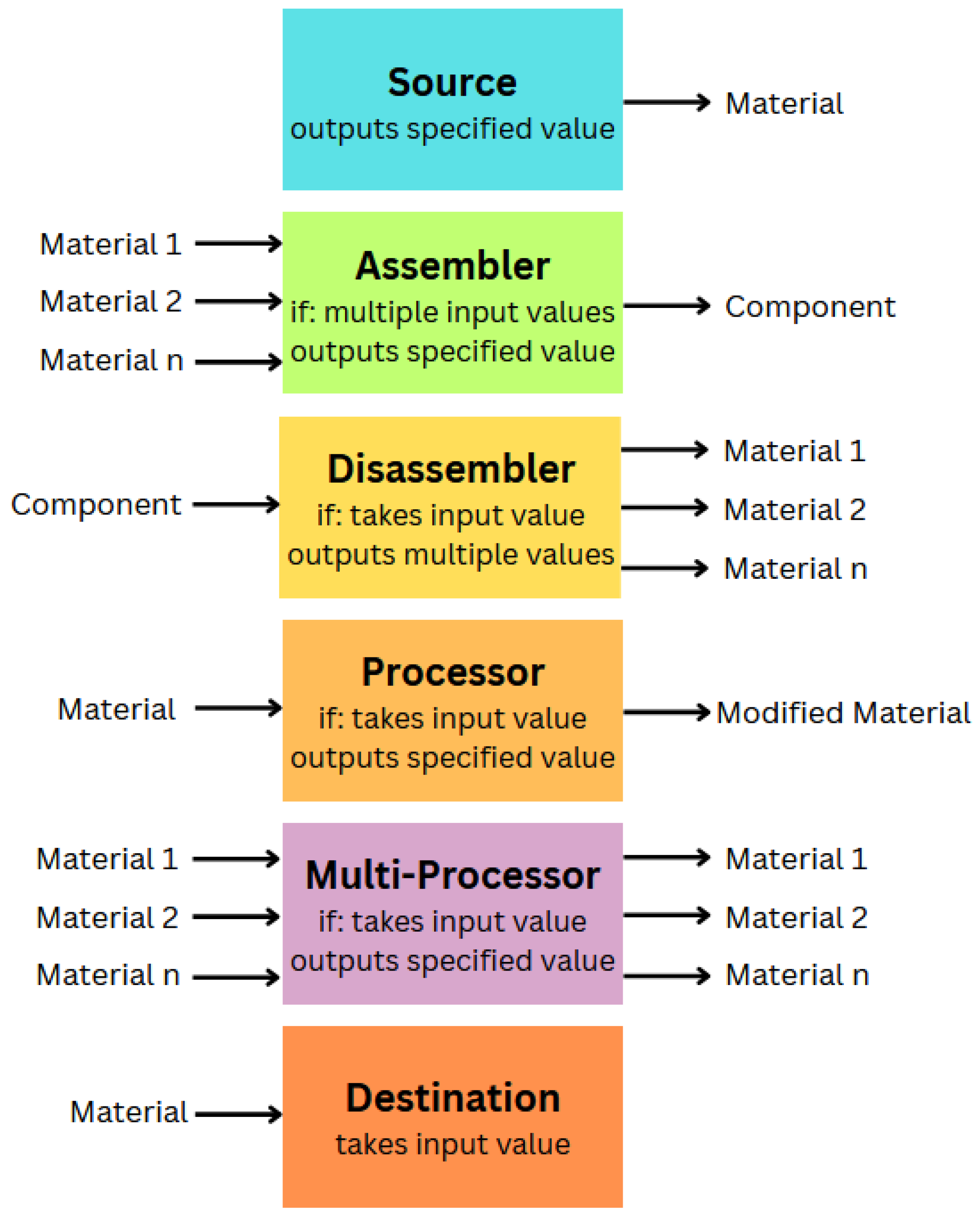
The proposed framework comprises a simple set of six abstract building blocks that can be arranged and reconfigured to model the behaviour of different manufacturing systems inside immersive environments. Drawing on Star and Griesemer’s concept of boundary objects [
41], we designed the ARTIFY blocks to bridge the gap between technical and non-technical stakeholders. The blocks serve as flexible artefacts that are robust enough to maintain system logic but ‘plastic’ enough to adapt to the semantic needs of different disciplines.
Therefore, we ground our design in the concept of boundary objects. At a base level, each block uses semantic strings as a label, input(s), and/or output(s). To support logic evaluation, each block type includes a semantic matching routine that checks if the incoming output string from a connected block matches the expected input value. Currently, string matching is used, which simplifies user control but may be extended in the future to support fuzzy or synonym-based matching. We designed six blocks to embody elements common to different manufacturing processes, facilitating rapid understanding and system prototyping among collaborators, as described below and visualised in
Figure 1:
- 1.
Source: This block embodies the source or stockpile of some raw material or component used in the manufacturing process. It has no inputs and outputs a semantic string. In a table manufacturing process, for example, a Source could represent a ‘Woodpile’ that outputs the semantic string ‘lumber’.
- 2.
Assembler: This many-to-one block embodies any step in which multiple materials or components are used to create a new or augmented material or component. It takes two or more semantic inputs and outputs a semantic string. For example, in table manufacturing, an Assembler labelled ‘Assembly Station’ with ‘tabletop’ and ‘table legs’ as inputs would output ‘table’.
- 3.
Disassembler: This one-to-many block embodies any step that transforms a component or material into two or more materials or components. It takes one semantic string as input and outputs two or more semantic strings. For example, a Disassembler labelled ‘Table Saw’ may take ‘lumber’ as input and output multiple ‘wooden planks’.
- 4.
Processor: This one-to-one block embodies a manufacturing step in which a material or component is altered into an augmented or different state. It takes one semantic string as input and outputs one semantic string, e.g., a Processor labelled ‘Lathe’ with ‘wooden board’ as input could output ‘table leg’.
- 5.
Multi-Processor: This many-to-many block embodies a manufacturing step in which multiple materials or components are processed to produce multiple outputs.
- 6.
Destination: This block embodies a step at which a material or component leaves the manufacturing procedure, taking only a semantic string as input. This could represent a finished product, discarded waste, or a by-product to be reused elsewhere.
Our framework is conceptually related to abstract visual prototyping and programming systems that allow for code systems to be assembled and understood as a flowchart [
42], such as Unreal Blueprints (Unreal Blueprints
https://dev.epicgames.com/documentation/en-us/unreal-engine/introduction-to-blueprints-visual-scripting-in-unreal-engine (accessed on 11 February 2026)) or Node-RED (Node-RED
https://nodered.org/ (accessed on 11 February 2026)). However, these systems are primarily designed as software authoring tools and closely mirror constructs such as functions, events, or message passing. As a result, their effective use typically requires technical knowledge and familiarity with programming paradigms or development environment interfaces, limiting their accessibility for non-technical stakeholders or their ability to foster interdisciplinary discussion. In contrast, ARTIFY operates at a higher semantic level, where blocks represent manufacturing concepts rather than code logic, supporting early sensemaking and discussion. Furthermore, ARTIFY is explicitly designed for embodied interaction in immersive environments, where system models can be spatially arranged and negotiated as boundary objects rather than constructed as abstract 2D diagrams.
ARTIFY also makes distinct contributions from existing XR CAD and industrial mixed-reality systems, such as CAD-IT Mixed Reality (CAD-IT
https://cadituk.com/mixed-reality/ (accessed on 11 February 2026)), XR-EASY (XR-EASY
https://xr-easy.com/ (accessed on 11 February 2026)), or SpinFire XR (SpinFireXR
https://www.techsoft3d.com/enterprise/spinfire-xr/experiences/ (accessed on 11 February 2026)). These systems primarily focus on the visualisation, inspection, and interaction with detailed models or digital twins, which are normally constructed in CAD software or from extensive libraries of specific components, then experienced or modified in mixed reality. As such, these tools excel at supporting later tasks such as design review, training, and maintenance, but their goals of geometric accuracy and component-level detail constrain their use for exploratory or conceptual modelling of manufacturing processes. ARTIFY instead models systems using behavioural abstraction, while ARTIFY blocks can still reflect the accurate appearance and position of real components, positioning it as a pre-digital twin prototyping framework. By offering a small, shared set of abstract blocks that can be semantically reconfigured across contexts, ARTIFY aims to support rapid, collaborative exploration of alternative manufacturing system configurations before design commitments are made.
4.2. Semantic Configuration System
We designed this semantic, text-based design and interaction to maximise the accessibility and clarity of ARTIFY models across stakeholders. This approach allows users to define the terms that drive the visual logic of prototype models, enabling the model to directly echo the language used in cross-disciplinary team discussions and to scale fluidly from simple to technical terminology based on expertise. This may facilitate users’ constructionist understanding of complex system components based on the abstract block used to represent them. ARTIFY blocks feature simple internal logic whereby the correct output string is generated only if the specified input strings are present. While prioritising simplicity has many advantages, it is also key that this system is robust enough to usefully model varying manufacturing systems for stakeholders who are domain experts. Furthermore, a string-based system faces some potential usability issues, such as misspellings and typos. In the following section, we explore how the framework can be used to model two manufacturing processes of varying complexity, while the latter think-aloud evaluation explores usability.
4.3. Manufacturing System Use Cases Examples
To demonstrate how this framework may be applied in manufacturing design, we have applied it to model the two high-level manufacturing use cases: clothing [
43] (see
Figure 2) and semiconductors [
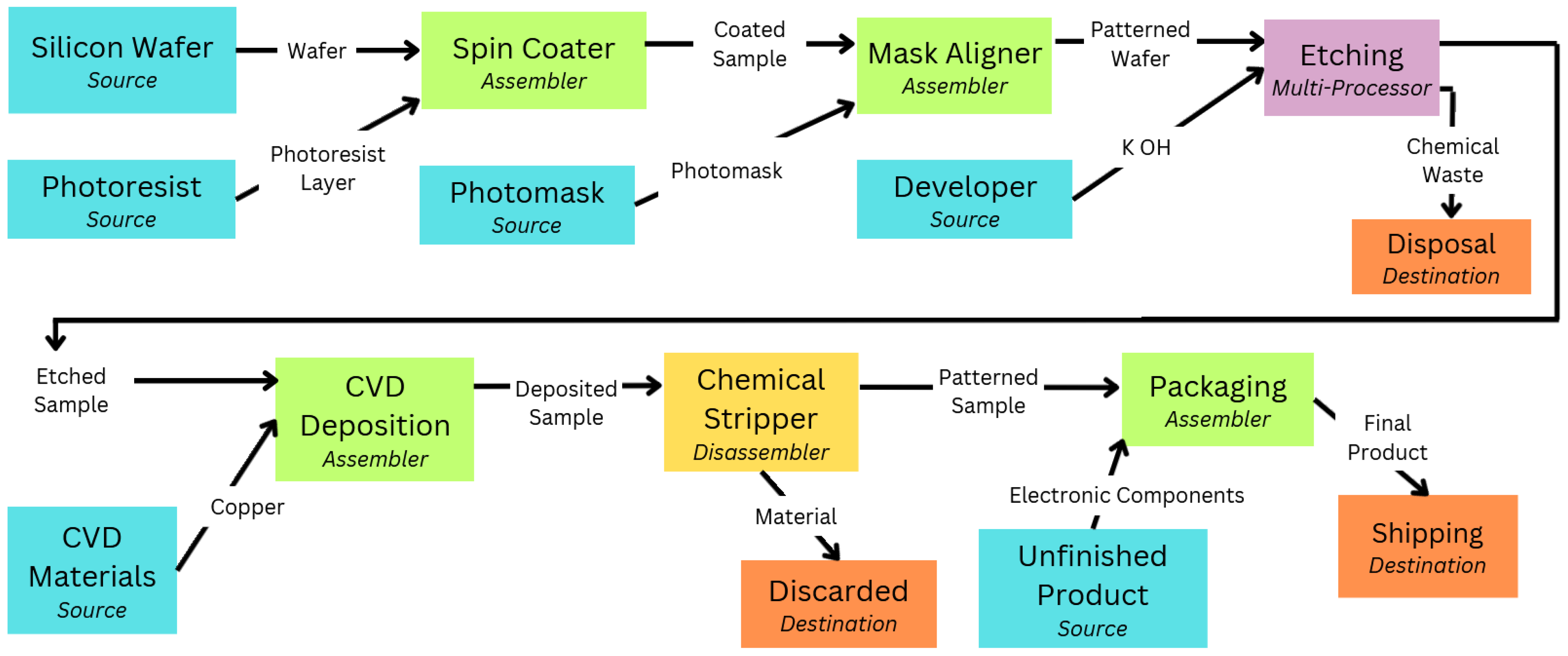
44] (see
Figure 3). The apparel manufacturing workflow is based on the specification description of garment production [
43,
45], in which the processes and functions mentioned are consistent with ASTM textile terminology and garment standards [
46] used in the industry. An expert in the relevant field was consulted to evaluate the semiconductor examples, and the feasibility of the semiconductor processing flow described by the proposed ARTIFY framework was confirmed. Despite each case requiring very different specialist expertise, using a shared set of familiar and abstract blocks to model their manufacturing procedure could improve comprehension for cross-disciplinary collaborators. Through simple semantic reconfiguration, the same blocks convey different real-world components in each model, but with similar purposes. This modelling would allow stakeholders in either system to both visualise and interact with the process, facilitating a greater understanding of how the system works and the requirements of each step, and thus clearer communication during design and planning. These two use cases also illustrate the advantages of using immersive prototyping to manipulate scale. For clothing manufacturing, the blocks would be placed to scale in an immersive environment with VR, or a real environment using AR, allowing collaborators to better explore and understand the installation without physical implementation. To obtain an overview of the procedure, the scale could be reduced to tabletop size. For micro-fabrication applications, such as semiconductors, smaller components and processes could be modelled at a larger size to allow for greater comprehension and understanding.
5. Technical Implementation
This section describes how ARTIFY is implemented as a Unity package, its technical features, and controllable features.
5.1. Apparatus
The augmented environment (AE) was run in real-time using Unity Editor v2022.3.47f1 on a 2024 Windows 10 with an Intel i7 processor and a NVIDIA RTX 4060 graphics card. The AE was displayed to users via a Meta Quest 3 head-mounted display and controlled using the Quest 3 controllers.
5.2. ARTIFY Package
ARTIFY is implemented as a Unity package. Within this package, all key functionality of the framework is implemented in a series of prefabs. This includes the six ARTIFY blocks described in
Section 3 and an additional block type called ‘prop’. Additionally, the package includes four objects that host key facilitation scripts: the
ScriptHost and
EventSystem, which govern block behaviour and user interface elements; the
SaveSystem, which facilitates saving and loading state; and the
ControllerButtonsMapper, which controls the functions mapped to the Quest controller. The package includes nine shapes that can be applied to blocks to change their appearance, ranging from abstract shapes such as cuboids, spheres, and cylinders to specific objects like gas containers or pipes. Furthermore, it includes 18 materials, varied by colour and texture, to further customise blocks so they more closely resemble domain-specific objects or structures, thereby making ARTIFY diagrams more immersive and aesthetically congruent. These prefabs allow users to flexibly assemble their own prototyped systems within the editor or during live prototyping (see
Section 5.4). An example scene is included, featuring a system in which each block type is utilised for demonstrative purposes. The ARTIFY Package and an accompanying workflow guide are openly accessible on GitHub (The ARTIFY Package quest3depth_ver, GitHub
https://github.com/Torquoal/ARTIFY (accessed on 11 February 2026)).
5.3. Block Implementation
ARTIFY blocks are implemented as Unity GameObjects with the following three key components: (1) a customisable shape; (2) a graphical interface with an edit menu; and (3) a configuration script. In addition to the six blocks described in
Section 3, this implementation included a bonus block type named ‘prop’. This block contains no logic, but its shape, size, and position can be changed to decorate the AE with appropriate objects, allowing teams to represent more details in the proposed installation.
Each block prefab features a configuration script that extends a BaseBlock script. This script contains variables for the block’s shape, name, size, and rotation, and its materials, allowing these values to be edited in real time while using ARTIFY. Based on the block type, this script also contains references to any connected input blocks and output blocks, as well as the input text the block may require and output text that the block ‘produces’. For example, a Processor block features an inputSource reference for another connected input block, one inputRequired variable containing a string for the Processor’s required semantic input, and one output variable containing a string for that Processor’s potential output.
Each block features a Boolean variable named
correct that indicates whether its input requirements are met and the block is therefore considered ‘active’. To assess in real time, each block script runs the function
CheckInput every frame at runtime. This function attempts to match (case-insensitive) the block’s
inputRequired string to the relevant
output string of an
inputSource block, provided that those blocks are also ‘active’. Thus, if a block’s
inputRequired and
output strings do not match, if the block is missing an
inputSource, or if the
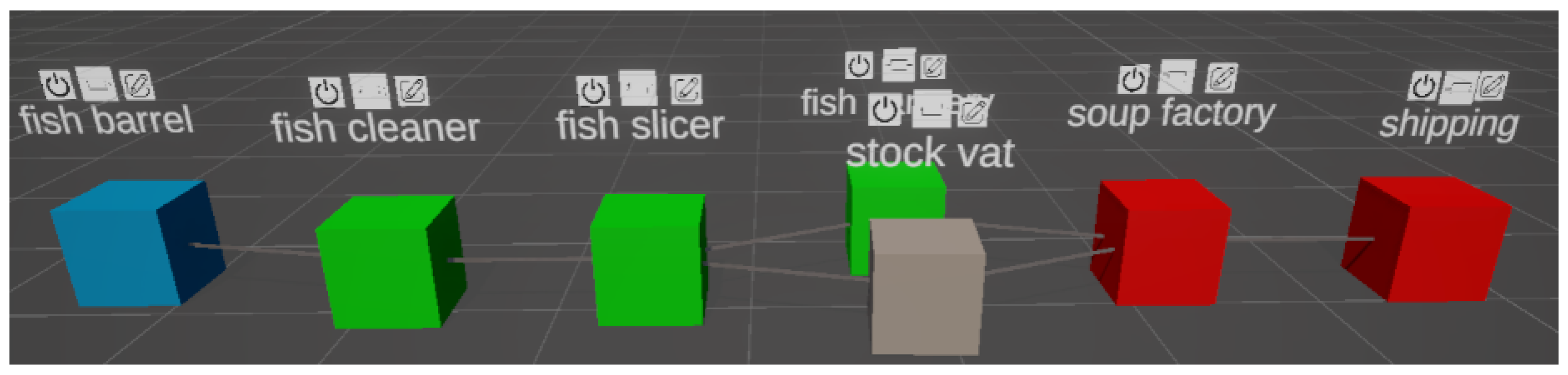
inputSource is ‘inactive’, then the block will, in turn, be set to ‘inactive’ (see
Figure 4). For example, if an
Assembler block named ‘cement mixer’ has the required input words ‘cement’ and ‘aggregate’ and the output word ‘concrete’, it will only be marked as ‘active’ if it is connected to two other active input blocks that both produce ‘cement’ and ‘aggregate’ as output words.
5.4. Using ARTIFY
Users hold both the Meta Controllers, with ray casts enabled, to interact with the ARTIFY prototyping framework. A banner is shown in the AE to remind them of all available controller functions. The raycast pointer and controller triggers are used to select actuate user interface buttons. The analogue sticks are used to manipulate the block’s size, rotation, and position. The ’B’ button is used to toggle on and off a main menu, which allows blocks to be spawned, deleted, saved, or loaded. This section will discuss these features in more detail.
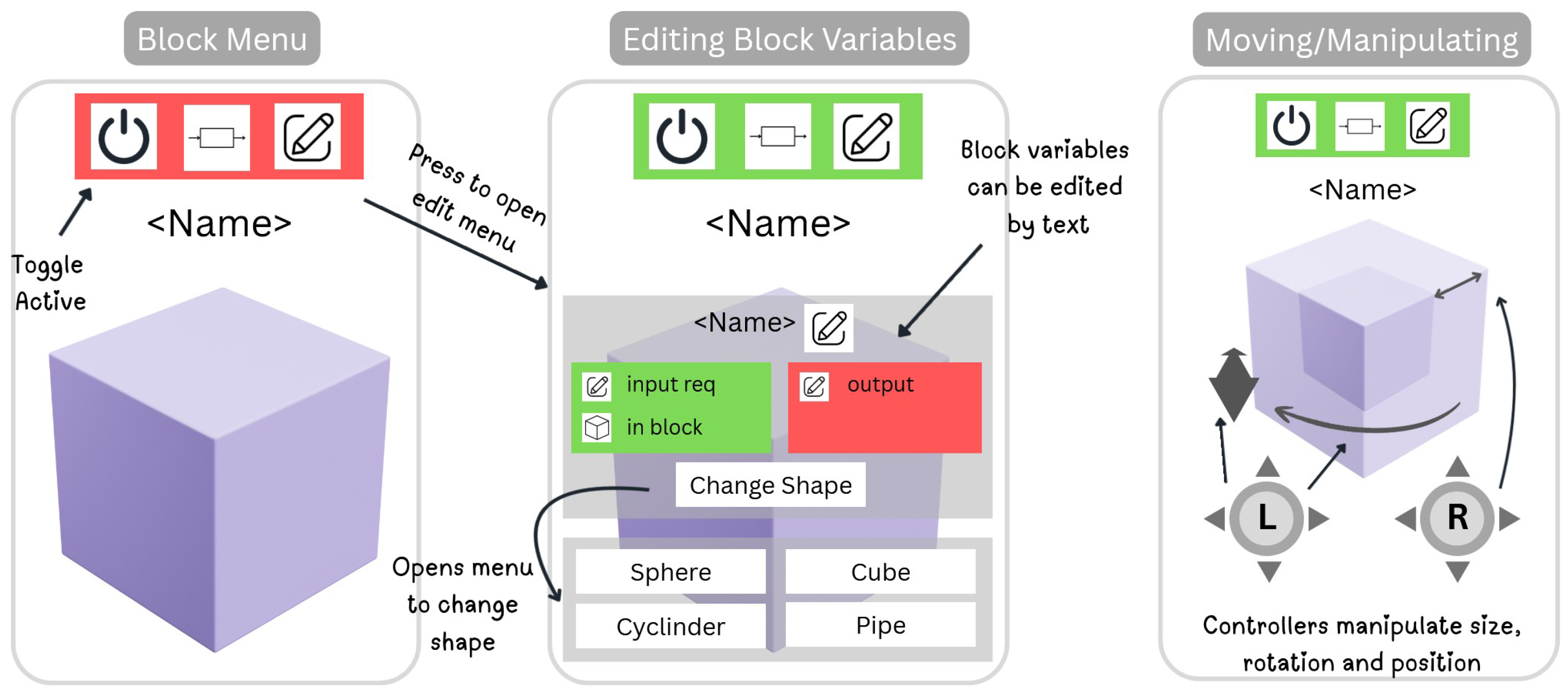
Block Menu: Above each block appears a small graphic interface that displays an on/off button, an icon representing the type of block, and an edit button. The edit button toggles on a more detailed edit menu, allowing users to customise that block’s behaviour. If the block is currently in an ‘active’ state, this menu will be marked with a green background, while ‘inactive’ blocks are marked with a red background (see
Figure 5). Finally, the on/off button allows users to manually toggle a block to ‘inactive’, even if otherwise it would be ‘active’, allowing them to witness how this change propagates through the system. For example, if a user turns off an early source of a key material in a system, they will be able to propagate change throughout the system, an established approach to deepen understanding [
12,
47].
Block Configuration: In order to configure a block in the scene, users can open the edit menu by hovering the appropriate button in the block’s title menu with the ray cast and pressing the controller trigger button (see
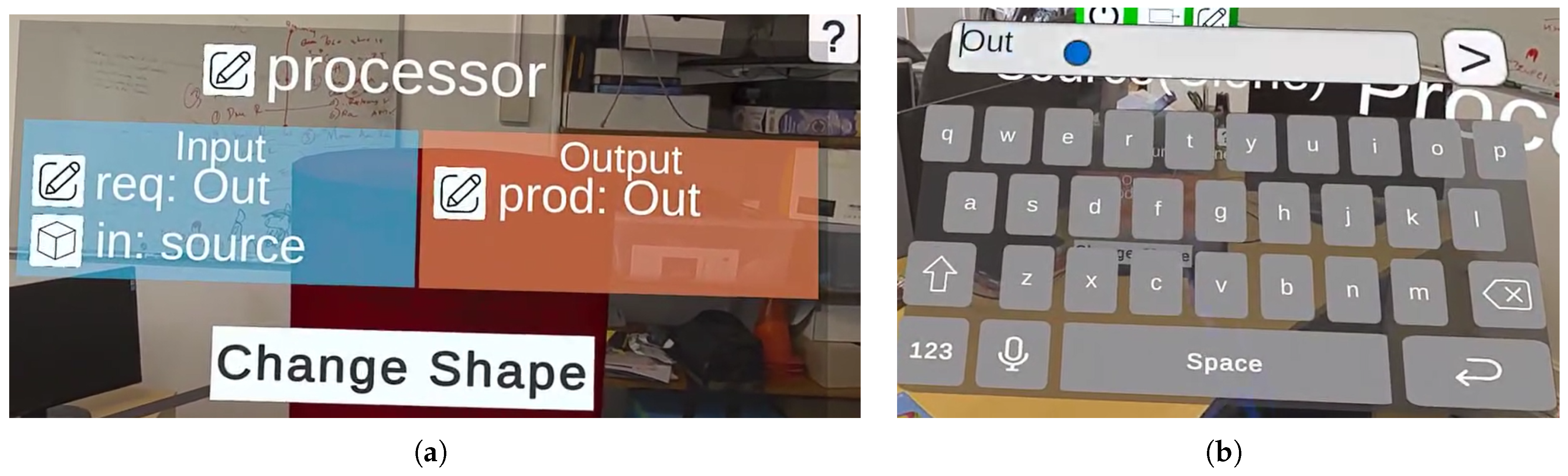
Figure 5). This menu shows the current block’s name, output string(s), required input string(s), and the other blocks it is connected to. The user can update any of these string values by pressing the adjacent button to show a virtual keyboard and entering new text (see
Figure 6). If the user enters the name of another existing block into the
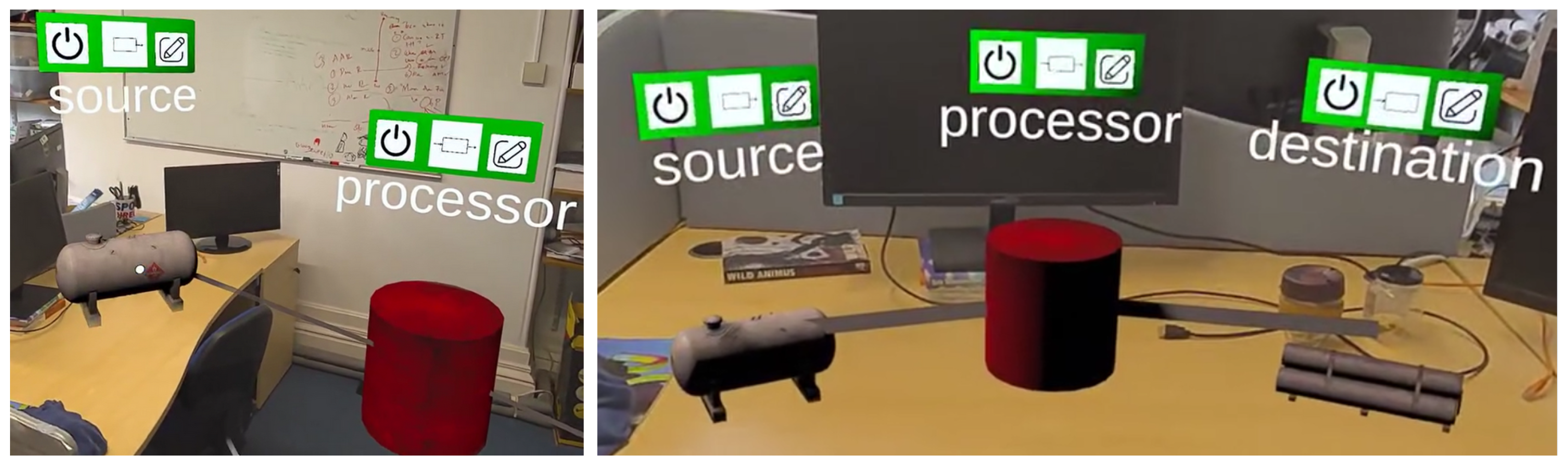
inputSource field, the two blocks are considered connected. This connection is visualised by visible lines rendered between them in the AE (see
Figure 7), making it easier for users to track the logical flow of the modelled system.
Changing Block Shapes: By default, blocks are created with a primitive cube mesh. However, by selecting the ‘Change Shape’ button in the edit menu, users can replace a block’s shape with any of the other available shapes in the package—from basic shapes like cylinder and sphere to more immersive specific shapes such as piping or a gas tank, as shown in
Figure 7. New shapes can be added as needed, guided by the included step-by-step walkthrough documentation.
Changing a Block’s Position, Size, and Rotation: While selecting a block in the scene using a controller ray cast, users can hold the controller triggers to grab the block and move it as they wish within the scene. Additionally, if a block’s edit menu is opened, the user can use the controller’s analogue sticks to manipulate it. Holding the left analogue stick up or down pushes or pulls the block directly away from or toward the user, allowing blocks to be placed in distant areas or retrieved. Holding the left stick left or right rotates the block’s shape, allowing the user to create more accurate and immersive scale models. Holding the right stick up or down increases or decreases the block’s size. Enabling these functions only for blocks with the edit menu open further allows the user to manipulate multiple blocks at once. For example, in a system with five blocks, the user could enable the edit menu on two of them and resize them simultaneously while the other blocks remain unchanged.
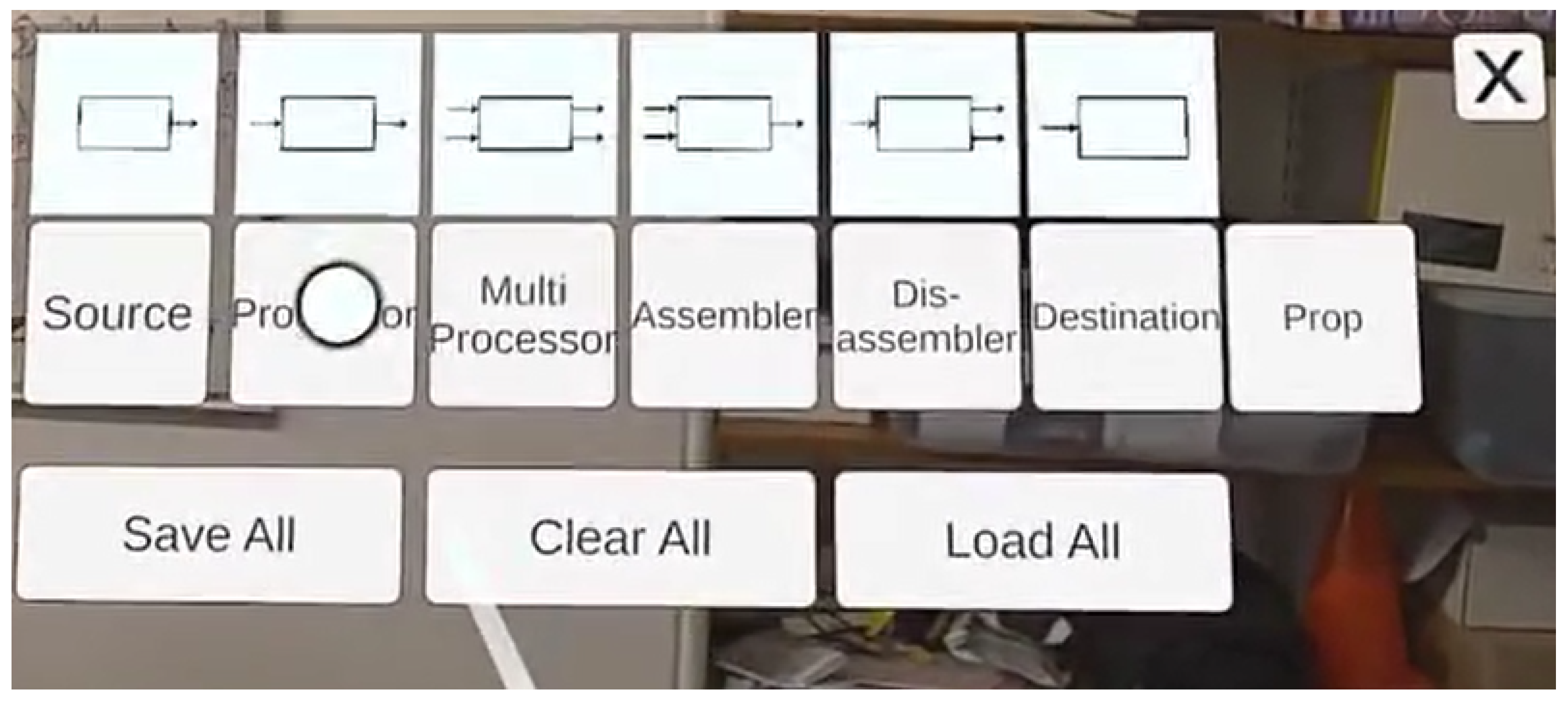
Adding and Removing Blocks from the Scene: In addition to editing or manipulating individual blocks, the user can add and remove blocks from the scene using the main menu. This toggleable menu will appear when the user presses ‘B’ on the right controller. The menu shows seven buttons with accompanying diagrams (see
Figure 8), which allow the user to spawn a new copy of an ARTIFY block directly in front of them in the scene. These blocks can then be moved, manipulated, and configured as desired. Users can press the ‘Clear All’ button to remove blocks in a scene to start from a blank canvas.
Saving and Loading ARTIFY Models: Finally, this menu can also be used to save and load ARTIFY models. This is managed by a SaveSystem script, which maintains a list of every block instance in the scene during runtime, including the blocks’ names, variable values, sizes, positions, and shapes. When the user presses ‘Save All’ on the main menu, these lists are serialised using a binary formatter and stored. If the user presses ‘Load All’, these stored values are retrieved and de-serialised to reconstruct the block lists. SaveSysten then iterates over these lists and creates a new block that exactly copies each listed entry using the stored name, variable, size, and position values, populating the scene with an exact copy of the saved state. This feature allows a team to save their changes for future sessions or return to an old state after experimenting with changes.
6. Think-Aloud Evaluation
We conducted a small-scale concurrent think-aloud evaluation of ARTIFY in order to explore its initial usability and suitability and inform then appropriate adjustments and future directions. This established technique allows rich experiential data to be captured by asking participants to vocalise their cognitive processes and feelings while using a system or interface, in order to gain insight into how usability could be improved [
48].
6.1. Procedure
In this evaluation, volunteers were asked to interact with all the key features of ARTIFY while thinking aloud before completing a feedback survey that asked them about their experiences featured a series of standardised questionnaires. As an initial exploration of how users perceived the framework and its usability, we did not include a control group or baseline tool. While ARTIFY is a collaboration-enabled framework designed to support synchronous multi-user interaction, this study focuses on evaluating the usability of its interaction mechanics. Validating that individual users can effectively manipulate the abstract blocks is a necessary precursor to evaluating the quality of collaboration in future studies. The aim at this stage was to capture initial usability and feasibility feedback on ARTIFY’s user experience and semantic prototyping approach in order to generate insights to further develop this XR spatial modelling approach, rather than to formally evaluate its efficacy compared to established techniques. The study received ethical approval from the institution’s IRB.
First, participants were introduced to the concept of ARTIFY and its core features using a demonstration video (ARTIFY Demonstration Video:
https://www.youtube.com/watch?v=_kE7s_dnbX4 (accessed on 11 February 2026)).
Next, they were fitted with the HMD by the researcher and underwent a short training period to introduce them to the controls that are described in the tutorial banner present in the AE. With these preliminary steps completed, participants were then asked to complete the tasks in two scenes, all while thinking aloud.
Scene 1 contained seven blocks representing a fish cannery. Participants were asked to describe what they thought the scene represented and deactivate a block, then describe the resultant effects. Next, participants were asked to change the name of a block, rotate it, reduce its size, pull a block toward themselves, and then rotate two blocks at the same time. They were then tasked with saving the scene and clearing it of all blocks, transitioning into Scene 2: a blank scene with no blocks.
In this scene, participants were asked to model a simple assembly line system for manufacturing metal piped from the following snippet: metal is sourced from a refinery, processed into pipes using an extruder, which are then shipped to their destination. To complete the task, participants needed to spawn relevant blocks (a source, a processor, and a destination) and then configure them to form a functional system.
Once the second scene was finished, participants completed the IPQ (Igroup Presence Questionnaire) [
49], which was adjusted to reflect its use in an AR application by changing ‘virtual world’ to ‘virtual items’. They also completed the System Usability Scale (SUS) [
50]. Finally, they were asked to rate how useful they felt ARTIFY could be for prototyping systems and installations, and how adequate they felt its current features were on a 7-point Likert scale, and then to detail their rationale via free-text questions.
6.2. Participant Demographics
We recruited seven volunteers (3F, 4M, mean age ) from institution mailing lists and social media. These volunteers were all researchers recruited from the fields of engineering and/or computing science to increase the chances of them having relevant perspectives on the use of ARTIFY as an AR application and engineering prototyping tool. In total, 43% reported using XR approximately once a week, 43% approximately once a month, and 14% had no experience.
6.3. Prototyping Experience
Participant results are summarised in
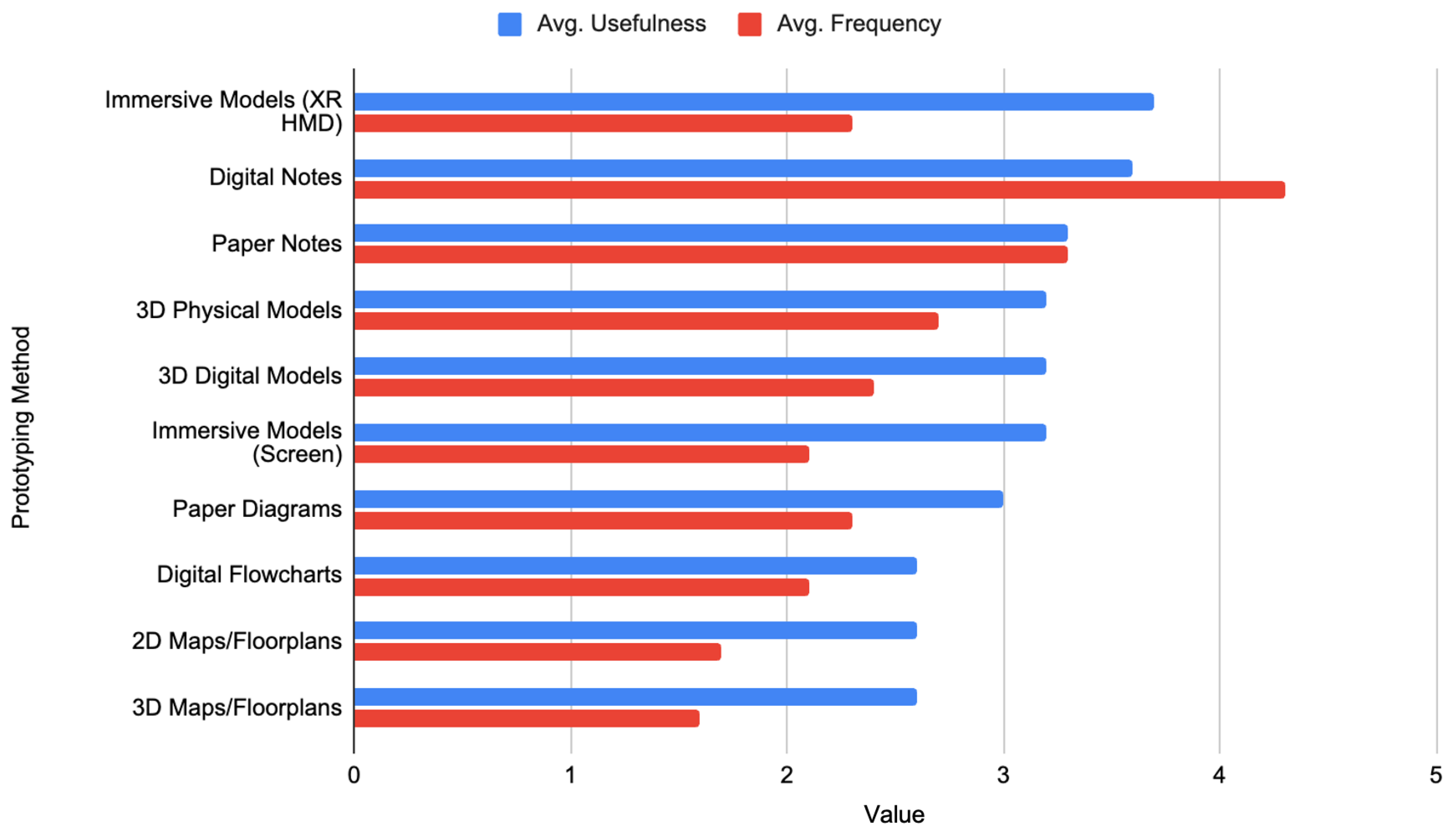
Figure 9. All participants had direct experience with system prototyping, with five participants reporting that they ‘Often’ undertook system prototyping as part of their work, while two said they ‘Sometimes’ took part in these activities. They had varied experiences and perceived usefulness with different prototyping tools (see full results in
Appendix A). The most used tools were Paper and Digital Notes, while Digital Notes and Immersive Models on an XR HMD were broadly seen as most useful across participants, indicating high receptivity to our approach.
6.4. Results
6.4.1. Presence (IPQ) and Usability (SUS)
Participants’ mean IPQ score was 5.14, which, according to Melo et al.’s adjective descriptions [
51], indicates
excellent presence. Regarding the IPQ subscales, participants scored
satisfactory experienced realism (3.46) and
very good spatial presence (4.91). However, they scored
low involvement (2.32).
The SUS was administered to check if the usability of ARTIFY was acceptable to participants. Scores ranged from 45.0 to 82.5 (on a 100-point scale). The mean score was 67.5, classified as between
okay and
good [
52], indicating usability is acceptable with room for improvement.
6.4.2. Think-Aloud Results
We applied thematic analysis to qualitative participant think-aloud transcripts and free text feedback [
53]. Initial transcripts were generated using
Otter.ai. A researcher then checked each recording to familiarise themselves with the data, correct mistakes, and apply anonymisation. A full inductive coding pass of the transcripts was then conducted by a single researcher. This initial coding was then reviewed by another researcher in a discursive review meeting. This review allowed redundant codes to be removed or combined, while disagreements on coding were resolved by adjusting the assigned codes or replacing them with a new code. In line with advice from Braun and Clark [
54], we took a qualitative and discursive approach to validity, acknowledging the influence of the researchers rather than calculating numerical reliability between researchers. The first researcher then conducted a second coding pass to apply any resultant coding changes following the meeting. Once inductive coding was complete, axial coding was conducted by both researchers to group codes into meaningful topics, forming a codebook of 32 codes within six categories (see
Appendix A Table A1). Through discussion of these topics and codes, the researchers generated three themes that described the core takeaways from the think-aloud evaluation: (A)
System Suitability, (B)
Usability Concerns, and (C)
Technical Issues and Limitations.
A. ARTIFY was Perceived as Applicable and Offering Value. Participants were positive regarding their perceived potential usefulness of ARTIFY as a system prototyping tool, with two participants rating it as ‘Extremely Useful’, four as ‘Moderately Useful’, and one as ’Slightly Useful’. The rationale for these ratings was attributed primarily to the advantages of spatialisation and to how ARTIFY could make prototyped systems more explainable or understandable. Participants appreciated the ability to see the size of the prototyped system relative to a real physical space and to themselves. For example, P4 felt that “the virtual environment, I can better experience and design my ideas. Make ideas more concrete, not just flat shapes”, while P1 compared it to normal paper prototyping approaches: “it would be more useful than normal post-it notes […] you can actually put everything in the room, at the right size, and essentially test if everything will fit”. It is important to remember, however, that while promising, these comparisons reflect participant perceptions and have not yet been empirically ratified by direct evaluation.
The other key benefit of ARTIFY that participants perceived was improving how understandable and explainable a system could be. P6 highlighted the potential to onboard team members, saying it would be “potentially be easier to explain to another person who can see it live than a paper model”. Meanwhile, P7 was more interested in how ARTIFY could reflect a system’s state and dependencies, describing it as “especially helpful with visualising how changes in an existing pipeline could impact the whole process.”.
B. Usability and Clarity Challenges. While participants were positive about ARTIFY’s perceived applicability, most agreed that the usability of the system required future iteration to improve. Using the Keyboard to configure blocks was understood by all participants and allowed them to execute tasks with no prior experience with the system. However, many participants reported having usability issues and making errors using the keyboard input. During the task, P6 reported they were “having some trouble with the keyboard”, P1 felt that “everything was pretty much as good as it could be except for the keyboard”, and P2 agreed: “I did not like the keyboard input”. Some also struggled with the joystick controls for manipulating the placement of blocks, with P1 describing it as “unintuitive”, and P3 reporting that “probably scales too quickly” when changing a block’s size.
User interface clarity was also a challenge during the evaluation. P6 highlighted a lack of feedback while using menus: “Okay, so I pressed it. I didn’t really get any feedback, so I don’t know if that worked”. Others struggled to remember how to use certain interactions, in particular, connecting blocks: “the way to link the output of one both to the input of the next was a bit clunky”—P1. For two participants, P3 and P4, this resulted in them requiring active guidance by the researcher during the evaluation, with P4 requiring consistent hints and reminders across all steps, with P4 asking “Which, which, which one I need to press?” when trying to connect an input block.
C. Technical Issues and Limitations. Participants noted two recurrent technical issues that impacted the use of sessions. The first and most serious bug that emerged was a system crash, which could occur when two participants spawned multiple blocks at the same time that exactly collided with each other. This naturally caused confusion when it happened to P1: “oh, it’s, it’s crashed. It’s, I don’t know why it’s crashed” and to P4: “why is it crashed”. Additionally, P3 encountered a bug when reducing the size of a block with the analogue stick, whereby it became too small to see or select. Identifying these issues via a think-aloud evaluation informed immediate improvements and future requirements for the ARTIFY framework.
6.5. Resultant Adjustments Made to ARTIFY
This evaluation was used to inform a number of immediate improvements to the usability and clarity of ARTIFY. Usability changes were as follows: (1) the default speed of control functions, such as scaling or rotating blocks, was lowered; (2) the speed of these functions was made customisable; and (3) text entry can now be cancelled. Regarding feedback seeking to improve clarity, we (1) added a minimum size to blocks to ensure they are always easily visible, (2) detailed the system’s controls and functions on a toggleable tutorial cheat sheet, and (3) added visual feedback to menu buttons on hover and selection. Finally, a collision bug between blocks that could result in crashes was addressed.
7. Discussion
7.1. Moving from Static Domain-Specific VR Models to Flexible Domain-Independent AR Models
There are several examples of high-fidelity, domain-specific XR models that allow stakeholders to experience an immersive preview of installations like air cabins, buildings, or factories [
25,
55], sometimes featuring specific scripted interactions [
56]. Compared to these efforts, context-independent systems like ARTIFY may offer unique value in facilitating the early conceptual design phase with a standardised and understandable system to prioritise flexibility, speed of iteration, and cross-disciplinary communication. Therefore, ARTIFY may be thought of as a conceptual twin, rather than a digital twin, allowing teams to quickly build and test a minimum viable system, with the ability for any stakeholder to observe changes in state and adjust object behaviour, size, and position. That said, adding a library of high-fidelity domain-specific assets or pre-existing 3D model XR creation tools [
28,
57,
58,
59], teams could use ARTIFY to create systems or installations with representative visuals, in a similar manner to the factory floor models proposed by Al-Jundi et al. [
10]. This functionality could be provided via integration with asset creation tools such as Gravity Sketch (Gravity Sketch
https://gravitysketch.com/ (accessed on 11 February 2026)), or a large set of pre-existing assets via Unity Industry (Unity Industry Asset Manager
https://unity.com/products/asset-manager (accessed on 11 February 2026)).
Unlike prior systems, which mock up large installations in representative fully virtual reality spaces [
10,
25,
55], ARTIFY brings these models into AR, which could allow stakeholders to project representative scale models into real contexts, such as a proposed warehouse location. Furthermore, ARTIFY extends the state of the art by allowing models to be dynamically scaled up or down as desired, enabling stakeholders to view an installation as a small-scale desktop model, a 1:1 representation, or even larger than life size (see
Figure 7). Taken together, these features could represent significant advancements to the applicability of XR prototyping for advanced manufacturing and industrial system modelling. We advocate for the future exploration of similar approaches to fully unlock the potential of XR as a facilitator of agile system design and cross-disciplinary stakeholder discussion.
7.2. Exploring Semantic Configuration as an XR Prototyping Interaction Scheme
In ARTIFY, we combined simple traditional XR raycast and trigger interaction with a novel semantic configuration system that allows users to dictate block names, inputs, outputs, and connect all using matching words. While existing games or XR applications show examples of potentially more powerful interaction design inside immersive environments, these interactions can become obstructions to stakeholders with varying technical expertise, alongside specific terminology or symbology, a key concern identified in prior work [
2,
39]. Thus, we explored semantic configuration in order to democratise the system design workflow, allowing a team with varying expertise to configure, observe, and understand the system semantically in line with their discussion, without a layer of engineering system software or system diagrams that only some stakeholders may understand.
Despite only using the system for a 3-min training session, all of our testers were able to use the system to complete all available functions, which was promising. Additionally, participants found the resultant system clear and understandable. However, we also encountered significant usability issues with this approach. Participants found that keyboard input could be slow, particularly when editing many blocks in a row. Such a semantic configuration introduces challenges around vocabulary standardisation, as well as typos. Significant future work could seek to address these issues by integrating ontology-based term selection, auto correction, or dynamic auto-completion from existing model terms, making input quicker and more consistent and helping teams maintain semantic coherence with complex models. Alternative input methodologies that remain accessible to users with varied skill sets should also be explored, such as voice input, selecting words that already exist in the model from a list, or allowing blocks to be connected through simple visual selection. Finally, future iterations could offer an active tutorial walkthrough for new users, alongside the passive control scheme cheat sheet we added following think-aloud feedback.
Our evaluation intentionally focused on understanding usability with a generic task rather than a single, complex industrial application. This approach was chosen to first validate and refine the core interaction paradigm of the abstract, semantic blocks. Introducing a domain-specific problem before establishing baseline usability of the interface could have confounded the results, making it difficult to distinguish between challenges with the tool itself versus challenges with the problem’s complexity. Now that core usability insights have been gained from an initial exploration and early improvements made, the framework is better prepared for a more ecologically valid evaluation.
8. Limitations and Future Work
While the think-aloud evaluation was effective for assessing and improving initial usability, it did not measure ARTIFY’s performance in solving a real-world manufacturing design problem. Furthermore, while participants had experience with prototyping and were from engineering and computer science backgrounds, the evaluation did not include stakeholders currently working on a live industrial project. Additionally, future work is needed to explore how comprehensible the system is to stakeholders with lower technological literacy and whether it can facilitate cross-disciplinary collaboration. Finally, insights regarding the promising applicability of ARTIFY compared to traditional paper or digital prototyping methods were based solely on participants’ perceptions, as no comparative evaluation with these methods was conducted at this stage. Therefore, future work must benchmark ARTIFY against these traditional baselines to validate these perceptions.
To address these limitations, we plan to apply an improved version of ARTIFY, refined following the think-aloud study, in a longitudinal case study with an industrial partner to a manufacturing system design challenge. It is vital for future work to directly compare this XR prototyping to such prior baseline approaches. For example, a future study could group pairs of engineers and non-engineers into two-person teams and task them to use ARTIFY and a traditional prototyping medium (e.g., UML, paper prototyping, and/or 2D CAD tools) to prototype an ecologically valid system model.
The system’s comparative applicability could then be evaluated using mixed measures. Success will be measured against quantifiable engineering metrics such as a reduction in design errors and decreased time in the conceptual design phase compared to traditional methods. The impact of the system on users could be measured using a combination of physiological measures of cognitive load and engagement, such as gaze fixations, pupil dilation, and heart rate variation [
58,
59], alongside subjective workload measures such as the NASA TLX. The impact of ARTIFY on collaboration could be explored via observations and team interviews. Findings will inform the efficacy of the system in achieving its stated goals, but also provide an opportunity to explore the impact of a novel abstract modular modelling system on communication, collaboration, and outcomes in manufacturing design teams.
Finally, the evaluation highlighted issues with the semantic matching system: it is easily disrupted by spelling issues, vocabulary differences, and users found the keyboard input obstructive. Future work is needed to tackle these issues while maintaining the accessibility and quick understanding of the system by making improvements to the interaction and interface, such as autocorrect, suggested terms, alternative input methods (e.g., voice input), and the ability to quickly select previously entered terms.
9. Conclusions
This paper presents ARTIFY, a novel approach to AR prototyping for industrial applications that makes use of modular blocks that can be connected to wider systems. The system uses a simple semantic customisation and logic system to allow stakeholders to customise, understand, and discuss a prototyped system or installation in their own words. Furthermore, users can adjust the position, size, and appearance of the blocks in AR, allowing them to visualise and navigate installations to a realistic scale, or view large installations as smaller system diagrams. We outline the conceptual design of the system, describe an initial technical implementation, and report improvements and user feedback as a result of a think-aloud usability evaluation. We finish by discussing the differences between ARTIFY and prior systems and reflecting on the implications of introducing modular, semantically configurable XR prototyping into early design stages. While preliminary findings show promise, further evaluation in industry-relevant contexts is needed to validate its long-term value for system design and stakeholder communication.
Author Contributions
Conceptualization, S.M., B.C., Y.X. and R.G.; methodology, S.M., B.C., Y.X. and R.G.; software, S.M.; validation, S.M., B.C. and R.G.; formal analysis, S.M. and R.G.; data curation, S.M.; writing—original draft preparation, S.M., B.C. and R.G.; writing—review and editing, S.M., B.C. and R.G.; visualization, S.M.; supervision, R.G.; project administration, R.G.; funding acquisition, R.G. All authors have read and agreed to the published version of the manuscript.
Funding
This research received funding from the UK’s Engineering and Physical Sciences Research Council (EPSRC) as part of the Augmented Reality for Trans-Disciplinary Design of ReconFigurable Manufacturing Systems (ARTIFY) project, number 323668/0.
Data Availability Statement
Conflicts of Interest
The authors declare no conflict of interest.
Appendix A
Table A1.
Thematic analysis codebook and frequencies.
Table A1.
Thematic analysis codebook and frequencies.
| Category | Code | Count |
|---|
| Applicability | 24 |
| | Spatialisation is useful | 5 |
| | Can check size of system | 2 |
| | System More Explainable/Less Abstract | 1 |
| | Helps Visualise System Changes | 7 |
| | Correctly Described System | 8 |
| | Model Shows Interaction | 1 |
| Usability | | 77 |
| | Sub-Category: Usability Issues | 14 |
| | Obstructive/Low Usability | 2 |
| | Multiple Manipulation is Challenging | 3 |
| | Needs Lower Size Limit | 2 |
| | Crash Caused by Collision Error | 2 |
| | Joystick Controls were Unintuitive | 3 |
| | Reduce Controller Sensitivity | 2 |
| | Sub-Category: Successful Use | 28 |
| | System is Easy/Usable | 3 |
| | Built Model Successfully | 3 |
| | Successfully Connected Blocks | 4 |
| | Successfully Manipulated Block | 9 |
| | Successfully Configured Block Text | 6 |
| | Successful Use of Menus | 3 |
| | Sub-Category: Clarity Issues | 20 |
| | Add an in-depth Tutorial | 1 |
| | Confusion about UI elements | 3 |
| | Required Active Guidance | 6 |
| | Block Connections Needs Clarification | 6 |
| | Improve Interaction Feedback | 4 |
| | Sub-Category: Improvements/Additions | 15 |
| | Want more colour changes | 2 |
| | Wanted More Customisation Options | 1 |
| | Choose Shape on Spawn | 1 |
| | Allow cancelling interactions | 1 |
| | Want Voice Input | 1 |
| | Add Autocomplete/Autocorrect | 2 |
| | Allow visual selection | 2 |
| | Keyboard Interaction Improvement | 5 |
Table A2.
Raw Data for Frequency of Use of Prototyping Methods. Scale: 1 (Never), 2 (Rarely), 3 (Sometimes), 4 (Often), 5 (Always). Methods are sorted by the average usefulness data shown in
Table A3.
Table A2.
Raw Data for Frequency of Use of Prototyping Methods. Scale: 1 (Never), 2 (Rarely), 3 (Sometimes), 4 (Often), 5 (Always). Methods are sorted by the average usefulness data shown in
Table A3.
| | Participant Frequency Rating |
|---|
|
Prototyping Method
|
P1
|
P2
|
P3
|
P4
|
P5
|
P6
|
P7
|
Avg.
|
|---|
| Immersive Models (XR HMD) | 4 | 4 | 2 | 1 | 2 | 1 | 2 | 2.3 |
| Digital Notes | 5 | 2 | 5 | 4 | 5 | 5 | 4 | 4.3 |
| Paper Notes | 3 | 4 | 2 | 3 | 5 | 2 | 4 | 3.3 |
| 3D Physical Models | 1 | 4 | 2 | 4 | 3 | 1 | 4 | 2.7 |
| 3D Digital Models | 4 | 3 | 2 | 1 | 3 | 1 | 3 | 2.4 |
| Immersive Models (Screen) | 4 | 2 | 2 | 2 | 2 | 1 | 2 | 2.1 |
| Paper Diagrams | 2 | 2 | 2 | 3 | 3 | 1 | 3 | 2.3 |
| Digital Flowcharts | 1 | 2 | 2 | 4 | 2 | 2 | 2 | 2.1 |
| 2D Maps/Floorplans | 1 | 2 | 1 | 1 | 3 | 1 | 3 | 1.7 |
| 3D Maps/Floorplans | 2 | 3 | 1 | 1 | 1 | 1 | 2 | 1.6 |
Table A3.
Raw Data for Perceived Usefulness of Prototyping Methods. Scale: 1 (Not Very Useful), 2 (Somewhat Useful), 3 (Very Useful), 4 (Extremely Useful). A dash (-) indicates the participant had never used the method.
Table A3.
Raw Data for Perceived Usefulness of Prototyping Methods. Scale: 1 (Not Very Useful), 2 (Somewhat Useful), 3 (Very Useful), 4 (Extremely Useful). A dash (-) indicates the participant had never used the method.
| | Participant Usefulness Rating |
|---|
|
Prototyping Method
|
P1
|
P2
|
P3
|
P4
|
P5
|
P6
|
P7
|
Avg.
|
|---|
| Immersive Models (XR HMD) | 4 | 4 | 4 | 4 | 2 | - | 4 | 3.7 |
| Digital Notes | 4 | 2 | 4 | 4 | 4 | 3 | 4 | 3.6 |
| Paper Notes | 2 | 3 | 4 | 3 | 4 | 3 | 4 | 3.3 |
| 3D Physical Models | - | 3 | 4 | 3 | 2 | - | 4 | 3.2 |
| 3D Digital Models | 4 | 3 | 4 | 3 | 3 | - | 3 | 3.2 |
| Immersive Models (Screen) | 4 | 3 | 4 | 3 | 3 | - | 3 | 3.2 |
| Paper Diagrams | 3 | 3 | 4 | 3 | 2 | 3 | 3 | 3.0 |
| Digital Flowcharts | 1 | 2 | 4 | 4 | 1 | 3 | 3 | 2.6 |
| 2D Maps/Floorplans | - | 2 | 4 | 2 | 3 | - | 2 | 2.6 |
| 3D Maps/Floorplans | 1 | 3 | 4 | 3 | - | - | 2 | 2.6 |
References
- Kent, L.; Snider, C.; Gopsill, J.; Hicks, B. Mixed reality in design prototyping: A systematic review. Des. Stud. 2021, 77, 101046. [Google Scholar] [CrossRef]
- Podkosova, I.; Reisinger, J.; Zahlbruckner, M.A.; Kovacic, I.; Kaufmann, H. Evaluation of Virtual Reality for Early-Stage Structure and Production Planning for Industrial Buildings. In Proceedings of the 2023 IEEE International Symposium on Mixed and Augmented Reality Adjunct (ISMAR-Adjunct), Sydney, Australia, 16–20 October 2023; pp. 159–166, ISSN 2771-1110. [Google Scholar] [CrossRef]
- Wen, J.; Gheisari, M. Using virtual reality to facilitate communication in the AEC domain: A systematic review. Constr. Innov. 2020, 20, 509–542. [Google Scholar] [CrossRef]
- Chandak, P. Rapid Prototyping Technologies and Design Frameworks: Transforming Traditional Manufacturing into Smart Additive Solutions. J. Mater. Sci. Manuf. Res. 2023, 4, 1–6. [Google Scholar] [CrossRef]
- Wang, K.; Liu, P.; Hu, Y.; Liu, X.; Wang, Z.; Perlin, K. A Collaborative Multimodal XR Physical Design Environment. In Proceedings of the SIGGRAPH Asia 2024 XR; SA ’24; ACM: New York, NY, USA, 2024; pp. 1–2. [Google Scholar] [CrossRef]
- Alhakamy, A. Extended Reality (XR) Toward Building Immersive Solutions: The Key to Unlocking Industry 4.0. ACM Comput. Surv. 2024, 56, 237. [Google Scholar] [CrossRef]
- Chen, B.; Macdonald, S.; Attallah, M.; Chapman, P.; Ghannam, R. A Review of Prototyping in XR: Linking Extended Reality to Digital Fabrication. arXiv 2025, arXiv:2504.02998. [Google Scholar] [CrossRef]
- Billinghurst, M.; Nebeling, M. Rapid prototyping of XR experiences. In ACM SIGGRAPH 2022 Courses; Association for Computing Machinery: New York, NY, USA, 2022; pp. 1–124. [Google Scholar] [CrossRef]
- Ponce, P.; Anthony, B.; Bradley, R.; Maldonado-Romo, J.; Méndez, J.I.; Montesinos, L.; Molina, A. Developing a virtual reality and AI-based framework for advanced digital manufacturing and nearshoring opportunities in Mexico. Sci. Rep. 2024, 14, 11214. [Google Scholar] [CrossRef]
- Al-Jundi, H.A.; Tanbour, E.Y. Design and evaluation of a high fidelity virtual reality manufacturing planning system. Virtual Real. 2023, 27, 677–697. [Google Scholar] [CrossRef]
- Macdonald, S.; Bretin, R.; ElSayed, S. Evaluating Transferable Emotion Expressions for Zoomorphic Social Robots using VR Prototyping. In Proceedings of the 2024 IEEE International Symposium on Mixed and Augmented Reality (ISMAR); IEEE: New York, NY, USA, 2024. [Google Scholar]
- Alqallaf, N.; Ghannam, R. Immersive Learning in Photovoltaic Energy Education: A Comprehensive Review of Virtual Reality Applications. Solar 2024, 4, 136–161. [Google Scholar] [CrossRef]
- López-Gómez, C.; Leal-Ayala, D.; Palladino, M.; O’Sullivan, E. Emerging Trends in Global Advanced Manufacturing: Challenges, Opportunities and Policy Responses; Technical Report; United Nations Industrial Development Organization (UNIDO): Cambridge, UK, 2023. [Google Scholar]
- Whyte, J.; Bouchlaghem, N.; Thorpe, A.; McCaffer, R. From CAD to virtual reality: Modelling approaches, data exchange and interactive 3D building design tools. Autom. Constr. 2000, 10, 43–55. [Google Scholar] [CrossRef]
- Buxton, B. Sketching User Experiences: Getting the Design Right and the Right Design; Morgan Kaufmann: Burlington, MA, USA, 2010. [Google Scholar]
- Sharma, S.; Keighrey, C.; Gilligan, S.; Lardner, J.; Murray, N. Transforming Design Reviews with XR: A No-Code Media Experience Creation Strategy for Manufacturing Design. In Proceedings of the 2025 ACM International Conference on Interactive Media Experiences, New York, NY, USA, 3–6 June 2025; pp. 30–48. [Google Scholar] [CrossRef]
- de Freitas, F.V.; Gomes, M.V.M.; Winkler, I. Benefits and challenges of virtual-reality-based industrial usability testing and design reviews: A patents landscape and literature review. Appl. Sci. 2022, 12, 1755. [Google Scholar] [CrossRef]
- Castronovo, F.; Nikolic, D.; Liu, Y.; Messner, J. An evaluation of immersive virtual reality systems for design reviews. In Proceedings of the 13th International Conference on Construction Applications of Virtual Reality (CONVR 2013), London, UK, 30–31 October 2013; Volume 47. [Google Scholar]
- Sharma, A.; Kosasih, E.; Zhang, J.; Brintrup, A.; Calinescu, A. Digital Twins: State of the art theory and practice, challenges, and open research questions. J. Ind. Inf. Integr. 2022, 30, 100383. [Google Scholar] [CrossRef]
- Eppinger, S.D.; Browning, T.R. Design Structure Matrix Methods and Applications; MIT Press: Cambridge, MA, USA, 2012. [Google Scholar]
- Ong, S.K.; Yuan, M.; Nee, A.Y. Augmented reality applications in manufacturing: A survey. Int. J. Prod. Res. 2008, 46, 2707–2742. [Google Scholar] [CrossRef]
- Gong, L.; Fast-Berglund, A.; Johansson, B. A Framework for Extended Reality System Development in Manufacturing. IEEE Access 2021, 9, 24796–24813. [Google Scholar] [CrossRef]
- Stemasov, E.; Hohn, J.; Cordts, M.; Schikorr, A.; Rukzio, E.; Gugenheimer, J. BrickStARt: Enabling In-situ Design and Tangible Exploration for Personal Fabrication Using Mixed Reality. Proc. ACM Hum.-Comput. Interact. 2023, 7, 64–92. [Google Scholar] [CrossRef]
- Freitas, G.; Pinho, M.S.; Silveira, M.S.; Maurer, F. A Systematic Review of Rapid Prototyping Tools for Augmented Reality. In Proceedings of the 2020 22nd Symposium on Virtual and Augmented Reality (SVR), Porto de Galinhas, Brazil, 7–10 November 2020; pp. 199–209. [Google Scholar] [CrossRef]
- Moerland-Masic, I.; Reimer, F.; Bock, T.M.; Meller, F.; Nagel, B. Application of VR technology in the aircraft cabin design process. CEAS Aeronaut. J. 2022, 13, 127–136. [Google Scholar] [CrossRef]
- Kordaß, B.; Gärtner, C.; Söhnel, A.; Bisler, A.; Voß, G.; Bockholt, U.; Seipel, S. The virtual articulator in dentistry: Concept and development. Dent. Clin. 2002, 46, 493–506. [Google Scholar] [CrossRef]
- Abriata, L.A. Building blocks for commodity augmented reality-based molecular visualization and modeling in web browsers. PeerJ Comput. Sci. 2020, 6, e260. [Google Scholar] [CrossRef]
- Fu, Z.; Xu, R.; Xin, S.; Chen, S.; Tu, C.; Yang, C.; Lu, L. Easyvrmodeling: Easily create 3d models by an immersive vr system. In Proceedings of the ACM on Computer Graphics and Interactive Techniques; ACM: New York, NY, USA, 2022; Volume 5, pp. 1–14. [Google Scholar] [CrossRef]
- Soliman, M.; Pesyridis, A.; Dalaymani-Zad, D.; Gronfula, M.; Kourmpetis, M. The Application of Virtual Reality in Engineering Education. Appl. Sci. 2021, 11, 2879. [Google Scholar] [CrossRef]
- Maclean, C.; Wolfe, A.; Bhatti, S.; Centino, A.; Ghannam, R. Virtual and Augmented Reality as Educational Tools for Modern Quantum Applications. In Proceedings of the 2022 29th IEEE International Conference on Electronics, Circuits and Systems (ICECS), Glasgow, UK, 24–26 October 2022; pp. 1–4. [Google Scholar] [CrossRef]
- Song, G.; Wang, X.; Ghannam, R. Immersive quantum: A systematic literature review of XR in quantum technology education. Comput. Educ. X Real. 2024, 5, 100087. [Google Scholar] [CrossRef]
- Zable, A.; Hollenberg, L.; Velloso, E.; Goncalves, J. Investigating Immersive Virtual Reality as an Educational Tool for Quantum Computing. In Proceedings of the 26th ACM Symposium on Virtual Reality Software and Technology, New York, NY, USA, 1–4 November 2020; pp. 1–11. [Google Scholar] [CrossRef]
- Bairaktarova, D.; Valentine, A.; Ghannam, R. The use of extended reality (XR), wearable, and haptic technologies for learning across engineering disciplines. In International Handbook of Engineering Education Research; Routledge: Abingdon-on-Thames, UK, 2023; pp. 501–524. [Google Scholar]
- Getuli, V.; Capone, P.; Bruttini, A.; Isaac, S. BIM-based immersive Virtual Reality for construction workspace planning: A safety-oriented approach. Autom. Constr. 2020, 114, 103160. [Google Scholar] [CrossRef]
- Du, J.; Shi, Y.; Mei, C.; Quarles, J.; Yan, W. Communication by Interaction: A Multiplayer VR Environment for Building Walkthroughs. In Proceedings of the Construction Research Congress 2016; American Society of Civil Engineers: San Juan, Puerto Rico, 2016; pp. 2281–2290. [Google Scholar] [CrossRef]
- van Leeuwen, J.P.; Hermans, K.; Jylhä, A.; Jan Quanjer, A.; Nijman, H. Effectiveness of Virtual Reality in Participatory Urban Planning. In Proceedings of the 4th Media Architecture Biennale Conference, Beijing, China, 13–16 November 2018. [Google Scholar]
- Billinghurst, M.; Kato, H. Collaborative augmented reality. Commun. ACM 2002, 45, 64–70. [Google Scholar] [CrossRef]
- Gutwin, C.; Greenberg, S. A descriptive framework of workspace awareness for real-time groupware. Comput. Support. Coop. Work. (CSCW) 2002, 11, 411–446. [Google Scholar] [CrossRef]
- Xanthidou, O.K.; Aburumman, N.; Ben-Abdallah, H. Collaboration in Virtual Reality: Survey and Perspectives. Preprint 2023. in review. [Google Scholar] [CrossRef]
- Castillo, J.P.; Assadian, S.; Batmaz, A.U. Where We Stand and Where to Go: Building Bridges Between Real and Virtual Worlds for Collaboration. In Proceedings of the 2023 IEEE International Symposium on Mixed and Augmented Reality Adjunct (ISMAR-Adjunct), Sydney, Australia, 16–20 October 2023; pp. 228–233, ISSN 2771-1110. [Google Scholar] [CrossRef]
- Star, S.L.; Griesemer, J.R. Institutional Ecology, ‘Translations’ and Boundary Objects: Amateurs and Professionals in Berkeley’s Museum of Vertebrate Zoology, 1907–39. Soc. Stud. Sci. 1989, 19, 387–420. [Google Scholar] [CrossRef]
- Chen, M.; Peljhan, M.; Sra, M. EntangleVR: A Visual Programming Interface for Virtual Reality Interactive Scene Generation. In Proceedings of the 27th ACM Symposium on Virtual Reality Software and Technology, New York, NY, USA, 8–10 December 2021. [Google Scholar] [CrossRef]
- Geršak, J. Design of Clothing Manufacturing Processes: A Systematic Approach to Developing, Planning, and Control; Woodhead Publishing: Cambridge, UK, 2022. [Google Scholar]
- May, G.S.; Spanos, C.J. Fundamentals of Semiconductor Manufacturing and Process Control; John Wiley & Sons: Hoboken, NJ, USA, 2006. [Google Scholar]
- Sarkar, P. Garment Manufacturing: Processes, Practices and Technology; Online Clothing Study: New Delhi, India, 2015. [Google Scholar]
- ASTM D123-23; Standard Terminology Relating to Textiles. Technical Report. ASTM International: West Conshohocken, PA, USA, 2023.
- Yüzüak, Y.; Yiğit, H. Augmented reality application in engineering education: N-Type MOSFET. Int. J. Electr. Eng. Educ. 2023, 60, 245–257. [Google Scholar] [CrossRef]
- Alhadreti, O.; Mayhew, P. Rethinking Thinking Aloud: A Comparison of Three Think-Aloud Protocols. In Proceedings of the 2018 CHI Conference on Human Factors in Computing Systems, New York, NY, USA, 21–26 April 2018; pp. 1–12. [Google Scholar] [CrossRef]
- Schubert, T.; Friedmann, F.; Regenbrecht, H. Igroup presence questionnaire. Teleoperators Virtual Environ. 2001, 41, 115–124. [Google Scholar]
- Brooke, J. SUS: A quick and dirty usability scale. Usability Eval. Ind. 1995, 189, 4–7. [Google Scholar]
- Melo, M.; Goncalves, G.; Vasconcelos-Raposo, J.; Bessa, M. How much Presence is enough? Qualitative scales for interpreting the Igroup Presence Questionnaire score. IEEE Access 2023, 11, 24675–24685. [Google Scholar] [CrossRef]
- Bangor, A.; Kortum, P.; Miller, J. Determining what individual SUS scores mean; adding an adjective rating. J. Usability Stud. 2009, 4, 114–123. [Google Scholar]
- Braun, V.; Clarke, V. Using thematic analysis in psychology. Qual. Res. Psychol. 2006, 3, 77–101. [Google Scholar] [CrossRef]
- Braun, V.; Clarke, V. Successful Qualitative Research: A Practical Guide for Beginners; SAGE Publications: London, UK, 2013. [Google Scholar]
- Podkosova, I.; Reisinger, J.; Kaufmann, H.; Kovacic, I. BIMFlexi-VR: A Virtual Reality Framework for Early-Stage Collaboration in Flexible Industrial Building Design. Front. Virtual Real. 2022, 3, 782169. [Google Scholar] [CrossRef]
- Malik, A.A.; Masood, T.; Bilberg, A. Virtual reality in manufacturing: Immersive and collaborative artificial-reality in design of human-robot workspace. Int. J. Comput. Integr. Manuf. 2020, 33, 22–37. [Google Scholar] [CrossRef]
- Wang, Q.H.; Li, J.R.; Wu, B.L.; Zhang, X.M. Live parametric design modifications in CAD-linked virtual environment. Int. J. Adv. Manuf. Technol. 2010, 50, 859–869. [Google Scholar] [CrossRef]
- Guertin-Lahoud, S.; Coursaris, C.K.; Sénécal, S.; Léger, P.M. User Experience Evaluation in Shared Interactive Virtual Reality. Cyberpsychol. Behav. Soc. Netw. 2023, 26, 263–272. [Google Scholar] [CrossRef]
- Zhu, R.; Aqlan, F.; Zhao, R.; Yang, H. Sensor based modeling of problem-solving in virtual reality manufacturing systems. Expert Syst. Appl. 2022, 201, 117220. [Google Scholar] [CrossRef]
Figure 1.
Six abstract blocks used to model manufacturing systems in the ARTIFY framework.
Figure 1.
Six abstract blocks used to model manufacturing systems in the ARTIFY framework.
Figure 2.
Semantic reconfiguration of ARTIFY blocks for the apparel manufacturing use case.
Figure 2.
Semantic reconfiguration of ARTIFY blocks for the apparel manufacturing use case.
Figure 3.
Semantic reconfiguration of ARTIFY blocks to represent semiconductor micro-fabrication at a high level.
Figure 3.
Semantic reconfiguration of ARTIFY blocks to represent semiconductor micro-fabrication at a high level.
Figure 4.
A series of connected ARTIFY blocks reflecting the system state. Green blocks indicate the system is currently active and functional. Halfway through the model, a block is grey rather than green, indicating that it has been turned off by a user. All subsequent blocks to this grey block are shown as red, indicating their input requirements are no longer fulfilled, showing how the state of a single block can propagate throughout an ARTIFY system.
Figure 4.
A series of connected ARTIFY blocks reflecting the system state. Green blocks indicate the system is currently active and functional. Halfway through the model, a block is grey rather than green, indicating that it has been turned off by a user. All subsequent blocks to this grey block are shown as red, indicating their input requirements are no longer fulfilled, showing how the state of a single block can propagate throughout an ARTIFY system.
Figure 5.
Core user interactions with ARTIFY blocks. Arrows and descriptions indicate the functions of different user interface elements. The left analogue stick on the Meta Quest controller was used to push or pull blocks away and rotate them left or right, while the right analogue stick was used to increase or decrease the size of the block.
Figure 5.
Core user interactions with ARTIFY blocks. Arrows and descriptions indicate the functions of different user interface elements. The left analogue stick on the Meta Quest controller was used to push or pull blocks away and rotate them left or right, while the right analogue stick was used to increase or decrease the size of the block.
Figure 6.
(a) Configuration menu for a multiprocessor block, showing block title, both expected input words and both input blocks, as well as produced output words and connected output blocks. Any text can be changed by clicking the adjacent button. Additionally, alternate block shapes can be selected. (b) Digital keyboard used to update semantic information during block reconfiguration.
Figure 6.
(a) Configuration menu for a multiprocessor block, showing block title, both expected input words and both input blocks, as well as produced output words and connected output blocks. Any text can be changed by clicking the adjacent button. Additionally, alternate block shapes can be selected. (b) Digital keyboard used to update semantic information during block reconfiguration.
Figure 7.
A simple ARTIFY block system placed inside an office space. On the left, the blocks occupy room-scale space, while on the right, the blocks have been shrunk to form a desktop-scale model.
Figure 7.
A simple ARTIFY block system placed inside an office space. On the left, the blocks occupy room-scale space, while on the right, the blocks have been shrunk to form a desktop-scale model.
Figure 8.
Main ARTIFY menu, which allows new blocks to be spawned and for prototyped systems to be saved, loaded, or cleared. The user’s cursor hovers over a button labelled ‘Processor’ which would be used to spawn a processor block.
Figure 8.
Main ARTIFY menu, which allows new blocks to be spawned and for prototyped systems to be saved, loaded, or cleared. The user’s cursor hovers over a button labelled ‘Processor’ which would be used to spawn a processor block.
Figure 9.
Chart showing average frequency of Use vs. perceived usefulness across different prototyping methods. While participants find XR HMDs to be infrequently used, this highlights a barrier to adoption. The chart also shows that traditional “Digital Notes” are both frequently used and considered useful.
Figure 9.
Chart showing average frequency of Use vs. perceived usefulness across different prototyping methods. While participants find XR HMDs to be infrequently used, this highlights a barrier to adoption. The chart also shows that traditional “Digital Notes” are both frequently used and considered useful.
| Disclaimer/Publisher’s Note: The statements, opinions and data contained in all publications are solely those of the individual author(s) and contributor(s) and not of MDPI and/or the editor(s). MDPI and/or the editor(s) disclaim responsibility for any injury to people or property resulting from any ideas, methods, instructions or products referred to in the content. |