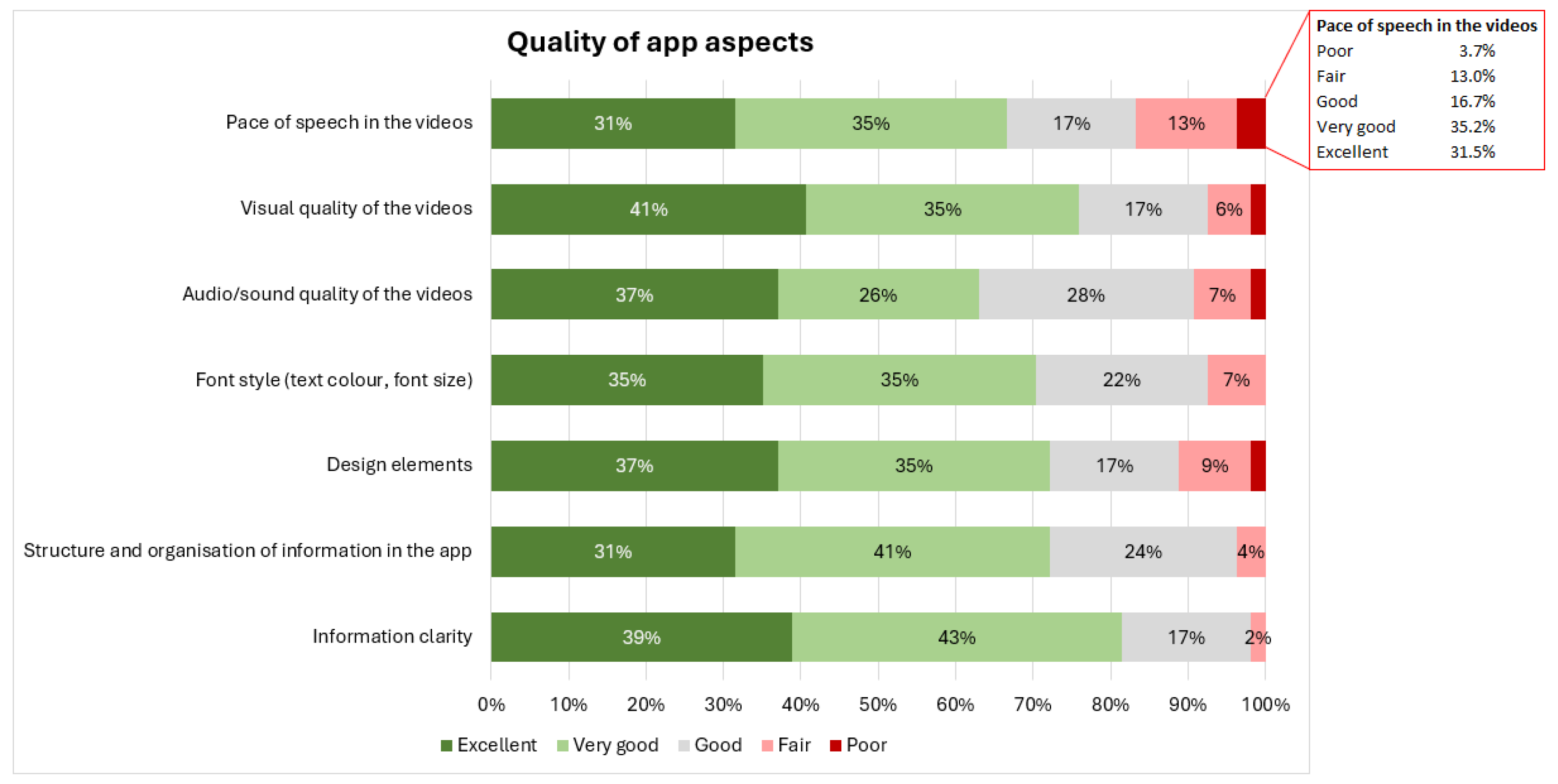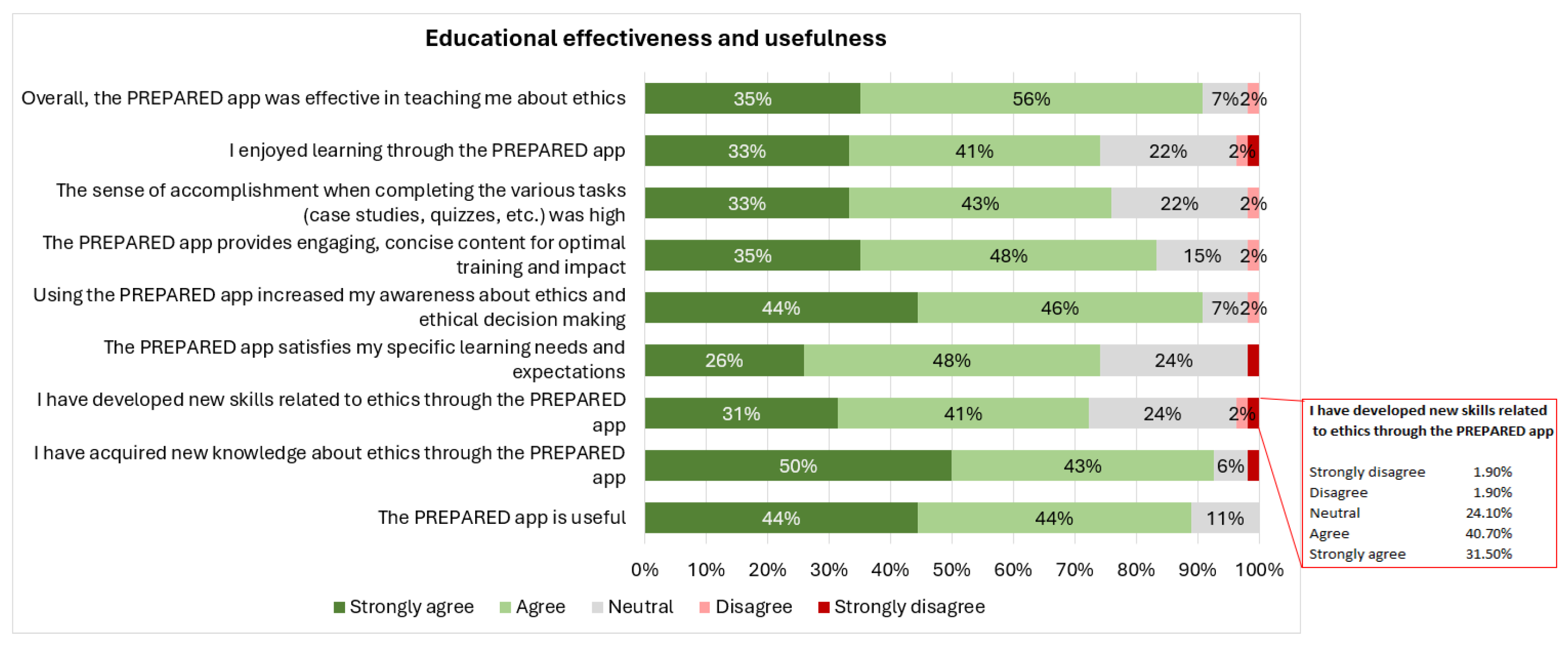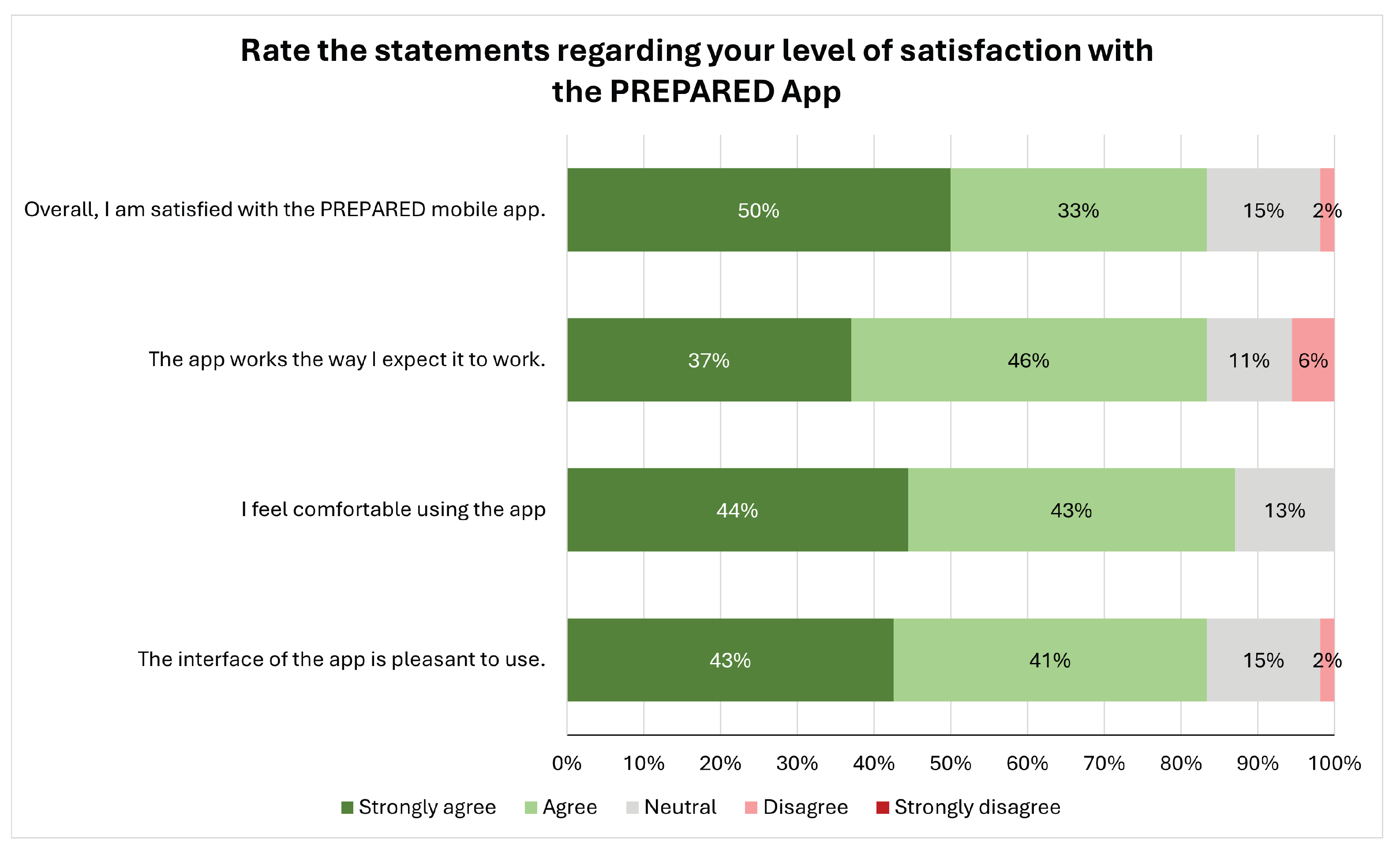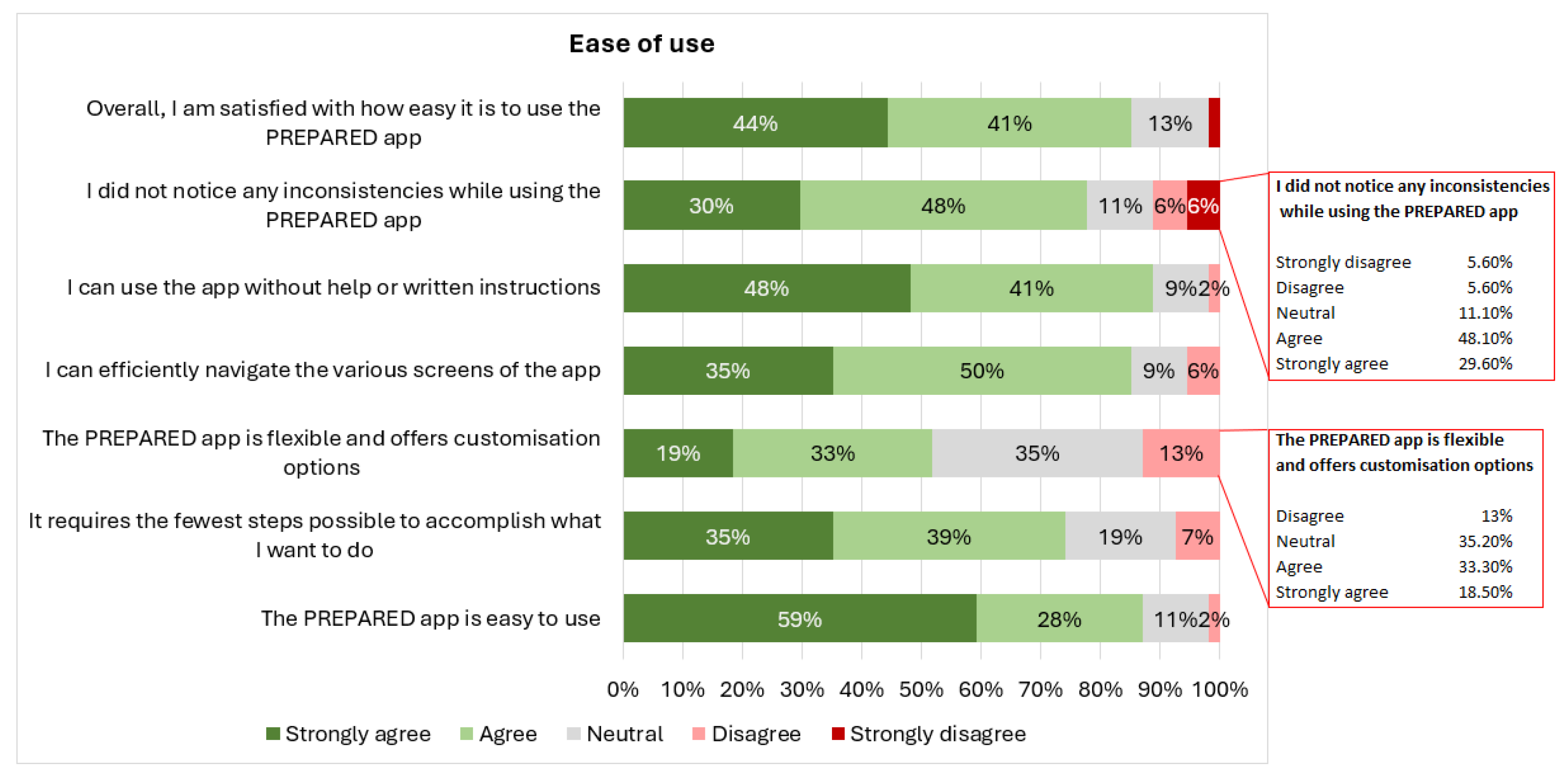



User Experience and Usability Evaluation of an Educational Mobile Application Developed for Fostering Ethics Literacy



Abstract
1. Introduction
- 1.
- How do users experience learning about ethics and integrity related to global crises through the PREPARED App?
- 2.
- What are experts’ perspectives on the usability of the PREPARED App?
- 3.
- What are the key strengths, weaknesses, and areas of improvement of the PREPARED App?
2. Background and Related Work
2.1. Contemporary Pedagogical Needs and the Role of Ethics Education
2.2. Technological Transformations and Ethics Education
2.3. Mobile Learning: Affordances, Constraints, and Learner Experience Design
2.3.1. Affordances of Mobile Learning
2.3.2. Constraints of Mobile Learning
2.3.3. Usability, Accessibility, and Learner Experience Design Considerations
2.4. Existing Mobile Apps Focusing on Ethics
3. The PREPARED Mobile App
3.1. Pedagogical Framework and Learning Experience Design
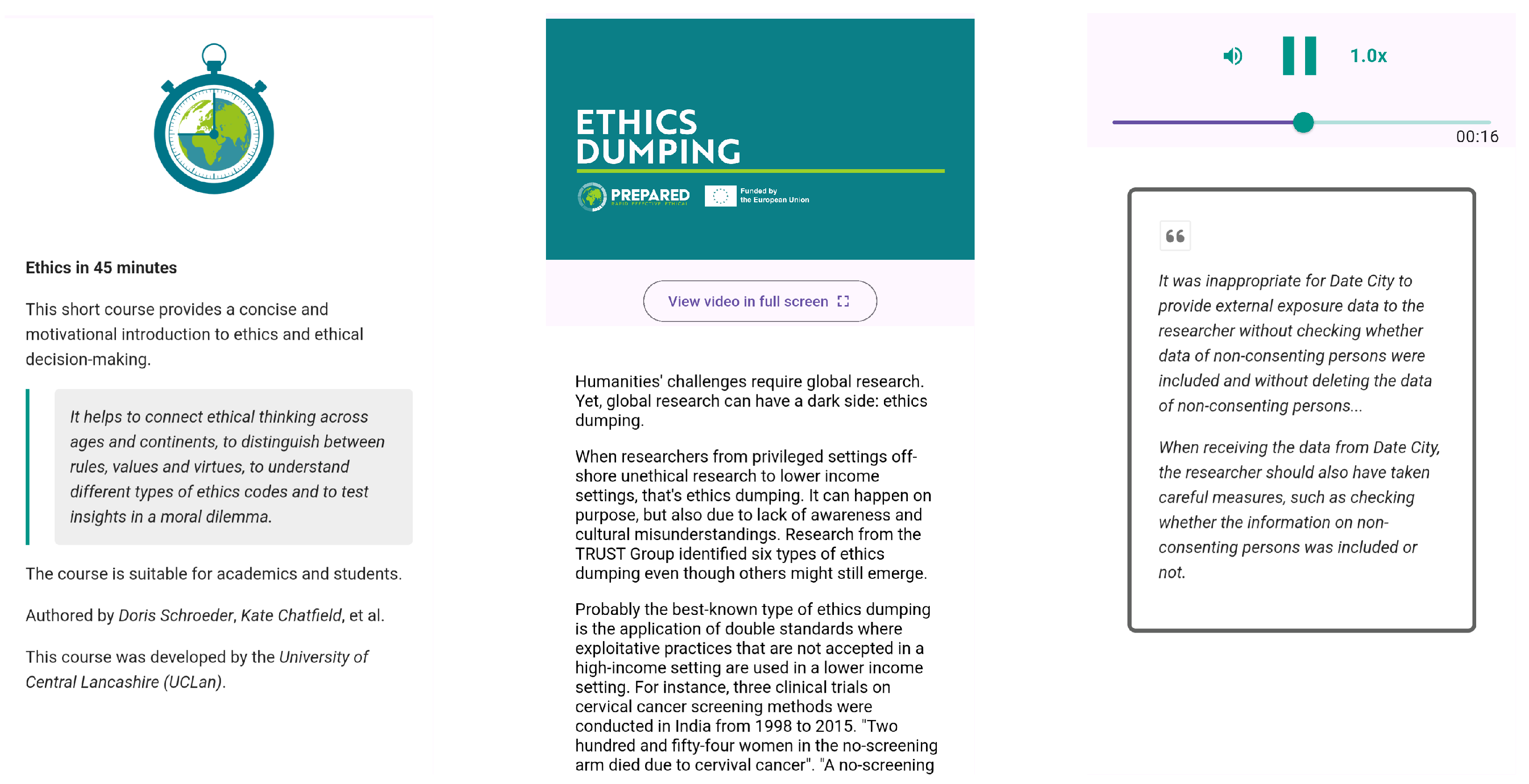
3.2. Interactive Features
3.3. Availability and Performance
3.4. Data Privacy
4. Research Methodology
4.1. Informed Consent and Ethical Approval
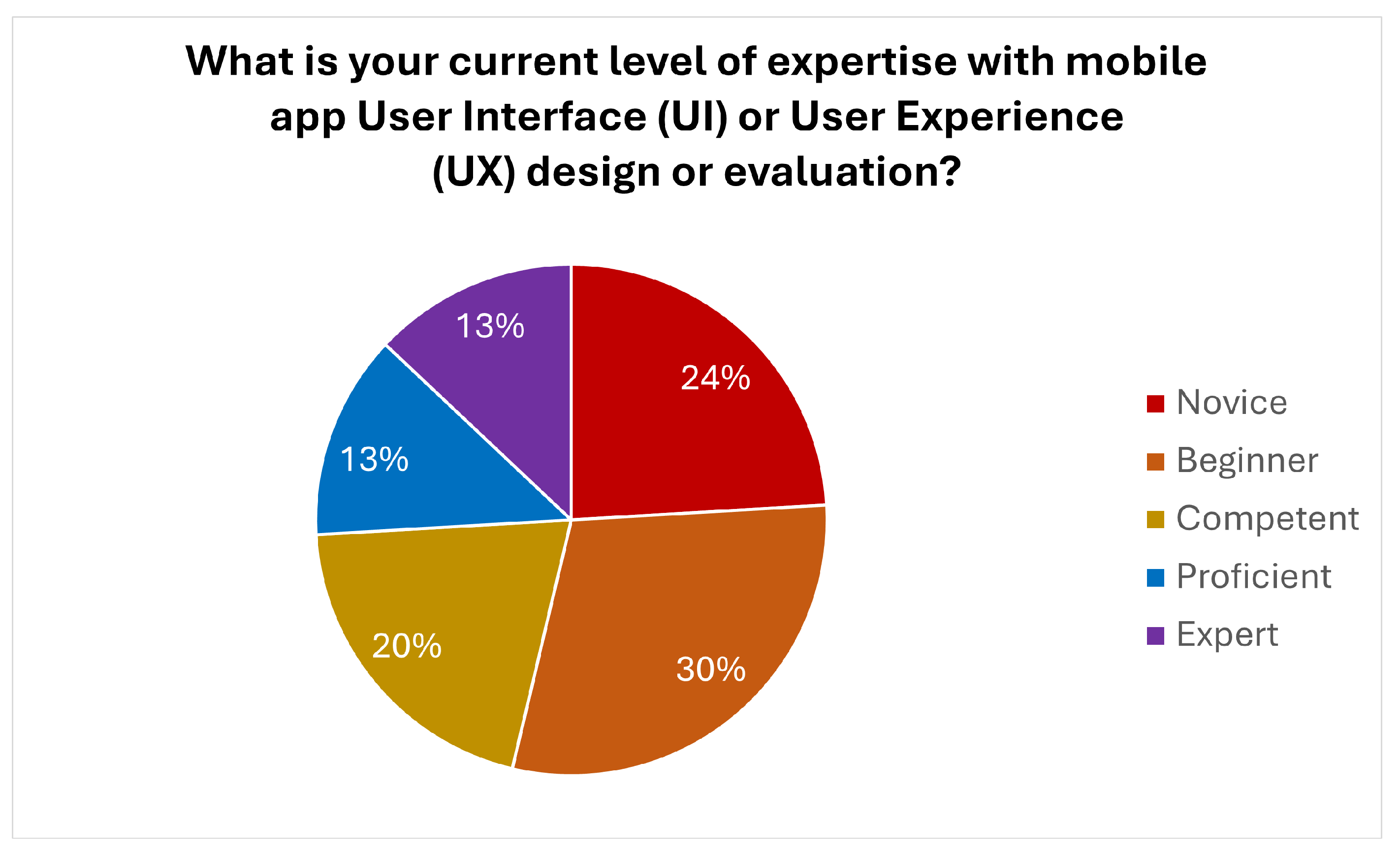
4.2. Research Participants
4.3. Research Methods
5. Results and Discussion of the Findings
5.1. User Experience Evaluation
5.2. Usability Evaluation
5.3. Accessibility Assessment
5.4. Strengths, Weaknesses, and Suggestions for Improvement
5.4.1. Strengths
5.4.2. Weaknesses
5.4.3. Suggestions from Users
5.4.4. Statistical Analysis
5.4.5. Insights from Experts
5.5. Study Limitations and Suggestions for Future Research
6. Conclusions
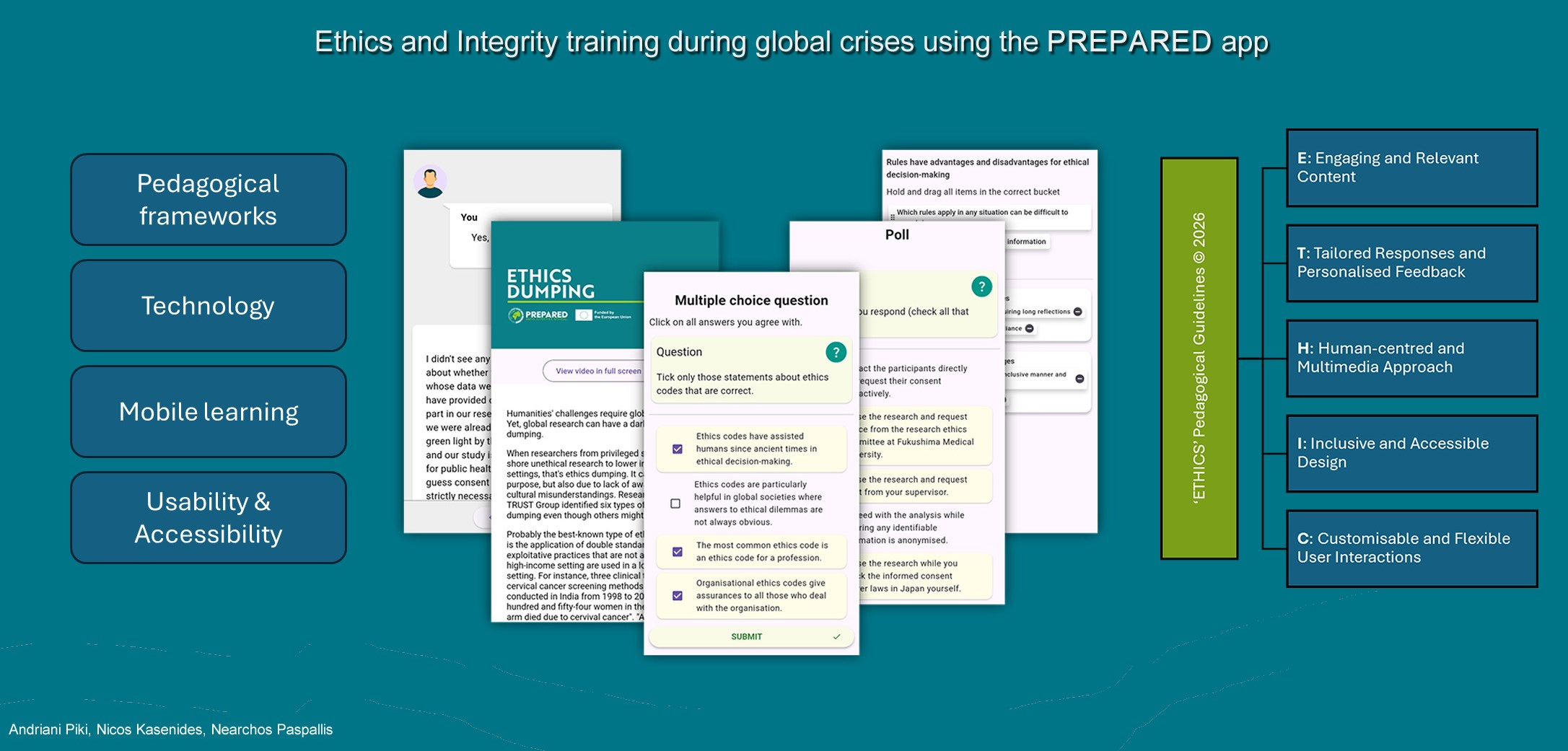
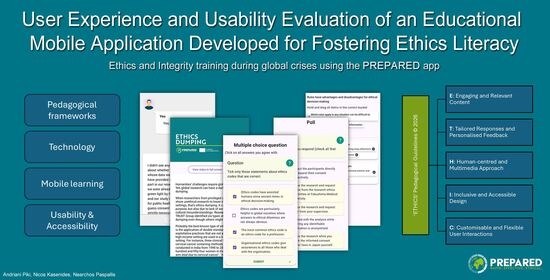
- E: Engaging and Relevant Learning Content: Add informative and relevant content in the form of captivating narratives or stories to activate reflection, and aim to capture and sustain learner engagement. Ensure learning objectives are clear and explicitly stated, and that the learning outcomes are rewarding in order to enhance educational efficacy. Gamification and game mechanics (e.g., badges, certificates, points, leaderboards, etc.) can be embedded to activate engagement.
- T: Tailored Responses and Personalised Feedback: Tailor the responses and adapt the feedback or hints provided to match users current context (e.g., based on the user’s actions or response to a quiz question, previous answers or accumulated user interactions, progression level, or personal traits and user profiles). AI technology can be utilized for achieving personalized interactions.
- H: Human-centred and Multimedia Approach: Embrace multimedia content, multimodal interactions, and a variety of interactive learning tasks to activate the development of diverse skillsets and offer a rounded learning experience. Eliminate text-heavy content and provide alternative representations (e.g., subtitles, visual content, animations, etc.) to enhance user satisfaction.
- I: Inclusive and Accessible Design: Design inclusive learner experiences with accessibility guidelines in mind, offer alternative modes of interaction (e.g., text to speech) and adjustable features to allow diverse users, including those with disabilities or from diverse cultural backgrounds, to be able to use the mobile app seamlessly, effectively, and efficiently.
- C: Customisable and Flexible User Interactions: Support diverse needs and preferences by allowing users to customise mobile app settings (e.g., pace of videos, colour contrast, difficulty level, etc.) based on their preferred interaction modes. Offering flexible learning paths is conducive to mobile earning.
- S: Sustainable and Structured Learning Content: Design the learning content, interactive activities, and user interface by employing a simple structure to enable easy navigation on mobile devices, and ensure content remains relevant, reflecting the sustainability challenges that underpin the fast-paced and constantly changing world.
Supplementary Materials
Author Contributions
Funding
Institutional Review Board Statement
Informed Consent Statement
Data Availability Statement
Acknowledgments
Conflicts of Interest
References
- UNESCO. Education in Emergencies—Ensuring the Right to Education in Emergencies and Building Resilience in the Face of Crisis; UNESCO: Paris, France, 2025. [Google Scholar]
- United Nations Department of Economic and Social Affairs. Cascading Global Crises Threaten Human Survival and the SDG Roadmap Is the Way Forward; United Nations Department of Economic and Social Affairs: New York, NY, USA, 2022. [Google Scholar]
- World Economic Forum. Future of Jobs Report 2025; World Economic Forum: Geneva, Switzerland, 2025. [Google Scholar]
- United Nations Department of Economic and Social Affairs. The 17 Goals; United Nations Department of Economic and Social Affairs: New York, NY, USA, 2025. [Google Scholar]
- United Nations. The Sustainable Development Goals Report 2025; United Nations: Geneva, Switzerland, 2025. [Google Scholar]
- PREPARED Project. An App for Ethics in Times of Crisis. 2024. Available online: https://prepared-project.eu/an-app-for-ethics-in-times-of-crisis (accessed on 1 February 2025).
- Liu, Z.L. Generative AI and Mobile Learning in Higher Education: Comparing Student and Faculty Perspectives on Employability Impact. Int. J. Interact. Mob. Technol. 2025, 19, 34. [Google Scholar] [CrossRef]
- Kasinidou, M.; Kleanthous, S.; Otterbacher, J. Artificial Intelligence in Everyday Life: Educating the Public Through an Open, Distance-Learning Course. In Proceedings of the 2023 Conference on Innovation and Technology in Computer Science Education V.1, Turku, Finland, 7–12 July 2023; pp. 306–312. [Google Scholar]
- Sharples, M. Mobile Learning: Research, Practice and Challenges. Distance Educ. China 2013, 3, 5–11. [Google Scholar]
- Kukulska-Hulme, A.; Bossu, C.; Charitonos, K.; Coughlan, T.; Ferguson, R.; FitzGerald, E.; Gaved, M.; Guitert, M.; Herodotou, C.; Maina, M.; et al. Innovating Pedagogy 2022: Open University Innovation Report 10; The Open University: Milton Keynes, UK, 2022. [Google Scholar]
- Kukulska-Hulme, A.; Wise, A.F.; Coughlan, T.; Biswas, G.; Bossu, C.; Burriss, S.K.; Charitonos, K.; Crossley, S.A.; Enyedy, N.; Ferguson, R.; et al. Innovating Pedagogy 2024: Open University Innovation Report 12; The Open University: Milton Keynes, UK, 2024. [Google Scholar]
- Marinoni, G.; van’t Land, H. The Impact of COVID-19 on Global Higher Education. Int. High. Educ. 2020, 7–9. Available online: https://ejournals.bc.edu/index.php/ihe/article/view/14593 (accessed on 18 December 2025).
- Piki, A. An Exploration of Student Experiences with Social Media and Mobile Technologies During Emergency Transition to Remote Education. In Proceedings of the World Conference on Mobile and Contextual Learning, Cairo, Egypt, 2–4 November 2020; pp. 10–17. [Google Scholar]
- PREPARED Project. PREPARED: “Pro-Active Pandemic Crisis Ethics and Integrity Framework”. 2025. Available online: https://prepared-project.eu (accessed on 1 February 2025).
- United Nations Department of Economic and Social Affairs. Goal 4: Ensure Inclusive and Equitable Quality Education and Promote Lifelong Learning Opportunities for All; United Nations Department of Economic and Social Affairs: New York, NY, USA, 2025. [Google Scholar]
- United Nations. Transforming our World: The 2030 Agenda for Sustainable Development; United Nations: Geneva, Switzerland, 2015. [Google Scholar]
- UNESCO. AI and the Future of Education: Disruptions, Dilemmas and Directions; UNESCO: Paris, France, 2025. [Google Scholar] [CrossRef]
- Arar, K.; Saiti, A. Ethical Leadership, Ethical Dilemmas and Decision Making among School Administrators. Equity Educ. Soc. 2022, 1, 126–141. [Google Scholar] [CrossRef]
- Schroeder, D.; Robinson, D. The PREPARED Code: A Global Code of Conduct for Research During Pandemics. In Research Ethics and Integrity During Pandemics: Developing the PREPARED Code; Chatfield, K., Singh, M., Eds.; Springer Nature: Cham, Switzerland, 2025; pp. 8–15. [Google Scholar]
- De Cremer, D.; Narayanan, D.; Nagpal, M.; McGuire, J.; Schweitzer, S. AI Fairness in Action: A Human-Computer Perspective on AI Fairness in Organizations and Society. Int. J. Hum.–Comput. Interact. 2024, 40, 1–3. [Google Scholar] [CrossRef]
- Tian, X.; Tang, Y. The Long-Term Impact of Moral Education on College Students’ Psychological Well-Being: A Longitudinal Study Revealing Multidimensional Synergistic Mechanisms. Behav. Sci. 2025, 15, 217. [Google Scholar] [CrossRef]
- Dwinanda, R.R.; Utama, A.A.G.S.; Fauziyan, A. Ethics and Leadership in Crisis Management: A Systematic Literature Review. J. Ilm. Manaj. Dan Bisnis 2025, 10, 52–64. [Google Scholar] [CrossRef]
- Salonen, A.O.; Laininen, E.; Hämäläinen, J.; Sterling, S. A Theory of Planetary Social Pedagogy. Educ. Theory 2023, 73, 615–637. [Google Scholar] [CrossRef]
- TRUST Consortium. The TRUST Code: A Global Code of Conduct for Equitable Research Partnerships; TRUST Consortium. 2018. Available online: https://www.globalcodeofconduct.org/ (accessed on 17 December 2025).
- Chatfield, K.; Singh, M. Research Ethics and Integrity During Pandemics: Developing the PREPARED Code; Springer Nature: Cham, Switzerland, 2025. [Google Scholar] [CrossRef]
- Dübeler, D.; Schütze, C.; Müller, A.; Richter, B.; Wrede, B. Humans Follow AI-Advice by (Un-) Trustworthy Virtual Agents in Ethical Healthcare Decisions. In Proceedings of the International Conference on Human-Computer Interaction, Gothenburg, Sweden, 22–27 June 2025; Springer Nature: Cham, Switzerland, 2025; pp. 263–268. [Google Scholar]
- Krügel, S.; Ostermaier, A.; Uhl, M. Zombies in the Loop? Humans Trust Untrustworthy AI-Advisors for Ethical Decisions. Philos. Technol. 2022, 35, 17. [Google Scholar] [CrossRef]
- Vianello, A.; Laine, S.; Tuomi, E. Improving Trustworthiness of AI Solutions: A Qualitative Approach to Support Ethically-Grounded AI Design. Int. J. Hum.–Comput. Interact. 2023, 39, 1405–1422. [Google Scholar] [CrossRef]
- European Commission. Shaping Europe’s Digital Future: Ethics Guidelines for Trustworthy AI; European Commission: Brussels, Belgium, 2019. [Google Scholar]
- European Commission. Shaping Europe’s Digital Future: The AI Act; European Commission: Brussels, Belgium, 2024. [Google Scholar]
- Sharples, M.; Taylor, J.; Vavoula, G. A Theory of Learning for the Mobile Age. In The SAGE Handbook of E-Learning Research; Andrews, R., Haythornthwaite, C., Eds.; Sage: London, UK, 2007; pp. 221–247. [Google Scholar]
- Piki, A. Re-imagining the Distributed Nature of Learner Engagement in Computer-Supported Collaborative Learning Contexts in the Post-Pandemic Era. In Proceedings of the International Conference on Human-Computer Interaction, Virtual Event, 26 June–1 July 2022; Springer International Publishing: Cham, Switzerland, 2022; pp. 161–179. [Google Scholar] [CrossRef]
- Ferguson, R.; Coughlan, T.; Egelandsdal, K.; Gaved, M.; Herodotou, C.; Hillaire, G.; Jones, D.; Jowers, I.; Kukulska-Hulme, A.; McAndrew, P.; et al. Innovating Pedagogy 2019; Open University: Milton Keynes, UK, 2019. [Google Scholar]
- Al-Bashayreh, M.; Almajali, D.; Altamimi, A.; Masa’deh, R.; Al-Okaily, M. An Empirical Investigation of Reasons Influencing Student Acceptance and Rejection of Mobile Learning Apps Usage. Sustainability 2022, 14, 4325. [Google Scholar] [CrossRef]
- Alshamaila, Y.; Awwad, F.M.A.; Masa’deh, R.E.; Farfoura, M.E. Complexities, Challenges, and Opportunities of Mobile Learning: A Case Study at the University of Jordan. Sustainability 2023, 15, 9564. [Google Scholar] [CrossRef]
- Benaida, M.; Shaheen, A.R.B.Y.; Alam, T.; Khalifa, A.H.B.S. A Hybrid Approach to Raising Digital Literacy among Adolescents in KSA Using a Mobile Application. Int. J. Interact. Mob. Technol. 2025, 19, 98. [Google Scholar] [CrossRef]
- Lee, S.S.; Tay, S.M.; Balakrishnan, A.; Yeo, S.P.; Samarasekera, D.D. Mobile Learning in Clinical Settings: Unveiling the Paradox. Korean J. Med. Educ. 2021, 33, 349–362. [Google Scholar] [CrossRef]
- Torrents, E.G. Best Digital Practices in Mental Health: Design and Implementation of a Tailored Mobile Application for Vulnerable Populations in the European Union. Preprints 2024, 2024060284. Available online: https://www.preprints.org/manuscript/202406.0284 (accessed on 17 December 2025).
- Whitmeyer, S.J.; Atchison, C.; Collins, T.D. Using Mobile Technologies to Enhance Accessibility and Inclusion in Field-Based Learning. GSA Today 2020, 30, 4–10. [Google Scholar] [CrossRef]
- Huang, Z.; Benyoucef, M. An Empirical Study of Mobile Application Usability: A Unified Hierarchical Approach. Int. J. Hum.–Comput. Interact. 2023, 39, 2624–2643. [Google Scholar] [CrossRef]
- Faudzi, M.A.; Cob, Z.C.; Omar, R.; Sharudin, S.A.; Ghazali, M. Investigating the User Interface Design Frameworks of Current Mobile Learning Applications: A Systematic Review. Educ. Sci. 2023, 13, 94. [Google Scholar] [CrossRef]
- Christopoulos, A.; Mystakidis, S. Gamification in Education. Encyclopedia 2023, 3, 1223–1243. [Google Scholar] [CrossRef]
- Parsons, D.; Palalas, A.; Nikou, S.; Rodulfo, S. Mobile Learning Frameworks and Pedagogy: A Systematic Review. Eur. J. Educ. 2024, 59, e12601. [Google Scholar] [CrossRef]
- Stefan, I.A.; Gheorghe, A.F.; Stefan, A.; Piki, A.; Tsalapata, H.; Heidmann, O. Constructing Seamless Learning Through Game-Based Learning Experiences. Int. J. Mob. Blended Learn. 2022, 14, 1–12. [Google Scholar] [CrossRef]
- Suartama, I.K.; Setyosari, P.; Ulfa, S. Development of an Instructional Design Model for Mobile Blended Learning in Higher Education. Int. J. Emerg. Technol. Learn. 2019, 14, 4–22. [Google Scholar] [CrossRef]
- Zieni, H.A. The Effect of Mobile Learning on Learner Autonomy: A Suggested Measurement Tool to Assess the Development of Learner Autonomy. J. Asia TEFL 2019, 16, 1020–1030. [Google Scholar] [CrossRef]
- Lan, Y.J.; Lin, Y.T. Mobile Seamless Technology Enhanced CSL Oral Communication. J. Educ. Technol. Soc. 2016, 19, 335–350. [Google Scholar]
- Sung, Y.T.; Yang, J.M.; Lee, H.Y. The Effects of Mobile-Computer-Supported Collaborative Learning: Meta-Analysis and Critical Synthesis. Rev. Educ. Res. 2017, 87, 768–805. [Google Scholar] [CrossRef]
- Casebourne, I. Left to Their Own Devices: An Exploration of Context in Seamless Work-Related Mobile Learning. Br. J. Educ. Technol. 2024, 55, 1772–1789. [Google Scholar] [CrossRef]
- Schindler, L.A.; Burkholder, G.J.; Morad, O.A.; Marsh, C. Computer-Based Technology and Student Engagement: A Critical Review of the Literature. Int. J. Educ. Technol. High. Educ. 2017, 14, 25. [Google Scholar] [CrossRef]
- Sharples, M.; Spikol, D. Mobile Learning. In Technology Enhanced Learning: Research Themes; Luckin, R., Cukurova, M., Eds.; Springer International Publishing: Cham, Switzerland, 2017; pp. 89–96. [Google Scholar]
- Kasenides, N.; Piki, A.; Paspallis, N. Exploring the User Experience and Effectiveness of Mobile Game-Based Learning in Higher Education. In Proceedings of the International Conference on Human-Computer Interaction, Copenhagen, Denmark, 23–28 July 2023; Springer Nature: Cham, Switzerland, 2023; pp. 72–91. [Google Scholar]
- Chavez, O.J.F.; Palaoag, T. UI/UX Prototype Design for a Personalized Learning Mobile App to Boost Comprehension: A Design Thinking Model. TQM J. 2025. [Google Scholar] [CrossRef]
- Feng, Y.; Liao, Y.; Ren, Y. Effects of M-Learning on Students’ Learning Outcome: A Meta-Analysis. In New Media for Educational Change: Selected Papers from HKAECT 2018 International Conference; Springer: Singapore, 2018; pp. 115–123. [Google Scholar]
- Li, X.; Heng, Q. Design of Mobile Learning Resources Based on New Blended Learning: A Case Study of Superstar Learning App. In Proceedings of the 2021 IEEE 3rd International Conference on Computer Science and Educational Informatization (CSEI), Xinxiang, China, 18–20 June 2021; pp. 333–338. [Google Scholar]
- Moran, K. Reading Content on Mobile Devices; Nielsen Norman Group: Fremont, CA, USA, 2016. [Google Scholar]
- Mukhtarkyzy, K.; Smagulova, L.; Tokzhigitova, A.; Serikbayeva, N.; Sayakov, O.; Turkmenbayev, A.; Assilbayeva, R. A systematic review of the utility of assistive technologies for SEND students in schools. Front. Educ. 2025, 10, 1523797. [Google Scholar] [CrossRef]
- Piki, A.; Tchanturia, I.; Kasenides, N.; Paspallis, N.; Leal, S. SDG Quest: Leveraging Mobile Game-Based Learning to Foster Environmental, Social, and Economic Sustainable Development Goals. In Proceedings of the International Conference on Human-Computer Interaction, Washington, DC, USA, 29 June–4 July 2024; Springer Nature: Cham, Switzerland, 2024; pp. 373–392. [Google Scholar]
- Alsawaier, R. The Effect of Gamification on Motivation and Engagement. Int. J. Inf. Learn. Technol. 2018, 35, 56–79. [Google Scholar] [CrossRef]
- Nurtanto, M.; Kholifah, N.; Ahdhianto, E.; Samsudin, A.; Isnantyo, F.D. A Review of Gamification Impact on Student Behavioral and Learning Outcomes. Int. J. Interact. Mob. Technol. 2021, 15, 23–45. [Google Scholar] [CrossRef]
- Alasmari, T. The Effect of Screen Size on Students’ Cognitive Load in Mobile Learning. J. Educ. Teach. Learn. 2020, 5, 280–295. [Google Scholar] [CrossRef]
- Kim, J.; Choi, Y.; Xia, M.; Kim, J. Mobile-Friendly Content Design for MOOCs: Challenges, Requirements, and Design Opportunities. In Proceedings of the CHI Conference on Human Factors in Computing Systems, New Orleans, LA, USA, 29 April–5 May 2022; pp. 1–16. [Google Scholar]
- Nielsen, J. Mobile Content is Twice as Difficult; Nielsen Norman Group: Fremont, CA, USA, 2011. [Google Scholar]
- Faisal, C.M.N.; Fernandez-Lanvin, D.; De Andrés, J.; Gonzalez-Rodriguez, M. Design Quality in Building Behavioral Intention through Affective and Cognitive Involvement for E-Learning on Smartphones. Internet Res. 2020, 30, 1631–1663. [Google Scholar] [CrossRef]
- Ahn, T.Y.; Lee, S.M. User Experience of a Mobile Speaking Application with Automatic Speech Recognition for EFL Learning. Br. J. Educ. Technol. 2016, 47, 778–786. [Google Scholar] [CrossRef]
- Curum, B.; Khedo, K.K. Cognitive Load Management in Mobile Learning Systems: Principles and Theories. J. Comput. Educ. 2021, 8, 109–136. [Google Scholar] [CrossRef]
- Kim, J.; Kim, J. Guideline-Based Evaluation and Design Opportunities for Mobile Video-Based Learning. In Proceedings of the Extended Abstracts of the 2021 CHI Conference on Human Factors in Computing Systems; ACM: New York, NY, USA, 2021; pp. 1–6. [Google Scholar]
- Elkhair, Z.; Abdul Mutalib, A. Mobile Learning Applications: Characteristics, Perspectives, and Future Trends. Int. J. Interact. Digit. Media 2019, 5, 18–21. [Google Scholar]
- Sophonhiranrak, S. Features, Barriers, and Influencing Factors of Mobile Learning in Higher Education: A Systematic Review. Heliyon 2021, 7, e06696. [Google Scholar] [CrossRef]
- Piki, A.; Markou, M.; Vasiliou, A. Learning Through Play: The Role of Learning and Engagement Theory in the Development of Educational Games for Intellectually Challenged Children. In Proceedings of the 2016 International Conference on Interactive Technologies and Games (ITAG), Nottingham, UK, 26–27 October 2016; pp. 1–6. [Google Scholar]
- Piki, A.; Stefan, I.A.; Stefan, A.; Gheorghe, A.F. Mitigating the Challenges of Mobile Games-Based Learning Through Gamified Lesson Paths. In Proceedings of the World Conference on Mobile and Contextual Learning, Cairo, Egypt, 2–4 November 2020; pp. 73–80. [Google Scholar]
- Guo, F.; Wang, X.S.; Shao, H.; Wang, X.R.; Liu, W.L. How User’s First Impression Forms on Mobile User Interface?: An ERPs Study. Int. J. Hum.–Comput. Interact. 2020, 36, 870–880. [Google Scholar] [CrossRef]
- Rigby, C.S. Gamification and Motivation. In The Gameful World: Approaches, Issues, Applications; Walz, S.P., Deterding, S., Eds.; MIT Press: Cambridge, MA, USA, 2015; pp. 113–138. [Google Scholar]
- Jones, K.M. Learning Analytics and Higher Education: A Proposed Model for Establishing Informed Consent Mechanisms to Promote Student Privacy and Autonomy. Int. J. Educ. Technol. High. Educ. 2019, 16, 24. [Google Scholar] [CrossRef]
- Rogers, Y.; Sharp, H.; Preece, J. Interaction Design: Beyond Human-Computer Interaction, 6th ed.; John Wiley & Sons: Hoboken, NJ, USA, 2023. [Google Scholar]
- Hoehle, H.; Aljafari, R.; Venkatesh, V. Leveraging Microsoft’s Mobile Usability Guidelines: Conceptualizing and Developing Scales for Mobile Application Usability. Int. J. Hum.–Comput. Stud. 2016, 89, 35–53. [Google Scholar] [CrossRef]
- Papadakis, S. Advances in Mobile Learning Educational Research (AMLER): Mobile Learning as an Educational Reform. Adv. Mob. Learn. Educ. Res. 2021, 1, 1–4. [Google Scholar] [CrossRef]
- Nie, R. Research on Dynamic Visual Communication Graphics Design under Mobile Terminal Platform. In Proceedings of the 2018 International Conference on Intelligent Transportation, Big Data & Smart City (ICITBS), Xiamen, China, 25–26 January 2018; pp. 198–201. [Google Scholar]
- Kumar, B.A.; Mohite, P. Usability of Mobile Learning Applications: A Systematic Literature Review. J. Comput. Educ. 2018, 5, 1–17. [Google Scholar] [CrossRef]
- Grellmann, B.; Neate, T.; Roper, A.; Wilson, S.; Marshall, J. Investigating Mobile Accessibility Guidance for People with Aphasia. In Proceedings of the 20th International ACM SIGACCESS Conference on Computers and Accessibility, ASSETS ’18, Galway, Ireland, 22–24 October 2018; pp. 410–413. [Google Scholar] [CrossRef]
- W3C Web Accessibility Initiative (WAI). WCAG 2 Overview. 2025. Available online: https://www.w3.org/WAI/standards-guidelines/wcag/ (accessed on 18 December 2025).
- Game Accessibility Guidelines. Available online: https://gameaccessibilityguidelines.com/ (accessed on 18 December 2025).
- Nielsen, J. Enhancing the explanatory power of usability heuristics. In Proceedings of the SIGCHI Conference on Human Factors in Computing Systems, CHI ’94, Boston, MA, USA, 24–28 April 1994; pp. 152–158. [Google Scholar] [CrossRef]
- Kumar, B.A.; Goundar, M.S. Usability heuristics for mobile learning applications. Educ. Inf. Technol. 2019, 24, 1819–1833. [Google Scholar] [CrossRef]
- Piki, A. Learner Engagement in Computer-Supported Collaborative Learning Environments: A Mixed-Methods Study in Postgraduate Education. Ph.D. Thesis, University of London, London, UK, 2012. [Google Scholar]
- Chang, Y.K.; Kuwata, J. Learning Experience Design: Challenges for Novice Designers. In Learner and User Experience Research: An Introduction for the Field of Learning Design & Technology; EdTech Books, 2020. [Google Scholar]
- Parrish, P. Aesthetic Principles for Instructional Design. Educ. Technol. Res. Dev. 2009, 57, 511–528. [Google Scholar] [CrossRef]
- Tawfik, A.A.; Payne, L.; Ketter, H.; James, J. What Instruments Do Researchers Use to Evaluate LXD? A Systematic Review Study. Technol. Knowl. Learn. 2025, 30, 47–62. [Google Scholar] [CrossRef]
- Erasmus University Rotterdam. Dilemma Game: Professionalism and Integrity in Research; Erasmus University Rotterdam: Rotterdam, The Netherlands, 2024. [Google Scholar]
- Erasmus University Rotterdam. Dilemma Game Instructions & Suggestions; Erasmus University Rotterdam: Rotterdam, The Netherlands, 2020. [Google Scholar]
- Seedall, C.; Schroeder, D.; Paspallis, N.; Nyirenda, T.; Singh, M. Implementation Support for the PREPARED Code. In Research Ethics and Integrity During Pandemics: Developing the PREPARED Code; Chatfield, K., Singh, M., Eds.; Springer Nature: Cham, Switzerland, 2025; pp. 76–93. [Google Scholar]
- PREPARED Project. PREPARED App. 2025. Available online: https://prepared-project.eu/app (accessed on 1 February 2025).
- Alias, N.F.; Razak, R.A. Revolutionizing Learning in the Digital Age: A Systematic Literature Review of Microlearning Strategies. Interact. Learn. Environ. 2025, 33, 1–21. [Google Scholar] [CrossRef]
- Lee, Y.M. Mobile Microlearning: A Systematic Literature Review and Its Implications. Interact. Learn. Environ. 2023, 31, 4636–4651. [Google Scholar] [CrossRef]
- Shatte, A.B.; Teague, S. Microlearning for Improved Student Outcomes in Higher Education: A Scoping Review. July 2020. OSF Preprints. Available online: https://osf.io/preprints/osf/fhu8n_v1 (accessed on 17 December 2025).
- Yadav, M.; Kanwal, P.; Dang, T.T. Microlearning for the Masses: Empowerment of Geographically Dispersed Teams. In Navigating the Global Workforce Through Bold Workplace Learning and Professional Development; IGI Global: Hershey, PA, USA, 2026; pp. 319–346. [Google Scholar]
- Jarutkamolpong, S.; Kwangmuang, P. Enhancing Undergraduate Creative Thinking Through a Constructivist Mobile Learning Application: Design, Development, and Evaluation. Think. Ski. Creat. 2025, 57, 101866. [Google Scholar] [CrossRef]
- Tan, C.; Ng, C.S. Constructivism in Education. In Oxford Research Encyclopedia of Education; Oxford University Press: Oxford, UK, 2021. [Google Scholar] [CrossRef]
- Ren, P.; Xiao, Y.; Chang, X.; Huang, P.; Li, Z.; Gupta, B.B.; Chen, X.; Wang, X. A Survey of Deep Active Learning. ACM Comput. Surv. 2021, 54, 1–40. [Google Scholar] [CrossRef]
- Nawrocki, P.; Wrona, K.; Marczak, M.; Sniezynski, B. A Comparison of Native and Cross-Platform Frameworks for Mobile Applications. Computer 2021, 54, 18–27. [Google Scholar] [CrossRef]
- Palmieri, M.; Singh, I.; Cicchetti, A. Comparison of Cross-Platform Mobile Development Tools. In Proceedings of the 2012 16th International Conference on Intelligence in Next Generation Networks, Berlin, Germany, 8–11 October 2012; pp. 179–186. [Google Scholar]
- Malavolta, I.; Ruberto, S.; Soru, T.; Terragni, V. End Users’ Perception of Hybrid Mobile Apps in the Google Play Store. In Proceedings of the 2015 IEEE International Conference on Mobile Services, New York, NY, USA, 27 June–2 July 2015; pp. 25–32. [Google Scholar]
- Heitkötter, H.; Hanschke, S.; Majchrzak, T.A. Evaluating Cross-Platform Development Approaches for Mobile Applications. In Proceedings of the International Conference on Web Information Systems and Technologies, Porto, Portugal, 18–21 April 2012; Springer: Berlin/Heidelberg, Germany, 2012; pp. 120–138. [Google Scholar]
- Biørn-Hansen, A.; Rieger, C.; Grønli, T.; Majchrzak, T.A.; Ghinea, G. An Empirical Investigation of Performance Overhead in Cross-Platform Mobile Development Frameworks. Empir. Softw. Eng. 2020, 25, 2997–3040. [Google Scholar] [CrossRef]
- The European Parliament and the Council of the European Union. General Data Protection Regulation. 2016. Available online: https://eur-lex.europa.eu/eli/reg/2016/679/oj/eng (accessed on 18 December 2025).
- PREPARED. PREPARED App Privacy Policy. 2025. Available online: https://prepared-project.eu/app/#privacy (accessed on 18 December 2025).
- Nielsen, J. Usability Inspection Methods. In Proceedings of the Conference Companion on Human Factors in Computing Systems, Boston, MA, USA, 24–28 April 1994; pp. 413–414. [Google Scholar]
- Nielsen, J.; Mack, R.L. Usability Inspection Methods; John Wiley & Sons: New York, NY, USA, 1994. [Google Scholar]
- Wharton, C.; Rieman, J.; Lewis, C.; Polson, P. The Cognitive Walkthrough Method: A Practitioner’s Guide. In Usability Inspection Methods; Nielsen, J., Mack, R.L., Eds.; John Wiley & Sons: New York, NY, USA, 1994; pp. 105–140. [Google Scholar]
- Alshabib, A.; Alakkas, N.; Hassine, J. A Comparative Study of Heuristic Evaluation and Cognitive Walkthrough: An E-Government Usability Assessment Case Study. Arab. J. Sci. Eng. 2025, 50, 7801–7830. [Google Scholar] [CrossRef]
- Mahatody, T.; Sagar, M.; Kolski, C. State of the Art on the Cognitive Walkthrough Method, Its Variants and Evolutions. Int. J. Hum.–Comput. Interact. 2010, 26, 741–785. [Google Scholar] [CrossRef]
- Liu, C.; Correia, A.P. A Case Study of Learners’ Engagement in Mobile Learning Applications. Online Learn. 2021, 25, 25–48. [Google Scholar] [CrossRef]
- Piki, A. Learner Engagement in Mobile Computer-Supported Collaborative Learning Contexts: An Integrative Framework. In Proceedings of the 16th World Conference on Mobile and Contextual Learning, Larnaca, Cyprus, 30 October–1 November 2017; pp. 1–7. [Google Scholar]
- McLean, G. Examining the Determinants and Outcomes of Mobile App Engagement—A Longitudinal Perspective. Comput. Hum. Behav. 2018, 84, 392–403. [Google Scholar] [CrossRef]
- Nielsen, J. How I Developed the 10 Usability Heuristics; UX Tigers: Fremont, CA, USA, 2024. [Google Scholar]
- Kumar, A.; Srivastava, K.; Yadav, K.; Deshmukh, O. Multi-Faceted Index Driven Navigation for Educational Videos in Mobile Phones. In Proceedings of the 22nd International Conference on Intelligent User Interfaces, Limassol, Cyprus, 13–16 March 2017; pp. 357–361. [Google Scholar]
- Navarrete, E.; Nehring, A.; Schanze, S.; Ewerth, R.; Hoppe, A. A Closer Look into Recent Video-Based Learning Research: A Comprehensive Review of Video Characteristics, Tools, Technologies, and Learning Effectiveness. Int. J. Artif. Intell. Educ. 2025, 35, 1631–1694. [Google Scholar] [CrossRef]
- Kukulska-Hulme, A.; Bossu, C.; Charitonos, K.; Coughlan, T.; Deacon, A.; Deane, N.; Ferguson, R.; Herodotou, C.; Huang, C.W.; Mayisela, T.; et al. Innovating Pedagogy 2023: Open University Innovation Report 11; The Open University: Milton Keynes, UK, 2023. [Google Scholar]
- Wen, J.; Li, C.; Yang, Y.; Li, J. A Task Complexity Evaluation Framework for Mobile AI Agent Applications. In Proceedings of the International Conference on Human-Computer Interaction, Gothenburg, Sweden, 22–27 June 2025; Springer Nature: Cham, Switzerland, 2025; pp. 444–454. [Google Scholar]



| Guidelines | Success Criteria (SC) | Status | Comments |
|---|---|---|---|
| 1.1. Text Alternatives: Provide text alternatives for any non-text content. | 1.1.1. Non-text Content | Implemented | Informative images and iconography include meaningful alternative text. Icon buttons include assistive labels when long pressed. All videos are accompanied by descriptive text, transcripts, or both. |
| 1.2. Time-based Media: Provide alternatives for time-based media. | 1.1.2. Captions (Prerecorded) | Implemented | All embedded videos have subtitles that are automatically enabled by default. |
| 1.3. Adaptable: Create content that can be presented in different ways (for example, simpler layout) without losing information or structure. | 1.3.1. Info & Relationships | Implemented | Content is accompanied by a textual description, and its structure is preserved through different layouts. Users can adapt video playback speed to meet their preferences. Users can switch between different views (e.g., normal or full screen in videos) without the loss of content. |
| 1.3.4. Orientation | Partially Implemented | The app’s user interface is locked to Portrait mode to ensure the content’s visibility. For videos, the orientation can be adapted to either portrait or landscape (full screen). | |
| 1.4. Distinguishable: Make it easier for users to see and hear content, including separating foreground from background. | 1.4.3. Contrast (Minimum) | Implemented | Normal text meets the minimum contrast ratio of 4.5:1, and large-scale text and images have a contrast ratio of at least 3:1, critical for reading content in various lighting conditions (e.g., outdoor use). |
| 1.4.4. Resize Text | Partially implemented | Text content can be zoomed up to 200% while also respecting the operating system’s font scaling accessibility settings. At maximum scaling, some quiz buttons clip or overlap at maximum (200%) zoom. | |
| 2.2. Enough Time: Provide users with enough time to read and use content. | 2.2.2. Pause, Stop, Hide | Implemented | The app does not contain any components that automatically start (such as videos), no moving banners or blinking elements, or any other time-based distractions that can interfere with the user’s understanding of the content. |
| 2.5. Input modalities: Make it easier for users to operate functionality through various inputs beyond keyboard. | 2.5.5. Target Size (AAA) | Partially implemented | Touch targets for multiple-choice answers are smaller than the recommended 44x44 px size and are too close to each other for people with reduced dexterity or motor impairments. Normal buttons meet the size criteria. |
| 3.1. Readable: Make text content readable and understandable. | 3.1.5. Reading Level | Implemented | The text is written at an appropriate educational level. Case study descriptions and content are broken into smaller, more readable sections and paragraphs. |
| 3.2. Predictable: Make pages appear and operate in predictable ways. | 3.2.3. Consistent Navigation | Implemented | Navigation components, such as those for going to the previous or next pages, are repeated on multiple screens and are placed at the same locations. Other navigational components are clearly visible and indicated as interactive components through elevation and colouring. |
| 3.3. Input Assistance: Help users avoid and correct mistakes. | 3.3.1. Error Identification | Implemented | If an input error is detected, the app identifies the respective field and provides clear feedback to the user in text. When a user leaves a required field empty, the app provides an informative message, rather than a generic error. Specific error messages are included for lack of Internet connectivity and general system issues. |
| 3.3.2. Labels or Instructions | Implemented | Form fields and other interactive elements contain clear labels or hints, along with instructions in each screen, which are visible before the user provides any input. | |
| 4.1. Compatible: Maximize compatibility with current and future user agents, including assistive technologies. | 4.1.2. Name, Role, Value | Partially implemented | Interactive UI elements (e.g., form elements, links, buttons, etc.) use native components that correctly broadcast their Role (e.g., “Button”) and Value (e.g., “On/Off”). Primary navigation links have unique Names. However, assistive technologies (e.g., screen readers) are not embedded. |
| Thematic Categories (Frequency) | Representative Verbatim Quotes from Users |
|---|---|
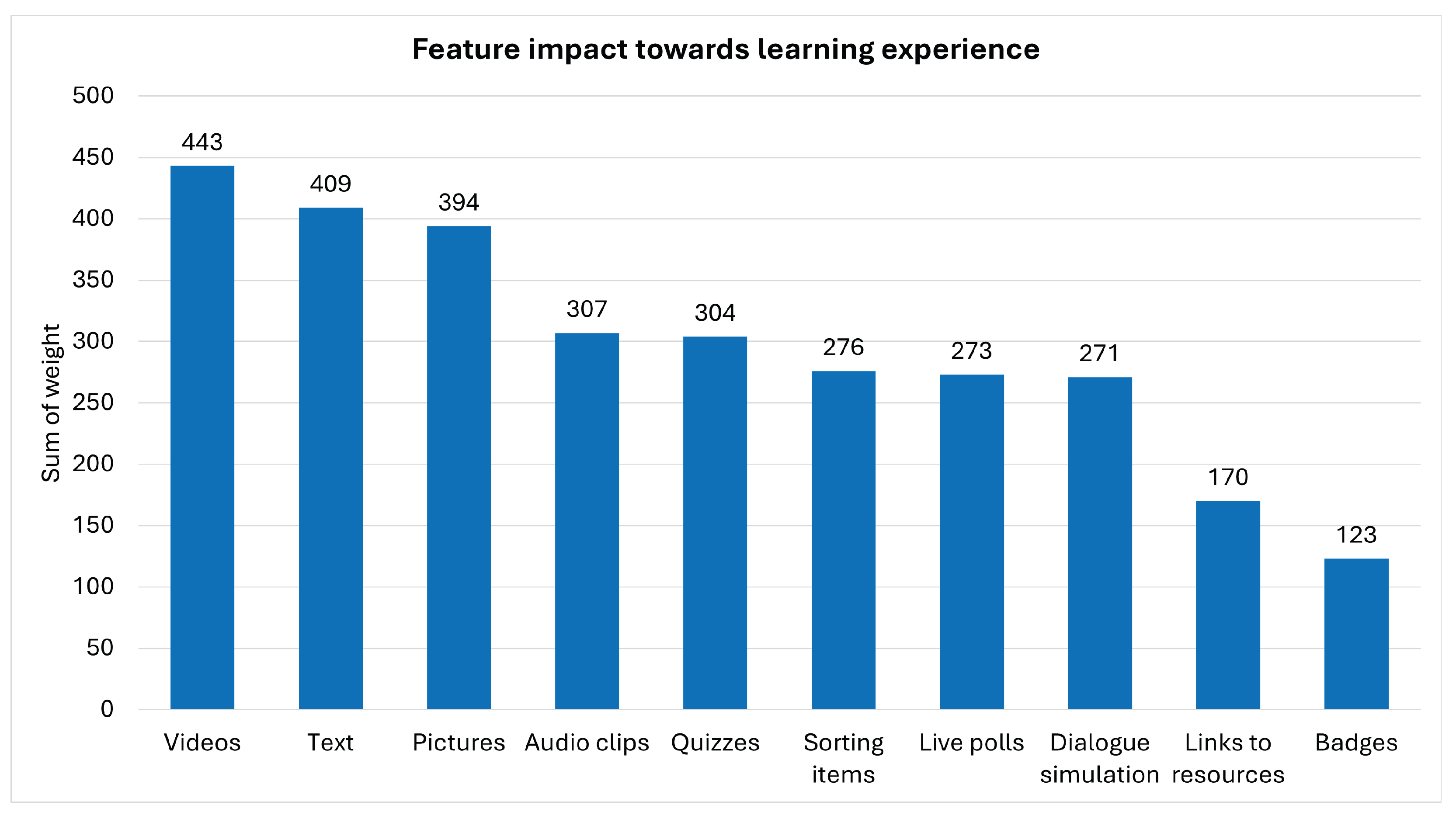
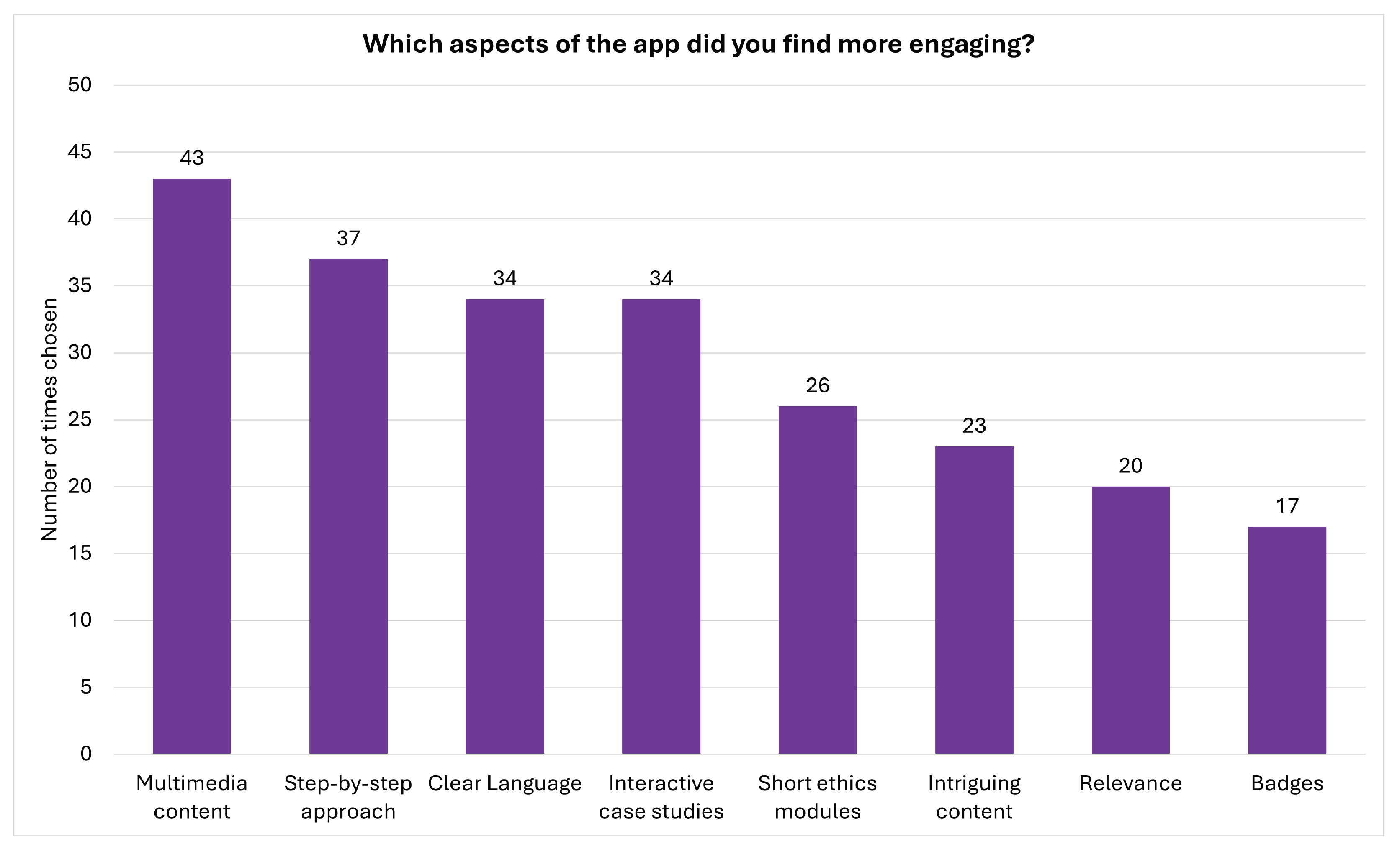
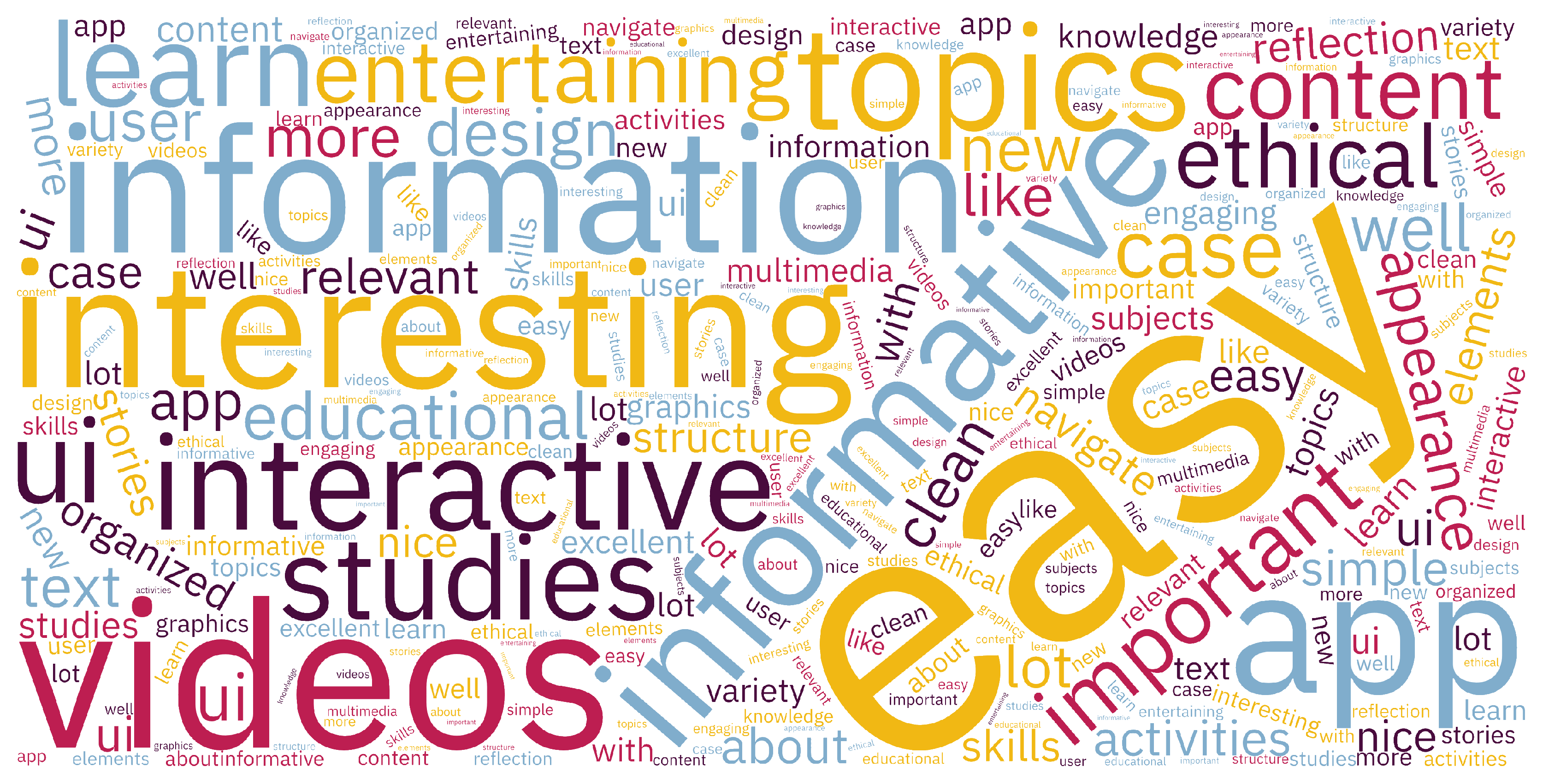
| Informative content, relevance to ethics, educational efficacy (n = 29) | “This is a very powerful tool for learning purposes.” “The different characters in the cases help to understand the ethical challenges.” “Very interesting and relevant case studies. The content provides the key insights per case study and really triggers reflection.” “The topics are very important. This app helps to learn more, to think and to rethink more about these topics.” “Excellent topics, very relevant and timely topics.” “Informativeness and relevance of the information to ethics topics.” “Very educational and I like the push about ethics because it’s very important.” “Interesting subjects and modules to learn about.” “Very informative, fast learning.” “Informative short videos.” “Highly informative.” “A lot of stories.” “Learn new skills/improve or refresh your skills.” “Well organized case studies with insightful information on ethical problems and decisions.” “The user interface is easy to use and the app is very informative. I can see this being widely adopted in higher education as a training course.” “New knowledge.” |
| Ease of use (n = 13) | “Easy to use.” “Simple and easy to use.” “Intuitive to navigate and use.” |
| Multimedia content and variety of learning tasks (n = 12) | “Very interesting activities and stories, which have high-quality graphics and videos.” “Engaging multimedia content, like videos and interactive elements.” “The content is interesting and there is a good mix of different types of multimedia.” “Easy to access and has very important information and videos to watch and learn.” “Graphics and videos.” “Option to read the text in several places.” “The sorting buckets.” |
| UI design and visual appeal (n = 12) | “Nice UI.” “Easy to navigate.” “Clean design as an app.” “Clarity in design.” “The videos and the progress bar at the bottom of every section.” “Nice appearance.” |
| Engaging, captivating, and enjoyable (n = 9) | “Captivating case studies with a variety of interactive components and storytelling.” “Useful content and information which invites reflecting on ethical aspects; important knowledge is provided; useful external sources through hyperlinks allow further exploration and extend the value of the app.” “Interesting subjects.” “Entertaining as well as educational.” |
| Clarity and well-organised structure (n = 8) | “Clear information.” “To the point.” “Well-structured.” “Simple structure.” “Step-by-step information.” “Very well organized activities appearance, and also interesting case studies.” |
| Interactive learning elements (n = 7) | “I loved the fact that you see what each user voted (in the polls).” “Interesting videos and interactive elements.” “Engaging, informative, interactive.” |
| Thematic Codes (Frequency Count) | Representative Verbatim Quotes from Users |
|---|---|
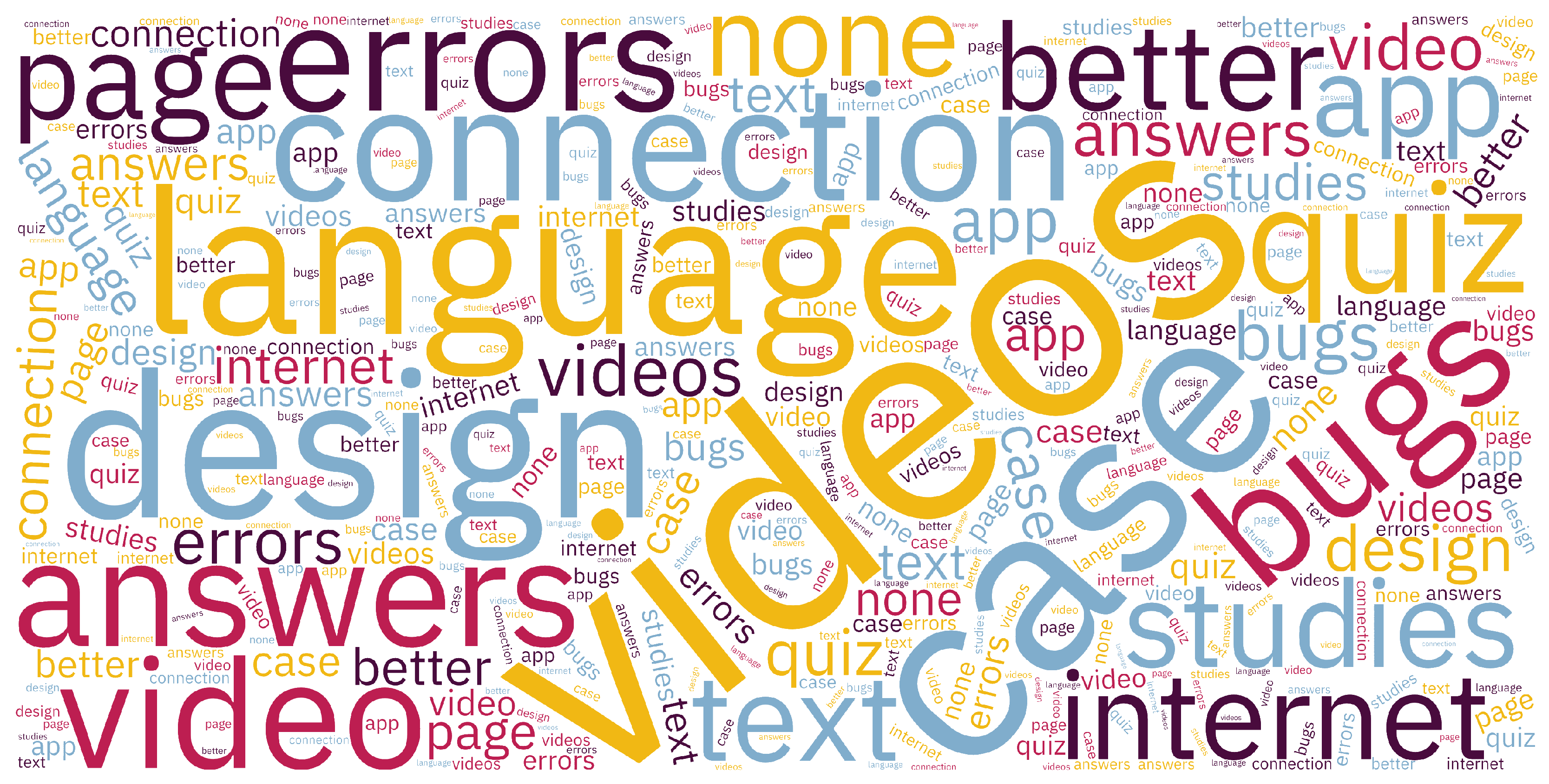
| Video quality (n = 14) | “Speech in videos is too slow” “The videos are very slow” “Pace/speed of narration in videos is too slow which impacts engagement negatively” “Video quality and video playback issues” “Poor audio quality in videos” “Many videos cannot load properly” “Long videos without interactivity are boring” |
| Lack of flexibility and customisation (n = 7) | “Forced to watch videos in order to proceed to the next page” “Unable to skip content” “Forbidden skipping” “Cannot resubmit questions or polls again when revisiting content” “Lack of customisation options” “My only issue as someone who has returned to the app several times to look at different courses and case studies is that it can be frustrating to have to go through a whole case again when I might just want to check one screen” |
| Learning content quantity and quality (n = 7) | “Small number of case studies” “Limited references to external sources” “The case study topics appear ad hoc with no central theme or clear vision” |
| Text-heavy content (n = 6) | “Too much text to read” “A lot of information” |
| Feedback, help, and hints (n = 4) | “In some quizzes the correct answers are not shown before proceeding” “Lack of hints while doing some interactive activities” “Could provide better help messages” “Unclear where the chosen nickname is used and how” |
| Language barrier (n = 3) | “Content only available in English” “No translation options or subtitles in my native language” |
| Thematic Codes (Frequency Count) | Representative Verbatim Quotes from Users |
|---|---|
| Visual appeal (colours, layout, graphics, icons) (n = 9) | “The images selected for the case studies are not always very engaging (e.g., there is a white human figure on a black background but it does not relate to the topic). Using more relevant, attractive, impactful graphics would be better.” |
| “When selecting an option in the quiz a tick (check icon) appears on the submit button which is confusing. Initially I thought it had already registered the answer.” | |
| “The icon with the questionnaire mark on MCQs is misleading.” | |
| “Design, colours, icons are not distinguishable.” | |
| “Colours.” | |
| “Layout.” | |
| Navigability (n = 3) | “Some bugs when scrolling in main menu.” |
| “Scrolling at the end turns the page.” | |
| “You cannot skip through pages, for example if you accidentally go back to the previous page you will have to repeat the step if you want to move on.” |
| Thematic Codes (Frequency Count) | Representative Verbatim Quotes from Users |
|---|---|
| Internet connectivity (n = 7) | “I’m not sure if it’s the app or not, but on the quizzes it kept disconnecting. I checked my WiFi and it’s not the problem.” |
| “Internet connection is lost even though the app is connected.” | |
| “The network error shows up even with stable Internet connection.” | |
| “The video loading would show a pop up that I had no Internet connection.” | |
| “An error appearing for ‘No Connectivity’ especially when playing videos.” | |
| Interactivity and responsiveness (n = 5) | “Some interactive elements may lag or not function smoothly.” |
| “Loading for too long.” | |
| “Many of the videos aren’t working properly—they just don’t load.” | |
| “I couldn’t watch all the videos due to errors.” | |
| “During video playing the mobile was going to sleep mode.” |
| Thematic Category | Representative Verbatim Quotes from Users | Analysis and Interpretation |
|---|---|---|
| Customisation options | “Dark theme.” “Offer a wider range of customisation options and perhaps offer a simple tutorial when the first poll/quiz/sorting activities take place to guide the user.” | Customisation, personalisation, and flexibility are inextricably associated with technology acceptance, adoption, and learner engagement. |
| Icons, buttons, navigation, and interaction modes | “The UI should be more engaging/flexible. The icons and placement of information can be a bit misleading, but a quick rearrangement will fix it!” “The submit button on the quizzes area is misleading users if they have already submitted or not.” “During a course to be able to swipe left or right, instead of only using the buttons.” “I’m not sure how the app performs on mobile phones, as I don’t have an Android device. I tested it on my tablet in landscape mode, but the app remained locked in portrait. I checked the auto-rotate settings, but it still didn’t switch. Only the videos rotate when viewed in full screen.” | Three ideas can be extracted from these statements. Firstly, technical issues or deficiencies that may cause negative emotions, such as frustration or confusion, should be eliminated, as they hinder learner engagement. Secondly, the absence of expected functionality, interactive modes, or shortcuts (typically available in other mobile apps) can influence the app’s intuitiveness. Thirdly, the use of icons and menus should be efficient, effective, memorable, learnable, and have reasonable utility, in line with key usability principles [75]. If a user needs to click on an icon to remember what information or page it links to, this violates the principle of “recognition rather than recall” [115]. |
| Accessibility | “In terms of accessibility, I would recommend adding subtitles to the videos. Many users might access the app in noisy environments or while on public transport. Some pages contain only a few lines of text followed by large blank white space—this may be due to viewing it on a tablet. However, it’s worth considering that many institutions in higher education use tablets in classroom sessions, so optimizing the layout for tablet use could be beneficial.” | Accessibility is key—both in terms of technology compliance and compliance with accessibility guidelines (e.g., WCAG). Designing inclusive and accessible learner experiences involves offering alternative modes of interaction and adjustable settings to allow diverse users, including those with disabilities, to be able to use the mobile app effectively and efficiently. Cross-platform development was employed for the PREPARED App to ensure wider adoption and access to this technological resource. Still, the increasing variability of device sizes, specifications, and user contexts must be considered to ensure the app is inclusive and accessible. |
| Thematic Category | Representative Verbatim Quotes from Users | Findings |
|---|---|---|
| Explicit learning objectives and guidelines | “Add an Introduction paragraph to explain what the app includes.” “It would help to add specific learning goals.” “Provide a few guidelines like user info/guidelines to highlight the key benefits of the app and key functionality.” | These add-on features can help manage learners’ expectations and boost their confidence during first use, while also sustaining their attention and reducing the risk of losing interest. |
| Inclusive and accessible learning | “It would help to add subtitles in order to make the videos accessible to those with hearing problems.” “Add a feature to allow in-app note-taking, or to allow me to favourite a screen/page I see so I can revisit it, or to be able to get a snapshot of what I read, rather than going through the whole case again.” “Offer a text alternative to the audio/videos.” | Accessibility, equality, diversity, and inclusion are of paramount importance in learning contexts [39]. Attending to diverse learning styles and human factors supports the vision of inclusive education. |
| Feedback and features | “Have a separate section for quizzes, independent from the case studies, to test general knowledge or current understanding. Another feature is to add a screen which shows the percentage of completing each case study to encourage users to continue and complete it. Another idea is to have daily informative notifications or daily challenges e.g., quizzes to engage the users.” “Add a progress bar below each case study so that every time I open the app I remember the status and track my progress easier.” “It would be nice to have a dashboard in the app to show which case studies are complete, incomplete, or not started. This way, each completed case study could be assigned a badge showing on the dashboard.” “There should be a notification system or reminder options, which could be customised to encourage users and keep them engaged.” “It would be nice to see the titles of the case studies in the menu so I can choose which one to view without scrolling all the way down on the main page every time. A progress bar could also be shown in this menu to encourage me to complete the remaining case studies.” “To be able to share this app to increase visibility or to suggest it to others.” | These suggestions show how enhanced interaction features embedded in the mobile app can encourage and engage users. They also highlight the social nature of mobile apps, even in educational contexts. Promoting the badge/certificate feature and incorporating additional gamification mechanics can strengthen the role of social computing and social media [58]. This aligns with trends in professional networks, where users share certifications or challenge results (e.g., Wordle). Embracing similar features can increase interest and influence the overall learning experience. |
| Thematic Category | Representative Verbatim Quotes from Users | Findings |
|---|---|---|
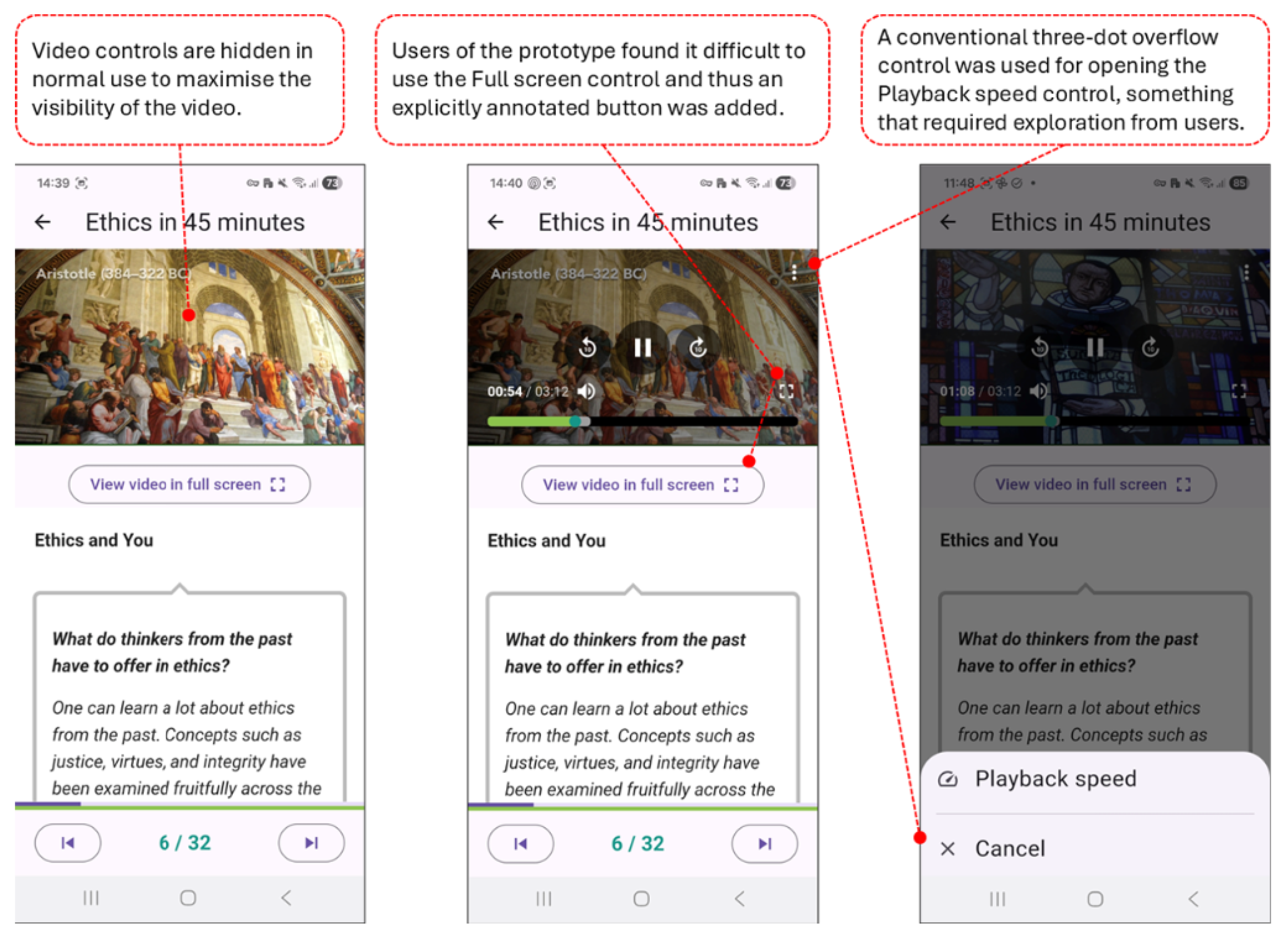
| Video & graphical content | “Video controls could be improved to add flexibility.” “Fast paced videos.” “Shorter and more engaging videos.” “Offer the option to watch the entire content instead of pieces.” “Play video highlights (like short videos) as an intro instead of showing static video.” “It should be clear/visible how to change the pace of the video. I discovered it much later accidentally.” “Using more relevant, attractive, impactful graphics would be better and more engaging.” | Visual content can strongly influence the effectiveness of an educational mobile app. Graphical elements must be carefully selected. Adding video previews, breaking videos into smaller parts, and adding headings or tags can support microlearning. Making playback-speed controls more obvious can also enhance engagement. |
| Personalisation and multimodal interactions | “Text under videos is useful but could be better formatted or structured to highlight keywords.” “Personalisation options on whether the text appears plain or formatted.” “It would be better to have the option to see the content in other languages or have choice of subtitles in other languages.” “Add a podcast option, to make the app allow the videos to play in the form of podcasts, and the videos to start one after the other. Also, give the option to change languages.” | These recommendations demonstrate that multimedia and multimodal interactions resonate with users, offering flexible ways to consume the same content. For an inclusive and personalised learning experience, it is important to allow users to access content in their preferred modality. |
| Content quality | “Provide more content on ethics and wellness.” “It would be nice if there was a way to propose/suggest/contribute new case studies or new topics to be considered by the developing team. Or, some suggested topics which users can vote (as upcoming case studies for example).” “Add something to make the app not a ’single use’ app, to have continuity, maybe something to revisit the quizzes or notification if new case studies or info is added.” “For people that want to know more trusted links on more thorough info or research can be given.” “Additional reference to external resources for expanded credibility.” “Need more validation. Need to be Multilingual. Good to have Progress Tracker. More quizzes. AI feedback is good to have. AR or 360° video for more immersive scenarios is good to have.” | Learners value credible, validated, and high–quality content presented in multiple formats. They also seek more interaction with the material, including content in additional languages, podcast modes, AI-supported feedback, more case studies and quizzes, and access to immersive or alternative formats. |
Disclaimer/Publisher’s Note: The statements, opinions and data contained in all publications are solely those of the individual author(s) and contributor(s) and not of MDPI and/or the editor(s). MDPI and/or the editor(s) disclaim responsibility for any injury to people or property resulting from any ideas, methods, instructions or products referred to in the content. |
© 2026 by the authors. Licensee MDPI, Basel, Switzerland. This article is an open access article distributed under the terms and conditions of the Creative Commons Attribution (CC BY) license.
Share and Cite
Piki, A.; Kasenides, N.; Paspallis, N. User Experience and Usability Evaluation of an Educational Mobile Application Developed for Fostering Ethics Literacy. Information 2026, 17, 193. https://doi.org/10.3390/info17020193
Piki A, Kasenides N, Paspallis N. User Experience and Usability Evaluation of an Educational Mobile Application Developed for Fostering Ethics Literacy. Information. 2026; 17(2):193. https://doi.org/10.3390/info17020193
Chicago/Turabian StylePiki, Andriani, Nicos Kasenides, and Nearchos Paspallis. 2026. "User Experience and Usability Evaluation of an Educational Mobile Application Developed for Fostering Ethics Literacy" Information 17, no. 2: 193. https://doi.org/10.3390/info17020193
APA StylePiki, A., Kasenides, N., & Paspallis, N. (2026). User Experience and Usability Evaluation of an Educational Mobile Application Developed for Fostering Ethics Literacy. Information, 17(2), 193. https://doi.org/10.3390/info17020193