1. Introduction
With the growing digitalization of industrial processes, augmented reality (AR) is being increasingly applied as an effective tool for improving production operations, employee training, and the creation of work instructions. Recent advancements in mixed-reality hardware, edge computing, real-time spatial mapping, and AI-supported object recognition have significantly expanded the industrial applicability of augmented reality technologies [
1,
2,
3].
One of the most significant applications of AR is the support of assembly operations, where digital work instructions provide operators with precise and dynamic guidance in real-time. In this way, it is possible to support error reduction, reduce adaptation time, and enhance the overall operational efficiency of production processes. However, the implementation of such solutions requires thorough testing in a real business to evaluate their benefits and potential limitations [
2,
3,
4].
This study investigates AR-based training implementation in a real industrial environment using Microsoft HoloLens 2 (Microsoft Corp., Redmond, WA, USA) as a representative head-mounted mixed reality device. The focus is placed on the evaluation framework rather than on a single hardware platform. It examines the process of their design, integration, and testing in real conditions, emphasizing operational guidance consistency and workflow feasibility under real manufacturing conditions, and the economic aspects of implementing this technology. The results of this work provide an overview of the possibilities of using AR to optimize training and work processes in modern manufacturing operations [
1,
2,
4].
In recent years, augmented reality (AR) has become an increasingly important tool in various industrial sectors, including manufacturing, logistics, and others, where it contributes to the optimization of processes [
1,
2]. The COVID-19 pandemic has facilitated a better understanding of the full potential of this technology in these industries. According to the Wall Street Journal, AR has ceased to be perceived as an experiment and has become an essential tool in everyday work processes. Applications that utilize AR can integrate digital images into the real environment, enabling effective communication between managers and experts remotely [
3,
4].
During the pandemic, for example, at the Porsche car manufacturer, a subsidiary of Volkswagen AG, the number of workers using augmented reality glasses increased, allowing technicians to perform complex repairs on sports cars with the assistance of remote experts. Although some business leaders may be hesitant to adopt this technology in production, concerns about the necessary digital infrastructure are beginning to fade. Upon considering the benefits that augmented reality offers, it becomes evident that it is an investment that yields improvements. The implementation of augmented reality can help companies reduce downtime, identify issues immediately, and provide real-time support [
3,
4].
Literature Review and Related Work on AR in Industrial Training
Assembly is a key process in overall production. The total costs, time required for manufacturing, and product quality depend on the efficiency and accuracy of executing each step of the assembly. These operations are often demanding, as they require detailed adjustments to achieve the desired outcome. The entire process can be time-consuming and involve numerous components that need to be assembled in the correct order to ensure the proper functioning of the product. For this reason, workers should be well-trained to meet the time constraints required by production. In some cases, the order of assembly varies according to the product variant, which may necessitate consulting paper manuals or reference tables, potentially causing unnecessary delays, distractions, and subsequently, issues with ensuring safety. During manual assembly, these tasks are performed by workers with the assistance of tools or semi-automatic machines. Operations related to setup and maintenance should be planned in advance for all equipment to ensure its proper use and to prevent issues that may arise in the event of unforeseen failures [
2,
4].
In manual assembly systems, numerous applications have been tested, primarily aimed at assisting operators in correctly executing assembly sequences. Extensive studies published in 2012 and 2016 indicate that since the beginning of this century, research on augmented reality has become increasingly relevant for researchers engaged in assembly processes [
1,
2]. Within this broad area of the literature, we can distinguish two main categories: contributions focused on “real industrial” applications and contributions oriented towards “demonstrative” cases. The first category pertains to the implementation of AR systems to address specific industrial problems (e.g., the assembly of engines or vehicle bodies), which is the main subject of this survey. The second category represents experimental demonstrations conducted with simple components or toys that serve as reference values. These demonstration contributions are often used to test specific hardware or software solutions. Examples may include studies that compare the use of various devices, such as smartphones, Microsoft HoloLens, and Epson Moverio BT200 (Seiko Epson Corp., Suwa, Japan) smart glasses, in conjunction with paper instructions. These research findings indicate that users are able to assemble a LEGO Duplo set (LEGO Group, Billund, Denmark) most quickly with a paper instruction manual, while the number of errors decreases with the support of augmented reality [
3,
4].
Recent studies (2021–2024) [
5,
6,
7,
8] report that AR-based training can reduce onboarding time, improve task accuracy, and provide cognitive guidance in manufacturing environments. In parallel, research has expanded toward ergonomic assessment, cognitive workload measurement, and integration of AR systems within Industry 4.0 architectures. However, real industrial pilot studies that jointly combine strategic evaluation tools, continuous improvement frameworks, and economic analysis remain limited.
Despite the increasing number of studies on AR in industrial training, there is still limited evidence from real manufacturing environments combining technical implementation, training evaluation, and economic assessment. Therefore, this study aims to investigate the design, implementation, and strategic potential of AR-based work instructions using Microsoft HoloLens 2 in an industrial setting.
While previous studies have extensively documented the technical advantages of augmented reality in industrial training, limited research has integrated strategic evaluation tools, continuous improvement methodology, and economic assessment into a unified decision-making framework for real manufacturing deployment.
The main contribution of this study, therefore, lies not in re-confirming previously reported AR performance improvements but in developing and applying an integrated evaluation framework combining SWOT analysis, PDCA cycle methodology, and investment analysis within a real industrial environment.
By bridging operational implementation with strategic management tools, this research provides a structured model that supports managerial decision-making in AR adoption. This research follows an exploratory industrial case study methodology aimed at evaluating the feasibility, strategic positioning, and economic implications of AR-based training implementation in a real manufacturing environment.
Based on the identified research gap, this study addresses the following research question:
How can augmented reality-based training be systematically evaluated in a real industrial environment with respect to operational feasibility, strategic positioning, and economic viability?
To answer this question, the study integrates pilot implementation, continuous improvement logic (PDCA), quantitative SWOT analysis, and scenario-based investment assessment.
2. Study Context
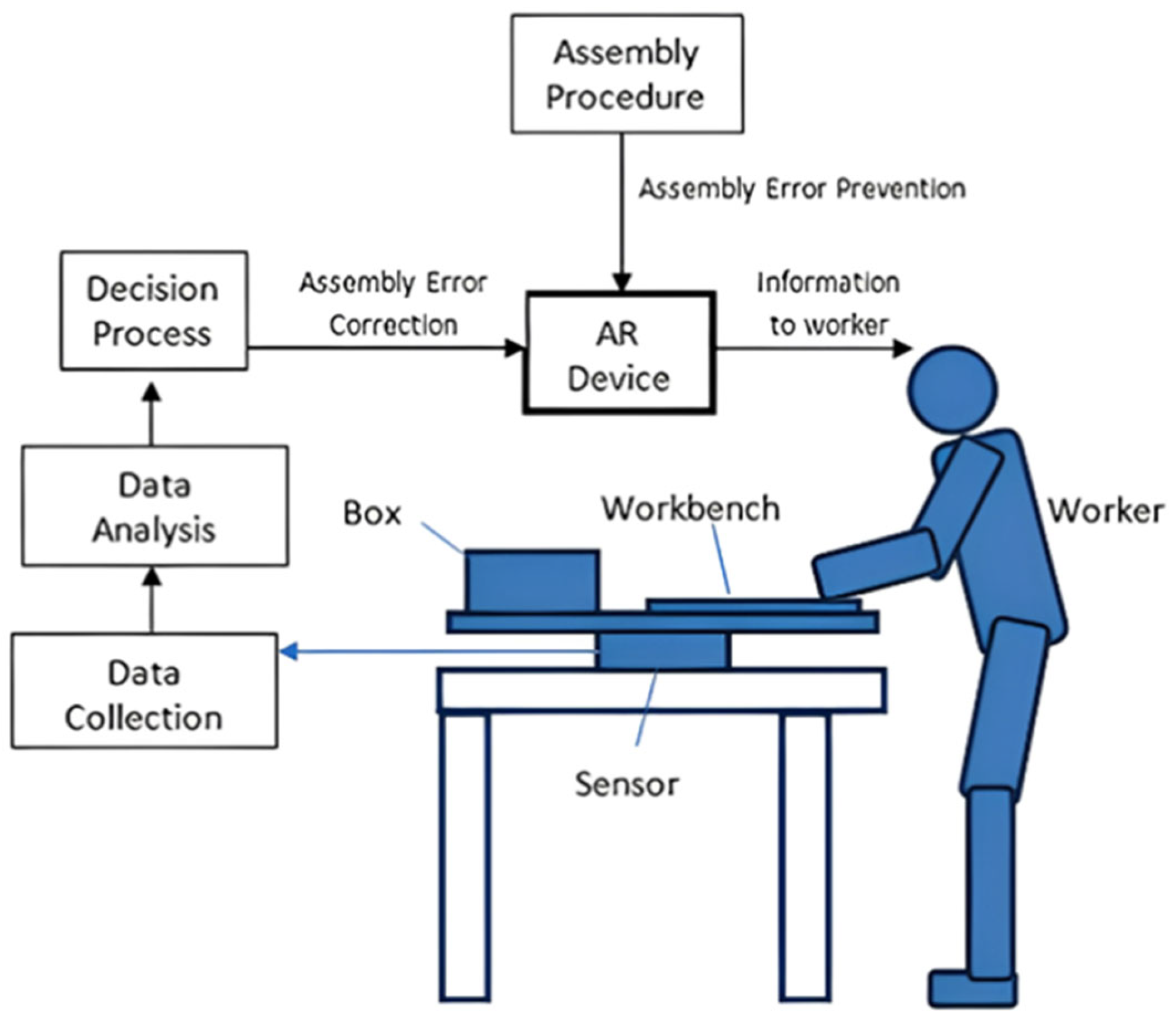
The mere use of augmented reality (AR) cannot provide feedback for closed-loop control in tasks performed by the operator. Therefore, in manual assembly systems, it is crucial that systems utilizing AR are integrated with sensors that can generate relevant physical process values for the user. AR can be combined with sensing devices to create a synergistic system, where the advantages of one device complement the advantages of the other [
9,
10]. In this way, AR can guide the operator in performing the correct steps and provide support in correcting errors that may occur. In this study, a manual assembly workstation configuration integrating sensing devices with augmented reality guidance was implemented to guide the activities of the worker.
Figure 1 illustrates the system diagram, where the force sensor is connected to the RR—Reaction Recording—system to detect assembly errors that the augmented reality camera cannot identify [
10].
Note: Blue arrows indicate measured data flow from the sensor to the data collection module, while black arrows represent information and control flows between the assembly procedure, AR device, decision process, and the worker.
2.1. Instruction and Training of Employees in Production
In assembly tasks, augmented reality plays a key role in providing instructions. Visual technologies, such as optical or video displays, are most commonly used to guide assembly operations.
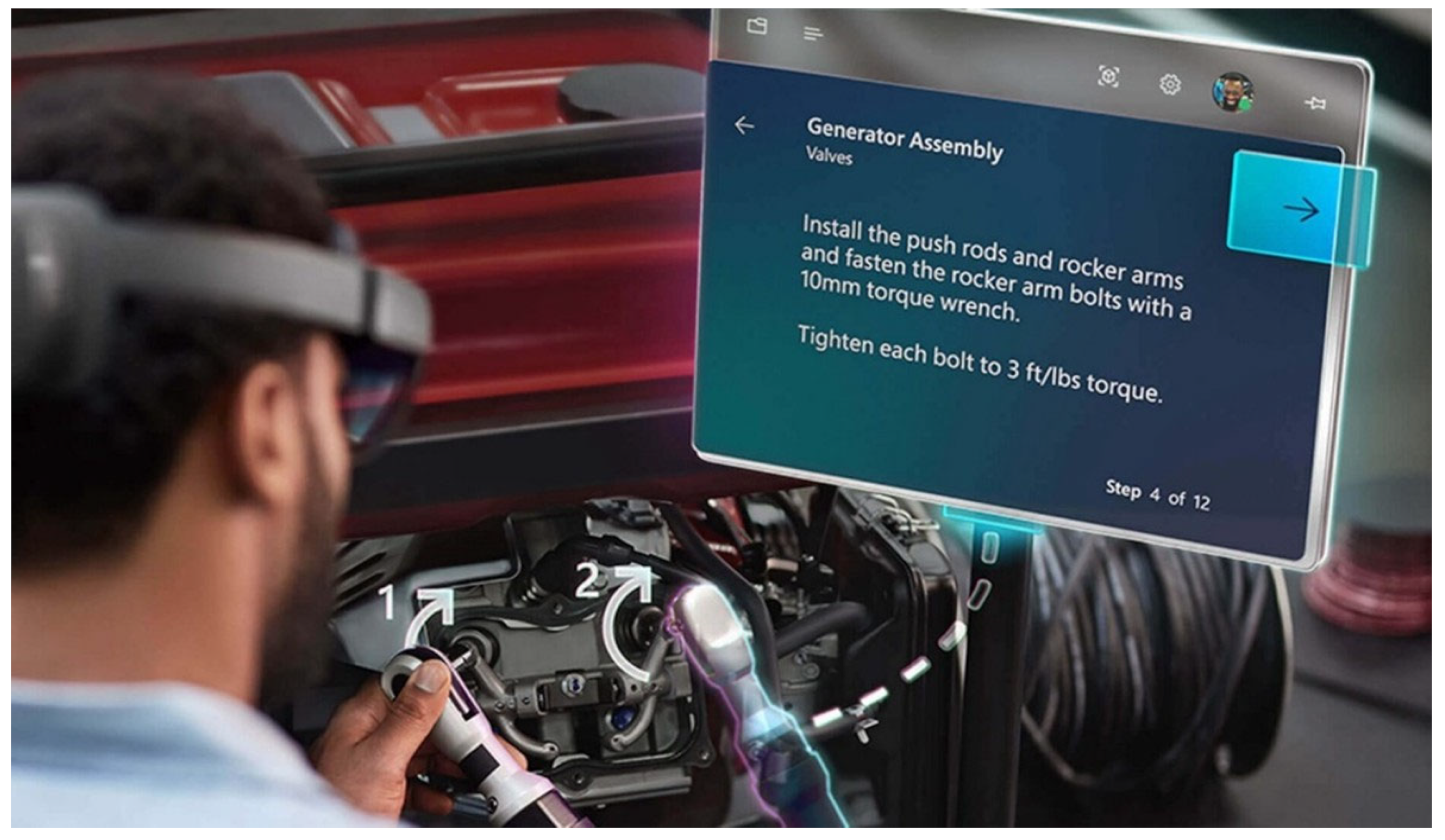
Figure 2 illustrates a system that replaces paper manuals in assembly processes. This AR application, tailored for Microsoft HoloLens, displays information directly in the worker’s line of sight through a head-mounted display. The virtual “tunnel” in the system visually guides the worker to the correct placement of parts, thereby optimizing the preparation of individual components as well as entire series [
11,
12].
2.2. Utilization of Augmented Reality in the Manufacturing Plant
The application of augmented reality has brought numerous advantages to the manufacturing operation and opened new possibilities. Above all, it allowed for a rapid response to the COVID-19 pandemic without the need to halt regular operations and processes. The plant continued to carry out service interventions, conduct audits, and review processes, just as it would under normal conditions [
13,
14]:
SITE AUDIT—Thanks to HoloLens2, the race was able to conduct an audit with participants from abroad without the need for their physical presence. During tours of potential new spaces, an image was broadcasted and a so-called “linewalk” was conducted, which means a remote inspection.
SERVICE EQUIPMENT—The remote connection with the service technician allowed the technician to provide guidance remotely and fulfill the role of an “extended hand” for the on-site technician through two-way communication.
SETTING PARAMETERS—The remote connection between the service technician and the engineer enabled the configuration of parameters, while the HoloLens2 made it possible to remotely align the machine.
“REVERSE PROCESS FMEA”—Due to COVID-19 measures, only one person with a Microsoft HoloLens2 was present at the site of the so-called “RPFMEA”. Even though the other team members were connected only via MS Teams, they successfully performed all the necessary tasks together.
CHECKLIST—The release of the first piece/“Dock” audit— Parts inspection can be performed using HoloLens 2 or a tablet, with the checklist automatically completed and stored in a database, thereby eliminating the need for paper-based documentation. When using glasses, it is possible to automatically scan a barcode and record and save the visual inspection of the part.
In the factory, Microsoft HoloLens 2 devices were utilized alongside applications such as Dynamics 365 Remote Assist and Guides to perform various actions. The Dynamics 365 Remote Assist application enables employees to connect with a remote colleague using mobile devices through Microsoft Teams, which is available on both desktop and mobile platforms. By utilizing live video calls, mixed-reality annotations, and high-resolution images, remote experts can collaboratively observe their surroundings and quickly resolve issues [
14].
The manufacturing plant covers an area of 40,000 m
2 of production hall and 10,000 m
2 of logistics center. Its predecessor initially focused on the production of motorcycle gearboxes, later transitioning to the production of dual-clutch six-speed gearboxes. In 2019, the plant came under 100% ownership of a multinational company, which subsequently invested over 170 million euros in new technologies, assembly lines, and the restructuring of operations. As part of this transformation, the plant secured a significant contract for the production of dual-clutch transmissions for front-wheel drive, including a variant with hybrid drive. In early 2020, the production of a 7-speed automatic dual-clutch transmission with a maximum torque of 300 Nm was launched here. A clutch is also produced for this model at the plant [
13,
14].
In August 2021, the production of additional types of gearboxes with a maximum torque of 400 Nm was launched, one of which was the first hybrid gearbox in the history of this manufacturing company. In October of the same year, the production of another model of dual-clutch gearbox with a torque of 300 Nm for another significant customer from the automotive industry began. The work instruction was developed for the assembly process of the 7DCT300 transmission wiring harness, which is produced on assembly lines No. 1 and 2. Microsoft HoloLens 2 augmented reality glasses and the Microsoft Dynamics 365 Guides application were used for its implementation [
13,
14].
2.3. Microsoft Dynamics 365 Guides
An application supporting augmented reality, designed for Microsoft HoloLens 2, assisted operators in learning during the work process through holographic instructions. These instructions are visually linked to the location where the work is performed and may include images, videos, and 3D holographic models. Operators can clearly identify the required actions and their locations, enabling faster task completion, reduced error rates, and improved skill retention. If necessary, they can contact a remote expert via Microsoft Teams. This expert has the ability to see what the operator sees on their HoloLens. With detailed holographic instructions, employees have the necessary confidence to tackle new challenges, quick access to information, and maximize their free time while working [
15,
16].
The main advantages of Microsoft Dynamics 365 Guides are:
Improved employee safety: The hands-free solution for instant access to information and instructions contributes to higher concentration and reduces the risk of errors.
Innovation without the need for coding: MS Dynamics 365 Guides can be utilized without advanced coding skills. It allows for the creation of complex visual work instructions for workplace training and daily processes.
Integration with existing processes: MS Dynamics 365 Guides seamlessly integrates into current processes, thereby contributing to increased productivity and efficiency.
Improvement of operational efficiency: The Microsoft Power BI system, connected with Dynamics 365 Guides, provides data-driven statistics that help identify the steps necessary to optimize workflows in the future through instructions.
Enhanced employee experiences: With MS Dynamics 365, employees can delve deeply into each task like never before, having access to videos, photographs, and 3D models, which enables them to achieve a new level of training and support. Microsoft Dynamics 365 Guides allows workers to operate faster and more efficiently in almost any environment while maintaining a high level of security [
15,
16].
2.4. The Process of Creating Work Instruction for the Assembly Operation of the 7DCT300 Transmission Wiring Harness
To create the instruction, we need two applications:
PC application—this is used to create the instruction. It will work on selecting the anchoring method, adding tasks and steps, writing instructions for specific steps, and assigning various types of resources to support these steps.
The supporting units include:
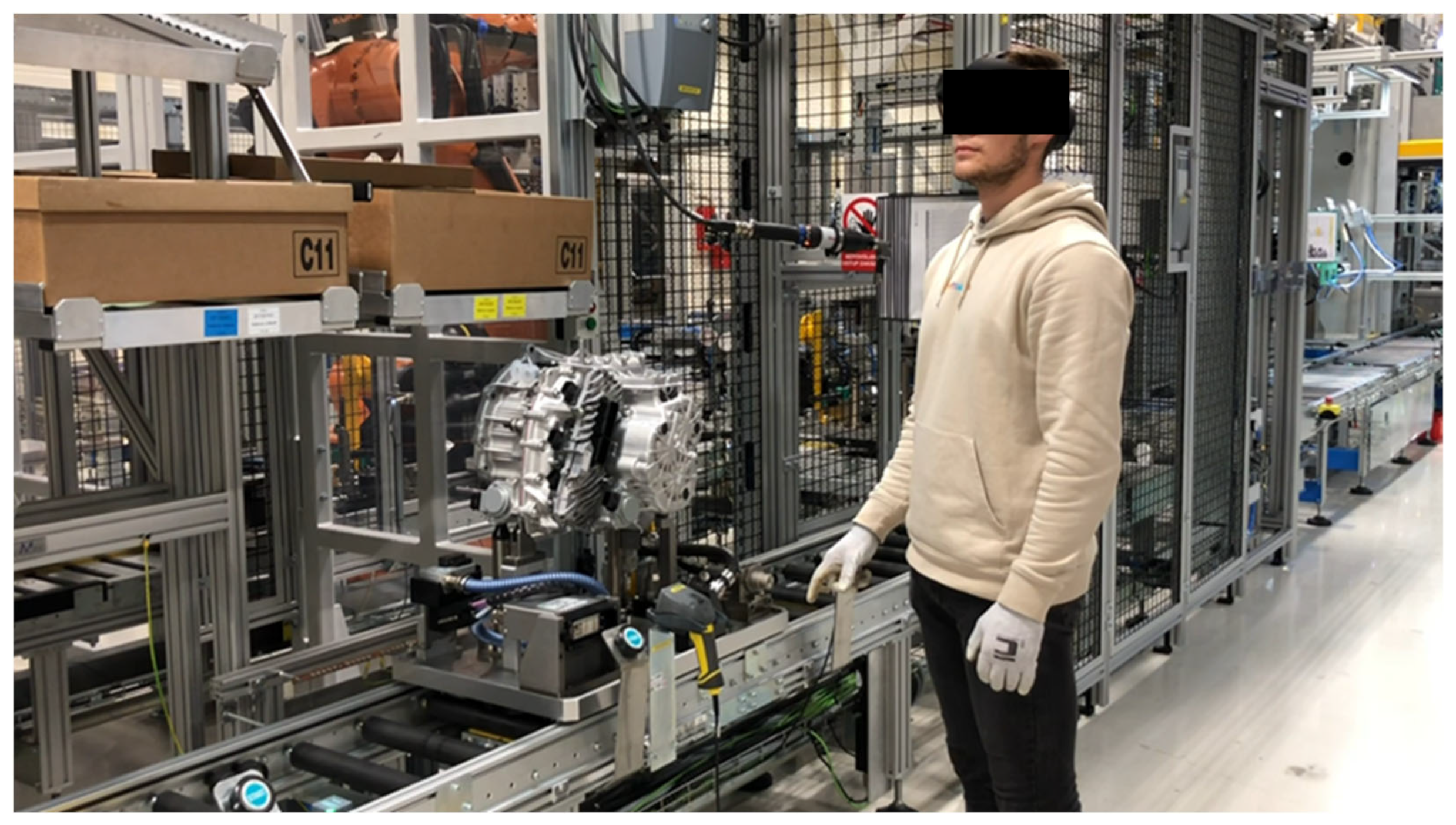
The HoloLens application in Author mode—after creating a guide using the computer application, the HoloLens application, in Author mode, is used to test the flow of the guide. The application involves placing holograms into the real world, adding holographic dotted lines that indicate to operators where to focus, and adding styles for 3D objects (e.g., warning or caution). The image (
Figure 3) shows the use of work instructions in augmented reality directly on the assembly line [
5,
6].
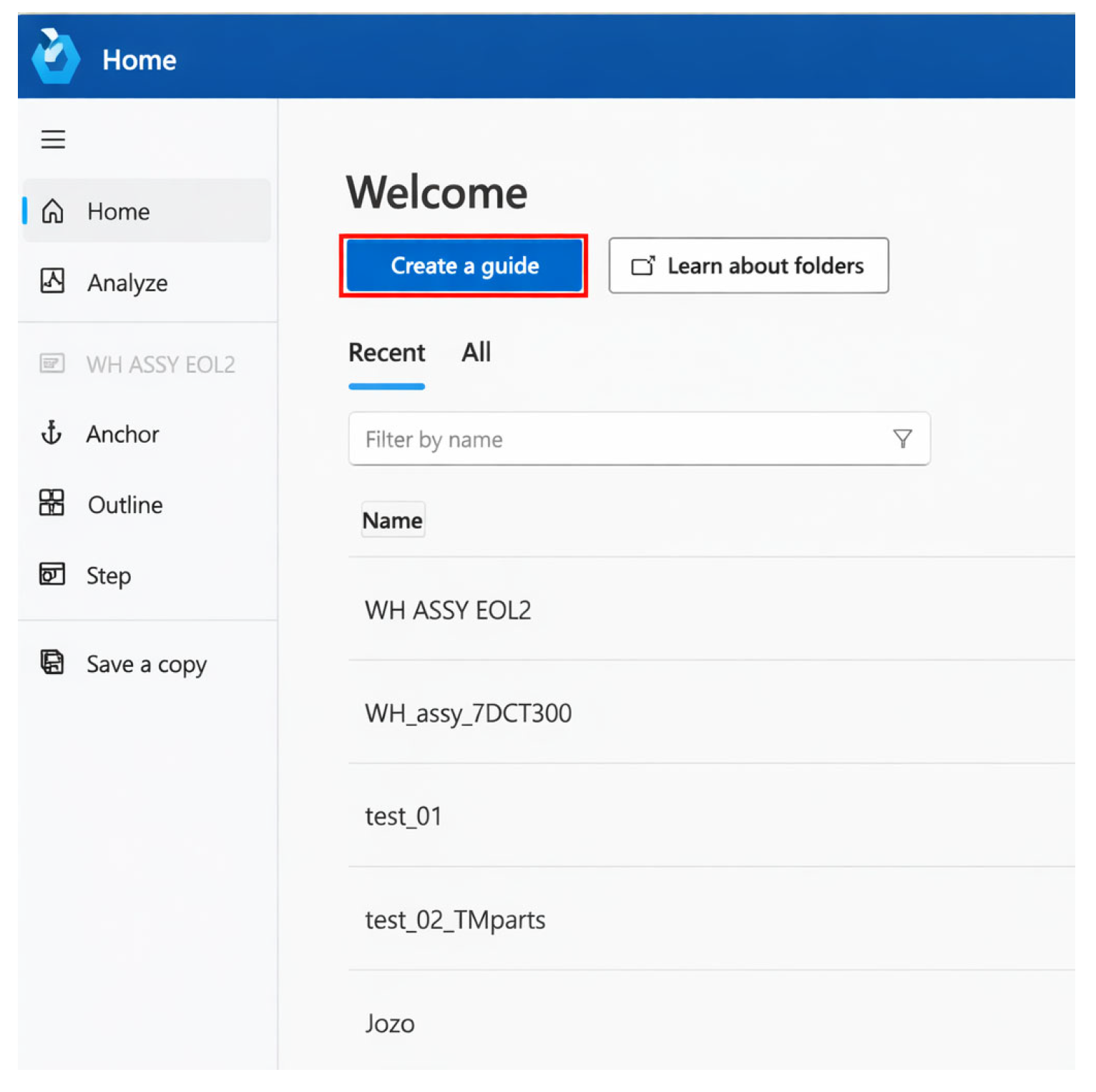
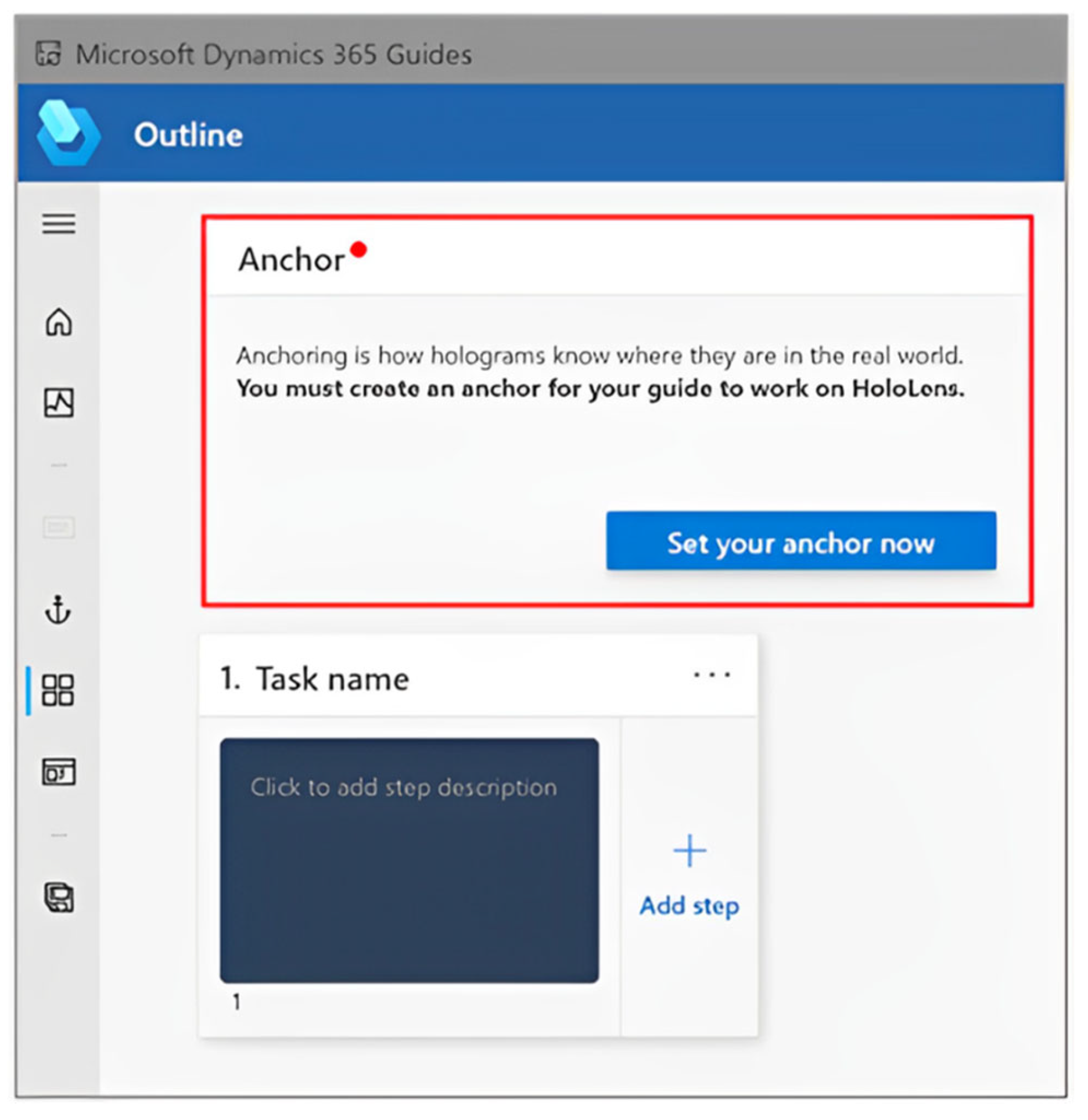
The first step is to select “Create a guide” (
Figure 4) and define the title of the instruction. The title “WH ASSY EOL2” was used for this instruction. The PC application for creating the instruction and the HoloLens application are connected via the cloud, where all files and content of Dynamics 365 Guides are stored. After creating the instructions, all changes are saved to both the computer and the HoloLens, simplifying the switch between devices. The automatic saving checks for changes every four seconds. To use Dynamics 365 Guides, being online is necessary.
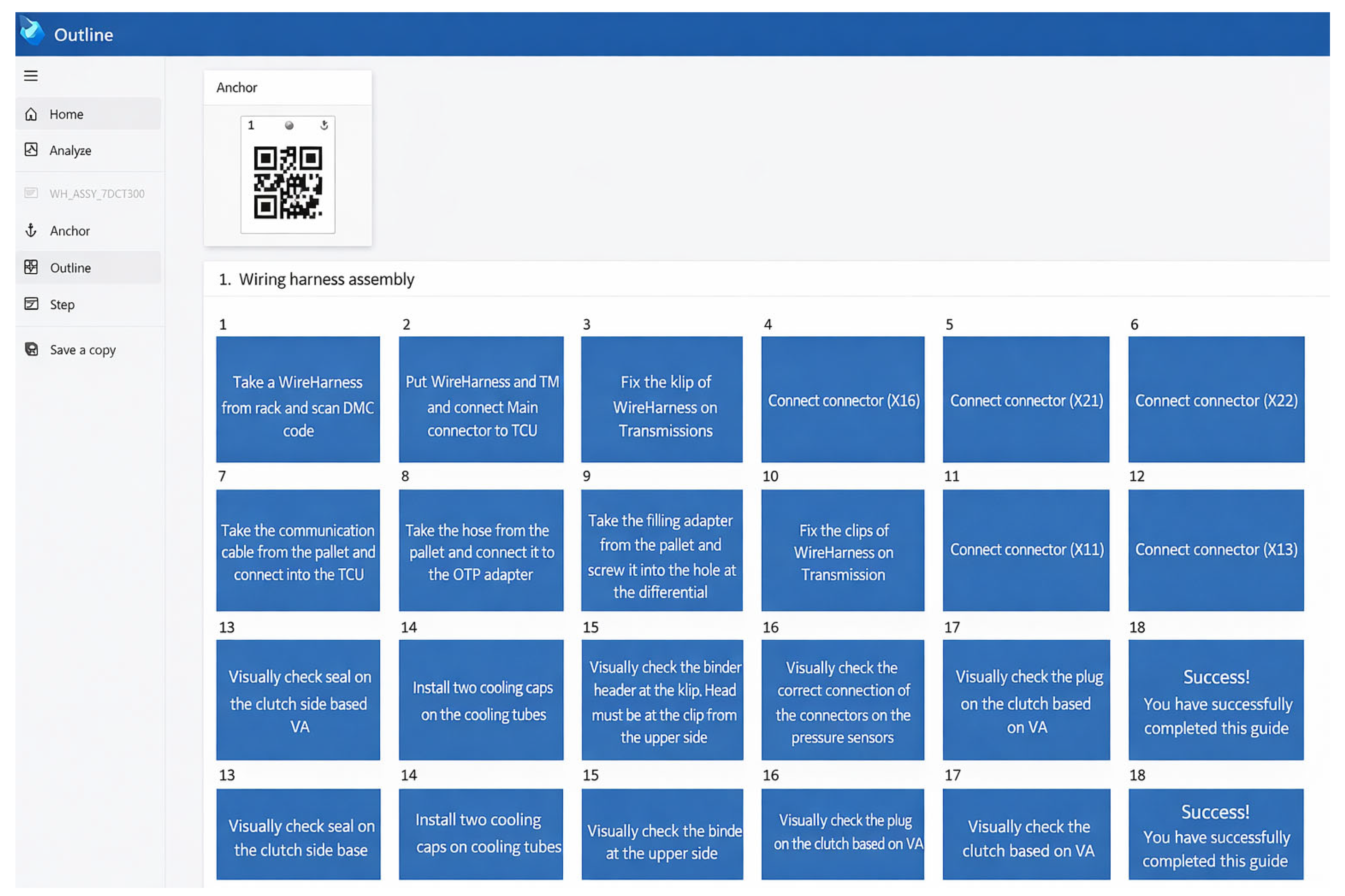
When you create an instruction using the Microsoft Dynamics 365 Guides desktop app, the “Outline” page appears. On the “Outline” page, a framework has been created for the instruction by adding tasks and steps. The “Outline” section provides a great way to map your guide at the beginning or to get an overall picture of the guide. Steps are the central building block for creating a wizard in MS Dynamics 365 Guides. The individual steps were created on the basis of the standardized work instruction and its document “Job Element Sheet” (JES), which is used as a manual for the installation operation of the wiring harness and should describe the basic assembly steps [
6].
The JES instruction should be posted on each operation. The steps written in the JES have been modified into a simpler form and defined in the MS Dynamics 365 Guides application (
Figure 5). 3D content, media, or website links can be added to the steps to help operators complete the step. Unlike traditional instruction, the steps in Dynamics 365 Guides are described briefly and simply.
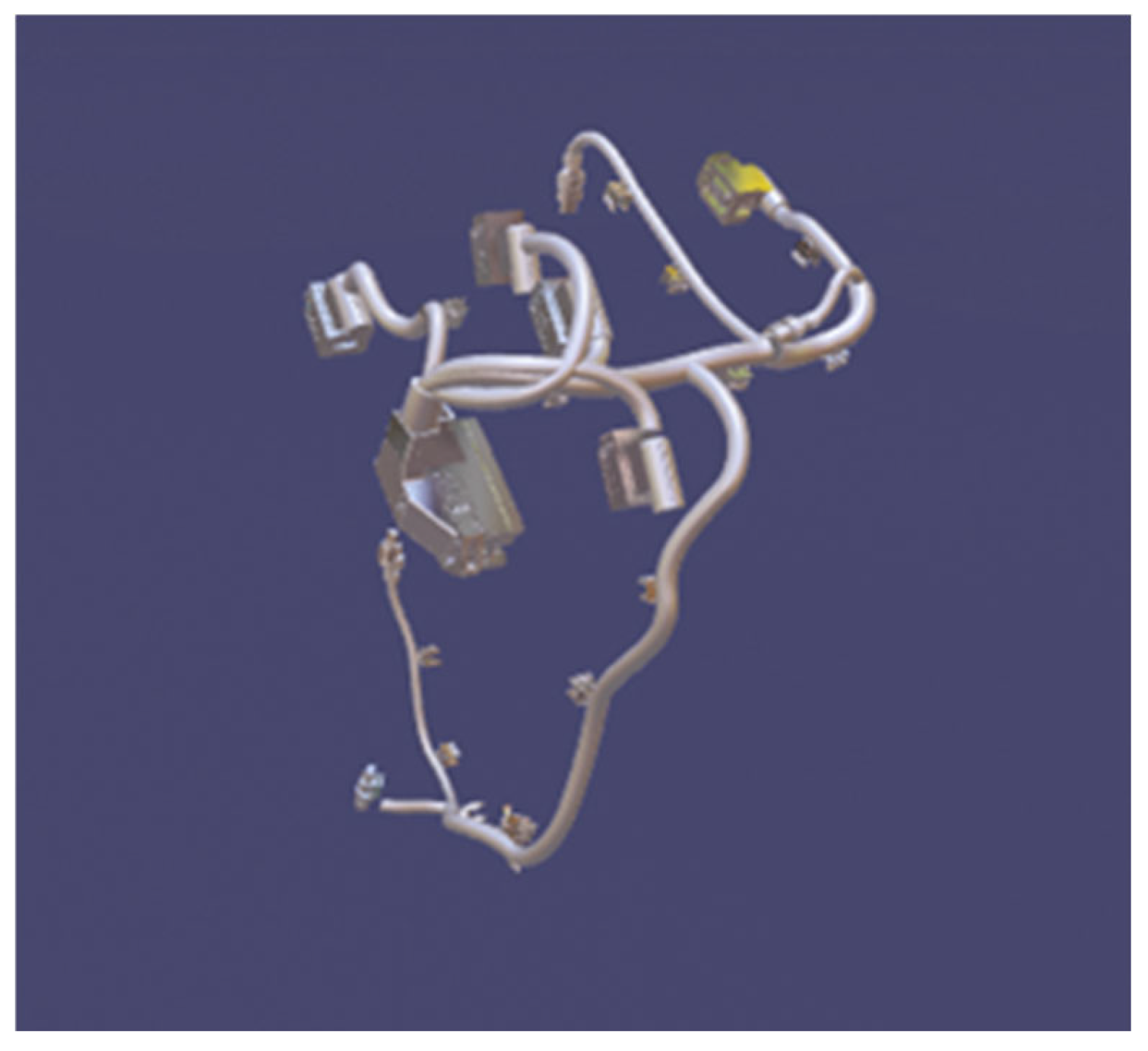
Microsoft Dynamics 365 includes a library of predefined 3D objects that are optimized to work seamlessly with HoloLens. The 3D toolset comprises markers, arrows, hands, numbers, symbols, zones, and general tools. Since the cable bundle was not included in the 3D toolset, it was necessary to convert and optimize the 3D model of the cable bundle for use in MS HoloLens 2 (
Figure 6). Autodesk 3ds Max 2023 (Autodesk Inc., San Rafael, CA, USA) was utilized for the conversion and optimization of the 3D model. The CAD model of the cable bundle was exported to an FBX file, which we can import into MS HoloLens 2. A crucial aspect was the reduction in the number of triangles in the cable bundle object so that the MS HoloLens 2 unit could open it in the instruction [
7].
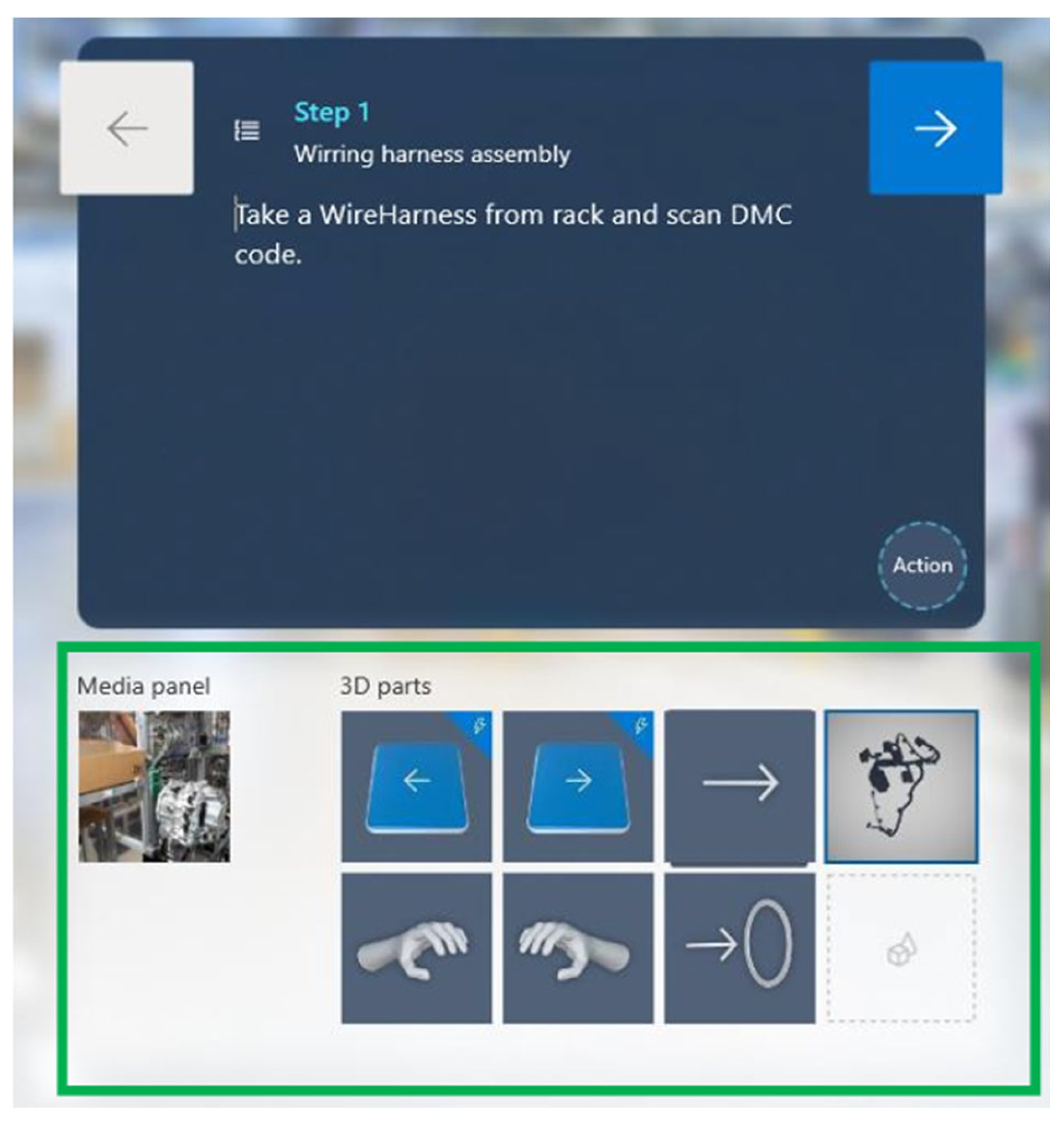
It is necessary to select objects or other files from the 3D set according to the defined step (
Figure 7). Each step was accompanied by a video or photo to visualize a specific step. 3D files such as arrows, hands, symbols, etc., have been added from the 3D “Toolkit”.
After creating a guide using the Microsoft Dynamics 365 Guides application, a very important part is the selection of the anchoring method. When we anchor the instruction, we spatially synchronize it with the real-world environment. Anchors help holograms determine where they are located in the real world. The anchor for the instruction must be created and defined before it will function on HoloLens. The creation utilized anchoring through a QR code (
Figure 8). To view the instructions in MS HoloLens 2, it is sufficient to look at the printed anchor with a QR code that is attached to a physical object in the real world [
6,
7].
2.5. Creation of Work Instructions in a Real Environment with MS HoloLens 2
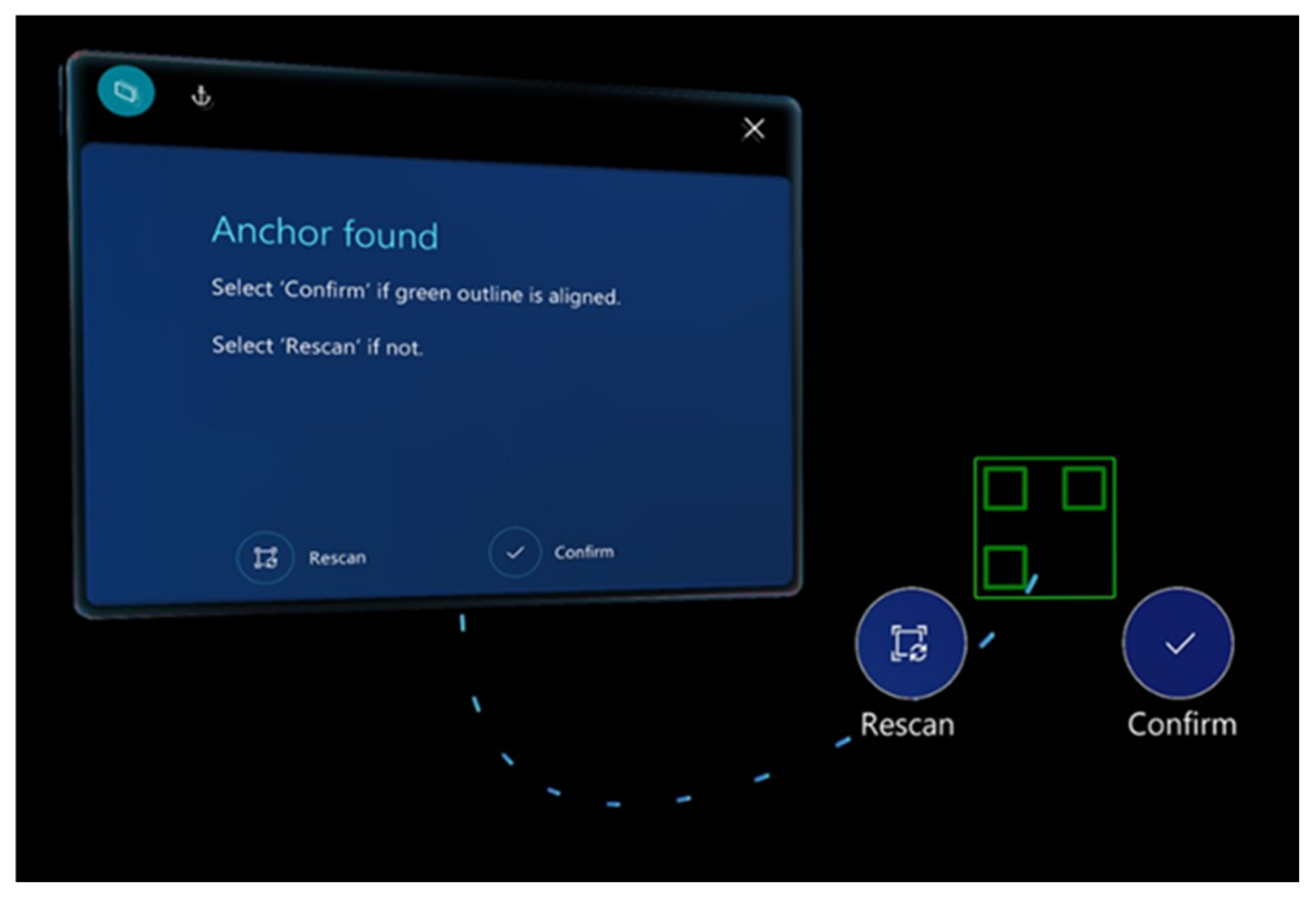
After turning on the AR MS HoloLens 2 smart glasses and launching the MS Dynamics 365 Guides application, it is necessary to select the current work instruction that is being created and then scan the QR code or anchor. Using the glasses, one must look at the QR code until a green outline appears. The QR code is focused on with the gaze and confirmed by clicking (
Figure 9).
Upon confirming the anchor QR code in the Microsoft Dynamics 365 Guides HoloLens application, the “Step” card page will be displayed. The “Step” card is the center of everything that is done in the work instruction. It is also what operators see when using the guide. The “Step” card tracks operators in their environment to keep instructions where they need them while moving through the workspace. On the card, we navigate to the next or previous steps by looking at or gesturing towards the Next and Back buttons [
8,
17]. The card in
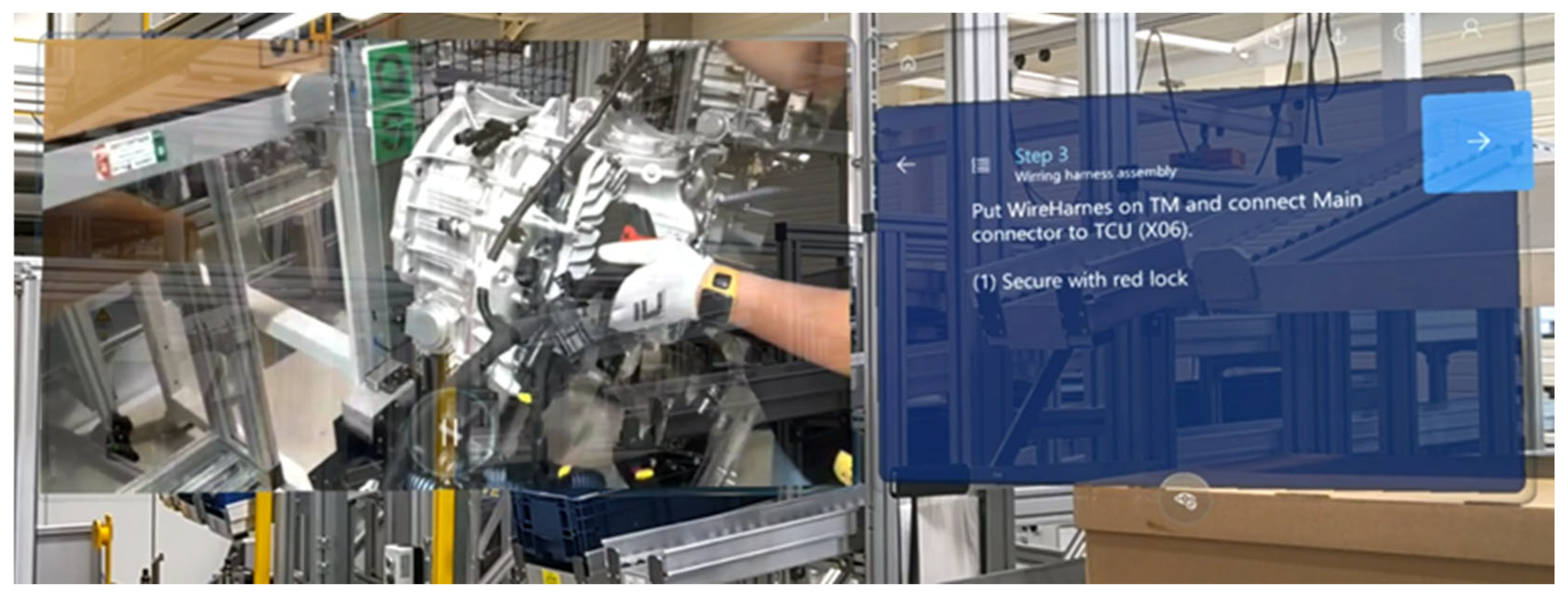
Figure 10 describes what, and how, to do in step no. 3 and provides video instructions for visualization.
The next step in the creation process was the placement of holograms into the real environment (
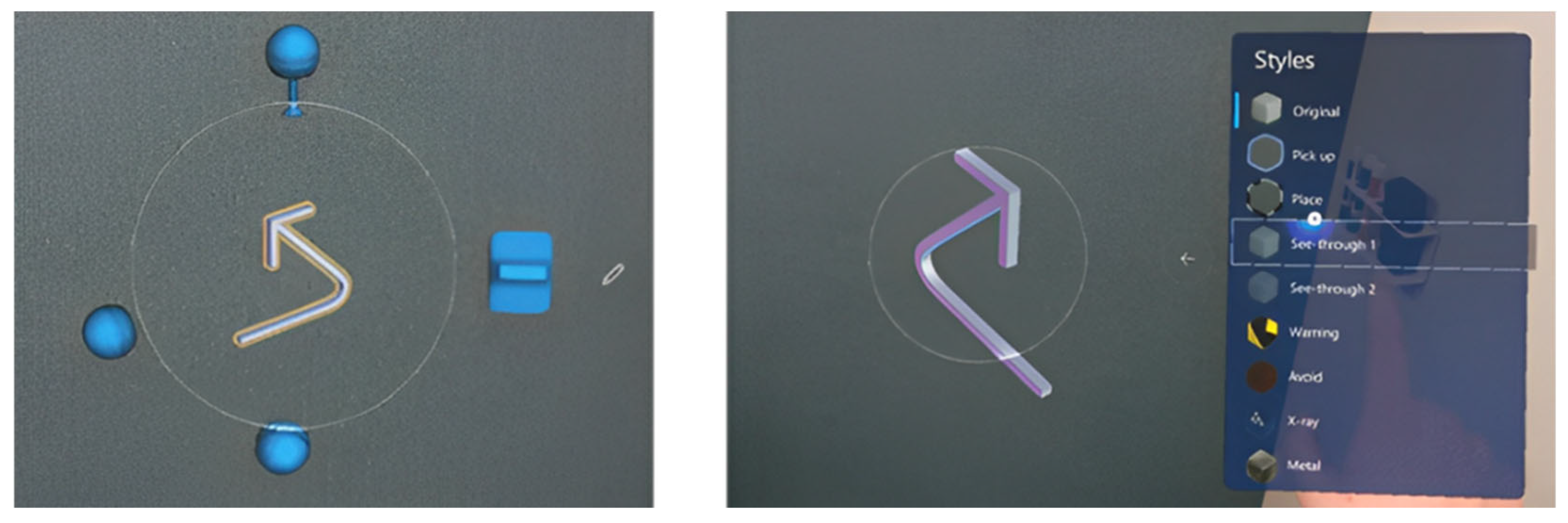
Figure 11). For the proper storage of holograms, it is necessary to know how to handle them correctly and place them in a visible location. To manipulate the object, we first need to indicate it by pointing or looking at it. Holograms can be transferred by touch as if they were real objects. By placing a hand on the 3D object, control elements will be displayed. The control elements allow for the movement of the hologram, rotation, resizing of the hologram, or editing the visual style (warning, avoidance, transparency, X-Ray, and others) [
17,
18].
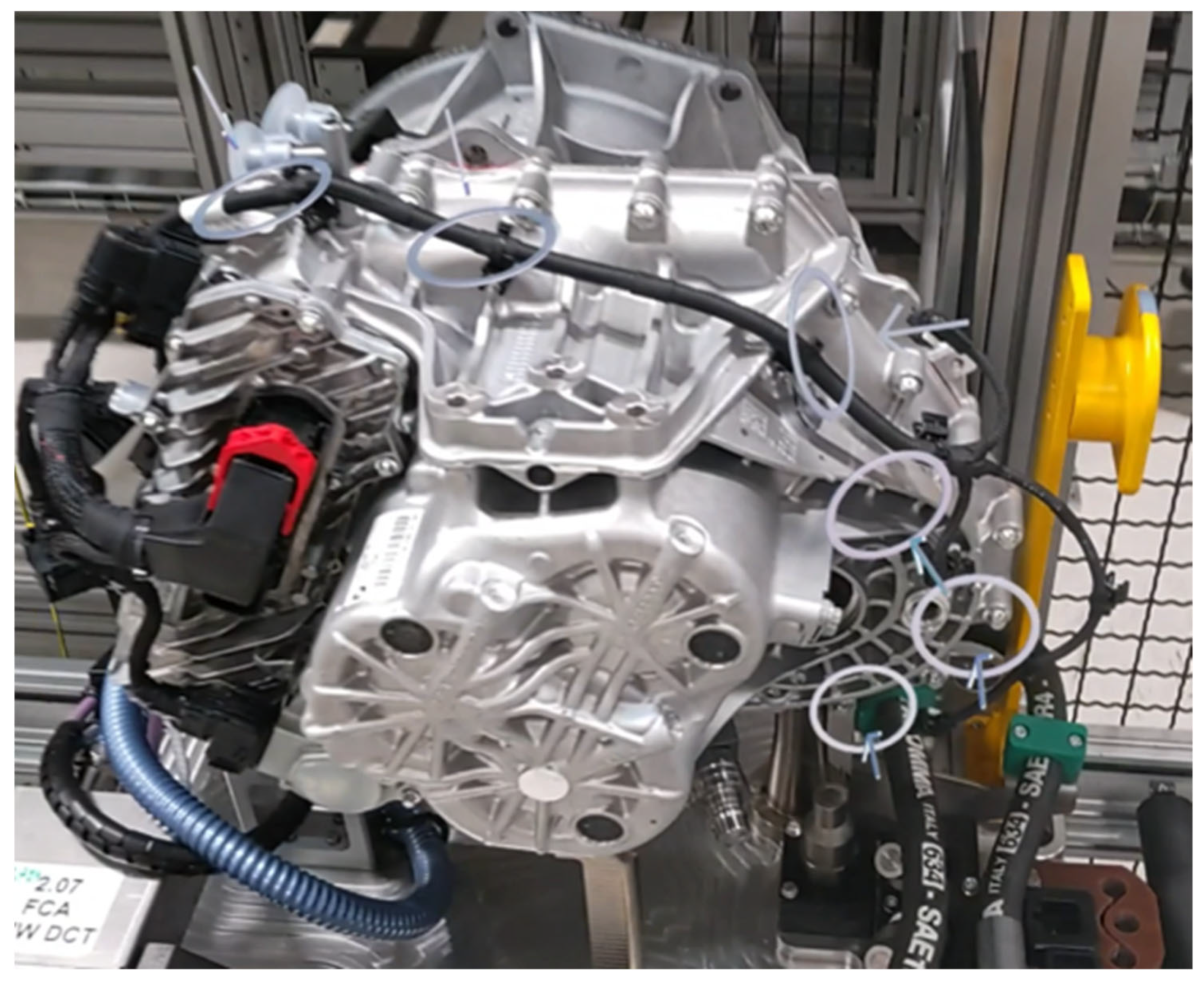
During this phase of the process, it is necessary to go through each step in the given instruction and place all items assigned to the respective step in the PC application. In the first step of the instruction, which is displayed immediately after its initiation, a dotted line was used to help the operator orient themselves correctly. 2D images were utilized during quality control to highlight the OK and NOK positioning of the component or correct assembly. The 3D part of the cable harness was added to assist operators as a visualization of its correct placement. The cable harness was positioned against its physical counterpart in the real world (
Figure 12). 3D objects from the 3D toolset (such as arrows, numbers, etc.) were placed in appropriate locations that are visible to the operators.
The critical and creative thinking of employees is supported by the use of augmented reality applications, which significantly enhance understanding during training [
9,
14]. Users of these applications are motivated and excited about practical learning, with knowledge being acquired in a simpler manner. Motivation to learn is higher, and the use of augmented reality brings visible improvements in performance.
The augmented reality-supported application provides an interactive interface that allows real-time navigation, thereby improving the understanding of the given task. Thanks to the ability to work with 3D models, learning becomes more immersive and interactive. This technology proves to be very useful for education, as it offers richer content and a more effective form of training compared to traditional methods used in the industrial environment.
Previous experimental studies have reported that individuals who learned using augmented reality achieved statistically better results compared to those who did not utilize it [
9,
13]. When employees master the technology, they can educate themselves independently according to their own preferences of time and place, provided that the application supports autonomous learning. Research aimed at instructional systems for mechanical assembly in the context of intelligent manufacturing has demonstrated that instructions utilizing augmented reality reduce task completion time and decrease error rates by 33.2% compared to traditional manuals.
The study further indicates that dynamic visual support of augmented reality and tool detection significantly minimizes errors, such as incorrect tool selection or incorrect assembly order, reducing their occurrence by up to 72.7%. Experiments implementing multimodal augmented reality instructions into assembly processes have demonstrated a significant improvement in performance compared to traditional methods, such as paper manuals [
19].
In the manufacturing plant, the training program for new employees is divided into a two-day structure. After two days of training on occupational safety, production, quality, and other topics, employees are divided into groups where operators working in the manufacturing or assembly sector begin to learn individual production operations. The traditional initial training course for operators lasts for 5 days.
A wooden assembly line is used for training new operators, which simulates the manufacturing process. On this line, the number of operations is lower than in the real process, as is the number of components and tools. By using smart glasses in combination with productivity applications, the training of operators can become significantly more efficient.
The assembly of the cable harness is one of the most complex assembly operations on the production line. With the traditional paper form of the document serving as a work instruction, training the operator in real-time is challenging in terms of cycle time. By using augmented reality in a real environment, it is possible to reduce the assembly cycle time, ensure the accuracy of the process, and significantly accelerate the acquisition of operator experience [
18,
19].
The proposal for training new employees working in the manufacturing or assembly sector for cable harness assembly:
Step 1: The instructor will go through the manual in paper form with the new employees at the wooden (trial) line. He will verbally describe the process of assembling the cable harness and identify the operator’s skills to determine motivation and proficiency.
Step 2: At this stage, the instructor will provide visual education, assembling five cable harnesses on the wooden line. He will provide a detailed description of the instructions, and the operator will follow along and ask questions for further understanding. If this process is understood, the instructor will train the operators on how to use the MS HoloLens 2 smart glasses.
Step 3: Practical training of the operator. The operator practices assembly with MS HoloLens 2 glasses under the supervision of an instructor. The instructor monitors the quality and proper assembly. The instructor may take certain steps to prevent production interruptions. The product is manufactured jointly with the operator and the instructor, who will occasionally assist with the assembly. The operator uses the glasses for a maximum of 30 min, completing the assembly a total of 15 times. The time usually allowed for assembly (takt time) is adhered to in order to avoid production stoppages.
Step 4: The operator demonstrates the ability to assemble the cable harness independently within the correct time frame and without any damage or quality defects, even without the MS HoloLens 2 glasses. The operator can work independently at the station without supervision, although the instructor or team leader is still present to assist and support if necessary. When the operator is able to assemble several flawless products without any external assistance, the training is considered satisfactory [
18,
19].
3. Research Methodology
This research follows an exploratory industrial case study methodology. The methodological framework combines qualitative and quantitative analytical tools, including semi-structured interviews, descriptive performance monitoring, quantitative SWOT analysis, PDCA-based continuous improvement logic, and investment estimation. The objective is not statistical hypothesis testing but structured strategic and economic evaluation of AR deployment in a real manufacturing context.
The methodological structure, therefore, integrates implementation context, evaluation logic, and decision-support tools in a coherent analytical sequence.
3.1. Pilot Implementation and Participants
The AR-based training guide was evaluated as an exploratory pilot implementation within the assembly department. A total of six operators participated in the pilot phase. All participants were newly assigned or recently trained assembly operators with comparable baseline exposure to traditional training procedures.
The pilot implementation included an initial orientation session, guided hands-on assembly training using AR instructions, and a short post-training feedback discussion.
The objective of the pilot was to assess practical feasibility, workflow integration, user interaction, and economic implications rather than to conduct a statistically powered experimental comparison.
The pilot phase served as the empirical foundation for the subsequent strategic and economic evaluation frameworks described below.
3.2. Continuous Improvement Framework (PDCA)
Unlike prior AR training studies that primarily focus on technical performance comparison, this study embeds AR implementation within a continuous improvement cycle aligned with industrial quality management principles.
Plan: At this stage, the company identifies training needs and defines objectives for the implementation of HoloLens 2. This includes:
Analyzing current training challenges—Identifying weaknesses in traditional training methods.
Defining educational goals—Determining key skills that employees should acquire through AR training.
Selecting appropriate training modules—Deciding which processes (e.g., machine operation, maintenance, and safety procedures) are suitable for training with HoloLens.
Preparing AR content—Developing or procuring interactive 3D models, instructional overlays, and real-time features.
Ensuring compatibility—Verifying that the HoloLens 2 system integrates well with existing workflows and IT infrastructure.
Do: The second phase involves the pilot implementation of the training program with HoloLens 2. This step includes:
Training a small group of employees—Testing AR training on a selected team and obtaining initial feedback.
Observing practical use—Monitoring how employees interact with the system and how effectively they adopt new tasks.
Identifying technical or user issues—Detecting software bugs, hardware limitations, or user difficulties.
Providing support and guidance—Assisting employees in familiarizing themselves with the new training method.
Check: After the initial implementation, a detailed performance evaluation is conducted to assess the effectiveness of AR training. This phase focuses on:
Obtaining feedback from employees—Conducting surveys or interviews to understand user experience and satisfaction.
Measuring training outcomes—Comparing learning speed, task accuracy, and error rates between AR training and traditional methods.
Analyzing technical performance—Checking device reliability, battery life, and software stability during training sessions.
Identifying areas for improvement—Determining necessary content adjustments, usability enhancements, or the addition of new features.
Act: Based on the evaluated results, necessary adjustments will be made prior to the expansion of the training program to the entire company. This phase includes:
Improvement of AR content—Updating instructional overlays, enhancing 3D visualizations, or adding interactive elements.
Addressing technical issues—Increasing software performance, fixing bugs, or improving device ergonomics.
Expansion of the training program—Deployment of enhanced AR training for a larger group of employees.
Standardization of best practices—Documenting successful training methods and integrating them into internal processes.
Continuous improvement—Repeating the PDCA cycle at regular intervals to maintain training effectiveness in line with technological advancements and the company’s needs [
20,
21].
3.3. Evaluation Framework
Following the implementation logic defined by the PDCA cycle, a structured strategic evaluation was conducted to assess internal and external positioning.
The SWOT analysis of augmented reality-based training identifies key internal strengths and weaknesses as well as external opportunities and threats associated with applying this technology. The analysis follows the methodological overview of SWOT provided by Helms and Nixon [
22]. The strategic position was subsequently derived using the TOWS logic and quantitative evaluation approach described by Weihrich [
23] and Dyson [
24]. To enable a quantitative comparison of the identified factors, each strength, weakness, opportunity, and threat was evaluated using a five-point rating scale (1–5), where higher values indicate a stronger impact on the training process. The quantitative transformation of SWOT factors into weighted strategic indicators enables objective positioning of AR training within a strategic decision matrix, which extends beyond descriptive evaluation commonly found in AR adoption studies.
3.4. Economic Assessment Approach
The investment calculation included hardware acquisition, software licensing, initial guide configuration, and estimated setup time. Long-term maintenance costs were assumed to be marginal compared to initial implementation expenditure. The economic assessment was designed as a scenario-based estimation model rather than a full financial feasibility study, focusing on comparative training cost structures. The results of these interconnected methodological components are presented in the following section, structured according to descriptive performance monitoring, qualitative perception analysis, quantitative strategic positioning, and economic evaluation.
4. Results
This section presents the findings of the exploratory pilot implementation of AR-based training in a real manufacturing environment. The results are structured in accordance with the methodological framework described in
Section 3 and include descriptive performance monitoring, qualitative perception analysis, quantitative SWOT evaluation, and scenario-based economic assessment. Given the pilot nature of the study, the findings are intended to provide structured evaluative insights into feasibility, strategic positioning, and investment implications rather than statistically generalizable conclusions.
4.1. Descriptive Performance Monitoring
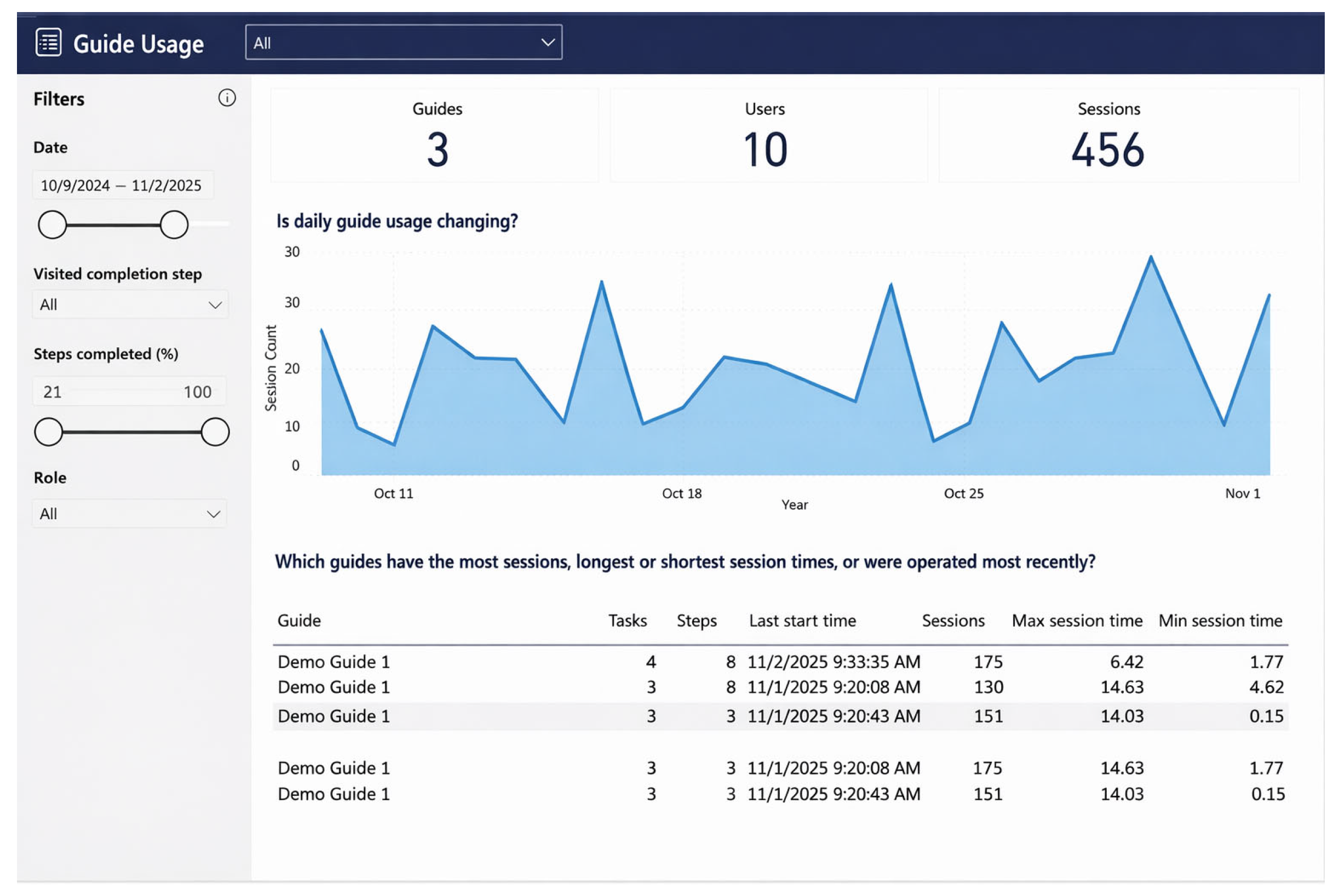
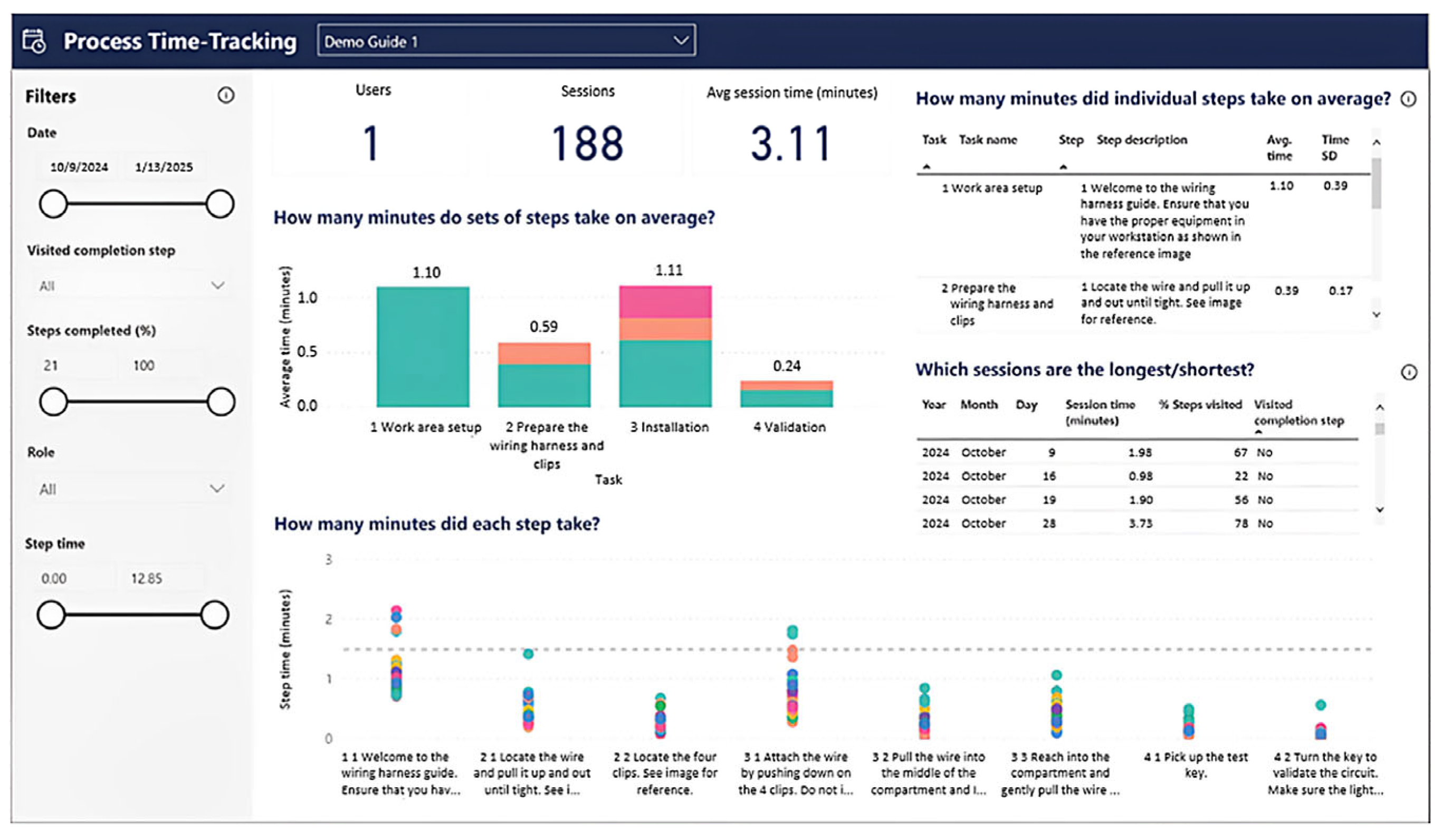
For the evaluation of the pilot implementation of AR-based training, session data were monitored using the “Guides Analytics Power BI” template (
Figure 13). Guides Analytics is part of the Microsoft Dynamics 365 Guides application suite and enables descriptive tracking of instruction usage, step duration, and completion behavior.
The tool was used to analyze session data generated during the exploratory pilot phase involving six operators. The analysis focused on descriptive indicators such as step-level time distribution, task completion consistency, and overall guide usage patterns rather than inferential statistical testing.
The descriptive monitoring aimed to identify usage patterns and variability in step execution during the pilot implementation phase [
25,
26].
Guides Analytics can also be used to deepen detailed information about time tracking at the task and step level. For example, the overview “Process Time Tracking” can be used to answer the following questions: Which instruction step has the greatest variability in terms of time, whether the amount of operational time is evenly distributed among tasks, or which step takes the most time (
Figure 14).
These reports provide information on the acceptance and use of instructions by operators and offer authors a means to improve them based on data. For instance, the author could focus their efforts on modifying steps that take a long time to complete or exhibit a high degree of variability among operators. These reports are also valuable in training scenarios for both trainers and trainees to better understand performance and improvement over time.
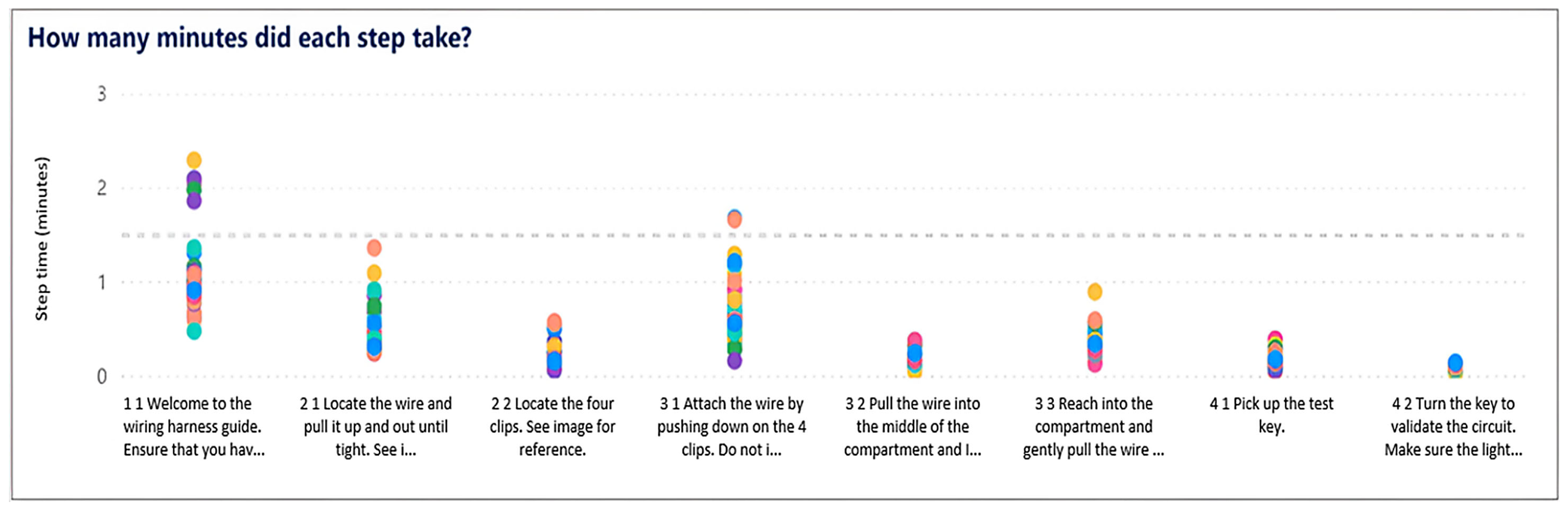
The point graph (
Figure 15) displays the time in minutes (
y-axis) for each step of the guide (
x-axis) to provide an idea of which steps take the most time and which steps have the greatest variability in time. If a step is visited multiple times in the same session, the sum of the visit times for that step is displayed. Each guide session is represented in a separate color. Sessions may share the same color if many sessions are displayed. The integration of smart glasses with the analytical platform has not yet taken place in the plant. However, work is currently underway for its implementation and incorporation into the training process.
4.2. Qualitative Perception Analysis
To better understand the practical perception of AR-supported training, an exploratory semi-structured interview was conducted with one assembly operator who participated in the pilot phase. The interview was conducted as an exploratory qualitative input within the pilot phase and was not intended to provide statistically representative evidence. The objective of the interview was to identify relevant practical performance dimensions rather than to generate statistically generalizable conclusions. The identified statements were grouped into four thematic categories: time, ergonomics, digitization, and costs. These qualitative dimensions subsequently served as input for the SWOT-based strategic evaluation (
Table 1).
The interview findings reflect the subjective perception of one operator and therefore serve as an exploratory qualitative input rather than statistically validated evidence. The interview focused on perceived advantages and disadvantages of traditional training compared to AR-supported training across four thematic dimensions: time, ergonomics, digitization, and costs. The summarized results provide contextual insight into practical implementation aspects under real manufacturing conditions.
Table 2 summarizes the main advantages of traditional training as perceived by the interviewed operator. The results indicate that conventional instruction is primarily associated with higher physical comfort and lower technological demands. The absence of head-mounted displays eliminates ergonomic discomfort, such as headaches or dizziness, and allows an unrestricted field of view during task execution. Traditional training is also perceived as safer in terms of operational disturbances, as it does not involve electronic devices that could interfere with the working environment or cause battery-related failures.
Furthermore, the findings suggest that traditional training benefits from continuous human assistance and a standardized learning approach, which may facilitate knowledge transfer, particularly for less technologically experienced workers. The lack of programming requirements and minimal dependence on digital infrastructure make this method more accessible, especially for older operators or workers with limited digital literacy.
Table 3 presents the main benefits of training supported by augmented reality as identified in the interview. The results emphasize the contribution of AR to training standardization and simplification, enabling a uniform training process for all operators. The possibility of updating instructions directly through smart glasses allows rapid adaptation to process changes without the need for extensive retraining.
AR-assisted training is perceived as more engaging and efficient, providing hands-free guidance and step-by-step visual support during task execution. In addition, the technology enables the collection of process data for further analysis and optimization. These observations indicate potential benefits of AR-based training in terms of standardization and engagement within the pilot context.
Although the advantages of AR-based training were well documented in the previous literature, their integration into a structured strategic evaluation process remains underexplored. In this study, these qualitative findings serve as input variables for the subsequent SWOT quantification and PDCA-based optimization process.
4.3. Quantitative SWOT Results
Based on the evaluation framework described in
Section 3, the quantified internal factors yielded the following results (
Table 4).
The results indicate that the total score of strengths (S = 4.50) exceeds that of weaknesses (W = 3.40), suggesting a relatively strong internal position of augmented reality training.
Subsequently, the external environment was evaluated by quantifying the identified opportunities and threats, as summarized in
Table 5.
The total score of opportunities (O = 4.40) is higher than that of threats (T = 3.65), indicating a favorable external environment for the application of augmented reality in training.
Table 6 summarizes the total scores of internal and external factors and presents the resulting internal (S–W) and external (O–T) strategic positions.
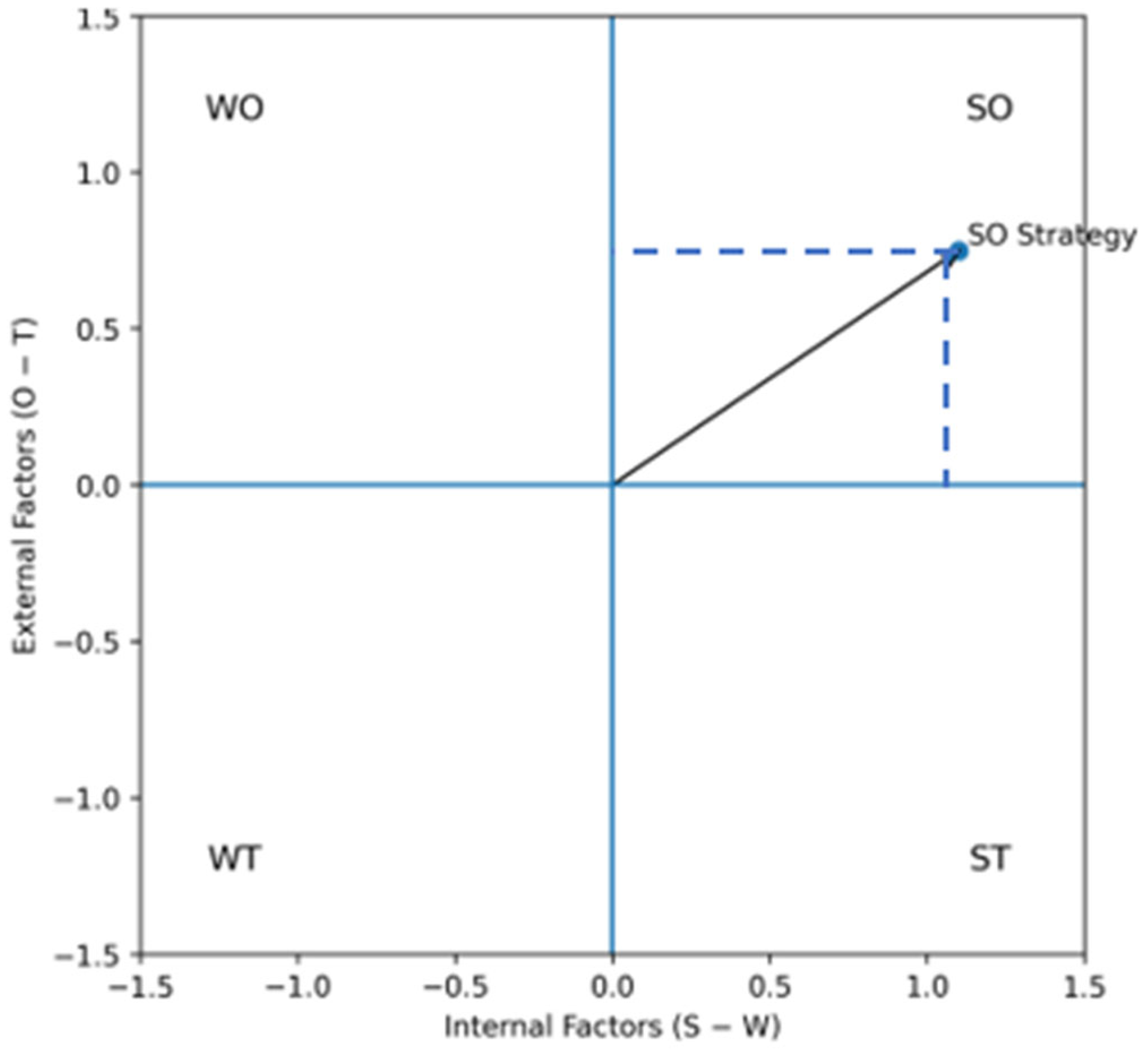
Based on these results, the overall strategic position was visualized using the SWOT strategic matrix, as shown in
Figure 16.
The resulting position in the upper-right quadrant confirms an SO (strength–opportunity) strategy, implying that organizations should leverage internal strengths to capitalize on favorable external opportunities for AR-enabled industrial training.
4.4. Investment Analysis
As a reference value for the investment, the payment calculation will be used. Factors such as the cost of the HoloLens 2, the HoloLens license, and the average wage costs for an assembly worker will be considered (
Table 7) [
23]. The total costs for the HoloLens 2 and the license were: a basic cost of 3418 EUR for HoloLens + 54 EUR/month = 3472 EUR. From the information provided, we know that traditional operator training lasts for 5 days. Therefore, we have 5 days × 8 h = 40 h for total training. To determine the hourly wage cost of the employee, a simple estimated amount was used. It was found that the average assembly worker in Slovakia earns 950 €/month (data obtained
https://www.profesia.sk/ accessed on 10 November 2023). To determine the basic costs for the company for hiring an employee, it is necessary to consider the total costs of fees [
24]. The fees, including wages, amount to 1500 €. This includes all social contributions, such as insurance, etc. The figure is approximate based on the average salary of an employee working as an assembler.
Calculation of hourly employee costs:
The calculation of the costs of training an employee for 5 days:
Calculation of investment return:
The return on investment for training supported by AR takes approximately 10 weeks of traditional training to become economically advantageous, which means that, for training, the traditional method is economically better. Calculations show that investment is economically beneficial when training multiple employees.
This calculation does not consider programming hours and the costs of programming AR. This calculation also does not consider the loss of teaching operators. In traditional training for three or more employees, the total costs amount to 374 × 4 = 1496 € < 3472 €.
Therefore, we can conclude that when traditionally training ten or fewer employees, classical training is a cheaper alternative. However, when training more than four employees (e.g., 10), HoloLens2 is a better economic choice [
23,
25]. See
Table 7.
5. Discussion
The analysis of augmented reality (AR) training implementation revealed several key findings regarding its effectiveness, limitations, and potential for industrial training. The results from the interviews, SWOT analysis, cost evaluation, and PDCA cycle provide a comprehensive understanding of the impact of AR training compared to traditional methods.
The findings align with recent industrial AR studies demonstrating improved task guidance, error reduction support, and enhanced usability in manual assembly environments [
14,
16]. However, unlike many laboratory-based evaluations, the present study was conducted under real production conditions and integrates strategic and economic assessment dimensions.
One of the primary advantages of AR training, as observed in
Table 3, is its ability to standardize training for all employees. The structured digital environment ensures that every trainee receives the same level of instruction, thereby reducing variability in learning outcomes. Furthermore, AR provides hands-free assistance, which is particularly beneficial in industrial settings where workers need to interact with physical components while following instructions. This finding corresponds to the strengths identified in the SWOT analysis, including improved data collection and the potential for off-site training [
27].
However, the weaknesses and threats of AR training must also be acknowledged. As indicated in
Table 1, prolonged use of head-mounted displays may raise ergonomic concerns, with some trainees reporting discomfort during extended training sessions [
28]. In addition, cybersecurity risks and the dependence on stable internet connectivity, as identified in the SWOT analysis, represent important challenges for practical deployment. The cost analysis further highlights the substantial initial investment required for AR implementation [
29]. Although long-term savings may be achieved through reduced training costs and maintenance, the high upfront expenses remain a significant barrier to widespread adoption. The presented investment calculation should therefore be interpreted as an illustrative scenario-based estimation rather than a full-scale financial feasibility study.
A comparison of traditional and AR-based training (
Table 2 and
Table 3) emphasizes the strengths of conventional methods, such as an unrestricted field of view and the absence of ergonomic discomfort. Traditional training also does not require advanced technological literacy, which makes it more accessible to a broader range of employees. Nevertheless, its main drawbacks include limited standardization and dependence on instructor availability, which may lead to inconsistencies in training quality. In contrast, AR-based training offers more structured and engaging learning experiences, particularly when combined with interactive three-dimensional elements [
27].
The PDCA cycle presented in
Section 4 plays a crucial role in refining the AR training process. During the Plan phase, key objectives such as hands-free assistance and training standardization were identified. The Do phase enabled pilot implementation and direct comparison with traditional methods. Feedback collected in the Check phase highlighted both the advantages and limitations observed in the interviews and SWOT analysis. Finally, the Act phase resulted in recommendations aimed at improving ergonomics, optimizing training content, and reducing implementation costs.
The quantitative SWOT results indicate an SO strategic orientation, suggesting that AR-based training is currently positioned for proactive expansion rather than defensive adoption. Practically, this implies prioritizing use cases in which internal strengths—such as standardization, hands-free guidance, and data-driven improvement—directly support external opportunities, including remote training and integration with advanced digital ecosystems.
Overall, although AR training offers substantial advantages, its implementation must be carefully managed in order to address ergonomic challenges, financial constraints, and technological dependencies. The insights derived from the PDCA cycle suggest that continuous improvement is essential for maximizing training effectiveness. Future research should therefore focus on enhancing user comfort, reducing costs, and further integrating AR with existing training programs to ensure its long-term viability in industrial environments [
28,
29].
5.1. Technological Sustainability and Device Independence
Although the present study was conducted using Microsoft HoloLens 2, the proposed evaluation framework is not limited to a single hardware platform. The recent discontinuation of HoloLens 2 highlights the dynamic and rapidly evolving nature of AR hardware development. However, the methodological contribution of this study—integrating SWOT analysis, PDCA cycle, and investment evaluation—remains applicable to other industrial AR devices.
Alternative head-mounted AR devices currently available for industrial environments include RealWear Navigator series (RealWear Inc., Vancouver, WA, USA), Vuzix M400/M4000 (Vuzix Corporation, West Henrietta, NY, USA), Magic Leap 2 (Magic Leap, Inc., Plantation, FL, USA), and Epson Moverio platforms (Seiko Epson Corporation, Suwa, Nagano, Japan). These systems differ in terms of ergonomics, field of view, processing power, and interaction modes, yet they support similar use cases, such as remote assistance, guided assembly, and digital work instructions.
Therefore, the strategic and economic conclusions presented in this study should be interpreted as device-independent and transferable to future AR platforms.
5.2. User Experience and Workload Considerations
Although the present study focused primarily on strategic evaluation and economic feasibility, user experience and perceived workload represent important dimensions of AR-based training adoption. Formal usability assessment tools such as the System Usability Scale (SUS) and multidimensional workload instruments such as NASA-TLX were not applied within this pilot implementation.
However, qualitative observations during the pilot phase suggested improved visual guidance clarity and reduced reliance on external supervision. Future research should incorporate standardized usability questionnaires and workload assessment frameworks to systematically evaluate cognitive load, perceived task complexity, and ergonomic comfort associated with AR-assisted training.
5.3. Study Limitations
This research represents an exploratory industrial pilot implementation rather than a statistically powered experimental investigation. The number of participants (n = 6) limits the possibility of performing rigorous inferential statistical analysis. Consequently, the results should be interpreted as indicative trends observed under real industrial conditions rather than as statistically validated performance improvements.
The qualitative evaluation through a semi-structured interview involved only one operator, which may introduce subjective bias. The interview served primarily to identify practical dimensions relevant for strategic assessment, rather than to provide statistically representative user evaluation.
Furthermore, formal usability and workload assessment instruments (e.g., System Usability Scale—SUS, or NASA-TLX) were not employed in this study, which limits the ability to quantify user experience outcomes. Future research should incorporate structured survey instruments and larger participant samples to validate training efficiency, perceived workload, and usability factors. Furthermore, a formal control group based exclusively on traditional paper-based training was not established within this pilot phase, which limits direct experimental comparison between training modalities.
Although the empirical observations are limited to a single industrial plant, the proposed evaluation framework is transferable to other manufacturing environments, as it is based on generic strategic, economic, and process-optimization principles rather than plant-specific parameters.
6. Conclusions
This study examined the implementation of AR-based training in an industrial setting and compared its effectiveness with traditional training methods [
30]. The results highlight both the advantages and challenges associated with AR training, particularly in terms of efficiency, ergonomics, cost, and digitization. The SWOT analysis provided a comprehensive overview of the strengths, weaknesses, opportunities, and threats of AR-based training, while the cost analysis demonstrated its long-term financial potential despite the initial investment requirements. In addition, the PDCA cycle illustrated how continuous improvement strategies can be used to systematically optimize AR-based training programs.
From a theoretical perspective, this study contributes by linking augmented reality deployment with strategic management and continuous improvement frameworks. From a managerial perspective, it provides a structured model for evaluating technological investments in industrial training environments.
From a practical perspective, AR-based training offers substantial benefits for industrial environments. The provision of hands-free, standardized, and interactive instruction enhances worker engagement and supports more effective knowledge transfer. Moreover, features such as real-time data collection and remote expert guidance can improve operational efficiency and reduce error rates. The ability to integrate AR with existing digital tools, including IoT, artificial intelligence, and enterprise software, further strengthens its potential for sustainable long-term adoption [
30,
31,
32,
33,
34].
The results of this study provide several important implications for industrial practice. First, AR-based work instructions can be effectively used to standardize training processes, reduce dependency on instructor availability, and ensure consistent knowledge transfer across operators. Second, the hands-free and step-by-step visual guidance is particularly suitable for complex assembly and maintenance tasks, where error reduction and process reliability are critical. Third, the presented cost analysis suggests that AR training becomes economically advantageous when applied to larger groups of employees or in high-turnover workplaces, making it especially relevant for large-scale manufacturing plants. Finally, the integration of AR training with analytics tools and the PDCA improvement cycle enables data-driven optimization of training content and continuous improvement of operational performance. From a managerial perspective, these findings support a gradual, use-case-oriented deployment of AR technologies in areas with the highest training complexity and quality requirements.
Nevertheless, several challenges must be addressed before large-scale implementation can be achieved. High acquisition costs, limited battery life, and the learning curve associated with AR systems remain important barriers to adoption. Therefore, companies should pursue a gradual implementation strategy, initially focusing on use cases in which AR provides the highest added value, such as maintenance procedures, complex assembly operations, and safety training. Continuous software updates and structured employee feedback mechanisms are essential to ensure that AR-based training remains effective, reliable, and user-friendly [
30,
35,
36,
37].
Overall, the quantitative SWOT assessment placed AR-based training in an SO strategic position, indicating strong potential for further deployment in industrial education when aligned with targeted, high-value training scenarios.
Future research should focus on improving ergonomics, reducing implementation costs, and strengthening the integration of AR with emerging digital technologies. Longitudinal studies examining employee performance, learning retention, and user satisfaction would provide valuable insights into the long-term effectiveness and organizational impact of AR-based training solutions.
Given the rapid evolution of AR hardware technologies, the presented framework should be considered adaptable to emerging industrial AR platforms beyond HoloLens 2.
Although limited in scope, this study contributes to the academic field by proposing an integrated evaluation framework that connects AR deployment with strategic management tools and continuous improvement methodology within real industrial conditions.