1. Introduction
The Agricultural Machinery Design and Manufacturing Industry faces mounting pressure to reconcile structural efficiency with operational robustness, particularly in the context of global food security and the intensifying demand to increase yield from diminishing arable land [
1]. In response, the sector is embracing a technological shift towards digitalization, automation, and intelligent systems to enhance productivity, sustainability, and operational precision. A particular focus of this transformation has been the increasing application of Unmanned Aerial Vehicles (UAVs), which have become indispensable tools in advancing precision, efficiency, and adaptability across various agricultural operations. They support a range of applications, such as crop monitoring, precision spraying, mapping, and logistics, that demand highly specialized components [
2,
3,
4].
From a structural design perspective, these UAV-integrated components must be lightweight, structurally resilient, and adaptable to dynamic multi-task requirements. Such demands mirror a broader shift in advanced manufacturing, characterized by the convergence of digital design, novel materials, and next-generation fabrication technologies. Among these, additive manufacturing (AM) has emerged as a powerful enabler for producing complex, customized parts, most especially in design prototyping. When combined with computational design techniques such as topology optimization (TO), AM can significantly enhance component performance by reducing weight while maintaining mechanical integrity. TO is a mathematical design approach that determines the most efficient material layout within a specified domain based on performance objectives and boundary conditions [
5,
6,
7]. Its application has been well established in aerospace, automotive, and biomedical engineering, yet it remains underutilized in the agricultural sector despite its promise in addressing harsh, variable operating conditions [
8,
9,
10,
11,
12,
13]. A key barrier lies in the disconnect between TO-generated geometries and their manufacturability. While TO produces structurally efficient designs, these often require refinement to accommodate AM constraints such as minimum wall thickness, overhang angles, build orientation, and anisotropic mechanical properties [
14,
15]. To overcome the challenges, the paradigm of Design for Additive Manufacturing (DfAM) provides a suite of principles to ensure optimized parts are both high-performing and printable [
14,
16,
17,
18,
19,
20]. Conceptually, TO focuses primarily on the distribution of material within a given design domain to satisfy structural objectives, typically expressed in terms of stiffness or compliance. DfAM, in contrast, extends beyond this material distribution stage by incorporating process-specific parameters, such as build orientation, support generation, layer thickness, and surface roughness, into the design rationale, thereby coupling structural optimization with manufacturability considerations.
DfAM introduces a transformative design methodology tailored to exploit the geometric freedom, material efficiency, and functional integration enabled by AM technologies. Unlike conventional design paradigms, which often retrofit existing parts for fabrication, DfAM establishes a forward-looking approach wherein components are inherently optimized for layer-wise manufacturing processes. Central to this methodology are DfAM-informed rules, a structured set of design principles that address printability constraints (e.g., minimum wall thickness, overhang angles), material usage strategies (e.g., hollow or lattice structures), and functional requirements such as mechanical strength and thermal stability. These rules also facilitate support minimization, anisotropy reduction, and part consolidation, all essential for high-performance applications, such as UAVs [
21,
22]. However, implementing these principles early in the design phase remains difficult due to fragmented toolchains and limited CAD software support. The specific research gap addressed in this study is the lack of a fully CAD-native workflow that automates TO while embedding DfAM rules and manufacturability checks within the same environment. Accordingly, the novelty resides in the automation and integration of these functions into a unified commercial CAD software add-in, whereas the UAV bracket serves solely as a validation case to demonstrate applicability rather than as a source of novelty.
Currently, most commercially available CAD platforms provide only limited native support for customized and integrated TO and/or DfAM-aware functionalities. As a result, engineers are often compelled to rely on fragmented software ecosystems that necessitate manual geometry conversions, model reconstruction, and repeated validation processes, leading to elongated development cycles and elevated risks of design errors. These challenges are specifically exacerbated within the agricultural machinery design and manufacturing sector, where constraints on technical infrastructure and a scarcity of specialized digital design expertise further obstruct the adoption of advanced generative and additive design methodologies. Mandolini et al. (2022) highlight that while frameworks integrating TO with DfAM have shown promise, their implementation remains largely confined to research environments and fails to pervade commercial CAD systems [
23]. Furthermore, Fernández et al. (2025) demonstrate the difficulty of integrating CAD and FEA in agricultural tool development due to technological fragmentation and skill gaps in small-scale farming contexts [
24]. The situation is further complicated by the fact that most CAD systems are not inherently optimized for DfAM, as acknowledged in recent state-of-the-art reviews on Industry 4.0 integration with AM and TO [
25,
26,
27].
In sectors employing UAV platforms, which are exposed to dynamic loads, thermal gradients, and weight constraints, DfAM rules provide a critical foundation for ensuring component robustness without compromising efficiency. Among these, TO stands out as a particularly impactful DfAM strategy. It enables the automated generation of geometry that minimizes mass while satisfying predefined structural or thermal performance criteria, making it ideally suited for UAV frames, wings, and internal support structures [
28,
29]. The add-in tool introduced in this study specifically focuses on TO for AM components, examining how they can be applied to design UAV components that are both lightweight and structurally sound, while also being amenable to rapid prototyping and iteration cycles. In practical terms, integrating TO with DfAM expedites prototyping by producing structurally efficient geometries that are inherently manufacturable by AM. As UAV systems increasingly operate in complex and unpredictable environments, the need for agile, robust, and lightweight structures becomes paramount. DfAM-informed design frameworks empower engineers to meet these evolving demands through intelligent material placement, functional consolidation, and streamlined fabrication workflows [
18,
30]. Ultimately, the DfAM perspective provides the necessary link between design intent and manufacturing capability, unlocking the full potential of AM in next-generation UAV applications.
Recent research efforts have focused on embedding TO and DfAM capabilities directly within the CAD environment to create end-to-end, automation-ready design tools. For example, Asadollahi-Yazdi et al. (2019) introduced a multi-objective fused filament fabrication (FFF)-oriented optimization framework, while Prabhu et al. (2020) demonstrated early-stage manufacturability evaluation for FFF processes. Mandolini et al. (2022) extended this by incorporating real-time simulation feedback, and Sbrugnera Sotomayor et al. (2021) highlighted the benefits of generative design coupled with DfAM. These innovations collectively aim to streamline the transition from concept to fabrication [
23,
25,
31,
32]. Additionally, the studies have further advanced DfAM by introducing expert systems, intelligent tooling, and comprehensive methodological frameworks. Aljabali et al. (2025) developed a rule-based DfAM expert system; Uralde et al. (2024) proposed sensorized tooling concepts for aeronautical AM; and Asapu and Ravi Kumar (2025) provided a comprehensive review consolidating current DfAM practices and applications [
33,
34,
35].
Similarly, recent advances (2023–2025) extend beyond geometry-only formulations towards process-aware and manufacturability-constrained optimization. Physics-informed TO now embeds thermal/process surrogates to curb local overheating and reduce defect risk during Laser Powder Bed Fusion (L-PBF), with experimental validation demonstrating reduced hotspots relative to geometry-based overhang control [
36]. Concurrently, support-aware formulations and overhang-constrained schemes have broadened to permit design choices that trade infill- vs. self-supporting strategies while retaining structural efficiency [
37]. In parallel, multi-objective DfAM has matured from method proposals to deployable decision-support, integrating rule-based manufacturability compliance with performance targets and early-stage cost proxies [
35,
38]. Finally, AI-assisted DfAM is accelerating functional integration and closed-loop design-to-print by combining generative/ML models with in situ monitoring and parameter adaptation [
39,
40]. These developments align with our CAD-native TODfAM emphasis on manufacturability-guided optimization rather than algorithmic novelty. In this context, the proposed TODfAM framework distinguishes itself as a CAD-native, manufacturability-driven workflow that consolidates these recent advancements within a single design environment, rather than introducing a new optimization algorithm. Nevertheless, the practical application of such integrated design tools to UAV systems applicable in agricultural practices remains largely unexplored. The agricultural context presents unique design constraints, related components must withstand vibrations, impacts, humidity fluctuations, and prolonged environmental exposure, while remaining lightweight to preserve aerodynamic efficiency and flight duration. Additionally, UAV systems often require frequent design updates due to evolving field conditions, necessitating rapid and flexible prototyping workflows [
41,
42,
43,
44,
45].
Despite considerable progress in CAD-integrated TO and DfAM methodologies, there remains a notable absence of a unified design platform specifically tailored to the unique requirements of purpose-built UAV component development. Existing solutions are often constrained by a lack of automation, inadequate incorporation of manufacturability considerations, or the necessity for extensive manual intervention across disparate software systems. This study seeks to address this critical gap by presenting the development and validation of an automated CAD-integrated add-in tool grounded in DfAM-aware TO principles. While the approach does not propose a new optimization algorithm, it contributes through workflow-level integration by embedding TO, DfAM and FEA automation directly into CAD software, thus improving accessibility and design productivity for engineers. In the context of this study, TO is regarded as a geometry generator embedded within a broader DfAM framework, in which manufacturability principles guide post-optimization refinement and validation. The proposed add-in tool is designed to function within a conventional parametric CAD environment, specifically SOLIDWORKS enabling seamless integration of TO algorithms. By embedding these capabilities directly into the CAD interface, the add-in reduces repetitive modelling operations and streamlines the iterative design workflow. As a result, it enhances the manufacturability and structural performance of the designed components, particularly those intended for AM fabrication. To demonstrate the practical utility of the tool, a case study is presented involving the design and prototyping of a pusher duct support bracket for a next-generation UAV applicable for multifunctional logistics applications including precision agriculture. This representative scenario highlights the tool’s ability to generate structurally efficient, AM components that are robust under the operational and environmental demands characteristic of modern agricultural systems.
In this context, the present research addresses a critical design challenge: the integration of automated TO workflows within a parametric 3D CAD environment, coupled with manufacturability considerations for AM. The SOLIDWORKS-based implementation exemplifies how such integration can be achieved through a parametric 3D modelling approach, enabling design automation while adhering to DfAM-aware constraints, structural performance criteria, and AM process requirements. By incorporating iterative validation steps, including AM process verification and printability checks, the workflow ensures that optimized designs transition smoothly from digital modelling to reliable physical fabrication.
2. Materials and Methods
2.1. Formulation of the Topology Optimization Problem and Its Integration with DfAM Principles in the SOLIDWORKS Simulation Environment
TO represents a transformative approach in mechanical design, particularly when aligned with the principles of DfAM. This methodology facilitates the creation of lightweight, structurally efficient, and functionally tailored components by optimizing material layout within a predefined design space. Its utility becomes especially pronounced in the context of AM, where geometric freedom enables the realization of complex, non-intuitive forms.
The initial phase of any TO procedure involves clearly specifying the design space, objectives, boundary conditions, and constraints. In structural optimization, a common objective is to minimize material usage while maintaining or enhancing mechanical performance. One of the most prevalent computational strategies employed for this purpose is the Solid Isotropic Material with Penalization (SIMP) method, which allows for a continuous variation in material density throughout the design domain [
46,
47]. Beyond deterministic density-based strategies such as SIMP, evolutionary and hybrid optimization frameworks have also been investigated. For example, Cardillo et al. (2013) proposed a Genetic Algorithm (GA)-based hybridization of partial solutions to address multi-objective trade-offs between stiffness and mass. Such evolutionary approaches enable broader exploration of the design space but generally incur higher computational costs. In contrast, the present study employs a deterministic SIMP-based formulation directly integrated within the CAD environment, prioritizing workflow automation and manufacturability alignment rather than multi-objective generality [
48].
The general topology optimization problem is expressed as shown in Equation (1):
In this formulation,
f(
ρ): Compliance (reciprocal of stiffness), which is minimized to achieve a stiff structure,
ρ(
x) denotes the density distribution over the design domain, Ω: design variable, with values ranging between a small positive threshold
ρmin and 1.
V0: Original volume,
V*: Maximum allowable volume (Volume constraint) The displacement and force vectors are represented by
U and
F, respectively. The global stiffness matrix
K(
ρ) is assembled using penalized element stiffness matrices according to Equation (2):
Here, p is a penalization exponent (typically p = 3) intended to drive the optimization towards a near-discrete solution, and Ke represents the stiffness matrix of the eth element.
While this formulation is well suited for achieving structurally optimal designs, it does not inherently account for manufacturing feasibility. DfAM principles address this limitation by introducing constraints that ensure the design is suitable for AM processes (Equation (3)) [
49,
50,
51].
Relevant DfAM constraints may be included:
These constraints are essential for ensuring geometric and functional printability. The overhang constraint θmin for instance, prevents unsupported geometries that would require additional support structures. Similarly, lmin ensures features do not fall below the resolution of the printing process. Symmetry and orientation constraints help control build direction and load path continuity, while performance-based criteria such as εmax safeguard against localized structural failure. Such constraints may be embedded directly into the optimization process through filtering, projection, or penalization, or they may be handled in a post-processing stage. Although some of advanced platforms may provide explicit DfAM enforcement capabilities, SOLIDWORKS Simulation offers an accessible, albeit limited, framework, a topology study module performs nonparametric TO of parts. The TO module in SOLIDWORKS allows users to define mechanical and geometric constraints in a native CAD environment. These include: (1) Preserved regions, which protect critical zones from material removal; (2) Build direction constraints, which guide the solution toward manufacturable shapes; (3) Symmetry planes, which simplify both the design and manufacturing process. Although constraints such as minimum member size and overhang angle are not natively implemented, the resulting optimized geometries can be exported and refined using external software that supports these features. In this regard, the integration of TO with DfAM principles represents a relatively powerful strategy for the development of efficient, manufacturable designs. SOLIDWORKS Simulation facilitates this process through its intuitive interface and CAD-native workflow, making it particularly suitable for iterative product development cycles in industries where weight, customization, and performance are critical, such as aerospace, medical devices, and unmanned aerial systems.
2.2. Development of the Add-In Tool and Its Operational Workflow
This study presents the development of a custom CAD add-in interface for SOLIDWORKS-Premium 2025 SP.1.0, specifically designed for the target component and integrating parametric modelling, static FEA, and topology optimisation within a unified framework. The framework is structured around a set of predefined key geometric parameters, each constrained by upper and lower bounds. This methodological approach aligns with early-stage design strategies, wherein initial design variables are systematically configured to ensure geometric compatibility with adjacent components, such as the wing and the pusher duct in a UAV platform. By enabling controlled modifications to the geometry, the proposed methodology allows for the generation of multiple component variants with tailored mass–stiffness characteristics, thereby reducing the need for extensive redesign efforts. The automated TO process employed in this context is inherently supported by the parametric design logic, ensuring a streamlined, scalable, and adaptable workflow.
The add-in tool was developed using the Microsoft .NET Framework 4.8 within the Visual Studio integrated development environment (IDE), a widely adopted platform for engineering software development. The application was programmed in C#, an object-oriented programming language well-suited for interacting with external software libraries. To facilitate automated manipulation of both the dimensional attributes of the CAD model and the boundary conditions specified during the TO process, the tool leverages the Application Programming Interfaces (APIs) provided by SOLIDWORKS CAD and SOLIDWORKS Simulation products. These APIs encompass an extensive suite of callable functions accessible through languages such as Visual Basic for Applications (VBA), VB.NET, Visual C#, Visual C++ 6.0, and Visual C++/CLI. They provide direct programmatic access to key SOLIDWORKS functionalities, including the creation of geometric entities (e.g., lines), the insertion of standard or user-defined components into part or assembly environments, and the interrogation and validation of surface and feature parameters [
52,
53]. Within this development environment, the dynamic link library (DLL) files SolidWorks.Interop.sldworks.dll, SolidWorks.Interop.swconst.dll, SolidWorks.Interop.swcommands.dll, SolidWorks.Interop.swpublished.dll and SolidWorkstools.dll were added as project references in Visual Studio. These libraries provide access to model parameters and interface elements. Additionally, solidworks.Interop.cosworks.dll was incorporated to enable programmatic definition and manipulation of boundary conditions and simulation-specific functions within the SOLIDWORKS Simulation environment (
Supplementary Files “SOLIDWORKS Helper Class” and “TODfAM Form Class” supporting the described methods are provided).
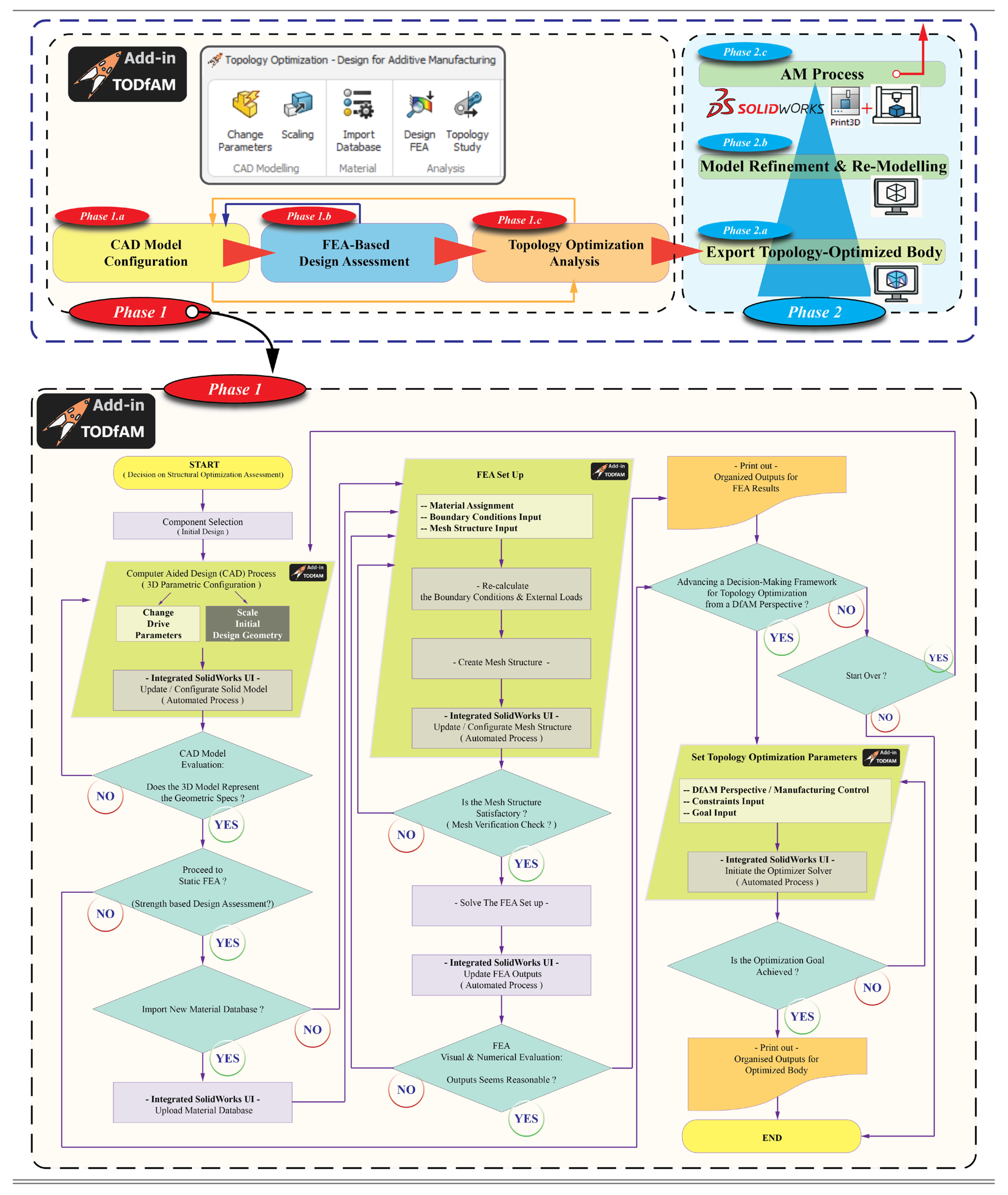
The developed automation tool, named TODfAM (Topology Optimization—Design for Additive Manufacturing), incorporates a custom-designed add-in that facilitates the definition, modification, analysis, and optimization of key design parameters and design volume. Emphasis is placed on parameters affecting the mass–stiffness trade-off within the resulting component geometry. Through this capability, the tool aligns with the overarching principles of DfAM and simulation-driven TO. The TODfAM application is compiled into an executable (.exe) setup file and seamlessly integrated into the SOLIDWORKS during installation. This integration enables native functionality within the SOLIDWORKS environment, allowing for uninterrupted and intuitive user interaction. As part of this study, a tailored algorithm was developed to enable TO of components specifically intended for AM. This algorithm was embedded within the bespoke TODfAM add-in and implemented directly in the SOLIDWORKS environment. To evaluate the tool’s functionality and effectiveness, a case study was conducted by methodically applying the procedural steps defined by the integrated algorithm. The structured workflow of the TODfAM add-in tool and following work procedure in SOLIDWORKS’ native environment is described in
Figure 1.
2.3. CASE STUDY: Topology Optimization of a Pusher Duct Support Bracket for a Novel UAV Prototype
2.3.1. Reference Model
The structural component sampled in the case study—an additively manufactured pusher duct support bracket—was specifically designed for an innovative UAV platform designated as JUPITER. This UAV represents the outcome of a collaborative initiative spearheaded by the Soton UAV team which operates within a multidisciplinary, research-intensive framework, dedicated to the advanced design, prototyping, and operational integration of UAV technologies at the University of Southampton (UK). The bracket forms part of a protected design and serves as a critical subsystem within the JUPITER airframe, which itself is currently subject to an ongoing patent application procedure. Due to intellectual property considerations, the publication of exhaustive technical data and complete visual documentation is currently restricted (see acknowledgement).
The JUPITER was engineered to operate within the Civil Aviation Authority’s (CAA) A2 Open Category for UAVs weighing under 25 kg, JUPITER being distinguished by its distributed propulsion system. This architecture includes fifteen independently controlled electric motors, offering substantial thrust redundancy and thereby enhancing the platform’s operational robustness. In conjunction, a custom-designed powertrain health monitoring system has been implemented to further bolster flight safety and dependability. Aerodynamically, the airframe has been designed to manage turbulent airflow conditions through a streamlined, low-drag configuration and multiple redundant control surfaces, ensuring sustained stability even in unfavourable meteorological environments. The design process has placed a premium on safety, evidenced by fully enclosed propellers and an ergonomically intuitive loading mechanism. In addition to its multi-mission-oriented functionality, encompassing agricultural logistics and precision farming applications, a particularly noteworthy design attribute of the JUPITER UAV is its compatibility with NHS (National Health Service, UK)-standard Small Versapak containers. This feature facilitates seamless integration into established medical logistics workflows, thereby extending the platform’s utility beyond the agricultural sector. Moreover, scalability has been strategically incorporated into the system’s architectural framework. A higher-capacity variant is currently under development, engineered to transport payloads of up to 15 kg over distances nearing 100 km, thus broadening the operational scope of the platform to meet diverse logistical demands [
54,
55,
56]. The bracket has been specifically focused to ensure the secure attachment of both the pusher duct and the yaw thruster, while also enhancing the overall aerodynamic performance of the UAV. The geometry of the bracket has been configured to sustain structural integrity under varying dynamic loads.
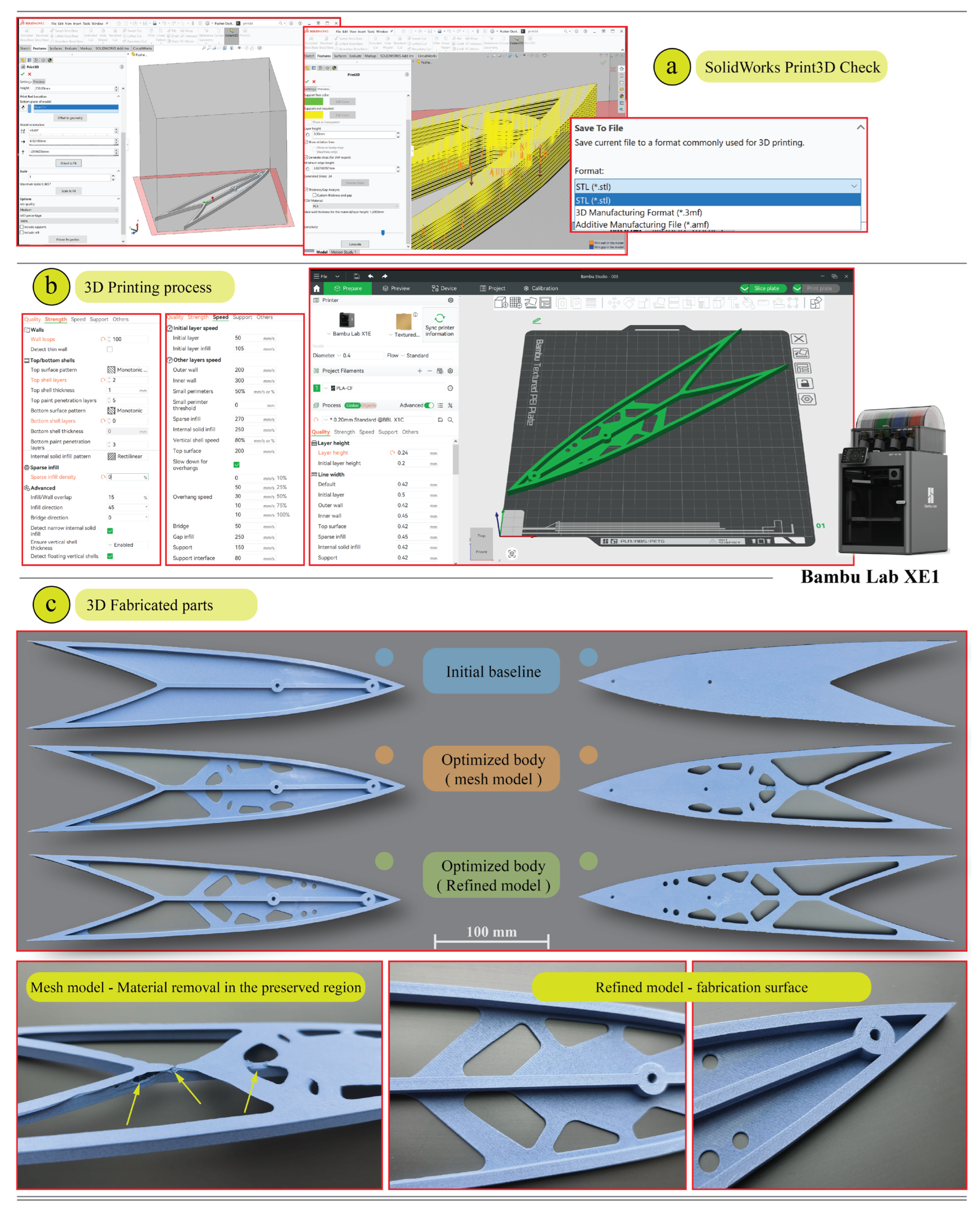
The initial bracket design was fabricated using additive manufacturing techniques on a Bambu Lab X1E system (Bambu Lab, TX, USA—www. bambulab.com) housed in the Southampton UAV Team’s design laboratory at the University of Southampton. Production employed a carbon fibre-reinforced polylactic acid (PLA-CF) filament, a proprietary material developed by Bambu Lab that incorporates carbon fibres into an enhanced PLA matrix. The parts were produced via FFF, resulting in components with a uniform matte surface and minimal layer delineation, characteristics advantageous for prototyping contexts that demand a non-glossy, esthetically refined finish [
57]. Printing parameters included the use of a 1.75 mm diameter filament extruded through a 0.4 mm nozzle, with individual layer heights maintained at 0.24 mm. The extrusion temperature was set to a constant 220 °C, and the fabrication speed was uniformly held at 50 mm s
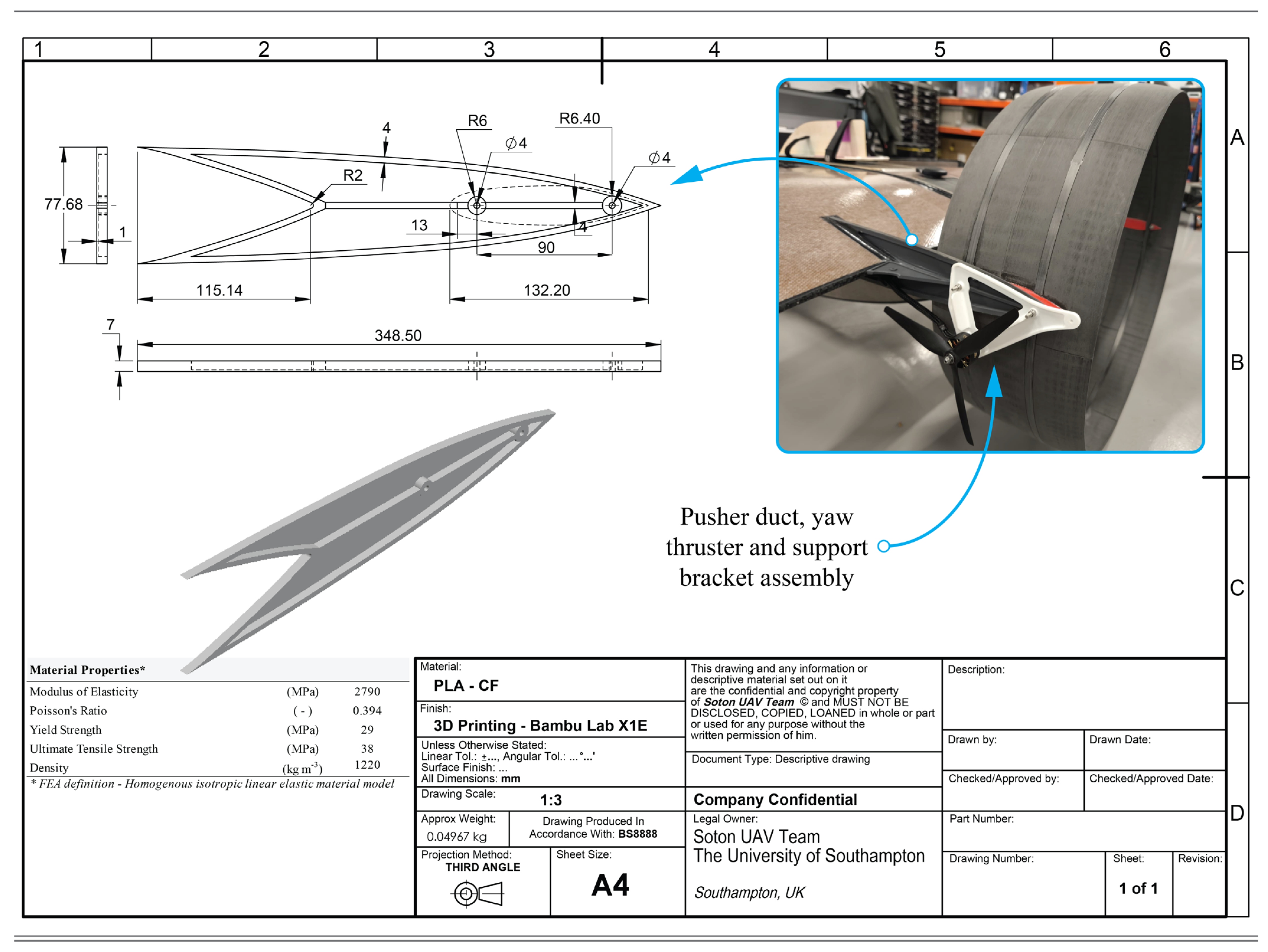
−1. To maximize mechanical integrity, the bracket was manufactured with full infill and dense outer shells, a strategy aimed at enhancing load-bearing capacity and ensuring overall structural cohesion. The inclusion of carbon fibres within the PLA matrix imparted notable improvements in stiffness and surface hardness, while retaining the processability and dimensional stability associated with standard PLA materials. Although SOLIDWORKS Simulation supports the use of linear orthotropic material models, in this study the material behaviour was intentionally idealized as homogeneous, isotropic, and linearly elastic, in order to reduce computational overhead and facilitate faster convergence during topology optimization iterations. A technical schematic illustrating the material properties alongside critical geometric and dimensional specifications, is provided in
Figure 2.
2.3.2. Setup of the TODfAM Add-In Tool
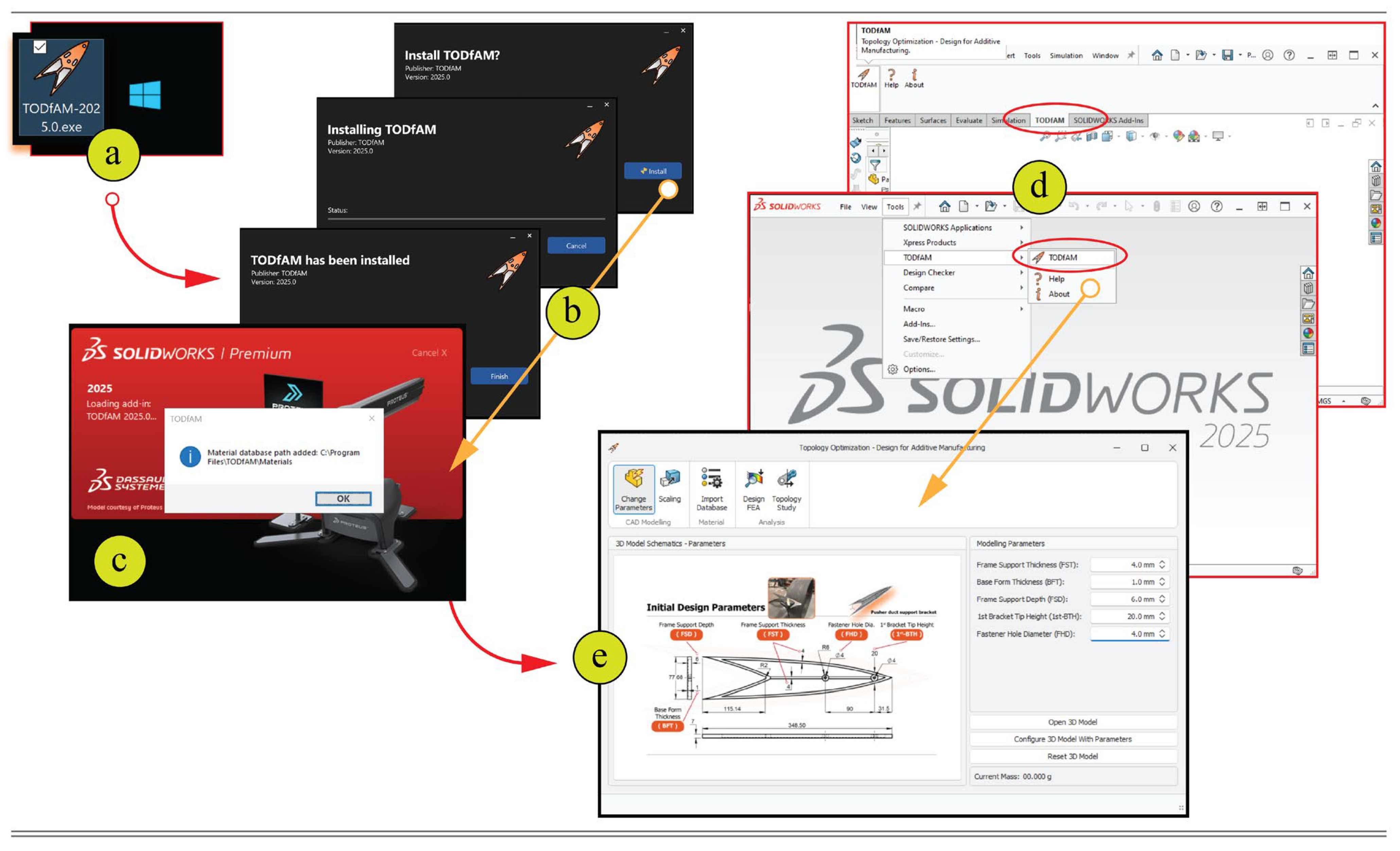
The TODfAM add-in application has been compiled into an executable (.exe) setup file, allowing for straightforward installation within a Windows operating environment. It is specifically designed to be compatible with SOLIDWORKS versions from 2025 onwards. Upon successful installation, the add-in can be accessed via the SOLIDWORKS user interface, appearing under the ‘Tools menu’ and ‘Command Manager’ tabs in the part design window. Additionally, the add-in can be activated or deactivated via the ‘Tools—Add-Ins’ menu (
Figure 3). Currently in its pilot phase, the tool has been developed with future scalability in mind, aiming to support a wide range of parametric design applications. Its initial implementation is particularly tailored to the design evaluation and structural optimization of the pusher duct support bracket. Upon initial launch, the add-in defaults to the ‘CAD Modelling, Change Parameters’ tab, which functions as the primary gateway for initiating the design and TO workflow. This interface is preconfigured with a material database tailored specifically for AM materials, thereby streamlining the setup process and ensuring compatibility with DfAM-aware design strategies.
2.3.3. Phase 1.a: Configuration of the Parametric Model
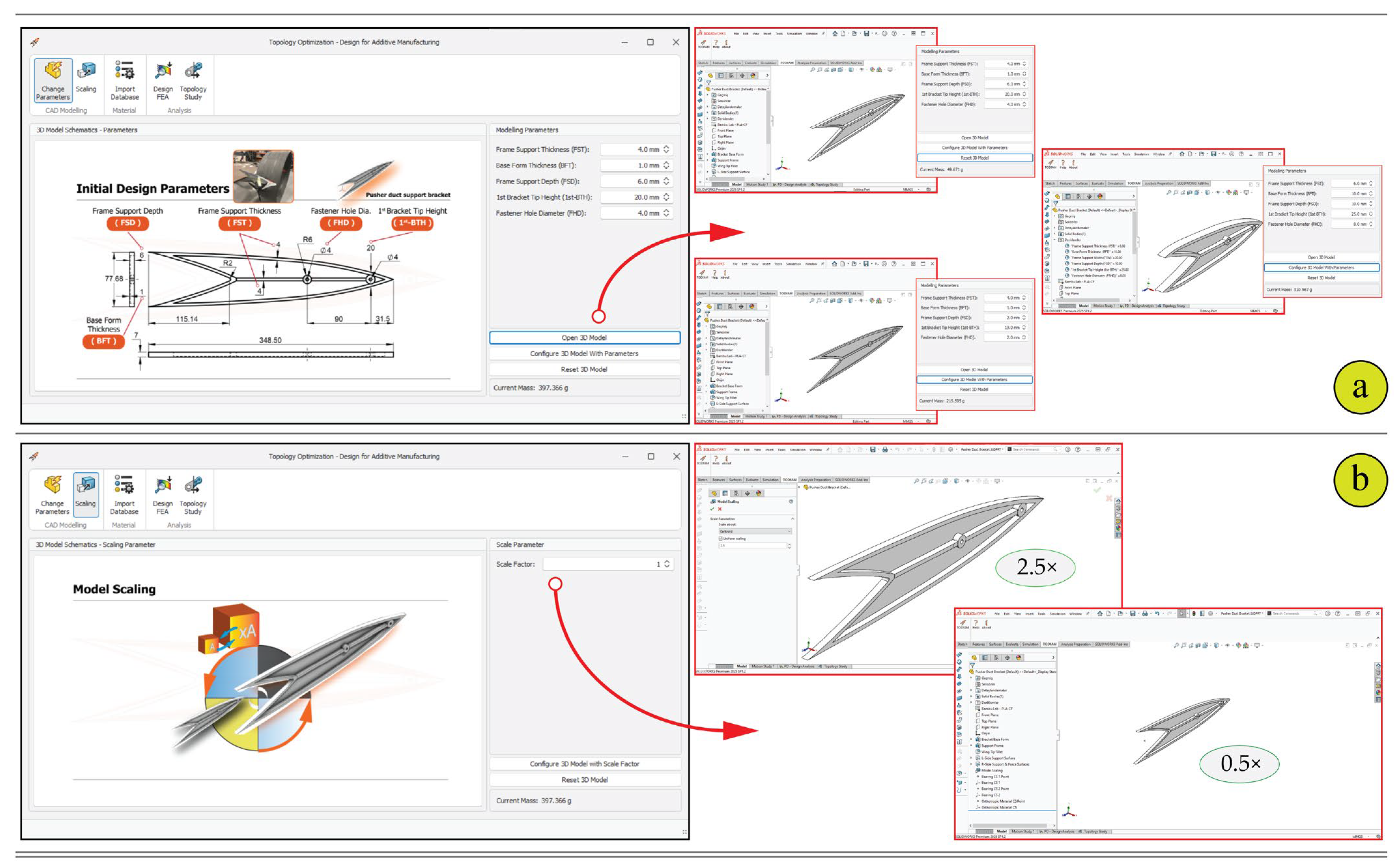
The initial phase of the TODfAM workflow is dedicated to configuring the parametric model geometry through the ‘CAD Modelling’ interface in the add-in, which is subdivided into Parameters and Scaling tabs. As illustrated in
Figure 4, this phase enables users to define and manipulate key dimensional attributes of the component, in this case, a pusher duct support bracket, within a SOLIDWORKS-native environment. The Parameters tab presents a technical schematic annotated with critical geometric features, including Frame Support Thickness (FST), Base Form Thickness (BFT), Frame Support Depth (FSD), Bracket Tip Height (BTH), and Fastener Hole Diameter (FHD). Each of these parameters is input via a control panel on the right-hand side of the interface, where users can assign values within pre-defined bounds to ensure design feasibility and assembly compatibility. Upon specifying these parameters, the user may invoke the “Configure 3D Model with Parameters” function, which dynamically regenerates the bracket geometry in SOLIDWORKS and provides real-time updates on model mass. This parametric configuration process facilitates efficient exploration of design alternatives without requiring manual redrawing or re-modelling and supports structural refinement at the conceptual stage. The visual outputs shown in
Figure 4a demonstrate how changes in parameter values translate into distinct model variants within the CAD workspace, ensuring rapid feedback and iteration. Complementing this, the Scaling tab offers a global transformation feature whereby a uniform scale factor is applied to the entire model (
Figure 4b). This capability is particularly useful for early-stage trade-off studies and mass-scaling assessments. Once a scale value is defined, the model is proportionally resized while preserving parametric relationships and design intent. The integration of these two sub-functions—dimension-specific parameterization and holistic scaling—forms the foundational layer for the subsequent TO process by ensuring that the model geometry is both structurally relevant and manufacturable.
In the present case study, the model configuration was retained using the initial design parameters illustrated in
Figure 2. This baseline configuration defines the principal geometric features as follows: FST of 4 mm, BFT of 1 mm, FSD of 6 mm, BTH of 20 mm, and FHD of 4 mm. These dimensional specifications provided a consistent foundation for evaluating subsequent design modifications within the study framework.
2.3.4. Material Database
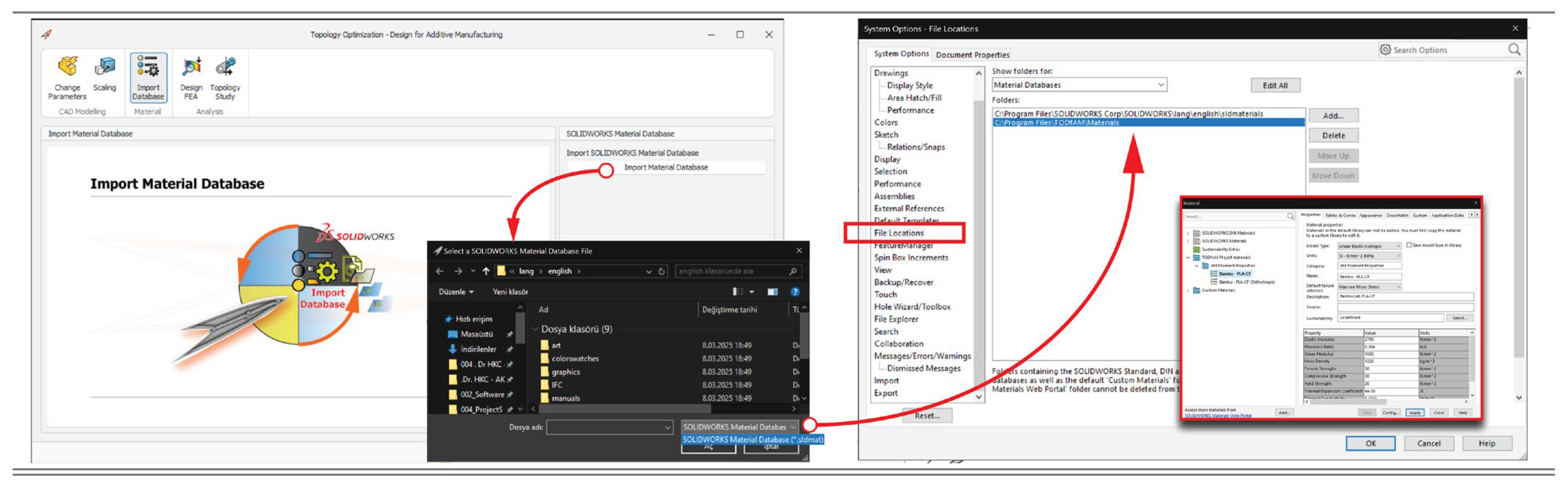
In the developed add-in interface, a dedicated Material Database Import tab has been incorporated to enhance the material selection workflow for subsequent analyses. This feature enables users to load customized material databases tailored to specific project requirements. Through this interface, users can import external SOLIDWORKS material database files (.sldmat) by integrating them into the designated SOLIDWORKS file locations. The imported database may be manually configured or sourced from reputable online platforms such as MatWeb: Online Materials Information Resource (
www.matweb.com) or ANSYS Granta Selector (
https://www.ansys.com/products/materials/granta-selector) (accessed on 18 November 2025), which offer comprehensive material datasets. By default, the TODfAM tool comes preloaded with a bespoke, project-specific material library, alongside SOLIDWORKS’ comprehensive default material database. Within this database, both isotropic and orthotropic material properties of the PLA-CF are embedded. These properties are critical for ensuring the fidelity of structural and topological simulations. For the case study presented herein, the isotropic material properties detailed in
Figure 2 have been employed. For the concept-stage TO, a linear-elastic isotropic material model was adopted to maintain solver stability and consistent SIMP-based compliance evaluation. Raster-aligned orthotropic modelling and a fully calibrated directional property set were not implemented at this stage. Consequently, the mapping between manufacturing parameters and FE material axes is deferred to the post-optimization phase, once the geometry and build orientation are finalized.
Figure 5 provides a visual representation of the user interface, highlighting the file loading process within the SOLIDWORKS environment.
2.3.5. Phase 1.b: FEA Based Design Assessment
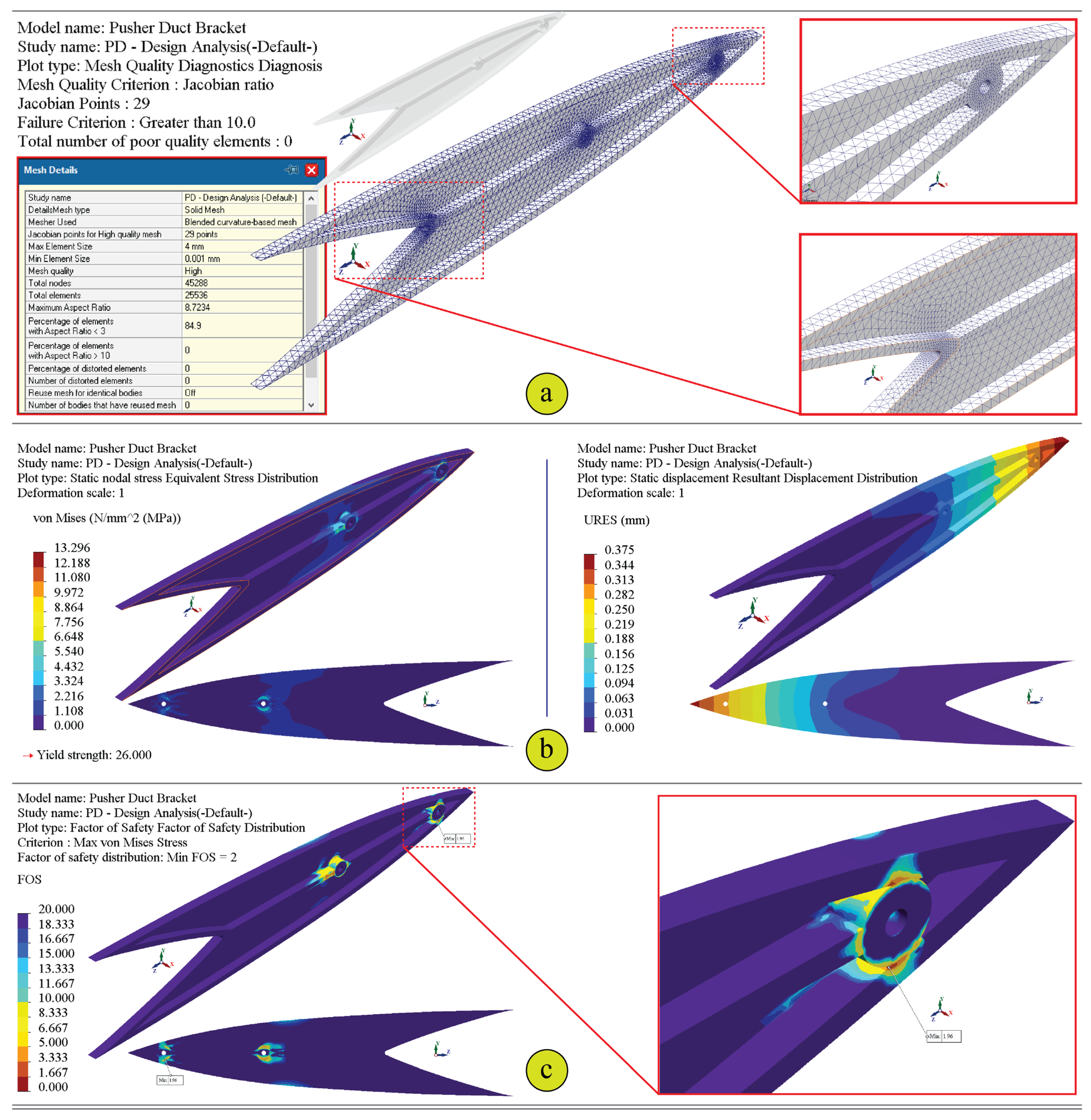
Following the geometric configuration of the parametric model (Phase 1.a), Phase 1.b of the TODfAM workflow introduces a built-in FEA environment to assess the structural performance of the initial design under anticipated loading conditions. This phase is integral to pre-optimization validation, ensuring that the baseline configuration is structurally sound and that critical stress, displacement, and safety factors are understood prior to initiating TO.
As illustrated in
Figure 6, the ‘Design FEA’ tab of the TODfAM interface guides the user through a systematic setup of boundary conditions and loading scenarios. The interface includes five primary input domains: material definition, fixtures, external loads, mesh parameters, and output diagnostics. The core of this setup is built around a UAV-relevant loading configuration, where multiple forces and supports are applied to simulate real-world aerodynamic and mechanical demands during take-off. The loading scheme, visualized in the schematic (left), comprises standard gravitational acceleration, two bearing loads acting on the inner wings and duct interface (representing the mass of the pusher duct and associated subsystems), and an externally applied yaw thruster force. The primary load path proceeds from the hub interface through the upper rib members to the outer mounting lugs and into the UAV frame. The bracket is anchored through a fixed support at the wing root and constrained elastically at both lateral faces to replicate semi-flexible mounting conditions commonly encountered in UAV platform assemblies. The elastic restraint conditions are numerically defined by specifying both normal and tangential stiffness values for the right and left support interfaces (e.g., other support brackets or duct joints). To assist users in obtaining accurate stiffness values, the TODfAM tool includes a dedicated Elastic Support Stiffness Calculation window (
Figure 6, right). This utility enables the calculation of distributed and total stiffness parameters based on the structural material’s mechanical properties, namely Young’s modulus (
E), Poisson’s ratio (
ν), and shear modulus (
G), as well as geometrical attributes such as support area (
A) and wall thickness (
t) [
58,
59]. Stiffness values can be defined analytically as
kn =
EA/
t and
kt =
GA/
t, and can be verified through compliance runs using
ki =
Fi/
δi based on the same material and geometric inputs. The derived stiffnesses are then automatically fed into the fixture definition to model contact behaviour under both axial and tangential loading regimes. Here, the left interface was assigned a tangential stiffness of 0 N·m
−1 to simulate its slotted connection allowing minor sliding during assembly, whereas the right interface was constrained to represent the fixed joint.
In terms of meshing, the add-in incorporates a curvature-based meshing system, allowing the user to define maximum and minimum element sizes, element distribution in radial patterns, and the mesh growth ratio. This ensures adequate resolution in regions of high geometric or stress complexity. Mesh quality options include both High and Draft, giving the designer control over simulation precision and computational time. Once the simulation inputs are fully defined, the user can generate the mesh and execute a linear static analysis directly within the interface. All analyses were performed in a global cartesian reference frame; no local material axes were assigned during TO process. Resulting outputs, including maximum equivalent stress (von Mises), maximum displacement, and minimum factor of safety (FOS), are presented numerically in the diagnostics section. These values serve as critical indicators for evaluating whether the current geometry meets performance requirements or whether preliminary modifications are necessary before proceeding to TO. Through this integrated FEA capability, TODfAM enables early-stage structural validation without leaving the SOLIDWORKS environment. This accelerates the design-verification loop and allows users to anchor the TO process in a structurally meaningful baseline, thereby reducing the likelihood of impractical or unsafe solutions in later stages.
In this case study, the loading scenario was described according to the maximum structural loading condition which is expected during take-off in the JUPITER UAV platform. Under this configuration, the yaw thruster applies a maximum thrust force of 30.900 N, acting laterally towards the pusher duct. The combined mass of the duct and associated subsystems was defined as 0.650 kg, fully borne by the bracket arms. A design flight load factor of +6.5 g (g-force) was applied to simulate vertical acceleration during ascent, while aerodynamic effects were intentionally neglected under the assumption that they offer limited contribution to worst-case loading. This omission is justified, as aerodynamic forces would in practice act to partially offset the imposed inertial loads. This static case was treated as a representative bounding condition for concept-stage screening, as it corresponds to the wort-case load state of the UAV; extended envelopes including aerodynamic effects will be considered during configuration-specific validation. The bracket–wing interface was modelled as a fixed support, while the bracket–duct connections were treated as elastic restraints. To simulate these elastic interactions accurately, both normal and tangential stiffness values were assigned based on the elastic and shear moduli of the joint materials, as well as contact geometry. The following support stiffnesses were defined: Right elastic face: Normal: 245 × 106 N·m−1, Tangential: 87.6 × 10⁶ N·m−1, Left elastic face: Normal: 368.7 × 10⁶ N·m−1, Tangential: 0 N·m−1.
2.3.6. Phase 1.c: Topology Optimization Study
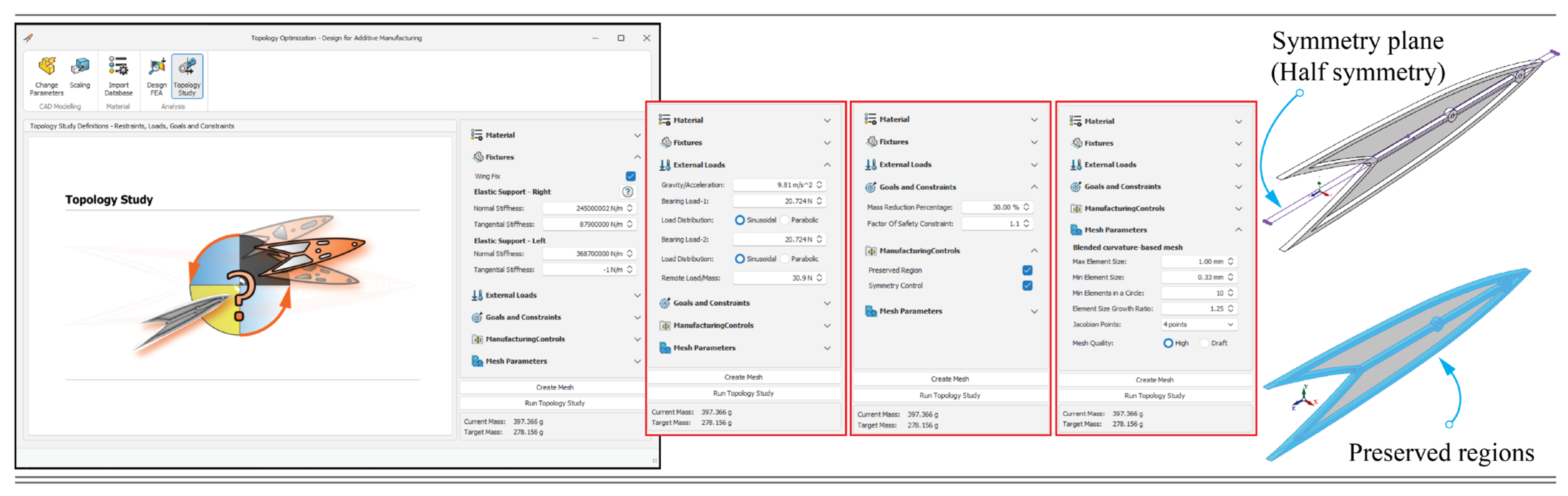
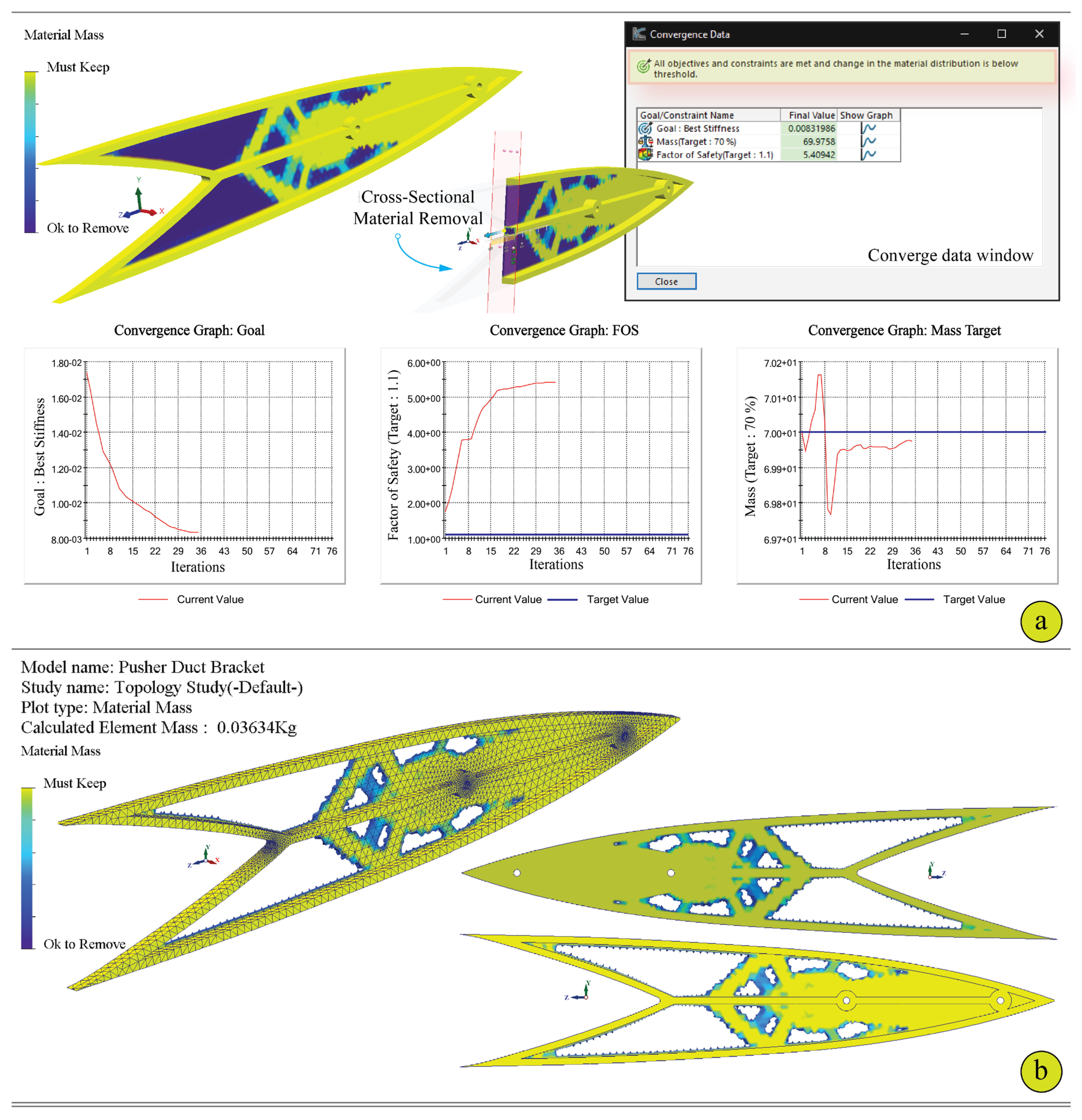
Phase 1.c of the TODfAM workflow initiates the TO stage, representing the culmination of the pre-optimization setup that includes geometric parameterization and structural validation. The objective of this sub-phase is to generate an optimized structural layout that achieves the desired mechanical performance while reducing unnecessary material usage. The Topology Study tab of the TODfAM interface offers an integrated graphical environment within SOLIDWORKS for configuring and executing this process (
Figure 7). This module leverages SOLIDWORKS Simulation’s native TO solver, enhanced with DfAM-aware control parameters embedded through the TODfAM add-in. As with the previous FEA phase, the interface allows users to configure material properties, fixtures, external loads, and mesh parameters. These inputs are carried over to maintain continuity and accuracy, ensuring that the TO is grounded in the same physical assumptions used for the initial structural assessment. Additional functional domains within this tab include Goals and Constraints and Manufacturing Controls. The Goals and Constraints section allows the user to define the mass reduction target and factor of safety constraint. In the case study presented here, a mass reduction goal of 30% was applied, with a minimum factor of safety constraint set to ≥1.1. This balance was selected to ensure both structural efficiency and manufacturability, particularly in the context of UAV component integration where weight savings are critical but cannot compromise operational safety. For concept-stage screening, a pragmatic lower bound of FOS ≥ 1.1 was applied to prevent brittle solutions; programme-level safety factors for flight hardware will be assigned during qualification.
The Manufacturing Controls section introduces DfAM-aligned constraints to guide the optimization towards geometries suitable for AM. Two controls were activated in this study:
- -
Preserved Region: To protect functionally critical areas (e.g., bolt holes or interfaces) from material removal (These preserved regions correspond to the as-designed bolt holes and mounting pads shown in
Figure 2 and were retained unchanged throughout optimization).
- -
Symmetry Control: To enforce symmetric solutions, thereby improving structural balance and manufacturability while potentially reducing post-processing efforts.
It should be noted that, at the current stage, the manufacturability constraints in TODfAM are limited to geometry-level controls. Advanced DfAM parameters such as minimum feature size, overhang angle, and build direction are currently managed externally during the parametric re-modelling phase, since the SOLIDWORKS TO kernel does not yet provide in-solver enforcement for these parameters.
In practice, these DfAM criteria were applied quantitatively during the post-optimization parametric re-modelling and verified at each hand-off using SOLIDWORKS Print3D and the slicer. Specifically, thin members below ~1 mm were thickened and unsupported overhangs > 45° were corrected; build orientation was set flat on the bracket base, consistent with the fabrication plan, prior to final slicing. This hybrid approach reflects current SOLIDWORKS TO capabilities, verification and correction occur outside the solver, while ensuring that the manufactured geometry satisfies printability constraints.
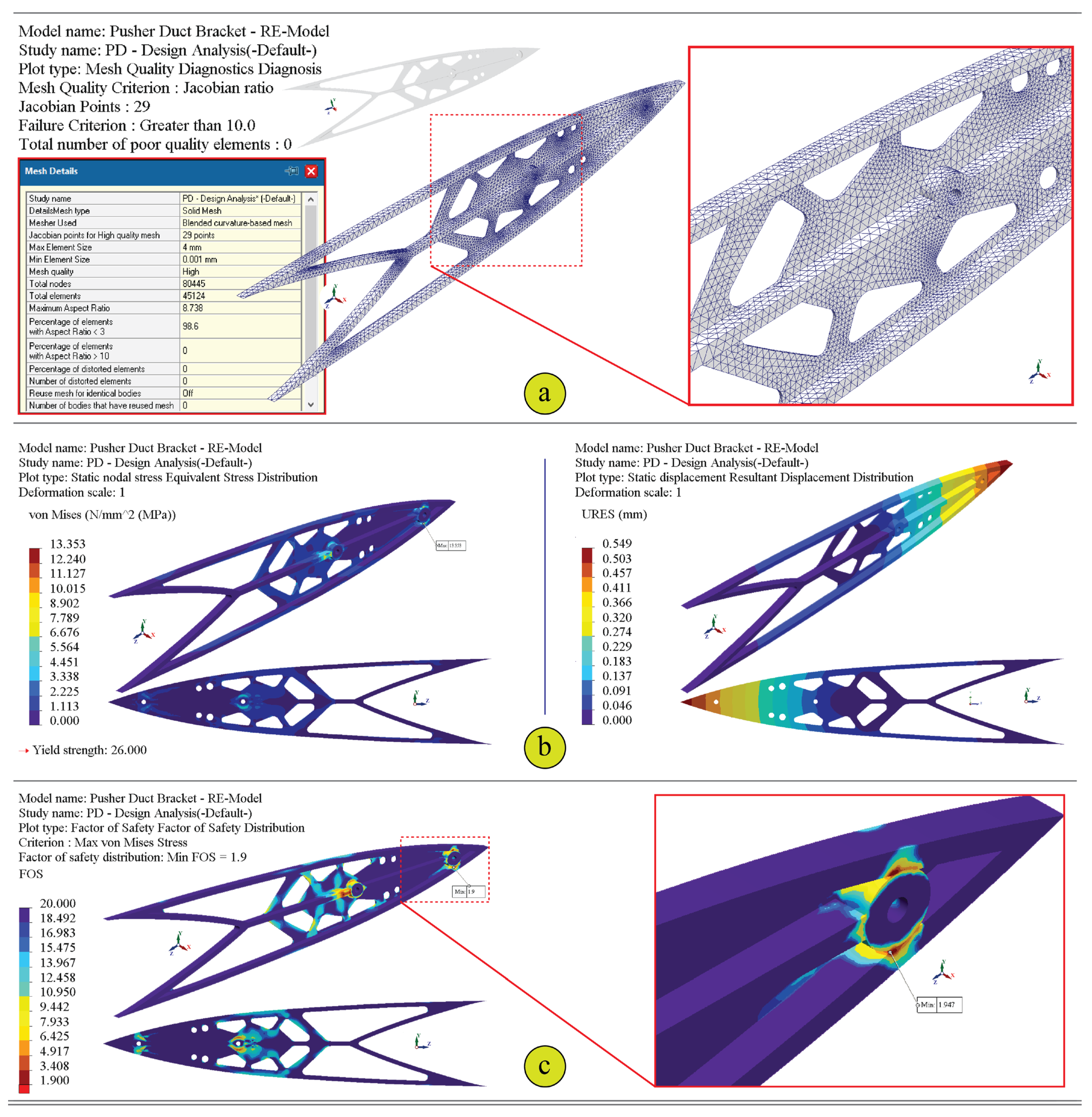
Mesh generation for the topology study employs the same curvature-based strategy implemented in the FEA phase. Parameters such as element size (min. 0.001 mm, max. 4 mm), growth ratio (1.1), and Jacobian control points can be defined to achieve adequate fidelity. The minimum element size represents the solver’s refinement threshold for curvature continuity rather than a physical element length. The effective element dimensions governing accuracy were approximately 0.4–1.6 mm, with a growth ratio of 1.1, while the minimum Jacobian threshold of 0.001 was applied solely as a refinement control. The mesh ensures that material distribution across the design space is optimized with sufficient resolution, particularly around preserved regions and high-load paths. Once configured, the TO is executed by selecting “Run Topology Study.” The solver evaluates the material layout that minimizes structural compliance (i.e., maximizes stiffness) within the defined volume and safety constraints. Throughout the process, TODfAM continuously displays the current and target mass values, providing real-time insight into optimization progress and convergence. By embedding this stage within the SOLIDWORKS environment, the TODfAM tool eliminates the need for external mesh translation, manual result interpretation, or iterative geometry adjustments in third-party tools. The result is a functionally optimized, additively manufacturable design aligned with DfAM principles and validated through prior structural simulation. This capability marks a critical milestone in transitioning from conceptual geometry to a fabrication-ready topology driven by performance, manufacturability, and automation. Typical numerical parameters were p = 3, a density-filter radius of 1.2 mm, and an element size of 0.4–1.6 mm with a growth ratio of 1.1; finer meshes primarily smoothed local members without significantly affecting the global mass–stiffness response. A formal displacement/stress convergence curve lies outside the current workflow-integration scope and is flagged for future validation. Although most procedures are automated within the developed add-in, certain DfAM checks—such as support accessibility and build orientation—remain manually verified, representing a hybrid automated–manual integration.
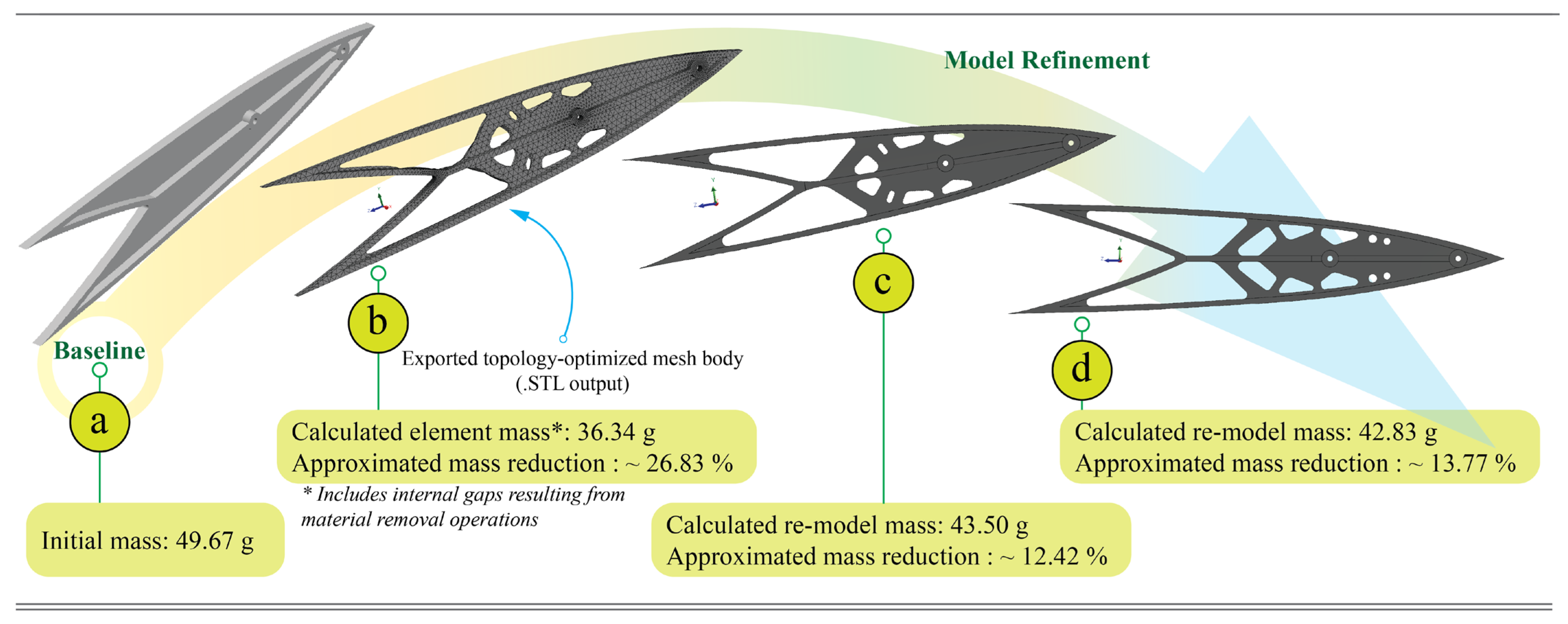
2.3.7. Phase 2.a: Exporting the Optimized Body
Upon completion of the TO process within the TODfAM interface, the next step involves the export of the optimized bracket geometry for subsequent post-processing. In this phase, the resulting optimized body—typically a non-parametric mesh representation—is extracted directly from the SOLIDWORKS Simulation environment using the native result export functionality. The model is saved in STL (stereolithography) format, which is the standard file type used in AM workflows due to its compatibility with slicing software and AM hardware. The STL export preserves the integrity of the optimized geometry, including topology-specific features such as internal voids and stress-adaptive load paths. It is crucial at this stage to ensure that the mesh resolution and tolerance settings are sufficiently refined to avoid tessellation artefacts that may compromise manufacturability or structural fidelity. This exported STL model then serves as the baseline geometry for further refinement, correction of non-printable features, or direct preparation for AM, depending on the specific production requirements.
2.3.8. Phase 2.b: Model Refinement and FEA Validation of the Re-Model
Although the exported topology-optimized body provides a structurally efficient configuration, it exists as a mesh-based, non-parametric geometry that limits design adaptability and compatibility with standard engineering workflows. To overcome this, the optimized model is reverse-engineered and reconstructed in SOLIDWORKS as a fully parametric solid model. This re-modelling process reinstates feature-based design flexibility, enabling dimension-driven modifications, precise definition of functional features, and integration with technical drawings and tolerance specifications. It also allows for the inclusion of essential manufacturability enhancements, such as ensuring minimum wall thicknesses, smoothing sharp edges, and correcting mesh irregularities that may impede AM processes.
Following re-modelling, a secondary FEA is performed to validate the mechanical integrity of the refined geometry under the same loading conditions defined during the initial assessment phase. This verification step is essential to confirm that the reconstructed model preserves the structural performance characteristics of the original optimized shape. The same boundary conditions, elastic supports, and load magnitudes are reapplied, and the simulation results are compared against the original performance targets, including stress distribution, displacement fields, and factor of safety. Any deviations that compromise performance can be addressed through iterative adjustments within the parametric model. This dual approach, reconstructing a DfAM-aware parametric model and verifying its structural fidelity, ensures the final design is both manufacturable and mechanically validated prior to AM fabrication.
2.3.9. Phase 2.c: Additive Manufacturing Process
The final phase of the TODfAM integrated workflow involved preparing the optimized bracket for fabrication via FFF. A two-stage AM preparation approach was implemented, combining the use of SOLIDWORKS Print3D and Bambu Studio. First, the SOLIDWORKS Print3D module was used to perform integrated DfAM verification within the CAD environment. This included checks for build volume compliance, overhang angles, and wall thickness, ensuring that the optimized design was suitable for FFF without extensive manual modification. As the Bambu Lab X1E printer model is not directly supported in SOLIDWORKS, custom machine parameters, including build volume, nozzle diameter, layer height, and extrusion temperature, were configured to reflect the X1E’s specifications. Following this verification, the bracket model was exported in STL format and processed in Bambu Studio for final slicing and machine-specific parameterization. For this study, the bracket was fabricated on the Bambu Lab X1E FFF system, which offers high-precision fabrication capabilities suitable for functional prototyping. The selected material was PLA-CF. The refined parametric model, verified for AM compliance, was used for final fabrication, resulting in a support-free, dimensionally accurate component. This combined workflow, leveraging both integrated CAD-based DfAM checks and advanced slicing software, ensured that the optimized UAV bracket transitioned effectively from design to reliable physical realization.
4. Conclusions
This study developed and validated TODfAM, a SOLIDWORKS-integrated add-in tool that embeds a hybrid, DfAM-aware topology optimization workflow directly within a parametric CAD environment. The tool automates early design stages, including parametric modelling, integrated FEA validation, and DfAM-oriented topology optimization, thereby streamlining iterative design and manufacturability assessment. Its effectiveness was demonstrated through a UAV pusher-duct bracket case study, achieving a 13.77% mass reduction while maintaining structural integrity and manufacturability under FFF-based additive manufacturing constraints.
The principal contribution of this research lies in establishing a CAD-native, automated workflow that unifies topology optimization, DfAM evaluation, and AM preparation within a single design environment. This integration addresses a long-standing gap in engineering practice by mitigating toolchain fragmentation and promoting the practical adoption of DfAM methodologies for UAVs and similar lightweight structures.
Future developments will extend TODfAM by automating parametric re-modelling, supporting multi-objective optimization, enabling multi-CAD interoperability, and incorporating AM process simulations for thermal distortion and residual stress analysis. Experimental mechanical validation, including static and fatigue testing, will also be conducted to correlate numerical and physical performance, further enhancing the robustness and industrial relevance of the proposed framework.
Overall, TODfAM demonstrates that reliable, concept-stage structural verification and manufacturability assessment can be achieved entirely within a CAD-native platform, offering a practical bridge between digital design automation and additive manufacturing.




 ,
,