1. Introduction
Music has evolved tremendously in recent years, with new technologies and instruments being developed to create new and innovative sounds. One of the most significant developments in the music industry has been the introduction of Digital Musical Instruments (DMIs) [
1,
2]. DMIs are devices that produce sounds through digital processing rather than through mechanical or acoustic means. The evolution of DMIs can be traced back to the 1920s when the first digital synthesizer, called Thereminvox, was developed by Leon Theremin, who used hand movements to control the pitch and volume of the sound produced. Since then, the development of DMIs has been rapid and dynamic, with each generation of instruments introducing new sounds and possibilities for musicians and producers. The introduction of MIDI in the 1980s revolutionized the music industry by enabling musicians to connect different instruments and equipment and to control various parameters of DMIs through physical movements, leading to the development of more sophisticated DMIs. Today, DMIs come in different forms, including keyboards, guitars, drums, percussion, wind, brass, and stringed instruments. DMIs are designed to mimic the sound of their acoustic counterparts, but they offer more flexibility and versatility in terms of sound production. One of the significant advantages of DMIs is that they can be easily customized and reprogrammed to suit the specific needs of the user [
3]. This customization allows for greater control over the sound production process and encourages experimentation with sound design. In addition, gesture-controlled DMIs allow for greater expressivity and creativity in music performance [
4]. Musicians can use their physical movements to shape and manipulate the sound produced by the instrument, creating unique and dynamic performances. Gesture also allows for a more intuitive and natural way of interacting with DMIs [
5]. Therefore, gesture-controlled DMIs have changed the way humans create, perform, and interact with music.
However, learning to play DMIs comes with some challenges, including the need for musicians to develop new motor skills and new perceptual abilities [
6]. Additionally, because DMIs can produce a wide range of sounds, learning to control and manipulate these sounds with their gestures can be overwhelming for beginners [
7], since they need to integrate multiple sensory modalities. Apart from that, DMIs allow a high degree of flexibility in mapping gestures to sound. This flexibility can lead to complex mappings where the relationship between a specific gesture and its corresponding sound output may not be immediately intuitive or straightforward [
8,
9]. Finally, the gesture-based control of DMIs also involves the use of technology, which can be challenging for individuals.
In this paper, an innovative approach is proposed to alleviate the aforementioned limitations, called HapticSOUND, which provides a unique interactive experience to museum visitors about traditional musical instruments. The approach utilizes sensorimotor learning, which refers to the process by which individuals learn to use their sensory and motor systems to interact with the environment [
10]. Specifically, through the Interaction Subsystem, users perform gestures (motor skills) on a 3D-printed DMI to produce sounds. In addition, the subsystem has integrated sensory feedback, such as visual, auditory, and annotated information, related to the performed gestures, and provides levels with an increasing degree of difficulty for acquiring and refining motor skills based on sensory feedback. Apart from this subsystem, HapticSOUND provides the Information Subsystem where users learn about traditional musical instruments, as well as the Entertainment Subsystem where they play a 3D gesture-based puzzle game. The rest of the paper is organized as follows: In
Section 2, the related work is provided. Next, in
Section 3, the description of the HapticSOUND system is introduced, and three subsystems are described, placing more emphasis on the Interaction Subsystem (
Section 4). In
Section 5, the pilot study to evaluate the usability of the Interaction Subsystem is reported, and the results are discussed in
Section 6. Finally,
Section 7 concludes the paper and presents limitations and future work.
2. Related Work
The use of modern technology and machine learning for gesture recognition and sound production in the field of DMIs has gained increasing attention in recent years. The recent research in this area explores a variety of machine learning models, datasets, and applications for the DMIs, and investigates the usability and performance of such systems. There are several research works that developed DMIs which produce electronic sound through real objects where sensors have been attached. More specifically, Turchet, McPherson, and Barthet [
11] described the development and evaluation of a smart cajón, which was a percussion instrument that used sensors and machine learning algorithms to recognize different types of drum hits and to generate electronic sounds. They found that the k-nearest neighbor algorithm achieved an accuracy of over 90% for most types of hits, concluding that their approach could be a promising tool for musicians and researchers. In addition, Ref. [
12] conducted a series of experiments to explore how different types of physical effort and motion can affect the resulting sound in new musical instruments. They designed several new instruments, including a wind instrument with a flexible tube, a percussion instrument with a rotating disc, and a string instrument with a moving bridge. The authors tested these instruments with a group of musicians and used motion capture technology and sound analysis to analyze the relationships between physical effort, motion, and sound. They found that different types of physical effort and motion can have a significant impact on the resulting sound in new musical instruments, presenting a valuable contribution to the field of new musical instrument design and development. Rasamimanana et al. [
13] presented a system for creating modular musical objects that enabled embodied control of digital music, using Max/MSP. The system consisted of a set of modular objects, each of which was designed to enable a specific type of embodied interaction with the digital music system. These objects included physical controllers, such as sensors and buttons, as well as virtual controllers, such as software interfaces that allowed the user to control the sound using body movements. The system was designed to allow a high degree of expressivity and control in the performance of digital music, focusing on embodied interaction and gestural control. Finally, Ref. [
5] proposed a natural user interface for accessing and engaging with musical cultural heritage through gestural expression and emotional elicitation. The system used a combination of sensors, such as motion capture and physiological sensors, to capture users’ gestures and emotional responses, and translated them into sound, aiming to provide a more immersive and interactive experience.
Apart from the aforementioned research studies, there are many approaches that use virtual instruments for sound production. For example, Gillian and Paradiso [
14] presented Digito, a virtual musical instrument that was controlled by hand gestures. The system was designed to provide a high degree of control over the produced sound, with the user being able to manipulate the instrument’s parameters in real time using hand gestures. Digito used a Microsoft Kinect sensor to track the user’s hand movements and interpret them as gestures that control various aspects of the sound produced. Finally, they discussed the challenges involved in developing a gesturally controlled virtual instrument, including the need for an accurate and robust gesture recognition algorithm. Additionally, Dalmazzo and Ramirez [
15] explored the use of machine learning algorithms for fingering gesture recognition in an air violin, which was a virtual musical instrument implemented in Max/MSP that allowed the performer to play the violin without an actual instrument. The performer used finger gestures to play the notes, and the system produced the corresponding sound output. The results showed high accuracy in recognizing the finger gestures, highlighting the effectiveness and potential of machine learning for enhancing virtual musical instruments and providing new opportunities for musical expression. Hofmann [
16] explored the development of a virtual keyboard instrument and hand tracking in a virtual reality (VR) environment. The aim was to investigate the feasibility of using VR technology to create a realistic and interactive keyboard instrument that allowed users to play music with their hands in a virtual space. The evaluation of the study showed that the virtual keyboard instrument and hand-tracking system were effective and intuitive for users to use and that the system had the potential to be used in music education and performance. Moreover, Lee [
17] introduced Entangled, which was an interactive instrument that enabled multiple users to create music in a virtual 3D space using their smartphones for gesture control. The instrument used a combination of audio, visual, and haptic feedback to create a unique, immersive experience for the users. In Entangled, users could apply gravitational force to a swarm of particles, where their gestures and movements affected the sound and visuals in the virtual space. The instrument was designed to be accessible and easy to use, with no prior musical experience necessary. The study by Mittal and Gupta [
18] introduced a new interactive musical interface called MuTable that can turn any surface into a musical instrument, allowing users to create and perform music using gestures and movements. MuTable consisted of a camera, a projector, and a computer running specialized software. The camera captured the user’s hand movements and gestures, which were then processed by the software to generate musical notes and sounds, while the projector projected visual feedback onto the surface, indicating where the user’s hands should go to play different notes and sounds. They evaluated the system in terms of performance and usability and they found that the system was easy to use and allowed users to create and perform music without prior musical training. Finally, Ref. [
19] presented the development and evaluation of a unique interactive musical instrument called Sound Forest/Ljudskogen, which utilized a large-scale setup of strings to create an immersive and engaging musical experience for users. The researchers described the design process, including the placement and tension of the strings, the sensing technology, and the mapping between the user’s gestures and the produced sound. The findings of the evaluation demonstrated the positive reception and impact of Sound Forest/Ljudskogen placed at a museum. Participants expressed enjoyment and excitement in playing the instrument, highlighting its immersive and intuitive nature.
In conclusion, in the research area of DMIs, special emphasis is placed on interaction and specifically on gestures. Hand gesture analysis and control of audio processing is an active area of research in the fields of computer science and music technology. The use of hand gestures to control audio processing has the potential to provide a more natural and expressive form of interaction between the user and the computer. Therefore, researchers have explored various machine learning models, datasets, and applications to enhance gesture recognition and sound production in DMIs. The current paper proposes the Interaction Subsystem, which implements well-known techniques for capturing, analyzing, and recognizing gestures as well as producing sounds, according to the literature review. In addition, to the best of our knowledge, it contributes to the field of museums, since it presents the first investigation of a holistic approach, called HapticSOUND, which includes three subsystems, the Interaction, the Information, and the Entertainment Subsystems, for visitors to learn about traditional musical instruments, play games, and interact with a DMI.
3. HapticSOUND Architecture
The HapticSOUND project aims at creating an analysis, documentation, and demonstration system for traditional musical instruments in museums. HapticSOUND will be established in the Cretan Ethnology Museum (CEM) in Greece, which involves visitors in a personalized experience of the transmittal of cultural knowledge in an active, pleasant, and creative way. The proposed system aims to act as a bridge between the visitors of the CEM museum and the cultural heritage of Crete (Greece). To achieve this, the proposed system involves the creation of a demonstrative system for informing CEM visitors about the musical instruments exhibited in the museum, promoting their familiarization with the sounds they produce, the manner they create sounds, and how they are constructed. The visitor’s participation is supported in experiential learning by providing opportunities for visitors to learn how to play the 3D-printed DMI, evolving from simple note creation to musical patterns. Moreover, visitors have the opportunity to study the structural model of the musical instrument in the context of a 3D serious game, in which they have to assemble it.
The next sections provide an in-depth explanation of the HapticSOUND system and its subsystems. The architecture is shown in
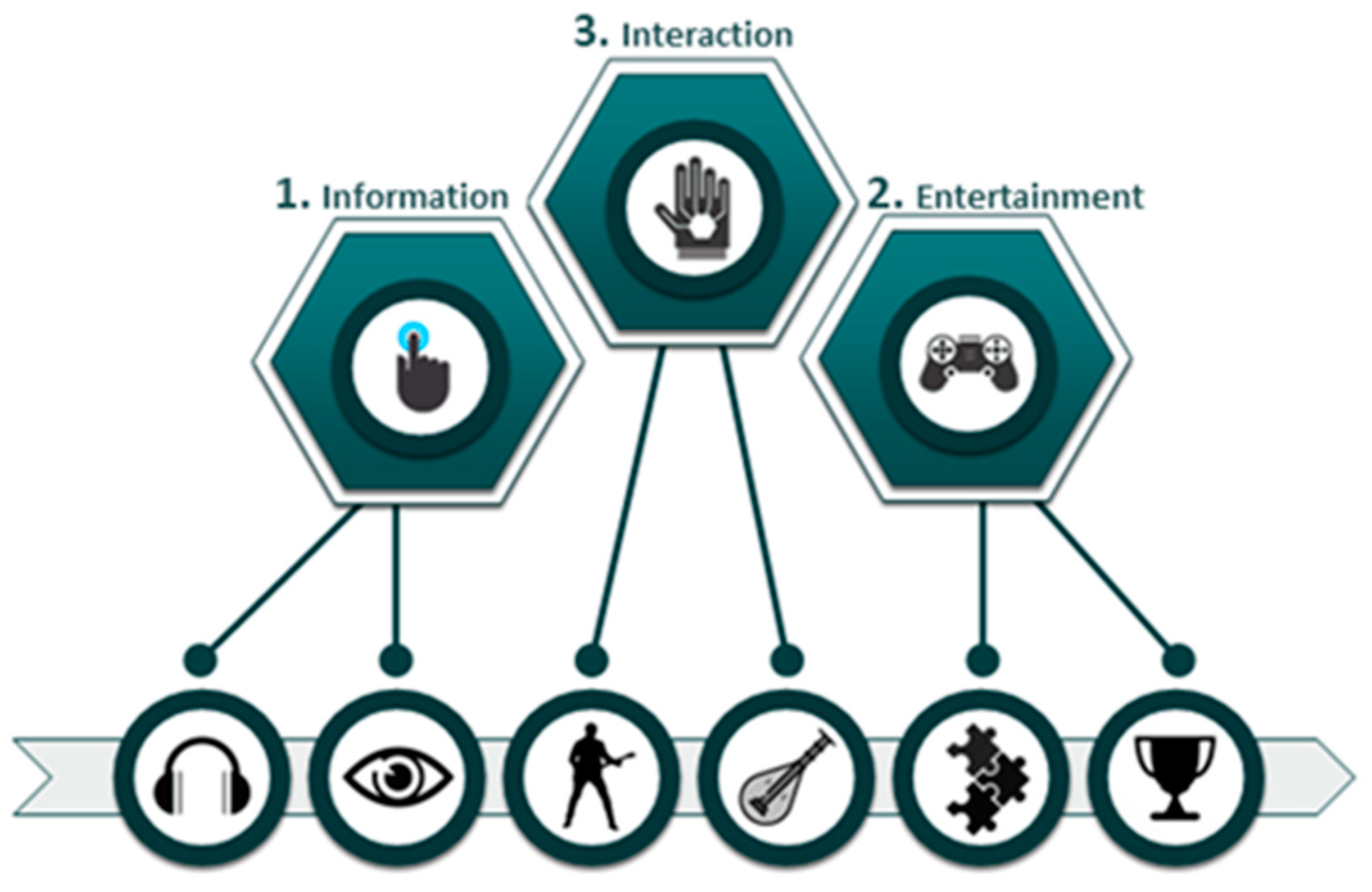
Figure 1 and consists of three subsystems: (1) the Information Subsystem (provides audio tracks and informative text), (2) the Entertainment Subsystem (provides a 3D gesture-based serious puzzle game and gamification elements), and (3) the Interaction Subsystem (provides the user interaction with an exact 3D-printed replica of a traditional musical instrument).
The user interacts with HapticSOUND and its subsystems through the user interface, which has been implemented in the Unity game engine (
https:/unity.com, accessed on 10 July 2022), and the use of the Leap Motion Controller (
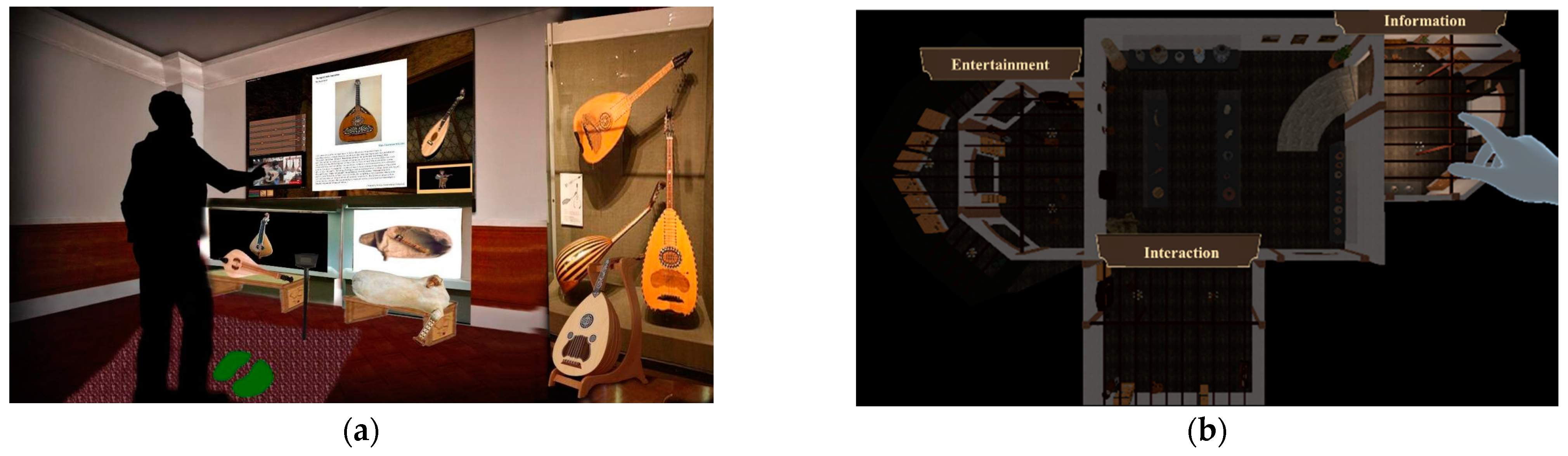
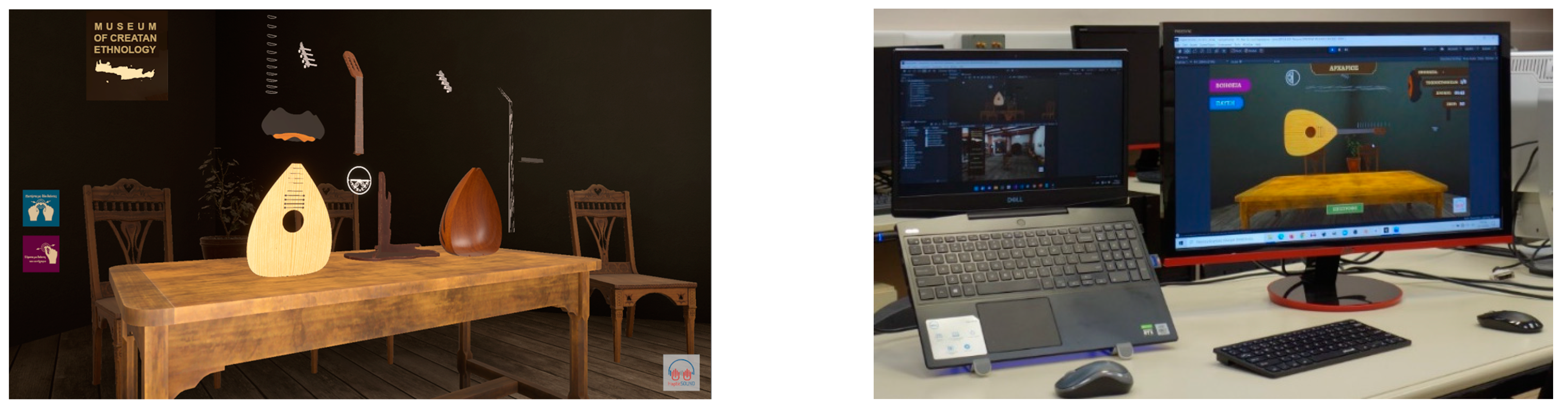
https://www.ultraleap.com, accessed on 22 January 2023), with which the system captures and interprets the user’s gestures (hands and fingers). For the user’s convenience, virtual hands are also placed in the 3D space (
Figure 2), following the user’s gestures in real time and providing visual feedback to him/her. In the next subsections, the three subsystems are briefly described.
3.1. Information Subsystem
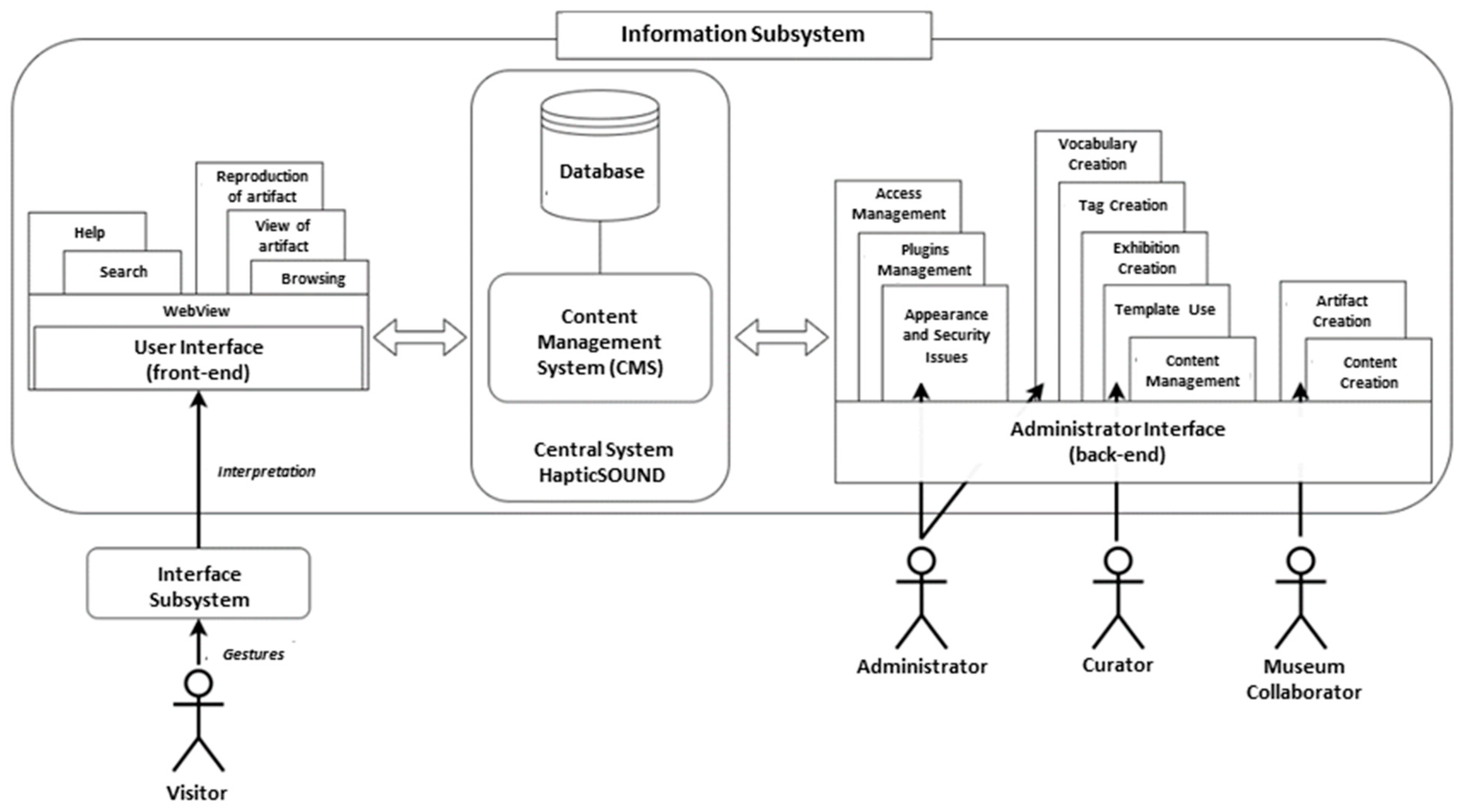
The purpose of the Information Subsystem is to inform museum visitors about the traditional Cretan musical instruments. Specifically, it allows the user to display text, videos, and 3D representations of traditional musical instruments on the screen (i.e., lute and oud), navigate collections and digital exhibitions, and listen to samples of traditional musical instruments. The architecture of the Information Subsystem is presented in
Figure 3.
The basic unit of the Information Subsystem is the Content Management System (CMS), located in the central system of HapticSOUND along with the Information Subsystem database. The CMS was created using the OMEKA software v3.1.1 (
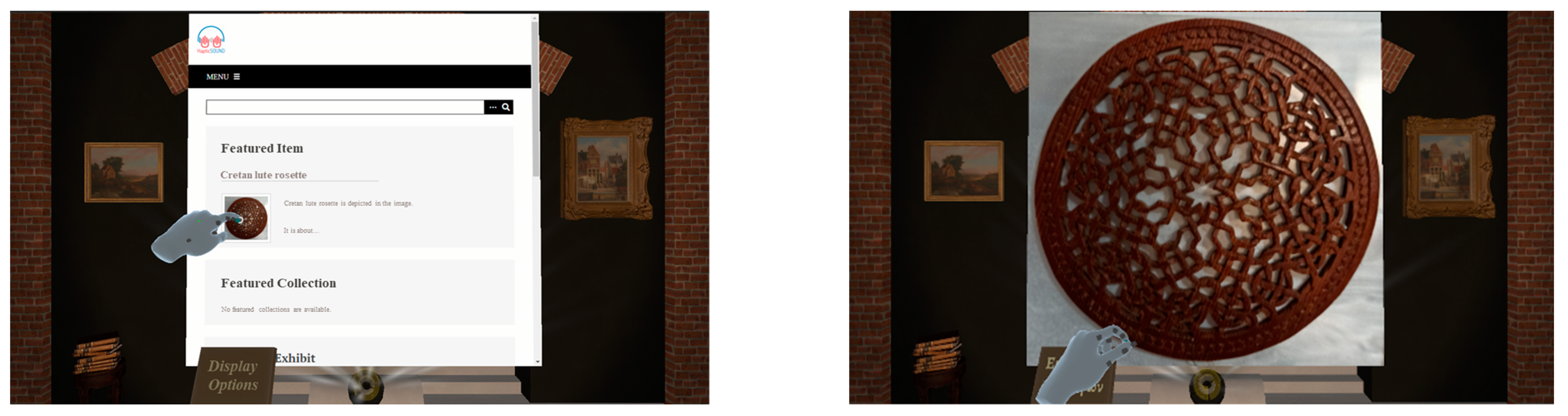
https://omeka.org/, accessed on 5 November 2022), which is an open-source platform specifically designed for creating, managing, searching, and publishing artifacts, digital exhibitions, and collections in museums, libraries, and exhibitions. OMEKA provides the ability to create and present exhibitions and collections consisting of digital artifacts from various digital collections and offers a fully customizable viewing environment. OMEKA allows data and metadata import and export for all required file types and provides the ability to extend its capabilities through the installation of plugins. Finally, using the OMEKA platform ensures interoperability with other systems through the use of established standards (
Figure 4).
The user interface unit is the public part of the Information Subsystem through which the user navigates to the museum’s digital collections and exhibitions, searches for information, views photos and texts, and plays videos and music. The Information Subsystem operates in a web browser environment; therefore, the WebView is responsible for loading and displaying the CMS’s web content in the HapticSOUND system environment, which has been implemented in the Unity game engine.
The Administrator Interface unit is the private part of the Information Subsystem, where users with privileged rights (museum staff, project members, etc.) execute management actions, such as importing objects, collections, and plugins, as well as creating and managing user accounts.
3.2. Entertainment Subsystem
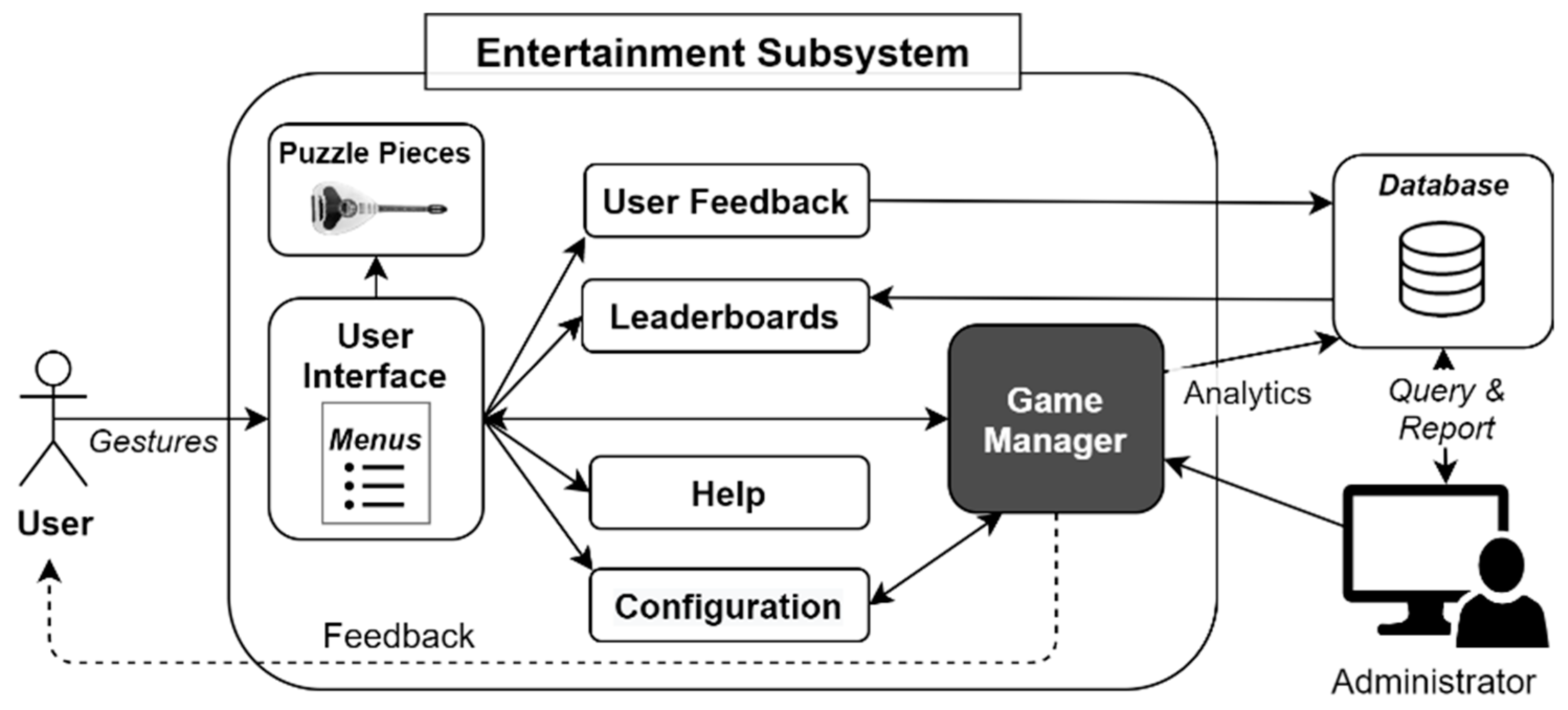
The purpose of the Entertainment Subsystem is to engage visitors in creative activities while they are entertained. To achieve this, the Entertainment Subsystem includes engaging game mechanics (such as puzzles) and gamification elements (such as leaderboards). Specifically, the Entertainment Subsystem is a digital 3D gesture-based serious puzzle game, which employs the Leap Motion controller to receive gestural input from the user. The visitor virtually assembles the traditional Cretan lute that is disassembled into its component parts. Therefore, to solve the puzzle, the visitor has to identify the lute’s parts, reflect on the lute’s structural model, and interact with the virtual representations of the lute’s parts to gain an in-depth understanding of its structure and functionality. Nevertheless, the Entertainment Subsystem aims to foster positive feelings in the users by engaging them in an amusing and productive activity, performed in a realistic and attractive 3D environment. The architecture of the Entertainment Subsystem is presented in
Figure 5.
Apart from the virtual representations of the lute’s parts, the Entertainment Subsystem contains the following sub-units: (a) the Configuration sub-unit, which sets the difficulty level of the game, (b) the User Feedback sub-unit, which allows the user to evaluate his/her experience, (c) the Help sub-unit, which provides help to the user by explaining the purpose of the game and the manner it is played, (d) the Leaderboards sub-unit, which manages and displays the results board showing the players with the best performance, and (e) the Game Manager sub-unit, which coordinates the game’s operations. The Game Manager generates the session data that include statistics, measurements, and scores, while the User Feedback sub-unit creates the rating data that are stored in a back-end storage facility (i.e., a database) of the HapticSOUND Central System. The Entertainment Subsystem was implemented in the Unity 3D game development engine with C# as the programming language, as was the Information Subsystem (
Figure 6).
3.3. Interaction Subsystem
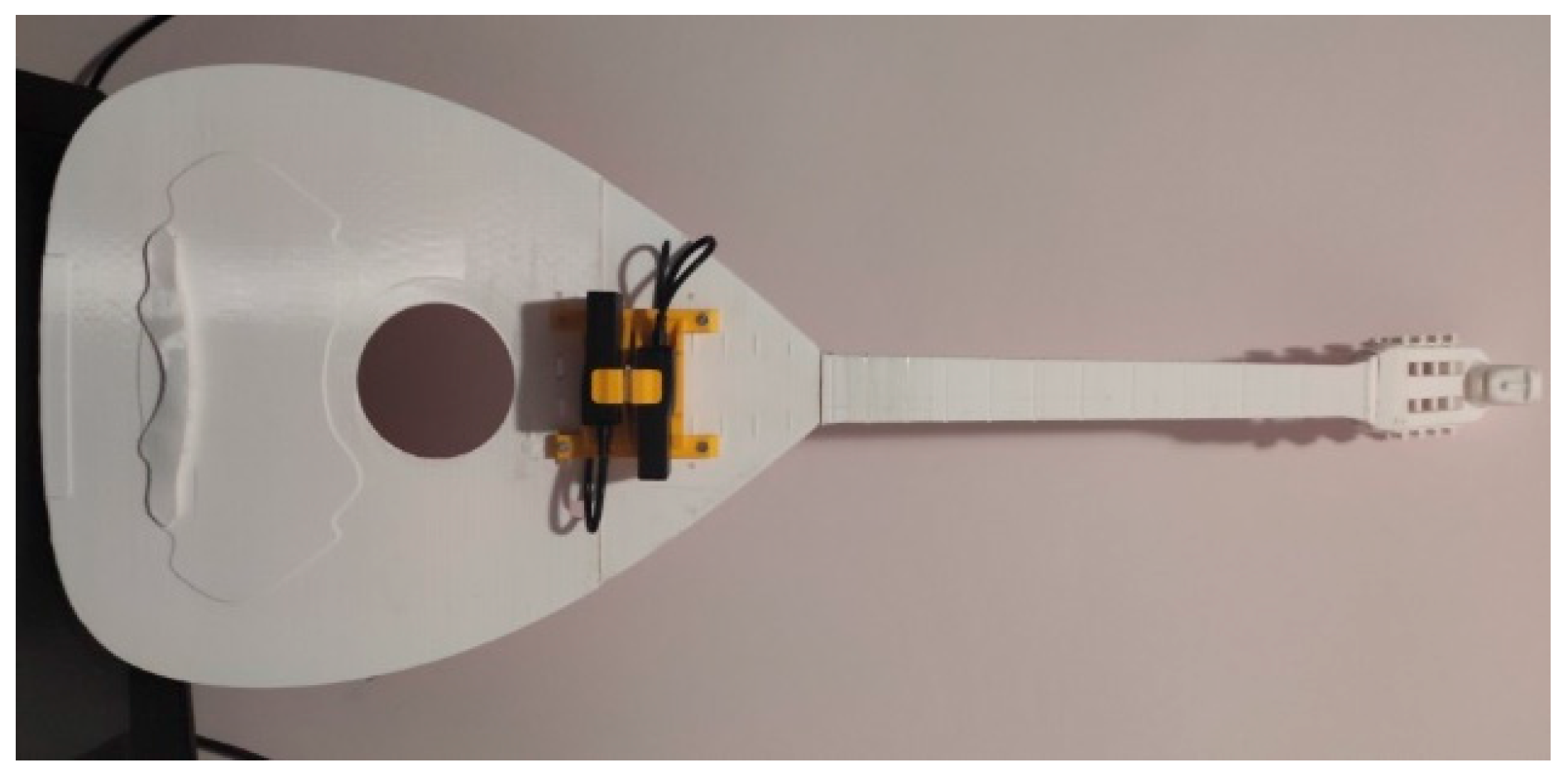
The purpose of the Interaction Subsystem is to enable visitors to interact with the DMI and generate sounds using a sensorimotor approach. Specifically, it includes a DMI that is an accurate replica of the Traditional Musical Instrument (TMI replica) in physical dimensions, where two Time-of-Flight (ToF) cameras have been placed on the TMI replica, as shown in
Figure 7, to capture, process, and recognize the user’s gestures.
The Interaction Subsystem offers two scenarios of use:
Case 1—the user performs single musical notes and receives auditory feedback in real time; and
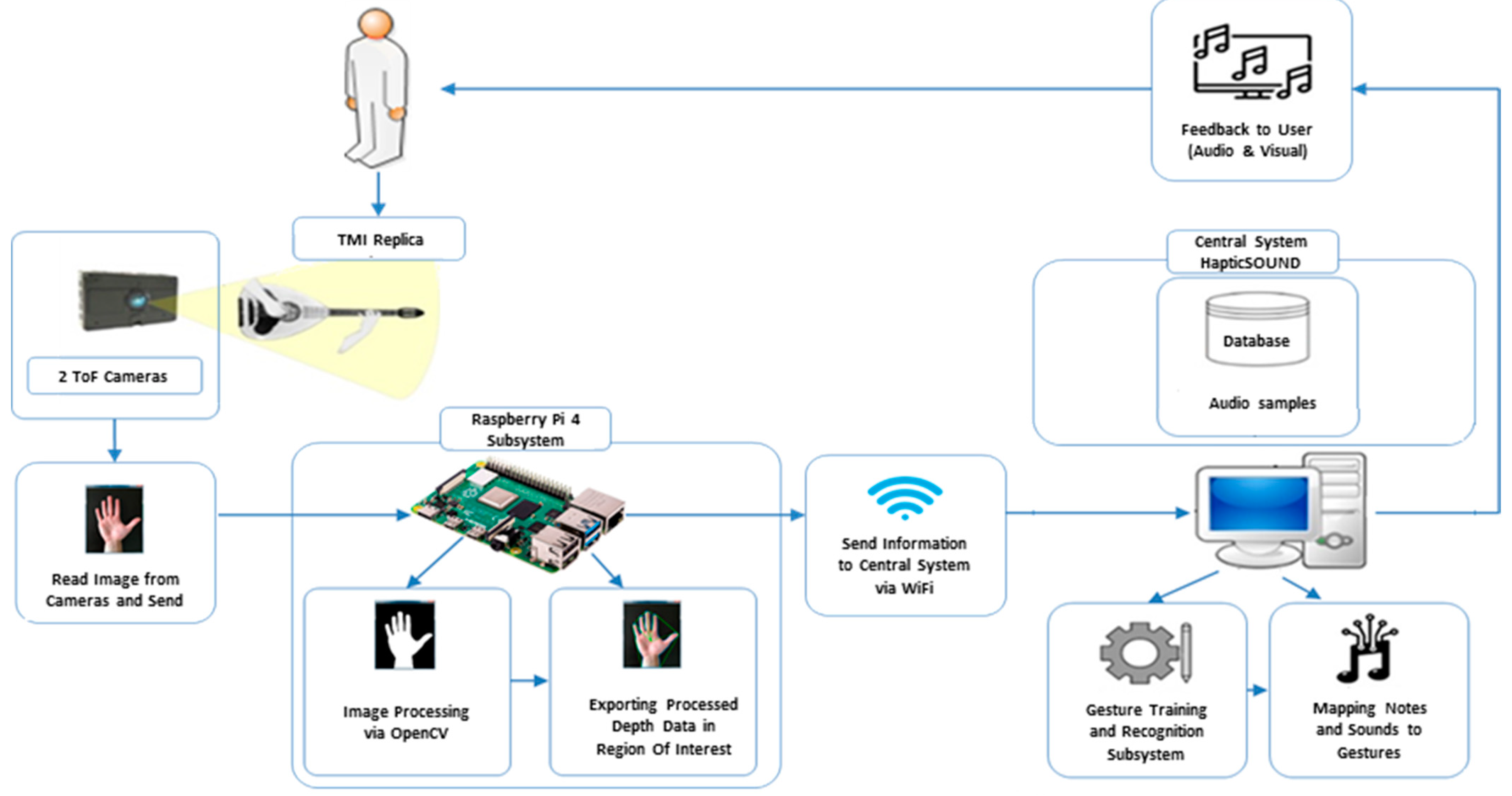
Case 2—the user performs a music excerpt, imitating the technical performance of an expert music teacher, and receives visual and auditory feedback in real time. The architecture of this Subsystem is presented in
Figure 8.
The user interacts with the 3D-printed DMI, which is the TMI replica (
Figure 7), while cameras detect his/her gestures through algorithms, which are processed by the Raspberry Pi Subsystem. Then, these data are sent to the central system of HapticSOUND via Wi-Fi in order for the performed gesture to be recognized. To achieve this, the system was trained beforehand with expert gestures by applying machine learning algorithms and then these gestures were mapped to sounds that have been stored in the HapticSOUND database. As a result, the user executes a gesture and the system recognizes the performed gesture and simultaneously produces sounds. Apart from the audio feedback, the system also provides visual feedback to the user.
4. Implementation of the Interaction Subsystem
In this section, the implementation of the Interaction Subsystem is described in more detail. As already mentioned in
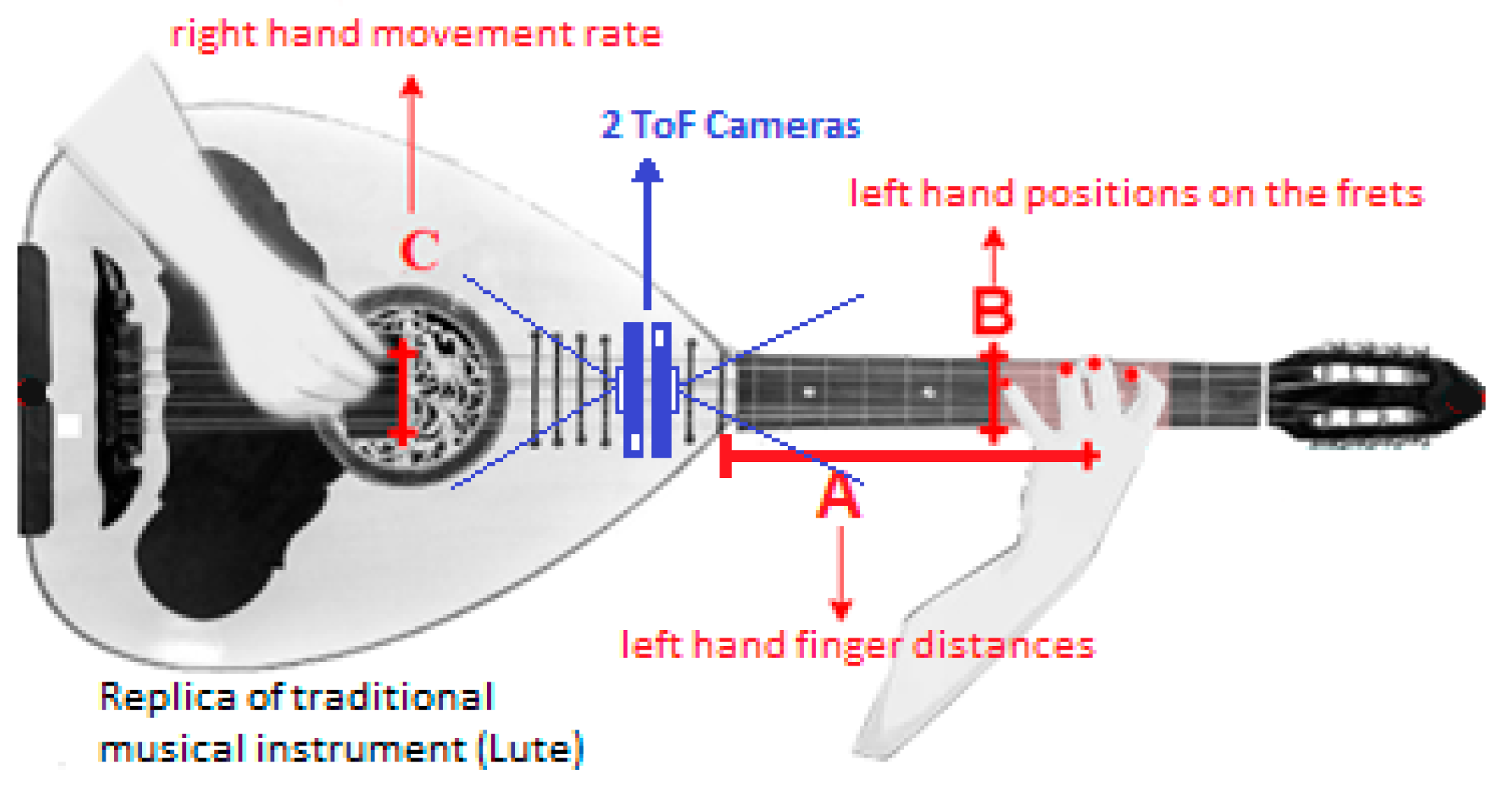
Section 3.3, two ToF cameras are used to capture the user’s gestures. Camera 1 records and monitors the distance of the instrumentalist’s left hand touching the keyboard (we consider the performer to be right-handed), while camera 2 records the tempo given by the instrumentalist with his/her right hand (
Figure 9).
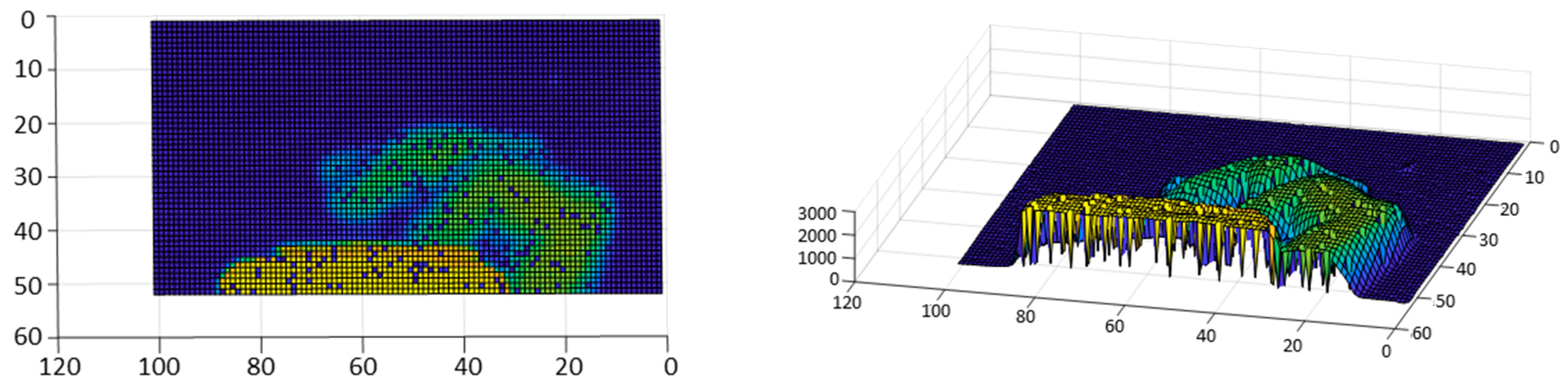
These ToF cameras are IFM3D O3X101, which provide point clouds, depth maps, and grayscale images. The resolution of the camera is 224 × 172 pixels with corresponding viewing angles of 60° × 45°. The IFM3D cameras capture the user’s finger gestures. A Region of Interest (ROI) in the view field of each camera is specified (
Figure 10) and the captured data corresponding to the ROI are processed by the Raspberry Pi 4 microcontroller. For finger gesture recognition, an algorithm was developed in Python, utilizing the OpenCV library. The algorithm runs on the microcontroller in order to extract features such as position coordinates (including depth), angles, velocity, etc., which are the input data to the system.
In addition, the user interface was implemented in the Max/MSP programming environment, which is one of the most popular software environments for creating interactive and real-time DMIs [
5,
13,
15] that can be used to recognize a wide range of hand gestures. The user interface was then embedded into Unity, through the use of mira.frame (
https://docs.cycling74.com/max7/refpages/mira.frame, accessed on 7 May 2023), where the Interaction System runs (
Figure 11).
For Case 1 (performing single musical notes and receiving auditory feedback in real time), initially, all single notes are recorded while the expert music teacher performs with the real traditional musical instrument and stored in the HapticSOUND Database. Next, the user performs fingerings on the TMI replica, where his/her gestures are captured. These gestural data, which correspond to predefined values of variables A, B, and C (
Figure 9), are mapped to single notes each time the user’s hands take a specific position. To achieve this, the mapping that has been implemented is a well-known technique called direct (explicit) mapping [
21] and one-to-one, where an input parameter is mapped to a composition parameter. As a result, single notes are produced (auditory feedback) according to the user’s fingerings. For example, when the distance of the left hand is A1 with a specific finger arrangement B1 (output by camera 1) and the rhythm given by the right hand is C1 (output by camera 2), the sound of note D1, which was recorded from the corresponding position and is in the database, is triggered. Summarizing, in this case, the intuitive and straightforward nature of direct and one-to-one mapping simplifies the learning process for users using the DMI because it allows them to quickly establish a connection between their gestures and the sound they want to produce, facilitating a more natural and expressive interaction with the instrument.
For Case 2 (performing a music excerpt and receiving visual and auditory feedback in real time), both the gestural data and the corresponding audio excerpt are captured while the expert music teacher performs with the real traditional musical instrument. These data feed the machine learning algorithm (training phase) and, as a result, gestural data are mapped to audio excerpts through the technique of implicit mapping [
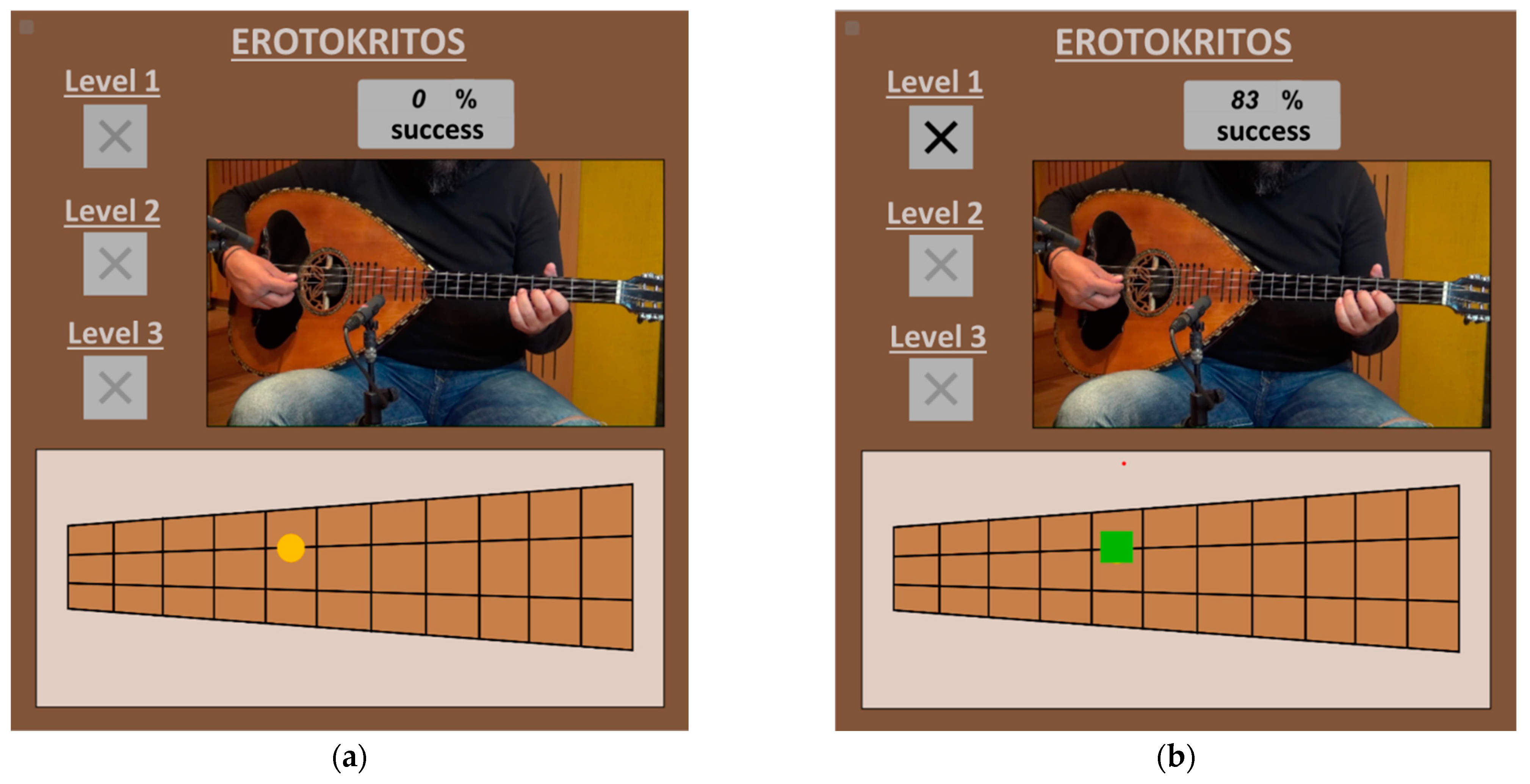
22]. Then, the user (novice) tries to perform the same gestures on the TMI replica as the expert music teacher, in order to reproduce in real time the same music sound. To achieve this, both the real video of the expert music teacher as well as an annotated fretboard with yellow annotations are displayed to the user in order to place his/her fingers in the correct positions (
Figure 11a). Therefore, the user imitates a gesture, and cameras record his/her gesture and send the corresponding data to the system via Wi-Fi. Then, the system recognizes the performed gesture and predicts the music sound (recognition phase) that corresponds to the specific gesture by comparing the performed gesture to that of the expert. The music sound is generated by the system in real time and depends on how much the user’s gestural data converge or diverge from that of the expert (audio feedback), which helps users to detect and correct errors in their performance. As they explore and experiment with different gestures, they receive feedback that indicates whether their gestures produce the desired sound. By comparing the intended outcome with the actual result, they can identify discrepancies and adjust their gestures accordingly. Over time, this feedback loop helps refine motor skills and improve the accuracy of the mapping between gestures and sound. The system also provides visual feedback, in addition to audio feedback, by displaying green annotations for the correct gesture as well as the total percentage of the similarity of the user’s performed gesture in relation to the gesture of the expert (
Figure 11b). Case 2 provides three levels with an increasing degree of difficulty and, by repeatedly performing gestures and observing the corresponding auditory or visual feedback, users learn to associate specific gestures with desired musical outcomes. Finally, the machine learning algorithms that were implemented are Hidden Markov Models (HMM) [
23] and Dynamic Time Warping (DTW) [
24]. The advantage of DTW is that it allows the time alignment between the gesture of the user and of the expert, depending on the speed of the gesture that is performed by the user. Specifically, Gesture Follower was used, developed by IRCAM [
25,
26], which implements both HMM and DTW. Additional advantages are that Gesture Follower adopts a template-based method and applies training with a single sample (one-shot learning), minimizing the training process. Summarizing, in this case, a sensorimotor approach is implemented to contribute to the learning process through the integration of feedback, error detection, and correction. It involves a dynamic process of acquiring, integrating, and refining motor skills based on sensory feedback since it helps users develop an embodied understanding of the DMI, enhancing their ability to control and express themselves through the mapping between gestures and sound.
5. Pilot Study
This section presents the small-scale preliminary study that was conducted to evaluate the usability of the Interaction Subsystem. To achieve this, the System Usability Scale (SUS) questionnaire was selected [
27], which is one of the most well-known instruments for usability assessment, and it provides reliable results even with a small sample size [
28]. The questionnaire consists of 10 statements, with a five-point Likert scale ranging from “Strongly Agree” to “Strongly Disagree”. Scores are assigned based on the response, with some statements receiving reverse scoring. The scores for all 10 statements are then summed to obtain a total score between 0 and 100, with higher scores indicating higher perceived usability. The SUS score can be interpreted in the context of the study, with scores above 68 considered average [
27].
5.1. Participants
A one-day workshop was organized at the University of Macedonia (Greece) to evaluate the Interaction Subsystem, where, in total, fourteen (n = 14) participants took part in the study, who were students, researchers, and academics with varying levels of musical experience from the Department of Music Science & Art and the Department of Applied Informatics. The sample comprised nine (n = 9) men and five (n = 5) women with an average age of 35 years. In addition, 36% (n = 5) of the subjects had a senior level of musical experience, 21% (n = 3) of them had mid-level experience, 29% (n = 4) had an intermediate level, while the rest 14% (n = 2) had entry-level musical experience.
5.2. Procedure
The pilot study included two phases corresponding to the two cases that the Interaction Subsystem provides. More specifically, in Phase 1 (Case 1), each user experimented with the TMI replica in order to execute single musical notes and explore the possibilities of the TMI replica. The duration of Phase 1 was approximately 2 min per user.
Then, the user moved on to Phase 2 (Case 2), where s/he performed on the TMI replica three music excerpts of a famous Cretan traditional song named “Erotokritos”. The three music excerpts corresponded to the three levels of sensorimotor learning that were of increasing difficulty. The user moved to the next excerpt only if s/he passed the score of 60% in the previous level. An annotated fretboard was displayed to him/her, which s/he had to follow by imitating the gesture of the expert music teacher in order to produce the proper music sound. The duration of Phase 2 ranged from approximately 2 to 5 min depending on the pace and the success level of each user.
6. Results and Discussion
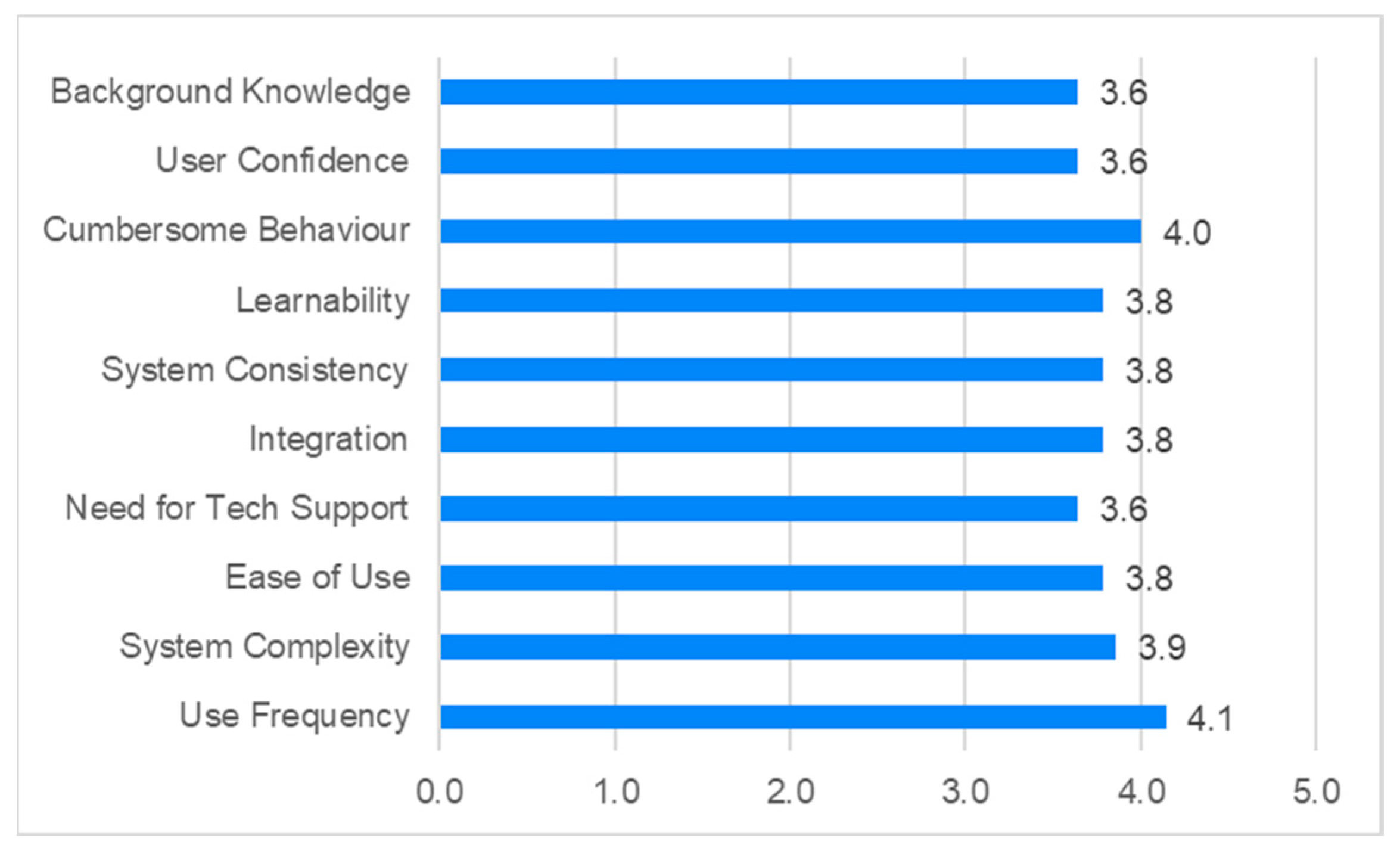
The overall SUS score for the usability assessment of the Interaction Subsystem is 70, which is considered acceptable and can be interpreted, as presented in
Figure 12. It is worth noting that in
Figure 12, the positive meaning of each question was taken into account, and a number close to 5 indicates user satisfaction. Through the analysis of users’ responses to each question, the most important usability weaknesses are related to “Background Knowledge”, “User Confidence”, and “Need for Tech Support”.
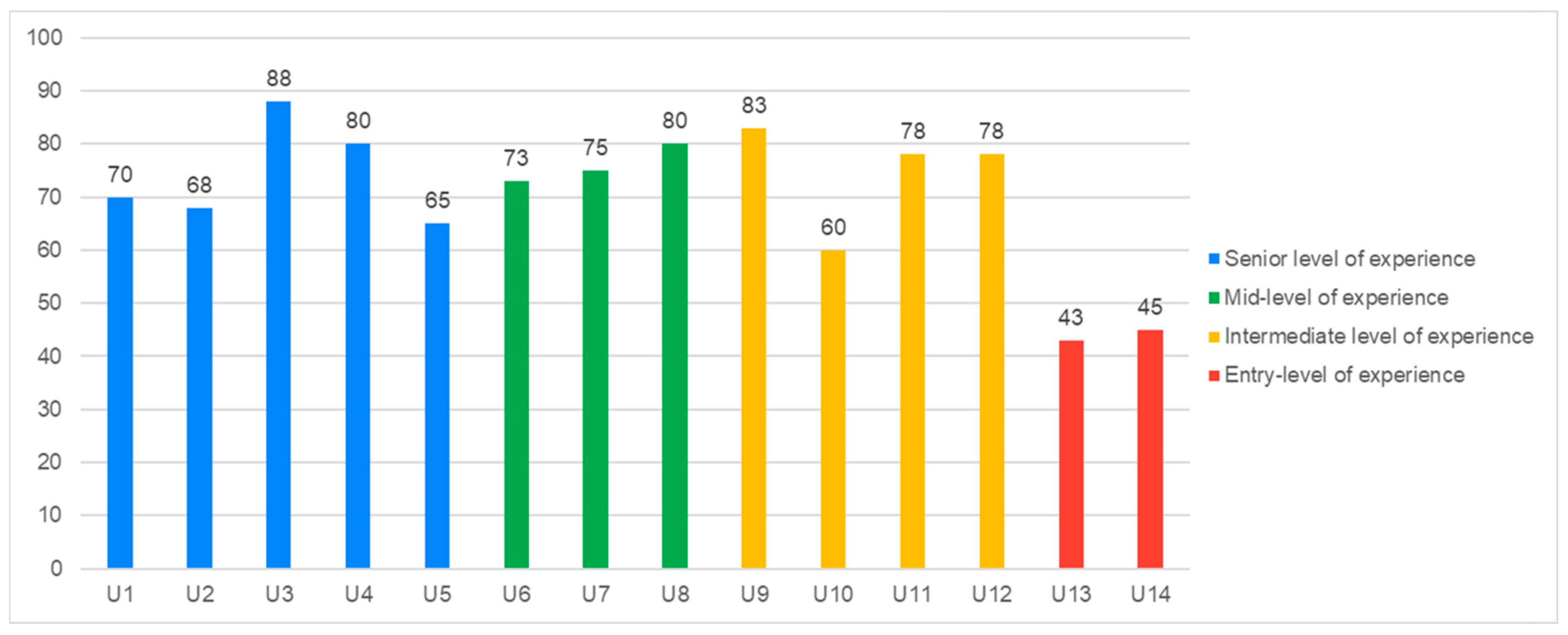
The above findings can be further supported by the SUS score per user, which is depicted in
Figure 13.
Specifically, the two users who had entry-level musical experience (U13 and U14) were not very confident in holding the TMI replica, placing their hands in the correct positions, and looking at the annotated fretboard at the same time (“User Confidence”). As a result, they preferred to have the support of a technical person in order to be able to successfully perform the musical gestures (“Need for Tech Support”). In addition, some of the users either with high or low musical experience (U1, U2, U5, U10, U13, and U14) agreed that there were many things that needed to be learned for the first time (“Background Knowledge”). The expert musicians claimed that although they know how to play a real traditional musical instrument, it was not the same as the 3D-printed TMI replica. It is worth mentioning that despite encountering usability issues, all participants were able to successfully complete the three music excerpts (levels) of “Erotokritos”. Although errors occurred during the execution of the gestures and the produced sound, with the aid of audio and visual feedback, all participants were able to make corrections and align their performed gestures with the expert gestures.
7. Conclusions and Future Work
Leveraging the aforementioned, this paper presents an approach called HapticSOUND that provides a unique interactive experience to museum visitors with traditional musical instruments. HapticSOUND comprises three subsystems: (a) the Information Subsystem, where users can learn information about traditional musical instruments, (b) the Entertainment Subsystem, where users learn to virtually assemble traditional musical instruments through a 3D serious game, and (c) the Interaction Subsystem, where users interact with a DMI which is a 3D TMI replica. Emphasis is given to the design and implementation of the Interaction Subsystem which utilizes sensorimotor learning and machine learning techniques to enhance the user experience. Users can explore the abilities of the 3D-printed TMI replica in a more engaging and intuitive way. In addition, a preliminary pilot study was conducted on 14 participants in order to evaluate the usability of the Interaction Subsystem. The findings were promising since the usability was satisfactory, revealing that the proposed approach can provide added value to the implementation of similar future endeavors.
However, there are certain limitations of the present study that should be addressed and improved upon in future research. Firstly, although the analysis is robust in small samples [
28], a larger-scale experiment could be necessary to further investigate the usability of the system and extract more valuable conclusions. Moreover, in order to enhance the generalizability of the validation process and to mitigate the potential impact of the limited sample size in the present study, it would be beneficial to include a more diverse and representative sample of the population of interest. Another important aspect that has to be taken into consideration is the investigation of whether the learning outcomes and motor skills of the user will be enhanced with the use of the Interaction Subsystem. Finally, the HapticSOUND system is planned to be established in the Cretan Ethnology Museum (CEM), where all the aforementioned improvements in the evaluation of the subsystem will be accomplished in the near future as well as some modifications might also be required to ensure its effective application in real conditions.




 ,
,