


A Preliminary Usability Study of a Novel Educational Training System to Teach ScratchJr. in School




Abstract
1. Introduction
2. State of the Art
2.1. Overview
2.2. Teaching Programming to Students with Special Needs
- One relevant study identified is the work by Lorena Lanzas Llorente entitled “Emotional comprehension work in children with ASD (autism spectrum disorder) through Educational Robotics: a proposed intervention approach”, which focuses on the benefits provided by robotics, in this case through the use of a robot called AISOYl Kik-E, for children with ASD (autism spectrum disorder). The study centres on developing the understanding of basic emotions through the recognition of facial expressions. Through this work, the aim is to provide children with an innovative resource that promotes their emotional development and, consequently, supports their educational development.
- (1)
- At a general level, the author observed the benefits of Educational Robotics for pupils with special educational needs; in this specific case, for pupils with ASD, as it facilitates learning and enhances interaction, among other aspects,
- (2)
- Robots such as AISOYl Kik-E help children with ASD (autism spectrum disorder) to develop various socio-emotional skills by using visual resources adapted to their needs, which enable repetition, interaction, and emotional comprehension.
- 2.
- Other relevant studies identified include the work by [48], in which the authors, in their study on technological tools for inclusive education, highlight the possibilities offered by ICT in addressing classroom diversity. They argue that these tools can facilitate access to education and provide high-quality learning opportunities for pupils with different special educational needs present in mainstream classrooms.
- 3.
- Studies such as that by [50], in their work entitled “Software tools for inclusive education in the early childhood education stage”, also focus on the various existing computer-based tools applicable in early educational settings, paying particular attention to how these tools may influence development and learning, especially among pupils with special educational needs. The study conducted by these authors was qualitative in nature, allowing for a more in-depth exploration of existing software tools used in inclusive education, the identification of best practices, and an examination of how their use influenced children with special educational needs.The results obtained were as follows:
- The authors observed a growing trend in the use of these tools in inclusive education at early educational stages and were also able to verify, through studies conducted by [51], that not all software tools are equally effective for pupils with special educational needs.
- 1.1
- The existing software tools used with pupils with special educational needs and analysed in the authors’ study include:
- 1.2
- Tinker cad, used to teach programming to secondary school students.
- 1.3
- Various educational mobile applications employed in different learning processes for pupils in Early Childhood and Primary Education.
- Several interactive programmes aimed at the development of logical and motor skills, used with preschool and primary school pupils.
- Furthermore, through this qualitative study, the authors were able to confirm that 67% of educational institutions have incorporated at least one software tool designed for inclusive education into their early childhood education programmes.
- Finally, at least 72% of pupils with special educational needs showed a notable improvement in learning during their educational process, underscoring the relevance of these tools within the field of inclusive education.
- 4.
- Another study identified is “The influence of motivation and cooperation among primary school pupils through educational robotics: a case study” by [52]. This study seeks to explore the relationship between Educational Robotics and the factors influencing pupils’ motivation during the implementation of a robotics-based project, with the aim of determining whether Educational Robotics constitutes part of an educational change in the classroom from both a methodological and a procedural perspective.The study is focused on an early educational level (primary education) and is addressed to all pupils, both neurotypical and those with special educational needs; however, it does not place particular emphasis on pupils with NEE.This research shows how studies by authors such as [53] identify robotics as one of the most important resources within educational technology, as it can provide a constructive learning environment in the classroom.The conclusions reached by the author [52], in this study were as follows:
- Educational robotics promotes increased motivation and interest among pupils in the classroom, leading to more meaningful outcomes in the teaching–learning process.
- A cooperative working methodology generates both academic and social benefits for pupils.
- Additionally, drawing on the work of [54] in his book, the author argues that in order to achieve an effective technological learning environment, it is necessary to take into account all the emotions that may influence pupils. She maintains that for learning to occur, it is essential to generate an emotional response in learners; when this emotion is positive, learning becomes more meaningful, as motivation plays a central role.
- 5.
- A brief summary of other studies identified in the literature is presented below:
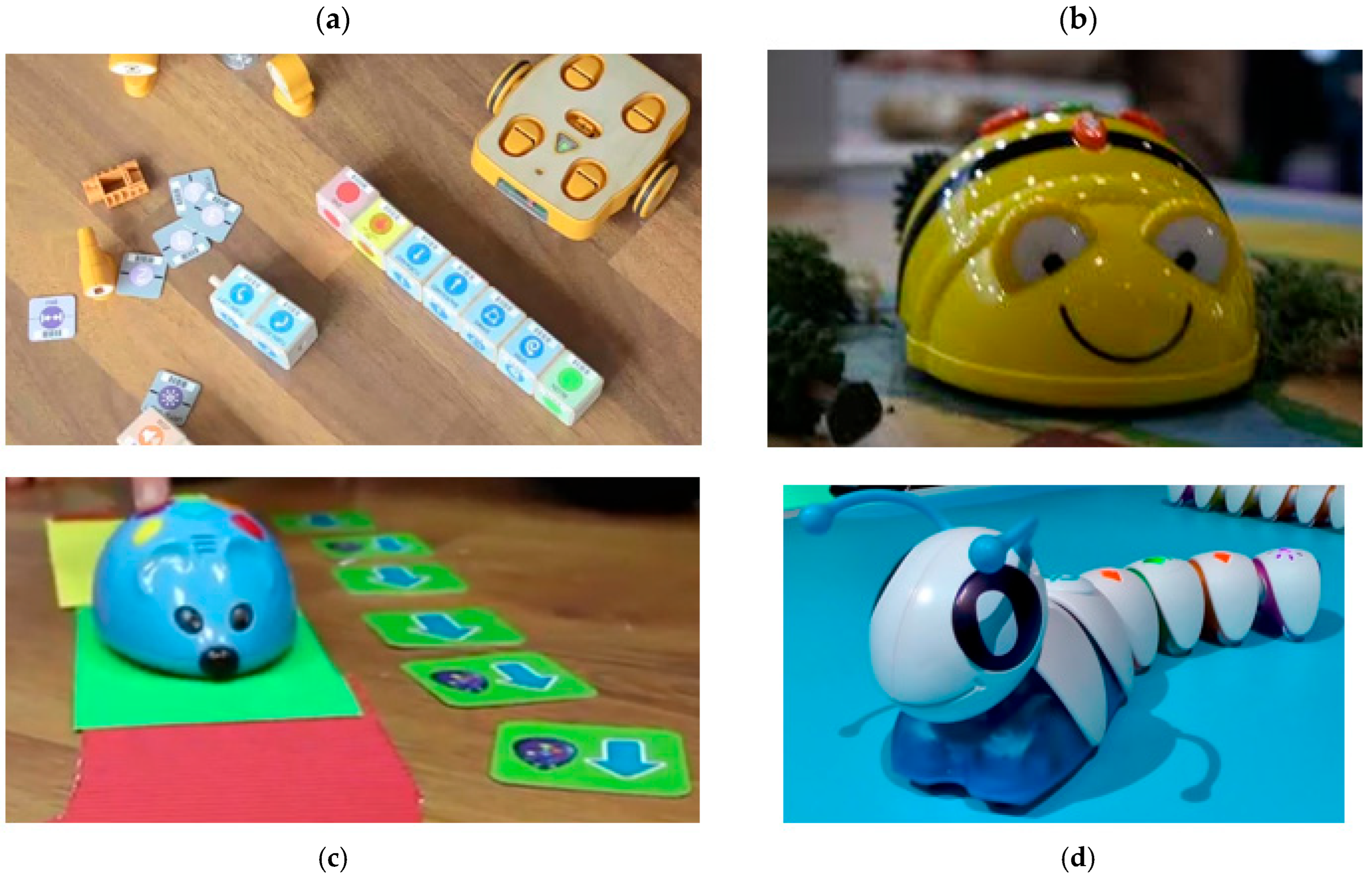
- Floor Robots (Bee-Bot)The Bee-Bot robot is part of the new generation of educational robotics designed to introduce young children to programming, specifically pupils in Early Childhood Education and the first cycle of Primary Education. Several studies have employed Bee-Bot, a programmable bee-shaped robot specifically designed for children aged 4–7 years.
- ✓
- According to Angeli and Valanides [55]:
- ○
- The authors examine how working with Bee-Bot influences sequential thinking skills (sequencing, route planning, and debugging) in pupils in the early years of primary education.
- ○
- They conclude that, with appropriate scaffolding, children improve in problem decomposition, step anticipation, and logical reasoning.
- ✓
- According to Di Lieto et al. [56]:
- ○
- An Educational Robotics Lab programme using Bee-Bot and Pro-Bot was implemented with pupils with special educational needs (neurodevelopmental conditions and learning difficulties) integrated within mainstream classrooms.
- ○
- The benefits observed included:
- ▪
- Improvements in executive functions (planning, working memory, and inhibitory control).
- ▪
- Increased participation and better behavioural regulation during classroom tasks.
- ▪
- Inclusive activities in which both pupils with special educational needs and their peers without special educational needs participated, thereby strengthening social interactions.
- ✓
- Review of educational robotics and neurodevelopmental disorders [57]:
- ○
- A critical review of studies involving educational robots with children with ASD, ADHD, intellectual disability, among others.
- ○
- The review includes experiences with Bee-Bot-type robots at Early Childhood and Primary Education levels.
- ○
- The main conclusions indicate that:
- ▪
- Robots increase motivation and participation.
- ▪
- They can support both academic skills (pre-programming and logical–spatial concepts) and social skills (pair work, turn-taking, and communication).
- Kit-Based Robots (KIBO) for Children Aged 4–7 YearsKIBO is a robot explicitly designed for children aged 4–7 years and is programmed using physical wooden blocks, making it a screen-free system.
- ✓
- According to Elkin, Sullivan, and Bers [58]: “Programming with the KIBO Robotics Kit in Preschool Classrooms”
- ○
- The study involved work in early childhood classrooms using KIBO.
- ○
- Results:
- ▪
- Children aged 3–5 years were able to create simple programmes, sequence instructions, and debug them.
- ▪
- KIBO was naturally integrated with activities such as art, music, and storytelling, which supported the development of language skills and creativity.
- ✓
- KIBO as a tool for Computational Thinking and STEAM
- ○
- Documentation and studies from DevTech/KinderLab show that KIBO enables children aged 4–7 years to develop computational thinking, problem-solving skills, and STEAM exploration without the need for screens.
- ○
- Although many studies involving KIBO do not focus specifically on pupils with special educational needs, they do report:
- ▪
- High accessibility due to its tangible and manipulable nature.
- ▪
- The possibility of adaptation for pupils with attentional, motor, or communication difficulties, owing to the physical, collaborative, and multimodal nature of the activities (sound, movement, and construction).
- Social Robots and Programming with Children with ASD/Special Educational NeedsThis line of research combines social robotics with the development of social competences, while also incorporating elements of simple programming or “co-programming”.
- ✓
- According to Gkiolnta et al. [59]: “Robot programming for a child with ASD”
- ○
- The study presents a case of robot programming involving a child with ASD.
- ○
- The child participates in guided programming activities, with observed improvements in sustained attention, interaction, and enjoyment of the task.
3. Materials and Methods
3.1. Context
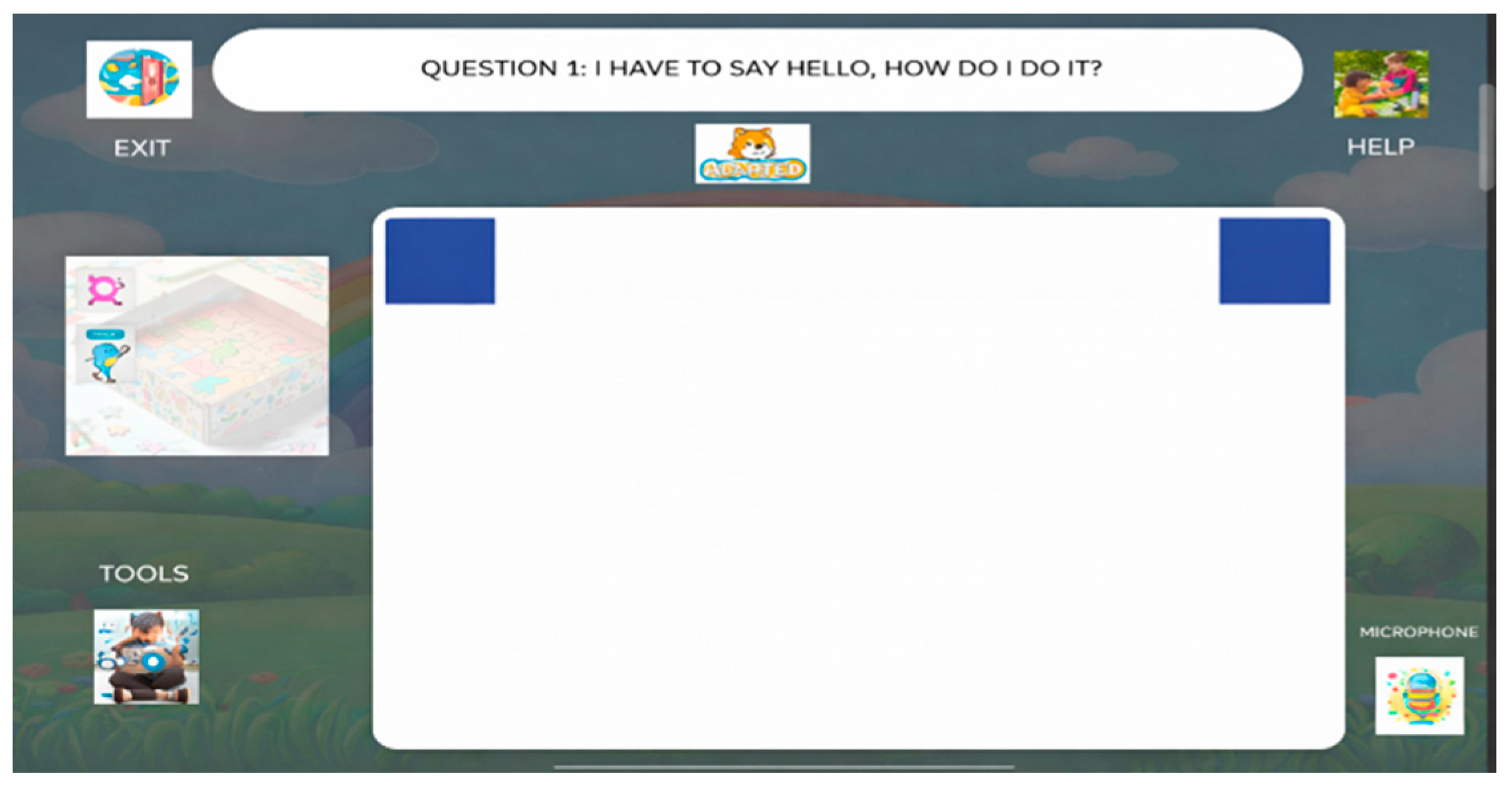
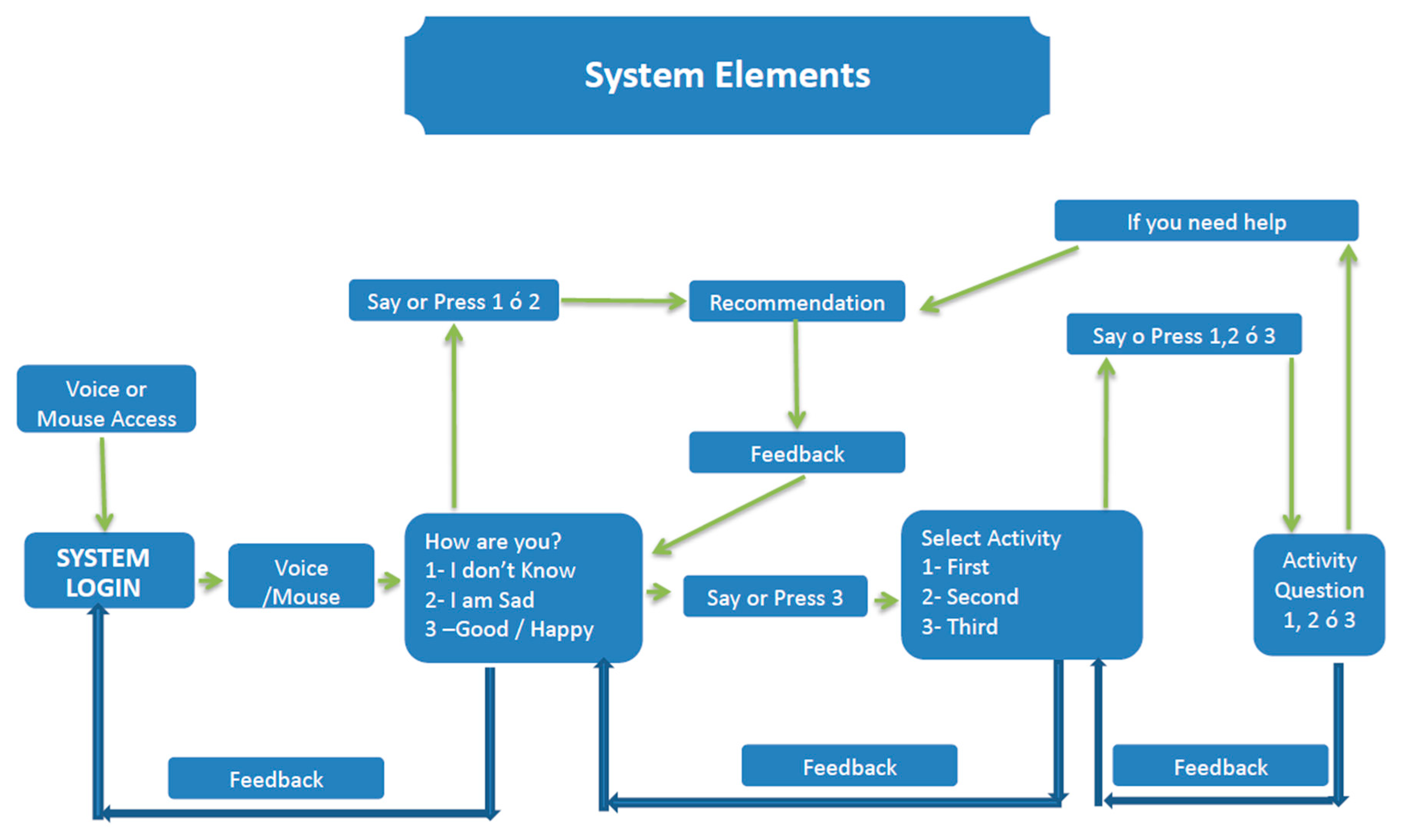
- (a)
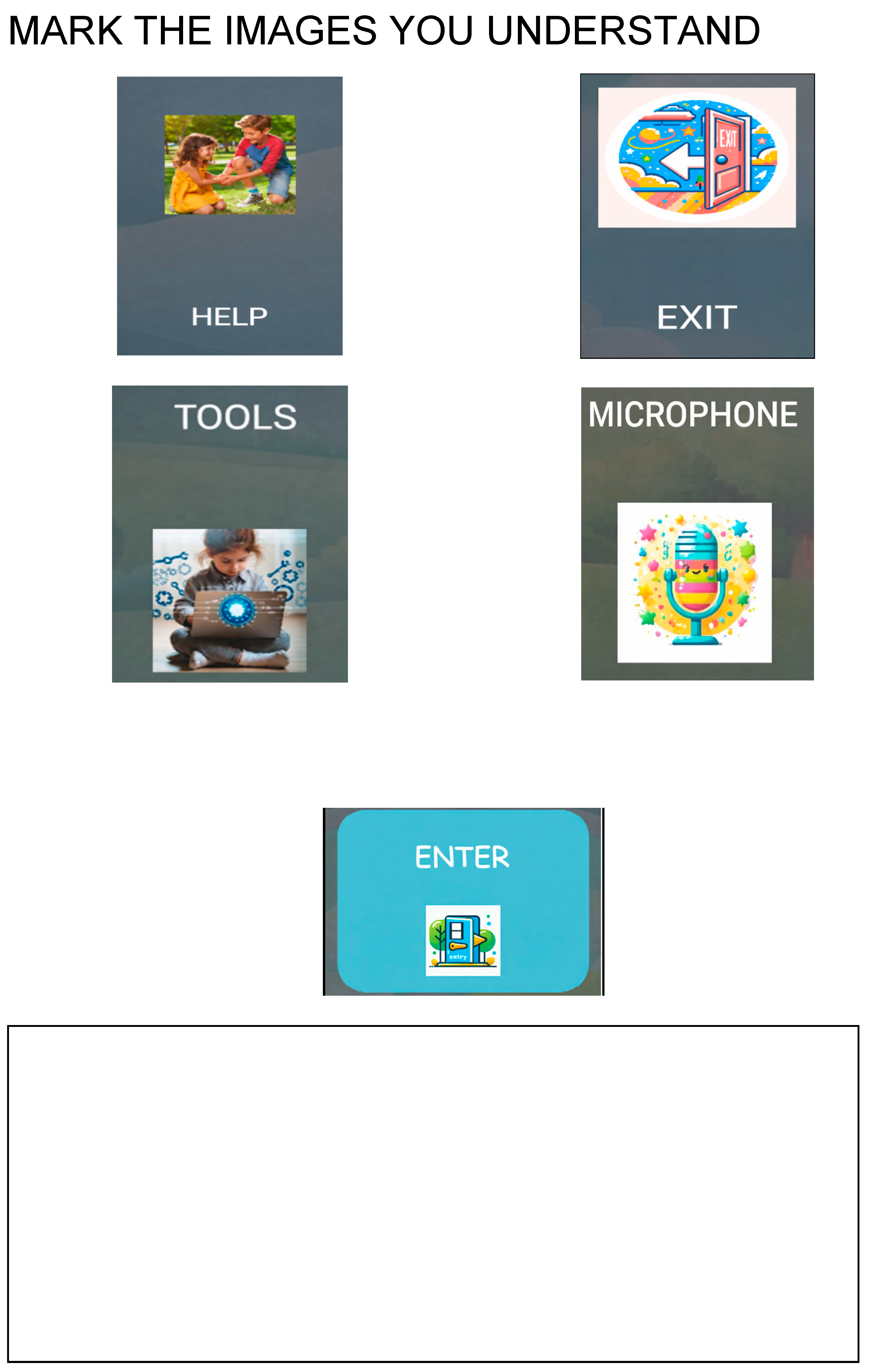
- If the student selects options one or two, a screen presenting recommendations on the actions to be performed is displayed. These recommendations are provided both in written form and as audio output.
- a.
- Once the student has completed the recommended actions, they return to the initial or main screen of the system, either by voice command or via mouse interaction.
- (b)
- If the student selects option three, a screen displaying the number of activities proposed by the system is shown.
- a.
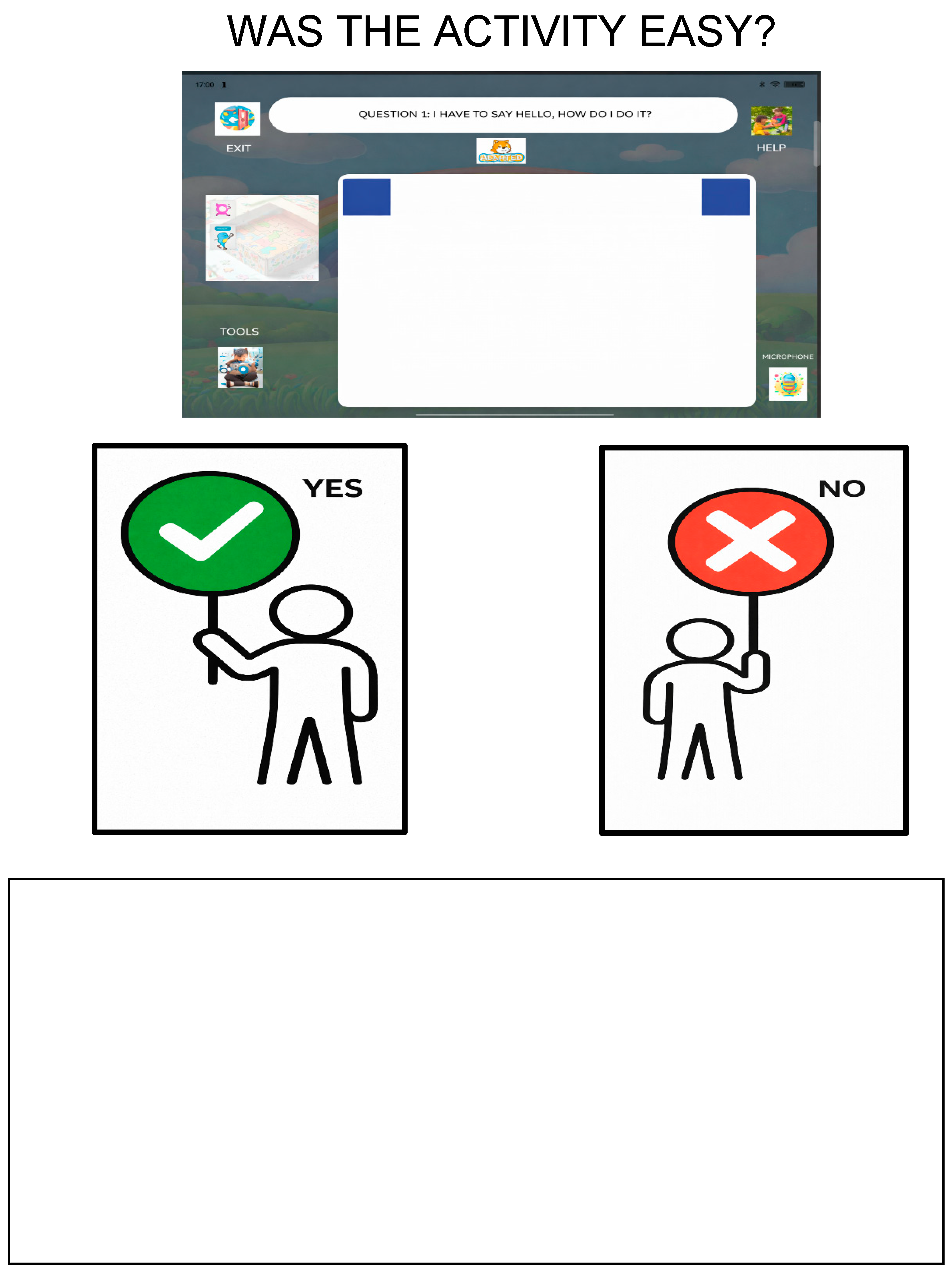
- When the student indicates—either verbally or through mouse interaction—the activity they wish to perform, the corresponding activity screen is displayed. Instructions for completing the activity are provided both in written form and through audio.
- i.
- If the child is able to complete the activity independently, they can automatically return—by voice command or mouse interaction—to the main screen containing the set of questions in order to select another activity.
- ii.
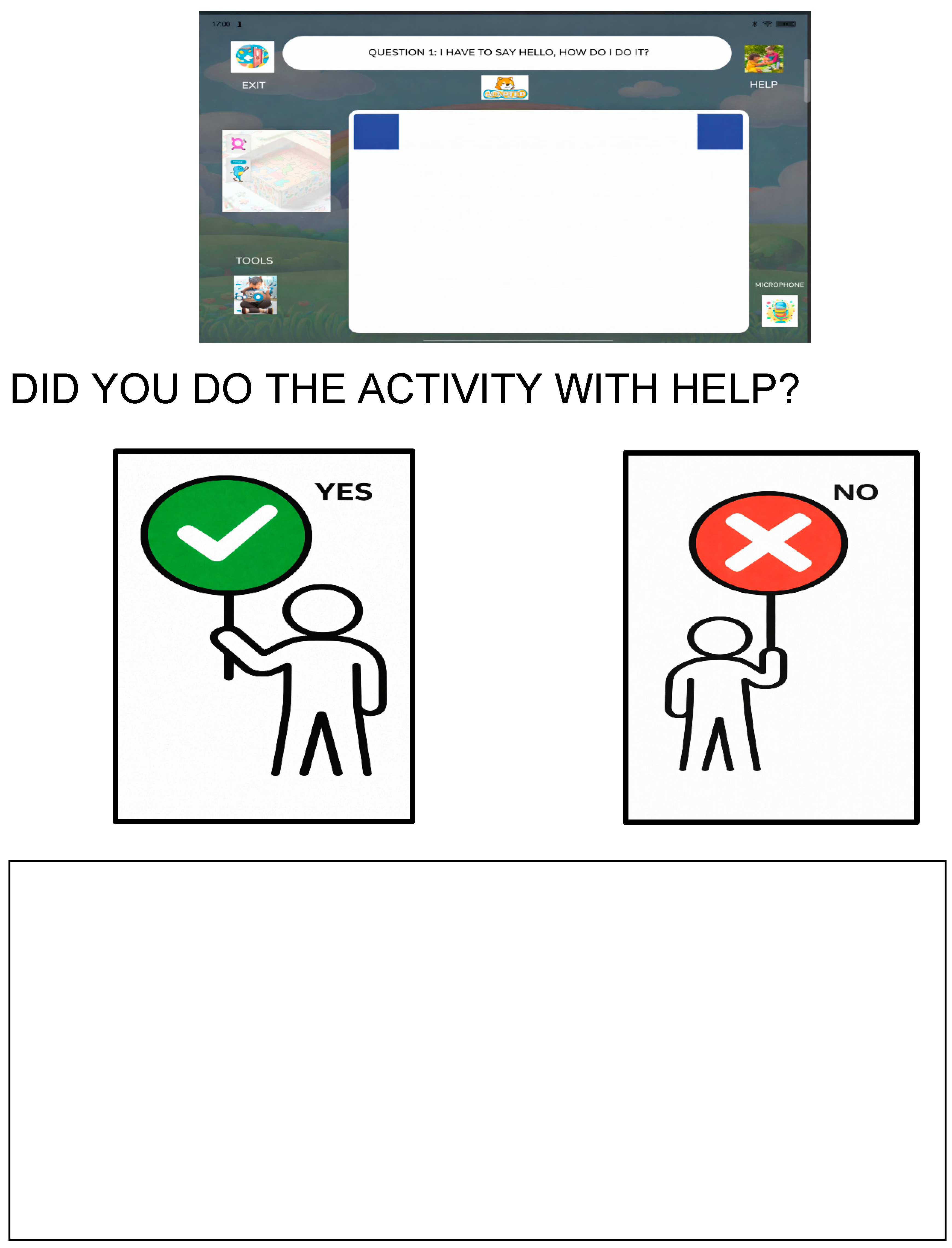
- If assistance is required, the system redirects the student to the recommendations screen. Once the student has completed the recommended actions, they return to the initial or main screen of the system, either verbally or through mouse interaction.
3.2. Sample
3.3. Research Questions
3.4. Instrument
3.5. Procedure
4. Results
4.1. Descriptive Overview of the Participants and Variables
4.2. RQ1—Factors Associated with Satisfaction with Boby
4.2.1. Usual Use of the Tablet (Q10)


4.2.2. Preference for Block-Based Games (Q14)

4.3. RQ2—Reading Ability and Satisfaction with Boby
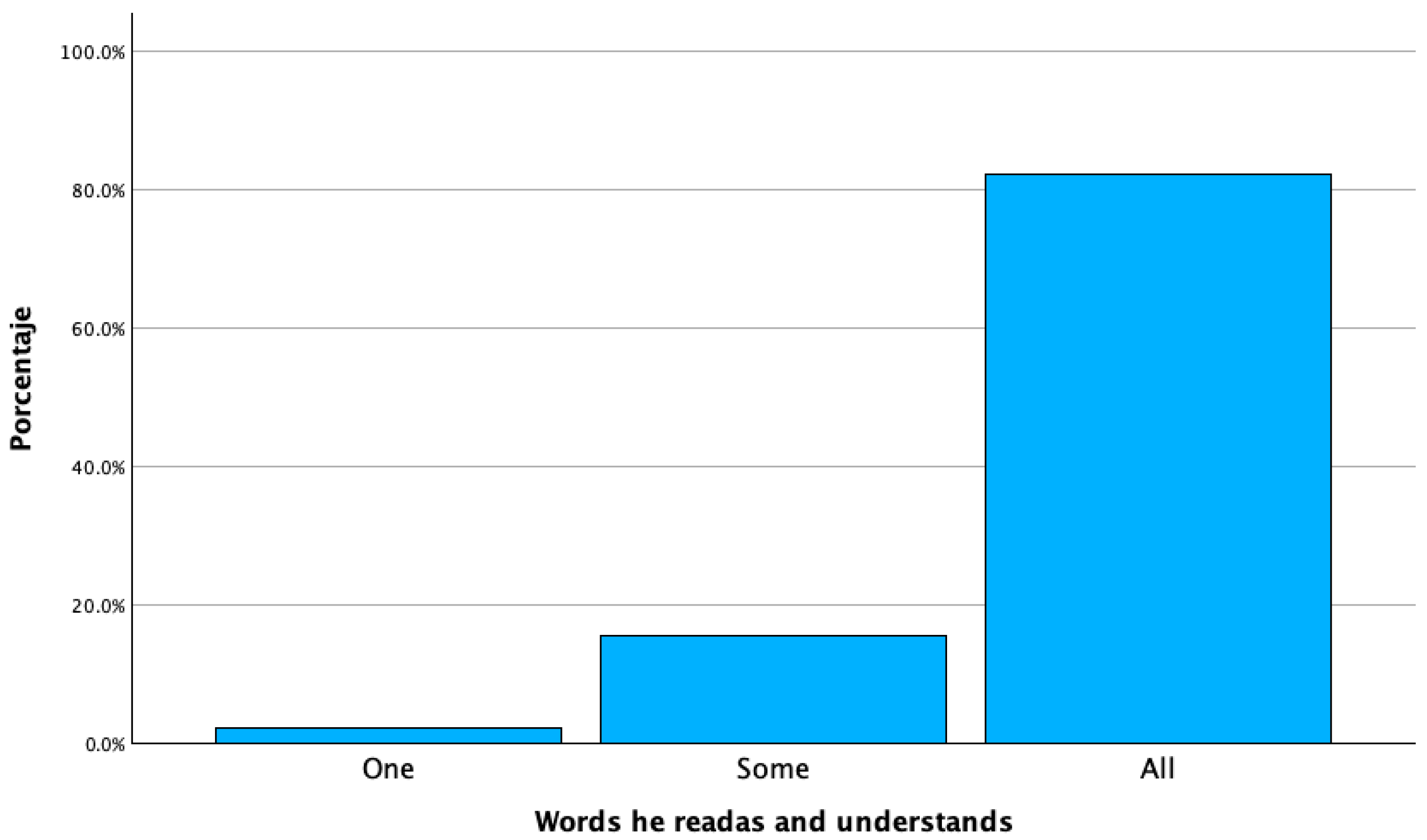
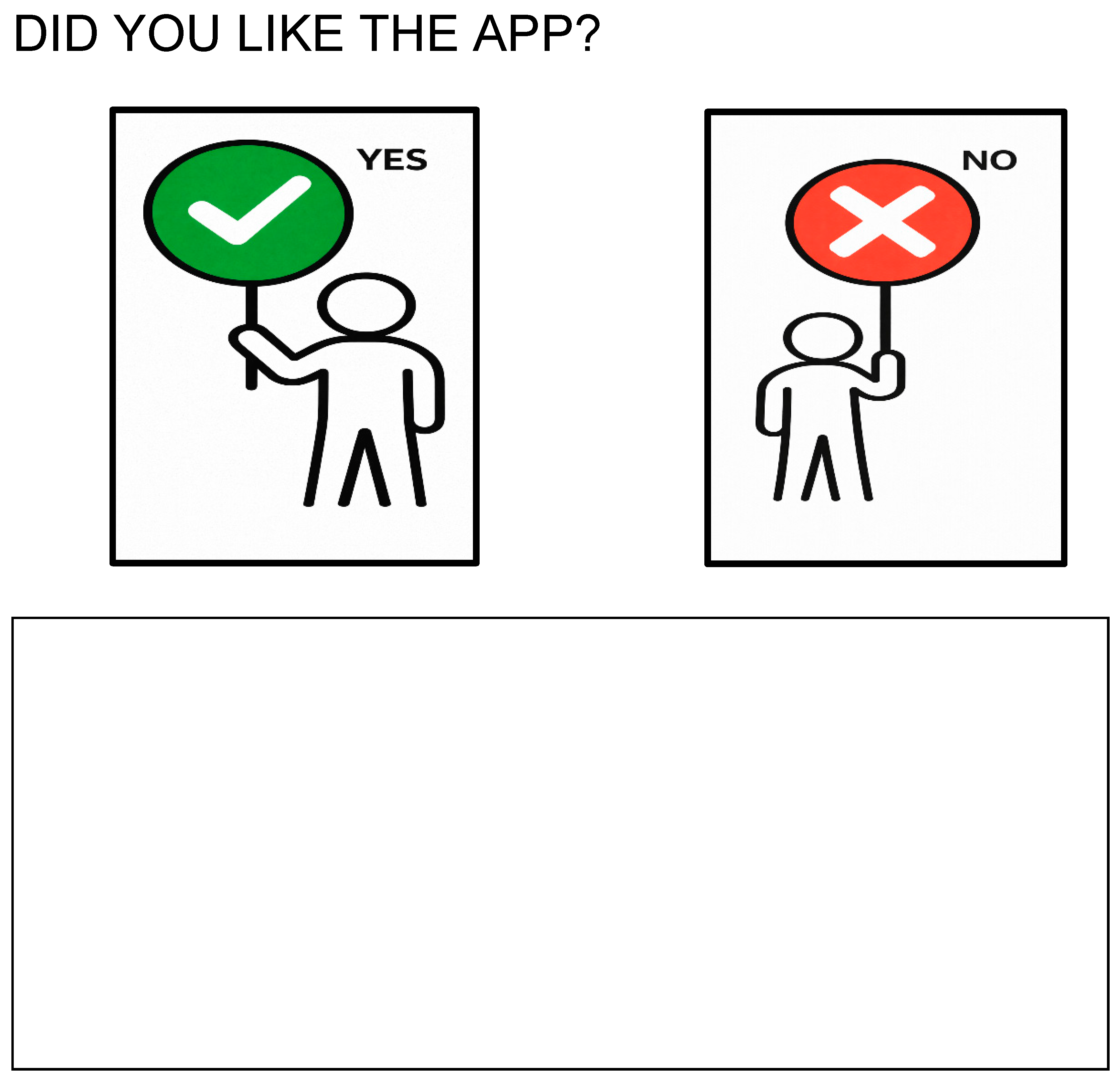
- At the lowest reading level (Q7 = 0, “reads one word”), the only child in this category reported that they liked the app.
- Among those who “read some words” (Q7 = 1), 6 out of 7 children liked the app and 1 did not.
- Among those who “read all words” (Q7 = 2), 27 out of 32 children liked the app and 5 did not.
- No students were classified as “advanced readers” (Q7 = 3) in the current dataset.

| Reading Ability (Q7) | Total n in Subgroup | n “Yes, I Liked the App” | n “No” |
|---|---|---|---|
| 0 = reads one word | 1 | 1 | 0 |
| 1 = reads some words | 7 | 6 | 1 |
| 2 = reads all words | 32 | 27 | 5 |
| 3 = advanced reader (if applicable) | 0 | 0 | 0 |
4.4. RQ3—Completion of the “Hello” Activity
4.5. Synthesis
5. Discussion
6. Conclusions
Author Contributions
Funding
Data Availability Statement
Acknowledgments
Conflicts of Interest
Appendix A


References
- Abascal, J.; Aedo, I.; Cañas, J.; Gea, M.; Gil, A.; Lorés, J.; Martínez, A.; Ortega, M.; Valero, P.; Vélez, M. La Interacción Persona-Ordenador; Lleida, Spain. 2001. Available online: https://aipo.es/wp-content/uploads/2022/02/LibroAIPO.pdf (accessed on 16 December 2025).
- Muñoz-Arteaga, J.; Collazos, C.; Granollers, T.; Luna-García, H. Perspectivas en la Interacción Humano-Tecnología; Red HCI-Collab; Lleida, Spain, 2023. Available online: https://hci-collab.uxartetic.com/ (accessed on 16 December 2025).
- Computer Science Teachers Association (CSTA). Computer Science K–8: Building a Strong Foundation. 2012. Available online: https://csteachers.org/k12standards/ (accessed on 16 December 2025).
- Manches, A.; Plowman, L. Computing education in children’s early years: A call for debate. Br. J. Educ. Technol. 2017, 48, 191–201. [Google Scholar] [CrossRef]
- Wing, J. Computational Thinking. Commun. ACM 2006, 49, 33–35. [Google Scholar] [CrossRef]
- Sánchez-Vera, M. La robótica, la programación y el pensamiento computacional en la educación infantile. Rev. Infanc. Educ. Y Aprendiz. 2020, 7, 209–234. [Google Scholar]
- Caguana-Anzoátegui, L.; Rodrigues-Pereira, M.; Solís-Jarrín, M. Cubetto for preschoolers: Computer programming code to code. In Proceedings of the 2017 International Symposium on Computers in Education (SIIE), Lisbon, Portugal, 9–11 November 2017; pp. 1–5. [Google Scholar] [CrossRef]
- Alsina, Á.; Acosta, Y. Conectando la educación matemática infantil y el pensamiento computacional: Aprendizaje de patrones de repetición con el robot educativo programable Cubetto. Innovaciones Educ. 2022, 24, 1–20. [Google Scholar] [CrossRef]
- Ramos Ruiz, J.; Paredes Barragán, P. Desarrollo del pensamiento Computacional mediante Cubetto en Educación Infantil. IE Comun. Rev. Iberoam. De Informática Educ. 2023, 38, 35–44. [Google Scholar]
- Pérez Vázquez, E.; Lorenzo Lledó, G.; Lledó Carreres, A. Aplicación del Robot Bee-Bot en las Aulas de Educación Infantil y Educación: Una Revisión Sistemática Desde el Año 2016. 2021. Available online: https://rua.ua.es/server/api/core/bitstreams/2ed6f7f2-6c22-4f71-8401-1056292a5440/content (accessed on 16 December 2025).
- Buendía Cueva, G.I.; Tasayco Díaz, A.P.; Menacho Rivera, A.S. Gamificación y tecnología en la educación infantil: Una revisión sistemática. Rev. InveCom 2025, 5, 1–8. [Google Scholar]
- Ruiz Moltó, M.; Arteaga Martínez, B. El pensamiento geométrico-espacial y computacional en educación infantil: Un estudio de caso con KUBO. Contextos Educ. Rev. De Educ. 2022, 30, 41–60. [Google Scholar] [CrossRef]
- Resnick, M.; Maloney, J.; Monroy-Hernández, A.; Rusk, N.; Eastmond, E.; Brennan, K.; Millner, A.; Rosenbaum, E.; Silver, J.; Silverman, B.; et al. Scratch: Programming for all. Commun. ACM 2009, 52, 60–67. [Google Scholar] [CrossRef]
- Bers, M. El desarrollo de Scratch J.R: El aprendizaje de programación en primera infancia como nueva alfabetización. Virtualidad Educ. Y Cienc. 2023, 26, 43–62. [Google Scholar] [CrossRef]
- Narváez Minda, J.; Torres Navas, E.J.; Analuisa Maguashca, J.; Guerrón Varela, E.R. Software Scratch J.R como recurso pedadógico para la consolidación de nociones espaciales en Educación Infantil. MIKARIMIN Rev. Multidiscip. 2021, 7, 71–84. [Google Scholar]
- Meyer, A.; Rose, D.H.; Gordon, D. Universal Design for Learning: Principles, Framework, and Practice, 3rd ed.; CAST: Lynnfield, MA, USA, 2025; ISBN 9781943085392. [Google Scholar]
- Smith, J.; Brown, L. Scratch Jr. Tactile: An inclusive approach to programming for young children. J. Educ. Technol. 2013, 10, 45–60. [Google Scholar]
- Elshahawy, M.; Aboelnaga, K.; Sharaf, N. CodaRoutine: A serious game for introducing sequencial programming concepts to children with autism. In Proceedings of the IEEE Global Enginerering Education Conference (EDUCON), Porto, Portugal, 27–30 April 2020. [Google Scholar]
- Zubair, M.S.; Brown, D.; Hughes-Roberts, T.; Bates, M. Designing accessible visual programming tools for children with autism spectrum condiction. Univers. Access Inf. Soc. 2021, 22, 277–296. [Google Scholar] [CrossRef]
- Taylor, M. Computer programming with Pre-K through first-grade students with intellectual disabilities. J. Spec. Educ. 2018, 52, 78–88. [Google Scholar] [CrossRef]
- Utreras, E.; Pontelli, E. Introductory programming and young learners with visual disabilities: A review. Univers. Access Inf. Soc. 2023, 22, 169–184. [Google Scholar] [CrossRef]
- Johnson, J.L. Animated Pedagogical Agents: Face-to-Face Interaction in Interactive Learning Environments. J. Artif. Intell. Educ. 2000, 11, 47–78. [Google Scholar]
- Ocaña, J.; Morales-Urrutia, E.; Pérez-Marín, D.; Pizarro, C. Can a Learning Companion Be Used To Continue Teaching Programming to Children Even During The COVID-19 Pandemic? IEEE Access 2020, 8, 157840–157861. [Google Scholar] [CrossRef]
- Morales-Urrutia, E.; Ocaña, J.; Pérez-Marín, D.; Pizarro, C. Cand Mindfulness Help Primary Education Students to Learn How to Program With an Emotional Learning Companion? IEEE Access 2021, 9, 6642–6660. [Google Scholar] [CrossRef]
- Manzanares, M.; Pérez-Marín, D.; Pizarro-Romero, C. Towards the use of pedagogic Conversational Agents to teach block-based programming to all using ScartchJr. In Actas del XXVII Simposio Internacional de Informática Educativa (SIIE); SIIE: Viseu, Portugal, 2025; pp. 107–112. [Google Scholar]
- García-Peñalvo, F. La enseñanza de la informática, la programación, el pensamiento computacional en los estudios preuniversitarios. El Enfoque TACCLE3 2017, 18, 7–17. [Google Scholar] [CrossRef][Green Version]
- Ozturk, H.; Calingasan, L. Robotics in Early Childhood Education: A Case Study for the Best Practices; Ozcinar, G., Wong, H., Ozturk, H., Eds.; IGI Global Scientific Publishing: Hershey, PA, USA, 2018; pp. 182–200. [Google Scholar] [CrossRef]
- Ching, Y.; Hsu, Y.; Baldwin, S. Developing computational thinkin with educational technologies for young learners. TechTrends 2018, 62, 563–573. [Google Scholar] [CrossRef]
- Morgado, L.; Cruz, M.; Kahn, K. Preschool cookbook of computer programming topics. Australas. J. Educ. Technol. 2010, 26, 309–326. [Google Scholar] [CrossRef]
- Etecé. Niño de 3 Años. Biblioteca Humanidades. 2023. Available online: https://humanidades.com/nino-de-3-anos/ (accessed on 16 December 2025).
- Bers, M. Beyond computer literacy: Supporting youth’s positive development through technology. New Dir. Youth Dev. 2010, 2010, 13–23. [Google Scholar] [CrossRef]
- Papert, S. Mindstorms: Children, Computers, and Powerful Ideas; Basic Books: New York, NY, USA, 1980. [Google Scholar]
- Lerner, R.; Almerigi, J.; Theokas, C.; Lerner, J. Positive youth development: A view of the issues. J. Early Adolesc. 2005, 25, 10–16. [Google Scholar] [CrossRef]
- Pérez-Marín, D. Teaching Programming in Early Childhood Education with stories. In Proceedings of the Actas de la international Coference of Education Research and Innovation (ICERI), Seville, Spain, 11–13 November 2019; pp. 9206–9212. [Google Scholar]
- Liukas, L. Hello Ruby: Adventures in Coding; COBEE: Singapore, 2015; Available online: https://www.helloruby.com (accessed on 16 December 2025).
- Otterborn, A.; Schonborn, K.; Hultén, M. Investigating Preschool Educators’ implementation of Computer Programming in Their Teaching Practice. Early Child. Educ. J. 2019, 48, 253–262. [Google Scholar] [CrossRef]
- Flannery, L.; Silverman, B.; Kazakoff, E.; Bers, M.; Bontá, P.; Resnick, M. Designing ScratchJr.: Support for early childhood learning through computer programming. In Proceedings of the 12th International Conference on Interaction Design and Children, New York, NY, USA, 24–27 June 2013; pp. 1–10. [Google Scholar]
- Yu, T.; Roque, N. Designing pedagogic conversational agents: A framework and review. Int. J. Artif. Intell. Educ. 2022, 32, 1–35. [Google Scholar]
- Beraza, I.; Pina, A.; Demo, B. Soft & hard ideas to improve interaction with robots for kids & teachers. In Proceedings of the SIMPAR 2010 International Conference on Simulation, Modeling and Programming for Autonomous Robots, Darmstadt, Germany, 15–18 November 2010; pp. 549–557. [Google Scholar]
- Highfield, K. Robotic toys as a catalyst for mathematical problem solving. Aust. Prim. Math. Classr. 2010, 15, 22–27. [Google Scholar]
- Stoeckelmayr, K.; Tesar, M.; Hofmann, A. Pre-primary children programming robots: A first attempt. In Proceedings of the 2nd International Conference on Robotics in Education, Thessaloniki, Greece, 23–25 April 2011; pp. 185–192. [Google Scholar]
- Kazakoff, E.; Bers, M. Programming in a robotics context in the pre-primary classroom: The impact on sequencing skills. J. Educ. Multimed. Hypermedia 2012, 21, 371–391. [Google Scholar]
- Bers, M.; Flannery, L.; Kazakoff, E.; Sullivan, A. Computational Thinking and tinkering: Exploration of an early childhood robotics curriculumn. Comput. Educ. 2014, 72, 145–157. [Google Scholar] [CrossRef]
- Bravo Sánchez, F.; Forero Guzmán, A. La Robótica como un recurso para facilitar el aprendizaje y desarrollo de competencias generales. Teoría De La Educación. Educ. Y Cult. En La Soc. De La Inf. 2012, 13, 120–136. [Google Scholar] [CrossRef]
- Ruiz Velasco, E.; Beauchemin, M.; Freyre, A.; Martínez, P.; García, V.; Rosas, L.; Minami, Y.; Velásquez, M. Robótica Pedagógica: Desarrollo de Entornos de Aprendizaje con Tecnología. Virtual Educa. 2006. Available online: https://www.academia.edu/3249497/Rob%C3%B3tica_pedag%C3%B3gica_desarrollo_de_entornos_de_aprendiz (accessed on 16 December 2025).
- Acuña, A. Robótica y Aprendizaje por Diseño. Educación año xlviii-xlix, 2004, 139–140. Available online: https://es.scribd.com/document/333359840/Robotica-y-Aprendizaje-Por-Diseno (accessed on 16 December 2025).
- González, A.; Hernández, A.R. AlToy 1: Un robot neo-educativo con emociones. Rev. Iberoam. De Informática Educ. 2013, 51, 51–62. [Google Scholar]
- Romero Martinez, S.J.; Calzada, I.G.; García Sandoval, A.; Lozano Domínguez, A. Herramientas Tecnológicas para la educación Inclusiva. Rev. Tecnol. Cienc. Y Educ. 2018, 2018, 83–112. [Google Scholar] [CrossRef]
- Pérez de la Maza, L. Programa de estructuración ambiental por ordenador para personas del especto autista: PEAPO. In Las Nuevas Tecnologías en la Respuesta Educativa a la Diversidad; Soto Pérez, F.J., Rodríguez Vázquez, J., Eds.; Selegrafía, S.L.: Murcia, Spain, 2000; pp. 255–258. [Google Scholar]
- Guaña-Moya, J.; Rodrigo Altamiraño-Pazmiño, M. Herramientas de Software para la educción inclusiva en la etapa de educación inicial. Rev. Enectiva 2024, 5, 1–14. [Google Scholar]
- Rozengardt, A. Lo no Formal en la Atención y Educación de la Primera Infancia; UNESCO: Paris, France, 2020. [Google Scholar]
- Sánchez Sánchez, T. La influencia de la motivación y la cooperación del alumnado de primaria con la Robótica educativa: Un estudio de caso. Panorama 2019, 13, 117–140. [Google Scholar] [CrossRef]
- Merino-Armero, J.M.; Villena-Taranilla, R.; Somoza, J.A.G.-C.; Cózar-Gutiérrez, R. Análisis del efecto de la robótica en la motivación de estudiantes de tercero de Educación Primaria durante la resolución de tareas de interpretación de planos. Rev. De Estud. Y Exp. En Educ. 2017, 3, 163–173. [Google Scholar] [CrossRef]
- Jiménez, L. El Poder y la Ciencia de la Motivación. Cómo Cambiar tu Vida y Vivir Mejor Gracias a la Ciencia de la Motivación. 2017. Available online: https://www.scribd.com/document/544570897/El-poder-y-la-ciencia-de-la-motivacion-PDFDrive (accessed on 16 December 2025).
- Angeli, C.; Valanides, N. Developing young children’s computational thinking with educational robotics: An intervention study. J. Educ. Comput. Res. 2020, 58, 461–484. [Google Scholar]
- Di Lieto, M.; Inguaggiato, E.; Castro, E.; Cecchi, F.; Cioni, G.; Dell’Omo, M.; Laschi, C.; Dario, P. Educational robotics and students with neurodevelopmental disordes: A systematic review. Heliyon 2020, 6, e05160. [Google Scholar] [CrossRef]
- Pivetti, M.; Di Battista, S.; Agatolio, F.; Moro, M. Educational robotis and students with nuerodevelopmental disorders: A systematic review. Heliyon 2020, 6, e05145. [Google Scholar] [CrossRef]
- Elkin, M.; Sullivan, A.; Bers, M. Programming with the KIBO robotics kit in preschool classrooms. Comput. Sch. 2016, 33, 169–186. [Google Scholar] [CrossRef]
- Gkonlnta, E.; Papadopoulos, A.; Giannakoulas, I.; Bamidis, P. Robot programming as an intervention for a child with autism spectrum disorder: A case study. Int. J. Dev. Disabil. 2023, 69, 424–431. [Google Scholar] [CrossRef]
- Leelawong, K.; Biswas, G. Designing learning by teaching agents: The Betty’s Brian system. Int. J. Artif. Intell. Educ. 2008, 18, 181–208. [Google Scholar] [CrossRef]
- Elbeltagi, R.; Al-Beltagi, M.; Saeed, N.K.; Alhawamdeh, R. Play therapy in children with autism: Its role, implications, and limitations. World J. Clin. Pediatr. 2023, 12, 1–22. [Google Scholar] [CrossRef]
- Comunidad de Madrid Comunidad de Madrid Inicio. Página no Encontrada. 2025. Available online: https://www.comunidad.madrid/ (accessed on 16 December 2025).
- Wang, X.C.; Christ, T.; Chiu, M.M.; Strekalova-Hughes, E. Exploring the relationship between kindergarteners’ buddy reading and individual comprehension of interactive app books. AERA Open 2019, 5, 1–17. [Google Scholar] [CrossRef]
- Raja, P.; Setiyadi, A.B.; Riyantika, F. The Correlation between perceptions on the use of online digital interactive media and reading comprehension ability. Int. J. Engl. Lang. Lit. Stud. 2021, 10, 292–319. [Google Scholar] [CrossRef]


| Variable | Category | % |
|---|---|---|
| Sex | Boys | 35.4 |
| Girls | 56.3 | |
| Age | 6 years | 56.3 |
| 7 years | 37.5 | |
| Class | Class A | 46.7 |
| Class B | 53.3 | |
| Neurodivergent status | Neurotypical | 97.8 |
| Neurodivergent | 2.2 | |
| Reading ability (Q7) | 0 = reads one word | 2.2 |
| 1 = reads some words | 15.6 | |
| 2 = reads all words | 82.2 | |
| 3 = advanced reader (if used) | 0 | |
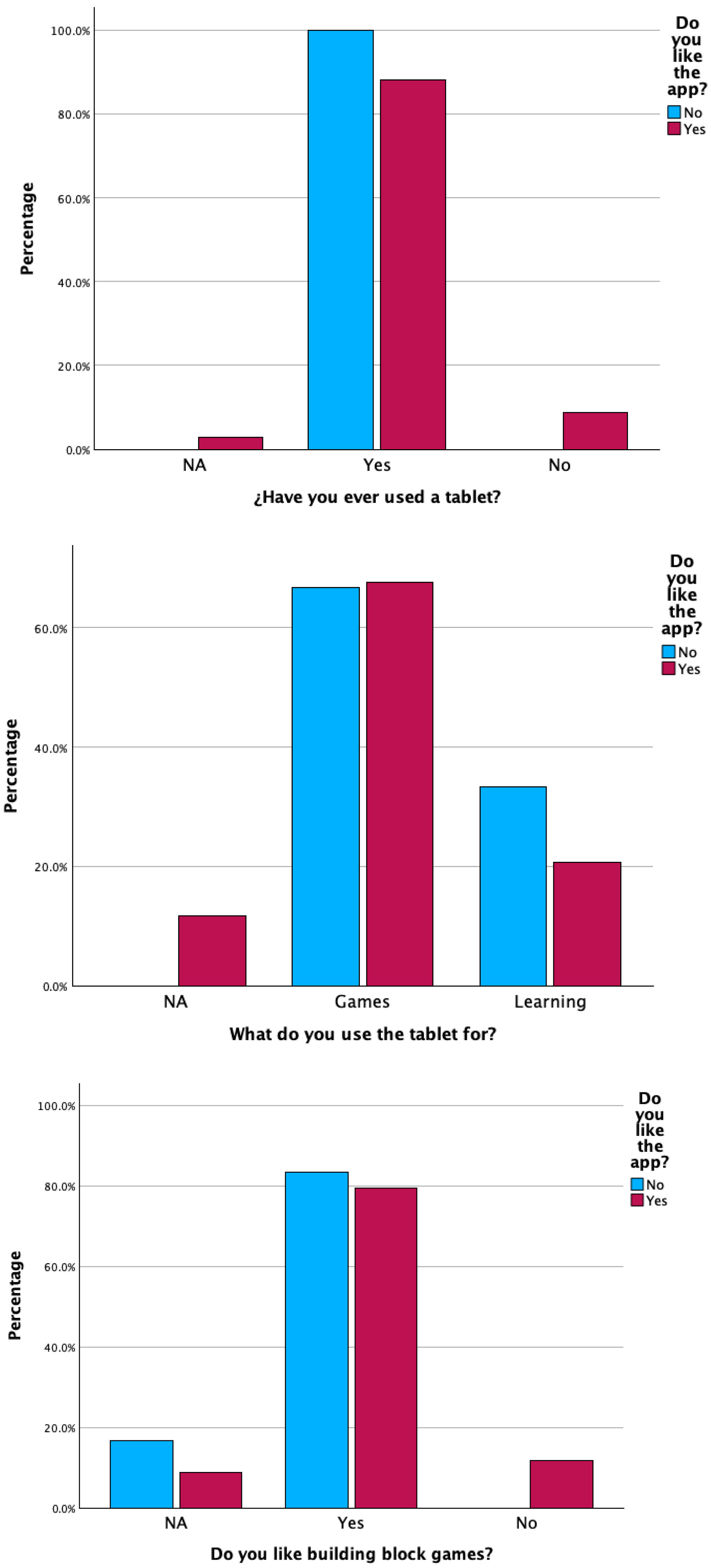
| Tablet use (Q10) | Mainly for games | 66.7 |
| Mainly for learning | 24.4 | |
| Other/mixed | 8.9 | |
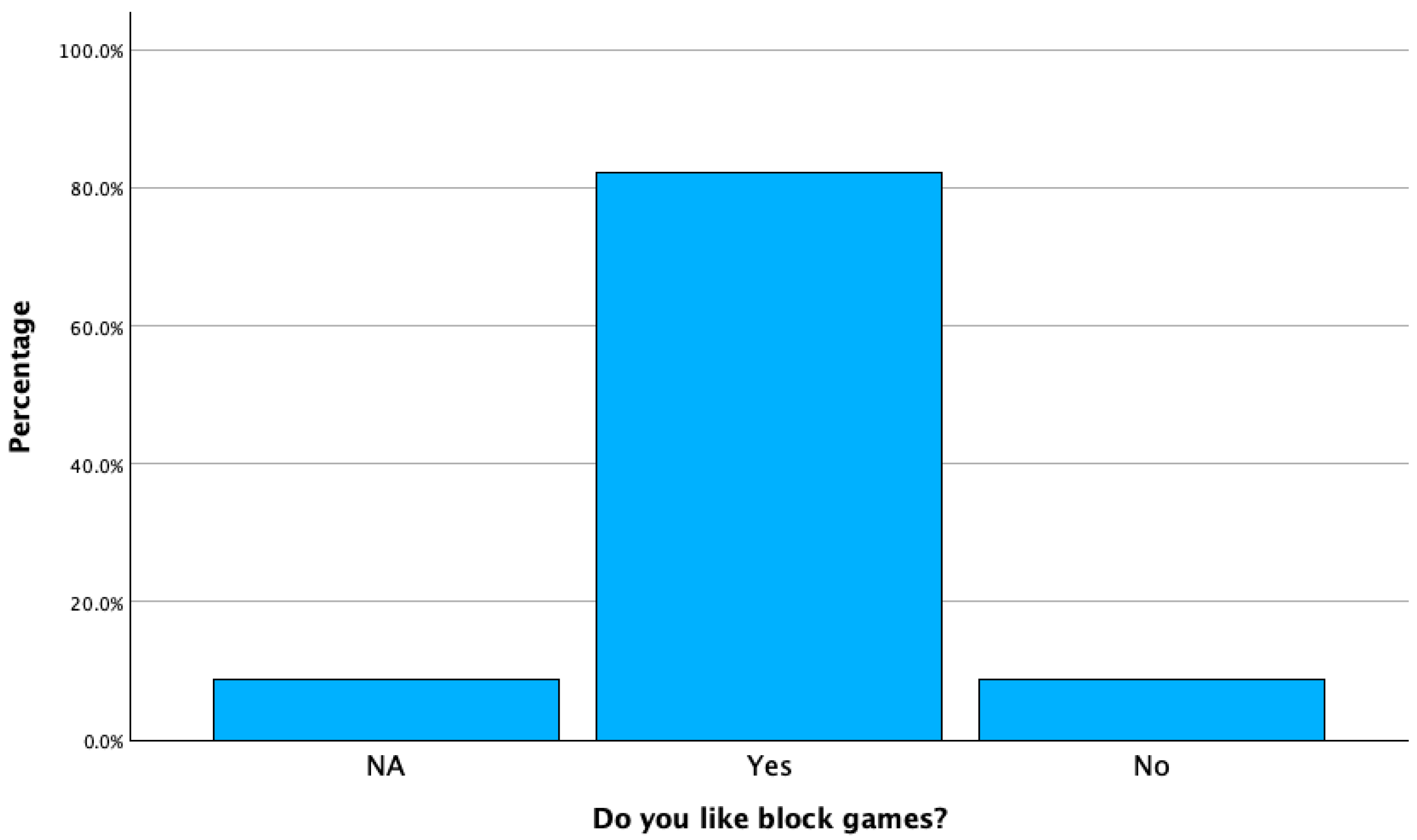
| Likes block games (Q14) | Yes | 82.2 |
| No | 8.9 | |
| Other/mixed | 8.9 | |
| Questionnaire completed | Yes (valid responses) | 93.75 |
| No/missing | 0.06 |
| Tablet Use (Q10) | n “Yes, I Liked the App” | n “No” |
|---|---|---|
| Mainly for games | 23 | 4 |
| Mainly for learning | 7 | 2 |
| Other/mixed | 4 | 0 |
| Total (valid cases) | 34 | 6 |
| Likes Block Games (Q14) | n “Yes, I Liked the App” | n “No” |
|---|---|---|
| Yes | 27 | 5 |
| No | 4 | 0 |
| NA | 3 | 1 |
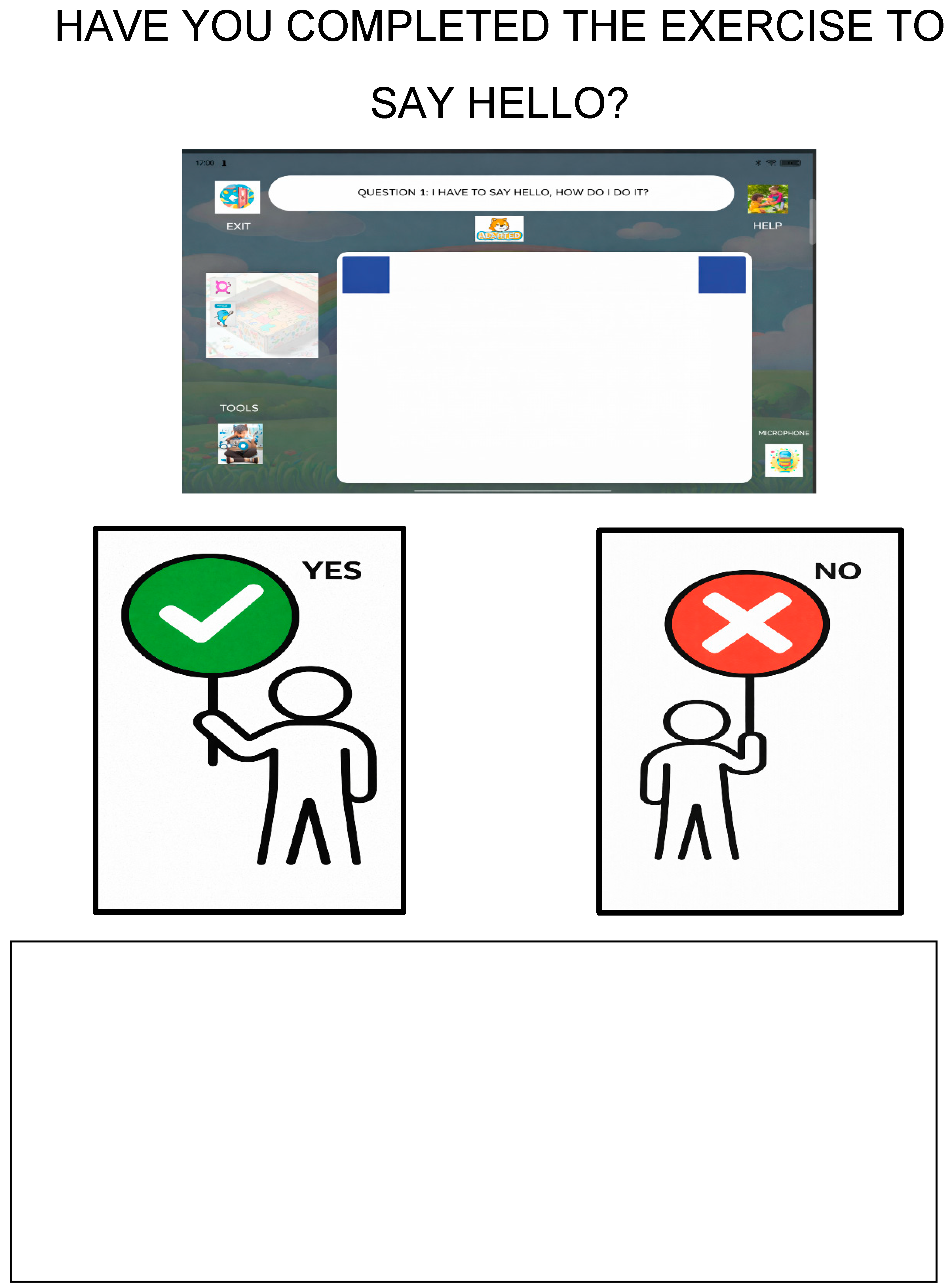
| Group | n Total | n Completed Without Help | n Completed with Help | n Not Completed |
|---|---|---|---|---|
| Neurotypical | 41 | 2 | 35 | 4 |
| Neurodivergent | 1 | 0 | 0 | 1 |
Disclaimer/Publisher’s Note: The statements, opinions and data contained in all publications are solely those of the individual author(s) and contributor(s) and not of MDPI and/or the editor(s). MDPI and/or the editor(s) disclaim responsibility for any injury to people or property resulting from any ideas, methods, instructions or products referred to in the content. |
© 2026 by the authors. Licensee MDPI, Basel, Switzerland. This article is an open access article distributed under the terms and conditions of the Creative Commons Attribution (CC BY) license.
Share and Cite
Manzanares, M.J.; Pérez Marín, D.; Pizarro, C. A Preliminary Usability Study of a Novel Educational Training System to Teach ScratchJr. in School. Computers 2026, 15, 17. https://doi.org/10.3390/computers15010017
Manzanares MJ, Pérez Marín D, Pizarro C. A Preliminary Usability Study of a Novel Educational Training System to Teach ScratchJr. in School. Computers. 2026; 15(1):17. https://doi.org/10.3390/computers15010017
Chicago/Turabian StyleManzanares, María Jesús, Diana Pérez Marín, and Celeste Pizarro. 2026. "A Preliminary Usability Study of a Novel Educational Training System to Teach ScratchJr. in School" Computers 15, no. 1: 17. https://doi.org/10.3390/computers15010017
APA StyleManzanares, M. J., Pérez Marín, D., & Pizarro, C. (2026). A Preliminary Usability Study of a Novel Educational Training System to Teach ScratchJr. in School. Computers, 15(1), 17. https://doi.org/10.3390/computers15010017