1. Introduction
In modern society, the rapid advancement of non-face-to-face technologies has opened new possibilities for human–computer interaction across various domains, including education, recruitment, healthcare, and counseling. In particular, virtual interview systems are being actively researched in both industry and academia, as they offer benefits such as improved recruitment efficiency, reduced travel costs, and minimized time constraints [
1,
2,
3]. While conventional video conferencing-based interview systems allow real-time communication, they fall short in terms of immersion and user satisfaction due to the disconnect from a physical interview environment. Consequently, the demand for 3D-based virtual interview spaces that provide a visually immersive experience similar to real environments is gradually increasing. However, the practical implementation of such virtual interview environments requires considerable technical and physical resources.
Constructing a realistic 3D virtual interview space involves complex processes such as interior modeling, camera calibration, high-resolution texture generation, and lighting setup. When these processes are performed manually, labor cost and time consumption increase exponentially. This presents a significant barrier for general users or small-scale development teams without sufficient resources or expertise.
Various approaches have been used to address this issue. A notable example is the use of 360° panoramic imaging [
4], which allows for relatively simple production while offering some degree of visual immersion. However, this method is primarily effective for viewpoint transitions around a fixed camera and lacks support for free viewpoint movement and depth-based interaction. Moreover, inconsistencies between actual depth perception and the projected visual effects can result in unnatural or distorted representations, limiting the realism of the scene. To overcome these limitations, we created a projection-mapping-based virtual interview room generation framework. Projection mapping is used to project light or video onto real-world architectural structures, interior surfaces, or 3D objects. In this study, we apply this framework to virtual interview room generation in a 3D space. Structures such as tables, chairs, and walls are constructed as 3D meshes using Blender, while the projected images (textures) are automatically generated using Stable Diffusion [
5], a text-to-image generative deep learning model, and ControlNet [
6], which allows condition-controlled image generation.
The framework developed offers advantages. First, it establishes an automated pipeline that allows non-experts or individuals without design expertise to generate high-quality visual outputs. Leveraging Stable Diffusion and ControlNet, the system produces high-resolution images using only text prompts and conditional inputs, serving as a practical alternative to traditional manual modeling. Second, different from panoramic video methods, the framework enables freedom in viewpoint navigation and maintains spatial consistency, making it suitable for various simulation and training applications. Third, by integrating Blender’s UV mapping with camera calibration data extracted via fSpy, the framework enables accurate reconstruction of real-world viewpoints within virtual environments, enhancing visual immersion.
In this context, an end-to-end pipeline integrating Stable Diffusion, ControlNet, Blender, and fSpy is proposed to construct a photorealistic virtual interview room. The framework encompasses three key contributions: (1) the development of an automatic texture generation method that combines text-based image synthesis with depth-based conditional control; (2) the proposal of a real-world 3D reconstruction approach that links camera parameter calibration from fSpy with UV mapping in Blender; (3) the implementation of a projection mapping-based virtual interview room generation system that ensures high visual fidelity while enhancing cost and time efficiency. Collectively, these innovations establish a comprehensive methodology for creating immersive, resource-efficient, and visually compelling virtual environments.
2. Design of Interview Rooms
2.1. Generation of Template Image Using Stable Diffusion
Stable Diffusion is a deep learning-based text-to-image generation model capable of producing high-resolution images from textual or visual inputs, and it has recently been applied across various visual content creation domains. Users can construct prompts to explicitly describe the desired scene, and the model also supports an image-to-image generation mode that produces new images based on existing ones. In this study, Stable Diffusion was employed as the foundational tool for generating images to ensure the visual realism of virtual interview spaces. The quality and style of images generated through Stable Diffusion are determined not only by the prompt itself but also by a combination of various configuration elements. Accordingly, we considered Model, Checkpoint, variational autoencoder (VAE), Embedding, and Low-Rank Adaptation (LoRA).
The Model refers to the core pre-trained structure of Stable Diffusion, and users may select from various models trained on different datasets. In this research, the Anything V5 (Prt-RE) [
7] checkpoint was selected to achieve a realistic and refined indoor space representation. This checkpoint includes training data that effectively captures realistic interior and office-like styles, making it well-suited for virtual interview environments. In this study, the Blessed02 [
8] VAE was used due to its excellent performance in reproducing natural light-based color tones. The EasyNegative [
9] embedding was applied to reduce unnecessary distortion or exaggerated details. Lastly, we used the realistic style room LoRA [
10], which specializes in realistic indoor room generation, to accurately reflect the structure, materials, and lighting characteristics of interior spaces. Without this LoRA, the generated indoor images tend to lack realism, often resulting in unnatural layout or lighting inconsistencies. Hence, LoRA is an essential component for producing high-quality interview room imagery.
Based on these configuration components, the following prompt was designed to generate the target image: a realistic indoor interview room, front-facing view from the entrance, professional office setting, neutral color scheme, soft bright lighting from windows, minimal and clean design, modern interior, realistic style, and great detail. This prompt incorporates functional requirements of an interview room, including a frontal view composition, office-like arrangement, lighting conditions, and interior style.
2.2. 3D Alignment and Viewpoint Calibration of AI-Generated Images Using fSpy
One of the most critical preprocessing steps in projection mapping for virtual interview room generation is the precise restoration of 3D viewpoint information from a 2D image. To accomplish this, we utilized fSpy to manually define the camera viewpoint and axis orientation (x, y, z) of interview room images generated by Stable Diffusion. fSpy is used to analyze geometric axis information within an image and aligns it in 3D space, enabling reconstruction of a spatial composition that closely resembles a real-world setting. The user begins by dragging and dropping the generated image onto the program interface, after which two axes can be defined based on linear structures within the scene (e.g., walls, ceilings, floor lines, etc.).
In this study, the first axis was set as the Y-axis (floor depth direction) and the second axis as the Z-axis (vertical direction). This setup aligns with Blender’s coordinate system, where the Z-axis represents height, the Y-axis runs vertically along the floor, and the X-axis runs horizontally across the floor. Accordingly, it is crucial to ensure that the axes defined in fSpy are consistent with Blender’s coordinate conventions to maintain spatial alignment. One important consideration is that images generated by AI models such as Stable Diffusion are not photographs captured in real space; therefore, accurate perspective geometry is not guaranteed. As a result, certain lines may appear distorted, and the orientation of the camera may not be aligned with the actual horizontal or vertical elements of the structure. In such cases, users must manually adjust the reference lines within fSpy to define a perspective that closely resembles real-world space. The more naturally the perspective is defined, the higher the geometric consistency of the 3D reconstruction in Blender, and the more accurate the projection mapping will be in the later stages. Once the camera viewpoint and axes have been configured, fSpy allows the settings to be saved as a .fspy file, which can be imported into Blender via a plugin. This process enables the construction of a basic geometry aligned with the original image’s viewpoint and structure, effectively translating a 2D AI-generated image into a consistent 3D space.
2.3. Extraction of Depth Map in 3D Model
To utilize the camera viewpoint and spatial alignment information defined through fSpy, this study imported the corresponding data into the Blender environment and reconstructed it within a 3D space. When the file generated by fSpy is imported, a virtual camera and a perspective-corrected background image are inserted into the scene, serving as a reference coordinate system for 3D modeling. This process enables the construction of a three-dimensional scene consistent with real-world space, based on viewpoint information manually extracted from a two-dimensional image.
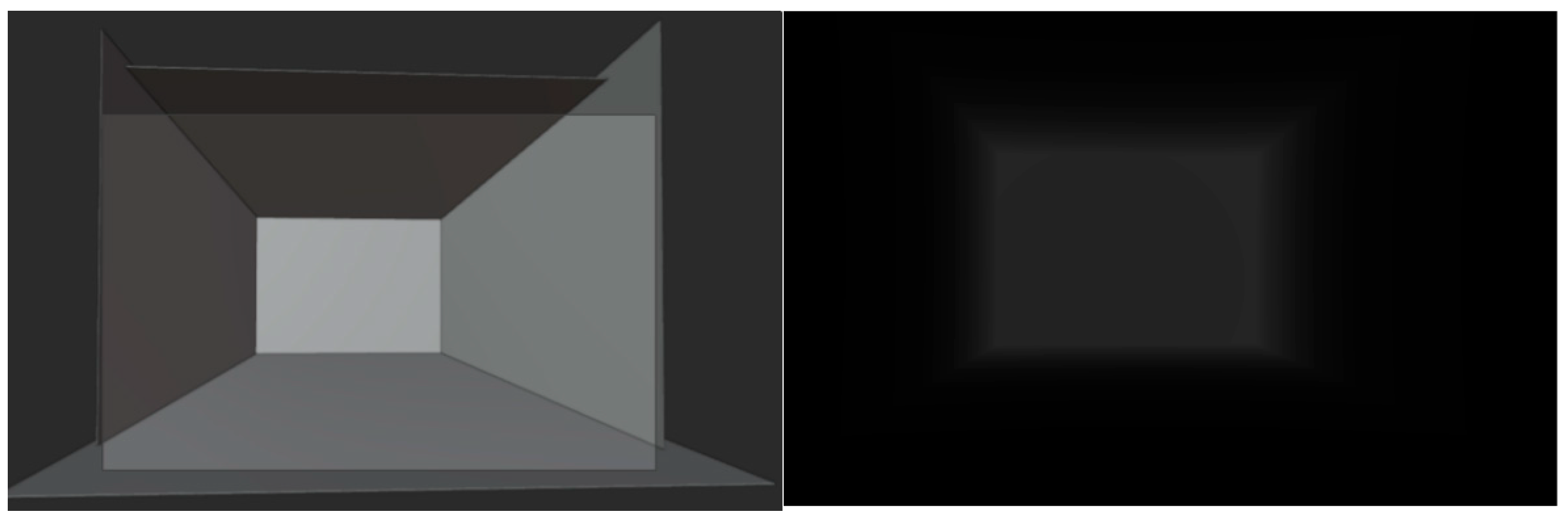
With the camera and background image aligned, the user can design 3D structures that correspond to the scene or place pre-constructed objects to form a layout suitable for projection mapping. In particular, the basic structure of an interview room can be sufficiently represented using simple cube geometry, and for more complex environments, externally sourced models or detailed mesh constructions can be employed. Subsequently, based on the configured 3D scene and camera data, a depth map representing the depth information of objects is extracted by enabling the Mist Pass in Blender’s rendering pipeline and adjusting the depth range and falloff curve within the world coordinate settings to define the desired depth distribution. The Mist Pass generates a grayscale depth image based on the distance between the camera and objects in the scene, allowing for visual distinction between objects at different depths. If the grayscale distribution of the depth map is not visible enough, the visibility can be improved by fine-tuning the minimum and maximum depth range and selecting an appropriate falloff type.
Figure 1 illustrates the constructed cube map (left) and the resulting depth map (right) as the final output. The color of the depth map is inverted by default, so the image shown is the result after applying color inversion.
2.4. Image Generation of Interview Room Using ControlNet
To generate realistic interview room images based on 3D model-derived depth information and sample references, we employed ControlNet. ControlNet is an extension module of Stable Diffusion that enables fine-grained control over image generation by incorporating various types of conditional inputs. A key advantage of ControlNet is its ability to utilize multiple units in parallel, allowing multiple reference images or data sources to be integrated simultaneously.
In this study, two ControlNet units were used. The first unit received a sample image created from a 3D modeled interview room. This unit’s Control Type was set to Reference, enabling the generated image to adopt the structural and stylistic characteristics of the sample. The second unit was assigned the Depth Map extracted earlier from Blender, with its Control Type set to Depth and the model specified as control_sd15_depth. The prompt used for image generation was identical to the one used in the earlier Stable Diffusion-based image creation. To obtain the desired image, parameters such as random seed, control weight, and the influence of each ControlNet unit were adjusted iteratively. Through this process, a variety of realistic interview room images, each with a consistent style, perspective, and spatial layout, were successfully generated.
2.5. Application of Virtual Interview 3D Model Using Projection Mapping
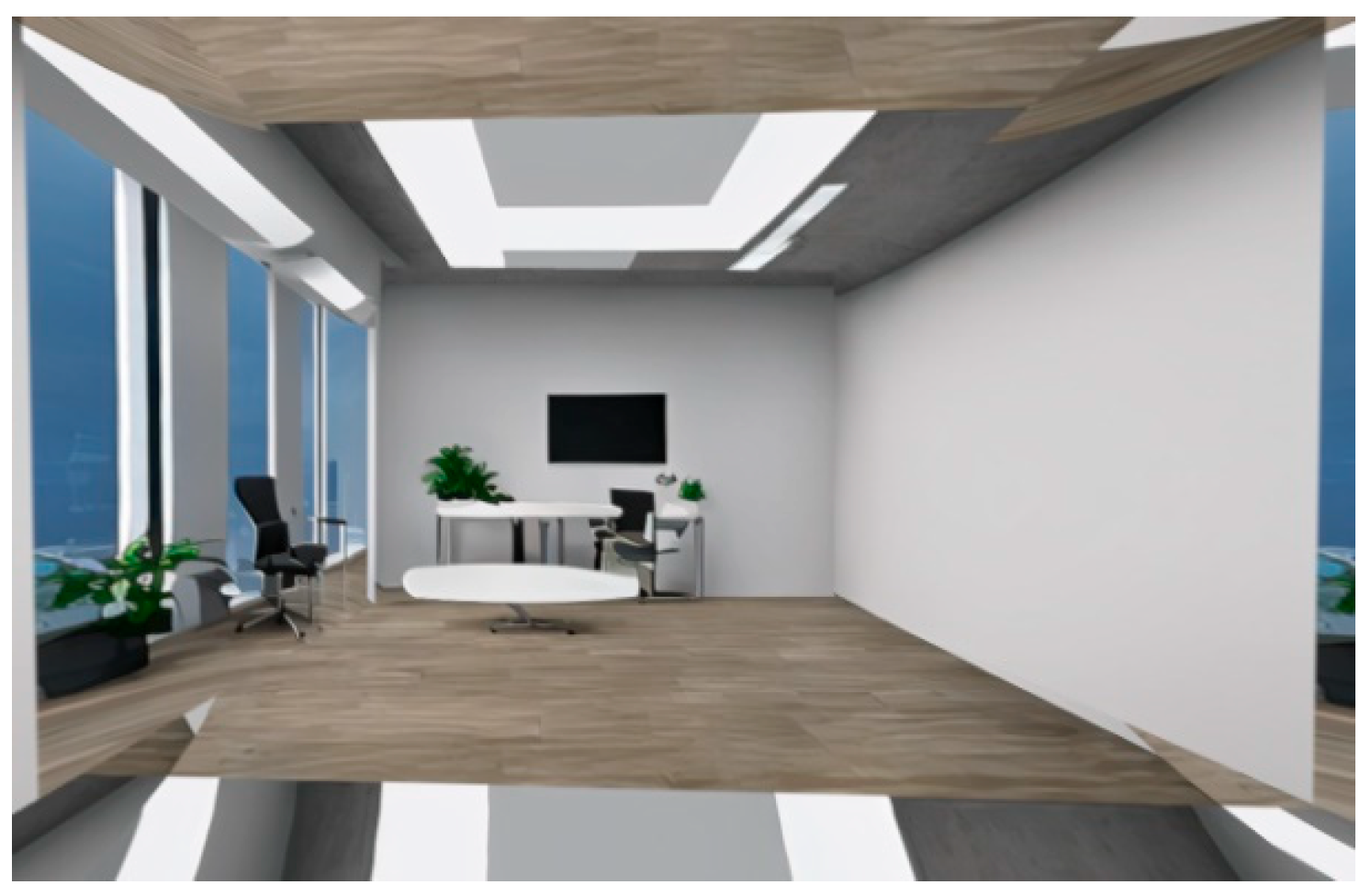
The final step in generating the virtual interview environment is projection mapping, which implements visual coherence by projecting the previously generated image onto the 3D model. In this study, simple projection mapping was performed using Blender. After adjusting the image aspect ratio and model scale to match, the surface material of the model was set to Diffuse Bidirectional Scattering Distribution Function, and the color channel was linked to the generated interview room image as an Image Texture. Through this, the texture can be visualized on the surface of the model in Blender’s Viewport Shading mode. The lighting mode was set to Flat, and the color mode to Texture so that the texture information is displayed visually without being affected by lighting. However, image distortion or stretching may occur in areas located outside the camera’s field of view or where the mesh structure is insufficient. In this study, since the camera viewpoint was fixed or involved only simple linear motion, such a simple projection mapping technique was sufficient to construct a realistically rendered interview room model.
Figure 2 shows the final 3D spatial model that was created.
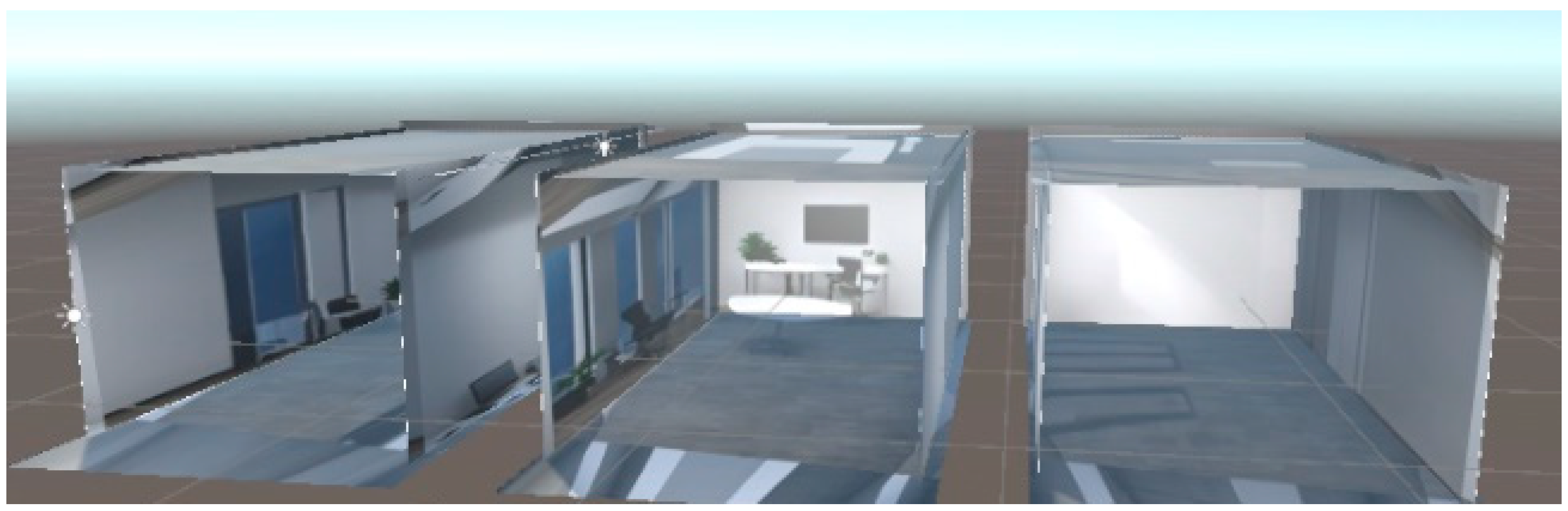
The resulting 3D object was exported from Blender in the Filmbox format and then imported into the Unity engine for use in actual virtual interview content development. Unity provides high compatibility with external 3D models, allowing the imported model to retain the projected texture and mesh structure. This enables the environment to be extended into a real-time interactive system by adding interactive elements such as user navigation, camera movement, and non-player character placement. In particular, combining Unity’s scene editor, lighting system, and physically based rendering functionality makes it possible to simulate lighting conditions and spatial perception similar to a real interview room, providing a highly immersive user experience.
Figure 3 shows the view of the 3D environment placed within Unity.
3. Conclusions and Future Works
We developed a practical and highly scalable method for implementing a virtual interview space through an integrated workflow that combines Stable Diffusion, ControlNet, FSpy, Blender, and Unity. The textures generated using image-based spatial analysis and depth information were accurately mapped onto 3D meshes, ensuring visual realism and spatial coherence through projection mapping. In particular, integration with the Unity environment demonstrated the potential for expanding to various functionalities. The developed method can be applied to virtual interview simulations, education, training, and interactive content development. Merging generative AI with 3D technologies enables a new direction for efficiently creating user-customized virtual spaces.
It is required to expand the system to support multi-viewpoint configurations that allow more flexible camera navigation. Additionally, the quality of textures could be further enhanced by employing high-resolution upscaling or more precise conditional control techniques. Furthermore, incorporating simple interactive elements in the Unity environment could significantly enhance the immersion of the interview simulation.