1. Introduction
The recent COVID-19 pandemic has significantly impacted the healthcare industry, including the field of rehabilitation. Social distancing measures and limited access to in-person services have accelerated the adoption of telerehabilitation as a practical alternative for delivering therapy. Due to the extreme strain on the health service, scenarios once considered implausible have become the norm. Even those previously reluctant to embrace digital technologies were compelled to adapt to remote communication tools like Zoom, gaining familiarity with modern computing in the process.
Technology has been reported to improve access to rehabilitation services and reduce logistical barriers in certain contexts [
1]. By eliminating geographical and logistical barriers, online consultations have enabled patients, especially those in remote areas, to access specialised care from their homes. For individuals with limited time, financial resources, or significant mobility impairments, virtual care is often the only viable option.
Although several telerehabilitation systems have been developed [
2], traditional approaches typically rely on self-directed routines assigned as “homework.” This method places the responsibility for both quantity and quality of exercises on the patient, leading to suboptimal outcomes. Inadequate performance may result from fatigue, disinterest, progressive medical conditions, or errors in execution issues that are known to reduce the efficacy of therapy [
3]. These challenges highlight the need for effective remote monitoring.
Recent solutions include basic video conferencing platforms or applications targeting cognitive enhancement through activities such as memory and word games [
4], typically delivered via mobile phones or tablets. More advanced systems use motion tracking [
5,
6] to support motor function recovery. Several studies [
7,
8,
9,
10] have explored motion capture technologies within physiotherapy. However, many such systems are designed for controlled environments, with limited consideration for real-world deployment, a gap that remains underexplored. Historically, some telerehabilitation tools used to employ the now-defunct Microsoft Kinect, which was popular due to its integration with the Xbox gaming console. While useful in research settings, these solutions often lacked the practical utility needed for broad adoption in clinical practice.
ReHub
® (DyCare, Barcelona, Spain) presents one of the most advanced and deployable systems currently available. It uses a standard smartphone equipped with machine learning-based image recognition. Studies report improved adherence for some smartphone-based interventions [
11]. In this work, adherence is treated as a motivating requirement for reducing friction in capture and review workflows rather than as an evaluated outcome of the present prototype. Increasing patient compliance with home-based rehabilitation and adherence to self-managed parts of the rehabilitation journey have been shown to positively impact clinical outcomes [
12,
13,
14]. The HCI component has also gathered attention [
15], with virtual reality (VR) emerging as a promising tool for increasing user engagement. Gamified VR environments can improve the quality of exercises [
16,
17], particularly in sports-related injuries, where younger, tech-savvy patients are often more receptive to such interventions. However, for patients recovering from severe conditions such as strokes, VR may be less appropriate due to usability concerns. The severity of their impairments often simplifies evaluation, as fewer external factors influence recovery outcomes. Despite VR’s potential, the high cost of hardware and infrastructure required for deployment renders it economically impractical in most clinical settings. Consequently, cost-effective solutions tend to rely on motion tracking combined with supplementary sensors to improve accuracy [
6].
While smartphone-based systems offer convenience, they may lack the precision and accuracy required for high-fidelity rehabilitation. This is particularly problematic for patients with neurological disorders, where improvements in fine motor skills such as range of motion, grip strength, and finger dexterity are paramount since those parameters’ range of motion may not be recognisable and accurately tracked by a phone camera [
18]. Additionally, the limited customisability of pre-defined exercise libraries can hinder therapists, who require flexibility to tailor regimens to individual patient needs [
19].
Building a habit of completing precise and often complex rehabilitation routines presents a challenge. Improper execution can cause harm, and patients frequently struggle with motivation, particularly when exercise is uncomfortable. Tracking progress and maintaining quality is burdensome, and infrequent appointments often leave clinicians without sufficient insight to provide optimal care. In more severe cases, patients may be unable to engage with therapy independently.
While many initiatives focus on enhancing in-clinic rehabilitation, fewer address the larger and arguably more critical aspect: recovery at home. This project seeks to bridge that gap by developing a comprehensive tool that supports home-based rehabilitation in a low-computing resourceful device. The system features a visualisation interface and an administrative application, enabling patients and clinicians to monitor and manage rehabilitation progress over time. Our proposed system incorporates online scheduling, video calls, skeletal motion tracking, and real-time visual feedback in a user-friendly interface. Designed with clinical deployment in mind, the platform avoids the gamified, consumer-oriented features of commercial products, offering a sanitised, data-rich environment suitable for professional use.
This manuscript is positioned as a framework and systems paper. It contributes a reference architecture and working prototype for multimodal telerehabilitation capture and replay, integrating skeletal motion tracking and plantar pressure sensing within a 3D visualisation workflow for asynchronous clinician review. The emphasis is on modularity, deployability, and data artefacts that support inspection and later analysis. The manuscript does not report clinical outcomes, usability studies, or quantitative sensor benchmarking. These evaluations require ethics approval and dedicated resourcing and are treated as necessary future work.
This paper presents an extension of our prior work [
20] on telerehabilitation timekeeping and data management. By integrating data capture capabilities, we have developed a functional prototype, paving the way for data analysis and clinical evaluation. Future clinical deployment studies may assess operational impact, including administrative burden and service cost implications; such evaluation is outside the scope of the present manuscript.
2. System Architecture
The system involves a three-tier process: a computer running the native application, an Edge Node (Sensor Hub) to be provided to the patient by the hospital, and microcontrollers driving sensor inputs.
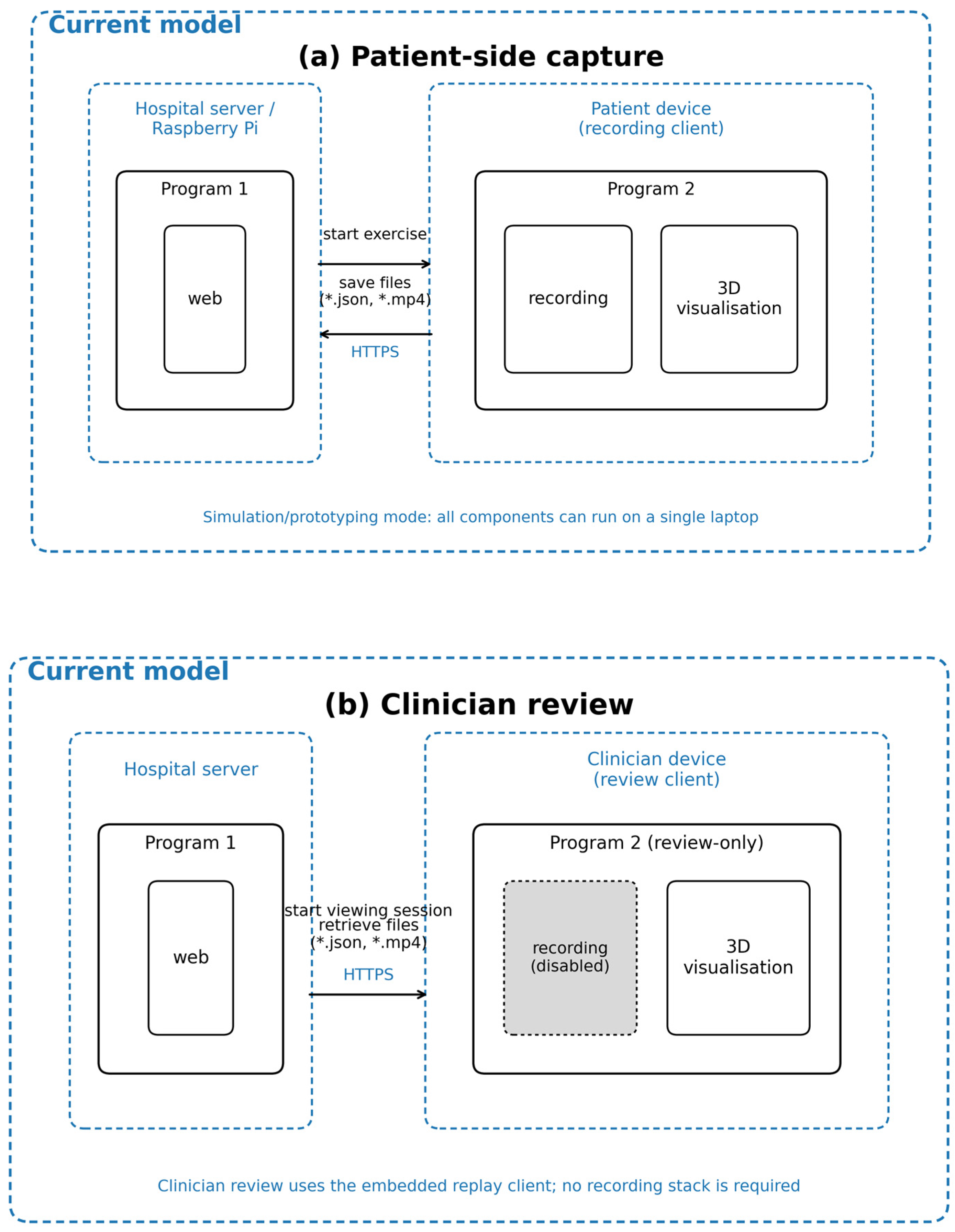
Figure 1 illustrates the current architecture of the telehealth system, implemented as a simulation experiment in which all components typically run on a single laptop. This configuration serves as a development and prototyping environment, allowing for the testing of core functionalities such as exercise scheduling, data recording, and visualisation within a simplified and controlled setting. This approach enables efficient iteration and validation during early-stage development.
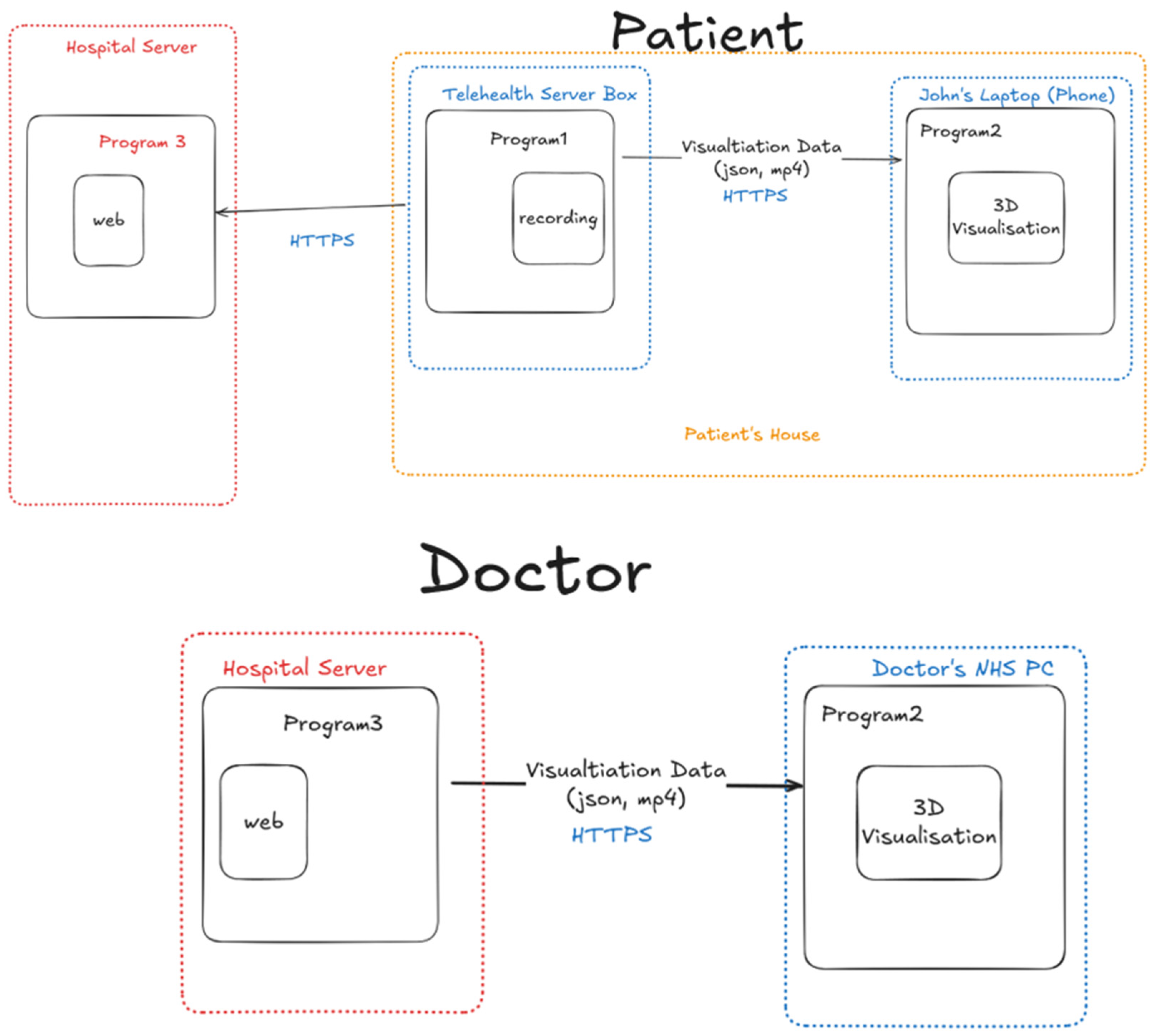
On the patient side, the system architecture comprises a lightweight web server (Program 1), shown in
Figure 1, which can be hosted on a hospital server on a device consisting of Raspberry Pi. This web interface enables patients to initiate an exercise session. Upon starting the session, the system generates data files in JSON and MP4 formats, containing exercise instructions and motion capture data. These files are transmitted securely over the HTTPS protocol to Program 2, which operates on the same local machine. Program 2 incorporates a recording module responsible for capturing motion data in a real-world deployment and a 3D visualisation module, which displays exercises to guide the patient’s performance. For simulation and early-stage prototyping, all components are co-located on a single laptop, with network interactions emulated locally, which streamlines development and testing by requiring only one machine.
In the doctor’s case, the model is adjusted to reflect a review-only role. The hospital server hosts the web application (Program 1), which maintains the central repository where patient exercise data are stored. The doctor (Dr Mo) accesses an embeddable, review-only variant of Program 2 directly within Program 1 via a standard web browser. This variant excludes the recording module, as indicated in the diagram. Exercise session data (JSON and MP4 files) are retrieved from the hospital server over HTTPS and rendered through the 3D visualisation module for clinical review. This configuration supports remote clinical oversight while restricting data modification, helping preserve the integrity of recorded patient information.
Overall, the current model provides a simplified yet functional telehealth environment, enabling developers to validate software and hardware components, workflows, and data transmission mechanisms in a controlled, local setting. While it does not yet include the distributed networking or scalability features required for full deployment, it serves as a robust foundation for future development of centralised or patient-operated systems.
2.1. Requirements-Driven Design
The platform was developed against a set of design requirements derived from common constraints in home-based rehabilitation and from the need to support asynchronous clinical review. These requirements motivate the three-tier architecture in
Figure 1 and guide the separation between patient-facing capture and clinician-facing review:
R1 Asynchronous review: enable clinicians to inspect recorded sessions without requiring synchronous attendance, including replay and inspection controls.
R2 Multimodal capture: support capture of skeletal kinematics and plantar pressure to provide complementary signals for lower limb activity and gait-related tasks.
R3 Role separation and integrity: support a review-only clinician role that restricts modification of patient recordings and reduces the risk of accidental changes.
R4 Low burden deployment: minimise patient side configuration and allow deployment on commodity hardware and constrained network connections.
R5 Portable recording artefacts: store sessions in accessible formats that support replay and later offline analysis.
R6 Extensibility: allow additional sensors or modalities to be integrated through stable interfaces without redesigning the core application.
R7 Secure transfer and access control: use standard secure transport and authentication suitable for remote health data workflows.
2.2. Traceability Matrix
This section provides traceability between the design requirements in
Section 2.1 and the architectural elements in
Figure 1. The purpose is to make explicit how each requirement motivates a component or interaction in the proposed framework. The table references both the architectural location (
Figure 1 and
Section 2) and the section (s) where the corresponding mechanism is described in more detail. Where a requirement is addressed only at the level of architectural intent in the current prototype, this is stated explicitly and treated as future work rather than as a validated claim.
Implementation note:
Table 1 is intended to clarify design rationale and architectural coverage. It does not constitute empirical validation of sensor accuracy, clinical outcomes, or usability, which remain outside the scope of this manuscript.
4. Features
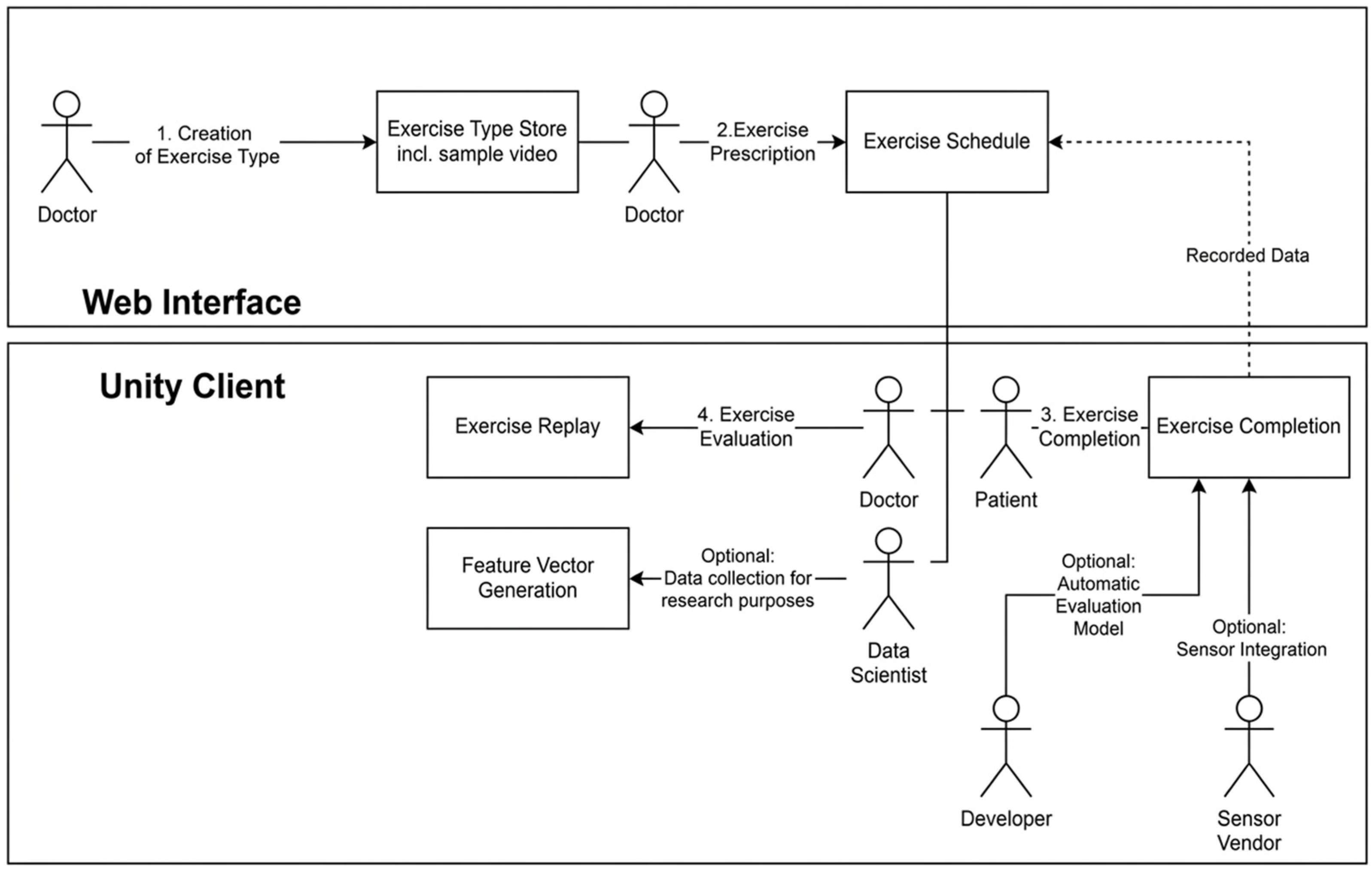
The developed system (
Figure 3) builds upon our previously created web-based exercise scheduling platform and data management interface. While the earlier version was effective in scheduling exercises, tracking patient adherence, and storing sensor data, it lacked direct integration with physical sensors. Instead, it relied on manually uploaded, well-formatted CSV files to generate basic charts, an approach that may be suitable for controlled trials with trained participants but impractical for real-world clinical use. Although this design reduced the complexity of integrating sensor data into the system, it placed a significant burden on users to manage data formatting and transfers. In everyday clinical environments, where care workers are often overstretched and patients may face cognitive or physical challenges to learn complex software systems, such a workflow is not feasible.
The current system addresses these limitations by introducing a modular environment capable of integrating a wide range of sensors. This design shifts the integration burden away from patients and caregivers and places it in the hands of technical specialists such as data scientists who are better equipped to handle these tasks.
4.1. Skeletal Motion Capture
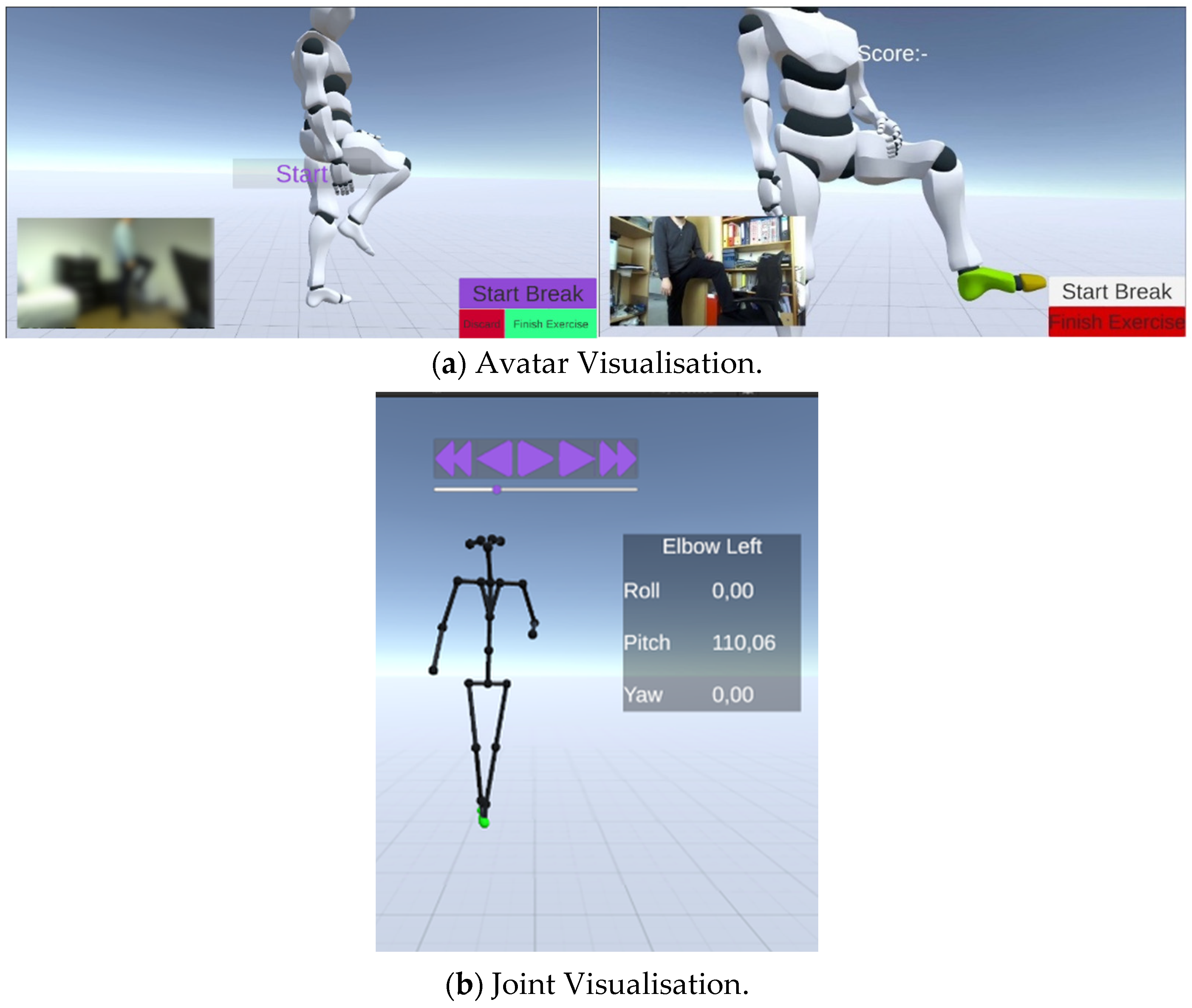
Using Stereolabs motion capture, the patient’s pose (
Figure 4) is captured and streamed in real time, with fidelity determined by the underlying SDK configuration and operating conditions [
21]. There are two modes of visualisation: Avatar and Skeleton. By default, the avatar mode is used. This mode renders a rigged 3D model, with bones animated according to the joint positions. The virtual avatar mirrors the user’s movements, enabling interaction with virtual objects. The system supports a variety of body formats, allowing it to track different joints’ positions and rotations.
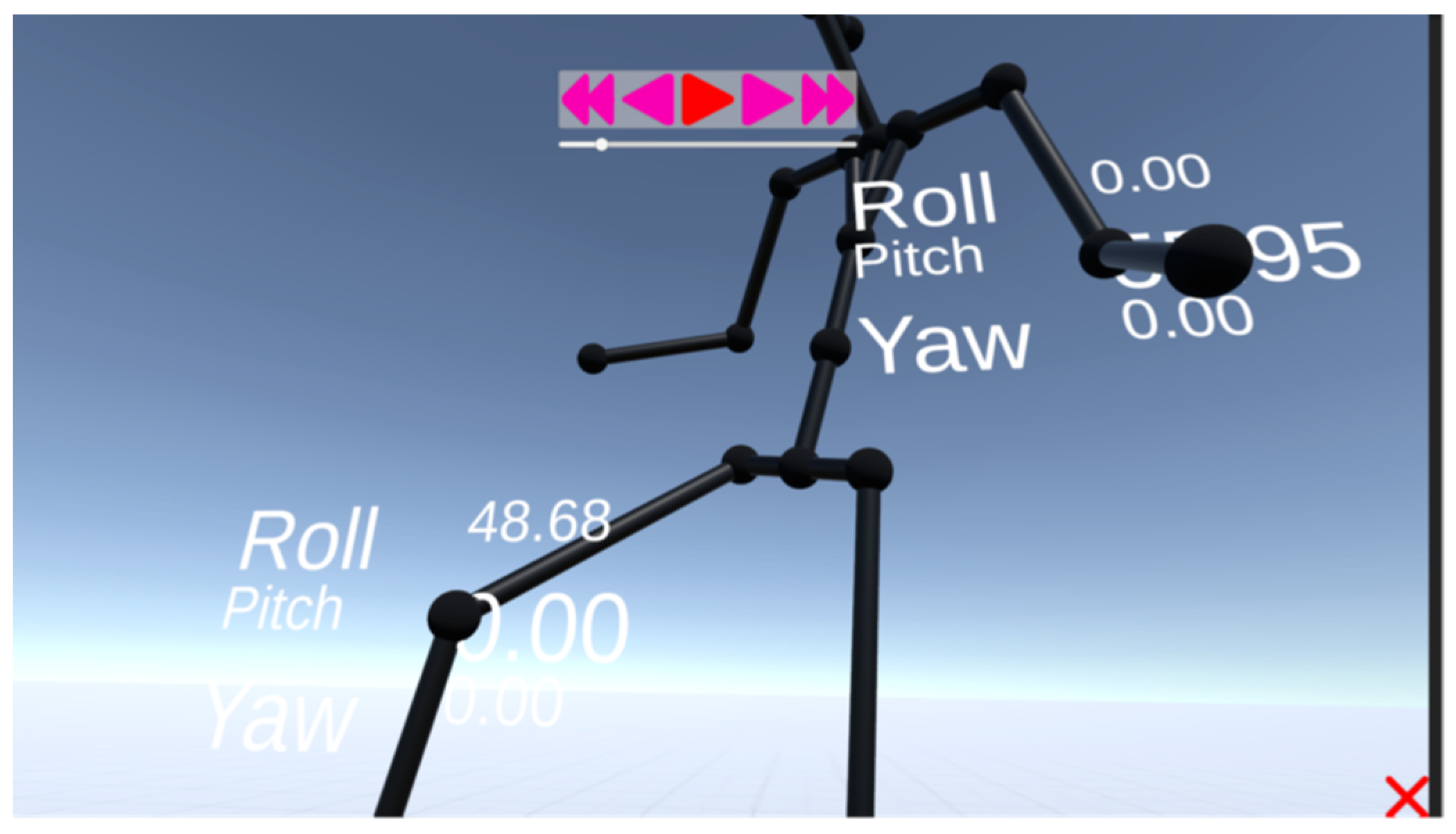
The skeleton mode renders a simple skeleton from spheres and cylinders. Clicking on a joint sphere will display the measured angles in an overlay. This mode is perhaps more helpful for inspection, as it allows the user to see the joint positions without the avatar obscuring them. This rendering logic is taken from Stereolab’s SDK; however, it has been modified to fit with mirror movements. The avatar prefab has modified shaders with custom vertex colours, and the skeleton has joint angle overlays and joint sphere colouring logic.
For convenience, all recognised individuals are displayed, but only the patient’s data are recorded. This enables patients with severe mobility issues to use the software with assistance. Data from aides are not captured, which reduces computational load and minimises data noise. By default, the system identifies the first person to enter the frame as the patient, though this can be adjusted with a simple click.
4.2. Sole Sensors
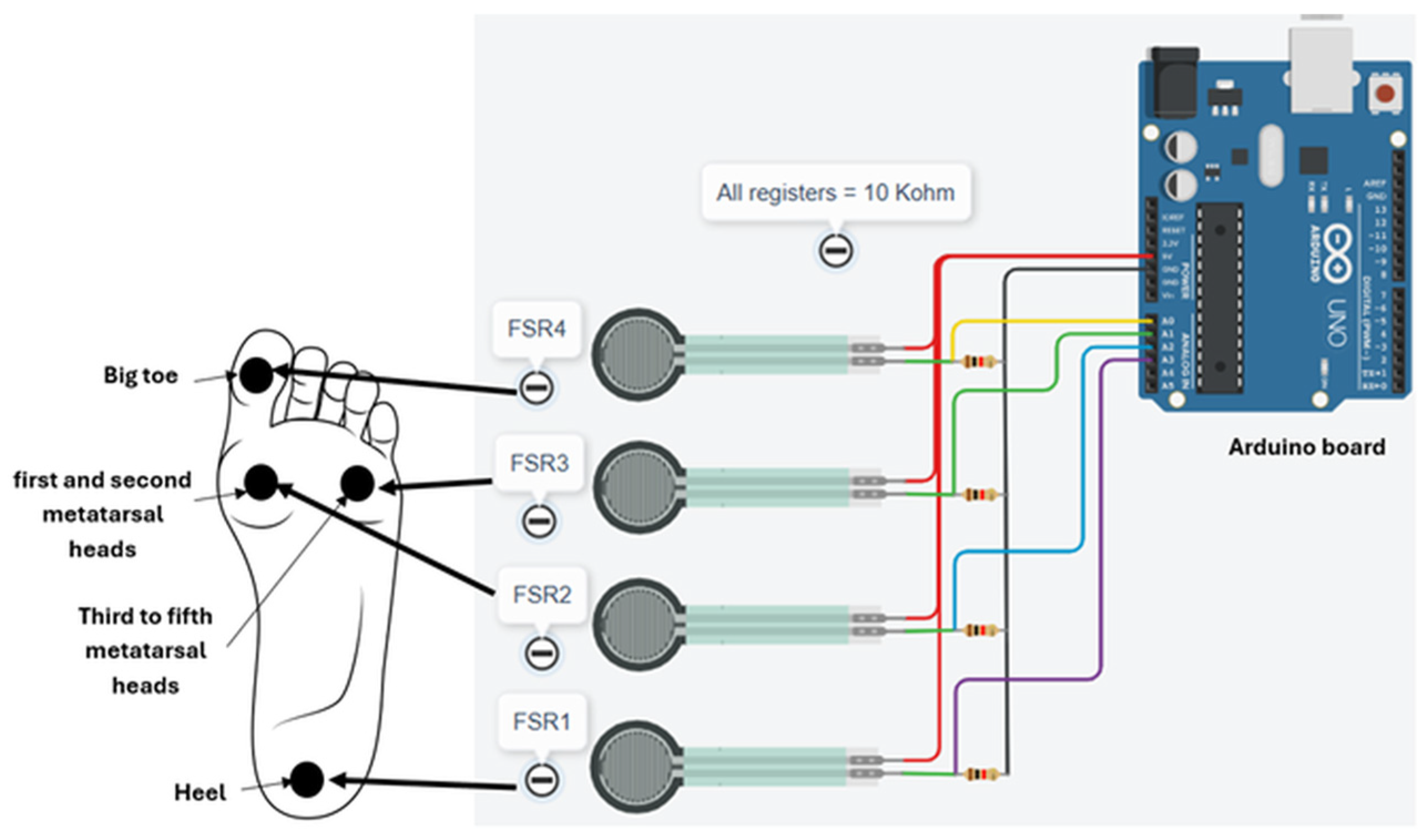
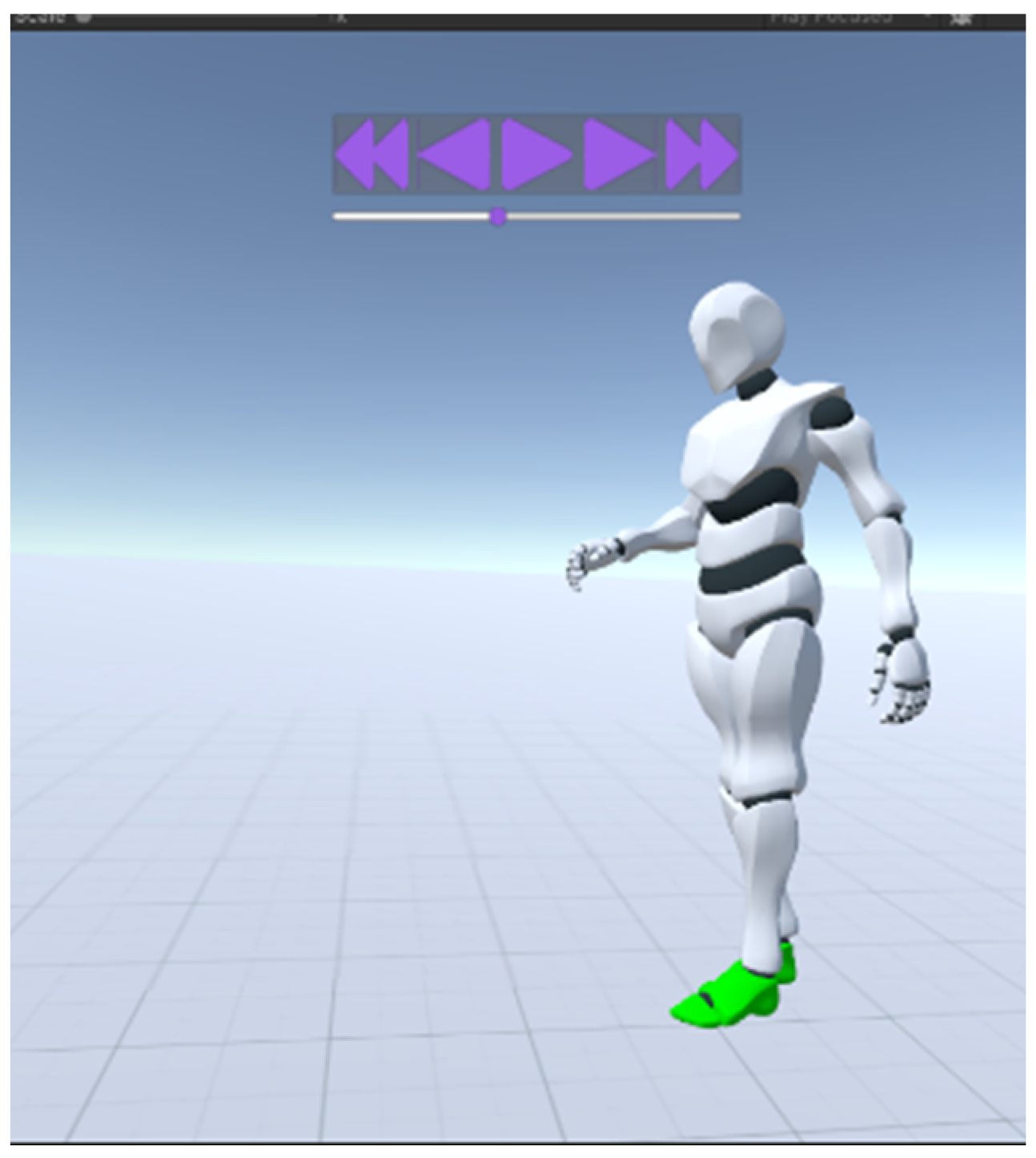
The software architecture is designed for seamless integration of FSR with minimal effort. In this configuration, the avatar’s feet are visually highlighted in real time in response to force measurements from the sensor. This representation can provide more meaningful feedback, particularly for patients, than raw force values alone. Illustrative examples of this functionality are presented in
Figure 5. The data of the FSR are visualised by colouring the avatar’s feet. Setting a vertex’s colour is the easiest way to pass colour information to the avatar model. By default, Unity does not colour meshes by vertex colour. Hence, a reusable shader colouring any mesh by vertex colour is used and is applied to the avatar’s feet through a controller class responsible for determining correct colours based on pressure data.
The force applied to the sensor determines the colour and follows a gradient from green to red. As a human’s perception, both of colours and of gait, is not linear, the gradient is not linear either. It was found that lowering the exponent of to 0.75 seems to yield a good result. In skeleton mode, the spheres representing joints are coloured by adjacent sensors, as no surfaces are available: the bone cylinders are already coloured based on which person they belong to.
As the patient performs an exercise, sensor data are captured periodically. Each consecutive state contains all sensors’ most recent readings, as well as timing information used for reconstruction at playback, necessary due to the non-constant sampling interval caused by resource fluctuations. Quite importantly, the sampling of sensors need not be equal to the capture frequency. In cases where one sensor is faster than another, the slower sensor’s latest readings can be processed alongside newer readings, or an aggregator implementation, can collect and average readings. The latter option is preferred, as repeated copies of old data pollute the input of any further data processing.
4.3. Measurement Customisation
For each exercise, clinicians can specify detailed measurement parameters. Default settings are provided as practical starting points for typical configurations; however, they have not yet been clinically optimised and may be refined through future medical input. The system therefore offers fine-grained control to accommodate scenarios requiring more precise data collection.
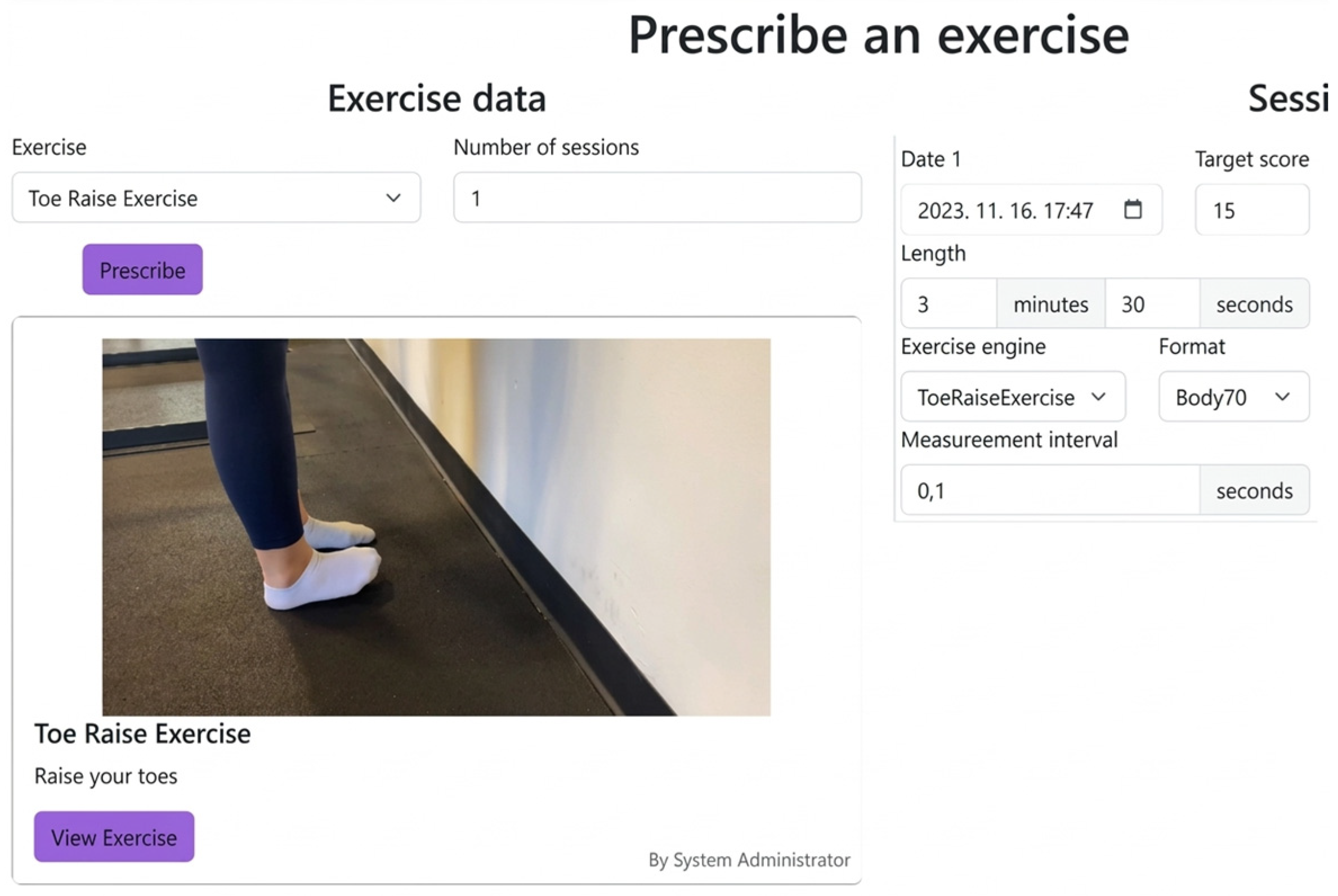
Figure 6 illustrates the therapist interface used to configure recording parameters. Basic settings, such as sampling rate, can be adjusted directly within the interface. More advanced customisations, such as automated scoring algorithms or interactive exercises involving virtual objects (e.g., a virtual leg raise level indicator), require bespoke software extensions. Once implemented, these options can be conveniently accessed by clinicians via a corresponding selector. Fine-grained control enables clinicians to balance between time- and space-wise resolution.
For example, in exercises focusing on a single joint, such as a leg lift, reducing the number of tracked joints decreases the computational load, thereby increasing the achievable sampling rate.
Figure 6 depicts the exercise prescription screen, where therapists configure these measurement details. The time of exercise completion is recorded and synchronised with the web interface, as well as any other schedule-related datapoints such as actual exercise length (compared to the prescribed) and the amount and extent of breaks taken during completion.
4.4. Replay
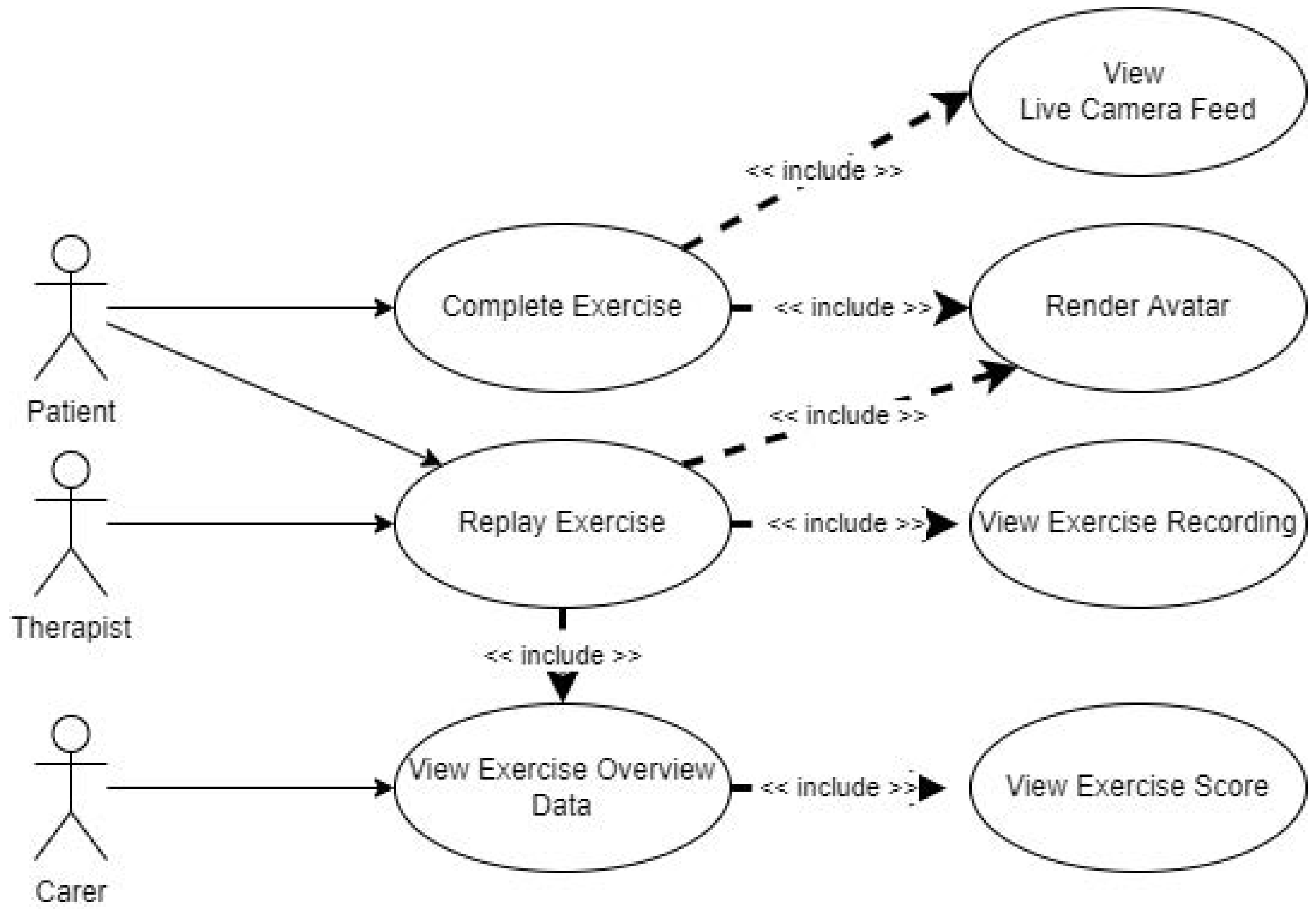
From the web interface, physicians can download captured data and replay the skeletal recording. The reconstructed skeletons’ joint parameters can be read from an overlay, available after clicking on a tracked joint. Furthermore, the observer can move in three dimensions, enabling therapists to view patients from previously unimaginable angles. The replay screen aims to imitate the exercise completion screen, having the same overlays and environments, with skeleton-tracking parts disabled.
While the usability of this visual experience has not yet been evaluated, numerical joint pose values (position and rotation estimates) can be queried on demand by selecting a joint. Because range of motion is commonly a target of rehabilitation programmes, this functionality supports inspection of joint kinematics across recorded sessions.
Figure 7 illustrates the therapist view. The environment is primarily visual and displays numeric values only when explicitly requested. A more detailed view is available by holding the TAB key; the clinical relevance of these absolute values was not evaluated in the current work and is left for future study.
Therapists can download the recorded exercise file from the web interface or initiate the virtual environment directly via the “View exercise” screen. The interface allows for real-time playback of the recorded exercise or step-by-step, slow examination. The patient’s model is examinable from all angles, whilst the virtual skeleton is overlaid on top of the video recording. Viewers can easily jump to a selected state, allowing for a quick skip to relevant sections. Given the included video re-encoder, the exercise’s video is a standard MPEG-4 (mp4) [
29] format, allowing therapists to export and share data with other tooling. This is a departure from the bespoke formats of the camera system, which requires the development kit to be installed, or the impractical AVI container it can export to.
4.5. Patient Recognition
Some patients may have severely impaired movement and may require physical assistance during an exercise. In such cases, the system must identify the patient reliably and restrict data capture to the patient’s motion even when other people are present in the camera view. Although manual subject selection is feasible during setup, it is undesirable to rely on user interaction during the exercise itself, particularly when a helper may be actively supporting the patient. To avoid mid-task interaction, the system selects the first person detected in the camera’s view. If the wrong subject is selected, the misidentified person can leave the frame to clear the selection. If the patient is temporarily lost due to a detection error, the system ignores previously detected people and selects the first newly entering subject, which is likely to be the patient. The selected patient’s skeleton is marked using a unique black colour.
4.6. Breaks
Should the patient require a break, the system can pause the exercise and resume it when they are ready. All sensors stop recording during the break, and the prescribed length is not impacted. Breaks are recorded and displayed on the web interface, but are not included in the exercise score.
4.7. Data Capture for Research Purposes
In addition to the clinical workflow scenarios described above, the data capture pipeline can operate as a stand-alone recording tool. The prototype is designed to support repeated execution of the same exercise across multiple sessions, with participant specific configuration stored alongside each recording. This design may be useful for future ethics-approved studies that require consistent capture conditions across participants or over time. No clinical testing or research data collection is reported in the present manuscript.
4.8. Exercise Completion
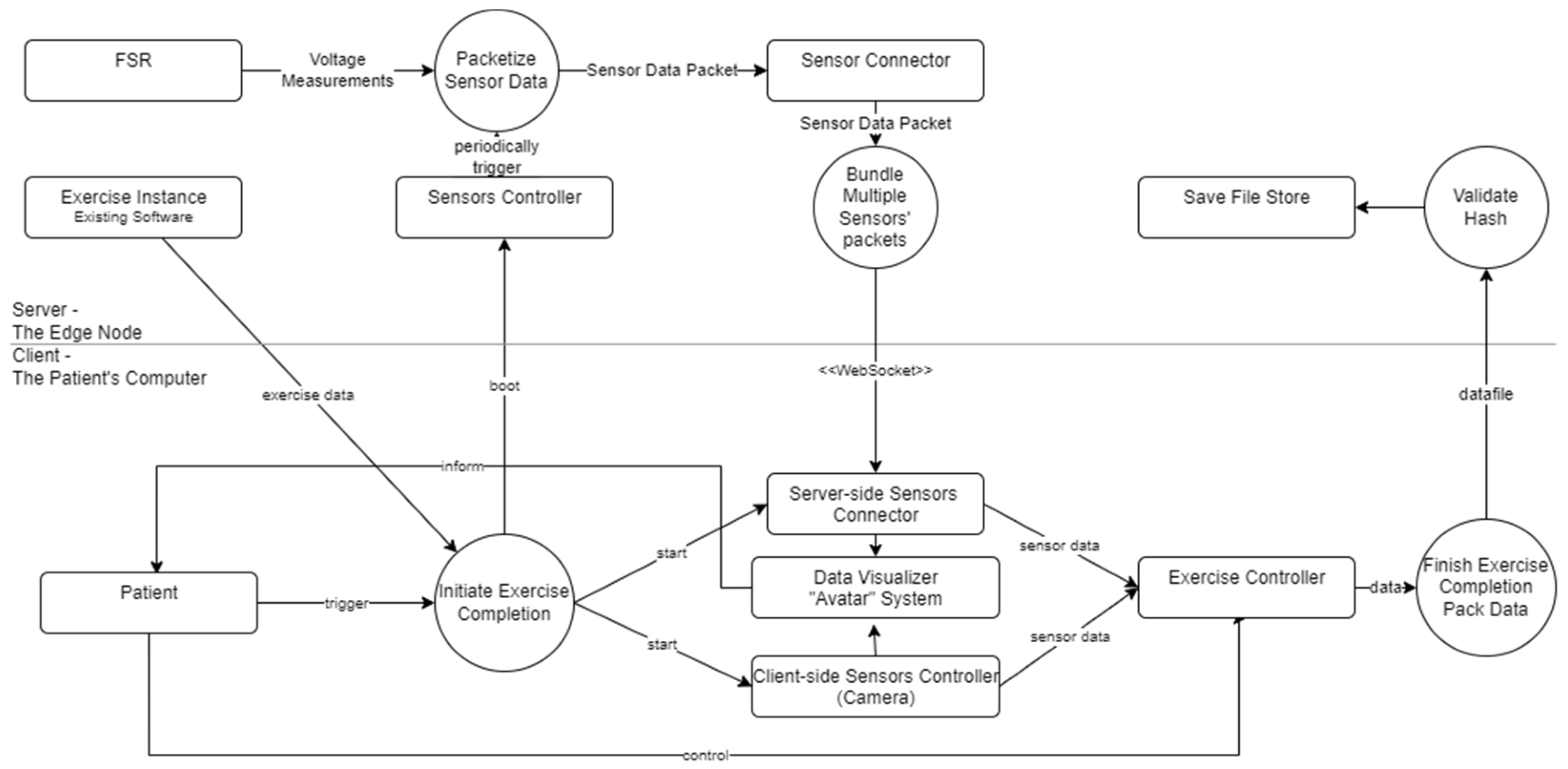
The game is launched by instructions from the administrative application. Because the skeletal tracking runs on the GPU, the game needs to be standalone, with server-side sensor support (
Figure 8). Whilst the saves are handled via a RESTful [
30] Application Programming Interface (API) and a client on the web interface, the sensor data require a continuous connection: This is handled either via the existing WebSocket connection or directly via TCP.
4.9. Deployment
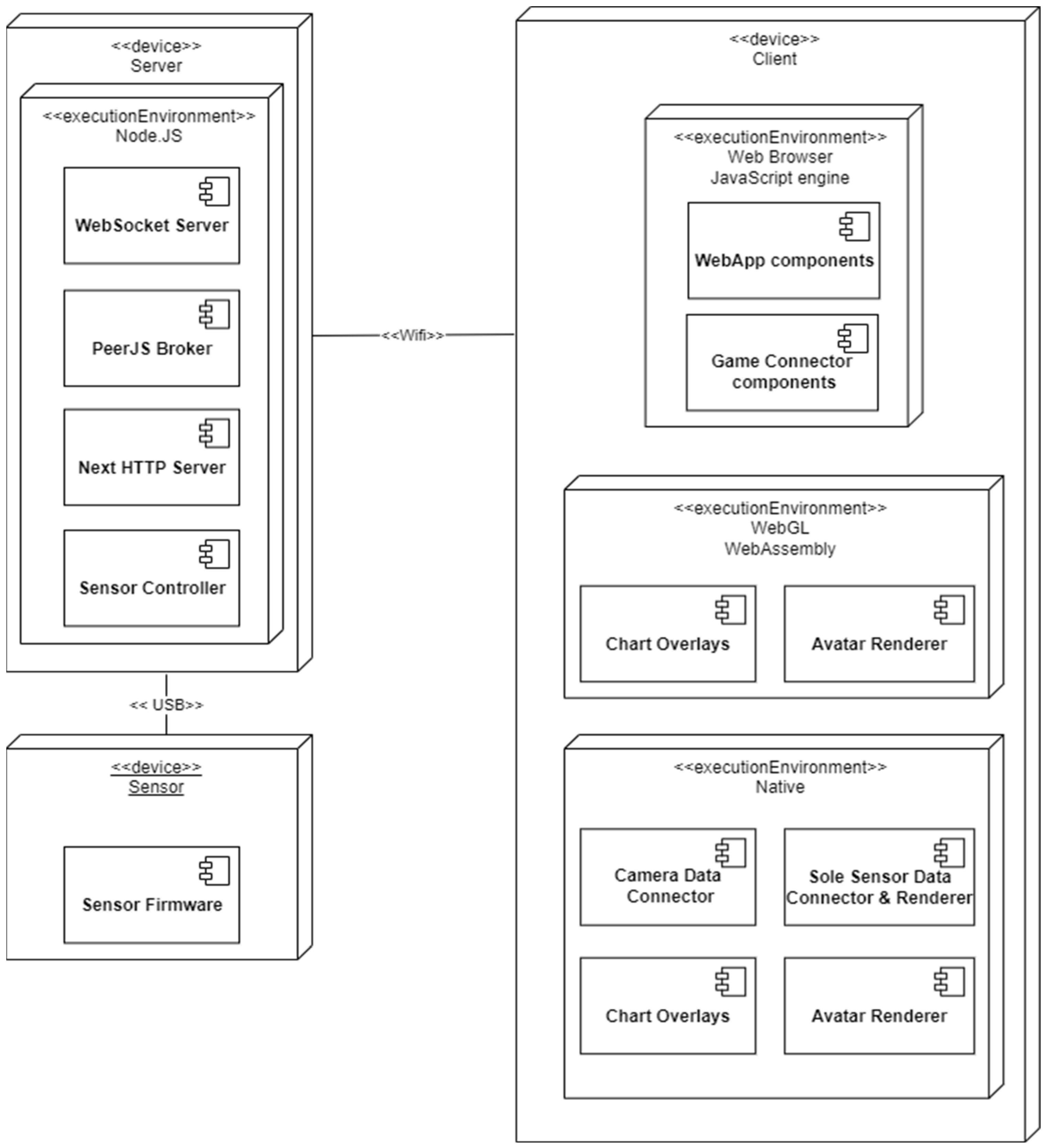
The five fundamental software packages are the sensor firmware, the server application, the recording software, the playback software, and the web application, as shown in
Figure 9. Deploying client-side resources is relatively straightforward: JavaScript components run within a web browser, while exercises can be recorded and reviewed via the native application. The therapist-facing edition is intended to run on all major operating systems. In contrast, the recording and playback applications depend on the Stereolabs SDK, which is readily supported on Windows and also available on Linux, although Linux deployment typically requires additional manual configuration. Given that Windows 10/11 remains the most common target platform for end users [
31], development will prioritise this environment.
The web server is assumed to run on a low-performance Linux device (e.g., a Raspberry Pi), so technology choices are selected to remain compatible with lightweight Linux distributions and limited hardware resources. This baseline does not preclude deployment on higher-performance machines, including Windows systems, when available. Large overhead enterprise tooling is therefore avoided for the core deployment; nevertheless, a Dockerfile is provided to support optional containerised deployment and reduce setup effort.
Operational workflow in the current prototype can be summarised as (1) clinician schedules and configures an exercise in the web interface, (2) patient initiates the session and the native recording client is launched, (3) motion capture and sensor streams are recorded and stored as JSON and MP4 artefacts, (4) artefacts are uploaded to the repository, and (5) clinician reviews the session via the embedded replay client.
Security and Data Protection Considerations
The system handles sensitive rehabilitation recordings, including video, derived kinematics, schedules, and clinician notes. In the current prototype, data in transit are transferred over HTTPS (TLS) and access to stored artefacts is gated by authenticated sessions. On the server side, storage directories containing patient data are isolated via filesystem permissions and encrypted at rest; administrative access is restricted to system administrators, while clinical staff access is limited to authorised application functions. The prototype is not presented as a certified medical device or as compliant with a specific regulatory framework; deployment in clinical settings would require institutional security review, audit logging, and integration with established identity and access management.
5. Backend Technical Architecture
The tracking framework (
Figure 10), being installed on other devices, should be minimised as much as possible: every additional dependency and task increases the already demanding requirements imposed on the patients’ computers. Besides the actual sensor integration, all new features are included within the replay functionality. Isolating the most complex element, the sensor integration considerably enhances the development experience: it causes less confusion to think of this as a separate sub-project during early phases. The web interface uses Next.js [
32] to provide a React [
33] application. Having requirements such as a live video feed, creating the package without an external framework would be a daunting task, resulting in a chaotic and unmaintainable codebase. Due to its popularity and the large community, React is a good choice for a project of this scale. Other frameworks, such as Svelte [
34], Vue.js [
35], and Angular [
36], are also viable options. React was chosen due to the author’s familiarity with its package ecosystem.
As the application is not SEO critical, performance concessions can be made. One of the most prevalent features of today’s web applications is server-side rendering. This improves search engine results, as most cannot execute JavaScript. However, this is no concern: the application is a local device management tool. This is important to specify, as executing React on the server side is non-trivial, requiring a JavaScript engine, such as V8 [
37]. Whilst all technologies provide this in some form, past experiences with PHP’s v8 extension discourage the author from using it.
Having determined that, from the React perspective, any server arrangement is satisfactory, the need for both WebSocket and WebRTC servers and easy access to peripheries is considered. In this regard, no current ecosystem is more suitable than JavaScript. The only language usable on all sides, its Node.js implementation [
38], was chosen as the main runtime. The Express framework [
39] is the most popular for Node web applications. Yet Next.js, a framework specially designed for React, provides greater convenience, such as file-based routing.
Prisma [
40] is used as the ORM, providing a convenient and safe way to interact with the database. Having excellent support for TypeScript, datatypes are enforced directly at compile time from the database schema, thereby reducing the risk of errors. Its middleware is used frequently to provide file management and security features, intercepting queries and hiding the complexity of these operations from the rest of the application.
5.1. The Patient’s Progress
The web interface allows users to track their advancements. The user is presented with statistics for the most recent exercises shown. For each exercise type, a paginated list of instances is displayed. These statistics include the minimum, average, and maximum scores achieved and are displayed separately for recent and selected completions. Selecting a specific page in the paginated list of instances allows for a more detailed statistical analysis. Under the hood, Vercel’s SWR [
41] library and custom API handlers fetch and cache the data in line with the stale-while-revalidate architecture [
42], allowing for a smooth user experience. A line chart aids in visualising the patient’s progress, showing both the target score set by the therapists and the achieved result. Using the excellent Chart.js [
43] and its React integration, the chart is interactive, allowing for exact reading of the score at any point in time. The prescribing therapist can manually enter the score for exercises not scored automatically. This is carried out by clicking the “Edit” button on the instance’s overview page.
5.2. Data Flow
For transmission, WSS provides message encryption with little extra configuration and works well with HTTP, required due to the sensitive nature of passwords and other transmitted information. Considering two insoles with two FSRs each, four bytes are created at each measurement. Even including timestamps and some metadata structure, these would be small packets. Whilst the WS’s overhead at these packet sizes is relatively high [
31], given assumed gigabit local network speeds provided by most “full fibre” providers’ home units in the UK, this is not a major concern: with 200 samples per second, this would mean less than 3 kb plus a HTTP handshake worth of additional headers compared to a raw TCP socket. Still, a client-side option to use TCP directly is available and should be considered for future development. Whilst its current implementation lacks encryption, the local nature of the traffic and the fact that it contains purely sensor read bytes make this a minor concern. A potential attacker would simultaneously need extensive knowledge of the project and infiltrate the user’s home network, which is an improbable scenario. Even then, encrypting the data would be a simple matter of adding a TLS layer to the TCP socket.
5.3. Scoring
Data processing and evaluation could happen on the server computer during downtime (the device is kept under power, despite being idle). There would be enough computational capacity overnight, but the patient is likely to turn off the device after use. As such, the data processing and evaluation were implemented on the client’s computer and evaluated in real time. A final score is calculated as a carry value, amassed throughout the session. Storing intermediary, real-time scores would inflate file sizes, but would allow data to be visualised on the web interface. Given that therapists are likely to be interested in further data when looking for mid-task feedback, scoring on the client is the better option. It allows therapists to tweak the scoring algorithm to their liking and supports real-time feedback within the prototype.
Data processing and evaluation can be performed either on the server during idle periods or on the client during the exercise session. Although server-side processing may be feasible overnight, in-home settings allow the patient to power down the device after use. For this reason, the current prototype computes scores on the client in real time.
If a session is sampled at times , let denote the vector of extracted features at time , derived from the captured joint poses (and, where relevant, plantar sensor readings). For each exercise , the scoring logic defines a set of feature functions and corresponding acceptance bands or thresholds. Each function extracts a clinically relevant performance metric from the feature vector. Examples include joint angle magnitude (range of motion), applied pressure, movement phase for repetition detection, or elapsed time.
Each feature is mapped to a bounded penalty
, where
indicates acceptable performance at time
and
indicates maximal deviation under the chosen criterion. The session maintains a running carry value updated per time step, as shown in Equation (3):
where
for all feature weights
The weights determine the relative importance of each performance criterion (e.g., range of motion, repetition accuracy, force control, or duration).
After
samples, the final normalised score for exercise
is shown in Equation (4):
This formulation corresponds to a normalised time-average weighted deviation measure, scaled to the interval . Sustained deviations result in larger accumulated penalties and therefore lower final scores.
In the current prototype, the choice of features, thresholds, and weights is configurable to allow clinicians to adapt scoring behaviour to exercise type and patient context. The scoring mechanism is included to support real-time feedback and to demonstrate analytics readiness; it is not presented as clinically validated, and no quantitative accuracy or effectiveness evaluation is reported. Storing intermediate per-frame scores would increase recording file size but could enable richer visualisation within the web interface. For this reason, the prototype stores the final score and relevant session artefacts, while maintaining the carry value during execution.
5.4. Exercise
The system supports rehabilitation routines satisfying the contract of the
IExercise interface. An abstract
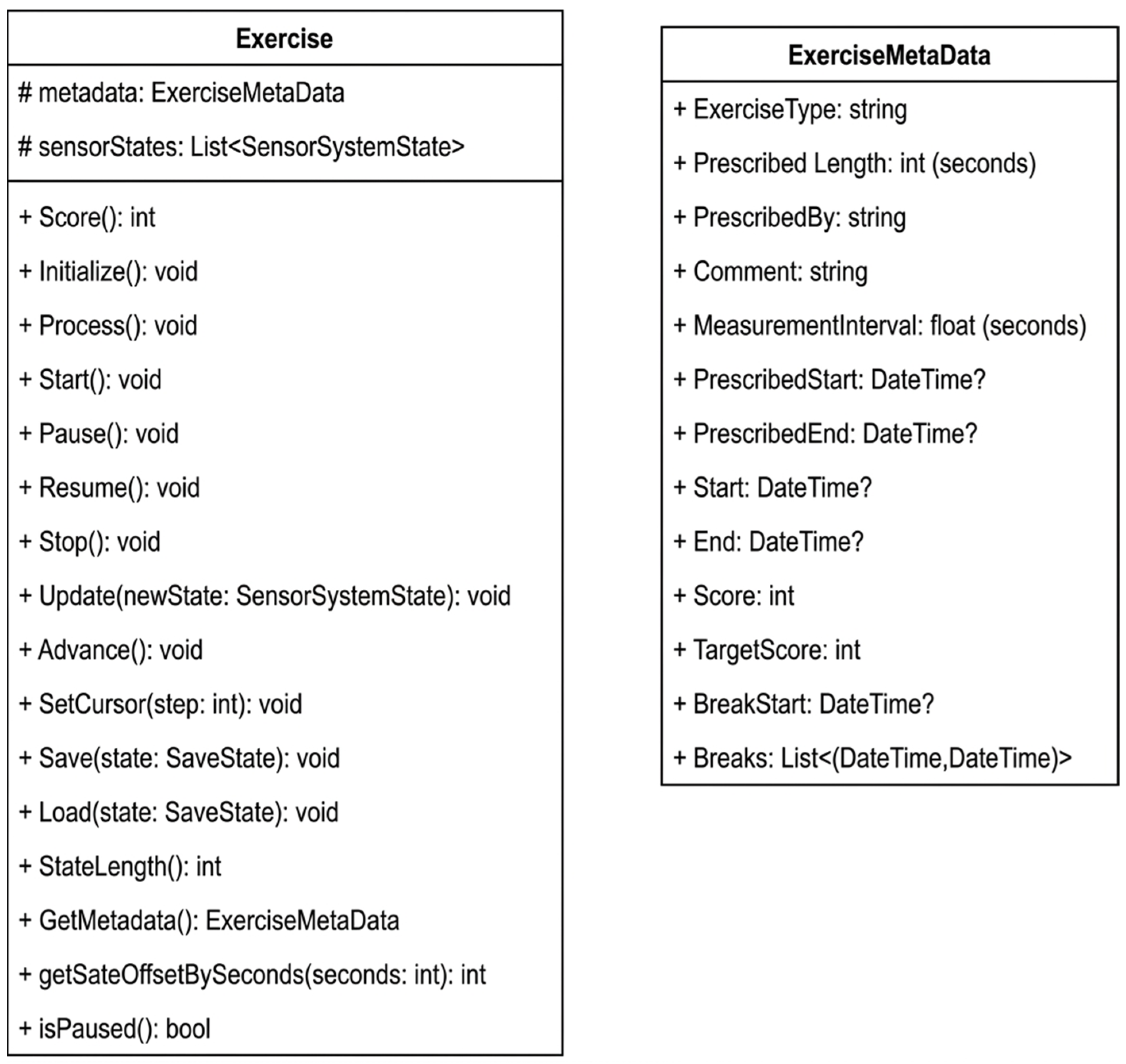
Exercise class (
Figure 11) provides the basic functionality. Whilst some elements violate Liskov’s Substitution Principle to ease the implementation of tasks via the abstract superclass, explicit type checks ensure type safety. New, non-conforming activities can be added by implementing the interface without utilising any prior code.
5.5. Save Files
The ZED camera can record video and sensor data at the same time. However, the proprietary format is highly impractical for the end user. It is hard to access the embedded video, and the raw sensor data are entirely unusable. Thus, two separate files need to be created: a video output and a sensor data file. The latter can contain processed data and metadata about the instance, such as the prescriber’s name, comments, and scheduled completion.
The file itself contains serialised objects from the tracker application. Text-based formats are incredibly versatile, allowing easy external access: standalone processing applications can process output without needing a manual detailing a binary file’s contents. Experimentation yielded that with a measurement interval of 0.1 s, even a ten-minute session produces a file of less than 1 GB. Thus, the initial idea of binary serialisation was dropped. Besides having significantly less padding than an XML file, JSON files are effortlessly usable in JavaScript environments. Consequently, this format was chosen for storage. Having a text-serialised file is incredibly prone to modification. Even though it can safely be assumed that the patients have no intention or skill to tamper with their results, a validation hash has been added to further authenticity. The two salts are kept secret, known only by the Unity Application and the web server. The hash is calculated as follows:
5.6. Video Recording Issues
The Stereolabs Unity plugin exposes recording functionality via the ZedCamera class. In principle, recordings can be exported either in the proprietary SVO container or in a standard container format such as AVI. The documentation indicates that the output format is inferred from the filename; however, in our environment, this mechanism did not behave as expected. Although ZedCamera provides an AVI export path, the plugin’s ZedManager implementation triggered an SVOError during export, and the available error reporting did not allow the failure mode to be diagnosed directly. Step debugging suggested that the error arises in the attachment and loading mechanism used for precompiled SDK utilities.
A full rewrite of ZedManager was not feasible within the scope of this project. As a practical workaround, the prototype supports exporting a standard MP4 recording via re-encoding for replay and review. Resolving the AVI export issue through an updated SDK/plugin version or an alternative capture pipeline is an engineering requirement for operational deployment and is treated as future work rather than as a validated clinical capability.
5.7. Skeleton Tracking
The ZED SDK is reasonably straightforward alongside the Unity plugin. The SDK returns three-dimensional joint positions: connecting these with straight lines will create the skeleton of the virtual avatar. Calculating joint angles from these points is crucial: from angles over time, acceleration can be computed, and angle differences permit simple limit-based scoring. Once the patient surpasses the target angle, they get a ‘point”. These simple criteria are included to demonstrate the integration path for exercise-specific evaluation logic; they are not presented as clinically optimised or validated indicators.
5.8. FSR and Other Sensors
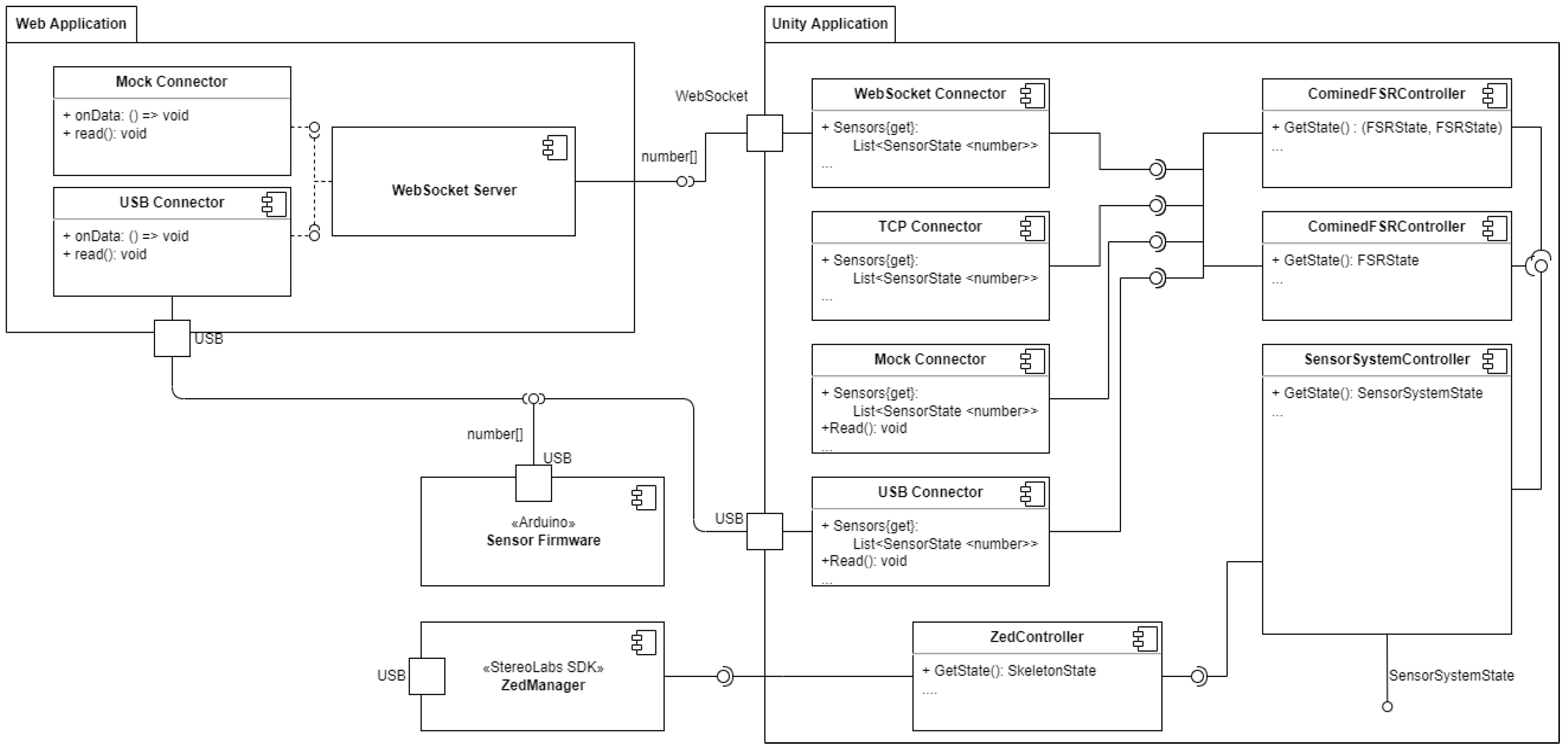
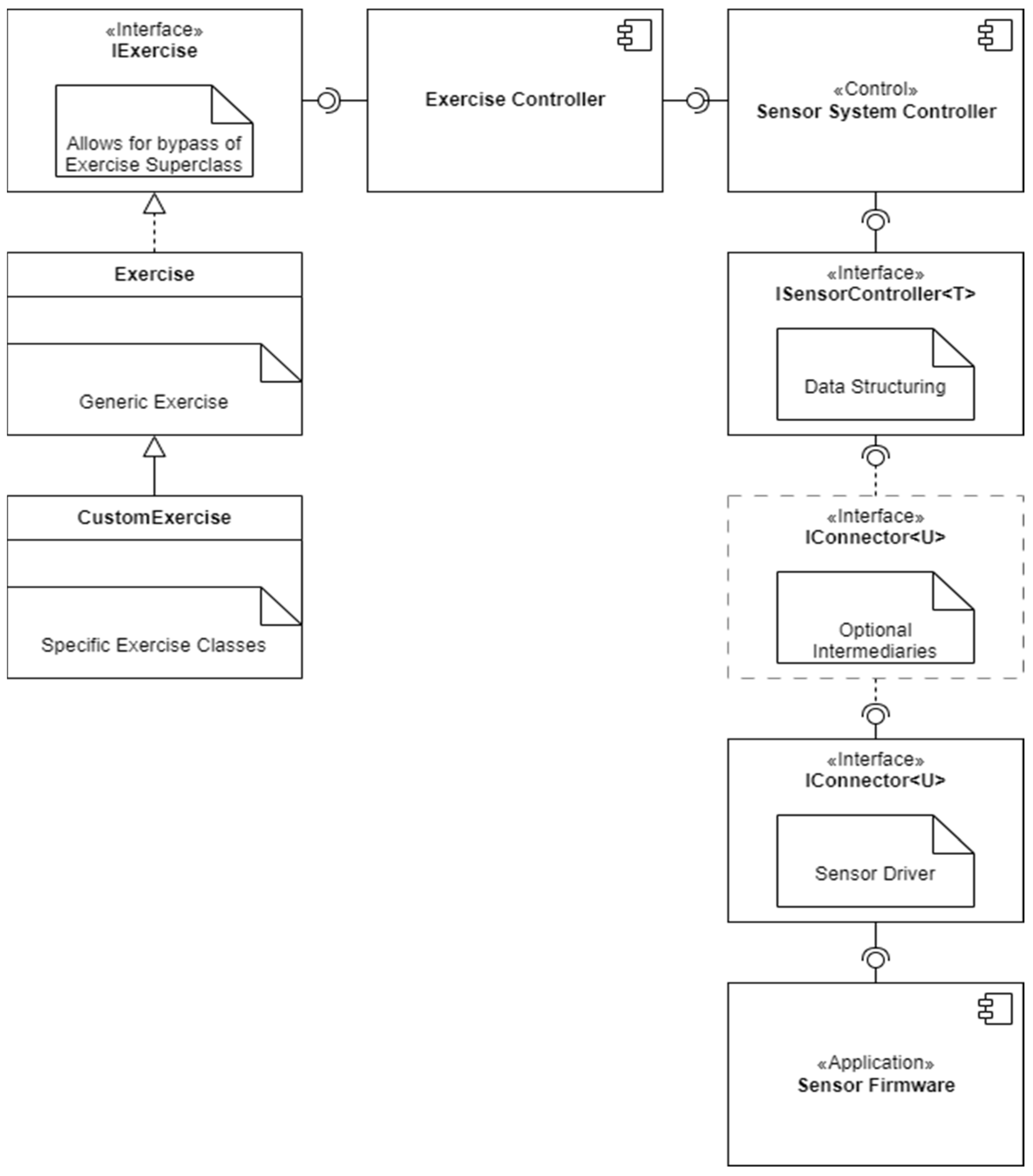
Whilst planning the sensor architecture, extendibility, clarity, and maintainability were key concerns. Following the dependency inversion principle, connection to sources is provided exclusively via interfaces. This allows for easy extension and replacement of sensors. The composition is divided into the firmware, sensor connectors and controllers. All are capable of independent operation and are not reliant on each other’s specifics. Following SOLID principles allows for an easier comprehensible component network and segregates upkeep responsibilities (
Figure 12). The sensor firmware reads the voltage on the resistors as a ten-bit value (0–1023). It then converts it to a byte range (0–255) value and sends it to the server via USB. To avoid flooding, sensor connectors will request data from the sensors at regular intervals. In this case, the sensor responds to an “r” character received through the serial interface.
5.9. Connectors
Connectors are tasked mainly with I/O. They are responsible for connecting to external devices and reading their data in a sensor-agnostic way. Not to be confused with the Sensor Hub’s connector component, client-side connectors are responsible for converting data streams into directly usable information. In the case of the WS and TCP connectors, this involves connecting to the Sensor Hub and reading streams from the server-side FSR connector. The
IConnector<SensorSate<T>> interface.
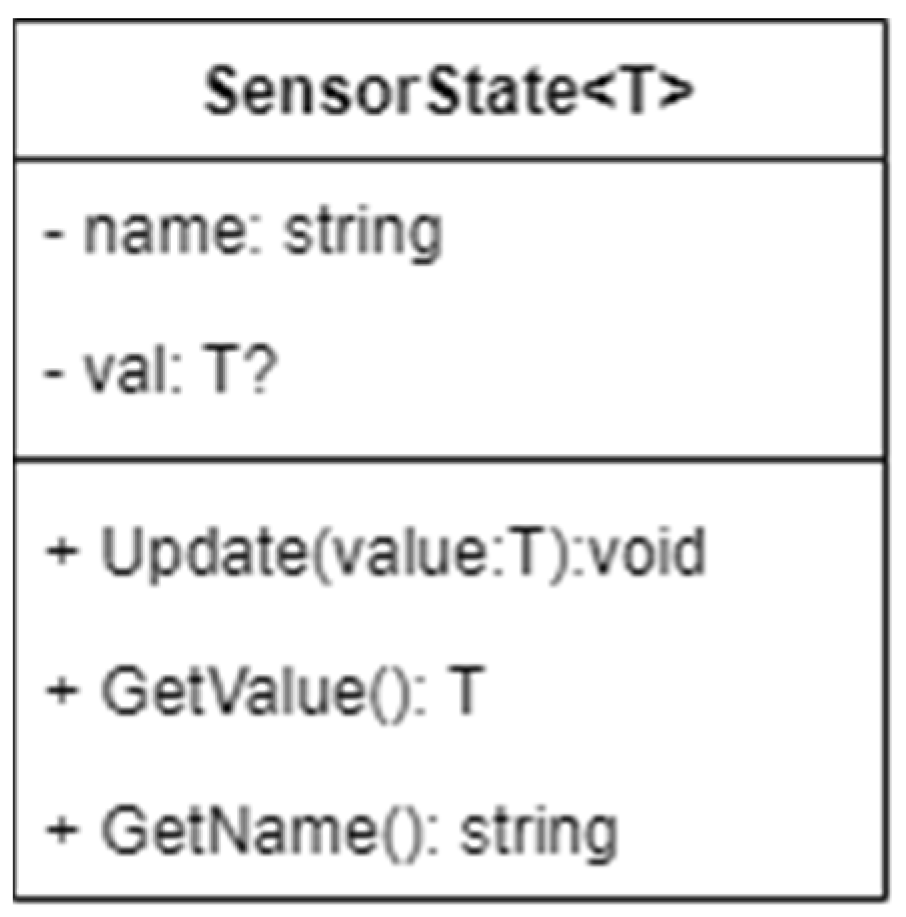
SensorState<T> temporarily stores the sensor’s raw state (
Figure 13), with name information. Whilst this is currently not utilised, as all sensor data are numeric (more specifically integer), should a proprietary binary format be used, parsing the data is easily supported by overriding the
Update and
GetValue methods: a new overload of
Update accepting the raw data, with
GetValue initiating processing when called.
A direct USB connector is included, allowing a complete bypass of the Sensor Hub. This is useful for debugging purposes, as it allows the client to connect directly to the FSR sensor. It is also helpful for real-world environments, as it allows the software to be used without lending a device to a patient.
5.10. Controllers
The controller classes are responsible for processing data from the sensors. They are tasked with converting raw sensor readings, as produced by the connector, into meaningful information. The
IController<T> generic interface, which all controllers must implement (
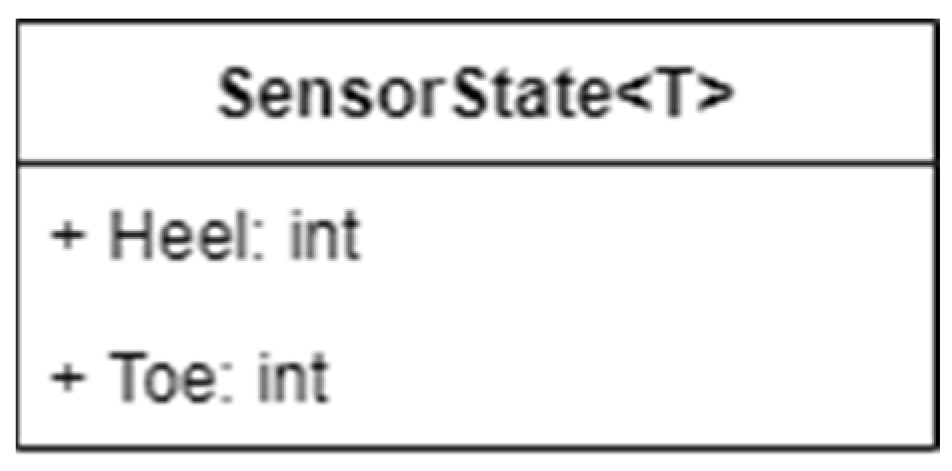
Figure 14), lays down the maximum functionality other classes can expect from a controller. Its type of parameter T is the type of data the controller will produce. It is expected that these will be custom, serializable classes containing the processed information. For example, a controller for the FSR will convert the raw sensor integer array into a pair of
FSRState objects, each containing the measured pressure in a human-readable format. These data are passed to all components using pressure measurements, such as the avatar’s feet colourer.
For the FSR, two controllers are provided: whilst the FSRController is a single-foot implementation, the CombinedFSRController provides a single controller for both feet. Changing from one Arduino to a two-Arduino setup is as simple as changing the controller. With a production-ready insole, wireless communication will allow for separate, battery-powered built-in microcontrollers.
6. Seamless Integration Between Platforms
The system supports deep linking [
44], negating the need to download and upload files manually (
Figure 15). Via a custom protocol, systems handle exercise URLs not as HTTP resources, but as command-line arguments to the exercise completion client. The implemented link contents remain URL conformant, improving readability. This requires a more involved setup process on the users’ computers but is easily achievable through an installer.
Afterwards, the recording can be launched from the website with one click. Behind the scenes, the file download and upload processes are identical, as only the configuration data required to find the remote server is passed via the deep-linked URL. A revokable API key infrastructure allows for greater security, as the links themselves do not contain any sensitive information and only transfer the key and host information.
Figure 15 shows the data flow typical exercise completion from the user’s perspective. In the boundary between the two platforms, the dashed line indicates simple file uploads, whilst the solid line demonstrates the capabilities of the deeplink handler.
6.1. Exercising
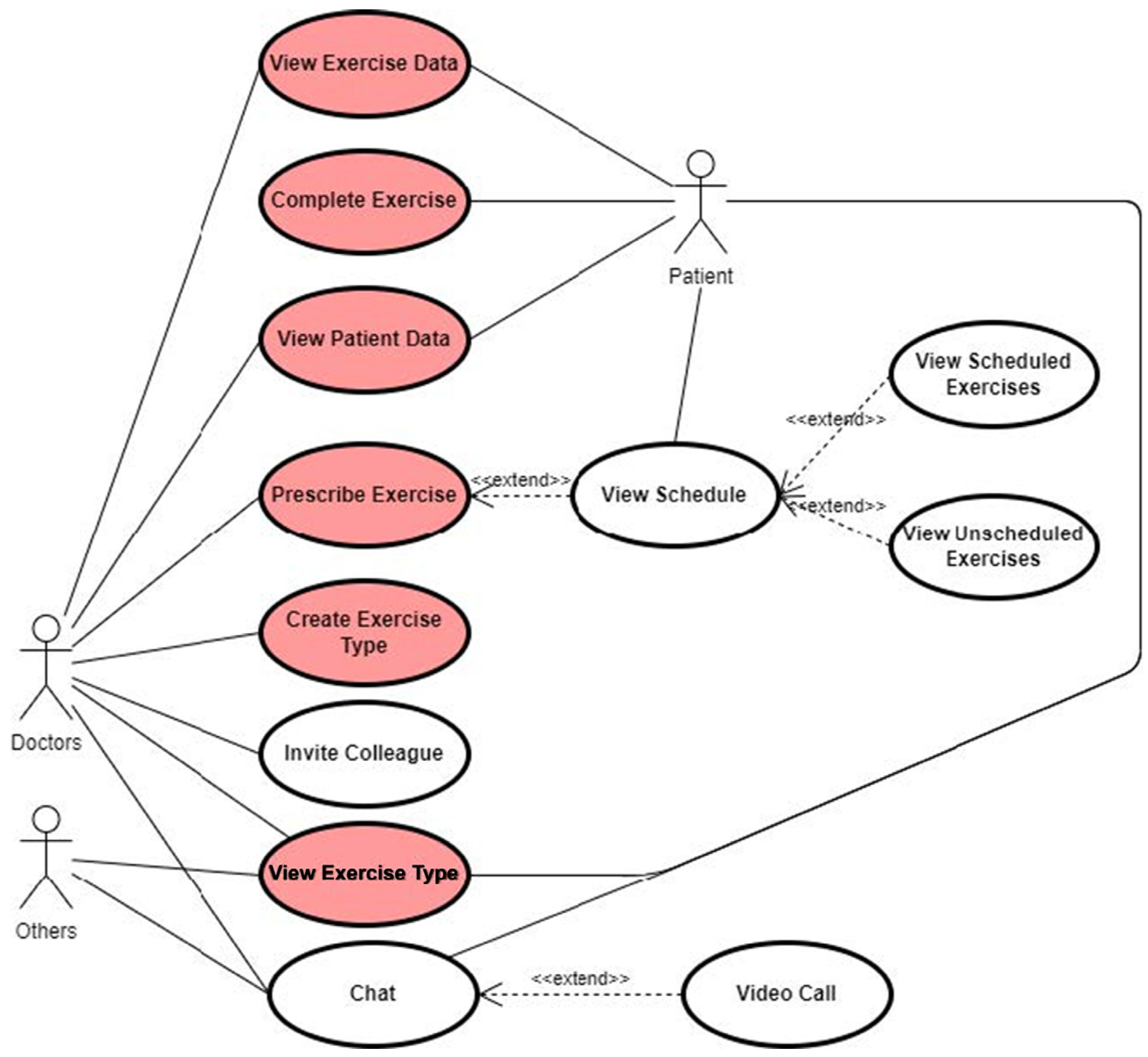
After logging in to the web interface, the patient is able to see their exercise schedule. They may opt to complete so-called unscheduled exercises, which are prescribed to be completed at the patient’s convenience. Alternatively, if a scheduled exercise is due, they can start that instance. The exercise setup screen contains all the information necessary to bootstrap the recording application. In case they opened the page on a machine on which the local client is installed, clicking the complete button will automatically open and configure their instance, connecting it to remote sensors and downloading the necessary instruction file. Alternatively, they can download the instruction file directly.
Importantly, the deeplink starting the recording does not contain any information about the prescribed exercise, besides its unique identifier. The URL only contains data necessary to identify the remote host, with the client application automatically fetching and loading the exercise instruction file. It is worth noting that this does not bypass authentication. The deeplink includes a short expiry API key, which allows the client to access otherwise hidden exercise information. The exercise instruction file contains all the information necessary to initiate an exercise completion. From the prescribed sampling interval to the optional use of bespoke exercise implementations, this JSON file is deserialised directly into the local client’s internal exercise representation.
After the necessary systems are initialised, the patient can click the start button to start the data recording. Taking breaks is supported for storage saving; the data recording fully stops. Each break is recorded and represented in the resulting file, which can be used to judge the patient’s ability and adjust prescribed repetitions and exercise length accordingly. If the session was initiated directly by the web interface, the passed configuration data allow for automatic upload to the remote host. After a successful upload, all local data are cleaned up. Otherwise, the patient is instructed to manually upload the file to the remote host.
The settings menu allows for configuring sensor access constants. From the remote host’s IP address to the sole sensors’ connection type, the user can fully customise the used sensor architecture. Usually, there is no need to change anything, as the default settings alongside the web interface’s instructions should be sufficient for home use. However, this facilitates development and mass data capture use cases, where the required architecture may be non-standard.
6.2. Software Architecture
Sensors are implemented via an MVC architecture. The sensors model (ISensor) is responsible for storing and formatting the sensors’ latest raw output in a usable format. The model can be queried to retrieve the most recent reading and can be instructed to initiate a new read operation. Sensors which have continuous independent output can simply implement a method stub; however, this should be avoided in cases where possible, to minimise resource usage. For example, the sole sensor only reads data when triggered over the serial bus. On the other hand, the ZED camera creates a new reading whenever it finishes its internal calculations.
Controllers are responsible for initiating polling and obeying the parent controller’s instructions. In practice, the SensorSystemController issues periodic sensor read and data retrieval operations and instantiates the child controllers. A controller is different from a model, as it may direct multiple sensors; for example, the insole sensor’s controller is responsible for two separate instances of an identical sensor stack. The view is responsible for visually representing the recorded data. Views are the engine’s MonoBehaviours, interacting directly with the virtual representation. To aid further development, colouring shaders for the 3D model have been provided, enabling trivial colour-based feedback implementations.
The ExerciseController is responsible for data capture. It periodically polls the SensorSystemController and writes recorded data to a linked list of states. It is also responsible for loading exercises (implementing IExercise and/or inheriting from Exercise), which may contain exercise-specific code. This allows for bespoke evaluation systems as well as gamification on certain, well-defined rehabilitation tasks.
Periodically, the captured data are written to disk, preserving partial exercises in case of a system crash. Currently, exercise continuation is not permitted due to a lack of implementation and anti-tampering reasons. The integrity of the created data file can be verified via a provided SHA256 hash, calculated at the end of exercise completion. As the hash parameter’s definition is provided in the software documentation, it is easy to verify even in cases of bulk processing.
The playback stack bypasses the controller and model implementation, interacting directly with the View layer. As none of the other code is required, the ReplayController effectively puppeteers the view layer to render the exercise’s visual representation. This is advantageous as it enables corresponding dependencies to be dropped, but this significantly increases the maintenance burden. Each visualisation change needs to be implemented both in terms of live data representation as well as the recorded state render. Furthermore, as the model is directly represented in the view, the separate implementation allows for the recording implementation to represent the latest sensor data, instead of the latest recorded state, reducing latency significantly.
6.3. Modularity
The project’s modularity is a major strength of its design. Whilst primarily developed with a web interface-controlled sensor hub in mind, it is completely capable of running standalone, recording directly within the client device. The resulting files are standard file formats and can easily be analysed externally.
The web application alone can be utilised to a great extent to handle therapy schedules. Its single-tenant architecture, whilst ensuring a high degree of security, limits its scalability. A hospital with multiple patients would require multiple web application instances. However, this is relatively easy to achieve due to the benefits of containerisation. Even within its independent software components, this modularity allows for a plethora of configuration options. Depicted in
Figure 16 are the various means of connecting the FSR with the connector-controller architecture. Adding a new sensor type is as simple as satisfying an interface and utilising existing input implementations. This allows for a wide range of possible configurations and real-world scenarios. With little medical input thus far, the project was developed with a versatile feature set, ensuring practicality in nearly any scenario.
6.4. Usability
Parts of the software remain relatively difficult to setup and require substantial manual configuration. In a clinical deployment, this setup would typically be performed by a system administrator. The interface is designed to minimise the number of steps required for patients to initiate sessions and for clinicians to review recordings; however, usability has not been evaluated in this work and requires formal assessment in a clinical test environment. Visual design could be improved through standardised icons and colour choices, but this was not prioritised during prototyping given the breadth of functionality and limited project timeframe. Within each use case, interface decisions are implemented consistently.
The current scoring functionality is not yet sufficiently practical for routine clinical use, but it demonstrates how exercise-specific evaluation logic can be integrated into the workflow. Recording artefacts are stored in a format intended to support post hoc inspection and analysis. Engagement features were not a focus of this prototype and are not included; any motivational or gamified elements would require careful clinical design and evaluation in future work.
6.5. Technical Characterisation
This section provides objective indicators at the system-design and artefact level, including component capability bounds, throughput, and transport overhead considerations, recording artefact size behaviour under a stated measurement interval, quantified component-level limits for the prototype insole, build-level footprint indicators for the web interface, and artefact-level integrity and descriptive checks computed from stored recordings. It does not include clinical outcomes, user studies, or ground-truth accuracy benchmarking of motion capture or plantar pressure measurements against external reference systems.
6.5.1. Component Specifications
Plantar pressure sensors (FSR). The prototype insole uses Tangio TPE-506B force sensing resistors. Manufacturer documentation reports an actuation force of approximately 20 g and a force sensitivity range up to 5000 g (5 kg). Manufacturer documentation for the Tangio TPE-500 series reports single-part repeatability on the order of 2% (under the datasheet definition and test condition) and durability testing up to 10 million actuations at a 1 kg load and 3 Hz. These values describe component capability bounds; they do not imply measurement validity of the insole assembly under realistic clinical loading conditions.
Stereo camera (motion capture). The system uses the Stereolabs ZED 2i. Manufacturer documentation reports supported frame rates up to 100 fps at 662 × 376, 60 fps at 1280 × 720, 30 fps at 1920 × 1080, and 15 fps at 2208 × 1242, enabling configuration trade-offs between temporal resolution and image detail. Manufacturer information also reports an IMU output data rate of 400 Hz and poses update rates up to 100 Hz (configuration dependent). These specifications describe component capabilities rather than measured performance in the present prototype.
6.5.2. Sensor Stream Capacity and Transport Overhead (Analytic Bounds)
Different exercises impose varying sampling requirements; therefore, the firmware must support configurable sampling behaviour. At the same time, it is necessary to avoid flooding the USB bus. To address this, the sampling clock is delegated to the client, which requests new samples on demand. The primary constraint in this architecture is the fixed baud rate of 115,200 bps. Even when timestamps and lightweight metadata are included, the transmitted packets remain small.
Although the WebSocket protocol introduces proportionally higher overhead for small packet sizes, this overhead is expected to remain modest at the sampling regimes considered in this prototype. Under the assumption of gigabit local network speeds, a sampling rate of 200 samples per second is estimated to generate less than 3 kB of additional overhead plus a one-time HTTP handshake compared to a raw TCP socket implementation. This supports the choice of encrypted WebSocket transport at the sampling regimes considered, without making claims about end-to-end latency.
6.5.3. Recording Artefact Size
Recording produces separate artefacts for video and structured sensor/kinematic data because the camera’s proprietary container format is impractical for end users and downstream processing. During prototyping, it was observed that with a measurement interval of 0.1 s, a ten-minute session produces a data file of less than 1 GB. This observation motivated retaining JSON during prototyping rather than introducing additional binary serialisation complexity, while keeping sampling parameters configurable for later optimisation.
6.5.4. Reliability Boundaries of the Prototype Insole (Feasibility Analysis)
A feasibility check was performed on the suitability of the selected FSRs under realistic loading. Using an 80 kg body mass assumption and uniform load distribution, the estimated load per sensor is approximately 13 1/3 kg, which exceeds the linear force range of the TPE-506B components used in the prototype. The prototype sensors are therefore not suitable for the intended task under realistic conditions, particularly given dynamic loading during exercises such as toe raises. This limitation is a component-level constraint of the prototype insole rather than a limitation of the modular sensing architecture.
6.5.5. Web Application Footprint (Build Output)
On the client side, the web application maintains a relatively small footprint. In the current prototype, the largest compressed bundle remains below 100 kB. Most of this size is attributable to essential dependencies such as the React runtime, Chart.js, and Lodash, which together account for approximately 75 kB. As these libraries are primarily used for data visualisation, Next.js built-in code-splitting ensures they are loaded only on relevant pages, thereby avoiding unnecessary overhead elsewhere in the application.
6.5.6. Measurement Artefact Integrity and Descriptive Indicators
To support reproducibility and detect corruption or tampering of recorded measurements, each saved session is signed with a salted SHA-256 hash computed over session metadata and the number of recorded sensor states. On load, the system recomputes the hash and flags mismatches as invalid recordings. This provides an objective integrity guarantee for stored measurement artefacts independent of clinical validation.
The recorded session structure stores time-stamped sensor states, including joint pose arrays (positions and rotations) and per-foot FSR byte values. The platform includes routines that compute descriptive statistics over the recorded streams, including per-channel minimum, maximum, and average values over time. These indicators quantify completeness and basic signal behaviour of the captured measurements and provide a reproducible basis for downstream inspection and debugging.
7. Future System Architectures
The future models of telehealth architecture enhance flexibility, privacy, and accessibility in remote healthcare delivery. There are two primary models under consideration: a distributed model, where the web server is located in the patient’s home, and a centralised model, where the web server and data storage are managed by the hospital. Both aim to support advanced rehabilitation through visualisation and recording of patient exercises, but they differ in design philosophy and clinical integration.
7.1. Distributed Model—Web Server in Patient’s Home
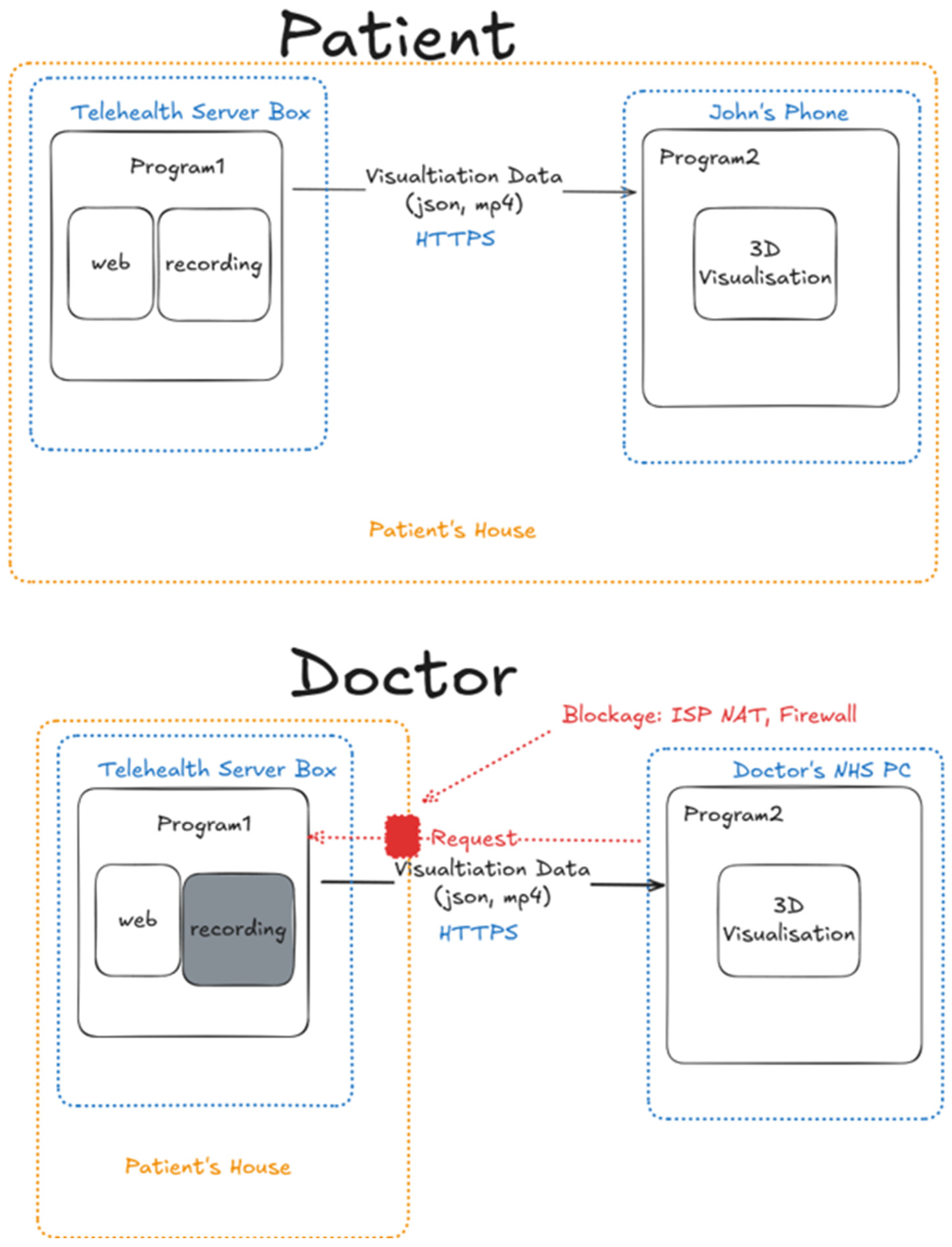
In this future-oriented distributed model, all core services, including the web interface, data recording, and streaming of visualisation data (JSON/MP4), are hosted within the Telehealth Server Box located at the patient’s house (
Figure 17).
This setup empowers patients with full ownership of their health data and allows for local, fast, and private access. John, the patient, interacts with his own phone or laptop to perform exercises and visualise movements via Program 2, without data ever needing to leave the home network. However, when a doctor tries to access the patient’s visualisation data remotely, network security measures like NAT and firewalls prevent incoming connections, making direct remote clinical access difficult. This model prioritises data privacy and patient autonomy, but future enhancements will need to solve the connectivity issue for external medical staff, perhaps through secure relays or hybrid cloud sync.
7.2. Centralised Model—Web Server in Hospital
The centralised future model consolidates control at the hospital server, where Program 3 (
Figure 18) manages the web interface and stores all exercise and visualisation data. Patients still perform exercises at home using the Telehealth Server Box, but the generated data are uploaded to the hospital’s infrastructure. From there, it can be accessed by both patients (on their phones or laptops) and doctors (from their PCs) using Program 2 for 3D visualisation. This model streamlines clinical workflows and ensures that doctors always have access to the most recent data without technical barriers. It is ideal for scenarios where medical oversight, data consistency, and regulatory compliance are critical. However, it reduces the patient’s local control over their data and may introduce dependency on hospital-side systems and connectivity.
As future models, both architectures represent viable directions for evolving telehealth infrastructure (
Figure 19). The distributed model is ideal for privacy-focused, decentralised healthcare ecosystems, while the centralised model supports robust, scalable, and clinically integrated solutions. A potential hybrid model could merge these strengths, offering local autonomy to patients while synchronising key data to central servers for clinician access, paving the way for a more resilient and patient-centric telehealth future.
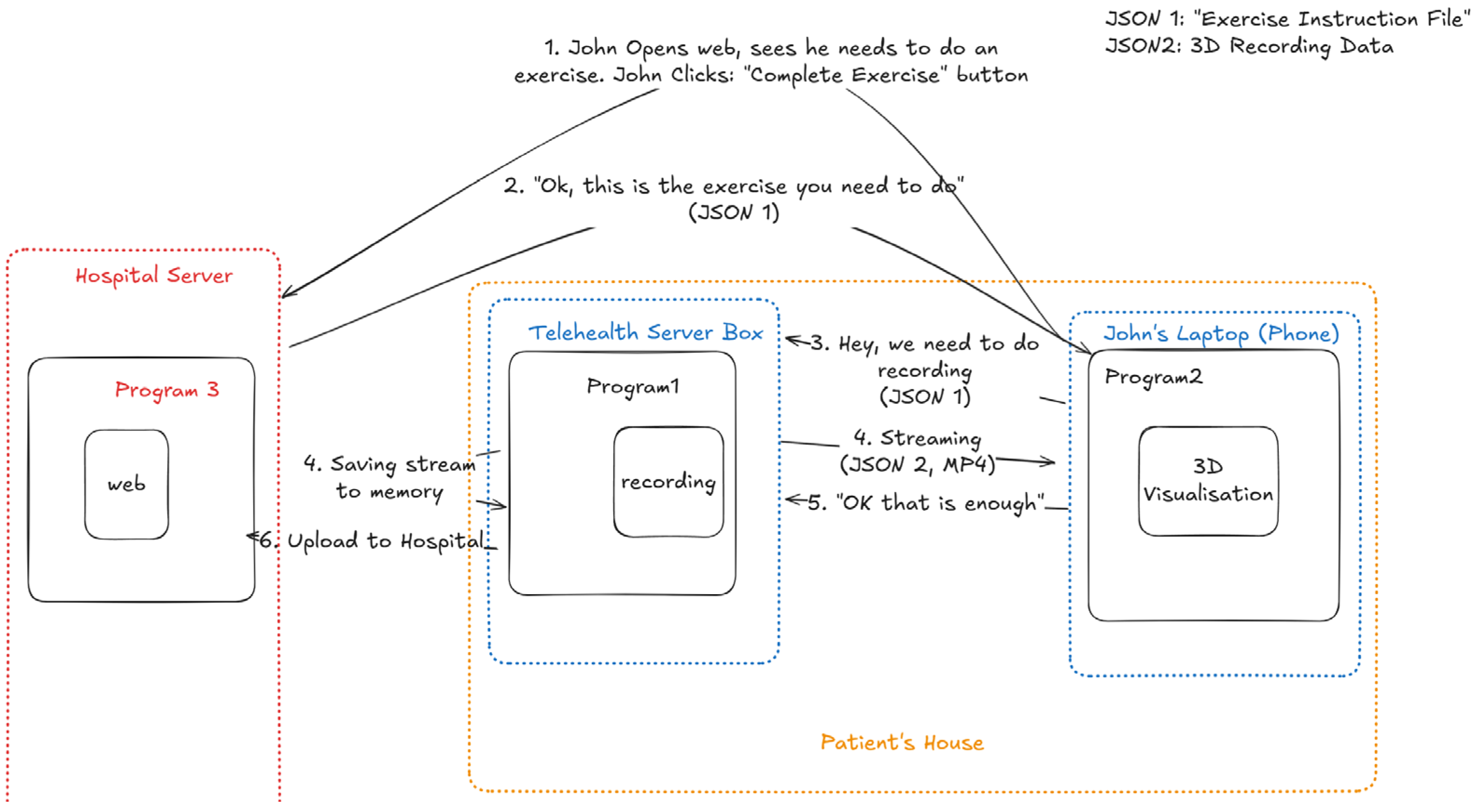
This telehealth model is designed to facilitate remote physical therapy by seamlessly integrating hospital systems with a patient’s home setup. As shown in the use-case example in
Figure 19, it consists of three main components: hospital server, Telehealth Server box located at the patient’s home, and the patient’s personal device (e.g., laptop or phone). The process begins when the patient, e.g., John, logs into a web interface hosted on the hospital server and sees that he has an exercise scheduled. He clicks the “Complete Exercise” button, triggering the hospital server to send an exercise instruction file (in JSON 1 format) to the Telehealth Server Box at his home. This instruction file contains detailed guidelines for the specific exercise John needs to perform.
Upon receiving JSON 1, the Telehealth Server Box passes the exercise instructions to John’s personal device, where Program 2 is responsible for rendering a 3D visualisation of the exercise. This visualisation helps John perform the activity correctly by showing animated guidance. As John performs the exercise, the Telehealth Server Box, running Program 1, begins recording his movements in real time. These movement data are formatted into JSON 2, which is a structured representation of the 3D recording data.
While the exercise is ongoing, the Telehealth Server Box streams the JSON 2 data to John’s device, enabling live feedback or visualisation if needed. Once the system detects that enough data have been recorded either through a preset time duration or data completeness, it stops recording. The recorded movement data are first saved locally in memory within the Telehealth Server Box. Finally, these data are uploaded back to the hospital server, allowing clinicians to review John’s performance at a later time. In summary, this telehealth architecture may ensure a smooth workflow for remote rehabilitation by combining exercise instruction delivery, real-time motion capture, 3D guidance, and secure data transmission, all while keeping the patient at home and maintaining clinical oversight remotely.
7.3. Scoring and Gaming
The sandbox exercise has no scoring. This feature’s primary purpose is to allow the patient to familiarise themselves with the environment and to record submissions for custom exercise types added by their therapists. The toe raise exercise is scored only by the FSR sensor. The exercise requires movements too fine for the limited accuracy of the skeletal tracking. The hold length and the number of repetitions can be determined by sensor states (controlled via the measurement interval) and accumulate a form of interest the longer it is. These awards are held longer with more points in a non-linear fashion.
7.4. Sensor Connection Locations
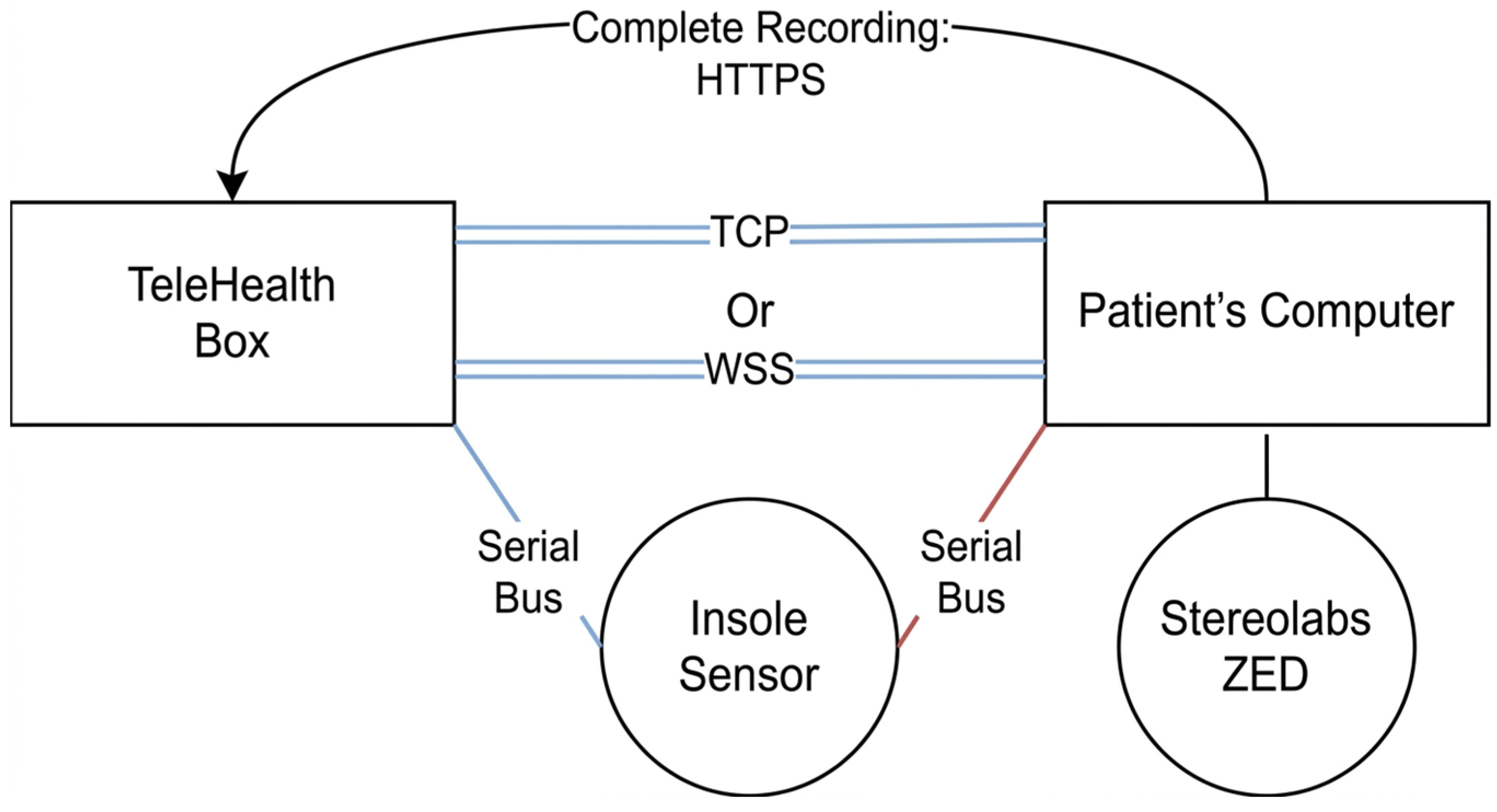
The originally planned architecture included an inexpensive standalone device (TeleHealth Box) to be handed to the patient by the hospital and the patient’s computer, running the bulk of the data processing.
Sensors would be connected to the TeleHealth Box, preconfigured by the providers’ technicians, whilst the camera system would interact with the patients’ computers directly. To aid testing and development, an optional, direct connection option is maintained to the patient’s computer (shown in red). As shown in
Figure 20, this allows operation without the TeleHealth Box, opening a wide variety of further use cases. In case the solution proves difficult to operate by the public, a more powerful device could be provided by the hospital, as the direct connection provides less latency and is easier to maintain. This alternative option could evolve to be the main point of sensor contact. In this case, the patient’s computer would serve merely as a display, with sensor linkage and data processing hidden within the provided IoMT device.
Both TCP and WSS are available to establish the inter-device bus, shown on the diagram as double lines. TCP offers a smaller overhead; thus, it is easier to configure, but it lacks security as the sensor readings can easily be intercepted by anyone on the local network. Furthermore, many functionalities of the web interface already operate via Web Sockets, such as the chat or the indication of online status. As the minimal cost of using a higher-level protocol is far outweighed by the added benefits, exercises started from the web interface are automatically configured to use Web Sockets.
The choice to separately send the end recording was twofold. Firstly, this can keep the provided device minimal, as a complete file transfer takes significantly less processing than a streamed data format. Secondly, the remote box can be oblivious to the nature of the used sensors: It has no integration with the sensor stack’s data formats. The synchronisation of these between the Unity client and the TypeScript application would have been immensely difficult, as breaking changes in foreign function interfaces would have had to be propagated manually.
7.5. Build Targets
The Stereolabs SDK is quite difficult to install. Installing the CUDA runtime and the SDK itself is a tedious and, for most users, unnecessary step. Furthermore, some users may not be able to conform to this requirement, lacking the necessary hardware. For this reason, related code has been compartmentalised, and the application is compatible and deliverable without including the exercise recording. This smaller edition can be distributed to therapists, and, given it is not constrained by the camera’s platform dependencies, is runnable in-browser via the WebGL [
45] standard. This allows tight integration with the web interface, with no installation requirement from the clinical staff. Given that the complete system is envisioned to be provided to the patient by the hospital, this means that no end-user setup is required.