1. Introduction
In recent years, the emergence of breakthrough technologies aimed at optimizing production processes has led to remarkable growth, marking the beginning of what is often referred to as the fifth industrial revolution. This transformative period, known as Industry 5.0, is characterized by the seamless integration of manufacturing workflows with information systems and communication technologies, where the Industrial Internet of Things (IIoT) and Industrial Augmented Reality (IAR) play pivotal roles [
1,
2,
3].
Advancements in digital technologies have opened new avenues for innovation in the shipbuilding industry. The integration of digital tools, such as Extended Reality (XR), offers transformative potential for improving efficiency, accuracy and collaboration in complex industrial processes. Augmented Reality (AR) and Mixed Reality (MR), in particular, have emerged as powerful technologies capable of overlaying virtual information onto the real-world environment, enabling real-time visualization and interaction [
4].
Specifically, this research is framed within a joint project carried out in association with Navantia, one of the largest European shipbuilders, and Universidade da Coruña (Spain). The authors of this article work in a research line called “Digital Worker”, aimed at analyzing the potential of IAR and Industrial Mixed Reality (IMR) applications for Shipyard 5.0 [
5].
In this context, the construction of large vessels is a highly complex process that involves multiple specialized tasks and extensive coordination across various disciplines. Shipyards, as hubs of maritime engineering, rely on cutting-edge technologies and well-structured workflows to meet the demands of modern shipbuilding. However, according to industry experts and data provided by Navantia, some shipyard processes still depend on traditional methodologies, such as the use of 2D blueprints and extensive paper-based documentation. While these conventional approaches have been widely used, they often lead to inefficiencies and increase the risk of errors, particularly in tasks requiring precision during assembly procedures. Among the various processes involved in ship construction, electrical outfitting tasks are particularly relevant. These tasks consist of designing and installing the support brackets, pass-through openings and other components of the electrical network of the vessel. As reported by Navantia, during the project analysis and design phase, electrical outfitting work is primarily performed indoors in workshops, where the assembly process traditionally relies heavily on paper documentation.
Therefore, and due to the large amount of required documentation, efforts were made to develop a MR application to speed up and improve the efficiency of operators in the tasks of placement and installation of electrical outfitting during the assembly process of the vessel parts (blocks). The operators are intended to use smart glasses to superimpose the electrical outfitting elements directly on the real environment so that they can be used as a control reference.
Research as well as commercial efforts have explored the integration of speech control or voice assistance with AR and MR systems in industrial contexts. In the maritime domain, in [
6] the author tested AR wearables for vessel repair and maintenance processes since 2019, which enabled real-time and voice-assisted remote guidance for shipyard personnel. Moreover, in [
7] the S.A.M.I.R. architecture was proposed to combine AR with Natural Language Processing for tele-maintenance in industrial automation settings. Academic research has also analyzed the performance challenges of Automatic Speech Recognition (ASR) on Microsoft HoloLens 2, specifically by simulating an industrial environment inside a recording studio, which revealed that online ASR capabilities degrade significantly when sound pressure levels exceed 64.2 dB(A) [
8]. In addition, recent literature reviews on Voice User Interfaces (VUIs) for the manufacturing industry identified maintenance as a frequent application scenario and showed the increasing combination of VUIs with AR glasses in these settings [
9]. However, the existing approaches predominantly rely on Cloud-based ASR services or support only major languages and do not address the specific challenges of low-resource languages within harsh shipyard environments. Furthermore, the automatic generation of precision dimensions between 3D objects as part of an integrated MR workflow represents a capability that is not reported by prior AR/MR industrial applications with on-device ASR capabilities.
Specifically, this article includes the following main contributions, which have not been found together in previous works:
Automatic generation of dimensions between two 3D objects (e.g., a support and a component of the structure, or a support and a pass-through).
A Galician on-device ASR system that allows operators to interact with the MR application hands-free with just the use of their voice.
Finally, it is worth mentioning that this article provides a broad and exhaustive set of tests aimed at evaluating the proposed system. Throughout usability tests, the NASA Task Load Index (NASA-TLX) methodology was adapted to XR experiences and later transformed into an automated process that collects application usage data. Another experiment was conducted in which a group of shipyard workers tested the application and validated aspects such as its efficiency and usefulness as a replacement for traditional tasks. Thus, tests carried out on the ASR system demonstrate its robust performance in noisy environments such as factories or industrial workshops.
The rest of this article is structured as follows.
Section 2 reviews the state of the art from the latest studies focusing on the subject of AR or MR solutions that assist in industrial environments, with a particular focus on the shipbuilding industry.
Section 3 details the design of the proposed system, and
Section 4 explains how the proposed features were implemented.
Section 5 details the experiments and validation tests that were carried out both in the research phase and at the workshops, which involved the end-users of the application. Finally,
Section 7 presents the conclusions.
2. State of the Art
2.1. AR/MR in the Construction Industry
In recent years, the integration of MR technologies into industrial environments has gained increasing attention due to its potential to enhance productivity, safety and collaboration. Within the Architecture, Engineering, Construction and Operations (AECO) industry, significant advancements have been made in utilizing MR to address complex challenges.
For instance, the authors of [
10] provided a comprehensive review of MR applications in the AECO industry, highlighting their use in tasks such as design visualization, construction planning and real-time collaboration. This study underscored the transformative impact of MR in reducing errors and improving decision-making processes. Expanding on this topic, [
11] explores the role of AR and MR in remote collaboration on physical tasks. In this article, various AR/MR systems were reviewed, showing examples where experts and operators interact in real-time across geographically dispersed locations. Following from the previous literature, a study has also been found which examined Virtual Reality (VR) and AR applications in construction safety, identifying their effectiveness in mitigating workplace hazards [
12].
Moreover, Building Information Modeling (BIM) has emerged as a critical enabler of MR technologies in construction, as can be seen in [
13], where the authors proposed a BIM data flow architecture integrated with AR/VR technologies, demonstrating its applicability across various AECO use cases. Whereas the Digital Twin (DT) paradigm further enhances MR capabilities, [
14] provided a detailed literature review on DT applications in construction, illustrating their potential to optimize workflows and resource management.
Focusing on shipbuilding-specific research, MR technologies have also gained traction. For example, authors in [
15] created a framework to facilitate the product designers to browse the parts assembly sequences for process validation.
On the other hand, some projects have been found while looking at the wider market for commercial solutions, although they are not entirely fitted to this specific industrial area. Several mobile device applications currently address 3D visualization and interaction, offering a range of functionalities but with limitations in scope for precise industrial applications. For example, Polycam [
16] integrates photogrammetry with AR to create and visualize realistic 3D models, allowing users to measure and view point clouds or mesh-based FBX models in AR environments. BIMx [
17], linked to Archicad [
18], facilitates 3D model visualization and project management by combining plans and models, with built-in measurement tools. While widely used in architectural and construction contexts, it lacks AR capabilities, which restricts its potential for real-time alignment with physical environments. eDrawings [
19] focuses on Computer Aided Design (CAD) file visualization using AR and VR technologies, allowing users to interact with and explore 3D models in real-world environments. However, this last solution is only available for mobile devices, so these units lack the power or quality of a purpose-built device, such as specific Head-Mounted Display (HMD) smart glasses.
2.2. Automatic Dimension Generation Between 3D Objects
Numerous studies were found that explore the use of XR technologies for the analysis and interactive visualization of 3D models within the AECO industry, as previously stated in
Section 2.1.
In contrast, it has been considerably challenging to find any literature containing specific functionality on the acquisition of measurements within a 3D model. Finally, a study was identified in which a VR system was developed for visualization, inspection and taking measurements on 3D models obtained through photogrammetry [
20]. To perform the measurements, users are required to place two markers on the 3D model, and then the system calculates the Euclidean distance between the two points. This makes the measuring process dependent on the accessibility of the physical space to be measured, as well as the capability to perform an exhaustive photogrammetry analysis of the surrounding area.
However, a system like this does not meet the high standards of accuracy required for high-precision assembly tasks in a shipyard. The system proposed in this article tackles this dependency, since the user would only need to specify the two elements to be measured, and the system would automatically obtain the minimum distance between the two objects.
2.3. Automatic Speech Recognition in Industrial Metaverse Applications
Modern ASR systems have been shown to play a key role regarding the level of intuitiveness of interactions in IMR environments [
21], particularly in scenarios like shipbuilding, where traditional touch- or gesture-based interfaces may be impractical in certain situations [
22].
In these settings, workers often require their hands to be free in order to perform complex tasks or operate certain tools or machinery, and environmental factors such as gloves, dust or liquids further complicate the use of standard MR input paradigms.
Moreover, low-resource languages such as Galician in the ASR space have recently garnered attention due to the lack of large training datasets that are otherwise available for more common languages such as English or Mandarin [
23]. Specific advancements in ASR for low-resource languages have leveraged techniques such as transfer learning where models trained on large corpora are later fine-tuned with smaller datasets [
24]. Multilingual models have also proven effective by extracting shared linguistic features across languages and then fine-tuning the resulting model to a low-resource language [
25]. Moreover, the use of semi-supervised or unsupervised learning methods has enabled the use of unlabeled data to further train and enhance model performance [
26,
27].
Regarding standalone MR devices like the Microsoft HoloLens 2 used in this implementation, the use of transformer-based model architectures with Connectionist Temporal Classification (CTC) encoding such as the one present in the Wav2Vec 2.0 architecture tends to be more efficient than other legacy approaches [
28]. These models optimized with quantization, pruning and other overhead reduction techniques have shown that real-time processing of the user’s voice is possible, even in such computationally constrained devices [
29]. Effective Active Noise Cancellation (ANC) algorithms and spatial audio processing have also been previously demonstrated as being key necessities in order to ensure precise and clear audio capture as well as accurate command recognition [
30]. This is key in the Industrial Metaverse, as it has been shown that it allows for higher transcription accuracy without the need to increase the computational capabilities of the embedded devices or the complexity of the ASR models [
31]. In shipyards specifically, this can be one of the main challenges, as very high levels of noise are prevalent due to the continuous use of heavy machinery and tools [
32].
2.4. Analysis of the State of the Art
The previously analyzed studies provide a strong groundwork for the design and development of a MR application for shipyard operators. These studies serve as a foundational reference for applying MR in complex industrial domains, including shipyards, where similar challenges arise. Specifically, the AECO industry concepts align with shipyard operations, particularly in scenarios requiring critical collaboration between on-site workers and remote engineers [
10,
11]. Moreover, these findings apply directly to shipyard environments, where safety is predominant during assembly [
2]. By integrating BIM or DT technologies, the proposed applications address precision and safety challenges in complex assembly processes.
However, while prior work has explored MR applications for visualization, collaboration and industrial training, relatively few studies have addressed measurement capabilities in VR and AR contexts. These existing methods typically rely on manual marker placement, which introduces human error. The proposed system overcomes these limitations by automatically computing distances between selected 3D elements, ensuring high-precision measurements without user-dependent placement inaccuracies.
In addition, the solution presented in this article also incorporates on-device ASR capabilities for MR in noisy environments. The reviewed literature rarely addresses this complex subject, especially for low-resource languages like Galician. Although industrial MR solutions often integrate speech recognition, they frequently rely on cloud-based services, which raises concerns regarding latency and connectivity in large-scale shipyards. To solve this, the proposed system introduces a Galician on-device ASR model optimized for real-time, offline processing on Microsoft HoloLens 2 smart glasses. This implementation significantly improves hands-free interaction, allowing operators to issue commands and retrieve information efficiently, even in high-noise settings.
Regarding performance benchmarks, the previous work of the authors of this article evaluated the performance of a collaborative AR framework in shipyard environments, demonstrating communication latencies below 5 ms for regular packets and anchor transmission times between 2 and 30 seconds [
22]. The existing literature also reports efficiency improvements from MR/AR systems in various industrial contexts, such as 47% to 78% time reductions in railway assembly tasks [
33]. However, such performance benchmarks are highly domain-specific as well as task-specific, with little direct applicability from one field or task to another. This applies especially to the unique scenario presented in this article, which combines automatic dimension generation, on-device ASR for a low-resource language and deployment inside a shipyard. Thus, this article prioritizes real-world validation with end users over cross-domain benchmarks, which ensures that any findings are directly applicable to the electrical outfitting context inside shipyards.
Building on this approach, capability-oriented comparisons do reveal that unlike prior work in the literature, which achieved 47% to 78% efficiency gains in railway assembly tasks [
33], this system integrates automatic dimension generation within the application, as well as low-resource on-device ASR for shipyard electrical outfitting tasks, which is a capability combination that is absent in current literature. While [
10] reviews MR visualization and [
20] relies on manual photogrammetry markers, neither provides an automatic measurement feature validated in an industrial shipyard.
Recent shipyard technology surveys, including the 2025 Mari4_YARD project, confirm that shipyard environments remain particularly challenging for MR device deployment [
4]. In the application presented in this article, the on-device ASR implementation achieves 100% intent recognition rate with 2.76 s latency and 16.5% CER, and at the same time avoids cloud connectivity dependencies unlike what is presented in solutions available in the literature [
8].
Building on these insights, this research applies MR technologies to shipbuilding with the aim of improving the effectiveness, accuracy and reliability of operators during electrical outfitting assembly and inspection ultimately contributing to the evolution of the Shipyard 5.0 paradigm.
3. Analysis and Design of the Proposed System
3.1. Main Goals of the System
The aim of the proposed work, as was briefly explained before, is to develop an application for HoloLens 2 smart glasses that streamlines and enhances the efficiency of workshop operators in the placement and installation tasks of electrical elements during the assembly process of a vessel. Therefore, the goal of the glasses is to present the 3D elements directly onto the real hull structure and to provide all needed dimensions, so they can be used as a reference by the workshop operators to measure where to install the final elements.
Specifically, Navantia provides additional requirements to be achieved by the application:
The application must show the detailed information associated with each electrical outfitting element in line with a full digital process.
The application must show the blueprints associated with each electrical outfitting element: measurements, position relative to centerline/frame, rotation, etc.
3.2. Design Requirements
The requirements to be fulfilled by the application developed as part of this project are listed below:
Visualization of electrical components 3D models in the corresponding position.
Display of centerline, frame and longitudinal identifiers along the structure.
Visualization of the 3D model of the filling (space reserved for cables, etc.).
Possibility to show and hide each of these 3D objects.
Display of dimensions for each electrical element.
Tags/labels with associated information for each electrical element.
Search by element identifier code.
Filtering elements by groups: block number, stage, control parametric and PBS.
Optional use of Bluetooth wireless peripherals to enter text.
System that allows scene switching between different block scenes.
Automatic dimension generation system. The main feature of this system is the generation of a dimension between two elements selected by the user. The positioning of the dimensions will be specific and adapted as appropriate for each type of element. In addition, the dimensions shall be positioned between the closest faces of the 3D elements. The splitting of dimensions on the X, Y, Z axes; allowing the user to obtain the values parallel to the center line, the vertical and frames of the vessel. Finally, the possibility to move dimensions to avoid them being partially or totally hidden by other 3D objects will also be provided.
Implementation and deployment of an on-device ASR system for voice interaction and control of the User Interface (UI) elements and functionalities via voice commands in Spanish or Galician.
User monitoring system. Measurement of times, clicks and gaze–object collisions for each performed task. Measurement of ASR-related metrics such as latency, Character Error Rate (CER) and Word Error Rate (WER) as well as relevant voice samples.
System for automatic collection and storage of application usage data.
Generation of alerts and notifications in association with an electrical element. These alerts and notifications include small descriptions that can be input using the on-device ASR system.
4. Implementation of the System
This HoloLens application has been developed using Unity [
34] and Microsoft’s Mixed Reality Toolkit 3 (MRTK3) [
35]—a toolkit that provides ready-to-use objects and functionalities to be included in the application, such as buttons or dialogue panels. This greatly facilitates the application development process, since all that is required is to add these objects to the scene and configure them according to the needs of the project. At the time the project was initiated, the available versions of this software were Unity 2021.3.6f1 and MRTK 3 beta version 3.0.0-pre.14. In a later stage, the project was updated to Unity 6.0.23f1 and MRTK 3.2.2.
4.1. UI: 3D Environment
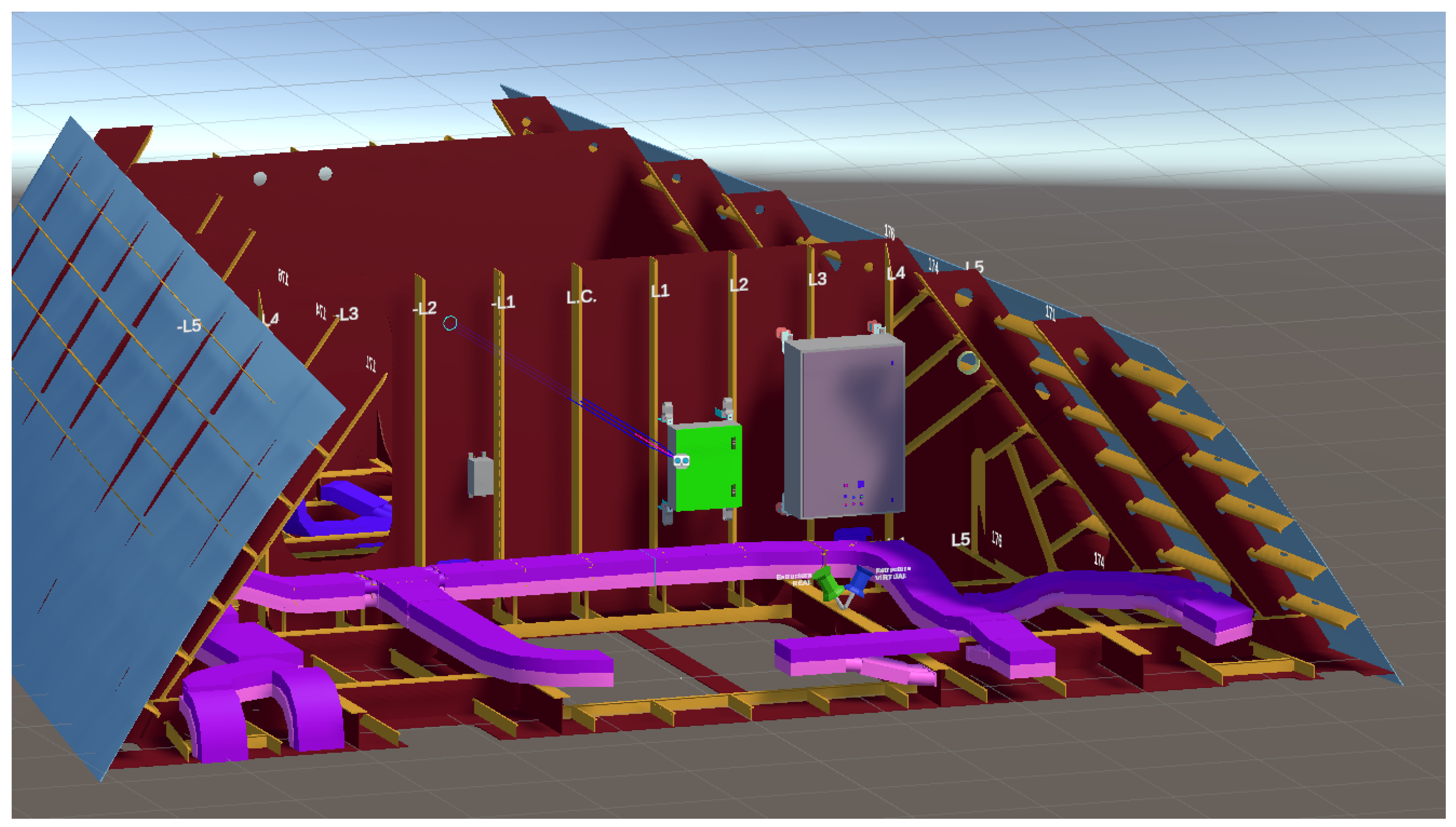
The MR application consists of a very important visual part: the 3D virtual replica of the elements that make up the vessel section that is being built. These 3D elements, which can be seen in
Figure 1, are the following: the hull and internal structure (represented with burgundy and mustard colors), electrical outfitting elements (mustard, purple and other colored wall-mounted structures) and the filling (space reserved for cables) in a strong and soft shade of pink.
Inside the workshops, in order to orient themselves within the construction blocks that will form the final ship, a 2-axis coordinate system is used referring to the centerline (an imaginary line that intersects the ship bow to stern) and the frames (imaginary lines parallel to each other and perpendicular to the centerline, they could be referred to as the “ribs” of the ship).
4.2. UI: Interacting with the Application
For the user interaction with the buttons (Pressable Button) both far and near interaction were enabled, allowing users to use the buttons at a distance or to press directly on the buttons with their finger as if they were tactile buttons (near interaction). Both options are given to provide freedom of movement and to make the User Experience (UX) as organic as possible, thus accommodating to each user, as some find it more comfortable to interact from a distance and others prefer to directly tap on the buttons and objects in the scene. Furthermore, from previous experiences and also through the conducted tests, it has been confirmed that there are users who are more comfortable interacting only in one of the two ways (far/near).
4.3. UI: Menu Panels
In addition to the direct interaction of the user with the 3D scene, a menu was also designed, through which the user can navigate to access the rest of the application’s functionalities. This menu is divided into different panels, one per functionality, each of them accessible by clicking on the corresponding button on the left sidebar. The menu has a button that allows the user to anchor the panel to fix its position and stop it from following the user around. Due to this, all panels have a white bottom bar that can be used to move and position the menu where the user considers most convenient.
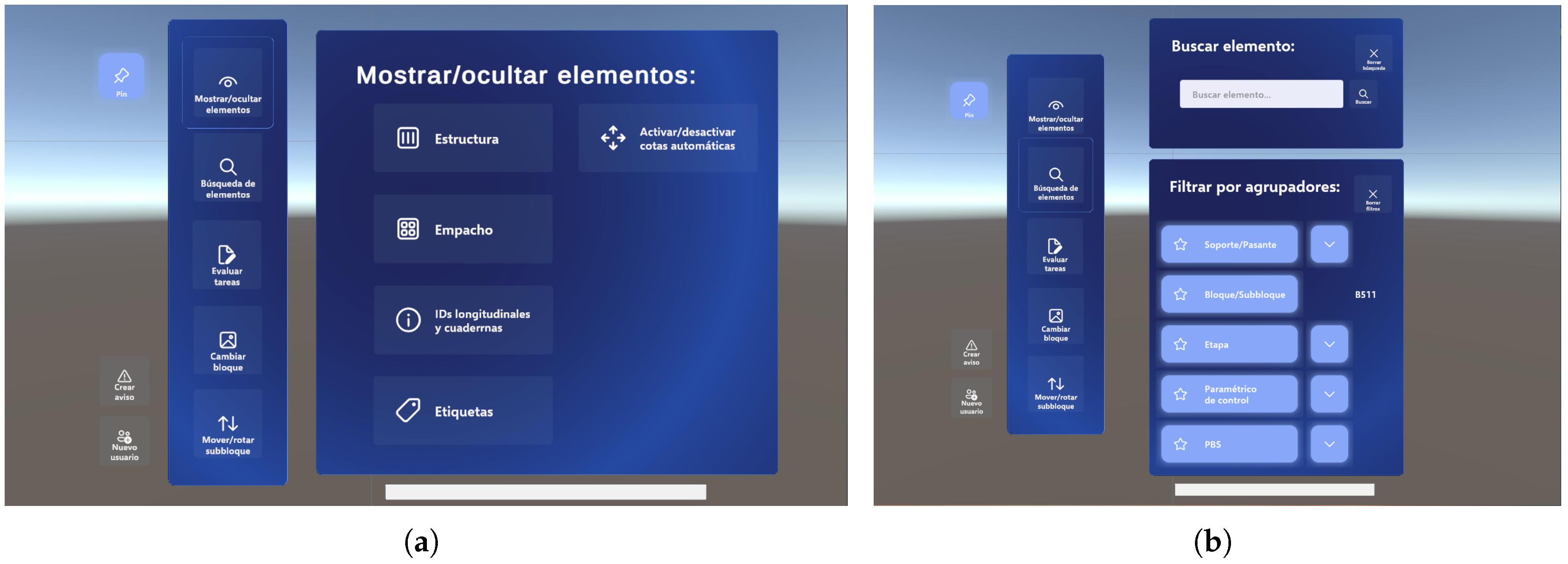
The first panel, ‘
Mostrar/ocultar elementos’ (show/hide elements), can be seen in
Figure 2a. Through this panel, the following elements can be selected to make them visible or hide them: block structure, filling, centerline and frame identifiers and, lastly, the labels associated with each electrical outfitting element. In addition, the automatic generation of dimensions can also be activated or deactivated from this panel.
The next tab is the panel for searching and filtering electrical elements, illustrated in
Figure 2b. In this case, the panel is divided into two parts: the upper section for the search (using the floating keyboard to enter the identifier of the element in the text field) and, on the other hand, the lower section for group filtering by types/groupers (where the options are selected from the drop-down menus).
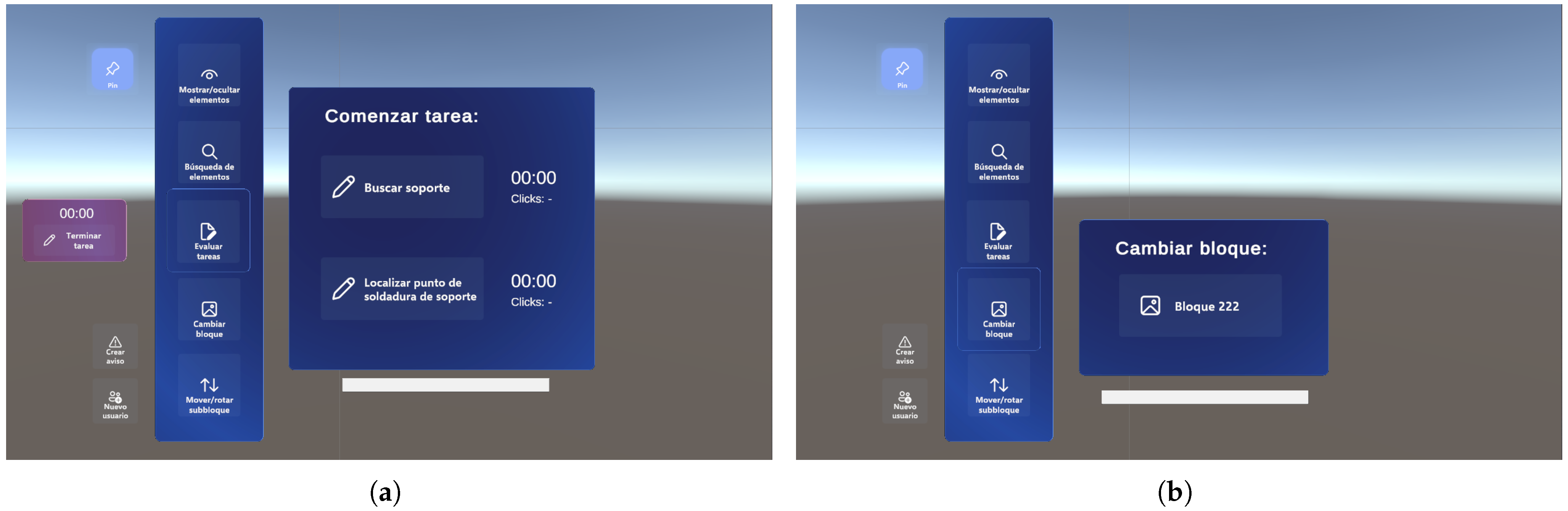
On the third menu panel, which can be seen in
Figure 3a, the start and end of a task are managed. In addition, next to the start button of each task there is also a counter with the number of clicks made during each task and the time elapsed since the button was pressed. Additionally, when a task is started, a floating panel appears on the left of the menu in an orange tint, from which the timer can also be seen and where a button can be pressed to end the task. This small panel will be visible until the task is finished regardless of switching to another panel or not. This allows the user to navigate freely through the rest of the menu without having to worry and, at the same time, serves as a reminder not to forget to mark the task as completed.
The next menu tab is very straightforward, as it currently consists of only one button, as can be seen in
Figure 3b. The idea of this panel is to be able to change to a different block at any time, making it possible to navigate through the vessel without the need to restart the application.
4.4. UI: Element Tags
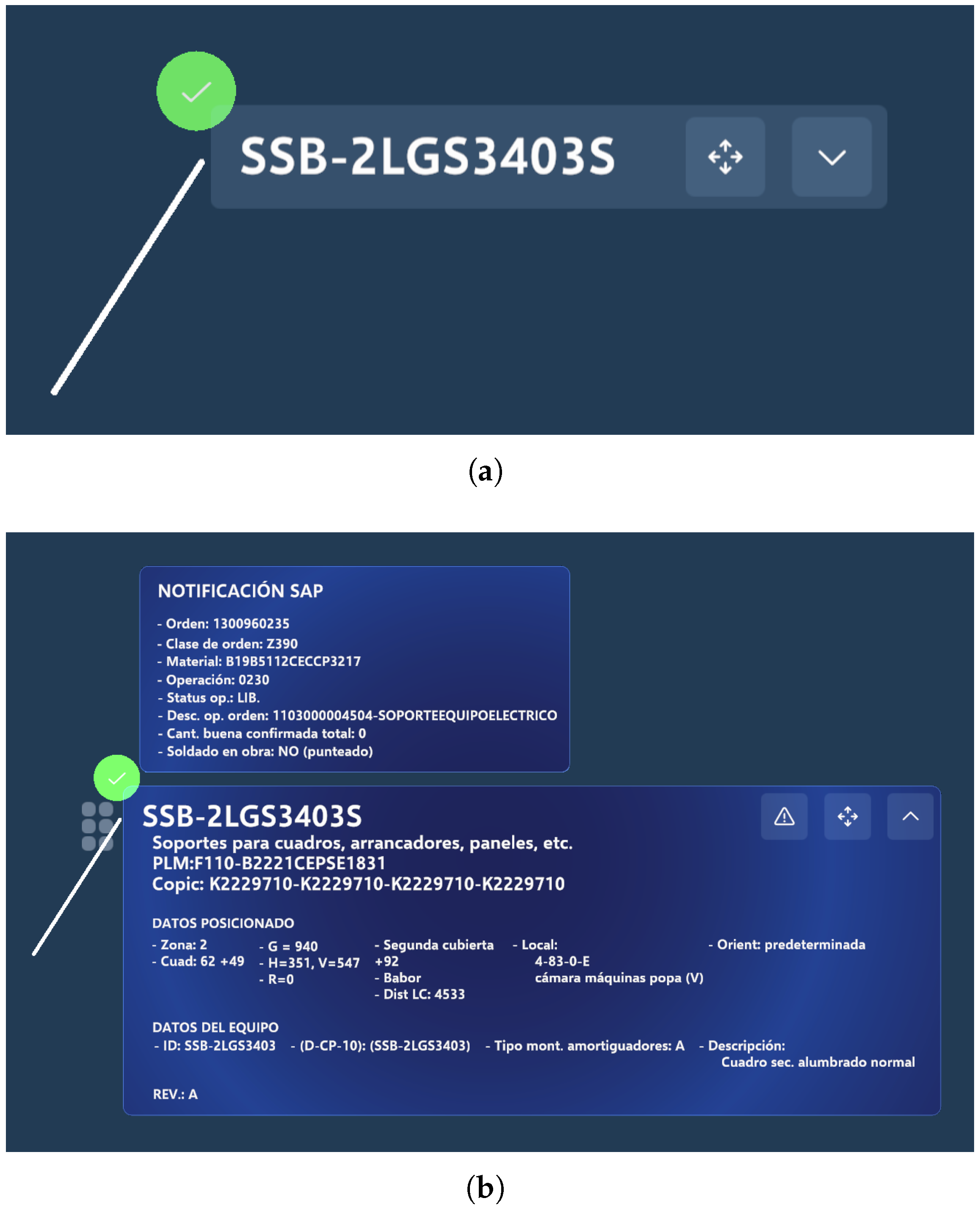
In order to identify each of the electrical outfitting elements that can be viewed in the application, tags have been added for each one of the brackets and pass-throughs. An example of these labels can be found in
Figure 4. In the upper left corner of the label, a green icon is added to indicate whether the electrical element is registered as installed in the system.
In addition, this resource is used to extend the information offered on each of the elements. To this end, a drop-down label has been designed, as shown in
Figure 4b. In its collapsed version, only the identifier of each element is visible, as well as a button to display the label and another to show or hide the element’s dimensions. The displayed label contains all the information regarding the corresponding element, while maintaining the buttons mentioned above. This information is currently contained in the blueprints or data sheets used for the correct positioning of each element in the block structure.
On the other hand, as shown in
Figure 4b, a small panel was added at the top of the displayed label where the information of the assembly order of that element is specified. Additionally, in the big drop-down version of the label, a new button allows the creation of a notification associated to this specific element (for more information see
Section 4.7). When the notification is sent, the background of the element identifier lights up to indicate that this electrical element has an error pending to be solved.
4.5. Search and Filtering System
The search system integrated in this project is essential for facilitating the search and positioning of the electrical outfitting elements in a fast, comfortable and efficient way as within one of the blocks that will form part of the final vessel, there can be from tens to hundreds of elements in the electrical outfitting area alone. This means that when combined with the remaining building areas, finding a specific element at an advanced stage of the vessel construction can become a tedious and time-consuming task.
For this reason, and in order to enhance the digitalization in the workshops, a new feature has been implemented. This enables each element to be searched for by using its identifier code. The search menu consists of a panel with a text box into which the identifier is typed (as previously shown in
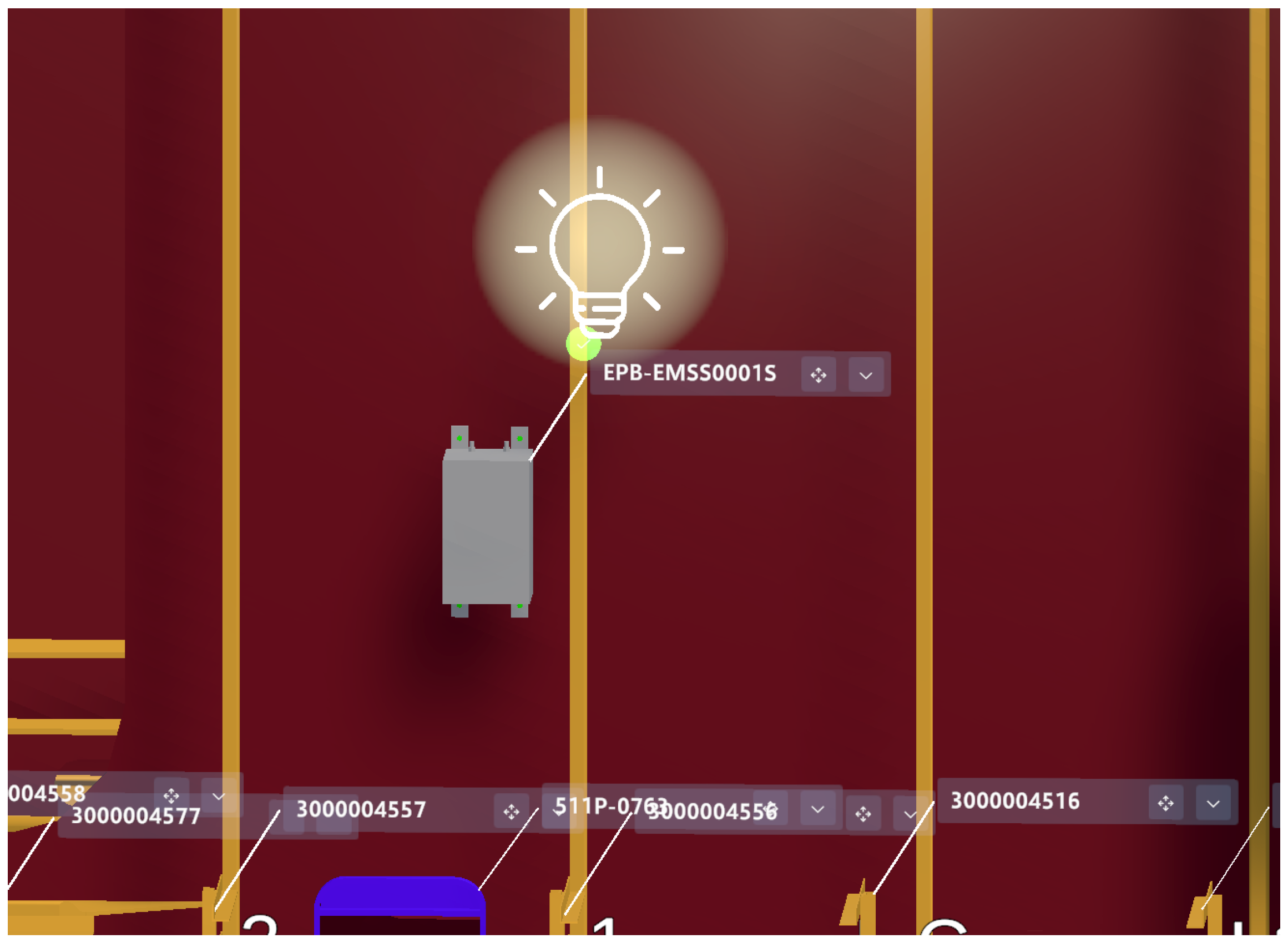
Figure 2b). For this, the virtual keyboard provided by the HoloLens is used. After entering the code, only the elements that match the text will be visible. For this purpose, a light bulb with a flashing effect has been added to help identify the matching elements of the specified search, as illustrated in
Figure 5. As soon as the user starts typing, the search is carried out without the need to press any confirmation button.
On the other hand, within workshops there is also the need to classify elements and situations in which only electrical outfitting elements of a certain type are to be installed or inspected. For these cases, the workshops use specific codes which are called groupers.
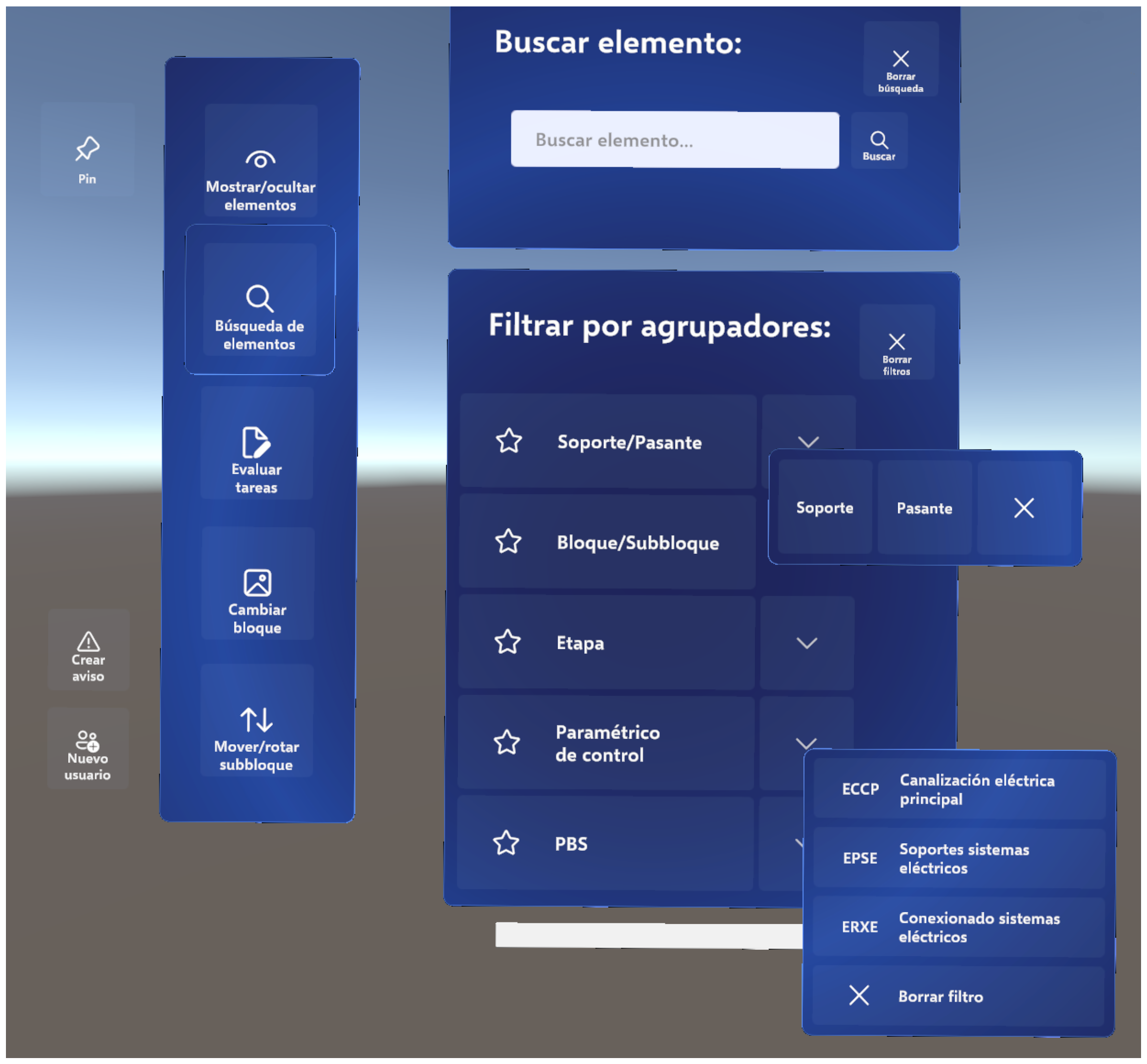
For this purpose, a panel has been designed within the main menu for the filtering of elements, from which the following types of groupers can be selected: type of element (support/passer), block (fixed value for each scene, cannot be changed manually), construction stage, parametric control and PBS. As can be seen in
Figure 6, a drop-down subpanel menu has been added to make the selection of the groupers as comfortable as possible. Thus, the user has to interact as little as possible with the application, avoiding the need to write the acronyms or name of the filters to be applied.
This filtering functionality behaves in the same way as the element search. For instance, selecting any of the options in the drop-down menus hides all the elements but those that meet the selected criteria. The filters can also be individually disabled or all criteria can be cleared at once using the top button on the panel.
4.6. Automatic Dimension Generation System
The aim of the automatic dimension generation system is to create a tool that allows users to generate the dimensions they request by simply clicking on two elements of the vessel, whether they are brackets, crosspieces or structural sections.
The first step to achieve this functionality is to detect clicks and register which element the user is interacting with. To do this, the implementation made for user monitoring, detailed in
Section 4.9, is reutilized, and this functionality is extended so that the application tracks which object is being clicked on. Then, each structural or electrical outfitting element manages the click internally, returning the point at which the dimension has to be placed, since each type of element is differently dimensioned. During the analysis process, each of the elements was standardized to ensure that the dimensions were generated consistently, always referring to the same point regardless of where the user clicks on the structural or electrical outfitting element.
Throughout this process, consideration is also given to ensure that the dimensions are positioned on the closest faces of the elements so that the metal thickness is not included in the measurement. This is especially important when dimensioning between the structure and another element, as the wall of the structure may be several centimeters thick, and the user wants to obtain the shortest distance between the elements, not to measure from the middle or gravity point of the 3D model.
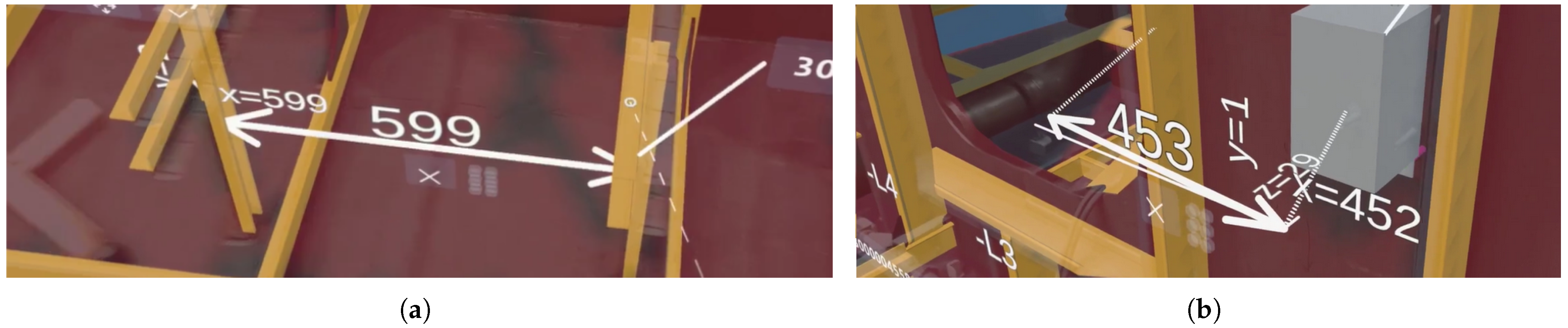
Moreover, Navantia requests the possibility of separating the dimensions into the three axes, X, Y and Z, so that the measurements can always be taken in the stern–bow, port–starboard or vertical direction. For this reason, auxiliary axes have been added, as shown in
Figure 7, separating the dimension into three measurements, one for each axis.
In this system a final functionality was added, namely the possibility of repositioning the dimensions. In this way, the user can position them in a place where they are not completely or partially hidden by other elements of the scene. Furthermore, there is also the possibility to delete the dimension with the button that appears below the number in the middle of the dimension.
4.7. Notification System
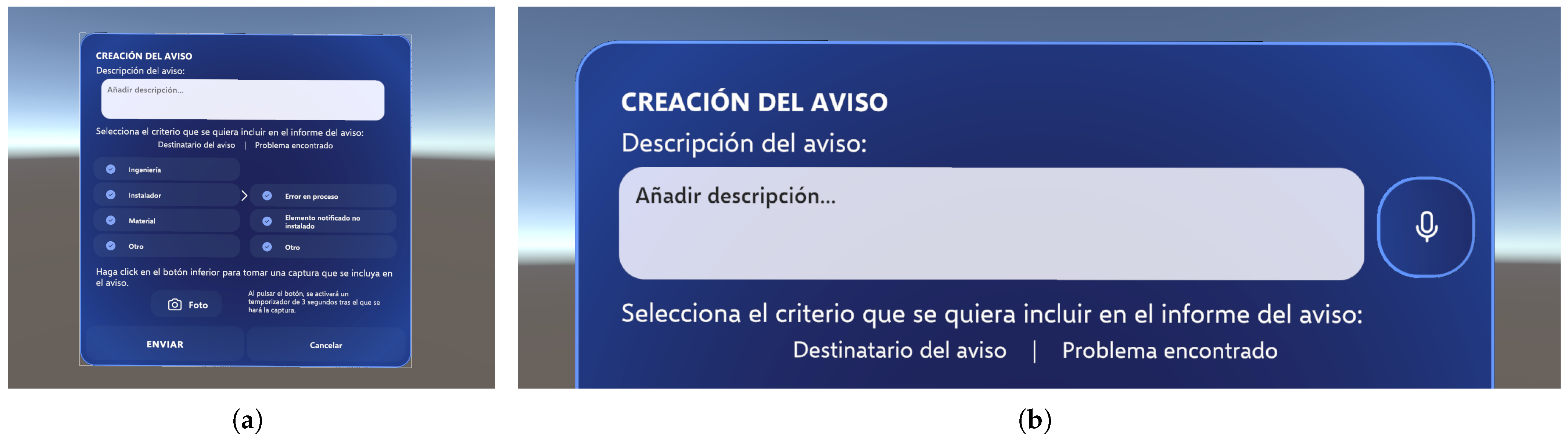
The notification system was designed with the intention of sending alerts from the MR application to Navantia’s cloud specifying problems that are detected in workshops. These warnings could be, for example, that there is an error in the information, a faulty material or that the server says that an element is already installed when in fact it is not. Errors are easily detectable while using the MR application, either during the installation process or when inspecting the vessel, so it is very useful that notifications are generated from within the application itself.
The menu shown in
Figure 8a was designed for the creation of the notifications. In this panel, it is possible to select which department will receive the notification from the list of recipients; subsequently, a drop-down menu appears for each recipient showing the specific error to be notified. A description text field is also included where a more detailed description of the error can be added.
In order to increase the ease-of-use of this notification interface by avoiding the use of the virtual keyboard as much as possible, a voice dictation button was added next to the description text field, as can be seen in
Figure 8b. This button, when pressed, allows the user to input the description by freely speaking in either Spanish or Galician, and the underlying on-device ASR system will transcribe what the user says into the description text field. Further implementation details regarding the on-device ASR system are provided in
Section 4.8.
Moreover, the notification also includes the possibility of taking a screenshot of what is seen through the Microsoft HoloLens 2 smart glasses, so that it can be attached to the notification to expand the information about the error in a visual way.
Currently, the alerts are locally stored in a CSV file. The data stored in the CSV are: date and time at which the notification is created; element identifier, if applicable, on which the notification is being created; description; recipient of the notification (engineering, installer, material or other) and notification type (specific type depending on the recipient).
4.8. Integration of Voice Control Using On-Device ASR
The ASR system to be implemented required support for both Spanish and Galician, a low-resource language spoken in northwestern Spain, and due to both privacy and connectivity concerns inside the shipyard, it was also required to be run fully on-device without access to the Internet. Furthermore, due to the specific noise challenges commonly encountered in shipyards, such as those caused by the operation of heavy machinery and power tools, the ASR system also required the use of ANC during the capture of the user’s voice.
Microsoft HoloLens 2 smart glasses provide different ways to access the sound capture Application Programming Interfaces (APIs), which allow for making use of the embedded 5-microphone array, of noise cancellation algorithms and of the beamformed voice capture options available for each of the APIs. Such APIs include the Unity API, the Mixed Reality Toolkit (MRTK) API and a custom sound capture implementation that uses the available Windows RunTime (WinRT) API primitives present in the Windows Holographic OS. This last implementation that makes use of the WinRT API primitives shows solid results in sound quality and noise cancellation capabilities.
Following initial hardware compatibility and efficiency tests on Microsoft HoloLens 2 (for in-depth details as well as comparative benchmarks, see [
36]), the final system deployed a fine-tuned Wav2Vec 2.0 ASR model. This model features 94.4 M parameters in the Open Neural Network eXchange (ONNX) format, running on top of the ONNX Runtime.
The final model’s activations and weights were also quantized dynamically to 8-bit integers which reduced the model size by 68% from an initial 361 MB to just 116 MB. Lastly, to decode the model’s CTC encoded outputs, a native CTC decoder using the Beam Search algorithm was adapted for the ARM64 architecture and included as a separate Dynamic Link Library (DLL) file. Further in-depth details regarding the fine-tuning process and the datasets used can be found in [
37], and details regarding sound capture APIs, quantization techniques and the on-device ASR pipeline including the CTC decoder used can be found in [
36].
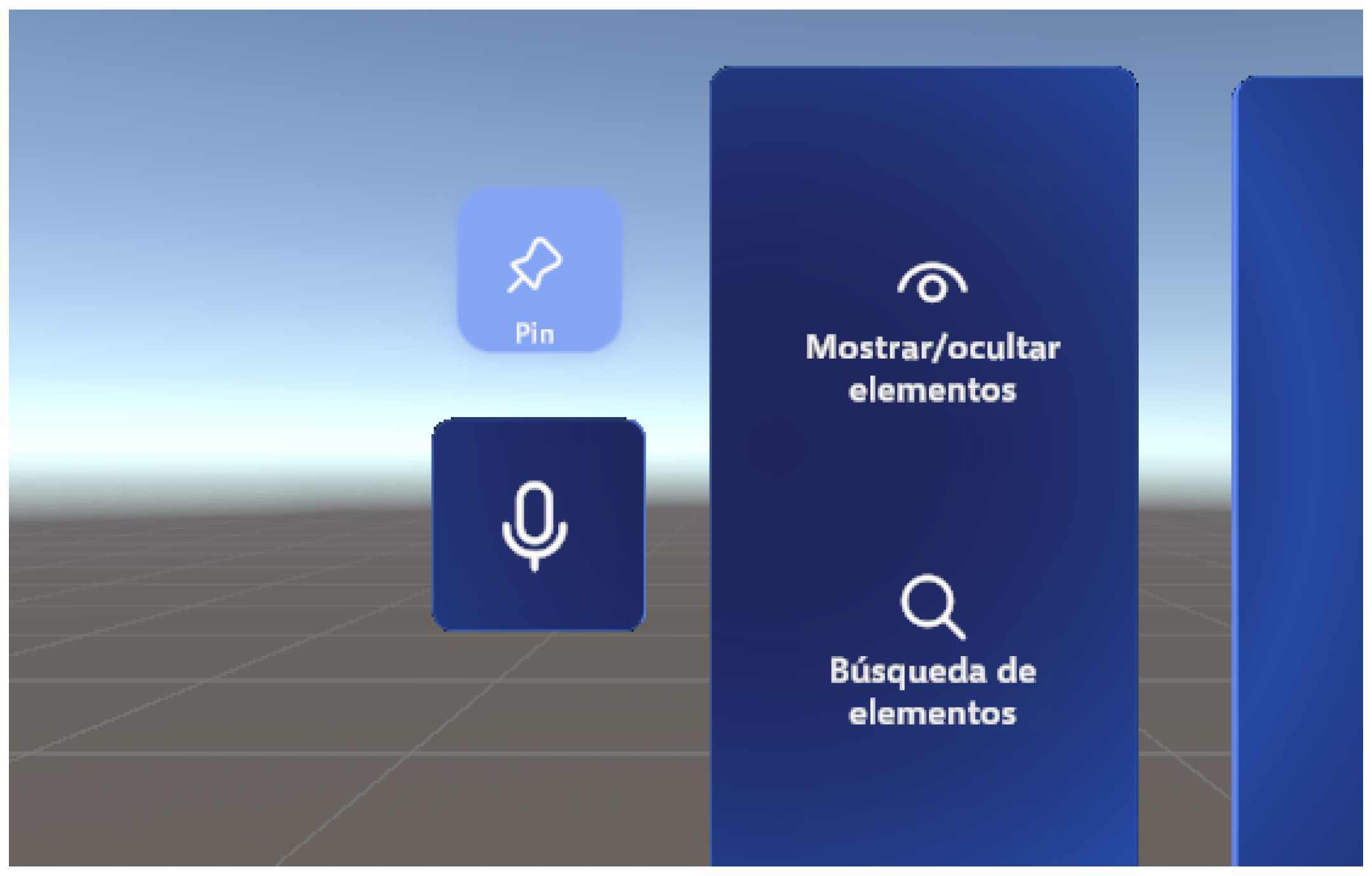
This inference and decoding pipeline is used in order to infer which voice command the user is trying to execute when the voice control is activated using the button seen in
Figure 9. In order to map the model’s decoded output to each of the available voice commands, the Levenshtein distance between the output of the model and each of the available commands is used. Although the implementation differs, the Levenshtein distance between two strings
a and
b (of lengths
and
, respectively) is defined recursively by Equation (
1):
The application then calls the function associated with whichever voice command has the shortest Levenshtein distance to the decoded output of the model.
4.9. User Monitoring Systems and Automatic Collection of Usage Data
The user monitoring system was initially created to track the tasks performed and the time spent on each task. To perform such tasks, the collected data included: date, finish_timestamp (i.e., time at which the task is completed), task number identifier, task name, duration (i.e., seconds elapsed since the start of the task), and the number of clicks performed during the task.
Next, the system was expanded to also monitor user interactions, with the addition of functionalities to track the number of clicks between the users hand-rays or fingertips and the in-application collidable elements, such as the floating menu buttons or the scene tags.
In order to gather more interaction data and avoid limiting the implementation to just hand interactions, the gaze monitoring subsystem was used to collect information on which elements were being gazed at. Collisions between the user’s gaze and the objects in the scene, both collidable (buttons and tags) and non-collidable (the 3D model of the ship) were recorded. The data collected regarding the user’s gaze was: date, timestamp, exit_eyegaze_timestamp and the name of the object against which the user’s gaze collided.
In order to detect clicks, the relevant objects such as menu buttons were made interactable, and the application was made to hook on to the OnClick event of these objects in order to record an entry every time this event got triggered.
Similarly, all elements in the scene that could be gazed at (this includes both menus and the 3D model of the ship itself) were made interactable using OpenXR functionalities. Interactions provided by OpenXR included events such as HoverEnter and HoverExited that were used to store the timestamps of when a user started to look at an element and when such a user stopped looking at the element.
To prevent loss of information, the previously mentioned data were gathered and saved in the same CSV file automatically every 30 seconds, adding an additional row per each individual interaction. Later, previous to the analysis phase, any incomplete entries were removed during the data cleaning process to avoid biasing the results.
The user monitoring system was further enhanced to capture detailed metrics related to the on-device ASR system usage. For each voice interaction that the user triggered, the system recorded data that included the original audio sample processed by the ASR system, the raw decoded transcription produced by the ASR model and decoder, the final command mapping after processing through the Levenshtein distance matching algorithm, and accuracy metrics, measured between the raw transcription and the expected phrase of the executed command, such as WER, CER, and the end-to-end latency of the ASR pipeline.
The ASR data collection was triggered automatically whenever the user touched the voice command button in the floating menu. The system started the audio capture process through the WinRT API, processed the audio through the ASR model running on ONNX Runtime and logged all the previously mentioned data upon completion of the voice command to a CSV file automatically, with each row in such a file corresponding to each interaction between the user and the ASR system.
To ensure data integrity and prevent information loss, the ASR system performed the logging operations immediately after each voice command was processed. Any errors that arose during the operation of the ASR pipeline were also logged to a separate .log file, storing any available voice samples for future debugging of such errors.
5. Evaluation
The tests in a real environment are conducted at the Navantia facilities in Ferrol shipyard. The objective of the tests performed in the workshops is for the end users to test and validate the application and decide whether what has been developed so far meets the established requirements or whether modifications and improvements to the functionalities are needed.
5.1. Usability Validation
Besides the routine test mentioned above, where it is checked that the application works correctly, validating the application’s usability is essential, especially for MR technologies. Users often lack familiarity with smart glasses or may even be using them for the first time.
Therefore, NASA-TLX was adopted, one of the best known tools for assessing the subjective workload required to perform a task [
38]. NASA-TLX evaluates workload through six dimensions: mental, physical and temporal demands, performance, effort and frustration. By combining subjective ratings for each dimension, it calculates an overall workload score, providing insights into the user’s perception of task difficulty.
NASA-TLX methodology involves two phases. Prior to task execution, users weight each dimension through binary comparisons to identify the most relevant factors. Following task completion, users rate each dimension using a 20-point scale, with scores ranging from 0 to 100.
While widely used since the 1980s [
38], NASA-TLX application in XR remains limited. Although the SIM-TLX variant [
39] exists for VR, it focuses heavily on simulated environments. This makes it less applicable to AR and MR, which are built upon the real world. Furthermore, SIM-TLX incorporates ten dimensions: mental, physical and temporal demands, frustration, task complexity, situational stress, distraction, perceptual strain, task control and presence. These new dimensions increase the binary comparisons from 15 to 45, resulting in a tedious evaluation process. Many of its dimensions, such as presence or situational stress, do not align well with all XR scenarios.
Taking all of this information into consideration, the following XR NASA-TLX was proposed. By adapting this methodology to XR, it measures the mental workload of operators using smart glasses as a substitute for traditional blueprints and techniques. It has five additional dimensions tailored to XR experiences: physical comfort, visual comfort, general comfort, ease of use and application usability. A previous study carried out by the authors provides an in-depth description of the proposed methodology [
40].
During the usability validation process, an initial test compared traditional paper-based tasks with the MR application. This study revealed difficulties in data collection and user collaboration (for further information, refer to our previous work). Consequently, a user monitoring system (
Section 4.9) was designed to automatically collect usage metrics within the MR application. This approach eliminates the need for manual feedback from the users and provides objective data on interactions, clicks, focused objects and usage time.
After this automatic collection system was implemented and incorporated in the MR application, a second study was conducted. This test involving 23 shipyard workers and engineers evaluated how familiarity with MR and HoloLens 2 affects interaction metrics.
Regarding participant selection, a convenience sampling approach was employed where all available workers who attended the scheduled testing session were included as participants. This sampling strategy was methodologically appropriate for three reasons: First, access to shipyard workers is restricted by production schedules and may also be affected by safety protocols. Second, the study required participants with domain-specific expertise in electrical outfitting tasks. Third and last, real-world trials with actual end-users were prioritized over artificial laboratory conditions. Although a larger pool of potential end users was summoned from the workforce, the final sample comprised only those who were finally present at the testing session.
To ensure methodological rigor, the study was performed with a sample size of 23 participants and randomization was implemented to mitigate order biases. All participants followed a standardized protocol with identical briefing materials, task instructions and testing conditions. The shipyard block location, Microsoft HoloLens 2 smart glasses and application configuration remained constant across trials. To eliminate observer bias, data collection was fully automated using the monitoring system described in
Section 4.9 with identical CSV logging formats and sampling frequencies for all participants. Such CSV files were automatically timestamped and were anonymized to protect participant privacy.
The study acknowledges potential selection bias inherent in convenience sampling; however, the 23 participants represent a high percentage of the total workers initially summoned, with non-participation attributed primarily to schedule conflicts rather than self-exclusion based on technical ability. This approach aims to balance such methodological rigor with the practical constraints of industrial field research.
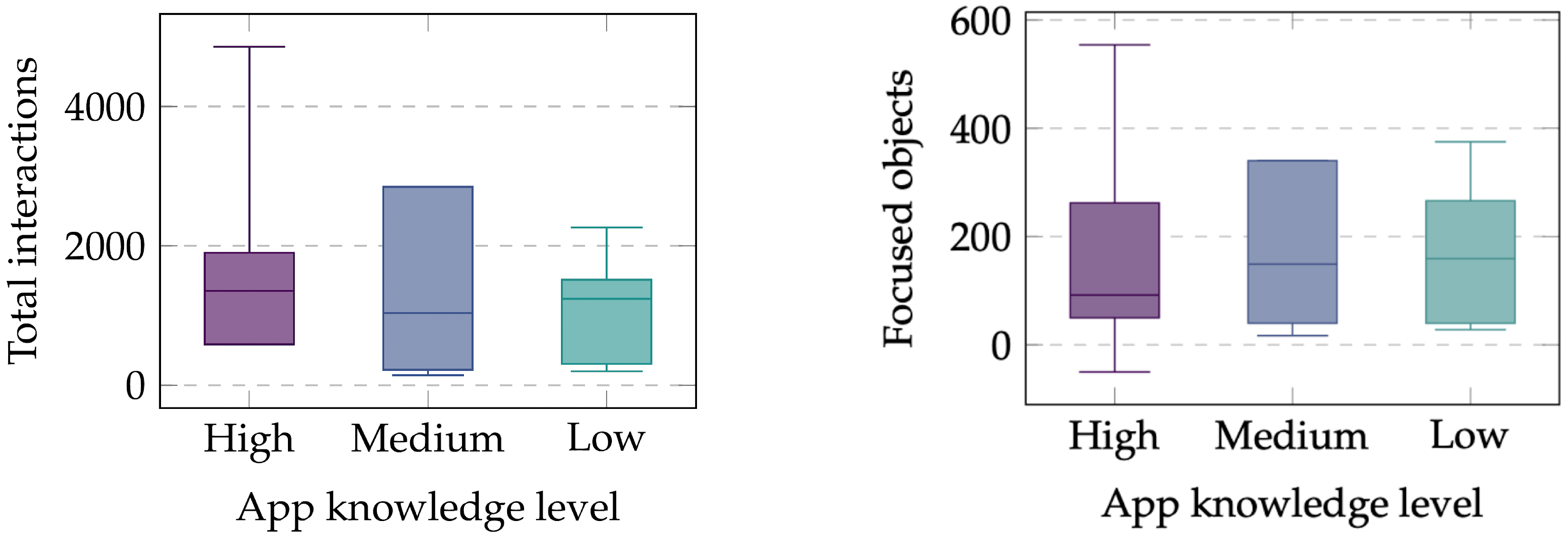
Participants were asked to explore the application freely, with a brief introduction provided only to those unfamiliar with the capabilities of the application. The data (see
Figure 10) showed that users familiar with the application interacted more frequently and explored the environment more deeply, as indicated by a higher number of objects viewed. However, this metric is also influenced by the duration of use, as longer usage times likely lead to more interactions.
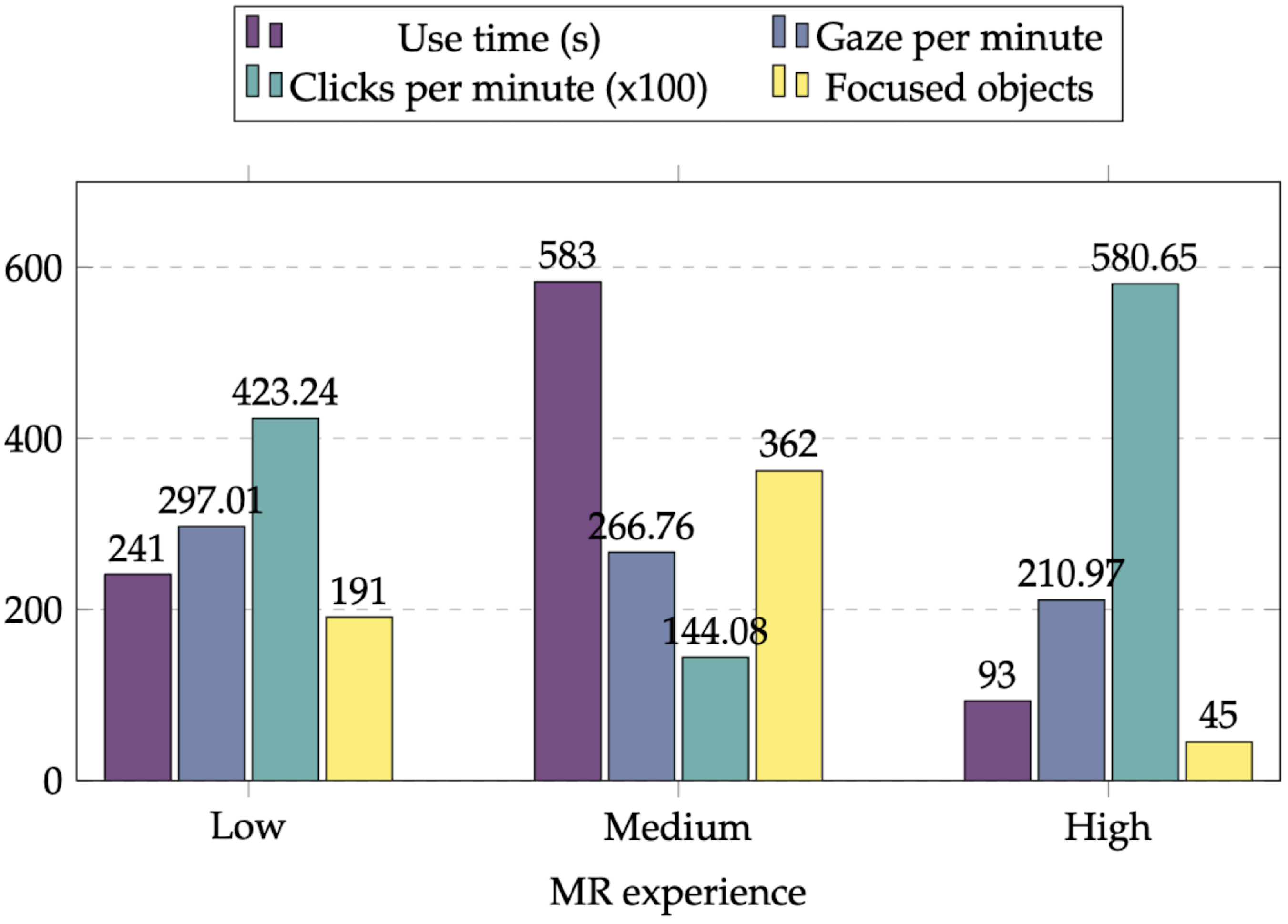
Finally, a third experiment confirmed that prior knowledge positively influences efficiency and interaction depth (
Figure 11). Experienced users showed a consistent gaze-per-minute rate but required less time to locate functionalities, reducing the need for visual searching. The data also highlighted significant differences in efficiency (clicks per minute) between the most- and least-experienced users.
Overall, the automatically collected data prove that prior experience improves the effectiveness of the application. Additionally, the XR NASA-TLX improves sensitivity to XR-specific workload factors, providing richer insights into user performance in industrial shipyard operations.
5.2. Functionality Validation
The final tests for the validation of the application were carried out on one of the blocks included in the application. To conduct this experiment, a diverse group of shipyard professionals performed or simulated their daily tasks using Microsoft HoloLens 2 smart glasses and the developed application. After completing the requested tasks, users fill in a form indicating their feedback on the experience. The tasks to be performed during this test are listed below:
to take distance measurements by using the automatic dimensions feature, allowing the user to decide which objects to measure;
to obtain the extended information of some of the equipment by using the corresponding label;
to display the pre-calculated dimensions of some of the electrical outfitting elements;
to use the search panel to find a specific element;
to create and to send a notification to alert a department of the shipyard that there is a problem in the installation of an element;
finally, to make use of the voice commands feature to show and hide virtual elements of the vessel.
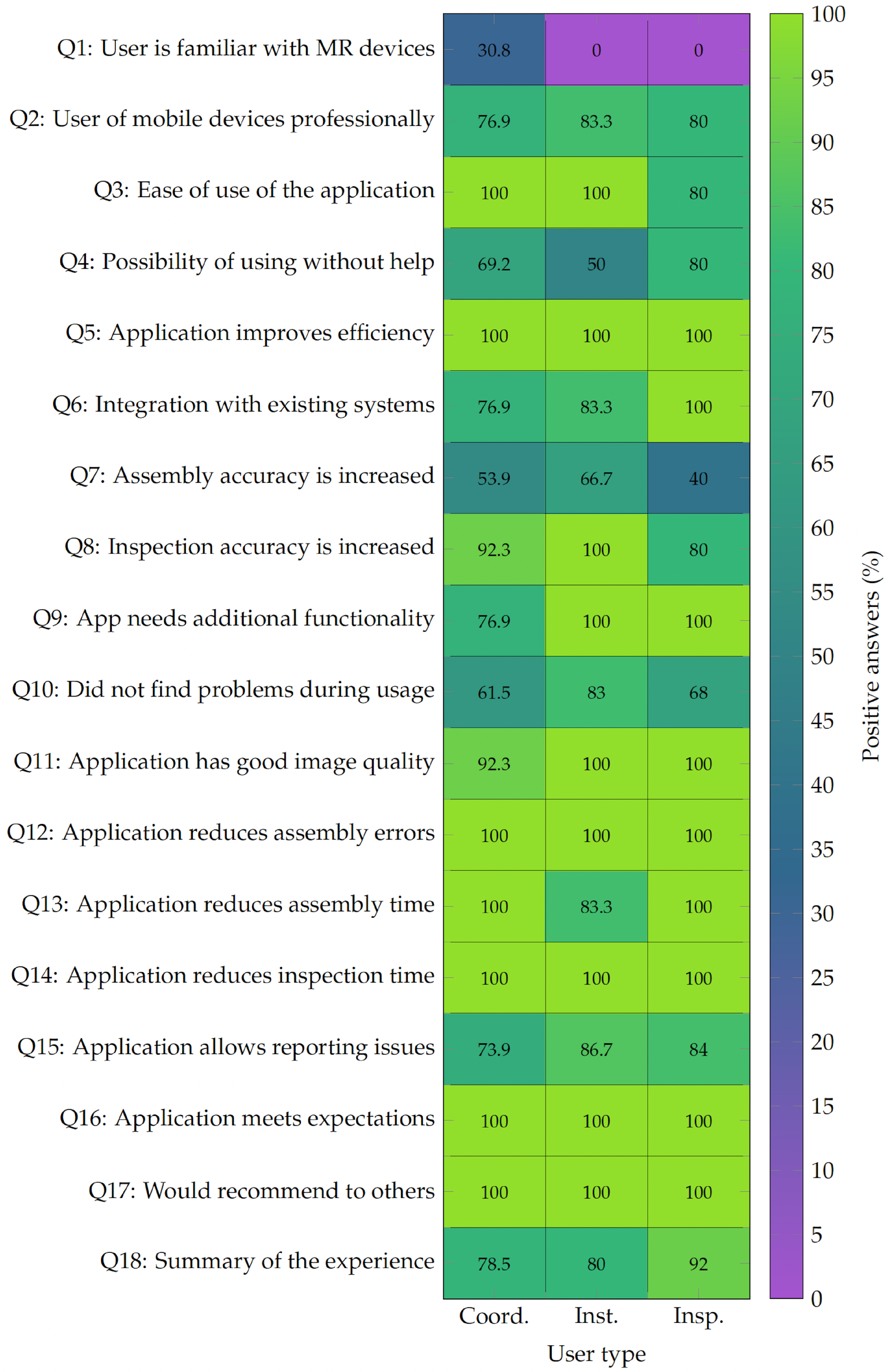
The analysis of the data obtained during the tests and the results of the surveys carried out, which can be summarized in
Figure 12, has led to the following findings.
The trials involved 24 participants: 13 coordinators, 5 inspectors and 6 workshop operators responsible for vessel installation and construction. Notably, only 4 of the 24 participants had prior experience with XR devices. Despite this lack of familiarity, which typically implies a steep learning curve, 96% of users (, , 95% CI [87.8%, 100%]) found the application easy to use and reported satisfactory image and graphic quality.
Regarding user autonomy, 67% of participants stated they could use the application without assistance (, ). However, 8 users (33%) felt they would need expert help to operate the system correctly. Among these 8 individuals, only two reported initial difficulties and only one struggled to complete the requested tasks.
Overall, 45.83% of users reported no problems during testing, 37.5% experienced minor initial issues that they quickly resolved and 16.67% (4 people) faced difficulties with specific tasks. These results suggest that while the application is intuitive, the technology inherent learning curve requires a brief adaptation period before users become fully independent.
Regarding professional utility, 100% of participants agreed that the application would improve efficiency in assembly and inspection tasks (, ). Specifically, 13 participants found the application accurate enough for assembly, while 22 out of 24 confirmed it provided the necessary precision for inspection. Only 3 users suggested adding extra functionality to support their work. Although some users (45.83%) expressed concerns about the absolute precision for certain tasks, only a single user felt that new functionalities were required.
In terms of usability and impact, all participants believed the application would reduce errors during the assembly phase (, ). Furthermore, every participant agreed that the tool would decrease inspection times (, ), with only one person doubting its potential to reduce assembly time (95.8% agreement, , ).
In conclusion, the tests demonstrate that the application effectively enhances shipyard operations such as assembly, inspection and issue reporting. Even for XR novices, the system remains intuitive and significantly boosts perceived efficiency. These results highlight the potential of MR to streamline shipyard workflows, provided a short introductory period is included for new users.
5.3. On-Device ASR System Evaluation
In order to evaluate the effectiveness of the integrated on-device ASR system, as well as its accuracy and latency inside the shipyard, the participants that took part in the functionality validation tests were asked to issue a series of voice commands in Galician during the tests in the block of the ship. The tested voice commands include, but are not limited to:
Toggling visibility of structural or electrical outfitting elements (e.g., “Amosa/agocha a estrutura” (show/hide the structure)).
Managing virtual dimensions that were automatically generated (e.g., “Borra todas as cotas” (delete all dimensions)).
Throughout the testing phase, participants were instructed to also utilize the speech-to-text dictation functionality when issuing alerts within the notifications panel, enabling them to freely articulate detailed descriptions for the newly created alerts.
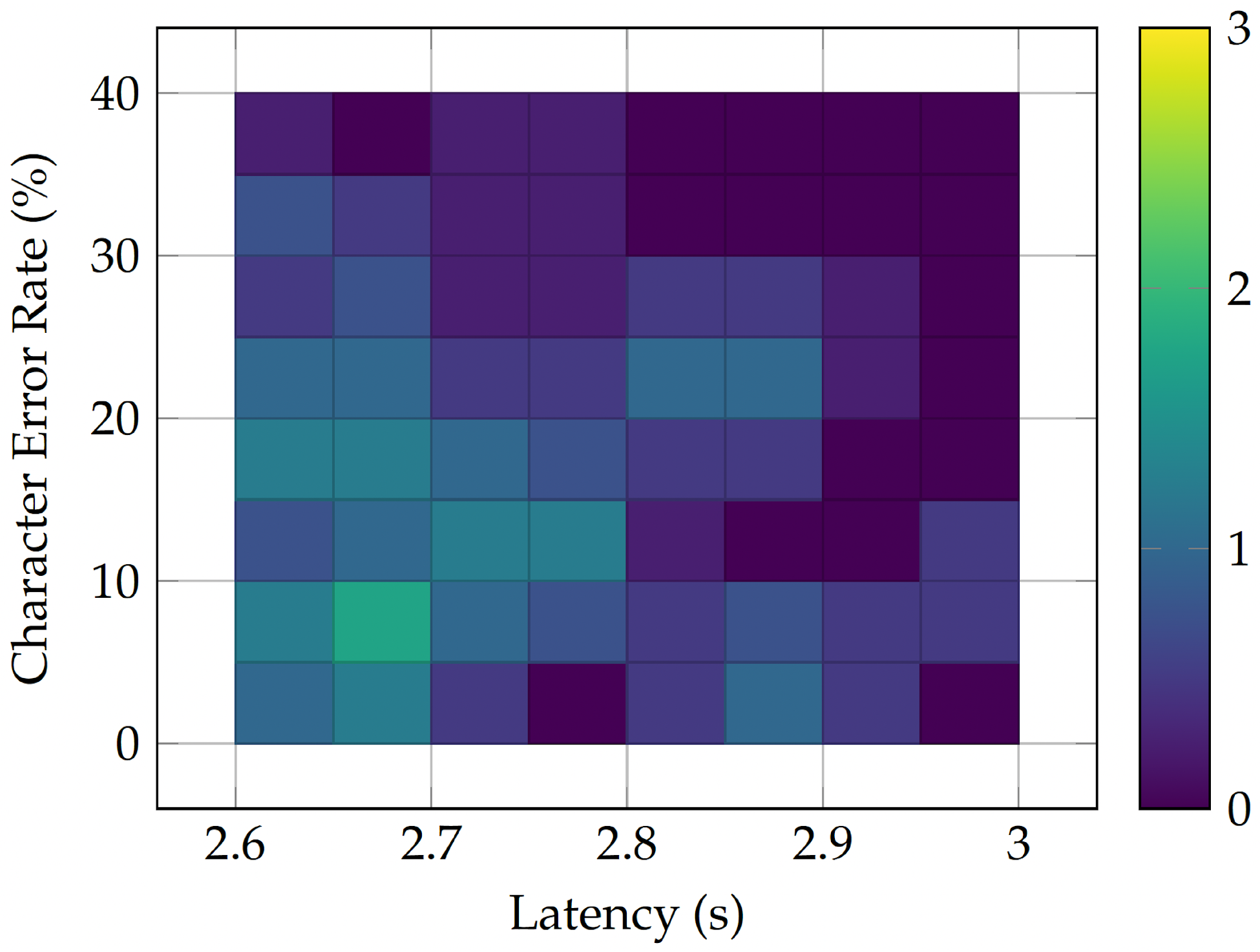
As can be seen in
Figure 13, the on-device ASR system demonstrated robust performance in a noisy and crowded environment like the shipyard. It achieved a mean CER of 16.5% (
, SD = 9.9%,
,
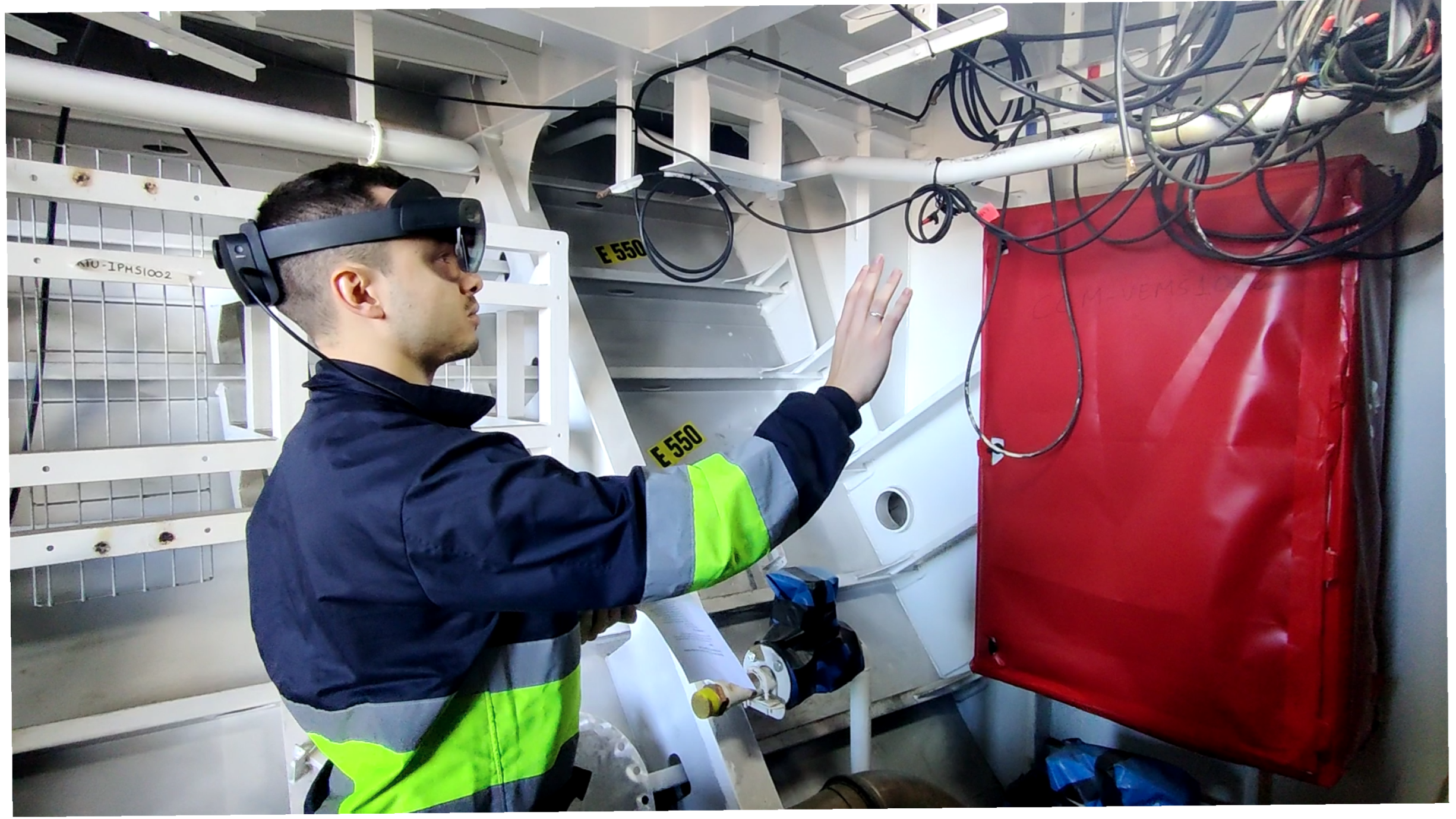
, tested against a minimum acceptable threshold of 30% for voice command recognition applications) and with these results was able to obtain a 100% intent recognition accuracy, which means the application always executed the action that the user intended to perform with the issued voice command. Moreover, after analyzing the metadata and recordings of the tests performed, it was observed that the overlapping voices in the confined workspace where the test was carried out were the main obstacle for the ASR system, rather than the more intense background noise of heavy machinery and power tools. An example of the enclosed space where the tests were carried out can be seen in
Figure 14.
Figure 13 also highlights that the latency remained consistently below 3 seconds across all the tests performed by the users, achieving a mean value of 2.76 s (SD = 0.12 s,
,
).
6. Limitations and Future Work
Several limitations exist regarding scalability and production deployment, especially hardware-wise. The Microsoft HoloLens 2 has a limited battery life and constrained computational capabilities. Comfort during long shifts can be significantly impacted. To mitigate these issues, users can utilize external batteries (as it can be seen in
Figure 14) or rely on Edge Computing devices to handle complex computational tasks. For full-scale production, industrial-grade editions of the headset such as the Trimble XR10 may offer better safety and durability.
Full deployment also requires robust device management processes. This includes protocols for application updates and infrastructure for data synchronization with existing shipyard systems. Moreover, the harsh shipyard environment (which includes dust, humidity and salty air, as well as harsh chemicals) may accelerate device wear. Maintaining accuracy also requires regular eye-tracking calibration for each operator. In addition, the ASR model may undergo periodic updates in case new technical terminology is added or if shipyard workflows evolve.
The integration of MR hardware is designed to complement existing inspection and assembly protocols rather than replace them abruptly. Transitioning from paper-based to digital workflows requires a phased adoption strategy. During this period, both systems will coexist to ensure operational continuity. By aligning virtual overlays with traditional processes, the system enhances data accessibility while minimizing disruption.
However, compatibility with the whole shipyard IT infrastructure remains a challenge. Integrating the application with Product Lifecycle Management (PLM), CAD and Enterprise Resource Planning (ERP) platforms requires standardized data formats and synchronization protocols. Furthermore, user authentication must align with the strict shipyard Identity and Access Management (IAM) systems.
Regarding the evaluation methodology and possible biases, the participants in the functionality validation tests did not have prior experience with MR devices in most cases (only 4 out of the 24 participants had used MR devices previously), which could have negatively influenced their perception of the ease of use of the application and its effectiveness. However, most participants were shipyard workers and engineers with domain expertise in electrical outfitting tasks, which adds a possible bias towards positive feedback on the utility provided by the application in their specific tasks even if this validates its practical applicability for those specific shipyard workers.
In terms of accuracy, while the ASR system achieved a 100% intent recognition accuracy, the CER of 16.5% indicates that transcription errors still occurred, especially in cases where secondary voices from other users were heard in the background, making it difficult for the ASR model to distinguish between the main user’s voice and background voices that should be ignored.
Future specific steps to improve speech recognition accuracy include fine-tuning the model for the individual noise conditions typical of shipyards, which can be done through expansion of the datasets used for the fine-tuning process, augmenting them by means of noise-injection or reverberation to simulate the kind of noise typical of these environments. The inclusion of a Language Model (LM) for an LM-guided decoding process is also a viable approach towards increasing transcription accuracy but the limited computational capabilities of the Microsoft HoloLens 2 do not indicate that this approach is viable while aiming to maintain a positive user experience and application performance. Cloud-based adaptation would be feasible technically, but it would compromise the offline operational requirement essential for shipyard environments with unreliable connectivity as well as rigid security and connectivity protocols.
A potential future mitigation strategy in this direction would be the usage of class-based language modeling techniques, where a general ASR model handles common speech, while a separate finite-state component manages the more predictable transcription patterns of technical identifiers prevalent in the shipyard (e.g., “Block 511”, “Component ABC123”…). Regarding the ASR system, possible domain biases can arise, for example, due to the use of certain respiratory protective equipment, which can modify voice frequencies and create a specific acoustic and phonetic set of characteristics.
Finally, other specific lines of future work include the automatic positioning of virtual elements based on CAD models of the blocks of the ship and their overlap with the real-world environment, which would reduce the need for manual adjustments by the user and would improve the overall user experience when working with the application. In addition, the use of Artificial Vision models such as Instance Segmentation models to automatically identify real-world elements and to perform automatic alignment monitoring could further enhance the ease of use and accuracy of the application.
7. Conclusions
This study presented the design and development of a MR application for Microsoft HoloLens 2 smart glasses, aimed at improving the efficiency and accuracy of shipyard workers during the installation of electrical outfitting systems. By making use of the capabilities of MR, the application enables operators to visualize virtual elements directly and easily onto real-world vessel structures.
Despite 83% of participants having no prior XR experience, 96% found the application easy to use, and 67% reported being able to operate it independently after an initial short adaptation period.
The functionality validation tests conducted on the block of the ship with electrical outfitting tasks showed that 100% of users agreed that the application would reduce assembly errors and enhance efficiency in assembly and inspection tasks. The perceived precision varied by task type: 92% of participants confirmed sufficient accuracy for inspection tasks (, ).
The on-device ASR system proved robust in the tested industrial conditions, achieving 100% intent recognition accuracy, a CER of 16.5% and an average response latency of 2.76 s, which ensures that real-time interaction is feasible.
Based on the obtained results, the application demonstrated potential to reduce reliance on paper-based blueprints through real-time dimension visualization.
In conclusion, within the specific scope of the tested electrical outfitting tasks in the block of the ship, this article demonstrates the potential of MR as an effective tool for inspection tasks and provides practical results for further improvement towards its use in assembly tasks, thus contributing to the evolving ecosystem of MR technologies in the naval industry.
Author Contributions
Design, A.V.-B. and A.V.-P.; software, A.V.-B. and A.V.-P.; experiments, A.V.-B. and A.V.-P.; writing—original draft preparation, A.V.-B. and A.V.-P.; writing—review and editing, A.V.-B., A.V.-P., T.M.F.-C., J.V.-M. and P.F.-L.; supervision, J.V.-M., T.M.F.-C. and P.F.-L.; funding acquisition, T.M.F.-C. All authors have read and agreed to the published version of the manuscript.
Funding
This work has been supported by Centro Mixto de Investigación UDC-NAVANTIA (IN853C 2022/01), funded by GAIN (Xunta de Galicia) and ERDF Galicia 2021–2027.
Institutional Review Board Statement
This study involves only fully anonymized data and does not include any collection of personal or sensitive data. The study did not require ethical approval.
Informed Consent Statement
Verbal informed consent was obtained from the participants. The rationale for utilizing verbal consent is that the study involved minimal risk, did not include the collection of sensitive personal data and was conducted in an academic context. Verbal consent ensured accessibility and voluntary participation while maintaining ethical standards.
Data Availability Statement
Data are contained within the article.
Acknowledgments
We would like to thank all the Navantia personnel who collaborated with us both during the design and development of the electrical outfitting MR tool and also during the tests carried out in the shipyard workshops. A special mention should be given to the cooperation and support provided by Marcos Varela-Vigo and Alejandra Caamaño-Pestonit throughout all the steps of the project. We would also like to extend our recognition to Oscar Blanco-Novoa, former researcher at CEMI who collaborated during the design process of the MR application.
Conflicts of Interest
The authors declare no conflict of interest. Javier Vilar-Martínez was employed by Navantia S. A. The remaining authors declare that the research was conducted in the absence of any commercial or financial relationships that could be construed as a potential conflict of interest.
References
- Munirathinam, S. Industry 4.0: Industrial internet of things (IIoT). In Advances in Computers; Elsevier: Amsterdam, The Netherlands, 2020; Volume 117, pp. 129–164. [Google Scholar]
- de Souza Cardoso, L.F.; Mariano, F.C.M.Q.; Zorzal, E.R. A survey of industrial augmented reality. Comput. Ind. Eng. 2020, 139, 106159. [Google Scholar] [CrossRef]
- Sharma, A.; Mehtab, R.; Mohan, S.; Mohd Shah, M.K. Augmented reality—An important aspect of Industry 4.0. Ind. Robot. Int. J. Robot. Res. Appl. 2022, 49, 428–441. [Google Scholar] [CrossRef]
- Grazi, L.; Feijoo Alonso, A.; Gąsiorek, A.; Pertusa Llopis, A.M.; Grajeda, A.; Kanakis, A.; Rodriguez Vidal, A.; Parri, A.; Vidal, F.; Ergas, I.; et al. Methodology and Challenges of Implementing Advanced Technological Solutions in Small and Medium Shipyards: The Case Study of the Mari4_YARD Project. Electronics 2025, 14, 1597. [Google Scholar] [CrossRef]
- Navantia. Shipyard 5.0 Strategic Network, Products Catalog. Available online: https://www.navantia.es/en/catalog/ (accessed on 26 August 2025).
- Hound, N. Wärtsilä Moves Towards Remote Guidance for Vessel Repair and Maintenance. 2019. Available online: https://www.iims.org.uk/wartsila-moves-towards-remote-guidance-for-vessel-repair-and-maintenance (accessed on 30 December 2025).
- De Felice, F.; Cannito, A.R.; Monte, D.; Vitulano, F. S.A.M.I.R.: Supporting Tele-Maintenance with Integrated Interaction Using Natural Language and Augmented Reality. In Human-Computer Interaction—INTERACT 2021: 18th IFIP TC 13 International Conference, Bari, Italy, 30 August–3 September 2021, Proceedings, Part V; Lecture Notes in Computer Science; Springer: Cham, Switzerland, 2021; Volume 12936, pp. 280–284. [Google Scholar] [CrossRef]
- Rosilius, M.; Spiertz, M.; Wirsing, B.; Geuen, M.; Bräutigam, V.; Ludwig, B. Impact of Industrial Noise on Speech Interaction Performance and User Acceptance when Using the MS HoloLens 2. Multimodal Technol. Interact. 2024, 8, 8. [Google Scholar] [CrossRef]
- Ludwig, H.; Schmidt, T.; Kühn, M. Voice user interfaces in manufacturing logistics: A literature review. Int. J. Speech Technol. 2023, 26, 627–639. [Google Scholar] [CrossRef]
- Cheng, J.C.; Chen, K.; Chen, W. State-of-the-art review on Mixed Reality applications in the AECO industry. J. Constr. Eng. Manag. 2020, 146, 03119009. [Google Scholar] [CrossRef]
- Wang, P.; Bai, X.; Billinghurst, M.; Zhang, S.; Zhang, X.; Wang, S.; He, W.; Yan, Y.; Ji, H. AR/MR remote collaboration on physical tasks: A review. Robot. Comput.-Integr. Manuf. 2021, 72, 102071. [Google Scholar] [CrossRef]
- Li, X.; Yi, W.; Chi, H.L.; Wang, X.; Chan, A.P. A critical review of Virtual and Augmented Reality (VR/AR) applications in construction safety. Autom. Constr. 2018, 86, 150–162. [Google Scholar] [CrossRef]
- Schiavi, B.; Havard, V.; Beddiar, K.; Baudry, D. BIM data flow architecture with AR/VR technologies: Use cases in architecture, engineering and construction. Autom. Constr. 2022, 134, 104054. [Google Scholar] [CrossRef]
- Opoku, D.G.J.; Perera, S.; Osei-Kyei, R.; Rashidi, M. Digital twin application in the construction industry: A literature review. J. Build. Eng. 2021, 40, 102726. [Google Scholar] [CrossRef]
- Wang, J.; Zhu, M.; Fan, X.; Yin, X.; Zhou, Z. Multi-channel augmented reality interactive framework design for ship outfitting guidance. IFAC-PapersOnLine 2020, 53, 189–196. [Google Scholar] [CrossRef]
- Polycam. Cross-Platform 3D Scanning Floor Plans & Drone Mapping. Available online: https://poly.cam/ (accessed on 26 August 2025).
- Graphisoft. BIMx. Available online: https://graphisoft.com/solutions/bimx/ (accessed on 26 August 2025).
- Graphisoft. Archicad. Available online: https://graphisoft.com/solutions/archicad/ (accessed on 26 August 2025).
- eDrawings. View CAD Files in AR/VR. Available online: https://www.edrawingsviewer.com/view-cad-files-arvr (accessed on 26 August 2025).
- Tadeja, S.K.; Rydlewicz, W.; Lu, Y.; Bubas, T.; Rydlewicz, M.; Kristensson, P.O. Measurement and inspection of photo-realistic 3-D VR models. IEEE Comput. Graph. Appl. 2021, 41, 143–151. [Google Scholar] [CrossRef]
- Połap, D. Voice Control in Mixed Reality. In Proceedings of the 2018 Federated Conference on Computer Science and Information Systems (FedCSIS); ACSIS: Marlton, NJ, USA, 2018; pp. 497–500. [Google Scholar] [CrossRef]
- Vidal-Balea, A.; Blanco-Novoa, O.; Fraga-Lamas, P.; Vilar-Montesinos, M.; Fernández-Caramés, T.M. Creating collaborative Augmented Reality experiences for industry 4.0 training and assistance applications: Performance evaluation in the shipyard of the future. Appl. Sci. 2020, 10, 9073. [Google Scholar] [CrossRef]
- Sailor, H.; Patil, A.; Patil, H. Advances in Low Resource ASR: A Deep Learning Perspective. In Proceedings of the 2018 Speech and Language Technology in Under-Resourced Languages (SLTU), Gurugram, India, 29–31 August 2018; pp. 15–19. [Google Scholar] [CrossRef]
- Azizah, K.; Adriani, M.; Jatmiko, W. Hierarchical Transfer Learning for Multilingual, Multi-Speaker, and Style Transfer DNN-Based TTS on Low-Resource Languages. IEEE Access 2020, 8, 179798–179812. [Google Scholar] [CrossRef]
- Conneau, A.; Khandelwal, K.; Goyal, N.; Chaudhary, V.; Wenzek, G.; Guzmán, F.; Grave, E.; Ott, M.; Zettlemoyer, L.; Stoyanov, V. Unsupervised Cross-lingual Representation Learning at Scale. arXiv 2019, arXiv:1908.06342. [Google Scholar]
- Pratap, V.; Sriram, A.; Tomasello, P.; Hannun, A.; Liptchinsky, V.; Synnaeve, G.; Collobert, R. Massively Multilingual ASR: 50 Languages, 1 Model, 1 Billion Parameters. arXiv 2020, arXiv:2007.03001. [Google Scholar] [CrossRef]
- Baevski, A.; Zhou, Y.; Mohamed, A.; Auli, M. wav2vec 2.0: A framework for self-supervised learning of speech representations. Adv. Neural Inf. Process. Syst. 2020, 33, 12449–12460. [Google Scholar]
- Kim, C.; Gowda, D.; Lee, D.; Kim, J.; Kumar, A.; Kim, S.; Garg, A.; Han, C. A Review of On-Device Fully Neural End-to-End Automatic Speech Recognition Algorithms. In Proceedings of the 2020 54th Asilomar Conference on Signals, Systems, and Computers, Pacific Grove, CA, USA, 1–4 November 2020; pp. 277–283. [Google Scholar]
- Marchisio, A.; Hanif, M.A.; Khalid, F.; Plastiras, G.; Kyrkou, C.; Theocharides, T.; Shafique, M. Deep Learning for Edge Computing: Current Trends, Cross-Layer Optimizations, and Open Research Challenges. In Proceedings of the 2019 IEEE Computer Society Annual Symposium on VLSI (ISVLSI), Miami, FL, USA, 15–17 July 2019; pp. 553–559. [Google Scholar] [CrossRef]
- Schröter, H.; Rosenkranz, T.; Escalante-B, A.N.; Maier, A. Low Latency Speech Enhancement for Hearing Aids Using Deep Filtering. IEEE/ACM Trans. Audio Speech Lang. Proc. 2022, 30, 2716–2728. [Google Scholar] [CrossRef]
- Park, S.M.; Kim, Y.G. A Metaverse: Taxonomy, Components, Applications, and Open Challenges. IEEE Access 2022, 10, 4209–4251. [Google Scholar] [CrossRef]
- Chute, D.O. Noise Control Methods for Shipbuilding. National Shipbuilding Research Program. 2012. Available online: https://www.nsrp.org/wp-content/uploads/2015/09/Deliverable-2012-424-Noise_Control_Methods_Final_Report-Atrium.pdf (accessed on 27 January 2026).
- Garcia, C.; Ortega, M.; Ivorra, E.; Contero, M.; Mora, P.; Alcañiz, M.L. Holorailway: An augmented reality system to support assembly operations in the railway industry. Adv. Manuf. 2024, 12, 764–783. [Google Scholar] [CrossRef]
- Unity. Unity Real-Time Development Platform|3D, 2D, VR & AR Engine. Available online: https://unity.com/ (accessed on 26 August 2025).
- Microsoft. Mixed Reality Toolkit 3. Available online: https://learn.microsoft.com/en-us/windows/mixed-reality/mrtk-unity/mrtk3-overview/ (accessed on 26 August 2025).
- Valladares-Poncela, A.; Fraga-Lamas, P.; Fernández-Caramés, T.M. On-Device Automatic Speech Recognition for Low-Resource Languages in Mixed Reality Industrial Metaverse Applications: Practical Guidelines and Evaluation of a Shipbuilding Application in Galician. IEEE Access 2025, 13, 77017–77038. [Google Scholar] [CrossRef]
- Froiz-Míguez, I.; Fraga-Lamas, P.; Fernández-Caramés, T.M. Design, Implementation, and Practical Evaluation of a Voice Recognition Based IoT Home Automation System for Low-Resource Languages and Resource-Constrained Edge IoT Devices: A System for Galician and Mobile Opportunistic Scenarios. IEEE Access 2023, 11, 63623–63649. [Google Scholar] [CrossRef]
- Hart, S.G.; Staveland, L.E. Development of NASA-TLX (Task Load Index): Results of empirical and theoretical research. In Advances in Psychology; Elsevier: Amsterdam, The Netherlands, 1988; Volume 52, pp. 139–183. [Google Scholar]
- Harris, D.; Wilson, M.; Vine, S. Development and validation of a simulation workload measure: The simulation task load index (SIM-TLX). Virtual Real. 2020, 24, 557–566. [Google Scholar] [CrossRef]
- Vidal-Balea, A.; Fraga-Lamas, P.; Fernández-Caramés, T.M. Advancing NASA-TLX: Automatic User Interaction Analysis for Workload Evaluation in XR Scenarios. In Proceedings of the 2024 IEEE Gaming, Entertainment, and Media Conference (GEM), Turin, Italy, 5–7 June 2024; IEEE: New York, NY, USA, 2024; pp. 1–6. [Google Scholar]
Figure 1.
Elements visible in the application that constitute the structure and electrical elements of this section of the vessel. © Picture courtesy of Navantia S. A. S.M.E.
Figure 1.
Elements visible in the application that constitute the structure and electrical elements of this section of the vessel. © Picture courtesy of Navantia S. A. S.M.E.
Figure 2.
Overview of the application: (a) main panel to toggle the visibility of items; (b) panel for searching elements by identifier and filtering items by item type.
Figure 2.
Overview of the application: (a) main panel to toggle the visibility of items; (b) panel for searching elements by identifier and filtering items by item type.
Figure 3.
Overview of the application: (a) panel to administer the task manager; (b) panel for changing between vessel’s blocks.
Figure 3.
Overview of the application: (a) panel to administer the task manager; (b) panel for changing between vessel’s blocks.
Figure 4.
Overview of the application: (a) collapsed tag: shows element IDs; (b) extended tag: presents all information related to the given element.
Figure 4.
Overview of the application: (a) collapsed tag: shows element IDs; (b) extended tag: presents all information related to the given element.
Figure 5.
Light bulb animation which helps visually identify the elements that meet the search criteria.
Figure 5.
Light bulb animation which helps visually identify the elements that meet the search criteria.
Figure 6.
User interface panel that allows the user to filter results by item type, block, construction stage, parametric control and PBS.
Figure 6.
User interface panel that allows the user to filter results by item type, block, construction stage, parametric control and PBS.
Figure 7.
Automatic dimension generation system: (a) dimension created between two main electrical outfitting supports; (b) dimension created between a support and the structure, displaced from its original position, with auxiliary lines indicating the points to which the dimension refers. © Pictures courtesy of Navantia S. A. S.M.E.
Figure 7.
Automatic dimension generation system: (a) dimension created between two main electrical outfitting supports; (b) dimension created between a support and the structure, displaced from its original position, with auxiliary lines indicating the points to which the dimension refers. © Pictures courtesy of Navantia S. A. S.M.E.
Figure 8.
Overview of the application: (a) notification panel; (b) voice dictation feature added to the notification panel.
Figure 8.
Overview of the application: (a) notification panel; (b) voice dictation feature added to the notification panel.
Figure 9.
Main menu navigation pane which shows the voice control button used to activate the on-device ASR system.
Figure 9.
Main menu navigation pane which shows the voice control button used to activate the on-device ASR system.
Figure 10.
Number of total interactions (left) and focused objects (right) grouped by user app level of knowledge, which demonstrate that prior experience with the application influences interaction type and frequency.
Figure 10.
Number of total interactions (left) and focused objects (right) grouped by user app level of knowledge, which demonstrate that prior experience with the application influences interaction type and frequency.
Figure 11.
Results of the experiment which show the influence of prior MR experience on several interaction metrics like use time, gaze per minute, clicks per minute and focused objects.
Figure 11.
Results of the experiment which show the influence of prior MR experience on several interaction metrics like use time, gaze per minute, clicks per minute and focused objects.
Figure 12.
Percentage of positive answers per user type for each question in the survey.
Figure 12.
Percentage of positive answers per user type for each question in the survey.
Figure 13.
Heatmap which shows the distribution of latency and character error rate during the ASR system tests inside the shipyard.
Figure 13.
Heatmap which shows the distribution of latency and character error rate during the ASR system tests inside the shipyard.
Figure 14.
Workshop scenario where the tests were performed. © Picture courtesy of Navantia S. A. S.M.E.
Figure 14.
Workshop scenario where the tests were performed. © Picture courtesy of Navantia S. A. S.M.E.
| Disclaimer/Publisher’s Note: The statements, opinions and data contained in all publications are solely those of the individual author(s) and contributor(s) and not of MDPI and/or the editor(s). MDPI and/or the editor(s) disclaim responsibility for any injury to people or property resulting from any ideas, methods, instructions or products referred to in the content. |






 ,
,