




The Impact of User Interface and Experience (UI/UX) Design on Visual Ergonomics: A Technical Approach for Reducing Human Error in Industrial Settings

Abstract
1. Introduction
Research Questions
- How does UI/UX design influence user experience and error reduction during interaction with digital systems?
- Which UI/UX design elements are most closely aligned with visual ergonomics principles?
- What differences exist in error occurrence between systems designed with and without visual ergonomics considerations?
- How does ergonomically informed UI/UX design affect operational efficiency in work-related tasks?
- To what extent do working conditions influence the need for visual ergonomics in human–machine interaction?
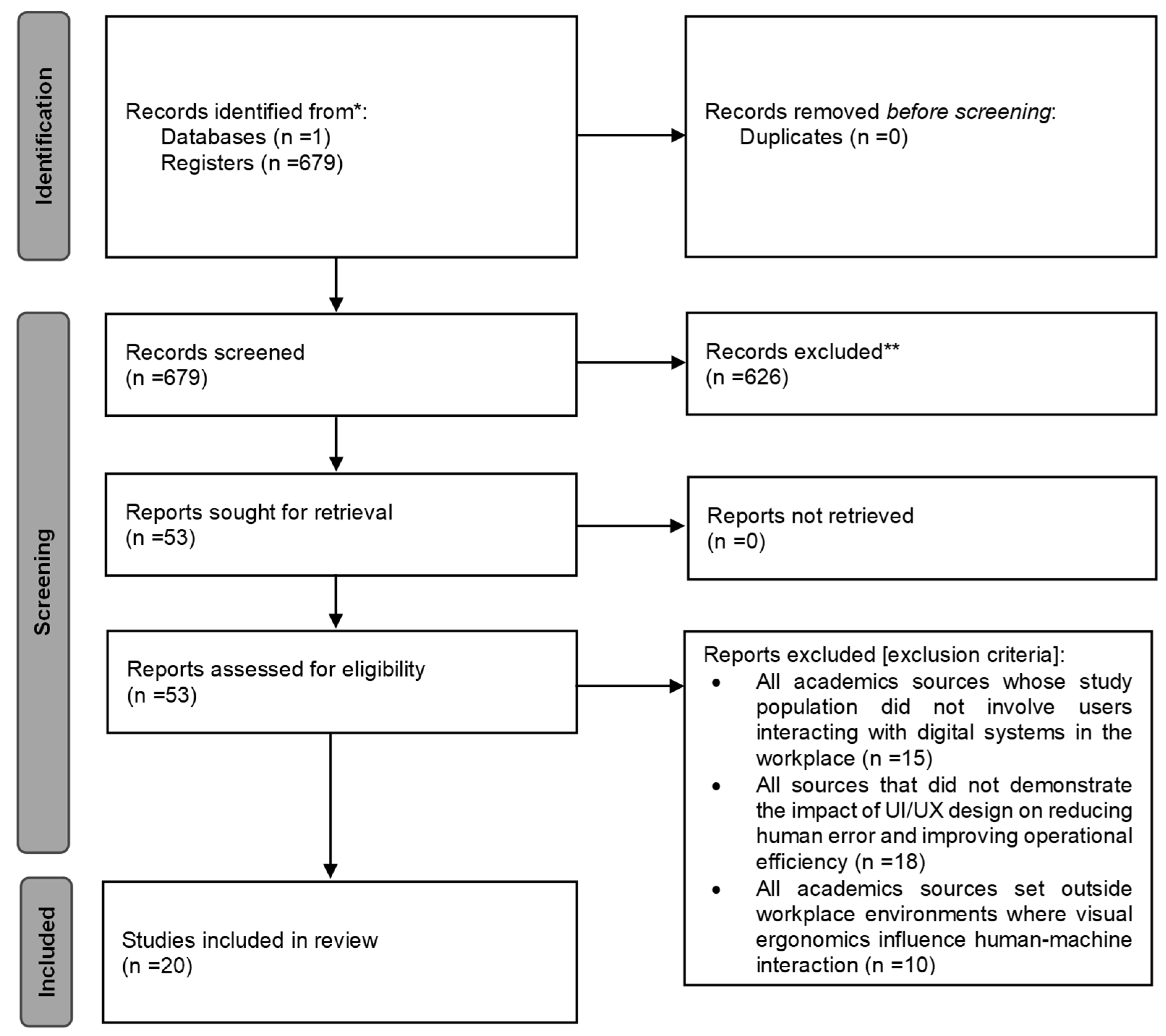
2. Materials and Methods
3. Results
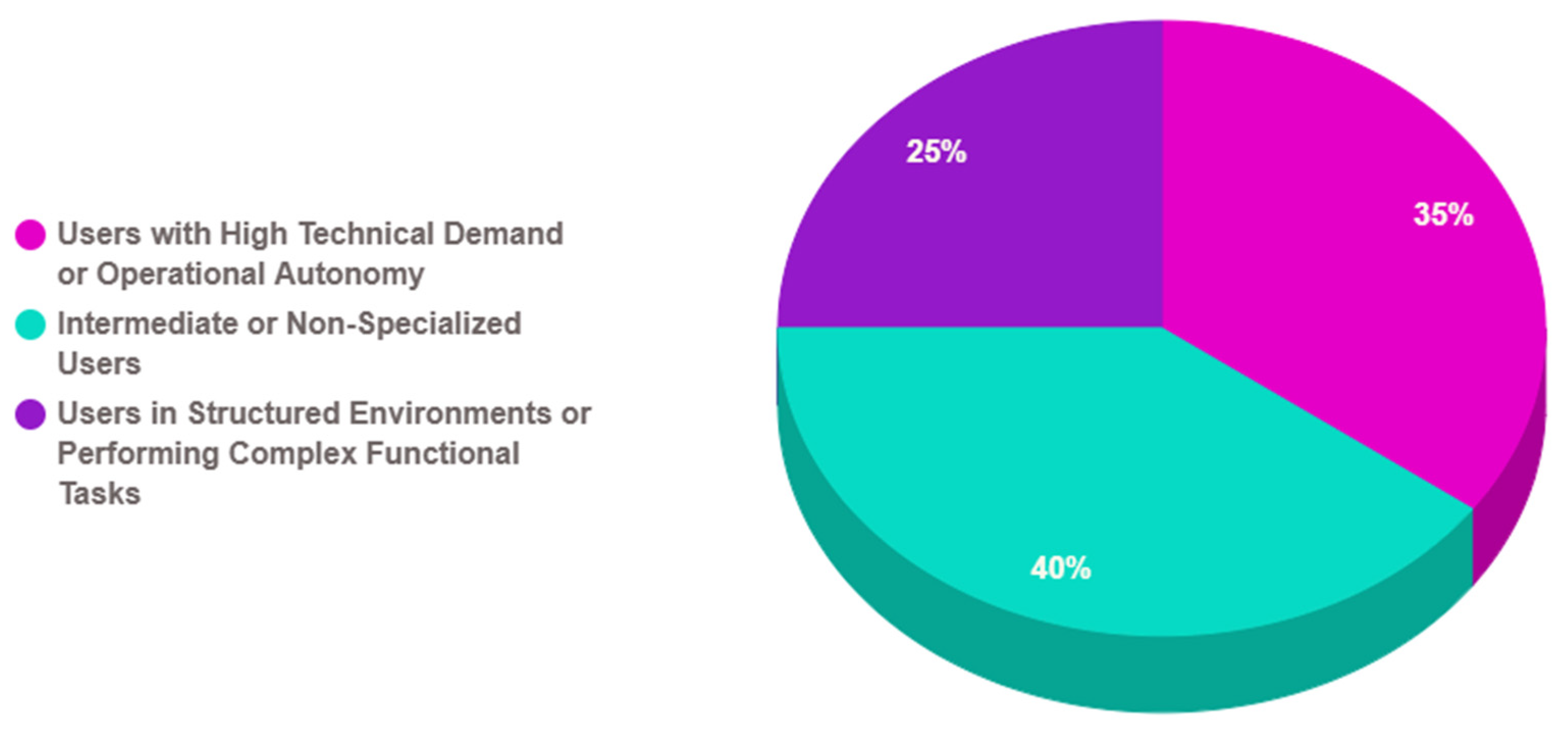
3.1. RQ1: What Characteristics Do Users Who Interact with Digital Systems Have?
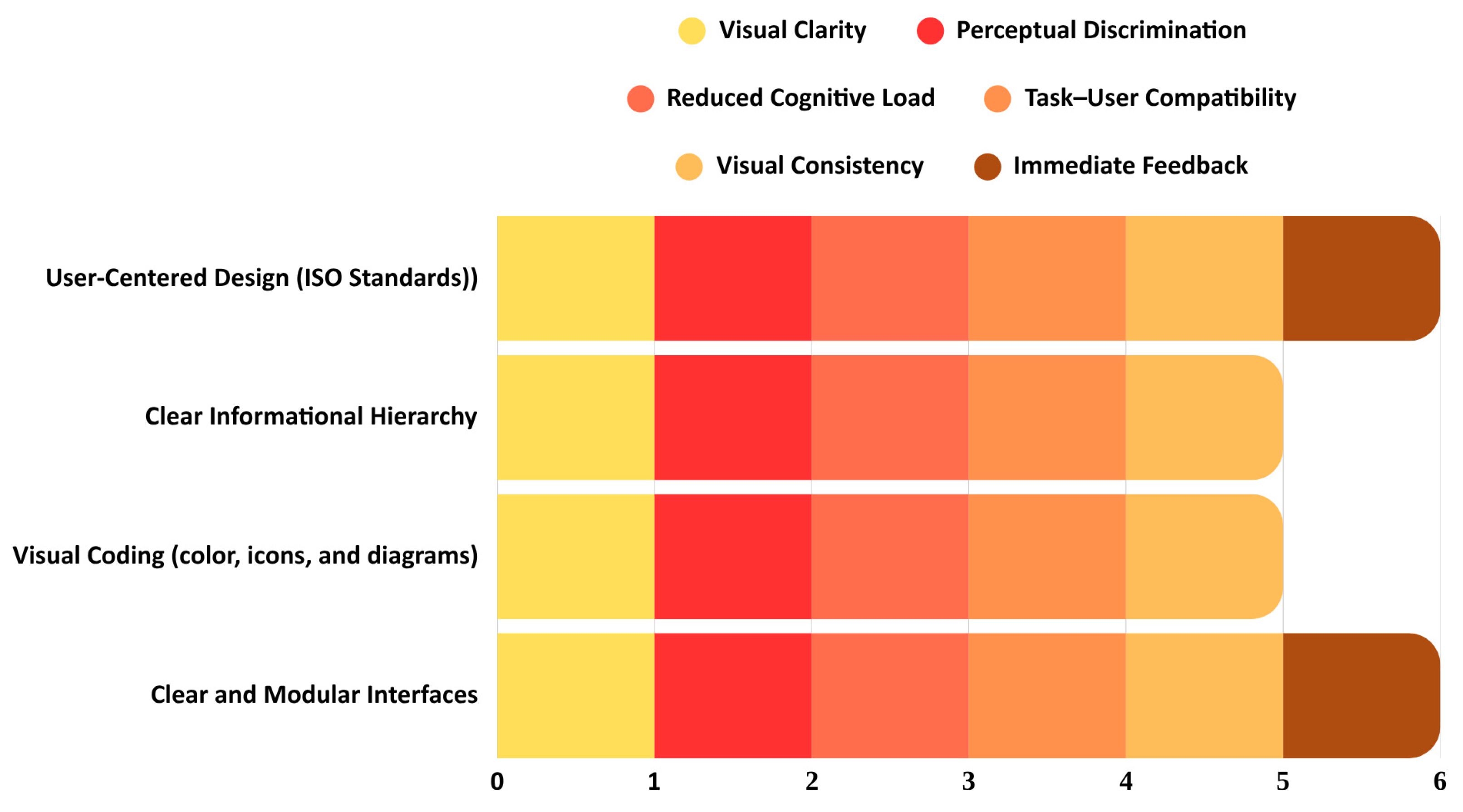
3.2. RQ2: Which UI/UX Design Elements Align with Visual Ergonomics Principles?
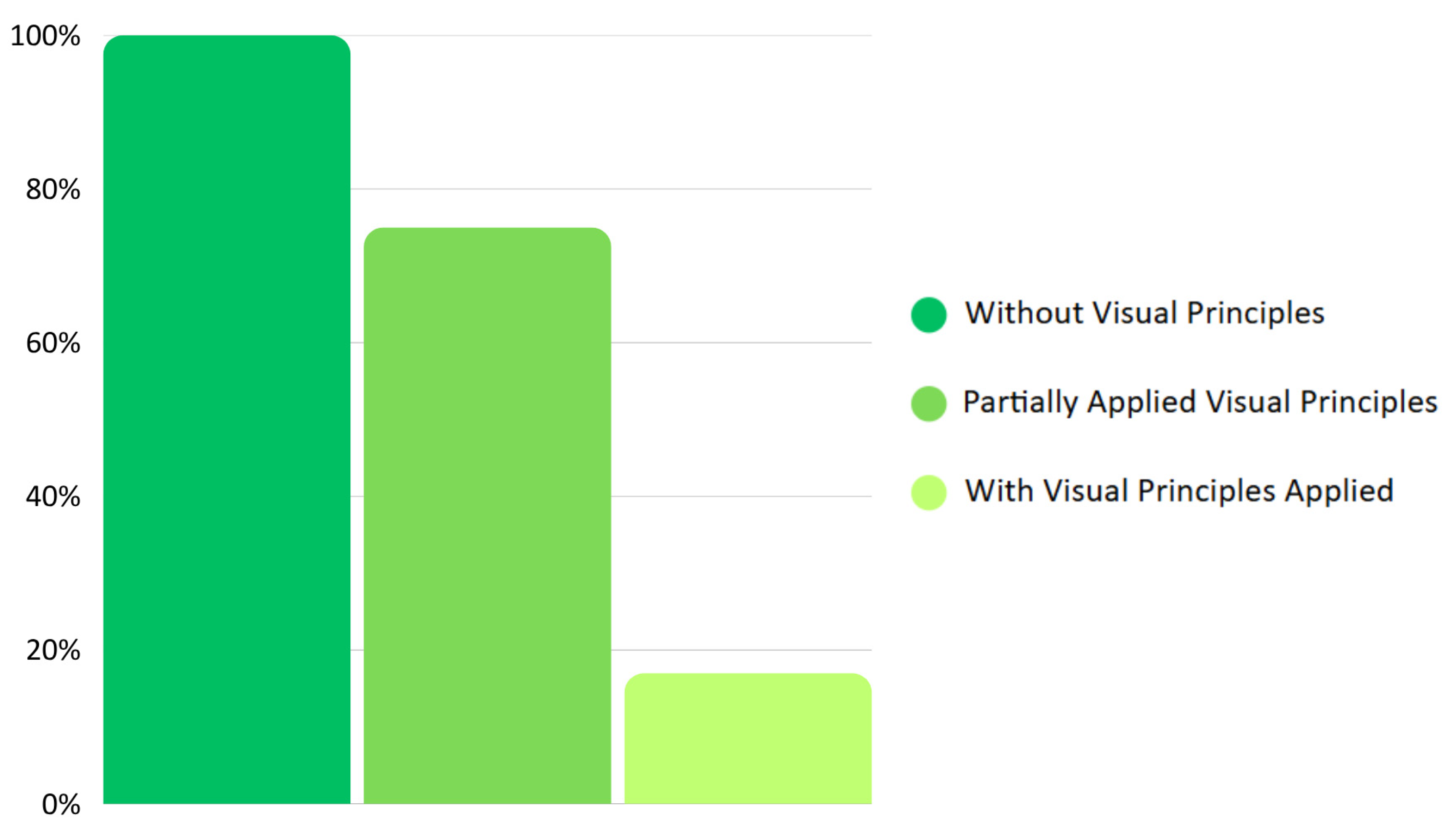
3.3. RQ3: What Differences Exist Between Systems Designed with and Without Visual Ergonomics Principles in Terms of the Occurrence of Human Errors?
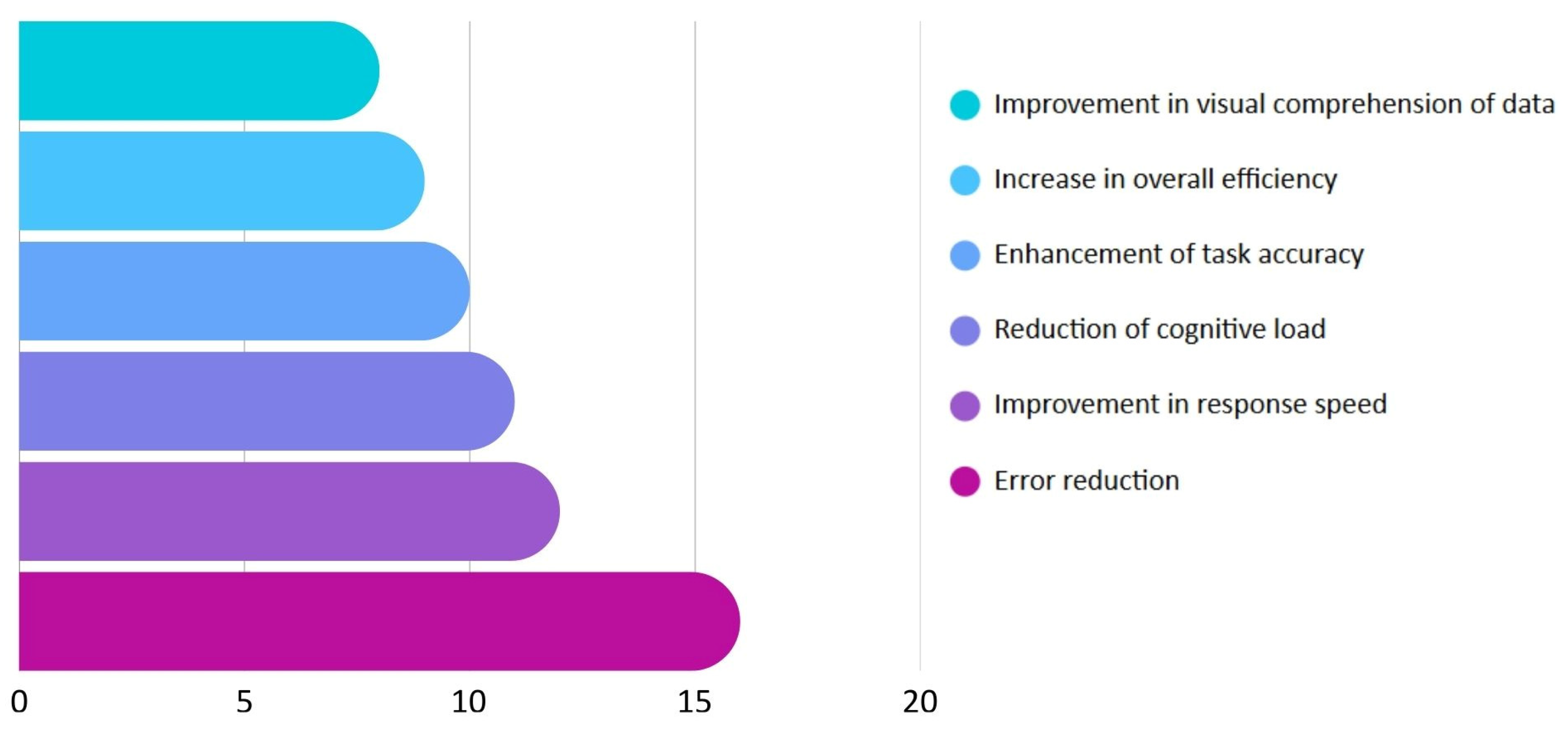
3.4. RQ4: How Does Ergonomic UI/UX Design Affect Error Reduction and Efficiency Im-Provement in Operational Tasks?
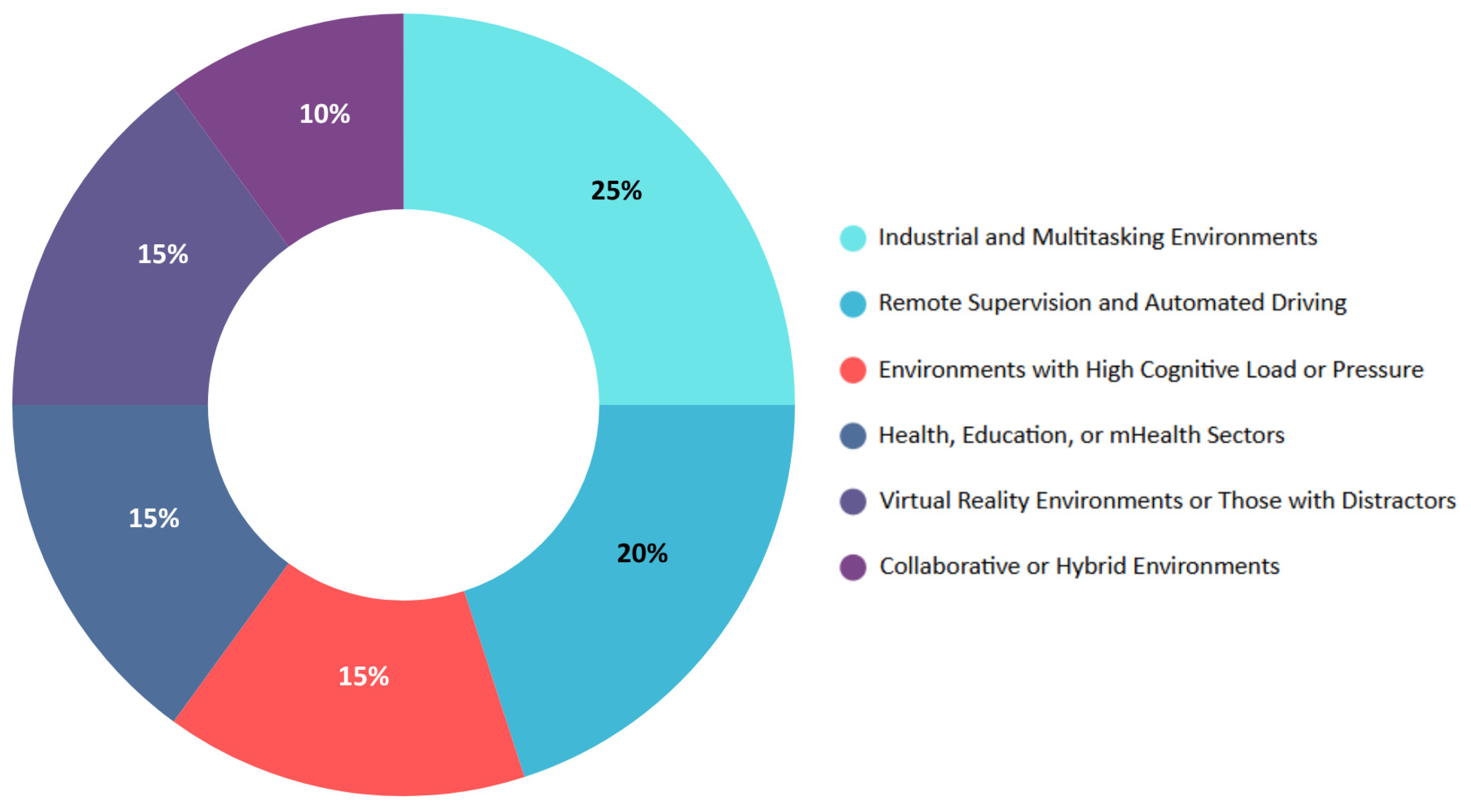
3.5. RQ5: To What Extent Do Working Conditions Influence Human–Machine Interaction and the Need for Good Visual Ergonomics?
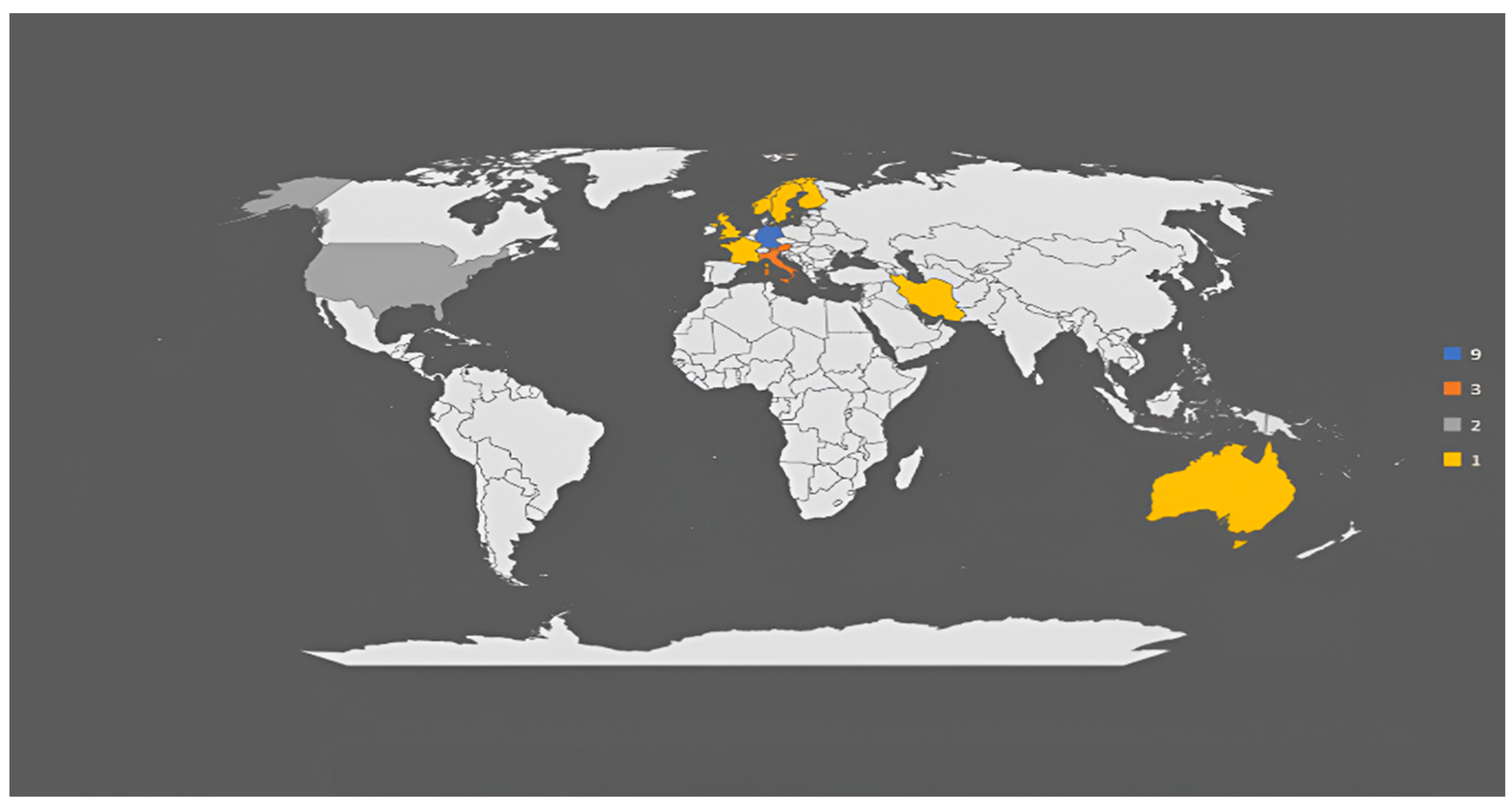
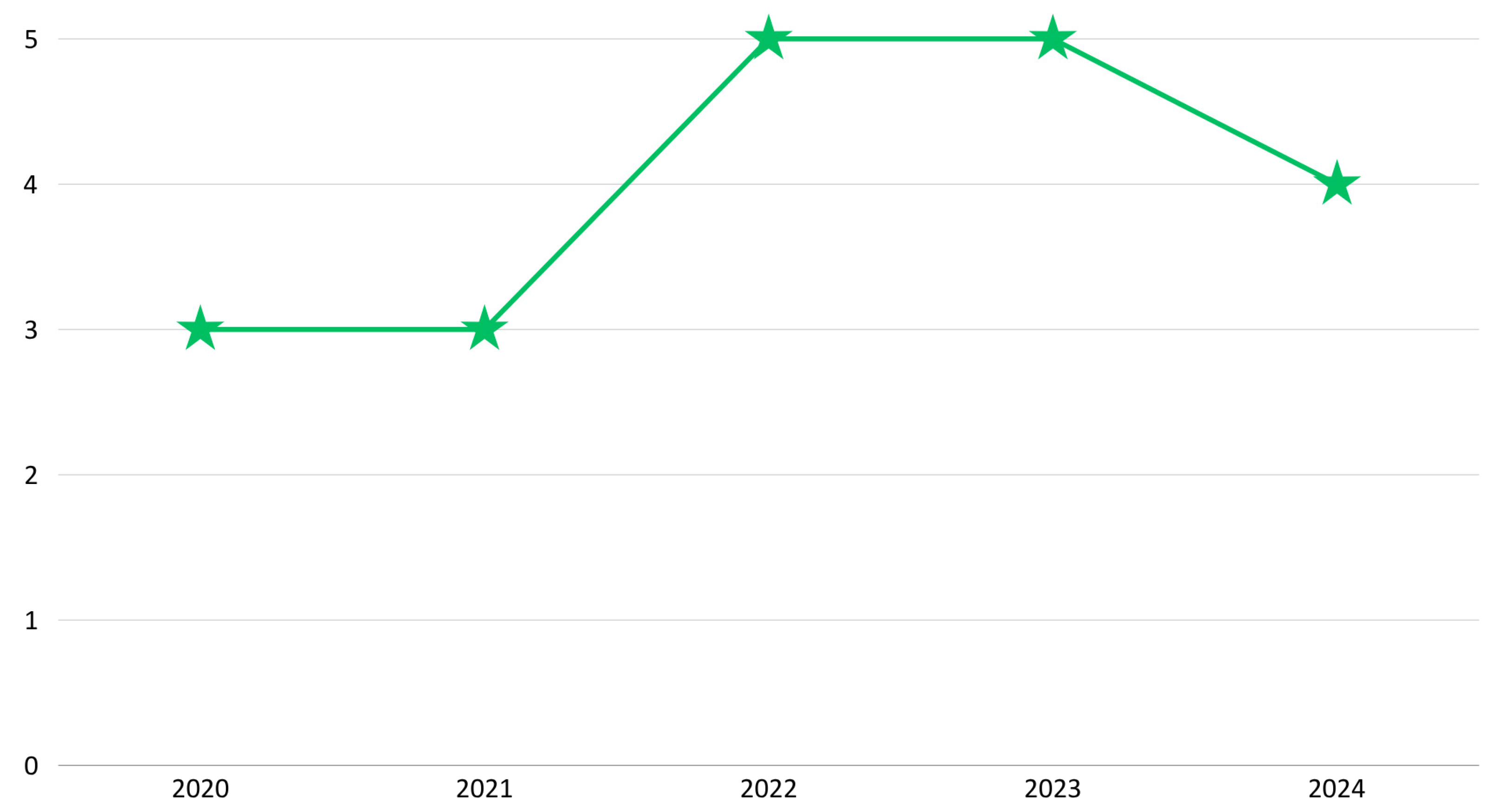
3.6. Bibliometric Analysis
4. Discussion
5. Conclusions
Author Contributions
Funding
Institutional Review Board Statement
Informed Consent Statement
Data Availability Statement
Conflicts of Interest
References
- Tsamis, G.; Chantziaras, G.; Giakoumis, D.; Kostavelis, I.; Kargakos, A.; Tsakiris, A. Intuitive and Safe Interaction in Multi-User Human-Robot Collaboration Environments through Augmented Reality Displays. In Proceedings of the 30th IEEE International Conference on Robot & Human Interactive Communication (RO-MAN), Vancouver, BC, Canada, 8–12 August 2021; pp. 520–526. [Google Scholar] [CrossRef]
- Lorenz, S.; Helmert, J.R.; Anders, R.; Wölfel, C.; Krzywinski, J. UUX Evaluation of a Digitally Advanced Human–Machine Interface for Excavators. Multimodal Technol. Interact. 2020, 4, 57. [Google Scholar] [CrossRef]
- Prabhakar, G.; Biswas, P. A Brief Survey on Interactive Automotive UI. Transp. Eng. 2021, 6, 100089. [Google Scholar] [CrossRef]
- Zhou, L.; Feng, Z.; Cai, Z.; Yang, X.; Ai, C.; Shao, H. A Massage Area Positioning Algorithm for Intelligent Massage System. Comput. Intell. Neurosci. 2022, 2022, 7678516. [Google Scholar] [CrossRef]
- Nezami, F.N.; Wächter, M.A.; Maleki, N.; Spaniol, P.; Kühne, L.M.; Haas, A.; Pingel, J.M.; Tiemann, L.; Nienhaus, F.; Keller, L.; et al. Westdrive X LoopAR: An Open-Access Virtual Reality Project in Unity for Evaluating User Interaction Methods during Takeover Requests. Sensors 2021, 21, 1879. [Google Scholar] [CrossRef]
- Wagner, N.; Kraus, M.; Tonn, T.; Minker, W. Comparing Moderation Strategies in Group Chats with Multi-User Chatbots. In Proceedings of the 4th Conference on Conversational User Interfaces, Glasgow, UK, 26–28 July 2022; ACM: New York, NY, USA; pp. 1–4. [Google Scholar] [CrossRef]
- Bellet, T.; Banet, A.; Petiot, M.; Richard, B.; Quick, J. Human-Centered AI to Support an Adaptive Management of Human-Machine Transitions with Vehicle Automation. Information 2021, 12, 13. [Google Scholar] [CrossRef]
- Bringas, S.; Duque, R.; Nieto-Reyes, A.; Tîrnăucă, C.; Montaña, J.L. A Framework for Identifying Sequences of Interactions That Cause Usability Problems in Collaborative Systems. Electronics 2021, 10, 388. [Google Scholar] [CrossRef]
- El Helou, M.; Benfriha, K.; Al-Ahmari, A.M.; Wardle, P.; Talhi, E.; Loubère, S.; El Zant, C.; Charrier, Q. A Modular Smart Vision System for Industrial Inspection and Control of Conformity. Smart Sustain. Manuf. Syst. 2022, 6, 177–189. [Google Scholar] [CrossRef]
- Montalvan, J.; Arteaga, L.; Corrales, J.; Vásquez, C.; Cornejo, J. Pluriversality on Earth and Beyond: Opening the Field of Critical Interplanetary Design within the Design Discipline. In Proceedings of the DRS2024: Boston, Boston, MA, USA, 23–28 June 2024. [Google Scholar] [CrossRef]
- Peternel, L.; Schøn, D.T.; Fang, C. Binary and Hybrid Work-Condition Maps for Interactive Exploration of Ergonomic Human Arm Postures. Front. Neurorobot. 2021, 14, 590241. [Google Scholar] [CrossRef]
- Schrank, A.; Walocha, F.; Brandenburg, S.; Oehl, M. Human-Centered Design and Evaluation of a Workplace for the Remote Assistance of Highly Automated Vehicles. Cogn. Technol. Work 2024, 26, 183–206. [Google Scholar] [CrossRef]
- Doolani, S.; Owens, L.; Wessels, C.; Makedon, F. vIS: An Immersive Virtual Storytelling System for Vocational Training. Appl. Sci. 2020, 10, 8143. [Google Scholar] [CrossRef]
- Strazdas, D.; Hintz, J.; Khalifa, A.; Abdelrahman, A.A.; Hempel, T.; Al-Hamadi, A. Robot System Assistant (RoSA): Towards Intuitive Multi-Modal and Multi-Device Human-Robot Interaction. Sensors 2022, 22, 923. [Google Scholar] [CrossRef]
- Colceriu, C.; Theis, S.; Brell-Cokcan, S.; Nitsch, V. User-Centered Design in Mobile Human-Robot Cooperation: Consideration of Usability and Situation Awareness in GUI Design for Mobile Robots at Assembly Workplaces. i-com 2023, 22, 193–213. [Google Scholar] [CrossRef]
- Hajahmadi, S.; Marfia, G. Effects of the Uncertainty of Interpersonal Communications on Behavioral Responses of the Participants in an Immersive Virtual Reality Experience: A Usability Study. Sensors 2023, 23, 2148. [Google Scholar] [CrossRef]
- Ul Huda, N.; Sahito, S.F.; Gilal, A.R.; Abro, A.; Alshanqiti, A.; Alsughayyir, A.; Palli, A.S. Impact of Contradicting Subtle Emotion Cues on Large Language Models with Various Prompting Techniques. Int. J. Adv. Comput. Sci. Appl. 2024, 15, 407–414. [Google Scholar] [CrossRef]
- Lahti, M.; Nenonen, S. Design Science and Co-Designing of Hybrid Workplaces. Buildings 2021, 11, 129. [Google Scholar] [CrossRef]
- Chojecki, P.; Strazdas, D.; Przewozny, D.; Gard, N.; Runde, D.; Hoerner, N.; Al-Hamadi, A.; Eisert, P.; Bosse, S. Assessing the Value of Multimodal Interfaces: A Study on Human–Machine Interaction in Weld Inspection Workstations. Sensors 2023, 23, 5043. [Google Scholar] [CrossRef]
- Wang, X.; Hu, Y.; Zhang, W. Usability Design of Human-Machine Interaction Interface of Child Companion Robot in Wireless Network. Sci. Program. 2022, 2022, 2840541. [Google Scholar] [CrossRef]
- Shelat, S.; Marquez, J.J.; Zheng, J.; Karasinski, J.A. Collaborative System Usability in Spaceflight Analog Environments Through Remote Observations. Appl. Sci. 2024, 14, 2005. [Google Scholar] [CrossRef]
- Park, D.Y.; Choi, J.; Ryu, S.; Kim, M.J. A User-Centered Approach to the Application of BIM in Smart Working Environments. Sensors 2022, 22, 2871. [Google Scholar] [CrossRef]
- Daniel, M.; Rivière, G. Exploring Axisymmetric Shape-Change’s Purposes and Allure for Ambient Display: 16 Potential Use Cases and a Two-Month Preliminary Study on Daily Notifications. In Proceedings of the 15th International Conference on Tangible, Embedded, and Embodied Interaction, Salzburg, Austria, 14–17 February 2021; ACM: New York, NY, USA, 2021; pp. 1–6. [Google Scholar] [CrossRef]
- Ban, Y.; Karasawa, H.; Fukui, R.; Warisawa, S. Development of a Cushion-Shaped Device to Induce Respiratory Rhythm and Depth for Enhanced Relaxation and Improved Cognition. Front. Comput. Sci. 2022, 4, 770701. [Google Scholar] [CrossRef]
- Meredith, R.; Eddy, E.; Bateman, S.; Scheme, E. Comparing Online Wrist and Forearm EMG-Based Control Using a Rhythm Game-Inspired Evaluation Environment. J. Neural Eng. 2024, 21, 046057. [Google Scholar] [CrossRef]
- Yingta, N.; Nocera, J.A.; Rehman, I.U.; Brew, O. A Systematic Review of Usefulness Design Goals of Occupational mHealth Apps for Healthcare Workers. In Human-Computer Interaction—INTERACT 2021; Springer: Cham, Switzerland, 2021. [Google Scholar] [CrossRef]
- León-Vargas, F.; Martin, C.; Garcia-Jaramillo, M.; Aldea, A.; Leal, Y.; Herrero, P.; Reyes, A.; Henao, D.; Gomez, A.M. Is a Cloud-Based Platform Useful for Diabetes Management in Colombia? The Tidepool Experience. Comput. Methods Programs Biomed. 2021, 208, 106205. [Google Scholar] [CrossRef] [PubMed]
- Horváth, I.; Berki, B. Investigating the Operational Complexity of Digital Workflows Based on Human Cognitive Aspects. Electronics 2023, 12, 528. [Google Scholar] [CrossRef]
- Lingelbach, K.; Tagalidou, N.; Markey, P.S.; Föll, B.; Peissner, M.; Vukelić, M. Examining Joy of Use and Usability During Mobile Phone Interactions within a Multimodal Methods Approach. In Proceedings of the Mensch und Computer, Darmstadt, Germany, 4–7 September 2022; ACM: New York, NY, USA; pp. 276–285. [Google Scholar] [CrossRef]
- Kettwich, C.; Schrank, A.; Avsar, H.; Oehl, M. A Helping Human Hand: Relevant Scenarios for the Remote Operation of Highly Automated Vehicles in Public Transport. Appl. Sci. 2022, 12, 4350. [Google Scholar] [CrossRef]
- Kettwich, C.; Schrank, A.; Oehl, M. Teleoperation of Highly Automated Vehicles in Public Transport: User-Centered Design of a Human-Machine Interface for Remote-Operation and Its Expert Usability Evaluation. Multimodal Technol. Interact. 2021, 5, 26. [Google Scholar] [CrossRef]

| Code | Questions |
|---|---|
| Main | How does user interface design affect user experience and error reduction during interaction with digital systems? |
| P | What characteristics do users who interact with digital systems have? |
| I | Which UI/UX design elements align with visual ergonomics principles? |
| C | What differences exist between systems designed with and without visual ergonomics principles in terms of the occurrence of human errors? |
| O | How does ergonomic UI/UX design affect error reduction and efficiency improvement in operational tasks? |
| C | To what extent do working conditions influence human–machine interaction and the need for good visual ergonomics? |
| Factor | Description | Search Terms |
|---|---|---|
| Population | Users of digital systems (end users interacting with interfaces) | “users”, “end users”, “digital users”, “system users”, “application users”, “human users”, “software users”, “interface users”, “professional users”, “task operators” |
| Intervention | UI/UX design with visual ergonomics principles | “user interface”, “UI design”, “UX design”, “user experience”, “interaction design”, “digital interface”, “graphical user interface”, “interface usability”, “usability engineering”, “UI/UX optimization” |
| Comparison | Systems with and without visual ergonomic focus | “no UI design”, “non-UX interface”, “traditional interface”, “outdated interface”, “basic interface”, “minimal design”, “standard interface”, “conventional interface”, “non-ergonomic UI”, “low usability” |
| Objective | Error reduction and efficiency improvement through better design | “user satisfaction”, “usability”, “error reduction”, “human error”, “task performance”, “interaction efficiency”, “visual clarity”, “productivity”, “cognitive workload”, “error prevention” |
| Context | Industrial environments using digital systems | “human-machine interaction”, “work environment”, “workplace”, “occupational setting”, “professional environment”, “job-related system”, “organizational system”, “work system”, “business application”, “enterprise software”, “employee interface” |
| Topic | Search Terms |
|---|---|
| Population | “users” OR “end users” OR “digital users” OR “system users” OR “application users” OR “human users” OR “software users” OR “interface users” OR “online users” OR “technology users” |
| Intervention | “user interface” OR “UI design” OR “UX design” OR “user experience” OR “interaction design” OR “digital interface” OR “human-computer interaction” OR “graphical user interface” OR “interface usability” OR “UI/UX optimization” |
| Comparison | “no UI design” OR “non-UX interface” OR “traditional interface” OR “outdated interface” OR “basic interface” OR “minimal design” OR “standard interface” OR “conventional interface” OR “non-ergonomic UI” OR “poor usability” |
| Objective | “user satisfaction” OR “usability” OR “error reduction” OR “human error” OR “task performance” OR “interaction efficiency” OR “cognitive load” OR “interface success” OR “visual clarity” OR “error prevention” |
| Context | “human-machine interaction” OR “work environment” OR “workplace” OR “occupational setting” OR “professional environment” OR “job-related system” OR “organizational system” OR “work system” OR “business application” OR “enterprise software” OR “employee interface” |
| Population | “users” OR “end users” OR “digital users” OR “system users” OR “application users” OR “human users” OR “software users” OR “interface users” OR “online users” OR “technology users” |
| Inclusion Criteria | Exclusion Criteria |
|---|---|
| Published between 2020 and 2025. | Published before 2020. |
| Related to the field of computer science and engineering. | Not related to computer science or engineering. |
| The document is a scientific article, conference paper or book chapter. | The document is not a scientific article, conference paper or book chapter. |
| Written in English. | Not written in English. |
| Open access document. | Not open access. |
| Published between 2020 and 2025. | Published before 2020. |
| Inclusion Criteria | Exclusion Criteria |
|---|---|
| Users interacting with digital systems in the workplace. | Users do not interact with digital systems in the workplace. |
| UI/UX design impacts the reduction in human error and improvement of operational efficiency. | UI/UX design does not impact the reduction in human error and improvement of operational efficiency. |
| Visual ergonomics influences human–machine interaction in work environments. | Visual ergonomics does not influence human–machine interaction in work environments. |
| Title | Year |
|---|---|
| Impact of Contradicting Subtle Emotion Cues on Large Language Models with Various Prompting Techniques | 2024 |
| Human-centered design and evaluation of a workplace for the remote assistance of highly automated vehicles | 2024 |
| Collaborative System Usability in Spaceflight Analog Environments through Remote Observations | 2024 |
| Investigating the Operational Complexity of Digital Workflows Based on Human Cognitive Aspects | 2023 |
| User-centered design in mobile human-robot cooperation: consideration of usability and situation awareness in GUI design for mobile robots at assembly workplaces | 2023 |
| Effects of the Uncertainty of Interpersonal Communications on Behavioral Responses of the Participants in an Immersive Virtual Reality Experience: A Usability Study | 2023 |
| Assessing the Value of Multimodal Interfaces: A Study on Human-Machine Interaction in Weld Inspection Workstations | 2023 |
| Robot System Assistant (RoSA): Towards Intuitive Multi-Modal and Multi-Device Human-Robot Interaction | 2022 |
| Comparing Moderation Strategies in Group Chats with Multi-User Chatbots | 2022 |
| A User-Centered Approach to the Application of BIM in Smart Working Environments | 2022 |
| A Helping Human Hand: Relevant Scenarios for the Remote Operation of Highly Automated Vehicles in Public Transport | 2022 |
| Examining Joy of Use and Usability During Mobile Phone Interactions within a Multimodal Methods Approach | 2022 |
| Westdrive X LoopAR: An Open-Access Virtual Reality Project in Unity for Evaluating User Interaction Methods during Takeover Requests | 2021 |
| Design Science and Co-Designing of Hybrid Workplaces | 2021 |
| Teleoperation of Highly Automated Vehicles in Public Transport: User-Centered Design of a Human-Machine Interface for Remote-Operation and Its Expert Usability Evaluation | 2021 |
| A Systematic Review of Usefulness Design Goals of Occupational mHealth Apps for Healthcare Workers. | 2021 |
| A Framework for Identifying Sequences of Interactions That Cause Usability Problems in Collaborative Systems | 2021 |
| Human-Centered AI to Support an Adaptive Management of Human-Machine Transitions with Vehicle Automation | 2020 |
| UUX Evaluation of a Digitally Advanced Human-Machine Interface for Excavators | 2020 |
| vIS: An Immersive Virtual Storytelling System for Vocational Training | 2020 |
| Classification | Characteristics | |
|---|---|---|
| Users with High Technical Demand or Operational Autonomy | Evaluator User | Interaction is cognitive and involves subjective judgment. Evaluation is interpretative, not operational [6,16,29]. |
| Technical Supervisor | High criticality, remote supervision, requiring precise interaction based on prioritized visualization [5,30,31]. | |
| Specialized User | Performs collaborative tasks in an isolated environment, requiring external simulation and subject to high cognitive load [5,7]. | |
| Vehicle Supervisor | Perform tasks requiring remote coordination and critical visualization, like advanced monitoring tasks [5,12,31]. | |
| Simulated Driver | Performs critical tasks under automation, requiring reaction time analysis and visual alerts [7,12,21]. | |
| Expert Technician | Works remotely under visual pressure, requiring sustained attention and usability evaluation under real operational conditions [5,12,30]. | |
| Automated Driver | Varies in attitudes toward automation, with familiarity with adaptive systems according to contextual criticality [5,21,31]. | |
| Intermediate or Non-Specialized Users | Functional User | Cognitive evaluation for understanding digital tasks, including interface analysis under cognitive pressure [2,13]. |
| Experimental User | Reacts to ambiguity with low experience, in a simulated emotional and social context [17,29]. | |
| General User | Simultaneous use of voice, touch, and GUI, with low learning curve but high adaptability [18,19,22]. | |
| Common Digital User | Engages in conversational tasks and textual collaboration, focused on efficient communication [8,16]. | |
| Everyday User | Mobile use with emotional sensitivity and subjective perception of UX, constantly assessing UI design and aesthetics [6,16]. | |
| Collaborative User | Low technical experience, structured interface use, and higher impact from poor design in relation to recurring errors [6,29]. | |
| Technical Student | No technical experience, exposed to immersive learning with high retention of visual narrative in VR [18,28]. | |
| Users in Structured Environments or Performing Complex Functional Tasks | Industrial Operator | Physical work, multitasking, variable age range, requiring robust, accessible, and visually clear interfaces [14,19,22]. |
| Plant Technician | Multimodal interaction designed to optimize physical tasks through ergonomic UI [14,15]. | |
| BIM Professional | Age-related differences, medium technical experience, requiring role-sensitive UX [15,30,31]. | |
| Hybrid User | Participate in design and perform hybrid multitasking, requiring UI adjustments for flexible and collaborative environments [13,22]. | |
| Healthcare Professional | High workload in sensitive environments, requiring simplified, functional UX [7,11]. | |
| Machinery Technician | Under initial learning and constant functional UX evaluation, beginning digital integration in heavy machinery [15,28]. | |
| UI/UX Design Elements | Visual Ergonomics Principles | Relationship |
|---|---|---|
| Visualization of emotional contradictions | Semantic clarity and pattern recognition | Design elements focus on affective perception through unambiguous visualization [16,29] |
| Modular interface with supervision levels | Informational hierarchy and reduced visual load [15,19,26] | Remote supervision requires rapid discrimination and visual alerting [30,31] |
| Task panels with visual coding | Spatial segmentation and visual simplicity | Autonomous interface design in isolation demands efficient visualization [5,7] |
| Graphically represented workflows | Task prioritization and grouping | Design applies cognitive load reduction in administrative processes [15,22] |
| GUI with visual layers per task | Color coding and guided navigation | Industrial system design demands tactile or projected ergonomic visualization [14,19] |
| VR environment with controlled ambiguity | Visual contrast and guided paths | Immersive environments require visual balance and narrative focus in interface design [17,29] |
| Projection onto the workspace | Visual proximity and postural ergonomics | Design prevents unnecessary movements and keeps the interface always visible [14,15] |
| Combined touch and voice modality | Visual–control multichannel | Design enables visual choice based on preference and situation [18,19] |
| Functional icons in conversations | Visual identification and quick response | Iconic clarity facilitates fluency in social interactions [8,29] |
| Adaptive BIM profile interface | Visual adaptability by role | Design adjusts to user experience and expectations [18,28] |
| Critical remote visualization | Hierarchical simplicity and alert coding | Design ensures high visual demand in remote control contexts [12,31] |
| Emotional smartphone layout | Contrast and functional aesthetics | Visual design impacts both emotional and functional decision-making [16,17] |
| Alert-signaling interfaces | Immediate visibility and focus | Design meets rapid reaction needs to unexpected events [7,21] |
| Collaborative tools with visual boards | Spatial distribution and shared legibility | Hybrid spaces require clear interfaces for visual coordination [8,22] |
| Remote vehicular HMI monitoring | Reduced visual complexity and focus | Remote design supervision demands visual economy and state clarity [12,30] |
| Mobile apps with grouped functions | Semantic grouping and visual accessibility | Design reduces interpretation effort under work pressure [2,22] |
| Sequential logs with action coding | Visual pattern identification | Collaborative structured tasks require clear graphical traceability [6,18] |
| Progressive visual alerts (ADAS) | Criticality of graduation and adaptability | Hierarchical visualization according to required attention level [5,21] |
| Visual interface for machinery | Enlarged icons and progressive visual guidance | Design assists users transitioning to complex digital systems [15,26] |
| Immersive VR storytelling | Visual narrative and guided focus | Interface design in immersive environments requires sequenced visual structures [16,29] |
| UI/UX Design Elements | Articles Implemented In |
|---|---|
| Modular and segmented panels. | [12,22] |
| Task and action confirmations (immediate visual feedback). | [12,14,15,19,26] |
| Projected interaction on work surfaces. | [19] |
| Synchronized voice/touch response. | [14] |
| Step-by-step visual guides for operational tasks. | [2,15] |
| Interfaces are divided into functional or hierarchical layers. | [15,18,22] |
| Functional grouping of buttons and input areas. | [2,26] |
| UI/UX Design Elements | Articles Implemented In |
|---|---|
| Colors associated with tasks or criticality | [5,7,13,21] |
| Functional iconography (messaging, collaboration, and action) | [6,8,29] |
| Diagrams or traces coded by type of action | [8,28] |
| Coding by temporal or logical blocks | [13,21] |
| Progressive coding according to attention level (ADAS, emergency, etc.) | [5,7] |
| Visual assignment of roles or task shifts | [18,22] |
| UI/UX Design Elements | Articles Implemented In |
|---|---|
| Minimization of simultaneous indicators | [17,28,31] |
| Visual prioritization of relevant content (priority in visual flow) | [12,30,31] |
| Separation of action and navigation areas | [18,29] |
| Layouts with guided visual paths | [13,16] |
| Semantically clean, non-distracting interfaces | [16,17,29] |
| Clear visual sequencing in workflows | [8,28] |
| UI/UX Design Elements | Articles Implemented In |
|---|---|
| Design adaptation to the user’s role | [7,18,22] |
| Co-design with active participation of the end user | [18] |
| Principles of usefulness, efficiency, and context of use | [2,15,26] |
| Progressive personalization or adaptability of the interface | [7,21] |
| Visual safety standards and layout in technical environments | [2] |
| Integration of ISO 9241 in usability evaluation and task structuring | [7,15,26] |
| Ref. | Evidence of Human Errors | Design Characteristics | |
|---|---|---|---|
| Systems Applying Visual Ergonomics Principles | [21] | Significant error reduction | Critical supervision of UI/UX design with visual hierarchy [30,31]. |
| [8] | Reduction in operational errors | Design with guided and collaborative visualization [5,7]. | |
| [2] | Low error incidence | Functional modular visual design in factory settings [2,19]. | |
| [6] | Reduced operational failures | Optimized projection design prevents human errors [14,15]. | |
| [1] | Error-free interaction | Multimodal design prevents user confusion [18,19]. | |
| [9] | Improved role-based accuracy | Design adapted to the user’s professional profile [18,28]. | |
| [30] | Error-free remote control | Design with clear, hierarchical critical visualization [12,31]. | |
| [14] | Precise, error-free responses | Adaptive and predictable interface design [7,21]. | |
| [31] | High operational accuracy | Focused critical visualization design [12,30]. | |
| [16] | Error reduction according to attention level | Adaptive visual design in automated driving [5,21]. | |
| [11] | Low technical error rate | Robust visual design for physical tasks [15,26]. | |
| Systems not Applying Visual Ergonomics Principles | [3] | High perceptual confusion | Poor visual quality design causes errors [17,29]. |
| [15] | Frequent coordination errors | Absence of visual coding in design [8,29]. | |
| [29] | Frequent navigation errors | Non-hierarchical, non-intuitive interface design [16,17]. | |
| [26] | Functional failures due to poor design | Critical functions poorly visible [2,22]. | |
| [17] | Repetition of unnecessary actions | No clear visual feedback [6,18]. | |
| Systems with Partial/Limited Application | [4] | Low direct impact | Visual semantic design without operational interaction. |
| [28] | Visual ambiguity causing errors | Incomplete visual design. | |
| [5] | Errors due to poorly differentiated tools | Lack of visual clarity in multitasking. | |
| [22] | Minimal errors in narrative environment | Guided visual design, but not operational. |
| Ergonomic UI/UX Principle | Reported Operational Improvement |
|---|---|
| Clear visual informational hierarchy | Reduction in navigation errors; focus on critical information [2,12,15,19,21,30,31]. |
| Color coding and visual layering | Reduced ambiguity; quick identification of critical states [5,6,7,14,22,28]. |
| Immediate feedback and clear signals | Increased task accuracy; reduced repetition of actions [12,13,15,19,26]. |
| Visual segmentation of tasks (modular panels) | Improved execution times and more intuitive workflows [6,8,15,18]. |
| Interface adaptability to user profile | Greater perception of control and lower cognitive load in complex operations [5,7,8,18,22]. |
| Minimization of distractors and clean design | Smoother task execution and higher precision in virtual reality environments [13,16,26,29]. |
| Participatory/co-created design | Better understanding of the work context and reduced functional errors [18]. |
| Work/Environmental Condition | Influence on Visual Ergonomics Demand |
|---|---|
| High cognitive load and operational pressure | Interfaces with coding, hierarchy, and immediate feedback to focus attention [2,6,12,15,19]. |
| Environmental distractors (lighting, noise, VR) | Clean design, visual focus control, and guided paths to reduce confusion [13,16,26,29]. |
| Remote supervision/automated transport | Adaptive UIs, clear visual hierarchy, and progressive coding for safe mode transitions [7,12,30,31]. |
| Hybrid/collaborative work | Participatory design, explicit role signaling, and synchronized elements [5,6,8,22]. |
| Healthcare sector/mHealth | Functional organization, clear iconography, and reduction in visual noise for critical tasks [13,16,18,26,29]. |
Disclaimer/Publisher’s Note: The statements, opinions and data contained in all publications are solely those of the individual author(s) and contributor(s) and not of MDPI and/or the editor(s). MDPI and/or the editor(s) disclaim responsibility for any injury to people or property resulting from any ideas, methods, instructions or products referred to in the content. |
© 2026 by the authors. Licensee MDPI, Basel, Switzerland. This article is an open access article distributed under the terms and conditions of the Creative Commons Attribution (CC BY) license.
Share and Cite
Vizcarra, A.; Quiroz, G.; Cornejo, J. The Impact of User Interface and Experience (UI/UX) Design on Visual Ergonomics: A Technical Approach for Reducing Human Error in Industrial Settings. Designs 2026, 10, 8. https://doi.org/10.3390/designs10010008
Vizcarra A, Quiroz G, Cornejo J. The Impact of User Interface and Experience (UI/UX) Design on Visual Ergonomics: A Technical Approach for Reducing Human Error in Industrial Settings. Designs. 2026; 10(1):8. https://doi.org/10.3390/designs10010008
Chicago/Turabian StyleVizcarra, Anael, Gustavo Quiroz, and Jose Cornejo. 2026. "The Impact of User Interface and Experience (UI/UX) Design on Visual Ergonomics: A Technical Approach for Reducing Human Error in Industrial Settings" Designs 10, no. 1: 8. https://doi.org/10.3390/designs10010008
APA StyleVizcarra, A., Quiroz, G., & Cornejo, J. (2026). The Impact of User Interface and Experience (UI/UX) Design on Visual Ergonomics: A Technical Approach for Reducing Human Error in Industrial Settings. Designs, 10(1), 8. https://doi.org/10.3390/designs10010008