1. Introduction
Virtual reality (VR) and enhanced reality (or augmented reality AR) are approaches that emerged after the development of computer systems and personal display screens [
1]. With recent advances in miniaturized mobile computing platforms and accurate displays, there has been a strong increase in demand for deeper human–digital interactions beyond traditional flat-panel displays. Augmented reality (AR) and virtual reality (VR) headsets are emerging as next-generation interactive displays capable of providing new possibilities in three-dimensional (3D) visual experiences [
2]. In the virtual reality approach, the media are synthetic, and the user can perform certain commands in this synthetic world using a joystick or other equipment [
3]. Interaction with non-real objects or people can be achieved using spatial localizers and angle determinants. Mechanical force and motion feedback (haptic feedback) can be received from the synthetic world, instead of just observational activities, such as touching and manipulating the object. At the same time, the 360-degree video on AR/VR applications may affect empathy, attitude, and attention to immersive communications [
4] in social life.
An enhanced reality or mixed reality (MR) experience combines elements of both AR and VR and involves the interaction of real-world and digital objects. Mixed reality allows one to view virtual items, similar to augmented reality, but these objects also interact with the actual environment. Hence, mixed reality is a more immersive and interactive version of augmented reality [
5].
In enhanced reality (ER or AR) applications, real environments or objects are used together with or instead of synthetic images. These can be interacted with, such as by observation or touch, and they contain environments that are completely isolated from the real world. Despite the virtual reality system, interaction with the real world is possible [
6]. For example, when looking at a glass, it is evident that it is full and covered with a picture. It is situated next to a real ruin. It is possible to see the exact structure while looking at it, touching a virtual organ using a haptic device, or cutting as if working on a synthetic patient on a real operating table. Improved reality applications require more equipment and software support than virtual reality systems. To look at a real object, you need either VR glasses with a high-resolution camera or a transparent surface, with which a helmet capable of transmitting images is required. The viewer must also consider head movements and body angle and position, and specialized hardware is required for physical feedback.
A newly developed area of VR/AR systems is the application of education or meetings [
7] through collaboration, in which users can interact with each other regardless of the distance between them. This option allows users to install appropriate collaboration tools or environments in a virtual environment with appropriate architecture that can replace a traditional physical meeting. However, technical or approach problems may arise when users are far away from each other and need an effective way or tool to collaborate. Appropriate solutions to these problems will increase the performance and acceptance rate of this system [
7].
There are also applications in sports, urban life, and tourism and architecture [
8]. A sailing application with augmented reality is a paradigm shift. The bicycle simulator’s development and validation are a significant step forward. Virtual bicycle simulation for sustainable traffic in the city is a valuable addition, and the fictionalized virtual reality cycling system is a pioneering innovation. The virtual cycling trainer application with an electromechanical system control [
9] and the virtual reality application [
10] are two examples of how discomfort in bicycle simulators can be reduced.
Different design applications are also available for operation. These include a unified reality application that uses finger gestures to guide design [
11], as well as a unified reality application in applications [
8]. The virtual 360-degree tourism application, especially for older people via bicycle [
12], is another example of how virtual reality can be used to enhance tourism. Some applications undeniably improve the quality of human life, including social rehabilitation [
13], virtual multi-user unified reality application for meetings [
7], and investigating social effects on children’s cycling [
14]. For people with limited opportunities to be outdoors, using a stationary bicycle indoors is not the only substitute. Instead, a virtual reality- and, more importantly, augmented reality-supported system can be used. When such an application is applied, it can increase efficiency by creating a sense of reality for people [
15]. Similarly, training athletes using a virtual reality system allows us to adjust the degree of difficulty and course to achieve significant gains in a constrained environment in the most economical way [
16].
Use in the healthcare sector is also important. For example, elderly people require limited movement exercises. Other uses are during physical ailments, medical treatment, or the rehabilitation of the patient at the end of an immobilizing treatment. Virtual augmented reality has been shown to be a powerful tool for shoulder rehabilitation [
17], hand rehabilitation [
18], wrist rehabilitation [
19], virtual mirror therapy at home [
20], and balance rehabilitation in Parkinson’s patients [
21]. It is also an effective approach for cycling, as a rhythmic exercise suitable for rehabilitation [
22].
In the medical field, VR/AR applications have begun to be used in technical and clinical applications regarding virtual therapies. For example, stroke is a leading cause of disability worldwide, affecting men, women, and even children, with a higher rate in the elderly. It causes motor, sensory, and cognitive impairments, as well as a decrease in the ability to withstand exertion. Post-stroke rehabilitation focuses on reducing motor impairment and minimizing physical disability through functional reorganization of the brain, taking over the functions of damaged brain regions in the cerebral cortex areas not affected. Most post-stroke rehabilitation treatments utilize technological advances such as improvements in robotic design, development of tactile interfaces, and the emergence of human–machine interactions in virtual reality. These technologies are being investigated in an effort to develop more effective strategies to reduce the physical disabilities resulting from stroke injury. Virtual reality (VR) technology has emerged as a potential method in the field of rehabilitation with advantages such as a controllable environment, clear feedback, a sense of presence, entertaining treatments, and digital recordings in VR rehabilitation systems [
17].
The parameters of immersive VR/AR operations are important when HMDs are used to achieve real environment effects, such as distance accuracy, depth perception [
23], the gyro bias of HMDs, latency [
24], and the human response time [
25].
Virtual reality systems or augmented reality systems have some of the side effects of using head-mounted goggles [
26], including headaches, rapid movement of the image, or nausea due to movement, depending on the duration of use [
27]. However, these effects may not be considered in the application design and implementation.
Similar interactions with various real objects have been carried out, displaying synthetic images in a real environment [
28,
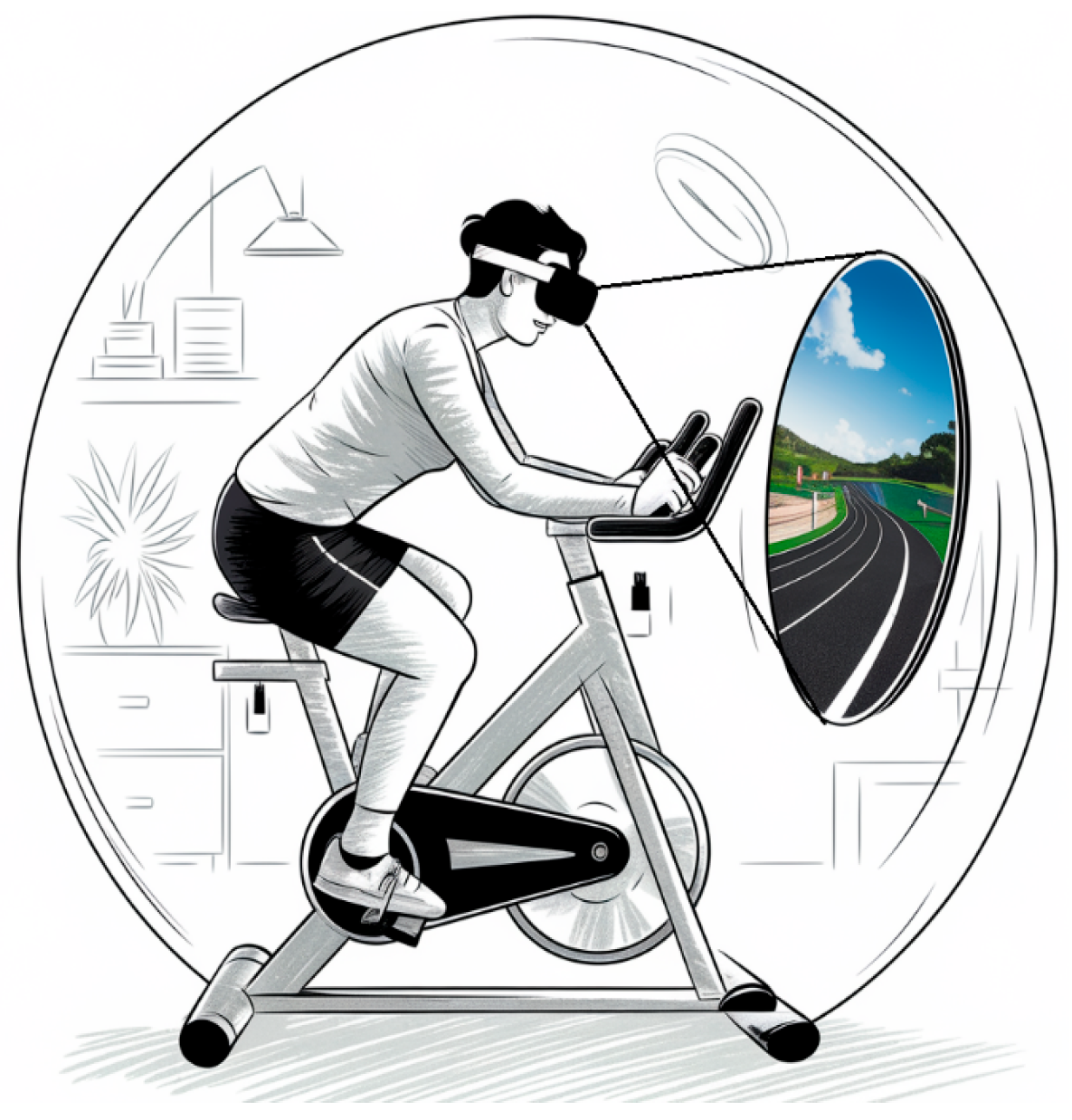
29]. Real 360-degree visual walkthroughs of areas have also been conducted, as well as layering synthetic images of old buildings over the real ones. Activities such as overlaying the image and the synthetic but mechanical system feedback have also been performed. Although there are real bicycle simulators, there are very few studies in which all these aspects have been combined. This principal concept is shown below in
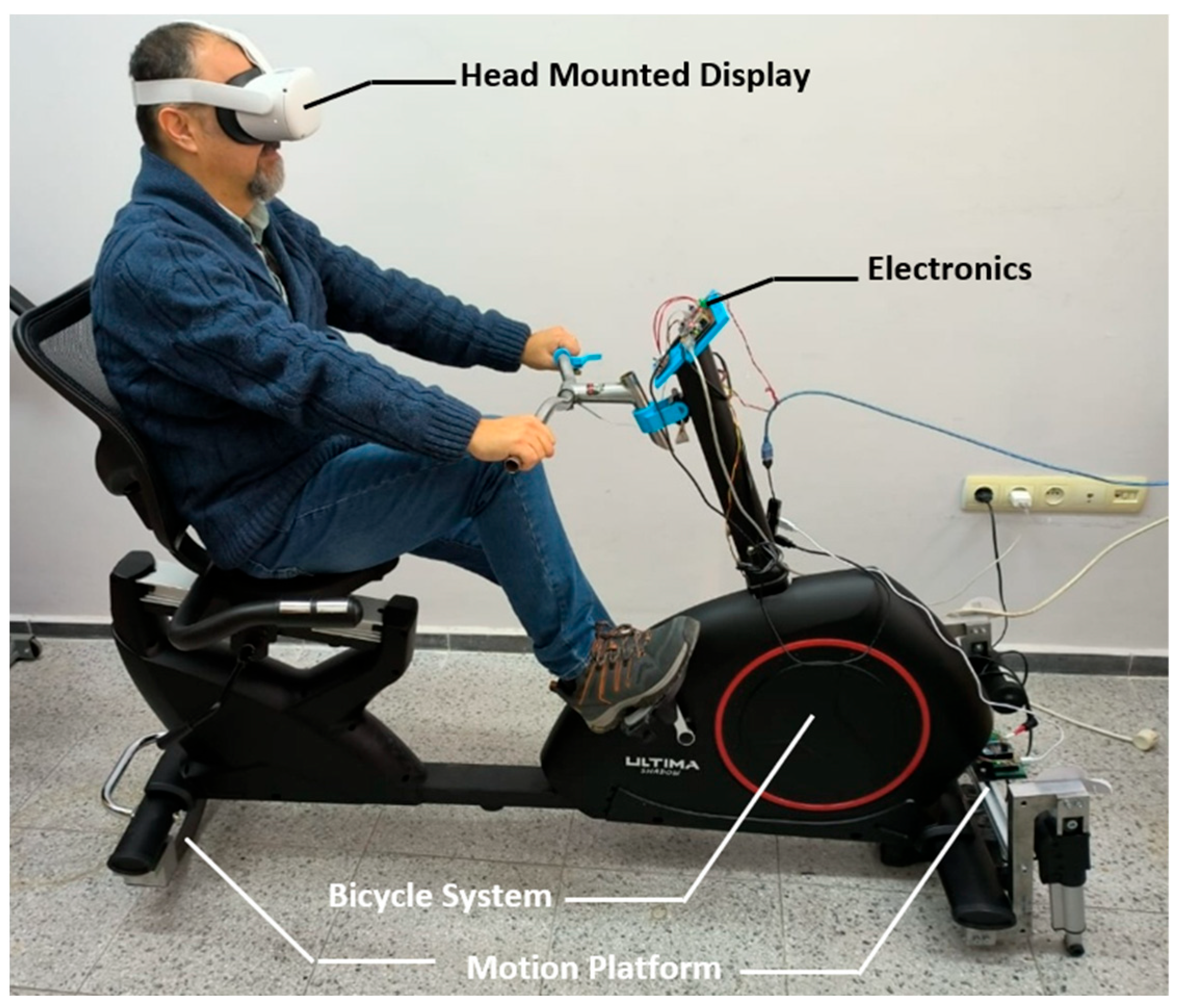
Figure 1.
In this study, we developed the interaction of applications with real objects or environments using the enhanced reality technique, unlike the virtual reality systems mentioned above. The system planned according to the block diagram requires subcomponents with great detail.
The previous rehabilitation examples were not fully immersive, because they use a mirror [
20], a camera [
21], or a completely virtual world [
22,
29]. The effectiveness is based on the method. So, if the aim is rehabilitation, each action is useful. In this study, the main idea is to feel immersed while exercising, because enthusiasm is a motivation for progress in rehabilitation. So, our study firstly aims to develop a realistic environment and equipment.
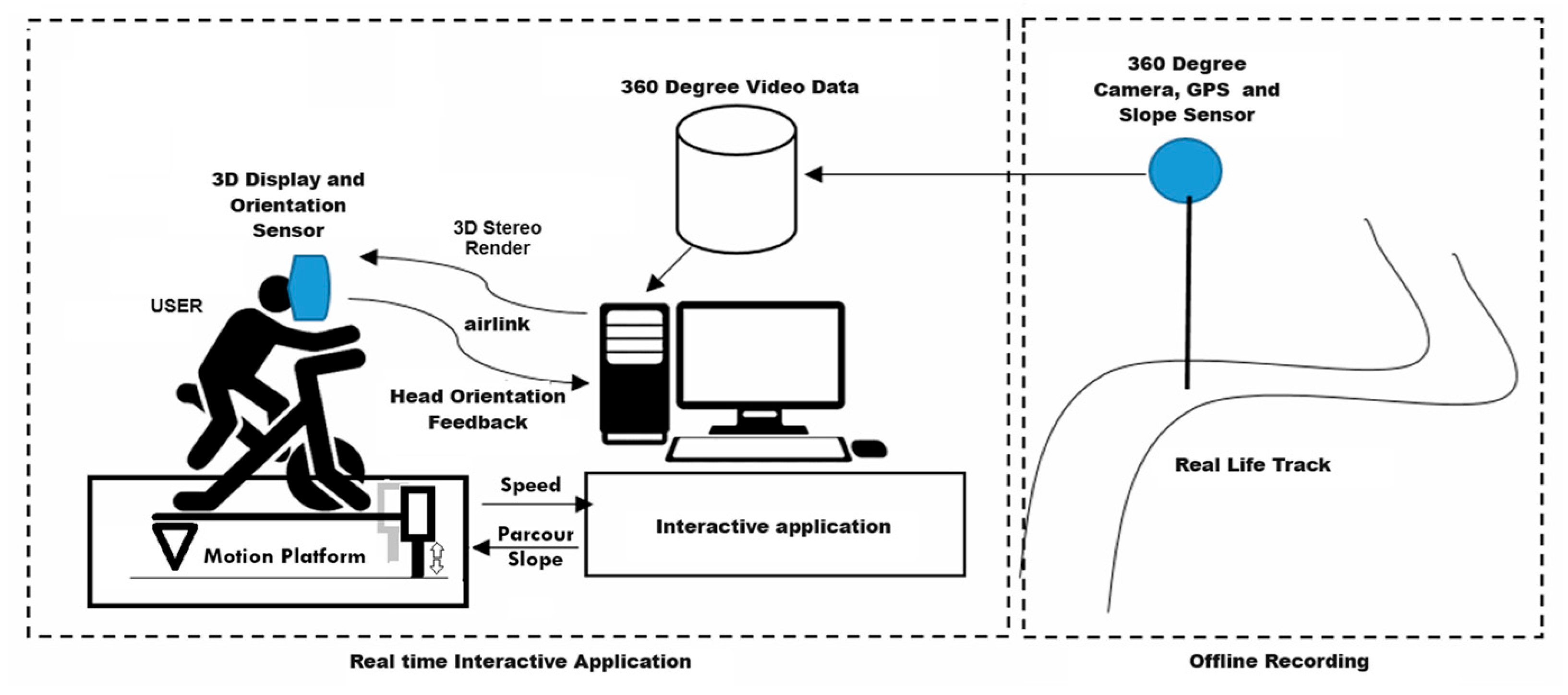
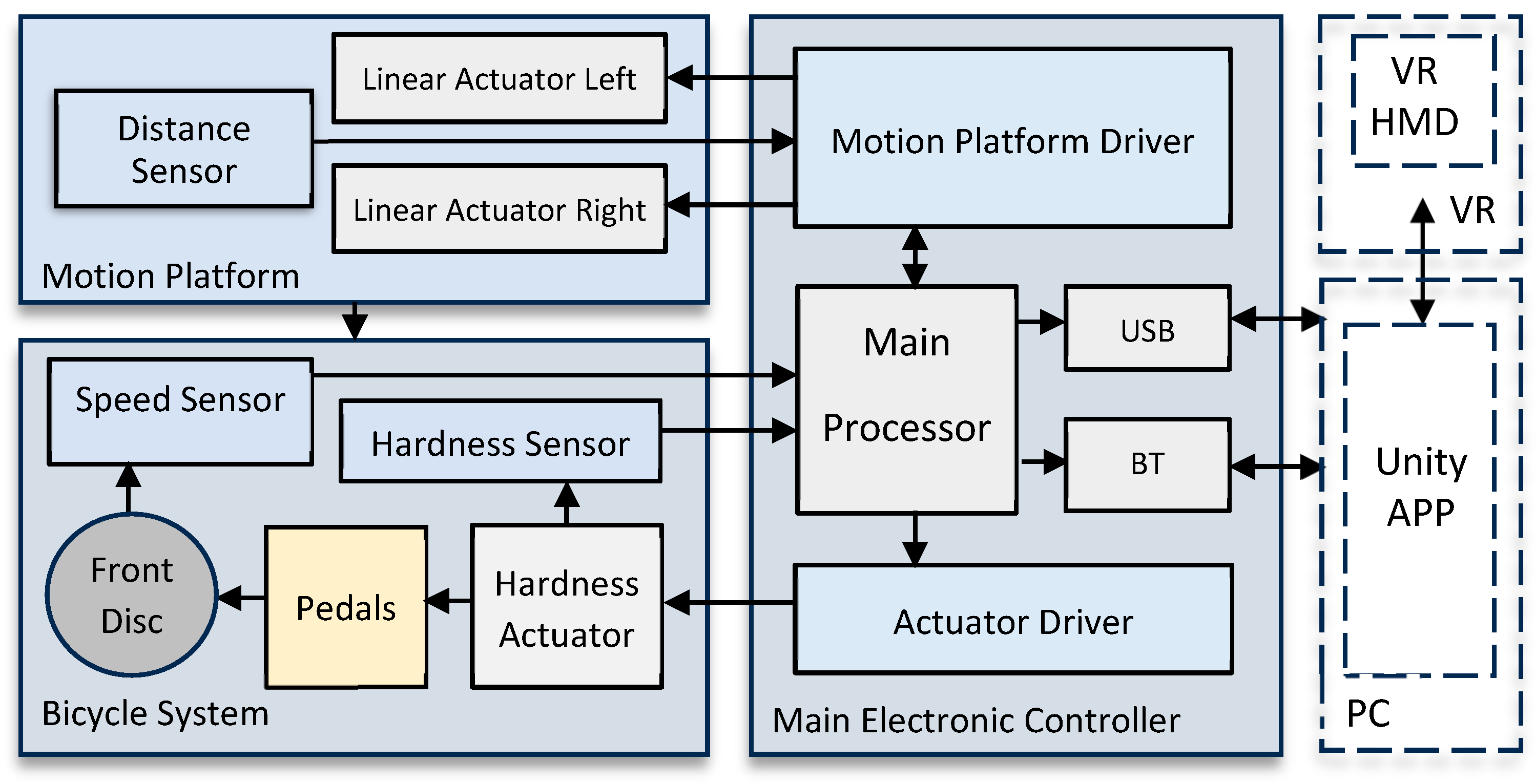
The virtual reality equipment used in this project allows users to experience a three-dimensional visualization of the real physical space in proportion to their movements. This system consists of several subsystems for indoor exercises with the help of AR. The mechanical system allows users to engage in actual cycling, walking, or driving practices that closely resemble those in the real environment, with the added benefit of electromechanical feedback. The user can adjust the angle and position of the bicycle by performing an activity on a mechanical system using virtual reality goggles that provide visual and head movement feedback. A bicycle can be ridden or driven by head movements and mechanical performance taken from the real environment. The user sees only a certain part of the 360-degree video stream, which is given to each eye separately, allowing them to obtain a three-dimensional feeling and, as these images are renewed according to head movements, it is easier to accept. At this stage, the natural perspective and distance focusing techniques of the human eye are also used. The system block diagram is shown in
Figure 2.
2. Materials and Methods
The study requires the mathematical modeling of the mechanical bicycle system and subcomponents such as the pedal forcing system. The analysis must extract the kinematic formulation necessary to transform the image in accordance with the viewpoint. We include the pitch and roll motion of the bicycle platform, with the real slopes of the parkour as the pitch and the bicycle side-to-side motion as the roll. In the initial study, only pitch values were used; then, the pitch and roll operations were completed.
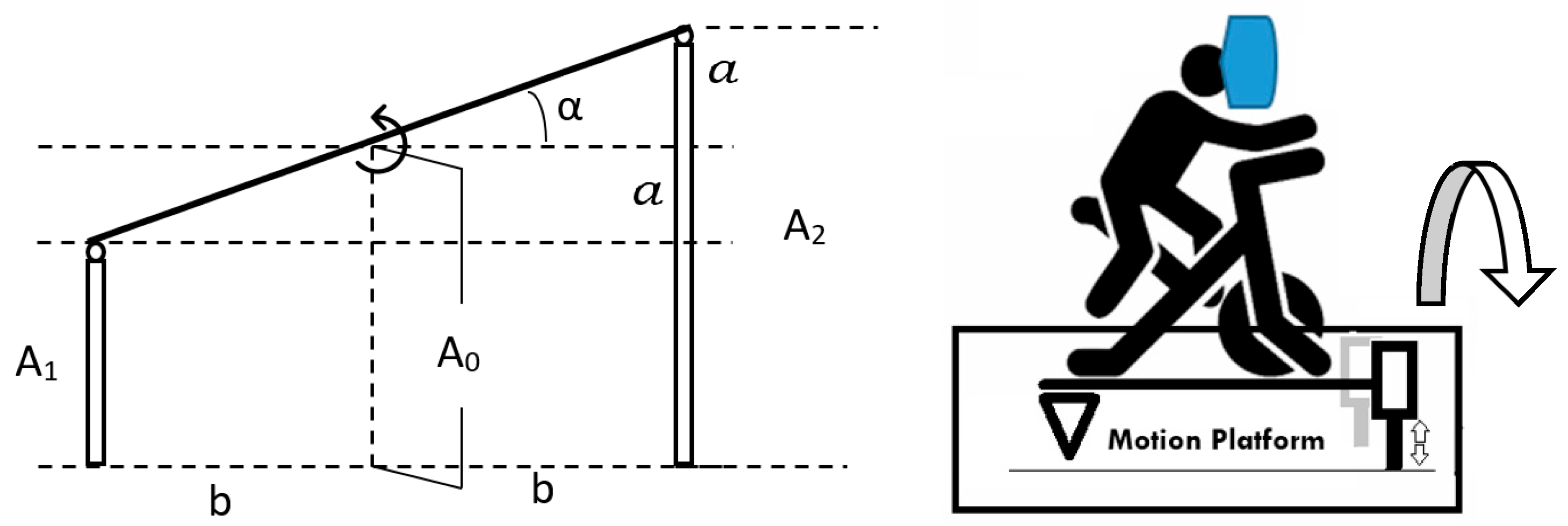
Figure 3 shows how to calculate the linear actuator extension depending on the roll angle with a front view.
Thus, the angle α can be used to write Equation (4):
Then, we have Equations (5) and (6) for A
1 and A
2, as follows:
Here, we take
, where
is the extension value, which is needed to rotate the angle α as the roll. The required linear extensions of each actuator can be solved as Equations (7) and (8):
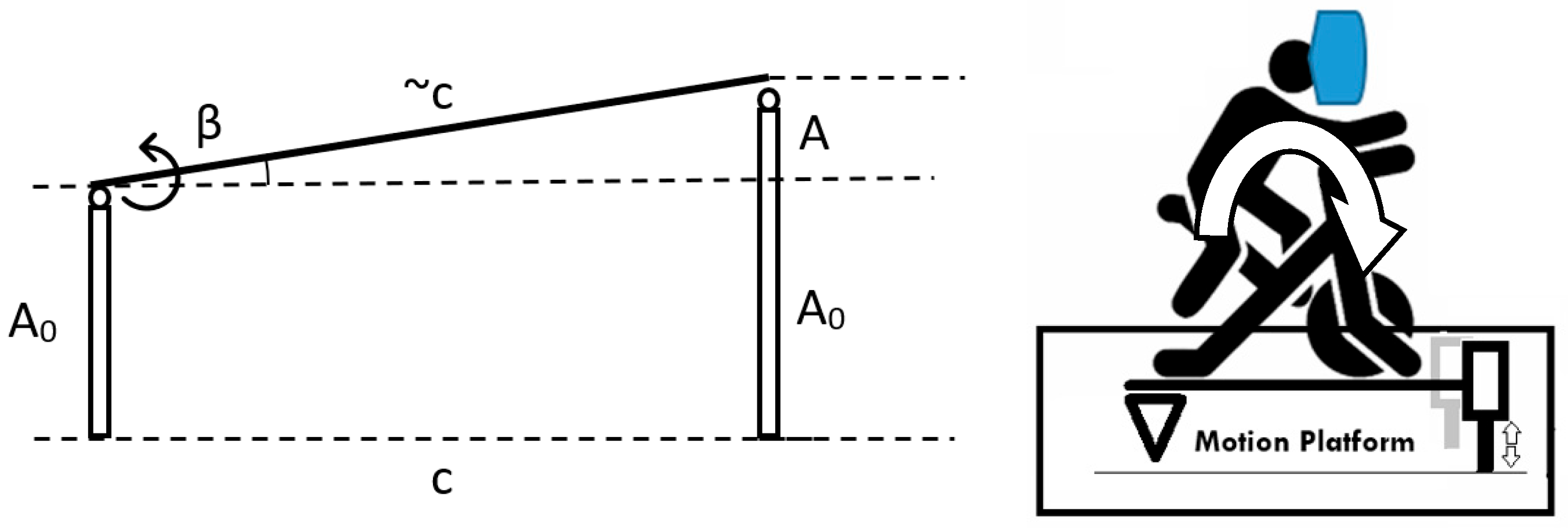
Figure 4 shows how to calculate the linear actuator extension depending on the pitch angle from a side view.
Here, we assume that c is constant, and the actuators are connected to the base from two sides without any deformations; therefore, the angle β is small. If A is the extension of the actuator rod and small β, we can write Equation (9) as
Then, linear actuator extension A can be derived from Equation (10) for both actuators:
So, for both pitch and roll conditions, the extension of actuator rods can be calculated as follows:
The mechanical system created according to the concept given in
Figure 1 is shown in
Figure 5. The system consists of a two-degree-of-freedom motion platform added to the bottom of a standard magnetic force exercise bike, where the sensor and electronic system are revised and made suitable for operation. The added handlebar and brake system ensure that the user obtains the full feeling of using the exercise bike.
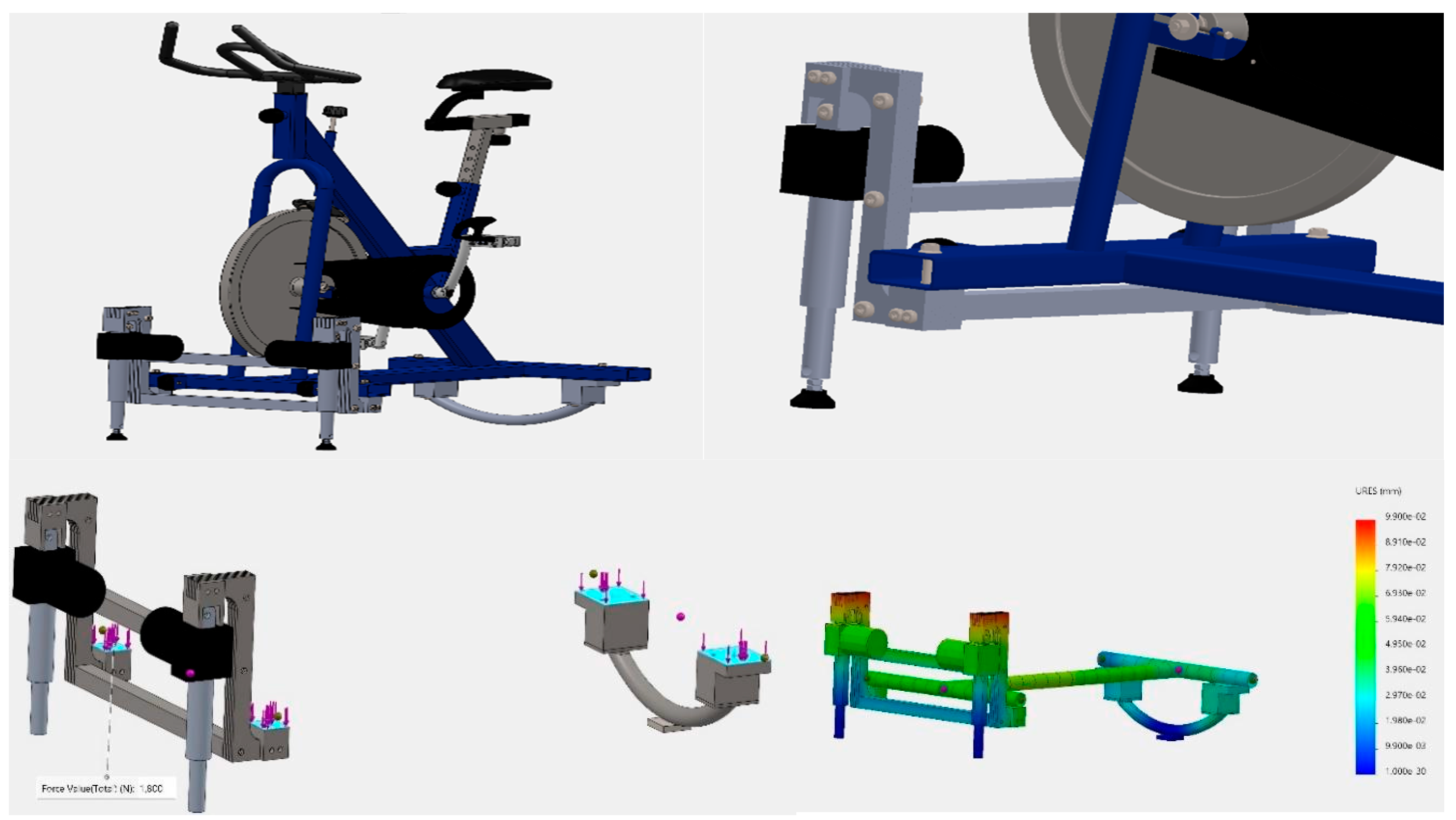
The kinematic relations required for the mechanical system are calculated with a geometric approach to determine the angle between the center and front center points. The design was made according to the prediction that the actuators could operate under a total load of 5000N. Because the exercise bike weighs 100 kg, and the person on it weighs 80 kg on average, the factor of safety (FoS) was determined with a ratio of requirement of 2–3 times the above. In the study, the mechanical design of the motion system was tested in a simulation environment, and its compliance with these safety requirements was also analyzed. According to these simulation results, the total load of 1800 N applied to the pivot at the front and rear center points carried by two actuators with a capacity of 5000 N shows that the system can operate with a factor of safety (FoS) = 2.78. The simulation analyses are shown in
Figure 6.
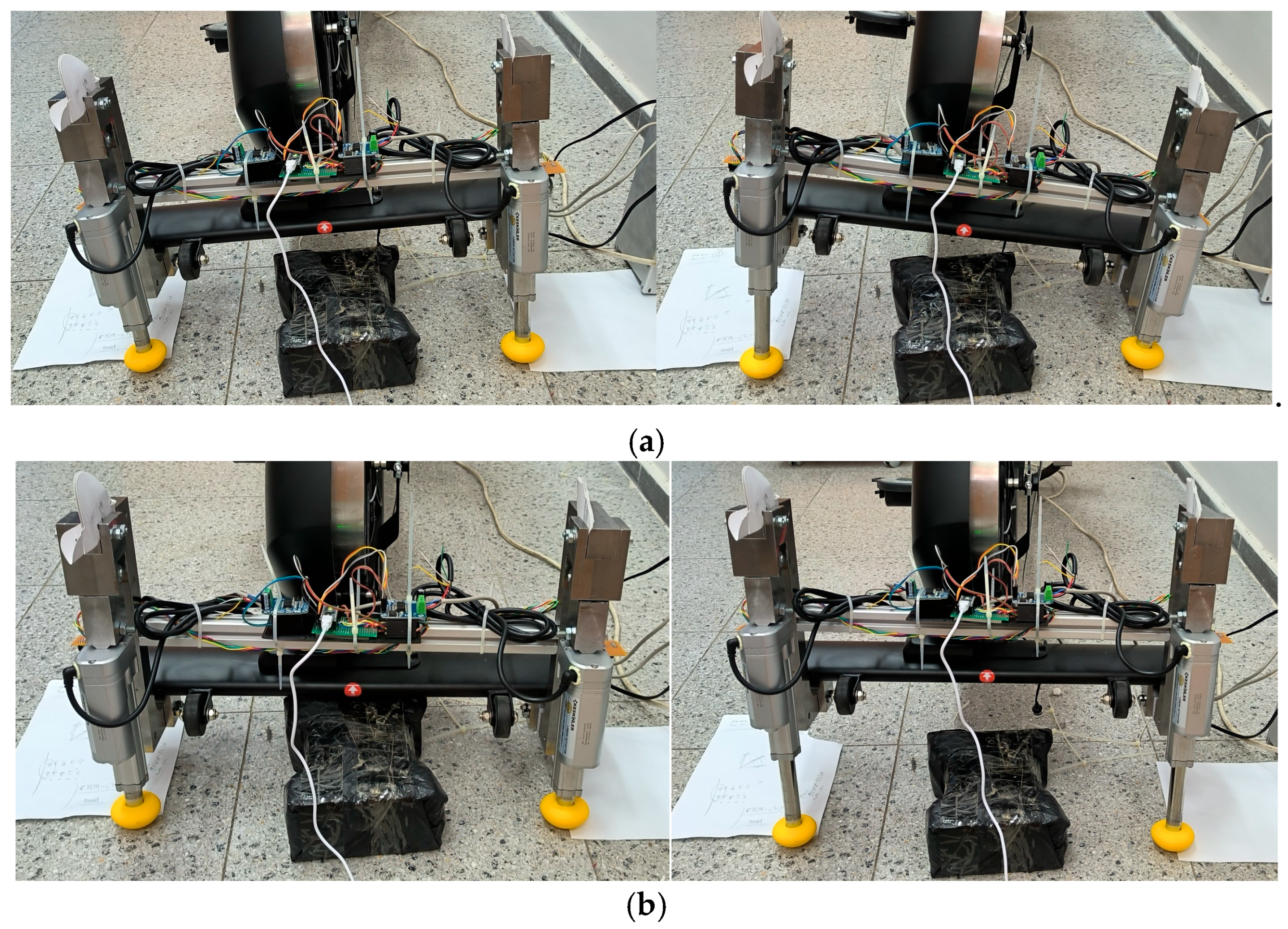
The developed system can process speed and slope information using real or virtual 3D images. This platform has ±10-degree angles of pitch and roll axes and 7 mm/s maximum speed features. These features are suitable for people with limited mobility and the elderly. However, they would need to be updated for more active athletes. The mechanical motion system inclination examples are shown in
Figure 7.
3. Electronic System
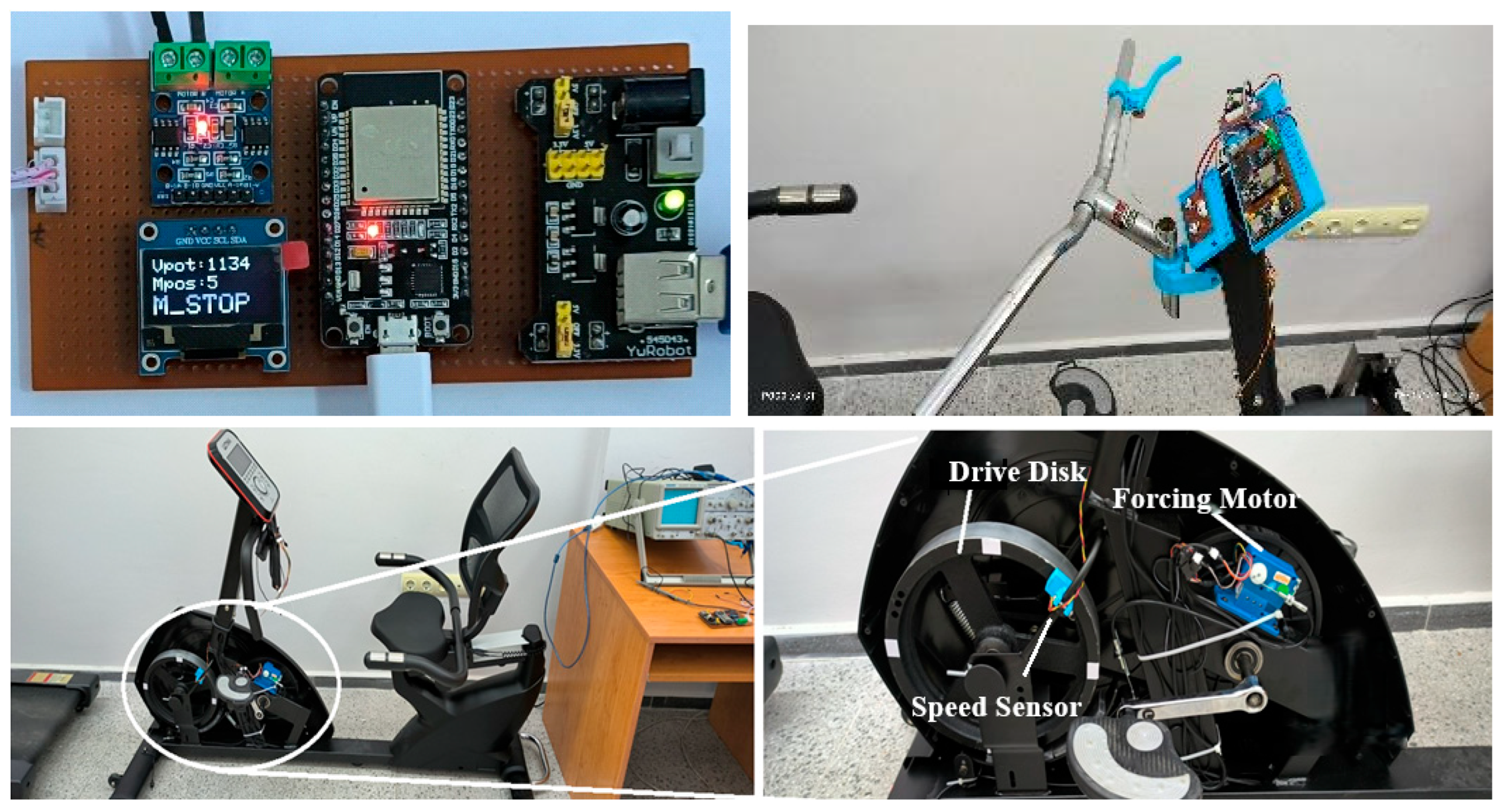
The entire electronic system was designed, and the processor and control card were produced. In addition, as the existing magnetic speed sensor was on the rear disk in the experiments, which did not produce a signal when the pedal movement stopped, a new infrared sensor system was designed and produced on the front disk to obtain a more realistic driving function.
Figure 8 shows our electronic system components.
To provide realistic responses for the advanced applications planned in the study, the electronic control system required additional structures not present on the bicycle from Ultima, İstanbul, Türkiye. These include the sensor structure measuring the speed of the front drive disk, the circuit measuring the brake lever on the free handlebar, the sensor and driver module controlling the position of the DC forcing motor, the circuit driving the linear actuators of the motion platform, the processor card providing communication with the external computer system, and the embedded software. All these additional components were designed and implemented to be controlled from a single card. This electronic control card and the system subcomponents are given in
Figure 9 below.
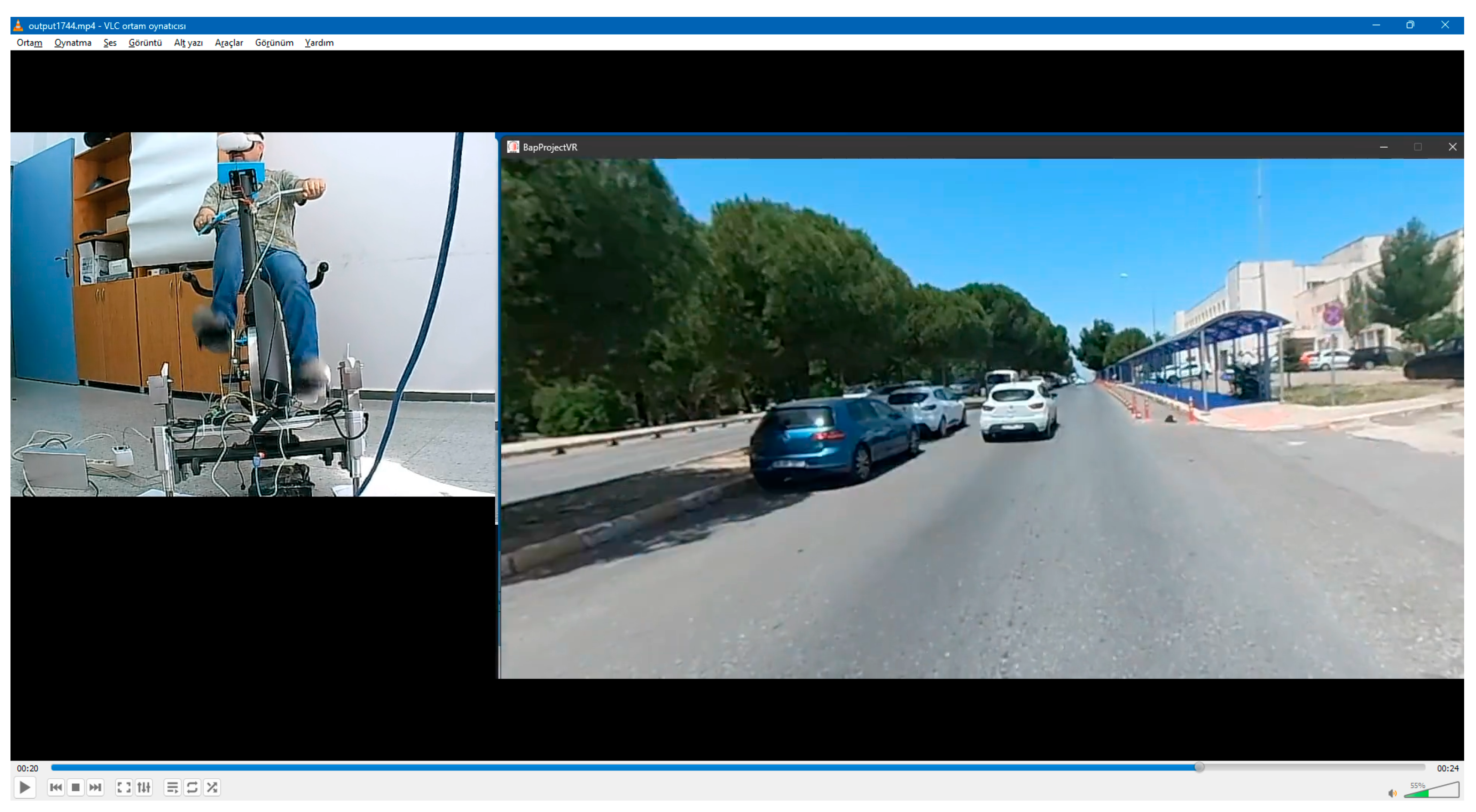
During operation, even if the user stops pedaling, the speed information received from the front disk of the exercise bike, which continues to rotate realistically with its current momentum, is combined with the brake lever level, converted to a value between 1 and 20, and transferred to the external computer via USB port or wirelessly via Bluetooth. In this way, the external computer can adjust the playback speed more realistically. In addition, the same wired or wireless communication channel transmits the recorded slope information at the time of video playback to our designed card with embedded control software. This information is also used to drive the mechanical motion system actuators and control the forcing motors. In this way, the pitch and roll angles are applied to the motion platform with the least synchronization delay with the image, and the most effective physical feedback is provided to the user, due to the platform that makes the forcing change in the pedal according to the inclination. In this way, the human brain can accept the reality of the exercise more with the mechanical body movement and 3D visual stimulation, and the desired result can be achieved.
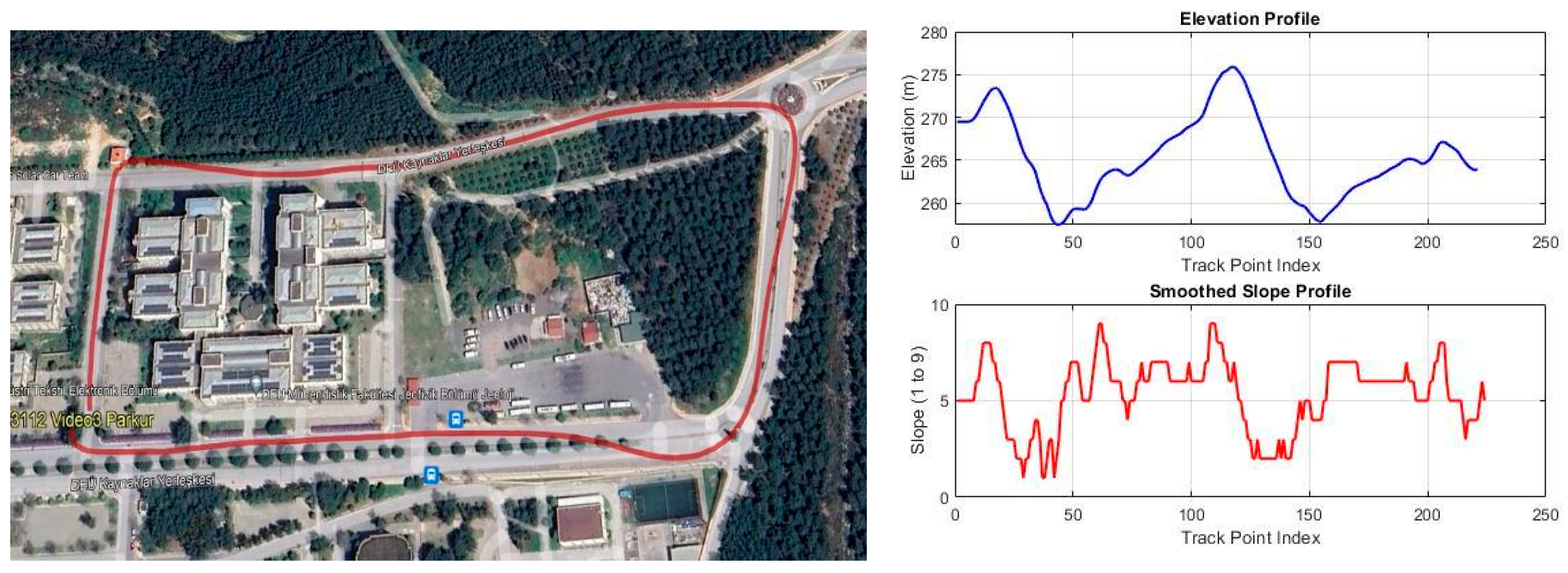
This system is designed to use nine levels of hardness, with 5 being normal, 1 being the lowest or easiest, and 9 being the highest or hardest. Depending on the conditions of the slope during use on the track, if the slope is positive, the user will feel the pedal hardness as higher than level 5, and if the slope is negative, the user will feel the pedal hardness as lower than level 5. Theoretically, the system can apply more than 9 levels of hardness (in practice, 16), but as it is assumed that users are generally elderly or have mobility issues, the hardness level is limited to a maximum of 9.
5. Software
Two main software components were used this phase. The first was embedded software that collects the pedal disc speed and magnetic strain system motor position information of the exercise bike, transmits the speed information to the computer software, and controls the motion platform driver, which runs on the ESP32 processor Shanghai, China. The flow diagram of this system is shown in Algorithm 1. This software is written in C language and uploaded to the chip using an Arduino IDE 1.8.16 from Interaction Design Institute Ivrea, Ivrea, Italy. This code works synchronously with the hardware input interrupt that reads the front disc speed sensor in a timer interrupt cycle and can transfer the information obtained to the computer via USB or wireless Bluetooth. This software also controls the motion platform drive by processing the recorded pitch and roll information along with the video frame sent by the computer software.
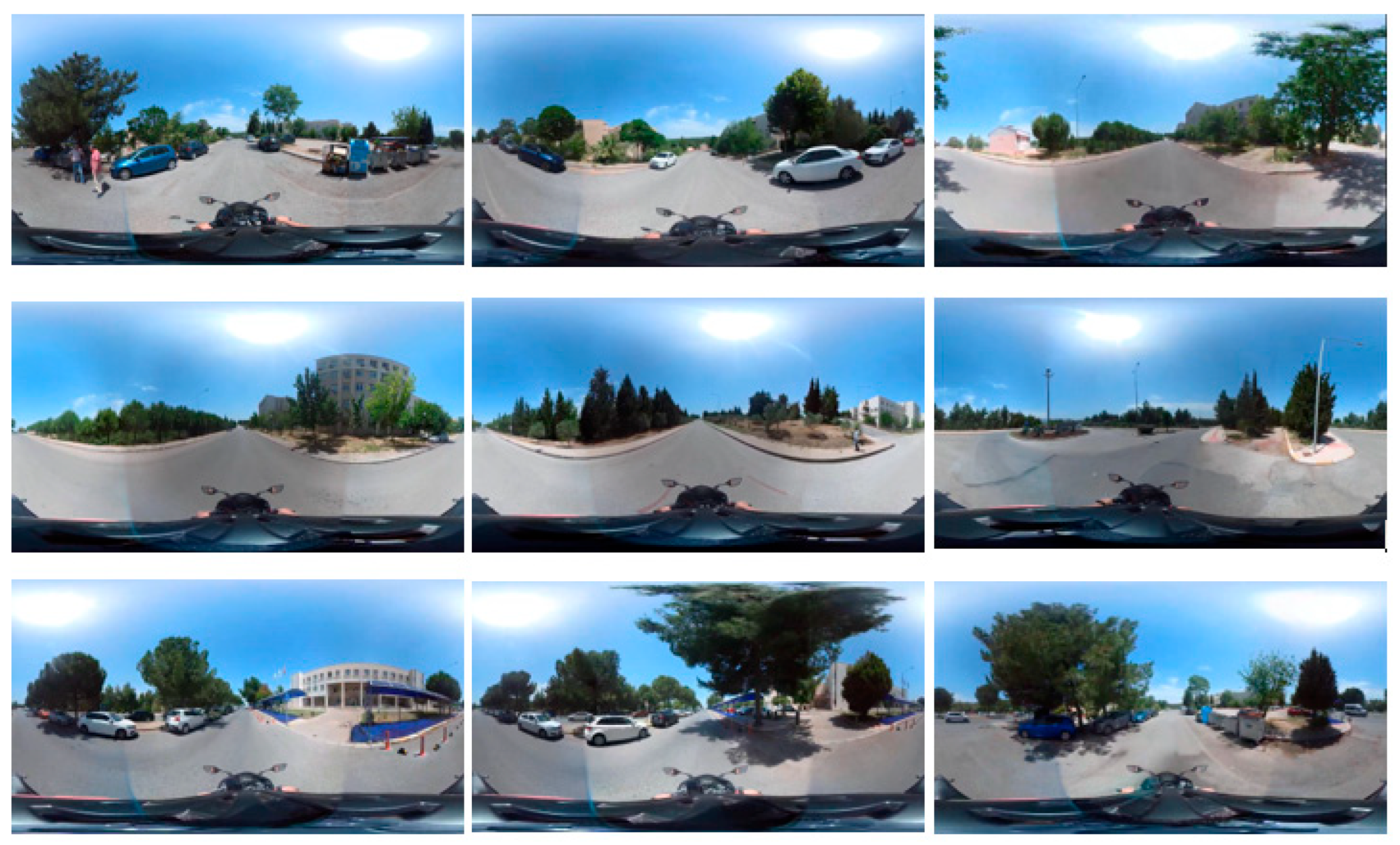
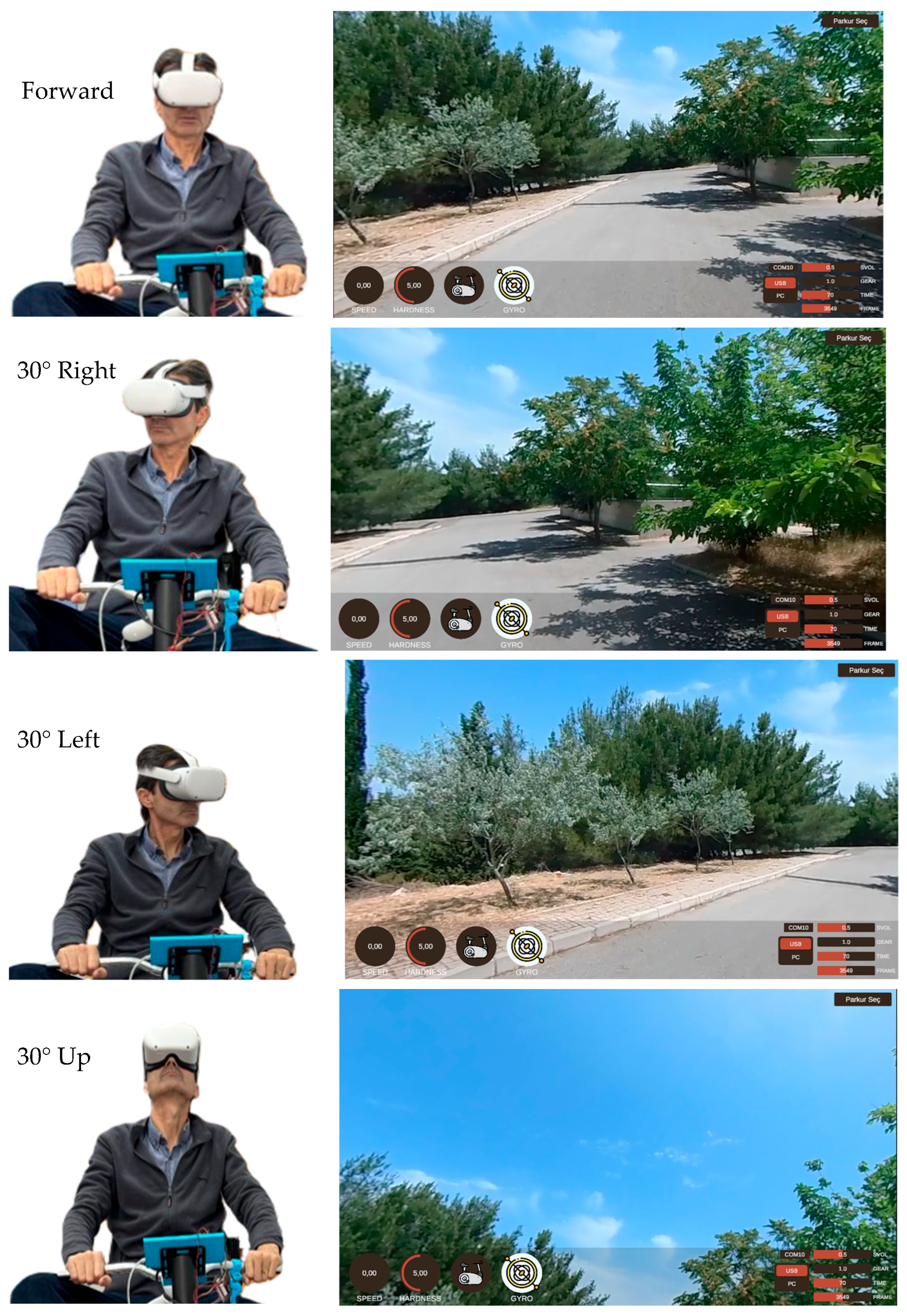
The second part of the software process was developing a viewport in the Unity Game Engine San Francisco, CA, USA for the Meta Oculus Quest2 headset Menlo Park, CA, USA. In this application, the aim was to show the user only a viewport of the 360-degree parkour video coated on a spherical virtual dome. In this strategy, only a limited part of the raw video is seen by the user, wherever the user looks.
For this method, the size of the sphere and the viewport angles are determined by basic human eye perception [
28,
29]. So, the 3–20 m radius of the sphere is seen as suitable for a 2.5 mm pupil for the human eye for the best results. This study chooses a 5 m radius of the sphere and 60 degrees of viewport per eye as the viewport model. This software was developed by writing the three-dimensional environment structure developed in the Unity game engine with the C# language on the Visual Studio Visual Studio 2022 (version 17.x) platform. The concept drawing of the Unity software is shown in Algorithm 2.
| Algorithm 1 ESP32Embedded code flow. |
1: procedure SYSTEM_START
2: Initialize Serial Communication (9600)
3: Configure Input/Output Pins
4: Attach Encoder Interrupt
5: Setup Timer
6: Display OLED Startup Message
7: end procedure
8: procedure MAINLOOP
9: if Timer Triggered: Read interrupt count and time
10: Update OLED Display
11: Read and Filter Potentiometer Value
12: Calculate Level
13: if level > level_threshold: Move Motor Up
14: else if level < level_threshold: Move Motor Down
15: else: Stop Motor
16: Read Encoder and Map Values
17: Read Sensor States (Stop, Gyro)
18: Send Data to Serial
19: Delay (10ms)
20: end procedure
21: procedure ENCODER_ISR
22: if Time Elapsed ≥ 2ms: Increment Encoder; Update Last Time
23: end procedure
24: procedure TIMER_ISR
25: Update Encoder Value
26: Increment Interrupt Counter
27: Save Last Interrupt Time
28: Send Semaphore
29: Reset Encoder Value
30: end procedure
31: procedure SERIAL_EVENT
32: Read Serial Data; Extract First Character
33: if “B”: Extract Level Value; Update OLED if Enabled
34: Clear Serial Buffer
35: end procedure
|
| Algorithm 2 Unity Game Engine code flow. |
1: procedure SYSTEM_START
2: Initialize Serial Communication (9600)
3: Configure Input/Output Pins
4: Attach Encoder Interrupt
5: Setup Timer
6: Display OLED Startup Message
7: end procedure
8: procedure MAINLOOP
9: if Timer Triggered: Read interrupt count and time
10: Update OLED Display
11: Read and Filter Potentiometer Value
12: Calculate Level
13: if level > level_threshold: Move Motor Up
14: else if level < level_threshold: Move Motor Down
15: else: Stop Motor
16: Read Encoder and Map Values
17: Read Sensor States (Stop, Gyro)
18: Send Data to Serial
19: Delay (10ms)
20: end procedure
21: procedure ENCODER_ISR
22: if Time Elapsed ≥ 2ms: Increment Encoder; Update Last Time
23: end procedure
24: procedure TIMER_ISR
25: Update Encoder Value
26: Increment Interrupt Counter
27: Save Last Interrupt Time
28: Send Semaphore
29: Reset Encoder Value
30: end procedure
31: procedure SERIAL_EVENT
32: Read Serial Data; Extract First Character
33: if “B”: Extract Level Value; Update OLED if Enabled
34: Clear Serial Buffer
35: end procedure
|
7. Conclusions
Using our AR bicycle movement system, people with mobility limitations have the opportunity to participate in sport using real outdoor images in an indoor environment. The hardware consists of an electromechanical system and electronic control that provide physical feedback and form the basis for the related enhanced reality studies. This system was integrated with the two-degree-of-freedom motion platform of a safe exercise bike for the user, which was electronically and mechanically modified, and its electronic circuits were redesigned and are ready for use. In terms of safety, the final implementation can be connected to an external application computer in a wired or wireless manner in order for an expert operator to control the operation. In addition, the software can be used as a virtual or enhanced reality system infrastructure, with virtual reality equipment.
With this system, the user has the feeling of a real track with mechanical movement compatible with the track slope movements on the head-mounted display (HMD). The sense of reality (immersion) can be increased via the brain’s accepting the visual and physical stimuli. This work continues to be developed by our team.
One of the key points of the design is suitable parkour recordings. In this demo study, low slope tracks were chosen, because we focused on individuals with mobility issues. However, many demanding parkour or track alternatives are operable for healthy persons or athletes with appropriate mechanical system options.
This system is being developed for real-life applications aimed at people with limited mobility, such as the elderly, following ethical regulations and procedures. After these steps are completed, the system can be applied.
This design can be easily transformed into any other exercise system with the help of other options such as a treadmill or flight tool. Only appropriate video recording and mechanical feedback are required for that transformation. Hence, this option may be applied to further demands.
Our system aims first at a complete immersion with real-life media and equipment with realistic mechanical feedback. Similar examples of rehabilitation systems generally target rehabilitation, with realism as a secondary issue. At the same time, some applications in sports have realistic mechanical feedback, but their aim is performance rather than immersion. So, our system may be used for indoor exercise or rehabilitation applications for elderly people, with the choice of appropriately slow bicycle equipment with safe motion limits.
To provide a sense of reality in applications of this system, several points must be considered. The required external computer structure must have computational and image processing capabilities, the wireless or wired connection speed must be sufficiently high, and the output resolution of the rendering program must be high. Without these conditions, it may not be possible to provide realistic movement acceptance by the brain. In this context, an output resolution that can provide 4K images and a refresh rate of at least 50–60 Hz are both recommended.
Some people may experience slight dizziness using this system, for several reasons. The first may be the person themselves, as some people may be more sensitive. One should test the system and check the conditions. Second, the video resolution could be improved to achieve environmental realism. The video recording conditions were via a bicycle helmet, and the bicycle needs to be tilted during the turns. This situation may cause discomfort for the user. Thirdly, the field of view considered normal varies for all people and is not universal. Further studies for such improvements and generalization are planned at the next stage.