

Next Article in Journal
Research on Magnetorheological Semi-Active Suspension Control Using RBF Neural Network-Tuned Active Disturbance Rejection Control
Previous Article in Journal
Hierarchical Cooperative Control of Trajectory Tracking and Stability for Distributed Drive Electric Vehicles Under Extreme Conditions
Previous Article in Special Issue
Active Composite Plates with Embedded Shape-Memory Alloy Wires for Vibration Damping
 
 
Due to scheduled maintenance work on our servers, there may be short service disruptions on this website between 11:00 and 12:00 CEST on March 28th.
Technical Note

SMA Simulator: An Efficient Tool for Simulating the Partial Nonlinear Loading Cycles of Shape Memory Alloy Wire Actuators


Department of Mechanical Engineering, California State University, Northridge, CA 91330, USA
Actuators 2026, 15(4), 183; https://doi.org/10.3390/act15040183
Submission received: 26 January 2026 / Revised: 18 March 2026 / Accepted: 19 March 2026 / Published: 26 March 2026

Abstract

The behavior of shape memory alloy (SMA) materials is more complex than linear isotropic metals because of their nonlinear thermomechanical coupling. When an SMA material is mechanically stressed or joule-heated, phase transformation happens in the material, and accordingly some material properties dramatically change. In any loading or unloading scenario, the initial state of the material should be known because it significantly affects its behavior. Stress and strain alone are not enough to describe such materials. Temperature and martensitic fraction are also required to simulate SMA materials accurately. This paper presents a MATLAB application, called “SMA Simulator,” that was developed to simulate the nonlinear behavior of SMA wires under mechanical or thermal loads. This tool is very effective in helping users understand the shape memory and pseudoelastic effects in such smart materials, as it allows for plotting the loading path in the 3D stress–strain–temperature space while monitoring the evolution of the martensitic fraction. Any load–unload scenario can be studied, including multiple consecutive partial loading cycles. Since the application is not based on any numerical method that would require extensive meshing, the computational time is minimal, allowing users to perform more simulations and acquire results instantaneously.

1. Introduction

Shape memory alloy (SMA) materials are considered among the unique smart materials that can be used as actuators in various applications due to their relatively large actuation forces [1,2,3]. When exposed to temperatures higher than material-specific transformation temperatures, the material undergoes a phase transformation, resulting in these large actuation forces. Such temperature-sensitive transformations lead to increased stress and/or strain levels. Strains of up to 6–8% are typically reported in commercial SMA wires [4]. SMAs have been used already in many applications, such as cardiovascular implants [5], stents [6], dental braces [7], prosthodontics [8], prosthetic arms [9,10], various biomedical applications [11], wearables [12], building structures [13], robotics [14], morphing aerospace structures [2,15,16,17], and active composite plates with embedded SMA wires [18].
The multiphysics coupling and material nonlinearity that are prevailing in the mechanics of SMAs require the development of educational tools to help students understand the complexity of the behavior of such materials. Chen et al. [19] reviewed classroom demonstrations, laboratories, and student projects involving SMA materials till 2004. Song and Bannerot [20] developed a hands-on device to introduce SMAs to students in middle school and above. The device featured an SMA wire weightlifter and an SMA-actuated flexible limb. Similarly, Amariei et al. [21] developed a stand that includes an SMA weightlifter and an actuated spring to demonstrate mechanics concepts to undergraduate engineering students. Qi and Buechley [22] developed workshops to guide students in creating electronic origami cranes using SMA actuators. None of these educational tools emphasized the complex nonlinearity of the material. Hafzy et al. [23] developed two experiments to demonstrate the shape memory and superelastic effects in Nickel–Titanium (NiTi) alloys. Wang et al. [24] developed a remote SMA experiment to offer students hands-on experience in testing and controlling SMA wire actuators via a remote laboratory platform (LabVIEW). Tarng et al. [25] utilized a virtual reality (VR) application in a teaching module to show the shaping and restoration processes in SMAs, along with some real life applications. Santi et al. [26] developed an educational activity aiming to guide students to design and develop a product that uses the SMA actuator technology.
Educational applications (apps) have been very effective in teaching students various engineering concepts and allowing them to explore different scenarios at their pace. For example, Tan and Fok [27] developed a multimedia package to help students learn engineering measurements. Ramirez-Cortes et al. [28] developed an educational platform for teaching compensator design in a basic control theory course. Katsanos et al. [29] presented an education software for teaching structural dynamics and, in particular, soil-structure interaction problems. Panagiotopoulos and Manolis [30] developed a web-based educational package for teaching structural dynamics to serve as a virtual lab for civil engineering students. Türkkan [31] developed a visual application for teaching pipe flow optimization. Bishay [32] developed a computer application to help students understand the finite element analysis (FEA) through student-designed truss problems and supplemented that with student-generated assignment creation projects. Bishay [33] also developed a group of applications, called Composite Analysis and Design Apps (CADA), to guide students in designing composite structures. CADA was used in educational activities called “design challenges.”
Recently, some computational tools have been developed to serve specific purposes in advancing SMA technology and the adoption of these materials in various applications. To achieve the goals of the Consortium for the Advancement of Shape Memory Alloy Research and Technology (CASMART), Wheeler et al. [34] presented several modeling frameworks for SMA wires, coiled springs, and torque tubes to facilitate designing SMA-based actuation systems. These tools were developed for the CASMART 2015 Design challenge for students and are first-order approximations that do not represent the complex inelastic phase transformation and nonlinear nature of SMA response. Walgren et al. [35] developed the Shape Memory Alloy Rendering of Experimental Analysis and Calibration Tool (SMA-REACT) as a graphical user interface (GUI) for post-processing experimental SMA data and calibrating the Lagoudas’ 3D constitutive model. Kuner et al. [36] developed the Automatic Shape Memory Alloy Data Analyzer (ASMADA), a tool that identifies heating and cooling cycles from experimental data and extracts SMA material properties. Caltagirone and Benafan [37] developed the Shape Memory Materials Analysis and Research Tool (SM2ART) database as a web-based comprehensive repository. SM2ART provides access to thousands of peer-reviewed articles and published data, organized in a 2D and 3D visualization platform. It provides viewers with insight into SMAs, superelastic alloys, magnetic alloys, shape memory polymers (SMPs), and shape memory ceramics (SMCs).
Targeting students who want to learn the basics of SMA mechanics and explore various multi-step thermomechanical load–unload scenarios through different visual representations, this paper presents “SMA Simulator.” This is an efficient MATLAB application for simulating SMA materials when they are fully or partially loaded and unloaded, mechanically or thermally, in the 4D space of stress, strain, temperature, and martensitic fraction. The App is based on a simple 1D mathematical model and does not utilize the finite element method (FEM) that would increase the computational time needed in multi-step simulations. SMA Simulator is an educational tool that aims to help students understand how SMA wires generally behave. The rest of the paper is organized as follows: Section 2, Materials and Methods, gives a brief theoretical background on the fundamental equations of the simple mathematical model used to simulate SMA wires in the work. This is followed by a description of the SMA Simulator app. Section 3, Results, first presents a validation example, then demonstrates how the app was used to simulate a complex thermomechanical loading scenario. Section 4 presents a discussion and final conclusions.

2. Materials and Methods

2.1. Theoretical Background

To keep the mathematical background of the governing equations being solved by the SMA Simulator tool adequate for a first course in smart materials and structures, a simplistic one-dimensional thermomechanical model of shape memory alloy wires is considered here according to Leo’s textbook [38]. This would enable the course instructor to cover all mathematical background behind the app in the course and allow students to compare and verify their hand calculations or custom code with the solutions obtained by the application. The mathematical model assumes the loading on the SMA wire to be tensile. The modeled SMA wires cannot be subjected to compressive loads. Maximum mechanical stress applied on the SMA wire is assumed to be less than the yield strength of the SMA material. Yield and failure of the SMA material are not considered. A simple form of kinetic law for the phase transformation is considered. Besides being material dependent, transformation temperatures are linear functions of stress alone. No heat transfer between the SMA material and the surrounding environment is considered while the material is loaded mechanically, or thermally through directly changing the material temperature. Heat transfer is only considered when the Joule heating option is used for simulating heating and cooling of the SMA material. The effect of latent heat during Joule heating is neglected. SMA wire resistance is assumed to be independent of wire temperature. Young’s modulus is a linear function of the martensite fraction. The model is not suitable for simulating rough or defective SMA wires. More complex mathematical models can be integrated in future releases of SMA Simulator app. For more details on the mechanics of shape memory alloy materials, the readers are referred to the works of Lagoudas, Auricchio et al., and Cisse et al. [4,39,40].
In the simple model used in this work, each SMA material is characterized by four unique transformation temperatures called martensite start and finish temperatures ( M s and M f ) and austenite start and finish temperatures ( A s and A f ). The order of these transformation temperatures in most SMA materials is M f < M s < A s < A f . These transformation temperatures increase linearly by increasing the stress (T) applied on the material as follows [38]:
M f = M f + T c M ;       M s = M s + T c M ;             A f = A f + T c A ;           A s = A s + T c A   ,
where the superscript * indicates effective values of the transformation temperatures and c M and c A are transformation constants.
Phase transformation happens when the temperature or the applied stress on the material is changed. The martensitic fraction ξ from M to A and from A to M (where M is martensite and A is austenite) can be expressed as:
ξ M A = 1 2 1 + cos α A θ A s α A c A T ,
ξ A M = 1 2 1 + cos α M θ M f α M c M T ,
where α A = π / ( A f A s ) and α M = π / ( M s M f ) . The model uses θ as the wire temperature assuming there is no heat transfer with the environment for the sake of simplicity. However, when Joule heating is used, heat transfer with the environment during heating and cooling is considered. Young’s modulus changes linearly from the austenite Young’s modulus ( Y A ) to the martensite Young’s modulus ( Y M ):
Y ( ξ ) = Y A + ξ ( Y M Y A ) .
The general Hooke’s law for SMA materials can be expressed as
T T 0 = Y ( ξ ) S S L ξ Y ( ξ 0 ) S 0 S L ξ 0 ,
where T 0 ,   S 0 ,   ξ 0 are the initial stress, strain, and martensitic fraction, respectively, and S L is the maximum recoverable strain.
Joule heating is described by the following differential equation:
ρ A c p d θ ( t ) d t = i 2 R h c A c θ ( t ) θ ,
where θ ( t ) is the temperature as a function of time t, ρ is the material density [kg/m3], A is the SMA wire cross-sectional area, which is a function of the wire diameter D, i is the electric current intensity [A], c p is the specific heat capacity at constant pressure [J/kg·°C], h c is the heat transfer coefficient [J/m2·°C·s], θ is the ambient temperature [°C], and R is the wire resistance per unit length.
R = R e s i s t i v i t y A ;         A = π 4 D 2 ;                 A c = π D   .
To keep the analysis simple, this governing equation of the Joule heating phenomenon neglects the change to the SMA wire’s cross-sectional area, A, which would happen during loading or phase transformation due to Poisson’s effect. The solution of this differential equation is
θ ( t ) θ = R h c A c 1 e t / t h i 2 + θ 0 θ e t / t h ,
where θ 0 is the initial temperature and t h is the time constant:
t h = ρ A c p h c A c .
The steady-state temperature is defined as
θ S S = θ + R h c A c i 2 .
The time required to reach any desired temperature, θ d , during heating can be expressed as:
t d = t h ln θ S S     θ d θ S S     θ .
Temperature drop during cooling is expressed as
θ ( t ) = θ + θ 0 θ e t / t h ,
and the time required to reach any desired temperature, θ d , during cooling can be expressed as:
t d = t h ln θ d     θ θ 0     θ .

2.2. SMA Simulator MATLAB Application

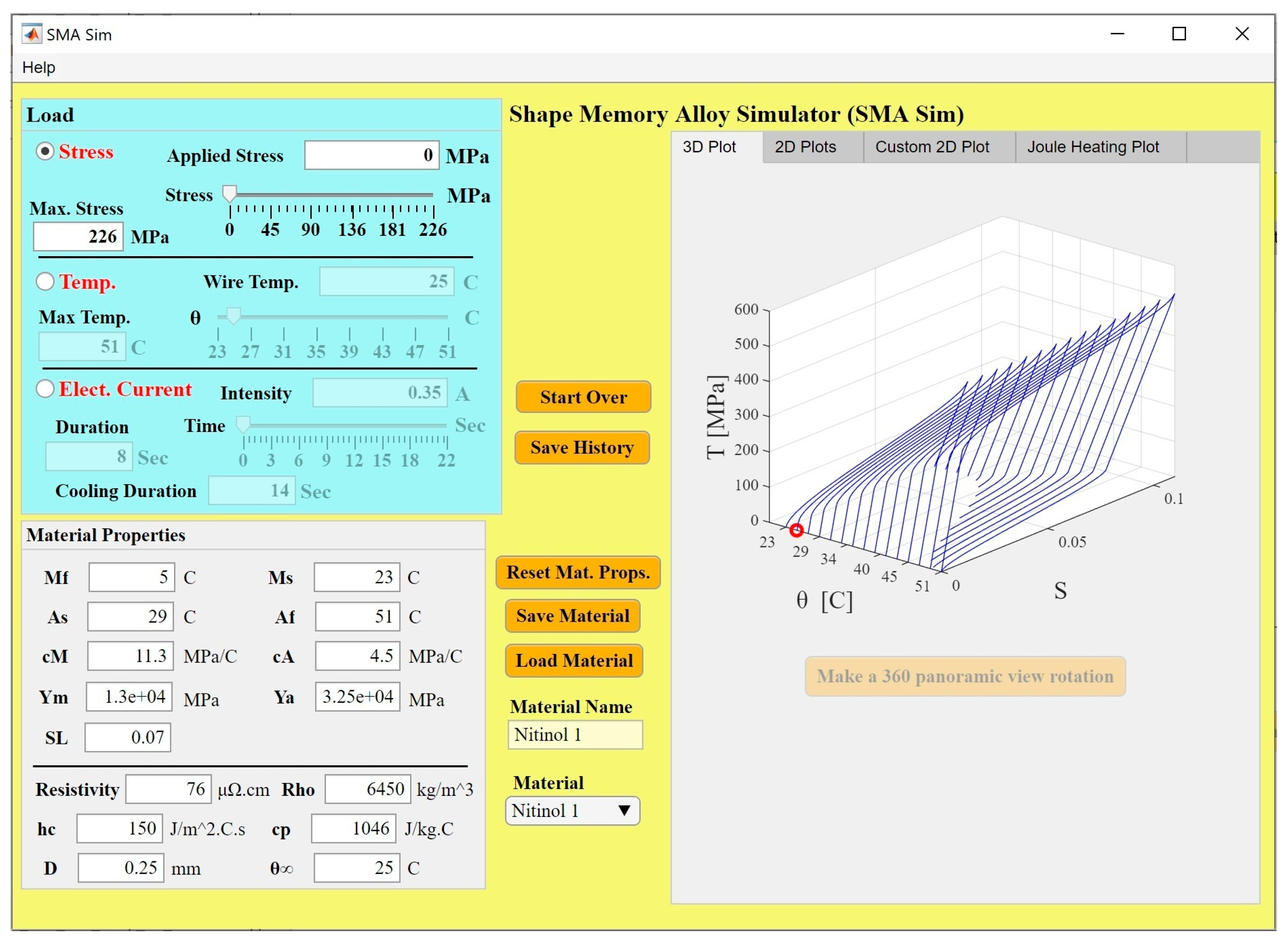
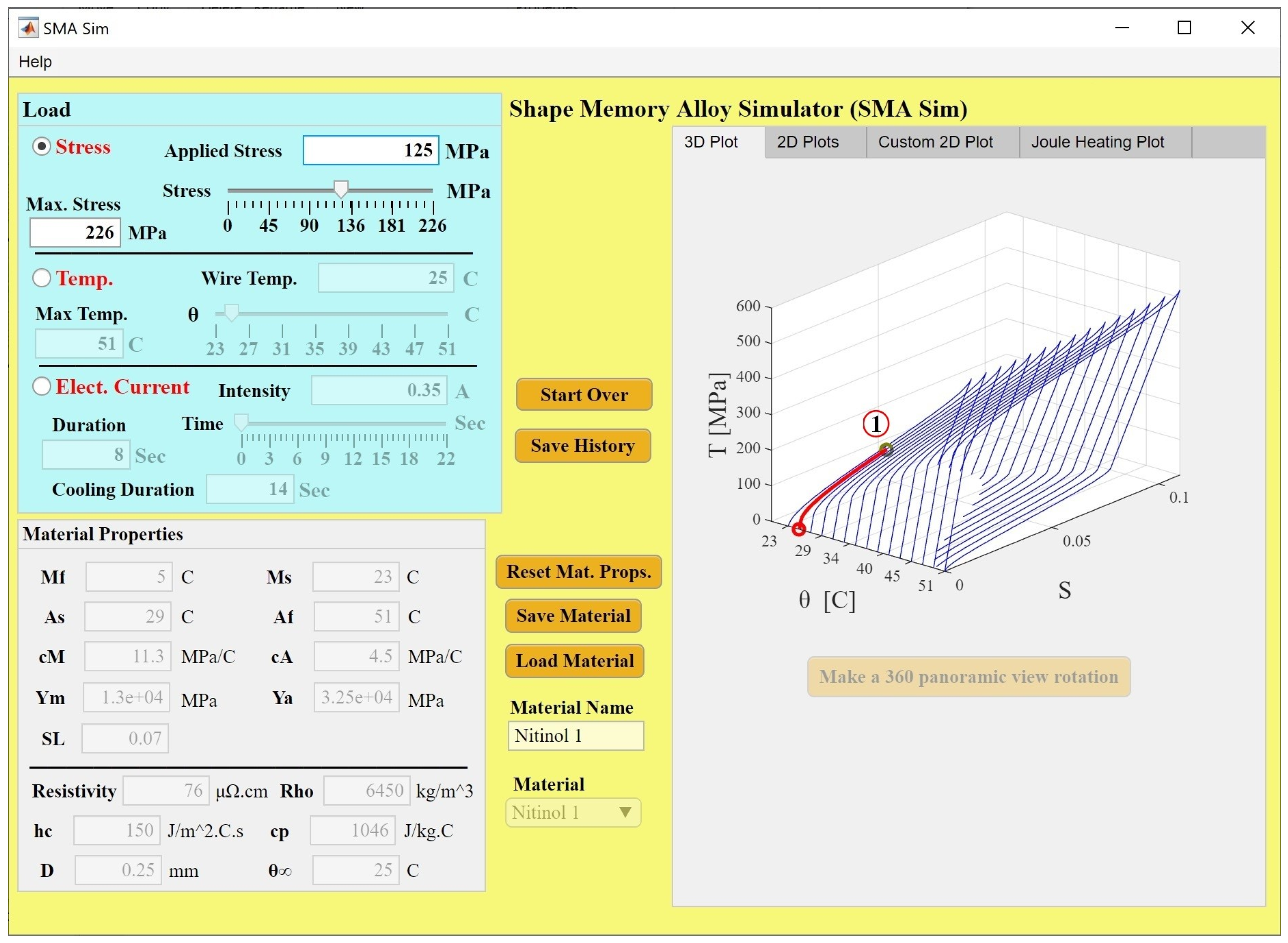
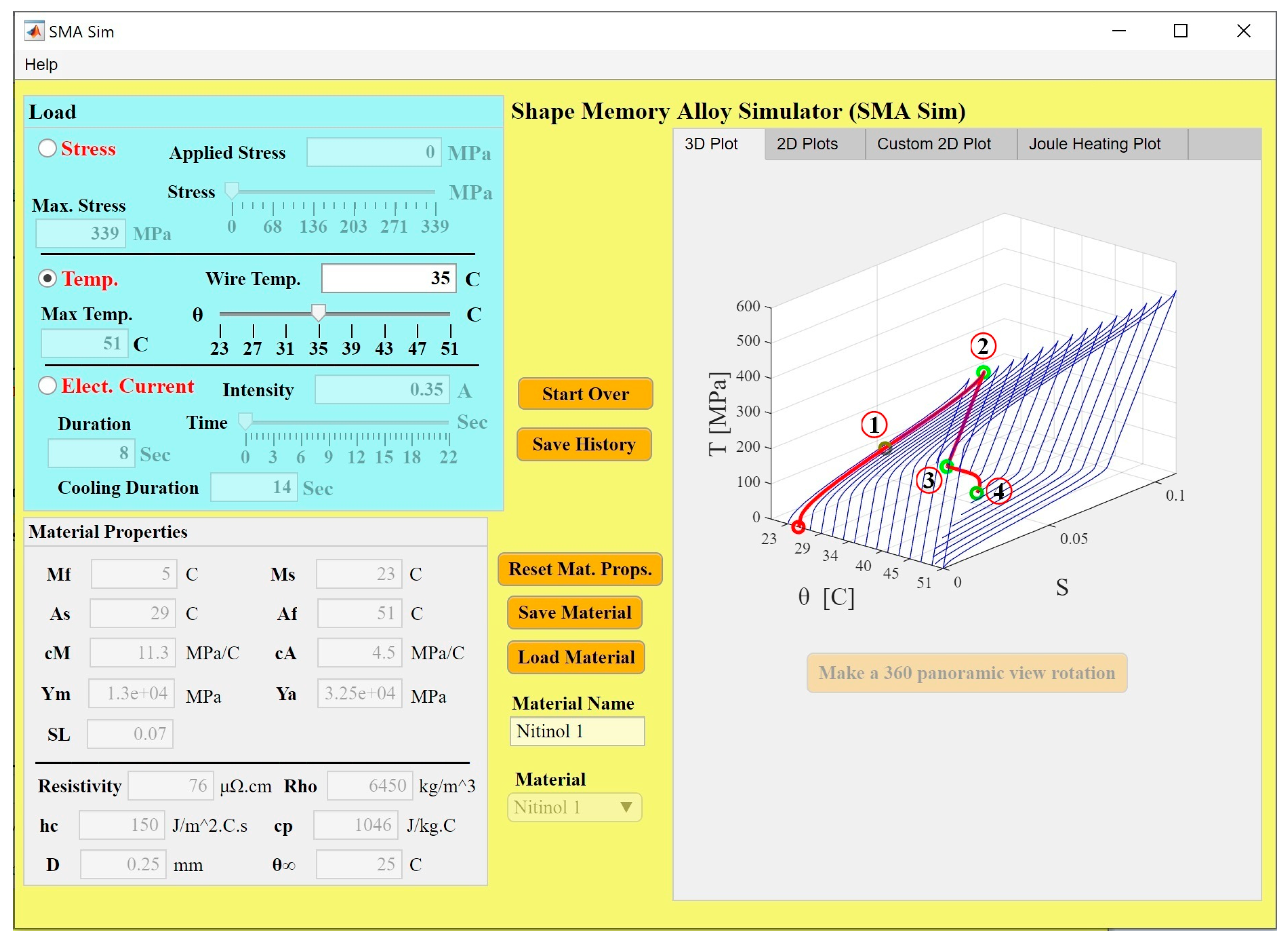
The main objective of the SMA Simulator MATLAB application is to plot the stress–strain and phase transformation curves of an SMA material subjected to mechanical or thermal loads. The app can be used to demonstrate the shape memory effect as well as the superelastic (or pseudoelastic) effect. The app also enables Joule heating, by running current through an SMA wire, and natural cooling of SMA wires. Figure 1 shows the user interface of the SMA Simulator.
There are two main panels in this app: “Load” and “Material Properties.” All results are displayed in the tab group on the right as a plot in the 3D strain–stress–temperature graph under the “3D Plot” tab, as plots in strain–stress and martensitic fraction–temperature 2D graphs in the “2D Plots” tab, as a 2D plot with customized X- and Y-data in the “Custom 2D Plot” tab, and as a temperature–time plot when Joule heating is used in the “Joule Heating Plot” tab. Some results are also displayed in MATLAB’s command window. The “Help” button will open a user manual PDF file that explains the functionality of the application.
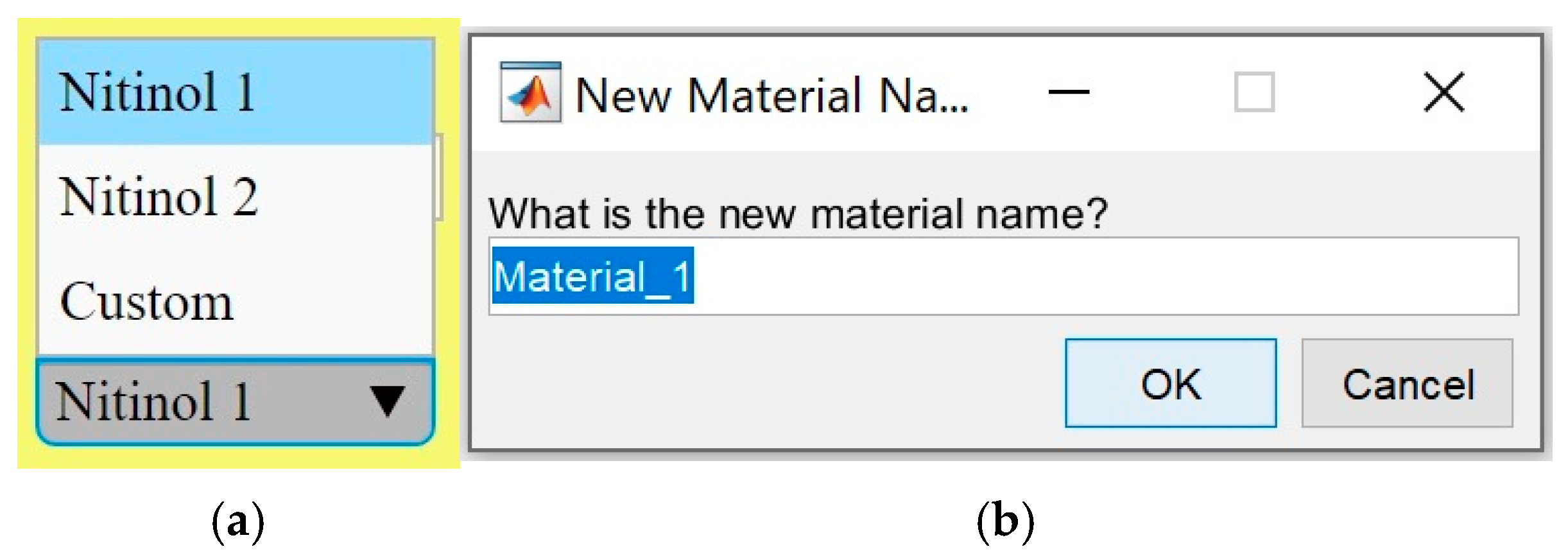
This app uses the symbol S for strain, T for stress, θ for material temperature, and ξ for martensitic fraction. When using SMA Simulator, the first step is to input all material properties in the “Material Properties” panel. These material properties are the four transformation temperatures [in °C]: martensite finish ( M f ), martensite start ( M s ), austenite start ( A s ), and austenite finish ( A f ); the transformation constants ( c M and c A ) [in MPa/°C]; the martensite and austenite Young’s moduli ( Y M and Y A ) [in MPa]; and the maximum recoverable strain ( S L ). If Joule heating is to be used in the simulation, more material properties must be defined as follows: resistivity [in μΩ·cm], density ( ρ or rho) [in kg/m3], heat transfer coefficient ( h c ) [in J/m2·°C·s], and specific heat capacity ( c p ) [in J/kg·°C]. The diameter of the SMA wire (D) should also be defined [in mm], as well as the ambient temperature ( θ ) [in °C]. The user can change the material from the “Materials” drop-down menu as shown in Figure 2a. Initially, the materials library has two stored SMA materials called “Nitinol 1” and “Nitinol 2,” whose properties are listed in Table 1. However, the user can create their own custom materials by clicking on the “Save Material” button after inputting all values in the material properties edit fields. This will open the “New Material Name” window, shown in Figure 2b, where the name of the new material can be inputted and the location of the new material data file can be specified. Users can also load a previously saved material to the materials library by clicking on “Load Material.” This will enable the user to locate a previously saved material data file and load it. The new material will be added to the list of available materials in the Materials drop-down menu. The material name of the selected material will be displayed in the “Material Name” field. Clicking on the “Reset Mat. Props.” button will reset values in the editable fields of all material properties to those of Nitinol 1 material.
The “Load” panel enables the user to select one of three options for loading the material: “Stress,” “Temp.” (Temperature), or “Elect. Current” (Electric current). When one option is selected, variables in the other two are noneditable. When the “Stress” radio button is selected, the user can move the “Stress” slider or type a value in the “Applied Stress” edit field to apply stress. Both options affect one another, i.e., moving the stress slider will change the value of the applied stress, and changing the applied stress value will move the stress slider. The “Max. Stress” field is editable but limited between 2 MPa and c M ( θ M f ) , which is the stress equivalent to full martensite transformation. So, any change in the values of c M , M f , or θ , will change the maximum stress value.
When the “Temp.” radio button is selected, the user can move the θ slider or type a value in the “Wire Temp” edit field to change the SMA material temperature. Both options affect one another, i.e., moving the θ slider will change the value of the wire temperature, and changing the wire temperature value will move the θ slider. When SMA Simulator is initialized, the maximum temperature, specified in the “Max. Temp.” field, is by default the austenite finish temperature ( A f ). The Max. Temp.” field is editable but cannot go below the martensite start temperature ( M s ). If Joule heating is being modeled, the steady-state temperature ( θ s s ) will be the maximum temperature.
When the “Elect. Current” radio button is selected; the user can type the current intensity (a positive value) in the “Intensity” field and the time duration of the electric current application in the “Duration” field (a positive value). If the user wants to model wire cooling by convection, the “Cooling Duration” (a positive value) must be defined. Once these variables are properly specified, the user can move the “Time” slider to see how temperature is changing over time in the “Joule Heating Plot” tab. As the temperature changes, the θ slider moves accordingly, the value of the “Wire Temp” changes, and the maximum stress also changes. This can be observed in all plots.
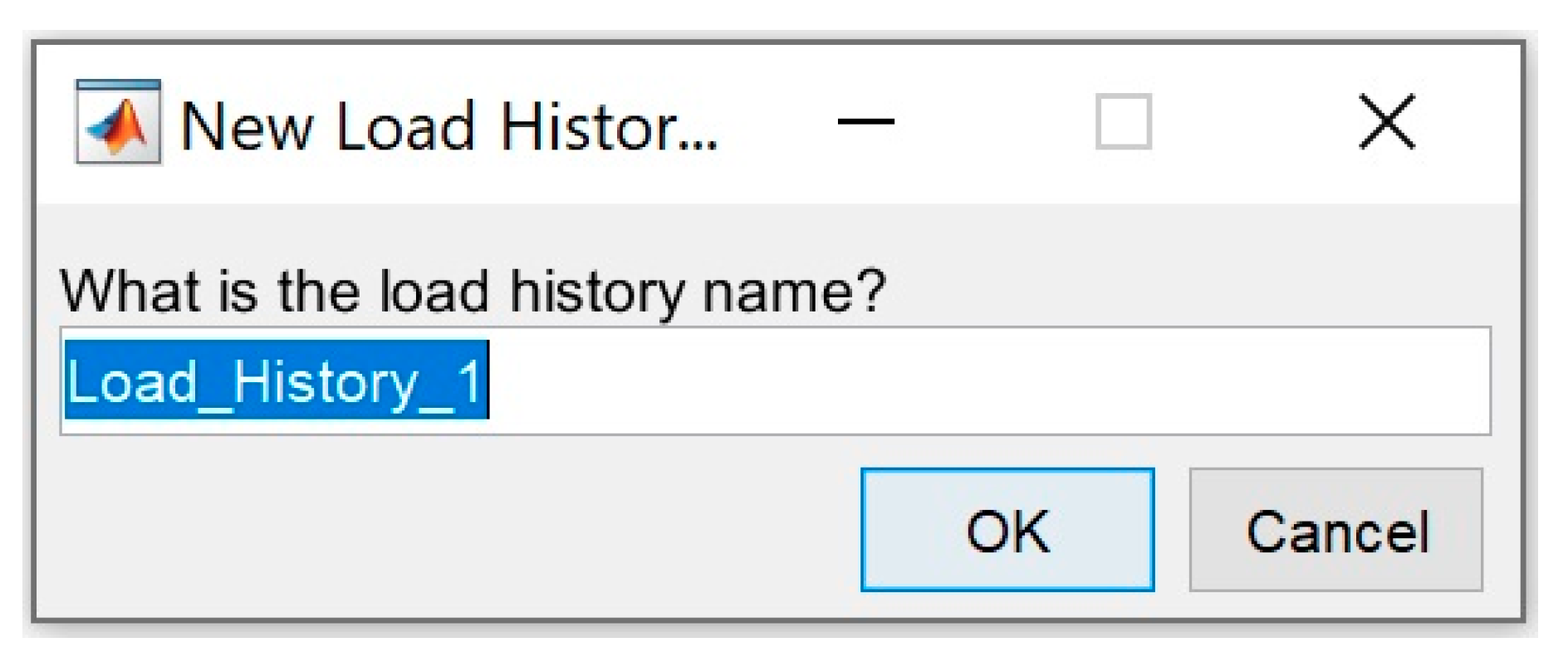
Whenever the user adjusts the material temperature or applied stress by moving a slider or entering a value in an edit field, the 3D plot, shown in Figure 1, displays a red line to show the new point in the 3D stress–strain–temperature coordinate space. The 2D plots also show the effective martensitic fraction-temperature transformation curve and the strain–stress curve for full phase transformation at the current temperature. The values of the four variables (temp. θ, martensitic fraction ξ, strain S, and stress T) at the main points are displayed on MATLAB’s command window. Several points are evaluated between the initial and final main points in each step. During these simulations, the material properties edit fields, and the material drop-down menu are all disabled because the user should not be editing the material properties during loading/unloading. Users can efficiently simulate different loading and unloading scenarios. The loading history is recorded while the material is loaded and unloaded. If the user wants to store all points the simulation passes by, they can press the “Save History” button. This will allow the history data file to be named before it is saved, as shown in Figure 3.
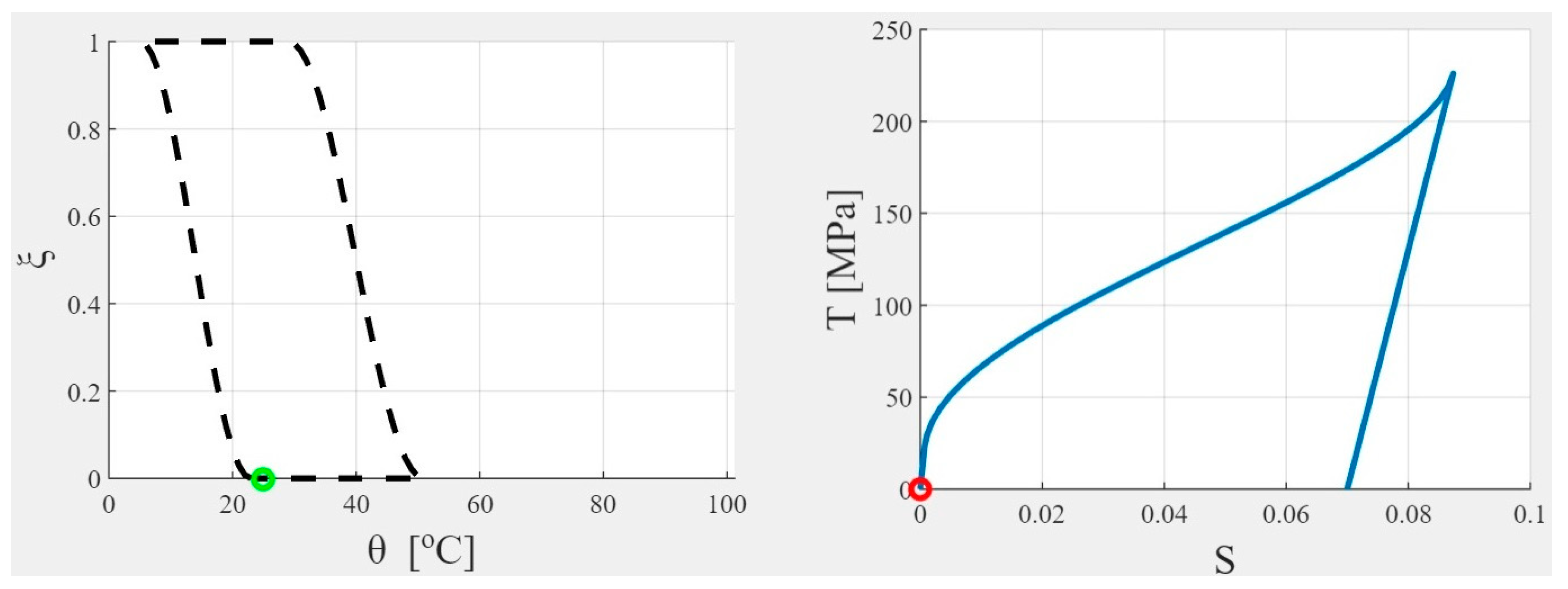
The initial state of the material is stress-free, strain-free, fully austenitic Nitinol 1 at 25 °C. The wire diameter, D, is 0.25 mm, and the ambient temperature, θ , is the same as the initial wire temperature. The “2D plots” tab shows the initial martensitic fraction-temperature transformation curve and the full transformation stress–strain curve as shown in Figure 4. The current state of the material is identified by the green circle in the first plot and the red circle in the second plot. The “Stress” option in the load panel is selected by default.
If the user wants to restart the simulation or try a new loading scenario, they can click on “Start Over.” This will return everything back to the original material state: stress-free, strain-free, fully austenitic, at 25°C. This will also clear the history of the previous scenario.

3. Results

3.1. Tool Validation

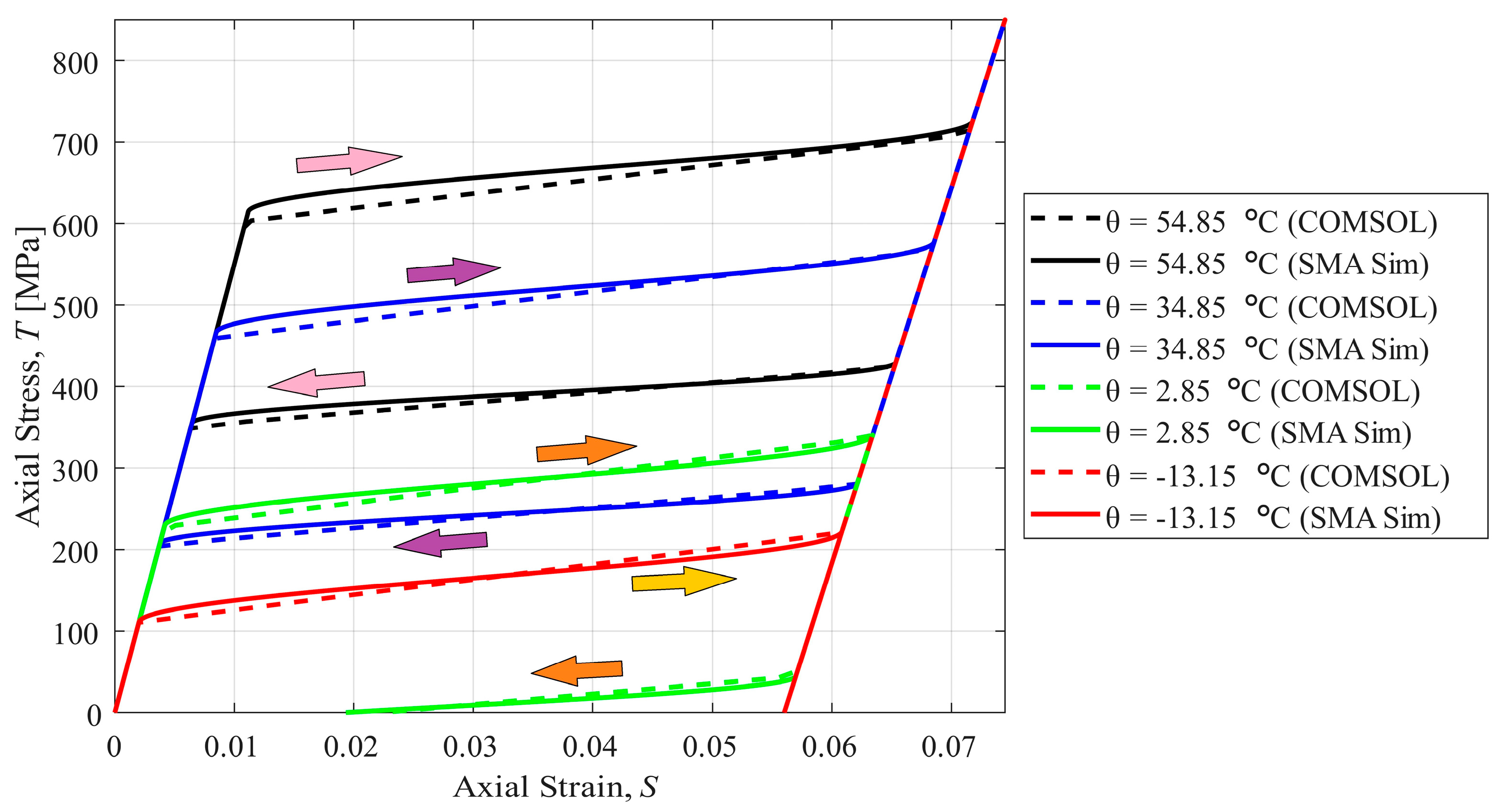
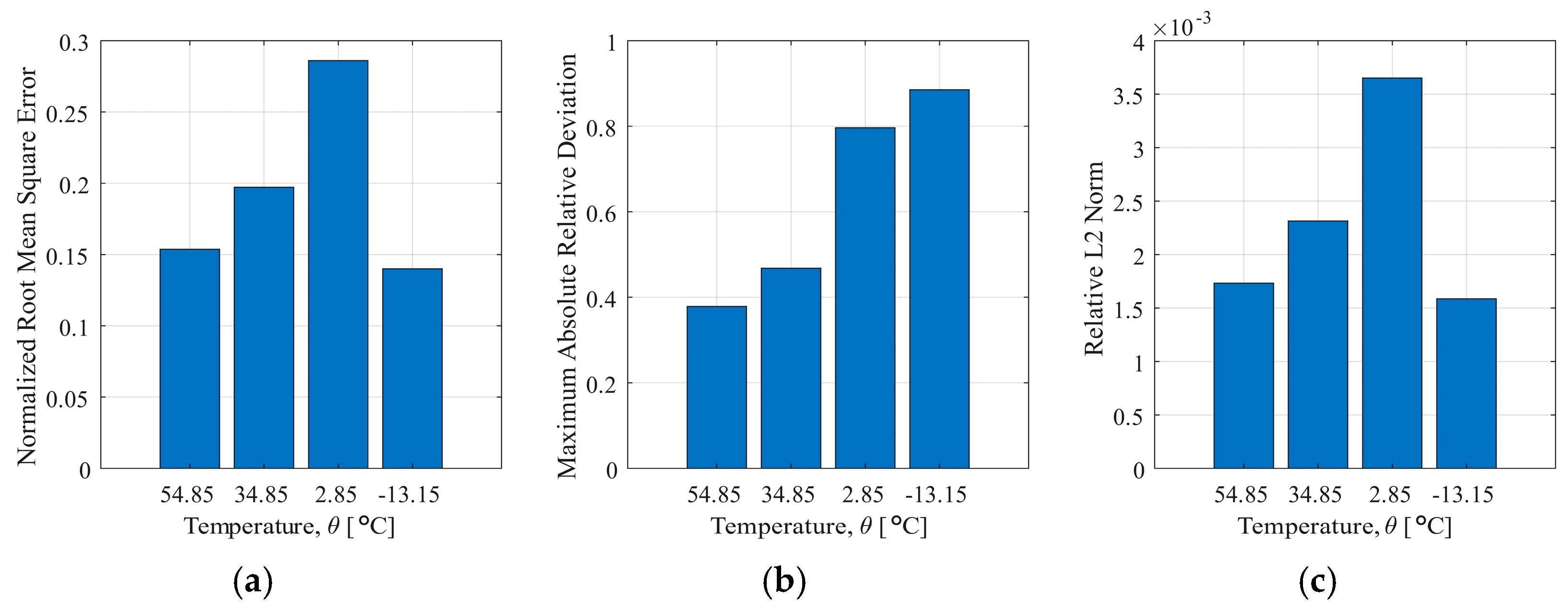
To validate the developed application, an example problem of a NiTi cylinder subjected to load–unload cycles at various temperatures was solved in SMA Simulator and COMSOL Multiphysics FEA package (version 6.0) for comparison. COMSOL’s “Shape Memory Alloy” node, under the “Solid Mechanics” physics, uses the Lagoudas SMA material model [4]. The example problem is presented in COMSOL’s “Uniaxial Loading of Shape Memory Alloy” tutorial [41]. The material properties used in this example are as follows: Y A = 55 GPa, Y M = 46 GPa, M s = 245 K, M f = 230 K, A s = 270 K, A f = 280 K, c M = c A = 7.4 MPa/K, and S L = 0.056. Poisson’s ratio, heat capacity at constant pressure, and density for both martensite and austenite phases are υ = 0.33, c p = 400 J/(kg·K), and ρ = 6500 kg/m3, respectively. COMSOL’s FEA model is a 2D axisymmetric model representing a cylinder of 20 cm length and 6 cm radius. A roller boundary condition is prescribed on the bottom face, and a normal load, whose magnitude is 850 MPa, is prescribed on the top face. The normal force is multiplied by a parameter that allows it to linearly increase in the first step, then linearly decrease in the second step. The mesh included 24 quadrilateral elements, equivalent to 36 mesh vertices. The study is a parametric sweep that solves the problem at four values of applied temperature (328, 308, 276, and 260 K). Figure 5 shows the stress–strain curves of the SMA cylinder in the load–unload cycle at the four temperatures computed using both COMSOL and SMA Sim. To quantify the deviation of the SMA Sim solution from that of COMSOL’s solution, Figure 6 shows the normalized root mean square error (NRMSE), the maximum absolute relative deviation (MARD), and the relative L2 error ( L 2 r e l ), defined as:
N R M S E = 1 N i   =   1 N T C O M S O L , i     T S M A   S i m , i 2 max T C O M S O L     m i n ( T C O M S O L ) ,
M A R D = max i T C O M S O L , i T S M A   S i m , i T C O M S O L , i ,
L 2 r e l = T C O M S O L T S M A   S i m 2 d S T C O M S O L ,
where T C O M S O L and T S M A   S i m are the stresses computed in COMSOL and SMA Sim after being linearly interpolated to have N = 1000 points each, for the sake of comparison. The integration in the L 2 r e l expression was done using the trapezoidal numerical integration method. NRMSE, MARD, and L 2 r e l did not exceed 0.3, 0.9, and 0.004, respectively, in any of the cases. SMA Sim computes and plots the stress–strain curves at various temperatures with high accuracy relative to COMSOL’s results. The curves demonstrate the pseudoelastic effect at both high temperatures (54.85 °C and 34.85 °C), where unloading the material results in full recovery of the transformation strain, as full phase transformation from austenite to martensite is achieved during loading, and back transformation to austenite during unloading. If loading happens at a temperature between the austenite start and finish temperatures, like in the case at 2.85 °C, the reverse transformation is not complete, and some residual strain still exists upon fully unloading the material. At low temperature (−13.15 °C), no reverse transformation happens during unloading, resulting in the maximum residual strain. Only heating the material would lead to strain recovery, which demonstrates the shape memory effect. SMA Simulator was capable of accurately simulating all considered cases.

3.2. Example Simulations

SMA Simulator can model different loading–unloading scenarios on SMA wires. As an example, a loading scenario, expressed below in a compact form, is considered.
Scenario 1: L125 − L226 − U − H35 − H51 − L450 − U50 − U − C29,
where L, U, H, and C indicate Load, Unload, Heat, and Cool, and the subscript defines the applied stress (in MPa) or temperature (in °C) in each step. U without a subscript means unloading to zero-stress. The material used is “Nitinol 1” whose properties are listed in Table 1.
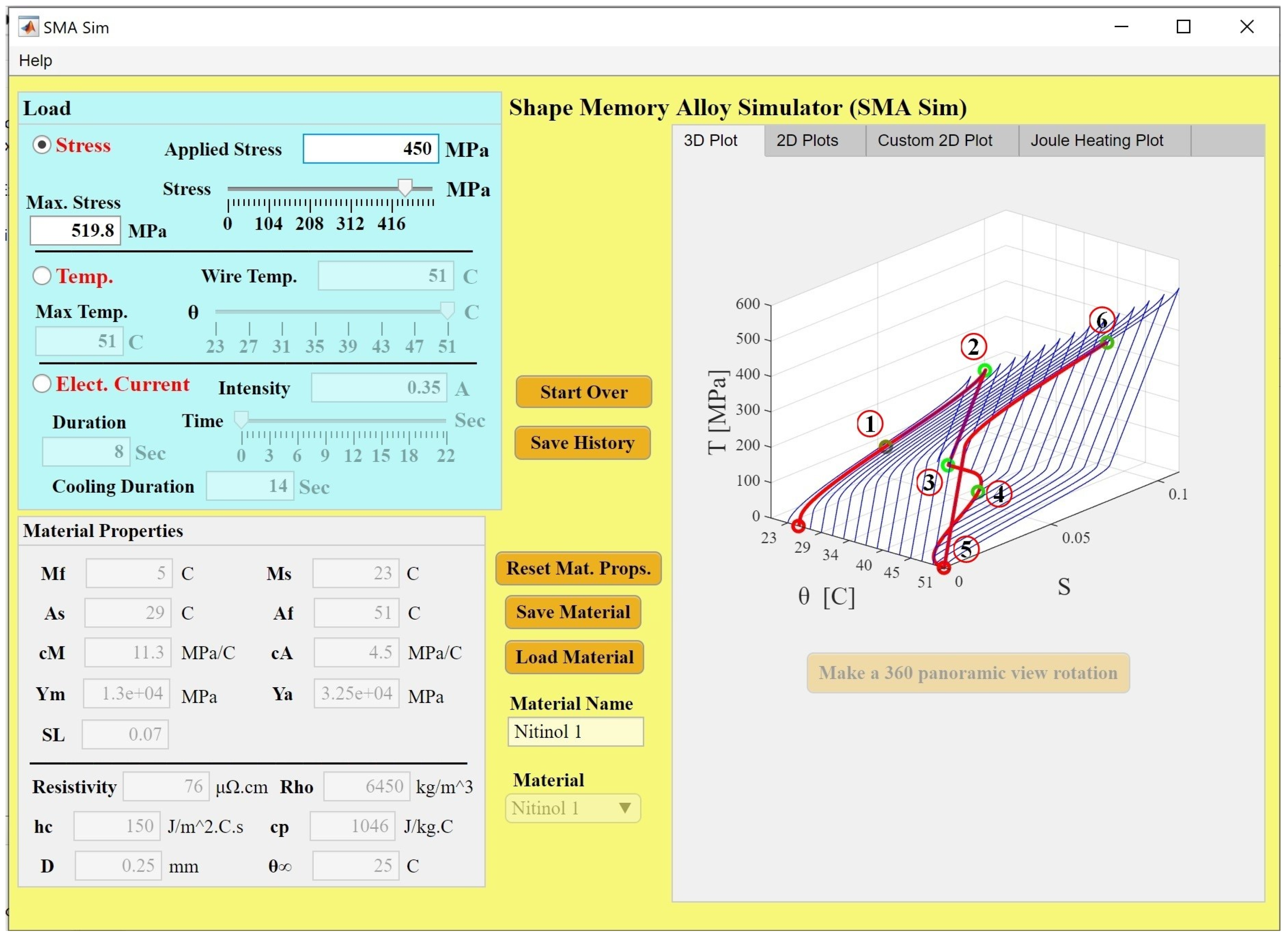
The first step (L125) is to raise the stress to 125 MPa. This can be done by moving the stress slider or writing 125 in the “Applied Stress” edit field and hitting Enter. A red curve appears in the 3D plot figure as shown in Figure 7. Now, point 1 has been reached.
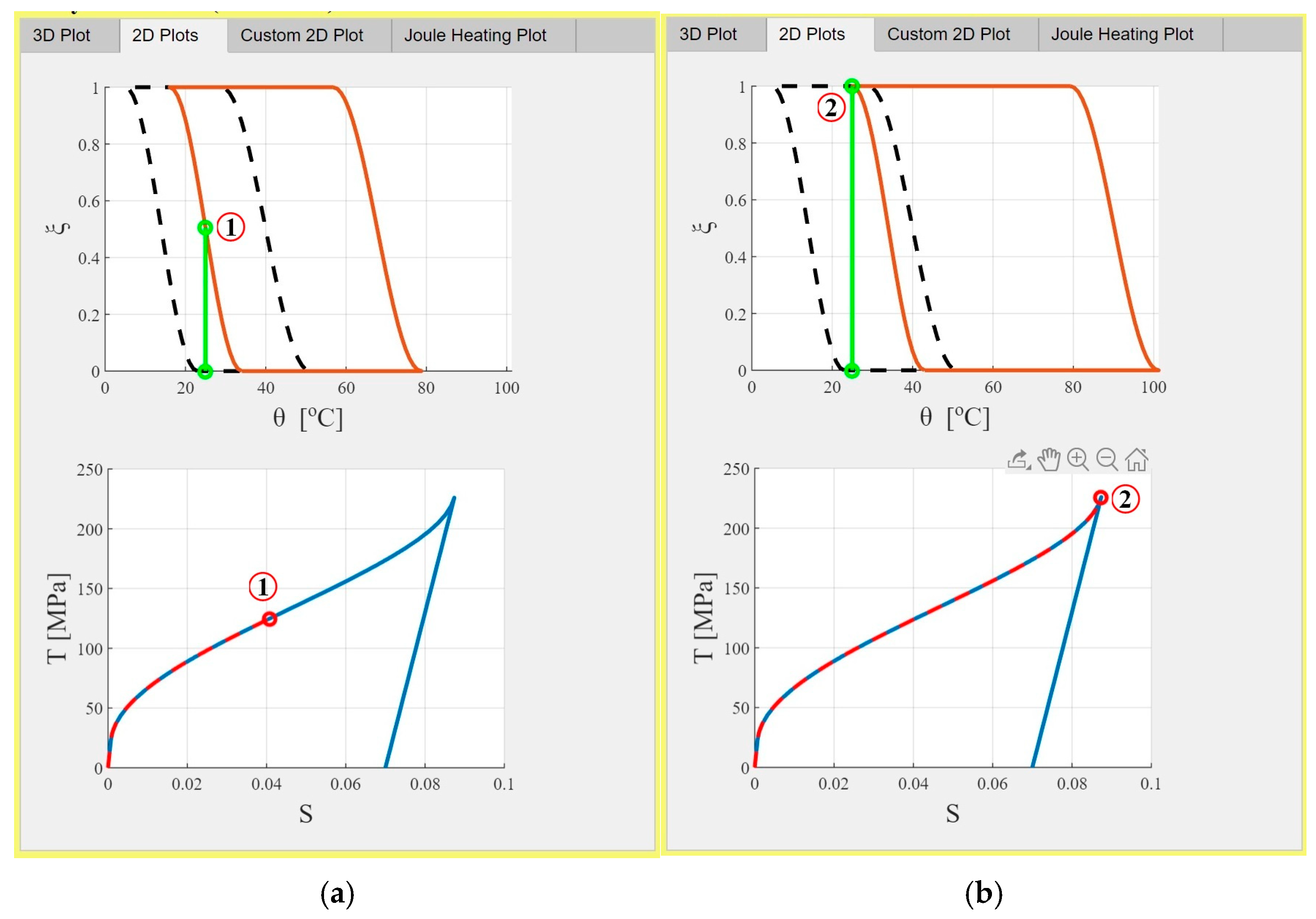
Switching to the “2D Plots” tab will show the 2D plots in Figure 8a. Stress moves the transformation curve to the right as expected. Transformation from austenite to martensite has already started, making the stress–strain curve nonlinear. The martensitic fraction at point 1 is 0.5.
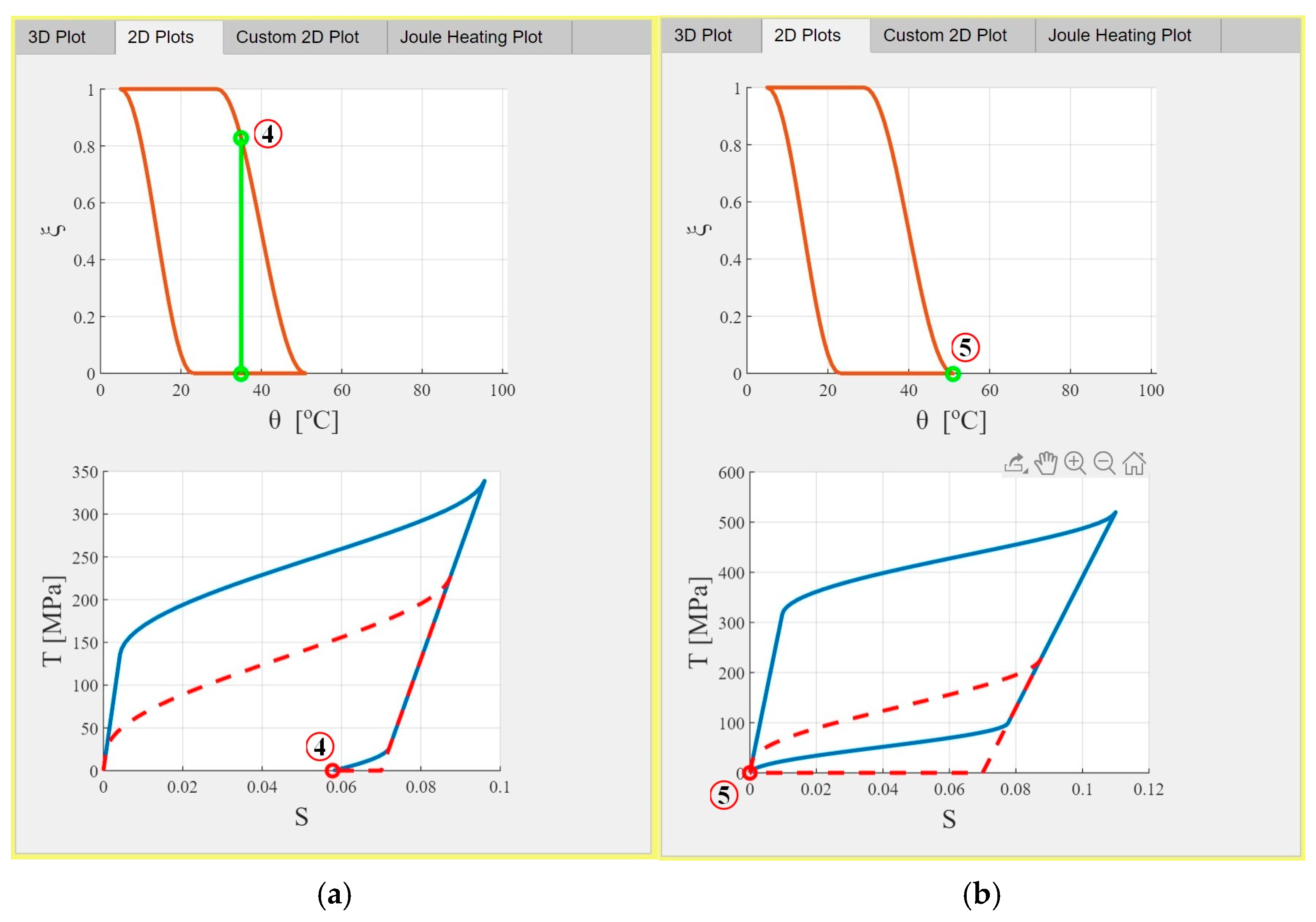
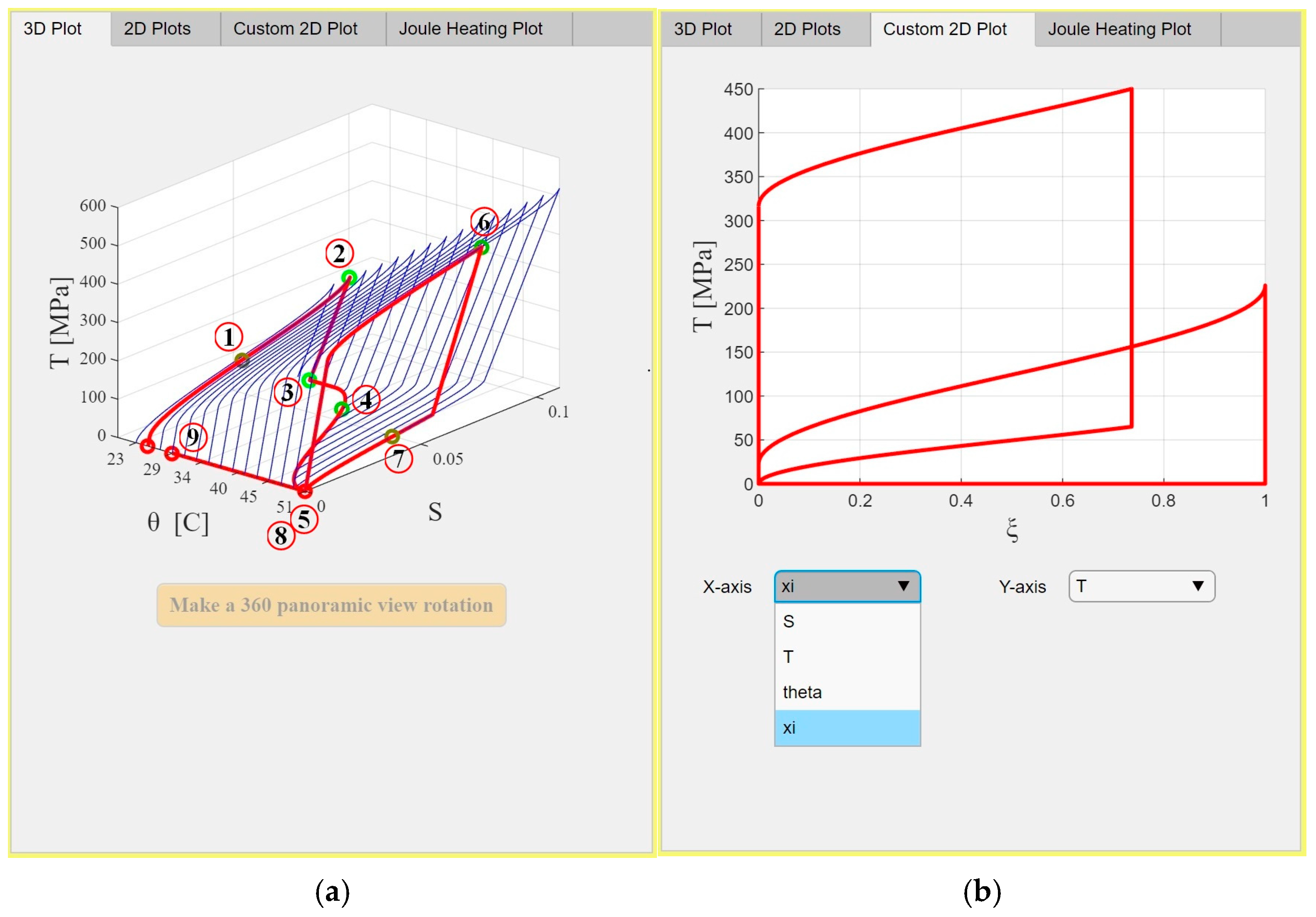
Increasing the stress to the maximum possible stress for this material at this temperature results in the 2D plots in Figure 8b. This is the second step in the scenario (L226), making the simulation reach point 2. Unloading is always linear in this case. When the stress goes down to zero, in the third step of the scenario (U), the residual strain is the maximum recoverable strain S L , which is 0.07 for this material. The material phase is purely martensite now (point 3 in Figure 9). The behavior of the material is demonstrating the shape memory effect at the current temperature, which means heating will be needed to recover any residual strain in the material. The fourth step increases the temperature to 35 °C (H35), as shown in the 3D plot in Figure 9 or the 2D plots in Figure 10a. Now point 4 has been reached. As the temperature increases, the material undergoes phase transformation back to austenite and hence starts to recover from the residual strain. The full stress–strain transformation cycle also changes, as shown by the blue curve in Figure 10a. The maximum stress also increases. In order to fully recover the residual strain, the temperature should be raised to the austenite finish temperature, which is 51 °C for this material. This is done in the next step (H51), reaching point 5. Figure 10b displays the 2D graphs at this temperature. The maximum stress goes up to 519.8 MPa now, as shown in Figure 10b and Figure 11. The material behavior is fully superelastic at this high temperature.
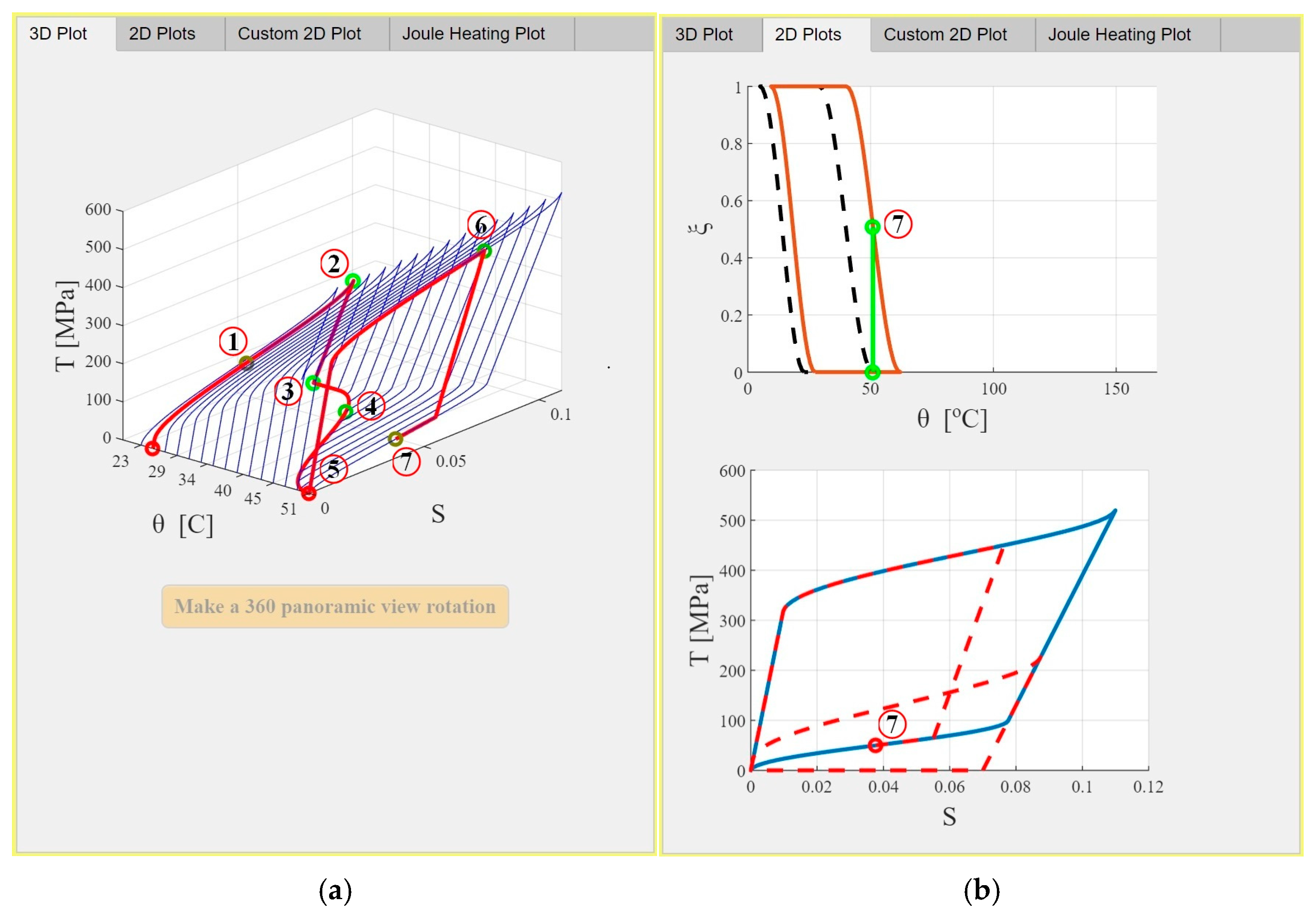
When the stress increases to 450 MPa in step 6 (L450), as shown in Figure 11, the SMA does not reach full transformation, since the maximum stress has not been achieved. Now, the simulation has reached point 6. Reducing the applied stress to 50 MPa in step 7 (U50) starts linearly and then continues nonlinearly to reach point 7, as shown in Figure 12a,b in 3D and 2D, respectively. The material is still a mixture of austenite and martensite phases at all these points. The martensitic fraction changes only in the nonlinear part of the loading/unloading steps.
Complete unloading (U) of the SMA wire would return the material to a zero-stress, zero-strain, fully austenitic state, since the temperature is high enough to keep the behavior pseudoelastic. This is represented by point 8 in Figure 13a, which coincides with point 5. Cooling the material to 29 °C in the last step (U29) to reach point 9, as shown in Figure 13a, will not change the phase or stress state of the material.
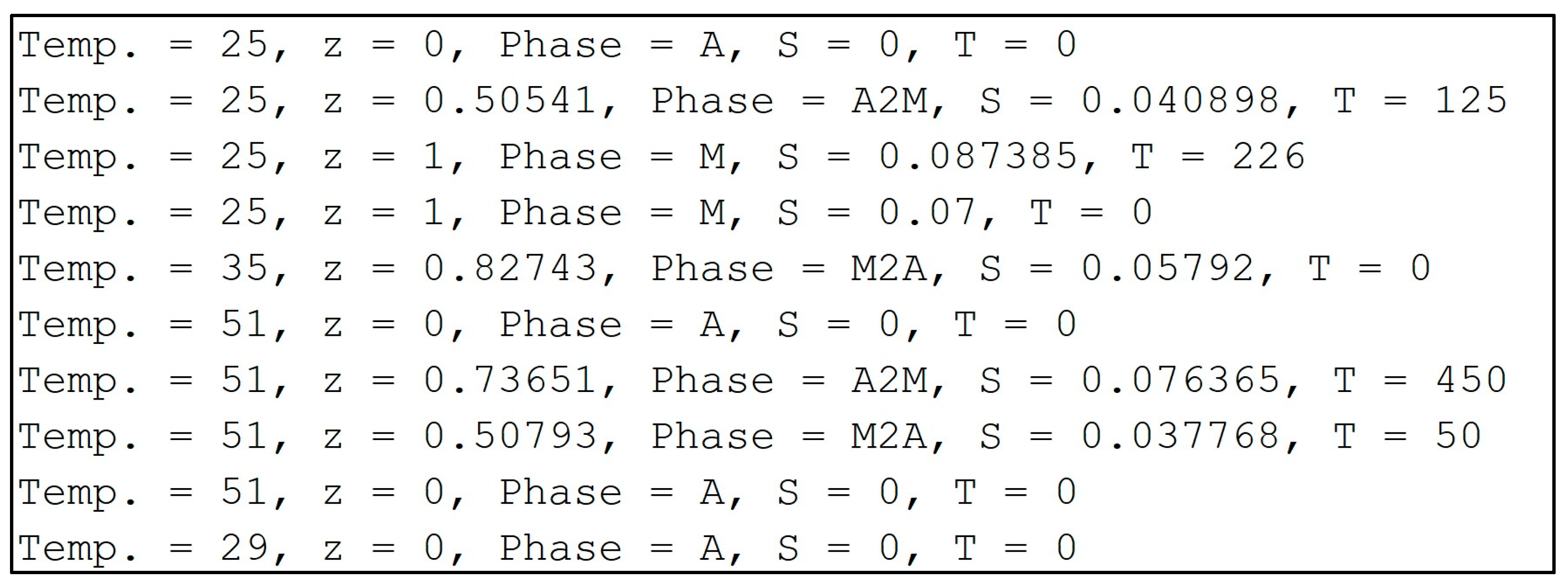
The history of this loading scenario is illustrated in a custom plot with any variables on the X- and Y-axes, as depicted in Figure 13b, which shows a stress-martensitic fraction (T-ξ) plot. The values of all the main variables for all points in this scenario are displayed on MATLAB’s command window, as shown in Figure 14. All values perfectly match hand calculations using the governing equations described in Section 2.1.
A small scenario is also presented here to show the Joule heating capability of the app. This scenario consists of only two steps: heating via Joule heating effect by running electric current through the wire and then cooling. It can be expressed as
Scenario 2: JH0.35/8 − NC14,
where JH and NC indicate Joule heating and natural cooling. The subscript of JH is i/Duration, where i is the electric current intensity [in Amps], and Duration is the heating duration [in seconds]. The subscript of NC is only the cooling duration [in seconds]. The material used is still “Nitinol 1” whose properties are listed in Table 1.
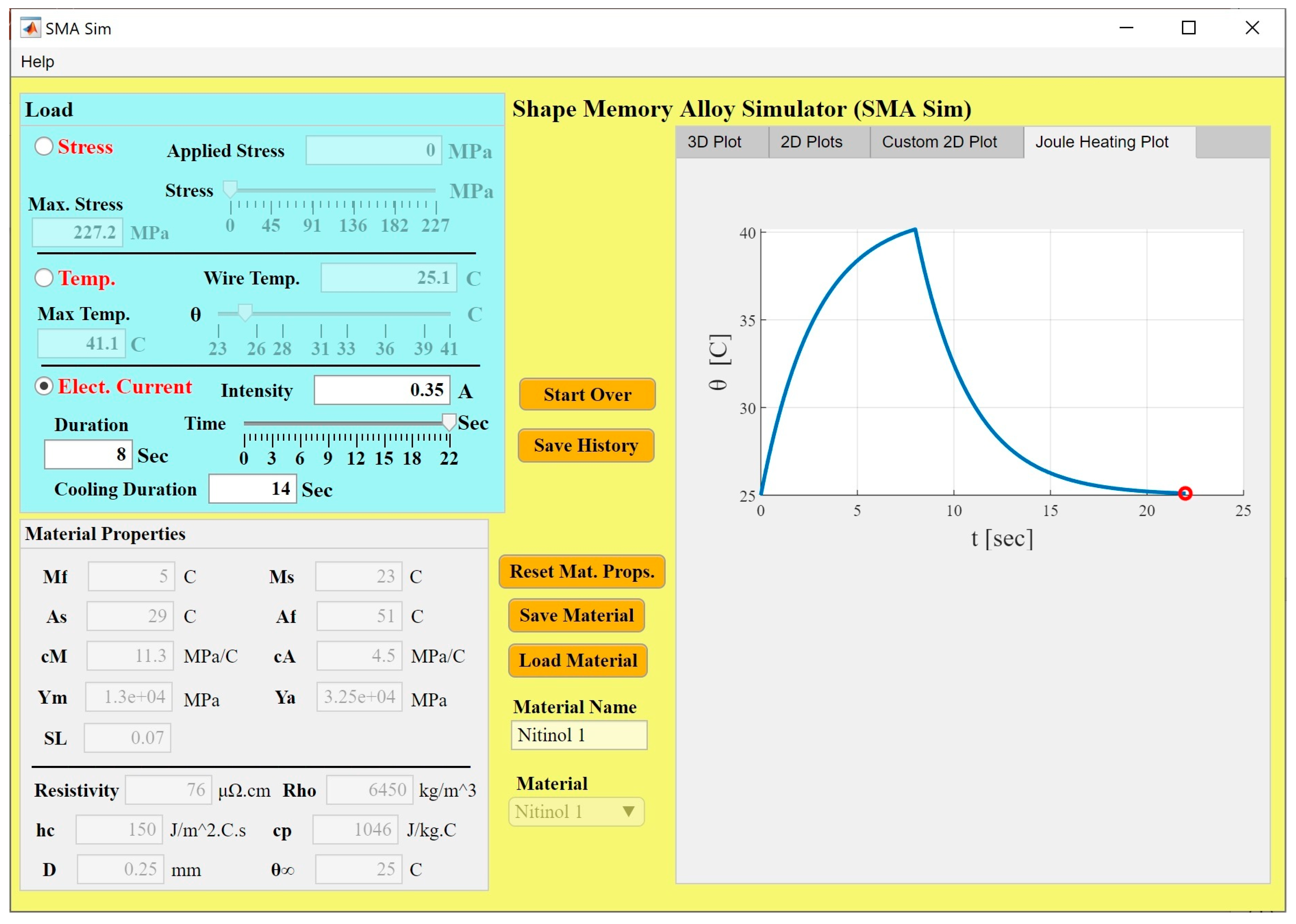
Clicking on the “Elect. Current” radio button from the “Load” panel would enable the Joule heating effect to be activated. In the first step, a current intensity of 0.35 A for a duration of 8 s is applied, and this is followed by cooling for a duration of 14 s. The generated “Joule Heating Plot” is shown in Figure 15. Note that as the user moves the Time slider, the temperature changes, which also moves the θ slider and updates the Wire Temp. and the Max. Stress values. Stress and strain do not change in this scenario. However, other loading steps can precede or follow any Joule Heating steps to change the stress and strain, as was done in the first scenario. Joule heating allows changing the wire temperature considering the ambient temperature and the convective heat transfer with the environment, rather than simply controlling the wire temperature as was done in the first example. A three-minute video demonstrating the two scenarios presented here can be found in the Supplementary Materials. Virtually infinite number of scenarios can be modeled and explored by students with full and partial mechanical or thermal loading and unloading steps, whether with Joule heating or direct temperature control.

4. Discussion and Conclusions

The SMA Simulator application, presented in this paper, is capable of modeling various loading scenarios on SMA wires and showing all material variables throughout the history of the full or partial load–unload steps using various 3D and 2D figures. Given that the application is independent on a finite element solver, the computational time for any step is less than 1 s, giving users a quick response and the ability to model a variety of scenarios. A validation example was presented where an SMA cylinder was modeled in a load–unload cycle at four different temperatures in COMSOL Multiphysics commercial FEA package and SMA Sim. Results showed less than 1% deviation in all curves using different curve comparison metrics. The example scenario presented next was a fully austenitic SMA wire, initially at 25 °C, which was mechanically loaded until the material was fully transformed into the martensite phase. The wire was then fully unloaded and heated to 51 °C, which is the austenite finish temperature, to recover the residual strain and transform the phase back to fully austenite. The wire was then mechanically loaded at this high temperature, and before reaching the full martensitic transformation, the wire was fully unloaded. Since the material exhibits pseudoelastic behavior at this high temperature, unloading the material recovered all residual strain that was built in the material. The wire was then cooled down to 29 °C. Heating the SMA wire can also be done through the Joule heating physics by defining the applied electric current, ambient temperature, and heating/colling durations. Modeling these scenarios in a finite element analysis (FEA) software package would be very complex, requiring many steps, preparation, and relatively long computational time. The application has been used by the author in the “Design of Smart Mechanical Systems” graduate course (three offerings: Fall 2019, Spring 2021, and Spring 2025), and all students praised it, as it allowed them to either verify their hand calculations in problems related to SMA materials or study complex loading scenarios without spending a lot of time performing hand calculations or running FEA simulations. The application allowed the students to spend more time understanding the behavior of SMA wires under these consequent mechanical and thermal loads. The user interface was reported by the students as “very friendly.”
Future extensions to the SMA Simulator application could add more complex models that describe the SMA behavior under thermomechanical loads, relaxing some of the assumptions used in the current simple model. A new option can also be introduced to model an SMA wire connected to a spring element, which would represent any elastic structure linked to the SMA wire and affecting its stress–strain state.

Supplementary Materials

The following supporting information can be downloaded at https://www.mdpi.com/article/10.3390/act15040183/s1, Video S1: SMA Simulator.

Funding

This research received no external funding.

Data Availability Statement

The data presented in this study is available on request from the corresponding author.

Acknowledgments

The author acknowledges the support of the Mechanical Engineering Department.

Conflicts of Interest

The author declares no conflicts of interest.

Nomenclature

Roman Symbols
SymbolDescriptionUnit
A Cross-sectional area of SMA wirem2
A c Convective surface area of SMA wirem2
A s Austenite start temperature°C
A f Austenite finish temperature°C
A s Effective austenite start temperature°C
A f Effective austenite finish temperature°C
c A Austenite transformation constantPa
c M Martensite transformation constantPa
c p Specific heat capacityJ·kg−1·°C−1
DSMA wire diameterm
h c Convective heat transfer coefficientJ·m−2·°C−1·s−1
i Electric current intensityA
M s Martensite start temperature°C
M f Martensite finish temperature°C
M s Effective martensite start temperature°C
M f Effective martensite finish temperature°C
RElectrical resistance per unit lengthΩ·m−1
ResistivityElectrical resistivity of SMA materialΩ·m
S Strain
S 0 Initial strain
S L Maximum recoverable strain
t Times
t d Time required to reach desired temperatures
t h Thermal time constants
TApplied stressPa
T 0 Initial stressPa
Y Young’s modulus of SMAPa
Y A Young’s modulus of austenitePa
Y M Young’s modulus of martensitePa
Greek Symbols
SymbolDescriptionUnit
α A Austenite phase transformation parameter (π/(AfAs))°C−1
α M Martensite phase transformation parameter (π/(MsMf))°C−1
ρ Material densitykg·m−3
θ Wire temperature°C
θ ( t ) Wire temperature as a function of time°C
θ 0 Initial temperature°C
θ Ambient temperature°C
θ S S Steady-state temperature°C
θ d Desired temperature°C
ξ Martensitic volume fraction
ξ 0 Initial martensitic fraction

References

  1. Mohd Jani, J.; Leary, M.; Subic, A.; Gibson, M.A. A Review of Shape Memory Alloy Research, Applications and Opportunities. Mater. Des. (1980–2015) 2014, 56, 1078–1113. [Google Scholar] [CrossRef]
  2. Barbarino, S.; Saavedra Flores, E.I.; Ajaj, R.M.; Dayyani, I.; Friswell, M.I. A Review on Shape Memory Alloys with Applications to Morphing Aircraft. Smart Mater. Struct. 2014, 23, 063001. [Google Scholar] [CrossRef]
  3. Naresh, C.; Bose, P.S.C.; Rao, C.S.P. Shape Memory Alloys: A State of Art Review. IOP Conf. Ser. Mater. Sci. Eng. 2016, 149, 012054. [Google Scholar] [CrossRef]
  4. Shape Memory Alloys: Modeling and Engineering Applications; Springer: Boston, MA, USA, 2008.
  5. Holman, H.; Kavarana, M.N.; Rajab, T.K. Smart Materials in Cardiovascular Implants: Shape Memory Alloys and Shape Memory Polymers. Artif. Organs 2021, 45, 454–463. [Google Scholar] [CrossRef] [PubMed]
  6. Morgan, N.B. Medical Shape Memory Alloy Applications—The Market and Its Products. Mater. Sci. Eng. A 2004, 378, 16–23. [Google Scholar] [CrossRef]
  7. Fernandes, D.J.; Peres, R.V.; Mendes, A.M.; Elias, C.N. Understanding the Shape-Memory Alloys Used in Orthodontics. ISRN Dent. 2011, 2011, 132408. [Google Scholar] [CrossRef]
  8. Miličić Lazić, M.; Popović Bajić, M.; Đorđević, I.; Živković, M.; Lazić, V.; Jokanović, V.; Nasov, I.; Živković, S. A Brief Overview and Application of Nickel-Titanium Shape Memory Alloy in Dentistry. In Titanium-Based Alloys—Characteristics and Applications; Vizureanu, P., Simona Baltatu, M., Eds.; IntechOpen: London, UK, 2024. [Google Scholar]
  9. Bishay, P.L.; Fontana, J.; Raquipiso, B.; Rodriguez, J.; Borreta, M.J.; Enos, B.; Gay, T.; Mauricio, K. Development of a Biomimetic Transradial Prosthetic Arm with Shape Memory Alloy Muscle Wires. Eng. Res. Express 2020, 2, 035041. [Google Scholar] [CrossRef]
  10. Bishay, P.; Aguilar, C.; Amirbekyan, A.; Vartanian, K.; Arjon-Ramirez, M.; Pucio, D. Design of a Lightweight Shape Memory Alloy Stroke-Amplification and Locking System in a Transradial Prosthetic Arm. In Proceedings of the ASME 2021 Conference on Smart Materials, Adaptive Structures and Intelligent Systems; American Society of Mechanical Engineers: New York, NY, USA, 2021; p. V001T05A015. [Google Scholar]
  11. Petrini, L.; Migliavacca, F. Biomedical Applications of Shape Memory Alloys. J. Metall. 2011, 2011, 501483. [Google Scholar] [CrossRef]
  12. Srivastava, R.; Alsamhi, S.H.; Murray, N.; Devine, D. Shape Memory Alloy-Based Wearables: A Review, and Conceptual Frameworks on HCI and HRI in Industry 4.0. Sensors 2022, 22, 6802. [Google Scholar] [CrossRef]
  13. Xu, L.; Zhu, M.; Zhao, J.; Chen, M.; Shi, M. The Utilization of Shape Memory Alloy as a Reinforcing Material in Building Structures: A Review. Materials 2024, 17, 2634. [Google Scholar] [CrossRef]
  14. Romančík, J.; Miková, Ľ.; Šarga, P.; Kelemenová, T.; Kelemen, M. Shape Memory Alloy Actuators in Robotics. Actuators 2026, 15, 162. [Google Scholar] [CrossRef]
  15. Hartl, D.J.; Lagoudas, D.C. Aerospace Applications of Shape Memory Alloys. Proc. Inst. Mech. Eng. Part G J. Aerosp. Eng. 2007, 221, 535–552. [Google Scholar] [CrossRef]
  16. Sellitto, A.; Riccio, A. Overview and Future Advanced Engineering Applications for Morphing Surfaces by Shape Memory Alloy Materials. Materials 2019, 12, 708. [Google Scholar] [CrossRef]
  17. Costanza, G.; Tata, M.E. Shape Memory Alloys for Aerospace, Recent Developments, and New Applications: A Short Review. Materials 2020, 13, 1856. [Google Scholar] [CrossRef] [PubMed]
  18. Padilla, A.; Bishay, P.L.; Pishvar, M. Active Composite Plates with Embedded Shape-Memory Alloy Wires for Vibration Damping. Actuators 2026, 15, 148. [Google Scholar] [CrossRef]
  19. Chen, K.C.; Crone, W.C.; Voss, E.J. Shape Memory Alloys for Classroom Demonstrations, Laboratories, and Student Projects. MRS Proc. 2004, 827, 391–396. [Google Scholar] [CrossRef]
  20. Song, G.; Bannerot, R. Development Of An Interactive Shape Memory Alloy Demonstration For Smart Materials Curricula. In Proceedings of the 2007 Annual Conference & Exposition Proceedings; ASEE Conferences: Honolulu, HI, USA, 2007; pp. 12.525.1–12.525.10. [Google Scholar]
  21. Amariei, D.; Frunzaverde, D.; Vela, I.; Gillich, G.R. Educational Stand Using Shape Memory Alloys to Enhance Teaching of Smart Materials. Procedia-Soc. Behav. Sci. 2010, 2, 5104–5108. [Google Scholar] [CrossRef][Green Version]
  22. Qi, J.; Buechley, L. Animating Paper Using Shape Memory Alloys. In Proceedings of the SIGCHI Conference on Human Factors in Computing Systems; ACM: Austin, TX, USA, 2012; pp. 749–752. [Google Scholar]
  23. Hefzy, M.; Elahinia, M.; Jahadakbar, A.; Arn, B.; Nematollahi, M. Demonstration of Shape Memory and Super-Elastic Effects of Nitinol Alloys. In Proceedings of the 2020 ASEE Virtual Annual Conference Content Access Proceedings; ASEE Conferences: Charlotte, NC, USA, 2020; p. 34379. [Google Scholar]
  24. Wang, N.; Weng, J.; Chen, X.; Song, G.; Parsaei, H. Development of a Remote Shape Memory Alloy Experiment for Engineering Education. Eng. Educ. Lett. 2014, 2015, 108867119. [Google Scholar] [CrossRef]
  25. Tarng, W.; Chen, C.-J.; Lee, C.-Y.; Lin, C.-M.; Lin, Y.-J. Application of Virtual Reality for Learning the Material Properties of Shape Memory Alloys. Appl. Sci. 2019, 9, 580. [Google Scholar] [CrossRef]
  26. Santi, R.; Papile, F.; Marinelli, A.; De Liguori, M.; Campus, G.; Del Curto, B.; Zurlo, F. Sma-Tech Epiphanies: An Educational Activity to Design for Technological Innovation with Shape Memory Alloys. In Proceedings of the 14th International Technology, Education and Development Conference, Valencia, Spain, 2–4 March 2020; pp. 6407–6415. [Google Scholar]
  27. Tan, F.L.; Fok, S.C. Development of a Computer-aided Educational Tool Incorporating MATLAB for Engineering Measurements. Comput. Appl. Eng. 2009, 17, 206–213. [Google Scholar] [CrossRef]
  28. Ramirez-Cortes, J.M.; Alarcon-Aquino, V.; Gomez-Gil, P.; Diaz-Mendez, A.; Ibarra-Bonilla, M.; García-Enriquez, I. Interactive Educational Tool for Compensators Design in MATLAB® Using Frequency Response Analysis. Comput. Appl. Eng. 2014, 22, 699–707. [Google Scholar] [CrossRef]
  29. Katsanos, E.I.; Taskari, O.N.; Sextos, A.G. A Matlab-based Educational Tool for the Seismic Design of Flexibly Supported RC Buildings. Comput. Appl. Eng. 2014, 22, 442–451. [Google Scholar] [CrossRef]
  30. Panagiotopoulos, C.G.; Manolis, G.D. A Web-based Educational Software for Structural Dynamics. Comput. Appl. Eng. 2016, 24, 599–614. [Google Scholar] [CrossRef]
  31. Türkkan, Y.A.; Eryılmaz Türkkan, G.; Yılmaz, H. A Visual Application for Teaching Pipe Flow Optimization in Engineering Curricula. Comput. Appl. Eng. 2020, 28, 154–159. [Google Scholar] [CrossRef]
  32. Bishay, P.L. Teaching the Finite Element Method Fundamentals to Undergraduate Students through Truss Builder and Truss Analyzer Computational Tools and Student-generated Assignments Mini-projects. Comput. Appl. Eng. Educ. 2020, 28, 1007–1027. [Google Scholar] [CrossRef]
  33. Bishay, P.L. Teaching Design of Composite Structures through Composite Analysis and Design Apps (CADA) and Design Challenges. Comput. Appl. Eng. 2022, 30, 1036–1059. [Google Scholar] [CrossRef]
  34. Wheeler, R.W.; Benafan, O.; Calkins, F.T.; Gao, X.; Ghanbari, Z.; Hommer, G.; Lagoudas, D.; Martin, D.; Nicholson, D.E.; Petersen, A.; et al. Engineering Design Tools for Shape Memory Alloy Actuators: CASMART Collaborative Best Practices and Case Studies. J. Intell. Mater. Syst. Struct. 2019, 30, 2808–2830. [Google Scholar] [CrossRef]
  35. Walgren, P.; Mingear, J.; Hartl, D. SMA-REACT: An Open-Source Toolkit for Shape Memory Alloy Data Visualization and Constitutive Model Calibration. Shap. Mem. Superelast. 2025. [Google Scholar] [CrossRef]
  36. Kuner, M.C.; Karakalas, A.A.; Lagoudas, D.C. ASMADA—A Tool for Automatic Analysis of Shape Memory Alloy Thermal Cycling Data under Constant Stress. Smart Mater. Struct. 2021, 30, 125003. [Google Scholar] [CrossRef]
  37. Caltagirone, P.E.; Benafan, O. Shape Memory Materials Analysis and Research Tool (SM2ART): Finding Data Anomalies and Trends. Shap. Mem. Superelasticity 2023, 9, 558–584. [Google Scholar] [CrossRef]
  38. Leo, D.J. Engineering Analysis of Smart Material Systems, 1st ed.; Wiley: Hoboken, NJ, USA, 2007. [Google Scholar]
  39. Auricchio, F.; Bonetti, E.; Scalet, G.; Ubertini, F. Theoretical and Numerical Modeling of Shape Memory Alloys Accounting for Multiple Phase Transformations and Martensite Reorientation. Int. J. Plast. 2014, 59, 30–54. [Google Scholar] [CrossRef]
  40. Cisse, C.; Zaki, W.; Ben Zineb, T. A Review of Constitutive Models and Modeling Techniques for Shape Memory Alloys. Int. J. Plast. 2016, 76, 244–284. [Google Scholar] [CrossRef]
  41. Uniaxial Loading of a Shape Memory Alloy. COMSOL Multiphysics Tutorial. Available online: https://www.comsol.com/model/download/1562741/models.nsm.uniaxial_loading_of_shape_memory_alloy.pdf (accessed on 10 January 2026).
Figure 1. User interface of the SMA Simulator App. The blue curves represent the stress-strain load-unload curves to fully transform the material from austenite to martensite and achieve the maximum recoverable residual strain upon unloading at different temperatures. The red circle represents the current state of the material.
Actuators 15 00183 g001
Figure 2. (a) Material drop-down menu that can grow by loading more materials, (b) New Material Name window for saving a new material.
Actuators 15 00183 g002
Figure 3. New Load History Name window.
Actuators 15 00183 g003
Figure 4. Initial martensitic fraction-temperature transformation curve (dashed black line) and the stress–strain curve for loading to achieve full transformation then unloading to achieve the maximum recoverable strain at the initial temperature (blue solid line). The green and red circles represent the current state of the material (initially T = 0, S = 0, ξ = 0, and θ = 25°C).
Actuators 15 00183 g004
Figure 5. Stress–strain curve of NiTi cylinder at various temperatures computed using SMA Sim and COMSOL Multiphysics. The arrows represent the direction of the load-unload cycle at different temperatures: 54.85 °C (pink arrows), 34.85 °C (purple arrows), 2.85 °C (orange arrows), and −13.15 °C (yellow arrow).
Actuators 15 00183 g005
Figure 6. (a) Normalized root mean square error, (b) maximum absolute relative deviation, and (c) relative L2 norm.
Actuators 15 00183 g006
Figure 7. Scenario 1 in SMA Sim: 3D plot, increasing stress to 125 MPa. The blue lines represent the stress-strain load-unload curves to fully transform the material from austenite to martensite and achieve the maximum recoverable residual strain upon unloading at different temperatures. The red line represents the stress-strain curve taken to point 1.
Actuators 15 00183 g007
Figure 8. Scenario 1 in SMA Sim: 2D plots, increasing the stress to (a) 125 MPa and (b) 226 MPa. In the top figures, the dashed black line represents the initial martensitic fraction-temperature (ξ-θ) transformation curve at zero stress, whereas the red solid line represents the ξ-θ transformation curve at the stress level reached at point 1 or 2. The green line and circle represent the current material state. In the bottom figures, the solid blue line represents the stress–strain (T-S) load-unload curve for full transformation and achieving maximum recoverable strain upon unloading at the current temperature, whereas the red dashed line represents the path taken to reach points 1 or 2 (highlighted using the red circles).
Actuators 15 00183 g008
Figure 9. Scenario 1 in SMA Sim: 3D plot, increasing the temperature to 35 °C. The red line represents the path taken as the simulation goes through points 1, 2, 3 and 4 in the 3D stress-strain-temperature space. The four points are highlighted using colored circles (red when the phase of the material is austenite, green when it is martensite, and a mixed color when the phase is mixed).
Actuators 15 00183 g009
Figure 10. Scenario 1 in SMA Sim: 2D plots, increasing the temperature to (a) 35 °C and (b) 51 °C. In the top figures, the red solid line represents the ξ-θ transformation curve at the stress level reached at point 4 or 5. The green line and circle represent the current material state. In the bottom figures, the solid blue line represents the T-S load-unload curve for full transformation and achieving maximum recoverable strain upon unloading at the current temperature, whereas the red dashed line represents the path taken to reach points 4 or 5 (highlighted using red circles).
Actuators 15 00183 g010
Figure 11. Scenario 1 in SMA Sim: 3D plot, increasing temperature to 51 °C, then increasing stress to 450 MPa. The red line represents the path taken as the simulation goes through points 1 to 6 in the 3D stress-strain-temperature space. All points are highlighted using colored circles that represent the phase of the material (red: austenite, green: martensite, and mixed color: mixed phase).
Actuators 15 00183 g011
Figure 12. Scenario 1 in SMA Sim: Unloading the material from 450 MPa to 50 MPa, (a) 3D plot, (b) 2D plots. The red line in (a) represents the path taken as the simulation goes through points 1 to 7 in the 3D stress-strain-temperature space. All points are highlighted using colored circles representing the phase of the material at each point. The dashed black line in (b) represents the initial martensitic fraction-temperature (ξ-θ) transformation curve at zero stress, whereas the red solid line represents the ξ-θ transformation curve at the stress level reached at point 7. The green line and circle represent the current material state. The solid blue line represents the T-S load-unload curve for full transformation at the current temperature, where the red dashed line represents the path taken to reach point 7 (highlighted using the red circle).
Actuators 15 00183 g012
Figure 13. Scenario 1 in SMA Sim: unloading then cooling to 29 °C in (a) 3D plot and (b) custom plot of T-ξ. The red line in (a) represents the path taken as the simulation goes through points 1 to 9 in the 3D stress-strain-temperature space. All points are highlighted using colored circles representing the phase of the material at each point. The red line in (b) represents the load history of the whole simulation in the 2D stress-martensitic fraction (T-ξ) space.
Actuators 15 00183 g013
Figure 14. Scenario 1 in SMA Sim: MATLAB command window displaying the values of the main variables at the nine stopping points of the loading scenario.
Actuators 15 00183 g014
Figure 15. Scenario 2 in SMA Sim: Joule heating plot. The blue line represents the temperature θ as a function of time t. The red circle represents the current state of the material.
Actuators 15 00183 g015
Table 1. Material properties of the SMA materials initially listed in the SMA Sim library.
Material M f  [°C] M s  [°C] A s  [°C] A f  [°C] c M  [MPa/°C] c A  [MPa/°C] Y M  [MPa] Y A  [MPa]
Nitinol 1523295111.34.513,00032,500
Nitinol 21017314471120,00062,000
Material S L ρ  [kg/m3] h c  [J/(m2·s·°C)] c p  [J/(kg·°C)]Resistivity [μΩ·cm]
Nitinol 10.076450150130876
Nitinol 20.066450140104666
Disclaimer/Publisher’s Note: The statements, opinions and data contained in all publications are solely those of the individual author(s) and contributor(s) and not of MDPI and/or the editor(s). MDPI and/or the editor(s) disclaim responsibility for any injury to people or property resulting from any ideas, methods, instructions or products referred to in the content.