

Article

Intuitive, Low-Cost Cobot Control System for Novice Operators, Using Visual Markers and a Portable Localisation Scanner

School of Engineering, STEM College, RMIT University, Melbourne, VIC 3000, Australia
*
Author to whom correspondence should be addressed.
Machines 2026, 14(2), 201; https://doi.org/10.3390/machines14020201
Submission received: 23 December 2025 / Revised: 21 January 2026 / Accepted: 31 January 2026 / Published: 9 February 2026
(This article belongs to the Special Issue Artificial Intelligence and Robotics in Manufacturing and Automation)

Abstract

Collaborative robots (cobots) can work cooperatively alongside humans, while contributing to task automation in industries such as manufacturing. Designed with enhanced safety features, cobots can safely assist a range of users, including those with no previous robotics experience. Despite the human-centric design of cobots, programming them can be challenging for novice operators, who may lack the skills and understanding of robotics. If left with a choice between major worker upskilling or replacement and investing in expensive and complex precision cobot positioning and object-detection systems, business owners may be reluctant to embrace cobot ownership. Furthermore, if a cobot’s primary intended tasks were simple Pick-and-Place operations, the tenuous return on investment, compared to retaining current manual processes, could make cobot adoption financially impracticable. This paper proposes a low-cost cobot control system (LCCS), an intuitive cobot solution for Pick-and-Place tasks, designed for novice cobot operators. Off-the-shelf vision-based positioning solutions, priced at around $US20,000, are typically designed to be assigned to a single cobot. The LCCS comprises a Raspberry Pi, a standard USB webcam and ArUco fiducial markers, which can easily be incorporated into a multi-cobot operation, with a combined total hardware cost of around $US100. The system scales simply and economically to support an expanding operation and it is easy to use It allows a user to specify a target pick location by positioning a portable localisation scanner upon an object to be grasped by the cobot end-effector. The scanner’s integrated webcam captures the location and orientation perspective from ArUco markers affixed to predefined positions outside the cobot workspace. By pressing a switch mounted on the scanner, the user relays the captured information, converted to 3D coordinates, to the cobot controller. Finally, the cobot’s integrated processor calculates the corresponding pose using inverse kinematics, which allows the cobot to move to the target position. Subsequent actions can be pre-programmed as required, as part of the initial system configuration. Preliminary testing indicates that the proposed system provides accurate and repeatable localisation information, with a mean positional error below 3.5 mm and a mean standard deviation less than 1.8. With a hardware investment just 0.3% of the UR5e purchase price, an easy to use, customisable, and easily scalable vision-based Pick-and-Place localisation system for cobots can be implemented. It has the potential to be a reliable and robust system that significantly lowers cobot operation barriers for novice operators by alleviating the programming requirement. By reducing the reliance on experienced programmers in a production environment, cobot tasks could be deployed more rapidly and with greater flexibility.

1. Introduction

The integration of cobots into various industries has ushered in a new era of automation, characterised by increased productivity, enhanced precision, and improved workplace safety. Although industrial robots have been the mainstay of high-volume manufacturing in the past, cobots will be the primary mechanical entity in the current industrial revolution, Industry 5.0 [1], which models a human-centric approach. While typical traditional industrial robots are confined to safety enclosures, cobots are designed to work safely alongside human operators, performing tasks that require agility, adaptability, and human–robot interaction [2]. This concept helps form a synergy, combining the precision, repetition, and endurance capabilities of the cobot with human perception, judgement, and dexterity. Although industrial robots remain the dominant automation machine for high volume manufacturing, the introduction of cobots has revolutionised custom automation processes, especially in operations where flexibility and versatility are critical, such as lean manufacturing [3], mass customisation [4,5], and mass personalisation [6]. Cobots are multi-functional, portable, easy to set up and maintain, and do not require physical constraints, making them practical, mobile coworkers in industrial workplaces. Over 75 percent of businesses surveyed for the 2023 World Economic Forum plan to adopt advanced technologies, including robotic and AI systems, over the next five years [7]. The flourishing cobot market is predicted to achieve a compound annual growth rate of 32.6% between 2024 and 2030 [8].
Despite the benefits and efficiency potential of cobots, programming complexity and a lack of technically skilled personnel are common barriers to their adoption [9]. Introducing new technologies such as cobots often requires an investment in technical skill development and can test organisational readiness [10]. Furthermore, cobot control methods, such as hand-guiding or lead-through programming, designed to simplify the control task, still require some level of technical skill [11]. During the hand-guiding process, a cobot arm is manipulated into position by a human, who must also enter control data into a user interface, typically on a teach pendant. This process requires expertise and dexterity and can be daunting for novice operators, who, despite their potential lack of technical skills, often possess a robust knowledge of the manual task intended to be shared with a cobot. As such, they may be the ideal programmer. Accurate pose validation, relating to a cobot’s precise position and orientation in the workspace, is crucial for the safe and efficient operation of the cobot. Misalignment or incorrect positioning can lead to operational errors, reduced efficiency, and potential safety hazards [5]. A range of end-effectors (cobot tool attachments), including vacuum grippers that use air suction, finger grippers that grasp objects, welding torches, and paint spray guns, broaden the functional scope of the cobot, demonstrating its versatility. However, as the selection of end-effectors and associated applications increases, so does the intricacy of cobot control. The required precision of movement, particularly as tasks become more complex, makes programming using the hand-guiding and teaching pendant method more complicated and less practical [12]. Even for less complex tasks, programming a cobot still requires some programming and robotics knowledge [13]. However, robot collaboration can reduce human workload and improve job satisfaction [14] and assist a novice in working more effectively. Modern positional technologies, such as Global Navigation Satellite System Real-Time Kinematic (GNSS RTK), Time-of-Flight (ToF) and ultrasonic sensors, depth cameras, and Light Detection and Ranging (LiDAR) systems, have the potential to assist cobot localisation. Nevertheless, there are constraints, particularly in terms of precision and lack of a relative reference frame (refer to Section 2.4.5). This paper proposes a novel, cost-effective computer vision system, leveraging fiducial markers, which provide precise localisation coordinates, aligned with a cobot’s positional origin, utilising a portable localisation scanner, containing a standard USB webcam.

1.1. Existing and Proposed Systems and Practices

As interest in cobots increases, the search continues for a simplified cobot control method, particularly aimed at novice operators. Fundamentally, control methods can range from complex traditional robot programming to more intuitive cobot control methods, designed with user-friendly interfaces. Other methods have been proposed in the current literature.

1.1.1. Traditional Robot Programming Methods

Modern industrial robots are often equipped with a digital user interface for offline programming purposes. These proprietary devices typically accept a command set unique to the specific manufacturer and require relevant training and skills to use. Dedicated cobot offline programming software examples include Universal Robot’s URScript [15], ABB’s RAPID [16], Fanuc’s Karel [17], and Kuka’s KRL [18]. Due to the proprietary nature of these systems, knowledge and skills gained in one platform are often not transferable to another. Multiple platform programming software such as RoboDK [19], ArtiMinds [20], and Robomaster [21] offer a single programming interface for a range of brands. These interfaces often contain complex menus that can be challenging for a non-skilled user to navigate. A fundamental knowledge of robotics is also typically required [12], including concepts such as reference frames, robotic axes, joint types, and end-effector offsets. Typically, robots, including cobots, can also be programmed in traditional high-level languages. While such programming languages allow more complex tasks to be programmed, they also require programming and robotics skills and, along with dedicated and third-party offline programming solutions, are unsuitable for novice operators [12].

1.1.2. Intuitive Cobot Control Methods

Cobots can typically be programmed through a digital display, known as a teach pendant, which runs proprietary programming software. Graphical programming software produced by cobot manufacturers include Universal Robot’s PolyScope X [22], ABB’s Wizard [23], Fanuc’s CRX [24], and Kuka’s iiQKA [25]. Teach pendant interfaces often contain simpler menus than traditional offline programming methods and can include dynamic graphics, which display state information, such as a virtual image of the current cobot pose. While the cobot can be programmed solely by entering field values into the teach pendant interface, it can be easier to incorporate lead-through programming or hand-guiding, to physically position the cobot into a desired pose, rather than entering the pose coordinates manually into the user interface. Despite the relative ease of cobot programming with a teach pendant in comparison with traditional programming methods, some level of vendor-based training and basic robotics knowledge is generally required, especially as task complexity increases [12]. In a teach pendant usability evaluation [26], a success rate of 70% was found when users attempted to program basic tasks with teach pendants, decreasing to 45% for advanced tasks. Other vision-based localisation systems, such as those based on depth [27] and ToF [28] cameras, are typically expensive and complex.

1.1.3. Fiducial Markers in Robotics

Fiducial markers are printed reference images with unique binary patterns, which can be detected and identified with computer vision programs, using dedicated libraries such as OpenCV [29]. Each marker has a unique ID and can provide a dynamic 3-axis position and 3-axis orientation perspective relative to a camera, due to the known marker size and fixed location. The camera, calibrated to compensate for optical distortion, captures the marker image and streams a live video of the relative position and orientation changes of the marker, with respect to the camera. Fiducial markers can be strategically placed within the cobot’s workspace surrounds, to provide reliable localisation information. They have been applied to many areas of robotics, such as mobile robot localisation and navigation [30,31,32], localisation of drones [33] and precision landing of unmanned aerial robots [34], positioning of agricultural robots within greenhouses [35], and precise alignment in robotic timber panel assembly [36]. These markers are simple, cost-effective, easily generated, robust in design, and require minimal computational resources and as such, show significant potential as a low-cost vision-based cobot control system. Fiducial markers, such as ArUco and AprilTags markers, have predefined patterns that can be easily and reliably detected by a simple vision system camera, providing a robust method for identifying and tracking points or objects in three-dimensional space, using computer vision. When the camera views a marker, 3D coordinates can be calculated, due to the marker’s relative image size and angular perspective, resulting in estimates of distance and rotation angle, with respect to the camera. These coordinates can then be suitably formatted and relayed to a cobot controller. Each marker has a unique ID and can be assigned a custom program, which can execute each time the vision system detects the marker. For example, boxes affixed with ArUco markers provide localisation information, to determine the ideal connection point for a vacuum gripper to grasp the boxes, in a Universal Robots UR5 cobot Pick-and-Place simulation [37]. Fiducial markers offer a promising path to pose validation simplification, by automating the process of acquiring distance and orientation data, making the task more accessible for operators with limited experience in robotics.

1.1.4. Cobot Control and Programming Concepts

Various solutions have been proposed to tackle the cobot programming simplification problem. A task-oriented system maps designated task skills to cobot actions through a dedicated user interface [38]. Block-based programming modules allow users to drag and drop pre-programmed functions, to form an executable cobot program [39,40,41]. Block-based programming systems can also be enhanced with natural language chat for a more intuitive user experience [42]. Gestures can also be combined with voice commands, so that pre-programmed physical gestures and speech inputs can control a cobot, while a graphical interface relays state transitions to a user [43]. A programmer can be guided through a cobot program development by a real-time AI interface using Natural Language Processing [44]. A robot’s trajectories can be managed through a Virtual Reality (VR) environment, connected to a physical robot controller, while a user interacts with a virtual robot, relaying commands to the physical robot in real time [45]. A more realistic experience can be gained by interacting directly with a physical cobot, within an Augmented Reality (AR) system. Due to the amalgamation of virtual and real environments in AR, user participation is more sustained than in a VR environment, where a user must transition between virtual and real environments [46,47].

1.2. Human–Cobot Interaction

There is a growing cobot market in the manufacturing industry, as enterprises seek to improve production efficiency, and academic literature in this regard is being generated quickly [48]. Manufacturers are turning to technologies such as voice recognition to enhance Human-Robot-Interaction (HRI) capabilities and make cobots easier to control, without the need for traditional programming. Moreover, the physical workload of operators could be reduced by offloading dull, awkward, and demanding tasks to cobots, thus improving worker productivity and wellbeing. Investigating worker stress levels as a gauge to cobot usability, workers experience no increased stress when working with cobots [49]. They even felt less stressed than when working with humans in some circumstances, such as when they caused a workflow delay to their human or cobotic coworker. To address the complexity in cobot operation for novice users, a practical training approach was used to teach the general skills and knowledge required to program a cobot [50]. Applying cognitive apprenticeship principles in a hands-on, problem-based training approach, participants were provided with guided examples of common cobot tasks to practice, before being asked to complete separate task assignments without assistance, to test their skills, using either a UR10e or UR3e cobot. Some common mistakes made by participants were listed, although all improved their skills over the course of training. The degree of knowledge and skills retention following the training session, which included around one hour of practice, was not investigated.

1.2.1. Cobot Programming with Extended Reality

As a means of programming a cobot without skilled programmers, an augmented reality (AR)-based programming system was proposed, which incorporates spatial anchors, or virtual target points, aimed at locating objects in a cobot Pick-and-Place operation [51]. Incorporating AI into robotic systems is paving the way to an era of extraordinary collaboration, production efficiency, and adaptability, revolutionising manufacturing operations. An operator can specify cobot waypoints and adjust end-effector orientation, using an AR headset and handheld controller [52]. Before committing to a proposed path, the user can choose to edit some commands, to reach an intended target or avoid a possible collision, before executing the cobot program. A mixed-reality (MR) solution to control a UR5e cobot with voice commands and gesture inputs was proposed [53]. A head-mounted display interprets the 3D coordinates of a user’s index finger, which serves as a reference point for an intended target. The system provides trajectory planning, allowing the cobot to be manoeuvred without formal programming. A mixed-reality multimodal platform provides an interface that allows a user to teach a cobot a desired trajectory path, by manipulating a holographic digital twin of the cobot [54]. Without having to program or even touch the actual cobot, the user adopts the same hand-guiding techniques with the virtual cobot as would be applied to the actual cobot. A benefit of this approach is that an operating cobot is not interrupted while the virtual configuration takes place. Novice operators with no programming experience can create a cobot program within an AR environment, using Trigger Action Programming (TAP), also known as event-driven programming [55]. TAP contains conditional rules, that can be coupled with logical operators, to control the start of a sequence; triggers, that initiate a state, such as the presence or absence of an object; and actions, that determine when and how a task is to be performed, in response to the triggers. Once a program is devised, a Motion Planner generates a motion plan for the desired program and users can view a simulation of the program using a robot digital twin, before executing it on the physical robot. A four-layered approach, incorporating an AR interface with a digital twin of a UR5 cobot was proposed [56], in a human-guided Pick-and-Place operation. In the proposed system, the task objectives, sequence planning and communication are established within the task layer. The skill layer focuses on the physical requirements, such as the location of objects, cobot trajectory paths, and end-effector operation. Providing the means to formulate a working program, by generating parameters required by the skill layer and forwarding basic commands to the execution layer, is the service layer, which acts as a conduit between the skill and execution layers. Finally, the execution layer is responsible for carrying out actions, which may target the manipulator, end-effector, camera, or sensors. Actions may include kinematic or other control inputs, gripper settings, or camera signals. The user can interact with a graphical user interface, containing a selection menu, via an AR headset, from where the virtual robot, which provides a preview before execution, can also be monitored. An experiment was conducted, where a Pick-and-Place assembly task was deployed on a UR5 cobot.

1.2.2. Cobot Programming with Computer Vision

Computer vision is a critically important element in transforming manufacturing practices [57], particularly with tasks involving irregularly shaped objects and other variations, such as in Pick-and-Place operations. AI-equipped cobots are capable of unprecedented versatility and precision, improving operational efficiency and quality, while decreasing wastage and production downtime. Cobots will play a pivotal role in Industry 5.0, with advanced AI contributing to their enhanced performance [58], but there are challenges to consider. The time and cost involved in training workers to operate and program a cobot can be a burden for business owners. Programming cobots can be complex, often requiring the services of skilled programmers. Simplified programming interfaces for cobots are a key area for future research [58]. A visual paradigm that uses image processing to detect objects within a cobot workspace identifies contours that highlight the edges of an object, disclosing its geometry, position, and orientation in 3D space [59]. By adjusting the pixel intensity threshold, the edges of a target object are highlighted, by grouping related pixels. Different pixel intensity settings can be used to highlight specific objects in the same scene. The test program was created in Python, using PyCharm and OpenCV libraries. Colour segmentation and k-means clustering are used to identify and localise objects in a cobot Pick-and-Place operation [60]. The computer vision system locates a specific target amongst a group of objects of different shapes and sizes through image segmentation, which separates objects as outlined regions of interest. Applying a Gaussian filter beforehand removes unwanted noise and provides higher-quality image data. The machine-learning algorithm k-means clustering is then applied to group related pixels, finding the characteristics of individual objects and locating objects by grouping pixels with the same characteristics. A low-cost depth camera is used in a proposed computer vision system that leverages NIOP image processing software for object recognition in a Pick-and-Place application for cobots [61]. The depth camera captures colour and depth images of a target object and the colour image is converted to greyscale, then binarised to reduce image complexity. The object’s boundaries are defined with a contours mapping, along with the object’s corners, from which the object’s size, position, and orientation are calculated. A UR3e cobot was used to test the Pick-and-Place operation.
Cost can be a major deterrent in the selection of viable control systems. Off-the-shelf visual systems for automated cobot control, such as the Inbolt GuideNOW intelligent vision guidance for robots, retails for $US28,000 [62], with Mech-Mind Robotics 3D Vision sensor and Mech-Viz Intelligent robot control and programming environment for $US17,000 [63], Mech Mind Mech-Eye PRO M 3D Vision sensor for $US20,000 [64], and Cambrian Robotics Machine Vision System would cost a cobot owner $US23,000 [65].

1.2.3. Cobot Programming with Large Language Models

A program review system presents a potential program structure to a user, for a Pick-and-Place task, via an End User Development interface [66]. Designed for non-technical users, the system uses the Large Language Model (LLM) ChatGPT to interpret the user’s intentions, displaying a possible program structure in Blockly. The block code can then be modified by the user as required. More tailored to the LLM-assisted development of code, Alchemist is an LLM coding interface tool that was used to generate robot sequence programs for a UR5 cobot [67]. Users of the system begin by attaching AR markers to specific target objects. A 3D visualisation panel displays the virtual cobot environment. The AR markers are used to locate targets, track movement, and update the status of the virtual workspace. The user then prompts the LLM (OpenAI GPT-4) to generate the code required to carry out a desired task, centred around the objects of interest specified by the AR markers. The prompts can be relayed via keyboard or by voice instruction through OpenAI Whisper speech-to-text functionality. The generated code can be reviewed, edited, saved, and executed through a terminal panel interface. Testing of the system revealed several shortcomings of the Alchemist system. As with any LLM, prompts can be misinterpreted, and, in this system, the code generated was not always reliable. Novice users were more likely to prompt the LLM to resolve coding problems rather than edit the code themselves, primarily due to their unfamiliarity with the code. Furthermore, the Alchemist platform allows users to customise their code by calling library functions with input variables, rather than having to edit code manually, but, again, the novice users avoided these options, typically due to their inexperience with programming. Another LLM code generator for cobots leverages the Mixed Reality support of LLMR [68] to connect novice users and their LLM prompts to simulations in a virtual environment [69]. User prompts were relayed via voice command to the LLM, modified to support a robotic command structure, which then output a series of waypoints representing the desired cobot path. A user, wearing a HoloLens2 AR headset, received feedback from the system through a virtual representation of the cobot workspace scene in Unity, which portrayed the proposed cobot Pick-and-Place path as a series of red spheres in 3D space. The user could then accept the path, which was then verified with a simplified inverse kinematics controller, before the generated code was converted to the native cobot language, in this case URScript, for the UR10e cobot used in system testing.

1.3. Limitations of Existing Methods

For technology to be broadly effective in general industrial settings, it must be accessible to operators with varying levels of expertise. Intuitive interfaces and clear instructions are essential for minimising training time and reducing operational errors. While there is a perception among workers that programming is too complex, they also have a desire to interact with cobots more simplistically [70]. There is a shortage of skilled technical personnel in industry [71], highlighting the need for systems that non-technical workers can operate. The reaction to this skills gap is typically to offer employees programming language and robotics fundamentals training [42]. This approach may be problematic for several reasons:
  • There is a time and cost element involved, which may be compounded if an employer must cover the cost of training, along with a replacement worker, while the trainee is engaged in training.
  • The employer may be reluctant to spend resources on training an employee who may then be recruited by a competitor [72].
  • The employee may have a low aptitude for learning a programming language or understanding basic robotics.
  • Despite a willingness to attend training, employees can be prevented from doing so due to time constraints, social commitments, cost, or unsupportive employers [73].
  • The employee has no interest in attending training [70]. Furthermore, the current education system is not adequately equipped to reskill a future technology-based workforce [74].
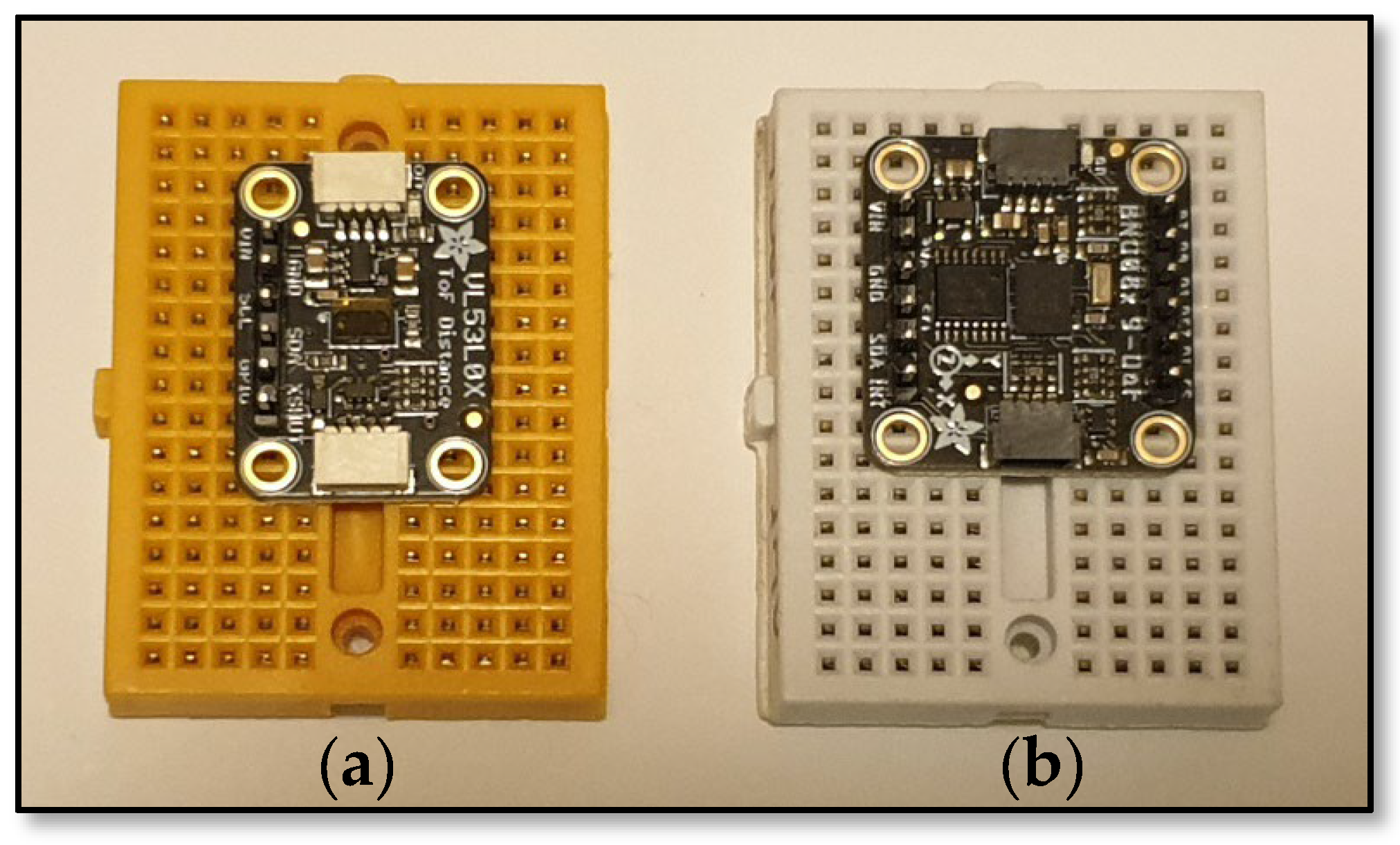
A fundamental analysis of different sensors was conducted, to determine the level of accuracy and suitability as part of an effective positioning solution for cobot end-effectors. Time-of-Flight (ToF) sensors (refer to Figure 1a) emit light pulses, which reflect from objects within the sensor’s operational range onto the image plane of an integrated camera. The sending time of the light pulse and the receiving time of the reflected light are used to calculate the distance to the object, based on the speed of light. Induced errors can occur, which have the potential to compromise the sensor’s measurement accuracy. These include heat from the camera distorting temperature-sensitive measurement data, poor reflective properties of an object, insufficient incident light to illuminate pixels, and the untimely collection of all pixels during the integration (analogous to exposure) time [75]. Used to measure velocity, orientation, and gravitational force, a 9 DoF (Degrees of Freedom) Inertial Measurement Unit (IMU) (refer to Figure 1b) is composed of three triple-axis sensors (3 × 3 = 9 DoF) in one unit. The first, an accelerometer, measures inertial acceleration, as a flexible piezoelectric material is deformed in a specific direction and over a recorded time interval. The second, a gyroscope, measures angular rotation by calculating the movement, as the sensor rotates, of sensing arms, which are connected to a fixed, central stator. Finally, the magnetometer supports the gyroscope by measuring magnetic bearings from the fluctuations in the magnetic field, detected within a copper coil, which surrounds a magnetic core. The IMU can be used to provide linear and angular data for some robotics applications, with an accuracy range dependent on threshold limit tolerances [76].
The key disadvantage of these types of sensors for the current problem, is that they require a point of reference against which the movement from one location to another can be related. In the case of the cobot, this would be the world coordinate frame, with which any such sensor would have to synchronise continuously. Fundamentally, a dynamic reference is required, that is directly and consistently related to the world coordinate frame. Accordingly, a study has been conducted for this project, into the concept of machine-readable fiducial markers, which have been successfully used for navigation on mobile robots [30].
A common option for moving an end-effector into a desired pose during the cobot programming phase is by way of hand-guiding, also known as lead-through programming. Once this mode is selected, the cobot’s joint motor brakes are released, allowing a user to physically move the manipulator arm into the desired pose within the workspace. Hand-guiding a cobot and entering settings into a teach pendant (graphical user interface), however, is not always an intuitive experience for a novice operator and is not sufficiently accurate for many applications [77]. When hand-guiding a cobot, there are numerous operational aspects to be considered, including the following:
  • Dexterity, concentration, and knowledge levels of the operator;
  • Speed of cobot arm movement (if movements are too quick, the speed protection system can sense an excess of force acting on a joint and place the control system into a protective stop mode, which typically requires a control reset);
  • Accurate positioning of the end-effector (e.g., centre point of workpiece mass to be clasped);
  • Accurate orientation of the end-effector (e.g., z-axis alignment if exit path needs to be vertically disposed);
  • End-effector pre-contact settings (e.g., suction off for a vacuum gripper or jaws open, with sufficient clearance to accommodate the workpiece, for a fingered gripper)
While many cobot control systems are designed to be intuitive to improve on traditional robot programming methods, they often have shortcomings. Vision- and sensor-based technologies such as depth and ToF cameras, LiDAR, and ultrasonic sensors, respectively, can be difficult to configure, complex to use, and expensive. Due to the fine tolerances required in cobot operations, a technology that can provide reliable and accurate positional data is essential, to ensure that the end-effector arrives at precisely the intended position and orientation. Hand-guiding cobots can be physically demanding, lacking in precision and may produce unpredictable results, especially when executing complex tasks. The proposed system addresses these constraints by providing a simple, intuitive, low-cost cobot control framework that is easy to set up, customise, and expand. A compact localisation scanner and single data transfer switch allows novice users to quickly and effectively control the cobot, without the need for previous programming experience or complex training.

1.4. Research Gaps

Details in the literature are typically scant regarding the practical implementation of the end-effector positioning process, particularly with respect to accurate positioning.

1.4.1. The Gaps in Human–Cobot Interaction

In fast-tracking practical cobot training, the authors [50] found that users tended to make common mistakes and skills retention was difficult with only one hour of practice. Interestingly, no skill retention analysis was carried out in the study.

1.4.2. The Gaps in Cobot Programming with Extended Reality

In AR programming [51,52,53], the AR systems were plagued with accuracy and synchronisation deficiencies. In gesture and voice-command-based AR [53], gesture and voice commands can be misinterpreted, leading to unexpected cobot movements and actions. Users need to concentrate and maintain focus. A Mixed-Reality Holographic with Digital Twin system [54] can be difficult and stressful for users to continuously transition between the Digital Twin and the physical cobot. Body-worn items (such as AR headsets, motion sensors, etc.) can be cumbersome and uncomfortable to wear and tiring to keep fitting and removing.

1.4.3. The Gaps in Cobot Programming with Computer Vision

Image processing to identify objects [59] lacks localisation precision along with detailed and accurate object definition (potential system quandary: “I see it is an object, but what is it?”). Colour segmentation and k-means clustering for object identification [60] only provide mean values, which may not be accurate for individual objects. This focuses on broad similarity, rather than an object’s tangible properties. Depth cameras used to locate objects [61] can be complex and inaccurate, especially when the environment is cluttered. The computational load is high as images are processed. And, typically, depth cameras can be over ten times more expensive than standard webcams.

1.4.4. The Gaps in Cobot Programming with Large Language Models

Large Language Models (LLMs) are still in their infancy and, generally, their accuracy and reliability are not yet at an acceptable level. Prompts can be open to ambiguity and the results still need verification, generally by a human. Novice users are typically incapable of judging whether a generated program is correct and how to edit it if it is not [67]. Novice users tended to avoid the editing option, due to their inexperience, opting instead for further prompting of the LLM; hence, the LLM becomes the program generator and validator, with no independent cross-checking. Mixed-Reality simulation interfaces [68,69] add a translation complexity layer to the LLMs, which again, relies on the accuracy of the prompts for optimal results.

1.5. Research Contributions

The specific contributions of this paper, in terms of the proposed system, relate to the following:
  • Ease of use. In contrast to traditional hand-guiding methods, which may be cumbersome for novice operators and require two-handed operation, the proposed system features a portable scanning tool that is light and easy to manage with one hand;
  • Lack of formal training requirement. The intuitive nature of the scanning tool, with its point-and-press operation, means that a brief instruction to a novice user is all that is required before use;
  • Cost effectiveness. The hardware for the proposed system can be purchased for around $US100. This cost is in stark contrast to existing visual systems, which cost around $US20,000;
  • Scalability. By simply printing and mounting additional fiducial markers, a system can be up scaled and configured as required;
  • Expansion. Connecting multiple cobots to a single visual localisation system can be achieved by securely connecting separate cobot controllers via a LAN-based switch;
  • Customisation. Programs can be created at the implementation stage, that allow specific actions to be conducted within the Pick-and-Place operations;
  • Democratisation. By providing an alternative to the traditional hand-guiding process for cobots, which some novice operators may find difficult, the proposed simplified control system may improve the appeal of cobot adoption by reducing barriers caused by control complexity.
The remainder of the paper contains the following sections: Section 2—Proposed Vision System, which gives an overview of the proposed cobot control system and defines the system components, a functional description of the ArUco marker system, and the processes of the proposed cobot control system; Section 3—Experimentation, which relates to the procedures and structure of experiments conducted in the testing of the proposed system and the data evaluation methodology; Section 4—Results, which deals with the analysis of the experiment results, in terms of defining the levels of system accuracy, repeatability and reliability; and the final Section 5 and Section 6, the Discussion and Conclusion sections respectively, offer closing perspectives on the proposed system, including limitations and future works. In addition, terminology used throughout the paper is defined in Appendix A.

2. Proposed Vision System

A low-cost cobot pose estimation apparatus or localisation scanner is proposed as a key component of a unique vision system. Designed for a novice to accurately define desired waypoints for an end-effector, the system calculates translational coordinates Tx, Ty, and Tz, and rotational angles Rx, Ry, and Rz, in a world coordinate orientation within a cobot’s workspace. The system will incorporate a low-cost camera, a small number of printed markers, and a simple localisation scanner, which is inexpensive and easy to manufacture. A Universal Robots UR5e has been used to test the system. Hand-guiding a cobot can require an operator to devote sufficient physical and cognitive attention to the task, that simultaneous tasks cannot be performed. The standalone localisation scanner can provide positional inputs automatically, requiring less cognitive function, no technical skills and can be light and quick to use, and unlike the hand-guiding method, requires only one hand to operate. The scanner is a unique tactile device, the purpose and application of which should be obvious to a novice operator, therefore requiring minimal instruction. The resulting system will have a low computational load, will be simpler, more reliable and much less expensive than a vision-based object recognition system. The executable programs will be simple and easily customisable during the initial system configuration, to suit a range of different applications.

2.1. System Overview

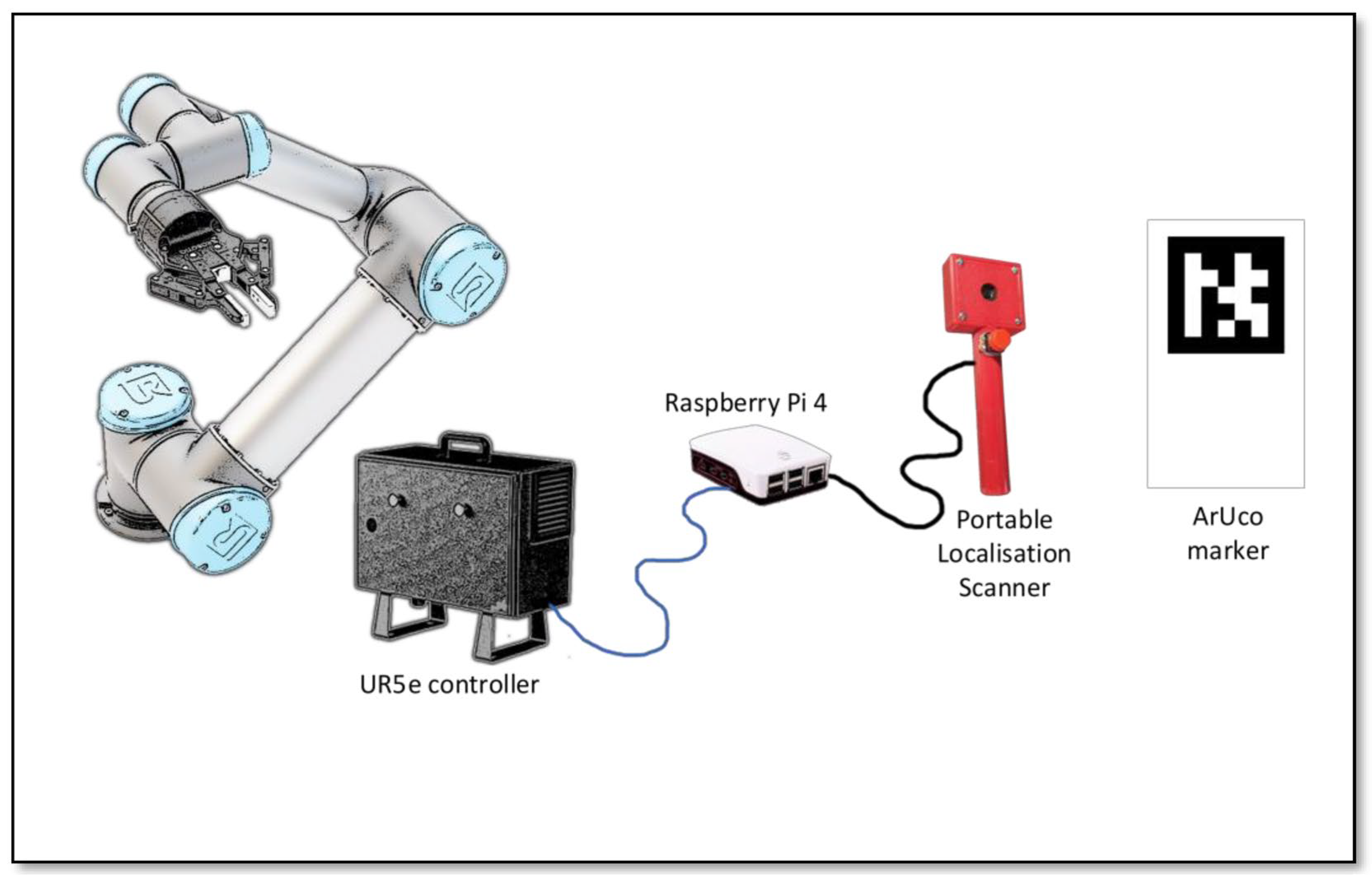
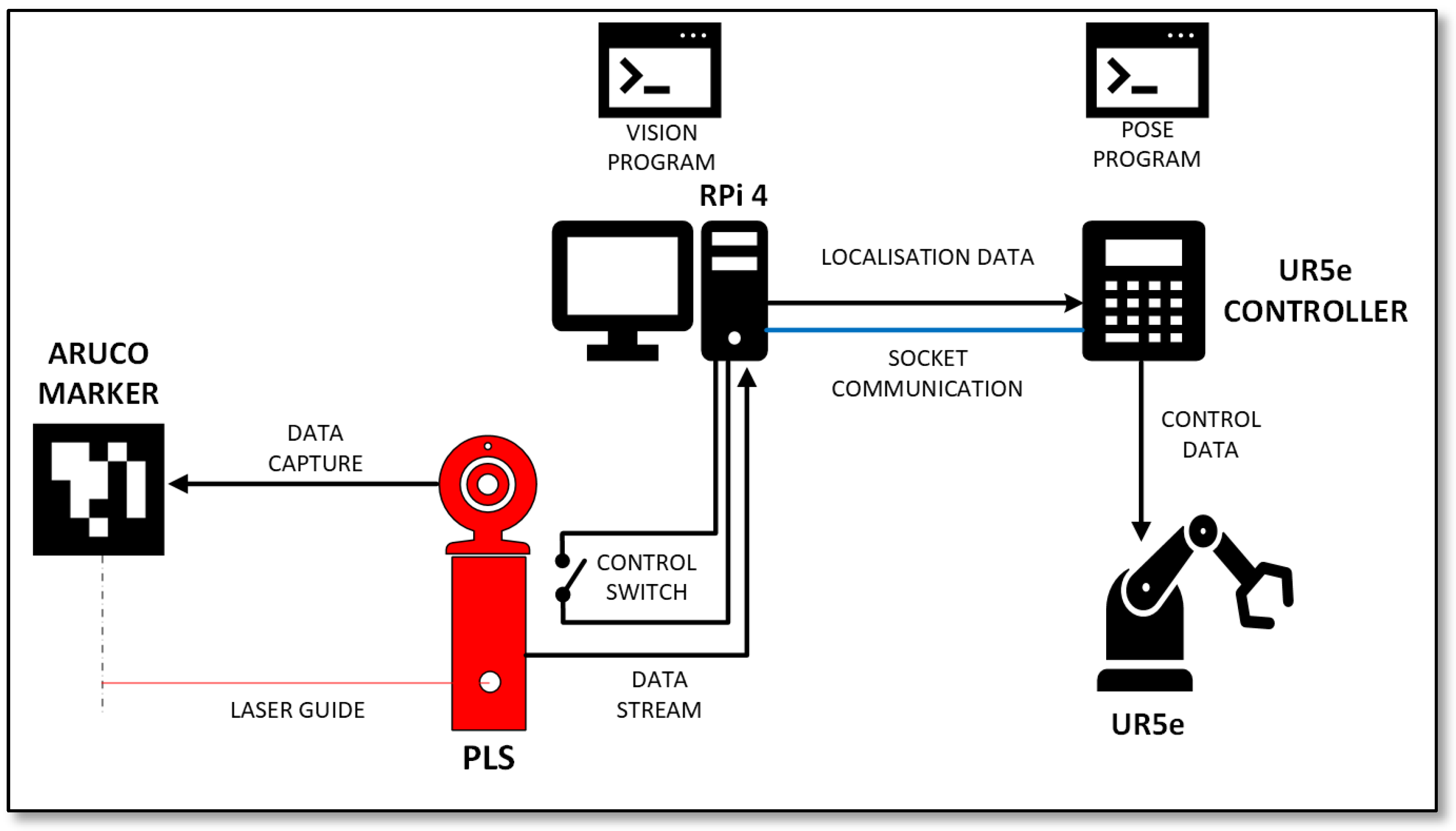
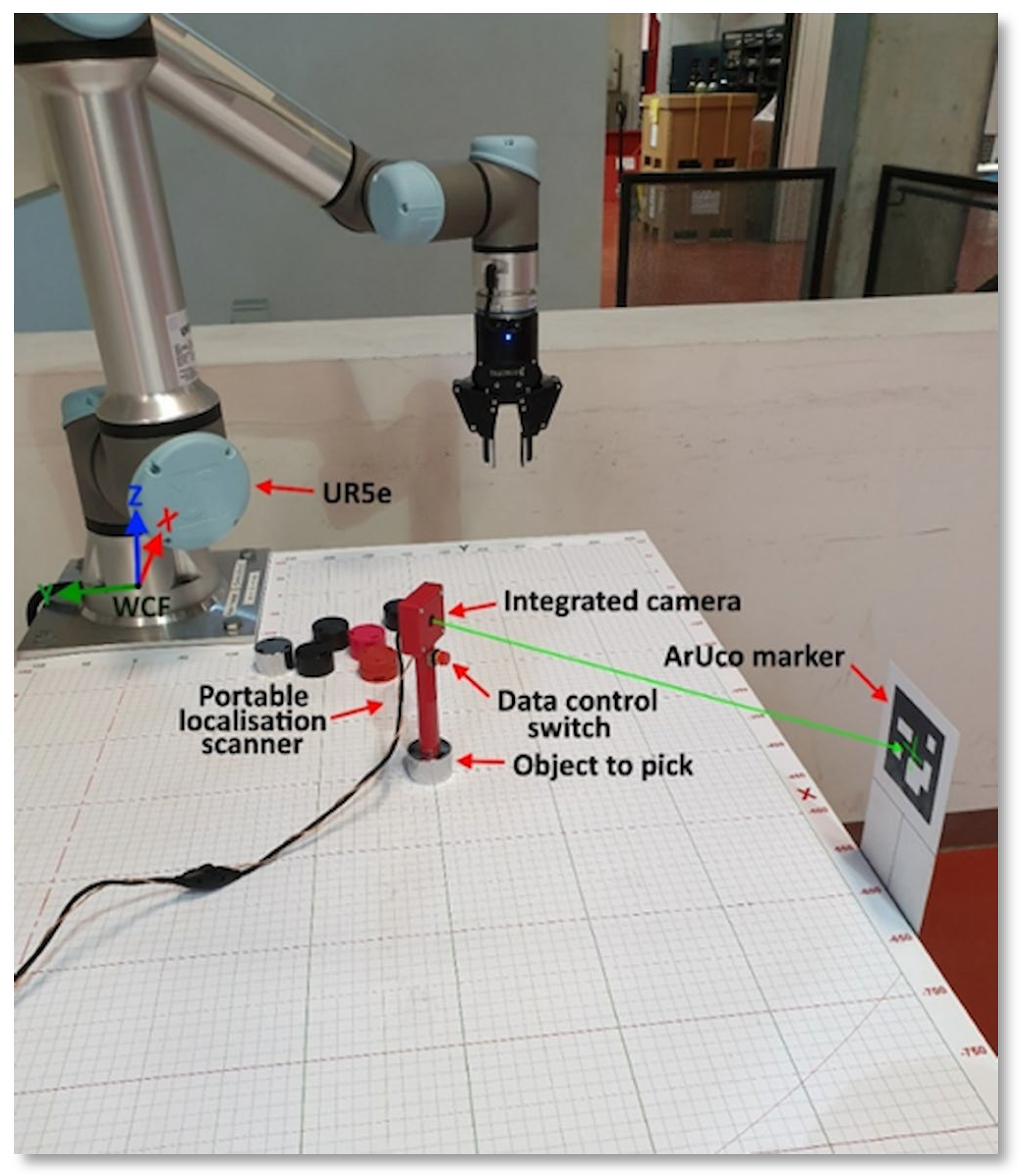
The proposed vision system, as presented in Figure 2, consists of five key components: 1. a hand-held Portable Localisation Scanner (PLS) with integrated camera and data control switch, 2. ArUco markers, 3. a Raspberry Pi 4 single-board computer, 4. a UR5e cobot and 5. a control program. The basic workflow of the system is as follows:
  • ArUco markers are securely fitted to several precise locations around the outside of the cobot workspace to provide a visual reference frame for localisation from any vantage point;
  • A user places the base of the PLS on top of an object to be picked within the cobot workspace, directing the front of the scanner towards one of the markers so that the marker is fully within the camera’s field of view;
  • Once the scanner is positioned at the top of the pick location, the user presses the data control switch on the scanner after a 5 s capture delay. This action captures the coordinate data for the current location of the centre of scanner’s base. On releasing the switch, the captured data, used to calculate the pose estimation, is converted using the transformation matrix (refer to Section 2.5.2). This data, along with the coordinate offsets related to the specific marker ID and delayed execution command are then transmitted to the UR5e controller. A 10 s delay is included before the UR5e moves, to allow the user time to remove the PLS from the workspace;
  • The user can now remove the scanner from the object and after the 10 s delay, the cobot will move to the desired location, pick the target object and place it at a predetermined destination point;
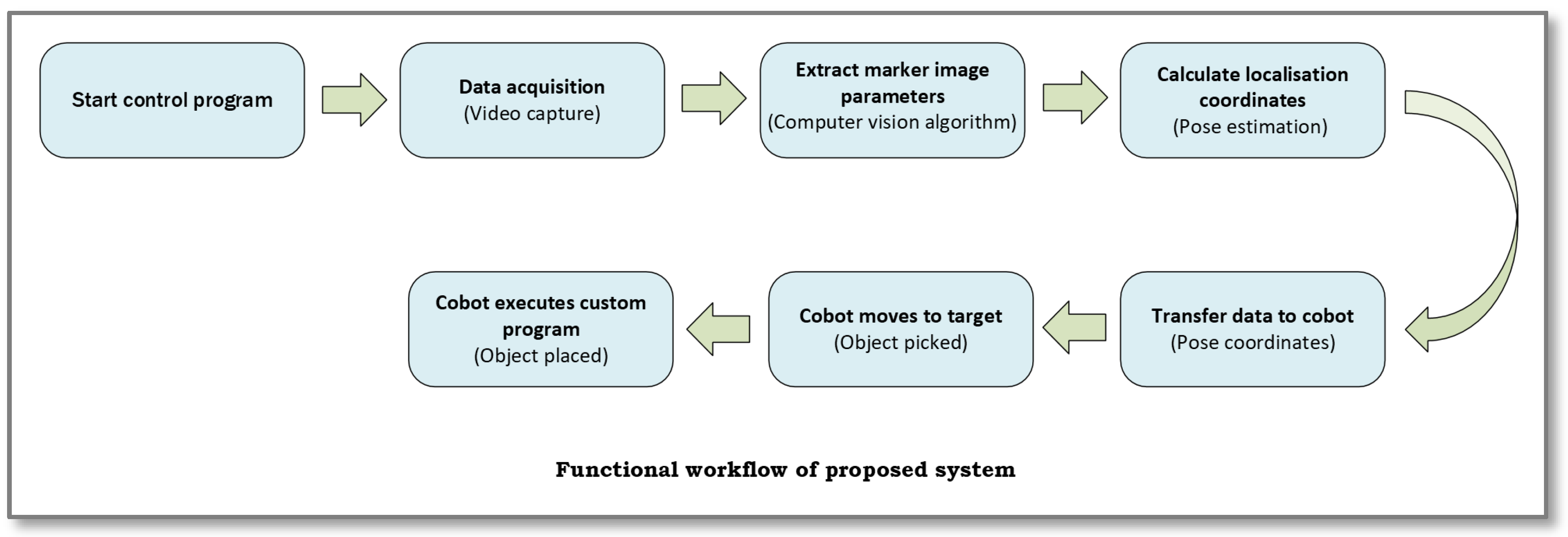
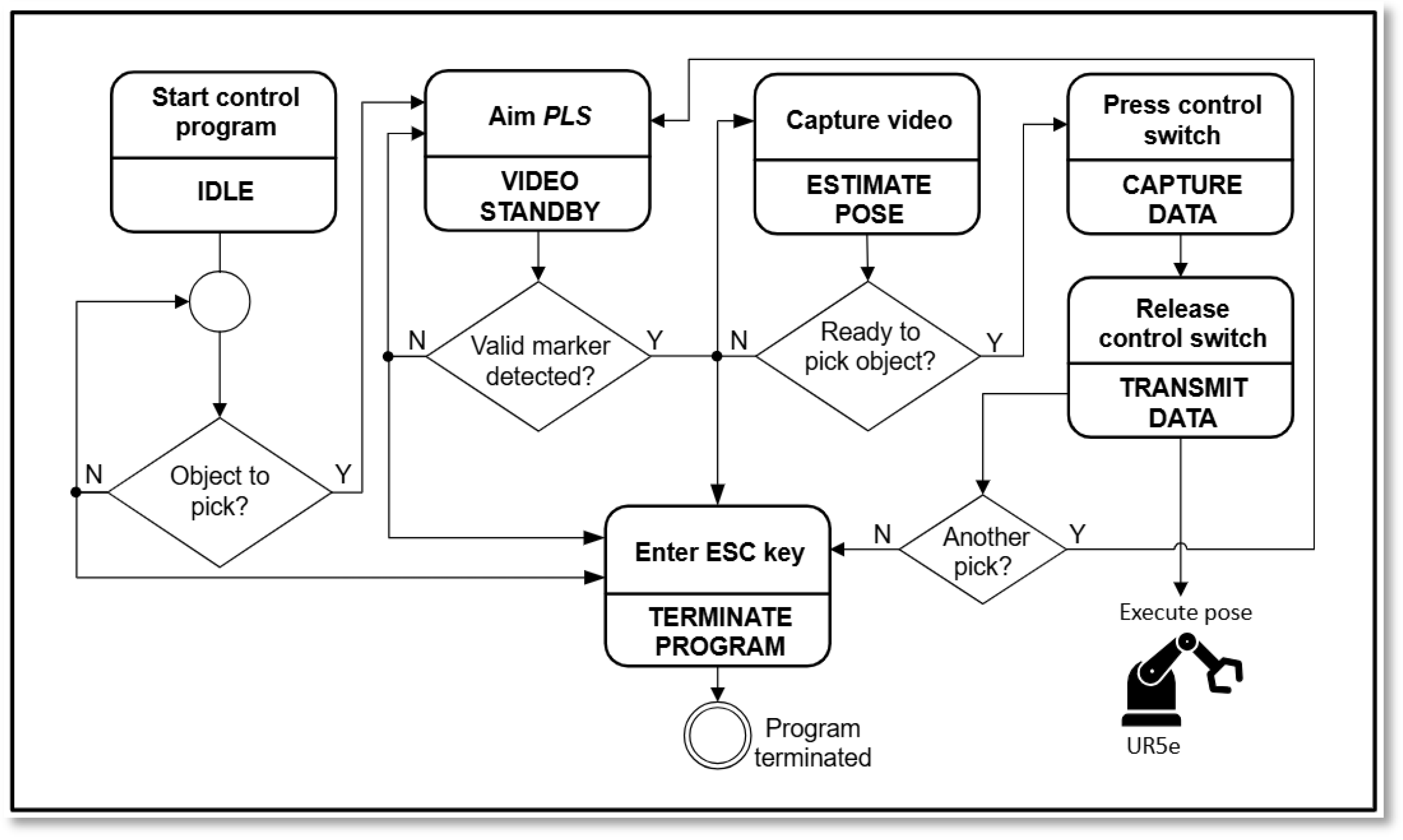
  • The system will remain in standby mode until another object is to be picked, at which point the process restarts at step 2 above. Otherwise, the program can be terminated. The system workflow is shown in Figure 3.
Figure 2. Key vision system components.
Machines 14 00201 g002
Figure 3. Functional workflow of system.
Machines 14 00201 g003

2.2. Hardware Components

Key considerations for components in this system were functionality, quality, and cost-effectiveness. The hardware components have therefore been selected based on task suitability, reliability, and economy.

2.2.1. Portable Localisation Scanner

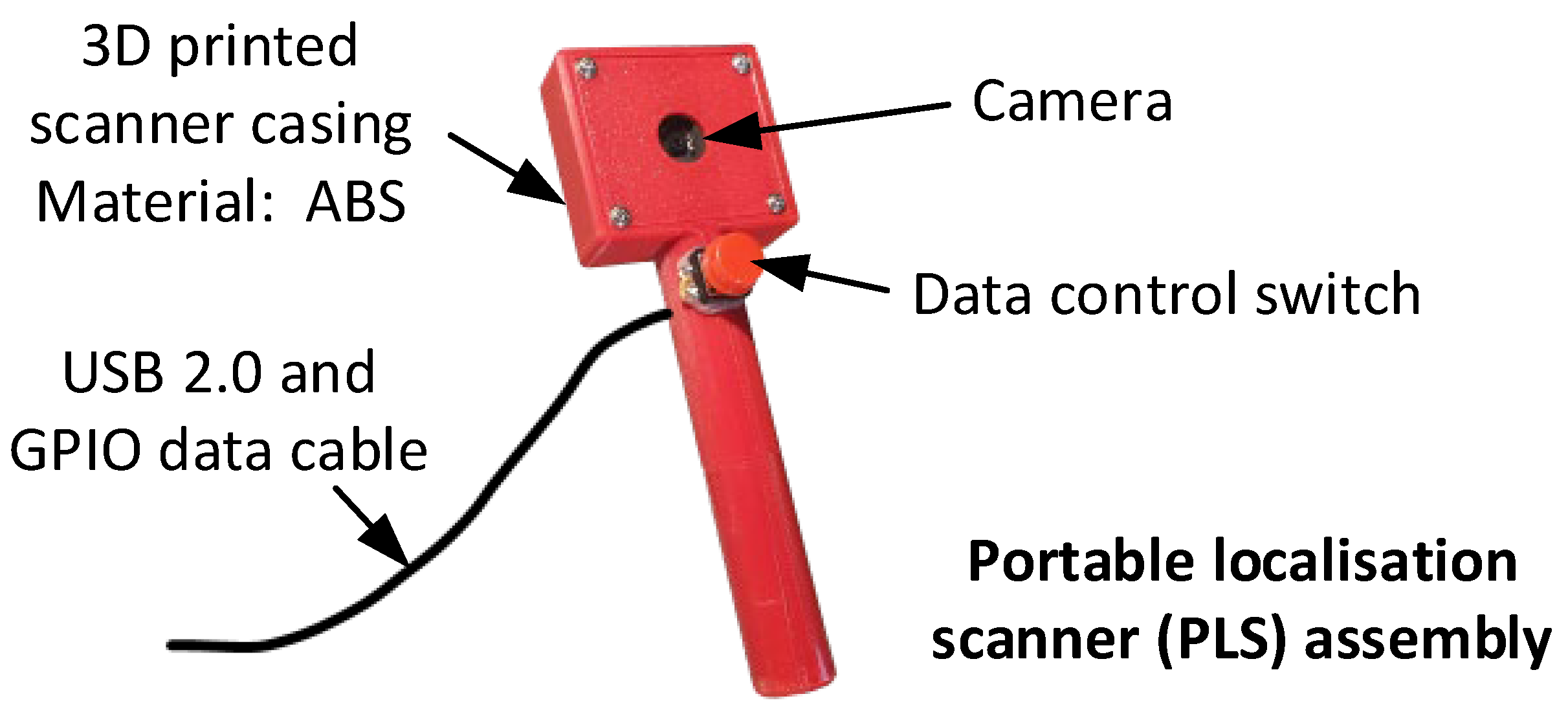
The Portable Localisation Scanner (PLS) shown in Figure 4, is 145 mm long, with a 100 mm long × 18 mm diameter handle. The integrated camera enclosure is 50 mm wide × 45 mm high and 18 mm deep. It was 3D-printed in 2 h with common ABS thermoplastic filament, which provides a favourable combination of strength, durability, stiffness and affordability. At the top of the handle, a small momentary switch has been mounted as a data control mechanism. A removable front cover provides access to the mounted PCB-based camera. The USB 2.0 cable is connected to a USB port on the Raspberry Pi, while the data control switch cable occupies two Raspberry Pi GPIO pins. The scanner is light, tactile and easy to manoeuvre.

2.2.2. Vision Capture

A standard USB 2.0 1080p webcam has been used to capture ArUco marker video streams. It has a display resolution of 1920 × 1080 pixels at 30 fps and uses a standard UVC video protocol. The camera PCB assembly was removed from the original housing and mounted directly to the PLS.

2.2.3. Processing Unit

All computational requirements for the system are executed by a Raspberry Pi 4 model B single-board computer with a 1.5 GHz quad-core ARM Cortex-A72 CPU and 2 GB of LPDDR4 RAM, and it supports Gigabit Ethernet. The operating system is Debian GNU/Linux 64-bit, version 12 (bookworm) and all system programs related to the ArUco marker detection, pose estimation, coordinate data processing, and UR5e communication are executed in Python 3.

2.2.4. Cobot

A Universal Robots UR5e collaborative robot (cobot), manufactured by Universal Robots in Odense Denmark was used for pose validation. This cobot has 6 degrees of freedom, a maximum payload of 5 kg, and a reach of 850 mm. It was used to measure the cobot interpretation accuracy of transmitted coordinate data, during Pick-and-Place test trials.

2.2.5. Communication

Communication between the Raspberry Pi and the UR5e controller is conducted over a directly connected CAT5e Ethernet cable, using the TCP/IP protocol and IPv4 addressing over client–server socket connections. Separate socket connections are required for the UR5e and its Robotiq 2F-85 gripping end-effector.

2.3. Software Architecture

The system software has been implemented in Python version 3.11.2 and uses the OpenCV library cv2 version 4.12.0.88 for the ArUco computer vision elements, with NumPy version 2.2.6 for mathematical support, particularly in matrix calculations. The socket library is used for communication between the Raspberry Pi and UR5e and general time and sys libraries to invoke processing delays and for runtime interaction.

2.4. Fiducial Markers

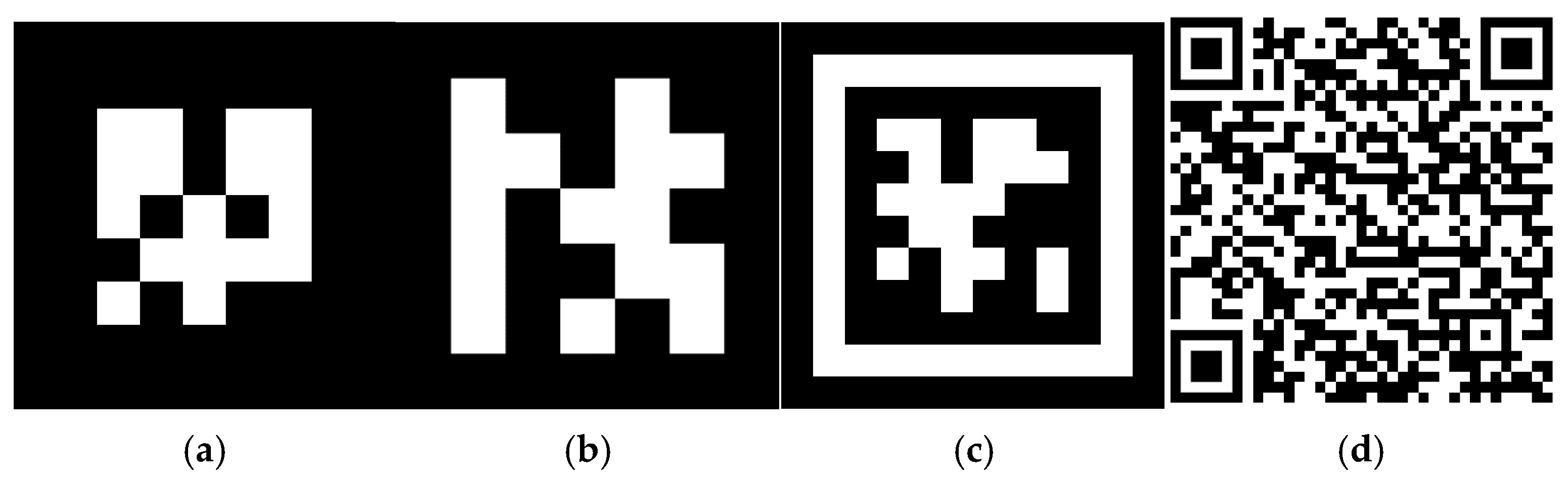
At the core of the vision system is the fiducial marker, which provides the localisation perspective required to determine the relative coordinates of the camera and hence, the pick location for the target object. This section discusses fiducial marker properties, functionality and comparative attributes used in the selection process for this system. Used as a point of reference and perspective, Fiducial markers contain predefined patterns that can be easily detected and interpreted by simple vision systems. They provide a reliable and cost-effective means of identifying and tracking objects in 3-dimensional space. Common fiducial marker systems include ARTag, ArUco, and AprilTag markers (Figure 5a, Figure 5b and Figure 5c, respectively). There are also more broadly recognised fiducial markers, such as the ubiquitous QR code, which is shown in Figure 5d, for the purpose of contrast. These are primarily used to link with website URLs, rather than as a fixed point of reference, and provide no localisation perspective [78].

2.4.1. ArUco Marker Detection and Pose Estimation

Fiducial marker systems reference a set of predefined markers contained in dedicated dictionaries, and, using a simple (calibrated) camera, each unique marker is detected and interpreted by a computer vision algorithm [79]. Each fiducial marker system contains specific properties, which dictate their suitability for different applications. ArUco markers have a very high detection rate, low computational needs, provide superior measurement accuracy and are most suitable for deployment on a minimal computational platform such as a Raspberry Pi [80]. Due to the known physical properties of the markers, such as the specific binary pattern, block size and marker size, calculations can be made within the algorithm to determine the marker ID, and the localisation parameters of distance and orientation from the camera. Initially, the camera must be calibrated, to allow for the camera’s specific geometry, including focal length, principal point, and lens distortion (refer to Section 2.4.4).
Referencing OpenCV function libraries, the localisation process follows these steps:
  • Image acquisition. When the marker is in the camera’s field of view, image frames are captured with the function cv2.VideoCapture();
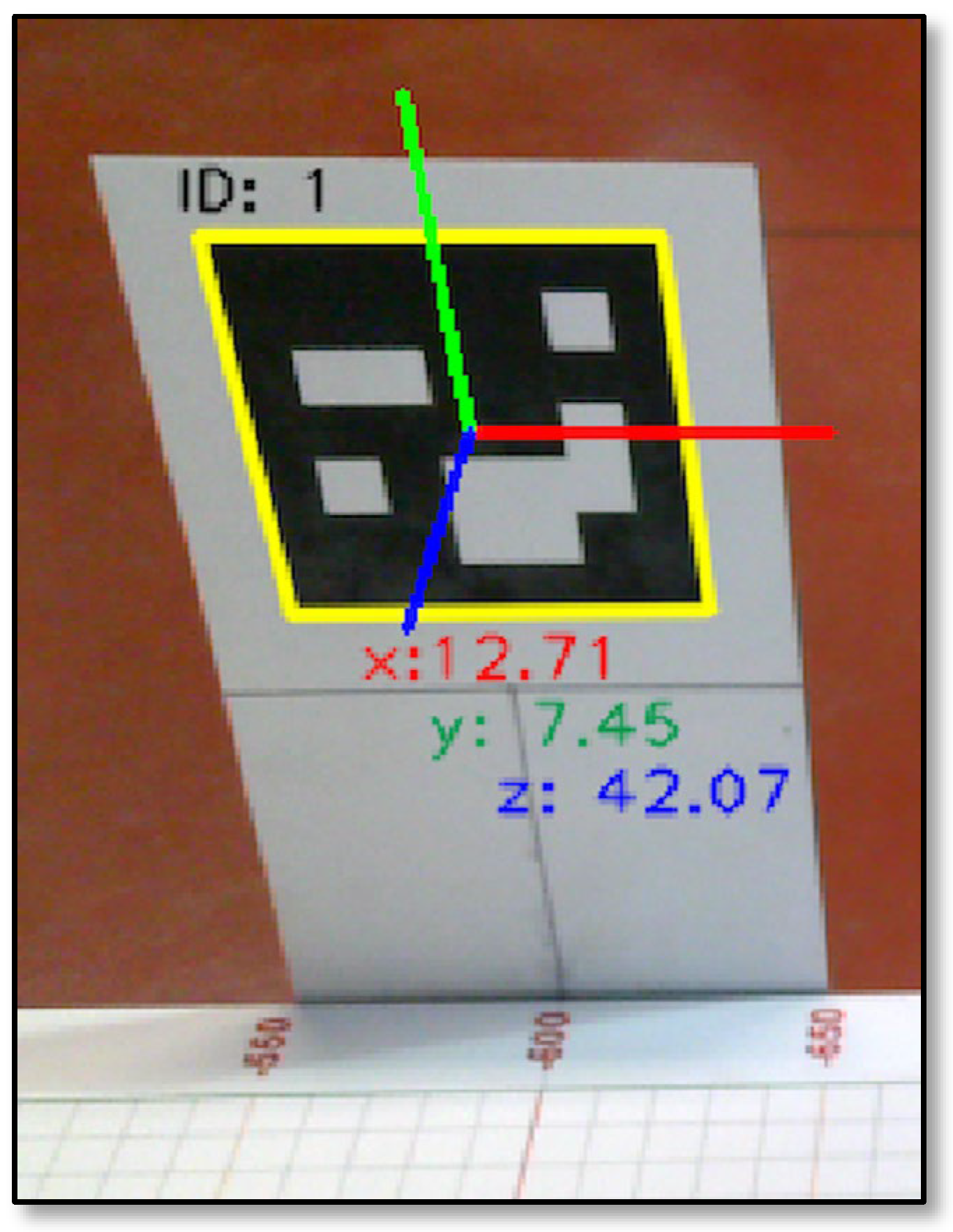
  • Marker detection. If a marker is within the range of ArUco markers (referred to as ArUco dictionaries) specified in the control program, the function cv2.aruco.detectMarkers() detects the corners of the detected marker, along with its unique ID. The marker borders, ID, coordinate axes, and coordinate reference values relative to the camera can also be displayed as a colour-coded coordinate dynamic overlay (refer to Figure 6) within the control program;
  • Pose estimation. Calculations for each pose estimation are processed within the function cv2.solvePnP(), which takes in as parameters the detected marker corners, marker size, camera geometry matrix, and distortion coefficient data, which were captured during the calibration process. This function calculates the pose estimate, related to the marker, from the camera perspective, and returns tvecs, the translation vector, containing the location coordinates and a rotation vector rvecs, containing the orientation angles (also known as pitch, roll, and yaw).

2.4.2. Fiducial Marker Functionality

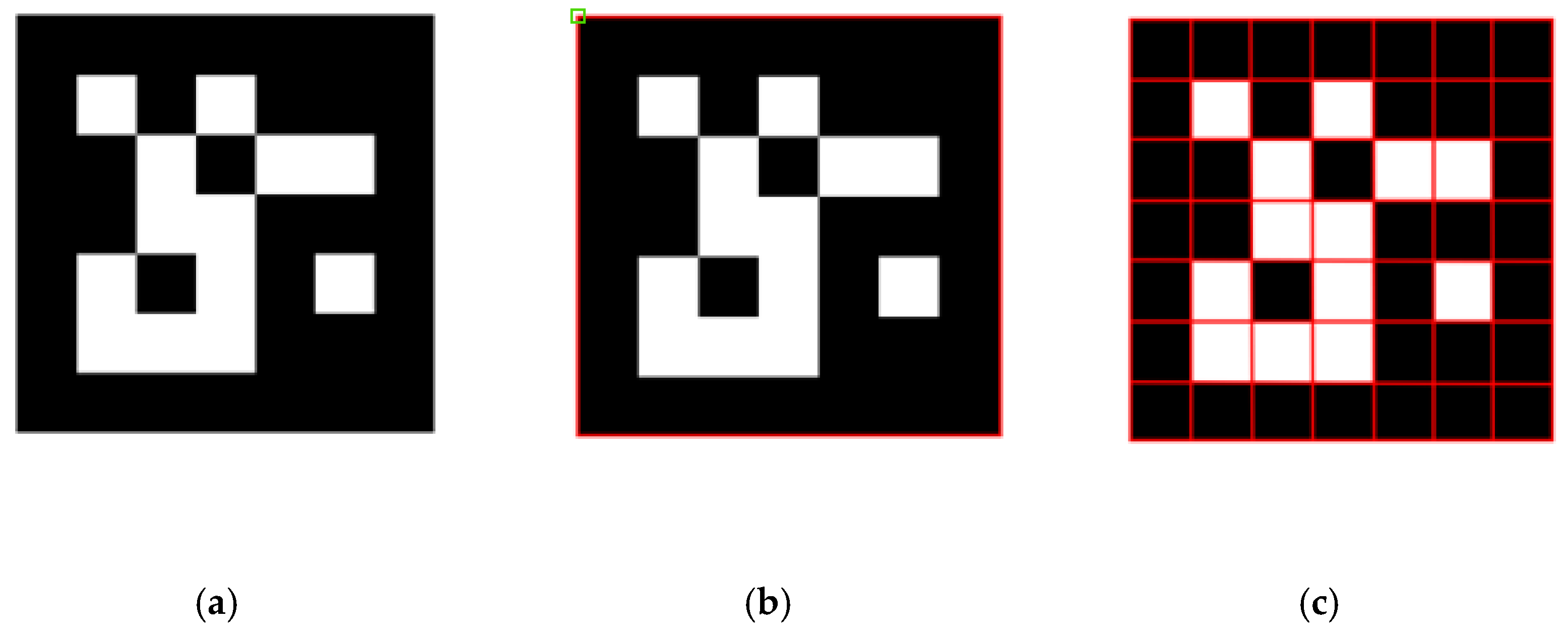
One type of fiducial marker is the ArUco marker, shown in Figure 7a. Each marker has an ID (Marker IDs start at 0. The ID is fixed, so ID 1, for example, cannot be reallocated as another ID.) They have known dimensions (The dictionary function in the program is used to specify the quantity and size of the markers in bits. Therefore, it is scaled in the program, and depends on the requirements, particularly the ID range.) They have a known orientation (The marker orientation is fixed. The top of the marker remains the top, regardless of rotation. This is how rotational perspective is achieved, and the marker orientation is referenced by its top left corner, as shown in Figure 7b).
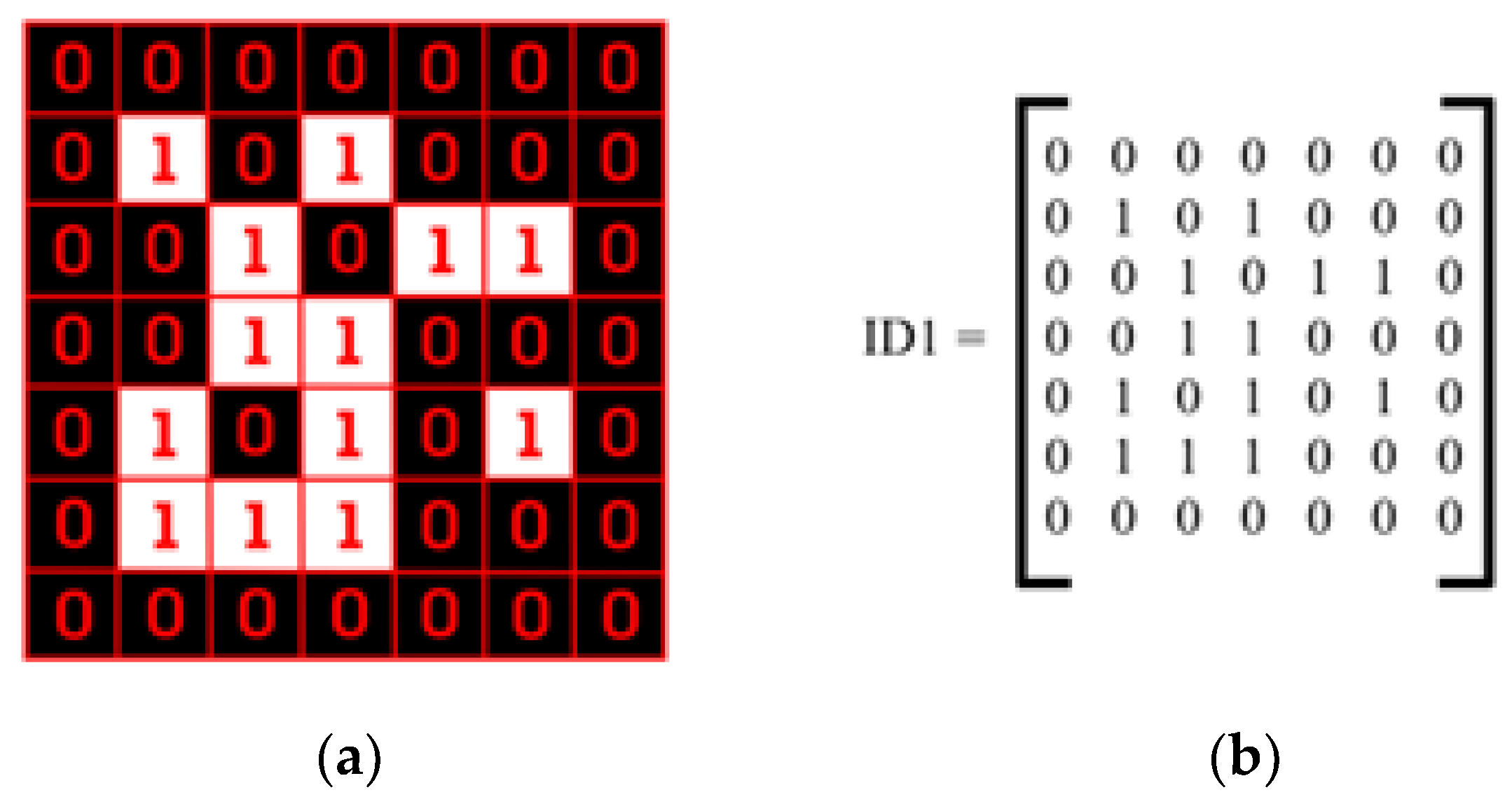
The four sides of the marker are first determined with a computer vision algorithm called Edge Detection, and this is a central function of the process. The marker will not be identified until the outer edges are detected (Refer to Figure 7b). The example in Figure 7c shows a 7 × 7 grid, programmed with the dictionary function as a 5 × 5 marker, since the black border is common to all. If any of that black border is obscured, it is unlikely that the marker will be detected. Each marker contains a binary pattern (refer to Figure 8a) that uniquely identifies it and can be expressed as a binary matrix, as shown in Figure 8b.

2.4.3. Orientation of Markers

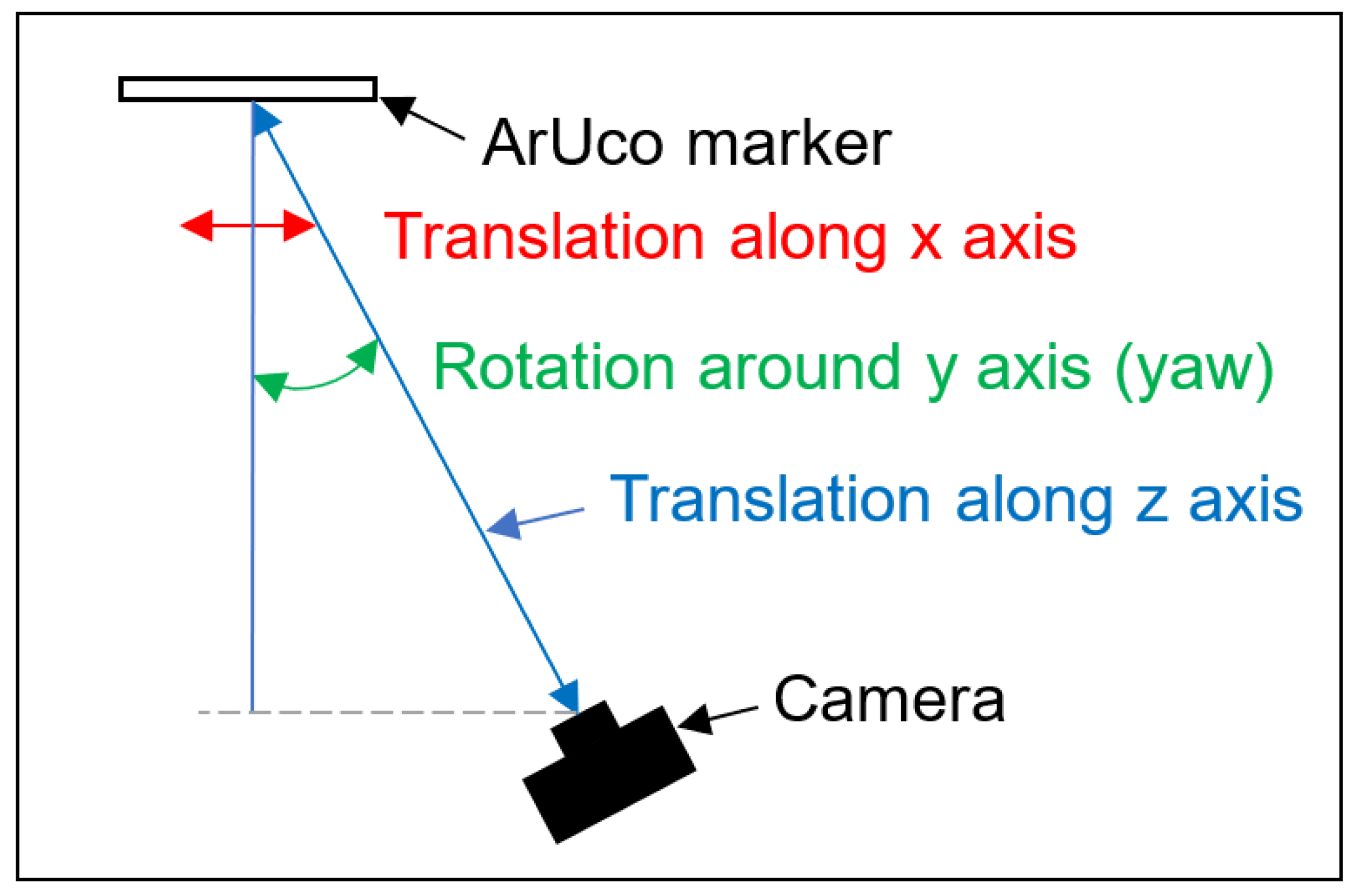
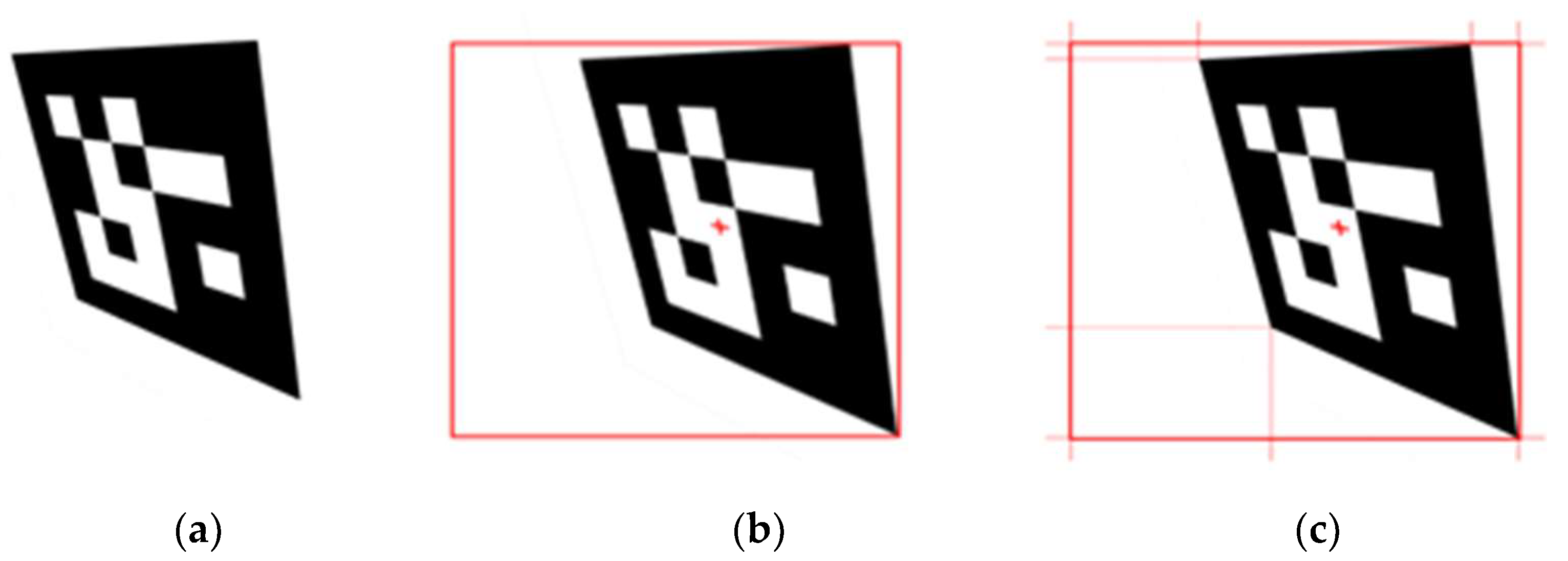
From a known marker size, any deviation in direction between the camera and marker can be detected and calculated, due to the relative distortion of the marker image from the camera’s perspective. Depending on which corners of the image and to what degree the deviations are detected, and using the image centre point as a reference, the amount of rotation in any of the 3 axes can be calculated within the OpenCV programming structure (refer to Figure 9). There is an orientation of the Camera Coordinate Frame with corresponding rotations around each axis. In Section 2.4.5, there is an example of a marker off to one side of a camera and this has a translation along the X axis and a rotation around the Y axis, which are used to determine the marker’s position and orientation with respect to that of the camera.

2.4.4. Computer Vision with Fiducial Markers

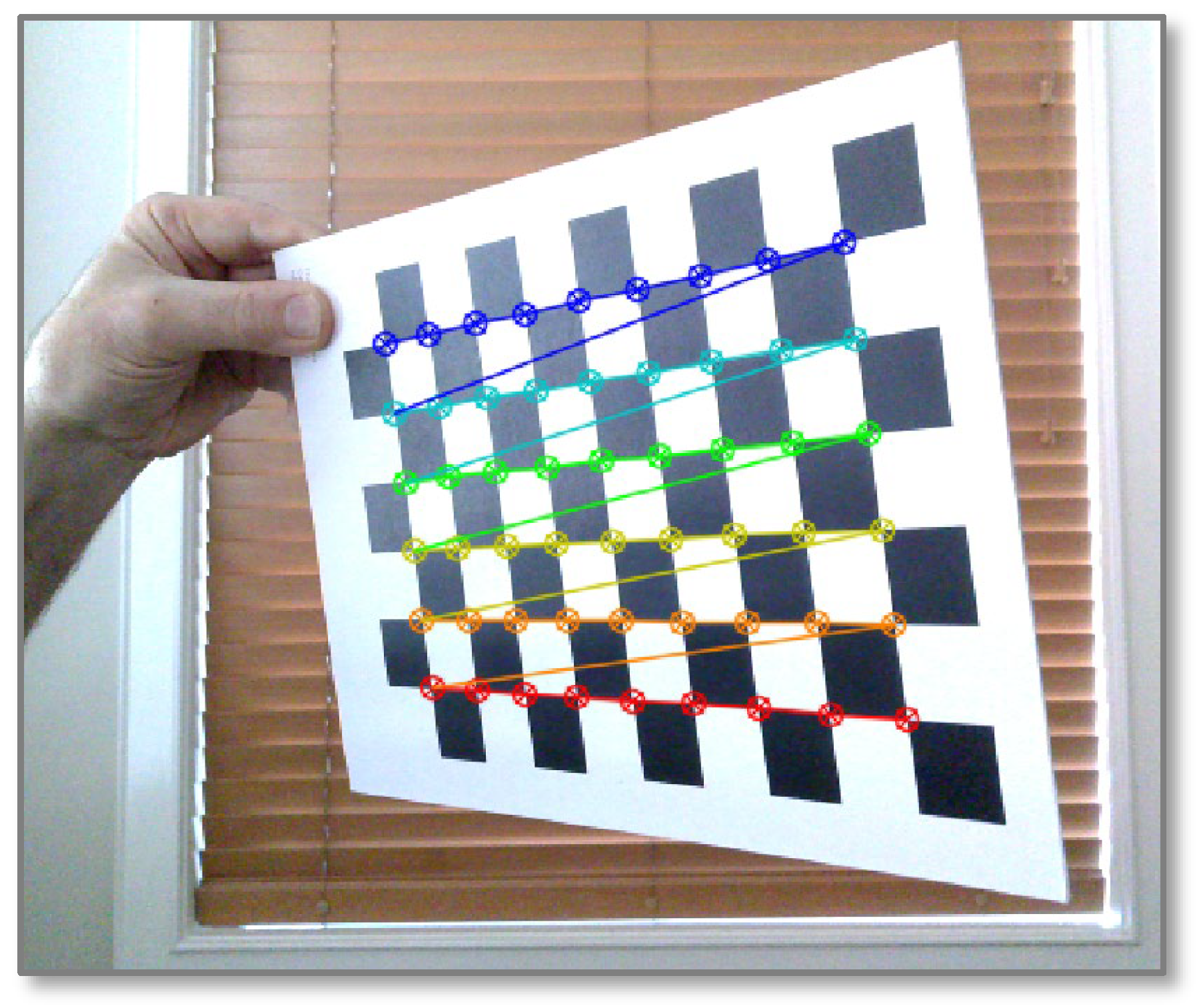
When a new camera is introduced to the system, a camera calibration must be conducted. This process consists of printing a dedicated checkerboard test pattern sheet with a known scale, nominating a specific camera within a calibration program and running the calibration program to capture a series of test pattern images from different angle and rotational perspectives. The checkerboard is detected using the cv2 function findChessboardCorners(), where the visual program identifies and locks on to 6 rows of nine corners, each set of corners represented with different colour bands (refer to Figure 10). As the checkerboard is rotated, the relative distance changes are captured, and an optical perspective mapping is created. This process results in the capturing of the camera’s intrinsic matrix, which is unique to that specific camera and allows adjustments to be made in a marker identification program to suit the camera’s physical properties, regarding focal length and imaging centre point or principal point. The intrinsic matrix precisely transforms the points in the camera’s coordinate system to that of an image pixel coordinate system by calculating the coordinate offsets from a reference model to the specific internal geometry of the camera. Once the calibration program is completed, unique camera intrinsic matrix and distortion coefficient files are created, and these are then referenced by the main program. The general intrinsic matrix (1) is shown below:
I M = f x 0 C x 0 f y C y 0 0 1
where fx is the focal length on the x-axis, fy is the focal length on the y-axis, Cx is the x coordinate of the principal point and Cy is the y coordinate of the principal point. The principal point is typically the centre of the image. Distortion coefficients are calculated to correct the effects of radial and tangential distortion in captured images. Radial distortion causes an apparent curving of straight lines or edges in a captured image, as light rays bend as they enter the camera lens, due to the radial curvature of the lens. This effect increases towards the edge of the lens. Tangential distortion occurs because the camera lens is not perfectly parallel to the image plane, making lines or edges appear closer or further away than they actually are. Three coefficients k1, k2 and k3 represent the radial distortion over the x and y axes (2), while the tangential distortion with respect to the x and y axes (3) has two coefficients p1 and p2, while r represents the radial distance from the image centre to the distortion point in the image. The distortion equations are as follows:
Radial distortion:       xrad = x(1 + k1r2 + k2r4 + k3r6)       yrad = y(1 + k1r2 + k2r4 + k3r6)
Tangential distortion:        xtan = x + [2p1xy + p2(r2 + 2x2)]       ytan = y + [p1(r2 +2y2) + 2p2xy]
Total distortion coefficients:       dc = (k1 k2 p1 p2 k3)
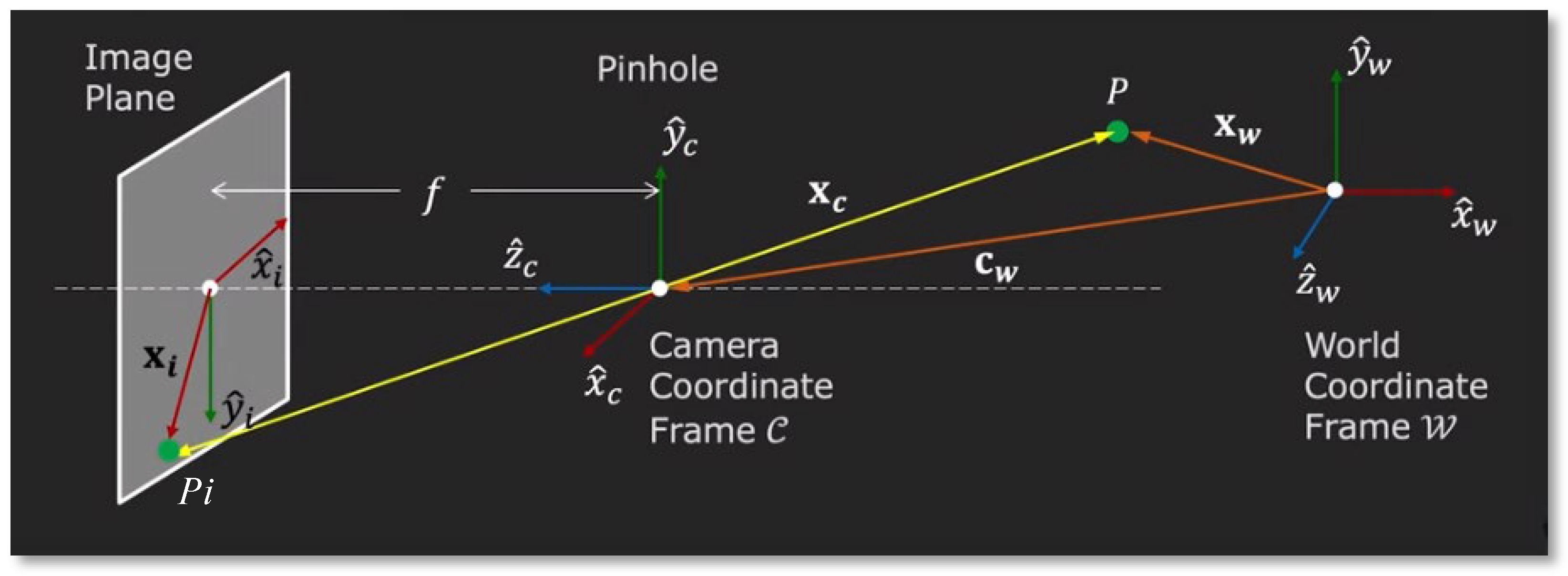
A mapping is required from the coordinate frame referenced by the fiducial marker and the coordinate frame the cobot references. These are the camera coordinate frame (𝒞) and world coordinate frame (𝒲), respectively. There is a third coordinate frame, which is the 2-dimensional image plane. It is important to note that once light enters the camera lens, it bends and lands at the camera’s focal point, which is at the image sensor. When referring to the image plane, the physical location can be assumed to be the camera’s image sensor.
The mapping between the frames is captured in the forward imaging model, which maps from 3D space in 𝒲 to a 3D space in 𝒞, then on to a 2D image plane (refer to Figure 11). In this model, a point P in the world coordinate frame (WCF) 𝒲 can be mapped through the origin of the camera coordinate frame (CCF) 𝒞 to a corresponding point Pi on the image plane. That point can be found from the homogenous coordinates of the 3-dimensional point defined in the camera coordinate frame 𝒞 (xc, yc, and zc) and the camera focal length f, using the two equations in Equation (5):
x i = f x c z c   and   y i = f y c z c
The camera’s orientation can be specified from the relative position cw between the origins of 𝒲 and 𝒞, then to the image plane as shown in Figure 11. This coordinate transformation can be expressed as follows:
Machines 14 00201 i001
The image coordinates must then be converted to pixel values. From the camera’s position and orientation, with respect to 𝒲, the external elements of the camera can be determined. This is presented as the extrinsic matrix (6) as shown below, which comprises the 3D rotation R and translation t:
EM   =   R | t =     r 11 r 12 r 13 r 21 r 22 r 23 r 31 r 32 r 33     t 0 t 1 t 2
r11, r12, and r13 relate to the direction of x ^ c in 𝒲, r21, r22 and r23 relate to the direction of y ^ c in 𝒲 and r31, r32 and r33 relate to the direction of z ^ c in 𝒲. Therefore, the mapping from the world coordinate frame to the fixed intrinsic parameters of the camera (described by the intrinsic matrix IM (1)) is dynamically defined by the extrinsic matrix EM (6). A mapping is required from the camera coordinate frame to convert translation and rotation values relative to the world coordinate frame. This provides a synchronisation between the image plane and the world coordinate frame.

2.4.5. Coordinate Frames

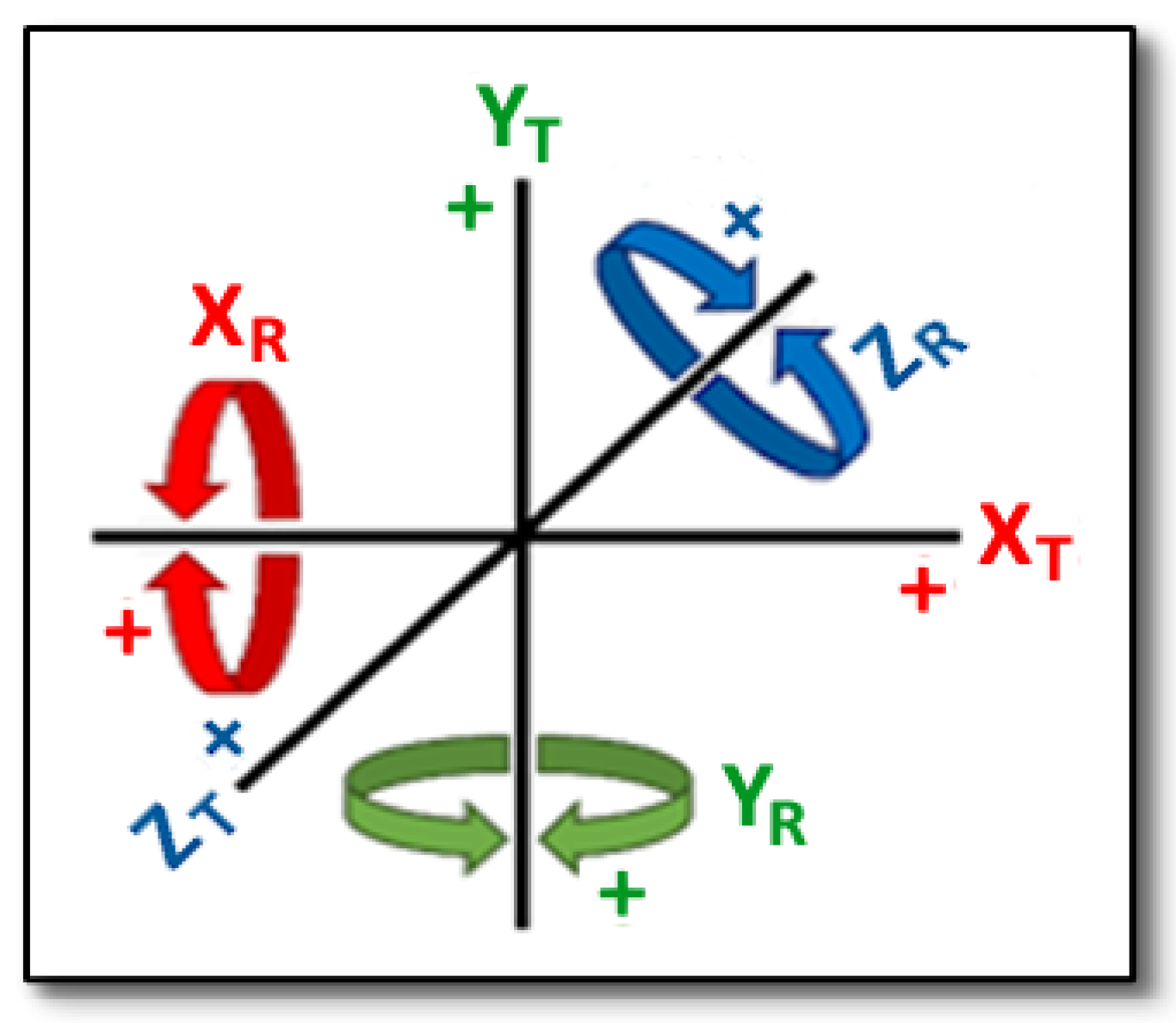
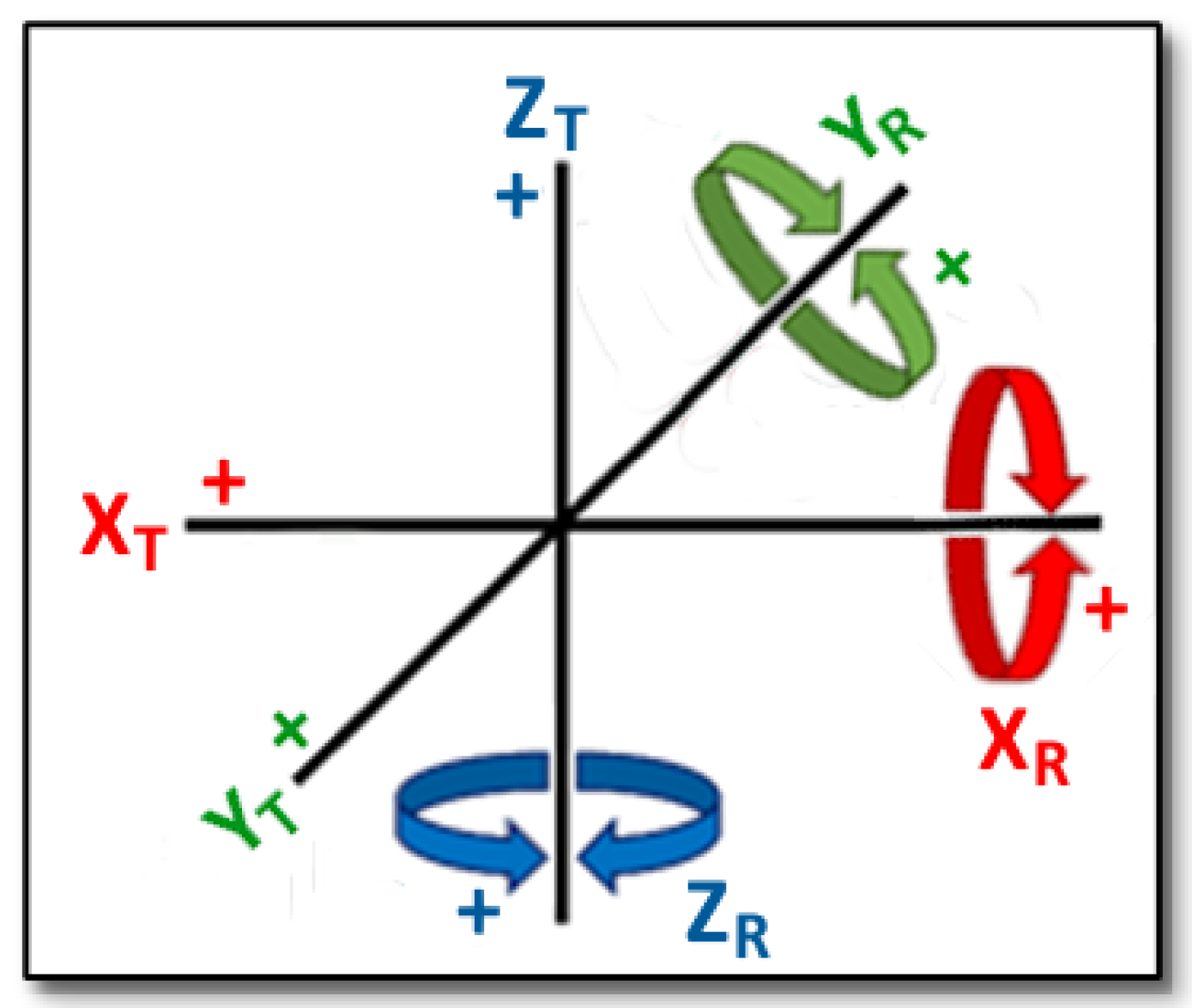
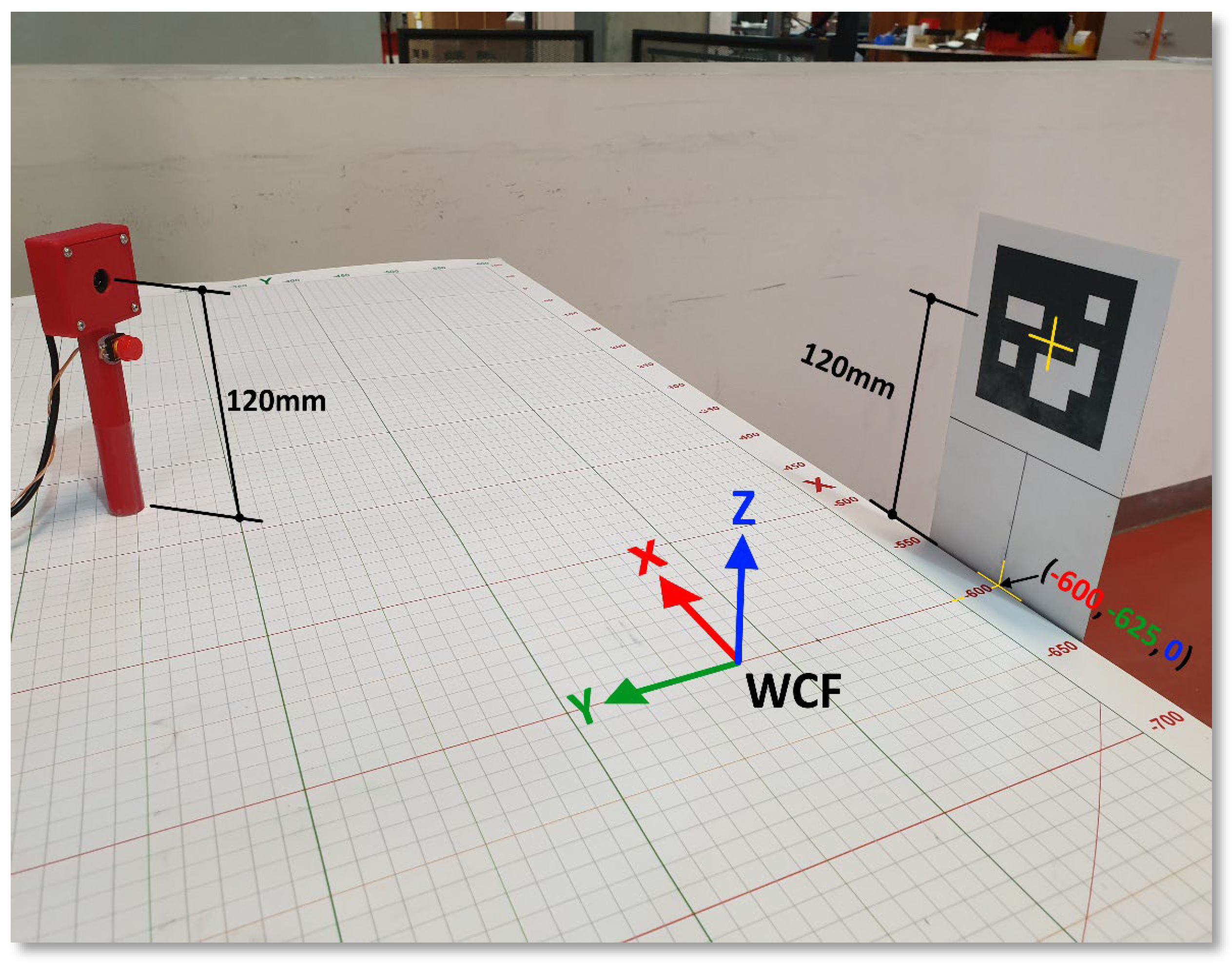
Position and orientation in three-dimensional (XYZ) space are determined by translation coordinates and rotation angles, respectively. Figure 12 shows XYZ translations and XYZ rotations relative to the camera coordinate frame, while Figure 13 shows the translations and rotations relative to the cobot’s world coordinate frame. A mapping is required between these coordinate frames, since the relative localisation, that is, the position and orientation between the two, is not fixed. Figure 14 shows an example of translation and rotation from the camera perspective. Figure 15 shows the relationship between the camera, ID 1 marker, and WCF. Note that the marker and camera centre points align, both 120 mm from the benchtop. Table 1 lists the CCF to WCF translation and rotation conversions, along with the x and y offsets with respect to marker ID 1, which is mounted as shown in Figure 15. In this case, marker ID 1, with respect to the WCF, has been positioned at the X = −600, Y = −625, and Z = 0, since the height of the camera and marker centre point are the same.

2.5. System Processes

This section deals with the organisational aspects of the proposed vision system, which forms a Human–Robot–Interaction (HRI) control mechanism for Pick-and-Place operations, within a collaborative robot environment, as described in Section 3.2.2. Force sensors, speed, and acceleration limits, along with the cobot’s ergonomic design, void of finger pinch points, provide a safe HRI experience for humans.

2.5.1. Controller State Management

The system becomes active and enters the IDLE state after the control program is started. The camera is initially in a VIDEO STANDBY state. When an object is to be picked, a user aims the PLS at a marker and once the integrated camera has a valid marker in its field of view and has identified the marker, the system automatically enters the ESTIMATE POSE state. When the user is ready to pick the object, they press the data control switch, at which point the current raw localisation data is captured in the CAPTURE DATA state. Once the switch is released, the system enters the TRANSMIT DATA state and formatted localisation data is transferred to the cobot controller. To end the program, the ‘ESC’ (escape) key is entered on the Raspberry Pi keyboard. This is the final state, TERMINATE PROGRAM, and this state can be entered from any decision point. On entering this state, as the name suggests, the control program is terminated. Figure 16 shows a finite state machine (FSM) representation of the system’s six states.

2.5.2. Coordinate Transformation

There are three localisation perspectives to be considered in this system, namely, those of the ArUco marker (image), the camera, and the cobot. Each has its own coordinate frame of reference, and a transformation must be calculated, to map points in 3D space between the coordinate frames. As detailed in Section 2.4.4, the three frames for the image, camera, and cobot are the Image Plane (IP), Camera Coordinate Frame (CCF), and World Coordinate Frame (WCF), respectively. The WCF can be calculated with a transformation matrix (7), as the product of the 4 × 4 homogeneous transformation matrix and 4 × 1 CCF vector. The former consists of a 3 × 3 matrix (product of Xr, Yr and Zr in (8)) which represents the combined rotational angles from the three axes, and the translations of the three axes in the fourth column.
W C F = x w y w z w 1 = a x x a y x a z x a x y a y y a z y 0 0 a x z a y z a z z a x t a y t a z t 0 1 x c y c z c 1
  X r = 1 0 0 0 c o s θ s i n θ 0 s i n θ c o s θ     Y r = c o s θ 0 s i n θ 0 1 0 s i n θ 0 c o s θ     Z r = c o s θ s i n θ 0 s i n θ c o s θ 0 0 0 1
The following Equation (9) are used to calculate the world coordinates of the PLS, relative to the ArUco marker:
Xw = Xoffset + Sin(Yr) ((Zt)(m))    Yw = Yoffset + Cos(Yr) ((Zt)(m))
where m = multiplier, calibrated to specific camera. Xoffset and Yoffset are the offsets discussed in Section 2.4.5.

2.5.3. Inverse Kinematics

Once the localisation data, containing the 3-axis position and 3-angle orientation coordinates, have been captured and transferred to the UR5e controller, the joint angles are calculated to control each joint position, using an inverse kinematics equation. The calculation is used to determine the six joint angles that will combine to achieve the desired pose of the cobot, while avoiding a state of singularity. The joint angles are calculated internally by the UR5e control system, using the get_inverse_kin() function.

2.5.4. Communication with the UR5e

Since the Raspberry Pi directly connects to the UR5e controller over a CAT5e Ethernet cable, capable of achieving a 1 Gigabit data transfer speed, which is well beyond the system’s required transmission speed, no latency is expected. A Python program initiates a TCP/IP socket connection between the Raspberry Pi and the UR5e, using the UR5e controller’s IPv4 address and port 30,002 for UR5e communications. A separate socket and port connection is used to communicate with the end-effector. While the program is running, and the socket connections have been established, the two sockets remain open to transmit and receive control commands, which is the captured coordinate data calculated from the current video frame of the fiducial marker. This coordinate data consists of the adjusted XYZ translation coordinates and XYZ rotational angles in terms of the World Coordinate Frame. The cobot controller receives the 3 position coordinates and 3 orientation angles and applies them relative to the end-effector’s Tool Centre Point (TCP), required to complete the desired pose. On exit, the socket connections are closed before the program terminates. The system connectivity and data segments are shown in Figure 17.

3. Experimentation

Table 2 shows a breakdown of the individual design elements in this project, divided into passive and active elements. The passive elements have no direct bearing on the project outcomes, while the active elements are critical to the project design.
Table 2. Design elements.
Element TypeElement
Category
Specific ElementPurpose
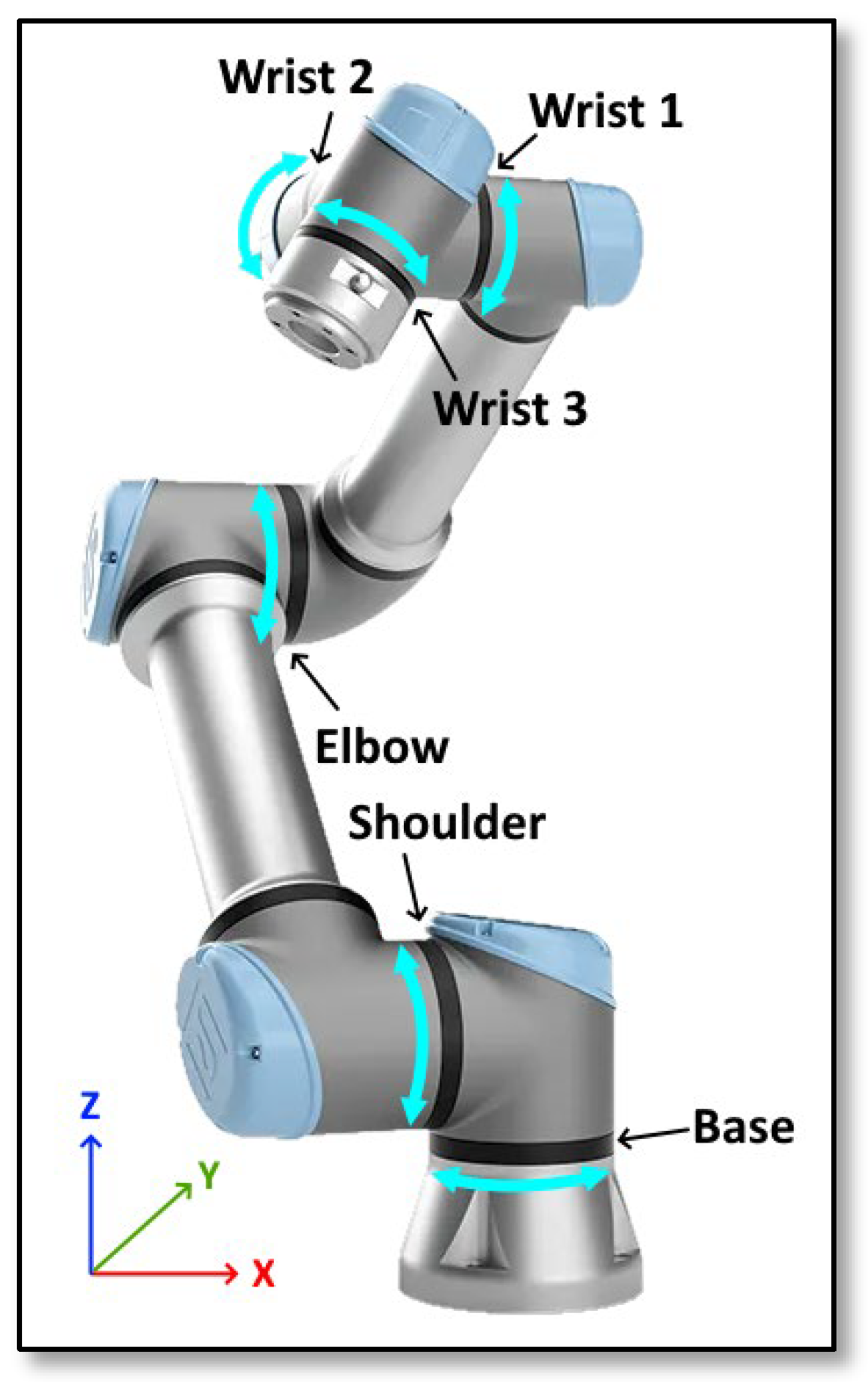
PassiveCobotUniversal Robots UR5e cobot with 6 DoF (Refer to Figure 18).Practical testing of the system
End effectorRobotiq 2F-85 gripper (Shown in Figures 19, 21, and 22).Object manipulation
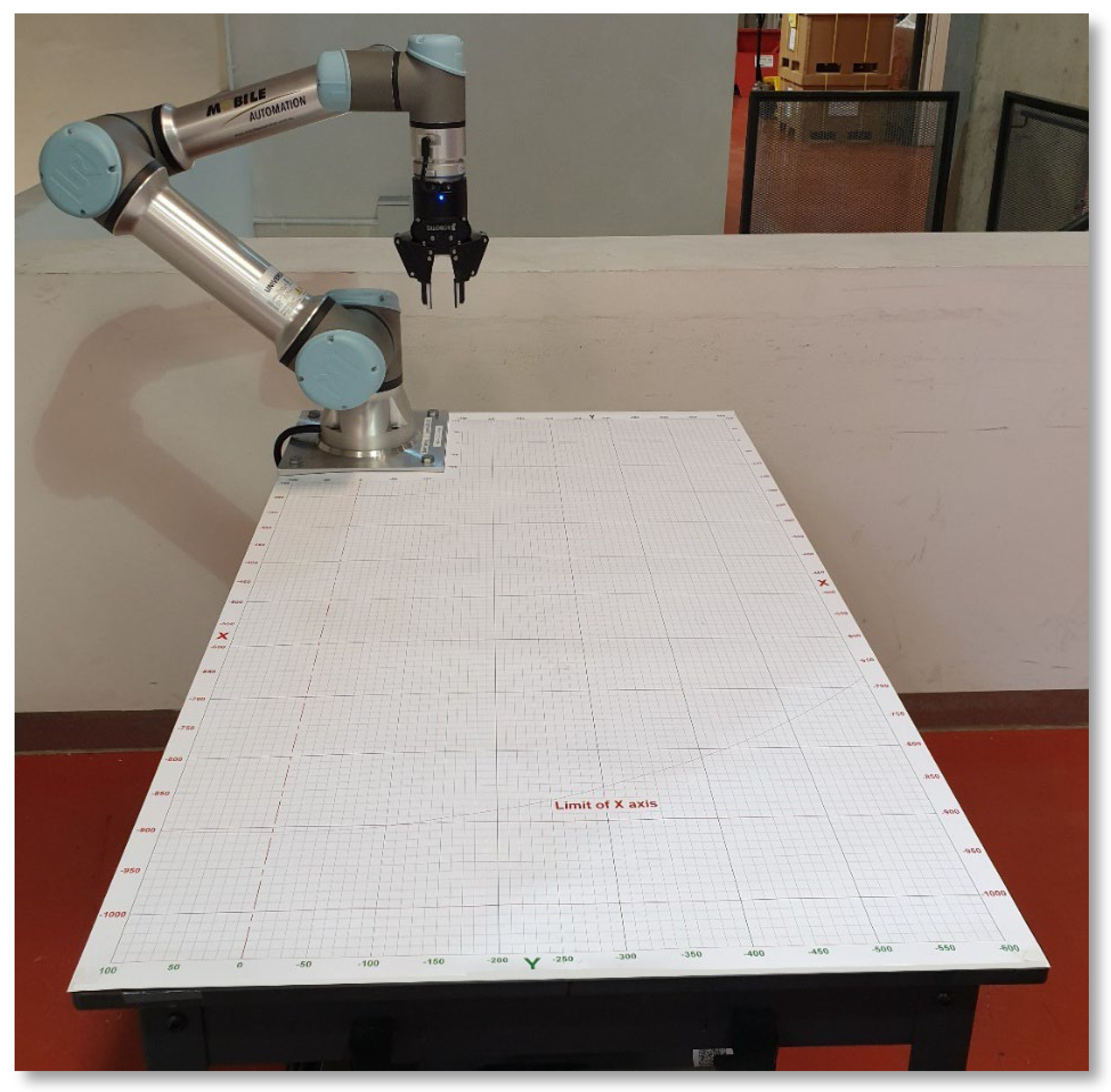
Cartesian coordinate reference gridCustom benchtop Cartesian coordinate grid mat, printed on 135 gsm paper with a durable matte polypropylene film. Spans from 100 to −600 across the x axis and 100 to −1050 along the y axis. The base at which the cobot is mounted is positioned at (0, 0, 0) (refer to Figure 19).Object placement and visual position validation
ActiveFiducial markersArUco markers were adopted due to their robust image definition and high detection accuracy. Markers were sized at 70 mm square, printed on 250 gsm sheet, and mounted on 1.5 mm card stock for rigidity. A stiffener modification was later applied to the markers to mitigate against distortion, as described in Section 3.3.1.Provides visual location and orientation perspective
Camera systemA standard USB webcam (detailed in Section 2.2.2), integrated into the localisation scanner and connected to the microprocessor via a USB-A cable.Video capture of markers
MicroprocessorRaspberry Pi 4 2 GB single board computer (see Section 2.2.3).Computation
Localisation scannerScanner body: A 3D printed tool with 18 mm handle and mounting points for the webcam PCB, data control switch, and a circular spirit level (see Section 2.2.1).Pose simulation apparatus
Data control switch: A momentary switch connected to the localisation scanner shaft, wired to GPIO terminals on the Raspberry Pi. The current localisation data is captured when the switch is pressed and transferred to UR5e controller on release.Initiates data transfer from Vision program to UR5e cobot
Software Interface: Executable programs are used to interact between a user, the peripherals, and the cobot hardware. Python is used to interact with the ArUco markers, process the camera feed and validate the cobot’s pose in real time. The collected data is relayed back to the cobot once the data control switch has been released.Interface between user and hardware for test trials
Figure 18. Universal Robot UR5e has 6 DoF, with a reach of 850 mm.
Machines 14 00201 g018
Figure 19. UR5e collaborative workspace with benchtop Cartesian coordinate grid mat.
Machines 14 00201 g019

3.1. Experimental Validation

A series of practical experiments were conducted to validate the functionality and evaluate the accuracy, repeatability and reliability of the proposed visual marker-based localisation system. The objective of the experiments was to collect quantifiable data on the system’s performance, in particular, the system’s ability to accurately estimate target coordinates within the cobot workspace and effectively communicate those coordinates to the cobot. To provide a visual perspective of pose coordinates, the UR5e workbench was covered with a custom Cartesian coordinate reference grid, as detailed in Table 2 and shown in Figure 19.

3.2. Experimental Setup

Following the procedure described in Section 2.1, the experiments were conducted using the hardware components listed in Section 2.2, including the PLS, with integrated camera and data control switch, a Raspberry Pi 4, ArUco markers, and a workbench-mounted UR5e cobot. Table 2 divides the components into element types, according to their dispensability within the design. The experimental setup steps were as follows:
  • A camera calibration was conducted, as described in Section 2.4.4, and the resulting camera calibration matrix and distortion coefficient files were then referenced from the ArUco Pose Estimation (control) program. The calibration process typically occurs only once, when a new camera is initialised in the system;
  • To provide a visual localisation reference, the UR5e benchtop was covered with a Cartesian grid mat, described in Table 2 and shown in Figure 19 and was specifically designed to represent the (x, y) coordinates (with the surface of the benchtop being the Z = 0 reference), at any reachable point on the benchtop;
  • The PLS, as shown in Figure 4, which contains a PCB-mounted webcam and data control switch, was connected to the Raspberry Pi via USB 2.0 port for the camera and via GPIO pins for the data control switch;
  • ArUco markers were generated using a dedicated program, printed, mounted, and strategically placed in precise locations around the perimeter of the UR5e workspace. From any point within the cobot’s operational range, at least one marker was within the camera’s Field of View (FoV). Following a manual adjustment of the markers’ positions and alignments, each marker ID was assigned a known coordinate location and offset, with respect to the location of the camera in the PLS, as described in Section 2.4.5. ArUco markers were precisely positioned at *GRID coordinates XwGRID, YwGRID, and ZwGRID, as shown in Table 3. To compensate for the discrepancies between the Cartesian plane on the printed grid and the world coordinate frame of the UR5e, ground truth coordinates were calculated, and these are listed as *COBOT coordinates XwCOBOT, YwCOBOT and ZwCOBOT in Table 3. Therefore, if the grid is used as a localisation reference, the markers would be located at the *GRID coordinates, and without the grid, the markers would be located at the *COBOT coordinates.
  • The z-axis values in Table 3 are designated as zero, since the positioned ArUco markers were raised so that the marker centreline and camera sensor centre point aligned, with the scanner positioned on the surface of the workbench.
  • With the software program loaded onto the Raspberry Pi, it was connected to the UR5e controller via a CAT5 Ethernet cable, as shown in Figure 2. The UR5e was then started, along with the control program on the Raspberry Pi.

3.2.1. Determining Ground Truth

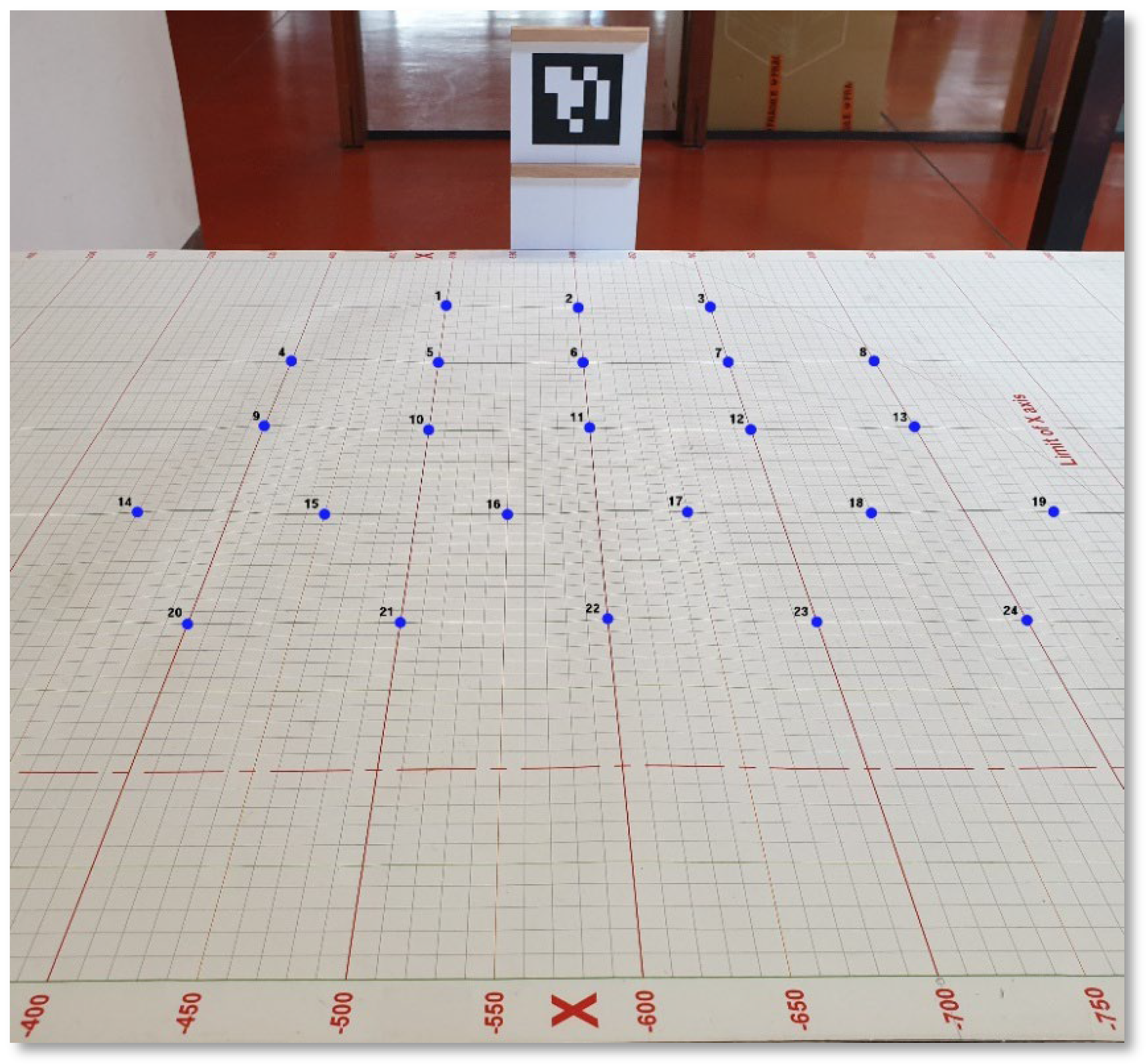
A group of 25 locations within the UR5e workspace were selected, representative of target pick points, relative to fixed ArUco marker positions. These points, shown in Figure 20, range in distance and orientation from the marker, with the (x, y) coordinates at each location listed under POSETGT in Table 4. On the level cobot workbench used during testing, the z-axis values were sufficiently consistent that it was not deemed necessary to include z-axis coordinates during testing (although a z-axis offset was included for the TCP pointer described in Section 3.2.2). For testing purposes, the printed Cartesian grid mat was used both as a convenient localisation reference and as the Ground Truth baseline. For pose estimations independent of the grid mat, adjusted marker placement coordinates were established and are listed in Table 3. To determine the positional accuracy of the system, each (POSEVISION) coordinate set calculated by the vision system was compared to the corresponding (POSETGT) coordinate set, being the ground truth coordinates. Ground truth coordinates for the UR5e cobot (POSECGT) were also established, but these were only used to measure the differences between the actual cobot tool position and the relative coordinate point on the Cartesian coordinate grid mat, which was used as an easy reference for the positioning of the PLS and TCP pointer. While the printed grid mat was deemed sufficiently accurate for this study, a new grid mat could be more closely mapped to the cobot’s coordinate system to reduce alignment errors. In the absence of the grid mat, however, the ArUco markers can be positioned with reference to the cobot’s coordinate system, rather than that of the grid mat, which would alleviate the need to convert coordinate values before transferring the data to the cobot controller.

3.2.2. Measurement Procedure

The PLS was manually positioned at each target point, as steadily as possible, with the tool’s base centred on one of the (x, y) coordinate points shown in Figure 20. Figure 21 shows a representation of the Pick-and-Place operation within the current test environment. With a marker in the camera’s FoV, images of the marker were automatically captured and processed by the control program. When the data control switch was pressed, following a 5 s capture interval (refer to Section 3.3.1), the current coordinate frame parameters (POSEVISION) were captured and sent to the control program.
Then, trigonometric calculations were performed, relative to the detected marker, resulting in formatted WCF coordinates. Upon release of the switch, the WCF pose coordinates, along with a delayed execution order, were transferred to the UR5e controller via an established TCP/IP socket connection. Following a 10 s workspace clearance delay, the cobot moved to the TCP pose, calculated by the UR5e controller, using inverse kinematics. This complete procedure, with a combined system delay of 15 s, represents one control program cycle.
Figure 21. Representation of a ‘Pick-and-Place’ configuration.
Machines 14 00201 g021
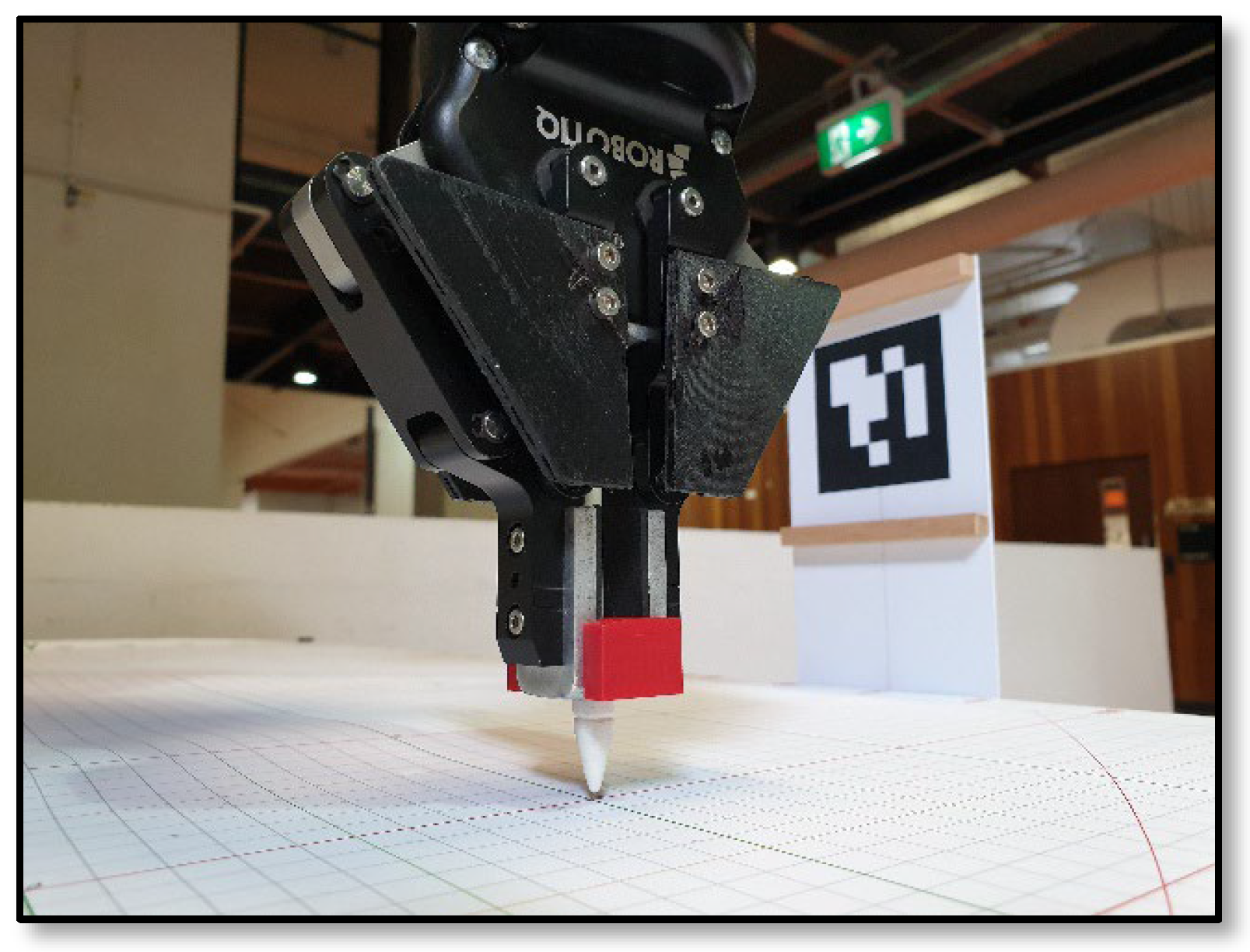
While the system was primarily designed for a Pick-and-Place application, merely testing the cobot’s ability to pick an object, without a scaled assessment, may be considered a rudimentary exercise. Moreover, testing based on a single Pick-and-Place operation may limit the system’s appeal to those with a vested interest in the same type of operation, picking similar objects. In contrast, sending the end-effector to a pose-estimate-generated location, where the TCP could be accurately measured, has much greater analytical potential and broadens the potential to a wider audience. To provide a more precise visual reference of the end position of the cobot’s end-effector, a TCP pointer attachment was designed and fitted to the UR5e’s 2-fingered gripper, as shown in Figure 22. As the pointer protrudes 20 mm below the base of the tool, 22 mm (allowing for clearance from the surface of the workbench) was automatically added in the control program to the z-axis value captured by the PLS. The relative precision provided by the TCP pointer, however, must be considered in conjunction with other system variables, which may be difficult to control.
The positional errors were calculated by comparing the expected coordinates for a specific target point to the coordinates returned by the visual system. For each target pick point, there were numerous variables (as described in Section 3.3.1), which may impact the overall accuracy, including the amount of precision used by a human to hold the PLS at the intended target point. As such, the collected data provides a snapshot of each point, repeated ten times, to establish a physical world trend, rather than a measure of absolute precision.
While the UR5e has a reported TCP positional tolerance of ±0.03 mm, human tolerance is considerably larger and varies between individuals. Hence, the accuracy of the cobot is less significant than the overall accuracy in the physical world, where compensations can be made, such as widening gripper widths prior to picking an object.
Figure 22. TCP pointer.
Machines 14 00201 g022

3.3. Evaluation Method

With the PLS positioned at the locations shown in Figure 20, the coordinates of the TCP pose (POSECOBOT) achieved after each execution of the control program cycle were recorded. 10 repetitions were conducted at each of the 24 locations, for a total of 240 recorded iterations. Due to the proximity of the target points shown in Figure 20, ArUco marker ID 4, also shown in the image, became the primary marker used in the test trials.

3.3.1. Accuracy

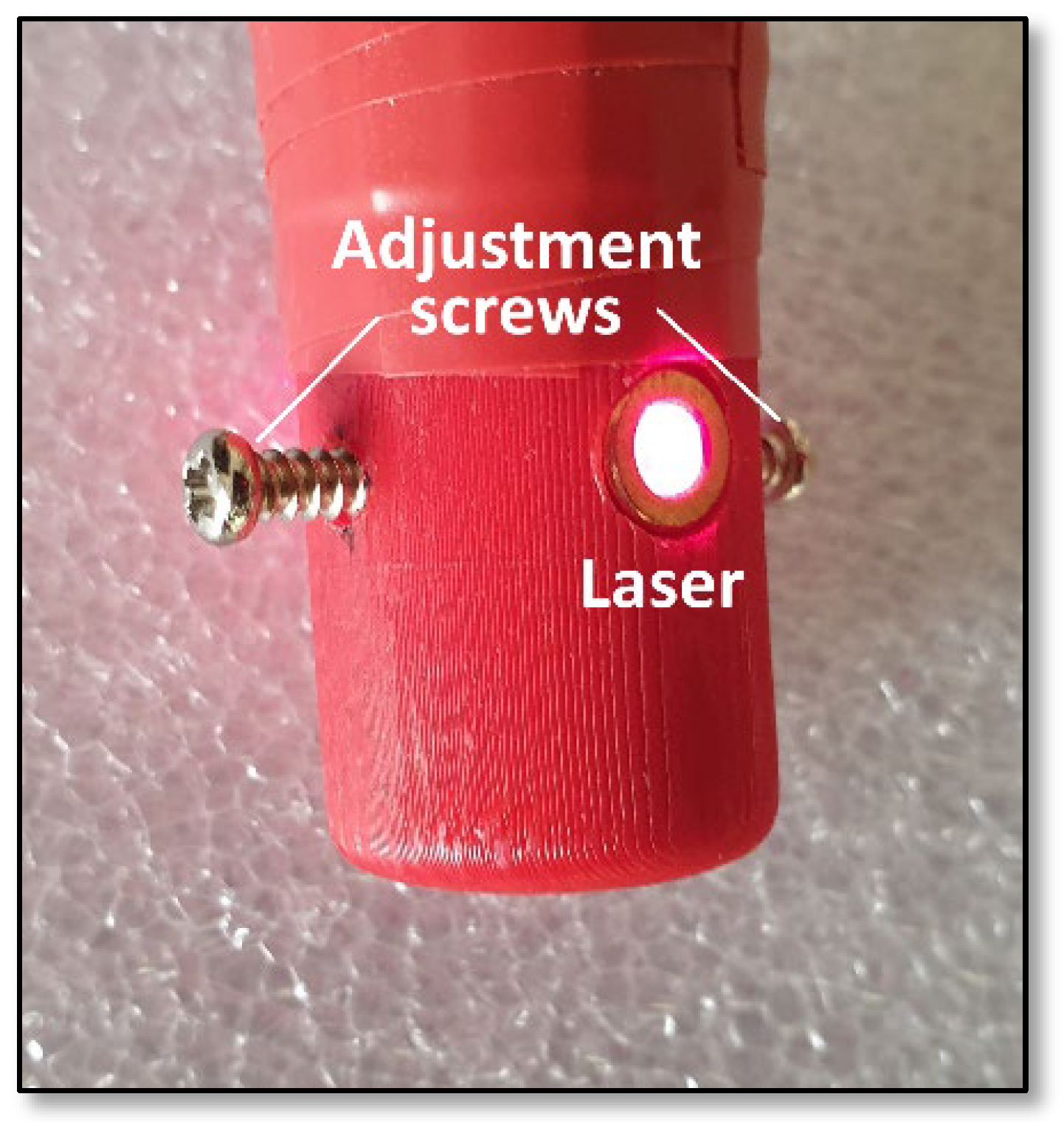
Many variables exist in the vision system, which can have a bearing on the accuracy of the pose estimations. These include the quality and frame rate of the camera (a constraint of this low-cost system), errors in camera calibration, signal noise, lighting level, marker size, print resolution, distortion and positioning, errors in marker detection, human hand steadiness, and accurate positioning of the PLS, image entropy, background distractions, and errors in robot kinematics. Each frame captured during a single pose estimation can be interpreted differently, producing a range of dissimilar results, which may be filtered to remove some erroneous data. Test trials conducted during this study revealed that the rotational angle between the camera and marker can greatly influence the accuracy of pose estimations. Distance estimations are optimised when markers are perpendicular to the camera image sensor [82]. To improve the alignment between the camera’s image sensor and the marker during the capture process, a small adjustable laser was retrofitted to the base of the PLS, as shown in Figure 23. In this way, a marked centreline on the face of the marker formed a guide for the laser, which was calibrated via a set of adjustment screws.
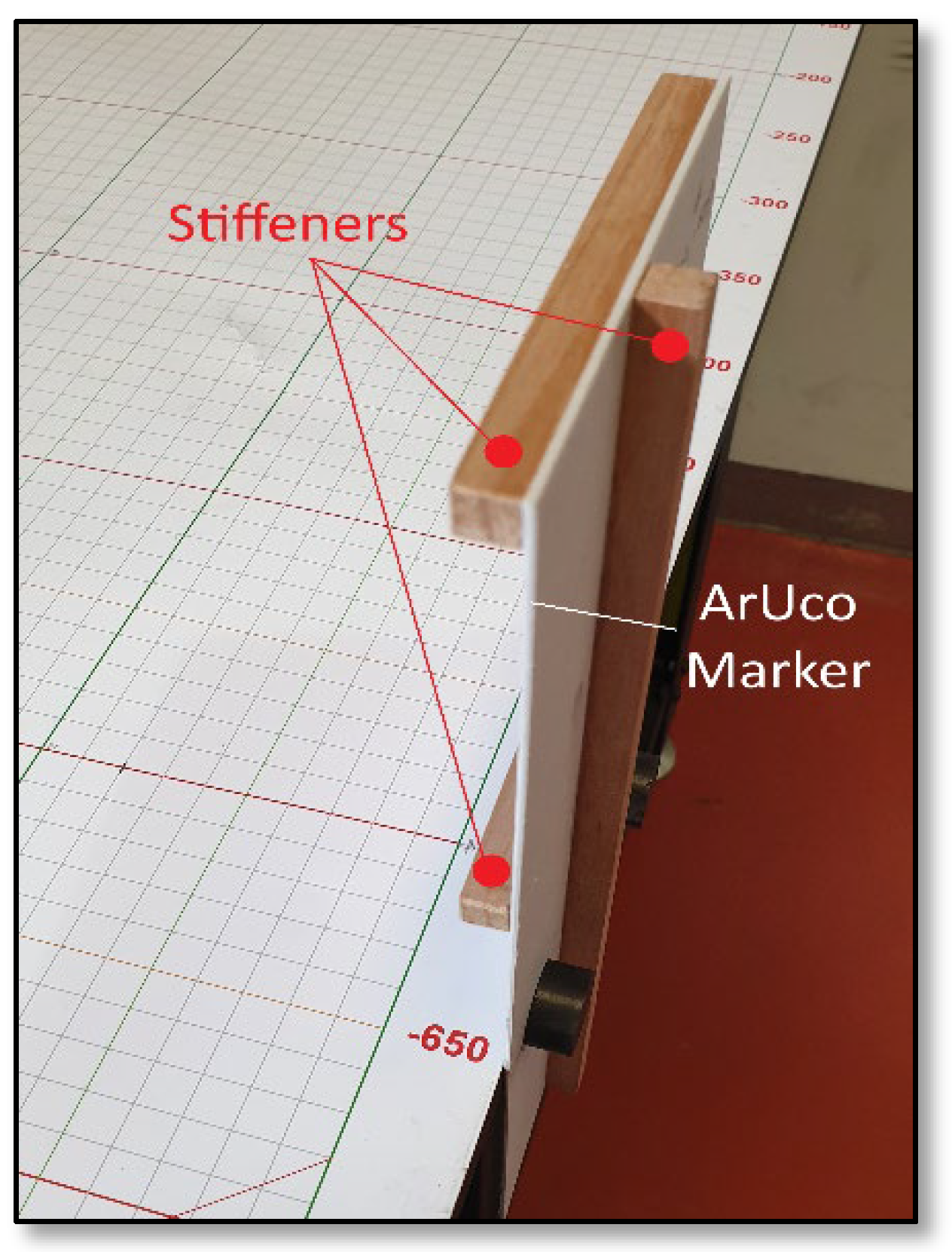
To reduce the chance of inaccurate pose estimation calculations due to marker distortion, the ArUco marker backing boards were fortified with vertical and horizontal stiffeners (see Figure 24) to improve their rigidity. As the cv2.solvePnP() function returns translation and rotation vector values during pose estimations, variations typically occur in the values for consecutive estimations. To mitigate the effect of these variations and to avoid the reliance on a single value, 30 iterations were inserted into dedicated Simple Moving Averages (SMA) arrays for each pose. The mean rate for a single frame capture and pose estimate was found to be 0.1576 s, equating to a time of 4.7277 s (rounded to 5 s) to fill the array. Once an array of size 30 was filled, a moving window was used to average the first portion of the array, before incrementing through the remainder. This was used to find the central tendency or trend of the vector values, for a better representation in the statistical distribution. The SMA Equation (10) is as follows:
S M A k = 1 k i = n k + 1 n P i
where:
  • n = total number of values in array;
  • k = window size;
  • Pi = single captured (ith) element (with a range of 0–29) of the vector value.
Figure 24. ArUco marker stiffeners.
Machines 14 00201 g024
While the SMA process improved the pose estimate accuracy, the arrays still contained inaccurate data, which biased the resulting mean. A filtering method was included to remove outliers within a higher and lower range, leaving a smaller and more accurate central data array. Incorporating the Interquartile Range (IQR) method, the data captured in each array was divided into four equal parts, called quartiles. The first quartile (Q1) separates the lowest 25% of the data, while the third quartile (Q3) separates the highest 25%, leaving the second quartile (Q2) containing the remaining median values. The IQR was then calculated as the difference between Q1 and Q3 as shown in Equation (11). Values below IQR × (Q1 − 1.5) or above IQR × (Q3 + 1.5) were considered outliers and discarded. Finally, the means of the IRQ for the x and y coordinates were calculated and used for the final pose estimation localisation values. No measurable increase in processing time was observed as a result of including the IQR calculation. The 5 s processing delay was therefore maintained.
I Q R = Q 3 Q 1
To compare the two-dimensional distance between x and y coordinates, the Euclidean distance can be calculated using the ED Equation (12):
E D x y i   =   x 2 i x 1 i 2 + y 2 i y 1 i 2
While the distance between the x and y coordinates is not a relevant method of assessing the accuracy of the system, calculating the distance error between those coordinates for consecutive pose estimates with the same target does provide a meaningful comparison. It shows how closely coupled the coordinates remain through consecutive test runs. To measure the accuracy error, for each iteration i, the Euclidean distance between the (POSEVISION) and (POSETGT) coordinates was calculated using the following Equation (13) for the x and y coordinates, respectively:
ED x y i   =   x P O S E V I S I O N i x P O S E T G T i 2 + y P O S E V I S I O N i y P O S E T G T i 2
In accordance with key Pick-and-Place requirements, the central focus was positional accuracy. Orientation errors, however, were also recorded from cobot kinematic rotation outputs, as deviations from the expected orthogonal coordinates. Overall system accuracy was assessed by calculating the mean and standard deviation (σ) of all pose coordinate relative errors.

3.3.2. Repeatability

The consistency of the system was evaluated in terms of repeatability, by comparing the similarity of the results between repetitions at the same target point. For the vision system, the PLS was manually returned to the same position for each control program cycle, over ten repetitions, with the aim of maintaining positional accuracy as much as possible. The repeatability of the vision system was determined by calculating the standard deviation (14) across all pose coordinate estimations (POSEVISION). Overall system repeatability was assessed by calculating the standard deviation across the same pose coordinates, over the ten repetitions. The consistency of the whole system is therefore measured, with (POSEVISION) compared to the ground truth provided by the fixed grid locations (POSETGT). The values calculated for standard deviation ( σ ) were used to gauge the repeatability of the system, with small σ values indicating a highly repeatable system.
σ = ( X X ¯ ) 2 n 1

3.3.3. Reliability

The reliability of the system, in quantitative terms, was assessed based on performance consistency and validity, primarily based on the accuracy and repeatability results, but also by evaluating robust functionality. The latter includes system connectivity and communication validation and the verification of correct program sequencing. System reliability was also measured using standard deviation and mean pose estimate values (µ). A low σ value indicates highly reliable behaviour, with a high value pointing to an unreliable system. A reliability score can be represented as a percentage of variation with the Coefficient of Variation (CV) Equation (15). The lower the CV, the less variation in the measurements and the more consistent and reliable the system. A CV of <10% indicates low variation and high reliability in systems that require high precision [82].
C V = σ μ × 100 %

4. Results

The analysis of the experiment results has produced quantitative data regarding the accuracy, repeatability, and reliability of the proposed vision system. Table 4 contains a summary record of the conducted control program cycles.

Analysis of Results

The categories of the data collected during the control program test trials, as summarised in Table 4, are explained in Table 5. Figure 25 shows the mean error of pose estimations (in millimetres) over all 24 target points, while Figure 26 shows the standard deviation between them. In these two figures, the x coordinates are shown in red, with the y coordinates shown in green, which follows the coordinate frame convention.
From the 240 data points tested, the system was evaluated based on localisation accuracy, pose estimate repeatability and system reliability. The following is a summary analysis of those principle elements.
  • Pose Estimation Error 
The total mean absolute errors of 3.07 mm and 3.22 mm for the x and y coordinate pose estimates, respectively, mean that the system could sustain a mean tolerance of merely ±5 mm, allowing for upper and lower bounds in the pose estimates. The mean errors over the 24 target points, captured in Figure 25, show one y coordinate value just outside that range, at target point 2. The relative error ranges for all x coordinate pose estimations are shown in Figure 27, and, for the y coordinates, in Figure 28. These figures contain box plots which represent the interquartile range of the ten tests for each of the 24 target points tested. The median value is shown as a horizontal line at the narrow point of the coloured box, which indicates the 25th percentile of the values at the coloured base and the 75th percentile at the top. The vertical black lines extending from the boxes indicate the highest and lowest data point that is not an outlier. Any outliers are shown as points, the same colour as the boxes. The relative error scale appears along the y-axis on the left, with the target points along the x-axis.
Since the PLS is a handheld device, pose estimates within 10 mm of a target object may be considered close to the control limits of a human hand. Moreover, most Pick-and-Place operations do not typically require extreme precision. In any case, a gripping end-effector would typically be set with an ‘open’ setting greater than 10 mm larger than the object to be picked.
2.
Repeatability results 
The mean standard deviations of 1.78 and 1.74 across the x-axis and y-axis pose estimations, respectively, indicate an extremely high repeatability potential. The mean standard deviations over the 24 target points are shown in Figure 26, and these are confined to a low and consistent range between 0.5 and 3.0. A mean Euclidean distance comparative error of only 4.884 mm over 240 data points also confirms the positive repeatability capacity of the system.
3.
Reliability results 
Aiming for consistency in system performance, pose estimate variance was used as a measurement of reliability. Ideally, a CV level below 10% would indicate a minimal variation in the standard deviation with respect to the mean relative error recorded. With a mean CV of 0.58%, this system achieves an extremely high reliability level.

5. Discussion

Designed for novice operators, this system requires no previous robotics experience and dispenses with the need for complex programming languages, teaching pendants, or physically positioning a cobot. We believe this research will contribute to a greater utilisation of cobots in industry, as they will be easier to operate and the control process will be more intuitive and immersive for the operator, since they will not be overwhelmed by technical complexity. Novice operators could be empowered as they find they are able to control the cobot accurately, without technical training and without the need to teach the cobot with cumbersome hand-guiding. This would help to bridge the skills gap between an operator and a skilled programmer, who often need to be contracted in to program the cobot initially, and to perform ongoing program modifications as required. An automated system that lowers the technical barrier may enable the worker who is most familiar with the operational aspects of a task to control the cobot themselves. This outcome would lower business costs and reduce problems such as the exchange of misinformation between the operator and programmer, since neither typically has an intimate knowledge of the other’s needs. They may even have their own preconceived notions about the direction the process should take, which could generate conflict and cause time delays. In a typical cobot programming paradigm, production is put on hold while a programmer is booked, the cobot task is relayed to the contractor, programming commences, and the program is tested and modified if necessary, before production can continue. With the proposed design, the worker who knows the job best can control the cobot on the fly, to suit their immediate requirements, without stopping the production line. By integrating a fiducial marker system for cobot pose estimation, there is a potential to improve:
  • The ease of use for the novice operator;
  • Operator engagement and job satisfaction;
  • The cobot’s operational efficiency and reliability;
  • Human safety, with easy operation and higher precision;
  • The appeal of cobots to a broader range of potential adopters, without technical hurdles;
  • The downtime and costs for operator training;
  • The costs and scheduling associated with contracting programming experts.
Despite an exceptionally modest budget, this system has achieved a very high and consistent accuracy rate, with an overall mean absolute localisation error of 3.14 mm. The system has a high repeatability potential, with a combined mean standard deviation of 1.76 over the 240 data points tested. While Figure 27 and Figure 28 show some variation between the estimated poses over all tested target points, the overall error range is minimal. The simplicity of design, cost-effectiveness and ease of scalability combine to form a robust, practical and feasible solution. This is especially true when compared to expensive and complex proprietary vision systems. The lack of prerequisite training or instruction suggests the system would be ideal for novice users who have no prior robotics experience. Program customisation options allow the system to be tailored to specific Pick-and-Place applications.

5.1. Limitations

To minimise the cost of the system, hardware components were selected with an emphasis on value-based functionality and simplicity of design. Such concessions, while not severely restricting the overall functionality and design integrity, have imposed some limitations on the system. These include the following:
1.
Camera: The webcam used was an inexpensive 1080p camera with basic optics and a USB 2.0 interface. The quality of the image sensor and lens, along with a relatively low data transfer rate, may have compromised system performance to some degree.
2.
Lighting: To minimise costs, no dedicated artificial light was used during testing. Instead, both natural light and standard internal lighting were used to illuminate the ArUco markers, for presentation to the vision system.
3.
Computation: The Raspberry Pi 4 used in the testing of this system contained a 1.5 GHz quad-core ARM Cortex-A72 CPU with 2 GB of RAM. In contrast, Raspberry Pi 5 units are available with 2.4 GHz quad-core Cortex-A76 CPU and 16 GB of RAM for much faster processing of video and program instructions. Such a processing upgrade should reduce the video capture delay, along with the time the PLS must be presented to the marker.
4.
ArUco Makers: If markers are not accurately located and aligned, or if they are distorted in any way, the pose estimation process may be affected. Despite fortifying the ArUco markers with stiffening supports, some minor distortion may have occurred. Substandard printing or marker coatings may also cause performance issues.
5.
PLS: The precision with which a user locates the scanner and the steadiness with which it is held will vary between individuals. This can influence the accuracy and picking capacity of the cobot.
6.
Operations: The system was designed for simple Pick-and-Place operations, and, although further functionality may be possible, most complex operations are likely to be beyond the scope of the system.

5.2. Future Work

Although the performance of the tested system was at a relatively high level, some hardware upgrades could further improve the pose estimate accuracy and system reliability. These include the most vital component in the system—the camera. A high-quality camera with a premium image sensor and a precision lens with low distortion characteristics could improve the marker detection rate, pose estimation accuracy, low light functionality, video capture speed, and angular range with a wider, less distorted field of view. Suitable non-glare lighting could provide visual consistency for the camera throughout the day. It is likely that a higher specification compact computer with a faster microprocessor and more system memory would accelerate the processing times for the system, while reducing capture times for the user. A dedicated fiducial marker holder could improve the accuracy of marker placement and reduce distortion. High-quality printing and professional mounting may improve marker readability. Finally, a redesign of the PLS could make it more tactile and easier for a user to manipulate and more accurate in its image-capturing capability. User test trials will be conducted in the near future, to further calculate the quantitative (accuracy, repeatability and reliability) aspects, along with user-specific qualitative (ergonomics, usability and functionality) elements.

6. Conclusions

Comprising a low-specification Raspberry Pi, a basic webcam, and a simple 3D-printed scanner, this inexpensive system is a robust and reliable vision-based tool. It is designed to assist a novice, with no robotics or programming experience, to perform simple Pick-and-Place tasks with a cobot. With the PLS having a simple point-and-press operation, no prior formal training or complex instruction is required.
The system can quickly estimate the pose of a simple hand-held scanner with a high degree of precision and can relay the localisation coordinates to a UR5e cobot controller, over a secure Ethernet connection, in real time. It is highly scalable at minimal cost, and the control program can be easily customised to accommodate a variety of applications.
Existing visual control solutions often require a complex setup and are typically assigned to a single cobot, and the systems are expensive, often more than half the purchase price of a UR5e cobot. In contrast, the proposed system requires minimal configuration, with a single system capable of supporting multiple cobots; it is also easily scalable within individual environments and has a hardware cost around 0.3% the cost of a UR5e cobot.
Operational simplicity, a lack of prerequisite training, cost efficiency, scalability, customisation capability, and functional accuracy are aspects of the system that have the potential to remove the barriers to cobot adoption and make their use more attractive to novice users.

Author Contributions

Conceptualisation, P.G. and C.-T.C.; methodology, P.G.; software, P.G.; validation, P.G.; formal analysis, P.G.; investigation, P.G.; resources, C.-T.C. and T.Y.P.; data curation, P.G.; writing—original draft preparation, P.G. and C.-T.C.; writing—review and editing P.G., C.-T.C. and T.Y.P.; visualisation, P.G.; supervision, C.-T.C. and T.Y.P.; project administration, C.-T.C. and T.Y.P.; funding acquisition, C.-T.C. and T.Y.P. All authors have read and agreed to the published version of the manuscript.

Funding

This research received no external funding.

Institutional Review Board Statement

Not applicable.

Informed Consent Statement

Not applicable.

Data Availability Statement

A summary of the data presented in this study is included in the article. Further enquiries can be directed to the corresponding author.

Acknowledgments

We would like to acknowledge the support of RMIT University for providing the resources and facilities to conduct this research.

Conflicts of Interest

The authors declare no conflicts of interest.

Appendix A. Terminology

  • Robot Components and Anatomy 
  • Actuator: A mechanism (motor, hydraulic cylinder, etc.) that converts energy into motion to move the robot’s joints.
  • End-Effector: A tool or device attached to the robot’s wrist that interacts with the environment (e.g., gripper, welding torch, and spray gun).
  • Joint: Sections of a robot’s arm that allow for movement or rotation, similar to a human joint.
  • Link: The rigid parts of a robot manipulator connecting the joints.
  • Manipulator: The mechanical system of links and joints designed to move and position the end-effector (typically refers to a robot).
  • Payload: The maximum weight a robot’s wrist can lift, typically measured in kilograms.
  • Pose: Description of a robot’s joint configuration in terms of position and end-effector rotation.
  • Sensor: Devices used to perceive the internal state (joint position, velocity) or external environment (distance, force, vision) to provide feedback to the control system.
  • Workspace: The total volume of space within which a robot can operate, determined by its physical design and joint limits.
  • Motion and Control 
  • Degrees of Freedom (DoF): The number of independent movements a robot can perform, typically corresponding to the number of joints or axes.
  • Dynamics: The study of forces and torques that cause motion in a robot system, considering mass and inertia.
  • Forward Kinematics: Calculating the end-effector’s position and orientation based on the given joint angles.
  • Inverse Kinematics: Determining the required joint angles to achieve a desired end-effector position and orientation in space.
  • Path Planning: The process of determining a collision-free route for a robot to follow from a starting point to a goal.
  • Repeatability: The robot’s ability to consistently return to the exact same position over multiple cycles.
  • Singularity: A configuration where a robot loses one or more degrees of freedom, potentially leading to instability or movement paralysis due to infinite joint possibilities.
  • Trajectory: The specific path that a robot’s end-effector follows, often optimised for smoothness or speed.
  • Coordinate Systems and Interaction 
  • Frame: A coordinate system used to define positions and orientations in space (e.g., base frame, tool frame and world frame).
  • Human–Robot Interaction (HRI): The study and design of systems where humans and robots work in proximity or collaboration.
  • Localisation: A robot’s pose position and orientation within the frame of reference
  • Position Vector: A mathematical representation defining a location in space relative to a reference frame.
  • Tool Centre Point (TCP): The origin of the coordinate system at the end of the end-effector, the central point between a gripper’s contact surfaces, for example.

References

  1. Doyle-Kent, M.; Kopacek, P. Industry 5.0: Is the manufacturing industry on the cusp of a new revolution? In International Conference on Production Research; Springer International Publishing: Cham, Switzerland, 2019; pp. 432–441. [Google Scholar]
  2. Peshkin, M.; Colgate, J.E. Cobots. Ind. Robot. Int. J. 1999, 26, 335–341. [Google Scholar] [CrossRef]
  3. Karaulova, T.; Andronnikov, K.; Mahmood, K.; Shevtshenko, E. Lean automation for low-volume manufacturing environment. In Proceedings of the 30th Annals of DAAAM and Proceedings, DAAAM International, Vienna, Austria, 23–26 October 2019; pp. 59–68. [Google Scholar]
  4. George, A.S.; George, A.H. The cobot chronicles: Evaluating the emergence, evolution, and impact of collaborative robots in next-generation manufacturing. Partn. Univers. Int. Res. J. 2023, 2, 89–116. [Google Scholar]
  5. Castillo, J.F.; Ortiz, J.H.; Velásquez, M.F.D.; Saavedra, D.F. COBOTS in industry 4.0: Safe and efficient interaction. In Collaborative and Humanoid Robots; IntechOpen: London, UK, 2021. [Google Scholar]
  6. Pizoń, J.; Gola, A. Vertical Integration Principles in the Age of the Industry 5.0 and Mass Personalization. In International Conference on Intelligent Systems in Production Engineering and Maintenance; Springer Nature Switzerland: Cham, Switzerland, 2023; pp. 332–345. [Google Scholar]
  7. Di Battista, A.; Grayling, S.; Hasselaar, E.; Leopold, T.; Li, R.; Rayner, M.; Zahidi, S. Future of jobs report 2023. In World Economic Forum; World Economic Forum: Geneva, Switzerland, 2023; pp. 978–982. [Google Scholar]
  8. Sikha, H. Collaborative Robot Market. Global Opportunity Analysis & Industry Forecast, 2024–2030. Next Move Strategy Consulting. 2025. Available online: https://www.nextmsc.com/report/collaborative-robot-market (accessed on 15 December 2025).
  9. Jennes, P.; Di Minin, A. Cobots in SMEs: Implementation Processes, Challenges, and Success Factors. In Proceedings of the 2023 IEEE International Conference on Technology and Entrepreneurship (ICTE), Kaunas, Lithuania, 9–11 October 2023; IEEE: New York, NY, USA, 2023; pp. 80–85. [Google Scholar]
  10. Simões, A.C.; Lucas Soares, A.; Barros, A.C. Drivers impacting cobots adoption in manufacturing context: A qualitative study. In Advances in Manufacturing II: Volume 1-Solutions for Industry 4.0; Springer International Publishing: Cham, Switzerland, 2019; pp. 203–212. [Google Scholar]
  11. El Zaatari, S.; Marei, M.; Li, W.; Usman, Z. Cobot programming for collaborative industrial tasks: An overview. Robot. Auton. Syst. 2019, 116, 162–180. [Google Scholar] [CrossRef]
  12. George, P.; Cheng, C.T.; Pang, T.Y.; Neville, K. Task complexity and the skills dilemma in the programming and control of collaborative robots for manufacturing. Appl. Sci. 2023, 13, 4635. [Google Scholar] [CrossRef]
  13. Emeric, C.; Geoffroy, D.; Paul-Eric, D. Development of a new robotic programming support system for operators. Procedia Manuf. 2020, 51, 73–80. [Google Scholar] [CrossRef]
  14. Van de Perre, G.; El Makrini, I.; Van Acker, B.B.; Saldien, J.; Vergara, C.; Pintelon, L.; Vanderborght, B. Improving productivity and worker conditions in assembly: Part 1-A collaborative architecture and task allocation. In Proceedings of the 2018 IEEE/RSJ International Conference on Intelligent Robots and Systems, IROS 2018: Towards a Robotic Society, Madrid, Spain, 1–5 October 2018. [Google Scholar]
  15. Develop with URScript. Available online: https://www.universal-robots.com/developer/urscript (accessed on 22 October 2025).
  16. ABB Robotics, Technical Reference Manual, RAPID Instructions, Functions and Data Types. Available online: https://search.abb.com/library/Download.aspx?DocumentID=3HAC050917-001 (accessed on 17 October 2025).
  17. FANUC Robotics SYSTEM. Available online: https://icdn.tradew.com/file/201606/1569362/pdf/7066348.pdf (accessed on 15 November 2025).
  18. Kuka. Application and Robot Programming. Available online: https://www.kuka.com/en-au/services/service_robots-and-machines/installation-start-up-and-programming-of-robots/application-and-robot-programming (accessed on 16 October 2025).
  19. RoboDK Basic Guide. Available online: https://robodk.com/doc/en/Basic-Guide.html (accessed on 4 November 2025).
  20. ArtiMinds Robotics. Available online: https://www.universal-robots.com/media/1226149/artiminds-software-produktflyer_ur-en-01.pdf (accessed on 18 October 2025).
  21. Robomaster Offline Programming Software for Robots. Available online: https://www.robotmaster.com/en (accessed on 6 November 2025).
  22. PolyScope X. Available online: https://www.universal-robots.com/products/polyscope-x (accessed on 15 October 2025).
  23. Wizard Easy Programming. Available online: https://new.abb.com/products/robotics/application-software/wizard (accessed on 15 October 2025).
  24. Collaborative Robots 101: Cobots and What You Need to Know. Available online: https://crx.fanucamerica.com/why-cobots-collaborative-robots/ (accessed on 15 November 2025).
  25. iiQKA: Robots for the People. Available online: https://www.kuka.com/en-au/future-production/iiqka-robots-for-the-people (accessed on 16 October 2025).
  26. Dong, J.; Kwon, W.; Kang, D.; Nam, S.W. A Study on the Usability Evaluation of Teaching Pendant for Manipulator of Collaborative Robot. In Proceedings of the International Conference on Human-Computer Interaction, Virtual, 24–29 July 2021; Springer International Publishing: Cham, Switzerland, 2021; pp. 234–238. [Google Scholar]
  27. Biswas, J.; Veloso, M. Depth camera based indoor mobile robot localization and navigation. In Proceedings of the 2012 IEEE International Conference on Robotics and Automation, Saint Paul, MN, USA, 14–18 May 2012; IEEE: New York, NY, USA, 2012; pp. 1697–1702. [Google Scholar]
  28. Francis, S.L.X.; Anavatti, S.G.; Garratt, M.; Shim, H. A ToF-camera as a 3D vision sensor for autonomous mobile robotics. Int. J. Adv. Robot. Syst. 2015, 12, 156. [Google Scholar] [CrossRef]
  29. OpenCV. Open Source Computer Vision. Available online: https://docs.opencv.org/4.x/d1/dfb/intro.html (accessed on 10 April 2025).
  30. Mantha, B.R.K.; de Soto, B.G. Designing a reliable fiducial marker network for autonomous indoor robot navigation. In Proceedings of the 36th International Symposium on Automation and Robotics in Construction (ISARC), Banff, Canada, 21–24 May 2019; pp. 74–81. [Google Scholar]
  31. Adámek, R.; Brablc, M.; Vávra, P.; Dobossy, B.; Formánek, M.; Radil, F. Analytical Models for Pose Estimate Variance of Planar Fiducial Markers for Mobile Robot Localisation. Sensors 2023, 23, 5746. [Google Scholar] [CrossRef]
  32. Alam, M.S.; Gullu, A.I.; Gunes, A. Fiducial Markers and Particle Filter Based Localization and Navigation Framework for an Autonomous Mobile Robot. SN Comput. Sci. 2024, 5, 748. [Google Scholar] [CrossRef]
  33. Mráz, E.; Rodina, J.; Babinec, A. Using fiducial markers to improve localization of a drone. In Proceedings of the 2020 23rd International Symposium on Measurement and Control in Robotics (ISMCR), Budapest, Hungary, 15–17 October 2020; IEEE: New York, NY, USA, 2020; pp. 1–5. [Google Scholar]
  34. Claro, R.M.; Silva, D.B.; Pinto, A.M. Artuga: A novel multimodal fiducial marker for aerial robotics. Robot. Auton. Syst. 2023, 163, 104398. [Google Scholar] [CrossRef]
  35. Zhang, W.; Gong, L.; Huang, S.; Wu, S.; Liu, C. Factor graph-based high-precision visual positioning for agricultural robots with fiducial markers. Comput. Electron. Agric. 2022, 201, 107295. [Google Scholar] [CrossRef]
  36. Rogeau, N.; Tiberghien, V.; Latteur, P.; Weinand, Y. Robotic insertion of timber joints using visual detection of fiducial markers. In Proceedings of the 37th International Symposium on Automation and Robotics in Construction (ISARC), Online, Japan, 27–29 October 2020; pp. 491–498. [Google Scholar]
  37. Jain, A.; Singhal, M.; Jhamb, M. Aruco marker-based pick and place approach using a UR5 robotic arm and vacuum gripper. In Proceedings of the International Conference on Artificial Intelligence on Textile and Apparel, Bengaluru, India, 11–12 August 2023; Springer Nature: Singapore; pp. 365–379.
  38. Schou, C.; Andersen, R.S.; Chrysostomou, D.; Bøgh, S.; Madsen, O. Skill-based instruction of collaborative robots in industrial settings. Robot. Comput.-Integr. Manuf. 2018, 53, 72–80. [Google Scholar] [CrossRef]
  39. Weintrop, D.; Afzal, A.; Salac, J.; Francis, P.; Li, B.; Shepherd, D.C.; Franklin, D. Evaluating CoBlox: A comparative study of robotics programming environments for adult novices. In Proceedings of the 2018 CHI Conference on Human Factors in Computing Systems, Montreal, QC, Canada, 21–26 April 2018; pp. 1–12. [Google Scholar]
  40. Shepherd, D.; Francis, P.; Weintrop, D.; Franklin, D.; Li, B.; Afzal, A. [Engineering Paper] An IDE for easy programming of simple robotics tasks. In Proceedings of the 2018 IEEE 18th International Working Conference on Source Code Analysis and Manipulation (SCAM), Madrid, Spain, 23–24 September 2018; IEEE: New York, NY, USA, 2018; pp. 209–214. [Google Scholar]
  41. Ionescu, T.B.; Schlund, S. A participatory programming model for democratizing cobot technology in public and industrial fablabs. Procedia CIRP 2019, 81, 93–98. [Google Scholar] [CrossRef]
  42. Fogli, D.; Gargioni, L.; Guida, G.; Tampalini, F. A hybrid approach to user-oriented programming of collaborative robots. Robot. Comput.-Integr. Manuf. 2022, 73, 102234. [Google Scholar] [CrossRef]
  43. Kaczmarek, W.; Panasiuk, J.; Borys, S.; Banach, P. Industrial robot control by means of gestures and voice commands in off-line and on-line mode. Sensors 2020, 20, 6358. [Google Scholar] [CrossRef]
  44. Siwach, G.; Li, C. Unveiling the potential of natural language processing in collaborative robots (Cobots): A comprehensive survey. In Proceedings of the 2024 IEEE International Conference on Consumer Electronics (ICCE), Las Vegas, NV, USA, 5–8 January 2024; IEEE: New York, NY, USA, 2024; pp. 1–6. [Google Scholar]
  45. Pérez, L.; Diez, E.; Usamentiaga, R.; García, D.F. Industrial robot control and operator training using virtual reality interfaces. Comput. Ind. 2019, 109, 114–120. [Google Scholar] [CrossRef]
  46. De Pace, F.; Manuri, F.; Sanna, A.; Fornaro, C. A systematic review of Augmented Reality interfaces for collaborative industrial robots. Comput. Ind. Eng. 2020, 149, 106806. [Google Scholar] [CrossRef]
  47. Ong, S.K.; Yew, A.W.W.; Thanigaivel, N.K.; Nee, A.Y. Augmented reality-assisted robot programming system for industrial applications. Robot. Comput.-Integr. Manuf. 2020, 61, 101820. [Google Scholar] [CrossRef]
  48. Liu, L.; Guo, F.; Zou, Z.; Duffy, V.G. Application, development and future opportunities of collaborative robots (cobots) in manufacturing: A literature review. Int. J. Hum.–Comput. Interact. 2024, 40, 915–932. [Google Scholar] [CrossRef]
  49. Mariscal, M.A.; Ortiz Barcina, S.; García Herrero, S.; López Perea, E.M. Working with collaborative robots and its influence on levels of working stress. Int. J. Comput. Integr. Manuf. 2024, 37, 900–919. [Google Scholar] [CrossRef]
  50. Hansen, A.K.; Villani, V.; Pupa, A.; Lassen, A.H. Introducing novice operators to collaborative robots: A hands-on approach for learning and training. IEEE Trans. Autom. Sci. Eng. 2025, 22, 3933–3946. [Google Scholar] [CrossRef]
  51. Kapinus, M.; Beran, V.; Materna, Z.; Bambušek, D. Augmented reality spatial programming paradigm applied to end-user robot programming. Robot. Comput.-Integr. Manuf. 2024, 89, 102770. [Google Scholar] [CrossRef]
  52. Yang, W.; Xiao, Q.; Zhang, Y. HA R 2 bot: A human-centered augmented reality robot programming method with the awareness of cognitive load. J. Intell. Manuf. 2024, 35, 1985–2003. [Google Scholar] [CrossRef] [PubMed]
  53. Calderón-Sesmero, R.; Duque-Domingo, J.; Gómez-García-Bermejo, J.; Zalama, E. Development of a Human–Robot Interface for Cobot Trajectory Planning Using Mixed Reality. Electronics 2024, 13, 571. [Google Scholar] [CrossRef]
  54. Rivera-Pinto, A.; Kildal, J.; Lazkano, E. Toward programming a collaborative robot by interacting with its digital twin in a mixed reality environment. Int. J. Hum.–Comput. Interact. 2024, 40, 4745–4757. [Google Scholar] [CrossRef]
  55. Ikeda, B.; Szafir, D. Programar: Augmented reality end-user robot programming. ACM Trans. Hum.-Robot. Interact. 2024, 13, 1–20. [Google Scholar] [CrossRef]
  56. Yin, Y.; Zheng, P.; Li, C.; Wan, K. Enhancing human-guided robotic assembly: AR-assisted DT for skill-based and low-code programming. J. Manuf. Syst. 2024, 74, 676–689. [Google Scholar] [CrossRef]
  57. Adebayo, R.A.; Obiuto, N.C.; Olajiga, O.K.; Festus-Ikhuoria, I.C. AI-enhanced manufacturing robotics: A review of applications and trends. World J. Adv. Res. Rev. 2024, 21, 2060–2072. [Google Scholar] [CrossRef]
  58. Rahman, M.M.; Khatun, F.; Jahan, I.; Devnath, R.; Bhuiyan, M.A.A. Cobotics: The Evolving Roles and Prospects of Next-Generation Collaborative Robots in Industry 5.0. J. Robot. 2024, 2024, 2918089. [Google Scholar] [CrossRef]
  59. Yevsieiev, V.; Maksymova, S.; Demska, N. Using Contouring Algorithms to Select Objects in the Robots’ Workspace. Tech. Sci. Res. Uzb. 2024, 2, 32–42. [Google Scholar]
  60. Yenjai, N.; Dancholvichit, N. Optimizing pick-place operations: Leveraging k-means for visual object localization and decision-making in collaborative robots. J. Appl. Res. Sci. Technol. (JARST) 2024, 23, 254153. [Google Scholar] [CrossRef]
  61. Santos, A.A.; Schreurs, C.; da Silva, A.F.; Pereira, F.; Felgueiras, C.; Lopes, A.M.; Machado, J. Integration of artificial vision and image processing into a pick and place collaborative robotic system. J. Intell. Robot. Syst. 2024, 110, 159. [Google Scholar] [CrossRef]
  62. GuideNOW—3D & AI Robot Guidance n.d. Available online: https://rbtx.com/en-US/components/vision-sensors/inbolt-guidenow-3d-real-time-robot-guidance-solution-for-ur (accessed on 5 January 2026).
  63. AI-based Camera on Robotic Arm n.d. Available online: https://rbtx.com/en-US/solutions/robotic-arm-with-ai-based-camera (accessed on 5 January 2026).
  64. 3D Vision Sensor—Mech-Eye PRO M n.d. Available online: https://rbtx.com/en-US/components/vision-sensors/mech-eye-pro-m/working-distance-1200-mm (accessed on 5 January 2026).
  65. Cambrian Robotics Machine Vision System n.d. Available online: https://unchainedrobotics.de/en/products/camera/cambrian-robotics-machine-vision-system (accessed on 5 January 2026).
  66. Gargioni, L.; Fogli, D. Integrating ChatGPT with Blockly for End-User Development of Robot Tasks. In Proceedings of the Companion of the 2024 ACM/IEEE International Conference on Human-Robot Interaction, Boulder, CO, USA, 11–15 March 2024; pp. 478–482. [Google Scholar]
  67. Karli, U.B.; Chen, J.T.; Antony, V.N.; Huang, C.M. Alchemist: Llm-aided end-user development of robot applications. In Proceedings of the Companion of the 2024 ACM/IEEE International Conference on Human-Robot Interaction, Boulder, CO, USA, 11–15 March 2024; pp. 361–370. [Google Scholar]
  68. De La Torre, F.; Fang, C.M.; Huang, H.; Banburski-Fahey, A.; Amores Fernandez, J.; Lanier, J. Llmr: Real-time prompting of interactive worlds using large language models. In Proceedings of the 2024 CHI Conference on Human Factors in Computing Systems, Honolulu, HI, USA, 11–16 May 2024; pp. 1–22. [Google Scholar]
  69. Mengying Fang, C.; Zieliński, K.; Maes, P.; Paradiso, J.; Blumberg, B.; Baun Kjærgaard, M. Enabling Waypoint Generation for Collaborative Robots using LLMs and Mixed Reality. arXiv 2024, arXiv:2403.09308. [Google Scholar] [CrossRef]
  70. Giannopoulou, G.; Borrelli, E.M.; McMaster, F. “Programming-It’s not for Normal People”: A Qualitative Study on User-Empowering Interfaces for Programming Collaborative Robots. In Proceedings of the 2021 30th IEEE International Conference on Robot & Human Interactive Communication (RO-MAN), Vancouver, BC, Canada, 8–12 August 2021; IEEE: New York, NY, USA, 2021; pp. 37–44. [Google Scholar]
  71. Ras, E.; Wild, F.; Stahl, C.; Baudet, A. Bridging the skills gap of workers in Industry 4.0 by human performance augmentation tools: Challenges and roadmap. In Proceedings of the 10th International Conference on PErvasive Technologies Related to Assistive Environments, Island of Rhodes, Greece, 21–23 June 2017; pp. 428–432. [Google Scholar]
  72. Jun, M.; Eckardt, R. Training and employee turnover: A social exchange perspective. BRQ Bus. Res. Q. 2025, 28, 304–323. [Google Scholar] [CrossRef]
  73. Advisory Council on Economic Growth. Learning Nation: Equipping Canada’s Workforce with Skills for the Future; Government of Canada: Ottawa, ON, Canada, 2017. [Google Scholar]
  74. Wingard, J.; Farrugia, C. (Eds.) The Great Skills Gap: Optimizing Talent for the Future of Work; Stanford University Press: Redwood City, CA, USA, 2021. [Google Scholar]
  75. Fürsattel, P.; Placht, S.; Balda, M.; Schaller, C.; Hofmann, H.; Maier, A.; Riess, C. A comparative error analysis of current time-of-flight sensors. IEEE Trans. Comput. Imaging 2015, 2, 27–41. [Google Scholar] [CrossRef]
  76. Ahmad, N.; Ghazilla, R.A.R.; Khairi, N.M.; Kasi, V. Reviews on various inertial measurement unit (IMU) sensor applications. Int. J. Signal Process. Syst. 2013, 1, 256–262. [Google Scholar] [CrossRef]
  77. Safeea, M.; Bearee, R.; Neto, P. End-effector precise hand-guiding for collaborative robots. In Proceedings of the Iberian Robotics Conference, Seville, Spain, 22–24 November 2017; Springer International Publishing: Cham, Switzerland, 2017; pp. 595–605. [Google Scholar]
  78. Patru, G.C.; Pirvan, A.I.; Rosner, D.; Rughinis, R.V. Fiducial marker systems overview and empirical analysis of ArUco AprilTag and CCTAG. Electr. Eng. Comput. Sci. 2023, 85, 49–62. [Google Scholar]
  79. Garrido-Jurado, S.; Muñoz-Salinas, R.; Madrid-Cuevas, F.J.; Marín-Jiménez, M.J. Automatic generation and detection of highly reliable fiducial markers under occlusion. Pattern Recognit. 2014, 47, 2280–2292. [Google Scholar] [CrossRef]
  80. Kalaitzakis, M.; Carroll, S.; Ambrosi, A.; Whitehead, C.; Vitzilaios, N. Experimental comparison of fiducial markers for pose estimation. In Proceedings of the 2020 International Conference on Unmanned Aircraft Systems (ICUAS), Athens, Greece, 1–4 September 2020; IEEE: New York, NY, USA, 2020; pp. 781–789. [Google Scholar]
  81. Nayar, S.K. First Principles of Computer Vision. Columbia University, New York. cs.columbia.edu. 2022. Available online: https://fpcv.cs.columbia.edu (accessed on 2 March 2025).
  82. Biology Insights. How to Interpret the Coefficient of Variation 2025. Available online: https://biologyinsights.com/how-to-interpret-the-coefficient-of-variation (accessed on 14 December 2025).
Figure 1. (a) ToF sensor and (b) IMU.
Machines 14 00201 g001
Figure 4. Portable Localisation Scanner (PLS).
Machines 14 00201 g004
Figure 5. Fiducial marker examples: (a) ARTag, (b) ArUco, (c) AprilTag, and (d) QR code.
Machines 14 00201 g005
Figure 6. ArUco marker detected, displaying camera coordinate frame.
Machines 14 00201 g006
Figure 7. (a) ArUco marker, (b) Marker edge detection, and (c) Marker block segments.
Machines 14 00201 g007
Figure 8. (a) Marker binary pattern, and (b) Marker binary matrix.
Machines 14 00201 g008
Figure 9. (a) Skewed orientation perspective, (b) Symmetric border alignment, and (c) Corner offsets.
Machines 14 00201 g009
Figure 10. Camera calibration checkerboard mapping.
Machines 14 00201 g010
Figure 11. Forward imaging model [81].
Machines 14 00201 g011
Figure 12. Camera coordinate frame.
Machines 14 00201 g012
Figure 13. World coordinate frame.
Machines 14 00201 g013
Figure 14. Example of translation and rotation—camera view.
Machines 14 00201 g014
Figure 15. ArUco marker ID 1 offset with respect to the World Coordinate Frame.
Machines 14 00201 g015
Figure 16. Finite State Machine representation of the proposed system.
Machines 14 00201 g016
Figure 17. System connectivity diagram.
Machines 14 00201 g017
Figure 20. Ground truth target points.
Machines 14 00201 g020
Figure 23. Laser fitted to PLS base.
Machines 14 00201 g023
Figure 25. Mean error of pose estimations.
Machines 14 00201 g025
Figure 26. Standard deviation of pose estimation errors.
Machines 14 00201 g026
Figure 27. Relative error of all x-coordinate pose estimates.
Machines 14 00201 g027
Figure 28. Relative error of all y-coordinate pose estimates.
Machines 14 00201 g028
Table 1. ID4 coordinate frame conversions and workspace offsets.
CCFWCFOffset
−XTXT−600
ZTYT−625
YTZT0
XRXR-
ZRYR-
−YRZR-
Table 3. ArUco marker placement coordinates.
IDXwGRIDYwGRIDZwGRIDXwCOBOTYwCOBOTZwCOBOT
0−7001250−700.00125.000
1−3001250−300.00125.810
2127−2500127.25−250.000
3−200−6250−200.00−624.080
4−600−6250−600.00−625.000
5−1077−2500−1072.93−250.000
Table 4. Pose coordinate trial record.
POSETGTPOSEVISION(Mean)POSEVISION(Rel err)POSEVISION(Stdev)EDAccPOSEVISION(CV)POSECGT(Grid err)
No.XwYwXwYwXwYwXwYwXw YwXwYwXwYw
1−500−500−503.21−504.283.214.281.732.166.1140.3450.428−497.58−500.35
2−600−500−599.49−505.22−0.515.220.751.595.8060.1240.315−597.30−500.68
3−700−500−698.36−503.67−1.643.671.211.384.9330.1730.274−697.04−500.76
4−400−400−401.86−401.551.861.551.221.643.4610.3030.408−398.03−400.41
5−500−400−502.49−402.082.492.082.511.805.1690.5000.447−497.53−400.41
6−600−400−601.05−404.771.054.771.232.405.2690.2040.592−597.45−400.58
7−700−400−697.47−402.49−2.532.491.571.774.9190.2250.440−697.22−400.70
8−800−400−798.19−400.22−1.810.221.371.554.1420.1710.386−796.84−401.25
9−400−300−403.17−297.433.17−2.572.481.255.4720.6160.421−398.29−300.00
10−500−300−502.23−298.972.23−1.031.101.233.7200.2190.410−497.93−300.49
11−600−300−599.55−300.28−0.450.281.111.272.7760.1840.423−597.79−300.58
12−700−300−697.18−298.13−2.82−1.871.661.535.2400.2370.513−697.29−300.79
13−800−300−798.56−297.12−1.44−2.881.211.293.5550.1520.433−797.20−300.87
14−350−200−350.99−196.070.99−3.931.982.424.7630.5631.236−348.69−200.16
15−450−200−454.22−196.444.22−3.562.592.636.2060.5701.339−448.34−200.48
16−550−200−552.77−200.052.770.052.732.485.2570.4931.238−548.05−200.63
17−650−200−648.10−199.82−1.90−0.182.001.764.9330.3080.879−647.71−201.04
18−750−200−746.96−197.60−3.04−2.402.071.475.0380.2780.743−747.66−200.98
19−850−200−848.75−198.12−1.25−1.881.821.875.4690.2140.945−847.30−201.50
20−400−100−401.68−98.121.68−1.882.231.465.9350.5541.488−398.97−100.65
21−500−100−501.77−98.041.77−1.962.931.555.2060.5841.577−498.60−100.63
22−600−100−600.28−99.940.28−0.060.821.983.7410.1371.984−598.21−100.83
23−700−100−695.83−99.91−4.17−0.092.431.254.8970.3501.254−697.67−101.23
24−800−100−797.77−99.48−2.23−0.521.961.935.1950.2461.944−797.90−101.25
Table 5. Description of Table 4 categories.
CategoryDescription
POSETGT24 target (x, y) coordinates, as shown in Figure 20
POSEVISION(Mean)The mean pose estimate (x, y) coordinate values from ten rounds of tests
POSEVISION(Rel err)The relative error between the target (x, y) coordinates and pose estimate (x, y) coordinate values
POSEVISION(Stdev)The Standard Deviation between the (x, y) coordinate errors
EDAccA comparison between relative Euclidian Distances of (x, y) coordinate errors
POSEVISION(CV)Coefficient of Variation values described in Section 3.3.3
POSECGT(Grid err)Cobot Ground Truth (x, y) coordinates compared to the grid mat (x, y) coordinates
Disclaimer/Publisher’s Note: The statements, opinions and data contained in all publications are solely those of the individual author(s) and contributor(s) and not of MDPI and/or the editor(s). MDPI and/or the editor(s) disclaim responsibility for any injury to people or property resulting from any ideas, methods, instructions or products referred to in the content.