

FingerType: One-Handed Thumb-to-Finger Text Input Using 3D Hand Tracking

Abstract
1. Introduction
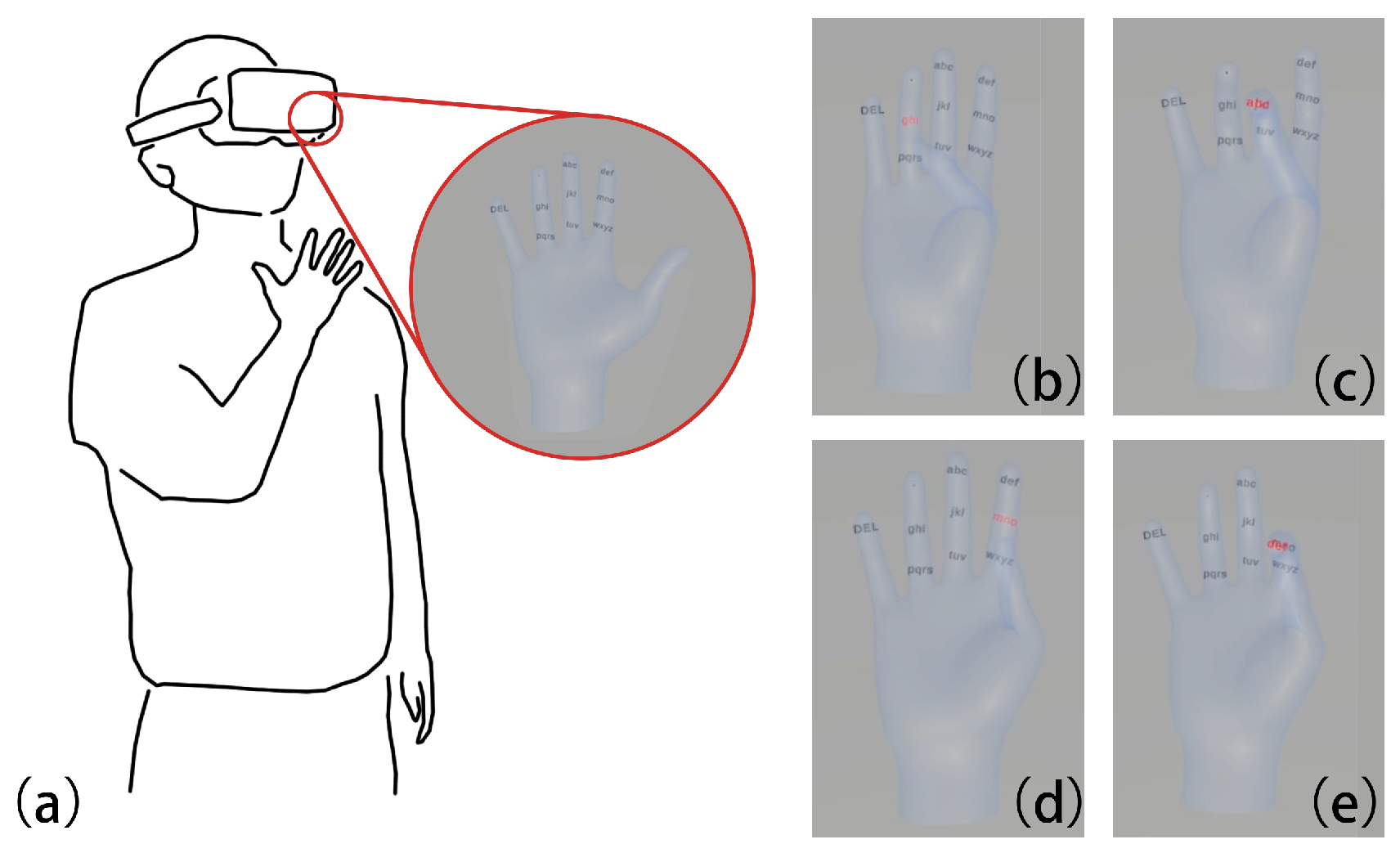
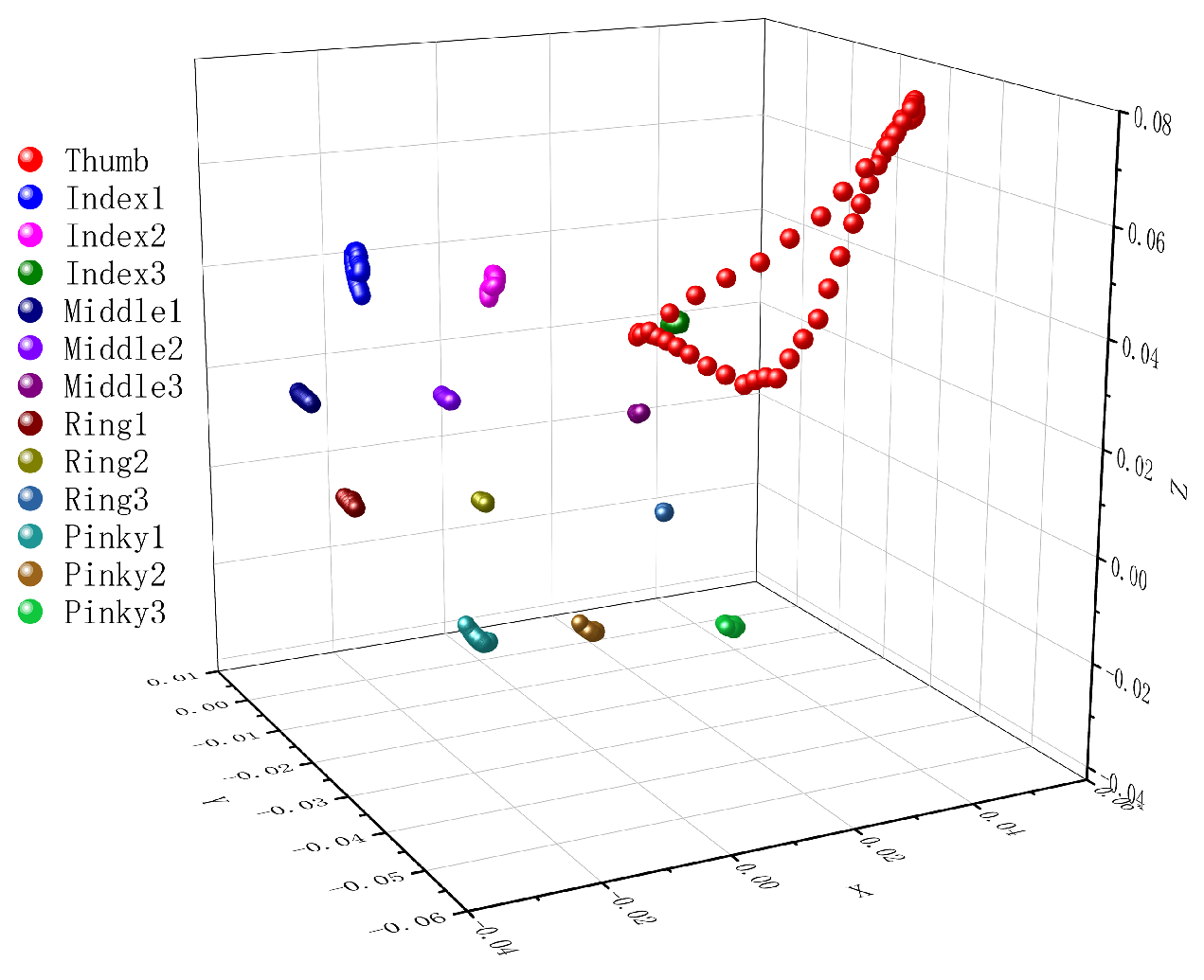
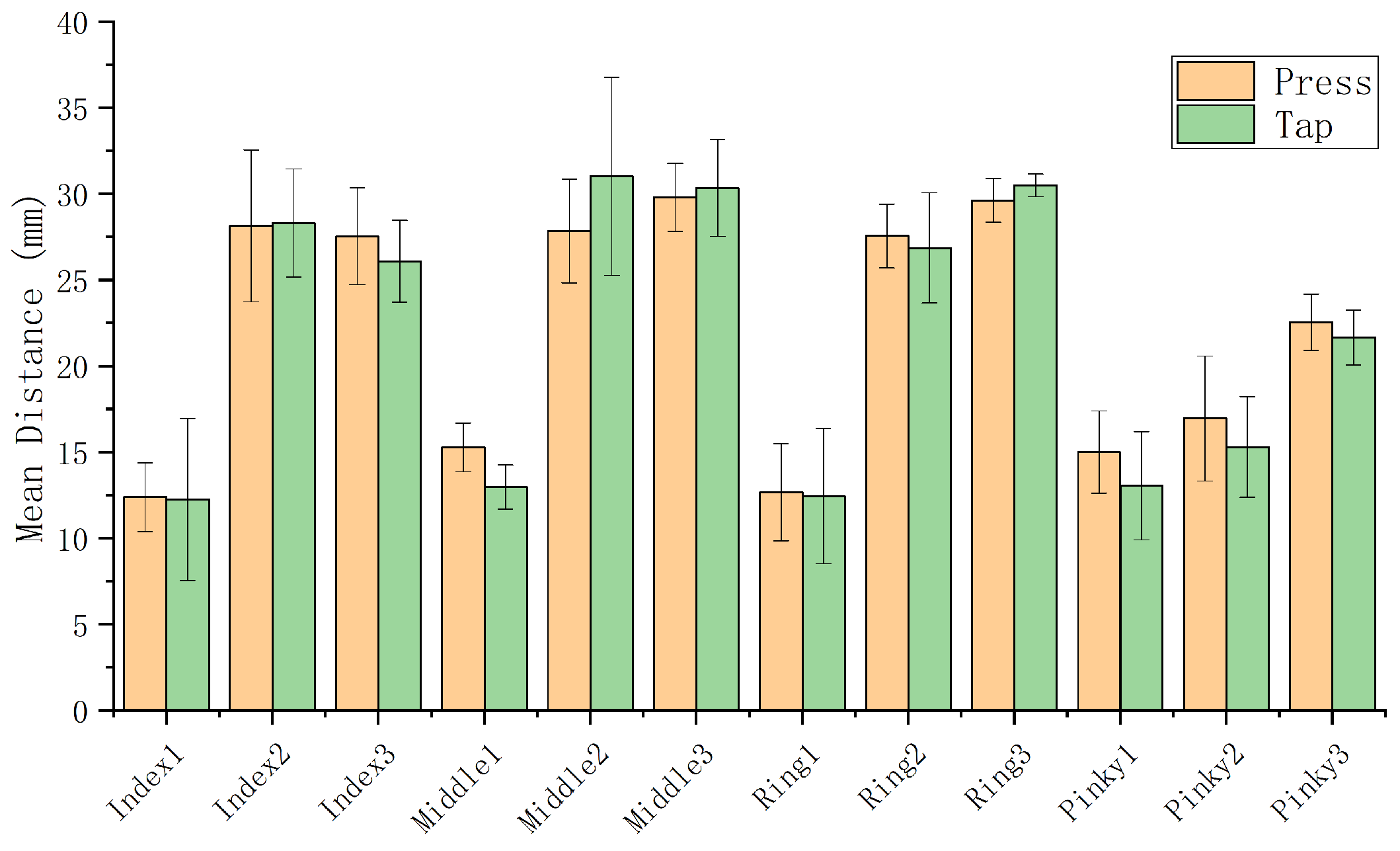
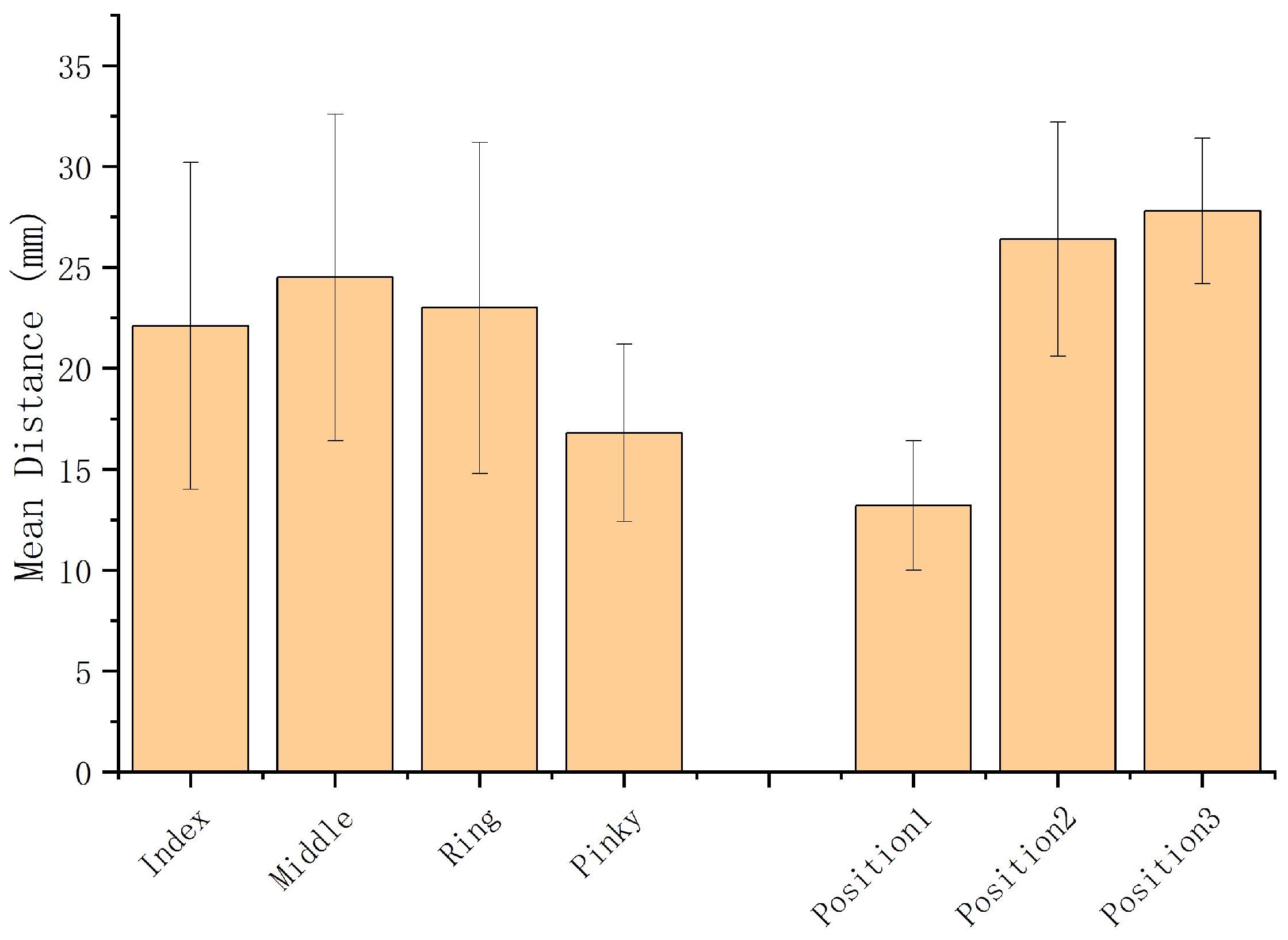
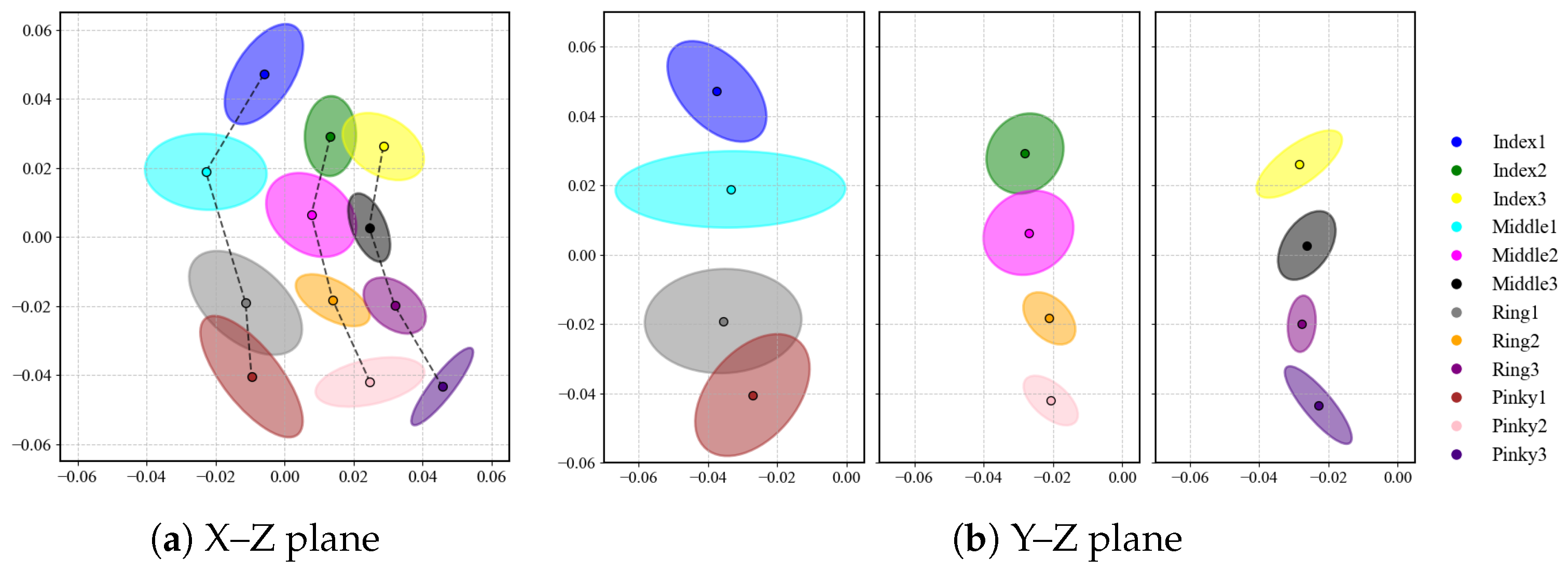
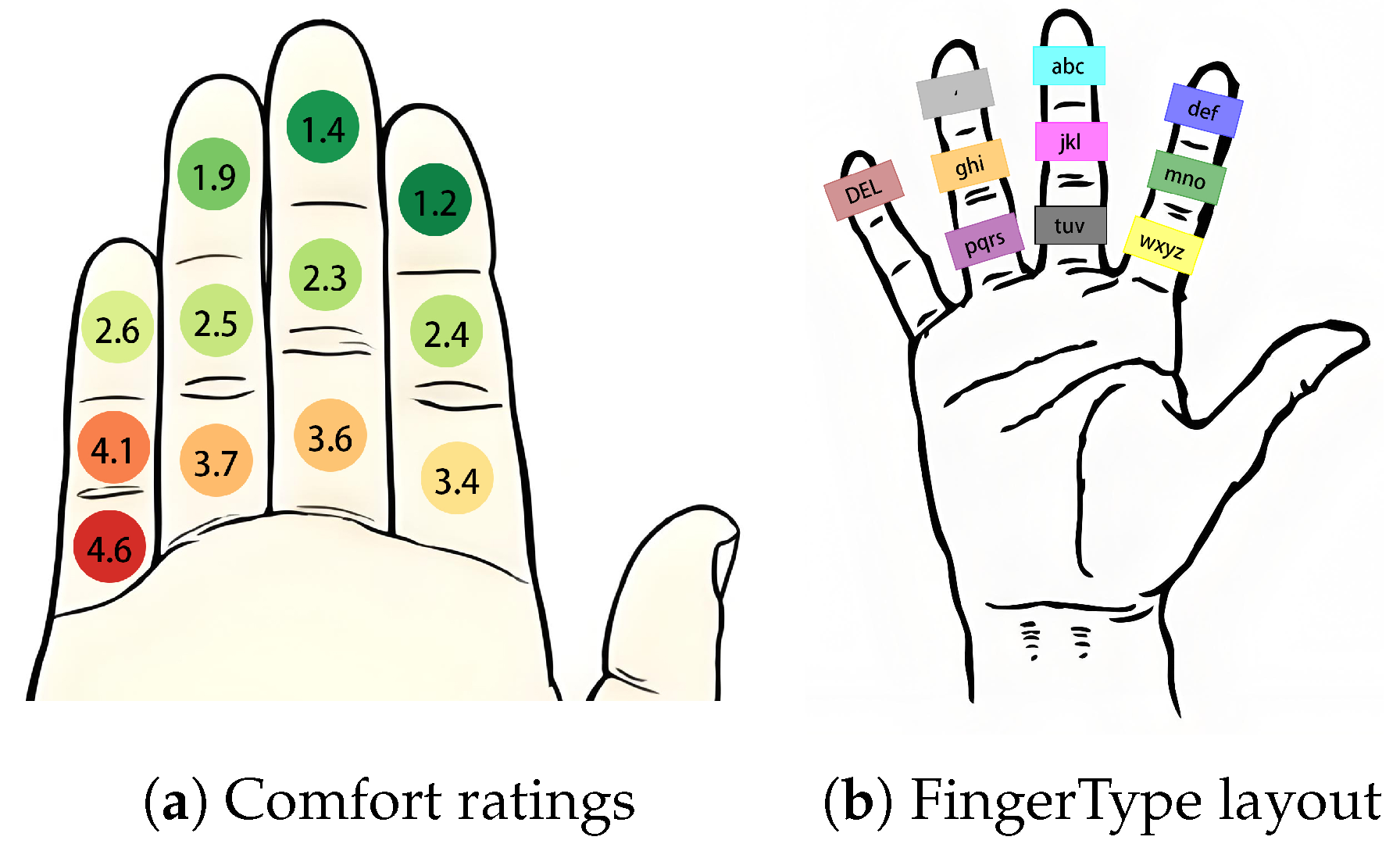
- We analyzed thumb-to-finger interaction across 12 zones, focusing on contact distances and comfort ratings. We then used these ergonomic data to optimize the key layout for one-handed input.
- We prioritized accessibility and interaction design by developing FingerType on off-the-shelf consumer VR hardware. Unlike methods requiring custom sensors, we demonstrate that high-precision, eyes-free input is achievable on standard devices without external wearables.
- We proposed FingerType, a bare-hand, one-handed T9 text-entry system for head-mounted devices that uses a TCN to recognize tap events (94.97% accuracy) and an n-gram language model to decode input into words.
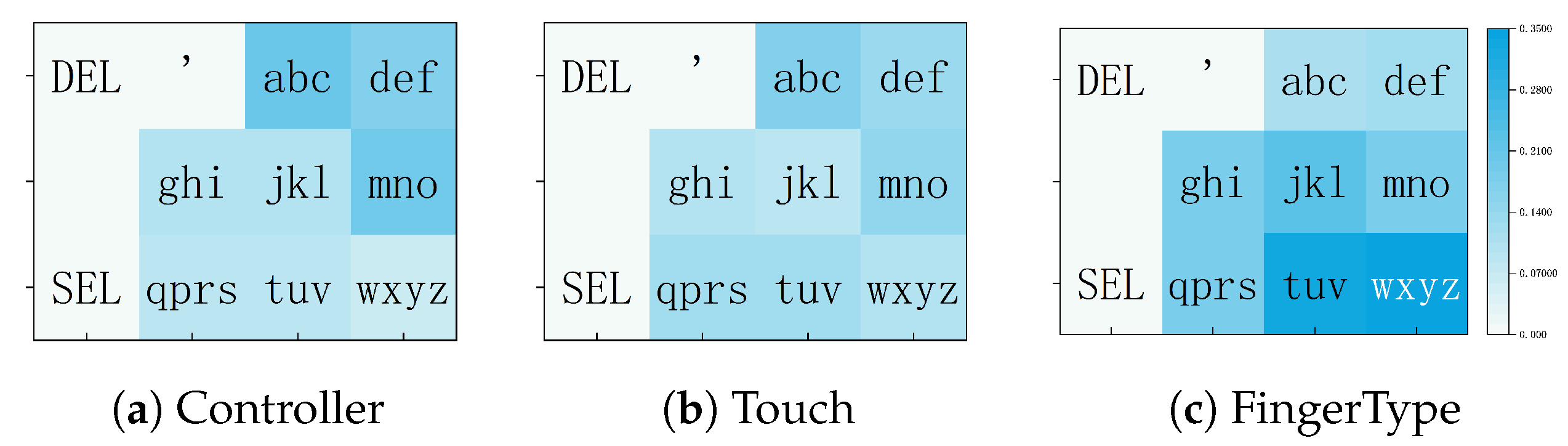
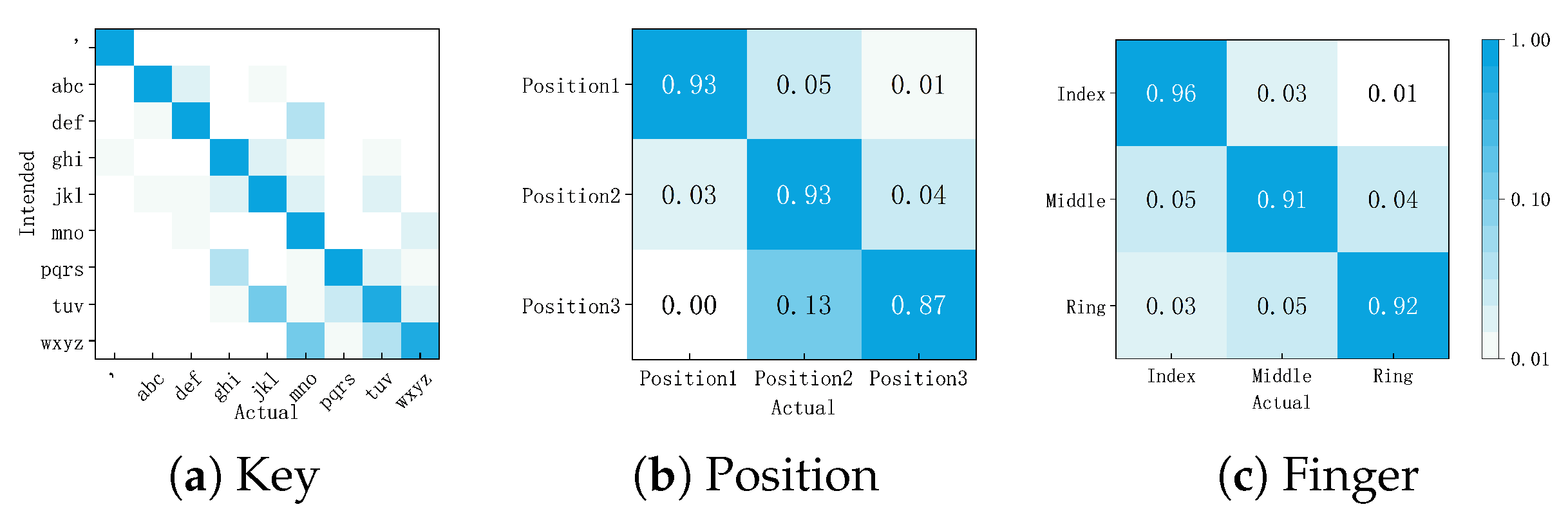
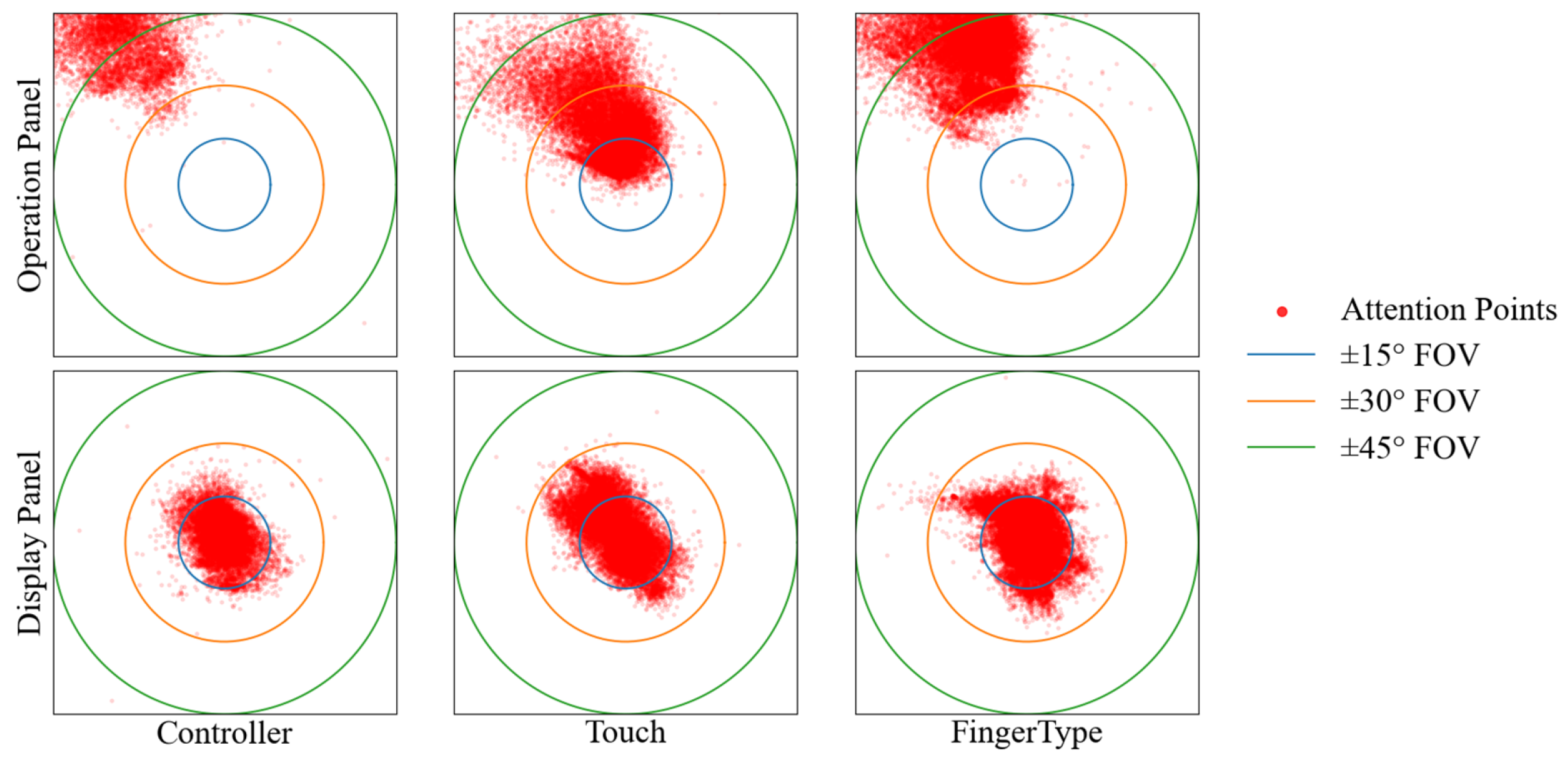
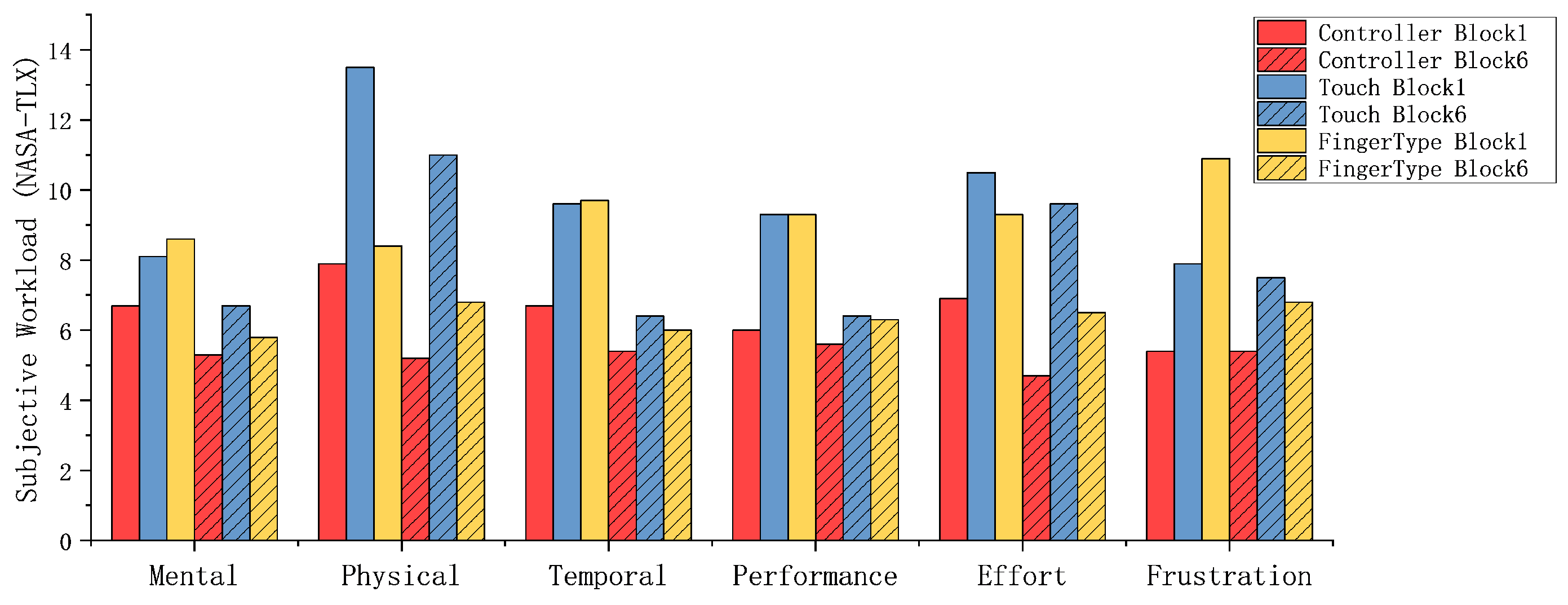
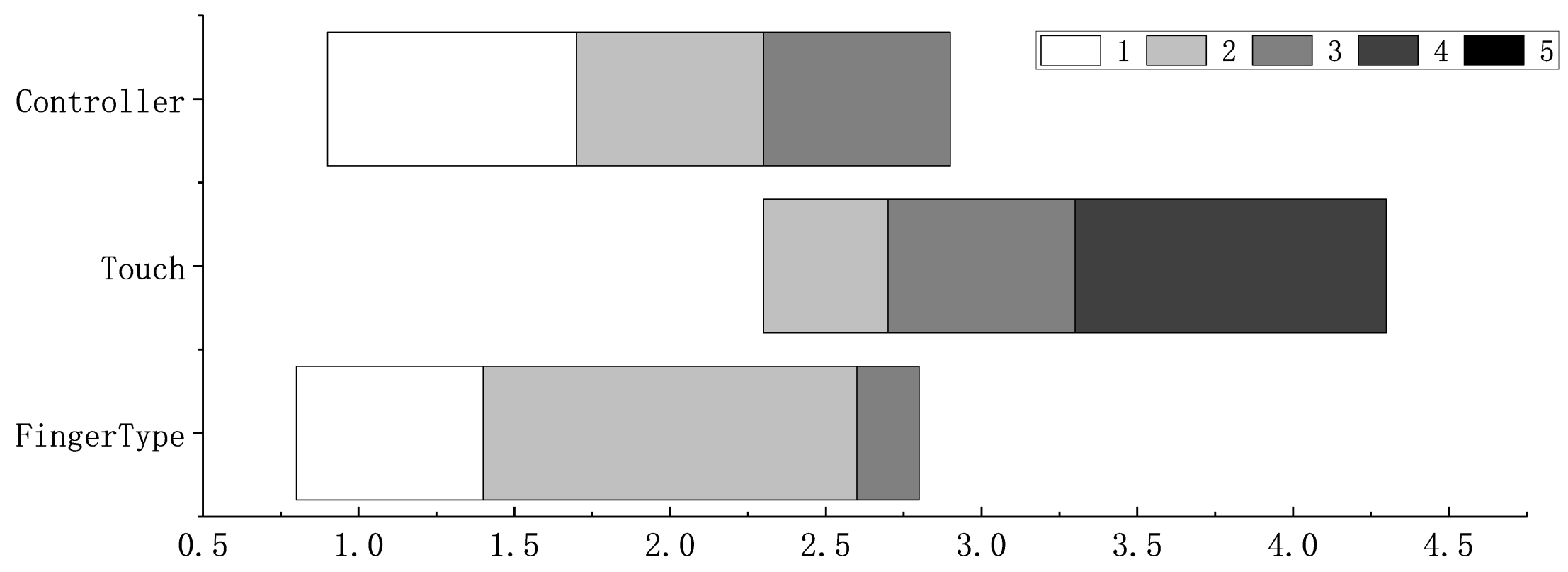
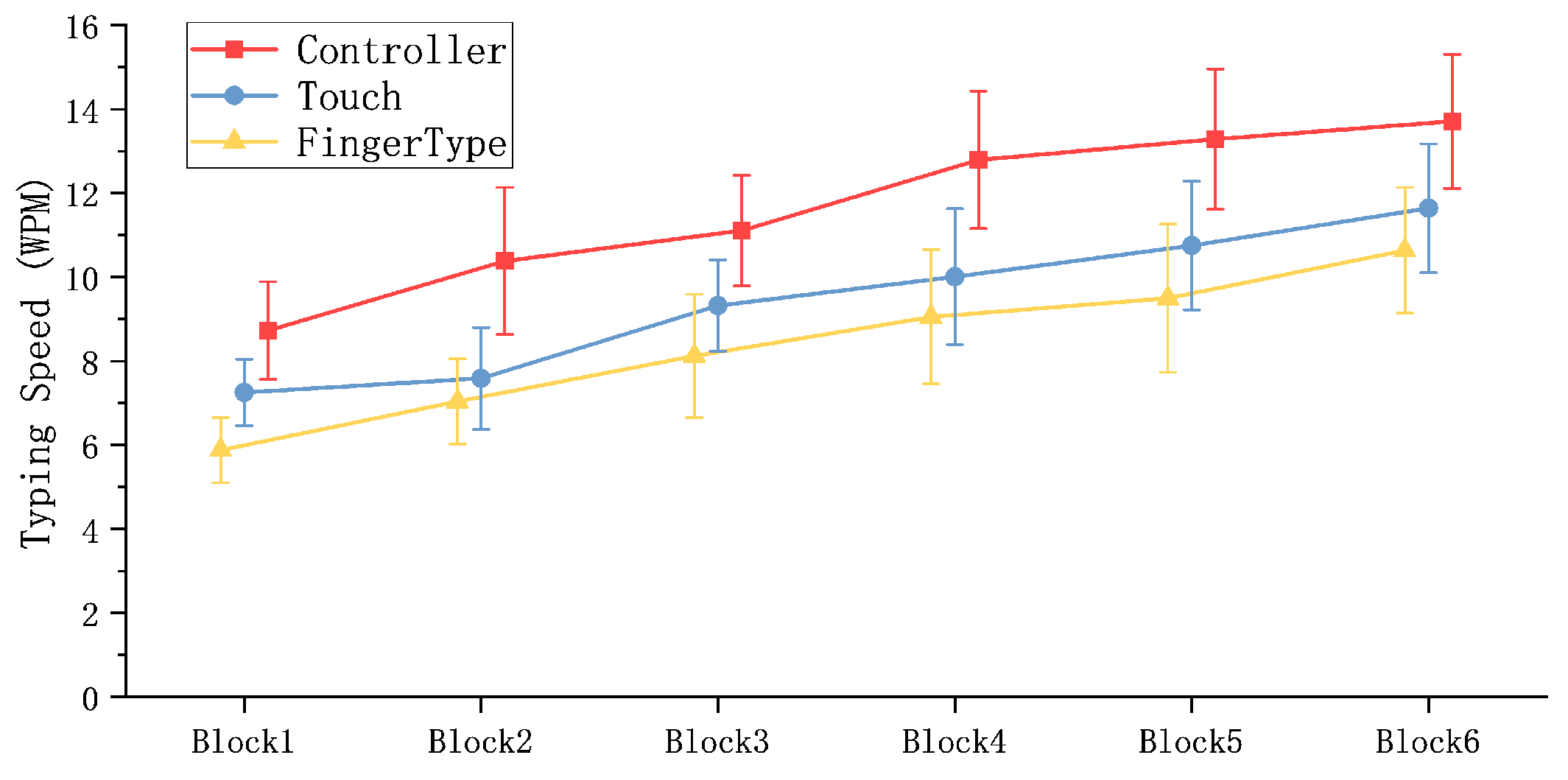
- We evaluated FingerType against controller and touch baselines in error patterns, attention demand, subjective perception and input speed, and analyzed its potential for further improvement.
2. Related Work
2.1. Text Entry in HMDs
2.2. Text Entry Through Hand/Finger Gestures
2.3. Thumb-to-Finger Input
3. Thumb-to-Finger Typing Behavior Analysis
3.1. Data Collection for Motion Analysis
3.1.1. Data Collection Setup
3.1.2. Data Collection Procedure
3.2. Analysis of Typing Behavior
3.2.1. Phases of Thumb Movement During Key Press Actions
3.2.2. Contact Distance Across Two Tapping Modes
3.2.3. Contact Distance Across Finger and Position Groups
3.2.4. Spatial Distribution of Contact Positions
3.3. Comfort Evaluation and Design Implications
3.3.1. Comfort Ratings of Tapping Positions
3.3.2. Design Implications for FingerType
4. FingerType
4.1. Tap Detection (Motion Model)
4.2. Text Decoding (Language Model)
5. Materials and Methods
5.1. Experiment Design
5.1.1. Participants and Apparatus
5.1.2. Experiment Design and Procedure
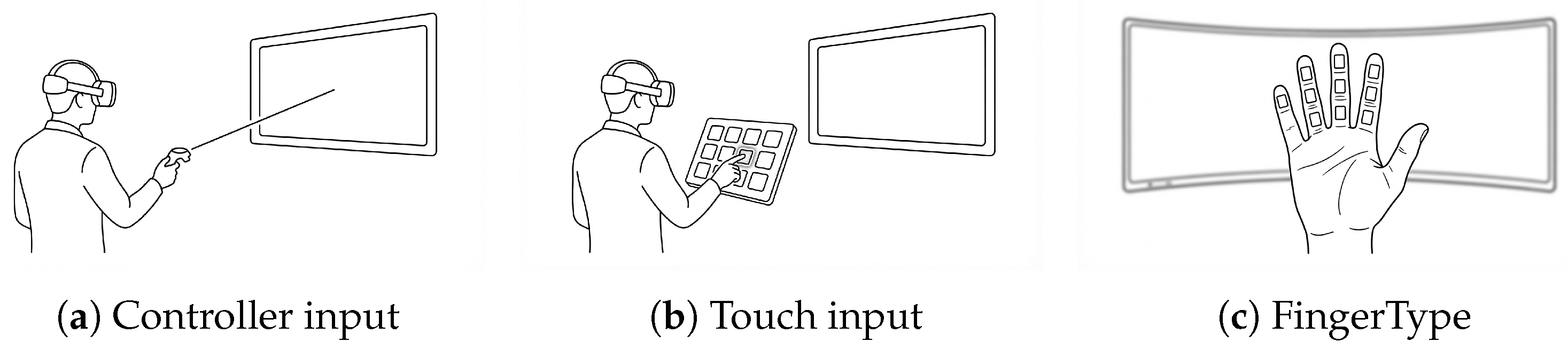
- Controller: A display panel (3 m × 0.5 m) is placed 3 m in front of the user to present the target phrase. An input panel with large buttons (60 × 20 cm) is operated via ray-casting: users aim a ray at the desired button and pull the trigger to select. Visual feedback is provided by a color change.
- Touch: The display panel is the same as in the Controller condition. The input panel is positioned 25 cm in front of user’s chest, and consists of a 4 × 3 grid of medium-sized buttons (8 × 8 × 1 cm). Users touch buttons using a virtual index finger; successful input is indicated by a color change.
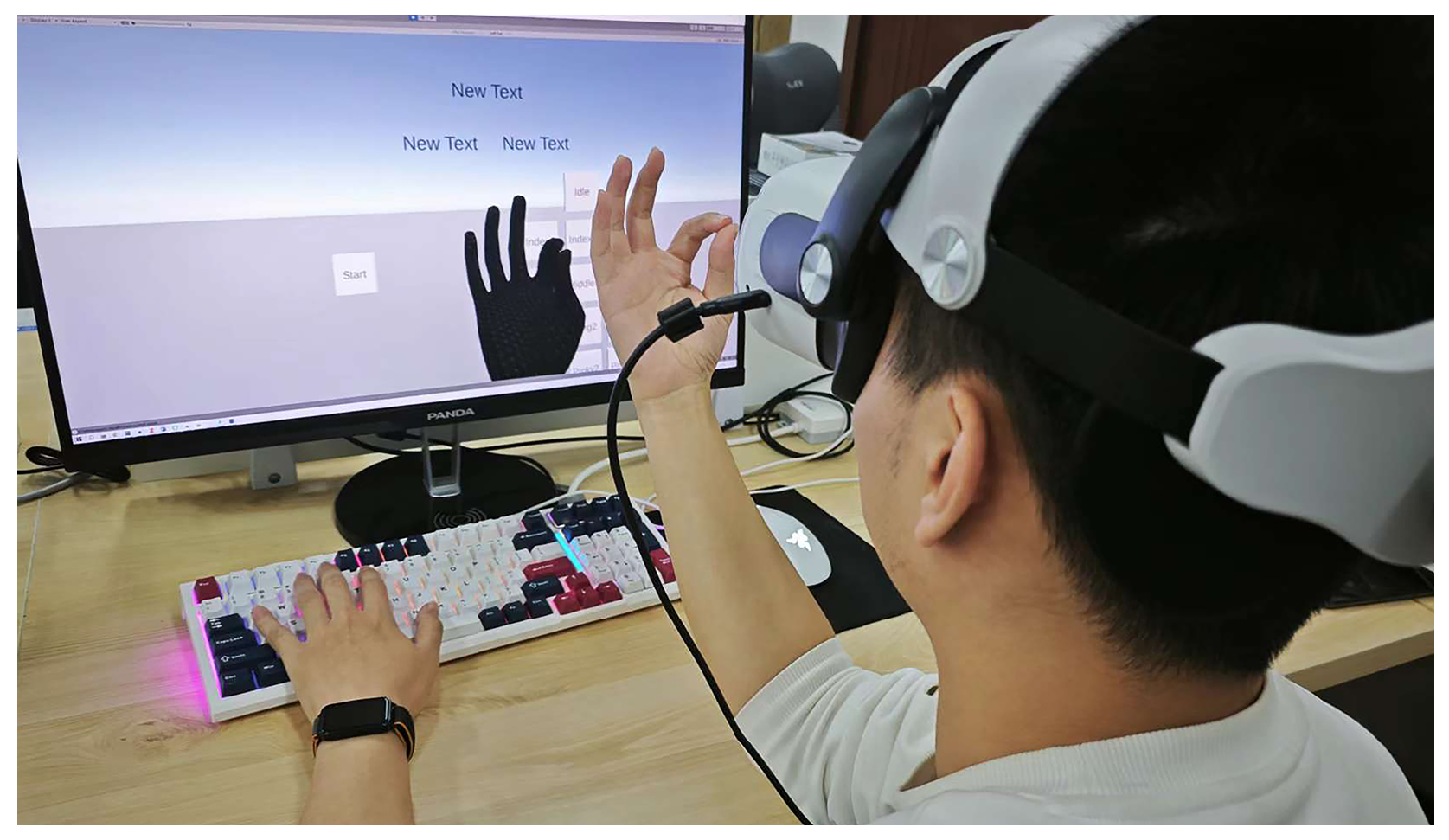
- FingerType: The display panel is unchanged. The input panel is attached to the virtual hand, with small buttons (2 × 0.5 cm) mapped onto finger segments. Users tap finger segments with thumb to input text, with color change used to confirm each tap.
5.2. Evaluation Metrics
5.2.1. Words per Minute (WPM)
5.2.2. Normalized Error Ratio ()
5.2.3. Attention Coverage Within FOV ()
6. Results
6.1. Error Pattern
6.1.1. Error Type Classification
6.1.2. Spatial Error Distribution
6.1.3. Detailed Error Analysis of FingerType
6.2. Attention Demand
6.3. Subjective Perception
6.4. Input Speed
7. Discussion
8. Conclusions
Author Contributions
Funding
Institutional Review Board Statement
Informed Consent Statement
Data Availability Statement
Conflicts of Interest
References
- Whitmire, E.; Jain, M.; Jain, D.; Nelson, G.; Karkar, R.; Patel, S.; Goel, M. DigiTouch: Reconfigurable Thumb-to-Finger Input and Text Entry on Head-mounted Displays. Proc. ACM Interact. Mob. Wearable Ubiquitous Technol. 2017, 1, 113. [Google Scholar] [CrossRef]
- Lee, L.H.; Lam, K.Y.; Li, T.; Braud, T.; Su, X.; Hui, P. Quadmetric Optimized Thumb-to-Finger Interaction for Force Assisted One-Handed Text Entry on Mobile Headsets. Proc. ACM Interact. Mob. Wearable Ubiquitous Technol. 2019, 3, 94. [Google Scholar] [CrossRef]
- Richardson, M.; Durasoff, M.; Wang, R. Decoding Surface Touch Typing from Hand-Tracking. In Proceedings of the 33rd Annual ACM Symposium on User Interface Software and Technology; Association for Computing Machinery: New York, NY, USA, 2020; pp. 686–696. [Google Scholar] [CrossRef]
- Niikura, T.; Watanabe, Y.; Komuro, T.; Ishikawa, M. In-air Typing Interface: Realizing 3D operation for mobile devices. In The 1st IEEE Global Conference on Consumer Electronics 2012; IEEE: Piscataway, NJ, USA, 2012; pp. 223–227. [Google Scholar] [CrossRef]
- Cui, W.; Liu, R.; Li, Z.; Wang, Y.; Wang, A.; Zhao, X.; Rashidian, S.; Baig, F.; Ramakrishnan, I.; Wang, F.; et al. GlanceWriter: Writing Text by Glancing Over Letters with Gaze. In Proceedings of the 2023 CHI Conference on Human Factors in Computing Systems; Association for Computing Machinery: New York, NY, USA, 2023; pp. 1–13. [Google Scholar] [CrossRef]
- Zhan, L.; Xiong, T.; Zhang, H.; Guo, S.; Chen, X.; Gong, J.; Lin, J.; Qin, Y. TouchEditor: Interaction Design and Evaluation of a Flexible Touchpad for Text Editing of Head-Mounted Displays in Speech-unfriendly Environments. Proc. ACM Interact. Mob. Wearable Ubiquitous Technol. 2024, 7, 198. [Google Scholar] [CrossRef]
- Cheng, Y.F.; Luong, T.; Fender, A.R.; Streli, P.; Holz, C. ComforTable User Interfaces: Surfaces Reduce Input Error, Time, and Exertion for Tabletop and Mid-air User Interfaces. In 2022 IEEE International Symposium on Mixed and Augmented Reality (ISMAR); IEEE: Piscataway, NJ, USA, 2022; pp. 150–159. [Google Scholar] [CrossRef]
- Huang, D.Y.; Chan, L.; Yang, S.; Wang, F.; Liang, R.H.; Yang, D.N.; Hung, Y.P.; Chen, B.Y. DigitSpace: Designing Thumb-to-Fingers Touch Interfaces for One-Handed and Eyes-Free Interactions. In Proceedings of the 2016 CHI Conference on Human Factors in Computing Systems; Association for Computing Machinery: New York, NY, USA, 2016; pp. 1526–1537. [Google Scholar] [CrossRef]
- Kounalaki, M.; Simou, I.; Komninos, A. Pseudo-haptic and Self-haptic Feedback During VR Text Entry. In Proceedings of the 2nd International Conference of the ACM Greek SIGCHI Chapter; Association for Computing Machinery: New York, NY, USA, 2023; pp. 57–64. [Google Scholar] [CrossRef]
- Fashimpaur, J.; Kin, K.; Longest, M. PinchType: Text Entry for Virtual and Augmented Reality Using Comfortable Thumb to Fingertip Pinches. In Extended Abstracts of the 2020 CHI Conference on Human Factors in Computing Systems; Association for Computing Machinery: New York, NY, USA, 2020; pp. 1–7. [Google Scholar] [CrossRef]
- Gu, Y.; Yu, C.; Li, Z.; Li, Z.; Wei, X.; Shi, Y. QwertyRing: Text Entry on Physical Surfaces Using a Ring. Proc. ACM Interact. Mob. Wearable Ubiquitous Technol. 2020, 4, 128. [Google Scholar] [CrossRef]
- Jiang, H.; Weng, D.; Zhang, Z.; Chen, F. HiFinger: One-Handed Text Entry Technique for Virtual Environments Based on Touches between Fingers. Sensors 2019, 19, 3063. [Google Scholar] [CrossRef] [PubMed]
- Gil, H.; Oakley, I. ThumbAir: In-Air Typing for Head Mounted Displays. Proc. ACM Interact. Mob. Wearable Ubiquitous Technol. 2023, 6, 164. [Google Scholar] [CrossRef]
- Wong, P.C.; Zhu, K.; Fu, H. FingerT9: Leveraging Thumb-to-finger Interaction for Same-side-hand Text Entry on Smartwatches. In Proceedings of the 2018 CHI Conference on Human Factors in Computing Systems; Association for Computing Machinery: New York, NY, USA, 2018; pp. 1–10. [Google Scholar] [CrossRef]
- Lee, L.H.; Yeung, N.Y.; Braud, T.; Li, T.; Su, X.; Hui, P. Force9: Force-assisted Miniature Keyboard on Smart Wearables. In Proceedings of the 2020 International Conference on Multimodal Interaction; Association for Computing Machinery: New York, NY, USA, 2020; pp. 232–241. [Google Scholar] [CrossRef]
- Jiang, H.; Weng, D.; Dongye, X.; Liu, Y. PinchText: One-handed text entry technique combining pinch gestures and hand positions for head-mounted displays. Int. J. Hum.-Comput. Interact. 2024, 40, 278–294. [Google Scholar] [CrossRef]
- De Rosa, M.; Fuccella, V.; Costagliola, G.; Adinolfi, G.; Ciampi, G.; Corsuto, A.; Di Sapia, D. T18: An ambiguous keyboard layout for smartwatches. In 2020 IEEE International Conference on Human-Machine Systems (ICHMS); IEEE: Piscataway, NJ, USA, 2020; pp. 1–4. [Google Scholar] [CrossRef]
- Guo, J.; Benton, A.; Tian, N.; Ma, W.; Feffer, N.; Zhou, Z.; Ren, L. EyeClick:A Robust Two-Step Eye-Hand Interaction for Text Entry in Augmented Reality Glasses. In Adjunct Proceedings of the 36th Annual ACM Symposium on User Interface Software and Technology; Association for Computing Machinery: New York, NY, USA, 2023; pp. 1–4. [Google Scholar] [CrossRef]
- Gong, J.; Xu, Z.; Guo, Q.; Seyed, T.; Chen, X.A.; Bi, X.; Yang, X.D. WrisText: One-handed Text Entry on Smartwatch using Wrist Gestures. In Proceedings of the 2018 CHI Conference on Human Factors in Computing Systems; Association for Computing Machinery: New York, NY, USA, 2018; pp. 1–14. [Google Scholar] [CrossRef]
- Jiang, H.; Weng, D. HiPad: Text entry for Head-Mounted Displays Using Circular Touchpad. In 2020 IEEE Conference on Virtual Reality and 3D User Interfaces (VR); IEEE: Piscataway, NJ, USA, 2020; pp. 692–703. [Google Scholar] [CrossRef]
- Liang, C.; Hsia, C.; Yu, C.; Yan, Y.; Wang, Y.; Shi, Y. DRG-Keyboard: Enabling Subtle Gesture Typing on the Fingertip with Dual IMU Rings. Proc. ACM Interact. Mob. Wearable Ubiquitous Technol. 2023, 6, 170. [Google Scholar] [CrossRef]
- Darbar, R.; Hu, X.; Yan, X.; Wei, Y.; Liang, H.N.; Xu, W.; Sarcar, S. OnArmQWERTY: An Empirical Evaluation of On-Arm Tap Typing for AR HMDs. In Proceedings of the 2024 ACM Symposium on Spatial User Interaction; Association for Computing Machinery: New York, NY, USA, 2024; pp. 1–12. [Google Scholar] [CrossRef]
- Wan, T.; Zhang, L.; Yang, H.; Irani, P.; Yu, L.; Liang, H.N. Exploration of Foot-based Text Entry Techniques for Virtual Reality Environments. In Proceedings of the 2024 CHI Conference on Human Factors in Computing Systems; Association for Computing Machinery: New York, NY, USA, 2024; pp. 1–17. [Google Scholar] [CrossRef]
- Lee, D.; Kim, J.; Oakley, I. FingerText: Exploring and Optimizing Performance for Wearable, Mobile and One-Handed Typing. In Proceedings of the 2021 CHI Conference on Human Factors in Computing Systems; Association for Computing Machinery: New York, NY, USA, 2021; pp. 1–15. [Google Scholar] [CrossRef]
- Liu, Z.; He, J.; Feng, J.; Zhou, J. PrinType: Text Entry via Fingerprint Recognition. Proc. ACM Interact. Mob. Wearable Ubiquitous Technol. 2023, 6, 174. [Google Scholar] [CrossRef]
- Beier, R.; Wolling, F.; Hornecker, E.; Michahelles, F. TipTopTyping: A Thumb-to-Finger Text Input Method and Character Layout Optimized for Mobile Spatial Computing. In Proceedings of Mensch und Computer 2024; Association for Computing Machinery: New York, NY, USA, 2024; pp. 196–206. [Google Scholar] [CrossRef]
- Xu, Z.; Chen, W.; Zhao, D.; Luo, J.; Wu, T.Y.; Gong, J.; Yin, S.; Zhai, J.; Yang, X.D. BiTipText: Bimanual Eyes-Free Text Entry on a Fingertip Keyboard. In Proceedings of the 2020 CHI Conference on Human Factors in Computing Systems; Association for Computing Machinery: New York, NY, USA, 2020; pp. 1–13. [Google Scholar] [CrossRef]
- Nohara, R.; Ishikawa, H.; Manabe, H. Hybrid Input Technique for VR Combining Head Mounted Keyboard with Head Pointing. In Proceedings of the 30th ACM Symposium on Virtual Reality Software and Technology; Association for Computing Machinery: New York, NY, USA, 2024; pp. 1–2. [Google Scholar] [CrossRef]
- Li, Z.; Yu, C.; Gu, Y.; Shi, Y. ResType: Invisible and Adaptive Tablet Keyboard Leveraging Resting Fingers. In Proceedings of the 2023 CHI Conference on Human Factors in Computing Systems; Association for Computing Machinery: New York, NY, USA, 2023. [Google Scholar] [CrossRef]
- Wolf, D.; Gugenheimer, J.; Combosch, M.; Rukzio, E. Understanding the Heisenberg Effect of Spatial Interaction: A Selection Induced Error for Spatially Tracked Input Devices. In Proceedings of the 2020 CHI Conference on Human Factors in Computing Systems; Association for Computing Machinery: New York, NY, USA, 2020; pp. 1–10. [Google Scholar] [CrossRef]
- Panopoulos, I.; Topalis, E.; Petrellis, N.; Hadellis, L. Greek Sign Language Detection with Artificial Intelligence. Electronics 2025, 14, 3241. [Google Scholar] [CrossRef]
- Petrellis, N.; Gioulekas, F.; Birbas, M. Design of a Multi-purpose Surface-EMG Readout System for Draft Control Applications. In 2019 Panhellenic Conference on Electronics & Telecommunications (PACET); IEEE: Piscataway, NJ, USA, 2019; pp. 1–5. [Google Scholar] [CrossRef]
- Miller, S.; Smith, A.; Bahram, S.; St. Amant, R. A glove for tapping and discrete 1D/2D input. In Proceedings of the 2012 ACM International Conference on Intelligent User Interfaces; Association for Computing Machinery: New York, NY, USA, 2012; pp. 101–104. [Google Scholar] [CrossRef]
- Yoon, S.H.; Huo, K.; Ramani, K. Plex: Finger-worn textile sensor for mobile interaction during activities. In Proceedings of the 2014 ACM International Joint Conference on Pervasive and Ubiquitous Computing: Adjunct Publication; Association for Computing Machinery: New York, NY, USA, 2014; pp. 191–194. [Google Scholar] [CrossRef]
- Yoon, S.H.; Huo, K.; Nguyen, V.P.; Ramani, K. TIMMi: Finger-worn Textile Input Device with Multimodal Sensing in Mobile Interaction. In Proceedings of the Ninth International Conference on Tangible, Embedded, and Embodied Interaction; Association for Computing Machinery: New York, NY, USA, 2015; pp. 269–272. [Google Scholar] [CrossRef]
- Kienzle, W.; Hinckley, K. LightRing: Always-available 2D input on any surface. In Proceedings of the 27th Annual ACM Symposium on User Interface Software and Technology; Association for Computing Machinery: New York, NY, USA, 2014; pp. 157–160. [Google Scholar] [CrossRef]
- Han, S.; Liu, B.; Cabezas, R.; Twigg, C.D.; Zhang, P.; Petkau, J.; Yu, T.H.; Tai, C.J.; Akbay, M.; Wang, Z.; et al. MEgATrack: Monochrome egocentric articulated hand-tracking for virtual reality. ACM Trans. Graph. 2020, 39, 87. [Google Scholar] [CrossRef]
- ITU-T Recommendation E.161; Arrangement of Digits, Letters and Symbols on Telephones and Other Devices That Can Be Used for Gaining Access to a Telephone Network. International Telecommunication Union: Geneva, Switzerland, 2001.
- Bai, S.; Kolter, J.Z.; Koltun, V. An Empirical Evaluation of Generic Convolutional and Recurrent Networks for Sequence Modeling. arXiv 2018, arXiv:1803.01271. [Google Scholar] [CrossRef]
- Heafield, K. KenLM: Faster and smaller language model queries. In Proceedings of the Sixth Workshop on Statistical Machine Translation; Association for Computing Machinery: New York, NY, USA, 2011; pp. 187–197. [Google Scholar]
- Witten, I.; Bell, T. The zero-frequency problem: Estimating the probabilities of novel events in adaptive text compression. IEEE Trans. Inf. Theory 1991, 37, 1085–1094. [Google Scholar] [CrossRef]
- Vertanen, K. Vocab 100k—English Word Vocabulary. Keith Vertanen’s Website. 2018. Available online: https://keithv.com/data/vocab_100k.txt (accessed on 28 June 2025).
- Maas, A.L.; Daly, R.E.; Pham, P.T.; Huang, D.; Ng, A.Y.; Potts, C. Learning Word Vectors for Sentiment Analysis. In Proceedings of the 49th Annual Meeting of the Association for Computational Linguistics: Human Language Technologies; Association for Computing Machinery: New York, NY, USA, 2011; pp. 142–150. [Google Scholar]
- MacKenzie, I.S.; Soukoreff, R.W. Phrase sets for evaluating text entry techniques. In CHI03 Extended Abstracts on Human Factors in Computing Systems; Association for Computing Machinery: New York, NY, USA, 2003; pp. 754–755. [Google Scholar] [CrossRef]
- Speicher, M.; Feit, A.M.; Ziegler, P.; Krüger, A. Selection-based Text Entry in Virtual Reality. In Proceedings of the 2018 CHI Conference on Human Factors in Computing Systems; Association for Computing Machinery: New York, NY, USA, 2018; pp. 1–13. [Google Scholar] [CrossRef]
- Hart, S.G.; Staveland, L.E. Development of NASA-TLX (Task Load Index): Results of Empirical and Theoretical Research. Adv. Psychol. 1988, 52, 139–183. [Google Scholar] [CrossRef]
- MacKenzie, I.S. A Note on Calculating Text Entry Speed. 2002. Available online: https://www.yorku.ca/mack/RN-TextEntrySpeed.html (accessed on 25 January 2026).
- Lu, Y.; Yu, C.; Yi, X.; Shi, Y.; Zhao, S. BlindType: Eyes-Free Text Entry on Handheld Touchpad by Leveraging Thumb’s Muscle Memory. Proc. ACM Interact. Mob. Wearable Ubiquitous Technol. 2017, 1, 18. [Google Scholar] [CrossRef]
- Fitts, P.M. The information capacity of the human motor system in controlling the amplitude of movement. J. Exp. Psychol. 1992, 121, 262–269. [Google Scholar] [CrossRef] [PubMed]



| Design | Examples | Sensor/Device | Accuracy | WPM |
|---|---|---|---|---|
| T9 Layout Inputs | FingerT9 [14] | Capacitive Sensor | - | 5.42 |
| Force9 [15] | Pressure Sensor | 91.5% | 10.8 | |
| PinchText [16] | Conductive Tape | - | 12.71 | |
| Lee et al. [2] | Force-sensitive Glove | 83.9% | 6.47 | |
| FingerType (Ours) | Quest 2 (Camera) | 94.97% | 10.63 | |
| QWERTY Layout Optimization | T18 [17] | Touchscreen | - | 15.7 |
| EyeClick [18] | Eye Tracker + Ctrl | - | 9.41 | |
| PinchType [10] | Optical Tracking | - | 12.54 | |
| Redesigning Layout Shape | WrisText [19] | Smartwatch IMU | 92.0% | 15.2 |
| HiPad [20] | Controller Touchpad | - | 13.57 | |
| IMU-based Gesture Tracking | QwertyRing [11] | IMU (Ring) | - | 20.59 |
| DRG-Keyboard [21] | Dual IMU | - | 12.9 | |
| Input Using Other Body Parts | TouchEditor [6] | Piezoresistive Film | 95.4% | 6.6 |
| OnArmQWERTY [22] | Vicon Tracking System | - | 20.18 | |
| Wan et al. [23] | Vive Tracker | - | 11.12 | |
| FingerText [24] | Capacitive Sensor | 97.5% | 31.3 | |
| Thumb-to-Finger Input Method | ThumbAir [13] | Quest 2 (Camera) | 98.2% | 13.73 |
| DigiTouch [1] | Resistive Fabric Glove | - | 16.0 | |
| PrinType [25] | Fingerprint Sensor | 96.4% | 34.22 | |
| TipTopTyping [26] | Camera (MediaPipe) | - | 6.15 | |
| HiFinger [12] | Pressure Sensor | - | 9.82 | |
| FingerTip Micro Gestures | TipText [27] | Vicon Tracking System | - | 13.3 |
| BiTipText [27] | Vicon Tracking System | - | 23.4 |
| Component | Specification |
|---|---|
| VR Headset | Meta Quest 2 |
| Tracking System | Built-in Hand Tracking |
| Development Engine | Unity 2022 |
| Operating System | Windows 10 |
| CPU | AMD Ryzen 7 4800H |
| GPU | NVIDIA GeForce RTX 2060 |
| RAM | 16 GB |
| Tap | Not Tap | |
|---|---|---|
| Detected | 896 | 9 |
| Not Detected | 40 | 30 |
| Method | Repeat (%) | Mistake (%) |
|---|---|---|
| Controller | 17.02 | 82.98 |
| Touch | 17.39 | 82.61 |
| FingerType | 21.84 | 78.16 |
| Input Method | Operation Panel | Display Panel | ||||
|---|---|---|---|---|---|---|
| ±15° | ±30° | ±45° | ±15° | ±30° | ±45° | |
| Controller | 0.01 | 0.67 | 16.54 | 91.59 | 99.91 | 99.95 |
| Touch Input | 28.40 | 74.54 | 97.47 | 69.47 | 99.78 | 99.95 |
| FingerType | 0.02 | 6.55 | 56.58 | 84.41 | 99.82 | 99.99 |
Disclaimer/Publisher’s Note: The statements, opinions and data contained in all publications are solely those of the individual author(s) and contributor(s) and not of MDPI and/or the editor(s). MDPI and/or the editor(s) disclaim responsibility for any injury to people or property resulting from any ideas, methods, instructions or products referred to in the content. |
© 2026 by the authors. Licensee MDPI, Basel, Switzerland. This article is an open access article distributed under the terms and conditions of the Creative Commons Attribution (CC BY) license.
Share and Cite
Jia, N.; Sun, M.; Li, Y.; Tian, Y.; Sun, T. FingerType: One-Handed Thumb-to-Finger Text Input Using 3D Hand Tracking. Sensors 2026, 26, 897. https://doi.org/10.3390/s26030897
Jia N, Sun M, Li Y, Tian Y, Sun T. FingerType: One-Handed Thumb-to-Finger Text Input Using 3D Hand Tracking. Sensors. 2026; 26(3):897. https://doi.org/10.3390/s26030897
Chicago/Turabian StyleJia, Nuo, Minghui Sun, Yan Li, Yang Tian, and Tao Sun. 2026. "FingerType: One-Handed Thumb-to-Finger Text Input Using 3D Hand Tracking" Sensors 26, no. 3: 897. https://doi.org/10.3390/s26030897
APA StyleJia, N., Sun, M., Li, Y., Tian, Y., & Sun, T. (2026). FingerType: One-Handed Thumb-to-Finger Text Input Using 3D Hand Tracking. Sensors, 26(3), 897. https://doi.org/10.3390/s26030897