1. Introduction
In today’s digital landscape, the frequency and sophistication of cyber threats continue to escalate, posing significant risks to organizations and their sensitive data [
1]. According to recent reports by Cybersecurity Ventures, global cybercrime costs are projected to reach
$10.5 trillion annually by 2025, highlighting the urgent need for effective threat detection and response mechanisms [
2]. As cybercriminals develop increasingly sophisticated methods for manual log analysis, administrators with limited budgets face the critical challenge of managing the overwhelming volume of log data generated by various applications and systems, which can hinder the timely identification and mitigation of potential threats [
3]. This deluge of raw logs can hinder the timely identification of log data from security tools, such as Loki, when running across vital tools in this context.
Loki Simple IOC and YARA Scanner is an open-source command-line tool designed to scan for malware and Indicators of Compromise (IOCs), serving as a vital resource for many low-budget cybersecurity teams [
4]. Loki uses multiple detection techniques, including file name pattern matching, YARA rule scanning, and hash signature comparisons, to identify suspicious files and potential IOCs on environment endpoints. It provides essential information about system intrusions and vulnerabilities [
5]. However, Loki’s raw output (e.g., detailed log files or CSV reports) can be complex, text-heavy, and challenging to interpret, especially for those without advanced technical knowledge and for administrators without advanced forensic expertise, which leads to overwhelmed analysts, delaying threat detection and response. Because manually combing through Loki log files is time-consuming, and this complexity can delay threat detection and response, ultimately jeopardizing an organization’s cybersecurity posture [
6].
To address these challenges, this research introduces a web-based dashboard system, DIGITRACKER, which processes and visualizes Loki scan results in a more accessible, user-friendly, and engaging format. By transforming raw Loki output into an interactive visual dashboard, the tool enables system administrators to monitor potential threats more effectively and take proactive measures to protect their systems. The integration of modern web technologies and dynamic data visualization techniques enhances user experience, facilitating intuitive navigation and faster decision-making [
7,
8].
Moreover, the increasing demand for real-time monitoring and analysis of security threats underscores the need for such a solution, as traditional manual log analysis is no longer sufficient to keep up with evolving threats. With cyber threats evolving rapidly, conventional methods of manual log analysis are no longer sufficient [
6,
9]. By streamlining the analysis process and providing immediate access to critical information, the proposed dashboard not only simplifies the interpretation of scan data but also empowers system administrators to take proactive measures to protect their systems [
9]. Moreover, the PoC solution is oriented towards low-budget cybersecurity teams, offering an affordable way to enhance threat visibility and incident tracking.
The rise of cyber threats and the complexity of log data from security tools, such as Loki, when running across hundreds of machines, create significant challenges for system administrators and cybersecurity responders. The overwhelming volume of raw logs can impede effective threat detection and response, increasing the risk of vulnerabilities. This project proposes a web-based dashboard to process and visualize Loki scan results, transforming raw log files into a straightforward, user-friendly interface for monitoring. Therefore, enabling real-time tracking and simplifying data analysis, the dashboard will allow administrators to understand critical information and respond to threats more quickly and efficiently. Ultimately, this tool aims to enhance an organization’s cybersecurity posture by empowering system administrators to identify and proactively mitigate emerging risks, as well as help them correlate similar patterns. In addition, the tool facilitates the export of results and highlights high- and critical-priority alerts.
In summary, our work bridges the gap between Loki’s powerful scanning capabilities and the usability needs of cybersecurity practitioners. The main contributions of this research are as follows:
Developed a platform that ingests Loki Scanner raw log files and presents the results in a centralized dashboard; we named it the DIGITRACKER system.
Designed an intuitive web dashboard that enables viewing and easy reporting of multiple types of detection results, including file name IOC, Yara rule checks, hash checks, and command-and-control (C2) backconnect checks. Whereas most related dashboards are limited to passive alert display, DIGITRACKER introduces an active workflow model that allows administrators to assign scanning and investigation tasks and track their completion within the same platform.
Implemented a task assignment and tracking mechanism for administrators to delegate scanning tasks to employees and oversee their progress and response status. This collaborative workflow feature (i.e., assigning scans and monitoring their completion) is generally absent in existing threat monitoring solutions.
Facilitated effective communication between administrators and employees through the platform to address scanning challenges and streamline task completion. By integrating user roles and notifications, the system enhances team coordination beyond purely technical interfaces, as emphasized in related work.
Provided automated report generation with rich visual representations (charts and graphs) based on the analysis of Loki scan data to facilitate understanding and decision-making. These comprehensive reports transform raw logs into decision-support information, making it easier for security teams to interpret results and take action, unlike typical scenarios where analysts manually sift through text-based logs.
Compared to traditional approaches that require manual log review and offline reporting, DIGITRACKER automatically generates visual reports from live scan data while maintaining low end-to-end latency from scan completion to dashboard visualization. Furthermore, the dashboard supports exporting the results and automatically highlights high-priority (critical) alerts to focus the analysts’ attention.
The remainder of the paper is organized as follows:
Section 2 discusses related work in the realm of cybersecurity dashboards and threat analysis visualization.
Section 3 describes our research methodology and the design, creation, and implementation of the DIGITRACKER tool, which was the outcome of this research.
Section 4 presents the study’s results, tool demonstration (with a discussion of performance and security evaluations), outlines, and provides future research directions. Finally,
Section 5 concludes the research.
2. Related Works
The development of a dashboard for visualizing malware detection results, particularly from tools like Loki, draws on a rich body of existing literature in cybersecurity, data visualization, and dashboard design.
This section examines key contributions in these fields, highlighting their relevance to the current project.
Prior works have highlighted the value of translating complex security data into intuitive visual formats. For example, researchers in [
10] provided a comprehensive survey of malware detection methodologies, emphasizing the critical role of visual analytics in interpreting complex datasets generated by malware detection tools. Moreover, researchers in [
11] focus on malware behavior analysis through visualization, which is helpful as a recent, high-visibility venue that positions visualization as a means to interpret and communicate malware behavior patterns. In addition, visualization is not just “pretty output” but a practical layer for interpreting complex detection signals, as researchers in [
12] have highlighted in their systematic review evaluating visualization-based techniques for malware detection and classification. On the other hand, researchers in [
13] have assessed this in an incident-response scenario, showing that visualization supports the identification of malicious activity and the making of informed decisions about network state.
All of these indicate that compelling visualizations can enhance security analysts’ understanding of malware behavior and facilitate quicker decision-making. Furthermore, ref. [
10] proposed that interactive dashboards can transform raw data into actionable insights, a concept that underpins the dashboard being developed in this project.
Similarly, in [
14,
15,
16], the researchers introduced a framework for real-time cybersecurity dashboards that aggregate and visualize data from multiple sources, including network traffic and intrusion detection systems. Their study underscores the importance of real-time data processing, which allows security teams to detect and respond to threats promptly. This framework’s emphasis on real-time visualization directly informs the design of our dashboard, which aims to provide immediate insights from the Loki tool’s outputs [
16].
The significance of user-centered design in security tools is another key theme. In [
17] the authors argue that usability is paramount for the effectiveness of security solutions, as complex interfaces can hinder user interaction and decision-making. Incorporating user feedback and iterative design (as in agile methodologies) leads to more intuitive tools [
17]. This aligns with our approach of designing the DIGITRACKER interface with simplicity and clarity, keeping the end-user’s experience in focus.
Other researchers have explored data integration techniques for security dashboards; for instance, ref. [
18] discusses various data integration techniques that enhance the functionality of cybersecurity dashboards. They highlight the challenges of consolidating data from different sources, such as threat intelligence feeds and internal logs, into cohesive visualizations. Insights from such studies guide our system in combining Loki scan output with task management data to provide a more comprehensive view of threats.
Case studies of operational security dashboards, such as the one presented by [
13] shed light on practical challenges and best practices in deploying visualization tools in large organizations. The study examines the challenges encountered during development and deployment, as well as the visualization techniques used to improve situational awareness among security personnel. The lessons learned from their implementation experience provide valuable insights into best practices for dashboard design, which will be applied to ensure our dashboard is functional and user-friendly.
Moreover, the researchers in [
19], introduced a modular framework for developing security dashboards that can integrate various tools and data sources, facilitating a more adaptable approach to presenting security information. This notion of modularity is reflected in our architecture, allowing DIGITRACKER to evolve with emerging requirements and integrate additional data sources in the future.
More recent works continue to stress the importance of aggregate and visualizing threat monitoring. For example, ref. [
9] demonstrates the use of predictive analytics for real-time threat detection, indicating that modern dashboards should not only display data but also help anticipate threats. Our work complements this direction by focusing on real-time data transformation and visualization, laying a foundation for future analytics and AI-driven enhancements.
To our knowledge, none of the existing systems specifically focus on parsing and visualizing the output of the Loki scanner, nor do they integrate a task assignment workflow. In practice, general log analysis platforms such as Grafana or custom dashboards built with Streamlit can be used to visualize security data, but they lack the built-in scanning integration and collaborative workflow features of our solution. Grafana, for instance, is a log aggregation system that requires custom configuration and query development to display Loki’s IOC findings, but it does not provide case management or assignment capabilities. Similarly, a Streamlit-based approach would still require significant custom coding for features such as role-based access and task tracking. In contrast, DIGITRACKER offers a ready-to-use, specialized dashboard that ingests Loki’s output and immediately presents actionable insights with minimal setup, addressing a niche not covered by existing tools.
Table 1 highlights a comparison of system characteristics across different studies. Moreover, we identified gaps in existing research regarding Loki tool ingestion, particularly in real-time capabilities and user-centered approaches. Our proposed system addresses these gaps with a web-based dashboard that supports Arabic, is user-friendly, and incorporates near-real-time processing.
3. Methodology
This section details the approach taken to develop the DIGITRACKER system, from initial data collection through design, implementation, and testing. The project followed an agile methodology with multiple development sprints, each involving planning, feature development, testing, and incorporating user feedback. By iteratively refining the system, we ensured flexibility and responsiveness to requirement changes and insights gained during development.
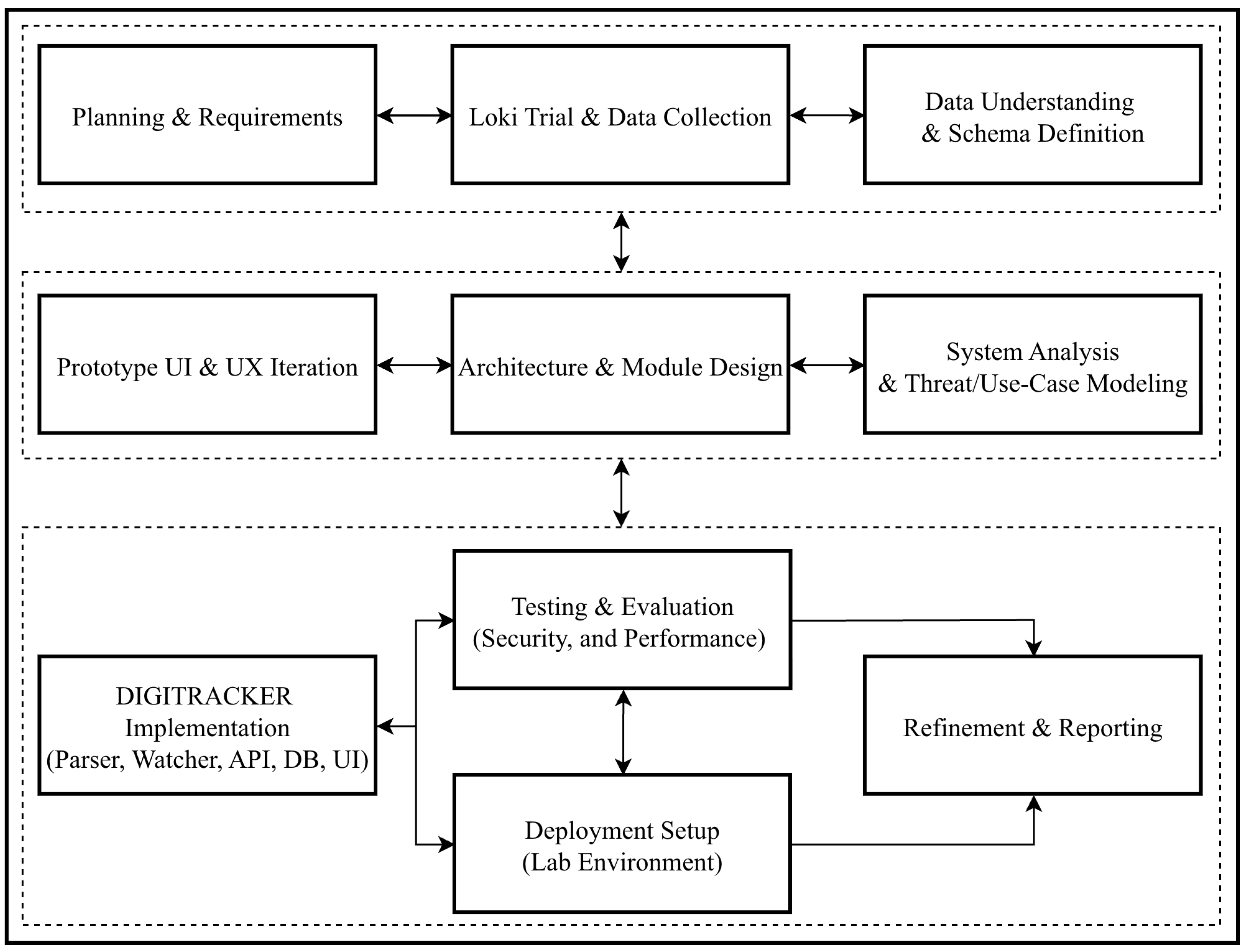
Figure 1 illustrates the key phases of the project, including the Loki tool trial and data collection, system analysis and design, tool development, deployment setup, and testing. Moreover, the following subsections elaborate on the study approach. Including all processes and components involved. Moreover,
Figure 1 outlines the steps followed in this work and summarizes the approach used.
Additionally, we will discuss the design choices made to ensure the dashboard is user-friendly, efficient, and capable of processing real-time data. By the end of this chapter, readers will have a thorough understanding of the proposed system’s structure and alignment with the identified requirements, setting the stage for the subsequent implementation phase. The methodology for this research is designed to provide a systematic and comprehensive approach to developing a web-based dashboard that visualizes the results of the Loki scan and detection tool. This section details the various phases of the research, including project planning, data collection, data processing, dashboard design and development, testing, deployment, and maintenance. Each phase incorporates specific techniques, tools, and technologies to achieve the research’s objectives, guided by an agile framework to ensure flexibility and responsiveness to user feedback.
Moreover, the research and development were divided into multiple sprints. Within each sprint, specific features were developed, tested, and reviewed, allowing for incremental progress and adaptation based on user feedback. In addition to detection precision, DIGITRACKER evaluates near-real-time performance by measuring latency metrics, including scan-result ingestion delay, parsing and storage time, and dashboard visualization response time.
3.1. Loki Data and Log Collection
To collect data for the research, we deployed the LOKI Simple IOC and YARA scanner on several endpoint systems in a controlled laboratory environment at the university during testing. This simulated different threat scenarios, including known malware samples, suspicious registry entries, altered file hashes, and malicious signatures.
Running the tool in command-line mode with log output enabled enables structured logging for every scan session. The testing phase focused on gathering a broad spectrum of detection logs across various YARA rule sets and IOC categories, including file name patterns, MD5/SHA256 hashes, and process anomalies. These logs provided the basis for identifying trends, calculating detection precision as a percentage, and creating datasets suitable for further research and system design. Moreover, we gathered a broad spectrum of detection logs by using various YARA rule sets and IOC definitions to ensure coverage of multiple attack vectors.
From the collected raw logs, we extracted pertinent fields and compiled them into a structured dataset. An example schema of the processed dataset includes columns for AlertID, Timestamp, Severity, IOC Type, File Path, Machine, and Status. Each row corresponds to an alert generated by Loki for a particular file or artifact. This processed dataset served as the basis for identifying trends, calculating detection precision (the percentage of Loki’s alerts that were true positives), and creating a repository of alerts for system design and testing. (In our lab tests, Loki achieved approximately 95–96% precision in flagging truly malicious artifacts, with few false positives in the curated test set).
To facilitate reproducibility, we note that this dataset (derived from Loki logs) can be made available to other researchers upon request, subject to sanitization of any sensitive information. By creating a structured dataset from real Loki scans, we established a realistic foundation for designing and evaluating the DIGITRACKER dashboard.
3.2. System Analysis and Design
With the log data in hand, the next step was to design a system capable of transforming Loki’s raw detection logs into meaningful visual insights. We identified the functional requirements of the system, which include: (1) ingesting and parsing Loki scan results; (2) securely storing results for retrieval and analysis; (3) presenting summary charts and detailed alert views; (4) managing user accounts and roles; (5) allowing task assignments and progress tracking; and (6) providing role-based secure access to data. These requirements guided the technical modeling and architecture of the solution. Key design artifacts produced during this phase were the system architecture diagram, data models, and process flow diagrams.
In addition, we developed a parsing engine that cleans and normalizes Loki output logs, extracts relevant fields (i.e., timestamp, severity, IOC type, file path, and host machine), and converts them into records in a central database. This automated parsing step is crucial to handling the complexity and variability of Loki’s output format. The system was architected with a focus on modularity: separating the user interface, processing logic, and data management into distinct components that communicate through defined interfaces. This approach improves maintainability and scalability, as new features or tools can be integrated with minimal impact on existing components.
This design phase played a crucial role in the technical modeling of the system’s functional requirements by converting them into understandable diagrams and representations. In addition, functional requirements specify what the system is supposed to do. They describe the interactions between the system and its users, as well as the system’s behavior in response to specific inputs. The following functional requirements are recorded. The system shall allow the administrator to:
Create, modify, and delete user accounts.
Show charts and reports of each type of detection.
Assign tasks for employees with a specified duration.
Track the task completion of each employee.
Assign self-tasks and execute them.
Show the result of a specific finished task (the result can be warnings, errors, notices, and alerts).
shows the result of a specific finished task (the result can be warnings, errors, notices, and alerts)
In terms of users, the system defines two primary roles: Admin (a cybersecurity analyst or supervisor) and Employee (an IT staff member tasked with running scans and addressing alerts). The functional requirements for each role were delineated. For instance, an Admin should be able to create/modify user accounts, assign scanning tasks to employees with specified deadlines, view all alerts and generate reports, and monitor task progress. An Employee should be able to log in, see their assigned tasks, upload scan results (CSV log files) for each completed task, and view the results of scans they performed. By enhancing the workflow between these roles, the development aims to improve the organization’s cybersecurity operations through effective log management and threat response, all within a robust and user-friendly web application.
The development aims to enhance the organization’s cybersecurity efforts by implementing effective log management and threat detection through a robust, user-friendly web application. This web application is designed to build a dashboard that facilitates the detection of potential cybersecurity threats by integrating Loki and various detection methods. Moreover, the System shall enable the [user, admin] to:
Login with the username and password created by the admin
Show tasks and their details.
Submit a CSV for each finished task.
Show the result of the completion task (the result can be warnings, errors, notices, and alerts)
Show progress of completion of the assigned tasks
System Architecture Design
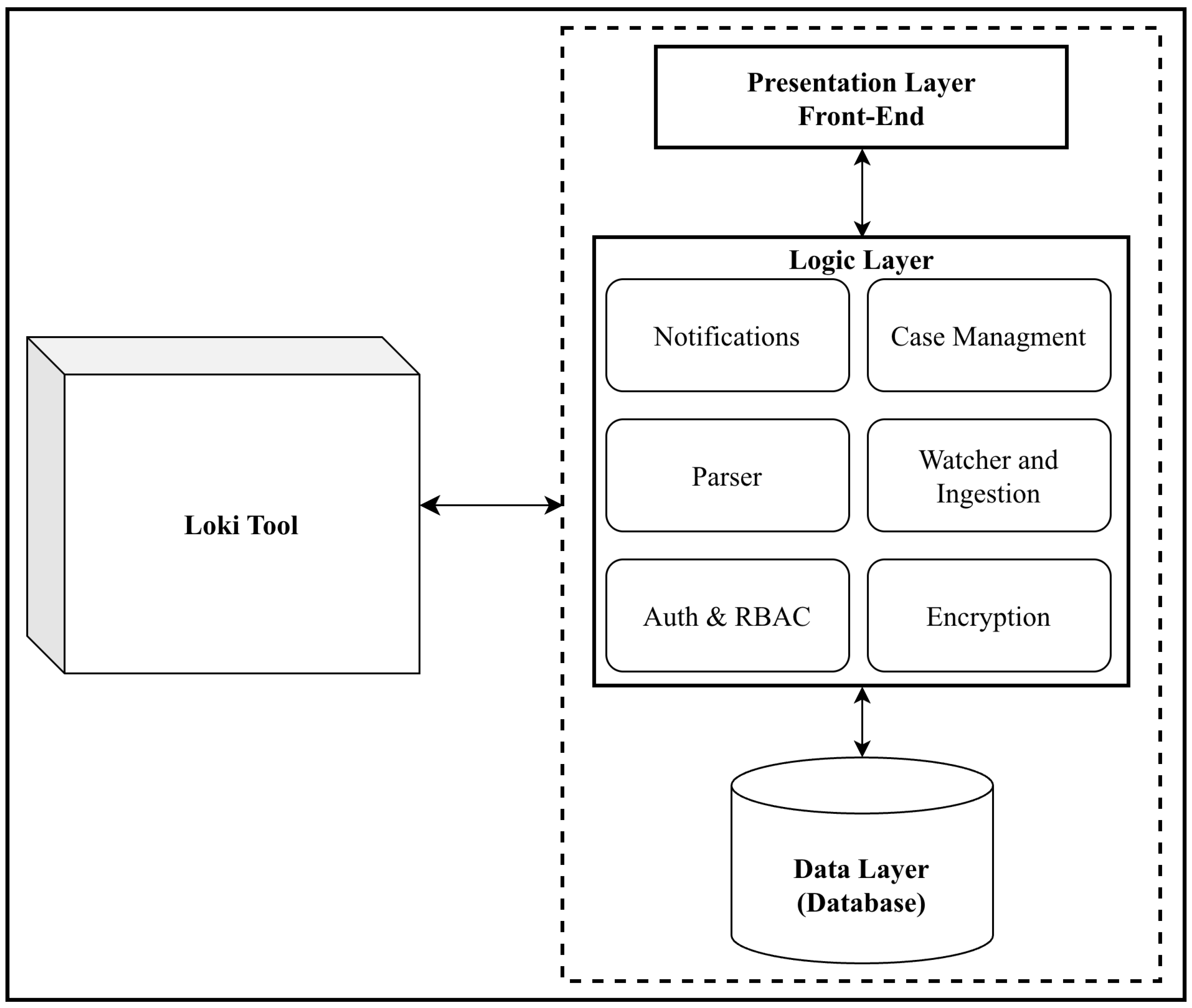
The overall system architecture consists of three main layers, integrated with the Loki scanning tool, as depicted in
Figure 2. The
Presentation Layer is the front-end user interface built using HTML, CSS, and JavaScript (leveraging the Bootstrap framework and a Metronic theme for responsive design). It provides the web-based dashboard where users interact with the system—logging in, viewing alerts, managing tasks, etc. The
Logic Layer is the back-end implemented in C# (ASP.NET Core MVC framework). This layer processes data received from the Loki scanner, handles application logic (such as parsing log files, applying role-based access rules, and triggering notifications), and mediates between the front-end and the data layer via a RESTful API. The
Data Layer consists of an SQL database that securely stores and manages all processed scan results, user information, task assignments, and other relevant data. This layered architecture ensures a clear separation of concerns: the UI is decoupled from data processing, and the database interactions are abstracted through the back-end logic.
The system architecture for the newly developed system consists of three main layers integrated with the Loki Tool:
- 1.
Presentation Layer
Built using HTML, CSS, Bootstrap, and JavaScript
Provides the user interface for interacting with and visualizing results.
- 2.
Logic layer
Developed using Python v3.12.9, and processes data received from the Loki Tool and manages communication between the presentation and data layers.
It contains the Parser, watcher, ingestion, and encryption modules.
- 3.
Data layer
System Architecture Design illustrating the three-tier architecture (Presentation, Logic, Data) and its integration with the Loki scanning tool. The Loki scanner (left) provides log outputs to the back-end logic layer, which processes and stores the results in the data layer, while the presentation layer visualizes the information for users.
In this design, the Loki scanner operates as an external module that the system interfaces with during scan tasks. Specifically, when a new scan task is initiated by an Admin (for example, assigning an Employee to run a scan on a particular machine or directory), the system can either instruct the Employee to run the Loki tool manually or invoke a console application that runs Loki with appropriate parameters. The scan output (i.e., log file or CSV data) is then fed into the DIGITRACKER pipeline via the back-end. We did not modify Loki’s internal scanning engine or YARA rules; instead, we use Loki “as is” and focus on effectively utilizing its output. By not altering Loki, we ensure compatibility with its updates and preserve the reliability of its tried-and-tested detection techniques.
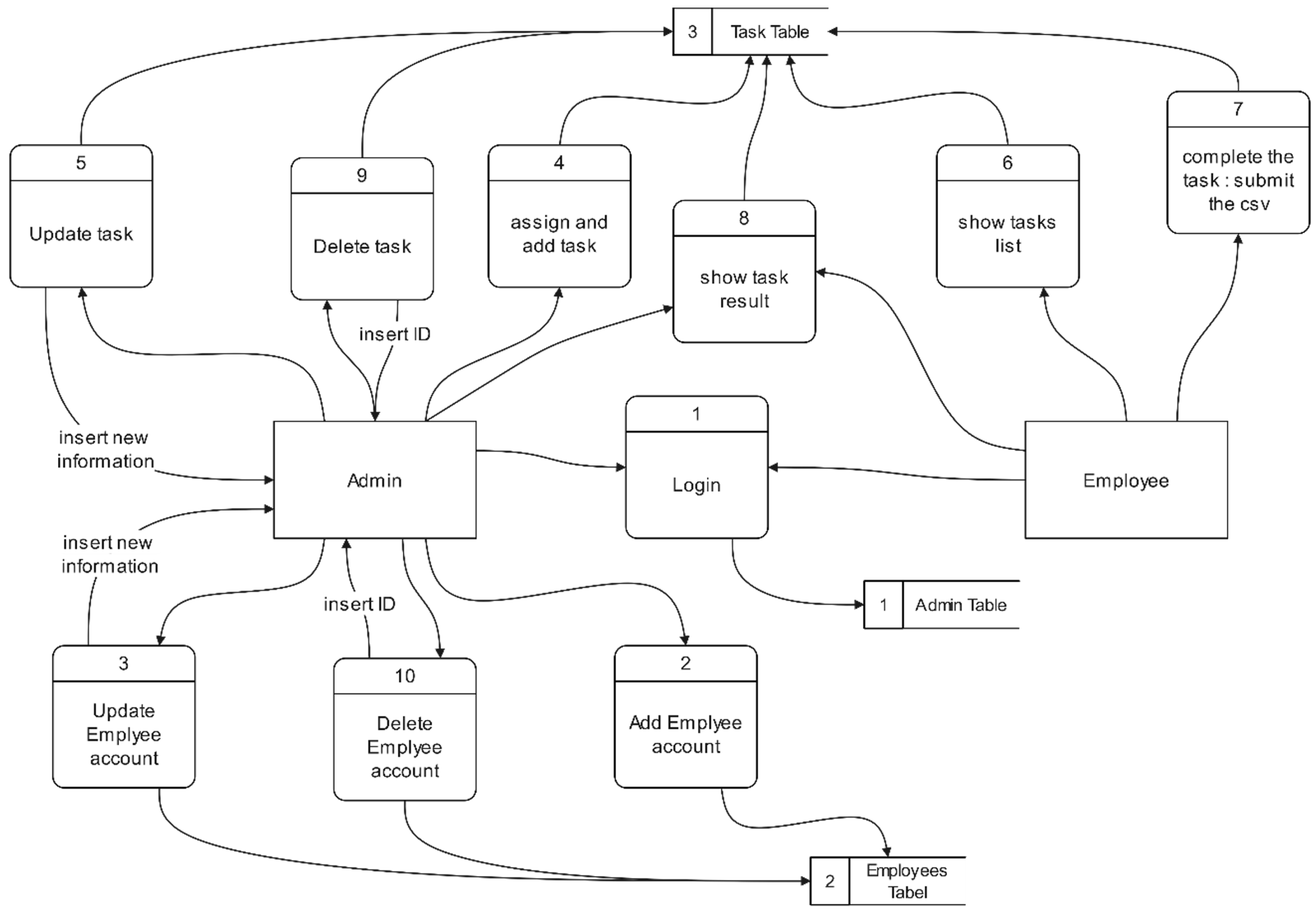
In the database design, an entity-relationship diagram (ERD) was developed, followed by the relational database schema and the system class diagram. Moreover, to visualize data flows and processes, we created a Data Flow Diagram (DFD) for core functions.
Figure 3 shows a simplified DFD focusing on task and alert management relative to data stores. In this diagram, the Admin can manage Employee accounts (reflected in the
Employees table in the database), assign tasks (reflected in the
Tasks table, which includes details such as task description, target machine, due date, etc.), and review scan results (alerts stored in an
Alerts/
ScanResults table). Employees retrieve their task details from the system, perform the scans using Loki (an external tool to the web app), and then submit the results back to the server. The database serves as the central hub where all these interactions are recorded and from which the dashboard pulls information to display.
The system design also considered error handling and edge cases. For instance, if a Loki scan fails or encounters errors (e.g., due to incorrect file paths or insufficient permissions on the target machine), the system detects the absence or corruption of the expected log file. In such cases, the platform flags the scan task with an “Error” status and notifies the Admin that the task did not complete successfully. This ensures that scan errors are managed gracefully and do not go unnoticed; administrators can then troubleshoot and re-initiate the scan if necessary. By incorporating these design considerations (e.g., verifying log integrity and providing appropriate user feedback), we built a robust system capable of reliable operation even in the face of partial failures or user errors.
3.3. Tool Development and Implementation
To begin, the development of the DIGITRACKER platform was approached with a modular architecture to ensure flexibility, maintainability, and scalability. Each module was designed to address specific functional requirements, including user interface design, secure data handling, real-time monitoring, and role-based access control. The primary goal was to create a responsive and secure environment capable of processing scan outputs from the Loki Scanner and translating them into actionable insights.
Moreover, the development process involved a combination of front-end technologies for user interaction, back-end frameworks and APIs for logic, and database systems for managing structured data. The sections below provide an in-depth explanation of each component that contributes to the platform’s seamless functionality.
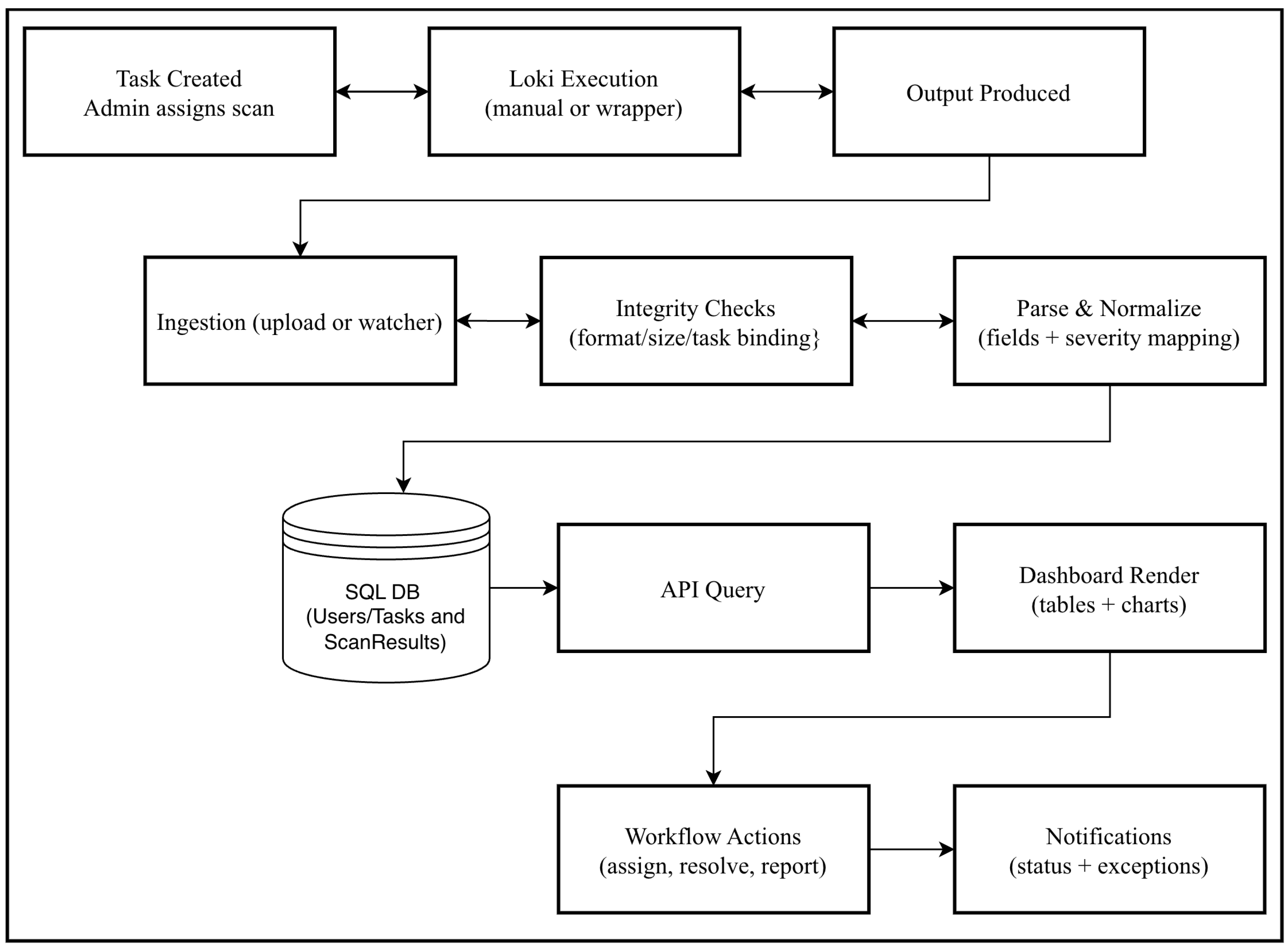
Figure 4 shows a step-by-step operational pipeline (what happens from scan initiation to dashboard updates), and in the following subsections, we provide an in-depth explanation of each module and component that contributes to the platform’s functionality.
3.3.1. Front-End Module
The front end of DIGITRACKER is responsible for the web application’s user interface and overall user experience. It was developed using a combination of HTML, CSS, and JavaScript, with additional support from Bootstrap and the Metronic theme to achieve a responsive, aesthetically pleasing, modern, cohesive design across the dashboard pages and user-centric design.
Additionally, jQuery was integrated to simplify Document Object Model (DOM) manipulation and to handle asynchronous AJAX calls to the back-end. This allows the UI to dynamically update content (for example, loading new alerts or updating task status without full page reloads) and provides a smooth, interactive experience. Key design goals for the front-end were to make the interface intuitive, minimalistic, and fast-loading, so users can focus on security insights rather than struggle with navigation.
We implemented multiple pages on the front-end corresponding to core functionalities: a login page, a main dashboard page showing summary statistics and charts, a task management page (for creating and assigning tasks), and alert pages to view details of active or historical alerts. Emphasis was placed on visualizing critical information. For example, we included charts to display the distribution of alerts by severity (e.g., counts of High/Medium/Low risk alerts) and trends over time (alerts per day/week). These visual elements leverage Chart.js to create responsive charts that update as new data comes in. Moreover, the UI supports toggling between light and dark modes to accommodate user preferences and reduce eye strain during extended use (this is important for analysts who may monitor the dashboard continuously).
3.3.2. Backend-End Module
The back-end component handles the core application logic and acts as an intermediary between the user interface, the database, and the external Loki scanning process. We developed the back-end using C# within the ASP.NET Core MVC framework. This choice provides a robust structure for implementing a Model-View-Controller architecture, separating concerns and making the code more maintainable. The back-end exposes a set of RESTful API endpoints that the front-end (via AJAX) calls for various operations, such as user authentication, fetching alert data, submitting a new task, or uploading scan results.
One of the crucial roles of the back-end is processing data from Loki. When a scan task is completed, the resulting log file is submitted to the server (either manually uploaded by an Employee or via automation). The back-end’s parsing engine reads this file, extracts relevant fields, and inserts the records into the database. In our implementation, we created a parser for Loki’s CSV output format that handles comma-separated values with quoted text fields to ensure that entries such as file paths (which may contain commas or spaces) are correctly parsed. In addition, the parser interprets severity levels and maps them to our internal representation. For example, Loki’s “Warning” or “Critical” labels are mapped to numeric severity scores or color codes for display.
We implemented logic for scheduling and triggering scans. In the current prototype, the typical workflow is that an Admin assigns a task to an Employee, who manually triggers running the Loki scanner on the target system and then uploads the results. However, the back-end is designed to allow automated invocation of scans as well: it can call a console utility (developed in C#) that wraps the Loki scanner and executes it on a specified path, then returns the output to the server. This console application is integrated with the back-end and uses RSA encryption (described later) to securely send scan results to the server’s API. In both scenarios (manual or automated), the back-end ensures that new scan data is processed, stored, and then reflected on the dashboard in near-real time.
Additionally, the back-end enforces business rules and security checks. It verifies user permissions for each request (e.g., only Admins can create tasks or view all alerts; Employees can only see their own tasks and alerts). We used ASP.NET Identity and authorization middleware to implement role-based access control (RBAC) by separating concerns and making it so that even if a malicious actor attempted to access admin-only functions by forging requests, the server would reject such actions based on the user’s role and authentication status.
Error handling in the back-end is also a critical aspect. If any part of the pipeline fails, for instance, if an uploaded CSV is not in the expected format or a database insert fails, the back-end catches the exception and responds with an error status code to the front-end, which then displays a meaningful message to the user. We implemented logging on the server side to record such events for troubleshooting and audit purposes.
3.3.3. Database Module
The database module is responsible for managing all data storage and retrieval operations within DIGITRACKER. We employed a relational SQL database (Microsoft SQL Server) to securely store information, including user profiles, assigned tasks, scan results, alerts, and configuration settings. The database design was informed by an Entity-Relationship Diagram (ERD) developed during the design phase. Key tables in the schema include: Users: stores user account information (UserID, Name, Email, Role, hashed Password, etc.). Tasks: stores scanning tasks (TaskID, AssignedTo (Employee user), Description, Target (machine or directory), Deadline, Status, etc.). ScanResults: stores individual alert records from Loki scans (AlertID, TaskID, Severity, IOCType, FilePath, Message, Timestamp, etc.). Notifications: stores system notifications or messages for users (e.g., if a task fails or completes, alert assignments, etc.).
To facilitate structured and efficient data access, we utilized an Object-Relational Mapping (ORM) approach via Entity Framework Core. This allowed us to interact with the database using C# classes and LINQ queries instead of raw SQL, improving development productivity and reducing the risk of SQL injection (by parameterizing queries). It also ensures consistency across the application when accessing or updating data.
Moreover, indices on key columns such as TaskID, UserID, and Timestamp were created to optimize performance for common queries, particularly retrieving recent alerts or filtering by user or task. Also, referential integrity constraints were implemented. For example, when a user is deleted, their related tasks and alerts can be handled appropriately (either reassigned or deleted) to avoid orphan records.
In addition, security of data at rest was considered. The database requires authentication credentials known only to the server application, and sensitive data, such as passwords, is stored in hashed form. In a production deployment, we would also enable encryption at rest for certain tables or the entire database and use secure backups.
3.3.4. Authentication & RBAC Module
User authentication and authorization were implemented to secure access to the application. We use the ASP.NET Identity framework for managing user accounts, password hashing, and authentication tokens. Users (Admins or Employees) must log in with a username/email and password to obtain a session token (stored as a secure cookie). Passwords are stored hashed using a strong one-way hashing algorithm.
This module is dedicated to securing application access by implementing robust user authentication and role-based access control (RBAC). It enforces restrictions on functionality based on user roles [
20], such as Admin and Employee, ensuring that users can access only features and data appropriate to their authorization level. This approach significantly enhances the system’s overall security, organization, and integrity.
Moreover, we implemented additional security measures, such as password complexity requirements (to encourage strong passwords) and account lockout after several failed login attempts (to mitigate brute-force attacks). Although our prototype uses basic credential login, the design allows extension to multi-factor authentication (MFA) in the future, as mentioned in our future work.
Moreover, to support multi-user RBAC, we had to introduce an RBAC system. Yet, creating and integrating a flexible RBAC solution added significant complexity to the back-end authorization logic as well as the front-end behavior, especially to deliver a smooth experience for different user roles, such as administrators and employees. Additionally, making the dashboard fully responsive across a wide range of screen sizes required substantial fine-tuning of the layout and UI components, using the Metronic theme together with Bootstrap to provide an optimal experience on both desktop and mobile devices.
3.3.5. File Watcher and Data Ingestion Module
The File Watcher (data ingestion) module is manually uploaded by an Employee or via a scanning process and the web application. In our implementation, this module is responsible for receiving scan results (log files) from Loki, securely processing the incoming data, and storing it in the database so that it handles quoted text fields and ensures that entries such as uploading the Loki output file for a given task are handled. The server receives this file through an API endpoint and passes it to the parsing engine as described above. For more automated operation, we developed a lightweight console application that can run alongside Loki. This console app reads Loki’s output in real-time and sends it to the server via a Hypertext Transfer Protocol Secure (HTTPS) request. To secure this communication, we utilized RSA encryption: the console app encrypts the log data using the server’s public key before transmission, and the server decrypts it with its private key upon receipt. This prevents eavesdroppers from reading sensitive scan data in transit, even if transmitted over an HTTP channel (in practice, we’d use HTTPS for an extra layer of security).
Once the File Watcher module obtains the log data (either via file or using RSA encryption (described later) to securely send scan results), new alert records are entered into the database. It then triggers an update mechanism on the front end. In our prototype, the front-end periodically polls the server for near-real-time active tasks; in a more advanced implementation, we could use WebSocket push notifications for instantaneous updates. Either way, the result is that within a couple of seconds of a scan completing, the new alerts appear on the Admin’s dashboard without requiring a manual page refresh.
Overall, the File Watcher module ensures that encrypted scan data can be seamlessly and securely received by the web application and that all incoming data is properly handled and persisted. This component is crucial for enabling the near-real-time monitoring capability of DIGITRACKER.
3.3.6. Encryption Module
The Encryption module protects sensitive scan artifacts and user data across two planes. In transit, the watcher can encrypt payloads using the server’s public key (RSA) prior to upload, reducing exposure even if transport is misconfigured; in practice, this is layered with HTTPS for defense in depth. At rest, the platform stores credentials as salted hashes (via Identity) and supports database-level encryption options (e.g., TDE/column encryption) for scan results and sensitive configuration. Key management is designed to keep private keys server-side and rotate keys with minimal operational disruption.
3.4. System Deployment, Testing, and Specifications
We implemented DIGITRACKER and tested it in a local laboratory environment. The software and hardware resources utilized are summarized in
Table 2.
For development and testing, the researchers used the following system specifications: a minimum of an Intel Core i5 processor or an equivalent alternative, ensuring sufficient computational capability for development, testing, and debugging activities. At least 4 GB of memory to support the smooth operation of development environments and application execution without performance degradation. A minimum of 5 GB of available disk space to accommodate project files, libraries, dependencies, and other essential data. Finally, stable internet connectivity was necessary to download dependencies and software updates, as well as to support communication between system components throughout the development and testing stages.
In addition, the system’s development relied on a range of technologies and tools, carefully selected to support both functionality and performance requirements across various system components, as demonstrated in
Table 3.
Once the system was implemented, we conducted several phases of testing to validate its functionality, security, and performance. The following subsection discusses the performed tests.
3.4.1. Integration Testing
Integration testing is a critical phase that verifies how different components of the system interact and work together. Unlike unit testing, which tests individual components in isolation, integration testing evaluates how multiple parts of the software function as a whole [
20,
21,
22]. This ensures that the system’s components communicate effectively, process data seamlessly, and produce the desired outcomes when integrated. During the integration testing phase, several key functionalities were tested to confirm their interaction between the backend and frontend, ensuring smooth data flow and consistent performance.
For example, we simulated an end-to-end workflow: an Admin creates a task, an Employee logs in and uploads a Loki scan result for that task, and then the Admin sees the alerts on the dashboard. This ensured that the front-end forms, API routes, parsing logic, and database updates were all in sync. We also tested multiple simultaneous operations (e.g., two different Employees uploading results at the same time) to observe that the system handled concurrency without errors (which it did). The integration tests confirmed that the system’s components communicate effectively and produce the desired outcomes when integrated.
3.4.2. Security Testing
Security testing is a crucial phase that aims to identify vulnerabilities within the system and ensure the protection of sensitive user data and communications [
23]. The goal is to assess how well the application protects against unauthorized access, data breaches, and other security threats. This type of test validates that the system adheres to the highest standards of data protection, privacy, and secure authentication. We conducted a series of security tests focusing on data encryption, authentication, authorization, and vulnerability assessment:
Data Encryption: We used Wireshark to capture network traffic while a scan result was being uploaded from the console to the server. We confirmed that the payload was encrypted and not human-readable (verifying our RSA encryption in transit). Additionally, we ensured that all web interactions occur over HTTPS in our test setup.
Authentication/Authorization: We attempted multiple incorrect login attempts to ensure account lockout policies took effect (after 5 failed tries, the test account was temporarily locked as expected). We also tried accessing admin-only API endpoints and pages using an Employee account token; the system correctly returned HTTP 403 Forbidden responses, indicating our RBAC checks are effective. We verified that an Employee cannot view or manipulate tasks/alerts that are not assigned to them.
Vulnerability Assessment: We employed OWASP ZAP (Zed Attack Proxy) to perform an automated scan of the web application. This included probing for SQL Injection, Cross-Site Scripting (XSS), and Cross-Site Request Forgery (CSRF) vulnerabilities. The results showed no critical vulnerabilities: our use of parameterized queries protected against SQL injection (ZAP did not find any injectable endpoints), our input validation and output encoding prevented XSS (attempts to inject ‘<script>’ tags in form inputs did not execute on the dashboard), and sensitive state-changing operations are inherently tied to user sessions (and we intend to implement anti-CSRF tokens in the next update, although ZAP did not find obvious CSRF flaws in the current UI).
Moreover, we also manually reviewed the application configuration for common security issues (e.g., ensuring password hashes use a strong algorithm, turning off detailed error messages in production mode, etc.). These security tests validated that the system adheres to high standards of data protection and secure authentication. We acknowledge that no system is perfectly secure; however, our testing did not reveal any major vulnerabilities at this stage.
3.4.3. Performance Testing
Performance testing assesses how well the system performs under various conditions, ensuring it meets performance requirements such as response time, throughput, and resource utilization [
24]. It focuses on the system’s behavior under normal, peak, and stressful conditions, ensuring it can handle the expected load and maintain responsiveness.
During this phase, the application was tested to determine its ability to process large volumes of data, handle multiple concurrent users, and respond efficiently to user interactions. The key focus was on ensuring that the system performs as expected even under high demand, without compromising functionality or user experience. In addition, the filtering functionality was evaluated to ensure the system handles a large volume of alerts with minimal delay, delivering real-time performance under various load conditions.
We conducted basic performance tests by populating the system with a large number of alerts and simulating concurrent users:
We inserted 1000 synthetic alert records into the database and observed how the dashboard handled this volume. The Running Alerts page loaded and displayed 100 alerts in under 15 s on the test machine, thanks in part to pagination and indexing. Client-side filtering and sorting (by risk level or date) on this dataset occurred almost instantaneously (well under 800 ms) due to efficient DOM updates and in-memory operations for this dataset size.
We simulated multiple users by opening multiple browser sessions and performing actions simultaneously (using automated scripts to mimic user clicks). The system could handle about 10 concurrent users performing operations (uploading files, refreshing dashboards) without noticeable slowdown on the single test server. CPU and memory usage remained within acceptable limits (CPU spiked to 80% during simultaneous file parsing but quickly dropped, and memory usage stayed under 2 GB).
We measured the end-to-end latency from the moment a Loki scan file is uploaded to the moment the parsed alerts appear on the dashboard. On average, this was around 6–10 s in our local environment for a scan log containing 50 alerts (most of the delay was due to file upload time and parsing). This indicates the system achieves near real-time updates, which is crucial for our goals.
We also note that Loki itself, during data collection, processed our test directories in a reasonable time (on the order of a few minutes for large file sets), but since our focus is on the dashboard, the relevant metric is that once Loki finishes, the results are on the dashboard almost immediately.
While these performance tests were modest (limited by our lab setup), they suggest that DIGITRACKER meets the performance requirements for small to medium environments. The architecture can be scaled (e.g., by deploying the web app and database on separate servers or by using cloud services) to handle larger loads if needed. We plan to conduct more rigorous performance evaluations (including stress tests and load balancing scenarios) in future work.
4. Results and Discussion
This research successfully addresses the growing need for efficient and accessible tools to manage cybersecurity threats for low-budget teams. By integrating a console-based scanner with a web-based dashboard, the system enables administrators to visualize and manage scan results more effectively. Secure transmission is achieved using TLS, with RSA-based cryptography used for encryption to ensure secure data transmission, while the modular design allows for easy task assignment, data upload, and role-based access [
25].
Moreover, this section demonstrates the DIGITRACKER system in action and discusses how it meets the needs identified. We focus on the user interface elements (with
Figure 5,
Figure 6 and
Figure 7) and the outcomes of integrating Loki’s scans into our dashboard, as well as summarizing the key results from testing.
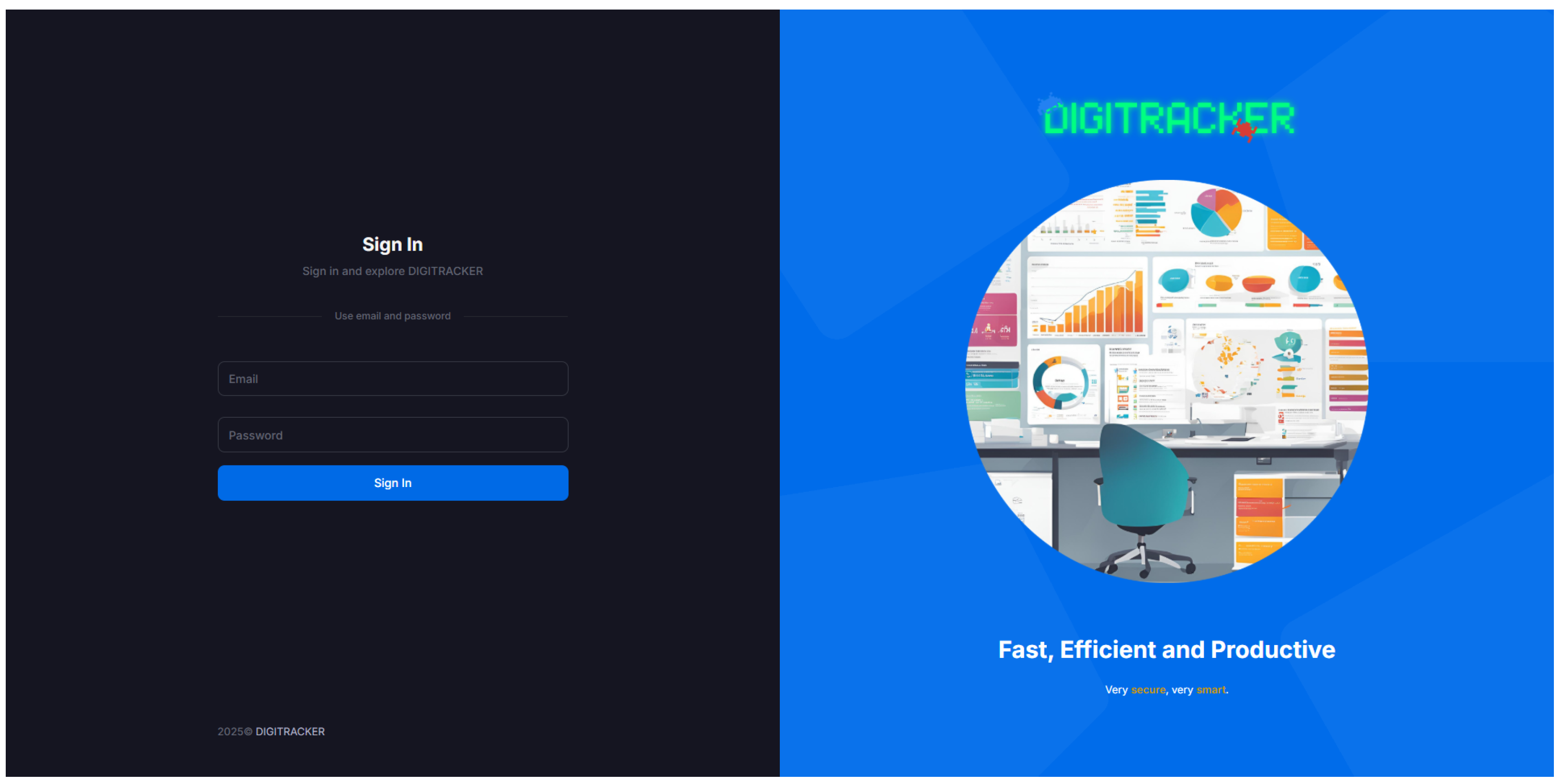
Upon deployment, users access the DIGITRACKER dashboard through a web browser. The initial interface is the login page, which is designed for simplicity and security. It requires user credentials and enforces a strong password policy. The interface supports both light and dark themes; many administrators prefer a dark mode for reduced eye strain, which our design accommodates (
Figure 5 shows the dark-mode login).
The page is optimized for usability, with a clean and intuitive layout that works seamlessly in both light and dark modes, allowing users to choose the display preference that suits them best. The dark mode reduces eye strain for extended use, while the light mode provides a bright and straightforward interface for users who prefer that style.
After a successful login, an Admin user is presented with the main dashboard. This dashboard provides a summary of system status and recent activity. Key panels might show the total number of alerts by severity, the number of tasks in progress, and quick links to various sections.
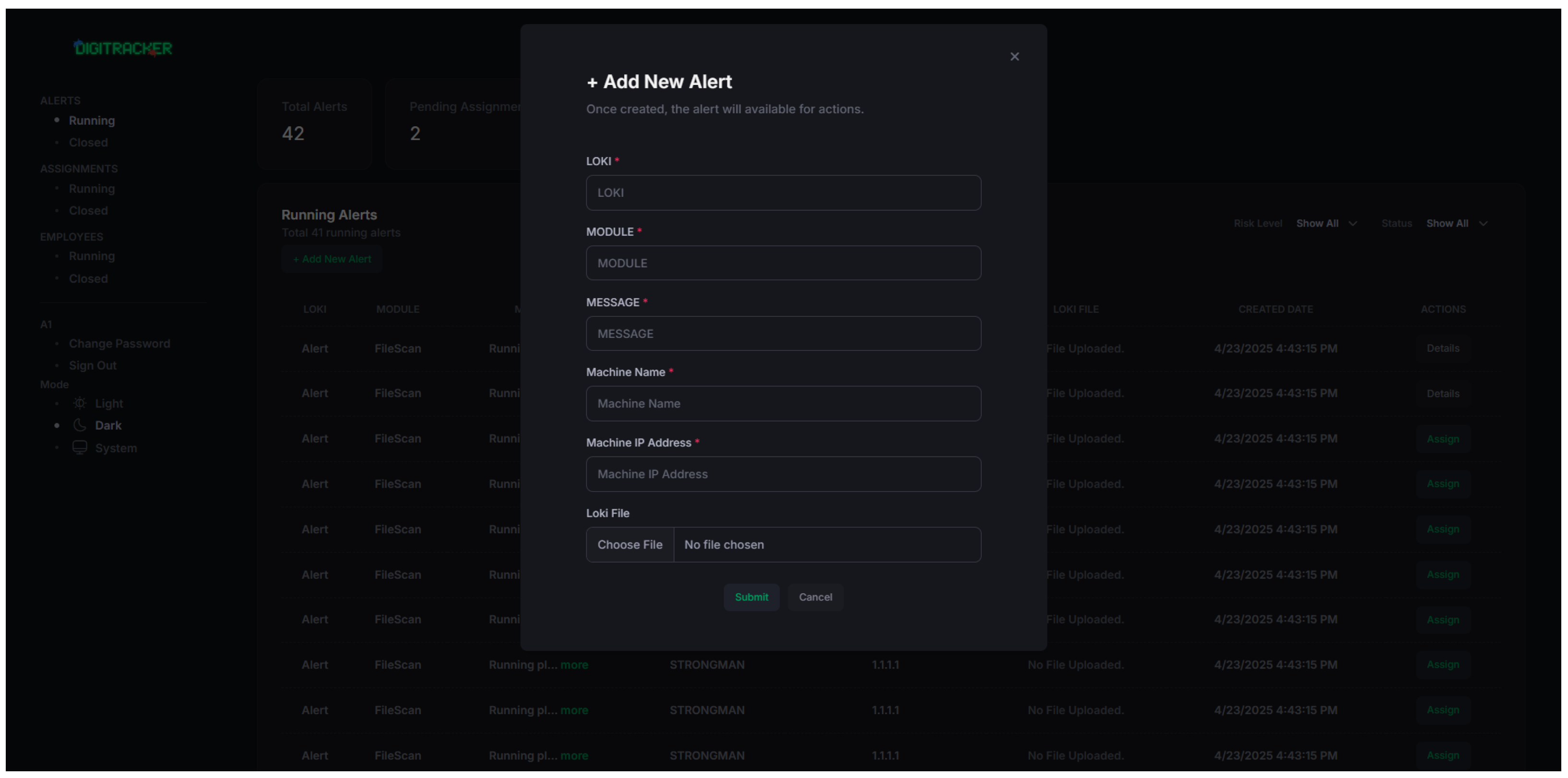
One of the core pages accessible from the dashboard is the “Add New Alert” page (for manually logging an alert or incident outside automated scans) and the task management page. As seen in
Figure 6, the interface is designed with simplicity and ease of use in mind. The page includes several clearly labeled fields, such as Alert Name, Message, Module, and Associated Files, enabling administrators to input the relevant details for each alert manually. Although much of DIGITRACKER’s alerts come from automated Loki scans, this manual input feature allows logging of external findings (for completeness of record-keeping).
This interface is used when alerts need to be created manually, providing a straightforward process for entering all necessary information and submitting the alert. The form is designed to ensure that required fields are filled in, with validation checks to prevent incomplete submissions. Once the fields are completed, the administrator can submit the alert by clicking the “Submit” button, which saves the alert to the system.
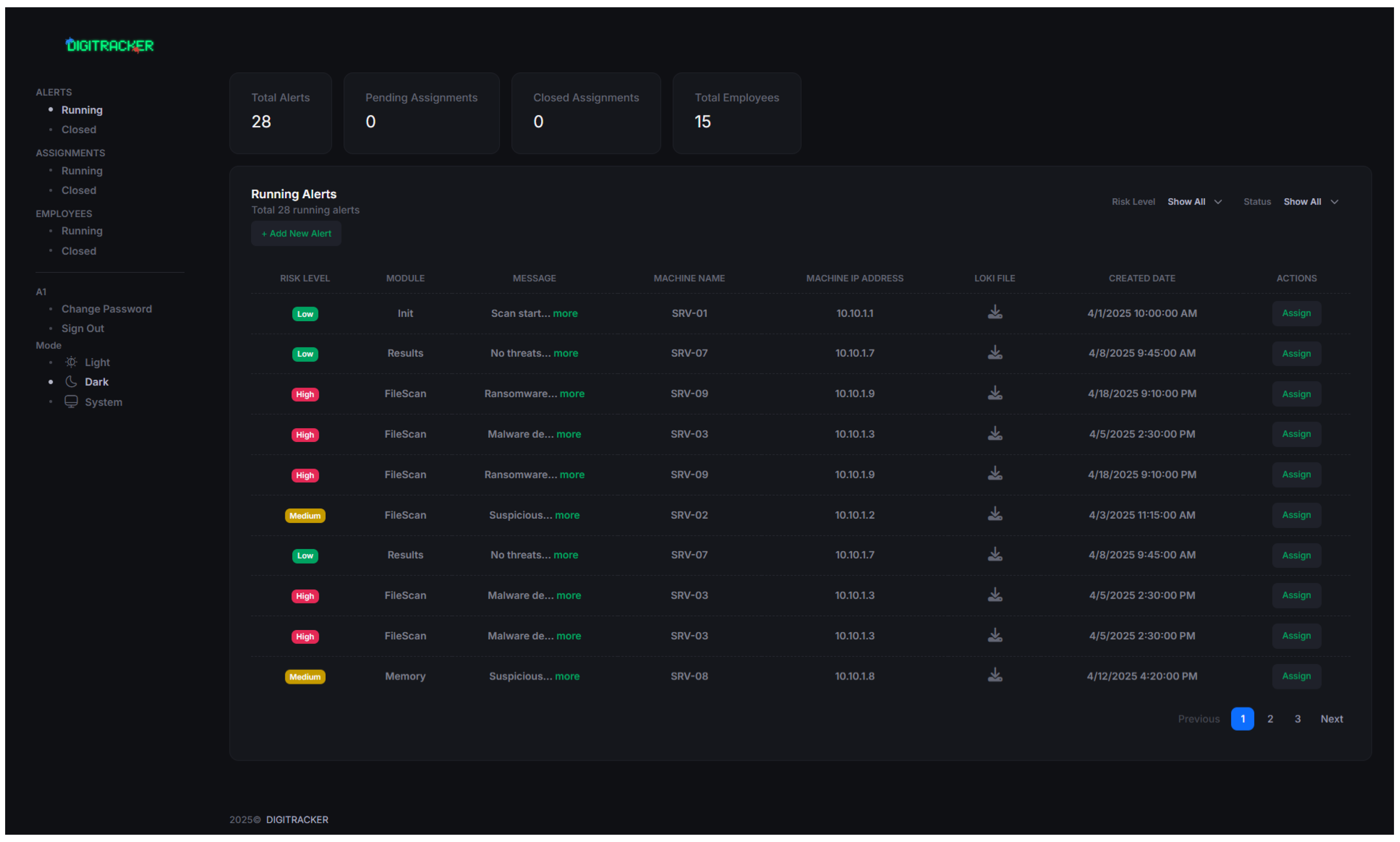
The heart of the DIGITRACKER platform is the “Running Alerts” page, which displays active (unresolved) alerts in a table format. The Running Alerts Page is an interface that displays active security alerts. As shown in
Figure 7, this page provides a clear, organized view of ongoing alerts, with essential details that administrators can monitor in near real time. The page includes columns for Risk Level, Machine (source host), Associated Loki File, and Creation Date, allowing administrators to easily assess the current state of each alert.
The interface is dynamic and supports user interaction for effective triage:
The table is interactive: columns can be sorted (e.g., sort by Risk Level to see High first) and filtered. For instance, an Admin can filter the alerts to show only “High” risk alerts or only those from a particular machine IP. This helps focus on the most critical issues when many alerts are present. Moreover, the user can sort and filter by risk or date, allowing for quick narrowing down to, say, “High-risk alerts in the last 24 h.”
Each alert row has an “Assign” action button. By clicking this, an Admin can delegate the investigation of that alert to a specific Employee. The system will then notify that employee (e.g., via a dashboard notification or email) that the alert is assigned to them. This implements a simple alert triage workflow that enables team collaboration within the platform.
The page updates in near real-time. As mentioned in testing, if new alerts are added to the database (by a Loki scan or manual entry), the Admin’s Running Alerts page will show them within a couple of seconds. Alerts can also be marked as resolved or deleted by the Admin once they are addressed; resolved alerts are moved off the “running” list (to a historical log accessible elsewhere).
The Risk Level column categorizes each alert based on its severity (High, Medium, or Low), helping administrators prioritize their response accordingly. The Machine IP column displays the IP address of the machine that generated the alert, making it easy to identify the source of the threat. Additionally, the Loki File column links each alert to the file generated by the Loki tool, providing context for further investigation.
The Creation Date column shows when each alert was first generated, offering a timeline for the event and helping administrators track the duration of active threats. Each entry in the table is sortable and can be filtered by Risk Level, Machine IP, or Creation Date to facilitate quick analysis.
Additionally, as part of the DIGITRACKER system’s lightweight case management tool functionality, the admin can use the “Assign” button to assign specific alerts to employees. This allows the admin to delegate the investigation and resolution of the alert to the appropriate team member. The Assign button, located next to each alert entry, provides a streamlined way for the admin to manage workloads and ensure timely responses to threats.
The Running Alerts Page is designed for efficiency and clarity, enabling administrators to monitor active security alerts and take immediate action when needed. The layout is intuitive, with well-organized information that provides all the relevant details at a glance. Also, the interface included an export function on this page that allows the admin to export the list of alerts (with all details) as a CSV or PDF report for reporting or further analysis. In future versions, we plan to allow more customizable report generation (see Future Work).
Following the presentation of the application’s user interface and core screens, it’s essential to highlight the development journey behind DIGITRACKER. Throughout the development process, various challenges were encountered, from data encryption to front-end responsiveness, but each was resolved through careful planning, research, and the implementation of modern technologies.
Throughout the development and testing, DIGITRACKER demonstrated that it can successfully bridge the gap between raw security scan data and actionable information. The integration with Loki means Loki’s scanning power and results are presented in an easy-to-read web interface. Moreover, the development benefited from the usability feedback of a small group of test users, which was positive—they found the dashboard straightforward to navigate. In particular, they valued the visual charts and the filtering feature on the alerts page, which significantly reduced the time to pinpoint critical events compared to reading through raw log files. On the technical side, the evaluation indicates the system imposes minimal overhead on the scanning workflow. The near-real-time delivery of scan results (within seconds) ensures that administrators are almost immediately aware of potential threats, enabling prompt responses and achieving our goal. The experimental evaluation shows that the end-to-end latency from Loki scan completion to dashboard visualization averages below 20 s, even for scan logs containing dozens of IOC alerts, confirming DIGITRACKER’s capability for near real-time threat tracking.
The result is a practical and user-friendly platform that simplifies the interpretation of complex scan data, empowering organizations to respond more quickly to potential threats. Highlights of some of the challenges faced are discussed in
Section 4.1.
4.1. Implementation Challenges and Limitations
During the project’s development, several technical and design challenges were encountered, each requiring careful analysis and customized solutions. First, implementing RSA encryption between the console application and the API posed significant challenges, particularly in managing key generation, secure distribution, and optimizing encryption performance to ensure reliable and secure communication.
Second, parsing and analyzing Loki-generated log files, along with CSV data, was complicated by inconsistent formatting and variable data structures. Additional processing was required to normalize the data and extract meaningful insights.
Third, displacing large volumes of scan data in a clear, interactive, and user-friendly manner required careful selection of UI components and performance optimization strategies to maintain responsiveness and usability.
Fourth, maintaining smooth real-time data transfer between system modules, especially in asynchronous operations, requires meticulous handling of API requests, response synchronization, and error management to ensure data consistency and system reliability.
We acknowledge some limitations in the current system. For instance, our evaluation environment was small, and real-world deployment may reveal additional performance considerations. Moreover, while our security testing was thorough, continuous monitoring and updates will be needed as new vulnerabilities emerge. Nonetheless, as a PoC, DIGITRACKER effectively shows how combining an open-source scanner with a custom dashboard and case management can empower low-budget cyber defense teams.
4.2. Testing Stages
The DIGITRACKER testing phase played a crucial role in ensuring the system’s quality, security, and usability. Through a combination of functional, non-functional, security, and usability testing, we identified and resolved issues early in the development process, ensuring that the system functions as intended and meets user expectations.
Functional testing confirmed that the system’s core features, including user login, task management, and alert creation, perform correctly under expected conditions. Non-functional tests evaluated system performance, security, and user experience, ensuring it could handle large volumes of data, provide secure access, and offer an intuitive interface. Security testing ensured that user data is protected through secure authentication and encryption methods, while usability testing confirmed that the interface is easy to navigate and enhances the user experience.
In general, the testing process validated the system’s robustness, reliability, and user-friendliness. With the issues identified during testing addressed, DIGITRACKER is ready for deployment, providing a secure, efficient, and user-centric solution. The comprehensive testing approach significantly contributed to delivering a high-quality product that meets both functional and non-functional requirements, ensuring a seamless and satisfying experience for all users.
Moreover, from the early stages of system design to implementation and testing, every aspect of the project has been thoroughly planned and executed to ensure that the system meets the highest standards of functionality, security, and usability. Key features such as user authentication, role-based access control (RBAC), and near-real-time alert management have been seamlessly integrated to enhance the platform’s security and efficiency.
The development of DIGITRACKER was a multi-phase process involving:
System Design and Architecture: The system was architected to allow easy scaling and integration with future technologies, with a focus on modularity and flexibility.
Implementation: Core features, such as alert management, user management, and task assignment, were implemented using modern technologies such as ASP.NET MVC, C#, and SQL databases, ensuring high performance and security.
Testing: Comprehensive functional, non-functional, and usability tests were conducted, validating the system’s stability and usability. Security tests ensured that sensitive data was protected, and usability testing confirmed that the platform was intuitive and easy to navigate for both administrators and employees.
4.3. Future Works
Although DIGITRACKER has met its initial goals and is ready for deployment, this research indicates several areas for future development and improvement to ensure the system remains adaptable and scalable to the evolving needs of cybersecurity professionals.
There are many future works in the plans. First, the tool needs more stress testing and load balancing to ensure that DIGITRACKER can efficiently handle a larger number of concurrent users and larger datasets. Optimizing response times and resource management will be critical as the system scales to accommodate more data and users. We plan to prioritize comprehensive performance testing and optimization in the next development cycle. For example, this may involve moving to an asynchronous upload model or caching frequently accessed data.
Another short-term enhancement is to integrate MFA to enhance security during user login. This will provide an extra layer of protection and is particularly important if the dashboard is exposed on the internet. We aim to implement and integrate MFA (e.g., TOTP or email/SMS verification) in the coming iterations.
As DIGITRACKER expands, offering support for multiple languages and regional settings will be essential to broaden its user base, as it currently only supports Arabic and English. When it comes to enhanced reporting and analytics capabilities, users can benefit from allowing them to generate customizable reports on alert statistics, employee task performance, and system health. This would help cybersecurity teams make more informed decisions based on real-time data insights. For example, an admin could generate a report on “alerts by category over the last quarter” or “employee task performance metrics” directly from the dashboard. We have prototyped a simple export feature, but making it flexible and rich (with charts, etc.) is on the roadmap.
Since security threats continually evolve, DIGITRACKER must also evolve to address emerging issues. In the medium term, we plan to incorporate advanced encryption techniques for data at rest (e.g., database encryption) and possibly integrate automated vulnerability scanning directly into the system (for instance, scheduling regular scans of critical servers or using open-source vulnerability assessment APIs and feeding results into the dashboard). These improvements are on our roadmap for the next year of development.
Furthermore, DIGITRACKER can benefit from integration with other widely used cybersecurity tools such as security information and event management (SIEM) systems, intrusion detection systems (IDS), and firewalls. This would allow for a more holistic approach to cybersecurity threat management, enabling the platform to aggregate data from various sources and provide a deeper understanding of potential threats.
In addition, in the longer term, Artificial Intelligence (AI) and Machine Learning (ML) could be leveraged to improve alert prioritization and provide detailed descriptions. Moreover, by analyzing historical data, AI algorithms could predict which threats are most likely to escalate and require immediate action. This would allow administrators to focus on the most critical issues, improve response time, and reduce manual workload. For example, we might incorporate anomaly detection algorithms to identify unusual spikes or correlations in the alert data that a human might miss, thereby enabling the discovery of zero-day vulnerabilities or attacks [
26].
Finally, since the tool is now designed to run on local and on-premises systems, a cloud-based deployment can offer additional flexibility and scalability, allowing DIGITRACKER to be accessed from anywhere. Moreover, containerizing the application (using Docker) and enabling it to run on cloud platforms could offer additional flexibility, scalability, and accessibility (especially for distributed teams or remote monitoring). In addition, the tool can integrate with cloud storage solutions for data redundancy and backups. This would also enable automatic scaling as the number of users and data grows.
In general, the research demonstrates the importance of combining automation, visualization, and secure communication in modern cybersecurity solutions. Through DIGITRACKER, cybersecurity teams can have access to a platform that not only facilitates near-real-time monitoring but also streamlines employee task management and provides comprehensive alert management. These features are essential for any organization that seeks to mitigate risks and improve operational efficiency in handling cybersecurity threats [
27].



 ,
,