1. Introduction
In everyday life, we are surrounded by a multitude of objects and devices that require our manual intervention on site from time to time. For many of these, it is not necessary for a specific person to be attentive, but it is sufficient if people in the vicinity do so. A good example of this is everyday office life. Here, there are areas that are frequented by several people several times a day. These areas often contain objects such as open/closed windows, coffee machines with pending cleaning tasks, water/bean shortages and unwatered plants. In principle, all people passing by randomly can solve these simple problems.
Where responsibilities are not rigidly defined and in the case of joint tasks, it is advisable not to impose the completion of such tasks on the people present, but to allow them to be completed on a voluntary basis. Possible reasons for an unwillingness to intervene/complete such tasks are complex (e.g., stress, lack of time, willingness to make sacrifices, etc.) and can vary from time to time and within the same person. They should therefore be free to decide whether they want to or can do them themselves or whether someone else should do them. However, this presupposes that they are aware of these pending tasks, so they need to be given information about the objects in question. It is important to note, however, that not all of these devices should force us to focus our attention on them, as this would inevitably contribute to the sensory overload that is often already present.
Such notifications from objects requiring assistance should therefore be unobtrusively embedded in their surroundings and easy to ignore. In order to avoid further distractions for people passing by, no direct interaction with electronic devices should be necessary at first.
1.1. Issues with Existing Technologies
There are some objects in our environment that are already trying to convey that they need a person’s attention. However, some difficulties can arise. On the one hand, the communication of information is inconsistent across multiple devices. People therefore need to know and recognize the different requests for help from the individual devices. Initially, this would be difficult for devices without a visual or auditory user interface and non-technical objects (e.g., windows, plants). These would first have to be individually equipped with technical devices in order to communicate their need for assistance. Some devices, on the other hand, provide this information visually via status LEDs or displays on the device. In both cases, these are only visible from certain angles and from close up. Auditory cues can also be provided, but here it is particularly difficult to distinguish and localize the objects in need of help. More complex information cannot be adequately conveyed. With multiple cues, sensory overload is more likely and auditory cues may be unsuitable for noisy environments. Another option is the use of information boards and public displays. A major problem here is assigning the information as to which of the nearby devices require assistance. If a map is used for the assignment, this can only be communicated with considerable cognitive effort.
1.2. Types of Augmented Reality
Augmented reality offers another way of conveying location-based information about objects. Here, additional information is visually displayed in relation to objects. In the literature, different types of displays are classified for displaying additional information. A common classification according to Bimber&Raskar [
1] differentiates between head-attached, hand-held and spatial augmented reality displays. In the first type, users wear devices on their heads that allow them to see the real environment but use technical systems such as mirrors and displays to superimpose additional visual information on certain objects they see. Currently popular representatives of this type include Google Glass, Microsoft Hololens and Apple Vision Pro. However, the prevalence and acceptance of these devices is still very limited. Other current obstacles are the limited wearing comfort (e.g., [
2]) and the common small field of vision.
With hand-held augmented reality, the user carries the augmented system in his or her hand. This is realized by a camera on the side facing away from the user and a display on the side facing the user (see-through). The objects on the displayed camera image are enriched with additional information. Common implementations are based on standard smartphones and tablet computers and are therefore very widespread. However, in contrast to head-attached systems, the user must hold the device in their hand and actively swivel it in the direction of the objects to be enriched. Here, too, the field of view is quite limited. The display of information is also quite limited due to the often small display.
In the third type, spatial augmented reality displays, the equipment for augmenting real objects with additional data is installed in the environment. Here, again, there are systems based on projectors that cast light onto the objects to be augmented. Several projectors are often required to enhance spatial objects without casting shadows. In addition, classic problems such as insufficient focusing, distortion and a lack of contrast can limit the benefits. Screen-based solutions, on the other hand, are located in the field of view between the user and the enriched object. In the simplest case, this is a setup consisting of a camera on the back and a display on the side facing the user, as with hand-held see-through displays. A special form is mirror-based displays, which are used for augmented reality. The most common representatives of this technique are video see-through virtual mirror displays (VMDs) and reflective half-mirror or half-silvered displays (RHMDs) [
3]. VMDs are based on normal displays without a reflective layer. Instead, they display the camera image of an additional camera and thus simulate the reflection. This concept is also used in VR environments, which have the advantage that several users can use one VR mirror by displaying a separate mirroring for each user. RHMDs instead are AR systems with highly reflective displays that work like a normal mirror when switched off. The system uses a camera to track the position of the user’s head or eyes in order to display additional information onto these display positions reflecting certain objects.
In this paper, we propose a novel approach using mirror displays (RHMDs) to provide unobtrusive, location-based cues to people walking by objects in their environment. We present a solution for open tasks in shared spaces such as offices (e.g., resolve paper jam of copier), common rooms (e.g., initiate the coffee machine’s cleaning program) or labs. We design, implement and evaluate a novel system through augmented reality to allow users to be aware of these tasks in a uniform manner. This means that our approach is unobtrusive and requires neither the wearing of AR glasses on the head nor the smartphone in the hand. Through this, a large area can be enriched with augmented reality through moving interaction with the mirror display (see
Section 3).
In the next section we discuss the related work, then we describe our concept in
Section 3, introducing further advantages of RHMDs for our approach, and we evaluate our approach with an experimental setup and extensive user study in
Section 4.
2. Related Work
Classical augmented reality approaches date back several decades. Approaches to the mirror metaphor in the field of augmented reality have been known since the early 2000s (e.g., [
4,
5]). A detailed discussion of the advantages over AR and VR approaches can be found here [
6]. RHMDs are usually used for mirror displays (e.g., [
7,
8,
9]), and VMDs (e.g., [
10,
11]) are mostly used for such displays.
2.1. Classical Smart Mirrors
For the sake of comprehensiveness, we will mention a few approaches for classic smart mirrors in this section. Existing smart mirror implementations usually supplement the reflected image with information displays at defined screen positions. In addition to displaying images or multimedia content (e.g., [
12]), these systems typically incorporate display areas for time information (e.g., [
13,
14,
15]), weather (e.g., [
13,
15,
16,
17]), calendar events (e.g., [
13,
17]), and news (e.g., [
13,
15,
18]). Sensors are frequently used to detect the presence of users (e.g., [
15,
16,
19]). Some systems use facial recognition to identify users (e.g., [
16,
18,
19]) and even recognize emotions (e.g., [
17]) to modify the displayed information. Importantly, these existing approaches focus on adding information to the reflected image, rather than employing object- or person-specific image enhancements, as explored in the following sections.
2.2. Technical Papers for Mirror Displays
There are several works that deal with special technical aspects of mirror displays, such as the initially marker-based or sensor-based (e.g., [
20,
21]) tracking of users, later frequent image-based tracking (e.g., [
22,
23]) and the calibration of the system [
7] or of additional cameras [
3]. The first systems were quite expensive and experimental. Nowadays, standard cameras and mirror displays on the market are usually sufficient as hardware and standard 3D development environments to model spatial relationships and implement rendering.
2.3. Fashion and Make-Up Applications
The areas of application for mirror displays are diverse. In fashion, they are used for the virtual fitting of clothing [
24,
25] and shoes [
22]. The main challenge here is the precise fitting of virtual clothing to the user’s body. Systems for make-up [
26] and shopping for such products [
27] require similar precision. Fujinami et al. propose a personalized mirror in the bathroom [
28], which identifies the user but does not display location-based information.
2.4. Entertainment and Gaming Applications
Other researchers investigated the use of mirror displays for entertainment in public spaces [
29] and develop a series of recommendations for this area of application, albeit strongly oriented towards the MS Hololens AR glasses. A similar application for gaming purposes proposes the display of silhouettes of other players to give the user an impression of where they are next to them while wearing VR glasses [
30].
2.5. Medical, Psychological and Physiological Applications
There are a number of papers that see potential applications in the medical field: for anatomy education [
6,
31,
32,
33] or to visualize EEG signals [
8]. AR is used here to project objects such as organs in front of the user or directly onto the user’s reflection (embodiment). The organs are interacted with using hand gestures or the user’s own body. Other works address embodiment and virtual body ownership with a virtual mirror or in a VR scene [
34,
35]. The main focus is on mapping the user onto an avatar. Among other things, this allows studies on distorted body perception. Besides psychological applications, it is also possible to focus on physiological issues. Thus, mirrors are also used for interactive support of movements of users to an instructor [
9].
2.6. Industrial and Technical Applications
In the technical field, there are several approaches, for example, for the enhancement of rear-view mirrors in vehicles [
5]. In the industrial sector, mirror displays are used several times to support assembly and maintenance tasks. The challenges here are the communication of location-based instructions to the user [
36] or the visualization of places that are visually hidden from the user in order to be able to carry out assemblies [
37]. Related to this is fault diagnosis and condition monitoring. The approach of Rajan et al. [
38] addresses this task area and uses mobile AR to visualize the status of IoT sensors based on location. Even if this comes closest to the issue augmenting devices with needs, this approach remains quite technical with the use of mobile AR on smartphones and without involving the user.
2.7. Comparison of Mirror AR Approaches
Although a narrative summary of related work on mirror display technology was given in the last sections, a systematic categorization is essential for identifying research gaps. We provide a six-dimensional classification scheme to help with this, which is summed up in the table below. By clearly defining dimensions along which current approaches can be compared and contrasted (see
Table A1), this categorization goes beyond a purely descriptive approach. By organizing related work based on display technology, interaction technology, ambient integration, user adaptivity, position adaptivity and the augmented entities presented, we aim to provide a more structured and insightful overview of the field, enabling a clearer understanding of the current landscape and potential directions for future research.
To categorize existing approaches in mirror display technology, we utilize a six-dimensional classification scheme. Display technology defines how the mirrored and augmented content is presented. This ranges from physical mirror displays— incorporating a reflective coating on a screen—to virtual mirrors realized through conventional displays, Head-Mounted Displays (HMDs) or mobile devices. Interaction technology details how the user interacts with the application. This encompasses various input methods, including full-body movement, limb tracking (like hand gestures), device-based control (controllers, smartphones, vehicles), gesture recognition and facial expression analysis. The ambient criterion distinguishes between direct and subtle engagement. A “No” indicates a direct, goal-oriented interaction where the user consciously engages with the application. A “Yes” shows that the application blends into the environment, enabling more casual, unobtrusive interaction. User-adaptiveness describes whether the system can differentiate between multiple users and tailor the interaction or displayed content specifically to each individual. Position-adaptiveness assesses if the system tracks the user’s movement and adjusts the augmentation accordingly, ensuring that virtual elements remain correctly aligned with the user’s new position. Finally, augmented entities specify what the application enhances or augments. This can range from the user’s full body or specific body parts (e.g., feet, brain) to avatars representing the user or others, reflected real-world objects or entirely virtual content with no direct physical counterpart.
2.8. Conclusions
In summary, there are currently no approaches in which mirror screens are used to subtly draw the attention of passing users to things that need help. Hence, there are several novelties to be addressed in the next sections, such as interaction concepts for unobtrusive, location-based cues to people walking by objects in their environment. We will present a corresponding novel concept for this in the next section.
3. Approach
Our approach (Augminded) is based on reflective half-mirror displays. We will first outline how they work and then present our concept and the intended user interaction. In the following, we present several use cases with the application of our approach.
3.1. Mirror Display Characteristics
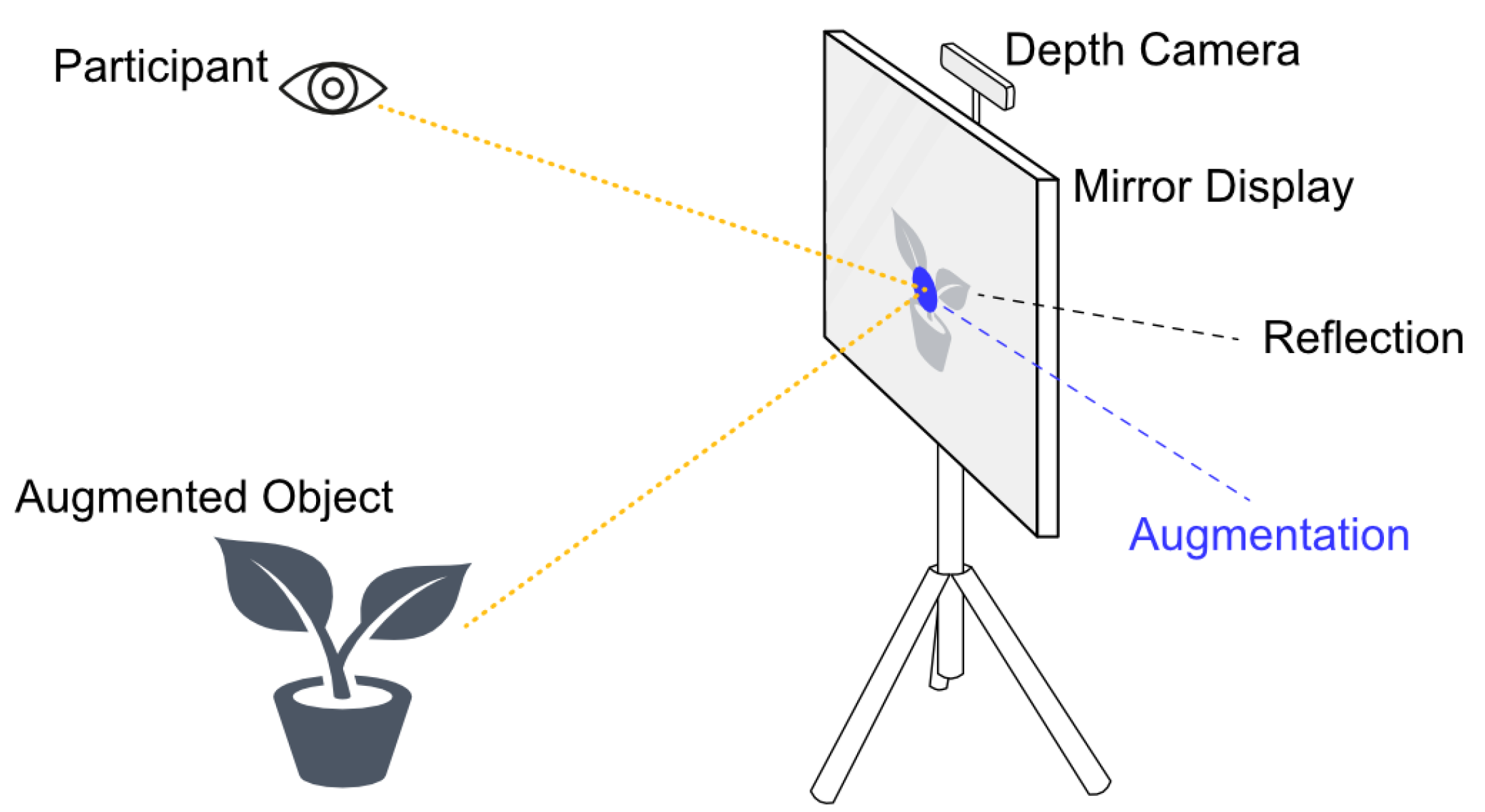
Mirrors are well-known objects of everyday use, and people are used to dealing with them. A perfect mirror reflects all the light at exactly the angle at which it hits it (angle of entry corresponds to angle of exit). In practice, the reflection is lower, and in the case of half-mirrors even deliberately significantly lower. However, in addition to half-mirrors, mirror displays also contain an underlying display, which can visually enhance the reflected image in certain places. While reflections are undesirable with conventional displays, they are desirable with these displays. Observers therefore primarily see a reflection of the surroundings, but it is possible to visually emphasize parts of it (e.g., certain objects). In order to be able to precisely emphasize the correct locations of the corresponding reflections, the position of the observer’s eyes must be known. From (i) the eye position, (ii) the mirror position and its orientation and (iii) the known positions of certain objects, the corresponding pixels on the display are calculated, which light up for the visual augmentation (see
Figure 1). Since this AR technology utilizes real mirrors, the same optical laws apply, which has several advantages [
33]: the mirror metaphor is familiar to users and the additional view allows additional depth information on mirrored objects, especially through binocular vision. This can be used for augmented reality applications; no devices such as AR glasses or a smartphone are required for the user.
3.2. Motives for Using AR Mirror Displays
In our approach, the mirror display is to be used to draw people’s attention to certain objects in their proximity. A key advantage of mirror displays as AR technology is their low threshold. The user does not need to bring anything with them or be prepared. We want to visually enrich a wide area and have a large field of view thanks to large mirrored displays. Due to the partial reflection, the contrasts on the corresponding displays are reduced. This can be a disadvantage in some applications but is an advantage in our use case. On the one hand, enriched objects can still be recognized in the background, which improves the object reference. On the other hand, as mentioned, the information should not appear intrusive so as not to contribute to potential sensory overload. In our application, the motion parallax is also helpful for depth estimation and temporary masking effects. The movement also provides a very wide mirrored field of view.
3.3. Interaction Concept
We propose the mirror display as a tool to gain awareness of objects in the proximity of the user in need of manual assistance. There are studies that investigate display blindness [
39] for public displays or strategize how the attention of people walking by can be drawn to such public displays [
40]. In contrast to this, however, we use mirror displays for our concept, i.e., objects in the mirror image are enriched with a spatial reference. Users subliminally recognize that the enhancement is related to their movement.
Augmented Objects by Mirror Display. Our interaction concept envisages that people who are passing these objects more or less by chance can complete tasks or make a conscious decision not to do so. When approaching or passing the mirror display, a visible dot in the mirror image indicates that certain objects require help. Biocca et al. [
2] propose an attention funnel for another application, which draws attention to an object in a very determined fashion. In contrast, our enrichment should be unobtrusive, initially subliminal. However, the user should have the opportunity to obtain more details about the objects.
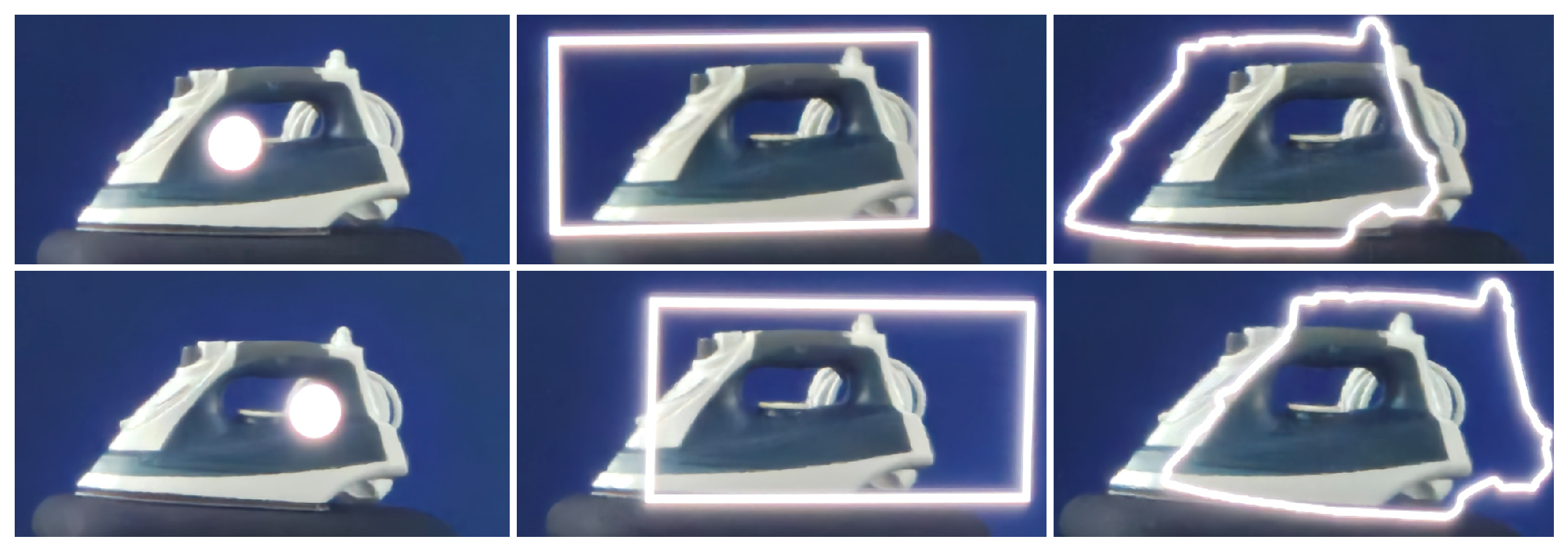
Right Augmentation of Objects. Experiments have shown that a simple dot has advantages in the enhancement of mirrored objects (see
Figure 2). Due to the two slightly horizontally shifted images perceived by binocular vision, the center point has an advantage over other types of augmentation. In contrast to bounding box and silhouette, it is perceived to reside on the visually enriched object, whereas with the two alternatives it protrudes above the object. In addition, the center point has the lowest demands on the technical setup of the mirror display system: only one position (point in space) of the objects to be enriched needs to be saved. With the alternatives, it is necessary to save a 3D model of the augmented object and to continuously render its bounding box or silhouette due to the different viewing angles (the user moves when looking at the mirror).
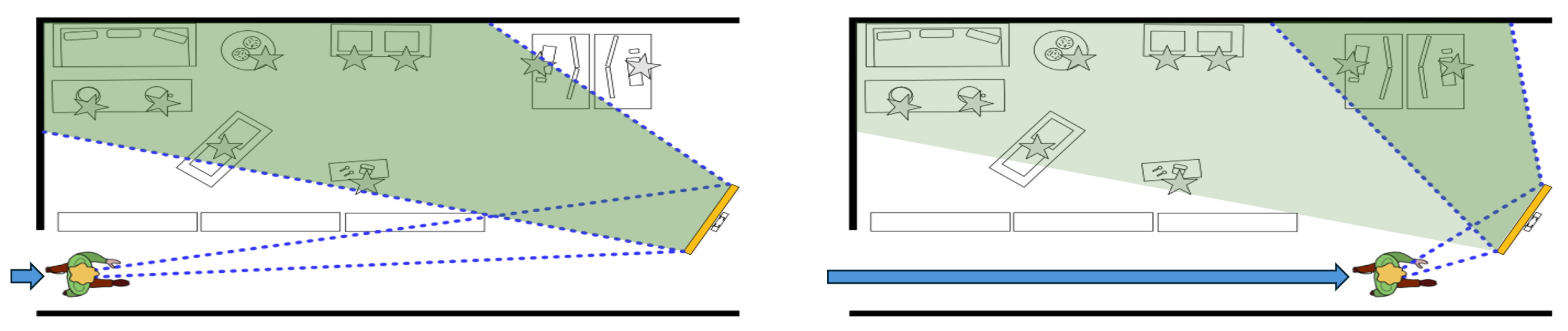
Changing Viewing Angle. When walking towards the mirror, during the movement to the mirror display, the viewing angle creates a changing reflection and thus an overall wide field of view (see
Figure 3). In other words: this can be used to enhance a spacious office area.
Deceleration as Interaction Technique. Emotions have been found to manifest in body posture, motor activity and facial expressions. Winkielman et al. [
41] describe embodied components of social interactions. Since cognition is reflected in posture and movement, we assume that body speed is a suitable means for interacting with our system.
Interaction Phases. Prante et al. [
42] and Vogel&Balakrishnan [
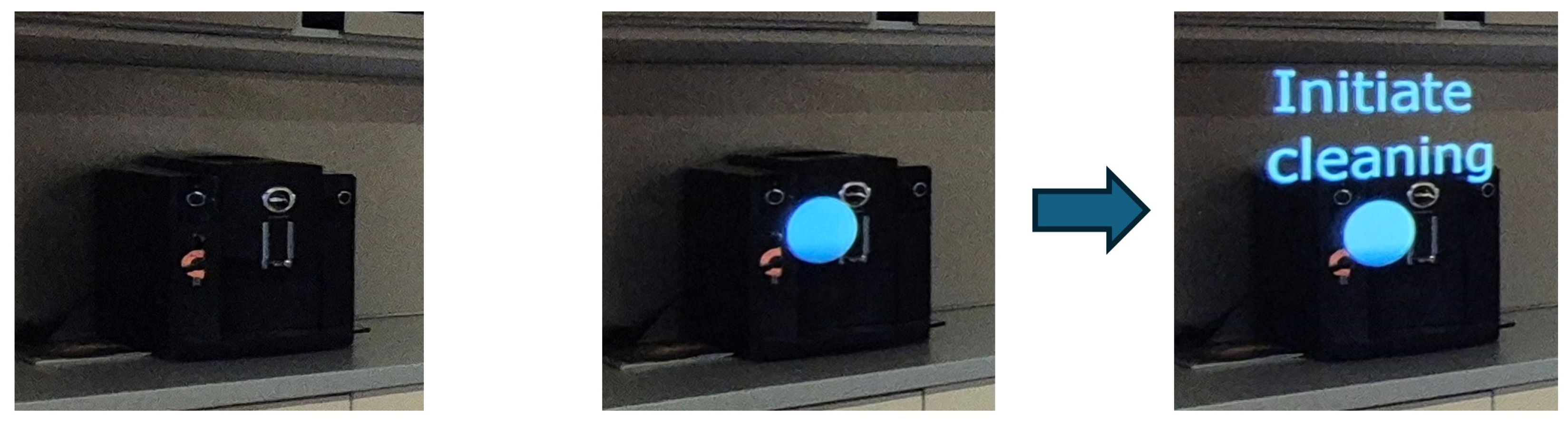
43] both defined zones for interacting with ambient displays. For this work we use and adapt a form of the interaction framework proposed by Vogel&Balakrishnan (excluding the Personal Interaction Phase). The Ambient Display Phase refers to the neutral state of our system, where no presence is detected and the mirror remains inactive. If the system detects a person it will automatically transition to the Implicit Interaction Phase, where the systems emphasize objects that want the user’s attention. The user can than decide to transition to a Subtle Interaction Phase by giving non-verbal cues such as slowing down, stopping in front of the mirror or looking at the emphasized objects’ reflection. Thus, the locus of control is in the hands of the user. Inside the Subtle Interaction Phase, the system displays additional information for the emphasized objects (see
Figure 4). This can be a description of a failure state (e.g., a printer reporting a paper jam), an explicit action that needs to be performed (e.g., “close the window”) or just additional information. At any time the system can revert back to the neutral state if the user moves on, turns their back to the system or no longer pays attention to the display.
Occlusion Handling. The reflection of an enriched object can be obscured by other features of the surrounding area. By modeling these features and including them in the enrichment, these occlusions can also be represented. However, as the enriched information is only displayed in an ambient context, the flickering can lead to unwanted stimuli. As a trade-off, the occlusion handling is not to be implemented in our interaction concept. Another advantage of AR mirrors is the multiple points of view a user can gain from the environment around them. Objects that are occluded in the reflection at the start of a user’s interaction might become visible to the user as they move along.
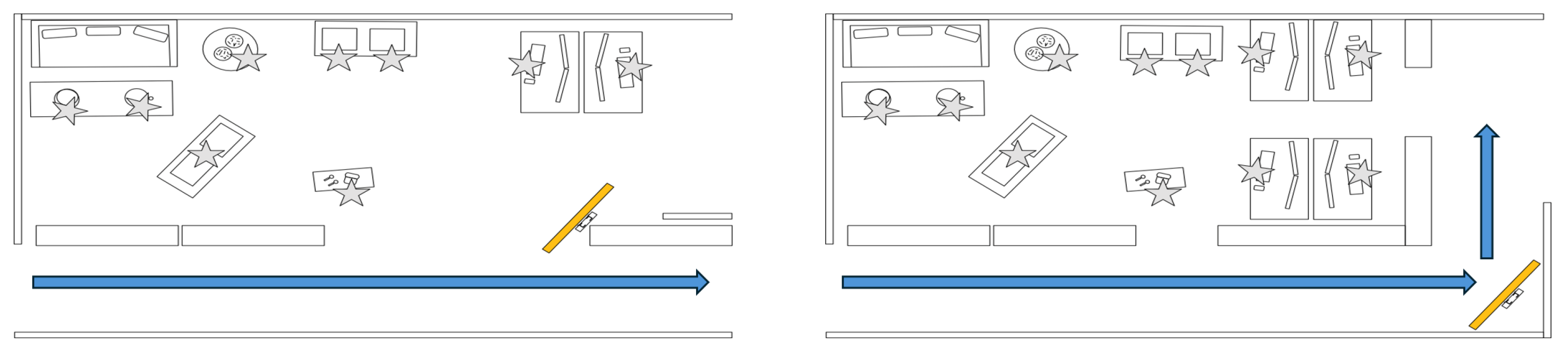
There are several setups in which the ambient mirror display can be set up. Two examples are shown in
Figure 5 for straight floors and cornered areas.
3.4. Exemplary Use Cases
In this section, we discuss some exemplary use cases for our concept. For some objects, the status of technical objects can already be forwarded via the network; for others, it can be determined using images with a reasonable amount of effort (e.g., open doors/windows). A further consideration of the status transmission from an object to a processing unit mirror display is an additional topic and is not discussed in depth in this paper (see
Section 5).
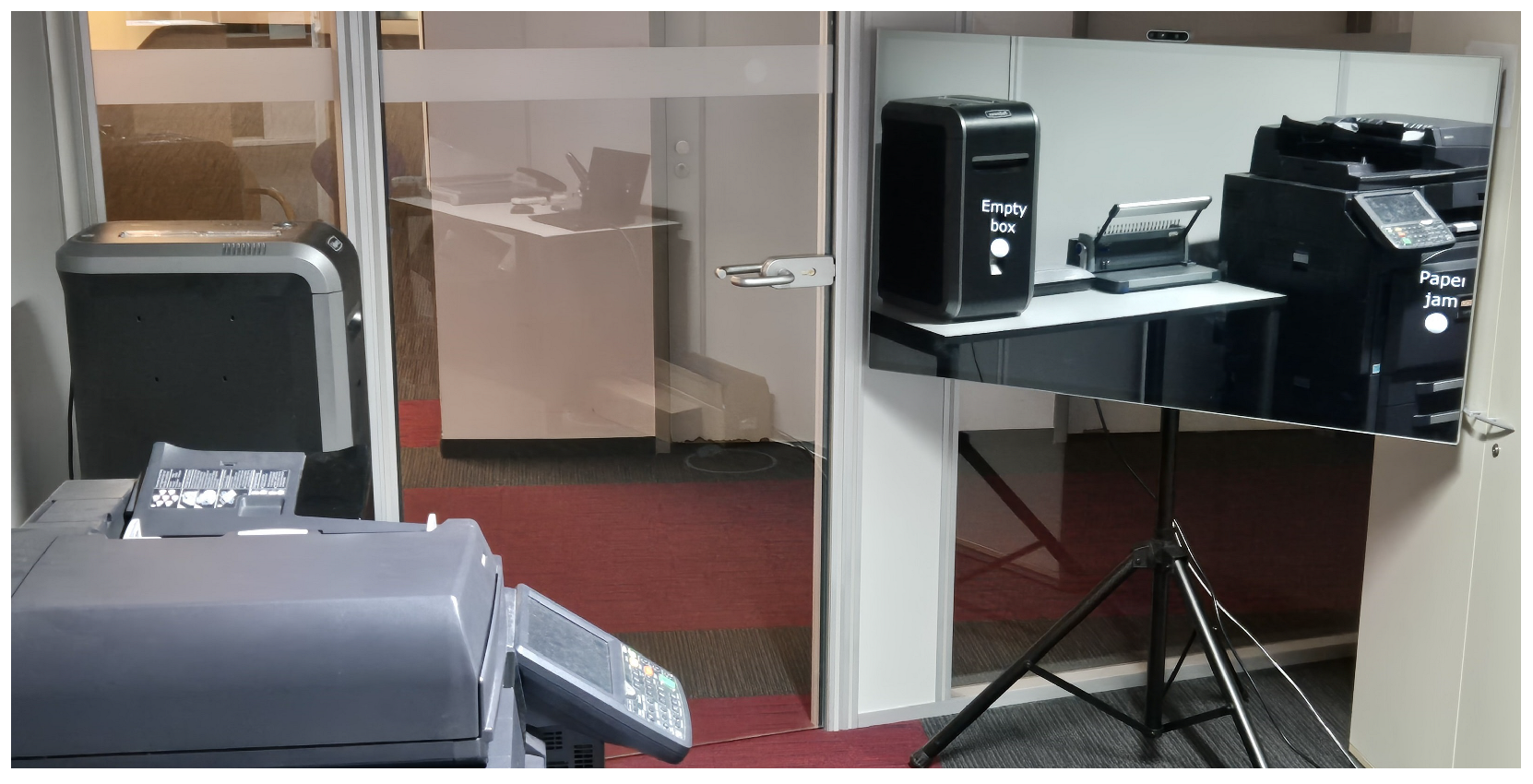
Office. As already described in the Introduction, office environments are good examples of the mirror displays, as many people are present here and many objects are under shared responsibility. In an open-plan office, for example, there are shared printers, computers, plants and windows (see
Figure 6). Printers can run out of paper, so the next print job could be interrupted, forcing the person printing to go to the printer to refill and resume the print job. Alternatively, someone may happen to be nearby, see the need through the mirror display and refill it beforehand. Computers may need to be switched off at the weekend so that remote access is not possible, for example. However, sometimes they are not switched on again. Plants have different watering intervals; it can be difficult for several people to see at a glance whether a plant has not been watered for a long time. Windows should always be opened (shock ventilation) and closed after a certain time, and the heating control should be adjusted accordingly. As with the plants, the mirror display can monitor the status of plants and windows based on an image and forward the request to intervene to people who happen to be present.
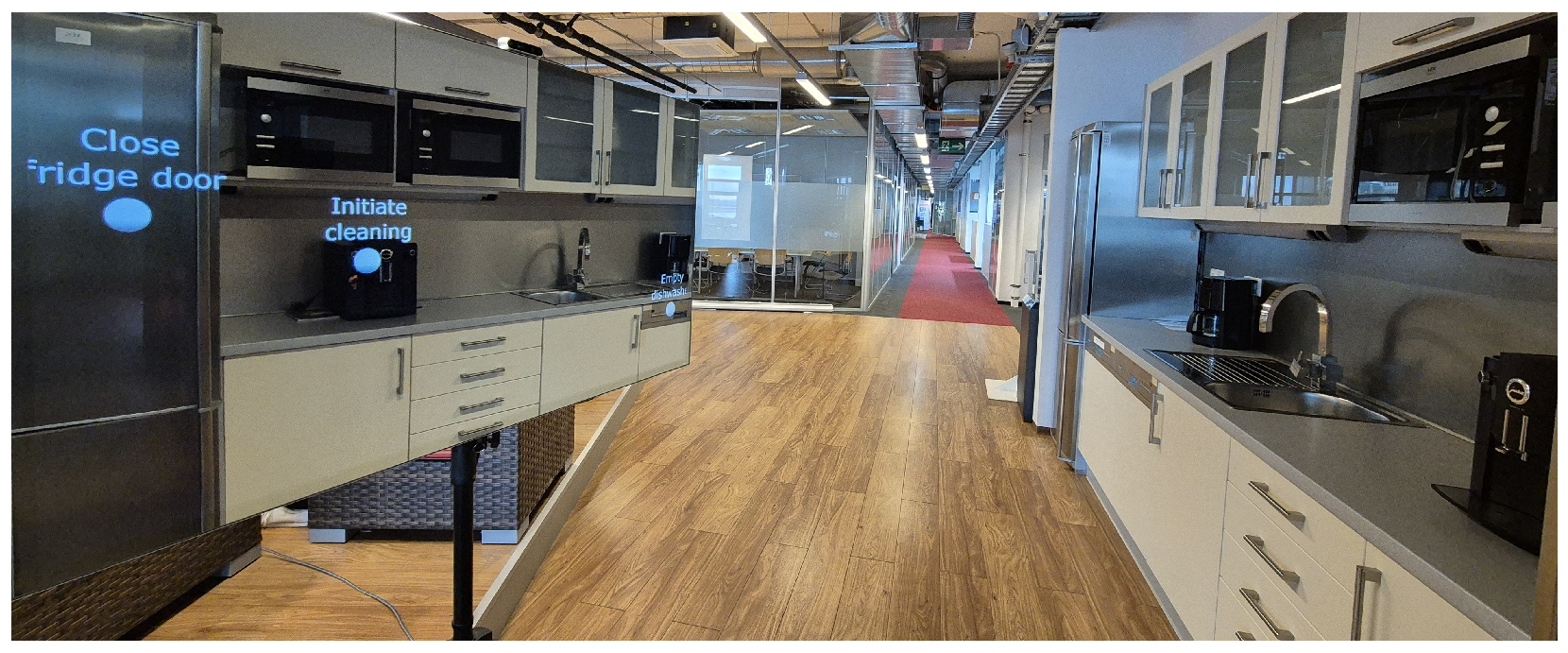
Coffee corner/meeting room. These areas are also frequented by many people and there are also activities here that can be carried out by many people. In addition to the objects already mentioned, other objects such as coffee machines or dishwashers can also be integrated here (see
Figure 7).
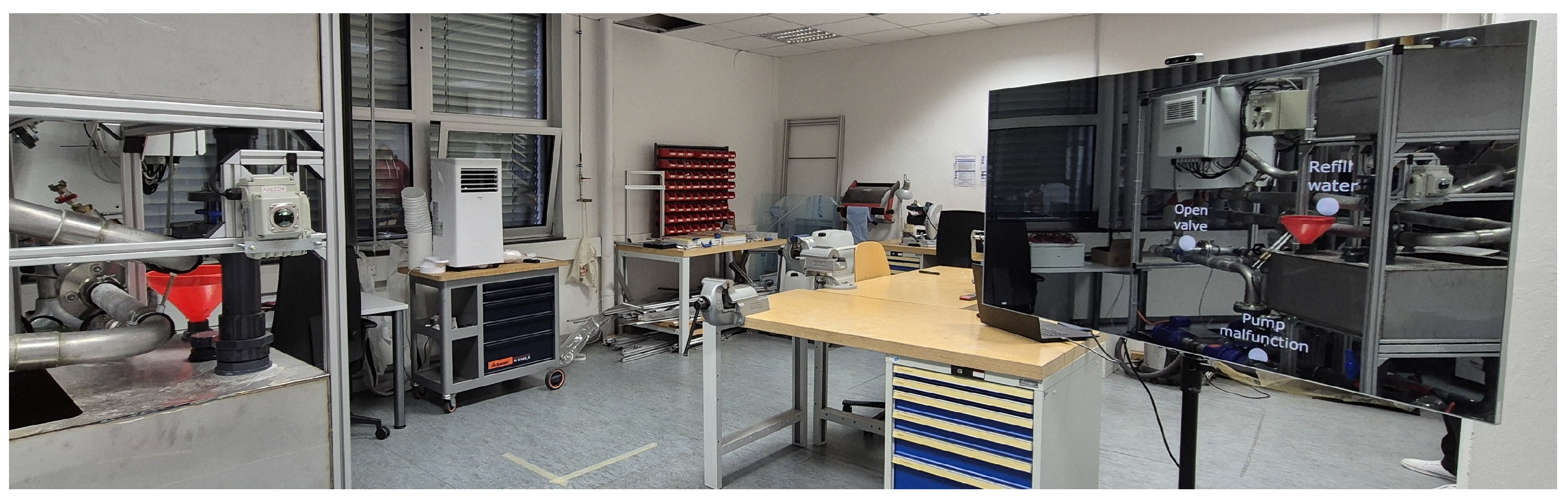
Industrial environment/laboratory. Mirror displays can also improve awareness of shared tasks for these areas. Although machines can often forward their status to responsible persons via networks, simple manual intervention on site is often necessary. The mirror display also receives this status and subsequently indicates that people in the vicinity should perform this task in a targeted manner or look for the problem that cannot be seen from a distance, for example, a paper jam in the printer, a finished printed component in the 3D printer that prevents another print from being started or a machine that requires simple manual intervention (see
Figure 8).
Overall, these use cases should take into account that people should not be forced to complete the tasks. Instead, they should be motivated to complete tasks for the community, for example, through gamification or other reward systems.
4. Evaluation
Our approach is deliberately intended to be applicable to many application scenarios. We have already presented several exemplary application scenarios in
Section 3.4. These different application areas (e.g., office, coffee corner, industrial/lab setting) include a wide variety of tasks (resolve paper jam, initiate cleaning procedure of coffee machine, open window, open valve of pump, etc.).
Since our approach represents a novel interaction technique, we initially focused on laboratory tests to evaluate feasibility and effectiveness in order to avoid undesirable influencing variables on the solvability of concrete, practical problems. Therefore, the problem solution was abstracted as follows: (i) perceive which real objects are enriched by the mirror display, (ii) read a corresponding message (take a specific piece of paper at the enriched real object) and (iii) then collect this specific piece of paper there. Thus, it was generically verifiable whether Augminded worked as proposed.
Dedicated studies are planned to investigate the external validity, i.e., the application of these findings to specific areas of application, in greater depth, but these would go beyond the scope of this paper.
4.1. Methods
To evaluate the feasibility and effectiveness of our approach (Augminded), we established several hypotheses, which formed the basis for conducting tests and analyses.
: Users recognize notifications on the mirror display while walking by.
: Users are able to correctly assign displayed notifications to the corresponding real objects.
: Users recognize and correctly assign multiple simultaneously displayed notifications on the mirror display.
These hypotheses are tested in an augmented environment in which there are several real objects whose mirror images are enriched with luminous dots by the mirror display. The task here is to recognize the enrichments, then run to all the enriched real objects and collect a piece of paper there and finally hand it over to the experimenter.
The independent variables (IVs) used for this were 1, 2 or 3 simultaneously displayed notifications, and the dependent variables (DVs) were recognition rate and combination of notifications (measured with the collected slips of paper) and time of completion.
To evaluate the interaction technique of reducing walking speed, we formulated two further hypotheses:
For this purpose, independent variables (IV) were used: presentation of different stimuli (simple (dots) or complex (text) notifications) depending on walking speed. We determined the following as dependent variables (DV): walking speed, successful interaction by adjusting walking speed as binary variable and success rate of completing the displayed task. For all hypotheses, we defined a critical threshold of 80% for successful completion. In order to assess the usability of our approach, participants had to complete an SUS after the trials. We implemented our concept through an experimental setup and evaluated it by means of a user study.
4.1.1. Participants
For our study we recruited fourteen volunteers (six female) from our technology campus between the ages of 25 and 42 (mean age 30.29 ± 4.60) years (for details see
Table 1). Six of the volunteers had prior experience with smart mirrors, respectively, or mirror displays. The participant with visual impairment wore glasses to correct her vision. The mean height of the participants was 175.71 ± 9.51 cm (171.85 ± 9.69 cm female, 179.57 ± 8.20 cm male). Each participant was informed of the study’s goal and the data we wanted to collect, after which written informed consent was obtained. All the collected data and recorded information was anonymized.
4.1.2. Apparatus and Materials
The study took place inside a quiet, separate area of an open-plan office. For the study, 8.5 m × 7 m of open space was surrounded by office dividers and set up specifically for the study. For our evaluation we used the office setting and corner setup described in
Section 3, as this was the best fit for our available lab space.
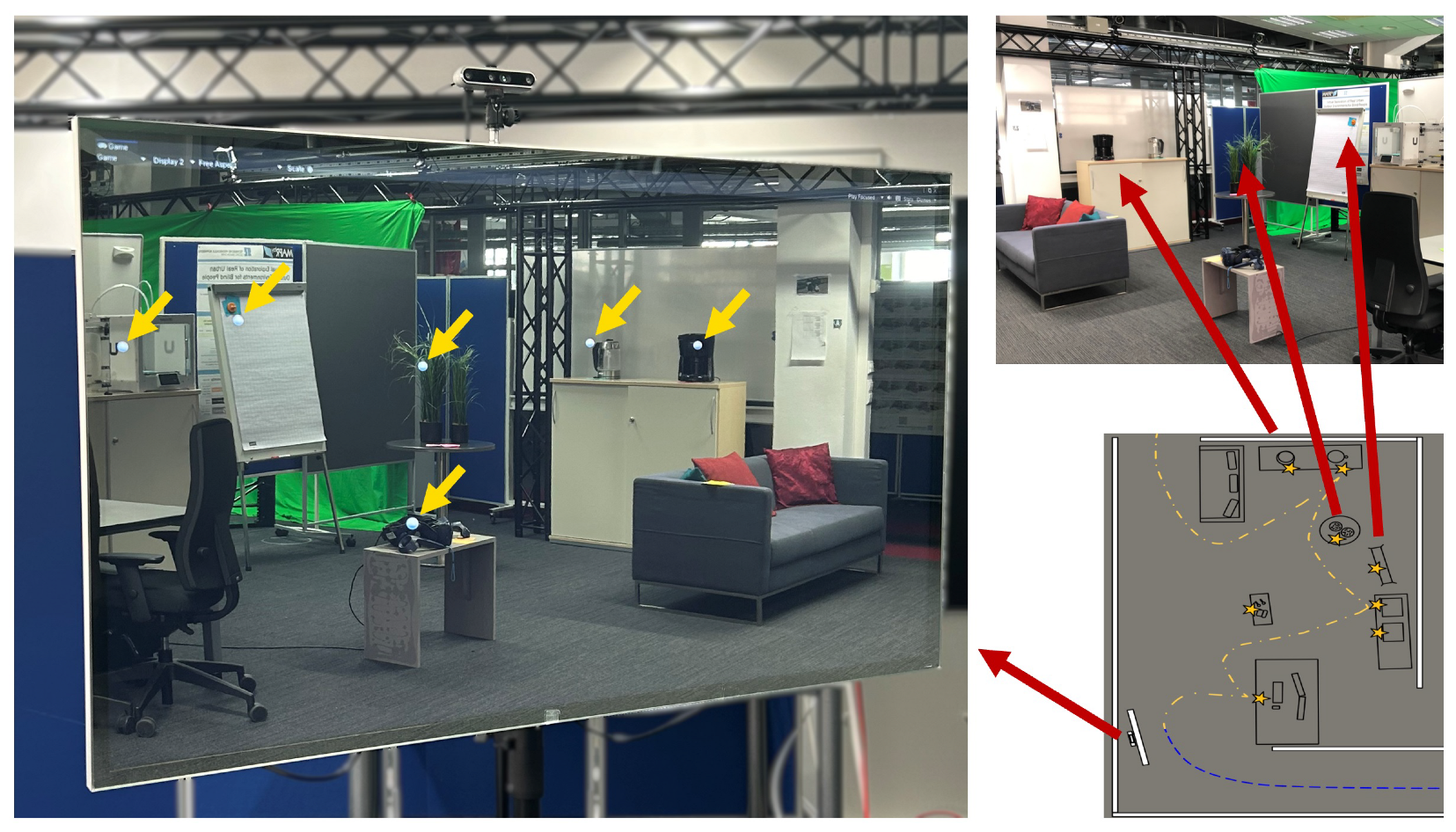
Figure 9 shows a top-down schematic overview of the setup, including the object pool that could be augmented by the mirror display. The objects varied in size and consisted of an electric kettle (1), a filter coffee machine (2), a flip chart (3), office plants (4), head-mounted virtual reality glasses (5), an off-the-shelf 3D printer (6), a do-it-yourself 3D printer (7) and a computer workstation (8). The path from the starting point towards the mirror was walled off, as shown in
Figure 9, and was approximately 9m long. The participants had to walk a path according to the dashed blue line towards the mirror and to look at the mirror display in order to see the mirrored objects with their augmentations.
Hardware. For the half-mirrored display, we used an off-the-shelf 55” mirror display (Samsung ML55LE, Samsung Electronics Co., Ltd., Suwon, Republic of Korea) with a resolution of 1920 × 1080 pixels and a display size of 120.96 × 68.04 cm. The display was mounted in landscape mode with the bottom edge 127 cm above the ground. Landscape mode allowed for a greater horizontal view inside the office environment where most interactive objects were between eye and ground level. The display was connected to a desktop computer with a 10th Gen Intel i9 and Nvidia RTX 3080 that performed the necessary calculation for the mirror and tracking of the participants.
Rendering User Perspective. In order to calculate the resulting output image, the system needed the current position of the participant, position and dimensions of the mirror as well as the positions of the objects. We used Unity 2022 LTS to perform these calculations and render the view. For the tracking of the participants’ positions, we used an Intel RealSense D455 depth camera (Intel Corporation, Santa Clara, CA, USA) and the pyrealsense2 wrapper of the Intel RealSense SDK 2.0 for our python implementation of the tracking. The camera was mounted on a tripod located at the horizontal center, 12.5 cm above and 23 cm behind the display. The viewing direction of the camera was set perpendicular to the mirror’s surface. The SDK provided a stream of color and depth frames with functions to convert coordinates from one space to the other. The color frames of the RealSense were first used to detect the participant’s face using RetinaFace [
44]. The center point at eye level was estimated and chosen as the participant’s viewpoint at each frame. The viewpoint coordinates of the color frame were then converted to the depth space to obtain the distance from the camera. To obtain the participant’s 3D position, the viewpoint coordinates and depth were projected into 3D space, with the camera position being the origin. The determined 3D position was then sent to Unity using
Google’s Protocol Buffers and network sockets. For the augmentations we also needed to know the position of the objects that we wanted to augment. We used a tape measure to obtain the position of each object relative to the camera. Instead of manually measuring all objects, one can also use markers that can be tracked by the camera or computer vision to select or detect objects inside the camera’s frame. Combining these three coordinates (participant, mirror and objects) we could represent the environment inside Unity and calculate the view of the participant on the mirror. This information was used to position the augmentation correctly on the display.
Interaction. As proposed by Vogel&Balakrishnan [
43] participants could start a phase transition with their body movement. Participants could signal their willingness to interact with the display by slowing down. In our approach, this causes the mirror display to show not only simple dots as notifications but also a textual message consisting of 2 to 3 words (e.g., see
Figure 7).
We used a hysteresis to avoid switching back and forth between both phases. If the participant’s movement speed dropped under the threshold of 0.6 m/s (2.16 km/h), the system transitioned to the Subtle Interaction Phase (showing dots and textual messages). To return to the Implicit Interaction Phase (showing only dots) the participants had to move faster than 0.72 m/s (factor of 1.2; 2.52 km/h). The current speed was calculated using the 3D coordinates and time stamp of each frame. A moving average over 750 ms was calculated to smooth these values over time and be more robust to small tracking errors. (The velocities and time intervals used by the algorithm are based on experimental values determined in a previous feasibility study [
45]).
4.1.3. Procedure
Preparation of the Study. To ensure optimal and consistent conditions for each participant, the window blinds were closed to reduce unwanted reflections and display glare. All available ceiling lights were switched on to ensure even illumination of the prepared office environment and mirror display.
To reduce learning effects we created a randomized test plan of trials for each participant. For each trial we generated a uniform random sample of set
s = [3D printer, 3D printer 2, Coffee maker, Electric kettle, PC workstation, Flip chart, Plant, VR glasses] without replacement. Subset sizes varied randomly between size 1 and 3 for each trial.
Table 2 provides an example of a trial sequence created in the described manner. Additionally, every object was equipped with notes to be picked up
.
Study Realization. Before the start of the study, we picked up each participant at the entrance and accompanied them to the space in which the study took place. After reaching the study area, the participant was informed about the goal of our study and what data we wanted to collect. Written informed consent was obtained, and demographic data of the participants such as the age, gender and height were collected.
After the data collection of the demographics, the participants had a chance to familiarize themselves with the mirror display. During the first familiarization phase, the plants were augmented on the mirror display. The participants could move around freely and try out the mirror until they felt comfortable using the mirror (approx. 30–60 s). We instructed them that it was their task to pick up notes at the augmented object. In a second familiarization phase, we explained that some objects could contain additional information on which note to pick up. They could access this information by slowing down their walking speed. After the explanation the plants were augmented with the message “pick up the apples note”. After the participants were comfortable with signaling their willingness to interact by slowing down, the main part of the study began. At any point during this process, participants had the option to ask questions or request clarification.
Each participant had to complete six trials, i.e., two trials with one object augmented by a notification, two trials with two and two trials with three simultaneously augmented objects. Of these six trials, three contained additional textual information accessible by slowing down (complex notifications). The individual steps for the test subjects were
Waiting for the experimenter’s start signal;
Walking towards the mirror whilst perceiving the augmented object;
(Optional) transitioning to the Subtle Interaction Phase by slowing down and obtaining instruction;
Performing instruction, i.e., collecting the right notes from the correct objects;
Handing over the notes to the experimenter.
During the trials we recorded the following information:
Measured time between the beginning and end of each trial.
Overall time between start of the first and end of the last trial (including downtime).
Collected notes and expected notes.
Tracked path of the participant.
During the study we noted down any comments from the participants and recorded our observations. Observable handling difficulties (stooped posture in tall subjects, repeated back and forth movements while focusing on the mirror) were recorded by the experimenter. After the participants filled out a linguistically adapted System Usability Scale (SUS) [
46], we collected qualitative feedback of our system. Additionally, the test person had the opportunity to describe any operating difficulties and think about possible use cases for the prototype.
4.2. Results
4.2.1. Statistical Evaluation
We defined the number of successfully solved (correct objects identified/correct notes collected) trials as a dependent variable. The tasks could only be successfully solved with the given notifications of the mirror display and the interaction with the system (slowing down to show textual instructions). To evaluate the runs with one (accuracy 96.43%), two (accuracy 89.29%) or three (accuracy 96.43%) augmented objects, we performed an exact binomial test for one (
p < 0.001,
n = 28), two (
p < 0.001,
n = 28) and three (
p < 0.001,
n = 28) simultaneously enriched objects, respectively. The subjects were able to recognize the correct combination of objects significantly more often than by random chance (50%) (see
Table 3).
Additionally, Fisher’s exact test was used to determine if there was a significant association between the number of enriched objects and the trial outcome. Fisher’s exact test showed no statistically significant association between the number of augmented objects and the outcome of the task (p = 0.61).
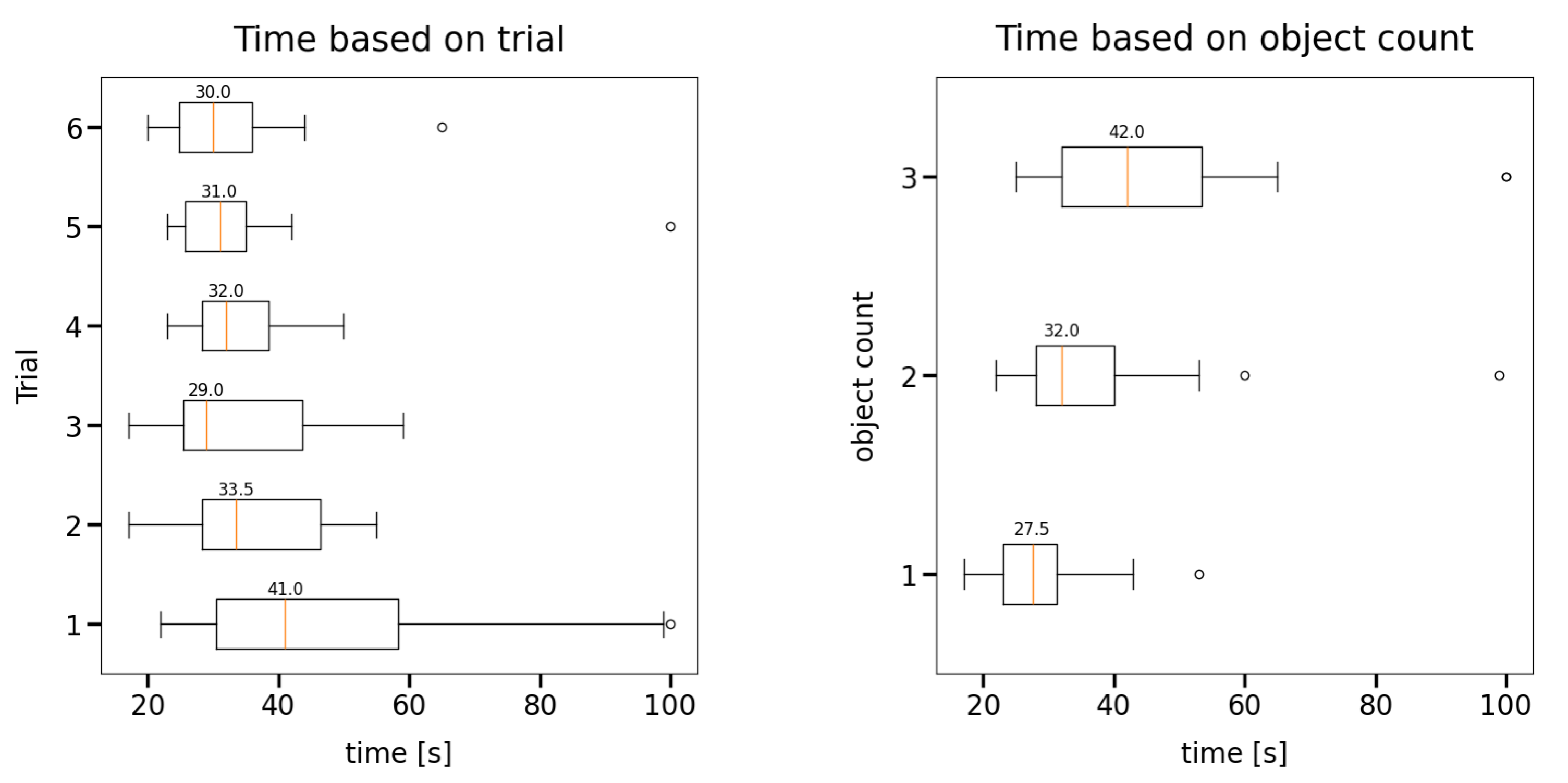
Figure 10 shows box plots of the time participants took to complete a trial depending on the number of the trial (left) and the number of objects in the trial (right). To compare the first trials of the participants to all other trials completed, we used a one-sided Wilcoxon-signed-ranked test. The test revealed that, for all trials taken after the first one, statistically significant less time (
p < 0.05) was needed. Comparing the other trials to each other does not result in a statistically significant difference. Regarding object count, a Wilcoxon-signed-ranked test comparing trials of different object counts shows that the time taken increases with the amount of enriched objects in the trial (Trials 1 and 2: W = 69.0,
p < 0.01, Trials 2 and 3: W = 84.5,
p < 0.01).
4.2.2. Trajectories
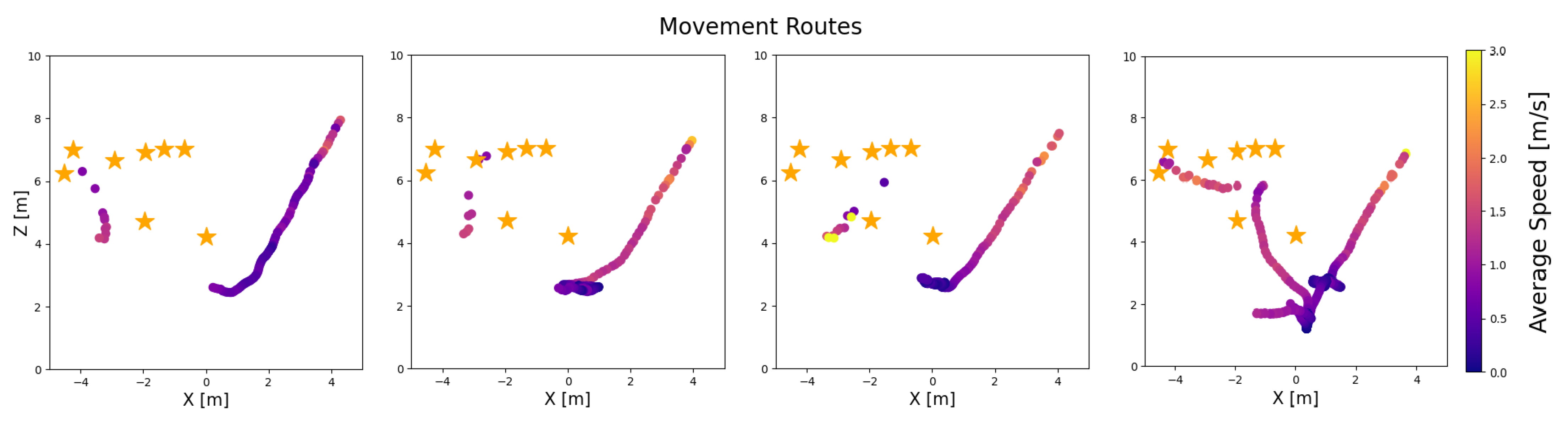
As described in the test design, the trajectories of the users were also recorded. Four exemplary paths recorded from the participants during the study are shown in
Figure 11. Because the tracking system uses facial recognition, it only recorded movements where the face was visible to the camera, i.e., it was facing the mirror.
4.3. Discussion
As indicated by the results of the conducted binomial tests, the proportion of correctly solved tasks differed significantly from chance level. The users were able to receive crucial information by interacting with the system for solving the task (
) and assign the displayed notifications to the real objects (
). This was successful for one augmented object but also for multiple concurrently augmented objects (
). The test subjects handled the interaction using deceleration (
) very well during the extended augmentations. This confirms our assumption that speed can be indicative of cognitive processes and is a suitable form of interaction, as cognition is reflected in posture and movement [
41]. Based on the application of the deceleration technique, users received more complex, textual instructions. The tasks displayed for the mirrored objects could be assigned to the real objects and solved (
).
4.3.1. Quantitative Aspects
When looking at the time data by trial (see
Figure 10), one can see that the time for consecutive trials significantly decreases after the first initial try. This may be an indication for a very intuitive way to interact and a steep learning curve of the user interacting with the system after a short familiarization phase. As expected the time needed to complete the task increases with the amount of objects enriched, as more information needs to be processed by the participants.
The trajectory data revealed additional insights about the interaction of the user with the display. It turned out that even if no object was augmented with additional information, the test subjects slowed down in front of the display (see trajectory 3 in
Figure 11). We assume that this served to localize the objects more precisely. When they were close to the display, they mostly moved in a straight line with increasing speed towards one of the enriched objects. After collecting the notes, some test subjects returned to the display to check that the correct notes had been collected (see trajectory 2 in
Figure 11). Some participants moved in a horizontal line in front of the display to search the whole room for enriched objects in the reflection (see trajectory 4 in
Figure 11). This may be due to the unknown object count and position of the enriched object. A visual indicator on the display may account for this.
Limitations. Our test subjects were relatively affine to technology. Nevertheless, we assume that these results can also be transferred to other user groups, as the task itself does not require any knowledge of technology. The test results probably suffer from a ceiling effect [
47]. The trials were assumably too easy for some or all of the participants, resulting in a large number of perfect or near-perfect scores. The task we chose may have placed demands on memory due to the number of enriched objects and associated tasks that had to be remembered and successfully solved in one trial but were not sufficient to achieve changes in the outcomes. Future experimental setups with different populations, varying demands on the participant, differing forms of enrichment and varying numbers of enriched objects will reveal further insights. In vivo studies in working environments with high cognitive load due to, for instance, noisy working environments will also show to what extent mirror displays are suitable for reducing the cognitive load of users.
4.3.2. Qualitative Aspects
Some participants reported uncertainties regarding whether they had recognized all the enriched objects and suggested some sort of “cue” indicating the number of enriched objects.
Especially tall test persons (i.e, taller than 185 cm) all had to “bend down” to capture all the objects in the mirror when they were close to the mirror. Participant 1, 11 and 13 additionally remarked that they were “too tall for the mirror”. This can be explained by the fixed mounting height of the mirror, as the display was mounted in a horizontal setup for a better view inside the office. Mounting the mirror higher could result in a similar problem for smaller people. A more vertical mirror surface, such as a taller or vertical mounted display, could alleviate those problems.
Another participant expressed resentment that they could only gather information while standing in areas where the reflection of the object was visible. A hybrid approach was desired by one participant, specifically embedding an overview of all enriched information on a second display. This additional information can, for example, be made accessible on user demand.
Sometimes objects were described as being “too close to each other”, unable to discriminate to which object the enrichment belongs. Some participants described the enrichment as “trembling”. The trembling and shaking can be explained by the steps of the participants, which resulted in slight head movements the tracking system picked up.
The mirror-inversion of the room was described as a “challenge” by one participant at the beginning of the experiment. The same participant additionally described learning to interact with the display following a steep learning curve and could imagine that it might reduce cognitive load as familiar objects are directly mirrored. Two other participants agreed with this observation. One said, “after the first trial everything was very intuitive”, and another one confirmed that “it’s very fast to learn.” The collected time data also support these claims. These statements align with the current state of the literature [
43,
48] on reducing cognitive load of the user. However, this still requires test series with respective subject groups, as discussed in previous sections. Other participants described solving the trial specific task as “fun.”
During the discussion other possible use cases were identified by our participants. Enrichments of museum exhibits and providing guidance in public places (e.g., indicating restrooms) were identified as possible use cases. One participant recognized the benefit of local reference as a way of imparting knowledge without language when training new employees, possibly bypassing language barriers. Participant 4 said that “this technology would be useful for dynamic objects that move in location”, which is another point that could be addressed in our future work.
5. Conclusions
This work presented Augminded, a novel approach for ambient awareness using reflective half-mirror displays. By leveraging the familiarity of mirrors and augmenting reflections with subtle, contextually relevant information, we wanted to create a low-threshold system to encourage action on shared tasks. People can obtain an awareness of which objects need attention as they pass by. This can be used for a variety of technical and non-technical objects. The additional view of the mirror display provides unobtrusive information. These are conveyed visually in a uniform manner and can be observed or ignored by passing users. If the user decides to interact by slowing down or pausing, the display adapts and provides more detailed information. On this basis, users can decide whether this is relevant to them or not.
Our categorization of existing mirror display technology, based on display technology (reflective half-mirror displays), interaction technology (body movement, deceleration triggering detailed information), the ambient criterion (initially unobtrusive engagement, shifting to subtle interaction), user-adaptive capabilities (potential for individualized task presentation), position-adaptive tracking (dynamic alignment of augmentation with user viewpoint) and augmented entities (real-world objects with associated tasks), guided our design and evaluation.
The user study showed the feasibility and intuitiveness of this approach. The participants readily recognized augmented objects and responded to the system’s cues.
5.1. Limitations
As the user study showed, our approach worked very well. However, we were also able to identify some limitations of the system. Since the tracking of users is camera-based, difficulties can be expected in unfavorable lighting conditions (e.g., direct sunlight).
Another system-related limitation results from the mirror displays. Although tracking can easily follow the paths of several people, the appropriate enrichment on the display can only be carried out for one person at a time. In our use case, however, it is sufficient for one person to be nearby in order to solve the joint tasks. We therefore suggest tracking the path of the first person to enter the interaction area. The mirror is consistently enriched for this person. When this person leaves the area, the enrichment is applied to a person who enters the area next.
As the user study showed, the different sizes of users can mean that the reflections and their enhancements cannot be fully displayed in some areas of the interaction area. Careful coordination between display placement and the mirrored environment should therefore be ensured.
Depending on the accuracy of the tracking and the size of the enriched objects, the density and proximity of objects is principally limited. However,
Figure 6 (right) shows that this should not be a problem in a typical office environment.
5.2. Future Work
In our future work, we plan to include the recognition of the states of mirrored non-technical objects. For example, opening intervals for windows and watering intervals for plants could be implemented. The people passing by would be the executing units of the manual tasks to be performed. A person opening a window for ventilation would no longer have to remember to come back to close it again after a few minutes. A more flexible responsibility culture could be supported.
In a larger context, a platform could be created that collects the status of various technical and non-technical objects. Some manufacturer-specific platforms to condition monitoring and smart home solutions already exist. However, there are already open standards that reduce dependency on individual providers and create the basis for genuine interoperability. One such standard is the license-free and open-source Matter standard (Connectivity Standards Alliance), which is already widely used and solves the problems of fragmentation between different manufacturers. Our mirror display could offer a helpful extension to these, particularly in the area of ambient assisted living (AAL). Thus, we are planning an evaluation in a real context (as described in
Section 3).
As described in
Section 4, it is necessary to initially align the mirror display and the camera. This also includes measuring the objects to be enriched in the room. In our study, we measured this manually and recorded it in the system. In order to speed up the setup, existing approaches for measuring the positions using visual markers, triangulation or computer vision could be implemented in the future as an aid.
We used a simple image-based head tracking system in our study, which proved to be very robust and allowed for a good estimation of eye position. Future approaches could optimize this even further and use head pose recognition or eye tracking to realize additional interactions with ambient mirror displays.
This research lays the foundation for a new generation of ambient displays that seamlessly blend into the environment, providing just-in-time information and facilitating a more connected and responsive workspace.
Author Contributions
Conceptualization, T.G.; methodology, T.G.; software, P.K.; validation, T.G., P.K. and M.M.; formal analysis, T.G., P.K. and M.M.; investigation, T.G., P.K. and M.M.; resources, T.G.; data curation, P.K. and M.M.; writing—original draft preparation, T.G., P.K. and M.M.; writing—review and editing, T.G. and P.K.; visualization, T.G. and P.K.; supervision, T.G.; project administration, T.G.; All authors have read and agreed to the published version of the manuscript.
Funding
This research received no external funding.
Institutional Review Board Statement
The study was conducted in accordance with the Declaration of Helsinki. An additional comprehensive ethical review and approval was waived for this study because the self-assessment form on ethics and data protection did not indicate a need for it due to the nature of the evaluation.
Informed Consent Statement
Informed consent was obtained from all subjects involved in the study.
Data Availability Statement
The original contributions presented in this study are included in the article. Further inquiries can be directed to the corresponding author.
Conflicts of Interest
The authors declare no conflicts of interest.
Correction Statement
This article has been republished with a minor correction to the Data Availability Statement. This change does not affect the scientific content of the article.
Appendix A
Table A1.
A comparison of mirror display papers. For the description of each column, please refer to
Section 2.7.
Table A1.
A comparison of mirror display papers. For the description of each column, please refer to
Section 2.7.
| | Display Technology | Interaction Technology | Ambient | User-Adaptive | Position-Adaptive | Augmented Entities |
|---|
| [23] | Virtual mirror (HMD) | Controller, body movement | no | no | yes | User (3rd person, patient’s spine) |
| [31] | Mirror display | Gestures, body movement | no | no | yes | User (body) |
| [22] | Virtual mirror (display) | Body movement | no | no | yes | User (feet) |
| [37] | Virtual mirror (HMD) | Hand motion | no | no | yes | Objects |
| [21] | Virtual mirror (display) | Body movement | no | no | yes | Body, objects |
| [28] | Mirror display | Controller movement | no | yes | no | No linked augmentation |
| [20] | Mirror display | Gestures | no | no | no | Objects |
| [26] | Virtual mirror (display) | Body movement | no | no | yes | No linked augmentation |
| [3] | Mirror display | Body movement | no | no | yes | User (body) |
| [27] | Virtual mirror (display) | Body movement | no | no | no | No linked augmentation |
| [36] | Mirror display | Body movement | no | no | yes | Objects (workplace) |
| [25] | Mirror display | Body movement | no | yes | yes | User (body) |
| [30] | Mirror display | Body movement | no | no | yes | User (3rd person, body) |
| [34] | Virtual mirror (display) | Body movement, facial expressions | no | yes | yes | User (embodiment through avatar) |
| [33] | Mirror display | Body movement | no | no | yes | No linked augmentation |
| [6] | Mirror display and virtual mirror (HMD) | Controller, body movement | no | no | yes | Objects |
| [8] | Mirror display | Body movement | no | no | yes | User (brain) |
| [5] | Virtual mirror (display) | Vehicle movement | no | no | yes | Rear mirror |
| [38] | Virtual mirror (mobile) | Mobile movement | no | no | yes | Objects (machine) |
| [7] | Mirror display | Controller (marker), body movement | no | no | yes | Virtual objects |
| [24] | Virtual mirror (display) | None | no | no | no | User (body) |
| [35] | Virtual mirror (HMD) | Body movement | no | no | yes | User (body) |
| [9] | Mirror display | Body movement | no | no | yes | User (body) |
| [29] | Real mirror, virtual content (HMD) | Body movement, gaze, gestures | no | no | yes | Objects |
References
- Bimber, O.; Raskar, R. Spatial Augmented Reality: Merging Real and Virtual Worlds; A K Peters: Natick, MA, USA, 2005. [Google Scholar]
- Biocca, F.; Tang, A.; Owen, C.; Xiao, F. Attention funnel: Omnidirectional 3D cursor for mobile augmented reality platforms. In Proceedings of the SIGCHI Conference on Human Factors in Computing Systems, Montréal, QC, Canada, 22–27 April 2006; ACM: New York, NY, USA; pp. 1115–1122. [Google Scholar] [CrossRef]
- Jang, J.S.; Jung, G.S.; Lee, T.H.; Jung, S.K. Two-Phase Calibration for a Mirror Metaphor Augmented Reality System. Proc. IEEE 2014, 102, 196–203. [Google Scholar] [CrossRef]
- Maes, P.; Darrell, T.; Blumberg, B.; Pentland, A. The ALIVE system: Wireless, full-body interaction with autonomous agents. Multimed. Syst. 1997, 5, 105–112. [Google Scholar] [CrossRef]
- Pardhy, S.; Shankwitz, C.; Donath, M. A virtual mirror for assisting drivers. In Proceedings of the IEEE Intelligent Vehicles Symposium 2000 (Cat. No.00TH8511), Dearborn, MI, USA, 5 October 2000; pp. 255–260. [Google Scholar] [CrossRef]
- Martin-Gomez, A.; Winkler, A.; Yu, K.; Roth, D.; Eck, U.; Navab, N. Augmented Mirrors. In Proceedings of the 2020 IEEE International Symposium on Mixed and Augmented Reality (ISMAR), Virtual Conference, 9–13 November 2020; pp. 217–226. [Google Scholar] [CrossRef]
- Sato, H.; Kitahara, I.; Ohta, Y. MR-Mirror: A Complex of Real and Virtual Mirrors. In Proceedings of the Virtual and Mixed Reality; Shumaker, R., Ed.; Lecture Notes in Computer Science; Springer: Berlin/Heidelberg, Germany, 2009; pp. 482–491. [Google Scholar] [CrossRef]
- Mercier-Ganady, J.; Lotte, F.; Loup-Escande, E.; Marchal, M.; Lécuyer, A. The Mind-Mirror: See your brain in action in your head using EEG and augmented reality. In Proceedings of the 2014 IEEE Virtual Reality (VR), Minneapolis, MN, USA, 29 March–2 April 2014; pp. 33–38. [Google Scholar] [CrossRef]
- Zhou, Q.; Irlitti, A.; Yu, D.; Goncalves, J.; Velloso, E. Movement Guidance using a Mixed Reality Mirror. In Proceedings of the Designing Interactive Systems Conference, Virtual Event, 13–17 June 2022; ACM: New York, NY, USA, 2022; pp. 821–834. [Google Scholar] [CrossRef]
- Vera, L.; Gimeno, J.; Coma, I.; Fernández, M. Augmented Mirror: Interactive Augmented Reality System Based on Kinect. In Proceedings of the Human-Computer Interaction—INTERACT 2011, Lisbon, Portugal, 5–9 September 2011; Campos, P., Graham, N., Jorge, J., Nunes, N., Palanque, P., Winckler, M., Eds.; Lecture Notes in Computer Science. Springer: Berlin/Heidelberg, Germany, 2011; pp. 483–486. [Google Scholar] [CrossRef]
- Laviola, E.; Gattullo, M.; Evangelista, A.; Fiorentino, M.; Uva, A.E. In-situ or side-by-side? A user study on augmented reality maintenance instructions in blind areas. Comput. Ind. 2023, 144, 103795. [Google Scholar] [CrossRef]
- Gold, D.; Sollinger, D.; Indratmo. SmartReflect: A modular smart mirror application platform. In Proceedings of the 2016 IEEE 7th Annual Information Technology, Electronics and Mobile Communication Conference (IEMCON), Vancouver, BC, Canada, 13–15 October 2016; pp. 1–7. [Google Scholar] [CrossRef]
- Athira, S.; Francis, F.; Raphel, R.; Sachin, N.S.; Porinchu, S.; Francis, S. Smart mirror: A novel framework for interactive display. In Proceedings of the 2016 International Conference on Circuit, Power and Computing Technologies (ICCPCT), Nagercoil, India, 18–19 March 2016; pp. 1–6. [Google Scholar] [CrossRef]
- Bhalla, N.; Garg, A.; Gaur, J. Smart Reflect: An Application Nonspecific Passive Information Display Device for Public and Private Spaces. Int. J. Res. Appl. Sci. Eng. Technol. 2021, 9, 360–368. [Google Scholar] [CrossRef]
- Tondewad, P.S.; Parate, H.; Awalkonde, P.; Mule, A. Smart Mirror Based on Raspberry Pi. Int. J. Res. Anal. Rev. 2019, 6, 151–153. [Google Scholar]
- Masud, S.A.; Tabassum, F.; Mozid, A.M.B.; Rahman, A. Smart Human-Machine Interaction in Mirror Interface. Int. J. Comput. Commun. Netw. Res. 2013, 2, 4. [Google Scholar]
- Kuruppu, G.; Wijesinghe, N.; Kumarawadu, P. Smart Mirror for Personalized Content Delivery Through Facial Emotion Recognition. In Proceedings of the 2021 3rd International Conference on Sustainable Technologies for Industry 4.0 (STI), Permanent Campus, Purbachal American City, Bangladesh, 18–19 December 2021; IEEE: New York, NY, USA, 2021; pp. 1–6. [Google Scholar] [CrossRef]
- Shahbuddin, M.; Al, E. Reflecto—A Smart Mirror Structure With A Contextual Association of Internet of Things. Inf. Technol. Ind. 2021, 9, 984–988. [Google Scholar] [CrossRef]
- Hossain, M.A.; Atrey, P.; Saddik, A.E. Smart mirror for ambient home environment. In Proceedings of the 3rd IET International Conference on Intelligent Environments (IE 07), University of Ulm, Ulm, Germany, 24–25 September 2007; Volume 2007, pp. 589–596. [Google Scholar] [CrossRef]
- Hosoya, E.; Kitabata, M.; Sato, H.; Harada, I.; Nojima, H.; Morisawa, F.; Mutoh, S.; Onozawa, A. A mirror metaphor interaction system: Touching remote real objects in an augmented reality environment. In Proceedings of the The Second IEEE and ACM International Symposium on Mixed and Augmented Reality (ISMAR 2003), Tokyo, Japan, 7–10 October 2003; pp. 350–351. [Google Scholar] [CrossRef]
- Fiala, M. Magic Mirror System with Hand-held and Wearable Augmentations. In Proceedings of the 2007 IEEE Virtual Reality Conference (VR 2007), Charlotte, NC, USA, 10–14 March 2007; pp. 251–254. [Google Scholar] [CrossRef]
- Eisert, P.; Rurainsky, J.; Fechteler, P. Virtual Mirror: Real-Time Tracking of Shoes in Augmented Reality Environments. In Proceedings of the 2007 IEEE International Conference on Image Processing (ICIP 2007), San Antonio, TX, USA, 16–19 September 2007; Volume 2, pp. II-557–II-560. [Google Scholar] [CrossRef]
- Bichlmeier, C.; Heining, S.M.; Feuerstein, M.; Navab, N. The Virtual Mirror: A New Interaction Paradigm for Augmented Reality Environments. IEEE Trans. Med. Imaging 2009, 28, 1498–1510. [Google Scholar] [CrossRef] [PubMed]
- Sekine, M.; Sugita, K.; Perbet, F.; Stenger, B.; Nishiyama, M. Virtual Fitting by Single-Shot Body Shape Estimation. In Proceedings of the 5th International Conference on 3D Body Scanning Technologies, Lugano, Switzerland, 21–22 October 2014; pp. 406–413. [Google Scholar] [CrossRef]
- Kim, M.; Cheeyong, K. Augmented Reality Fashion Apparel Simulation using a Magic Mirror. Int. J. Smart Home 2015, 9, 169–178. [Google Scholar] [CrossRef]
- Iwabuchi, E.; Nakagawa, M.; Siio, I. Smart Makeup Mirror: Computer-Augmented Mirror to Aid Makeup Application. In Human-Computer Interaction. Interacting in Various Application Domains; Jacko, J.A., Ed.; Springer: Berlin/Heidelberg, Germany, 2009; Volume 5613, pp. 495–503. [Google Scholar] [CrossRef]
- Javornik, A.; Rogers, Y.; Moutinho, A.M.; Freeman, R. Revealing the Shopper Experience of Using a “Magic Mirror” Augmented Reality Make-Up Application. In Proceedings of the 2016 ACM Conference on Designing Interactive Systems, Brisbane, QLD, Australia, 4–8 June 2016; ACM: New York, NY, USA, 2016; pp. 871–882. [Google Scholar] [CrossRef]
- Fujinami, K.; Kawsar, F.; Nakajima, T. AwareMirror: A Personalized Display Using a Mirror. In Proceedings of the Third International Conference on Pervasive Computing, Munich, Germany, 8–13 May 2005. [Google Scholar]
- Zimmer, C.; Bertram, M.; Büntig, F.; Drochtert, D.; Geiger, C. Mobile augmented reality illustrations that entertain and inform: Design and implementation issues with the hololens. In Proceedings of the SIGGRAPH Asia 2017 Mobile Graphics & Interactive Applications on—SA’17, Bangkok, Thailand, 27–30 November 2017; ACM Press: New York, NY, USA, 2017; pp. 1–7. [Google Scholar] [CrossRef]
- Krekhov, A.; Preuß, D.; Cmentowski, S.; Krüger, J. Silhouette Games: An Interactive One-Way Mirror Approach to Watching Players in VR. In Proceedings of the Annual Symposium on Computer-Human Interaction in Play, Virtual Event, 2–4 November 2020; ACM: New York, NY, USA, 2020; pp. 561–571. [Google Scholar] [CrossRef]
- Blum, T.; Kleeberger, V.; Bichlmeier, C.; Navab, N. mirracle: An augmented reality magic mirror system for anatomy education. In Proceedings of the 2012 IEEE Virtual Reality Workshops (VRW), Costa Mesa, CA, USA, 4–8 March 2012; pp. 115–116. [Google Scholar] [CrossRef]
- Bork, F.; Stratmann, L.; Enssle, S.; Eck, U.; Navab, N.; Waschke, J.; Kugelmann, D. The Benefits of an Augmented Reality Magic Mirror System for Integrated Radiology Teaching in Gross Anatomy. Anat. Sci. Educ. 2019, 12, 585–598. [Google Scholar] [CrossRef] [PubMed]
- Lee, G.A.; Park, H.S.; Billinghurst, M. Optical-Reflection Type 3D Augmented Reality Mirrors. In Proceedings of the 25th ACM Symposium on Virtual Reality Software and Technology, Parramatta, NSW, Australia, 12–15 November 2019; ACM: New York, NY, USA, 2019; pp. 1–2. [Google Scholar] [CrossRef]
- Latoschik, M.E.; Lugrin, J.L.; Roth, D. FakeMi: A fake mirror system for avatar embodiment studies. In Proceedings of the 22nd ACM Conference on Virtual Reality Software and Technology. Association for Computing Machinery, VRST, Munich, Germany, 2–4 November 2016; pp. 73–76. [Google Scholar] [CrossRef]
- Wolf, E.; Fiedler, M.L.; Dollinger, N.; Wienrich, C.; Latoschik, M.E. Exploring Presence, Avatar Embodiment, and Body Perception with a Holographic Augmented Reality Mirror. In Proceedings of the 2022 IEEE Conference on Virtual Reality and 3D User Interfaces (VR), Virtual Event, 12–16 March 2022; IEEE: New York, NY, USA, 2022; pp. 350–359. [Google Scholar] [CrossRef]
- Karg, P.; Stöhr, R.; Jonas, L.; Kreimeier, J.; Götzelmann, T. Reflect-AR: Insights into Mirror-Based Augmented Reality Instructions to Support Manual Assembly Tasks. In Proceedings of the 16th International Conference on PErvasive Technologies Related to Assistive Environments, Corfu, Greece, 5–7 July 2023; ACM: New York, NY, USA, 2023; pp. 62–68. [Google Scholar] [CrossRef]
- Feng, S.; He, W.; Zhang, S.; Billinghurst, M. Seeing is believing: AR-assisted blind area assembly to support hand–eye coordination. Int. J. Adv. Manuf. Technol. 2022, 119, 8149–8158. [Google Scholar] [CrossRef]
- Rajan, V.; Sobhana, N.; Jayakrishnan, R. Machine Fault Diagnostics and Condition Monitoring Using Augmented Reality and IoT. In Proceedings of the 2018 Second International Conference on Intelligent Computing and Control Systems (ICICCS), Madurai, India, 14–15 June 2018; IEEE: New York, NY, USA, 2018; pp. 910–914. [Google Scholar] [CrossRef]
- Müller, J.; Wilmsmann, D.; Exeler, J.; Buzeck, M.; Schmidt, A.; Jay, T.; Krüger, A. Display Blindness: The Effect of Expectations on Attention towards Digital Signage. In Pervasive Computing; Tokuda, H., Beigl, M., Friday, A., Brush, A.J.B., Tobe, Y., Eds.; Series Title: Lecture Notes in Computer Science; Springer: Berlin/Heidelberg, Germany, 2009; Volume 5538, pp. 1–8. [Google Scholar] [CrossRef]
- Lösch, E.; Alt, F.; Koch, M. Mirror, Mirror on the Wall: Attracting Passers-by to Public Touch Displays with User Representations. In Proceedings of the 2017 ACM International Conference on Interactive Surfaces and Spaces, Brighton, UK, 17–20 October 2017; ACM: New York, NY, USA, 2017; pp. 22–31. [Google Scholar] [CrossRef]
- Winkielman, P.; Niedenthal, P.; Wielgosz, J.; Eelen, J.; Kavanagh, L. Embodiment of cognition and emotion. In APA Handbook of Personality and Social Psychology; American Psychological Association: Washington, DC, USA, 2015; Volume 1, pp. 151–175. [Google Scholar] [CrossRef]
- Prante, T.; Röcker, C.; Streitz, N.; Stenzel, R.; Magerkurth, C.; van Alphen, D. Hello.Wall—Beyond Ambient Displays. In Proceedings of the 5th International Conference on Ubiquitous Computing (UBICOMP’03), Seattle, WA, USA, 12–15 October 2003. [Google Scholar]
- Vogel, D.; Balakrishnan, R. Interactive public ambient displays: Transitioning from implicit to explicit, public to personal, interaction with multiple users. In Proceedings of the 17th Annual ACM Symposium on User Interface Software and Technology, Santa Fe, NM, USA, 24–27 October 2004; ACM: New York, NY, USA, 2004; pp. 137–146. [Google Scholar]
- Deng, J.; Guo, J.; Zhou, Y.; Yu, J.; Kotsia, I.; Zafeiriou, S. RetinaFace: Single-stage Dense Face Localisation in the Wild. arXiv 2019, arXiv:1905.00641. [Google Scholar] [CrossRef]
- Götzelmann, T.; Karg, P.; Müller, M. A Novel Concept using Mirror Displays for Ambient User Notifications. In Proceedings of the 18th International Conference on PErvasive Technologies Related to Assistive Environments, Corfu, Greece, 25–27 June 2025; pp. 315–323. [Google Scholar] [CrossRef]
- Gao, M.; Kortum, P.; Oswald, F.L. Multi-Language Toolkit for the System Usability Scale. Int. J. Hum.–Comput. Interact. 2020, 36, 1883–1901. [Google Scholar] [CrossRef]
- Darr, C. Hitting the roof: Understanding ceiling effects. Set Res. Inf. Teach. 2009, 2, 58–59. [Google Scholar] [CrossRef]
- Renner, P.; Pfeiffer, T. Attention Guiding Using Augmented Reality in Complex Environments. In Proceedings of the 2018 IEEE Conference on Virtual Reality and 3D User Interfaces (VR), Reutlingen, Germany, 18–22 March 2018; IEEE: New York, NY, USA, 2018; pp. 771–772. [Google Scholar] [CrossRef]
Figure 1.
Schematic setup of Augminded: Depth camera continuously tracks eyes of user in order to determine which objects user currently sees in mirror display. User sees reflection (mirror surface) of real object that is augmented (blue) at place of reflection by underlying display.
Figure 1.
Schematic setup of Augminded: Depth camera continuously tracks eyes of user in order to determine which objects user currently sees in mirror display. User sees reflection (mirror surface) of real object that is augmented (blue) at place of reflection by underlying display.
Figure 2.
Different ways of enriching objects in the mirror display: Center point (left), bounding box (middle) and silhouette (right). Due to binocular vision, the left (top row) and right (bottom row) eyes see slightly horizontally shifted enhancements.
Figure 2.
Different ways of enriching objects in the mirror display: Center point (left), bounding box (middle) and silhouette (right). Due to binocular vision, the left (top row) and right (bottom row) eyes see slightly horizontally shifted enhancements.
Figure 3.
The user walks past the mirror display and has a changing viewing angle. The mirrored environment (green) gradually moves across a large viewing area in which the augmented objects (stars) are located.
Figure 3.
The user walks past the mirror display and has a changing viewing angle. The mirrored environment (green) gradually moves across a large viewing area in which the augmented objects (stars) are located.
Figure 4.
Object mirrored by Augminded mirror display: not augmented (left), object augmented with dot (center) and object augmented with additional information (right) after the user’s deceleration.
Figure 4.
Object mirrored by Augminded mirror display: not augmented (left), object augmented with dot (center) and object augmented with additional information (right) after the user’s deceleration.
Figure 5.
The mirror display can be placed in different setups such as straight floors (left) and corners (right).
Figure 5.
The mirror display can be placed in different setups such as straight floors (left) and corners (right).
Figure 6.
Exemplary office setting: The mirror display augments two of the mirrored objects with information. When passing by, the viewer can see that the shredder’s bin needs to be emptied and that the copier has a paper jam that needs to be cleared.
Figure 6.
Exemplary office setting: The mirror display augments two of the mirrored objects with information. When passing by, the viewer can see that the shredder’s bin needs to be emptied and that the copier has a paper jam that needs to be cleared.
Figure 7.
Exemplary coffee corner setting: The mirror display augments three of the mirrored objects with instructions. When passing by, the viewer can see that the refrigerator door is not closed properly, the coffee machine’s cleaning program needs to be started and the dishwasher can be emptied.
Figure 7.
Exemplary coffee corner setting: The mirror display augments three of the mirrored objects with instructions. When passing by, the viewer can see that the refrigerator door is not closed properly, the coffee machine’s cleaning program needs to be started and the dishwasher can be emptied.
Figure 8.
Exemplary lab setting: The mirror display augments three of the mirrored objects with instructions. When passing by, the viewer can see that water needs to be added to the funnel, a valve needs to be opened elsewhere and the pump is experiencing a problem.
Figure 8.
Exemplary lab setting: The mirror display augments three of the mirrored objects with instructions. When passing by, the viewer can see that water needs to be added to the funnel, a valve needs to be opened elsewhere and the pump is experiencing a problem.
Figure 9.
The test environment setup for the user study with an exemplary office setting. A top view (bottom right) shows the spatial arrangement of the mirror display with a depth camera and the office environment (see also top right) with the objects (yellow stars). In the left image, some of the reflections of these objects are augmented by the mirror display with white dots (no photomontage). These white dots are illustrated by yellow arrows. The dashed blue line in the top view (bottom right) depicts the path the participants took towards the mirror and the dotted orange line an exemplary path to the objects.
Figure 9.
The test environment setup for the user study with an exemplary office setting. A top view (bottom right) shows the spatial arrangement of the mirror display with a depth camera and the office environment (see also top right) with the objects (yellow stars). In the left image, some of the reflections of these objects are augmented by the mirror display with white dots (no photomontage). These white dots are illustrated by yellow arrows. The dashed blue line in the top view (bottom right) depicts the path the participants took towards the mirror and the dotted orange line an exemplary path to the objects.
Figure 10.
Box plot of time taken during trials (left) and time taken by number of objects enriched (right).
Figure 10.
Box plot of time taken during trials (left) and time taken by number of objects enriched (right).
Figure 11.
Four exemplary recorded trajectories of the participants walking towards the mirror and subsequently to the real objects (stars) to collect the corresponding notes. Colors denote walking speed.
Figure 11.
Four exemplary recorded trajectories of the participants walking towards the mirror and subsequently to the real objects (stars) to collect the corresponding notes. Colors denote walking speed.
Table 1.
Demographic data on the test subjects and task completion time. See
Section 4.2 for duration.
Table 1.
Demographic data on the test subjects and task completion time. See
Section 4.2 for duration.
| Id | Age | Size | Gender | Experience | Vis. Impairment | Impairment Type | Duration (min) |
|---|
| 1 | 25 | 170 | f | 1 | 0 | | 05:43 |
| 2 | 27 | 188 | m | 0 | 0 | | 07:50 |
| 3 | 28 | 167 | m | 0 | 0 | | 04:58 |
| 4 | 34 | 160 | f | 1 | 0 | | 06:27 |
| 5 | 26 | 173 | f | 0 | 0 | | 06:45 |
| 6 | 29 | 186 | f | 1 | 1 | near-sighted | 06:58 |
| 7 | 27 | 178 | m | 0 | 0 | | 07:00 |
| 8 | 35 | 163 | f | 1 | 0 | | 06:24 |
| 9 | 28 | 176 | m | 1 | 0 | | 05:16 |
| 10 | 33 | 168 | f | 0 | 0 | | 06:25 |
| 11 | 32 | 183 | f | 1 | 0 | | 10:00 |
| 12 | 27 | 184 | m | 0 | 0 | | 07:06 |
| 13 | 42 | 174 | m | 0 | 0 | | 10:59 |
| 14 | 31 | 190 | m | 0 | 0 | | 07:34 |
Table 2.
Exemplary trial sequence: Of the 8 objects in the environment, 1–3 objects were augmented (dot), for which a note had to be collected. In 3 of the 6 trials, one of these objects (bold) was also augmented with an instruction (additional text), for which a special note (apple, cherry) had to be collected.
Table 2.
Exemplary trial sequence: Of the 8 objects in the environment, 1–3 objects were augmented (dot), for which a note had to be collected. In 3 of the 6 trials, one of these objects (bold) was also augmented with an instruction (additional text), for which a special note (apple, cherry) had to be collected.
| Trial | Objects | Information |
|---|
| 1 | [“Coffee maker” “VR glasses”] | none |
| 2 | [“3D printer 2”] | none |
| 3 | [“3D printer 1”] | “pick the apples note” |
| 4 | [“PC work station”, “Printer”, “Electric kettle”] | “pick the apples note” |
| 5 | [“PC workstation”, “Flip chart”] | “pick the cherries note” |
| 6 | [“Coffee maker”, “Flip chart”, “Plant”] | none |
Table 3.
A contingency table of the trial outcomes (two levels of possible outcomes, fail vs. success) and n (number of enriched objects in one trial). A total of 6 × 14 = 84 trials were classified (*** indicates a highly significant difference, p < 0.001).
Table 3.
A contingency table of the trial outcomes (two levels of possible outcomes, fail vs. success) and n (number of enriched objects in one trial). A total of 6 × 14 = 84 trials were classified (*** indicates a highly significant difference, p < 0.001).
| n | Trial Outcome | | | |
|---|
| Fail | Success | Total | Accuracy | p-Value |
|---|
| 1 | 1 | 27 | 28 | 96.43% | <0.001 *** |
| 2 | 3 | 25 | 28 | 89.29% | <0.001 *** |
| 3 | 1 | 27 | 28 | 96.43% | <0.001 *** |
| Total | 5 | 79 | 84 | 94.05% | <0.001 *** |
| Disclaimer/Publisher’s Note: The statements, opinions and data contained in all publications are solely those of the individual author(s) and contributor(s) and not of MDPI and/or the editor(s). MDPI and/or the editor(s) disclaim responsibility for any injury to people or property resulting from any ideas, methods, instructions or products referred to in the content. |
© 2025 by the authors. Licensee MDPI, Basel, Switzerland. This article is an open access article distributed under the terms and conditions of the Creative Commons Attribution (CC BY) license (https://creativecommons.org/licenses/by/4.0/).