

Usability of the Stylus Pen in Mobile Electronic Documentation
Abstract
:1. Introduction
2. Related Work
3. Experiment
3.1. Method
3.1.1. Participants
3.1.2. Design and Task
3.1.3. Procedure
- Researcher reads a simple instruction set.
- Researcher presents the first sentence through the computer monitor and participant writes the first sentence using a traditional pen.
- After writing the first sentence, participant has a five-second interval.
- Researcher presents the second sentence through the computer monitor and participant writes the second sentence using a traditional pen.
- After writing the second sentence, participant has a five-second interval.
- Researcher presents the third sentence through the computer monitor and participant writes the third sentence using a traditional pen.
- After writing the third sentence, participant has a 10-second interval.
- Repeat steps (from 2–7) for three tasks of drawing a table.
- Repeat steps (from 2–7) for two tasks of writing a paragraph.
- Participant fills out a questionnaire, including questions on the level of comfort, readability, ease of manipulation, and attractiveness.
- In order to know the overall impressions on using a traditional pen, researcher conducts two-minute interview session.
- Repeat steps (from 2–11) using touchsmart stylus pen.
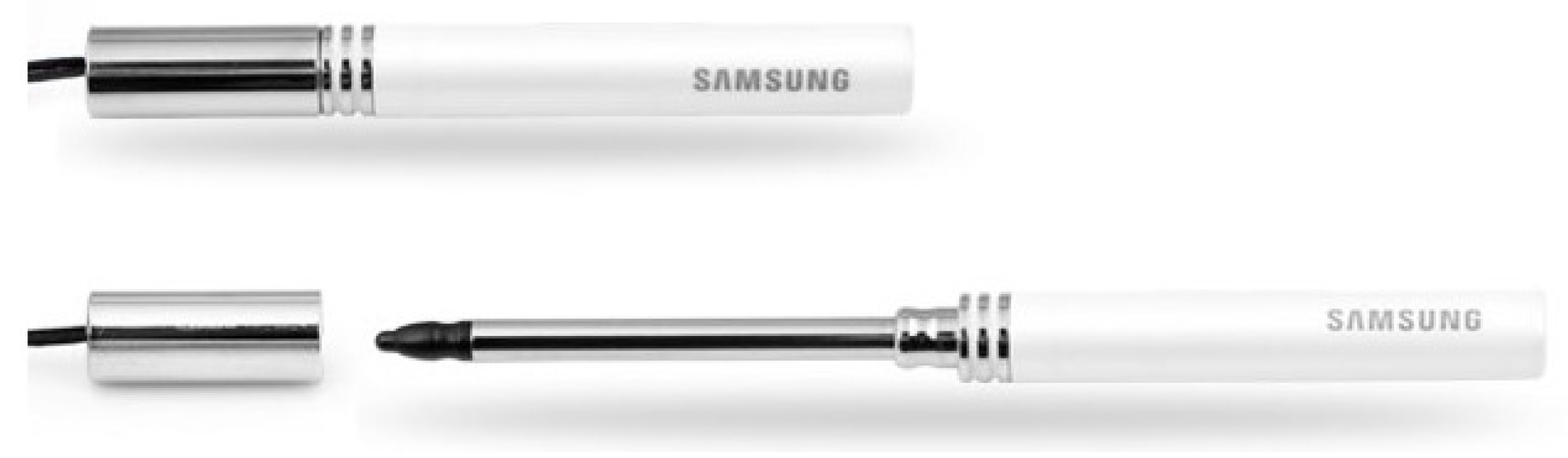
- Repeat steps (from 2–8, 10 and 11) using mobile stylus pen (Figure 1).

| Specifications | Traditional pen | Touchsmart stylus | Mobile stylus |
|---|---|---|---|
| Company | Hi-tech | HP | Samsung |
| Full length (mm) | 140 | 125 | 50 |
| Diameter (mm) | 10 | 10 | 7 |
| Screen size (mm × mm) | 260 × 164 | 260 × 164 | 73 × 44 |
| Center of mass (mm) | 74 | 65 | 25 |
| Weight (g) | 22.5 | 15.2 | 10.5 |
| Shape | Circle type | Circle type | Circle type |
| Interface environment | - | - | Handheld device |
| Signal detection | - | Electrostatic detection | Pressure-sensitive detection |

3.2. Results
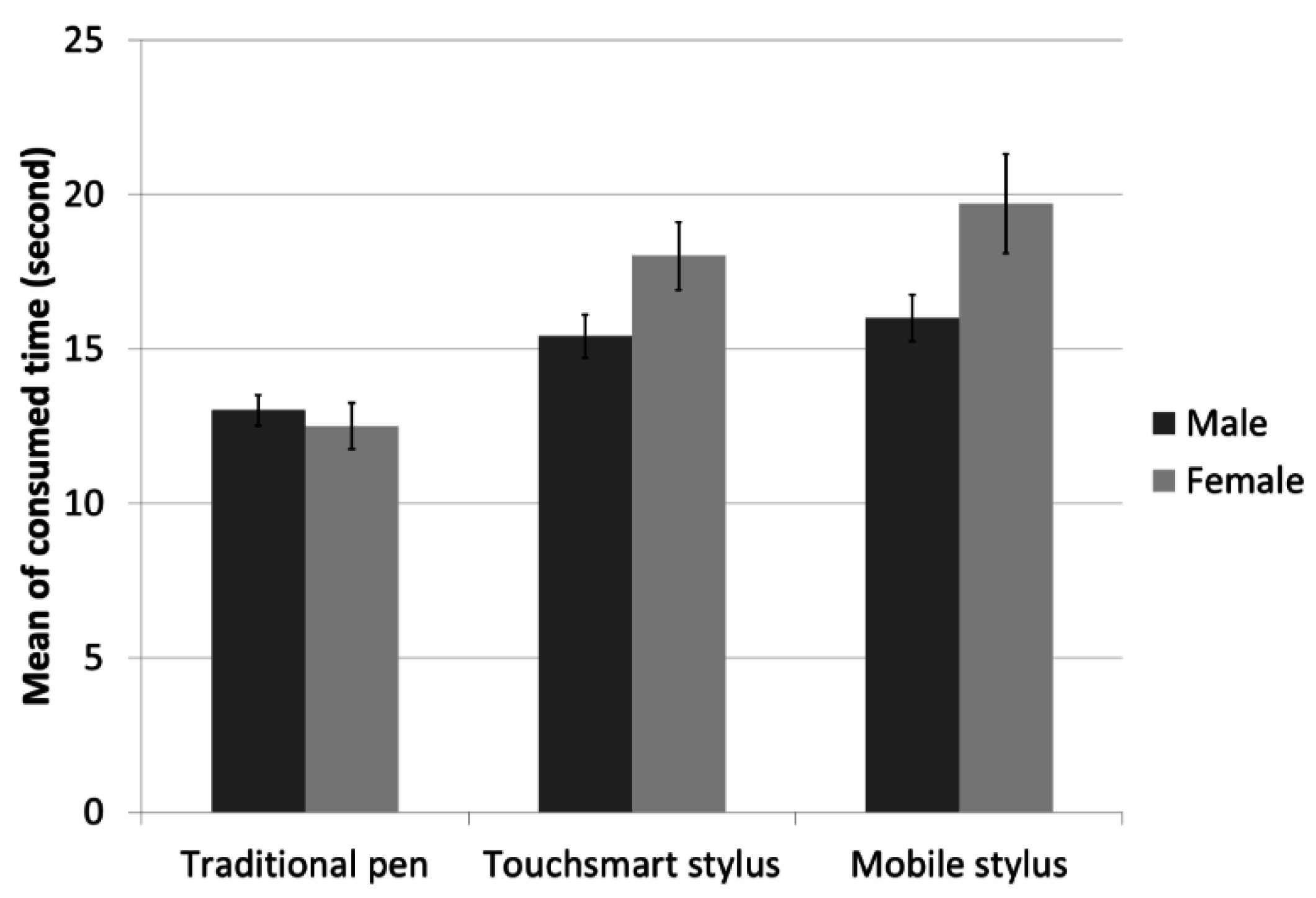
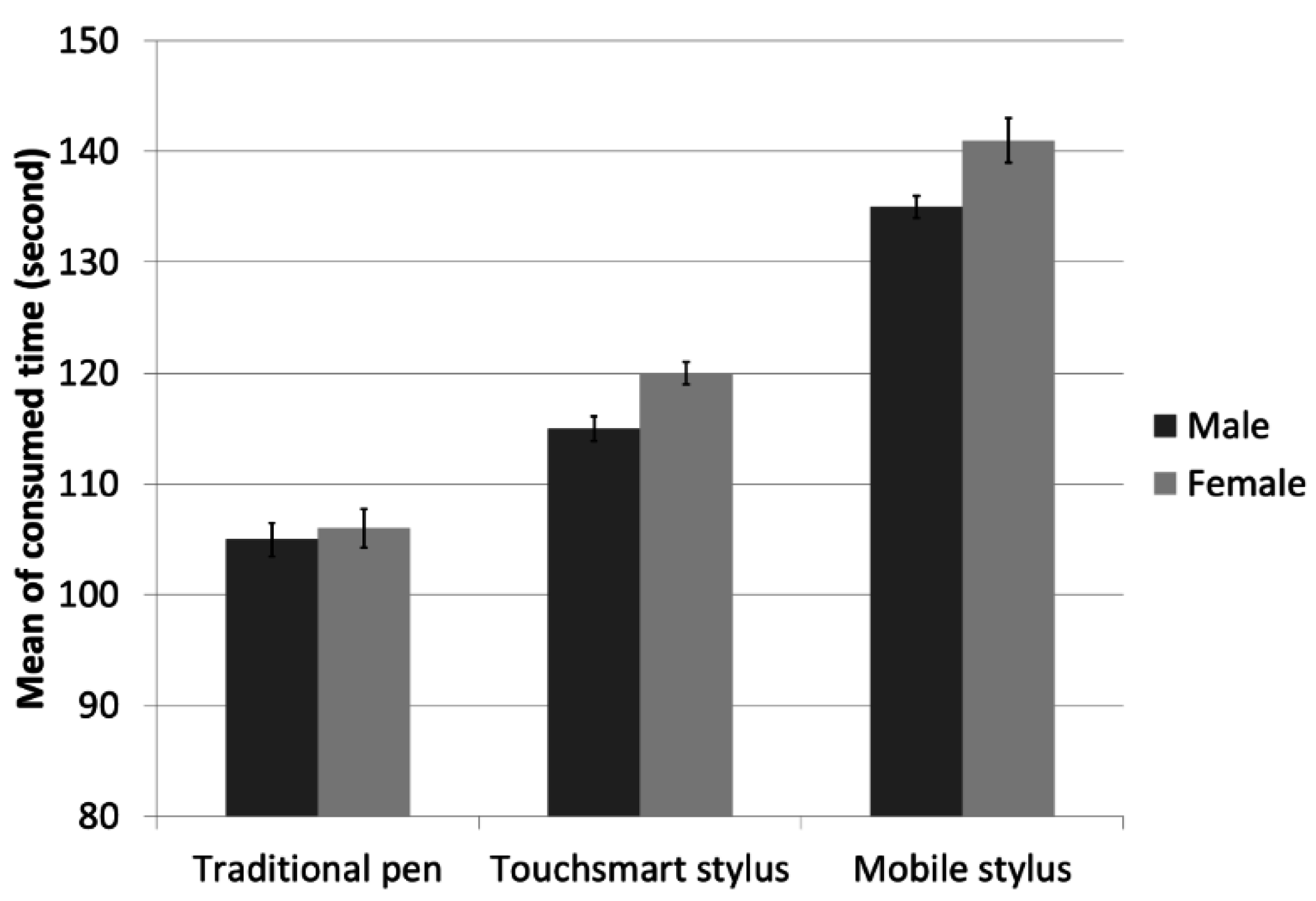
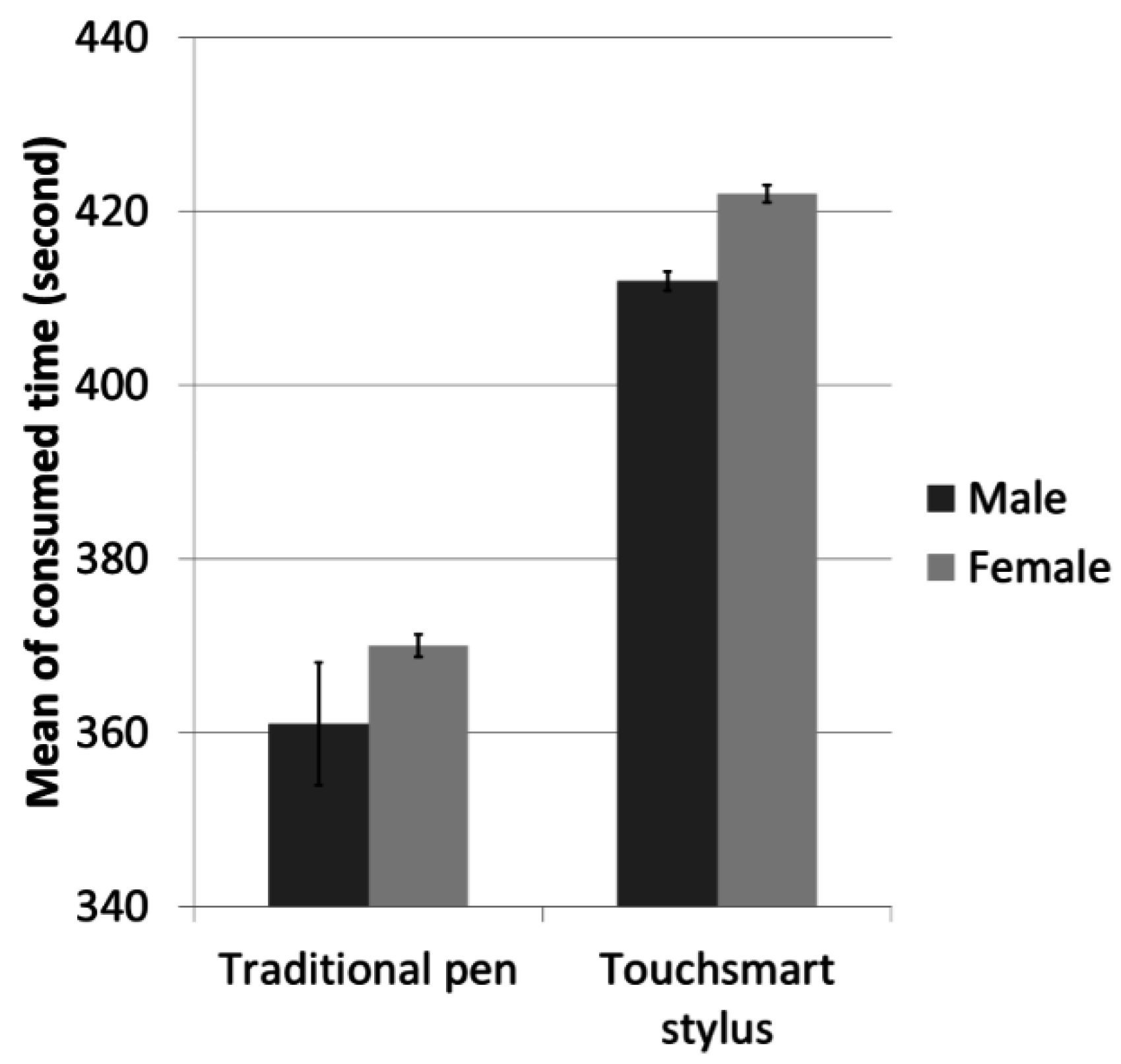
3.2.1. Consumed Time
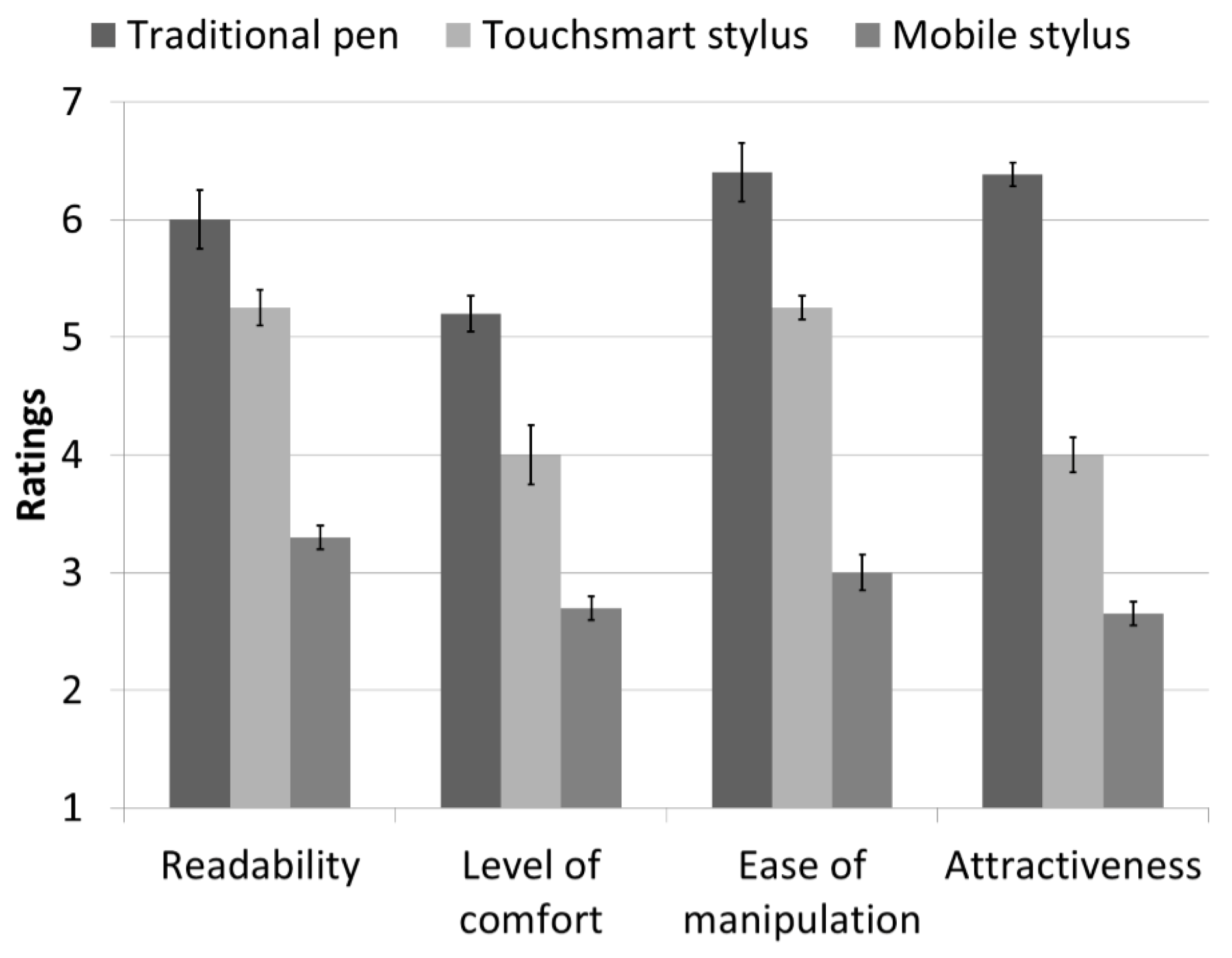
3.2.2. Subjective Assessments
- Readability: The main effect of the writing tool was significant (F(1,19)=610.08, p < 0.01). However, the main effects of the gender and interaction were not significant (p > 0.05).
- Level of comfort: The main effect of the writing tool was significant (F(1,19) = 329.99, p < 0.01). However, the main effects of the gender and interaction were not significant (p > 0.05).
- Ease of manipulation: The main effect of the writing tool was significant (F(1,19) = 86.02, p < 0.01). However, the main effects of the gender and interaction were not significant (p > 0.05).
- Attractiveness: The main effect of the writing tool was significant (F(1,19) = 519.97, p < 0.01). However, the main effects of the gender and interaction were not significant (p > 0.05).
4. Discussion
5. Conclusions
Acknowledgments
Author Contributions
Conflicts of Interest
References
- Kristoffersen, S.; Ljungberg, F. “Making place” to make IT work: Empirical explorations of HCI for mobile CSCW. In Proceedings of the international ACM SIGGROUP Conference on Supporting Group Work, Phoenix, AZ, USA, 14–17 November 1999; pp. 276–285.
- Saund, E.; Lank, E. Stylus input and editing without prior selection of mode. In Proceedings of the 16th Annual ACM Symposium on User interface Software and Technology, Vancouver, Canada, 2–5 November 2003; pp. 213–216.
- Wong, C.Y.; Khong, C.W.; Thwaites, H. Aesthetics and virtual keyboard designs for PDAs. In Proceedings of the 4th international Conference on Mobile Technology, Applications, and Systems and the 1st international Symposium on Computer Human interaction in Mobile Technology, Mobility ’07, Singapore, Singapore, 10–12 September 2007; pp. 181–186.
- Ren, X.; Moriya, S. Improving selection performance on pen-based systems: A study of pen-based interaction for selection tasks. ACM Trans. Comput.-Hum. Interact. 2000, 7, 384–416. [Google Scholar] [CrossRef]
- Brewster, S.A. Sound in the interface to a mobile computer. In Proceedings of the HCI international ’99 (the 8th international Conference on Human-Computer interaction) on Human-Computer interaction: Communication, Cooperation, and Application Design—Volume 2, Munich, Germany, 22–27 August 1999; Bullinger, H., Ziegler, J., Eds.; L. Erlbaum Associates: Hillsdale, NJ, USA, 1999; pp. 43–47. [Google Scholar]
- Mizobuchi, S.; Mori, K.; Ren, X.; Michiaki, Y. An Empirical Study of the Minimum Required Size and the Minimum Number of Targets for Pen Input on the Small Display. Lect. Notes Comput. Sci. 2002, 2411, 184–194. [Google Scholar]
- Cockburn, A.; Ahlström, D.; Gutwin, C. Understanding performance in touch selections: Tap, drag and radial pointing drag with finger, stylus and mouse. Int. J. Hum. Comput. Stud. 2012, 70, 218–233. [Google Scholar] [CrossRef]
- Holzinger, A.; Stocker, C.; Peischl, B.; Simonic, K.M. On using entropy for enhancing handwriting preprocessing. Entropy 2012, 14, 2324–2350. [Google Scholar] [CrossRef]
- Holzinger, A.; Höller, M.; Schedlbauer, M.; Urlesberger, B. An investigation of finger versus stylus input in medical scenarios. In Proceedings of the 30th International Conference on Information Technology Interfaces, 2008, Dubrovnik, Croatia, 23–26 June 2008; pp. 433–438.
- Ren, X.; Fukutoku, F. Usability of the Stylus Pen and Age. In Proceedings of Asia Pacific Conference on Computer Human Interaction. APCHI ’06, Taipei, Taiwan, 11–14 October 2006; pp. 1–10.
- Wobbrock, J.O.; Myers, B.A.; Kembel, J.A. EdgeWrite: A stylus-based text entry method designed for high accuracy and stability of motion. In Proceedings of the 16th Annual ACM Symposium on User interface Software and Technology, Vancouver, Canada, 2–5 November 2003; pp. 61–70.
- Tappert, C.C.; Suen, C.Y.; Wakahara, T. The State of the Art in Online Handwriting Recognition. IEEE Trans. Pattern Anal. Mach. Intell. 1990, 12, 787–808. [Google Scholar] [CrossRef]
- Bow, S. Pattern Recognition and Image Preprocessing, 2nd ed.; Marcel Dekker, Inc.: New York, NY, USA, 2002. [Google Scholar]
- Chu, H. Electronic books: Viewpoints from users and potential users. Library Hi. Tech. 2003, 21, 340–346. [Google Scholar] [CrossRef]
- Levine-Clark, M. Electronic book usage: A survey at the University of Denver. Libraries Acad. 2006, 6, 285–299. [Google Scholar] [CrossRef]
- Korat, O.; Shamir, A. The educational electronic book as a tool for supporting children’s emergent literacy in low versus middle SES groups. Comput. Educ. 2008, 50, 110–124. [Google Scholar] [CrossRef]
- Mickelson, R.A. Why Does Jane Read and Write so Well? The Anomaly of Women’s Achievement. Sociology Educ. 1989, 62, 47–63. [Google Scholar] [CrossRef]
- Holzinger, A.; Basic, L.; Peischl, B.; Debevc, M. Handwriting recognition on mobile devices: state of the art technology, usability and business analysis. In Proceedings of the International Conference on e-Business (ICE-B), Seville, Spain, 18–21 July 2011; pp. 1–9.
- Holzinger, A. Usability engineering methods for software developers. Commun. ACM 2005, 48, 71–74. [Google Scholar] [CrossRef]
- Ren, X.; Mizobuchi, S. Investigating the Usability of the Stylus Pen on Handheld Devices. In Proceedings of the Fourth Annual Workshop on HCI Research in MIS, Las Vegas, NV, USA, 10 December 2005; pp. 30–34.
- Holzinger, A.; Sommerauer, B.; Spitzer, P.; Juric, S.; Zalik, B.; Debevc, M.; Lidynia, C.; Valdez, A.C.; Roecker, C.; Ziefle, M. Mobile Computing is not Always Advantageous: Lessons Learned from a Real-World Case Study in a Hospital. Lect. Notes Comput. Sci. 2014, 8708, 110–123. [Google Scholar]
- Holzinger, A.; Searle, G.; Peischl, B.; Debevc, M. An Answer to “Who Needs a Stylus?” On Handwriting Recognition on Mobile Devices. In E-Business and Telecommunications; Springer Berlin Heidelberg: Seville, Spain, 2012; Volume 314, pp. 156–167. [Google Scholar]
- Ren, X.; Zhou, X. An investigation of the Usability of the Stylus Pen for Various Age Groups on Personal Digital Assistants. Behav. Inform. Technol. 2011, 30, 709–726. [Google Scholar] [CrossRef]
- Takahashi, H.; Ogasawara, A.; Ogasawara, M.; Ren, X. The effects of PDA pen-length on the performance of older adults. In Proceedings of 2005 International Conference on Active Media Technology, Kagawa, Japan, 19–21 May 2005; p. 283.
- Goldberg, D.; Richardson, C. Touch-typing with a stylus. In Proceedings of the INTERACT '93 and CHI '93 Conference on Human Factors in Computing Systems, Amsterdam, the Netherlands, 24–29 April 1993; pp. 80–87.
- Poupyrev, I.; Okabe, M.; Maruyama, S. Haptic feedback for pen computing: Directions and strategies. In Proceedings of the CHI '04, Vienna, Austria, 24–29 April 2004; pp. 1309–1312.
- Smith, G.M.; Schraefel, M.C. The radial scroll tool: Scrolling support for stylus- or touch-based document navigation. In Proceedings of the 17th Annual ACM Symposium on User interface Software and Technology, Santa Fe, NM, USA, 24–27 October 2004; pp. 53–56.
- Moscovich, T. Multi-touch interaction. In Proceedings of the CHI '06 Extended Abstracts on Human Factors in Computing Systems, Quebec, Canada, 22–27 April 2006; pp. 1775–1778.
- Lee, J.C.; Dietz, P.H.; Leigh, D.; Yerazunis, W.S.; Hudson, S.E. Haptic pen: A tactile feedback stylus for touch screens. In Proceedings of the 17th Annual ACM Symposium on User interface Software and Technology, Santa Fe, NM, USA, 24–27 October 2004; pp. 291–294.
- Poupyrev, I.; Maruyama, S.; Rekimoto, J. Ambient touch: Designing tactile interfaces for handheld devices. In Proceedings of the 15th Annual ACM Symposium on User interface Software and Technology, Paris, France, 27–30 October 2002; pp. 51–60.
- Poupyrev, I.; Rekimoto, J.; Maruyama, S. TouchEngine: A tactile display for handheld devices. In Proceedings of the CHI ’02 Extended Abstracts on Human Factors in Computing Systems, Minneapolis, MN, USA, 20–25 April; 2002; pp. 644–645. [Google Scholar]
- Garcia-Lopez, E.; Garcia-Cabot, A.; de-Marcos, L. An experiment with content distribution methods in touchscreen mobile devices. Appl. Ergon. 2015, 50, 79–86. [Google Scholar] [CrossRef] [PubMed]
- Park, E.; Kim, K.J.; Ohm, J. Does Panel Type Affect Haptic Experience? An Empirical Comparison of Touch Screen Panels for Smartphones. J. Multimodal User Interfaces 2014, 8, 429–433. [Google Scholar] [CrossRef]
- Park, E.; Kim, K.J.; del Pobil, A.P. The Effects of Multimodal Feedback and Gender on Task Performance of Stylus Pen Users. Int. J. Adv. Rob. Syst. 2012, 9, 1–7. [Google Scholar] [CrossRef]
- Cho, K.; Lee, J.; Lee, B.; Park, E. Effects of Feedforward in In-air Remote Pointing. Int. J. Hum. Comput. Interact. 2015, 31, 89–100. [Google Scholar] [CrossRef]
- Park, E.; del Pobil, A.P. Technology acceptance model for the use of tablet PCs. Wireless Pers. Commun. 2013, 73, 1561–1572. [Google Scholar] [CrossRef]
- Park, E.; Ohm, J. Factors influencing users’ employment of mobile map services. Telemat. Inform. 2014, 31, 253–265. [Google Scholar] [CrossRef]
© 2015 by the authors; licensee MDPI, Basel, Switzerland. This article is an open access article distributed under the terms and conditions of the Creative Commons Attribution license (http://creativecommons.org/licenses/by/4.0/).
Share and Cite
Park, E.; Del Pobil, A.P.; Kwon, S.J. Usability of the Stylus Pen in Mobile Electronic Documentation. Electronics 2015, 4, 922-932. https://doi.org/10.3390/electronics4040922
Park E, Del Pobil AP, Kwon SJ. Usability of the Stylus Pen in Mobile Electronic Documentation. Electronics. 2015; 4(4):922-932. https://doi.org/10.3390/electronics4040922
Chicago/Turabian StylePark, Eunil, Angel P. Del Pobil, and Sang Jib Kwon. 2015. "Usability of the Stylus Pen in Mobile Electronic Documentation" Electronics 4, no. 4: 922-932. https://doi.org/10.3390/electronics4040922
APA StylePark, E., Del Pobil, A. P., & Kwon, S. J. (2015). Usability of the Stylus Pen in Mobile Electronic Documentation. Electronics, 4(4), 922-932. https://doi.org/10.3390/electronics4040922