

Article

From Prompts to High-Fidelity Prototypes: A Usability Evaluation of Generative AI-Driven Prototyping Tools for Smart Mobile App Design


by
John Bustamante-Orejuela
1,
Xavier Quiñonez-Ku
1 and
Pablo Pico-Valencia
2,*
1
Engineering of Technology of Information, Pontificia Universidad Católica del Ecuador, Esmeraldas 080101, Ecuador
2
Software Engineering Department, Research Centre for Information and Communication Technologies (CITIC-UGR), University of Granada, 18071 Granada, Spain
*
Author to whom correspondence should be addressed.
Multimodal Technol. Interact. 2026, 10(4), 42; https://doi.org/10.3390/mti10040042
Submission received: 18 January 2026 / Revised: 8 March 2026 / Accepted: 11 March 2026 / Published: 17 April 2026

Abstract

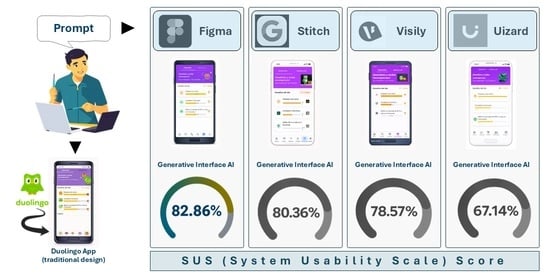
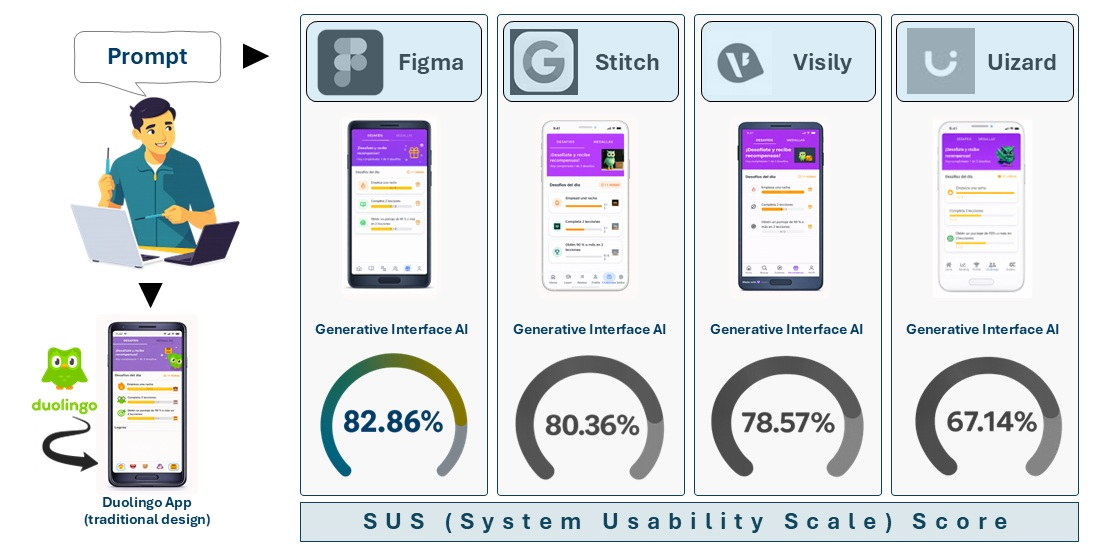
The integration of Generative Artificial Intelligence (GAI) into software design tools has transformed the early stages of mobile application development, particularly prototype creation from natural-language prompts. This study evaluates the usability and effectiveness of GAI-assisted prototyping tools for generating high-fidelity mobile application prototypes. A controlled laboratory usability study was conducted in which undergraduate Information Technology Engineering students used and evaluated four widely adopted prototyping platforms: Figma, Uizard, Visily, and Stitch. Participants employed these tools to recreate mobile interfaces corresponding to the interaction model of the Duolingo application. The System Usability Scale (SUS) was used to assess perceived usability and effectiveness from the users’ perspective. The results indicate that all evaluated tools enabled rapid prototype generation; however, significant differences emerged in usability, structural fidelity, and perceived control. Figma and Stitch achieved the highest usability scores and demonstrated greater alignment with the reference prototype (82.86 and 80.36, respectively). Visily achieved a favorable usability score (78.57), while Uizard obtained a moderate score (67.14). Although Uizard and Visily exhibited strong automation capabilities and faster initial generation, their outputs required additional manual refinement to achieve higher fidelity and customization. Participant feedback emphasized the importance of output quality, responsiveness, and foundational design knowledge in achieving satisfactory results. Overall, the findings suggest that current GAI-based prototyping tools are effective and valuable in real-world software development contexts. However, their effectiveness appears closely related to the degree of user control, responsiveness, and the ability to iteratively refine AI-generated interface components.

Graphical Abstract

1. Introduction

Progressive advances in Artificial Intelligence (AI), cloud computing, and the Internet of Things are reshaping the global technological landscape [1]. The trend toward increasing automation has led to growing demand for intelligent applications and systems with web-, mobile-, and wearable-oriented interfaces capable of performing complex processes similar to those carried out daily by humans, such as image recognition, natural language understanding, personalized recommendation generation, and decision-making under uncertainty [2].
To translate the needs of clients requesting such systems—often characterized by high complexity—development teams commonly employ high- or low-fidelity prototypes [3]. Through prototyping, teams can better understand the software requirements identified during the elicitation phase and transform them into interactive representations. In this way, prototyping enables clients to clearly and transparently visualize how their requirements have been technically interpreted. Within this context, next-generation tools have emerged to automate the creation of graphical user interfaces (GUIs) and the definition of complete interaction models through the integration of generative AI models. These models, known as Large Language Models (LLMs), enable agile prototype creation while adhering to user-centered design principles. With LLMs, it is no longer necessary to build a system in order to conceptualize it; instead, describing it in natural language—the medium humans naturally use for communication—is sufficient [4]. Consequently, contemporary prototyping tools reduce the need for fully manual interface and interaction model construction by graphic designers, as was common in previous years. Widely adopted tools of this kind include Figma version Figma Make [5], Uizard version Autodesigner 1.5 [6], Stitch version Beta [7], and Visily version 2025 [8]. For the purposes of this study, these platforms are collectively referred to as AI-based prototyping tools.
These tools differ from traditional prototyping platforms (e.g., Proto.io, Adobe XD) in that they leverage machine learning algorithms and LLMs to interpret descriptive prompts written in natural language [4], transforming them into high-fidelity interactive prototypes. This capability significantly enhances the application design phase by accelerating the validation and approval of functional requirements elicited collaboratively by development teams and stakeholders, prior to formally initiating the coding phase within the software development life cycle [9,10]. Moreover, such prototypes facilitate effective communication between clients and developers, reducing ambiguity and supporting more agile decision-making.
Despite the growing adoption of AI-based prototyping tools, a significant knowledge gap remains regarding how to rigorously evaluate their effectiveness in real-world software development contexts. While some studies have assessed AI-assisted development platforms such as GitHub Copilot and Amazon CodeWhisperer [11], limited research has focused specifically on tools designed for rapid application prototyping using generative AI. Existing studies remain incipient, as AI-driven mock-up generation tools require further refinement [12]. Although machine learning approaches to GUI generation have shown promise in predicting interface usability, automatically generated interfaces have not consistently met key criteria established by the ISO 9241-11 usability standard [13], a foundational reference in Human–Computer Interaction (HCI). This suggests that generative AI-based automatic prototyping tools have not yet reached full maturity and that many remain in experimental stages. Nevertheless, in recent years, numerous technological platforms—including prototyping tools—have increasingly incorporated generative AI functionalities, often through subscription-based models. This trend constitutes a primary motivation for the present study.
According to the formal definition of usability—“the extent to which a product can be used by specified users to achieve specified goals with effectiveness, efficiency, and satisfaction in a specified context of use” [13]—the current literature reveals a scarcity of studies examining automated prototyping tools based on generative AI. Among the few existing efforts is PlatoS [14], which automates usability testing on Android mockups and enables interaction analysis and design issue detection. However, its experiments are limited to three predefined tasks, potentially introducing bias into the evaluation model. Another notable contribution is GUIComp [15], an assistant that provides real-time feedback on alignment and visual consistency to improve design quality. Nevertheless, its scope is restricted to low-fidelity prototypes and does not assess applicability to high-fidelity prototypes representative of real mobile applications.
In response to these limitations, this study presents a systematic analysis of currently available prototyping tools that incorporate generative AI functionalities to generate prototypes from descriptive prompts. Within this framework, the research addresses the following question: What is the level of usability and effectiveness of prototyping tools that employ generative AI for the creation of mobile application prototypes through descriptive prompts? Additionally, the findings enable the identification of the primary advantages and limitations of AI-based automated prototyping tools in both academic environments and agile software development contexts.
The objective of this study is to analyze the usability and effectiveness of the most prominent and widely adopted AI-enabled prototyping tools in order to evaluate their capacity to generate high-fidelity mobile application prototypes during the early stages of software development. This evaluation is conducted through controlled laboratory-based testing. In doing so, the study identifies tools with stronger potential for real-world product development, as opposed to those that may currently be more suitable for academic or exploratory use.
The remainder of this article is organized as follows: Section 2 presents the theoretical foundations and key concepts related to generative AI-based prototyping tools; Section 3 describes the methodology adopted for the study; Section 4 details the findings obtained from the usability tests performed on the generated prototypes; Section 5 discusses the results; and Section 6 presents the conclusions and directions for future research.

2. Theoretical Background

2.1. Relationship Between User Experience (UX) and User-Centered Design

Prototyping, as part of the design phase within the software development life cycle, represents a critical stage in user interface development, as it enables the transformation of high-level and often ambiguous requirements into preliminary visual models with which users can interact. These visual models are typically categorized into low-, medium-, and high-fidelity prototypes [16].
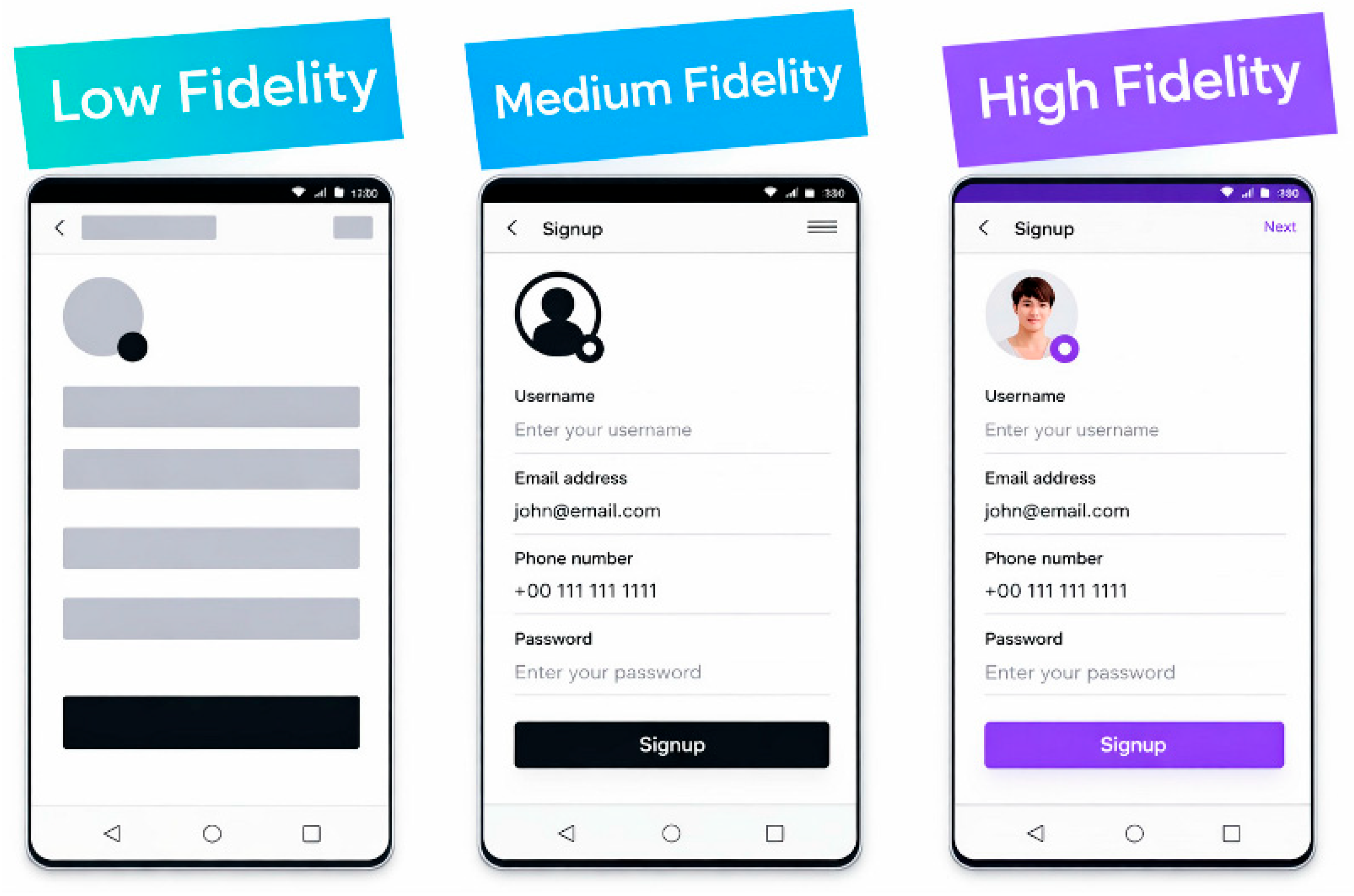
Low-fidelity prototypes allow rapid and cost-effective representation of initial ideas; medium-fidelity prototypes support testing of key functionalities without full visual refinement; and high-fidelity prototypes closely simulate the final product [17], making them suitable for usability testing in environments that approximate real-world conditions (Figure 1). This classification facilitates solution exploration, early detection of design issues, and the development of a shared understanding among stakeholders regarding the intended software product [18].
Low-fidelity prototypes serve as early conceptual representations that foster idea exploration and interaction design before implementation begins [19]. Their primary purpose is to support learning and enable cost-effective validation of proposed solutions with real users prior to full-scale development [20]. In human–machine interface systems, such as mobile applications, low-fidelity prototypes are particularly valuable because they provide an initial representation of the interaction model derived from requirements gathered during early stakeholder interviews. At this stage, stakeholders often lack a fully articulated understanding of their needs. Empirical evidence suggests that incorporating prototyping phases leads to higher-quality interfaces and facilitates usability testing under realistic usage conditions [20,21].
In the early stages, low-fidelity techniques such as paper prototypes or hand-drawn mockups are employed due to their low cost and effectiveness in communicating core concepts. However, such informal representations may be ambiguous or insufficient to capture detailed design constraints. Horizontal prototyping (mock-up prototyping) focuses specifically on interface layers, while vertical prototyping addresses deeper functional components. As development progresses, medium- and high-fidelity prototypes created with tools such as Balsamiq (low fidelity), SceneBuilder (esthetic refinement), or Atomic.io and Origami (detailed animations and interactions) enable feature refinement and provide more precise insight into user–system interaction [22,23]. Studies report that effective prototyping can reduce code production by up to 40% and overall development effort by approximately 45%, resulting in software that is easier to learn and use [21]. Consequently, prototyping directly supports user-centered development practices.
The integration of User Experience (UX) into agile development methodologies has gained increasing relevance. Agile frameworks, grounded in principles such as iterative development, user focus, and team collaboration, position prototyping as a natural bridge between design and implementation. Prototypes can be rapidly transferred into short development iterations, enabling teams to validate and refine solutions within each cycle. Nevertheless, despite this conceptual alignment, practical challenges persist in fully integrating UX and prototyping into agile workflows. These challenges include insufficient organizational support, communication barriers within multidisciplinary teams, and limited UX training among developers, which can restrict the iterative potential of prototyping and its contribution to truly user-centered agile cycles [24].

2.2. Towards AI-Based Prototyping Tools

Within the prototyping domain, AI is driving a paradigm shift. There is a clear transition from design processes led exclusively by graphic designers and UX specialists toward hybrid workflows that incorporate prompt engineering expertise. This emerging discipline complements, rather than replaces, traditional UX knowledge. In recent years, generative AI-powered tools have enabled rapid production of high-fidelity prototypes and automation of tasks that previously required substantial technical or visual expertise.
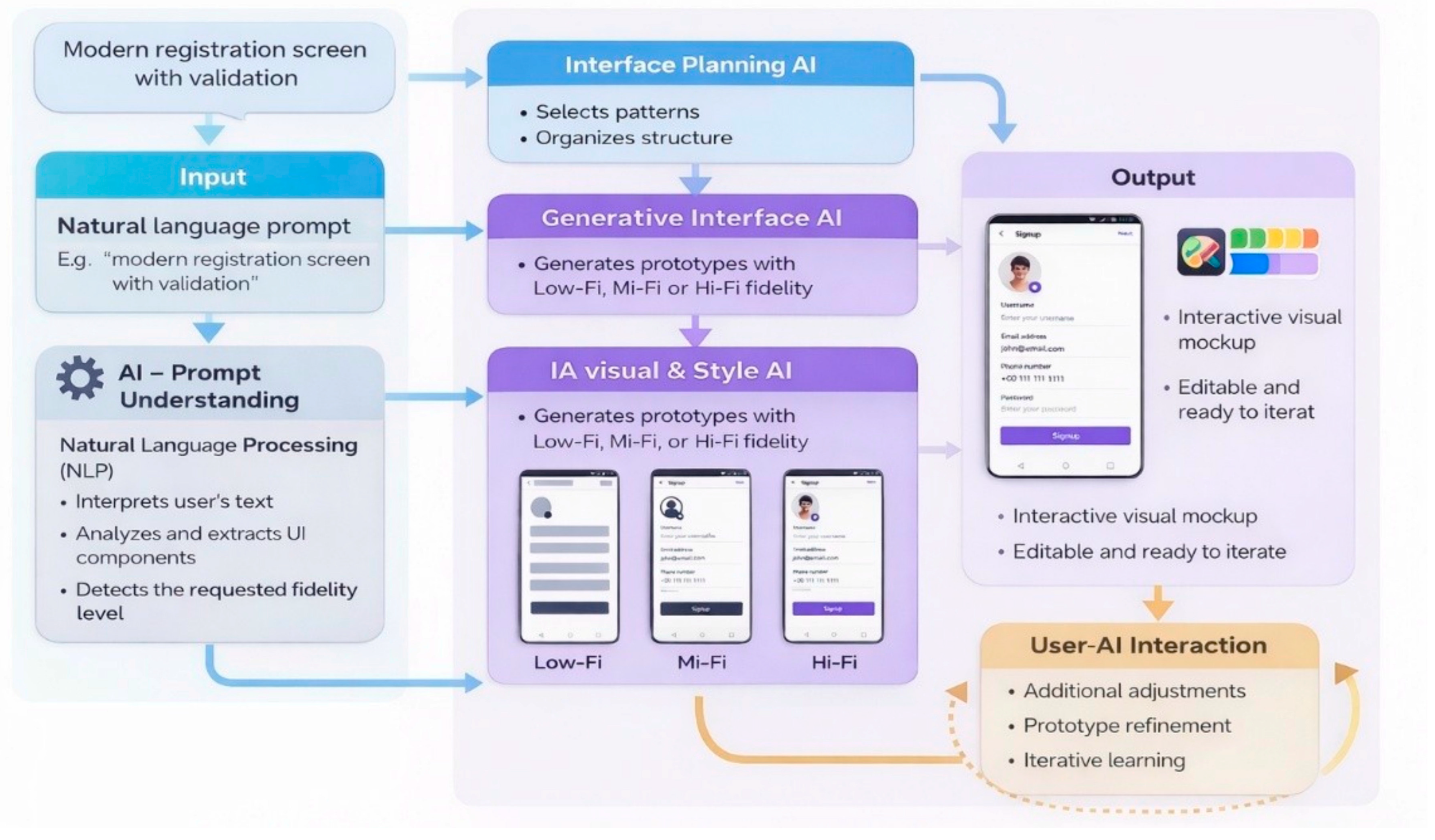
Figure 2 illustrates the typical workflow employed by generative AI-based prototyping tools. The process begins with a natural language prompt in which users describe the desired interface requirements. This input is processed through an AI-driven semantic understanding layer that applies natural language processing techniques to interpret user intent, identify interface components, and determine the desired fidelity level. Subsequently, an interface planning module selects appropriate design patterns and organizes the structural layout. A generative UI engine then transforms this plan into low-, medium-, or high-fidelity prototypes. Finally, the system delivers an interactive and editable visual mockup, incorporating a user–AI feedback loop that enables progressive refinement through additional prompts or manual adjustments.

2.3. Previous Studies on AI-Based Prototyping

Recent research on AI-based prototyping has explored diverse methodological approaches, ranging from structured prompt representations to empirical usability evaluations and workflow integration studies.
One line of research focuses on enhancing structural control and consistency in generative AI-assisted interface design. In this direction, the study by Calò et al. [25] evaluate a visual prompting framework that augments standard generative processes with structured visual specifications. The objective was to determine how different modalities of visual guidance impact both the designer’s experience and the quality of the generated UI artifacts. The methodology compared two distinct input modalities—free-form sketches and semantic-constrained drawings (using color-coded UI categories)—under controlled conditions with design practitioners. The results demonstrated that while sketches are superior for early-stage intuitiveness, the incorporation of explicit structural constraints through semantic drawings significantly improves output quality (2.75 vs. 1.50) and fidelity (3.60 vs. 3.38) compared to unconstrained visual generation. The authors conclude that structured visual prompting mechanisms can mitigate the ambiguity inherent in traditional prompting and increase output reliability, particularly when transitioning toward high-fidelity prototypes.
Similarly, the study represented by Chen et al. [26] introduces a structured and hierarchical intermediate representation called SPEC to bridge the semantic gap between high-level design intent and generative AI outputs. The objective was to enhance the controllability and fidelity of iterative UI generation by mapping abstract visual goals into controllable, parameterized specifications. Through quantitative experiments measuring pixel reconstruction (MSE), semantic alignment (CLIP), and structural similarity (SSIM), the study demonstrated significant gains in layout consistency and intent preservation compared to traditional prompt-driven baselines. The main conclusion highlights that shifting from one-shot prompting to a specification-driven paradigm provides a more robust and reliable framework for human–AI collaboration, enabling designers to maintain structural integrity and precision across multiple design iterations.
Complementing these contributions, Hsiao and Tang [27] investigate the application of generative AI tools within the UX design process. The objective was to evaluate the practical benefits and limitations of integrating AI into a professional workflow, using a mobile banking application case study to observe its impact on design efficiency and innovation. The methodology followed the Three Diamond Design Process, incorporating various AI tools to facilitate seven key work items, including competitive analysis, sketching, and design validation. The findings indicate that generative tools significantly streamline early-stage planning and accelerate the transition from abstract concepts to concrete visual prototypes, although manual intervention remains necessary to correct inaccuracies and refine technical details. The study concludes that AI-assisted design is most effective when positioned as a collaborative auxiliary tool that enhances productivity while relying on the strategic questioning and critical thinking of human designers.
In a related direction, Yuan et al. [28] present PrototypeFlow, a modular system designed to facilitate iterative human–AI synergy in the creation of high-fidelity UI prototypes. The study aimed to overcome the limitations of current generative tools—such as the lack of transparency and the production of non-editable outputs—by introducing transparent checkpoints and multi-modal input controls. Through quantitative evaluations and user studies with 16 practitioners, the results showed that this decoupled generation approach significantly improves output quality and semantic alignment (4.32/5) while reducing the manual effort required for refinement compared to industry baselines. The authors conclude that shifting from opaque, end-to-end generation to a collaborative, modular framework empowers designers to maintain creative agency and precise control over both global themes and local UI components.
Beyond structural fidelity, some studies have focused on the practical integration of AI within professional design environments to enhance workflow efficiency. The work represented by Honarvar [29] introduces an AI-driven Figma plugin designed to translate high-level project descriptions into structured UI recommendations. The objective was to automate the creation of UI components and layouts, specifically serving as an information engineering tool to help designers understand the necessary elements and structural architecture of a project. The methodology involved the development of a Django-based API server integrated with ChatGPT version 3.5 to process natural language inputs and programmatically render corresponding UI layouts directly within the Figma canvas. Results demonstrated the system’s viability and cost-efficiency. The author concludes that positioning AI as a collaborative design assistant rather than a mere code generator empowers designers to better conceptualize and organize their ideas, significantly reducing the manual effort required during the initial stages of the design process.
Similarly, Fang [30] investigates the role of iterative refinement in LLM-driven UI personalization for non-technical end users. The study’s objective was to evaluate user experience, the effectiveness of user involvement, and the challenges of adapting interfaces in real time using a custom-built mobile application. Through mixed-methods usability testing and thematic analysis, the findings revealed that prompt specificity is the primary determinant of outcome quality and user satisfaction, as vague instructions often resulted in model hallucinations and inconsistent implementations (Mean SUS score = 69.17). The author concludes that the success of generative systems relies heavily on prompt engineering quality, suggesting that future AI-assisted prototyping environments must incorporate structured input guidance and transparent feedback mechanisms to help users effectively bridge the gap between their mental models and AI execution.
In a broader professional context, the study represented by Chen et al. [31] investigate the adoption of Generative UI (GenUI) tools across multiple software development roles, including UX designers, researchers, developers, and product managers. The objective was to understand how practitioners utilize prompt-based prototyping in real-world settings and to identify the primary challenges to its integration. Using a week-long, project-based methodology involving 37 professionals, the researchers collected qualitative data through daily journals and semi-structured interviews, analyzed via grounded theory. The results demonstrated that GenUI significantly supports early-stage ideation, reduces the time required for initial drafts, and facilitates cross-functional visual communication by providing a shared tangible medium. Furthermore, the study found that GenUI democratizes UX design by enabling non-designers to gain greater independence in performing low-stakes prototyping tasks. However, significant gaps were identified in design system consistency, and contextual awareness, where discrepancies remain between the generated output and users’ needs and expectations. As a result, the output often requires extensive manual refinement to achieve production-ready quality.
Finally, Petridis et al. [32] examine generative prototyping from a human–AI collaboration perspective, specifically focusing on the tight coupling of LLM prompt authoring and UI design. The objective was to investigate how connecting UI elements to dynamic AI inputs and outputs influences designers’ workflows and their ability to communicate holistic product ideas. Through a user study with 14 professional designers using the PromptInfuser tool, the study demonstrated that integrated environments encourage a tandem iterative process, which reveals critical incompatibilities between UI layouts and AI behaviors early in the design cycle. The authors conclude that this “medium-fidelity” prototyping approach—connecting dynamic AI prototypes with low-fidelity visual mocks—is essential for anticipating technical constraints and improving the overall reliability and realism of envisioned AI-powered artifacts.
Taken together, these studies demonstrate that AI-based prototyping research converges on three key dimensions: structural fidelity enhancement through constrained prompting, empirical usability evaluation of AI-driven tools, and the exploration of automation–control trade-offs in human–AI collaboration. However, few studies simultaneously integrate cross-tool comparison, standardized usability measurement, structural fidelity assessment, and full interaction model replication under controlled laboratory conditions. This gap provides the contextual foundation for the present research.

2.4. Main AI-Based Prototyping Tools

AI-based tools for application prototyping can be broadly categorized into three main implementation approaches. First, AI-enhanced plug-ins extend established design platforms by incorporating intelligent functionalities—such as layout suggestions, automated content generation, and structural assistance—while preserving traditional manual design workflows. Examples of this approach include AI-integrated functionalities within platforms such as Figma, Uizard, Stitch, and Visily. Second, fully integrated AI-based prototyping solutions represent a new generation of tools that embed generative AI at their core, enabling the direct transformation of textual descriptions, sketches, or conceptual inputs into functional visual prototypes with minimal user intervention. Third, general-purpose generative AI systems, including large language models, do not offer native prototyping features but are increasingly used as auxiliary tools across different prototyping stages, particularly for ideation, requirement formulation, and interface logic definition [12]. Together, these implementation types provide a structured framework for understanding the diversity of current AI-based prototyping ecosystems, which is reflected in the following descriptions of the four selected platforms.
Figma [5] is a cloud-based interface design and collaborative prototyping platform that enables multiple users to edit simultaneously in real time through a web browser, facilitating collaborative work among designers, developers, and other stakeholders in digital product development. The platform integrates visual design, interactive prototyping, and component management functionalities, which has established it as a widely adopted reference in both academic and industrial contexts for user-centered design. In recent years, Figma has incorporated AI capabilities through tools such as Figma AI and FigJam AI, aimed at supporting and accelerating specific tasks within the design workflow, including content generation, idea organization, and automation of repetitive activities. These generative AI functionalities act as design support while preserving human creative control, making Figma a relevant benchmark for comparison with tools that emphasize higher levels of algorithmic automation in interface prototyping.
In contrast, Uizard [6] is an AI-assisted prototyping platform designed to transform early ideas into functional user interfaces quickly and accessibly. The platform can generate designs from textual descriptions, sketches, wireframes, or screenshots, automating the creation of editable screens and interface structures. This approach enables users with varying levels of experience to produce visual prototypes without requiring advanced design or programming knowledge. Uizard’s AI-driven capabilities aim to accelerate early design stages by translating conceptual inputs into coherent and reusable layouts. As a result, the platform reduces the time and effort required to iterate on initial proposals, supporting rapid solution exploration and user-centered design processes, particularly in academic and early validation contexts.
Visily [8] focuses on leveraging AI to accelerate GUI generation from multiple input formats, including textual descriptions, sketches, wireframes, and screenshots. Through this approach, the tool produces complete screens with coherent components, visual styles, and navigation structures, facilitating the creation of medium- and high-fidelity prototypes from early design stages. Visily offers a balance between automation and user control, as generated designs can be manually edited and refined in terms of layout, visual themes, and components. This combination reduces initial effort while maintaining designer involvement, supporting rapid iteration and user-centered development, particularly in academic contexts and early-stage validation.
Similarly, Stitch [7], an experimental tool developed by Google Labs, leverages generative AI to support the rapid creation of user interfaces and functional prototypes from natural language descriptions or visual inputs such as sketches and wireframes. Its approach seeks to reduce the gap between conceptualization and implementation by enabling agile transformation of ideas into digital interfaces. Stitch allows exporting generated designs to platforms such as Figma and can produce basic front-end code (HTML and CSS), thereby facilitating integration between design and development phases. These capabilities position Stitch as a solution oriented toward rapid prototyping and early experimentation, particularly suitable for academic contexts.
Table 1 presents a comparative analysis of the four aforementioned tools based on specific criteria, including ease of learning, level of AI-driven automation, degree of manual adjustment of generated prototypes, efficiency in prototype generation, interface clarity and quality, access mechanisms, and fidelity level of the resulting prototypes.

3. Methodology

3.1. Research Design and Method

This study adopted an applied experimental research design with a mixed-methods approach, integrating quantitative and qualitative techniques to evaluate the usability and effectiveness of generative AI–assisted prototyping tools for mobile application design.
The System Usability Scale (SUS) [33] was selected as the primary quantitative instrument due to its strong psychometric reliability, cross-domain applicability, and suitability for comparative usability research. SUS is an extensively validated instrument that has been applied to a wide range of interactive systems, including web applications, mobile platforms, enterprise software, and emerging digital environments. This neutrality is particularly relevant in the context of generative AI–based prototyping tools, which combine conventional interface manipulation with AI-mediated processes such as prompt-driven generation and iterative refinement. Its ability to produce a standardized usability score on a 0–100 scale enables direct comparison across heterogeneous systems and supports benchmarking using widely recognized interpretative thresholds, making it especially appropriate for structured comparative studies.
Moreover, SUS is well suited for controlled experimental settings with moderate sample sizes, as its robustness and sensitivity have been demonstrated even with relatively small participant groups. Compared to longer multidimensional questionnaires such as USE (Usefulness, Satisfaction, and Ease of Use), PSSUQ (Post-Study System Usability Questionnaire), or UEQ (User Experience Questionnaire), SUS minimizes participant fatigue while maintaining strong discriminatory power. This characteristic is particularly important when participants evaluate multiple tools within a single session. Given that this study aimed to assess overall perceived usability—including perceived ease of use, learnability, and confidence in interaction—rather than perform a granular diagnostic evaluation of specific interface attributes or objective performance metrics, SUS provided a balanced, efficient, and methodologically sound instrument aligned with the study’s objectives and widely accepted in both academic and industrial contexts.
Complementarily, the qualitative component consisted of structured non-participant observation conducted during usability testing sessions. A specifically designed observation sheet was used to systematically record participants’ behaviors, interaction strategies, difficulties encountered, and problem-solving approaches while using the prototyping tools. This qualitative data enabled a deeper understanding of user experience dimensions not fully captured by numerical scores.
The experimental procedure required participants to generate a functional mobile application prototype representing an intelligent system. To ensure experimental consistency, all participants worked under identical conditions in terms of instructions, time allocation, technological resources, and task complexity. This controlled setup enabled reliable comparison across tools and strengthened the internal validity of the study.
Quantitative indicators included task completion time, the number of iterations required to achieve the expected prototype output, and SUS usability scores. Qualitative indicators included perceived effectiveness, satisfaction, and observed interaction patterns. Data analysis combined descriptive statistical techniques for quantitative results and thematic analysis for qualitative observations. The findings were interpreted according to the usability framework defined in ISO 9241-11:2018 [13] and Nielsen’s usability heuristics [34], focusing on effectiveness, efficiency, and user satisfaction.

3.2. Case Study Selection: Intelligent Mobile Application Reference

To ensure that the prototyping task reflected a realistic and sufficiently complex design challenge, the study required a reference mobile application that met two key criteria: (i) substantial integration of AI mechanisms, including learning, adaptation, and personalization; and (ii) a mature and well-established user interface exemplifying contemporary mobile design principles such as clarity, simplicity, and usability.
Based on these criteria, three candidate applications were analyzed: The Weather Channel, which provides personalized weather explanations; Rappi, which integrates AI-driven recommendation systems, conversational assistance, and predictive logistics optimization; and Duolingo, which has evolved into a highly personalized language-learning platform supported by advanced AI techniques.
Among these alternatives, Duolingo [35] was selected as the reference case due to its unique combination of AI sophistication and exemplary user-centered interface design. Its AI implementation spans multiple dimensions, including adaptive learning personalization through machine learning models, predictive exercise sequencing via the “Birdbrain” system, automatic content generation, and generative conversational feedback supported by large language models. Furthermore, its interface design—characterized by card-based layouts, consistent visual hierarchy, immediate feedback mechanisms, and gamified interaction elements—constitutes a paradigmatic example of mature mobile UX/UI design.
This combination made Duolingo an ideal benchmark for assessing whether generative AI–based prototyping tools are capable of reproducing not only visual layouts but also the systemic coherence and interaction logic of a real-world intelligent mobile application.

3.3. Prompt Engineering Strategy and Interface Sampling

Once the reference application was defined, the methodological focus shifted to prompt engineering, a critical interaction mechanism when working with large language models. In this study, prompt engineering was conceptualized as the systematic design and optimization of textual instructions to guide generative AI systems toward producing accurate and consistent interface outputs.
A total of 21 descriptive prompts were designed following established prompt engineering principles [36]. These prompts were conceived as detailed technical specifications capable of translating complex UX/UI requirements into generative outputs. The selected interfaces covered the full spectrum of user experience flows within the application, including onboarding and initial setup, learning exercises, feedback and progress visualization, main navigation, and additional functionalities. Table 2 summarizes the taxonomy of interfaces included in the experimental design.
Each prompt followed a six-component structure derived from best practices in prompt engineering literature: role definition, task specification, contextual and visual constraints, spatial layout requirements, output format, and interaction states. This structured architecture ensured consistency across prompts and enabled a fair comparison of the prototyping tools’ generative capabilities. Importantly, the exact same prompt was applied verbatim across all evaluated AI-based prototyping tools, without tool-specific syntactic adjustments. This decision-controlled input variability and ensured that any observed differences in generated prototypes could be attributed to the tools’ generative mechanisms rather than to variations in prompt formulation. Table 3 details the components of the prompt architecture used in this study.
In addition to the standardized prompt architecture, the evaluation of generated interfaces followed a structured comparative framework. Visual fidelity was assessed according to predefined criteria, including layout hierarchy, spatial organization, component placement, color consistency, and representation of interaction states relative to the reference interaction model. The assessment did not rely on automated pixel-based similarity metrics (e.g., structural similarity index or image-difference algorithms), as the objective was to evaluate structural and functional correspondence rather than exact graphical replication. This methodological approach ensured consistency across tool evaluations while prioritizing interaction logic and design coherence.

3.4. Participants and Experimental Procedure

The usability evaluation was conducted in a controlled laboratory environment at the Pontifical Catholic University of Ecuador, Esmeraldas (PUCESE). Fourteen undergraduate students enrolled in the Information Technology Engineering program voluntarily participated in the study. The relatively small sample size was justified based on usability testing literature, which indicates that a limited number of participants (typically between 3 and 6 users) is sufficient to identify the majority of usability problems [37]. Therefore, the number of participants was considered adequate for the formative usability evaluation conducted.
Although the participant group consisted exclusively of undergraduate students, the sample was heterogeneous in terms of academic progression and professional exposure. Several students were concurrently employed in software development companies, while others were undertaking professional internships in various IT organizations. Consequently, participants brought differing levels of practical experience, technical maturity, and exposure to real-world development environments. This diversity enabled evaluation of generative AI–based prototyping tools from multiple competence perspectives within the scope of the study.
Participants were asked to complete six standardized prototyping tasks corresponding to different functional areas of the reference mobile application: initial setup, learning exercises, feedback and progress visualization, and additional functionalities. All tasks were performed using each evaluated tool under identical experimental conditions to ensure consistency and comparability.

3.5. Tools and Experimental Resources

The study was conducted using four representative generative AI–assisted prototyping tools: Figma, Uizard, Visily, and Stitch. The tools were evaluated in this same order. The selection of these tools was guided by predefined academic and methodological criteria to ensure comparability, accessibility, and practical relevance.
First, the tools were required to support natural-language–driven interface generation, as the central objective of this research was to evaluate usability within prompt-based prototyping environments. Only platforms allowing users to generate or substantially modify user interface layouts through textual instructions were considered.
Second, the selected tools were required to represent different levels of automation and interaction paradigms, ranging from hybrid AI-assisted environments (e.g., Figma with AI features) to predominantly prompt-driven systems (e.g., Uizard, Visily, and Stitch). This diversity was essential for analyzing the trade-off between automation and manual control, a core research focus.
Third, popularity and adoption within UI/UX and rapid application development communities were considered to strengthen the study’s practical relevance and applicability. The selected platforms are widely referenced in professional forums, design communities, and educational contexts, increasing the practical relevance of the findings.
Fourth, accessibility was established as a key criterion. All selected tools were verified to provide generative features without requiring paid subscription plans. This condition was particularly important given the academic nature of the study, ensuring reproducibility and equitable access.
Finally, tools were required to be sufficiently mature and stable at the time of experimentation. Early-stage experimental platforms with limited functionality or restricted access were excluded. Although other GAI-based prototyping tools exist, many impose paywalls on core generative features, lack stable prompt-based functionality, or operate within closed enterprise ecosystems, limiting their suitability for controlled academic comparison. The selected four tools therefore represent a balanced sample in terms of functionality, accessibility, maturity, and practical relevance.
Traditional prototyping tools, in which designers manually construct interfaces without generative AI support, were excluded from the study because they did not meet the defined selection criteria and did not align with the research objectives.

4. Results

This section presents and analyzes the results obtained from using Figma, Uizard, Visily, and Stitch to develop part of a Duolingo application prototype consisting of 21 interfaces. It also reports the results of the usability evaluation conducted using the System Usability Scale (SUS), administered to 14 participants who interacted with each tool under controlled conditions. This design enabled a comparative assessment of tool performance, perceived ease of use, and effectiveness in the context of AI-assisted prototyping.
All tools were used in their educational or free versions, in compliance with the corresponding licenses and terms of use. The tests were conducted on homogeneous workstations in the PUCESE computer laboratory, equipped with an Intel Core i5 processor, 8 GB RAM, and an up-to-date version of Google Chrome, thereby ensuring equivalent conditions for all participants. The comparison employed common evaluation criteria, including ease of learning, level of automation, efficiency of prototype generation, interface clarity, and perceived usefulness.

4.1. Extraction of Requirements from the Reference System

The study aimed to develop and evaluate an intelligent mobile application prototype as a reference case for analyzing the performance of generative AI–assisted prototyping tools. Accordingly, the requirements elicitation phase focused on selecting a mobile application that substantially incorporated AI techniques and featured a graphical user interface representative of current user-centered design standards. Duolingo was selected as the reference application because it exemplifies widely recognized mobile design best practices.
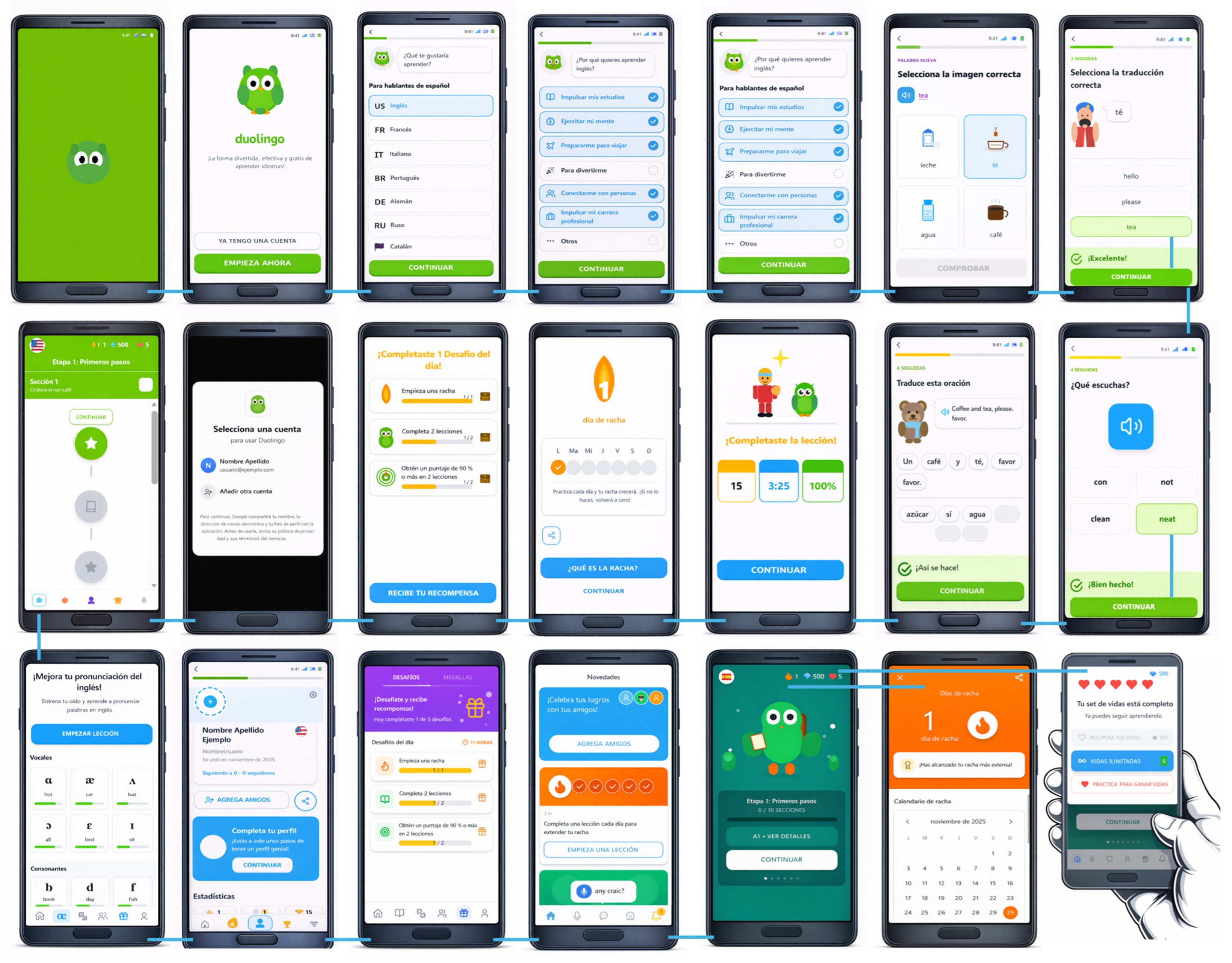
After analyzing the Duolingo application downloaded from the Google Play Store, the main functional requirements were identified and structured. These requirements served as the basis for defining the interaction model and the subsequent AI-assisted prototyping process. They also enabled a clear delimitation of prototype scope, operationalized through a set of representative screens corresponding to the main flows of the selected application. Given the breadth of Duolingo’s functionality, the study focused on 14 functional requirements written as user stories (US), covering user authentication, learning-oriented lesson navigation, interactive exercise completion, immediate feedback, and learning progress tracking:
  • US-1. As a user, I want to log in with my credentials to access my lessons, exercises, and personal progress.
  • US-2. As an authenticated user, I want to log out to protect my information when I finish using the system.
  • US-3. As a user, I want to view available lessons organized by modules or topics to easily select the content to study.
  • US-4. As a user, I want to access a lesson’s content to review the associated materials and activities.
  • US-5. As a user, I want to navigate across lesson sections to learn at my own pace.
  • US-6. As a user, I want to complete interactive exercises within lessons to practice acquired knowledge.
  • US-7. As a user, I want to submit my exercise answers so that the system can evaluate them.
  • US-8. As a user, I want to receive immediate feedback on my answers to identify correct and incorrect responses instantly.
  • US-9. As a user, I want to retry exercises when my answers are incorrect in order to improve my understanding.
  • US-10. As a user, I want to view the correct solution with an explanation to understand the appropriate procedure.
  • US-11. As a user, I want the system to record my progress in each lesson so I can resume learning where I left off.
  • US-12. As a user, I want the system to record my exercise results to track my performance.
  • US-13. As a user, I want to view a summary of my overall progress to know how much I have advanced and what content remains.
  • US-14. As a user, I want to quickly continue with the most recent lesson or in-progress activity to avoid interrupting my learning.

4.2. Interaction Model of the Application Under Study

The functionalities derived from the previously specified requirements (US-1 to US-14) were represented through the design of 21 interfaces that capture part of the main interaction flows of the selected intelligent mobile application, Duolingo. This interaction model defined the sequence of key screens and transitions and served as the baseline reference for evaluating the ability of AI-assisted prototyping tools to reproduce an equivalent interaction structure.

4.3. Prompt Engineering and AI-Based Prototyping Generation

The goal of this phase was to generate a replica prototype—or one as close as possible to the reference interaction model—corresponding to the Duolingo application. To this end, the selected AI-assisted prototyping tools were used: Figma, Uizard, Visily, and Stitch.
To assess each tool’s capacity to reproduce high-fidelity GUIs consistently—from visual structure to interaction flows—specific prompts were designed based on the Duolingo reference model. From the 21 user interfaces composing the interaction model, three representative and critical screens were selected: the app start screen, the language selection screen, and the “select the correct image” screen.
The selection of these three interfaces was guided by explicit methodological criteria to ensure representativeness and structural heterogeneity within the overall interaction model. First, the chosen screens correspond to functionally central stages of the user journey: onboarding and brand entry (app start screen), configuration and structured decision-making (language selection screen), and core learning interaction (image selection screen). Second, they present different levels of structural and visual complexity, ranging from a relatively simple hierarchical layout with call-to-action buttons, to a list-based interface with grouped selectable items, and finally to a grid-based interface integrating multimodal elements such as images, audio triggers, and interactive selection states. Third, the interfaces contain heterogeneous UI components—including buttons, progress bars, text labels, selectable cards, images, and feedback elements—organized through distinct layout patterns (linear, list-based, and grid-based). This variability enabled evaluation of each tool’s effectiveness in reproducing diverse interface structures, component compositions, and interaction affordances using natural language prompts only.
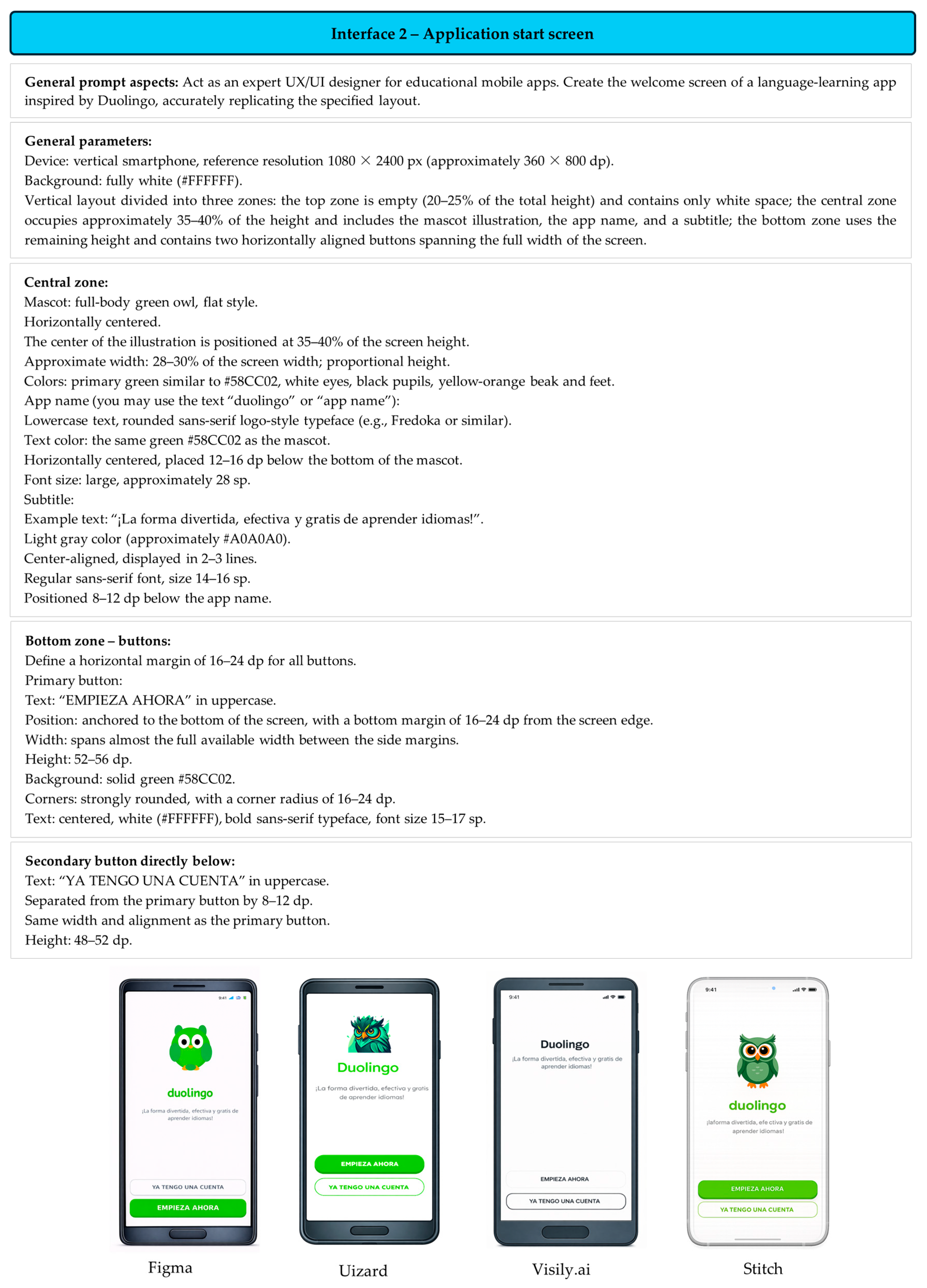
The prompts—defined according to prompt engineering best practices—were authored in Spanish and uniformly structured across interfaces. The prompt content, as well as all subsequent prompts described in the manuscript, was not translated for the experimental procedure; translation was performed exclusively for reporting purposes in the article. The original Spanish prompts are available in https://sl.ugr.es/0eWN accessed on 5 March 2026. The same prompt text was applied verbatim in Figma, Uizard, Visily, and Stitch. Figure 3 presents the prompt designed for Interface 2 (“Application start”), generated using natural language only, without adding or editing graphical design elements.
After executing the prompt shown in Figure 3 in each tool, fidelity to the reference interface was evaluated based on visual fidelity, structural coherence, level of automation, and ease of manual adjustment relative to the baseline. For Interface 2 (“Application start”), Figma most closely followed the three-zone structure, white background, visual hierarchy, and text colors; it also correctly placed the mascot and the “Duolingo” brand name in green. However, the owl did not match the original full-body version, and—most notably—Figma inverted the button order (placing “I ALREADY HAVE AN ACCOUNT” above and “GET STARTED” below), contrary to the prompt specification that the primary action should be closest to the bottom edge.
Uizard preserved layout and positioning but deviated stylistically by using non-flat illustrations and introducing unintended card containers. Visily showed the greatest variance, failing to maintain mascot prominence, typographic specifications, and the established color hierarchy, which weakened the brand’s intended playful identity. Stitch better preserved the educational tone and overall structure (owl, green name, gray subtitle, two buttons), but the mascot appeared smaller and visually muted, and its placement was slightly displaced from the intended central region. Although button colors were consistent with the prompt, spacing and proportions were less precise than requested, resulting in a less balanced layout than the original.
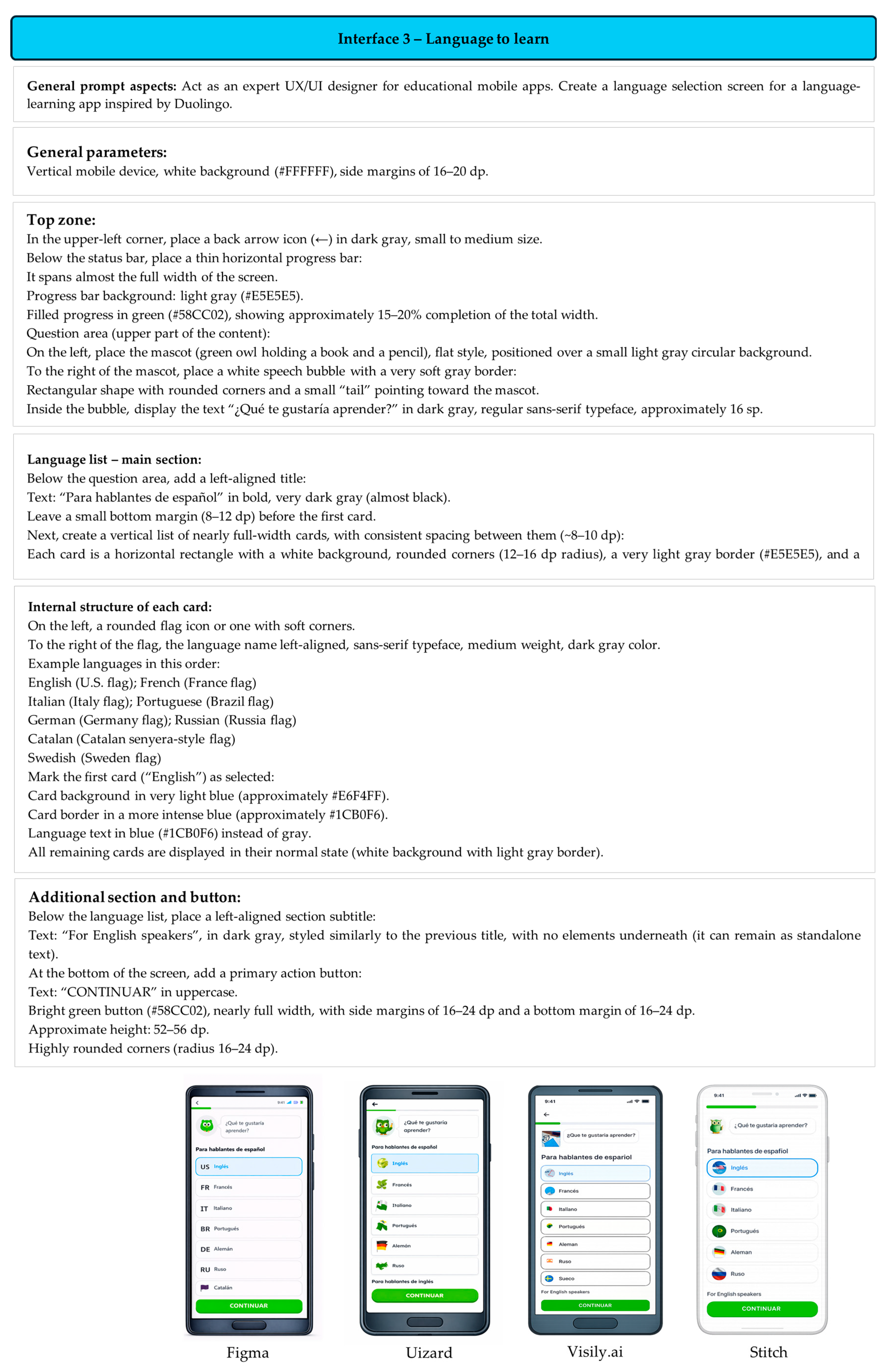
Regarding Interface 3 (“Language to learn”) (Figure 4), Figma produced the closest replication of the requested layout, preserving the back arrow, thin progress bar, speech bubble question, title (“For Spanish speakers”), large and rounded cards, and the green CONTINUE button. However, it replaced flags with country codes (US, FR, IT) and omitted the mascot holding a book and pencil specified in the prompt.
Uizard also preserved overall structure and the blue-selected state for “English,” but placed all content inside an unrequested large white container, used generic icons rather than flags, and employed a more complex owl illustration than the requested flat style. Visily maintained part of the hierarchy (title, language list, bottom button) but diverged substantially: the progress bar became thick, additional images appeared at the top, the speech bubble was not clearly associated with the mascot, and the cards lost the clean style with soft shadow and the light-blue selection pattern.
Stitch maintained a minimalist appearance, preserved the progress bar, speech bubble, card style, and CONTINUE button, and used fairly clear circular flags. Nevertheless, the mascot was reduced to a less recognizable icon, the cards did not span the full available width, and several languages specified in the prompt (e.g., Catalan and Swedish) were missing, resulting in a less complete screen.
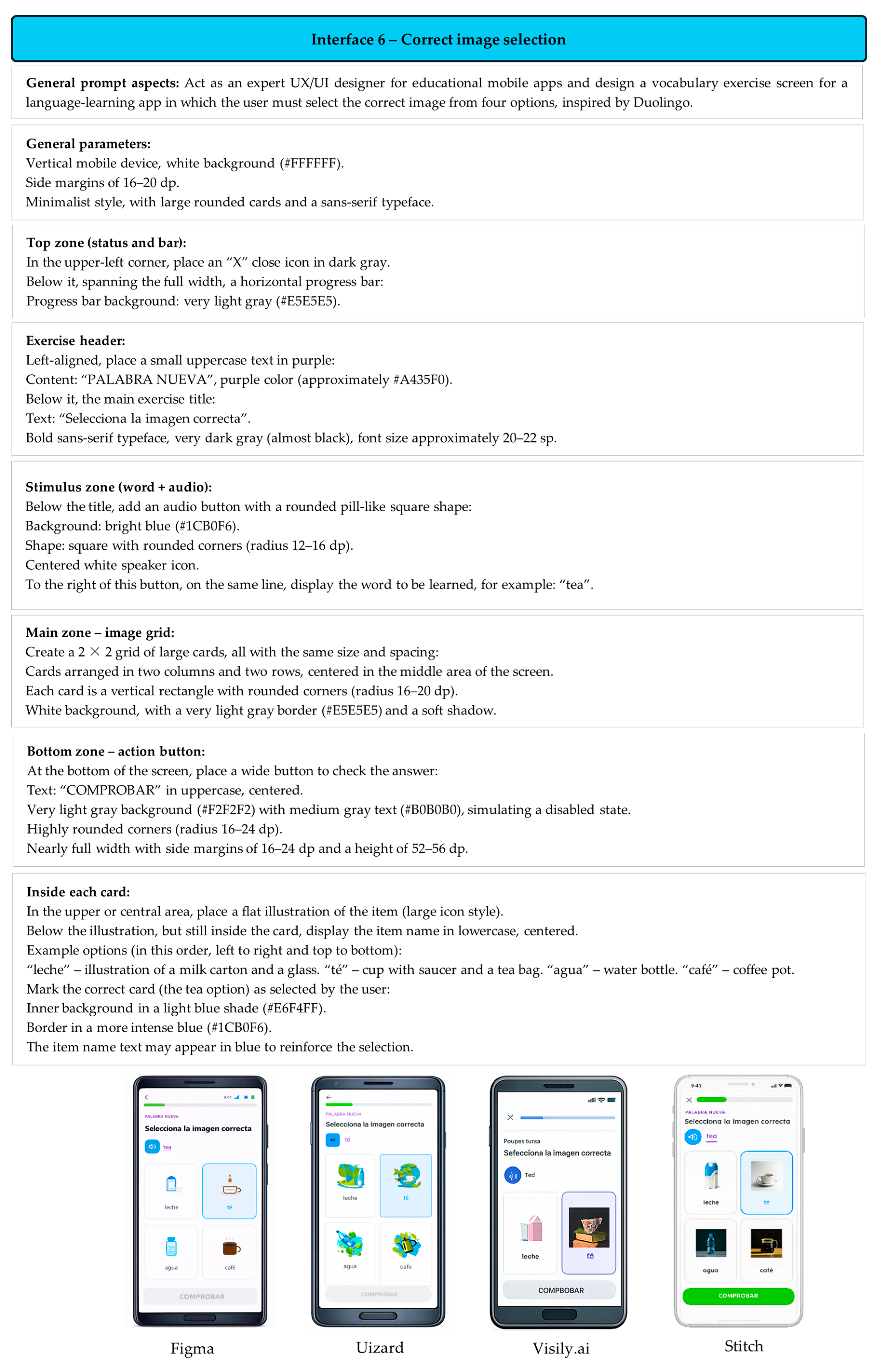
Another representative interface analyzed was Interface 6 (“Select the correct image”) (Figure 5). For this prompt, Figma again followed most specifications, preserving the “X,” the progress bar, the “NEW WORD” header, the blue audio button with the underlined word “tea,” the 2 × 2 grid with the “tea” card highlighted in blue, and the disabled gray CHECK button. However, the progress bar did not clearly display the light-gray background track, and the illustrations were simpler and less consistent with the requested flat style.
Uizard preserved the general structure (titles, audio button, 2 × 2 cards, bottom button), but its images were overly complex and gradient-heavy, deviating from the requested flat icon style; label typography (e.g., “coffee,” “milk”) was also less consistent. Visily deviated further by shifting progress and selection colors toward purple, weakening the intended palette; the cards no longer formed a clear 2 × 2 grid, and mixed illustration/photo styles reduced visual coherence—although it retained a disabled CHECK button. Stitch preserved overall layout and the blue selection state for “tea,” but used photographs instead of flat illustrations and rendered CHECK as an active green button, despite the prompt requiring a disabled light-gray state.
The remaining nineteen (19) prompts used to generate the full set of prototype interfaces are publicly available in the following repository: https://sl.ugr.es/0eWN accessed on 5 March 2026. The repository provides the complete prompt set in a structured and reusable format, enabling replication of the experiment and facilitating comparative analyses across generative AI-assisted prototyping tools. In addition, prompts are organized according to the interface taxonomy defined in the study (e.g., onboarding and setup, learning exercises, feedback and progress, main navigation, and additional features), and each prompt preserves a consistent specification schema (role definition, task and device constraints, visual context and color palette, spatial/layout restrictions, output format, and interactive states). Finally, it is important to note that all prompts were authored and executed in Spanish; therefore, the results reflect tool performance under Spanish natural language, which may influence semantic interpretation, stylistic fidelity, and the precision of the generated user interface components.

4.4. Generative AI-Based Automatic Prototyping

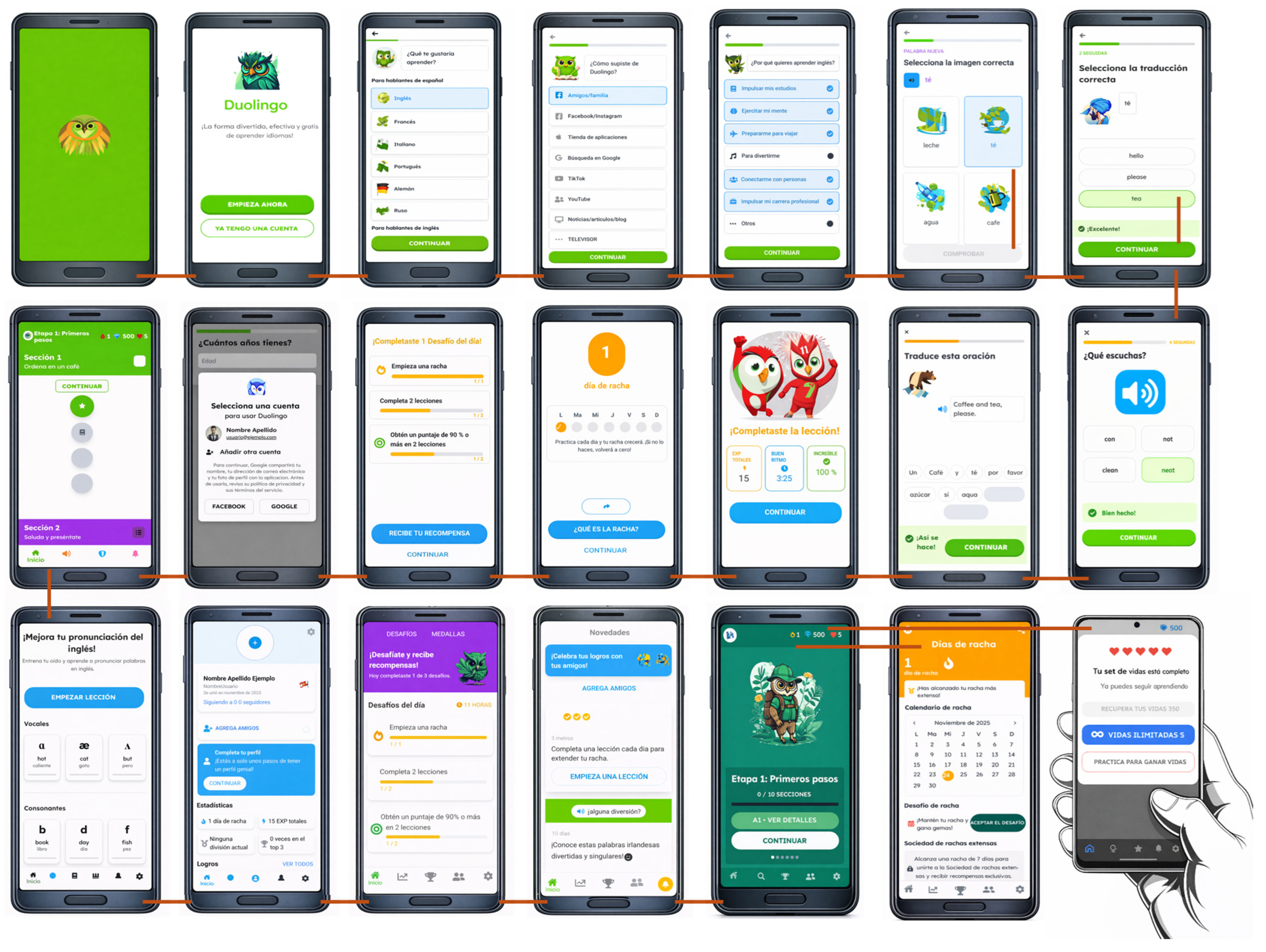
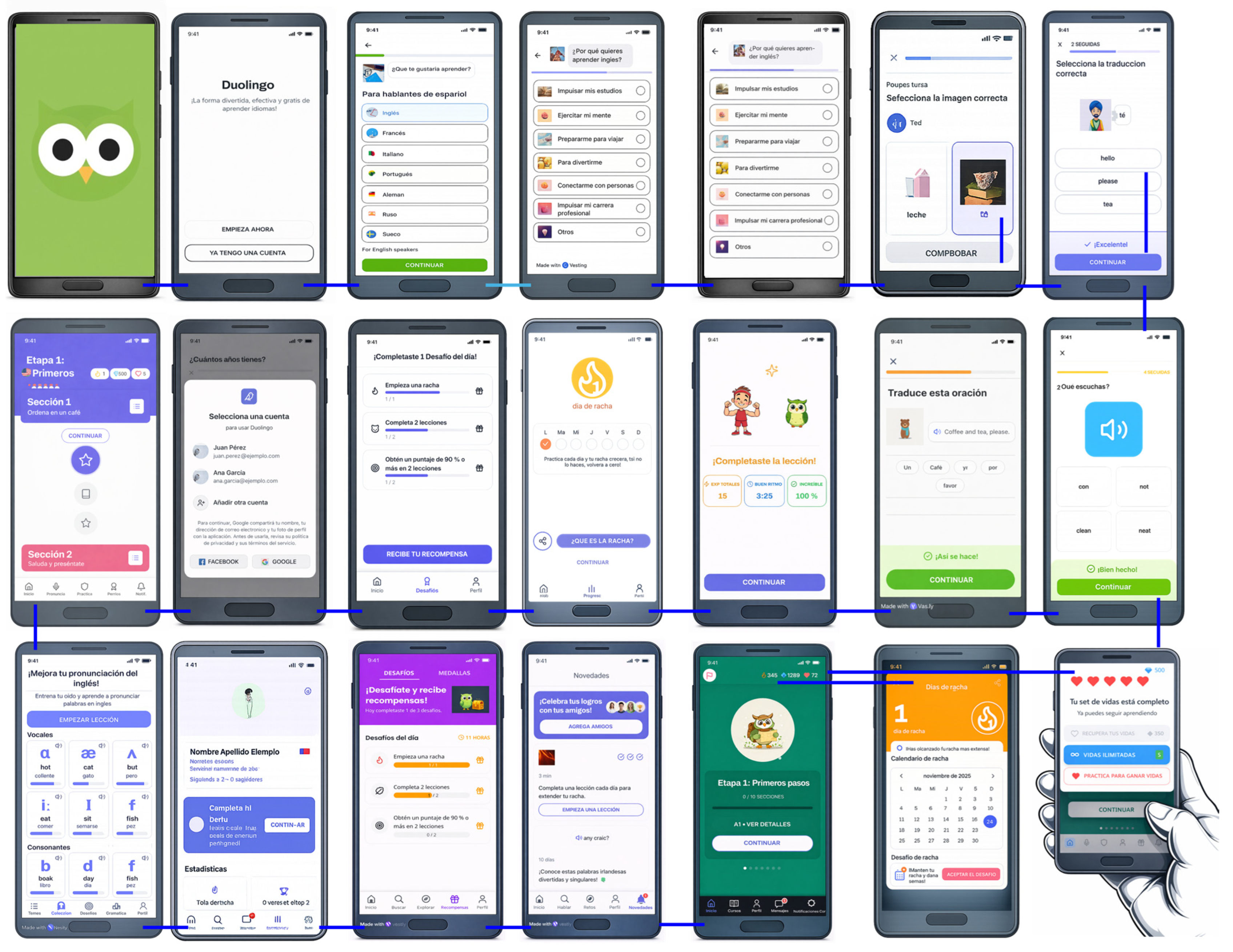
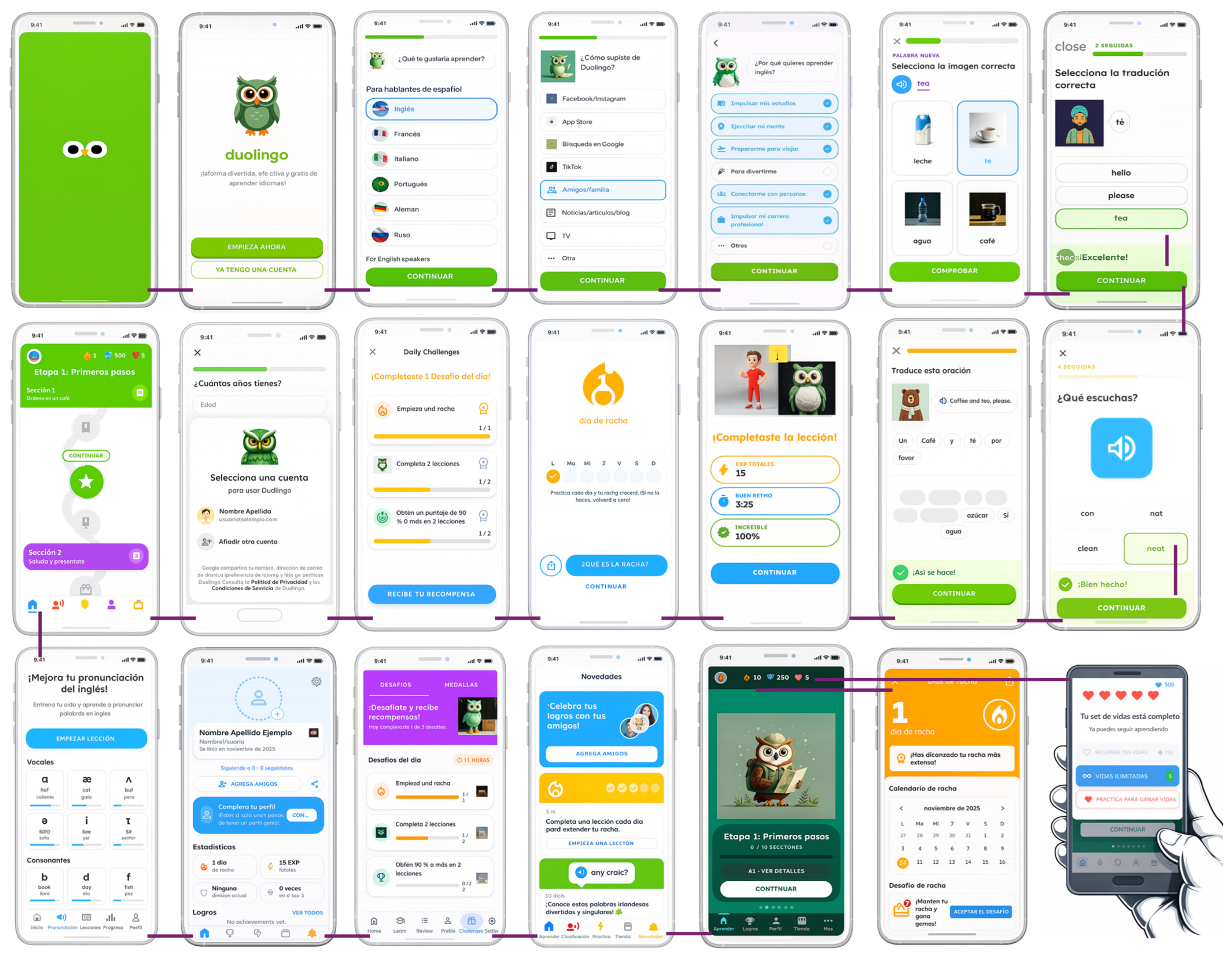
The prompts described above were applied in the four prototyping tools under study. Figure 6, Figure 7, Figure 8 and Figure 9 present the resulting interaction models generated from the Duolingo baseline model, enabling visual comparison of how each tool materializes the same specification into a coherent set of interconnected GUIs.
From the interaction model generated using Figma (Figure 6), notable strengths include its ability to represent the main functional flows of the intelligent mobile application, including login processes, lesson navigation, interactive exercise execution, immediate feedback, and progress visualization. The resulting prototype exhibits coherent and visually consistent high-fidelity interfaces that resemble real applications, facilitating user-journey understanding and early UX validation. Nevertheless, limitations were identified, particularly the reliance on well-structured prompts to obtain precise results and the need for subsequent manual adjustments to refine interaction details, dynamic states, and more complex behaviors. Overall, Figma demonstrates strong potential for early-stage interaction-model design and evaluation, although its effectiveness depends on balancing AI-driven assistance with designer-led refinement.
The interaction model generated with Uizard (Figure 7) highlights, as a primary strength, its ability to rapidly produce functional prototypes from textual descriptions, enabling representation of basic mobile flows such as initial access, screen-to-screen navigation, and learning activity visualization. Uizard supports near-immediate creation of initial interfaces, which is appropriate for early ideation and rapid prototyping. However, limitations were observed regarding design precision: in several cases, interfaces did not faithfully reproduce prompt specifications or maintain consistent visual coherence across the interaction flow. Furthermore, customization and component-level control were limited, requiring additional manual adjustments to achieve higher fidelity. Some of these constraints may be associated with the platform’s design philosophy and functional limitations—particularly in the free or educational version—rather than the generative mechanism alone. Overall, Uizard is suitable for sketches and preliminary prototypes but exhibits constraints that reduce its effectiveness for generating more complex interaction models.
The interaction model generated with Visily (Figure 8) reflects an approach oriented towards simplicity and speed in mobile prototyping. The tool represents key user flows such as initial access, content selection, activity execution, and progress visualization, supporting a high-level understanding of application behavior. This approach is particularly suitable for early-stage design and academic contexts where rapid idea validation is prioritized over visual detail.
However, the generated model revealed limitations in semantic precision and design control: interfaces tended to be visually simplified and did not always interpret detailed prompt instructions accurately. In addition, personalization and visual refinement options were more limited, restricting fidelity relative to the reference application. Overall, Visily is effective for rapid conceptual prototyping but presents limitations when higher levels of detail and creative control are required.
The interaction model generated with Stitch (Figure 9) reflects an approach oriented towards structured organization and agile prototype generation from textual instructions. The tool coherently represents the main application flows, including initial access, lesson progression, activity execution, and results visualization, remaining largely aligned with the reference model. Notable strengths include ease of use, integration with the Google ecosystem, and the ability to generate functional interfaces quickly and consistently, making it suitable for academic settings and early development stages.
Nonetheless, limitations were observed related to response speed when prompts were long or complex and to constrained visual detail and personalization, which required subsequent manual adjustments. Overall, Stitch emerges as an effective early-stage prototyping tool, although improvements are needed to achieve higher visual fidelity and finer-grained design control.

4.5. Usability Evaluation

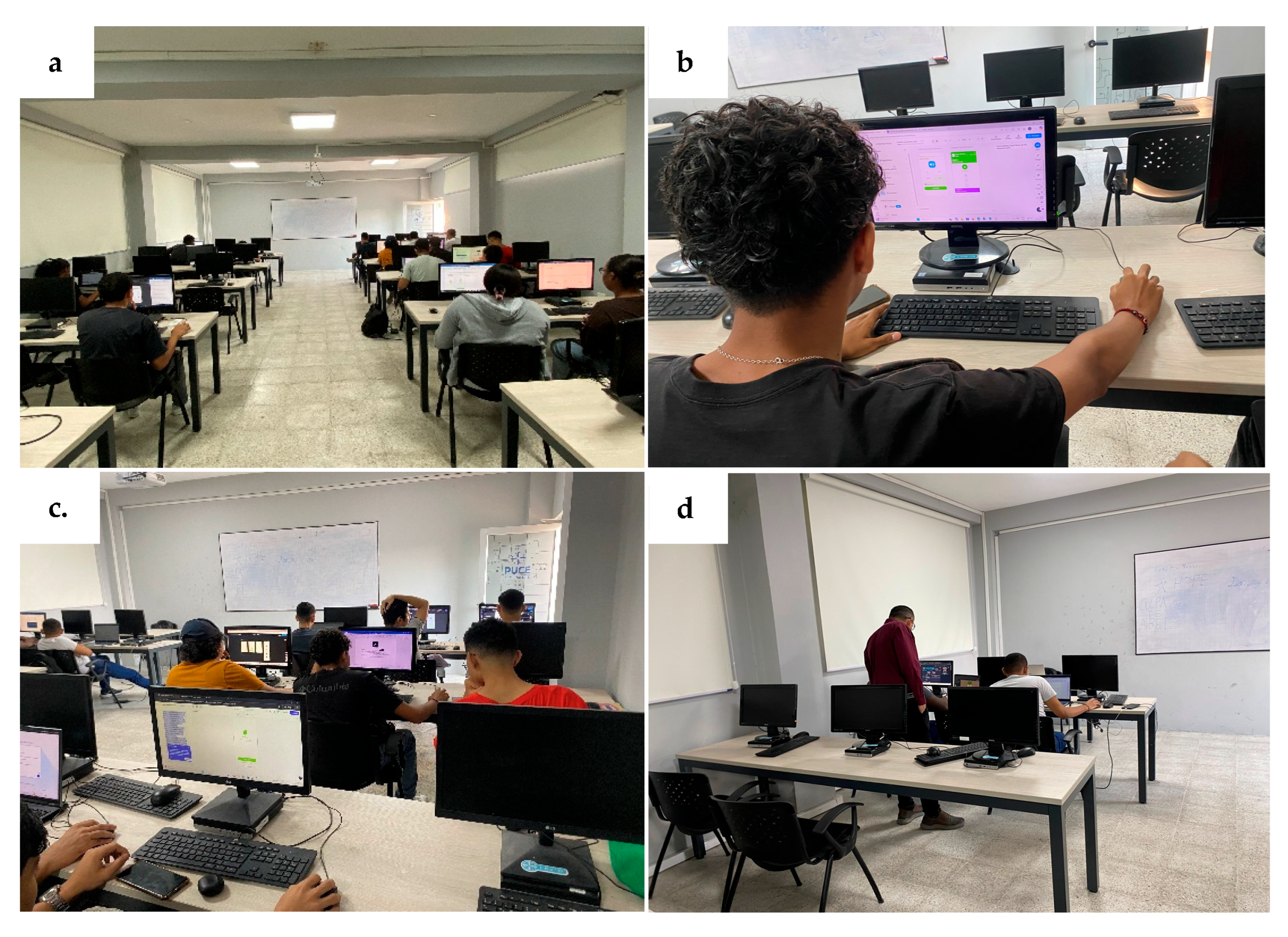
Usability evaluation of the prototyping tools was conducted with real users. Fourteen Information Technology Engineering students at PUCESE participated in the test. Participants, who gave their explicit and informed consent to participate, used the four tools in the institution’s computer laboratory under identical hardware and resource conditions. A collage of photographs showing participants evaluating the tools during the experimental sessions is shown in Figure A1 of Appendix A. Using Figma, Uizard, Visily, and Stitch, they developed five interfaces from the interaction model.
The process was guided by a dedicated technical guide to ensure that participants followed the same workflow, tool sequence, and prompt execution procedure. This technical guide was written in Spanish, as it is the participants’ native language, and it is available at: https://sl.ugr.es/0eY1 accessed on 5 March 2026. However, it was not possible to fully eliminate learning effects, as participants could become progressively familiar with the task type and interaction style across tools.
Furthermore, the time spent using each tool depended on the participants’ technological skills and on the pace at which each participant followed the instructions provided in the technical guide. According to the experimental records, participants required an average of 72 min to complete the tasks defined in the guide. This time also included the generation of a sixth interface of their choice, for which participants were asked to author their own prompt for each of the four evaluated tools.
Afterwards, the SUS questionnaire was administered, together with closed- and open-ended questions addressing motivation, prior experience, perceived usability, and overall preferences. The full experiment questionnaire is available at: https://sl.ugr.es/0eY0 accessed on 5 March 2026.
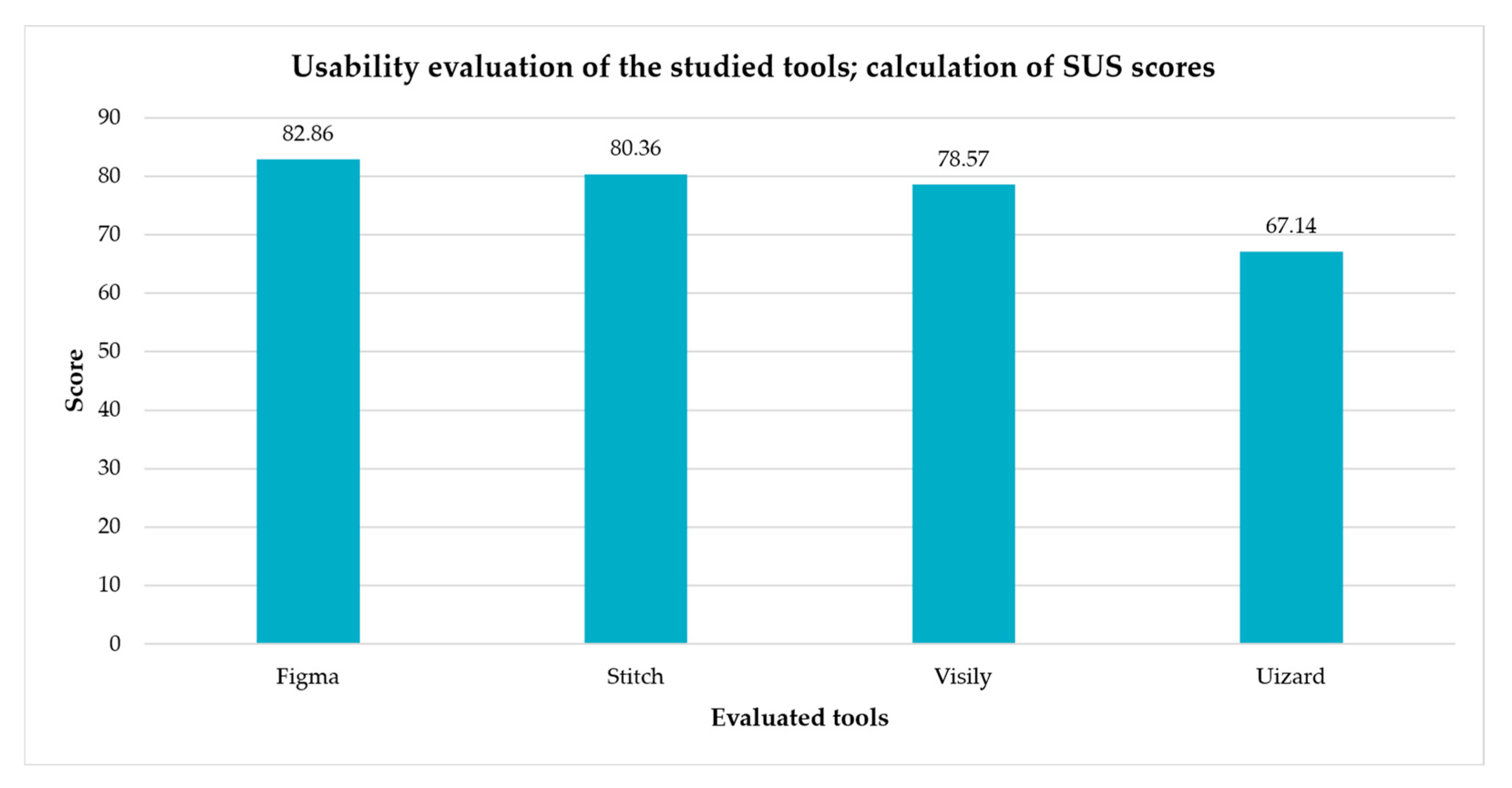
Perceived usability was measured using SUS, which is widely applied to assess perceived ease of use and overall usability in interactive systems. The questionnaire was completed independently for each tool using the same items and response scale to ensure comparability. Figure 10 presents the results.
The SUS score for Figma (82.86/100) indicates a highly positive usability perception. Most participants reported strong intention to use the tool frequently and perceived it as easy to use, with well-integrated functions and a relatively fast learning curve. Many also reported feeling confident during interaction, reflecting trust in the design environment. Nevertheless, responses also revealed challenges related to initial complexity: some participants perceived Figma as cumbersome or inconsistent and indicated that an initial learning period was necessary. These findings suggest that, while Figma provides high control and precision, perceived usability is partly conditioned by user familiarity with professional design tools.
Uizard obtained a SUS score of 67.14/100, reflecting moderate and more heterogeneous usability perceptions. While some participants found it easy to use and reported confidence during interaction, responses were more dispersed than for Figma, indicating variability across user profiles. A relevant proportion remained neutral or disagreed regarding frequent-use intention and functional integration. Several participants perceived the tool as cumbersome and indicated a need for prior learning, suggesting that although Uizard offers high automation for rapid interface generation, its behavior and outputs were not always perceived as fully intuitive or predictable. These findings indicate that Uizard’s perceived usability depends strongly on prompt clarity and user familiarity with AI-assisted workflows.
Visily achieved a SUS score of 78.57/100, indicating favorable perceived usability and a balance between ease of use and learnability. Most participants considered the tool easy to use, well integrated, and quick to learn, suggesting accessibility even for users with basic design experience. However, some responses reflected initial complexity and perceived inconsistency, as well as the need for a short adaptation period. While these issues did not prevent most participants from feeling confident, they indicate that Visily—despite generating coherent interfaces automatically—may require acclimation to fully leverage its capabilities. Overall, Visily appears well suited to rapid prototyping scenarios involving moderate user intervention.
Stitch obtained a SUS score of 80.36/100, reflecting an overall positive user experience. Participants generally perceived it as easy to use with well-integrated functions, and many reported that it was quick to learn and supported confident interaction. These characteristics highlight Stitch’s potential as an accessible AI-assisted prototyping tool, even for users with basic design knowledge. Nevertheless, some limitations were noted regarding consistency and initial effort: certain participants perceived Stitch as cumbersome or requiring a learning period. These perceptions may be linked to its experimental status and emphasis on initial interface generation rather than advanced editing.
Tool preference, expressed as percentages out of 14 participants, showed a clear predominance of Figma (71.4%), ranking it as the most valued tool in the usability test. Stitch ranked second (28.6%). In contrast, Uizard and Visily received no final preference (0% each), despite favorable usability ratings in some aspects. This suggests that participants’ final choice was influenced primarily by perceived stability, familiarity, and overall trustworthiness rather than by specific AI-driven features or automation levels.
To contextualize usability outcomes, participants’ motivation toward AI-assisted prototyping was examined. Results indicate that 21.43% reported very high motivation, 57.14% reported high motivation, and 21.43% reported moderate motivation in relation to the use of such tools in Software Engineering. Overall, motivation was predominantly high, suggesting positive attitudes toward generative AI prototyping. This is relevant because higher motivation may promote exploratory behavior, reduce resistance-related bias, and strengthen the validity of usability perceptions captured during the evaluation.
Participants also reported their prior experience with interface design and prototyping tools. Results show that 35.7% reported basic experience (the largest group), while intermediate and advanced experience accounted for 28.6% each. Only 7.1% reported expert-level experience, and none reported no experience, indicating that all participants had at least basic familiarity with the domain.

4.6. Aspects Related to the Usability Evaluation

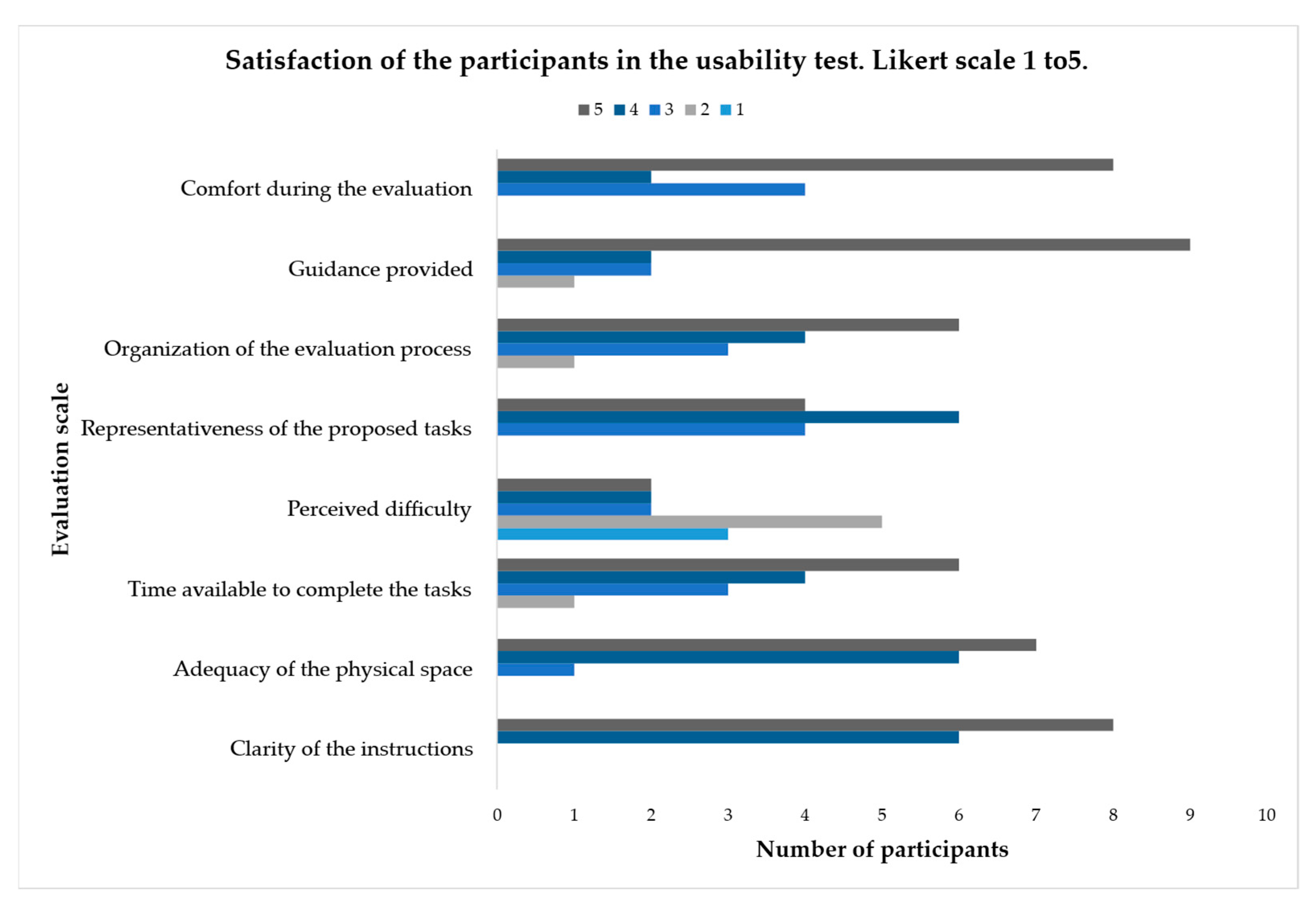
To evaluate participants’ perceptions of the experimental conditions, a set of items assessed organizational and contextual aspects of the usability test (Figure 11), including instruction clarity, adequacy of the physical space, time available, perceived difficulty, representativeness of tasks, overall organization, guidance during evaluation, and participant comfort.
As shown in Figure 11, the overall assessment of the usability test was predominantly positive. Instruction clarity and the guidance provided during evaluation received the highest ratings, indicating that participants understood the tasks and felt supported throughout the process. Adequacy of the physical space and participant comfort were also rated favorably, contributing to an appropriate controlled environment.
Regarding available time and process organization, responses were generally positive but showed slight dispersion, suggesting that some participants may have required additional time. In contrast, perceived difficulty exhibited greater variability, indicating that task complexity was experienced differently depending on participants’ individual background. Finally, task representativeness was rated as adequate, confirming that the activities reflected realistic usage flows of AI-assisted prototyping tools.

5. Discussion

5.1. Key Findings

The findings show that GAI-assisted prototyping tools exhibit differentiated levels of usability and effectiveness, shaped both by their underlying technological approach and by the degree of control they offer users throughout the design process. Overall, the results confirm that these tools can significantly accelerate early phases of mobile application development by facilitating the generation of functional visual prototypes from descriptive prompts, even when users have limited technical knowledge. This behavior is consistent with previous studies reporting that generative AI can reduce design time by producing high-fidelity initial drafts and sketches, supporting early ideation through the automation of prototyping tasks and interdisciplinary communication [31], as well as enabling the creation of visual and functional prototypes in agile development environments, even within teams with limited technical resources [12].
From a comparative perspective, Figma emerged as the tool with the highest overall acceptance. The SUS results, together with participants’ qualitative feedback, reflect an experience characterized by high perceived ease of use, visual consistency, and a strong sense of control during the design process. Participants repeatedly highlighted its speed, flexibility, and collaborative capabilities—factors that prior work has identified as key drivers of design tool adoption in both academic and professional contexts. In particular, recent research suggests that tools integrating AI as designer support rather than as a replacement foster collaboration, rapid iteration, and trust in the creative process [31,32]. Nevertheless, limitations related to dependence on well-formulated prompts and restrictions in the free version were also reported. These observations suggest that while AI can enhance productivity, it does not eliminate the need for basic design knowledge or UX criteria to achieve optimal results, as noted in studies on human–AI collaboration in interface design [24].
In contrast, Uizard exhibited more limited performance in perceived usability and in the quality of generated prototypes. Although participants valued its initial speed and simplicity, reported weaknesses—such as lower visual precision, generic outputs, and strong constraints in the free version—negatively affected the overall experience. These findings align with prior research warning that highly automated tools often sacrifice control and visual fidelity in favor of speed, limiting their applicability in scenarios requiring greater rigor in interface design. Studies on AI-based automated prototyping similarly indicate that excessive automation may diminish users’ ability to intervene, refine, and adapt outputs to specific contexts, ultimately affecting design quality [12,31].
Visily positioned itself as an intermediate solution, standing out for ease of learning and accessibility for users without extensive prior experience. Participants reported that it supports agile generation of functional prototypes without a steep learning curve; however, qualitative feedback revealed recurring perceptions of excessive simplicity and limited customization, which may constrain the depth of the final design. This behavior reinforces the widely discussed notion that simplicity-oriented prototyping tools can be effective for early ideation but tend to present constraints when higher fidelity or professional-level outcomes are required. Prior work likewise suggests that low-complexity prototypes facilitate early exploration but are insufficient to represent mature products or to support advanced usability evaluations [16,17,20].
In the case of Stitch, the results indicate particularly strong performance, comparable in several respects to Figma. Participants highlighted its ease of use, consistent interpretation of prompts, and ability to generate interfaces aligned with provided instructions. This perception was reinforced by its conversational approach and integration with the Google ecosystem, which reduced the entry barrier for users. These findings are consistent with research emphasizing the value of conversational interfaces and guided workflows for facilitating human–AI interaction in assisted design processes [31,38]. However, weaknesses related to response times and limitations in visual editing were also noted, indicating that while Stitch is effective for conceptualization support, it still requires improvements to consolidate as a high-fidelity final design solution.
Beyond identifying control as a differentiating factor, the findings indicate that control in AI-assisted prototyping should be understood as a multidimensional construct rather than a binary attribute. Control operates at different levels: (i) global stylistic adjustment, such as regenerating themes or layout variations through prompts; (ii) structural control over component hierarchy and spatial organization; and (iii) granular component-level editing, including the modification of typography, spacing, alignment, interaction states, and individual UI elements. The results demonstrate that not only perceived ease of use influences user evaluation, but also the degree of intervention users can exercise over specific interface elements. Participants consistently valued environments that enabled iterative refinement of detailed components, as this facilitated alignment with concrete requirements and improved perceived design precision. In this regard, tools such as Figma and Stitch stood out for offering greater direct manipulation and finer editability, which translated into higher perceptions of visual coherence, structural fidelity, and creative control. Conversely, more automation-oriented platforms emphasize rapid global generation with comparatively limited fine-grained intervention. Although this approach enhanced efficiency in early drafting phases, it often required subsequent manual corrections and was associated with perceptions of generic outputs or constrained customization. From an HCI perspective, these differences reflect distinct paradigms of human–AI collaboration, ranging from shared autonomy—where designers retain iterative decision authority—to more supervisory interaction models, in which users primarily evaluate and adjust outputs at higher levels of abstraction.
In addition to control granularity, responsiveness contributes to perceived usability and perceived control. Research on real-time AI-assisted systems shows that adaptive feedback improves human–machine experience, particularly when systems dynamically respond to user actions and contextual states [39]. Although the present study focuses on AI-assisted prototyping rather than physical task execution, this perspective reinforces the interpretation that perceived control is linked not only to editability depth but also to system responsiveness and transparency during iterative design processes. When feedback loops are immediate and visible, user engagement and trust tend to increase; when generation feels opaque or rigid, perceived controllability may decrease.
A cross-cutting aspect identified across all tools was the direct influence of prompt quality on the results obtained. Participants agreed that clear, structured, and detailed prompts produced outputs significantly closer to the reference prototype, even for users with basic knowledge. This finding aligns with recent literature on prompt engineering, which argues that the effectiveness of generative AI-based systems largely depends on users’ ability to communicate requirements precisely and contextually. In particular, Jiang et al. [4] (PromptMaker), Yuan et al. [28] (PrototypeFlow), Chen et al. [26] (SpecifyUI) and Petridis et al. [32,38] (MobileMaker and PromptInfuser), among others empirically demonstrate that prompt structure, level of detail, and contextual information directly influence the coherence and usefulness of prototypes generated from natural-language descriptions.

5.2. Comparative Analysis with Previous Studies

To contextualize these findings within the broader landscape of GAI-based UI prototyping research, a systematic comparison was conducted with representative prior studies. Table 4 summarizes key comparative dimensions, including prompt-based generation, structural fidelity assessment, automation–control analysis, availability of quantitative usability results, and the scope of interface replication.
The current research advances the field of Generative UI (GenUI) by providing a multi-dimensional evaluation that bridges the gap between formative role-based studies and technical system prototypes. While initial formative research by Chen et al. [31] identified a “last mile” problem—where generated outputs require extensive manual editing to become production-ready—our study systematically evaluates how four commercial platforms address this transition through a systematic comparative analysis of structural fidelity. Unlike Hsiao and Tang [27], who qualitatively assessed the acceleration of early-stage ideation within the Three Diamond process, our work provides empirical benchmarks using the System Usability Scale (SUS) for each tool, offering a granular view of professional satisfaction across different generative paradigms.
This empirical approach builds upon the usability benchmarks set by Fang [30], whose evaluation of the AdaptFit system reported a Mean SUS of 69.17 for real-time personalization. Our study expands this scope by applying comparable empirical evaluations across a cross-tool comparison of four commercial platforms, rather than a single custom application. While Honarvar [29] focused on the cost-efficiency and information engineering of translating prompts into Figma layers, our analysis prioritizes prototyping effectiveness and the reliability of the output’s hierarchical organization, a concern also central to the SPEC framework proposed by Chen et al. [26].
A distinguishing factor of our research is the replication of a complex interaction model consisting of 21 interconnected interfaces. In contrast, many existing studies focus on single-screen generation or localized component behaviors. For instance, Petridis et al. [32] explored “medium-fidelity” prototyping by coupling LLM prompts to specific UI elements in Figma to identify local incompatibilities. Similarly, Calò et al. [25] evaluated visual prompting through static sketches and semantic drawings, finding that while sketches are more intuitive for ideation, semantic constraints yield higher technical quality. By testing full interaction flows, our study moves beyond these localized evaluations to assess how GenUI maintains thematic consistency and structural coherence across a systemic user journey, a challenge explicitly identified by Yuan et al. [28] in their development of PrototypeFlow.
Finally, our technical assessment of structural fidelity aligns with the quantitative rigor found in SpecifyUI [26] and PrototypeFlow [28]. These studies employed computer vision metrics such as MSE, SSIM, and FID to measure how faithfully AI follows a designer’s spatial intent. Our systematic analysis complements these findings by evaluating how commercial text-to-UI generators interpret hierarchical organization and component correctness in a professional context. By synthesizing these technical metrics with standardized usability scores and high-complexity interaction models, this study provides a comprehensive framework that addresses the democratization of UX design discussed by Chen et al. [31] while maintaining the high-fidelity requirements of industry practitioners.

5.3. Study Limitations

Several limitations should be acknowledged. First, the participant cohort consisted exclusively of undergraduate students in Information Technology Engineering, which may influence interpretation of findings. Although usability literature supports small samples for identifying usability issues and interaction patterns, the absence of professional UX/UI designers may have affected evaluation of perceived control, visual refinement, and prompt engineering effectiveness. Professional designers typically have deeper knowledge of layout principles, interaction patterns, and iterative refinement strategies, potentially leading to more critical assessments of automation levels and more sophisticated prompt construction. Consequently, tools perceived as highly usable or effective in this study might be evaluated differently by expert designers who demand greater precision, customization depth, and control over micro-interactions. Future research should replicate this comparative evaluation with professional UX/UI practitioners to determine whether the balance between automation and manual control is perceived differently across experience levels.
Second, all prompts were authored and executed in Spanish. While this ensured linguistic consistency throughout the experiment, generative AI systems may vary in semantic interpretation and output structure depending on input language. Therefore, cross-linguistic replication may yield different structural or stylistic outcomes.
Third, the evaluation was conducted under controlled laboratory conditions using free or educational versions of the tools. Advanced functionalities available in paid versions were not included, which may limit generalizability to professional environments.
Taken together, the results suggest that generative AI–based prototyping tools constitute an effective resource in academic and agile development contexts, particularly for accelerating ideation and reducing initial design effort. However, effectiveness is not homogeneous across tools and appears to depend on the balance between automation and meaningful user control. These findings reinforce the need to select tools according to project goals, user experience level, and the stage of the development lifecycle, while also motivating future research focused on prompt optimization and evaluation in real professional settings.

6. Conclusions and Future Works

The present study enabled a systematic analysis of the effectiveness and perceived usability of prototyping tools that incorporate generative artificial intelligence for the creation of mobile interfaces through descriptive prompts. The results indicate that these tools provide meaningful support during the early phases of software development by reducing design time and facilitating the generation of functional prototypes, even for users with basic technical knowledge.
The findings show that Figma and Stitch achieved higher levels of usability and effectiveness (82.86 and 80.36, respectively), standing out for their visual coherence, ease of learning, and greater user control over generated outcomes. In contrast, Uizard and Visily offered high levels of automation and speed, but exhibited limitations in precision, customization, and visual fidelity, which negatively affected their overall evaluation. These differences confirm that the effectiveness of AI-based prototyping tools does not depend solely on automation, but rather on a balanced combination of intelligent assistance and meaningful manual control.
A particularly relevant conclusion concerns the explicit trade-off between automation and control. While Figma required more manual refinement after the initial generation phase, it consistently produced prototypes with higher structural and visual fidelity. By contrast, more automation-oriented tools enabled faster draft production but provided reduced granularity of intervention, which in some cases affected layout precision and alignment with the reference interaction model. These results suggest that higher automation does not necessarily translate into higher design quality; instead, prototype fidelity appears to benefit from environments that preserve meaningful user control and support iterative human refinement as part of the generative workflow.
This study has limitations that should be acknowledged. The usability evaluation was conducted in an academic context and involved students who had recently completed a Human–Computer Interaction course, which may influence interaction patterns and limit the generalizability of findings to professional or industrial settings. In addition, although the sample size aligns with established usability evaluation practices, the results should be interpreted as exploratory. Furthermore, the evaluation focused on short-term interactions with the tools and did not address long-term usage, learning curves, or sustained integration into real-world design workflows.
Despite heterogeneity in professional exposure among participants, the study remained bounded to an academic context, as all participants were undergraduate students from a single institution. Although some students had professional experience or were engaged in internships, external validity could be strengthened by incorporating a broader and more diverse sample, including senior students from multiple universities, recent graduates, and IT professionals with consolidated industry experience. Such diversification would enable deeper analysis of how competence level and professional background influence both perceived usability and the effectiveness of generative AI–driven prototyping tools.
Future work will extend this research by involving more diverse participant profiles, including professional designers and developers from industry, and by increasing sample size to enhance external validity. Longitudinal studies will also be conducted to examine learning effects, continued tool adoption, and usability evolution over time. In addition, future research may incorporate complementary evaluation methods—such as qualitative interviews, workload assessment, or performance-based metrics—to provide a more comprehensive understanding of AI-based prototyping tools across different usage contexts.
Finally, future studies should explore the impact of prompt language on generative outcomes by replicating the experiment with prompts written in different languages—such as English—and systematically comparing results. Since large language models may exhibit variations in interpretation, structural coherence, and visual fidelity depending on input language, a cross-linguistic analysis would provide deeper insight into how linguistic formulation influences prototype generation quality and consistency across tools.

Author Contributions

Conceptualization, J.B.-O. and P.P.-V.; methodology, J.B.-O., X.Q.-K. and P.P.-V.; validation, J.B.-O. and P.P.-V.; formal analysis, J.B.-O. and P.P.-V.; investigation, J.B.-O. and P.P.-V.; writing—original draft preparation, J.B.-O. and P.P.-V.; writing—review and editing, P.P.-V. and X.Q.-K.; supervision, P.P.-V. and X.Q.-K.; project administration, P.P.-V. All authors have read and agreed to the published version of the manuscript.

Funding

The APC was funded by the Pontificia Universidad Católica del Ecuador, Esmeraldas.

Institutional Review Board Statement

The study involved human participants exclusively through non-invasive, low-risk procedures (e.g., surveys/interaction with a technological system), without collecting sensitive or identifiable personal data. In accordance with the ethical framework of Pontificia Universidad Católica del Ecuador (PUCE) and the regulations of its Comité de Ética de la Investigación en Seres Humanos (CEISH-PUCE), the study was categorized as non-risk research. Therefore, no approval code or approval date is applicable.

Informed Consent Statement

Written informed consent was obtained from all participants prior to their involvement in the study.

Data Availability Statement

The original contributions presented in this study are included in the article. Further inquiries can be directed to the corresponding author.

Acknowledgments

During the preparation of this manuscript/study, the author(s) used ChatGPT 5.2 for the purposes of translation the manuscripts. The authors have reviewed and edited the output and take full responsibility for the content of this publication.

Conflicts of Interest

The authors declare no conflicts of interest.

Abbreviations

The following abbreviations are used in this manuscript:
AIArtificial Intelligence
GAIGenerative Artificial Intelligence
GUIGraphical User Interface
LLMLarge Language Models
PSSUQPost-Study System Usability Questionnaire
SUSSystem Usability Scale
UEQUser Experience Questionnaire
USEUsefulness, Satisfaction, and Ease of Use Questionnaire
UXUser Experience

Appendix A

Figure A1. Experimental environment and participant interaction during the usability evaluation of the AI-based prototyping tools. (a) Overview of the computer laboratory where the experimental sessions were conducted; (b) participant interacting with a prototyping tool while generating interface layouts; (c) participants simultaneously performing the interface generation tasks using the evaluated platforms; (d) research supervision and assistance during the experimental session.
Mti 10 00042 g0a1

References

  1. Ding, J.; Nemati, M.; Ranaweera, C.; Choi, J. IoT Connectivity Technologies and Applications: A Survey. IEEE Access 2020, 8, 67646–67673. [Google Scholar] [CrossRef]
  2. Li, Y.; Dang, X.; Tian, H.; Sun, T.; Wang, Z.; Ma, L.; Klein, J.; Bissyandé, T.F. An Empirical Study of AI Techniques in Mobile Applications. J. Syst. Softw. 2024, 219, 112233. [Google Scholar] [CrossRef]
  3. Freitas, G.; Pinho, M.S.; Silveira, M.S.; Maurer, F. A Systematic Review of Rapid Prototyping Tools for Augmented Reality. In Proceedings of the 2020 22nd Symposium on Virtual and Augmented Reality, SVR 2020; Institute of Electrical and Electronics Engineers Inc.: New York, NY, USA, 2020; pp. 199–209. [Google Scholar]
  4. Jiang, E.; Olson, K.; Toh, E.; Molina, A.; Donsbach, A.; Terry, M.; Cai, C.J. PromptMaker: Prompt-Based Prototyping with Large Language Models. In Proceedings of the Conference on Human Factors in Computing Systems; Association for Computing Machinery: New York, NY, USA, 2022. [Google Scholar]
  5. Figma Inc. Figma Versión Figma Make (Web-Based Interface Design Tool); Figma Inc.: San Francisco, CA, USA, 2025; Available online: https://www.figma.com/es-la/ (accessed on 12 December 2025).
  6. Uizard Technologies. Uizard Autodesigner 1.5 (Web-Based Interface Design Tool); Uizard Technologies: Copenhagen, Denmark, 2024; Available online: https://uizard.io/ (accessed on 12 December 2025).
  7. Google Labs Stitch. Stitch Version Beta (Web-Based Interface Design Tool); Google LLC: Mountain View, CA, USA, 2025; Available online: https://stitch.withgoogle.com/ (accessed on 13 December 2025).
  8. Visily Inc. Visily AI Design Web-Based Interface Design Tool), Version 2025; Visily Inc.: Atlanta, GA, USA, 2025; Available online: https://www.visily.ai/ (accessed on 12 December 2025).
  9. Rajuroy, A. Human—AI Collaboration in Software Engineering: Enhancing Developer Productivity and Innovation; New York Institute of Technology: New York, NY, USA, 2025. [Google Scholar]
  10. Sido, N.; Emon, E.A. Low/No Code Development and Generative AI. Bachelor’s Thesis, Aalborg University, Aalborg, Denmark, 2024. [Google Scholar]
  11. Yetiştiren, B.; Özsoy, I.; Ayerdem, M.; Tüzün, E. Evaluating the Code Quality of AI-Assisted Code Generation Tools: An Empirical Study on GitHub Copilot, Amazon CodeWhisperer, and ChatGPT. arXiv 2023. [Google Scholar] [CrossRef]
  12. Böhm, S.; Graser, S. AI-Based Mobile App Prototyping Status Quo, Perspectives and Preliminary Insights from Experimental Case Studies. In Proceedings of the Sixteenth International Conference on Advances in Human-Oriented and Personalized Mechanisms, Technologies, and Services, ThinkMind, Valencia, Spain, 13–17 November 2023. [Google Scholar]
  13. ISO 9241-11:2018; Ergonomics of Human-System Interaction Part 11: Usability: Definitions and Concepts. International Organization for Standardization: Geneva, Switzerland, 2018; pp. 1–29.
  14. Barra, S.; Francese, R.; Risi, M. Automating Mockup-Based Usability Testing on the Mobile Device. In Proceedings of the Green, Pervasive, and Cloud Computing; Miani, R., Camargos, L., Zarpelão, B., Rosas, E., Pasquini, R., Eds.; Springer International Publishing: Cham, Switzerland, 2019; pp. 128–143. [Google Scholar]
  15. Lee, C.; Kim, S.; Han, D.; Yang, H.; Park, Y.W.; Kwon, B.C.; Ko, S. GUIComp: A GUI Design Assistant with Real-Time, Multi-Faceted Feedback. In Proceedings of the Conference on Human Factors in Computing Systems; Association for Computing Machinery: New York, NY, USA, 2020. [Google Scholar]
  16. Coyette, A.; Kieffer, S.; Vanderdonckt, J. Multi-Fidelity Prototyping of User Interfaces. In Proceedings of the Human-Computer Interaction—INTERACT 2007; Baranauskas, C., Palanque, P., Abascal, J., Barbosa, S.D.J., Eds.; Lecture Notes in Computer Science; Springer: Berlin/Heidelberg, Germany, 2007; Volume 4662, pp. 150–164. [Google Scholar]
  17. Rudd, J.; Stern, K.; Isensee, S. Low vs. High-Fidelity Prototyping Debate. Interactions 1996, 3, 76–85. [Google Scholar] [CrossRef]
  18. Foly-Ehke, S.; Khan, A. Evaluating Different Prototype Fidelity Levels. Available online: https://talkbystudents.turkuamk.fi/ict/evaluating-different-prototype-fidelity-levels/ (accessed on 5 December 2025).
  19. Bjarnason, E. Prototyping Practices in Software Startups: Initial Case Study Results. In Proceedings of the 2021 IEEE 29th International Requirements Engineering Conference Workshops (REW), Notre Dame, IN, USA, 20–24 September 2021; IEEE: New York, NY, USA, 2021; pp. 206–211. [Google Scholar]
  20. Bjarnason, E.; Lang, F.; Mjöberg, A. An Empirically Based Model of Software Prototyping: A Mapping Study and a Multi-Case Study. Empir. Softw. Eng. 2023, 28, 115. [Google Scholar] [CrossRef]
  21. Boehm, B.W.; Gray, T.E.; Seewaldt, T. Prototyping Versus Specifying: A Multiproject Experiment. IEEE Trans. Softw. Eng. 2009, SE-10, 290–303. [Google Scholar] [CrossRef]
  22. Rocha Silva, T.; Hak, J.-L.; Winckler, M.; Nicolas, O. A Comparative Study of Milestones for Featuring GUI Prototyping Tools. J. Softw. Eng. Appl. 2019, 10, 564–589. [Google Scholar] [CrossRef]
  23. Carr, M.; Verner, J. Prototyping and Software Development Approaches; Department of Information Systems, City University of Hong Kong: Pok Fu Lam, Hong Kong, 1997; pp. 319–338. [Google Scholar]
  24. Alhammad, M.M.; Moreno, A.M. Integrating User Experience into Agile An Experience Report on Lean UX and Scrum; Association for Computing Machinery (ACM): New York, NY, USA, 2022; pp. 146–157. [Google Scholar]
  25. Calò, T.; De Russis, L. Evaluating Visual Prompting Modalities for Generative AI-Assisted UI Design. In Lecture Notes in Computer Science, Proceedings of the10th International Symposium, IS-EUD 2025, Munich, Germany, 16–18 June 2025; Springer: Cham, Switzerland, 2025; Volume 15713 LNCS, pp. 171–181. [Google Scholar]
  26. Chen, Y.; Shi, C.; Chen, L. SpecifyUI: Supporting Iterative UI Design Intent Expression through Structured Specifications and Generative AI. arXiv 2025. [Google Scholar] [CrossRef]
  27. Hsiao, H.L.; Tang, H.H. A Study on the Application of Generative AI Tools in Assisting the User Experience Design Process. In Proceedings of the Lecture Notes in Computer Science (Including Subseries Lecture Notes in Artificial Intelligence and Lecture Notes in Bioinformatics); Springer: Cham, Switzerland, 2024; Volume 14735, pp. 175–189. [Google Scholar]
  28. Yuan, M.; Chen, J.; Hu, Y.; Feng, S.; Xie, M.; Mohammadi, G.; Xing, Z.; Quigley, A.J. Towards Human-AI Synergy in UI Design: Supporting Iterative Generation with LLMs. ACM Trans. Comput.-Hum. Interact. 2025, 33, 1–45. [Google Scholar] [CrossRef]
  29. Honarvar, A. Automatic Generation of User Interface (UI) with the Help of AI Technologies. Master’s Thesis, Politecnico di Torino, Torino, Italy, 2024. [Google Scholar]
  30. Fang, Y. Enhancing Generative User Interfaces with LLMs a User-Driven Iterative Refinement Process. Master’s Thesis, Aalto University, Espoo, Finland, 2025. [Google Scholar]
  31. Anthony Chen, X.; Knearem, T.; Li, Y. A Formative Study to Explore the Design of Generative UI Tools to Support UX Practitioners and Beyond. In Proceedings of the 2025 ACM Designing Interactive Systems Conference (DIS '25); Association for Computing Machinery: New York, NY, USA, 2025; pp. 1179–1196. [Google Scholar] [CrossRef]
  32. Petridis, S.; Terry, M.; Cai, C.J. PromptInfuser: How Tightly Coupling AI and UI Design Impacts Designers’ Workflows. In Proceedings of the 2024 ACM Designing Interactive Systems Conference; Association for Computing Machinery: New York, NY, USA, 2024; pp. 743–756. [Google Scholar]
  33. Brooke, J. SUS: A Quick and Dirty Usability Scale. In Usability Evaluation in Industry; CRC Press: Boca Raton, FL, USA, 1995. [Google Scholar]
  34. Nielsen, J. Enhancing the Explanatory Power of Usability Heuristics. In Proceedings of the SIGCHI Conference on Human Factors in Computing Systems; Association for Computing Machinery: New York, NY, USA, 1994; pp. 152–158. [Google Scholar]
  35. Duolingo. Available online: https://es.duolingo.com/ (accessed on 13 December 2025).
  36. Prompt Engineering Guide Guía de Ingeniería de Prompt. Available online: https://www.promptingguide.ai/es (accessed on 17 December 2025).
  37. Nielsen, J.; Landauer, T.K. Mathematical Model of the Finding of Usability Problems. In Proceedings of the Conference on Human Factors in Computing Systems; Association for Computing Machinery (ACM): New York, NY, USA, 1993; pp. 206–213. [Google Scholar]
  38. Petridis, S.; Liu, M.X.; Fiannaca, A.J.; Tsai, V.; Terry, M.; Cai, C.J. In Situ AI Prototyping: Infusing Multimodal Prompts into Mobile Settings with MobileMaker. In Proceedings of the 2024 IEEE Symposium on Visual Languages and Human-Centric Computing (VL/HCC), Liverpool, UK, 2–6 September 2024; IEEE: New York, NY, USA, 2024. [Google Scholar]
  39. Chen, H.; Zendehdel, N.; Leu, M.C.; Yin, Z. A Gaze-Driven Manufacturing Assembly Assistant System with Integrated Step Recognition, Repetition Analysis, and Real-Time Feedback. Eng. Appl. Artif. Intell. 2025, 144, 110076. [Google Scholar] [CrossRef]
Figure 1. Comparison of fidelity levels in prototypes.
Mti 10 00042 g001
Figure 2. Process of generative AI-based prototyping tools.
Mti 10 00042 g002
Figure 3. Prompt designed to create Interface 2—Duolingo app start screen. Based on Duolingo (app) [35].
Mti 10 00042 g003
Figure 4. Prompt designed to create Interface 3—Language selection screen in Duolingo. Based on Duolingo (app) [35].
Mti 10 00042 g004
Figure 5. Prompt designed to create Interface 6—Select the correct images screen in Duolingo. Based on Duolingo (app) [35].
Mti 10 00042 g005
Figure 6. Interaction model generated with Figma, based on Duolingo.
Mti 10 00042 g006
Figure 7. Interaction model generated with Uizard, based on Duolingo.
Mti 10 00042 g007
Figure 8. Interaction model generated with Visily, based on Duolingo.
Mti 10 00042 g008
Figure 9. Interaction model generated with Stitch, based on Duolingo.
Mti 10 00042 g009
Figure 10. Usability evaluation results for the analyzed tools.
Mti 10 00042 g010
Figure 11. Assessment of aspects related to the usability test conducted.
Mti 10 00042 g011
Table 1. Comparison of the main IA-based prototyping tools.
Evaluation CriterionFigmaUizard.ioUizard.ioStitch (Google)
LearnabilityIntuitive and widely adopted interface; requires basic UI/UX knowledge. Moderate learning curve for beginners.Fast learning due to automatic generation from text, sketches, and templates; suitable for users without prior experience.Very easy to use; AI guides the design process from early interactions; suitable for beginners.Very high; designed for both technical and non-technical users; generates interfaces from natural language without requiring design or programming expertise.
Level of AI-driven automationModerate; AI supports specific tasks via native features and plugins (e.g., FigJam AI).High; AI is embedded in the main workflow and generates complete screens from text or images.Very high; generative AI produces complete interfaces with coherent styles and components.High; generative AI transforms textual prompts or sketches into functional interfaces and basic front-end code.
Prototype generation efficiencyHigh when using component libraries and reusable elements; lower direct automation compared to AI-first tools.Very high; generates prototypes within seconds from textual descriptions.Very high; produces complete interfaces rapidly with minimal manual intervention.Very high; enables rapid transition from idea to initial prototype.
Interface clarity and visual qualityVery high; enables precise control and pixel-level refinement.Adequate; generated designs often require adjustments to reach professional-level refinement.High; clean and visually coherent interfaces from initial generation.Adequate; functional and clear interfaces oriented toward early validation rather than advanced visual refinement.
Control over generated prototypesPredominantly manual control; AI functions as optional support.Predominantly AI-assisted, with basic manual editing capabilities.Balanced approach between automation and manual refinement.Predominantly automated generation; manual control mainly occurs after initial generation or via export to external tools (e.g., Figma).
Compatibility and accessBrowser-based; strong collaborative and cross-platform ecosystem.Browser-based; access through online account.Browser-based; free version includes key functionalities.Browser-based; experimental Google Labs tool with web access.
Prototype fidelity levelHigh-fidelity interactive visual prototypes.Medium-to-high-fidelity visual prototypes generated automatically.High-fidelity visual prototypes with coherent AI-generated structure.Initial visual prototypes and basic front-end code (HTML/CSS), exportable to Figma or development environments.
Table 2. Taxonomy of Duolingo interfaces.
CategoryInterfacesCount
Onboarding and initial setupThe onboarding flow includes the cover screen, app launch screen, language selection, how did you hear about Duolingo? why do you want to learn English? and account creation.6
Learning exercisesSelection of the correct image, Selection of the correct translation, what do you hear? Translate this sentence4
Feedback and progressLessons completed, Streak Day, Daily challenges3
Main navigationHome section, Levels section, Streak section, Hearts section4
Additional featuresImprove pronunciation, Profile section, Challenges section, News section4
Authors’ own elaboration based on the analysis of Duolingo user flows [35].
Table 3. Prompt architecture for UX/UI interface design.
ComponentPrimary Objective (Function)Key Content of the ExampleMethodological Rationale (According to Literature)
Role DefinitionEstablish the frame of reference and the AI’s persona.“Act as an expert UX/UI designer specializing in educational mobile applications.”Enhances output quality and consistency by contextualizing the interpretation of instructions.
Task and Technical SpecificationsDefine the specific action and device parameters.“Create the welcome screen. Device: vertical smartphone; reference resolution: 1080 × 2400 px (approx. 360 × 800 dp).”Enables design scalability across different screen densities through dual specification (px and dp).
Context and Color PaletteProvide background information and unambiguous visual precision.“Background: bright green #58CC02; selected states: blue #1CB0F6; streaks: yellow #FFC107; advanced sections: purple #A435F0.”A critical technique utilizing reproducible absolute values (hexadecimal codes) for technical accuracy.
Spatial Requirements and ConstraintsSpecify detailed layout criteria and visual organization.“Top zone (20–25% height): white space; Center zone (35–40% height): mascot, name, and subtitle; Bottom zone (remaining): two horizontal buttons.”Facilitates understanding of vertical organization, hierarchy, and visual priorities via segmentation.
Visual Output FormatIndicate precise dimensions, typography, and spacing.“App name in rounded sans-serif (Fredoka type), green #58CC02, size 28 sp, positioned 12–16 dp below the mascot.”Describes element properties (typeface family, size, relative spacing) for accurate rendering.
Interactive States and ToneDescribe conditional behavior and visual feedback.“Set the first card (‘English’) as selected: light blue background #E6F4FF, deep blue border #1CB0F6.”Essential for interfaces requiring visual feedback or the representation of active element selection.
Table 4. Comparative positioning of the present study within GAI-based UI prototyping research.
DimensionOur StudyE1 [27]E2 [25]E3 [26]E4 [28]E5 [30]E6 [29] E7 [32]E8 [31]
UI generation from textYesYesNoYesYesYesYesYesYes
Cross-tool comparisonYes (4 commercial platforms)YesNoYes (vs. Google Stitch)Yes (vs. Vercel’s V0 and Uizard)NoNoYes (vs. current designer workflow)No
Structural fidelity assessmentYes (systematic comparative analysis)Qualitative (assessing constraints in prototype design)Yes (ratings for quality and fidelity)Yes (Quantitative via MSE, CLIP, SSIM)Yes (Quantitative via FID and GD metrics)Qualitative (icon failures and layout inconsistencies)Qualitative (design showcase)Qualitative (realism and anticipation of UI issues)Qualitative (identifies gaps in quality and fidelity)
Comparable empirical evaluationYes (SUS per tool)Qualitative (interviews and observations)Yes (1-to-5 Likert scale)Yes (7-point Likert scale)Yes (5-point Likert scale)Yes (SUS score)NoYes (7-point Likert scale)Qualitative (Grounded theory analysis)
Focus on prototyping effectivenessYesYes (streamlining early-stage UX)Yes (impact on creative ideation)Yes (externalizing design intent)Yes (synergy and iterative refinement)Yes (personalization for end users)Yes (assisting in information engineeringYes (essence of product ideas)Yes (adoption by practitioners)
Replication of interaction modelYes (21 interconnected interfaces)Partial (Diamond design workflow)No (static mockup generation) Yes (hierarchical SPEC system)Partial (modular generation system)Yes (integrated Android application)Partial (Figma layers and shapes)Yes (functional mockups in Figma)Partial (week-long mini-projects)
Disclaimer/Publisher’s Note: The statements, opinions and data contained in all publications are solely those of the individual author(s) and contributor(s) and not of MDPI and/or the editor(s). MDPI and/or the editor(s) disclaim responsibility for any injury to people or property resulting from any ideas, methods, instructions or products referred to in the content.