1. Introduction
Engineering education requires a solid understanding of theoretical concepts and the development of practical competencies through hands-on experimentation with real systems [
1]. Laboratory activities are a fundamental component of the learning process because they allow students to convert theoretical knowledge into practical experience [
2]. Research shows that laboratory-based learning significantly enhances engineering students’ conceptual understanding, problem-solving skills, and experimental analysis skills [
3,
4]. Additionally, direct interaction with physical systems helps students observe and interpret real-world behaviors and phenomena that are challenging to replicate solely through theoretical models or simulations [
2,
5].
On-site laboratories are essential for engineering education; however, their implementation faces challenges related to infrastructure, equipment costs, and the availability of experimental resources [
6]. In many educational settings, the number of laboratory workstations is insufficient to accommodate growing student enrollment, limiting opportunities for hands-on interaction with equipment and individualized experimentation [
7,
8]. Furthermore, traditional laboratory environments often depend on fixed schedules and one-on-one supervision, restricting the flexibility necessary for effective hands-on learning [
9]. These challenges have prompted the exploration and development of alternative technological solutions to enhance access to practical learning experiences in engineering education [
10].
Remote laboratories have become a practical alternative that allows students to access and interact with real hardware through online platforms [
11,
12]. In recent years, these systems have evolved to utilize web-based interfaces, cloud computing services, and low-cost embedded nodes. This evolution has enhanced scalability, accessibility, and availability for remote use [
13]. Due to these features, remote laboratories have gained widespread adoption across various engineering disciplines, broadening access to experimental resources and facilitating hands-on activities without the limitations of traditional on-site laboratories [
14,
15].
Remote environments have proven valuable for teaching microcontrollers and embedded systems, enabling students to program and control physical devices remotely [
16]. In these educational contexts, experimental activities often emphasize interaction with peripherals such as Light Emitting Diodes (LEDs), sensors, actuators, and displays. This hands-on interaction allows students to observe the microcontroller’s external behavior [
17]. Yet, a substantial portion of a microcontroller-based system’s operation occurs internally during firmware execution. These internal processes include the evolution of variables, counters, and control structures within the program [
18]. Gaining insight into these internal states is essential for analyzing system behavior and effectively supporting the learning process in microcontroller and embedded systems programming courses [
19]. Nonetheless, most existing approaches still treat the system as a black box, limiting access to the internal computational processes that govern firmware execution.
To analyze the internal behavior of microcontroller-based programs, various tools and techniques are commonly used. Debugging tools, serial communication interfaces, and external display devices help monitor variables during firmware execution [
18]. These approaches include debugging interfaces such as Serial Wire Debug (SWD) and Joint Test Action Group (JTAG), as well as data transmission through communication protocols including Universal Asynchronous Receiver–Transmitter (UART), Inter-Integrated Circuit (I
2C), and Serial Peripheral Interface (SPI) [
20]. Furthermore, educational environments may incorporate Liquid Crystal Display (LCD) or Organic Light-Emitting Diode (OLED) modules connected to the microcontroller to visualize variable values in real time during program execution [
21].
Although these approaches enable the observation of a system’s internal state, their implementation often requires additional hardware or software configurations that may increase complexity for students in the early stages of learning [
22]. Consequently, there is a need to develop strategies that facilitate the monitoring of internal variables in microcontrollers without introducing additional complexity that may distract from the primary learning objectives [
23].
This work presents a remote laboratory designed for teaching microcontroller programming using a Cloud–Internet of Things (IoT) architecture. The system consists of a web platform connected to cloud services via Firebase, a Raspberry Pi 5 serving as the central control and processing unit, and a specialized educational board designed specifically for the course. This educational board enables users to interact with 10 essential peripherals commonly used in embedded systems, including General-Purpose Input/Output (GPIO), Analog-to-Digital Converter (ADC), I2C, SPI, and various sensors and actuators. The laboratory also features a visual monitoring system that employs a camera to observe hardware behavior during execution, as well as a mechanism to track internal firmware variables while the program runs on the STM32 microcontroller. This design allows for system behavior analysis without requiring students to undertake complex additional configurations.
Furthermore, firmware-level observability is positioned as a key dimension in the design of remote laboratories for embedded systems education, moving beyond traditional black-box interaction approaches.
The main contributions of this paper are summarized as follows:
Design and implementation of a remote laboratory for teaching STM32 microcontroller programming, based on a Cloud–IoT architecture: The proposed system incorporates a custom-designed educational board that enables interaction with the main peripherals of embedded systems, as well as sensors and actuators, to support remote experimental activities.
Introduction of a firmware-level observability mechanism for remote embedded systems laboratories, enabling real-time monitoring of internal firmware variables directly from compiled program artifacts, without requiring complex debugging configurations or external tools: Unlike conventional remote laboratories that rely primarily on external visual feedback, this approach transforms the system from a black-box interaction environment into a transparent and analyzable execution environment, where students can observe the evolution of internal states during runtime. This contribution enhances conceptual understanding, facilitates firmware analysis and supports the development of scalable, reproducible, and pedagogically effective remote experimentation environments.
The paper is organized as follows:
Section 2 reviews related work on remote laboratories with a particular focus on their application in microcontroller programming.
Section 3 presents the design of the proposed remote lab.
Section 4 presents its deployment in an educational context.
Section 5 presents the results, while
Section 6 discusses the impact of using the integrated laboratory on the teaching and learning process. Finally,
Section 7 presents the conclusions and future perspectives of this work.
2. Related Work
The literature shows a notable rise in the development of remote laboratories for engineering education, largely due to the COVID-19 pandemic [
24]. A review of these initiatives identified three primary categories: control and automation, digital engineering and electronics, and microcontrollers.
In the field of control and automation, several remote laboratories have been developed to enable experimentation with physical systems and real-time control. For instance, some approaches employ Programmable Logic Controller (PLC)-based architectures and microcontrollers for industrial process control [
25], as well as IoT platforms that integrate Raspberry Pi and Arduino to support programming and remote monitoring of embedded systems [
26]. Additionally, open-source environments have been proposed for motor control using PID techniques, including usability evaluations with students [
27], as well as more recent microcontroller- and IoT-based systems for remote process control [
28]. Collectively, these contributions highlight the potential of remote laboratories, with a primary focus on controlling physical processes.
Within the domain of digital engineering and electronics, several remote laboratories have been developed to support the design and validation of digital systems using programmable hardware. For example, some proposals employ Field-Programmable Gate Array (FPGA)-based platforms with remote access for the implementation of combinational and sequential circuits [
29], as well as more integrated architectures that combine FPGAs, microcontrollers, and web services to enable the execution and monitoring of real-time experiments [
30]. Similarly, remote environments with high adoption rates in educational contexts have been reported, incorporating video streaming and continuous access to hardware resources [
31,
32]. These approaches stand out for facilitating hands-on experimentation in digital design, allowing students to implement and validate their developments directly on real hardware in a remote setting.
In contrast to these approaches, this work focuses on remote microcontroller-based laboratories, particularly the mechanisms and systems that provide students with feedback during program execution, while various laboratories incorporate feedback through visual observation of the system’s physical behavior, this study emphasizes interfaces that enable real-time monitoring of internal firmware variables. This type of feedback is especially relevant in teaching embedded systems, as it facilitates understanding of the system’s internal workings and supports the development of programming and debugging skills.
Table 1 summarizes representative remote laboratories focused on microcontrollers, considering key aspects such as the platform used, the system architecture, the type of user feedback, and the level of system observability during experiment execution.
Related work on remote laboratories for teaching microcontrollers primarily relies on external feedback mechanisms, such as visual observation through cameras, sensor data acquisition, and interaction with physical devices. These approaches have demonstrated effectiveness in validating system behavior remotely and expanding access to hands-on experimentation. However, system observability is generally limited to external variables or hardware-level signals. In some cases, this scope is extended to electrical-level monitoring (e.g., pin measurements) using instruments such as multimeters or oscilloscopes. Nevertheless, access to internal firmware variables during execution remains limited, which may constrain deeper analysis of program behavior.
Considering that remote laboratories are intended to complement on-site learning environments and maintain comparable workflows, particularly during development and programming stages, it is relevant to incorporate mechanisms that enable observation as close as possible to that achievable in local settings. In this context, enhancing internal feedback capabilities can contribute to a more comprehensive understanding of system operation and to more effective support for learning processes in microcontroller and embedded systems programming.
3. Remote Lab Design
The development of the proposed remote laboratory was conducted using the Waterfall methodology [
41]. This methodology offers a sequential, structured approach to integrating hardware and software systems while enabling clear planning at each stage of development. The process is organized into six phases: requirements, analysis, design, implementation, testing, and maintenance. This section focuses on the requirements, analysis, and design phases, specifically addressing the conceptualization and design of the remote microcontroller laboratory. The implementation phase is discussed from an educational perspective in
Section 4, while the testing and validation phases are covered in
Section 5.
The proposed remote laboratory is built upon the UAZ Labs infrastructure, a Cloud–IoT-based platform for remote experimentation previously introduced in our work [
42]. The system architecture integrates a web-based interface for user interaction, cloud services via Firebase (Google, Mountain View, CA, USA) [
43] for data management and system communication, a Raspberry Pi 5 (Raspberry Pi Foundation, Cambridge, UK) [
44] acting as the central control node, and the experimental hardware connected to the platform. Additionally, a visual monitoring mechanism based on a camera and real-time video transmission via the YouTube (Google, San Bruno, CA, USA) [
45] Application Programming Interface (API) is incorporated to observe experiment execution. Through this infrastructure, users access the laboratory via the UAZ Labs web interface, enabling interaction with the remote hardware and real-time observation of experiments, with 24/7 availability.
In contrast, our earlier work [
46] introduced STM32Lab, an educational laboratory centered on STM32 microcontrollers, intended for courses on embedded systems programming. This platform was evaluated in an on-site setting to measure its impact on student learning. Although STM32Lab was designed from the beginning to function in both on-site and remote environments, its evaluation in that study was confined to the on-site context.
Therefore, this work proposes integrating the STM32Lab educational platform into the UAZ Labs infrastructure to enable a remote experimentation environment for microcontroller courses. Through this integration, users can interact with STM32-based hardware via the web platform, executing programs, controlling peripherals, and observing system behavior on the physical hardware. Furthermore, the proposed implementation incorporates a mechanism for monitoring internal firmware variables during program execution, thereby facilitating system behavior analysis without requiring users to configure additional complex settings.
3.1. Remote STM32Lab Architecture
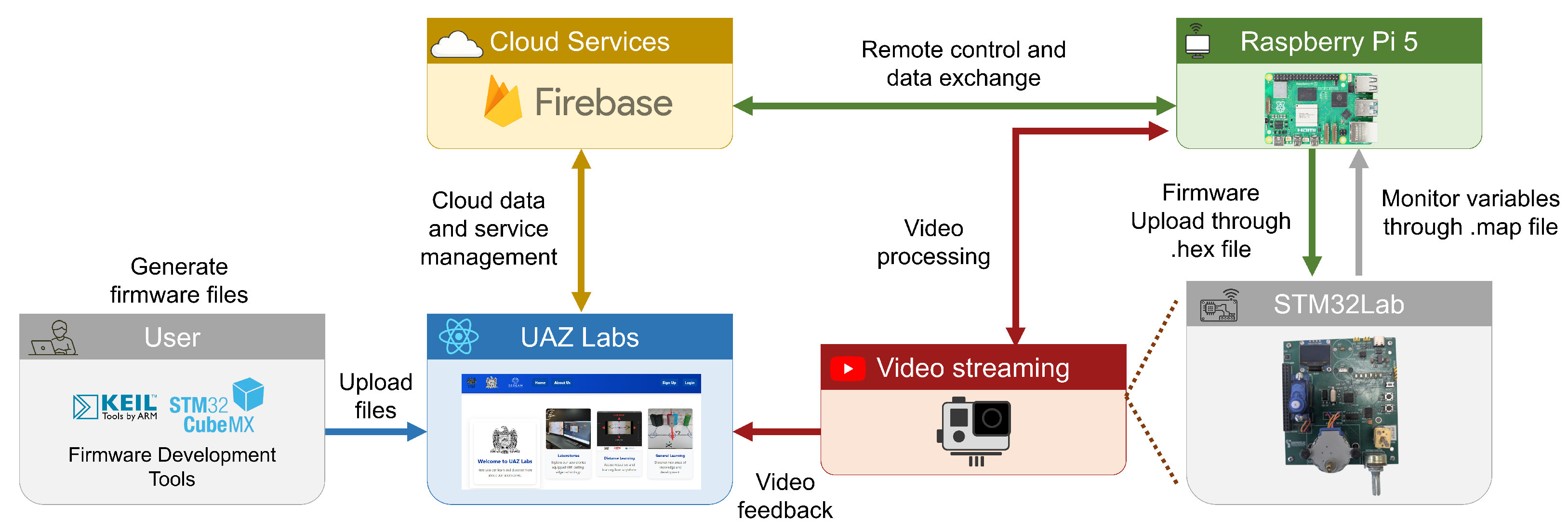
The UAZ Labs infrastructure is built on a modular architecture, enabling the integration of multiple remote laboratories into a single platform. This framework facilitates the addition of a new laboratory mainly by integrating or replacing the necessary experimental hardware, while maintaining the overall infrastructure for communication, control, and monitoring. In this implementation, the hardware integrated into this architecture is the STM32Lab.
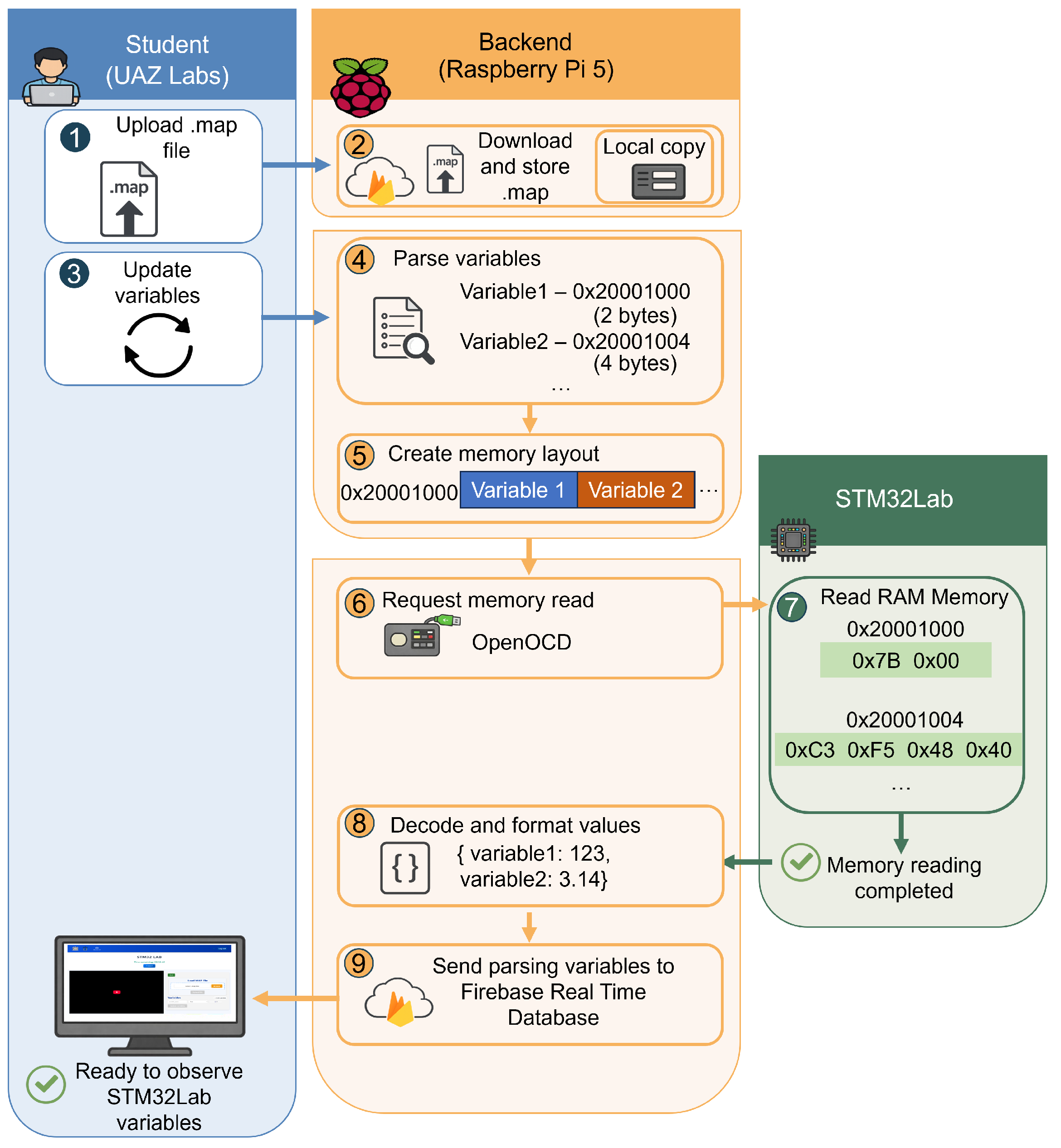
Figure 1 shows the overall system architecture and how the STM32Lab hardware is integrated into the UAZ Labs infrastructure.
3.2. Student Interaction and Development Workflow
The Microcontrollers course is part of the Robotics and Mechatronics Engineering program at the Autonomous University of Zacatecas (UAZ). The course covers the fundamental principles of programming and controlling embedded systems using STM32 microcontrollers, including the management of GPIO ports, communication interfaces such as I2C, SPI, and UART, interrupts, and the generation of Pulse Width Modulation (PWM) signals for controlling sensors and actuators. These topics are addressed through the development of programs in both assembly and C languages.
As part of the course, students learn about the firmware development process for embedded systems. This includes configuring microcontrollers, implementing programs, and compiling source code to create executable firmware. Development tools such as STM32CubeMX (version 6.11.0) [
47] are utilized for peripheral configuration and initial project generation. In addition, the Keil µVision (version 5.40) [
48] integrated development environment is used for code compilation and the generation of the necessary files for programming the microcontroller.
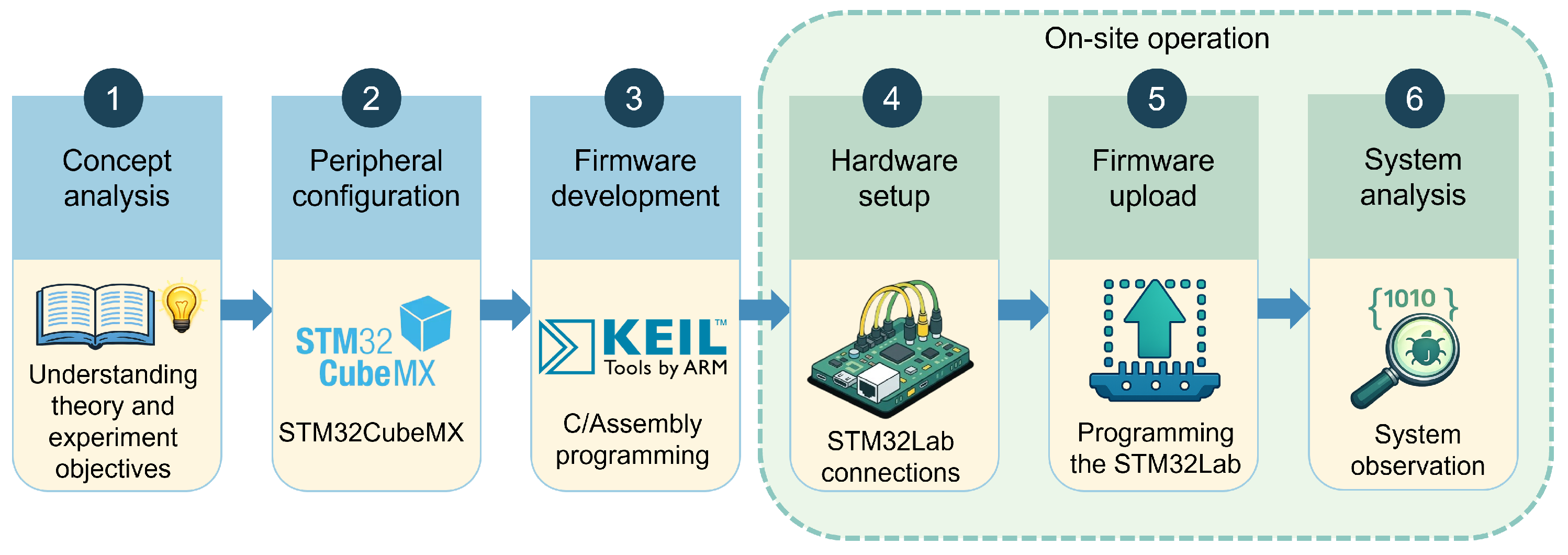
In the on-site learning environment, once the firmware files are generated, students prepare the experimental hardware by performing the necessary connections on the STM32Lab platform and subsequently program the microcontroller to execute the developed application. The system behavior is then analyzed using debugging tools or by observing the response of the connected devices.
Figure 2 illustrates the workflow followed by students during firmware development and testing in the on-site STM32Lab.
In contrast, in the remote environment, students do not directly prepare the experimental hardware; instead, they access the system through the UAZ Labs web platform, which allows them to upload their firmware to the STM32Lab. To accomplish this, students must locate the files generated during the firmware compilation process.
The files used in this process include the .hex file, which contains the compiled binary code, and the .map file, which describes the program’s memory layout, including the locations of variables and data structures used during firmware execution. It is important to note that the identification and interpretation of these files are not exclusive to the remote laboratory; rather, they are part of the fundamental concepts addressed during the firmware compilation process in the course. Therefore, their use in the remote mode does not introduce additional theoretical content, as students are only required to locate the firmware files.
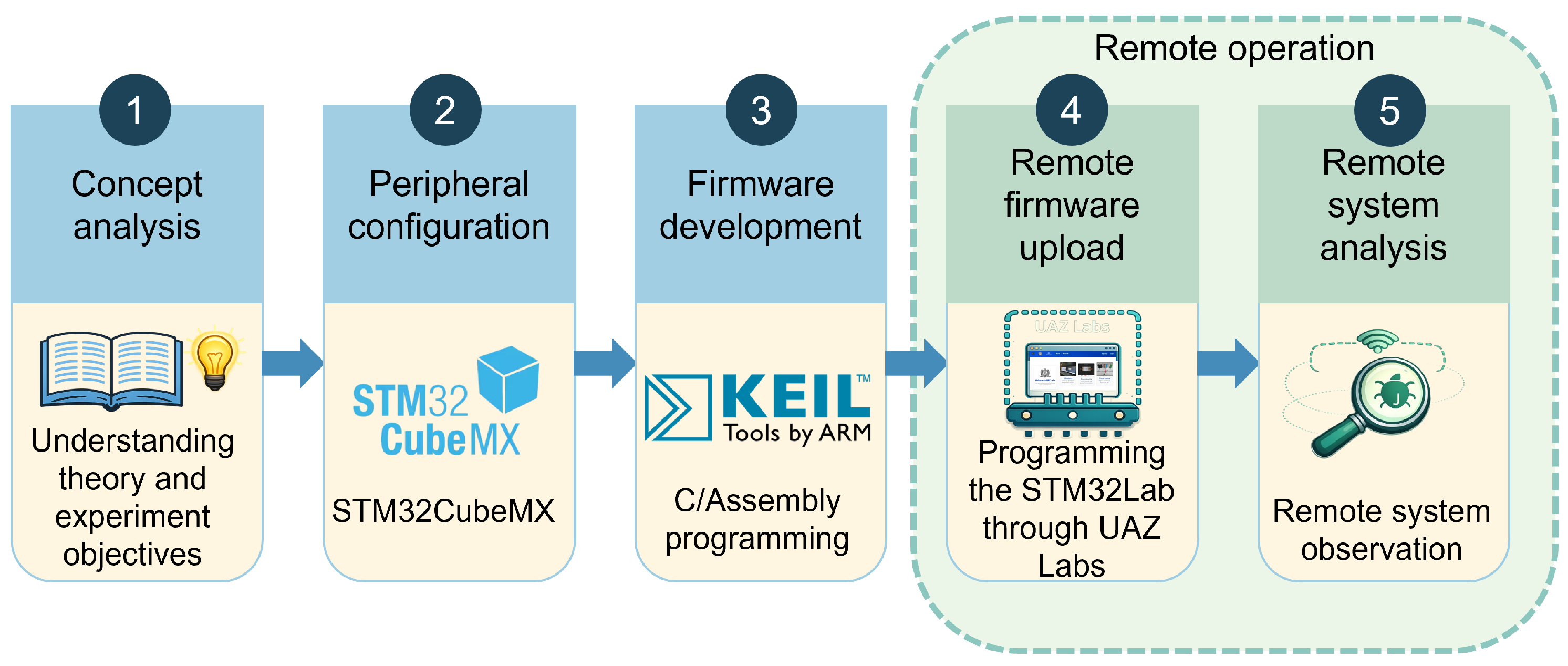
The workflow remains consistent with the on-site environment during the theoretical analysis, project configuration, and firmware development stages. The primary difference occurs in the final stages, where hardware preparation and firmware deployment are executed remotely. This approach maintains the development logic utilized in the on-site laboratory and positions the remote laboratory as a complementary tool in the learning process.
Figure 3 shows the workflow followed by the students for the development and firmware testing in the remote STM32Lab.
Section 3.3 provides an overview of how students interact with the UAZ Labs web platform from the user’s perspective. It explains how to upload firmware to the STM32Lab and select the variables to monitor. In contrast,
Section 3.5 delves into the internal workings of the system at the backend level. It details how the available monitoring variables are identified from the information contained in the .map file.
3.3. UAZ Labs Web Platform
UAZ Labs is a web-based platform for managing and operating remote laboratories. Students access the system through this platform using a personal account, from which they can schedule sessions via a reservation system. Each session lasts 1 h and can be scheduled at any time, ensuring continuous availability. During the assigned session, the platform provides the STM32Lab interface to upload firmware, observe the experiment in real time, and monitor internal program variables.
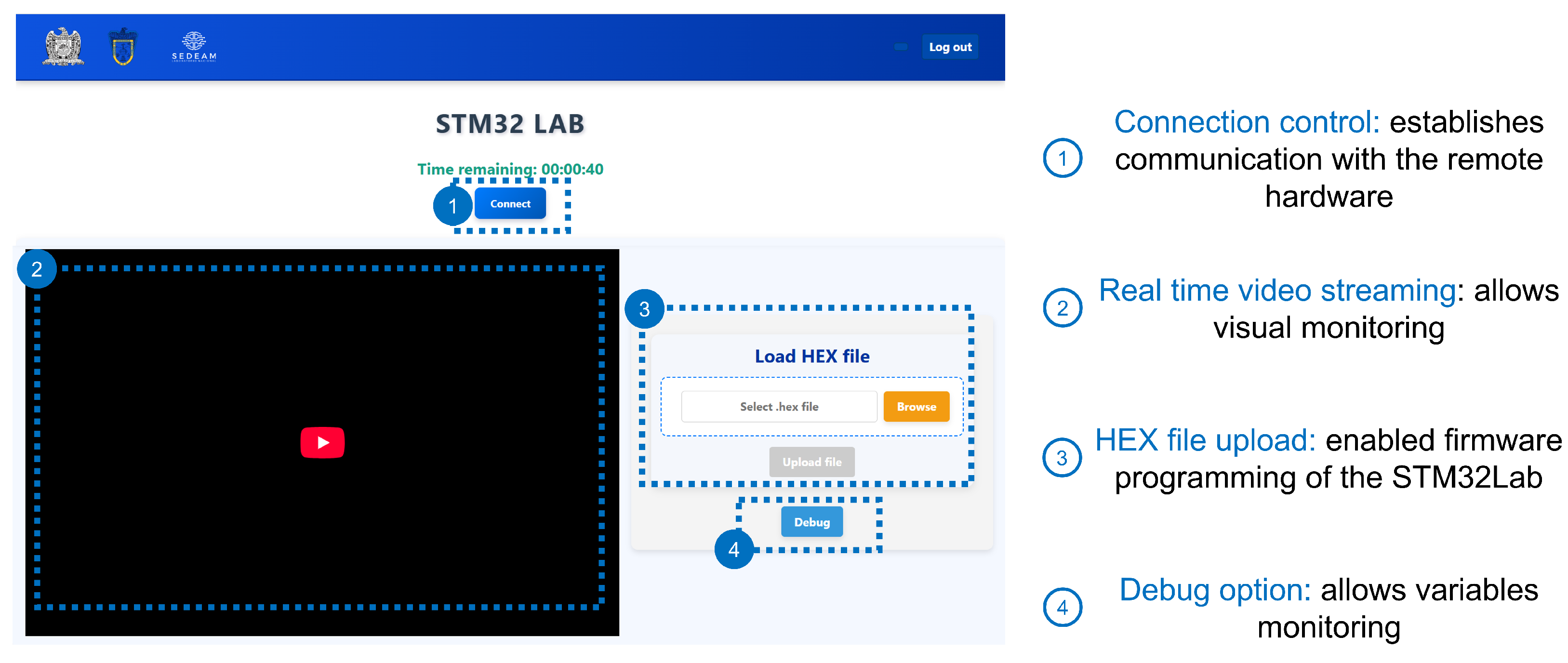
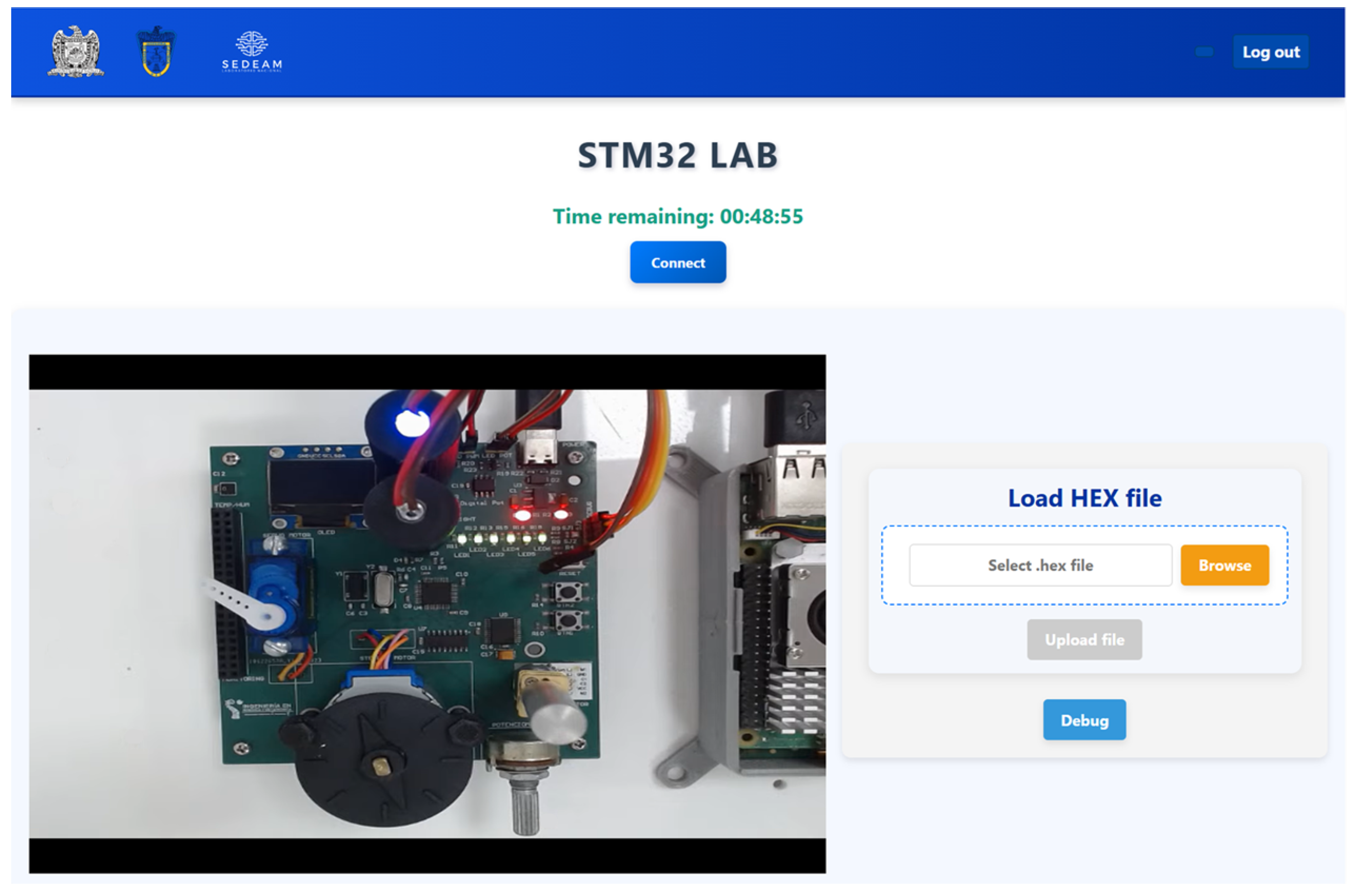
This interface provides a basic interaction mode in which students upload only the firmware. In this mode, students select the .hex file, as shown in
Figure 4. The system then establishes a connection with the remote hardware and programs the STM32 microcontroller. Once this process is completed, students can observe the system behavior through live video streaming, enabling analysis of the experiment operation.
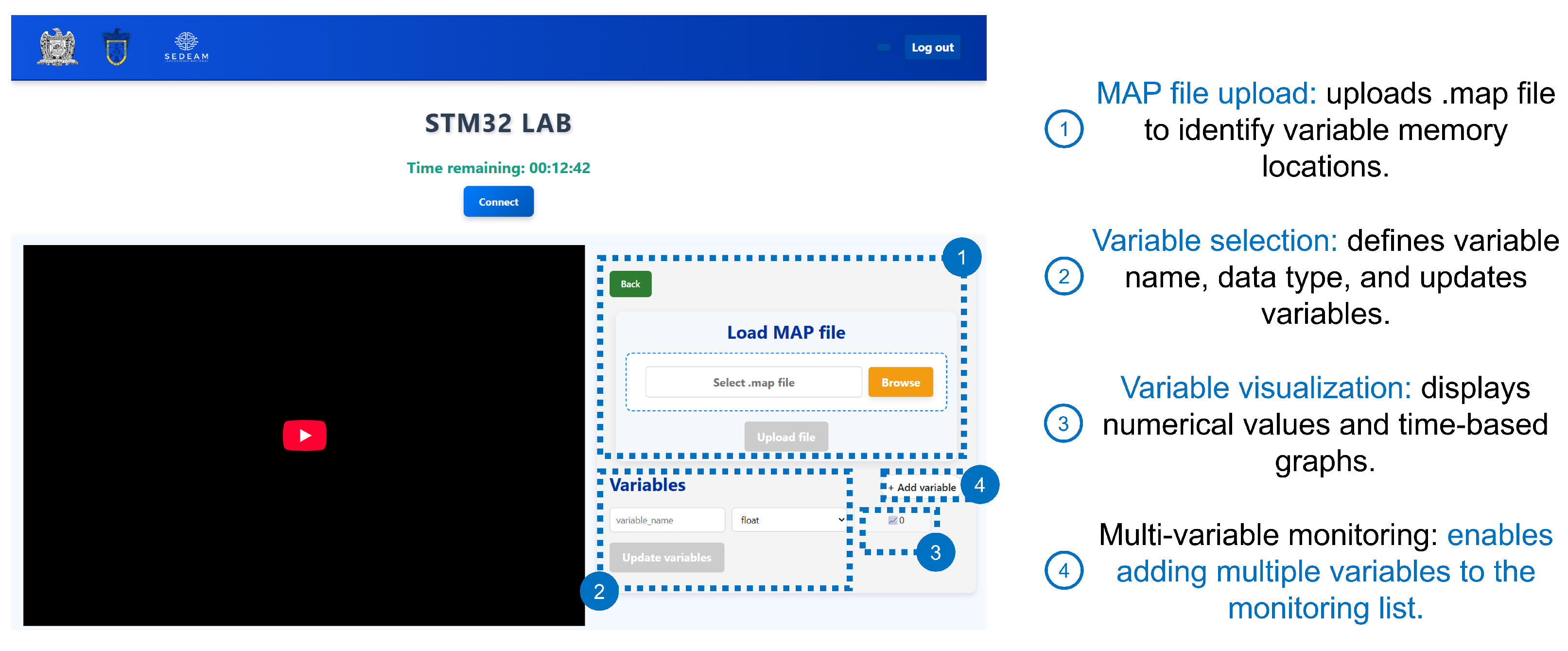
Below the section for uploading the firmware binary file, the interface provides access to the variable monitoring module via a “Debug” button. Upon selecting this option, the user is redirected to a section where the internal variables of the program can be observed during firmware execution, as shown in
Figure 5.
The interaction flow to observe firmware variables is described as follows:
Loading the compilation file (.map): The .map file is uploaded to the system, providing the information needed to determine the memory locations of the program’s variables.
Selecting variables to monitor: The user specifies the exact name of the variable as defined in the firmware source code and selects its corresponding data type (e.g., float, uint8_t, uint16_t). The variables are then updated using the “Update variables” option.
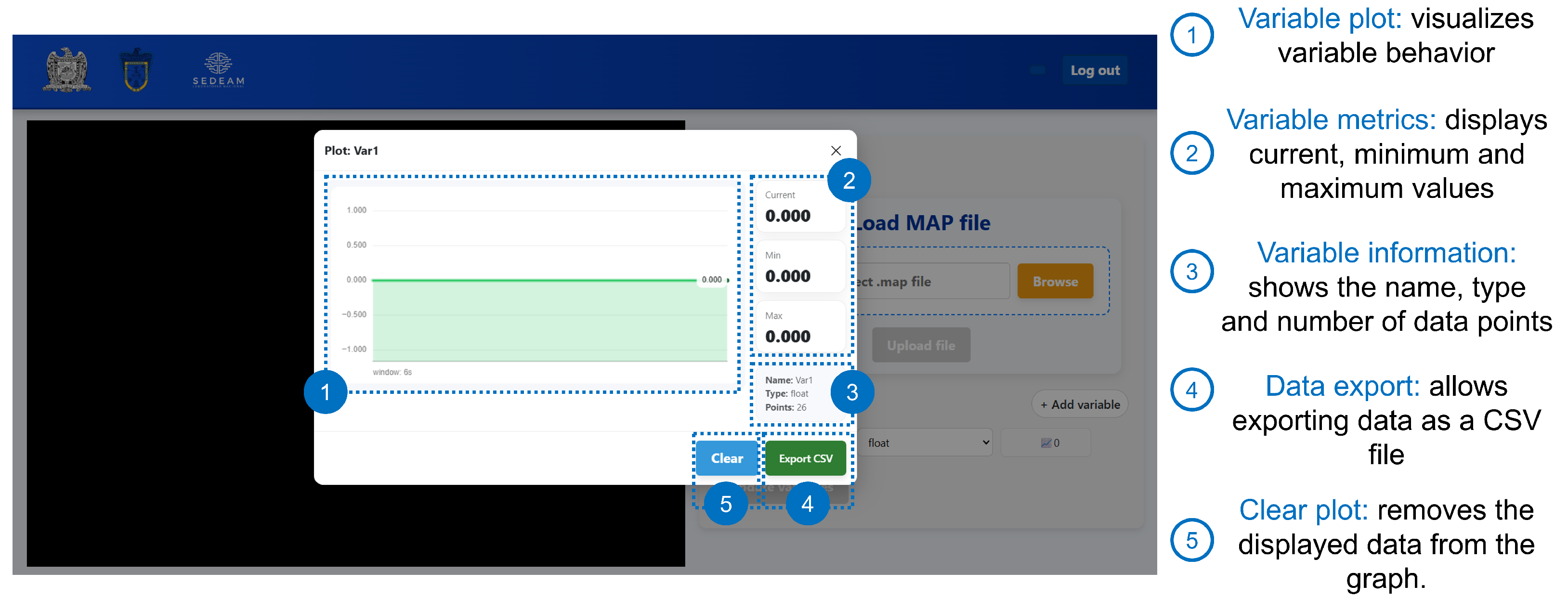
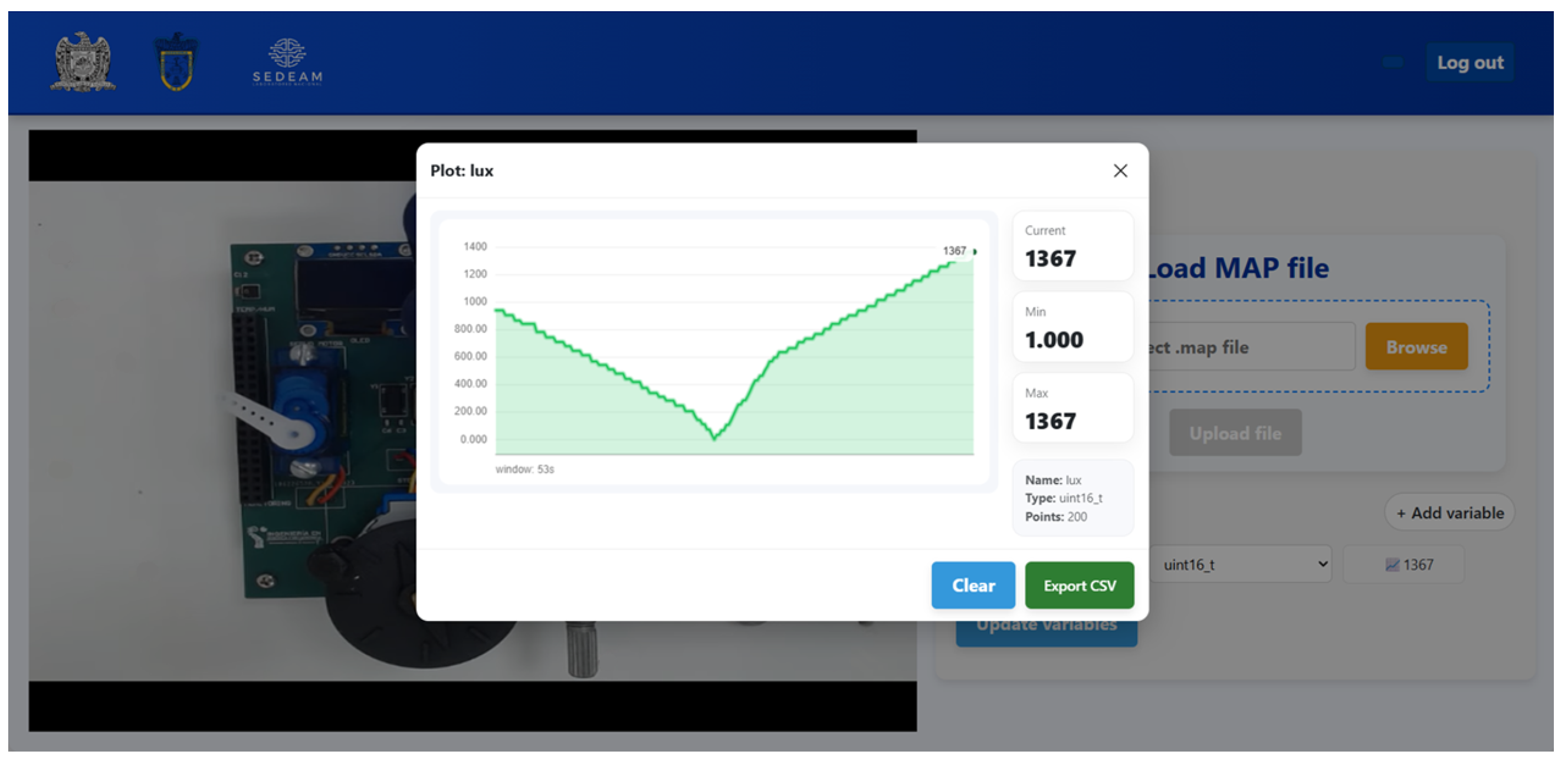
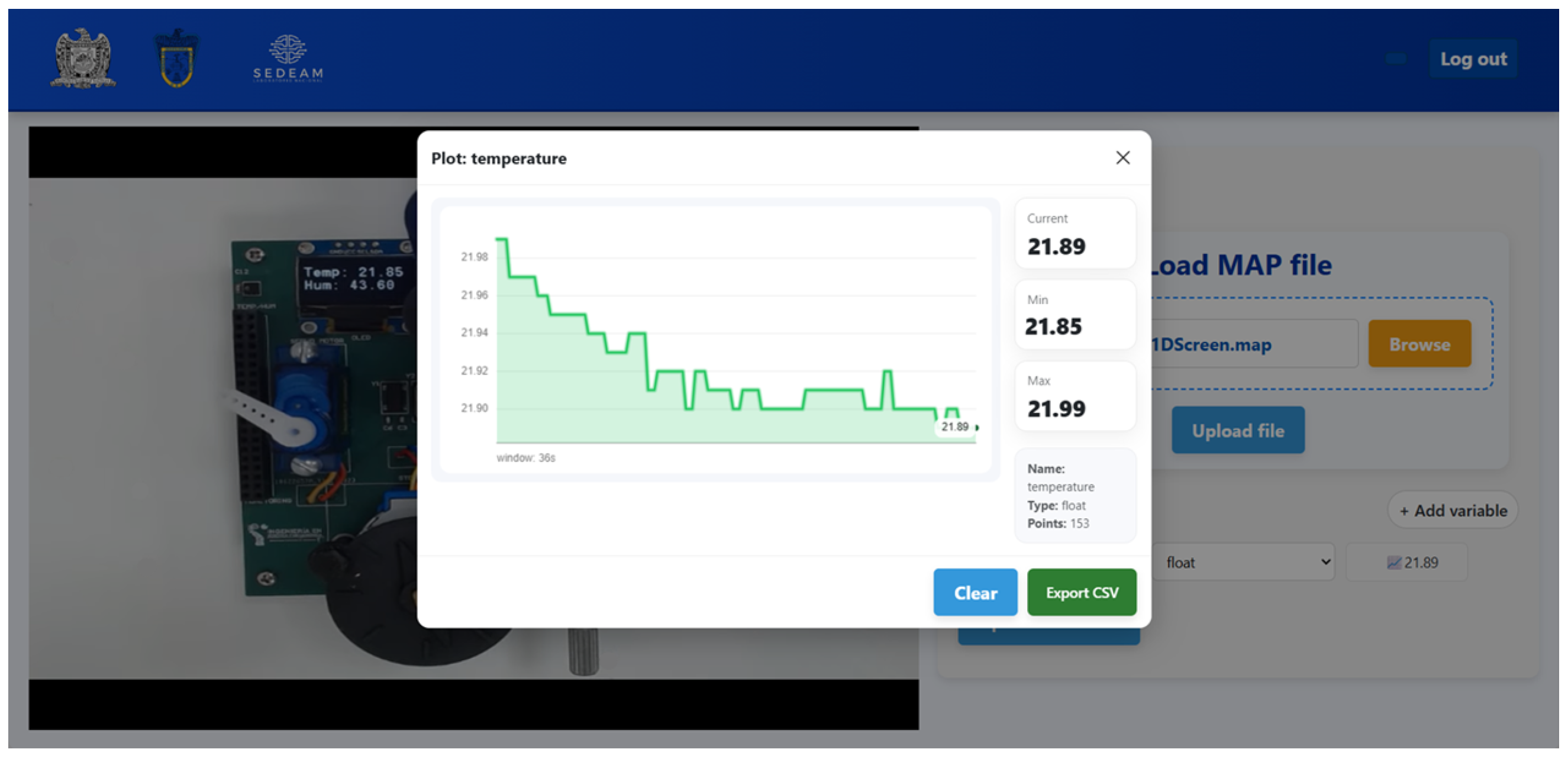
Visualization of variables: The interface displays their current numerical values. Additionally, a graphical representation is provided to visualize the evolution of each variable over time, generating a time-based plot, as illustrated in
Figure 6.
Monitoring multiple variables: Additional variables can be incorporated into the monitoring list within the same experimental session using the “add variable” option.
As discussed in
Section 3.2, the remote STM32Lab workflow differs from the on-site environment primarily in the stages of hardware preparation and microcontroller programming. Additionally, the variable-monitoring mechanism implemented does not follow a traditional debugging process. Instead, it provides access to internal variable values, enabling observation of system behavior without additional configuration that could complicate the learning process.
3.4. Cloud Services
The cloud infrastructure is based on the architecture presented in our previous work [
42], which introduced the Cloud–IoT architecture for remote laboratory operations. Within this framework, cloud services are implemented using Firebase, enabling communication and data exchange among the web platform, the laboratory control system, and the experimental hardware.
To support these functionalities, the system utilizes four key Firebase services. Firebase Authentication manages user accounts and controls access. Firebase Realtime Database allows for the storage and synchronization of system information across different platform components. Firebase Storage stores firmware files, while Firebase Hosting deploys the UAZ Labs web platform.
3.5. Raspberry Pi Backend and Firmware Processing
The Raspberry Pi 5 serves as the central control node, executing the backend system that coordinates interactions among the different system components. From this node, several key functions required for laboratory operation are managed, including video processing and streaming, firmware programming for the STM32Lab via an ST-Link (STMicroelectronics, Geneva, Switzerland) interface, monitoring of program variables, and communication with Firebase services to synchronize system data and user actions.
3.5.1. Video Processing
Video capture is conducted using a Logitech C920 Pro Stream camera connected to a Raspberry Pi 5 via USB. This process uses FFmpeg (version 7.0) and Python 3 scripts that handle the camera-generated frames and encode them for transmission. Once processed, the video stream is transmitted to YouTube Live.
3.5.2. Firmware Programming and Variable Monitoring
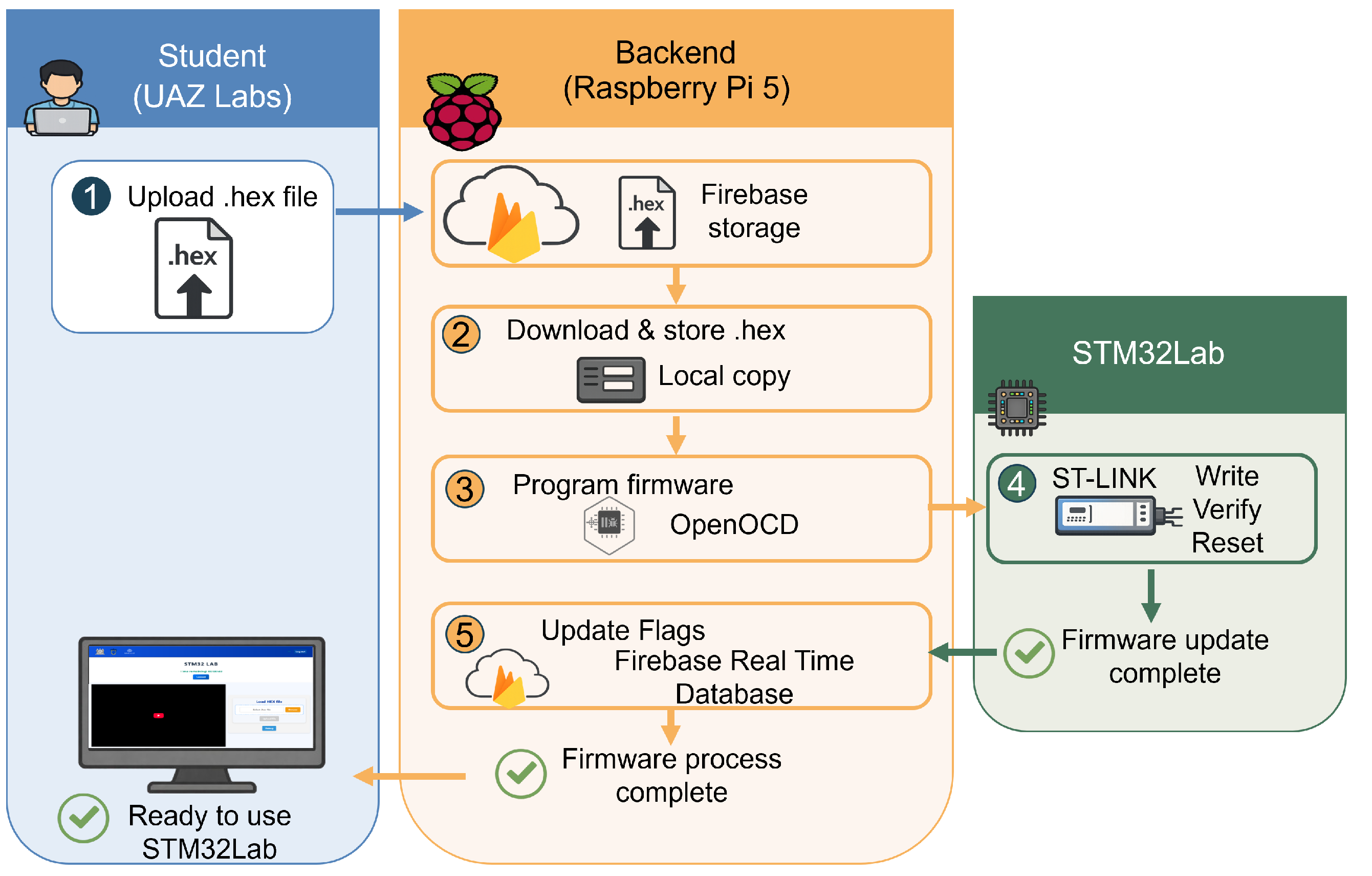
Firmware updates are performed via a connection to the ST-Link programmer using the Open On-Chip Debugger (OpenOCD) tool (version 0.12.0). When the student uploads the .hex file from the STM32Lab interface, it is stored in Firebase Storage, and a flag is triggered in the Firebase Realtime Database to notify the backend that new firmware is available. The backend detects this event, downloads the file, and creates a local copy to initiate the programming process of the STM32 microcontroller. Subsequently, OpenOCD performs the flashing, verification, and reset operations, ensuring the correct firmware is transferred to the STM32. Once the procedure is completed, the backend updates the corresponding flags in Firebase, allowing the interface to confirm the programming result to the user and proceed with the remote session.
Figure 7 illustrates the backend workflow for remote firmware programming in the STM32Lab.
When variable monitoring is required, the student uploads the .map file. The file is stored in Firebase Storage, and processing is triggered on the backend using a workflow similar to that for firmware updates.
Once the user defines the variables to be monitored, the student must enter the exact name of each variable as declared in the source code, along with its corresponding data type, and then select the Update variables option (see
Figure 5). This information is structured as a dictionary and sent to the Firebase Realtime Database. The backend retrieves this data, obtaining both the number of variables and their corresponding names. Subsequently, it searches the entire .map file to identify the memory address associated with each specified variable name. Finally, the selected data type is used to determine the number of bytes required for reading each variable from memory.
A memory layout is created by calculating the base address and the total number of bytes needed to access all selected variables. The backend then uses OpenOCD to perform direct memory access to the microcontroller’s RAM, retrieving the values stored at the specified addresses.
The retrieved data is processed to reconstruct the values of each variable based on its data type. These values are then transmitted to the Firebase Realtime Database, allowing the web platform to update the information displayed to the user. This memory reading process is executed periodically with a sampling interval of 100 ms, ensuring continuous acquisition and updating of variable values. It remains active until a new .map file is uploaded, which triggers a reconfiguration of the memory layout.
Figure 8 presents the backend processing workflow for variable identification, memory access, and data updating in the STM32Lab.
3.6. STM32Lab Hardware Platform
The STM32Lab integrates various sensor and actuator modules that facilitate hands-on activities related to peripheral management, digital communication, and electronic device control. Designed from the beginning for both on-site and remote operation, STM32Lab does face some challenges with remote access. Specifically, issues related to physical interaction, manual wiring, and experimental manipulation mean that not all modules on the board are suitable for use in remote settings.
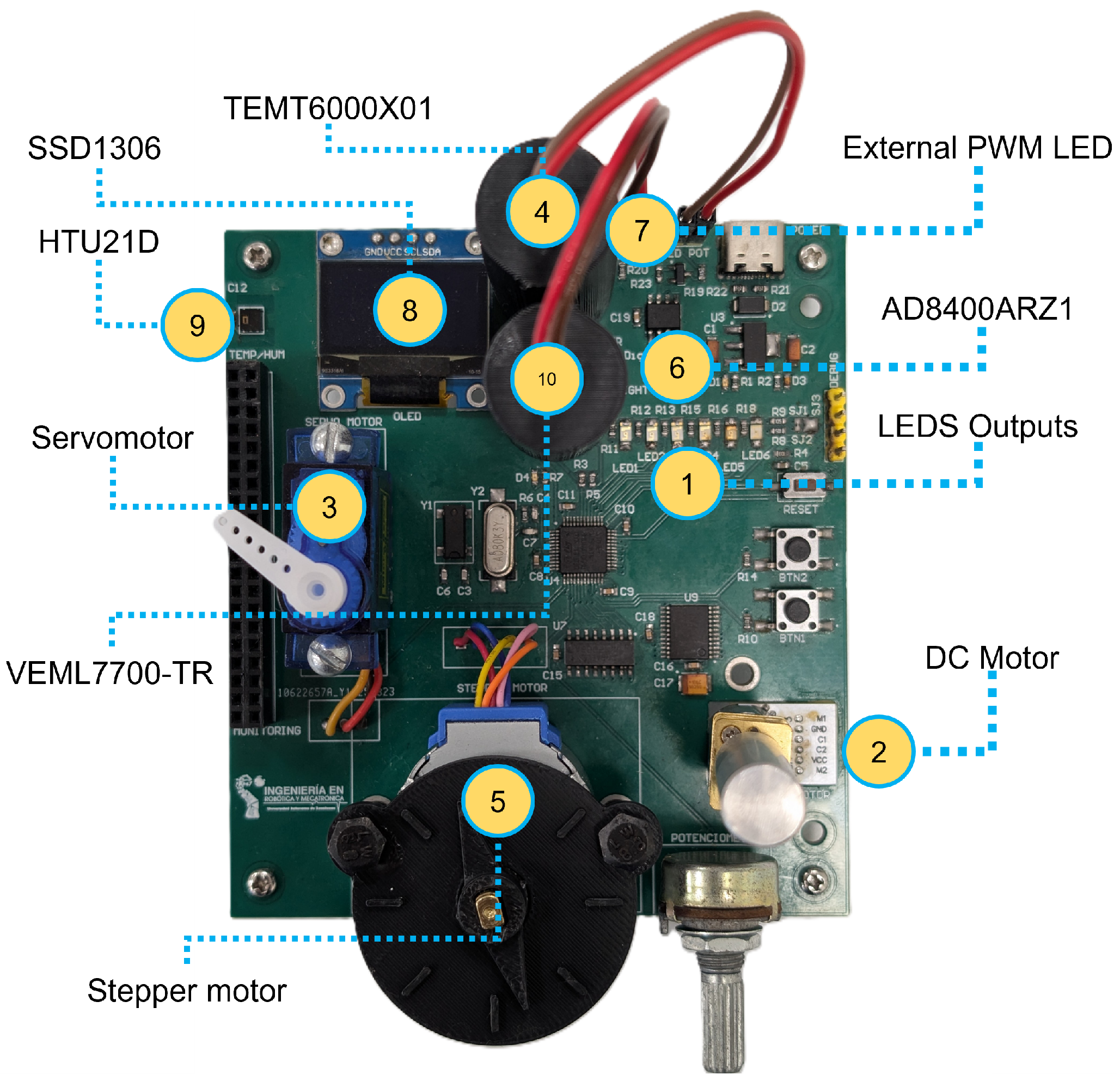
STM32Lab includes 13 integrated modules for on-site laboratory activities, with 10 of them also operable remotely.
Table 2 summarizes the available modules based on their mode of operation.
The modules that cannot be operated remotely are those that require direct physical interaction or manual intervention. Specifically, input devices such as push buttons and potentiometers generate signals in response to user manipulation. Additionally, the electrical debug connector necessitates external wiring and instrumentation for signal access, making it unsuitable for remote operation.
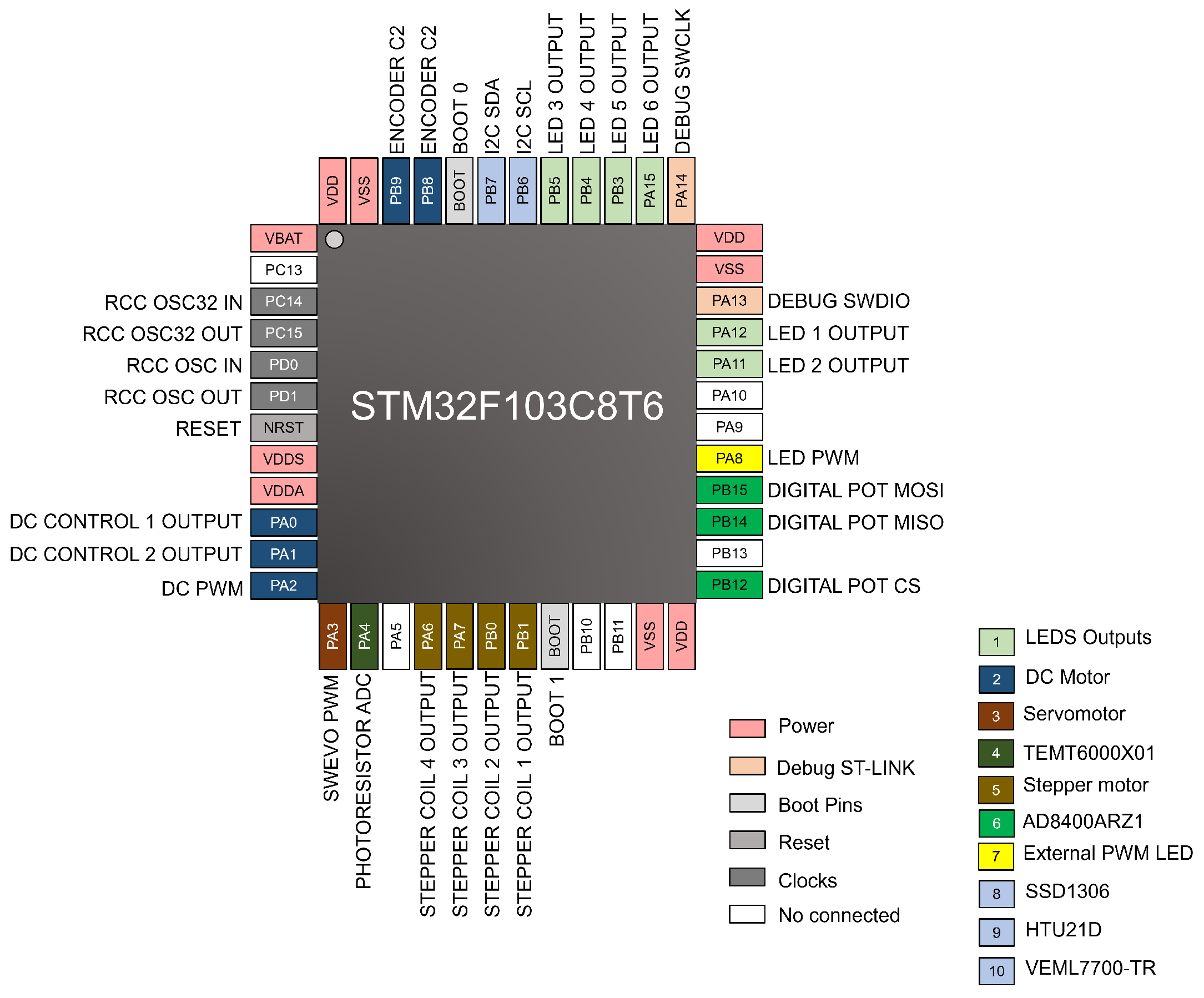
To support students in configuring their projects in STM32CubeMX, a diagram of the STM32F103C8T6 microcontroller is used as a reference, showing the available signals and their mapping to the peripheral modules. This representation allows students to identify the corresponding pins and understand how each hardware interface is connected. For clarity, the signals are grouped and color-coded by interface or associated peripheral type. It is important to note that each GPIO pin is connected to an independent module within the STM32Lab, and no direct electrical connections exist between GPIO pins. This design prevents potential conflicts such as short circuits caused by incorrect configurations.
Figure 9 presents this reference diagram.
Figure 10 illustrates the Printed Circuit Board (PCB) of the STM32Lab Educative Board, highlighting the ten module programming interfaces.
4. Educational Implementation
This section outlines the educational implementation of the proposed remote laboratory, focusing on its deployment in an academic environment. Specifically, it discusses the implementation phase of the Waterfall methodology, detailing how the designed system was integrated into a microcontroller programming course and how students utilized it during laboratory activities.
4.1. Educational Context
The implementation took place within the Robotics and Mechatronics Engineering program at the Autonomous University of Zacatecas, specifically in the Microcontrollers course for fifth-semester students. This course is designed to develop students’ competencies in programming embedded systems using STM32 microcontrollers. It covers both high-level C programming and low-level assembly language programming. Throughout the course, students work with fundamental concepts such as peripheral configuration, register manipulation, memory addressing, and the control of digital and analog inputs and outputs.
The course covers the complete firmware development process, from microcontroller configuration with tools such as STM32CubeMX to code implementation, compilation, and creation of firmware files. Emphasis is placed on using various peripherals, including GPIO, ADC, interrupts, timers, and communication protocols such as I2C, SPI, and UART, as well as on interactions with sensors and actuators. In this context, the remote STM32Lab is introduced as a supplementary tool that allows students to execute and analyze their programs on real hardware.
4.2. Participants
This study was conducted with a group of 40 students enrolled in the Microcontrollers course. It is critical to emphasize that the remote STM32Lab is not yet part of the formal course structure; instead, it was implemented at this stage as a pilot study with students taking the course.
The participants were aged 20–24 years. The group consisted of 35 male and 5 female students. All participants had prior exposure to fundamental microcontroller programming concepts in the course. Additionally, students had previously worked with the STM32Lab in an on-site environment, receiving an initial introduction to the platform before interacting with it remotely.
The objective of this preliminary implementation was to evaluate the system’s feasibility in a real educational environment and to analyze its performance from the end user’s perspective. Student participation focused on interacting with the platform, executing laboratory activities, and using variable-monitoring tools, without influencing or assessing their academic performance based on their use of the remote laboratory.
4.3. Experimental Methodology
This pilot study aims to evaluate the system’s functionality, operation, and usability within a real educational context. Instead of directly measuring learning outcomes through performance assessments or psychometric tools, this research focuses on an initial validation of the remote STM32Lab from an engineering standpoint. Specifically, the evaluation will examine aspects such as integration into the current workflow, system stability, accessibility, and the overall user experience from students’ perspectives.
The participants followed the conventional firmware development workflow. Subsequently, rather than uploading the program in an on-site laboratory setting, students used remote operation to upload the corresponding files and execute their programs on the STM32Lab. During this interaction, particular emphasis was placed on the use of the variable monitoring module. The objective was to assess whether this functionality is understandable, useful, and accessible to students within the context of their laboratory activities.
For data collection, a usability survey based on the System Usability Scale (SUS) [
49] was conducted at the conclusion of the intervention. The SUS is a standardized instrument consisting of 10 items that assess the perceived usability of a system using a five-point Likert scale, ranging from “strongly disagree” to “strongly agree.” The items alternate between positive and negative statements to minimize response bias. The final SUS score is calculated by converting individual item responses into a value between 0 and 100, providing a comprehensive measure of system usability. This score allows for comparisons across different systems and contexts using established interpretation scales.
In this study, the SUS was adapted for the remote STM32Lab context by incorporating items related to user interaction, firmware uploading, and variable monitoring during program execution. Additionally, an open-ended question was included to gather qualitative feedback and identify potential areas for improvement.
4.4. Learning Activities
The activities were organized in a progression of complexity, starting with controlling digital outputs and advancing to integrating peripherals, sensors, and actuators. This allowed students to develop skills in hardware configuration and firmware development gradually. These activities are described as follows:
Digital control using LEDs: Configuration and management of digital outputs using the 6 integrated LEDs. Basic GPIO concepts and control structures are covered.
PWM control and illumination measurement: Generation of a PWM signal to control the intensity of the external PWM LED. Light is measured using the VEML7700-TR sensor, enabling analysis of the relationship between duty cycle and brightness.
Digital potentiometer and light measurement: Control of the AD8400ARZ1 digital potentiometer via SPI to modify the resistance of a circuit with an LED. The response is measured with the ADC of the TEMT6000X01 photoresistor.
DC motor control: Implementation of speed and direction control using PWM and digital signals.
Servomotor control: Generation of a PWM signal for the angular positioning of the servomotor.
Stepper motor control: Sequential coil control for stepper motor operation, incorporating timing concepts.
Data acquisition and display: Temperature and humidity readings using the HTU21D sensor via I2C and display on the SSD1306 OLED screen.
5. Results
This section presents the results of deploying the remote STM32Lab, including its user interface, representative examples of activity execution, and a SUS-based usability evaluation.
5.1. System Implementation
As part of the system deployment, the various elements comprising the UAZ Labs architecture were integrated and connected.
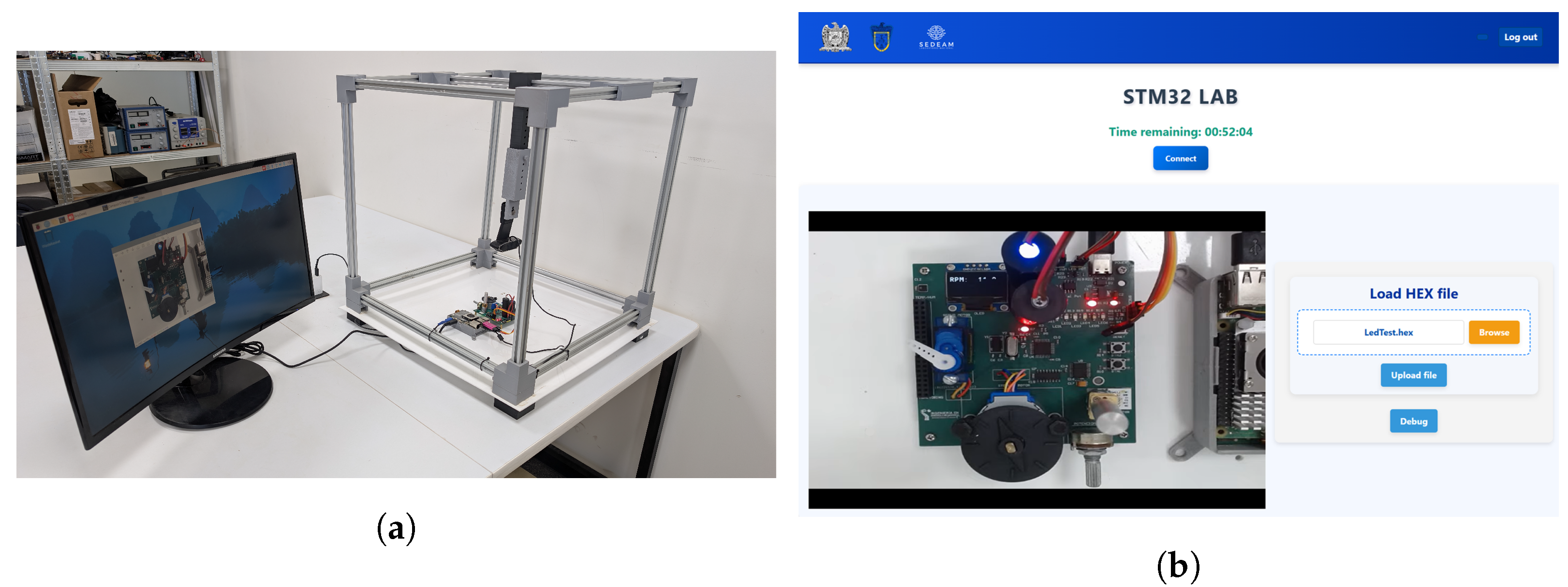
Figure 11a provides a 3D representation of the laboratory structure, illustrating the arrangement of the modules and their physical integration.
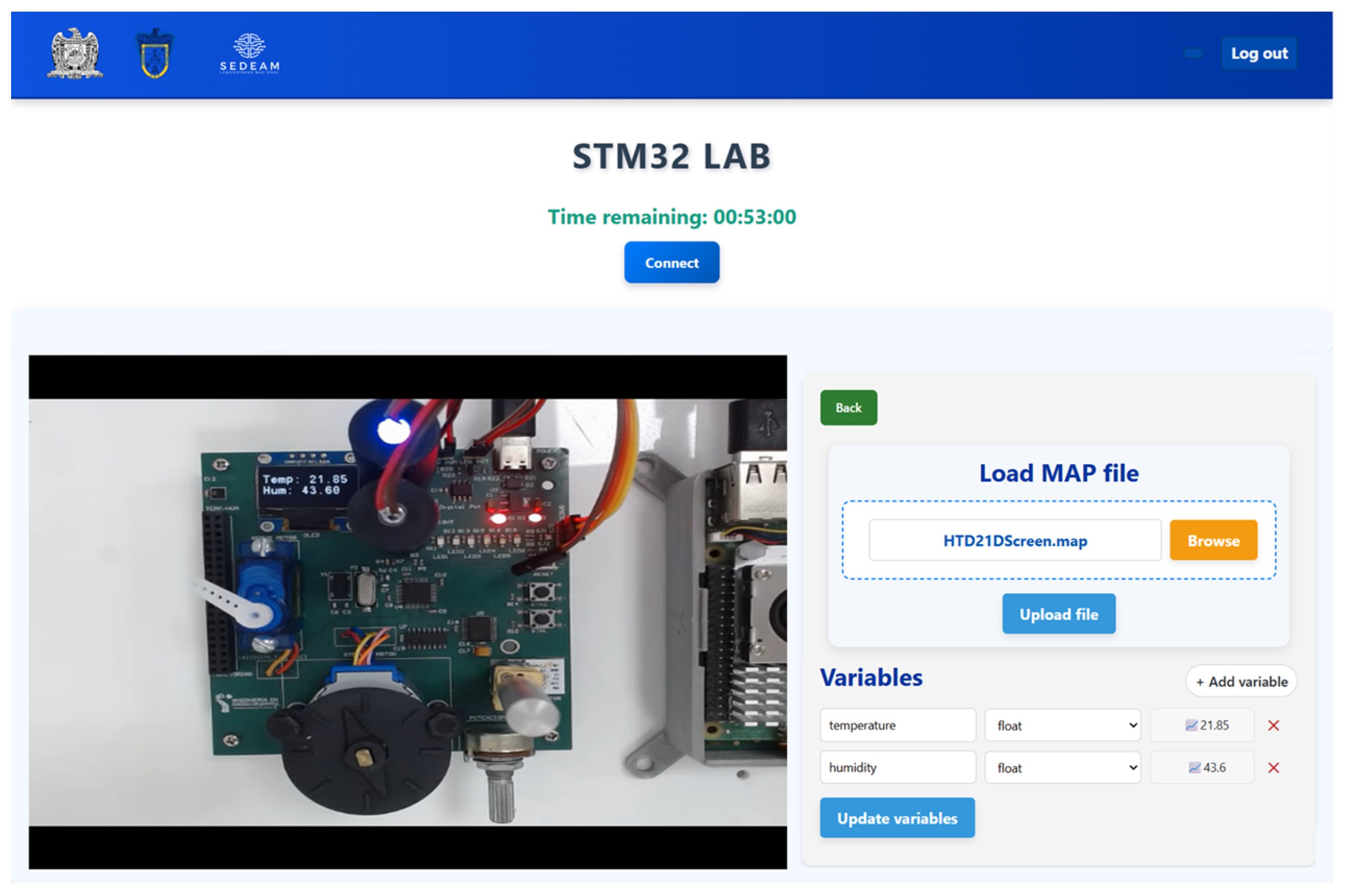
Figure 11b shows the STM32Lab in operation, featuring a real-time video feed of the experiment along with the interactive elements available to the user.
5.2. Experimental Execution Examples
This section presents the results from some of the learning activities, including controlling digital outputs with LEDs, controlling light intensity using PWM with measurement via the VEML7700-TR sensor, and acquiring environmental variables with the HTU21D sensor and displaying the results on the SSD1306 OLED screen. These cases allow us to exemplify the execution of the practices in the remote environment.
In the digital output control activity, students were instructed to configure their project to utilize the six LEDs as outputs in push-pull mode. Following this, they implemented an on/off sequence to confirm the correct configuration of the GPIO pins and the program’s functionality.
Figure 12 illustrates an example of the sequence executed in the remote laboratory.
In the illumination measurement activity, students were tasked with generating a 1 kHz PWM signal for an external LED. They gradually varied the duty cycle, which in turn adjusted the light intensity. After reaching maximum intensity, the signal was progressively reduced, continuously cycling through the increment and decrement phases. Additionally, the I
2C interface was configured for fast mode at 400 kHz to communicate with the VEML7700-TR sensor. Students developed the necessary firmware to acquire illuminance values measured in lux. They were also instructed to implement variable monitoring using the .map file, selecting the lux variable for display on the interface’s graph.
Figure 13 illustrates the behavior of this variable during program execution.
In the environmental data acquisition activity, students were tasked with configuring I
2C communication to obtain temperature and humidity readings from the HTU21D sensor. Using this data, they developed firmware to process the information and display the readings on an SSD1306 OLED screen. Additionally, they were required to implement monitoring of these variables for visualization in the corresponding graph within the interface.
Figure 14 illustrates the data visualization on the OLED screen, while
Figure 15 shows its representation in the system interface.
5.3. Latency Observations
During the operation of the remote STM32Lab, a latency was observed between user actions and the corresponding responses of the physical system. This behavior was particularly noticeable during actuator control activities, such as operating DC, servo, and stepper motors. Users experienced delays in the physical responses following changes in control signals.
Currently, the system lacks a specific mechanism for precise latency measurement, so this aspect was evaluated qualitatively based on user feedback. Students were asked to record their observations during interactions with the system, and they consistently reported a delay of approximately 5 s between executing an action and observing a response. This latency is primarily associated with real-time video transmission.
5.4. Usability (SUS)
The usability of the remote STM32Lab was evaluated using the SUS, which provided a quantitative measure of students’ perceptions of the system during their experimental activities. Individual scores were calculated according to the instrument’s standard methodology, yielding values ranging from 0 to 100.
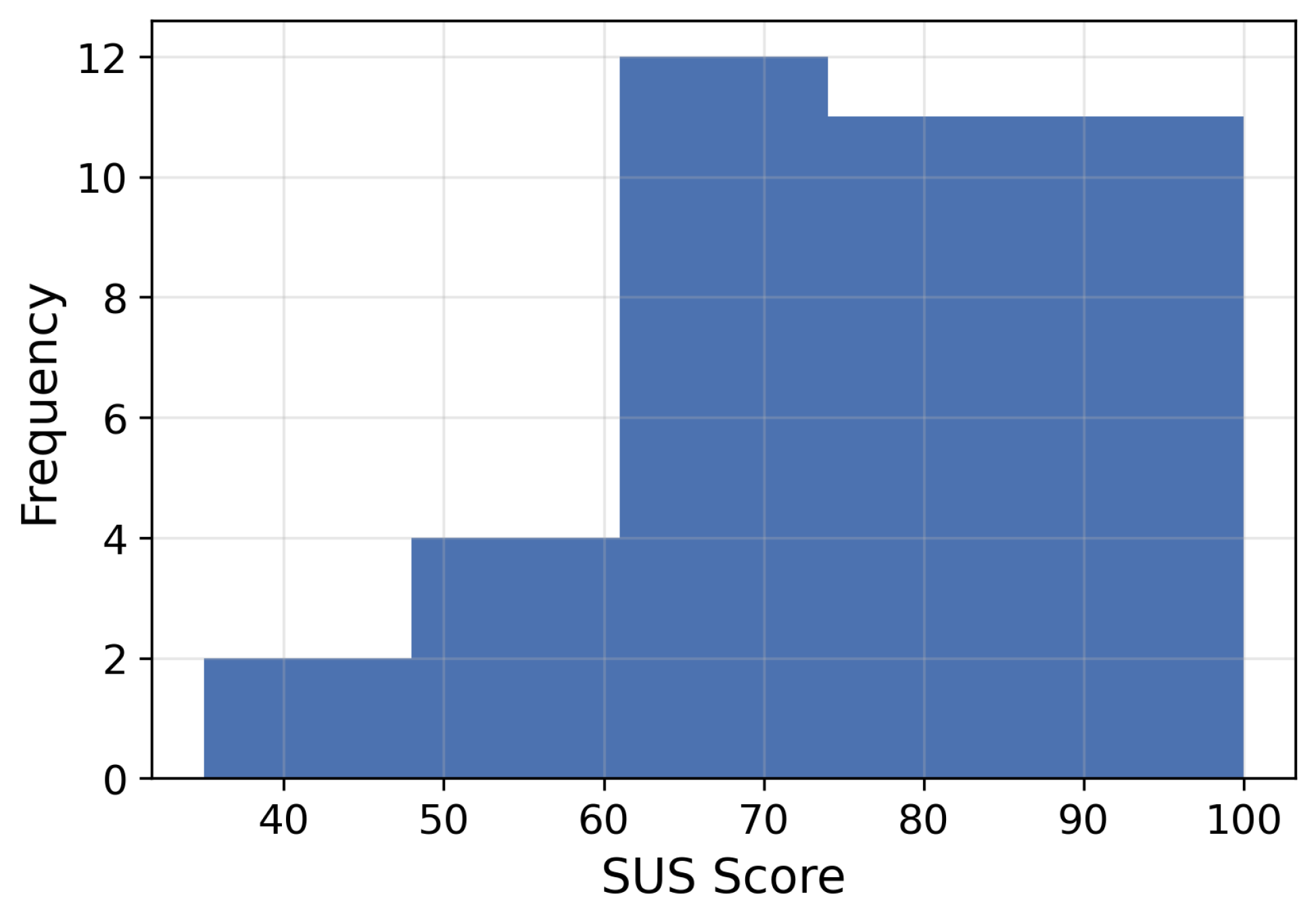
The average score was 75.19, with a standard deviation of 14.53, indicating a good level of usability based on widely accepted SUS interpretation scales.
Figure 16 illustrates the distribution of scores, showing a concentration of high values, suggesting a positive perception of the system among students.
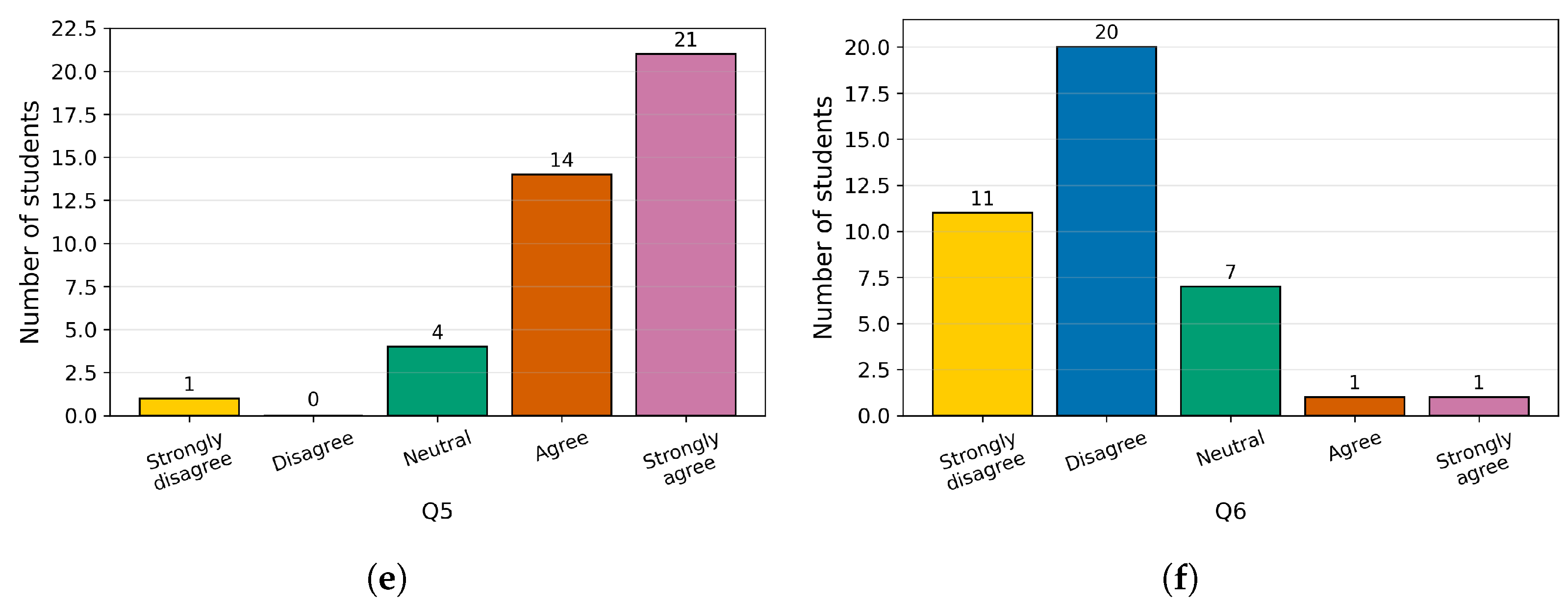
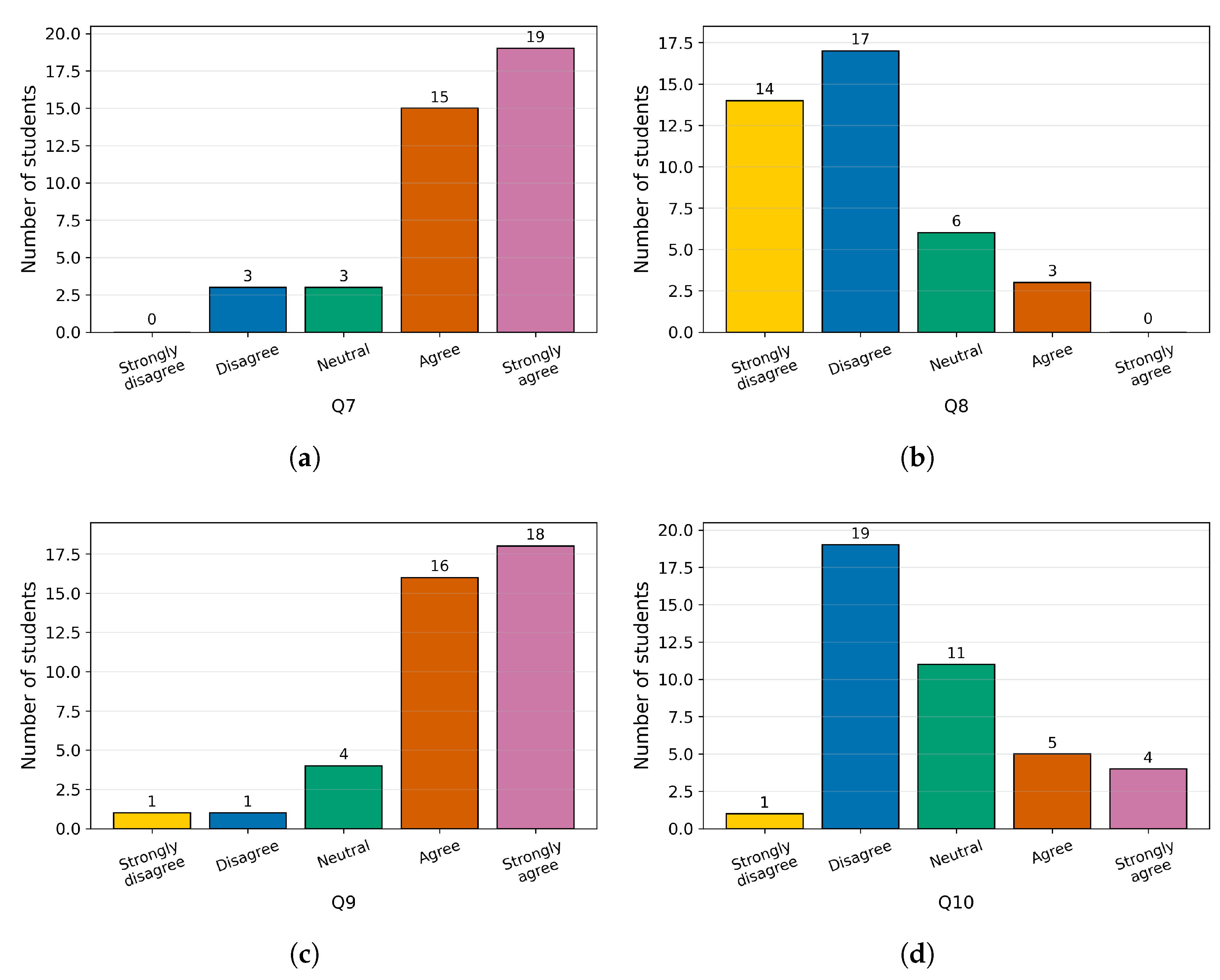
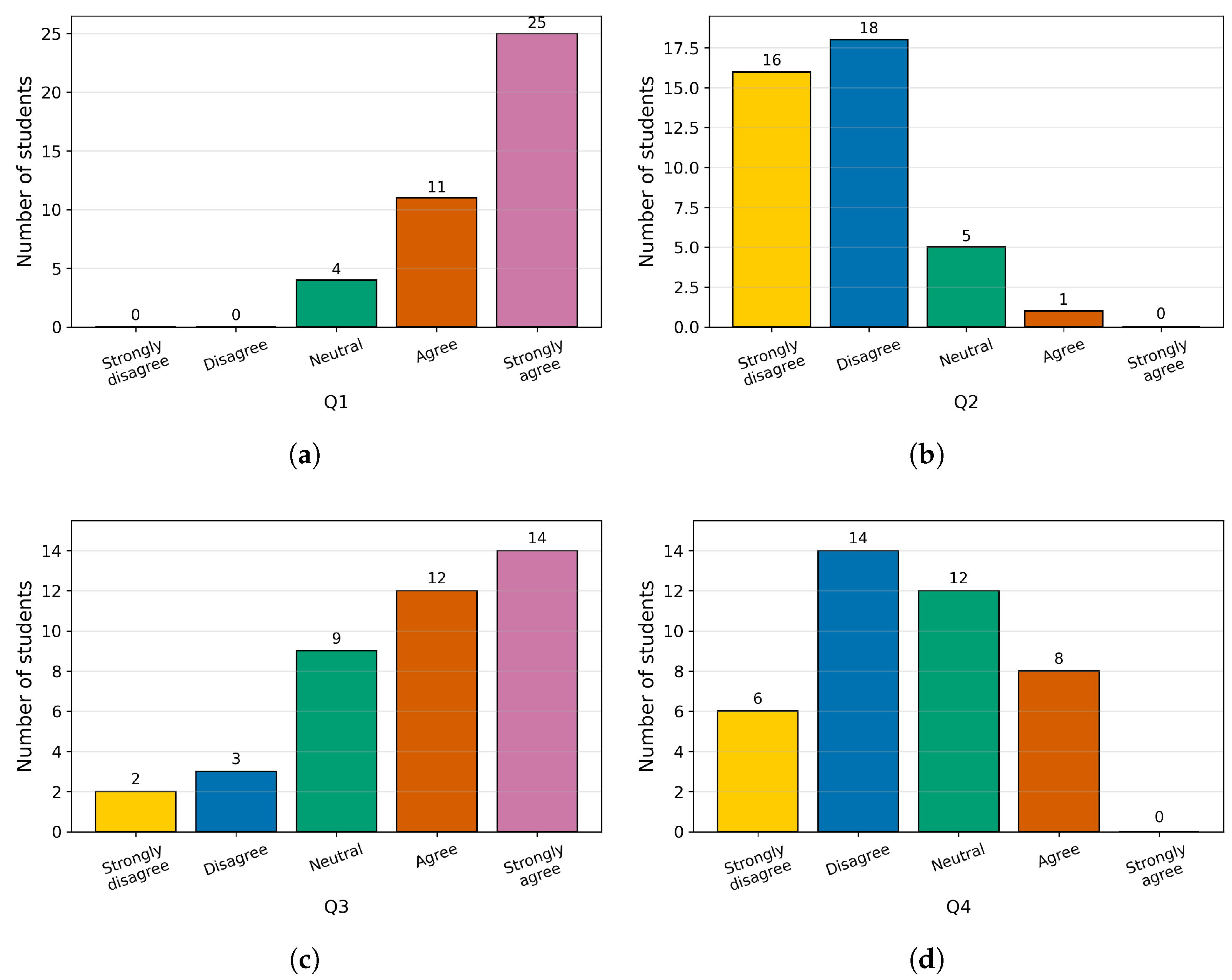
Figure 17 and
Figure 18 present the distribution of responses for each questionnaire item, revealing a general trend of agreement with most statements and a low number of responses indicating difficulties with the system. These results reinforce the evaluation’s reliability and support the perception that the remote STM32Lab offers a clear, accessible interface for students.
6. Discussion
The results obtained enable analysis of the system’s behavior from several perspectives, including its position relative to related work, students’ perceptions of its usability, and opportunities to expand the laboratory. Additionally, the implications of the system in an educational context are considered, especially regarding its integration as a complement to traditional laboratory environments.
6.1. Usability Analysis
The results showed a mean score of 75.19 (SD = 14.53) and a median of 77.50, indicating a good level of usability. According to established SUS benchmarks, scores above 68 are considered above average, while scores above 70 reflect good usability. These findings suggest that the proposed remote laboratory system offers a satisfactory user experience for students. Moreover, these results align with findings from the literature [
50].
A systematic review by Vlachogianni and Tselios reported an average SUS score of 70.09 (SD = 12.98) across various educational technology systems. This indicates that such platforms typically achieve acceptable usability levels while still having some limitations. In comparison, the usability score in this study exceeds the reported average, suggesting that the proposed system offers a higher-than-average level of usability within the context of educational technology [
51].
6.2. Comparison with Related Works
The studies presented in
Table 1 indicate that most remote laboratories focused on microcontrollers primarily provide feedback by monitoring the system’s external behavior. This is achieved through video observation, interaction with actuators, or the collection of sensor data, as demonstrated by Martin et al. [
21], Pereira et al. [
35], and Gómez-Alonso et al. [
38]. In these instances, the program’s functionality is validated by observing its effects on the hardware without direct access to the system’s internal state. Some approaches have integrated extra levels of physical observability by monitoring signals or pins. For instance, the research conducted by Garefalakis et al. [
13] uses an auxiliary microcontroller to analyze the system’s electrical behavior.
While these methods offer valuable insights into system operations, they limit observability to external or electrical signals, restricting direct analysis of the program’s internal behavior during execution. The STM32Lab offers a complementary approach that enables monitoring internal firmware variables while the system is running. This feature enhances feedback options in remote environments by combining internal system status information with observations from external hardware. Additionally, the system supports a workflow that aligns with the on-site environment, especially during firmware development and compilation. This makes it a valuable tool to integrate into the learning process.
6.3. System Extension
It is important to clarify that the proposed system is not designed to serve as a comprehensive remote debugging tool. Unlike professional debugging interfaces, such as JTAG or SWD protocols integrated into IDEs like Keil or STM32CubeIDE, this system does not support advanced features, such as hardware breakpoints, step-by-step code execution, or direct inspection of CPU registers. Instead, the system focuses on providing a high-level abstraction: real-time observation of firmware variables.
However, the modular architecture is designed to support future extensions that further enhance observability. One initial development direction is to broaden the monitoring capabilities to include lower-level components, such as the microcontroller’s registers, during program execution. This enhancement would enable students to examine the system’s internal behavior in greater detail, especially in scenarios involving assembly language programming or the direct manipulation of registers.
The observability mechanism can be improved, as the monitoring process depends on parsing the .map file to identify memory addresses. If a variable cannot be found due to issues such as incorrect naming, mismatched data types, or compiler optimizations, no data will be retrieved. Currently, the system does not provide feedback in these cases, which can affect usability. To address this, future efforts will focus on implementing feedback mechanisms that notify students when a variable cannot be located and assist them in verifying their configurations.
An alternative approach involves integrating electrical-level debugging mechanisms, while some studies have examined monitoring signals on specific pins, incorporating an electrical signal acquisition system into the remote laboratory would enable the data gathered from the firmware to be enhanced by insights into the system’s physical behavior. It is important to note that the STM32Lab platform already includes an electrical debugging connector, enabling students in a physical environment to analyze signals from various peripherals with instruments such as oscilloscopes or multimeters.
Electrical monitoring is a potential extension of the system that involves developing a mechanism to capture, process, and efficiently transmit signals to the Raspberry Pi. This data can then be integrated into the cloud infrastructure. As a result, the information would be sent to Firebase and visualized in the UAZ Labs interface, enabling virtual tools such as a multimeter or oscilloscope within the remote environment. This integration would provide a more comprehensive experience by combining firmware-level analysis with direct observation of the system’s electrical behavior.
Together, these potential extensions indicate a move toward a more complete integration between the software and hardware layers. This enhanced connection could strengthen the learning process by offering multiple perspectives on system behavior, allowing the remote lab to evolve into a more integrated environment.
6.4. Pedagogical Evaluation
This study evaluated the remote STM32Lab using a satisfaction survey to understand students’ perceptions of the platform. However, this type of evaluation does not provide a direct analysis of the system’s impact on the learning process. Therefore, it is essential to incorporate assessment tools that examine the pedagogical implications of the remote laboratory, particularly in comparison with traditional face-to-face learning environments. Future implementations should consider methodologies that assess both students’ self-perceptions of their learning and their actual performance through objective measures.
7. Conclusions
This work discusses the development and implementation of a remote laboratory utilizing an STM32 microcontroller, integrated into a Cloud–IoT architecture via the UAZ Labs platform. The system enables students to remotely execute programs on physical hardware while maintaining a workflow similar to that of in-person environments. Additionally, we incorporated a mechanism to monitor internal firmware variables during execution, enhancing the system’s observability without requiring any additional user configuration. As part of the initial validation, a satisfaction survey based on the SUS was conducted with a pilot group of 40 students. The results indicate a positive perception of the system among users.
Certain limitations have been identified that need to be addressed in future work. Currently, the system does not provide an alert when a variable cannot be found in the .map file, and future work will focus on incorporating feedback mechanisms to inform users of this condition. On the other hand, a detailed analysis of system latency has yet to be conducted, which is crucial for enhancing the real-time interaction experience. In particular, it is necessary to include the exploration of strategies to reduce latency in the video streaming component, with the aim of improving synchronization between visual feedback and system behavior. Additionally, the pedagogical evaluation of the laboratory was not directly included in this study; instead, the evaluation focused on students’ perceptions of the platform’s use through a satisfaction survey. Future work will involve integrating electrical monitoring mechanisms to analyze signals at the physical level in the remote environment, as well as developing more comprehensive educational studies to assess students’ self-perceptions of learning and performance relative to on-site environments.



 ,
,